1. Protocol FormatsRequest Format
Reply Format
Error Format
Event Format
2. Syntactic ConventionsThe rest of this document uses the following syntacticconventions.• The syntax {...} encloses a set of alternatives.• The syntax [...] encloses a set of structurecomponents.• In general, TYPEs are in uppercase andAlternativeValues are capitalized.• Requests in section 9 are described in the followingformat:RequestNamearg1: type1...argN: typeN→ result1: type1...resultM: typeMErrors: kind1, ..., kindKDescription.If no → is present in the description, then the requesthas no reply (it is asynchronous), although errors maystill be reported. If →+ is used, then one or morereplies can be generated for a single request.• Events in section 11 are described in the followingformat:EventNamevalue1: type1...valueN: typeNDescription.3. Common Types The [x,y] coordinates of a RECTANGLE specify the upper-leftcorner.The primary interpretation of large characters in a STRING16is that they are composed of two bytes used to index atwo-dimensional matrix, hence, the use of CHAR2B rather thanCARD16. This corresponds to the JIS/ISO method of indexing2-byte characters. It is expected that most large fontswill be defined with 2-byte matrix indexing. For largefonts constructed with linear indexing, a CHAR2B can beinterpreted as a 16-bit number by treating byte1 as the mostsignificant byte. This means that clients should alwaystransmit such 16-bit character values most significant bytefirst, as the server will never byte-swap CHAR2B quantities.The length, format, and interpretation of a HOST address arespecific to the family (see ChangeHosts request).4. ErrorsIn general, when a request terminates with an error, therequest has no side effects (that is, there is no partialexecution). The only requests for which this is not trueare ChangeWindowAttributes, ChangeGC, PolyText8, PolyText16,FreeColors, StoreColors, and ChangeKeyboardControl.The following error codes result from various requests asfollows: NoteThe Atom, Colormap, Cursor, Drawable, Font,GContext, Pixmap, and Window errors are also usedwhen the argument type is extended by union with aset of fixed alternatives, for example, <WINDOW orPointerRoot or None>.5. KeyboardsA KEYCODE represents a physical (or logical) key. Keycodeslie in the inclusive range [8,255]. A keycode value carriesno intrinsic information, although server implementors mayattempt to encode geometry information (for example, matrix)to be interpreted in a server-dependent fashion. Themapping between keys and keycodes cannot be changed usingthe protocol.A KEYSYM is an encoding of a symbol on the cap of a key.The set of defined KEYSYMs include the character setsLatin-1, Latin-2, Latin-3, Latin-4, Kana, Arabic, Cyrillic,Greek, Tech, Special, Publish, APL, Hebrew, Thai, and Koreanas well as a set of symbols common on keyboards (Return,Help, Tab, and so on). KEYSYMs with the most significantbit (of the 29 bits) set are reserved as vendor-specific.A list of KEYSYMs is associated with each KEYCODE. The listis intended to convey the set of symbols on thecorresponding key. If the list (ignoring trailing NoSymbolentries) is a single KEYSYM ‘‘K’’, then the list is treatedas if it were the list ‘‘K NoSymbol K NoSymbol’’. If thelist (ignoring trailing NoSymbol entries) is a pair ofKEYSYMs ‘‘K1 K2’’, then the list is treated as if it werethe list ‘‘K1 K2 K1 K2’’. If the list (ignoring trailingNoSymbol entries) is a triple of KEYSYMs ‘‘K1 K2 K3’’, thenthe list is treated as if it were the list ‘‘K1 K2 K3NoSymbol’’. When an explicit ‘‘void’’ element is desired inthe list, the value VoidSymbol can be used.The first four elements of the list are split into twogroups of KEYSYMs. Group 1 contains the first and secondKEYSYMs, Group 2 contains the third and fourth KEYSYMs.Within each group, if the second element of the group isNoSymbol, then the group should be treated as if the secondelement were the same as the first element, except when thefirst element is an alphabetic KEYSYM ‘‘K’’ for which bothlowercase and uppercase forms are defined. In that case,the group should be treated as if the first element were thelowercase form of ‘‘K’’ and the second element were theuppercase form of ‘‘K’’.The standard rules for obtaining a KEYSYM from a KeyPressevent make use of only the Group 1 and Group 2 KEYSYMs; nointerpretation of other KEYSYMs in the list is defined. Themodifier state determines which group to use. Switchingbetween groups is controlled by the KEYSYM named MODESWITCH, by attaching that KEYSYM to some KEYCODE andattaching that KEYCODE to any one of the modifiers Mod1through Mod5. This modifier is called the ‘‘groupmodifier’’. For any KEYCODE, Group 1 is used when the groupmodifier is off, and Group 2 is used when the group modifieris on.The Lock modifier is interpreted as CapsLock when the KEYSYMnamed CAPS LOCK is attached to some KEYCODE and that KEYCODEis attached to the Lock modifier. The Lock modifier isinterpreted as ShiftLock when the KEYSYM named SHIFT LOCK isattached to some KEYCODE and that KEYCODE is attached to theLock modifier. If the Lock modifier could be interpreted asboth CapsLock and ShiftLock, the CapsLock interpretation isused.The operation of ‘‘keypad’’ keys is controlled by the KEYSYMnamed NUM LOCK, by attaching that KEYSYM to some KEYCODE andattaching that KEYCODE to any one of the modifiers Mod1through Mod5. This modifier is called the ‘‘numlockmodifier’’. The standard KEYSYMs with the prefix KEYPAD intheir name are called ‘‘keypad’’ KEYSYMs; these are KEYSYMSwith numeric value in the hexadecimal range #xFF80 to #xFFBDinclusive. In addition, vendor-specific KEYSYMS in thehexadecimal range #x11000000 to #x1100FFFF are also keypadKEYSYMs.Within a group, the choice of KEYSYM is determined byapplying the first rule that is satisfied from the followinglist:• The numlock modifier is on and the second KEYSYM is akeypad KEYSYM. In this case, if the Shift modifier ison, or if the Lock modifier is on and is interpreted asShiftLock, then the first KEYSYM is used; otherwise,the second KEYSYM is used.• The Shift and Lock modifiers are both off. In thiscase, the first KEYSYM is used.• The Shift modifier is off, and the Lock modifier is onand is interpreted as CapsLock. In this case, thefirst KEYSYM is used, but if that KEYSYM is lowercasealphabetic, then the corresponding uppercase KEYSYM isused instead.• The Shift modifier is on, and the Lock modifier is onand is interpreted as CapsLock. In this case, thesecond KEYSYM is used, but if that KEYSYM is lowercasealphabetic, then the corresponding uppercase KEYSYM isused instead.• The Shift modifier is on, or the Lock modifier is onand is interpreted as ShiftLock, or both. In thiscase, the second KEYSYM is used.The mapping between KEYCODEs and KEYSYMs is not useddirectly by the server; it is merely stored for reading andwriting by clients.6. PointersButtons are always numbered starting with one.7. Predefined AtomsPredefined atoms are not strictly necessary and may not beuseful in all environments, but they will eliminate manyInternAtom requests in most applications. Note that theyare predefined only in the sense of having numeric values,not in the sense of having required semantics. The coreprotocol imposes no semantics on these names, but semanticsare specified in other X.Org standards, such as theInter-Client Communication Conventions Manual and the XLogical Font Description Conventions.The following names have predefined atom values. Note thatuppercase and lowercase matter.To avoid conflicts with possible future names for whichsemantics might be imposed (either at the protocol level orin terms of higher level user interface models), namesbeginning with an underscore should be used for atoms thatare private to a particular vendor or organization. Toguarantee no conflicts between vendors and organizations,additional prefixes need to be used. However, the protocoldoes not define the mechanism for choosing such prefixes.For names private to a single application or end user butstored in globally accessible locations, it is suggestedthat two leading underscores be used to avoid conflicts withother names.8. Connection SetupFor remote clients, the X protocol can be built on top ofany reliable byte stream.Connection Initiation
Server Response
Server Information
Screen Information
Visual Information
9. Requests__│ CreateWindowwid, parent: WINDOWclass: {InputOutput, InputOnly, CopyFromParent}depth: CARD8visual: VISUALID or CopyFromParentx, y: INT16width, height, border-width: CARD16value-mask: BITMASKvalue-list: LISTofVALUEErrors: Alloc, Colormap, Cursor, IDChoice, Match, Pixmap,Value, Window│__ This request creates an unmapped window and assigns theidentifier wid to it.A class of CopyFromParent means the class is taken from theparent. A depth of zero for class InputOutput orCopyFromParent means the depth is taken from the parent. Avisual of CopyFromParent means the visual type is taken fromthe parent. For class InputOutput, the visual type anddepth must be a combination supported for the screen (or aMatch error results). The depth need not be the same as theparent, but the parent must not be of class InputOnly (or aMatch error results). For class InputOnly, the depth mustbe zero (or a Match error results), and the visual must beone supported for the screen (or a Match error results).However, the parent can have any depth and class.The server essentially acts as if InputOnly windows do notexist for the purposes of graphics requests, exposureprocessing, and VisibilityNotify events. An InputOnlywindow cannot be used as a drawable (as a source ordestination for graphics requests). InputOnly andInputOutput windows act identically in otherrespects−properties, grabs, input control, and so on.The coordinate system has the X axis horizontal and the Yaxis vertical with the origin [0, 0] at the upper-leftcorner. Coordinates are integral, in terms of pixels, andcoincide with pixel centers. Each window and pixmap has itsown coordinate system. For a window, the origin is insidethe border at the inside, upper-left corner.The x and y coordinates for the window are relative to theparent’s origin and specify the position of the upper-leftouter corner of the window (not the origin). The width andheight specify the inside size (not including the border)and must be nonzero (or a Value error results). Theborder-width for an InputOnly window must be zero (or aMatch error results).The window is placed on top in the stacking order withrespect to siblings.The value-mask and value-list specify attributes of thewindow that are to be explicitly initialized. The possiblevalues are:The default values when attributes are not explicitlyinitialized are:Only the following attributes are defined for InputOnlywindows:• win-gravity• event-mask• do-not-propagate-mask• override-redirect• cursorIt is a Match error to specify any other attributes forInputOnly windows.If background-pixmap is given, it overrides the defaultbackground-pixmap. The background pixmap and the windowmust have the same root and the same depth (or a Match errorresults). Any size pixmap can be used, although some sizesmay be faster than others. If background None is specified,the window has no defined background. If backgroundParentRelative is specified, the parent’s background isused, but the window must have the same depth as the parent(or a Match error results). If the parent has backgroundNone, then the window will also have background None. Acopy of the parent’s background is not made. The parent’sbackground is reexamined each time the window background isrequired. If background-pixel is given, it overrides thedefault background-pixmap and any background-pixmap givenexplicitly, and a pixmap of undefined size filled withbackground-pixel is used for the background. Range checkingis not performed on the background-pixel value; it is simplytruncated to the appropriate number of bits. For aParentRelative background, the background tile origin alwaysaligns with the parent’s background tile origin. Otherwise,the background tile origin is always the window origin.When no valid contents are available for regions of a windowand the regions are either visible or the server ismaintaining backing store, the server automatically tilesthe regions with the window’s background unless the windowhas a background of None. If the background is None, theprevious screen contents from other windows of the samedepth as the window are simply left in place if the contentscome from the parent of the window or an inferior of theparent; otherwise, the initial contents of the exposedregions are undefined. Exposure events are then generatedfor the regions, even if the background is None.The border tile origin is always the same as the backgroundtile origin. If border-pixmap is given, it overrides thedefault border-pixmap. The border pixmap and the windowmust have the same root and the same depth (or a Match errorresults). Any size pixmap can be used, although some sizesmay be faster than others. If CopyFromParent is given, theparent’s border pixmap is copied (subsequent changes to theparent’s border attribute do not affect the child), but thewindow must have the same depth as the parent (or a Matcherror results). The pixmap might be copied by sharing thesame pixmap object between the child and parent or by makinga complete copy of the pixmap contents. If border-pixel isgiven, it overrides the default border-pixmap and anyborder-pixmap given explicitly, and a pixmap of undefinedsize filled with border-pixel is used for the border. Rangechecking is not performed on the border-pixel value; it issimply truncated to the appropriate number of bits.Output to a window is always clipped to the inside of thewindow, so that the border is never affected.The bit-gravity defines which region of the window should beretained if the window is resized, and win-gravity defineshow the window should be repositioned if the parent isresized (see ConfigureWindow request).A backing-store of WhenMapped advises the server thatmaintaining contents of obscured regions when the window ismapped would be beneficial. A backing-store of Alwaysadvises the server that maintaining contents even when thewindow is unmapped would be beneficial. In this case, theserver may generate an exposure event when the window iscreated. A value of NotUseful advises the server thatmaintaining contents is unnecessary, although a server maystill choose to maintain contents while the window ismapped. Note that if the server maintains contents, thenthe server should maintain complete contents not just theregion within the parent boundaries, even if the window islarger than its parent. While the server maintainscontents, exposure events will not normally be generated,but the server may stop maintaining contents at any time.If save-under is True, the server is advised that when thiswindow is mapped, saving the contents of windows it obscureswould be beneficial.When the contents of obscured regions of a window are beingmaintained, regions obscured by noninferior windows areincluded in the destination (and source, when the window isthe source) of graphics requests, but regions obscured byinferior windows are not included.The backing-planes indicates (with bits set to 1) which bitplanes of the window hold dynamic data that must bepreserved in backing-stores and during save-unders. Thebacking-pixel specifies what value to use in planes notcovered by backing-planes. The server is free to save onlythe specified bit planes in the backing-store or save-underand regenerate the remaining planes with the specified pixelvalue. Any bits beyond the specified depth of the window inthese values are simply ignored.The event-mask defines which events the client is interestedin for this window (or for some event types, inferiors ofthe window). The do-not-propagate-mask defines which eventsshould not be propagated to ancestor windows when no clienthas the event type selected in this window.The override-redirect specifies whether map and configurerequests on this window should override aSubstructureRedirect on the parent, typically to inform awindow manager not to tamper with the window.The colormap specifies the colormap that best reflects thetrue colors of the window. Servers capable of supportingmultiple hardware colormaps may use this information, andwindow managers may use it for InstallColormap requests.The colormap must have the same visual type and root as thewindow (or a Match error results). If CopyFromParent isspecified, the parent’s colormap is copied (subsequentchanges to the parent’s colormap attribute do not affect thechild). However, the window must have the same visual typeas the parent (or a Match error results), and the parentmust not have a colormap of None (or a Match error results).For an explanation of None, see FreeColormap request. Thecolormap is copied by sharing the colormap object betweenthe child and the parent, not by making a complete copy ofthe colormap contents.If a cursor is specified, it will be used whenever thepointer is in the window. If None is specified, theparent’s cursor will be used when the pointer is in thewindow, and any change in the parent’s cursor will cause animmediate change in the displayed cursor.This request generates a CreateNotify event.The background and border pixmaps and the cursor may befreed immediately if no further explicit references to themare to be made.Subsequent drawing into the background or border pixmap hasan undefined effect on the window state. The server mightor might not make a copy of the pixmap.__│ ChangeWindowAttributeswindow: WINDOWvalue-mask: BITMASKvalue-list: LISTofVALUEErrors: Access, Colormap, Cursor, Match, Pixmap, Value,Window│__ The value-mask and value-list specify which attributes areto be changed. The values and restrictions are the same asfor CreateWindow.Setting a new background, whether by background-pixmap orbackground-pixel, overrides any previous background.Setting a new border, whether by border-pixel orborder-pixmap, overrides any previous border.Changing the background does not cause the window contentsto be changed. Setting the border or changing thebackground such that the border tile origin changes causesthe border to be repainted. Changing the background of aroot window to None or ParentRelative restores the defaultbackground pixmap. Changing the border of a root window toCopyFromParent restores the default border pixmap.Changing the win-gravity does not affect the currentposition of the window.Changing the backing-store of an obscured window toWhenMapped or Always or changing the backing-planes,backing-pixel, or save-under of a mapped window may have noimmediate effect.Multiple clients can select input on the same window; theirevent-masks are disjoint. When an event is generated, itwill be reported to all interested clients. However, onlyone client at a time can select for SubstructureRedirect,only one client at a time can select for ResizeRedirect, andonly one client at a time can select for ButtonPress. Anattempt to violate these restrictions results in an Accesserror.There is only one do-not-propagate-mask for a window, notone per client.Changing the colormap of a window (by defining a new map,not by changing the contents of the existing map) generatesa ColormapNotify event. Changing the colormap of a visiblewindow might have no immediate effect on the screen (seeInstallColormap request).Changing the cursor of a root window to None restores thedefault cursor.The order in which attributes are verified and altered isserver-dependent. If an error is generated, a subset of theattributes may have been altered.__│ GetWindowAttributeswindow: WINDOW→visual: VISUALIDclass: {InputOutput, InputOnly}bit-gravity: BITGRAVITYwin-gravity: WINGRAVITYbacking-store: {NotUseful, WhenMapped, Always}backing-planes: CARD32backing-pixel: CARD32save-under: BOOLcolormap: COLORMAP or Nonemap-is-installed: BOOLmap-state: {Unmapped, Unviewable, Viewable}all-event-masks, your-event-mask: SETofEVENTdo-not-propagate-mask: SETofDEVICEEVENToverride-redirect: BOOLErrors: Window│__ This request returns the current attributes of the window.A window is Unviewable if it is mapped but some ancestor isunmapped. All-event-masks is the inclusive-OR of all eventmasks selected on the window by clients. Your-event-mask isthe event mask selected by the querying client.__│ DestroyWindowwindow: WINDOWErrors: Window│__ If the argument window is mapped, an UnmapWindow request isperformed automatically. The window and all inferiors arethen destroyed, and a DestroyNotify event is generated foreach window. The ordering of the DestroyNotify events issuch that for any given window, DestroyNotify is generatedon all inferiors of the window before being generated on thewindow itself. The ordering among siblings and acrosssubhierarchies is not otherwise constrained.Normal exposure processing on formerly obscured windows isperformed.If the window is a root window, this request has no effect.__│ DestroySubwindowswindow: WINDOWErrors: Window│__ This request performs a DestroyWindow request on allchildren of the window, in bottom-to-top stacking order.__│ ChangeSaveSetwindow: WINDOWmode: {Insert, Delete}Errors:Match, Value, Window│__ This request adds or removes the specified window from theclient’s save-set. The window must have been created bysome other client (or a Match error results). For furtherinformation about the use of the save-set, see section 10.When windows are destroyed, the server automatically removesthem from the save-set.__│ ReparentWindowwindow, parent: WINDOWx, y: INT16Errors: Match, Window│__ If the window is mapped, an UnmapWindow request is performedautomatically first. The window is then removed from itscurrent position in the hierarchy and is inserted as a childof the specified parent. The x and y coordinates arerelative to the parent’s origin and specify the new positionof the upper-left outer corner of the window. The window isplaced on top in the stacking order with respect tosiblings. A ReparentNotify event is then generated. Theoverride-redirect attribute of the window is passed on inthis event; a value of True indicates that a window managershould not tamper with this window. Finally, if the windowwas originally mapped, a MapWindow request is performedautomatically.Normal exposure processing on formerly obscured windows isperformed. The server might not generate exposure eventsfor regions from the initial unmap that are immediatelyobscured by the final map.A Match error is generated if:• The new parent is not on the same screen as the oldparent.• The new parent is the window itself or an inferior ofthe window.• The new parent is InputOnly, and the window is not.• The window has a ParentRelative background, and the newparent is not the same depth as the window.__│ MapWindowwindow: WINDOWErrors: Window│__ If the window is already mapped, this request has no effect.If the override-redirect attribute of the window is Falseand some other client has selected SubstructureRedirect onthe parent, then a MapRequest event is generated, but thewindow remains unmapped. Otherwise, the window is mapped,and a MapNotify event is generated.If the window is now viewable and its contents have beendiscarded, the window is tiled with its background (if nobackground is defined, the existing screen contents are notaltered), and zero or more exposure events are generated.If a backing-store has been maintained while the window wasunmapped, no exposure events are generated. If abacking-store will now be maintained, a full-window exposureis always generated. Otherwise, only visible regions may bereported. Similar tiling and exposure take place for anynewly viewable inferiors.__│ MapSubwindowswindow: WINDOWErrors: Window│__ This request performs a MapWindow request on all unmappedchildren of the window, in top-to-bottom stacking order.__│ UnmapWindowwindow: WINDOWErrors: Window│__ If the window is already unmapped, this request has noeffect. Otherwise, the window is unmapped, and anUnmapNotify event is generated. Normal exposure processingon formerly obscured windows is performed.__│ UnmapSubwindowswindow: WINDOWErrors: Window│__ This request performs an UnmapWindow request on all mappedchildren of the window, in bottom-to-top stacking order.__│ ConfigureWindowwindow: WINDOWvalue-mask: BITMASKvalue-list: LISTofVALUEErrors: Match, Value, Window│__ This request changes the configuration of the window. Thevalue-mask and value-list specify which values are to begiven. The possible values are:The x and y coordinates are relative to the parent’s originand specify the position of the upper-left outer corner ofthe window. The width and height specify the inside size,not including the border, and must be nonzero (or a Valueerror results). Those values not specified are taken fromthe existing geometry of the window. Note that changingjust the border-width leaves the outer-left corner of thewindow in a fixed position but moves the absolute positionof the window’s origin. It is a Match error to attempt tomake the border-width of an InputOnly window nonzero.If the override-redirect attribute of the window is Falseand some other client has selected SubstructureRedirect onthe parent, a ConfigureRequest event is generated, and nofurther processing is performed. Otherwise, the followingis performed:If some other client has selected ResizeRedirect on thewindow and the inside width or height of the window is beingchanged, a ResizeRequest event is generated, and the currentinside width and height are used instead. Note that theoverride-redirect attribute of the window has no effect onResizeRedirect and that SubstructureRedirect on the parenthas precedence over ResizeRedirect on the window.The geometry of the window is changed as specified, thewindow is restacked among siblings, and a ConfigureNotifyevent is generated if the state of the window actuallychanges. If the inside width or height of the window hasactually changed, then children of the window are affected,according to their win-gravity. Exposure processing isperformed on formerly obscured windows (including the windowitself and its inferiors if regions of them were obscuredbut now are not). Exposure processing is also performed onany new regions of the window (as a result of increasing thewidth or height) and on any regions where window contentsare lost.If the inside width or height of a window is not changed butthe window is moved or its border is changed, then thecontents of the window are not lost but move with thewindow. Changing the inside width or height of the windowcauses its contents to be moved or lost, depending on thebit-gravity of the window. It also causes children to bereconfigured, depending on their win-gravity. For a changeof width and height of W and H, we define the [x, y] pairsas:When a window with one of these bit-gravities is resized,the corresponding pair defines the change in position ofeach pixel in the window. When a window with one of thesewin-gravities has its parent window resized, thecorresponding pair defines the change in position of thewindow within the parent. This repositioning generates aGravityNotify event. GravityNotify events are generatedafter the ConfigureNotify event is generated.A gravity of Static indicates that the contents or originshould not move relative to the origin of the root window.If the change in size of the window is coupled with a changein position of [X, Y], then for bit-gravity the change inposition of each pixel is [−X, −Y] and for win-gravity thechange in position of a child when its parent is so resizedis [−X, −Y]. Note that Static gravity still only takeseffect when the width or height of the window is changed,not when the window is simply moved.A bit-gravity of Forget indicates that the window contentsare always discarded after a size change, even ifbacking-store or save-under has been requested. The windowis tiled with its background (except, if no background isdefined, the existing screen contents are not altered) andzero or more exposure events are generated.The contents and borders of inferiors are not affected bytheir parent’s bit-gravity. A server is permitted to ignorethe specified bit-gravity and use Forget instead.A win-gravity of Unmap is like NorthWest, but the child isalso unmapped when the parent is resized, and an UnmapNotifyevent is generated. UnmapNotify events are generated afterthe ConfigureNotify event is generated.If a sibling and a stack-mode are specified, the window isrestacked as follows:If a stack-mode is specified but no sibling is specified,the window is restacked as follows:It is a Match error if a sibling is specified without astack-mode or if the window is not actually a sibling.Note that the computations for BottomIf, TopIf, and Oppositeare performed with respect to the window’s final geometry(as controlled by the other arguments to the request), notto its initial geometry.Attempts to configure a root window have no effect.__│ CirculateWindowwindow: WINDOWdirection: {RaiseLowest, LowerHighest}Errors: Value, Window│__ If some other client has selected SubstructureRedirect onthe window, then a CirculateRequest event is generated, andno further processing is performed. Otherwise, thefollowing is performed, and then a CirculateNotify event isgenerated if the window is actually restacked.For RaiseLowest, CirculateWindow raises the lowest mappedchild (if any) that is occluded by another child to the topof the stack. For LowerHighest, CirculateWindow lowers thehighest mapped child (if any) that occludes another child tothe bottom of the stack. Exposure processing is performedon formerly obscured windows.__│ GetGeometrydrawable: DRAWABLE→root: WINDOWdepth: CARD8x, y: INT16width, height, border-width: CARD16Errors: Drawable│__ This request returns the root and current geometry of thedrawable. The depth is the number of bits per pixel for theobject. The x, y, and border-width will always be zero forpixmaps. For a window, the x and y coordinates specify theupper-left outer corner of the window relative to itsparent’s origin, and the width and height specify the insidesize, not including the border.It is legal to pass an InputOnly window as a drawable tothis request.__│ QueryTreewindow: WINDOW→root: WINDOWparent: WINDOW or Nonechildren: LISTofWINDOWErrors: Window│__ This request returns the root, the parent, and the childrenof the window. The children are listed in bottom-to-topstacking order.__│ InternAtomname: STRING8only-if-exists: BOOL→atom: ATOM or NoneErrors: Alloc, Value│__ This request returns the atom for the given name. Ifonly-if-exists is False, then the atom is created if it doesnot exist. The string should use the ISO Latin-1 encoding.Uppercase and lowercase matter.The lifetime of an atom is not tied to the interning client.Atoms remain defined until server reset (see section 10).__│ GetAtomNameatom: ATOM→name: STRING8Errors: Atom│__ This request returns the name for the given atom.__│ ChangePropertywindow: WINDOWproperty, type: ATOMformat: {8, 16, 32}mode: {Replace, Prepend, Append}data: LISTofINT8 or LISTofINT16 or LISTofINT32Errors: Alloc, Atom, Match, Value, Window│__ This request alters the property for the specified window.The type is uninterpreted by the server. The formatspecifies whether the data should be viewed as a list of8-bit, 16-bit, or 32-bit quantities so that the server cancorrectly byte-swap as necessary.If the mode is Replace, the previous property value isdiscarded. If the mode is Prepend or Append, then the typeand format must match the existing property value (or aMatch error results). If the property is undefined, it istreated as defined with the correct type and format withzero-length data. For Prepend, the data is tacked on to thebeginning of the existing data, and for Append, it is tackedon to the end of the existing data.This request generates a PropertyNotify event on the window.The lifetime of a property is not tied to the storingclient. Properties remain until explicitly deleted, untilthe window is destroyed, or until server reset (see section10).The maximum size of a property is server-dependent and mayvary dynamically.__│ DeletePropertywindow: WINDOWproperty: ATOMErrors: Atom, Window│__ This request deletes the property from the specified windowif the property exists and generates a PropertyNotify eventon the window unless the property does not exist.__│ GetPropertywindow: WINDOWproperty: ATOMtype: ATOM or AnyPropertyTypelong-offset, long-length: CARD32delete: BOOL→type: ATOM or Noneformat: {0, 8, 16, 32}bytes-after: CARD32value: LISTofINT8 or LISTofINT16 or LISTofINT32Errors: Atom, Value, Window│__ If the specified property does not exist for the specifiedwindow, then the return type is None, the format andbytes-after are zero, and the value is empty. The deleteargument is ignored in this case. If the specified propertyexists but its type does not match the specified type, thenthe return type is the actual type of the property, theformat is the actual format of the property (never zero),the bytes-after is the length of the property in bytes (evenif the format is 16 or 32), and the value is empty. Thedelete argument is ignored in this case. If the specifiedproperty exists and either AnyPropertyType is specified orthe specified type matches the actual type of the property,then the return type is the actual type of the property, theformat is the actual format of the property (never zero),and the bytes-after and value are as follows, given:N = actual length of the stored property in bytes (even if the format is 16 or 32)I = 4 * long-offsetT = N − IL = MINIMUM(T, 4 * long-length)A = N − (I + L)The returned value starts at byte index I in the property(indexing from 0), and its length in bytes is L. However,it is a Value error if long-offset is given such that L isnegative. The value of bytes-after is A, giving the numberof trailing unread bytes in the stored property. If deleteis True and the bytes-after is zero, the property is alsodeleted from the window, and a PropertyNotify event isgenerated on the window.__│ RotatePropertieswindow: WINDOWdelta: INT16properties: LISTofATOMErrors: Atom, Match, Window│__ If the property names in the list are viewed as beingnumbered starting from zero, and there are N property namesin the list, then the value associated with property name Ibecomes the value associated with property name (I + delta)mod N, for all I from zero to N − 1. The effect is torotate the states by delta places around the virtual ring ofproperty names (right for positive delta, left for negativedelta).If delta mod N is nonzero, a PropertyNotify event isgenerated for each property in the order listed.If an atom occurs more than once in the list or no propertywith that name is defined for the window, a Match error isgenerated. If an Atom or Match error is generated, noproperties are changed.__│ ListPropertieswindow: WINDOW→atoms: LISTofATOMErrors: Window│__ This request returns the atoms of properties currentlydefined on the window.__│ SetSelectionOwnerselection: ATOMowner: WINDOW or Nonetime: TIMESTAMP or CurrentTimeErrors: Atom, Window│__ This request changes the owner, owner window, andlast-change time of the specified selection. This requesthas no effect if the specified time is earlier than thecurrent last-change time of the specified selection or islater than the current server time. Otherwise, thelast-change time is set to the specified time withCurrentTime replaced by the current server time. If theowner window is specified as None, then the owner of theselection becomes None (that is, no owner). Otherwise, theowner of the selection becomes the client executing therequest. If the new owner (whether a client or None) is notthe same as the current owner and the current owner is notNone, then the current owner is sent a SelectionClear event.If the client that is the owner of a selection is laterterminated (that is, its connection is closed) or if theowner window it has specified in the request is laterdestroyed, then the owner of the selection automaticallyreverts to None, but the last-change time is not affected.The selection atom is uninterpreted by the server. Theowner window is returned by the GetSelectionOwner requestand is reported in SelectionRequest and SelectionClearevents.Selections are global to the server.__│ GetSelectionOwnerselection: ATOM→owner: WINDOW or NoneErrors: Atom│__ This request returns the current owner window of thespecified selection, if any. If None is returned, thenthere is no owner for the selection.__│ ConvertSelectionselection, target: ATOMproperty: ATOM or Nonerequestor: WINDOWtime: TIMESTAMP or CurrentTimeErrors: Atom, Window│__ If the specified selection has an owner, the server sends aSelectionRequest event to that owner. If no owner for thespecified selection exists, the server generates aSelectionNotify event to the requestor with property None.The arguments are passed on unchanged in either of theevents.__│ SendEventdestination: WINDOW or PointerWindow or InputFocuspropagate: BOOLevent-mask: SETofEVENTevent: <normal-event-format>Errors: Value, Window│__ If PointerWindow is specified, destination is replaced withthe window that the pointer is in. If InputFocus isspecified and the focus window contains the pointer,destination is replaced with the window that the pointer isin. Otherwise, destination is replaced with the focuswindow.If the event-mask is the empty set, then the event is sentto the client that created the destination window. If thatclient no longer exists, no event is sent.If propagate is False, then the event is sent to everyclient selecting on destination any of the event types inevent-mask.If propagate is True and no clients have selected ondestination any of the event types in event-mask, thendestination is replaced with the closest ancestor ofdestination for which some client has selected a type inevent-mask and no intervening window has that type in itsdo-not-propagate-mask. If no such window exists or if thewindow is an ancestor of the focus window and InputFocus wasoriginally specified as the destination, then the event isnot sent to any clients. Otherwise, the event is reportedto every client selecting on the final destination any ofthe types specified in event-mask.The event code must be one of the core events or one of theevents defined by an extension (or a Value error results) sothat the server can correctly byte-swap the contents asnecessary. The contents of the event are otherwiseunaltered and unchecked by the server except to force on themost significant bit of the event code and to set thesequence number in the event correctly.Active grabs are ignored for this request.__│ GrabPointergrab-window: WINDOWowner-events: BOOLevent-mask: SETofPOINTEREVENTpointer-mode, keyboard-mode: {Synchronous, Asynchronous}confine-to: WINDOW or Nonecursor: CURSOR or Nonetime: TIMESTAMP or CurrentTime→status: {Success, AlreadyGrabbed, Frozen, InvalidTime,NotViewable}Errors: Cursor, Value, Window│__ This request actively grabs control of the pointer. Furtherpointer events are only reported to the grabbing client.The request overrides any active pointer grab by thisclient.If owner-events is False, all generated pointer events arereported with respect to grab-window and are only reportedif selected by event-mask. If owner-events is True and agenerated pointer event would normally be reported to thisclient, it is reported normally. Otherwise, the event isreported with respect to the grab-window and is onlyreported if selected by event-mask. For either value ofowner-events, unreported events are simply discarded.If pointer-mode is Asynchronous, pointer event processingcontinues normally. If the pointer is currently frozen bythis client, then processing of pointer events is resumed.If pointer-mode is Synchronous, the state of the pointer (asseen by means of the protocol) appears to freeze, and nofurther pointer events are generated by the server until thegrabbing client issues a releasing AllowEvents request oruntil the pointer grab is released. Actual pointer changesare not lost while the pointer is frozen. They are simplyqueued for later processing.If keyboard-mode is Asynchronous, keyboard event processingis unaffected by activation of the grab. If keyboard-modeis Synchronous, the state of the keyboard (as seen by meansof the protocol) appears to freeze, and no further keyboardevents are generated by the server until the grabbing clientissues a releasing AllowEvents request or until the pointergrab is released. Actual keyboard changes are not lostwhile the keyboard is frozen. They are simply queued forlater processing.If a cursor is specified, then it is displayed regardless ofwhat window the pointer is in. If no cursor is specified,then when the pointer is in grab-window or one of itssubwindows, the normal cursor for that window is displayed.Otherwise, the cursor for grab-window is displayed.If a confine-to window is specified, then the pointer willbe restricted to stay contained in that window. Theconfine-to window need have no relationship to thegrab-window. If the pointer is not initially in theconfine-to window, then it is warped automatically to theclosest edge (and enter/leave events are generated normally)just before the grab activates. If the confine-to window issubsequently reconfigured, the pointer will be warpedautomatically as necessary to keep it contained in thewindow.This request generates EnterNotify and LeaveNotify events.The request fails with status AlreadyGrabbed if the pointeris actively grabbed by some other client. The request failswith status Frozen if the pointer is frozen by an activegrab of another client. The request fails with statusNotViewable if grab-window or confine-to window is notviewable or if the confine-to window lies completely outsidethe boundaries of the root window. The request fails withstatus InvalidTime if the specified time is earlier than thelast-pointer-grab time or later than the current servertime. Otherwise, the last-pointer-grab time is set to thespecified time, with CurrentTime replaced by the currentserver time.__│ UngrabPointertime: TIMESTAMP or CurrentTime│__ This request releases the pointer if this client has itactively grabbed (from either GrabPointer or GrabButton orfrom a normal button press) and releases any queued events.The request has no effect if the specified time is earlierthan the last-pointer-grab time or is later than the currentserver time.This request generates EnterNotify and LeaveNotify events.An UngrabPointer request is performed automatically if theevent window or confine-to window for an active pointer grabbecomes not viewable or if window reconfiguration causes theconfine-to window to lie completely outside the boundariesof the root window.__│ GrabButtonmodifiers: SETofKEYMASK or AnyModifierbutton: BUTTON or AnyButtongrab-window: WINDOWowner-events: BOOLevent-mask: SETofPOINTEREVENTpointer-mode, keyboard-mode: {Synchronous, Asynchronous}confine-to: WINDOW or Nonecursor: CURSOR or NoneErrors: Access, Cursor, Value, Window│__ This request establishes a passive grab. In the future, thepointer is actively grabbed as described in GrabPointer, thelast-pointer-grab time is set to the time at which thebutton was pressed (as transmitted in the ButtonPressevent), and the ButtonPress event is reported if all of thefollowing conditions are true:• The pointer is not grabbed and the specified button islogically pressed when the specified modifier keys arelogically down, and no other buttons or modifier keysare logically down.• The grab-window contains the pointer.• The confine-to window (if any) is viewable.• A passive grab on the same button/key combination doesnot exist on any ancestor of grab-window.The interpretation of the remaining arguments is the same asfor GrabPointer. The active grab is terminatedautomatically when the logical state of the pointer has allbuttons released, independent of the logical state ofmodifier keys. Note that the logical state of a device (asseen by means of the protocol) may lag the physical state ifdevice event processing is frozen.This request overrides all previous passive grabs by thesame client on the same button/key combinations on the samewindow. A modifier of AnyModifier is equivalent to issuingthe request for all possible modifier combinations(including the combination of no modifiers). It is notrequired that all specified modifiers have currentlyassigned keycodes. A button of AnyButton is equivalent toissuing the request for all possible buttons. Otherwise, itis not required that the button specified currently beassigned to a physical button.An Access error is generated if some other client hasalready issued a GrabButton request with the same button/keycombination on the same window. When using AnyModifier orAnyButton, the request fails completely (no grabs areestablished), and an Access error is generated if there is aconflicting grab for any combination. The request has noeffect on an active grab.__│ UngrabButtonmodifiers: SETofKEYMASK or AnyModifierbutton: BUTTON or AnyButtongrab-window: WINDOWErrors: Value, Window│__ This request releases the passive button/key combination onthe specified window if it was grabbed by this client. Amodifiers argument of AnyModifier is equivalent to issuingthe request for all possible modifier combinations(including the combination of no modifiers). A button ofAnyButton is equivalent to issuing the request for allpossible buttons. The request has no effect on an activegrab.__│ ChangeActivePointerGrabevent-mask: SETofPOINTEREVENTcursor: CURSOR or Nonetime: TIMESTAMP or CurrentTimeErrors: Cursor, Value│__ This request changes the specified dynamic parameters if thepointer is actively grabbed by the client and the specifiedtime is no earlier than the last-pointer-grab time and nolater than the current server time. The interpretation ofevent-mask and cursor are the same as in GrabPointer. Thisrequest has no effect on the parameters of any passive grabsestablished with GrabButton.__│ GrabKeyboardgrab-window: WINDOWowner-events: BOOLpointer-mode, keyboard-mode: {Synchronous, Asynchronous}time: TIMESTAMP or CurrentTime→status: {Success, AlreadyGrabbed, Frozen, InvalidTime,NotViewable}Errors: Value, Window│__ This request actively grabs control of the keyboard.Further key events are reported only to the grabbing client.This request overrides any active keyboard grab by thisclient.If owner-events is False, all generated key events arereported with respect to grab-window. If owner-events isTrue and if a generated key event would normally be reportedto this client, it is reported normally. Otherwise, theevent is reported with respect to the grab-window. BothKeyPress and KeyRelease events are always reported,independent of any event selection made by the client.If keyboard-mode is Asynchronous, keyboard event processingcontinues normally. If the keyboard is currently frozen bythis client, then processing of keyboard events is resumed.If keyboard-mode is Synchronous, the state of the keyboard(as seen by means of the protocol) appears to freeze. Nofurther keyboard events are generated by the server untilthe grabbing client issues a releasing AllowEvents requestor until the keyboard grab is released. Actual keyboardchanges are not lost while the keyboard is frozen. They aresimply queued for later processing.If pointer-mode is Asynchronous, pointer event processing isunaffected by activation of the grab. If pointer-mode isSynchronous, the state of the pointer (as seen by means ofthe protocol) appears to freeze. No further pointer eventsare generated by the server until the grabbing client issuesa releasing AllowEvents request or until the keyboard grabis released. Actual pointer changes are not lost while thepointer is frozen. They are simply queued for laterprocessing.This request generates FocusIn and FocusOut events.The request fails with status AlreadyGrabbed if the keyboardis actively grabbed by some other client. The request failswith status Frozen if the keyboard is frozen by an activegrab of another client. The request fails with statusNotViewable if grab-window is not viewable. The requestfails with status InvalidTime if the specified time isearlier than the last-keyboard-grab time or later than thecurrent server time. Otherwise, the last-keyboard-grab timeis set to the specified time with CurrentTime replaced bythe current server time.__│ UngrabKeyboardtime: TIMESTAMP or CurrentTime│__ This request releases the keyboard if this client has itactively grabbed (as a result of either GrabKeyboard orGrabKey) and releases any queued events. The request has noeffect if the specified time is earlier than thelast-keyboard-grab time or is later than the current servertime.This request generates FocusIn and FocusOut events.An UngrabKeyboard is performed automatically if the eventwindow for an active keyboard grab becomes not viewable.__│ GrabKeykey: KEYCODE or AnyKeymodifiers: SETofKEYMASK or AnyModifiergrab-window: WINDOWowner-events: BOOLpointer-mode, keyboard-mode: {Synchronous, Asynchronous}Errors: Access, Value, Window│__ This request establishes a passive grab on the keyboard. Inthe future, the keyboard is actively grabbed as described inGrabKeyboard, the last-keyboard-grab time is set to the timeat which the key was pressed (as transmitted in the KeyPressevent), and the KeyPress event is reported if all of thefollowing conditions are true:• The keyboard is not grabbed and the specified key(which can itself be a modifier key) is logicallypressed when the specified modifier keys are logicallydown, and no other modifier keys are logically down.• Either the grab-window is an ancestor of (or is) thefocus window, or the grab-window is a descendent of thefocus window and contains the pointer.• A passive grab on the same key combination does notexist on any ancestor of grab-window.The interpretation of the remaining arguments is the same asfor GrabKeyboard. The active grab is terminatedautomatically when the logical state of the keyboard has thespecified key released, independent of the logical state ofmodifier keys. Note that the logical state of a device (asseen by means of the protocol) may lag the physical state ifdevice event processing is frozen.This request overrides all previous passive grabs by thesame client on the same key combinations on the same window.A modifier of AnyModifier is equivalent to issuing therequest for all possible modifier combinations (includingthe combination of no modifiers). It is not required thatall modifiers specified have currently assigned keycodes. Akey of AnyKey is equivalent to issuing the request for allpossible keycodes. Otherwise, the key must be in the rangespecified by min-keycode and max-keycode in the connectionsetup (or a Value error results).An Access error is generated if some other client has issueda GrabKey with the same key combination on the same window.When using AnyModifier or AnyKey, the request failscompletely (no grabs are established), and an Access erroris generated if there is a conflicting grab for anycombination.__│ UngrabKeykey: KEYCODE or AnyKeymodifiers: SETofKEYMASK or AnyModifiergrab-window: WINDOWErrors: Value, Window│__ This request releases the key combination on the specifiedwindow if it was grabbed by this client. A modifiersargument of AnyModifier is equivalent to issuing the requestfor all possible modifier combinations (including thecombination of no modifiers). A key of AnyKey is equivalentto issuing the request for all possible keycodes. Thisrequest has no effect on an active grab.__│ AllowEventsmode: {AsyncPointer, SyncPointer, ReplayPointer,AsyncKeyboard, SyncKeyboard, ReplayKeyboard, AsyncBoth,SyncBoth}time: TIMESTAMP or CurrentTimeErrors: Value│__ This request releases some queued events if the client hascaused a device to freeze. The request has no effect if thespecified time is earlier than the last-grab time of themost recent active grab for the client or if the specifiedtime is later than the current server time.For AsyncPointer, if the pointer is frozen by the client,pointer event processing continues normally. If the pointeris frozen twice by the client on behalf of two separategrabs, AsyncPointer thaws for both. AsyncPointer has noeffect if the pointer is not frozen by the client, but thepointer need not be grabbed by the client.For SyncPointer, if the pointer is frozen and activelygrabbed by the client, pointer event processing continuesnormally until the next ButtonPress or ButtonRelease eventis reported to the client, at which time the pointer againappears to freeze. However, if the reported event causesthe pointer grab to be released, then the pointer does notfreeze. SyncPointer has no effect if the pointer is notfrozen by the client or if the pointer is not grabbed by theclient.For ReplayPointer, if the pointer is actively grabbed by theclient and is frozen as the result of an event having beensent to the client (either from the activation of aGrabButton or from a previous AllowEvents with modeSyncPointer but not from a GrabPointer), then the pointergrab is released and that event is completely reprocessed,this time ignoring any passive grabs at or above (towardsthe root) the grab-window of the grab just released. Therequest has no effect if the pointer is not grabbed by theclient or if the pointer is not frozen as the result of anevent.For AsyncKeyboard, if the keyboard is frozen by the client,keyboard event processing continues normally. If thekeyboard is frozen twice by the client on behalf of twoseparate grabs, AsyncKeyboard thaws for both. AsyncKeyboardhas no effect if the keyboard is not frozen by the client,but the keyboard need not be grabbed by the client.For SyncKeyboard, if the keyboard is frozen and activelygrabbed by the client, keyboard event processing continuesnormally until the next KeyPress or KeyRelease event isreported to the client, at which time the keyboard againappears to freeze. However, if the reported event causesthe keyboard grab to be released, then the keyboard does notfreeze. SyncKeyboard has no effect if the keyboard is notfrozen by the client or if the keyboard is not grabbed bythe client.For ReplayKeyboard, if the keyboard is actively grabbed bythe client and is frozen as the result of an event havingbeen sent to the client (either from the activation of aGrabKey or from a previous AllowEvents with modeSyncKeyboard but not from a GrabKeyboard), then the keyboardgrab is released and that event is completely reprocessed,this time ignoring any passive grabs at or above (towardsthe root) the grab-window of the grab just released. Therequest has no effect if the keyboard is not grabbed by theclient or if the keyboard is not frozen as the result of anevent.For SyncBoth, if both pointer and keyboard are frozen by theclient, event processing (for both devices) continuesnormally until the next ButtonPress, ButtonRelease,KeyPress, or KeyRelease event is reported to the client fora grabbed device (button event for the pointer, key eventfor the keyboard), at which time the devices again appear tofreeze. However, if the reported event causes the grab tobe released, then the devices do not freeze (but if theother device is still grabbed, then a subsequent event forit will still cause both devices to freeze). SyncBoth hasno effect unless both pointer and keyboard are frozen by theclient. If the pointer or keyboard is frozen twice by theclient on behalf of two separate grabs, SyncBoth thaws forboth (but a subsequent freeze for SyncBoth will only freezeeach device once).For AsyncBoth, if the pointer and the keyboard are frozen bythe client, event processing for both devices continuesnormally. If a device is frozen twice by the client onbehalf of two separate grabs, AsyncBoth thaws for both.AsyncBoth has no effect unless both pointer and keyboard arefrozen by the client.AsyncPointer, SyncPointer, and ReplayPointer have no effecton processing of keyboard events. AsyncKeyboard,SyncKeyboard, and ReplayKeyboard have no effect onprocessing of pointer events.It is possible for both a pointer grab and a keyboard grabto be active simultaneously (by the same or differentclients). When a device is frozen on behalf of either grab,no event processing is performed for the device. It ispossible for a single device to be frozen because of bothgrabs. In this case, the freeze must be released on behalfof both grabs before events can again be processed. If adevice is frozen twice by a single client, then a singleAllowEvents releases both.__│ GrabServer│__ This request disables processing of requests and close-downson all connections other than the one this request arrivedon.__│ UngrabServer│__ This request restarts processing of requests and close-downson other connections.__│ QueryPointerwindow: WINDOW→root: WINDOWchild: WINDOW or Nonesame-screen: BOOLroot-x, root-y, win-x, win-y: INT16mask: SETofKEYBUTMASKErrors: Window│__ The root window the pointer is logically on and the pointercoordinates relative to the root’s origin are returned. Ifsame-screen is False, then the pointer is not on the samescreen as the argument window, child is None, and win-x andwin-y are zero. If same-screen is True, then win-x andwin-y are the pointer coordinates relative to the argumentwindow’s origin, and child is the child containing thepointer, if any. The current logical state of the modifierkeys and the buttons are also returned. Note that thelogical state of a device (as seen by means of the protocol)may lag the physical state if device event processing isfrozen.__│ GetMotionEventsstart, stop: TIMESTAMP or CurrentTimewindow: WINDOW→events: LISTofTIMECOORDwhere: Errors: Window│__ This request returns all events in the motion history bufferthat fall between the specified start and stop times(inclusive) and that have coordinates that lie within(including borders) the specified window at its presentplacement. The x and y coordinates are reported relative tothe origin of the window.If the start time is later than the stop time or if thestart time is in the future, no events are returned. If thestop time is in the future, it is equivalent to specifyingCurrentTime.__│ TranslateCoordinatessrc-window, dst-window: WINDOWsrc-x, src-y: INT16→same-screen: BOOLchild: WINDOW or Nonedst-x, dst-y: INT16Errors: Window│__ The src-x and src-y coordinates are taken relative tosrc-window’s origin and are returned as dst-x and dst-ycoordinates relative to dst-window’s origin. If same-screenis False, then src-window and dst-window are on differentscreens, and dst-x and dst-y are zero. If the coordinatesare contained in a mapped child of dst-window, then thatchild is returned.__│ WarpPointersrc-window: WINDOW or Nonedst-window: WINDOW or Nonesrc-x, src-y: INT16src-width, src-height: CARD16dst-x, dst-y: INT16Errors: Window│__ If dst-window is None, this request moves the pointer byoffsets [dst-x, dst-y] relative to the current position ofthe pointer. If dst-window is a window, this request movesthe pointer to [dst-x, dst-y] relative to dst-window’sorigin. However, if src-window is not None, the move onlytakes place if src-window contains the pointer and thepointer is contained in the specified rectangle ofsrc-window.The src-x and src-y coordinates are relative to src-window’sorigin. If src-height is zero, it is replaced with thecurrent height of src-window minus src-y. If src-width iszero, it is replaced with the current width of src-windowminus src-x.This request cannot be used to move the pointer outside theconfine-to window of an active pointer grab. An attemptwill only move the pointer as far as the closest edge of theconfine-to window.This request will generate events just as if the user hadinstantaneously moved the pointer.__│ SetInputFocusfocus: WINDOW or PointerRoot or Nonerevert-to: {Parent, PointerRoot, None}time: TIMESTAMP or CurrentTimeErrors: Match, Value, Window│__ This request changes the input focus and thelast-focus-change time. The request has no effect if thespecified time is earlier than the current last-focus-changetime or is later than the current server time. Otherwise,the last-focus-change time is set to the specified time withCurrentTime replaced by the current server time.If None is specified as the focus, all keyboard events arediscarded until a new focus window is set. In this case,the revert-to argument is ignored.If a window is specified as the focus, it becomes thekeyboard’s focus window. If a generated keyboard eventwould normally be reported to this window or one of itsinferiors, the event is reported normally. Otherwise, theevent is reported with respect to the focus window.If PointerRoot is specified as the focus, the focus windowis dynamically taken to be the root window of whateverscreen the pointer is on at each keyboard event. In thiscase, the revert-to argument is ignored.This request generates FocusIn and FocusOut events.The specified focus window must be viewable at the time ofthe request (or a Match error results). If the focus windowlater becomes not viewable, the new focus window depends onthe revert-to argument. If revert-to is Parent, the focusreverts to the parent (or the closest viewable ancestor) andthe new revert-to value is taken to be None. If revert-tois PointerRoot or None, the focus reverts to that value.When the focus reverts, FocusIn and FocusOut events aregenerated, but the last-focus-change time is not affected.__│ GetInputFocus→focus: WINDOW or PointerRoot or Nonerevert-to: {Parent, PointerRoot, None}│__ This request returns the current focus state.__│ QueryKeymap→keys: LISTofCARD8│__ This request returns a bit vector for the logical state ofthe keyboard. Each bit set to 1 indicates that thecorresponding key is currently pressed. The vector isrepresented as 32 bytes. Byte N (from 0) contains the bitsfor keys 8N to 8N + 7 with the least significant bit in thebyte representing key 8N. Note that the logical state of adevice (as seen by means of the protocol) may lag thephysical state if device event processing is frozen.__│ OpenFontfid: FONTname: STRING8Errors: Alloc, IDChoice, Name│__ This request loads the specified font, if necessary, andassociates identifier fid with it. The font name should usethe ISO Latin-1 encoding, and uppercase and lowercase do notmatter. When the characters ‘‘?’’ and ‘‘*’’ are used in afont name, a pattern match is performed and any matchingfont is used. In the pattern, the ‘‘?’’ character (octalvalue 77) will match any single character, and the ‘‘*’’character (octal value 52) will match any number ofcharacters. A structured format for font names is specifiedin the X.Org standard X Logical Font DescriptionConventions.Fonts are not associated with a particular screen and can bestored as a component of any graphics context.__│ CloseFontfont: FONTErrors: Font│__ This request deletes the association between the resource IDand the font. The font itself will be freed when no otherresource references it.__│ QueryFontfont: FONTABLE→font-info: FONTINFOchar-infos: LISTofCHARINFOwhere: Errors: Font│__ This request returns logical information about a font. If agcontext is given for font, the currently contained font isused.The draw-direction is just a hint and indicates whether mostchar-infos have a positive, LeftToRight, or a negative,RightToLeft, character-width metric. The core protocoldefines no support for vertical text.If min-byte1 and max-byte1 are both zero, thenmin-char-or-byte2 specifies the linear character indexcorresponding to the first element of char-infos, andmax-char-or-byte2 specifies the linear character index ofthe last element. If either min-byte1 or max-byte1 arenonzero, then both min-char-or-byte2 and max-char-or-byte2will be less than 256, and the 2-byte character index valuescorresponding to char-infos element N (counting from 0) are:byte1 = N/D + min-byte1byte2 = N\\D + min-char-or-byte2where:D = max-char-or-byte2 − min-char-or-byte2 + 1/ = integer division\\ = integer modulusIf char-infos has length zero, then min-bounds andmax-bounds will be identical, and the effective char-infosis one filled with this char-info, of length:L = D * (max-byte1 − min-byte1 + 1)That is, all glyphs in the specified linear or matrix rangehave the same information, as given by min-bounds (andmax-bounds). If all-chars-exist is True, then allcharacters in char-infos have nonzero bounding boxes.The default-char specifies the character that will be usedwhen an undefined or nonexistent character is used. Notethat default-char is a CARD16, not CHAR2B. For a font using2-byte matrix format, the default-char has byte1 in the mostsignificant byte and byte2 in the least significant byte.If the default-char itself specifies an undefined ornonexistent character, then no printing is performed for anundefined or nonexistent character.The min-bounds and max-bounds contain the minimum andmaximum values of each individual CHARINFO component overall char-infos (ignoring nonexistent characters). Thebounding box of the font (that is, the smallest rectangleenclosing the shape obtained by superimposing all charactersat the same origin [x,y]) has its upper-left coordinate at:[x + min-bounds.left-side-bearing, y − max-bounds.ascent]with a width of:max-bounds.right-side-bearing − min-bounds.left-side-bearingand a height of:max-bounds.ascent + max-bounds.descentThe font-ascent is the logical extent of the font above thebaseline and is used for determining line spacing. Specificcharacters may extend beyond this. The font-descent is thelogical extent of the font at or below the baseline and isused for determining line spacing. Specific characters mayextend beyond this. If the baseline is at Y-coordinate y,then the logical extent of the font is inclusive between theY-coordinate values (y − font-ascent) and (y + font-descent− 1).A font is not guaranteed to have any properties. Theinterpretation of the property value (for example, INT32,CARD32) must be derived from a priori knowledge of theproperty. A basic set of font properties is specified inthe X.Org standard X Logical Font Description Conventions.For a character origin at [x,y], the bounding box of acharacter (that is, the smallest rectangle enclosing thecharacter’s shape), described in terms of CHARINFOcomponents, is a rectangle with its upper-left corner at:[x + left-side-bearing, y − ascent]with a width of:right-side-bearing − left-side-bearingand a height of:ascent + descentand the origin for the next character is defined to be:[x + character-width, y]Note that the baseline is logically viewed as being justbelow nondescending characters (when descent is zero, onlypixels with Y-coordinates less than y are drawn) and thatthe origin is logically viewed as being coincident with theleft edge of a nonkerned character (when left-side-bearingis zero, no pixels with X-coordinate less than x are drawn).Note that CHARINFO metric values can be negative.A nonexistent character is represented with all CHARINFOcomponents zero.The interpretation of the per-character attributes field isserver-dependent.__│ QueryTextExtentsfont: FONTABLEstring: STRING16→draw-direction: {LeftToRight, RightToLeft}font-ascent: INT16font-descent: INT16overall-ascent: INT16overall-descent: INT16overall-width: INT32overall-left: INT32overall-right: INT32Errors: Font│__ This request returns the logical extents of the specifiedstring of characters in the specified font. If a gcontextis given for font, the currently contained font is used.The draw-direction, font-ascent, and font-descent are thesame as described in QueryFont. The overall-ascent is themaximum of the ascent metrics of all characters in thestring, and the overall-descent is the maximum of thedescent metrics. The overall-width is the sum of thecharacter-width metrics of all characters in the string.For each character in the string, let W be the sum of thecharacter-width metrics of all characters preceding it inthe string, let L be the left-side-bearing metric of thecharacter plus W, and let R be the right-side-bearing metricof the character plus W. The overall-left is the minimum Lof all characters in the string, and the overall-right isthe maximum R.For fonts defined with linear indexing rather than 2-bytematrix indexing, the server will interpret each CHAR2B as a16-bit number that has been transmitted most significantbyte first (that is, byte1 of the CHAR2B is taken as themost significant byte).Characters with all zero metrics are ignored. If the fonthas no defined default-char, then undefined characters inthe string are also ignored.__│ ListFontspattern: STRING8max-names: CARD16→names: LISTofSTRING8│__ This request returns a list of available font names (ascontrolled by the font search path; see SetFontPath request)that match the pattern. At most, max-names names will bereturned. The pattern should use the ISO Latin-1 encoding,and uppercase and lowercase do not matter. In the pattern,the ‘‘?’’ character (octal value 77) will match any singlecharacter, and the ‘‘*’’ character (octal value 52) willmatch any number of characters. The returned names are inlowercase.__│ ListFontsWithInfopattern: STRING8max-names: CARD16→name: STRING8info FONTINFOreplies-hint: CARD32where:FONTINFO: <same type definition as in QueryFont>│__This request is similar to ListFonts, but it also returnsinformation about each font. The information returned foreach font is identical to what QueryFont would return exceptthat the per-character metrics are not returned. Note thatthis request can generate multiple replies. With eachreply, replies-hint may provide an indication of how manymore fonts will be returned. This number is a hint only andmay be larger or smaller than the number of fonts actuallyreturned. A zero value does not guarantee that no morefonts will be returned. After the font replies, a replywith a zero-length name is sent to indicate the end of thereply sequence.__│ SetFontPathpath: LISTofSTRING8Errors: Value│__ This request defines the search path for font lookup. Thereis only one search path per server, not one per client. Theinterpretation of the strings is operating-system-dependent,but the strings are intended to specify directories to besearched in the order listed.Setting the path to the empty list restores the default pathdefined for the server.As a side effect of executing this request, the server isguaranteed to flush all cached information about fonts forwhich there currently are no explicit resource IDsallocated.The meaning of an error from this request is systemspecific.__│ GetFontPath→path: LISTofSTRING8│__ This request returns the current search path for fonts.__│ CreatePixmappid: PIXMAPdrawable: DRAWABLEdepth: CARD8width, height: CARD16Errors: Alloc, Drawable, IDChoice, Value│__ This request creates a pixmap and assigns the identifier pidto it. The width and height must be nonzero (or a Valueerror results). The depth must be one of the depthssupported by the root of the specified drawable (or a Valueerror results). The initial contents of the pixmap areundefined.It is legal to pass an InputOnly window as a drawable tothis request.__│ FreePixmappixmap: PIXMAPErrors: Pixmap│__ This request deletes the association between the resource IDand the pixmap. The pixmap storage will be freed when noother resource references it.__│ CreateGCcid: GCONTEXTdrawable: DRAWABLEvalue-mask: BITMASKvalue-list: LISTofVALUEErrors: Alloc, Drawable, Font, IDChoice, Match, Pixmap,Value│__ This request creates a graphics context and assigns theidentifier cid to it. The gcontext can be used with anydestination drawable having the same root and depth as thespecified drawable; use with other drawables results in aMatch error.The value-mask and value-list specify which components areto be explicitly initialized. The context components are: In graphics operations, given a source and destinationpixel, the result is computed bitwise on corresponding bitsof the pixels; that is, a Boolean operation is performed ineach bit plane. The plane-mask restricts the operation to asubset of planes, so the result is:((src FUNC dst) AND plane-mask) OR (dst AND (NOT plane-mask))Range checking is not performed on the values forforeground, background, or plane-mask. They are simplytruncated to the appropriate number of bits.The meanings of the functions are:The line-width is measured in pixels and can be greater thanor equal to one, a wide line, or the special value zero, athin line.Wide lines are drawn centered on the path described by thegraphics request. Unless otherwise specified by the join orcap style, the bounding box of a wide line with endpoints[x1, y1], [x2, y2] and width w is a rectangle with verticesat the following real coordinates:[x1−(w*sn/2), y1+(w*cs/2)], [x1+(w*sn/2), y1−(w*cs/2)],[x2−(w*sn/2), y2+(w*cs/2)], [x2+(w*sn/2), y2−(w*cs/2)]The sn is the sine of the angle of the line and cs is thecosine of the angle of the line. A pixel is part of theline (and hence drawn) if the center of the pixel is fullyinside the bounding box, which is viewed as havinginfinitely thin edges. If the center of the pixel isexactly on the bounding box, it is part of the line if andonly if the interior is immediately to its right (xincreasing direction). Pixels with centers on a horizontaledge are a special case and are part of the line if and onlyif the interior or the boundary is immediately below (yincreasing direction) and if the interior or the boundary isimmediately to the right (x increasing direction). Notethat this description is a mathematical model describing thepixels that are drawn for a wide line and does not implythat trigonometry is required to implement such a model.Real or fixed point arithmetic is recommended for computingthe corners of the line endpoints for lines greater than onepixel in width.Thin lines (zero line-width) are nominally one pixel widelines drawn using an unspecified, device-dependentalgorithm. There are only two constraints on thisalgorithm. First, if a line is drawn unclipped from [x1,y1]to [x2,y2] and another line is drawn unclipped from[x1+dx,y1+dy] to [x2+dx,y2+dy], then a point [x,y] istouched by drawing the first line if and only if the point[x+dx,y+dy] is touched by drawing the second line. Second,the effective set of points comprising a line cannot beaffected by clipping. Thus, a point is touched in a clippedline if and only if the point lies inside the clippingregion and the point would be touched by the line when drawnunclipped.Note that a wide line drawn from [x1,y1] to [x2,y2] alwaysdraws the same pixels as a wide line drawn from [x2,y2] to[x1,y1], not counting cap-style and join-style.Implementors are encouraged to make this property true forthin lines, but it is not required. A line-width of zeromay differ from a line-width of one in which pixels aredrawn. In general, drawing a thin line will be faster thandrawing a wide line of width one, but thin lines may not mixwell aesthetically with wide lines because of the differentdrawing algorithms. If it is desirable to obtain preciseand uniform results across all displays, a client shouldalways use a line-width of one, rather than a line-width ofzero.The line-style defines which sections of a line are drawn:The cap-style defines how the endpoints of a path are drawn:The join-style defines how corners are drawn for wide lines:For a line with coincident endpoints (x1=x2, y1=y2), whenthe cap-style is applied to both endpoints, the semanticsdepends on the line-width and the cap-style:For a line with coincident endpoints (x1=x2, y1=y2), whenthe join-style is applied at one or both endpoints, theeffect is as if the line was removed from the overall path.However, if the total path consists of (or is reduced to) asingle point joined with itself, the effect is the same aswhen the cap-style is applied at both endpoints.The tile/stipple represents an infinite two-dimensionalplane with the tile/stipple replicated in all dimensions.When that plane is superimposed on the drawable for use in agraphics operation, the upper-left corner of some instanceof the tile/stipple is at the coordinates within thedrawable specified by the tile/stipple origin. Thetile/stipple and clip origins are interpreted relative tothe origin of whatever destination drawable is specified ina graphics request.The tile pixmap must have the same root and depth as thegcontext (or a Match error results). The stipple pixmapmust have depth one and must have the same root as thegcontext (or a Match error results). For fill-styleStippled (but not fill-style OpaqueStippled), the stipplepattern is tiled in a single plane and acts as an additionalclip mask to be ANDed with the clip-mask. Any size pixmapcan be used for tiling or stippling, although some sizes maybe faster to use than others.The fill-style defines the contents of the source for line,text, and fill requests. For all text and fill requests(for example, PolyText8, PolyText16, PolyFillRectangle,FillPoly, and PolyFillArc) as well as for line requests withline-style Solid, (for example, PolyLine, PolySegment,PolyRectangle, PolyArc) and for the even dashes for linerequests with line-style OnOffDash or DoubleDash:For the odd dashes for line requests with line-styleDoubleDash:The dashes value allowed here is actually a simplified formof the more general patterns that can be set with SetDashes.Specifying a value of N here is equivalent to specifying thetwo element list [N, N] in SetDashes. The value must benonzero (or a Value error results). The meaning ofdash-offset and dashes are explained in the SetDashesrequest.The clip-mask restricts writes to the destination drawable.Only pixels where the clip-mask has bits set to 1 are drawn.Pixels are not drawn outside the area covered by theclip-mask or where the clip-mask has bits set to 0. Theclip-mask affects all graphics requests, but it does notclip sources. The clip-mask origin is interpreted relativeto the origin of whatever destination drawable is specifiedin a graphics request. If a pixmap is specified as theclip-mask, it must have depth 1 and have the same root asthe gcontext (or a Match error results). If clip-mask isNone, then pixels are always drawn, regardless of the cliporigin. The clip-mask can also be set with theSetClipRectangles request.For ClipByChildren, both source and destination windows areadditionally clipped by all viewable InputOutput children.For IncludeInferiors, neither source nor destination windowis clipped by inferiors. This will result in includingsubwindow contents in the source and drawing throughsubwindow boundaries of the destination. The use ofIncludeInferiors with a source or destination window of onedepth with mapped inferiors of differing depth is notillegal, but the semantics is undefined by the coreprotocol.The fill-rule defines what pixels are inside (that is, aredrawn) for paths given in FillPoly requests. EvenOdd meansa point is inside if an infinite ray with the point asorigin crosses the path an odd number of times. ForWinding, a point is inside if an infinite ray with the pointas origin crosses an unequal number of clockwise andcounterclockwise directed path segments. A clockwisedirected path segment is one that crosses the ray from leftto right as observed from the point. A counter-clockwisesegment is one that crosses the ray from right to left asobserved from the point. The case where a directed linesegment is coincident with the ray is uninteresting becauseone can simply choose a different ray that is not coincidentwith a segment.For both fill rules, a point is infinitely small and thepath is an infinitely thin line. A pixel is inside if thecenter point of the pixel is inside and the center point isnot on the boundary. If the center point is on theboundary, the pixel is inside if and only if the polygoninterior is immediately to its right (x increasingdirection). Pixels with centers along a horizontal edge area special case and are inside if and only if the polygoninterior is immediately below (y increasing direction).The arc-mode controls filling in the PolyFillArc request.The graphics-exposures flag controls GraphicsExposure eventgeneration for CopyArea and CopyPlane requests (and anysimilar requests defined by extensions).The default component values are:Storing a pixmap in a gcontext might or might not result ina copy being made. If the pixmap is later used as thedestination for a graphics request, the change might ormight not be reflected in the gcontext. If the pixmap isused simultaneously in a graphics request as both adestination and as a tile or stipple, the results are notdefined.It is quite likely that some amount of gcontext informationwill be cached in display hardware and that such hardwarecan only cache a small number of gcontexts. Given thenumber and complexity of components, clients should viewswitching between gcontexts with nearly identical state assignificantly more expensive than making minor changes to asingle gcontext.__│ ChangeGCgc: GCONTEXTvalue-mask: BITMASKvalue-list: LISTofVALUEErrors: Alloc, Font, GContext, Match, Pixmap, Value│__ This request changes components in gc. The value-mask andvalue-list specify which components are to be changed. Thevalues and restrictions are the same as for CreateGC.Changing the clip-mask also overrides any previousSetClipRectangles request on the context. Changingdash-offset or dashes overrides any previous SetDashesrequest on the context.The order in which components are verified and altered isserver-dependent. If an error is generated, a subset of thecomponents may have been altered.__│ CopyGCsrc-gc, dst-gc: GCONTEXTvalue-mask: BITMASKErrors: Alloc, GContext, Match, Value│__ This request copies components from src-gc to dst-gc. Thevalue-mask specifies which components to copy, as forCreateGC. The two gcontexts must have the same root and thesame depth (or a Match error results).__│ SetDashesgc: GCONTEXTdash-offset: CARD16dashes: LISTofCARD8Errors: Alloc, GContext, Value│__ This request sets dash-offset and dashes in gc for dashedline styles. Dashes cannot be empty (or a Value errorresults). Specifying an odd-length list is equivalent tospecifying the same list concatenated with itself to producean even-length list. The initial and alternating elementsof dashes are the even dashes; the others are the odddashes. Each element specifies a dash length in pixels.All of the elements must be nonzero (or a Value errorresults). The dash-offset defines the phase of the pattern,specifying how many pixels into dashes the pattern shouldactually begin in any single graphics request. Dashing iscontinuous through path elements combined with a join-stylebut is reset to the dash-offset between each sequence ofjoined lines.The unit of measure for dashes is the same as in theordinary coordinate system. Ideally, a dash length ismeasured along the slope of the line, but implementationsare only required to match this ideal for horizontal andvertical lines. Failing the ideal semantics, it issuggested that the length be measured along the major axisof the line. The major axis is defined as the x axis forlines drawn at an angle of between −45 and +45 degrees orbetween 135 and 225 degrees from the x axis. For all otherlines, the major axis is the y axis.For any graphics primitive, the computation of the endpointof an individual dash only depends on the geometry of theprimitive, the start position of the dash, the direction ofthe dash, and the dash length.For any graphics primitive, the total set of pixels used torender the primitive (both even and odd numbered dashelements) with DoubleDash line-style is the same as the setof pixels used to render the primitive with Solidline-style.For any graphics primitive, if the primitive is drawn withOnOffDash or DoubleDash line-style unclipped at position[x,y] and again at position [x+dx,y+dy], then a point[x1,y1] is included in a dash in the first instance if andonly if the point [x1+dx,y1+dy] is included in the dash inthe second instance. In addition, the effective set ofpoints comprising a dash cannot be affected by clipping. Apoint is included in a clipped dash if and only if the pointlies inside the clipping region and the point would beincluded in the dash when drawn unclipped.__│ SetClipRectanglesgc: GCONTEXTclip-x-origin, clip-y-origin: INT16rectangles: LISTofRECTANGLEordering: {UnSorted, YSorted, YXSorted, YXBanded}Errors: Alloc, GContext, Match, Value│__ This request changes clip-mask in gc to the specified listof rectangles and sets the clip origin. Output will beclipped to remain contained within the rectangles. The cliporigin is interpreted relative to the origin of whateverdestination drawable is specified in a graphics request.The rectangle coordinates are interpreted relative to theclip origin. The rectangles should be nonintersecting, orgraphics results will be undefined. Note that the list ofrectangles can be empty, which effectively disables output.This is the opposite of passing None as the clip-mask inCreateGC and ChangeGC.If known by the client, ordering relations on the rectanglescan be specified with the ordering argument. This mayprovide faster operation by the server. If an incorrectordering is specified, the server may generate a Matcherror, but it is not required to do so. If no error isgenerated, the graphics results are undefined. UnSortedmeans that the rectangles are in arbitrary order. YSortedmeans that the rectangles are nondecreasing in their Yorigin. YXSorted additionally constrains YSorted order inthat all rectangles with an equal Y origin are nondecreasingin their X origin. YXBanded additionally constrainsYXSorted by requiring that, for every possible Y scanline,all rectangles that include that scanline have identical Yorigins and Y extents.__│ FreeGCgc: GCONTEXTErrors: GContext│__ This request deletes the association between the resource IDand the gcontext and destroys the gcontext.__│ ClearAreawindow: WINDOWx, y: INT16width, height: CARD16exposures: BOOLErrors: Match, Value, Window│__ The x and y coordinates are relative to the window’s originand specify the upper-left corner of the rectangle. Ifwidth is zero, it is replaced with the current width of thewindow minus x. If height is zero, it is replaced with thecurrent height of the window minus y. If the window has adefined background tile, the rectangle is tiled with aplane-mask of all ones and function of Copy and asubwindow-mode of ClipByChildren. If the window hasbackground None, the contents of the window are not changed.In either case, if exposures is True, then one or moreexposure events are generated for regions of the rectanglethat are either visible or are being retained in a backingstore.It is a Match error to use an InputOnly window in thisrequest.__│ CopyAreasrc-drawable, dst-drawable: DRAWABLEgc: GCONTEXTsrc-x, src-y: INT16width, height: CARD16dst-x, dst-y: INT16Errors: Drawable, GContext, Match│__ This request combines the specified rectangle ofsrc-drawable with the specified rectangle of dst-drawable.The src-x and src-y coordinates are relative tosrc-drawable’s origin. The dst-x and dst-y are relative todst-drawable’s origin, each pair specifying the upper-leftcorner of the rectangle. The src-drawable must have thesame root and the same depth as dst-drawable (or a Matcherror results).If regions of the source rectangle are obscured and have notbeen retained in backing store or if regions outside theboundaries of the source drawable are specified, then thoseregions are not copied, but the following occurs on allcorresponding destination regions that are either visible orare retained in backing-store. If the dst-drawable is awindow with a background other than None, thesecorresponding destination regions are tiled (with plane-maskof all ones and function Copy) with that background.Regardless of tiling and whether the destination is a windowor a pixmap, if graphics-exposures in gc is True, thenGraphicsExposure events for all corresponding destinationregions are generated.If graphics-exposures is True but no GraphicsExposure eventsare generated, then a NoExposure event is generated.GC components: function, plane-mask, subwindow-mode,graphics-exposures, clip-x-origin, clip-y-origin, clip-mask__│ CopyPlanesrc-drawable, dst-drawable: DRAWABLEgc: GCONTEXTsrc-x, src-y: INT16width, height: CARD16dst-x, dst-y: INT16bit-plane: CARD32Errors: Drawable, GContext, Match, Value│__ The src-drawable must have the same root as dst-drawable (ora Match error results), but it need not have the same depth.The bit-plane must have exactly one bit set to 1 and thevalue of bit-plane must be less than 2n where n is the depthof src-drawable (or a Value error results). Effectively, apixmap of the same depth as dst-drawable and with sizespecified by the source region is formed using theforeground/background pixels in gc (foreground everywherethe bit-plane in src-drawable contains a bit set to 1,background everywhere the bit-plane contains a bit set to0), and the equivalent of a CopyArea is performed, with allthe same exposure semantics. This can also be thought of asusing the specified region of the source bit-plane as astipple with a fill-style of OpaqueStippled for filling arectangular area of the destination.GC components: function, plane-mask, foreground, background,subwindow-mode, graphics-exposures, clip-x-origin,clip-y-origin, clip-mask__│ PolyPointdrawable: DRAWABLEgc: GCONTEXTcoordinate-mode: {Origin, Previous}points: LISTofPOINTErrors: Drawable, GContext, Match, Value│__ This request combines the foreground pixel in gc with thepixel at each point in the drawable. The points are drawnin the order listed.The first point is always relative to the drawable’s origin.The rest are relative either to that origin or the previouspoint, depending on the coordinate-mode.GC components: function, plane-mask, foreground,subwindow-mode, clip-x-origin, clip-y-origin, clip-mask__│ PolyLinedrawable: DRAWABLEgc: GCONTEXTcoordinate-mode: {Origin, Previous}points: LISTofPOINTErrors: Drawable, GContext, Match, Value│__ This request draws lines between each pair of points(point[i], point[i+1]). The lines are drawn in the orderlisted. The lines join correctly at all intermediatepoints, and if the first and last points coincide, the firstand last lines also join correctly.For any given line, no pixel is drawn more than once. Ifthin (zero line-width) lines intersect, the intersectingpixels are drawn multiple times. If wide lines intersect,the intersecting pixels are drawn only once, as though theentire PolyLine were a single filled shape.The first point is always relative to the drawable’s origin.The rest are relative either to that origin or the previouspoint, depending on the coordinate-mode.When either of the two lines involved in a Bevel join isneither vertical nor horizontal, then the slope and positionof the line segment defining the bevel join edge isimplementation dependent. However, the computation of theslope and distance (relative to the join point) only dependson the line width and the slopes of the two lines.GC components: function, plane-mask, line-width, line-style,cap-style, join-style, fill-style, subwindow-mode,clip-x-origin, clip-y-origin, clip-maskGC mode-dependent components: foreground, background, tile,stipple, tile-stipple-x-origin, tile-stipple-y-origin,dash-offset, dashes__│ PolySegmentdrawable: DRAWABLEgc: GCONTEXTsegments: LISTofSEGMENTwhere:SEGMENT: [x1, y1, x2, y2: INT16]Errors: Drawable, GContext, Match│__ For each segment, this request draws a line between [x1, y1]and [x2, y2]. The lines are drawn in the order listed. Nojoining is performed at coincident endpoints. For any givenline, no pixel is drawn more than once. If lines intersect,the intersecting pixels are drawn multiple times.GC components: function, plane-mask, line-width, line-style,cap-style, fill-style, subwindow-mode, clip-x-origin,clip-y-origin, clip-maskGC mode-dependent components: foreground, background, tile,stipple, tile-stipple-x-origin, tile-stipple-y-origin,dash-offset, dashes__│ PolyRectangledrawable: DRAWABLEgc: GCONTEXTrectangles: LISTofRECTANGLEErrors: Drawable, GContext, Match│__ This request draws the outlines of the specified rectangles,as if a five-point PolyLine were specified for eachrectangle:[x,y] [x+width,y] [x+width,y+height] [x,y+height] [x,y]The x and y coordinates of each rectangle are relative tothe drawable’s origin and define the upper-left corner ofthe rectangle.The rectangles are drawn in the order listed. For any givenrectangle, no pixel is drawn more than once. If rectanglesintersect, the intersecting pixels are drawn multiple times.GC components: function, plane-mask, line-width, line-style,cap-style, join-style, fill-style, subwindow-mode,clip-x-origin, clip-y-origin, clip-maskGC mode-dependent components: foreground, background, tile,stipple, tile-stipple-x-origin, tile-stipple-y-origin,dash-offset, dashes__│ PolyArcdrawable: DRAWABLEgc: GCONTEXTarcs: LISTofARCErrors: Drawable, GContext, Match│__ This request draws circular or elliptical arcs. Each arc isspecified by a rectangle and two angles. The angles aresigned integers in degrees scaled by 64, with positiveindicating counterclockwise motion and negative indicatingclockwise motion. The start of the arc is specified byangle1 relative to the three-o’clock position from thecenter of the rectangle, and the path and extent of the arcis specified by angle2 relative to the start of the arc. Ifthe magnitude of angle2 is greater than 360 degrees, it istruncated to 360 degrees. The x and y coordinates of therectangle are relative to the origin of the drawable. Foran arc specified as [x,y,w,h,a1,a2], the origin of the majorand minor axes is at [x+(w/2),y+(h/2)], and the infinitelythin path describing the entire circle/ellipse intersectsthe horizontal axis at [x,y+(h/2)] and [x+w,y+(h/2)] andintersects the vertical axis at [x+(w/2),y] and[x+(w/2),y+h]. These coordinates are not necessarilyintegral; that is, they are not truncated to discretecoordinates.For a wide line with line-width lw, the ideal boundingoutlines for filling are given by the two infinitely thinpaths consisting of all points whose perpendicular distancefrom a tangent to the path of the circle/ellipse is equal tolw/2 (which may be a fractional value). When the width andheight of the arc are not equal and both are nonzero, thenthe actual bounding outlines are implementation dependent.However, the computation of the shape and position of thebounding outlines (relative to the center of the arc) onlydepends on the width and height of the arc and theline-width.The cap-style is applied the same as for a linecorresponding to the tangent of the circle/ellipse at theendpoint. When the angle of an arc face is not an integralmultiple of 90 degrees, and the width and height of the arcare both are nonzero, then the shape and position of the capat that face is implementation dependent. However, for aButt cap, the face is defined by a straight line, and thecomputation of the position (relative to the center of thearc) and the slope of the line only depends on the width andheight of the arc and the angle of the arc face. For othercap styles, the computation of the position (relative to thecenter of the arc) and the shape of the cap only depends onthe width and height of the arc, the line-width, the angleof the arc face, and the direction (clockwise or counterclockwise) of the arc from the endpoint.The join-style is applied the same as for two linescorresponding to the tangents of the circles/ellipses at thejoin point. When the width and height of both arcs arenonzero, and the angle of either arc face is not an integralmultiple of 90 degrees, then the shape of the join isimplementation dependent. However, the computation of theshape only depends on the width and height of each arc, theline-width, the angles of the two arc faces, the direction(clockwise or counter clockwise) of the arcs from the joinpoint, and the relative orientation of the two arc centerpoints.For an arc specified as [x,y,w,h,a1,a2], the angles must bespecified in the effectively skewed coordinate system of theellipse (for a circle, the angles and coordinate systems areidentical). The relationship between these angles andangles expressed in the normal coordinate system of thescreen (as measured with a protractor) is as follows:skewed-angle = atan(tan(normal-angle) * w/h) + adjustThe skewed-angle and normal-angle are expressed in radians(rather than in degrees scaled by 64) in the range [0,2*PI).The atan returns a value in the range [−PI/2,PI/2]. Theadjust is:The arcs are drawn in the order listed. If the last pointin one arc coincides with the first point in the followingarc, the two arcs will join correctly. If the first pointin the first arc coincides with the last point in the lastarc, the two arcs will join correctly. For any given arc,no pixel is drawn more than once. If two arcs joincorrectly and the line-width is greater than zero and thearcs intersect, no pixel is drawn more than once.Otherwise, the intersecting pixels of intersecting arcs aredrawn multiple times. Specifying an arc with one endpointand a clockwise extent draws the same pixels as specifyingthe other endpoint and an equivalent counterclockwiseextent, except as it affects joins.By specifying one axis to be zero, a horizontal or verticalline can be drawn.Angles are computed based solely on the coordinate system,ignoring the aspect ratio.GC components: function, plane-mask, line-width, line-style,cap-style, join-style, fill-style, subwindow-mode,clip-x-origin, clip-y-origin, clip-maskGC mode-dependent components: foreground, background, tile,stipple, tile-stipple-x-origin, tile-stipple-y-origin,dash-offset, dashes__│ FillPolydrawable: DRAWABLEgc: GCONTEXTshape: {Complex, Nonconvex, Convex}coordinate-mode: {Origin, Previous}points: LISTofPOINTErrors: Drawable, GContext, Match, Value│__ This request fills the region closed by the specified path.The path is closed automatically if the last point in thelist does not coincide with the first point. No pixel ofthe region is drawn more than once.The first point is always relative to the drawable’s origin.The rest are relative either to that origin or the previouspoint, depending on the coordinate-mode.The shape parameter may be used by the server to improveperformance. Complex means the path may self-intersect.Contiguous coincident points in the path are not treated asself-intersection.Nonconvex means the path does not self-intersect, but theshape is not wholly convex. If known by the client,specifying Nonconvex over Complex may improve performance.If Nonconvex is specified for a self-intersecting path, thegraphics results are undefined.Convex means that for every pair of points inside thepolygon, the line segment connecting them does not intersectthe path. If known by the client, specifying Convex canimprove performance. If Convex is specified for a path thatis not convex, the graphics results are undefined.GC components: function, plane-mask, fill-style, fill-rule,subwindow-mode, clip-x-origin, clip-y-origin, clip-maskGC mode-dependent components: foreground, background, tile,stipple, tile-stipple-x-origin, tile-stipple-y-origin__│ PolyFillRectangledrawable: DRAWABLEgc: GCONTEXTrectangles: LISTofRECTANGLEErrors: Drawable, GContext, Match│__ This request fills the specified rectangles, as if afour-point FillPoly were specified for each rectangle:[x,y] [x+width,y] [x+width,y+height] [x,y+height]The x and y coordinates of each rectangle are relative tothe drawable’s origin and define the upper-left corner ofthe rectangle.The rectangles are drawn in the order listed. For any givenrectangle, no pixel is drawn more than once. If rectanglesintersect, the intersecting pixels are drawn multiple times.GC components: function, plane-mask, fill-style,subwindow-mode, clip-x-origin, clip-y-origin, clip-maskGC mode-dependent components: foreground, background, tile,stipple, tile-stipple-x-origin, tile-stipple-y-origin__│ PolyFillArcdrawable: DRAWABLEgc: GCONTEXTarcs: LISTofARCErrors: Drawable, GContext, Match│__ For each arc, this request fills the region closed by theinfinitely thin path described by the specified arc and oneor two line segments, depending on the arc-mode. For Chord,the single line segment joining the endpoints of the arc isused. For PieSlice, the two line segments joining theendpoints of the arc with the center point are used.For an arc specified as [x,y,w,h,a1,a2], the origin of themajor and minor axes is at [x+(w/2),y+(h/2)], and theinfinitely thin path describing the entire circle/ellipseintersects the horizontal axis at [x,y+(h/2)] and[x+w,y+(h/2)] and intersects the vertical axis at[x+(w/2),y] and [x+(w/2),y+h]. These coordinates are notnecessarily integral; that is, they are not truncated todiscrete coordinates.The arc angles are interpreted as specified in the PolyArcrequest. When the angle of an arc face is not an integralmultiple of 90 degrees, then the precise endpoint on the arcis implementation dependent. However, for Chord arc-mode,the computation of the pair of endpoints (relative to thecenter of the arc) only depends on the width and height ofthe arc and the angles of the two arc faces. For PieSlicearc-mode, the computation of an endpoint only depends on theangle of the arc face for that endpoint and the ratio of thearc width to arc height.The arcs are filled in the order listed. For any given arc,no pixel is drawn more than once. If regions intersect, theintersecting pixels are drawn multiple times.GC components: function, plane-mask, fill-style, arc-mode,subwindow-mode, clip-x-origin, clip-y-origin, clip-maskGC mode-dependent components: foreground, background, tile,stipple, tile-stipple-x-origin, tile-stipple-y-origin__│ PutImagedrawable: DRAWABLEgc: GCONTEXTdepth: CARD8width, height: CARD16dst-x, dst-y: INT16left-pad: CARD8format: {Bitmap, XYPixmap, ZPixmap}data: LISTofBYTEErrors: Drawable, GContext, Match, Value│__ This request combines an image with a rectangle of thedrawable. The dst-x and dst-y coordinates are relative tothe drawable’s origin.If Bitmap format is used, then depth must be one (or a Matcherror results), and the image must be in XY format. Theforeground pixel in gc defines the source for bits set to 1in the image, and the background pixel defines the sourcefor the bits set to 0.For XYPixmap and ZPixmap, the depth must match the depth ofthe drawable (or a Match error results). For XYPixmap, theimage must be sent in XY format. For ZPixmap, the imagemust be sent in the Z format defined for the given depth.The left-pad must be zero for ZPixmap format (or a Matcherror results). For Bitmap and XYPixmap format, left-padmust be less than bitmap-scanline-pad as given in the serverconnection setup information (or a Match error results).The first left-pad bits in every scanline are to be ignoredby the server. The actual image begins that many bits intothe data. The width argument defines the width of theactual image and does not include left-pad.GC components: function, plane-mask, subwindow-mode,clip-x-origin, clip-y-origin, clip-maskGC mode-dependent components: foreground, background__│ GetImagedrawable: DRAWABLEx, y: INT16width, height: CARD16plane-mask: CARD32format: {XYPixmap, ZPixmap}→depth: CARD8visual: VISUALID or Nonedata: LISTofBYTEErrors: Drawable, Match, Value│__ This request returns the contents of the given rectangle ofthe drawable in the given format. The x and y coordinatesare relative to the drawable’s origin and define theupper-left corner of the rectangle. If XYPixmap isspecified, only the bit planes specified in plane-mask aretransmitted, with the planes appearing from most significantto least significant in bit order. If ZPixmap is specified,then bits in all planes not specified in plane-mask aretransmitted as zero. Range checking is not performed onplane-mask; extraneous bits are simply ignored. Thereturned depth is as specified when the drawable was createdand is the same as a depth component in a FORMAT structure(in the connection setup), not a bits-per-pixel component.If the drawable is a window, its visual type is returned.If the drawable is a pixmap, the visual is None.If the drawable is a pixmap, then the given rectangle mustbe wholly contained within the pixmap (or a Match errorresults). If the drawable is a window, the window must beviewable, and it must be the case that, if there were noinferiors or overlapping windows, the specified rectangle ofthe window would be fully visible on the screen and whollycontained within the outside edges of the window (or a Matcherror results). Note that the borders of the window can beincluded and read with this request. If the window has abacking store, then the backing-store contents are returnedfor regions of the window that are obscured by noninferiorwindows; otherwise, the returned contents of such obscuredregions are undefined. Also undefined are the returnedcontents of visible regions of inferiors of different depththan the specified window. The pointer cursor image is notincluded in the contents returned.This request is not general-purpose in the same sense asother graphics-related requests. It is intendedspecifically for rudimentary hardcopy support.__│ PolyText8drawable: DRAWABLEgc: GCONTEXTx, y: INT16items: LISTofTEXTITEM8where: Errors: Drawable, Font, GContext, Match│__ The x and y coordinates are relative to the drawable’sorigin and specify the baseline starting position (theinitial character origin). Each text item is processed inturn. A font item causes the font to be stored in gc and tobe used for subsequent text. Switching among fonts does notaffect the next character origin. A text element deltaspecifies an additional change in the position along the xaxis before the string is drawn; the delta is always addedto the character origin. Each character image, as definedby the font in gc, is treated as an additional mask for afill operation on the drawable.All contained FONTs are always transmitted most significantbyte first.If a Font error is generated for an item, the previous itemsmay have been drawn.For fonts defined with 2-byte matrix indexing, each STRING8byte is interpreted as a byte2 value of a CHAR2B with abyte1 value of zero.GC components: function, plane-mask, fill-style, font,subwindow-mode, clip-x-origin, clip-y-origin, clip-maskGC mode-dependent components: foreground, background, tile,stipple, tile-stipple-x-origin, tile-stipple-y-origin__│ PolyText16drawable: DRAWABLEgc: GCONTEXTx, y: INT16items: LISTofTEXTITEM16where: Errors: Drawable, Font, GContext, Match│__ This request is similar to PolyText8, except 2-byte (or16-bit) characters are used. For fonts defined with linearindexing rather than 2-byte matrix indexing, the server willinterpret each CHAR2B as a 16-bit number that has beentransmitted most significant byte first (that is, byte1 ofthe CHAR2B is taken as the most significant byte).__│ ImageText8drawable: DRAWABLEgc: GCONTEXTx, y: INT16string: STRING8Errors: Drawable, GContext, Match│__ The x and y coordinates are relative to the drawable’sorigin and specify the baseline starting position (theinitial character origin). The effect is first to fill adestination rectangle with the background pixel defined ingc and then to paint the text with the foreground pixel.The upper-left corner of the filled rectangle is at:[x, y − font-ascent]the width is:overall-widthand the height is:font-ascent + font-descentThe overall-width, font-ascent, and font-descent are as theywould be returned by a QueryTextExtents call using gc andstring.The function and fill-style defined in gc are ignored forthis request. The effective function is Copy, and theeffective fill-style Solid.For fonts defined with 2-byte matrix indexing, each STRING8byte is interpreted as a byte2 value of a CHAR2B with abyte1 value of zero.GC components: plane-mask, foreground, background, font,subwindow-mode, clip-x-origin, clip-y-origin, clip-mask__│ ImageText16drawable: DRAWABLEgc: GCONTEXTx, y: INT16string: STRING16Errors: Drawable, GContext, Match│__ This request is similar to ImageText8, except 2-byte (or16-bit) characters are used. For fonts defined with linearindexing rather than 2-byte matrix indexing, the server willinterpret each CHAR2B as a 16-bit number that has beentransmitted most significant byte first (that is, byte1 ofthe CHAR2B is taken as the most significant byte).__│ CreateColormapmid: COLORMAPvisual: VISUALIDwindow: WINDOWalloc: {None, All}Errors: Alloc, IDChoice, Match, Value, Window│__ This request creates a colormap of the specified visual typefor the screen on which the window resides and associatesthe identifier mid with it. The visual type must be onesupported by the screen (or a Match error results). Theinitial values of the colormap entries are undefined forclasses GrayScale, PseudoColor, and DirectColor. ForStaticGray, StaticColor, and TrueColor, the entries willhave defined values, but those values are specific to thevisual and are not defined by the core protocol. ForStaticGray, StaticColor, and TrueColor, alloc must bespecified as None (or a Match error results). For the otherclasses, if alloc is None, the colormap initially has noallocated entries, and clients can allocate entries.If alloc is All, then the entire colormap is allocatedwritable. The initial values of all allocated entries areundefined. For GrayScale and PseudoColor, the effect is asif an AllocColorCells request returned all pixel values fromzero to N − 1, where N is the colormap-entries value in thespecified visual. For DirectColor, the effect is as if anAllocColorPlanes request returned a pixel value of zero andred-mask, green-mask, and blue-mask values containing thesame bits as the corresponding masks in the specifiedvisual. However, in all cases, none of these entries can befreed with FreeColors.__│ FreeColormapcmap: COLORMAPErrors: Colormap│__ This request deletes the association between the resource IDand the colormap and frees the colormap storage. If thecolormap is an installed map for a screen, it is uninstalled(see UninstallColormap request). If the colormap is definedas the colormap for a window (by means of CreateWindow orChangeWindowAttributes), the colormap for the window ischanged to None, and a ColormapNotify event is generated.The protocol does not define the colors displayed for awindow with a colormap of None.This request has no effect on a default colormap for ascreen.__│ CopyColormapAndFreemid, src-cmap: COLORMAPErrors: Alloc, Colormap, IDChoice│__ This request creates a colormap of the same visual type andfor the same screen as src-cmap, and it associatesidentifier mid with it. It also moves all of the client’sexisting allocations from src-cmap to the new colormap withtheir color values intact and their read-only or writablecharacteristics intact, and it frees those entries insrc-cmap. Color values in other entries in the new colormapare undefined. If src-cmap was created by the client withalloc All (see CreateColormap request), then the newcolormap is also created with alloc All, all color valuesfor all entries are copied from src-cmap, and then allentries in src-cmap are freed. If src-cmap was not createdby the client with alloc All, then the allocations to bemoved are all those pixels and planes that have beenallocated by the client using either AllocColor,AllocNamedColor, AllocColorCells, or AllocColorPlanes andthat have not been freed since they were allocated.__│ InstallColormapcmap: COLORMAPErrors: Colormap│__ This request makes this colormap an installed map for itsscreen. All windows associated with this colormapimmediately display with true colors. As a side effect,additional colormaps might be implicitly installed oruninstalled by the server. Which other colormaps getinstalled or uninstalled is server-dependent except that therequired list must remain installed.If cmap is not already an installed map, a ColormapNotifyevent is generated on every window having cmap as anattribute. In addition, for every other colormap that isinstalled or uninstalled as a result of the request, aColormapNotify event is generated on every window havingthat colormap as an attribute.At any time, there is a subset of the installed maps thatare viewed as an ordered list and are called the requiredlist. The length of the required list is at most M, where Mis the min-installed-maps specified for the screen in theconnection setup. The required list is maintained asfollows. When a colormap is an explicit argument toInstallColormap, it is added to the head of the list; thelist is truncated at the tail, if necessary, to keep thelength of the list to at most M. When a colormap is anexplicit argument to UninstallColormap and it is in therequired list, it is removed from the list. A colormap isnot added to the required list when it is installedimplicitly by the server, and the server cannot implicitlyuninstall a colormap that is in the required list.Initially the default colormap for a screen is installed(but is not in the required list).__│ UninstallColormapcmap: COLORMAPErrors: Colormap│__ If cmap is on the required list for its screen (seeInstallColormap request), it is removed from the list. As aside effect, cmap might be uninstalled, and additionalcolormaps might be implicitly installed or uninstalled.Which colormaps get installed or uninstalled isserver-dependent except that the required list must remaininstalled.If cmap becomes uninstalled, a ColormapNotify event isgenerated on every window having cmap as an attribute. Inaddition, for every other colormap that is installed oruninstalled as a result of the request, a ColormapNotifyevent is generated on every window having that colormap asan attribute.__│ ListInstalledColormapswindow: WINDOW→cmaps: LISTofCOLORMAPErrors: Window│__ This request returns a list of the currently installedcolormaps for the screen of the specified window. The orderof colormaps is not significant, and there is no explicitindication of the required list (see InstallColormaprequest).__│ AllocColorcmap: COLORMAPred, green, blue: CARD16→pixel: CARD32red, green, blue: CARD16Errors: Alloc, Colormap│__ This request allocates a read-only colormap entrycorresponding to the closest RGB values provided by thehardware. It also returns the pixel and the RGB valuesactually used. Multiple clients requesting the sameeffective RGB values can be assigned the same read-onlyentry, allowing entries to be shared.__│ AllocNamedColorcmap: COLORMAPname: STRING8→pixel: CARD32exact-red, exact-green, exact-blue: CARD16visual-red, visual-green, visual-blue: CARD16Errors: Alloc, Colormap, Name│__ This request looks up the named color with respect to thescreen associated with the colormap. Then, it does anAllocColor on cmap. The name should use the ISO Latin-1encoding, and uppercase and lowercase do not matter. Theexact RGB values specify the true values for the color, andthe visual values specify the values actually used in thecolormap.__│ AllocColorCellscmap: COLORMAPcolors, planes: CARD16contiguous: BOOL→pixels, masks: LISTofCARD32Errors: Alloc, Colormap, Value│__ The number of colors must be positive, and the number ofplanes must be nonnegative (or a Value error results). If Ccolors and P planes are requested, then C pixels and P masksare returned. No mask will have any bits in common with anyother mask or with any of the pixels. By ORing togethermasks and pixels, C*2P distinct pixels can be produced; allof these are allocated writable by the request. ForGrayScale or PseudoColor, each mask will have exactly onebit set to 1; for DirectColor, each will have exactly threebits set to 1. If contiguous is True and if all masks areORed together, a single contiguous set of bits will beformed for GrayScale or PseudoColor, and three contiguoussets of bits (one within each pixel subfield) forDirectColor. The RGB values of the allocated entries areundefined.__│ AllocColorPlanescmap: COLORMAPcolors, reds, greens, blues: CARD16contiguous: BOOL→pixels: LISTofCARD32red-mask, green-mask, blue-mask: CARD32Errors: Alloc, Colormap, Value│__ The number of colors must be positive, and the reds, greens,and blues must be nonnegative (or a Value error results).If C colors, R reds, G greens, and B blues are requested,then C pixels are returned, and the masks have R, G, and Bbits set, respectively. If contiguous is True, then eachmask will have a contiguous set of bits. No mask will haveany bits in common with any other mask or with any of thepixels. For DirectColor, each mask will lie within thecorresponding pixel subfield. By ORing together subsets ofmasks with pixels, C*2R+G+B distinct pixels can be produced;all of these are allocated writable by the request. Theinitial RGB values of the allocated entries are undefined.In the colormap, there are only C*2R independent redentries, C*2G independent green entries, and C*2Bindependent blue entries. This is true even forPseudoColor. When the colormap entry for a pixel value ischanged using StoreColors or StoreNamedColor, the pixel isdecomposed according to the masks and the correspondingindependent entries are updated.__│ FreeColorscmap: COLORMAPpixels: LISTofCARD32plane-mask: CARD32Errors: Access, Colormap, Value│__ The plane-mask should not have any bits in common with anyof the pixels. The set of all pixels is produced by ORingtogether subsets of plane-mask with the pixels. The requestfrees all of these pixels that were allocated by the client(using AllocColor, AllocNamedColor, AllocColorCells, andAllocColorPlanes). Note that freeing an individual pixelobtained from AllocColorPlanes may not actually allow it tobe reused until all of its related pixels are also freed.Similarly, a read-only entry is not actually freed until ithas been freed by all clients, and if a client allocates thesame read-only entry multiple times, it must free the entrythat many times before the entry is actually freed.All specified pixels that are allocated by the client incmap are freed, even if one or more pixels produce an error.A Value error is generated if a specified pixel is not avalid index into cmap. An Access error is generated if aspecified pixel is not allocated by the client (that is, isunallocated or is only allocated by another client) or ifthe colormap was created with all entries writable (using analloc value of All in CreateColormap). If more than onepixel is in error, it is arbitrary as to which pixel isreported.__│ StoreColorscmap: COLORMAPitems: LISTofCOLORITEMwhere: Errors: Access, Colormap, Value│__ This request changes the colormap entries of the specifiedpixels. The do-red, do-green, and do-blue fields indicatewhich components should actually be changed. If thecolormap is an installed map for its screen, the changes arevisible immediately.All specified pixels that are allocated writable in cmap (byany client) are changed, even if one or more pixels producean error. A Value error is generated if a specified pixelis not a valid index into cmap, and an Access error isgenerated if a specified pixel is unallocated or isallocated read-only. If more than one pixel is in error, itis arbitrary as to which pixel is reported.__│ StoreNamedColorcmap: COLORMAPpixel: CARD32name: STRING8do-red, do-green, do-blue: BOOLErrors: Access, Colormap, Name, Value│__ This request looks up the named color with respect to thescreen associated with cmap and then does a StoreColors incmap. The name should use the ISO Latin-1 encoding, anduppercase and lowercase do not matter. The Access and Valueerrors are the same as in StoreColors.__│ QueryColorscmap: COLORMAPpixels: LISTofCARD32→colors: LISTofRGBwhere:RGB: [red, green, blue: CARD16]Errors: Colormap, Value│__ This request returns the hardware-specific color valuesstored in cmap for the specified pixels. The valuesreturned for an unallocated entry are undefined. A Valueerror is generated if a pixel is not a valid index intocmap. If more than one pixel is in error, it is arbitraryas to which pixel is reported.__│ LookupColorcmap: COLORMAPname: STRING8→exact-red, exact-green, exact-blue: CARD16visual-red, visual-green, visual-blue: CARD16Errors: Colormap, Name│__ This request looks up the string name of a color withrespect to the screen associated with cmap and returns boththe exact color values and the closest values provided bythe hardware with respect to the visual type of cmap. Thename should use the ISO Latin-1 encoding, and uppercase andlowercase do not matter.__│ CreateCursorcid: CURSORsource: PIXMAPmask: PIXMAP or Nonefore-red, fore-green, fore-blue: CARD16back-red, back-green, back-blue: CARD16x, y: CARD16Errors: Alloc, IDChoice, Match, Pixmap│__ This request creates a cursor and associates identifier cidwith it. The foreground and background RGB values must bespecified, even if the server only has a StaticGray orGrayScale screen. The foreground is used for the bits setto 1 in the source, and the background is used for the bitsset to 0. Both source and mask (if specified) must havedepth one (or a Match error results), but they can have anyroot. The mask pixmap defines the shape of the cursor.That is, the bits set to 1 in the mask define which sourcepixels will be displayed, and where the mask has bits set to0, the corresponding bits of the source pixmap are ignored.If no mask is given, all pixels of the source are displayed.The mask, if present, must be the same size as the source(or a Match error results). The x and y coordinates definethe hotspot relative to the source’s origin and must be apoint within the source (or a Match error results).The components of the cursor may be transformed arbitrarilyto meet display limitations.The pixmaps can be freed immediately if no further explicitreferences to them are to be made.Subsequent drawing in the source or mask pixmap has anundefined effect on the cursor. The server might or mightnot make a copy of the pixmap.__│ CreateGlyphCursorcid: CURSORsource-font: FONTmask-font: FONT or Nonesource-char, mask-char: CARD16fore-red, fore-green, fore-blue: CARD16back-red, back-green, back-blue: CARD16Errors: Alloc, Font, IDChoice, Value│__ This request is similar to CreateCursor, except the sourceand mask bitmaps are obtained from the specified fontglyphs. The source-char must be a defined glyph insource-font, and if mask-font is given, mask-char must be adefined glyph in mask-font (or a Value error results). Themask font and character are optional. The origins of thesource and mask (if it is defined) glyphs are positionedcoincidently and define the hotspot. The source and maskneed not have the same bounding box metrics, and there is norestriction on the placement of the hotspot relative to thebounding boxes. If no mask is given, all pixels of thesource are displayed. Note that source-char and mask-charare CARD16, not CHAR2B. For 2-byte matrix fonts, the 16-bitvalue should be formed with byte1 in the most significantbyte and byte2 in the least significant byte.The components of the cursor may be transformed arbitrarilyto meet display limitations.The fonts can be freed immediately if no further explicitreferences to them are to be made.__│ FreeCursorcursor: CURSORErrors: Cursor│__ This request deletes the association between the resource IDand the cursor. The cursor storage will be freed when noother resource references it.__│ RecolorCursorcursor: CURSORfore-red, fore-green, fore-blue: CARD16back-red, back-green, back-blue: CARD16Errors: Cursor│__ This request changes the color of a cursor. If the cursoris being displayed on a screen, the change is visibleimmediately.__│ QueryBestSizeclass: {Cursor, Tile, Stipple}drawable: DRAWABLEwidth, height: CARD16→width, height: CARD16Errors: Drawable, Match, Value│__ This request returns the best size that is closest to theargument size. For Cursor, this is the largest size thatcan be fully displayed. For Tile, this is the size that canbe tiled fastest. For Stipple, this is the size that can bestippled fastest.For Cursor, the drawable indicates the desired screen. ForTile and Stipple, the drawable indicates the screen and alsopossibly the window class and depth. An InputOnly windowcannot be used as the drawable for Tile or Stipple (or aMatch error results).__│ QueryExtensionname: STRING8→present: BOOLmajor-opcode: CARD8first-event: CARD8first-error: CARD8│__ This request determines if the named extension is present.If so, the major opcode for the extension is returned, if ithas one. Otherwise, zero is returned. Any minor opcode andthe request formats are specific to the extension. If theextension involves additional event types, the base eventtype code is returned. Otherwise, zero is returned. Theformat of the events is specific to the extension. If theextension involves additional error codes, the base errorcode is returned. Otherwise, zero is returned. The formatof additional data in the errors is specific to theextension.The extension name should use the ISO Latin-1 encoding, anduppercase and lowercase matter.__│ ListExtensions→names: LISTofSTRING8│__ This request returns a list of all extensions supported bythe server.__│ SetModifierMappingkeycodes-per-modifier: CARD8keycodes: LISTofKEYCODE→status: {Success, Busy, Failed}Errors: Alloc, Value│__ This request specifies the keycodes (if any) of the keys tobe used as modifiers. The number of keycodes in the listmust be 8*keycodes-per-modifier (or a Length error results).The keycodes are divided into eight sets, with each setcontaining keycodes-per-modifier elements. The sets areassigned to the modifiers Shift, Lock, Control, Mod1, Mod2,Mod3, Mod4, and Mod5, in order. Only nonzero keycode valuesare used within each set; zero values are ignored. All ofthe nonzero keycodes must be in the range specified bymin-keycode and max-keycode in the connection setup (or aValue error results). The order of keycodes within a setdoes not matter. If no nonzero values are specified in aset, the use of the corresponding modifier is disabled, andthe modifier bit will always be zero. Otherwise, themodifier bit will be one whenever at least one of the keysin the corresponding set is in the down position.A server can impose restrictions on how modifiers can bechanged (for example, if certain keys do not generate uptransitions in hardware, if auto-repeat cannot be disabledon certain keys, or if multiple keys per modifier are notsupported). The status reply is Failed if some suchrestriction is violated, and none of the modifiers ischanged.If the new nonzero keycodes specified for a modifier differfrom those currently defined and any (current or new) keysfor that modifier are logically in the down state, then thestatus reply is Busy, and none of the modifiers is changed.This request generates a MappingNotify event on a Successstatus.__│ GetModifierMapping→keycodes-per-modifier: CARD8keycodes: LISTofKEYCODE│__ This request returns the keycodes of the keys being used asmodifiers. The number of keycodes in the list is8*keycodes-per-modifier. The keycodes are divided intoeight sets, with each set containing keycodes-per-modifierelements. The sets are assigned to the modifiers Shift,Lock, Control, Mod1, Mod2, Mod3, Mod4, and Mod5, in order.The keycodes-per-modifier value is chosen arbitrarily by theserver; zeroes are used to fill in unused elements withineach set. If only zero values are given in a set, the useof the corresponding modifier has been disabled. The orderof keycodes within each set is chosen arbitrarily by theserver.__│ ChangeKeyboardMappingfirst-keycode: KEYCODEkeysyms-per-keycode: CARD8keysyms: LISTofKEYSYMErrors: Alloc, Value│__ This request defines the symbols for the specified number ofkeycodes, starting with the specified keycode. The symbolsfor keycodes outside this range remained unchanged. Thenumber of elements in the keysyms list must be a multiple ofkeysyms-per-keycode (or a Length error results). Thefirst-keycode must be greater than or equal to min-keycodeas returned in the connection setup (or a Value errorresults) and:first-keycode + (keysyms-length / keysyms-per-keycode) − 1must be less than or equal to max-keycode as returned in theconnection setup (or a Value error results). KEYSYM numberN (counting from zero) for keycode K has an index (countingfrom zero) of:(K − first-keycode) * keysyms-per-keycode + Nin keysyms. The keysyms-per-keycode can be chosenarbitrarily by the client to be large enough to hold alldesired symbols. A special KEYSYM value of NoSymbol shouldbe used to fill in unused elements for individual keycodes.It is legal for NoSymbol to appear in nontrailing positionsof the effective list for a keycode.This request generates a MappingNotify event.There is no requirement that the server interpret thismapping; it is merely stored for reading and writing byclients (see section 5).__│ GetKeyboardMappingfirst-keycode: KEYCODEcount: CARD8→keysyms-per-keycode: CARD8keysyms: LISTofKEYSYMErrors: Value│__ This request returns the symbols for the specified number ofkeycodes, starting with the specified keycode. Thefirst-keycode must be greater than or equal to min-keycodeas returned in the connection setup (or a Value errorresults), and:first-keycode + count − 1must be less than or equal to max-keycode as returned in theconnection setup (or a Value error results). The number ofelements in the keysyms list is:count * keysyms-per-keycodeand KEYSYM number N (counting from zero) for keycode K hasan index (counting from zero) of:(K − first-keycode) * keysyms-per-keycode + Nin keysyms. The keysyms-per-keycode value is chosenarbitrarily by the server to be large enough to report allrequested symbols. A special KEYSYM value of NoSymbol isused to fill in unused elements for individual keycodes.__│ ChangeKeyboardControlvalue-mask: BITMASKvalue-list: LISTofVALUEErrors: Match, Value│__ This request controls various aspects of the keyboard. Thevalue-mask and value-list specify which controls are to bechanged. The possible values are:The key-click-percent sets the volume for key clicks between0 (off) and 100 (loud) inclusive, if possible. Setting to−1 restores the default. Other negative values generate aValue error.The bell-percent sets the base volume for the bell between 0(off) and 100 (loud) inclusive, if possible. Setting to −1restores the default. Other negative values generate aValue error.The bell-pitch sets the pitch (specified in Hz) of the bell,if possible. Setting to −1 restores the default. Othernegative values generate a Value error.The bell-duration sets the duration of the bell (specifiedin milliseconds), if possible. Setting to −1 restores thedefault. Other negative values generate a Value error.If both led-mode and led are specified, then the state ofthat LED is changed, if possible. If only led-mode isspecified, then the state of all LEDs are changed, ifpossible. At most 32 LEDs, numbered from one, aresupported. No standard interpretation of LEDs is defined.It is a Match error if an led is specified without anled-mode.If both auto-repeat-mode and key are specified, then theauto-repeat mode of that key is changed, if possible. Ifonly auto-repeat-mode is specified, then the globalauto-repeat mode for the entire keyboard is changed, ifpossible, without affecting the per-key settings. It is aMatch error if a key is specified without anauto-repeat-mode. Each key has an individual mode ofwhether or not it should auto-repeat and a default settingfor that mode. In addition, there is a global mode ofwhether auto-repeat should be enabled or not and a defaultsetting for that mode. When the global mode is On, keysshould obey their individual auto-repeat modes. When theglobal mode is Off, no keys should auto-repeat. Anauto-repeating key generates alternating KeyPress andKeyRelease events. When a key is used as a modifier, it isdesirable for the key not to auto-repeat, regardless of theauto-repeat setting for that key.A bell generator connected with the console but not directlyon the keyboard is treated as if it were part of thekeyboard.The order in which controls are verified and altered isserver-dependent. If an error is generated, a subset of thecontrols may have been altered.__│ GetKeyboardControl→key-click-percent: CARD8bell-percent: CARD8bell-pitch: CARD16bell-duration: CARD16led-mask: CARD32global-auto-repeat: {On, Off}auto-repeats: LISTofCARD8│__ This request returns the current control values for thekeyboard. For the LEDs, the least significant bit ofled-mask corresponds to LED one, and each one bit inled-mask indicates an LED that is lit. The auto-repeats isa bit vector; each one bit indicates that auto-repeat isenabled for the corresponding key. The vector isrepresented as 32 bytes. Byte N (from 0) contains the bitsfor keys 8N to 8N + 7, with the least significant bit in thebyte representing key 8N.__│ Bellpercent: INT8Errors: Value│__ This request rings the bell on the keyboard at a volumerelative to the base volume for the keyboard, if possible.Percent can range from −100 to 100 inclusive (or a Valueerror results). The volume at which the bell is rung whenpercent is nonnegative is:base − [(base * percent) / 100] + percentWhen percent is negative, it is:base + [(base * percent) / 100]__│ SetPointerMappingmap: LISTofCARD8→status: {Success, Busy}Errors: Value│__ This request sets the mapping of the pointer. Elements ofthe list are indexed starting from one. The length of thelist must be the same as GetPointerMapping would return (ora Value error results). The index is a core button number,and the element of the list defines the effective number.A zero element disables a button. Elements are notrestricted in value by the number of physical buttons, butno two elements can have the same nonzero value (or a Valueerror results).If any of the buttons to be altered are logically in thedown state, the status reply is Busy, and the mapping is notchanged.This request generates a MappingNotify event on a Successstatus.__│ GetPointerMapping→map: LISTofCARD8│__ This request returns the current mapping of the pointer.Elements of the list are indexed starting from one. Thelength of the list indicates the number of physical buttons.The nominal mapping for a pointer is the identity mapping:map[i]=i.__│ ChangePointerControldo-acceleration, do-threshold: BOOLacceleration-numerator, acceleration-denominator: INT16threshold: INT16Errors: Value│__ This request defines how the pointer moves. Theacceleration is a multiplier for movement expressed as afraction. For example, specifying 3/1 means the pointermoves three times as fast as normal. The fraction can berounded arbitrarily by the server. Acceleration only takeseffect if the pointer moves more than threshold number ofpixels at once and only applies to the amount beyond thethreshold. Setting a value to −1 restores the default.Other negative values generate a Value error, as does a zerovalue for acceleration-denominator.__│ GetPointerControl→acceleration-numerator, acceleration-denominator: CARD16threshold: CARD16│__ This request returns the current acceleration and thresholdfor the pointer.__│ SetScreenSavertimeout, interval: INT16prefer-blanking: {Yes, No, Default}allow-exposures: {Yes, No, Default}Errors: Value│__ The timeout and interval are specified in seconds; setting avalue to −1 restores the default. Other negative valuesgenerate a Value error. If the timeout value is zero,screen-saver is disabled (but an activated screen-saver isnot deactivated). If the timeout value is nonzero,screen-saver is enabled. Once screen-saver is enabled, ifno input from the keyboard or pointer is generated fortimeout seconds, screen-saver is activated. For eachscreen, if blanking is preferred and the hardware supportsvideo blanking, the screen will simply go blank. Otherwise,if either exposures are allowed or the screen can beregenerated without sending exposure events to clients, thescreen is changed in a server-dependent fashion to avoidphosphor burn. Otherwise, the state of the screens does notchange, and screen-saver is not activated. At the nextkeyboard or pointer input or at the next ForceScreenSaverwith mode Reset, screen-saver is deactivated, and all screenstates are restored.If the server-dependent screen-saver method is amenable toperiodic change, interval serves as a hint about how longthe change period should be, with zero hinting that noperiodic change should be made. Examples of ways to changethe screen include scrambling the color map periodically,moving an icon image about the screen periodically, ortiling the screen with the root window background tile,randomly reorigined periodically.__│ GetScreenSaver→timeout, interval: CARD16prefer-blanking: {Yes, No}allow-exposures: {Yes, No}│__ This request returns the current screen-saver controlvalues.__│ ForceScreenSavermode: {Activate, Reset}Errors: Value│__ If the mode is Activate and screen-saver is currentlydeactivated, then screen-saver is activated (even ifscreen-saver has been disabled with a timeout value ofzero). If the mode is Reset and screen-saver is currentlyenabled, then screen-saver is deactivated (if it wasactivated), and the activation timer is reset to its initialstate as if device input had just been received.__│ ChangeHostsmode: {Insert, Delete}host: HOSTErrors: Access, Value│__ This request adds or removes the specified host from theaccess control list. When the access control mechanism isenabled and a client attempts to establish a connection tothe server, the host on which the client resides must be inthe access control list, or the client must have beengranted permission by a server-dependent method, or theserver will refuse the connection.The client must reside on the same host as the server and/orhave been granted permission by a server-dependent method toexecute this request (or an Access error results).An initial access control list can usually be specified,typically by naming a file that the server reads at startupand reset.The following address families are defined. A server is notrequired to support these families and may support familiesnot listed here. Use of an unsupported family, an improperaddress format, or an improper address length within asupported family results in a Value error.Note that use of a host address in the ChangeHosts requestis deprecated. It is only useful when a host has a unique,constant address, a requirement that is increasingly unmetas sites adopt dynamically assigned addresses, networkaddress translation gateways, IPv6 link local addresses, andvarious other technologies. It also assumes all users of ahost share equivalent access rights, and as such has neverbeen suitable for many multi-user machine environments.Instead, more secure forms of authentication, such as thosebased on shared secrets or public key encryption, arerecommended.For the Internet family, the address must be four byteslong. The address bytes are in standard IP order; theserver performs no automatic swapping on the address bytes.The Internet family supports IP version 4 addresses only.For the InternetV6 family, the address must be sixteen byteslong. The address bytes are in standard IP order; theserver performs no automatic swapping on the address bytes.The InternetV6 family supports IP version 6 addresses only.For the DECnet family, the server performs no automaticswapping on the address bytes. A Phase IV address is twobytes long: the first byte contains the least significanteight bits of the node number, and the second byte containsthe most significant two bits of the node number in theleast significant two bits of the byte and the area in themost significant six bits of the byte.For the Chaos family, the address must be two bytes long.The host number is always the first byte in the address, andthe subnet number is always the second byte. The serverperforms no automatic swapping on the address bytes.__│ ListHosts→mode: {Enabled, Disabled}hosts: LISTofHOST│__ This request returns the hosts on the access control listand whether use of the list at connection setup is currentlyenabled or disabled.Each HOST is padded to a multiple of four bytes.__│ SetAccessControlmode: {Enable, Disable}Errors: Access, Value│__ This request enables or disables the use of the accesscontrol list at connection setups.The client must reside on the same host as the server and/orhave been granted permission by a server-dependent method toexecute this request (or an Access error results).__│ SetCloseDownModemode: {Destroy, RetainPermanent, RetainTemporary}Errors: Value│__ This request defines what will happen to the client’sresources at connection close. A connection starts inDestroy mode. The meaning of the close-down mode isdescribed in section 10.__│ KillClientresource: CARD32 or AllTemporaryErrors: Value│__ If a valid resource is specified, KillClient forces aclose-down of the client that created the resource. If theclient has already terminated in either RetainPermanent orRetainTemporary mode, all of the client’s resources aredestroyed (see section 10). If AllTemporary is specified,then the resources of all clients that have terminated inRetainTemporary are destroyed.__│ NoOperation│__ This request has no arguments and no results, but therequest length field allows the request to be any multipleof four bytes in length. The bytes contained in the requestare uninterpreted by the server.This request can be used in its minimum four byte form aspadding where necessary by client libraries that find itconvenient to force requests to begin on 64-bit boundaries.10. Connection CloseAt connection close, all event selections made by the clientare discarded. If the client has the pointer activelygrabbed, an UngrabPointer is performed. If the client hasthe keyboard actively grabbed, an UngrabKeyboard isperformed. All passive grabs by the client are released.If the client has the server grabbed, an UngrabServer isperformed. All selections (see SetSelectionOwner request)owned by the client are disowned. If close-down mode (seeSetCloseDownMode request) is RetainPermanent orRetainTemporary, then all resources (including colormapentries) allocated by the client are marked as permanent ortemporary, respectively (but this does not prevent otherclients from explicitly destroying them). If the mode isDestroy, all of the client’s resources are destroyed.When a client’s resources are destroyed, for each window inthe client’s save-set, if the window is an inferior of awindow created by the client, the save-set window isreparented to the closest ancestor such that the save-setwindow is not an inferior of a window created by the client.If the save-set window is unmapped, a MapWindow request isperformed on it (even if it was not an inferior of a windowcreated by the client). The reparenting leaves unchangedthe absolute coordinates (with respect to the root window)of the upper-left outer corner of the save-set window.After save-set processing, all windows created by the clientare destroyed. For each nonwindow resource created by theclient, the appropriate Free request is performed. Allcolors and colormap entries allocated by the client arefreed.A server goes through a cycle of having no connections andhaving some connections. At every transition to the stateof having no connections as a result of a connection closingwith a Destroy close-down mode, the server resets its stateas if it had just been started. This starts by destroyingall lingering resources from clients that have terminated inRetainPermanent or RetainTemporary mode. It additionallyincludes deleting all but the predefined atom identifiers,deleting all properties on all root windows, resetting alldevice maps and attributes (key click, bell volume,acceleration), resetting the access control list, restoringthe standard root tiles and cursors, restoring the defaultfont path, and restoring the input focus to statePointerRoot.Note that closing a connection with a close-down mode ofRetainPermanent or RetainTemporary will not cause the serverto reset.11. EventsWhen a button press is processed with the pointer in somewindow W and no active pointer grab is in progress, theancestors of W are searched from the root down, looking fora passive grab to activate. If no matching passive grab onthe button exists, then an active grab is startedautomatically for the client receiving the event, and thelast-pointer-grab time is set to the current server time.The effect is essentially equivalent to a GrabButton witharguments:The grab is terminated automatically when the logical stateof the pointer has all buttons released. UngrabPointer andChangeActivePointerGrab can both be used to modify theactive grab.__│ KeyPressKeyReleaseButtonPressButtonReleaseMotionNotifyroot, event: WINDOWchild: WINDOW or Nonesame-screen: BOOLroot-x, root-y, event-x, event-y: INT16detail: <see below>state: SETofKEYBUTMASKtime: TIMESTAMP│__ These events are generated either when a key or buttonlogically changes state or when the pointer logically moves.The generation of these logical changes may lag the physicalchanges if device event processing is frozen. Note thatKeyPress and KeyRelease are generated for all keys, eventhose mapped to modifier bits. The source of the event isthe window the pointer is in. The window the event isreported with respect to is called the event window. Theevent window is found by starting with the source window andlooking up the hierarchy for the first window on which anyclient has selected interest in the event (provided nointervening window prohibits event generation by includingthe event type in its do-not-propagate-mask). The actualwindow used for reporting can be modified by active grabsand, in the case of keyboard events, can be modified by thefocus window.The root is the root window of the source window, and root-xand root-y are the pointer coordinates relative to root’sorigin at the time of the event. Event is the event window.If the event window is on the same screen as root, thenevent-x and event-y are the pointer coordinates relative tothe event window’s origin. Otherwise, event-x and event-yare zero. If the source window is an inferior of the eventwindow, then child is set to the child of the event windowthat is an ancestor of (or is) the source window.Otherwise, it is set to None. The state component gives thelogical state of the buttons and modifier keys just beforethe event. The detail component type varies with the eventtype:MotionNotify events are only generated when the motionbegins and ends in the window. The granularity of motionevents is not guaranteed, but a client selecting for motionevents is guaranteed to get at least one event when thepointer moves and comes to rest. Selecting PointerMotionreceives events independent of the state of the pointerbuttons. By selecting some subset of Button[1-5]Motioninstead, MotionNotify events will only be received when oneor more of the specified buttons are pressed. By selectingButtonMotion, MotionNotify events will be received only whenat least one button is pressed. The events are always oftype MotionNotify, independent of the selection. IfPointerMotionHint is selected, the server is free to sendonly one MotionNotify event (with detail Hint) to the clientfor the event window until either the key or button statechanges, the pointer leaves the event window, or the clientissues a QueryPointer or GetMotionEvents request.__│ EnterNotifyLeaveNotifyroot, event: WINDOWchild: WINDOW or Nonesame-screen: BOOLroot-x, root-y, event-x, event-y: INT16mode: {Normal, Grab, Ungrab}detail: {Ancestor, Virtual, Inferior, Nonlinear,NonlinearVirtual}focus: BOOLstate: SETofKEYBUTMASKtime: TIMESTAMP│__ If pointer motion or window hierarchy change causes thepointer to be in a different window than before, EnterNotifyand LeaveNotify events are generated instead of aMotionNotify event. Only clients selecting EnterWindow on awindow receive EnterNotify events, and only clientsselecting LeaveWindow receive LeaveNotify events. Thepointer position reported in the event is always the finalposition, not the initial position of the pointer. The rootis the root window for this position, and root-x and root-yare the pointer coordinates relative to root’s origin at thetime of the event. Event is the event window. If the eventwindow is on the same screen as root, then event-x andevent-y are the pointer coordinates relative to the eventwindow’s origin. Otherwise, event-x and event-y are zero.In a LeaveNotify event, if a child of the event windowcontains the initial position of the pointer, then the childcomponent is set to that child. Otherwise, it is None. Foran EnterNotify event, if a child of the event windowcontains the final pointer position, then the childcomponent is set to that child. Otherwise, it is None. Ifthe event window is the focus window or an inferior of thefocus window, then focus is True. Otherwise, focus isFalse.Normal pointer motion events have mode Normal.Pseudo-motion events when a grab activates have mode Grab,and pseudo-motion events when a grab deactivates have modeUngrab.All EnterNotify and LeaveNotify events caused by a hierarchychange are generated after any hierarchy event caused bythat change (that is, UnmapNotify, MapNotify,ConfigureNotify, GravityNotify, CirculateNotify), but theordering of EnterNotify and LeaveNotify events with respectto FocusOut, VisibilityNotify, and Expose events is notconstrained.Normal events are generated as follows:When the pointer moves from window A to window B and A is aninferior of B:• LeaveNotify with detail Ancestor is generated on A.• LeaveNotify with detail Virtual is generated on eachwindow between A and B exclusive (in that order).• EnterNotify with detail Inferior is generated on B.When the pointer moves from window A to window B and B is aninferior of A:• LeaveNotify with detail Inferior is generated on A.• EnterNotify with detail Virtual is generated on eachwindow between A and B exclusive (in that order).• EnterNotify with detail Ancestor is generated on B.When the pointer moves from window A to window B and windowC is their least common ancestor:• LeaveNotify with detail Nonlinear is generated on A.• LeaveNotify with detail NonlinearVirtual is generatedon each window between A and C exclusive (in thatorder).• EnterNotify with detail NonlinearVirtual is generatedon each window between C and B exclusive (in thatorder).• EnterNotify with detail Nonlinear is generated on B.When the pointer moves from window A to window B ondifferent screens:• LeaveNotify with detail Nonlinear is generated on A.• If A is not a root window, LeaveNotify with detailNonlinearVirtual is generated on each window above A upto and including its root (in order).• If B is not a root window, EnterNotify with detailNonlinearVirtual is generated on each window from B’sroot down to but not including B (in order).• EnterNotify with detail Nonlinear is generated on B.When a pointer grab activates (but after any initial warpinto a confine-to window and before generating any actualButtonPress event that activates the grab), G is thegrab-window for the grab, and P is the window the pointer isin:• EnterNotify and LeaveNotify events with mode Grab aregenerated (as for Normal above) as if the pointer wereto suddenly warp from its current position in P to someposition in G. However, the pointer does not warp, andthe pointer position is used as both the initial andfinal positions for the events.When a pointer grab deactivates (but after generating anyactual ButtonRelease event that deactivates the grab), G isthe grab-window for the grab, and P is the window thepointer is in:• EnterNotify and LeaveNotify events with mode Ungrab aregenerated (as for Normal above) as if the pointer wereto suddenly warp from some position in G to its currentposition in P. However, the pointer does not warp, andthe current pointer position is used as both theinitial and final positions for the events.__│ FocusInFocusOutevent: WINDOWmode: {Normal, WhileGrabbed, Grab, Ungrab}detail: {Ancestor, Virtual, Inferior, Nonlinear,NonlinearVirtual, Pointer, PointerRoot, None}│__ These events are generated when the input focus changes andare reported to clients selecting FocusChange on the window.Events generated by SetInputFocus when the keyboard is notgrabbed have mode Normal. Events generated by SetInputFocuswhen the keyboard is grabbed have mode WhileGrabbed. Eventsgenerated when a keyboard grab activates have mode Grab, andevents generated when a keyboard grab deactivates have modeUngrab.All FocusOut events caused by a window unmap are generatedafter any UnmapNotify event, but the ordering of FocusOutwith respect to generated EnterNotify, LeaveNotify,VisibilityNotify, and Expose events is not constrained.Normal and WhileGrabbed events are generated as follows:When the focus moves from window A to window B, A is aninferior of B, and the pointer is in window P:• FocusOut with detail Ancestor is generated on A.• FocusOut with detail Virtual is generated on eachwindow between A and B exclusive (in order).• FocusIn with detail Inferior is generated on B.• If P is an inferior of B but P is not A or an inferiorof A or an ancestor of A, FocusIn with detail Pointeris generated on each window below B down to andincluding P (in order).When the focus moves from window A to window B, B is aninferior of A, and the pointer is in window P:• If P is an inferior of A but P is not an inferior of Bor an ancestor of B, FocusOut with detail Pointer isgenerated on each window from P up to but not includingA (in order).• FocusOut with detail Inferior is generated on A.• FocusIn with detail Virtual is generated on each windowbetween A and B exclusive (in order).• FocusIn with detail Ancestor is generated on B.When the focus moves from window A to window B, window C istheir least common ancestor, and the pointer is in window P:• If P is an inferior of A, FocusOut with detail Pointeris generated on each window from P up to but notincluding A (in order).• FocusOut with detail Nonlinear is generated on A.• FocusOut with detail NonlinearVirtual is generated oneach window between A and C exclusive (in order).• FocusIn with detail NonlinearVirtual is generated oneach window between C and B exclusive (in order).• FocusIn with detail Nonlinear is generated on B.• If P is an inferior of B, FocusIn with detail Pointeris generated on each window below B down to andincluding P (in order).When the focus moves from window A to window B on differentscreens and the pointer is in window P:• If P is an inferior of A, FocusOut with detail Pointeris generated on each window from P up to but notincluding A (in order).• FocusOut with detail Nonlinear is generated on A.• If A is not a root window, FocusOut with detailNonlinearVirtual is generated on each window above A upto and including its root (in order).• If B is not a root window, FocusIn with detailNonlinearVirtual is generated on each window from B’sroot down to but not including B (in order).• FocusIn with detail Nonlinear is generated on B.• If P is an inferior of B, FocusIn with detail Pointeris generated on each window below B down to andincluding P (in order).When the focus moves from window A to PointerRoot (or None)and the pointer is in window P:• If P is an inferior of A, FocusOut with detail Pointeris generated on each window from P up to but notincluding A (in order).• FocusOut with detail Nonlinear is generated on A.• If A is not a root window, FocusOut with detailNonlinearVirtual is generated on each window above A upto and including its root (in order).• FocusIn with detail PointerRoot (or None) is generatedon all root windows.• If the new focus is PointerRoot, FocusIn with detailPointer is generated on each window from P’s root downto and including P (in order).When the focus moves from PointerRoot (or None) to window Aand the pointer is in window P:• If the old focus is PointerRoot, FocusOut with detailPointer is generated on each window from P up to andincluding P’s root (in order).• FocusOut with detail PointerRoot (or None) is generatedon all root windows.• If A is not a root window, FocusIn with detailNonlinearVirtual is generated on each window from A’sroot down to but not including A (in order).• FocusIn with detail Nonlinear is generated on A.• If P is an inferior of A, FocusIn with detail Pointeris generated on each window below A down to andincluding P (in order).When the focus moves from PointerRoot to None (or viceversa) and the pointer is in window P:• If the old focus is PointerRoot, FocusOut with detailPointer is generated on each window from P up to andincluding P’s root (in order).• FocusOut with detail PointerRoot (or None) is generatedon all root windows.• FocusIn with detail None (or PointerRoot) is generatedon all root windows.• If the new focus is PointerRoot, FocusIn with detailPointer is generated on each window from P’s root downto and including P (in order).When a keyboard grab activates (but before generating anyactual KeyPress event that activates the grab), G is thegrab-window for the grab, and F is the current focus:• FocusIn and FocusOut events with mode Grab aregenerated (as for Normal above) as if the focus were tochange from F to G.When a keyboard grab deactivates (but after generating anyactual KeyRelease event that deactivates the grab), G is thegrab-window for the grab, and F is the current focus:• FocusIn and FocusOut events with mode Ungrab aregenerated (as for Normal above) as if the focus were tochange from G to F.__│ KeymapNotifykeys: LISTofCARD8│__ The value is a bit vector as described in QueryKeymap. Thisevent is reported to clients selecting KeymapState on awindow and is generated immediately after every EnterNotifyand FocusIn.__│ Exposewindow: WINDOWx, y, width, height: CARD16count: CARD16│__ This event is reported to clients selecting Exposure on thewindow. It is generated when no valid contents areavailable for regions of a window, and either the regionsare visible, the regions are viewable and the server is(perhaps newly) maintaining backing store on the window, orthe window is not viewable but the server is (perhaps newly)honoring window’s backing-store attribute of Always orWhenMapped. The regions are decomposed into an arbitraryset of rectangles, and an Expose event is generated for eachrectangle.For a given action causing exposure events, the set ofevents for a given window are guaranteed to be reportedcontiguously. If count is zero, then no more Expose eventsfor this window follow. If count is nonzero, then at leastthat many more Expose events for this window follow (andpossibly more).The x and y coordinates are relative to window’s origin andspecify the upper-left corner of a rectangle. The width andheight specify the extent of the rectangle.Expose events are never generated on InputOnly windows.All Expose events caused by a hierarchy change are generatedafter any hierarchy event caused by that change (forexample, UnmapNotify, MapNotify, ConfigureNotify,GravityNotify, CirculateNotify). All Expose events on agiven window are generated after any VisibilityNotify eventon that window, but it is not required that all Exposeevents on all windows be generated after all Visibilitityevents on all windows. The ordering of Expose events withrespect to FocusOut, EnterNotify, and LeaveNotify events isnot constrained.__│ GraphicsExposuredrawable: DRAWABLEx, y, width, height: CARD16count: CARD16major-opcode: CARD8minor-opcode: CARD16│__ This event is reported to a client using a graphics contextwith graphics-exposures selected and is generated when adestination region could not be computed due to an obscuredor out-of-bounds source region. All of the regions exposedby a given graphics request are guaranteed to be reportedcontiguously. If count is zero then no moreGraphicsExposure events for this window follow. If count isnonzero, then at least that many more GraphicsExposureevents for this window follow (and possibly more).The x and y coordinates are relative to drawable’s originand specify the upper-left corner of a rectangle. The widthand height specify the extent of the rectangle.The major and minor opcodes identify the graphics requestused. For the core protocol, major-opcode is alwaysCopyArea or CopyPlane, and minor-opcode is always zero.__│ NoExposuredrawable: DRAWABLEmajor-opcode: CARD8minor-opcode: CARD16│__ This event is reported to a client using a graphics contextwith graphics-exposures selected and is generated when agraphics request that might produce GraphicsExposure eventsdoes not produce any. The drawable specifies thedestination used for the graphics request.The major and minor opcodes identify the graphics requestused. For the core protocol, major-opcode is alwaysCopyArea or CopyPlane, and the minor-opcode is always zero.__│ VisibilityNotifywindow: WINDOWstate: {Unobscured, PartiallyObscured, FullyObscured}│__ This event is reported to clients selecting VisibilityChangeon the window. In the following, the state of the window iscalculated ignoring all of the window’s subwindows. When awindow changes state from partially or fully obscured or notviewable to viewable and completely unobscured, an eventwith Unobscured is generated. When a window changes statefrom viewable and completely unobscured, from viewable andcompletely obscured, or from not viewable, to viewable andpartially obscured, an event with PartiallyObscured isgenerated. When a window changes state from viewable andcompletely unobscured, from viewable and partially obscured,or from not viewable to viewable and fully obscured, anevent with FullyObscured is generated.VisibilityNotify events are never generated on InputOnlywindows.All VisibilityNotify events caused by a hierarchy change aregenerated after any hierarchy event caused by that change(for example, UnmapNotify, MapNotify, ConfigureNotify,GravityNotify, CirculateNotify). Any VisibilityNotify eventon a given window is generated before any Expose events onthat window, but it is not required that allVisibilityNotify events on all windows be generated beforeall Expose events on all windows. The ordering ofVisibilityNotify events with respect to FocusOut,EnterNotify, and LeaveNotify events is not constrained.__│ CreateNotifyparent, window: WINDOWx, y: INT16width, height, border-width: CARD16override-redirect: BOOL│__ This event is reported to clients selectingSubstructureNotify on the parent and is generated when thewindow is created. The arguments are as in the CreateWindowrequest.__│ DestroyNotifyevent, window: WINDOW│__ This event is reported to clients selecting StructureNotifyon the window and to clients selecting SubstructureNotify onthe parent. It is generated when the window is destroyed.The event is the window on which the event was generated,and the window is the window that is destroyed.The ordering of the DestroyNotify events is such that forany given window, DestroyNotify is generated on allinferiors of the window before being generated on the windowitself. The ordering among siblings and acrosssubhierarchies is not otherwise constrained.__│ UnmapNotifyevent, window: WINDOWfrom-configure: BOOL│__ This event is reported to clients selecting StructureNotifyon the window and to clients selecting SubstructureNotify onthe parent. It is generated when the window changes statefrom mapped to unmapped. The event is the window on whichthe event was generated, and the window is the window thatis unmapped. The from-configure flag is True if the eventwas generated as a result of the window’s parent beingresized when the window itself had a win-gravity of Unmap.__│ MapNotifyevent, window: WINDOWoverride-redirect: BOOL│__ This event is reported to clients selecting StructureNotifyon the window and to clients selecting SubstructureNotify onthe parent. It is generated when the window changes statefrom unmapped to mapped. The event is the window on whichthe event was generated, and the window is the window thatis mapped. The override-redirect flag is from the window’sattribute.__│ MapRequestparent, window: WINDOW│__ This event is reported to the client selectingSubstructureRedirect on the parent and is generated when aMapWindow request is issued on an unmapped window with anoverride-redirect attribute of False.__│ ReparentNotifyevent, window, parent: WINDOWx, y: INT16override-redirect: BOOL│__ This event is reported to clients selectingSubstructureNotify on either the old or the new parent andto clients selecting StructureNotify on the window. It isgenerated when the window is reparented. The event is thewindow on which the event was generated. The window is thewindow that has been rerooted. The parent specifies the newparent. The x and y coordinates are relative to the newparent’s origin and specify the position of the upper-leftouter corner of the window. The override-redirect flag isfrom the window’s attribute.__│ ConfigureNotifyevent, window: WINDOWx, y: INT16width, height, border-width: CARD16above-sibling: WINDOW or Noneoverride-redirect: BOOL│__ This event is reported to clients selecting StructureNotifyon the window and to clients selecting SubstructureNotify onthe parent. It is generated when a ConfigureWindow requestactually changes the state of the window. The event is thewindow on which the event was generated, and the window isthe window that is changed. The x and y coordinates arerelative to the new parent’s origin and specify the positionof the upper-left outer corner of the window. The width andheight specify the inside size, not including the border.If above-sibling is None, then the window is on the bottomof the stack with respect to siblings. Otherwise, thewindow is immediately on top of the specified sibling. Theoverride-redirect flag is from the window’s attribute.__│ GravityNotifyevent, window: WINDOWx, y: INT16│__ This event is reported to clients selectingSubstructureNotify on the parent and to clients selectingStructureNotify on the window. It is generated when awindow is moved because of a change in size of the parent.The event is the window on which the event was generated,and the window is the window that is moved. The x and ycoordinates are relative to the new parent’s origin andspecify the position of the upper-left outer corner of thewindow.__│ ResizeRequestwindow: WINDOWwidth, height: CARD16│__ This event is reported to the client selectingResizeRedirect on the window and is generated when aConfigureWindow request by some other client on the windowattempts to change the size of the window. The width andheight are the requested inside size, not including theborder.__│ ConfigureRequestparent, window: WINDOWx, y: INT16width, height, border-width: CARD16sibling: WINDOW or Nonestack-mode: {Above, Below, TopIf, BottomIf, Opposite}value-mask: BITMASK│__ This event is reported to the client selectingSubstructureRedirect on the parent and is generated when aConfigureWindow request is issued on the window by someother client. The value-mask indicates which componentswere specified in the request. The value-mask and thecorresponding values are reported as given in the request.The remaining values are filled in from the current geometryof the window, except in the case of sibling and stack-mode,which are reported as None and Above (respectively) if notgiven in the request.__│ CirculateNotifyevent, window: WINDOWplace: {Top, Bottom}│__ This event is reported to clients selecting StructureNotifyon the window and to clients selecting SubstructureNotify onthe parent. It is generated when the window is actuallyrestacked from a CirculateWindow request. The event is thewindow on which the event was generated, and the window isthe window that is restacked. If place is Top, the windowis now on top of all siblings. Otherwise, it is below allsiblings.__│ CirculateRequestparent, window: WINDOWplace: {Top, Bottom}│__ This event is reported to the client selectingSubstructureRedirect on the parent and is generated when aCirculateWindow request is issued on the parent and a windowactually needs to be restacked. The window specifies thewindow to be restacked, and the place specifies what the newposition in the stacking order should be.__│ PropertyNotifywindow: WINDOWatom: ATOMstate: {NewValue, Deleted}time: TIMESTAMP│__ This event is reported to clients selecting PropertyChangeon the window and is generated with state NewValue when aproperty of the window is changed using ChangeProperty orRotateProperties, even when adding zero-length data usingChangeProperty and when replacing all or part of a propertywith identical data using ChangeProperty orRotateProperties. It is generated with state Deleted when aproperty of the window is deleted using requestDeleteProperty or GetProperty. The timestamp indicates theserver time when the property was changed.__│ SelectionClearowner: WINDOWselection: ATOMtime: TIMESTAMP│__ This event is reported to the current owner of a selectionand is generated when a new owner is being defined by meansof SetSelectionOwner. The timestamp is the last-change timerecorded for the selection. The owner argument is thewindow that was specified by the current owner in itsSetSelectionOwner request.__│ SelectionRequestowner: WINDOWselection: ATOMtarget: ATOMproperty: ATOM or Nonerequestor: WINDOWtime: TIMESTAMP or CurrentTime│__ This event is reported to the owner of a selection and isgenerated when a client issues a ConvertSelection request.The owner argument is the window that was specified in theSetSelectionOwner request. The remaining arguments are asin the ConvertSelection request.The owner should convert the selection based on thespecified target type and send a SelectionNotify back to therequestor. A complete specification for using selections isgiven in the X.Org standard Inter-Client CommunicationConventions Manual.__│ SelectionNotifyrequestor: WINDOWselection, target: ATOMproperty: ATOM or Nonetime: TIMESTAMP or CurrentTime│__ This event is generated by the server in response to aConvertSelection request when there is no owner for theselection. When there is an owner, it should be generatedby the owner using SendEvent. The owner of a selectionshould send this event to a requestor either when aselection has been converted and stored as a property orwhen a selection conversion could not be performed(indicated with property None).__│ ColormapNotifywindow: WINDOWcolormap: COLORMAP or Nonenew: BOOLstate: {Installed, Uninstalled}│__ This event is reported to clients selecting ColormapChangeon the window. It is generated with value True for new whenthe colormap attribute of the window is changed and isgenerated with value False for new when the colormap of awindow is installed or uninstalled. In either case, thestate indicates whether the colormap is currently installed.__│ MappingNotifyrequest: {Modifier, Keyboard, Pointer}first-keycode, count: CARD8│__ This event is sent to all clients. There is no mechanism toexpress disinterest in this event. The detail indicates thekind of change that occurred: Modifiers for a successfulSetModifierMapping, Keyboard for a successfulChangeKeyboardMapping, and Pointer for a successfulSetPointerMapping. If the detail is Keyboard, thenfirst-keycode and count indicate the range of alteredkeycodes.__│ ClientMessagewindow: WINDOWtype: ATOMformat: {8, 16, 32}data: LISTofINT8 or LISTofINT16 or LISTofINT32│__ This event is only generated by clients using SendEvent.The type specifies how the data is to be interpreted by thereceiving client; the server places no interpretation on thetype or the data. The format specifies whether the datashould be viewed as a list of 8-bit, 16-bit, or 32-bitquantities, so that the server can correctly byte-swap, asnecessary. The data always consists of either 20 8-bitvalues or 10 16-bit values or 5 32-bit values, althoughparticular message types might not make use of all of thesevalues.12. Flow Control and ConcurrencyWhenever the server is writing to a given connection, it ispermissible for the server to stop reading from thatconnection (but if the writing would block, it must continueto service other connections). The server is not requiredto buffer more than a single request per connection at onetime. For a given connection to the server, a client canblock while reading from the connection but should undertaketo read (events and errors) when writing would block.Failure on the part of a client to obey this rule couldresult in a deadlocked connection, although deadlock isprobably unlikely unless either the transport layer has verylittle buffering or the client attempts to send largenumbers of requests without ever reading replies or checkingfor errors and events.Whether or not a server is implemented with internalconcurrency, the overall effect must be as if individualrequests are executed to completion in some serial order,and requests from a given connection must be executed indelivery order (that is, the total execution order is ashuffle of the individual streams). The execution of arequest includes validating all arguments, collecting alldata for any reply, and generating and queueing all requiredevents. However, it does not include the actualtransmission of the reply and the events. In addition, theeffect of any other cause that can generate multiple events(for example, activation of a grab or pointer motion) musteffectively generate and queue all required eventsindivisibly with respect to all other causes and requests.For a request from a given client, any events destined forthat client that are caused by executing the request must besent to the client before any reply or error is sent.1
Syntactic Conventions
Common Types
Errors
Keyboards
Pointers
Predefined Atoms
Connection Setup
Requests
Events
X
Window System Protocol
X
Consortium Standard
X
Version 11, Release 6.7 DRAFT
Robert
W. Scheifler
X Consortium, Inc.
X Window System is
a trademark of The Open Group.
Copyright ©
1986, 1987, 1988, 1994, 2002 The Open Group
Permission is
hereby granted, free of charge, to any person obtaining a
copy of this software and associated documentation files
(the ‘‘Software’’), to deal in the
Software without restriction, including without limitation
the rights to use, copy, modify, merge, publish, distribute,
sublicense, and/or sell copies of the Software, and to
permit persons to whom the Software is furnished to do so,
subject to the following conditions:
The above copyright
notice and this permission notice shall be included in all
copies or substantial portions of the Software.
THE SOFTWARE IS
PROVIDED ‘‘AS IS’’, WITHOUT WARRANTY
OF ANY KIND, EXPRESS OR IMPLIED, INCLUDING BUT NOT LIMITED
TO THE WARRANTIES OF MERCHANTABILITY, FITNESS FOR A
PARTICULAR PURPOSE AND NONINFRINGEMENT. IN NO EVENT SHALL
THE OPEN GROUP BE LIABLE FOR ANY CLAIM, DAMAGES OR OTHER
LIABILITY, WHETHER IN AN ACTION OF CONTRACT, TORT OR
OTHERWISE, ARISING FROM, OUT OF OR IN CONNECTION WITH THE
SOFTWARE OR THE USE OR OTHER DEALINGS IN THE SOFTWARE.
Except as contained
in this notice, the name of the Open Group shall not be used
in advertising or otherwise to promote the sale, use or
other dealings in this Software without prior written
authorization from the Open Group.
Acknowledgments
The primary
contributers to the X11 protocol are:
Dave
Carver (Digital HPW)
Branko Gerovac (Digital HPW)
Jim Gettys (MIT/Project Athena, Digital)
Phil Karlton (Digital WSL)
Scott McGregor (Digital SSG)
Ram Rao (Digital UEG)
David Rosenthal (Sun)
Dave Winchell (Digital UEG)
The
implementors of initial server who provided useful input
are:
Susan
Angebranndt (Digital)
Raymond Drewry (Digital)
Todd Newman (Digital)
The invited
reviewers who provided useful input are:
Andrew
Cherenson (Berkeley)
Burns Fisher (Digital)
Dan Garfinkel (HP)
Leo Hourvitz (Next)
Brock Krizan (HP)
David Laidlaw (Stellar)
Dave Mellinger (Interleaf)
Ron Newman (MIT)
John Ousterhout (Berkeley)
Andrew Palay (ITC CMU)
Ralph Swick (MIT)
Craig Taylor (Sun)
Jeffery Vroom (Stellar)
Thanks go to
Al Mento of Digital’s UEG Documentation Group for
formatting this document.
This
document does not attempt to provide the rationale or
pragmatics required to fully understand the protocol or to
place it in perspective within a complete
system.
The protocol
contains many management mechanisms that are not intended
for normal applications. Not all mechanisms are needed to
build a particular user interface. It is important to keep
in mind that the protocol is intended to provide mechanism,
not policy.
Robert W.
Scheifler
X Consortium, Inc.
1. Protocol FormatsRequest Format
Every request
contains an 8-bit major opcode and a 16-bit length field
expressed in units of four bytes. Every request consists of
four bytes of a header (containing the major opcode, the
length field, and a data byte) followed by zero or more
additional bytes of data. The length field defines the total
length of the request, including the header. The length
field in a request must equal the minimum length required to
contain the request. If the specified length is smaller or
larger than the required length, an error is generated.
Unused bytes in a request are not required to be zero. Major
opcodes 128 through 255 are reserved for extensions.
Extensions are intended to contain multiple requests, so
extension requests typically have an additional minor opcode
encoded in the second data byte in the request header.
However, the placement and interpretation of this minor
opcode and of all other fields in extension requests are not
defined by the core protocol. Every request on a given
connection is implicitly assigned a sequence number,
starting with one, that is used in replies, errors, and
events.
Reply Format
Every reply
contains a 32-bit length field expressed in units of four
bytes. Every reply consists of 32 bytes followed by zero or
more additional bytes of data, as specified in the length
field. Unused bytes within a reply are not guaranteed to be
zero. Every reply also contains the least significant 16
bits of the sequence number of the corresponding
request.
Error Format
Error reports are
32 bytes long. Every error includes an 8-bit error code.
Error codes 128 through 255 are reserved for extensions.
Every error also includes the major and minor opcodes of the
failed request and the least significant 16 bits of the
sequence number of the request. For the following errors
(see section 4), the failing resource ID is also returned:
Colormap, Cursor, Drawable,
Font, GContext, IDChoice,
Pixmap, and Window. For Atom errors,
the failing atom is returned. For Value errors, the
failing value is returned. Other core errors return no
additional data. Unused bytes within an error are not
guaranteed to be zero.
Event Format
Events are 32 bytes
long. Unused bytes within an event are not guaranteed to be
zero. Every event contains an 8-bit type code. The most
significant bit in this code is set if the event was
generated from a SendEvent request. Event codes 64
through 127 are reserved for extensions, although the core
protocol does not define a mechanism for selecting interest
in such events. Every core event (with the exception of
KeymapNotify) also contains the least significant 16
bits of the sequence number of the last request issued by
the client that was (or is currently being) processed by the
server.
2. Syntactic ConventionsThe rest of this document uses the following syntacticconventions.• The syntax {...} encloses a set of alternatives.• The syntax [...] encloses a set of structurecomponents.• In general, TYPEs are in uppercase andAlternativeValues are capitalized.• Requests in section 9 are described in the followingformat:RequestNamearg1: type1...argN: typeN→ result1: type1...resultM: typeMErrors: kind1, ..., kindKDescription.If no → is present in the description, then the requesthas no reply (it is asynchronous), although errors maystill be reported. If →+ is used, then one or morereplies can be generated for a single request.• Events in section 11 are described in the followingformat:EventNamevalue1: type1...valueN: typeNDescription.3. Common Types The [x,y] coordinates of a RECTANGLE specify the upper-leftcorner.The primary interpretation of large characters in a STRING16is that they are composed of two bytes used to index atwo-dimensional matrix, hence, the use of CHAR2B rather thanCARD16. This corresponds to the JIS/ISO method of indexing2-byte characters. It is expected that most large fontswill be defined with 2-byte matrix indexing. For largefonts constructed with linear indexing, a CHAR2B can beinterpreted as a 16-bit number by treating byte1 as the mostsignificant byte. This means that clients should alwaystransmit such 16-bit character values most significant bytefirst, as the server will never byte-swap CHAR2B quantities.The length, format, and interpretation of a HOST address arespecific to the family (see ChangeHosts request).4. ErrorsIn general, when a request terminates with an error, therequest has no side effects (that is, there is no partialexecution). The only requests for which this is not trueare ChangeWindowAttributes, ChangeGC, PolyText8, PolyText16,FreeColors, StoreColors, and ChangeKeyboardControl.The following error codes result from various requests asfollows: NoteThe Atom, Colormap, Cursor, Drawable, Font,GContext, Pixmap, and Window errors are also usedwhen the argument type is extended by union with aset of fixed alternatives, for example, <WINDOW orPointerRoot or None>.5. KeyboardsA KEYCODE represents a physical (or logical) key. Keycodeslie in the inclusive range [8,255]. A keycode value carriesno intrinsic information, although server implementors mayattempt to encode geometry information (for example, matrix)to be interpreted in a server-dependent fashion. Themapping between keys and keycodes cannot be changed usingthe protocol.A KEYSYM is an encoding of a symbol on the cap of a key.The set of defined KEYSYMs include the character setsLatin-1, Latin-2, Latin-3, Latin-4, Kana, Arabic, Cyrillic,Greek, Tech, Special, Publish, APL, Hebrew, Thai, and Koreanas well as a set of symbols common on keyboards (Return,Help, Tab, and so on). KEYSYMs with the most significantbit (of the 29 bits) set are reserved as vendor-specific.A list of KEYSYMs is associated with each KEYCODE. The listis intended to convey the set of symbols on thecorresponding key. If the list (ignoring trailing NoSymbolentries) is a single KEYSYM ‘‘K’’, then the list is treatedas if it were the list ‘‘K NoSymbol K NoSymbol’’. If thelist (ignoring trailing NoSymbol entries) is a pair ofKEYSYMs ‘‘K1 K2’’, then the list is treated as if it werethe list ‘‘K1 K2 K1 K2’’. If the list (ignoring trailingNoSymbol entries) is a triple of KEYSYMs ‘‘K1 K2 K3’’, thenthe list is treated as if it were the list ‘‘K1 K2 K3NoSymbol’’. When an explicit ‘‘void’’ element is desired inthe list, the value VoidSymbol can be used.The first four elements of the list are split into twogroups of KEYSYMs. Group 1 contains the first and secondKEYSYMs, Group 2 contains the third and fourth KEYSYMs.Within each group, if the second element of the group isNoSymbol, then the group should be treated as if the secondelement were the same as the first element, except when thefirst element is an alphabetic KEYSYM ‘‘K’’ for which bothlowercase and uppercase forms are defined. In that case,the group should be treated as if the first element were thelowercase form of ‘‘K’’ and the second element were theuppercase form of ‘‘K’’.The standard rules for obtaining a KEYSYM from a KeyPressevent make use of only the Group 1 and Group 2 KEYSYMs; nointerpretation of other KEYSYMs in the list is defined. Themodifier state determines which group to use. Switchingbetween groups is controlled by the KEYSYM named MODESWITCH, by attaching that KEYSYM to some KEYCODE andattaching that KEYCODE to any one of the modifiers Mod1through Mod5. This modifier is called the ‘‘groupmodifier’’. For any KEYCODE, Group 1 is used when the groupmodifier is off, and Group 2 is used when the group modifieris on.The Lock modifier is interpreted as CapsLock when the KEYSYMnamed CAPS LOCK is attached to some KEYCODE and that KEYCODEis attached to the Lock modifier. The Lock modifier isinterpreted as ShiftLock when the KEYSYM named SHIFT LOCK isattached to some KEYCODE and that KEYCODE is attached to theLock modifier. If the Lock modifier could be interpreted asboth CapsLock and ShiftLock, the CapsLock interpretation isused.The operation of ‘‘keypad’’ keys is controlled by the KEYSYMnamed NUM LOCK, by attaching that KEYSYM to some KEYCODE andattaching that KEYCODE to any one of the modifiers Mod1through Mod5. This modifier is called the ‘‘numlockmodifier’’. The standard KEYSYMs with the prefix KEYPAD intheir name are called ‘‘keypad’’ KEYSYMs; these are KEYSYMSwith numeric value in the hexadecimal range #xFF80 to #xFFBDinclusive. In addition, vendor-specific KEYSYMS in thehexadecimal range #x11000000 to #x1100FFFF are also keypadKEYSYMs.Within a group, the choice of KEYSYM is determined byapplying the first rule that is satisfied from the followinglist:• The numlock modifier is on and the second KEYSYM is akeypad KEYSYM. In this case, if the Shift modifier ison, or if the Lock modifier is on and is interpreted asShiftLock, then the first KEYSYM is used; otherwise,the second KEYSYM is used.• The Shift and Lock modifiers are both off. In thiscase, the first KEYSYM is used.• The Shift modifier is off, and the Lock modifier is onand is interpreted as CapsLock. In this case, thefirst KEYSYM is used, but if that KEYSYM is lowercasealphabetic, then the corresponding uppercase KEYSYM isused instead.• The Shift modifier is on, and the Lock modifier is onand is interpreted as CapsLock. In this case, thesecond KEYSYM is used, but if that KEYSYM is lowercasealphabetic, then the corresponding uppercase KEYSYM isused instead.• The Shift modifier is on, or the Lock modifier is onand is interpreted as ShiftLock, or both. In thiscase, the second KEYSYM is used.The mapping between KEYCODEs and KEYSYMs is not useddirectly by the server; it is merely stored for reading andwriting by clients.6. PointersButtons are always numbered starting with one.7. Predefined AtomsPredefined atoms are not strictly necessary and may not beuseful in all environments, but they will eliminate manyInternAtom requests in most applications. Note that theyare predefined only in the sense of having numeric values,not in the sense of having required semantics. The coreprotocol imposes no semantics on these names, but semanticsare specified in other X.Org standards, such as theInter-Client Communication Conventions Manual and the XLogical Font Description Conventions.The following names have predefined atom values. Note thatuppercase and lowercase matter.To avoid conflicts with possible future names for whichsemantics might be imposed (either at the protocol level orin terms of higher level user interface models), namesbeginning with an underscore should be used for atoms thatare private to a particular vendor or organization. Toguarantee no conflicts between vendors and organizations,additional prefixes need to be used. However, the protocoldoes not define the mechanism for choosing such prefixes.For names private to a single application or end user butstored in globally accessible locations, it is suggestedthat two leading underscores be used to avoid conflicts withother names.8. Connection SetupFor remote clients, the X protocol can be built on top ofany reliable byte stream.Connection Initiation
The client must
send an initial byte of data to identify the byte order to
be employed. The value of the byte must be octal 102 or 154.
The value 102 (ASCII uppercase B) means values are
transmitted most significant byte first, and value 154
(ASCII lowercase l) means values are transmitted least
significant byte first. Except where explicitly noted in the
protocol, all 16-bit and 32-bit quantities sent by the
client must be transmitted with this byte order, and all
16-bit and 32-bit quantities returned by the server will be
transmitted with this byte order.
Following the
byte-order byte, the client sends the following information
at connection setup:
protocol-major-version:
CARD16
protocol-minor-version: CARD16
authorization-protocol-name: STRING8
authorization-protocol-data: STRING8
The version numbers
indicate what version of the protocol the client expects the
server to implement.
The authorization
name indicates what authorization (and authentication)
protocol the client expects the server to use, and the data
is specific to that protocol. Specification of valid
authorization mechanisms is not part of the core X protocol.
A server that does not implement the protocol the client
expects or that only implements the host-based mechanism may
simply ignore this information. If both name and data
strings are empty, this is to be interpreted as
‘‘no explicit authorization.’’
Server Response
The client receives
the following information at connection setup:
success:
{Failed, Success, Authenticate}
The client receives
the following additional data if the returned success value
is Failed, and the connection is not successfully
established:
protocol-major-version:
CARD16
protocol-minor-version: CARD16
reason: STRING8
The client receives
the following additional data if the returned success value
is Authenticate, and further authentication
negotiation is required:
reason:
STRING8
The contents of the
reason string are specific to the authorization protocol in
use. The semantics of this authentication negotiation are
not constrained, except that the negotiation must eventually
terminate with a reply from the server containing a success
value of Failed or Success.
The client receives
the following additional data if the returned success value
is Success, and the connection is successfully
established:
protocol-major-version:
CARD16
protocol-minor-version: CARD16
vendor: STRING8
release-number: CARD32
resource-id-base, resource-id-mask: CARD32
image-byte-order: {LSBFirst, MSBFirst}
bitmap-scanline-unit: {8, 16, 32}
bitmap-scanline-pad: {8, 16, 32}
bitmap-bit-order: {LeastSignificant,
MostSignificant}
pixmap-formats: LISTofFORMAT
roots: LISTofSCREEN
motion-buffer-size: CARD32
maximum-request-length: CARD16
min-keycode, max-keycode: KEYCODE
where:

Server Information
The information
that is global to the server is:
The protocol
version numbers are an escape hatch in case future revisions
of the protocol are necessary. In general, the major version
would increment for incompatible changes, and the minor
version would increment for small upward compatible changes.
Barring changes, the major version will be 11, and the minor
version will be 0. The protocol version numbers returned
indicate the protocol the server actually supports. This
might not equal the version sent by the client. The server
can (but need not) refuse connections from clients that
offer a different version than the server supports. A server
can (but need not) support more than one version
simultaneously.
The vendor string
gives some identification of the owner of the server
implementation. The vendor controls the semantics of the
release number.
The
resource-id-mask contains a single contiguous set of bits
(at least 18). The client allocates resource IDs for types
WINDOW, PIXMAP, CURSOR, FONT, GCONTEXT, and COLORMAP by
choosing a value with only some subset of these bits set and
ORing it with resource-id-base. Only values constructed in
this way can be used to name newly created resources over
this connection. Resource IDs never have the top three bits
set. The client is not restricted to linear or contiguous
allocation of resource IDs. Once an ID has been freed, it
can be reused. An ID must be unique with respect to the IDs
of all other resources, not just other resources of the same
type. However, note that the value spaces of resource
identifiers, atoms, visualids, and keysyms are distinguished
by context, and as such, are not required to be disjoint;
for example, a given numeric value might be both a valid
window ID, a valid atom, and a valid keysym.
Although the server
is in general responsible for byte-swapping data to match
the client, images are always transmitted and received in
formats (including byte order) specified by the server. The
byte order for images is given by image-byte-order and
applies to each scanline unit in XY format (bitmap format)
and to each pixel value in Z format.
A bitmap is
represented in scanline order. Each scanline is padded to a
multiple of bits as given by bitmap-scanline-pad. The pad
bits are of arbitrary value. The scanline is quantized in
multiples of bits as given by bitmap-scanline-unit. The
bitmap-scanline-unit is always less than or equal to the
bitmap-scanline-pad. Within each unit, the leftmost bit in
the bitmap is either the least significant or most
significant bit in the unit, as given by bitmap-bit-order.
If a pixmap is represented in XY format, each plane is
represented as a bitmap, and the planes appear from most
significant to least significant in bit order with no
padding between planes.
Pixmap-formats
contains one entry for each depth value. The entry describes
the Z format used to represent images of that depth. An
entry for a depth is included if any screen supports that
depth, and all screens supporting that depth must support
only that Z format for that depth. In Z format, the pixels
are in scanline order, left to right within a scanline. The
number of bits used to hold each pixel is given by
bits-per-pixel. Bits-per-pixel may be larger than strictly
required by the depth, in which case the least significant
bits are used to hold the pixmap data, and the values of the
unused high-order bits are undefined. When the
bits-per-pixel is 4, the order of nibbles in the byte is the
same as the image byte-order. When the bits-per-pixel is 1,
the format is identical for bitmap format. Each scanline is
padded to a multiple of bits as given by scanline-pad. When
bits-per-pixel is 1, this will be identical to
bitmap-scanline-pad.
How a pointing
device roams the screens is up to the server implementation
and is transparent to the protocol. No geometry is defined
among screens.
The server may
retain the recent history of pointer motion and do so to a
finer granularity than is reported by MotionNotify
events. The GetMotionEvents request makes such
history available. The motion-buffer-size gives the
approximate maximum number of elements in the history
buffer.
Maximum-request-length
specifies the maximum length of a request accepted by the
server, in 4-byte units. That is, length is the maximum
value that can appear in the length field of a request.
Requests larger than this maximum generate a Length
error, and the server will read and simply discard the
entire request. Maximum-request-length will always be at
least 4096 (that is, requests of length up to and including
16384 bytes will be accepted by all servers).
Min-keycode and
max-keycode specify the smallest and largest keycode values
transmitted by the server. Min-keycode is never less than 8,
and max-keycode is never greater than 255. Not all keycodes
in this range are required to have corresponding keys.
Screen Information
The information
that applies per screen is:
The allowed-depths
specifies what pixmap and window depths are supported.
Pixmaps are supported for each depth listed, and windows of
that depth are supported if at least one visual type is
listed for the depth. A pixmap depth of one is always
supported and listed, but windows of depth one might not be
supported. A depth of zero is never listed, but zero-depth
InputOnly windows are always supported.
Root-depth and
root-visual specify the depth and visual type of the root
window. Width-in-pixels and height-in-pixels specify the
size of the root window (which cannot be changed). The class
of the root window is always InputOutput.
Width-in-millimeters and height-in-millimeters can be used
to determine the physical size and the aspect ratio.
The
default-colormap is the one initially associated with the
root window. Clients with minimal color requirements
creating windows of the same depth as the root may want to
allocate from this map by default.
Black-pixel and
white-pixel can be used in implementing a monochrome
application. These pixel values are for permanently
allocated entries in the default-colormap. The actual RGB
values may be settable on some screens and, in any case, may
not actually be black and white. The names are intended to
convey the expected relative intensity of the colors.
The border of the
root window is initially a pixmap filled with the
black-pixel. The initial background of the root window is a
pixmap filled with some unspecified two-color pattern using
black-pixel and white-pixel.
Min-installed-maps
specifies the number of maps that can be guaranteed to be
installed simultaneously (with InstallColormap),
regardless of the number of entries allocated in each map.
Max-installed-maps specifies the maximum number of maps that
might possibly be installed simultaneously, depending on
their allocations. Multiple static-visual colormaps with
identical contents but differing in resource ID should be
considered as a single map for the purposes of this number.
For the typical case of a single hardware colormap, both
values will be 1.
Backing-stores
indicates when the server supports backing stores for this
screen, although it may be storage limited in the number of
windows it can support at once. If save-unders is
True, the server can support the save-under mode in
CreateWindow and ChangeWindowAttributes,
although again it may be storage limited.
The
current-input-events is what GetWindowAttributes
would return for the all-event-masks for the root
window.
Visual Information
The information
that applies per visual-type is:
A given visual type
might be listed for more than one depth or for more than one
screen.
For
PseudoColor, a pixel value indexes a colormap to
produce independent RGB values; the RGB values can be
changed dynamically. GrayScale is treated in the same
way as PseudoColor except which primary drives the
screen is undefined; thus, the client should always store
the same value for red, green, and blue in colormaps. For
DirectColor, a pixel value is decomposed into
separate RGB subfields, and each subfield separately indexes
the colormap for the corresponding value. The RGB values can
be changed dynamically. TrueColor is treated in the
same way as DirectColor except the colormap has
predefined read-only RGB values. These values are
server-dependent but provide linear or near-linear
increasing ramps in each primary. StaticColor is
treated in the same way as PseudoColor except the
colormap has predefined read-only RGB values, which are
server-dependent. StaticGray is treated in the same
way as StaticColor except the red, green, and blue
values are equal for any single pixel value, resulting in
shades of gray. StaticGray with a two-entry colormap
can be thought of as monochrome.
The red-mask,
green-mask, and blue-mask are only defined for
DirectColor and TrueColor. Each has one
contiguous set of bits set to 1 with no intersections.
Usually each mask has the same number of bits set to 1.
The
bits-per-rgb-value specifies the log base 2 of the number of
distinct color intensity values (individually) of red,
green, and blue. This number need not bear any relation to
the number of colormap entries. Actual RGB values are always
passed in the protocol within a 16-bit spectrum, with 0
being minimum intensity and 65535 being the maximum
intensity. On hardware that provides a linear zero-based
intensity ramp, the following relationship exists:
hw-intensity =
protocol-intensity / (65536 / total-hw-intensities)
Colormap entries
are indexed from 0. The colormap-entries defines the number
of available colormap entries in a newly created colormap.
For DirectColor and TrueColor, this will
usually be 2 to the power of the maximum number of bits set
to 1 in red-mask, green-mask, and blue-mask.
9. Requests__│ CreateWindowwid, parent: WINDOWclass: {InputOutput, InputOnly, CopyFromParent}depth: CARD8visual: VISUALID or CopyFromParentx, y: INT16width, height, border-width: CARD16value-mask: BITMASKvalue-list: LISTofVALUEErrors: Alloc, Colormap, Cursor, IDChoice, Match, Pixmap,Value, Window│__ This request creates an unmapped window and assigns theidentifier wid to it.A class of CopyFromParent means the class is taken from theparent. A depth of zero for class InputOutput orCopyFromParent means the depth is taken from the parent. Avisual of CopyFromParent means the visual type is taken fromthe parent. For class InputOutput, the visual type anddepth must be a combination supported for the screen (or aMatch error results). The depth need not be the same as theparent, but the parent must not be of class InputOnly (or aMatch error results). For class InputOnly, the depth mustbe zero (or a Match error results), and the visual must beone supported for the screen (or a Match error results).However, the parent can have any depth and class.The server essentially acts as if InputOnly windows do notexist for the purposes of graphics requests, exposureprocessing, and VisibilityNotify events. An InputOnlywindow cannot be used as a drawable (as a source ordestination for graphics requests). InputOnly andInputOutput windows act identically in otherrespects−properties, grabs, input control, and so on.The coordinate system has the X axis horizontal and the Yaxis vertical with the origin [0, 0] at the upper-leftcorner. Coordinates are integral, in terms of pixels, andcoincide with pixel centers. Each window and pixmap has itsown coordinate system. For a window, the origin is insidethe border at the inside, upper-left corner.The x and y coordinates for the window are relative to theparent’s origin and specify the position of the upper-leftouter corner of the window (not the origin). The width andheight specify the inside size (not including the border)and must be nonzero (or a Value error results). Theborder-width for an InputOnly window must be zero (or aMatch error results).The window is placed on top in the stacking order withrespect to siblings.The value-mask and value-list specify attributes of thewindow that are to be explicitly initialized. The possiblevalues are:The default values when attributes are not explicitlyinitialized are:Only the following attributes are defined for InputOnlywindows:• win-gravity• event-mask• do-not-propagate-mask• override-redirect• cursorIt is a Match error to specify any other attributes forInputOnly windows.If background-pixmap is given, it overrides the defaultbackground-pixmap. The background pixmap and the windowmust have the same root and the same depth (or a Match errorresults). Any size pixmap can be used, although some sizesmay be faster than others. If background None is specified,the window has no defined background. If backgroundParentRelative is specified, the parent’s background isused, but the window must have the same depth as the parent(or a Match error results). If the parent has backgroundNone, then the window will also have background None. Acopy of the parent’s background is not made. The parent’sbackground is reexamined each time the window background isrequired. If background-pixel is given, it overrides thedefault background-pixmap and any background-pixmap givenexplicitly, and a pixmap of undefined size filled withbackground-pixel is used for the background. Range checkingis not performed on the background-pixel value; it is simplytruncated to the appropriate number of bits. For aParentRelative background, the background tile origin alwaysaligns with the parent’s background tile origin. Otherwise,the background tile origin is always the window origin.When no valid contents are available for regions of a windowand the regions are either visible or the server ismaintaining backing store, the server automatically tilesthe regions with the window’s background unless the windowhas a background of None. If the background is None, theprevious screen contents from other windows of the samedepth as the window are simply left in place if the contentscome from the parent of the window or an inferior of theparent; otherwise, the initial contents of the exposedregions are undefined. Exposure events are then generatedfor the regions, even if the background is None.The border tile origin is always the same as the backgroundtile origin. If border-pixmap is given, it overrides thedefault border-pixmap. The border pixmap and the windowmust have the same root and the same depth (or a Match errorresults). Any size pixmap can be used, although some sizesmay be faster than others. If CopyFromParent is given, theparent’s border pixmap is copied (subsequent changes to theparent’s border attribute do not affect the child), but thewindow must have the same depth as the parent (or a Matcherror results). The pixmap might be copied by sharing thesame pixmap object between the child and parent or by makinga complete copy of the pixmap contents. If border-pixel isgiven, it overrides the default border-pixmap and anyborder-pixmap given explicitly, and a pixmap of undefinedsize filled with border-pixel is used for the border. Rangechecking is not performed on the border-pixel value; it issimply truncated to the appropriate number of bits.Output to a window is always clipped to the inside of thewindow, so that the border is never affected.The bit-gravity defines which region of the window should beretained if the window is resized, and win-gravity defineshow the window should be repositioned if the parent isresized (see ConfigureWindow request).A backing-store of WhenMapped advises the server thatmaintaining contents of obscured regions when the window ismapped would be beneficial. A backing-store of Alwaysadvises the server that maintaining contents even when thewindow is unmapped would be beneficial. In this case, theserver may generate an exposure event when the window iscreated. A value of NotUseful advises the server thatmaintaining contents is unnecessary, although a server maystill choose to maintain contents while the window ismapped. Note that if the server maintains contents, thenthe server should maintain complete contents not just theregion within the parent boundaries, even if the window islarger than its parent. While the server maintainscontents, exposure events will not normally be generated,but the server may stop maintaining contents at any time.If save-under is True, the server is advised that when thiswindow is mapped, saving the contents of windows it obscureswould be beneficial.When the contents of obscured regions of a window are beingmaintained, regions obscured by noninferior windows areincluded in the destination (and source, when the window isthe source) of graphics requests, but regions obscured byinferior windows are not included.The backing-planes indicates (with bits set to 1) which bitplanes of the window hold dynamic data that must bepreserved in backing-stores and during save-unders. Thebacking-pixel specifies what value to use in planes notcovered by backing-planes. The server is free to save onlythe specified bit planes in the backing-store or save-underand regenerate the remaining planes with the specified pixelvalue. Any bits beyond the specified depth of the window inthese values are simply ignored.The event-mask defines which events the client is interestedin for this window (or for some event types, inferiors ofthe window). The do-not-propagate-mask defines which eventsshould not be propagated to ancestor windows when no clienthas the event type selected in this window.The override-redirect specifies whether map and configurerequests on this window should override aSubstructureRedirect on the parent, typically to inform awindow manager not to tamper with the window.The colormap specifies the colormap that best reflects thetrue colors of the window. Servers capable of supportingmultiple hardware colormaps may use this information, andwindow managers may use it for InstallColormap requests.The colormap must have the same visual type and root as thewindow (or a Match error results). If CopyFromParent isspecified, the parent’s colormap is copied (subsequentchanges to the parent’s colormap attribute do not affect thechild). However, the window must have the same visual typeas the parent (or a Match error results), and the parentmust not have a colormap of None (or a Match error results).For an explanation of None, see FreeColormap request. Thecolormap is copied by sharing the colormap object betweenthe child and the parent, not by making a complete copy ofthe colormap contents.If a cursor is specified, it will be used whenever thepointer is in the window. If None is specified, theparent’s cursor will be used when the pointer is in thewindow, and any change in the parent’s cursor will cause animmediate change in the displayed cursor.This request generates a CreateNotify event.The background and border pixmaps and the cursor may befreed immediately if no further explicit references to themare to be made.Subsequent drawing into the background or border pixmap hasan undefined effect on the window state. The server mightor might not make a copy of the pixmap.__│ ChangeWindowAttributeswindow: WINDOWvalue-mask: BITMASKvalue-list: LISTofVALUEErrors: Access, Colormap, Cursor, Match, Pixmap, Value,Window│__ The value-mask and value-list specify which attributes areto be changed. The values and restrictions are the same asfor CreateWindow.Setting a new background, whether by background-pixmap orbackground-pixel, overrides any previous background.Setting a new border, whether by border-pixel orborder-pixmap, overrides any previous border.Changing the background does not cause the window contentsto be changed. Setting the border or changing thebackground such that the border tile origin changes causesthe border to be repainted. Changing the background of aroot window to None or ParentRelative restores the defaultbackground pixmap. Changing the border of a root window toCopyFromParent restores the default border pixmap.Changing the win-gravity does not affect the currentposition of the window.Changing the backing-store of an obscured window toWhenMapped or Always or changing the backing-planes,backing-pixel, or save-under of a mapped window may have noimmediate effect.Multiple clients can select input on the same window; theirevent-masks are disjoint. When an event is generated, itwill be reported to all interested clients. However, onlyone client at a time can select for SubstructureRedirect,only one client at a time can select for ResizeRedirect, andonly one client at a time can select for ButtonPress. Anattempt to violate these restrictions results in an Accesserror.There is only one do-not-propagate-mask for a window, notone per client.Changing the colormap of a window (by defining a new map,not by changing the contents of the existing map) generatesa ColormapNotify event. Changing the colormap of a visiblewindow might have no immediate effect on the screen (seeInstallColormap request).Changing the cursor of a root window to None restores thedefault cursor.The order in which attributes are verified and altered isserver-dependent. If an error is generated, a subset of theattributes may have been altered.__│ GetWindowAttributeswindow: WINDOW→visual: VISUALIDclass: {InputOutput, InputOnly}bit-gravity: BITGRAVITYwin-gravity: WINGRAVITYbacking-store: {NotUseful, WhenMapped, Always}backing-planes: CARD32backing-pixel: CARD32save-under: BOOLcolormap: COLORMAP or Nonemap-is-installed: BOOLmap-state: {Unmapped, Unviewable, Viewable}all-event-masks, your-event-mask: SETofEVENTdo-not-propagate-mask: SETofDEVICEEVENToverride-redirect: BOOLErrors: Window│__ This request returns the current attributes of the window.A window is Unviewable if it is mapped but some ancestor isunmapped. All-event-masks is the inclusive-OR of all eventmasks selected on the window by clients. Your-event-mask isthe event mask selected by the querying client.__│ DestroyWindowwindow: WINDOWErrors: Window│__ If the argument window is mapped, an UnmapWindow request isperformed automatically. The window and all inferiors arethen destroyed, and a DestroyNotify event is generated foreach window. The ordering of the DestroyNotify events issuch that for any given window, DestroyNotify is generatedon all inferiors of the window before being generated on thewindow itself. The ordering among siblings and acrosssubhierarchies is not otherwise constrained.Normal exposure processing on formerly obscured windows isperformed.If the window is a root window, this request has no effect.__│ DestroySubwindowswindow: WINDOWErrors: Window│__ This request performs a DestroyWindow request on allchildren of the window, in bottom-to-top stacking order.__│ ChangeSaveSetwindow: WINDOWmode: {Insert, Delete}Errors:Match, Value, Window│__ This request adds or removes the specified window from theclient’s save-set. The window must have been created bysome other client (or a Match error results). For furtherinformation about the use of the save-set, see section 10.When windows are destroyed, the server automatically removesthem from the save-set.__│ ReparentWindowwindow, parent: WINDOWx, y: INT16Errors: Match, Window│__ If the window is mapped, an UnmapWindow request is performedautomatically first. The window is then removed from itscurrent position in the hierarchy and is inserted as a childof the specified parent. The x and y coordinates arerelative to the parent’s origin and specify the new positionof the upper-left outer corner of the window. The window isplaced on top in the stacking order with respect tosiblings. A ReparentNotify event is then generated. Theoverride-redirect attribute of the window is passed on inthis event; a value of True indicates that a window managershould not tamper with this window. Finally, if the windowwas originally mapped, a MapWindow request is performedautomatically.Normal exposure processing on formerly obscured windows isperformed. The server might not generate exposure eventsfor regions from the initial unmap that are immediatelyobscured by the final map.A Match error is generated if:• The new parent is not on the same screen as the oldparent.• The new parent is the window itself or an inferior ofthe window.• The new parent is InputOnly, and the window is not.• The window has a ParentRelative background, and the newparent is not the same depth as the window.__│ MapWindowwindow: WINDOWErrors: Window│__ If the window is already mapped, this request has no effect.If the override-redirect attribute of the window is Falseand some other client has selected SubstructureRedirect onthe parent, then a MapRequest event is generated, but thewindow remains unmapped. Otherwise, the window is mapped,and a MapNotify event is generated.If the window is now viewable and its contents have beendiscarded, the window is tiled with its background (if nobackground is defined, the existing screen contents are notaltered), and zero or more exposure events are generated.If a backing-store has been maintained while the window wasunmapped, no exposure events are generated. If abacking-store will now be maintained, a full-window exposureis always generated. Otherwise, only visible regions may bereported. Similar tiling and exposure take place for anynewly viewable inferiors.__│ MapSubwindowswindow: WINDOWErrors: Window│__ This request performs a MapWindow request on all unmappedchildren of the window, in top-to-bottom stacking order.__│ UnmapWindowwindow: WINDOWErrors: Window│__ If the window is already unmapped, this request has noeffect. Otherwise, the window is unmapped, and anUnmapNotify event is generated. Normal exposure processingon formerly obscured windows is performed.__│ UnmapSubwindowswindow: WINDOWErrors: Window│__ This request performs an UnmapWindow request on all mappedchildren of the window, in bottom-to-top stacking order.__│ ConfigureWindowwindow: WINDOWvalue-mask: BITMASKvalue-list: LISTofVALUEErrors: Match, Value, Window│__ This request changes the configuration of the window. Thevalue-mask and value-list specify which values are to begiven. The possible values are:The x and y coordinates are relative to the parent’s originand specify the position of the upper-left outer corner ofthe window. The width and height specify the inside size,not including the border, and must be nonzero (or a Valueerror results). Those values not specified are taken fromthe existing geometry of the window. Note that changingjust the border-width leaves the outer-left corner of thewindow in a fixed position but moves the absolute positionof the window’s origin. It is a Match error to attempt tomake the border-width of an InputOnly window nonzero.If the override-redirect attribute of the window is Falseand some other client has selected SubstructureRedirect onthe parent, a ConfigureRequest event is generated, and nofurther processing is performed. Otherwise, the followingis performed:If some other client has selected ResizeRedirect on thewindow and the inside width or height of the window is beingchanged, a ResizeRequest event is generated, and the currentinside width and height are used instead. Note that theoverride-redirect attribute of the window has no effect onResizeRedirect and that SubstructureRedirect on the parenthas precedence over ResizeRedirect on the window.The geometry of the window is changed as specified, thewindow is restacked among siblings, and a ConfigureNotifyevent is generated if the state of the window actuallychanges. If the inside width or height of the window hasactually changed, then children of the window are affected,according to their win-gravity. Exposure processing isperformed on formerly obscured windows (including the windowitself and its inferiors if regions of them were obscuredbut now are not). Exposure processing is also performed onany new regions of the window (as a result of increasing thewidth or height) and on any regions where window contentsare lost.If the inside width or height of a window is not changed butthe window is moved or its border is changed, then thecontents of the window are not lost but move with thewindow. Changing the inside width or height of the windowcauses its contents to be moved or lost, depending on thebit-gravity of the window. It also causes children to bereconfigured, depending on their win-gravity. For a changeof width and height of W and H, we define the [x, y] pairsas:When a window with one of these bit-gravities is resized,the corresponding pair defines the change in position ofeach pixel in the window. When a window with one of thesewin-gravities has its parent window resized, thecorresponding pair defines the change in position of thewindow within the parent. This repositioning generates aGravityNotify event. GravityNotify events are generatedafter the ConfigureNotify event is generated.A gravity of Static indicates that the contents or originshould not move relative to the origin of the root window.If the change in size of the window is coupled with a changein position of [X, Y], then for bit-gravity the change inposition of each pixel is [−X, −Y] and for win-gravity thechange in position of a child when its parent is so resizedis [−X, −Y]. Note that Static gravity still only takeseffect when the width or height of the window is changed,not when the window is simply moved.A bit-gravity of Forget indicates that the window contentsare always discarded after a size change, even ifbacking-store or save-under has been requested. The windowis tiled with its background (except, if no background isdefined, the existing screen contents are not altered) andzero or more exposure events are generated.The contents and borders of inferiors are not affected bytheir parent’s bit-gravity. A server is permitted to ignorethe specified bit-gravity and use Forget instead.A win-gravity of Unmap is like NorthWest, but the child isalso unmapped when the parent is resized, and an UnmapNotifyevent is generated. UnmapNotify events are generated afterthe ConfigureNotify event is generated.If a sibling and a stack-mode are specified, the window isrestacked as follows:If a stack-mode is specified but no sibling is specified,the window is restacked as follows:It is a Match error if a sibling is specified without astack-mode or if the window is not actually a sibling.Note that the computations for BottomIf, TopIf, and Oppositeare performed with respect to the window’s final geometry(as controlled by the other arguments to the request), notto its initial geometry.Attempts to configure a root window have no effect.__│ CirculateWindowwindow: WINDOWdirection: {RaiseLowest, LowerHighest}Errors: Value, Window│__ If some other client has selected SubstructureRedirect onthe window, then a CirculateRequest event is generated, andno further processing is performed. Otherwise, thefollowing is performed, and then a CirculateNotify event isgenerated if the window is actually restacked.For RaiseLowest, CirculateWindow raises the lowest mappedchild (if any) that is occluded by another child to the topof the stack. For LowerHighest, CirculateWindow lowers thehighest mapped child (if any) that occludes another child tothe bottom of the stack. Exposure processing is performedon formerly obscured windows.__│ GetGeometrydrawable: DRAWABLE→root: WINDOWdepth: CARD8x, y: INT16width, height, border-width: CARD16Errors: Drawable│__ This request returns the root and current geometry of thedrawable. The depth is the number of bits per pixel for theobject. The x, y, and border-width will always be zero forpixmaps. For a window, the x and y coordinates specify theupper-left outer corner of the window relative to itsparent’s origin, and the width and height specify the insidesize, not including the border.It is legal to pass an InputOnly window as a drawable tothis request.__│ QueryTreewindow: WINDOW→root: WINDOWparent: WINDOW or Nonechildren: LISTofWINDOWErrors: Window│__ This request returns the root, the parent, and the childrenof the window. The children are listed in bottom-to-topstacking order.__│ InternAtomname: STRING8only-if-exists: BOOL→atom: ATOM or NoneErrors: Alloc, Value│__ This request returns the atom for the given name. Ifonly-if-exists is False, then the atom is created if it doesnot exist. The string should use the ISO Latin-1 encoding.Uppercase and lowercase matter.The lifetime of an atom is not tied to the interning client.Atoms remain defined until server reset (see section 10).__│ GetAtomNameatom: ATOM→name: STRING8Errors: Atom│__ This request returns the name for the given atom.__│ ChangePropertywindow: WINDOWproperty, type: ATOMformat: {8, 16, 32}mode: {Replace, Prepend, Append}data: LISTofINT8 or LISTofINT16 or LISTofINT32Errors: Alloc, Atom, Match, Value, Window│__ This request alters the property for the specified window.The type is uninterpreted by the server. The formatspecifies whether the data should be viewed as a list of8-bit, 16-bit, or 32-bit quantities so that the server cancorrectly byte-swap as necessary.If the mode is Replace, the previous property value isdiscarded. If the mode is Prepend or Append, then the typeand format must match the existing property value (or aMatch error results). If the property is undefined, it istreated as defined with the correct type and format withzero-length data. For Prepend, the data is tacked on to thebeginning of the existing data, and for Append, it is tackedon to the end of the existing data.This request generates a PropertyNotify event on the window.The lifetime of a property is not tied to the storingclient. Properties remain until explicitly deleted, untilthe window is destroyed, or until server reset (see section10).The maximum size of a property is server-dependent and mayvary dynamically.__│ DeletePropertywindow: WINDOWproperty: ATOMErrors: Atom, Window│__ This request deletes the property from the specified windowif the property exists and generates a PropertyNotify eventon the window unless the property does not exist.__│ GetPropertywindow: WINDOWproperty: ATOMtype: ATOM or AnyPropertyTypelong-offset, long-length: CARD32delete: BOOL→type: ATOM or Noneformat: {0, 8, 16, 32}bytes-after: CARD32value: LISTofINT8 or LISTofINT16 or LISTofINT32Errors: Atom, Value, Window│__ If the specified property does not exist for the specifiedwindow, then the return type is None, the format andbytes-after are zero, and the value is empty. The deleteargument is ignored in this case. If the specified propertyexists but its type does not match the specified type, thenthe return type is the actual type of the property, theformat is the actual format of the property (never zero),the bytes-after is the length of the property in bytes (evenif the format is 16 or 32), and the value is empty. Thedelete argument is ignored in this case. If the specifiedproperty exists and either AnyPropertyType is specified orthe specified type matches the actual type of the property,then the return type is the actual type of the property, theformat is the actual format of the property (never zero),and the bytes-after and value are as follows, given:N = actual length of the stored property in bytes (even if the format is 16 or 32)I = 4 * long-offsetT = N − IL = MINIMUM(T, 4 * long-length)A = N − (I + L)The returned value starts at byte index I in the property(indexing from 0), and its length in bytes is L. However,it is a Value error if long-offset is given such that L isnegative. The value of bytes-after is A, giving the numberof trailing unread bytes in the stored property. If deleteis True and the bytes-after is zero, the property is alsodeleted from the window, and a PropertyNotify event isgenerated on the window.__│ RotatePropertieswindow: WINDOWdelta: INT16properties: LISTofATOMErrors: Atom, Match, Window│__ If the property names in the list are viewed as beingnumbered starting from zero, and there are N property namesin the list, then the value associated with property name Ibecomes the value associated with property name (I + delta)mod N, for all I from zero to N − 1. The effect is torotate the states by delta places around the virtual ring ofproperty names (right for positive delta, left for negativedelta).If delta mod N is nonzero, a PropertyNotify event isgenerated for each property in the order listed.If an atom occurs more than once in the list or no propertywith that name is defined for the window, a Match error isgenerated. If an Atom or Match error is generated, noproperties are changed.__│ ListPropertieswindow: WINDOW→atoms: LISTofATOMErrors: Window│__ This request returns the atoms of properties currentlydefined on the window.__│ SetSelectionOwnerselection: ATOMowner: WINDOW or Nonetime: TIMESTAMP or CurrentTimeErrors: Atom, Window│__ This request changes the owner, owner window, andlast-change time of the specified selection. This requesthas no effect if the specified time is earlier than thecurrent last-change time of the specified selection or islater than the current server time. Otherwise, thelast-change time is set to the specified time withCurrentTime replaced by the current server time. If theowner window is specified as None, then the owner of theselection becomes None (that is, no owner). Otherwise, theowner of the selection becomes the client executing therequest. If the new owner (whether a client or None) is notthe same as the current owner and the current owner is notNone, then the current owner is sent a SelectionClear event.If the client that is the owner of a selection is laterterminated (that is, its connection is closed) or if theowner window it has specified in the request is laterdestroyed, then the owner of the selection automaticallyreverts to None, but the last-change time is not affected.The selection atom is uninterpreted by the server. Theowner window is returned by the GetSelectionOwner requestand is reported in SelectionRequest and SelectionClearevents.Selections are global to the server.__│ GetSelectionOwnerselection: ATOM→owner: WINDOW or NoneErrors: Atom│__ This request returns the current owner window of thespecified selection, if any. If None is returned, thenthere is no owner for the selection.__│ ConvertSelectionselection, target: ATOMproperty: ATOM or Nonerequestor: WINDOWtime: TIMESTAMP or CurrentTimeErrors: Atom, Window│__ If the specified selection has an owner, the server sends aSelectionRequest event to that owner. If no owner for thespecified selection exists, the server generates aSelectionNotify event to the requestor with property None.The arguments are passed on unchanged in either of theevents.__│ SendEventdestination: WINDOW or PointerWindow or InputFocuspropagate: BOOLevent-mask: SETofEVENTevent: <normal-event-format>Errors: Value, Window│__ If PointerWindow is specified, destination is replaced withthe window that the pointer is in. If InputFocus isspecified and the focus window contains the pointer,destination is replaced with the window that the pointer isin. Otherwise, destination is replaced with the focuswindow.If the event-mask is the empty set, then the event is sentto the client that created the destination window. If thatclient no longer exists, no event is sent.If propagate is False, then the event is sent to everyclient selecting on destination any of the event types inevent-mask.If propagate is True and no clients have selected ondestination any of the event types in event-mask, thendestination is replaced with the closest ancestor ofdestination for which some client has selected a type inevent-mask and no intervening window has that type in itsdo-not-propagate-mask. If no such window exists or if thewindow is an ancestor of the focus window and InputFocus wasoriginally specified as the destination, then the event isnot sent to any clients. Otherwise, the event is reportedto every client selecting on the final destination any ofthe types specified in event-mask.The event code must be one of the core events or one of theevents defined by an extension (or a Value error results) sothat the server can correctly byte-swap the contents asnecessary. The contents of the event are otherwiseunaltered and unchecked by the server except to force on themost significant bit of the event code and to set thesequence number in the event correctly.Active grabs are ignored for this request.__│ GrabPointergrab-window: WINDOWowner-events: BOOLevent-mask: SETofPOINTEREVENTpointer-mode, keyboard-mode: {Synchronous, Asynchronous}confine-to: WINDOW or Nonecursor: CURSOR or Nonetime: TIMESTAMP or CurrentTime→status: {Success, AlreadyGrabbed, Frozen, InvalidTime,NotViewable}Errors: Cursor, Value, Window│__ This request actively grabs control of the pointer. Furtherpointer events are only reported to the grabbing client.The request overrides any active pointer grab by thisclient.If owner-events is False, all generated pointer events arereported with respect to grab-window and are only reportedif selected by event-mask. If owner-events is True and agenerated pointer event would normally be reported to thisclient, it is reported normally. Otherwise, the event isreported with respect to the grab-window and is onlyreported if selected by event-mask. For either value ofowner-events, unreported events are simply discarded.If pointer-mode is Asynchronous, pointer event processingcontinues normally. If the pointer is currently frozen bythis client, then processing of pointer events is resumed.If pointer-mode is Synchronous, the state of the pointer (asseen by means of the protocol) appears to freeze, and nofurther pointer events are generated by the server until thegrabbing client issues a releasing AllowEvents request oruntil the pointer grab is released. Actual pointer changesare not lost while the pointer is frozen. They are simplyqueued for later processing.If keyboard-mode is Asynchronous, keyboard event processingis unaffected by activation of the grab. If keyboard-modeis Synchronous, the state of the keyboard (as seen by meansof the protocol) appears to freeze, and no further keyboardevents are generated by the server until the grabbing clientissues a releasing AllowEvents request or until the pointergrab is released. Actual keyboard changes are not lostwhile the keyboard is frozen. They are simply queued forlater processing.If a cursor is specified, then it is displayed regardless ofwhat window the pointer is in. If no cursor is specified,then when the pointer is in grab-window or one of itssubwindows, the normal cursor for that window is displayed.Otherwise, the cursor for grab-window is displayed.If a confine-to window is specified, then the pointer willbe restricted to stay contained in that window. Theconfine-to window need have no relationship to thegrab-window. If the pointer is not initially in theconfine-to window, then it is warped automatically to theclosest edge (and enter/leave events are generated normally)just before the grab activates. If the confine-to window issubsequently reconfigured, the pointer will be warpedautomatically as necessary to keep it contained in thewindow.This request generates EnterNotify and LeaveNotify events.The request fails with status AlreadyGrabbed if the pointeris actively grabbed by some other client. The request failswith status Frozen if the pointer is frozen by an activegrab of another client. The request fails with statusNotViewable if grab-window or confine-to window is notviewable or if the confine-to window lies completely outsidethe boundaries of the root window. The request fails withstatus InvalidTime if the specified time is earlier than thelast-pointer-grab time or later than the current servertime. Otherwise, the last-pointer-grab time is set to thespecified time, with CurrentTime replaced by the currentserver time.__│ UngrabPointertime: TIMESTAMP or CurrentTime│__ This request releases the pointer if this client has itactively grabbed (from either GrabPointer or GrabButton orfrom a normal button press) and releases any queued events.The request has no effect if the specified time is earlierthan the last-pointer-grab time or is later than the currentserver time.This request generates EnterNotify and LeaveNotify events.An UngrabPointer request is performed automatically if theevent window or confine-to window for an active pointer grabbecomes not viewable or if window reconfiguration causes theconfine-to window to lie completely outside the boundariesof the root window.__│ GrabButtonmodifiers: SETofKEYMASK or AnyModifierbutton: BUTTON or AnyButtongrab-window: WINDOWowner-events: BOOLevent-mask: SETofPOINTEREVENTpointer-mode, keyboard-mode: {Synchronous, Asynchronous}confine-to: WINDOW or Nonecursor: CURSOR or NoneErrors: Access, Cursor, Value, Window│__ This request establishes a passive grab. In the future, thepointer is actively grabbed as described in GrabPointer, thelast-pointer-grab time is set to the time at which thebutton was pressed (as transmitted in the ButtonPressevent), and the ButtonPress event is reported if all of thefollowing conditions are true:• The pointer is not grabbed and the specified button islogically pressed when the specified modifier keys arelogically down, and no other buttons or modifier keysare logically down.• The grab-window contains the pointer.• The confine-to window (if any) is viewable.• A passive grab on the same button/key combination doesnot exist on any ancestor of grab-window.The interpretation of the remaining arguments is the same asfor GrabPointer. The active grab is terminatedautomatically when the logical state of the pointer has allbuttons released, independent of the logical state ofmodifier keys. Note that the logical state of a device (asseen by means of the protocol) may lag the physical state ifdevice event processing is frozen.This request overrides all previous passive grabs by thesame client on the same button/key combinations on the samewindow. A modifier of AnyModifier is equivalent to issuingthe request for all possible modifier combinations(including the combination of no modifiers). It is notrequired that all specified modifiers have currentlyassigned keycodes. A button of AnyButton is equivalent toissuing the request for all possible buttons. Otherwise, itis not required that the button specified currently beassigned to a physical button.An Access error is generated if some other client hasalready issued a GrabButton request with the same button/keycombination on the same window. When using AnyModifier orAnyButton, the request fails completely (no grabs areestablished), and an Access error is generated if there is aconflicting grab for any combination. The request has noeffect on an active grab.__│ UngrabButtonmodifiers: SETofKEYMASK or AnyModifierbutton: BUTTON or AnyButtongrab-window: WINDOWErrors: Value, Window│__ This request releases the passive button/key combination onthe specified window if it was grabbed by this client. Amodifiers argument of AnyModifier is equivalent to issuingthe request for all possible modifier combinations(including the combination of no modifiers). A button ofAnyButton is equivalent to issuing the request for allpossible buttons. The request has no effect on an activegrab.__│ ChangeActivePointerGrabevent-mask: SETofPOINTEREVENTcursor: CURSOR or Nonetime: TIMESTAMP or CurrentTimeErrors: Cursor, Value│__ This request changes the specified dynamic parameters if thepointer is actively grabbed by the client and the specifiedtime is no earlier than the last-pointer-grab time and nolater than the current server time. The interpretation ofevent-mask and cursor are the same as in GrabPointer. Thisrequest has no effect on the parameters of any passive grabsestablished with GrabButton.__│ GrabKeyboardgrab-window: WINDOWowner-events: BOOLpointer-mode, keyboard-mode: {Synchronous, Asynchronous}time: TIMESTAMP or CurrentTime→status: {Success, AlreadyGrabbed, Frozen, InvalidTime,NotViewable}Errors: Value, Window│__ This request actively grabs control of the keyboard.Further key events are reported only to the grabbing client.This request overrides any active keyboard grab by thisclient.If owner-events is False, all generated key events arereported with respect to grab-window. If owner-events isTrue and if a generated key event would normally be reportedto this client, it is reported normally. Otherwise, theevent is reported with respect to the grab-window. BothKeyPress and KeyRelease events are always reported,independent of any event selection made by the client.If keyboard-mode is Asynchronous, keyboard event processingcontinues normally. If the keyboard is currently frozen bythis client, then processing of keyboard events is resumed.If keyboard-mode is Synchronous, the state of the keyboard(as seen by means of the protocol) appears to freeze. Nofurther keyboard events are generated by the server untilthe grabbing client issues a releasing AllowEvents requestor until the keyboard grab is released. Actual keyboardchanges are not lost while the keyboard is frozen. They aresimply queued for later processing.If pointer-mode is Asynchronous, pointer event processing isunaffected by activation of the grab. If pointer-mode isSynchronous, the state of the pointer (as seen by means ofthe protocol) appears to freeze. No further pointer eventsare generated by the server until the grabbing client issuesa releasing AllowEvents request or until the keyboard grabis released. Actual pointer changes are not lost while thepointer is frozen. They are simply queued for laterprocessing.This request generates FocusIn and FocusOut events.The request fails with status AlreadyGrabbed if the keyboardis actively grabbed by some other client. The request failswith status Frozen if the keyboard is frozen by an activegrab of another client. The request fails with statusNotViewable if grab-window is not viewable. The requestfails with status InvalidTime if the specified time isearlier than the last-keyboard-grab time or later than thecurrent server time. Otherwise, the last-keyboard-grab timeis set to the specified time with CurrentTime replaced bythe current server time.__│ UngrabKeyboardtime: TIMESTAMP or CurrentTime│__ This request releases the keyboard if this client has itactively grabbed (as a result of either GrabKeyboard orGrabKey) and releases any queued events. The request has noeffect if the specified time is earlier than thelast-keyboard-grab time or is later than the current servertime.This request generates FocusIn and FocusOut events.An UngrabKeyboard is performed automatically if the eventwindow for an active keyboard grab becomes not viewable.__│ GrabKeykey: KEYCODE or AnyKeymodifiers: SETofKEYMASK or AnyModifiergrab-window: WINDOWowner-events: BOOLpointer-mode, keyboard-mode: {Synchronous, Asynchronous}Errors: Access, Value, Window│__ This request establishes a passive grab on the keyboard. Inthe future, the keyboard is actively grabbed as described inGrabKeyboard, the last-keyboard-grab time is set to the timeat which the key was pressed (as transmitted in the KeyPressevent), and the KeyPress event is reported if all of thefollowing conditions are true:• The keyboard is not grabbed and the specified key(which can itself be a modifier key) is logicallypressed when the specified modifier keys are logicallydown, and no other modifier keys are logically down.• Either the grab-window is an ancestor of (or is) thefocus window, or the grab-window is a descendent of thefocus window and contains the pointer.• A passive grab on the same key combination does notexist on any ancestor of grab-window.The interpretation of the remaining arguments is the same asfor GrabKeyboard. The active grab is terminatedautomatically when the logical state of the keyboard has thespecified key released, independent of the logical state ofmodifier keys. Note that the logical state of a device (asseen by means of the protocol) may lag the physical state ifdevice event processing is frozen.This request overrides all previous passive grabs by thesame client on the same key combinations on the same window.A modifier of AnyModifier is equivalent to issuing therequest for all possible modifier combinations (includingthe combination of no modifiers). It is not required thatall modifiers specified have currently assigned keycodes. Akey of AnyKey is equivalent to issuing the request for allpossible keycodes. Otherwise, the key must be in the rangespecified by min-keycode and max-keycode in the connectionsetup (or a Value error results).An Access error is generated if some other client has issueda GrabKey with the same key combination on the same window.When using AnyModifier or AnyKey, the request failscompletely (no grabs are established), and an Access erroris generated if there is a conflicting grab for anycombination.__│ UngrabKeykey: KEYCODE or AnyKeymodifiers: SETofKEYMASK or AnyModifiergrab-window: WINDOWErrors: Value, Window│__ This request releases the key combination on the specifiedwindow if it was grabbed by this client. A modifiersargument of AnyModifier is equivalent to issuing the requestfor all possible modifier combinations (including thecombination of no modifiers). A key of AnyKey is equivalentto issuing the request for all possible keycodes. Thisrequest has no effect on an active grab.__│ AllowEventsmode: {AsyncPointer, SyncPointer, ReplayPointer,AsyncKeyboard, SyncKeyboard, ReplayKeyboard, AsyncBoth,SyncBoth}time: TIMESTAMP or CurrentTimeErrors: Value│__ This request releases some queued events if the client hascaused a device to freeze. The request has no effect if thespecified time is earlier than the last-grab time of themost recent active grab for the client or if the specifiedtime is later than the current server time.For AsyncPointer, if the pointer is frozen by the client,pointer event processing continues normally. If the pointeris frozen twice by the client on behalf of two separategrabs, AsyncPointer thaws for both. AsyncPointer has noeffect if the pointer is not frozen by the client, but thepointer need not be grabbed by the client.For SyncPointer, if the pointer is frozen and activelygrabbed by the client, pointer event processing continuesnormally until the next ButtonPress or ButtonRelease eventis reported to the client, at which time the pointer againappears to freeze. However, if the reported event causesthe pointer grab to be released, then the pointer does notfreeze. SyncPointer has no effect if the pointer is notfrozen by the client or if the pointer is not grabbed by theclient.For ReplayPointer, if the pointer is actively grabbed by theclient and is frozen as the result of an event having beensent to the client (either from the activation of aGrabButton or from a previous AllowEvents with modeSyncPointer but not from a GrabPointer), then the pointergrab is released and that event is completely reprocessed,this time ignoring any passive grabs at or above (towardsthe root) the grab-window of the grab just released. Therequest has no effect if the pointer is not grabbed by theclient or if the pointer is not frozen as the result of anevent.For AsyncKeyboard, if the keyboard is frozen by the client,keyboard event processing continues normally. If thekeyboard is frozen twice by the client on behalf of twoseparate grabs, AsyncKeyboard thaws for both. AsyncKeyboardhas no effect if the keyboard is not frozen by the client,but the keyboard need not be grabbed by the client.For SyncKeyboard, if the keyboard is frozen and activelygrabbed by the client, keyboard event processing continuesnormally until the next KeyPress or KeyRelease event isreported to the client, at which time the keyboard againappears to freeze. However, if the reported event causesthe keyboard grab to be released, then the keyboard does notfreeze. SyncKeyboard has no effect if the keyboard is notfrozen by the client or if the keyboard is not grabbed bythe client.For ReplayKeyboard, if the keyboard is actively grabbed bythe client and is frozen as the result of an event havingbeen sent to the client (either from the activation of aGrabKey or from a previous AllowEvents with modeSyncKeyboard but not from a GrabKeyboard), then the keyboardgrab is released and that event is completely reprocessed,this time ignoring any passive grabs at or above (towardsthe root) the grab-window of the grab just released. Therequest has no effect if the keyboard is not grabbed by theclient or if the keyboard is not frozen as the result of anevent.For SyncBoth, if both pointer and keyboard are frozen by theclient, event processing (for both devices) continuesnormally until the next ButtonPress, ButtonRelease,KeyPress, or KeyRelease event is reported to the client fora grabbed device (button event for the pointer, key eventfor the keyboard), at which time the devices again appear tofreeze. However, if the reported event causes the grab tobe released, then the devices do not freeze (but if theother device is still grabbed, then a subsequent event forit will still cause both devices to freeze). SyncBoth hasno effect unless both pointer and keyboard are frozen by theclient. If the pointer or keyboard is frozen twice by theclient on behalf of two separate grabs, SyncBoth thaws forboth (but a subsequent freeze for SyncBoth will only freezeeach device once).For AsyncBoth, if the pointer and the keyboard are frozen bythe client, event processing for both devices continuesnormally. If a device is frozen twice by the client onbehalf of two separate grabs, AsyncBoth thaws for both.AsyncBoth has no effect unless both pointer and keyboard arefrozen by the client.AsyncPointer, SyncPointer, and ReplayPointer have no effecton processing of keyboard events. AsyncKeyboard,SyncKeyboard, and ReplayKeyboard have no effect onprocessing of pointer events.It is possible for both a pointer grab and a keyboard grabto be active simultaneously (by the same or differentclients). When a device is frozen on behalf of either grab,no event processing is performed for the device. It ispossible for a single device to be frozen because of bothgrabs. In this case, the freeze must be released on behalfof both grabs before events can again be processed. If adevice is frozen twice by a single client, then a singleAllowEvents releases both.__│ GrabServer│__ This request disables processing of requests and close-downson all connections other than the one this request arrivedon.__│ UngrabServer│__ This request restarts processing of requests and close-downson other connections.__│ QueryPointerwindow: WINDOW→root: WINDOWchild: WINDOW or Nonesame-screen: BOOLroot-x, root-y, win-x, win-y: INT16mask: SETofKEYBUTMASKErrors: Window│__ The root window the pointer is logically on and the pointercoordinates relative to the root’s origin are returned. Ifsame-screen is False, then the pointer is not on the samescreen as the argument window, child is None, and win-x andwin-y are zero. If same-screen is True, then win-x andwin-y are the pointer coordinates relative to the argumentwindow’s origin, and child is the child containing thepointer, if any. The current logical state of the modifierkeys and the buttons are also returned. Note that thelogical state of a device (as seen by means of the protocol)may lag the physical state if device event processing isfrozen.__│ GetMotionEventsstart, stop: TIMESTAMP or CurrentTimewindow: WINDOW→events: LISTofTIMECOORDwhere: Errors: Window│__ This request returns all events in the motion history bufferthat fall between the specified start and stop times(inclusive) and that have coordinates that lie within(including borders) the specified window at its presentplacement. The x and y coordinates are reported relative tothe origin of the window.If the start time is later than the stop time or if thestart time is in the future, no events are returned. If thestop time is in the future, it is equivalent to specifyingCurrentTime.__│ TranslateCoordinatessrc-window, dst-window: WINDOWsrc-x, src-y: INT16→same-screen: BOOLchild: WINDOW or Nonedst-x, dst-y: INT16Errors: Window│__ The src-x and src-y coordinates are taken relative tosrc-window’s origin and are returned as dst-x and dst-ycoordinates relative to dst-window’s origin. If same-screenis False, then src-window and dst-window are on differentscreens, and dst-x and dst-y are zero. If the coordinatesare contained in a mapped child of dst-window, then thatchild is returned.__│ WarpPointersrc-window: WINDOW or Nonedst-window: WINDOW or Nonesrc-x, src-y: INT16src-width, src-height: CARD16dst-x, dst-y: INT16Errors: Window│__ If dst-window is None, this request moves the pointer byoffsets [dst-x, dst-y] relative to the current position ofthe pointer. If dst-window is a window, this request movesthe pointer to [dst-x, dst-y] relative to dst-window’sorigin. However, if src-window is not None, the move onlytakes place if src-window contains the pointer and thepointer is contained in the specified rectangle ofsrc-window.The src-x and src-y coordinates are relative to src-window’sorigin. If src-height is zero, it is replaced with thecurrent height of src-window minus src-y. If src-width iszero, it is replaced with the current width of src-windowminus src-x.This request cannot be used to move the pointer outside theconfine-to window of an active pointer grab. An attemptwill only move the pointer as far as the closest edge of theconfine-to window.This request will generate events just as if the user hadinstantaneously moved the pointer.__│ SetInputFocusfocus: WINDOW or PointerRoot or Nonerevert-to: {Parent, PointerRoot, None}time: TIMESTAMP or CurrentTimeErrors: Match, Value, Window│__ This request changes the input focus and thelast-focus-change time. The request has no effect if thespecified time is earlier than the current last-focus-changetime or is later than the current server time. Otherwise,the last-focus-change time is set to the specified time withCurrentTime replaced by the current server time.If None is specified as the focus, all keyboard events arediscarded until a new focus window is set. In this case,the revert-to argument is ignored.If a window is specified as the focus, it becomes thekeyboard’s focus window. If a generated keyboard eventwould normally be reported to this window or one of itsinferiors, the event is reported normally. Otherwise, theevent is reported with respect to the focus window.If PointerRoot is specified as the focus, the focus windowis dynamically taken to be the root window of whateverscreen the pointer is on at each keyboard event. In thiscase, the revert-to argument is ignored.This request generates FocusIn and FocusOut events.The specified focus window must be viewable at the time ofthe request (or a Match error results). If the focus windowlater becomes not viewable, the new focus window depends onthe revert-to argument. If revert-to is Parent, the focusreverts to the parent (or the closest viewable ancestor) andthe new revert-to value is taken to be None. If revert-tois PointerRoot or None, the focus reverts to that value.When the focus reverts, FocusIn and FocusOut events aregenerated, but the last-focus-change time is not affected.__│ GetInputFocus→focus: WINDOW or PointerRoot or Nonerevert-to: {Parent, PointerRoot, None}│__ This request returns the current focus state.__│ QueryKeymap→keys: LISTofCARD8│__ This request returns a bit vector for the logical state ofthe keyboard. Each bit set to 1 indicates that thecorresponding key is currently pressed. The vector isrepresented as 32 bytes. Byte N (from 0) contains the bitsfor keys 8N to 8N + 7 with the least significant bit in thebyte representing key 8N. Note that the logical state of adevice (as seen by means of the protocol) may lag thephysical state if device event processing is frozen.__│ OpenFontfid: FONTname: STRING8Errors: Alloc, IDChoice, Name│__ This request loads the specified font, if necessary, andassociates identifier fid with it. The font name should usethe ISO Latin-1 encoding, and uppercase and lowercase do notmatter. When the characters ‘‘?’’ and ‘‘*’’ are used in afont name, a pattern match is performed and any matchingfont is used. In the pattern, the ‘‘?’’ character (octalvalue 77) will match any single character, and the ‘‘*’’character (octal value 52) will match any number ofcharacters. A structured format for font names is specifiedin the X.Org standard X Logical Font DescriptionConventions.Fonts are not associated with a particular screen and can bestored as a component of any graphics context.__│ CloseFontfont: FONTErrors: Font│__ This request deletes the association between the resource IDand the font. The font itself will be freed when no otherresource references it.__│ QueryFontfont: FONTABLE→font-info: FONTINFOchar-infos: LISTofCHARINFOwhere: Errors: Font│__ This request returns logical information about a font. If agcontext is given for font, the currently contained font isused.The draw-direction is just a hint and indicates whether mostchar-infos have a positive, LeftToRight, or a negative,RightToLeft, character-width metric. The core protocoldefines no support for vertical text.If min-byte1 and max-byte1 are both zero, thenmin-char-or-byte2 specifies the linear character indexcorresponding to the first element of char-infos, andmax-char-or-byte2 specifies the linear character index ofthe last element. If either min-byte1 or max-byte1 arenonzero, then both min-char-or-byte2 and max-char-or-byte2will be less than 256, and the 2-byte character index valuescorresponding to char-infos element N (counting from 0) are:byte1 = N/D + min-byte1byte2 = N\\D + min-char-or-byte2where:D = max-char-or-byte2 − min-char-or-byte2 + 1/ = integer division\\ = integer modulusIf char-infos has length zero, then min-bounds andmax-bounds will be identical, and the effective char-infosis one filled with this char-info, of length:L = D * (max-byte1 − min-byte1 + 1)That is, all glyphs in the specified linear or matrix rangehave the same information, as given by min-bounds (andmax-bounds). If all-chars-exist is True, then allcharacters in char-infos have nonzero bounding boxes.The default-char specifies the character that will be usedwhen an undefined or nonexistent character is used. Notethat default-char is a CARD16, not CHAR2B. For a font using2-byte matrix format, the default-char has byte1 in the mostsignificant byte and byte2 in the least significant byte.If the default-char itself specifies an undefined ornonexistent character, then no printing is performed for anundefined or nonexistent character.The min-bounds and max-bounds contain the minimum andmaximum values of each individual CHARINFO component overall char-infos (ignoring nonexistent characters). Thebounding box of the font (that is, the smallest rectangleenclosing the shape obtained by superimposing all charactersat the same origin [x,y]) has its upper-left coordinate at:[x + min-bounds.left-side-bearing, y − max-bounds.ascent]with a width of:max-bounds.right-side-bearing − min-bounds.left-side-bearingand a height of:max-bounds.ascent + max-bounds.descentThe font-ascent is the logical extent of the font above thebaseline and is used for determining line spacing. Specificcharacters may extend beyond this. The font-descent is thelogical extent of the font at or below the baseline and isused for determining line spacing. Specific characters mayextend beyond this. If the baseline is at Y-coordinate y,then the logical extent of the font is inclusive between theY-coordinate values (y − font-ascent) and (y + font-descent− 1).A font is not guaranteed to have any properties. Theinterpretation of the property value (for example, INT32,CARD32) must be derived from a priori knowledge of theproperty. A basic set of font properties is specified inthe X.Org standard X Logical Font Description Conventions.For a character origin at [x,y], the bounding box of acharacter (that is, the smallest rectangle enclosing thecharacter’s shape), described in terms of CHARINFOcomponents, is a rectangle with its upper-left corner at:[x + left-side-bearing, y − ascent]with a width of:right-side-bearing − left-side-bearingand a height of:ascent + descentand the origin for the next character is defined to be:[x + character-width, y]Note that the baseline is logically viewed as being justbelow nondescending characters (when descent is zero, onlypixels with Y-coordinates less than y are drawn) and thatthe origin is logically viewed as being coincident with theleft edge of a nonkerned character (when left-side-bearingis zero, no pixels with X-coordinate less than x are drawn).Note that CHARINFO metric values can be negative.A nonexistent character is represented with all CHARINFOcomponents zero.The interpretation of the per-character attributes field isserver-dependent.__│ QueryTextExtentsfont: FONTABLEstring: STRING16→draw-direction: {LeftToRight, RightToLeft}font-ascent: INT16font-descent: INT16overall-ascent: INT16overall-descent: INT16overall-width: INT32overall-left: INT32overall-right: INT32Errors: Font│__ This request returns the logical extents of the specifiedstring of characters in the specified font. If a gcontextis given for font, the currently contained font is used.The draw-direction, font-ascent, and font-descent are thesame as described in QueryFont. The overall-ascent is themaximum of the ascent metrics of all characters in thestring, and the overall-descent is the maximum of thedescent metrics. The overall-width is the sum of thecharacter-width metrics of all characters in the string.For each character in the string, let W be the sum of thecharacter-width metrics of all characters preceding it inthe string, let L be the left-side-bearing metric of thecharacter plus W, and let R be the right-side-bearing metricof the character plus W. The overall-left is the minimum Lof all characters in the string, and the overall-right isthe maximum R.For fonts defined with linear indexing rather than 2-bytematrix indexing, the server will interpret each CHAR2B as a16-bit number that has been transmitted most significantbyte first (that is, byte1 of the CHAR2B is taken as themost significant byte).Characters with all zero metrics are ignored. If the fonthas no defined default-char, then undefined characters inthe string are also ignored.__│ ListFontspattern: STRING8max-names: CARD16→names: LISTofSTRING8│__ This request returns a list of available font names (ascontrolled by the font search path; see SetFontPath request)that match the pattern. At most, max-names names will bereturned. The pattern should use the ISO Latin-1 encoding,and uppercase and lowercase do not matter. In the pattern,the ‘‘?’’ character (octal value 77) will match any singlecharacter, and the ‘‘*’’ character (octal value 52) willmatch any number of characters. The returned names are inlowercase.__│ ListFontsWithInfopattern: STRING8max-names: CARD16→name: STRING8info FONTINFOreplies-hint: CARD32where:FONTINFO: <same type definition as in QueryFont>│__This request is similar to ListFonts, but it also returnsinformation about each font. The information returned foreach font is identical to what QueryFont would return exceptthat the per-character metrics are not returned. Note thatthis request can generate multiple replies. With eachreply, replies-hint may provide an indication of how manymore fonts will be returned. This number is a hint only andmay be larger or smaller than the number of fonts actuallyreturned. A zero value does not guarantee that no morefonts will be returned. After the font replies, a replywith a zero-length name is sent to indicate the end of thereply sequence.__│ SetFontPathpath: LISTofSTRING8Errors: Value│__ This request defines the search path for font lookup. Thereis only one search path per server, not one per client. Theinterpretation of the strings is operating-system-dependent,but the strings are intended to specify directories to besearched in the order listed.Setting the path to the empty list restores the default pathdefined for the server.As a side effect of executing this request, the server isguaranteed to flush all cached information about fonts forwhich there currently are no explicit resource IDsallocated.The meaning of an error from this request is systemspecific.__│ GetFontPath→path: LISTofSTRING8│__ This request returns the current search path for fonts.__│ CreatePixmappid: PIXMAPdrawable: DRAWABLEdepth: CARD8width, height: CARD16Errors: Alloc, Drawable, IDChoice, Value│__ This request creates a pixmap and assigns the identifier pidto it. The width and height must be nonzero (or a Valueerror results). The depth must be one of the depthssupported by the root of the specified drawable (or a Valueerror results). The initial contents of the pixmap areundefined.It is legal to pass an InputOnly window as a drawable tothis request.__│ FreePixmappixmap: PIXMAPErrors: Pixmap│__ This request deletes the association between the resource IDand the pixmap. The pixmap storage will be freed when noother resource references it.__│ CreateGCcid: GCONTEXTdrawable: DRAWABLEvalue-mask: BITMASKvalue-list: LISTofVALUEErrors: Alloc, Drawable, Font, IDChoice, Match, Pixmap,Value│__ This request creates a graphics context and assigns theidentifier cid to it. The gcontext can be used with anydestination drawable having the same root and depth as thespecified drawable; use with other drawables results in aMatch error.The value-mask and value-list specify which components areto be explicitly initialized. The context components are: In graphics operations, given a source and destinationpixel, the result is computed bitwise on corresponding bitsof the pixels; that is, a Boolean operation is performed ineach bit plane. The plane-mask restricts the operation to asubset of planes, so the result is:((src FUNC dst) AND plane-mask) OR (dst AND (NOT plane-mask))Range checking is not performed on the values forforeground, background, or plane-mask. They are simplytruncated to the appropriate number of bits.The meanings of the functions are:The line-width is measured in pixels and can be greater thanor equal to one, a wide line, or the special value zero, athin line.Wide lines are drawn centered on the path described by thegraphics request. Unless otherwise specified by the join orcap style, the bounding box of a wide line with endpoints[x1, y1], [x2, y2] and width w is a rectangle with verticesat the following real coordinates:[x1−(w*sn/2), y1+(w*cs/2)], [x1+(w*sn/2), y1−(w*cs/2)],[x2−(w*sn/2), y2+(w*cs/2)], [x2+(w*sn/2), y2−(w*cs/2)]The sn is the sine of the angle of the line and cs is thecosine of the angle of the line. A pixel is part of theline (and hence drawn) if the center of the pixel is fullyinside the bounding box, which is viewed as havinginfinitely thin edges. If the center of the pixel isexactly on the bounding box, it is part of the line if andonly if the interior is immediately to its right (xincreasing direction). Pixels with centers on a horizontaledge are a special case and are part of the line if and onlyif the interior or the boundary is immediately below (yincreasing direction) and if the interior or the boundary isimmediately to the right (x increasing direction). Notethat this description is a mathematical model describing thepixels that are drawn for a wide line and does not implythat trigonometry is required to implement such a model.Real or fixed point arithmetic is recommended for computingthe corners of the line endpoints for lines greater than onepixel in width.Thin lines (zero line-width) are nominally one pixel widelines drawn using an unspecified, device-dependentalgorithm. There are only two constraints on thisalgorithm. First, if a line is drawn unclipped from [x1,y1]to [x2,y2] and another line is drawn unclipped from[x1+dx,y1+dy] to [x2+dx,y2+dy], then a point [x,y] istouched by drawing the first line if and only if the point[x+dx,y+dy] is touched by drawing the second line. Second,the effective set of points comprising a line cannot beaffected by clipping. Thus, a point is touched in a clippedline if and only if the point lies inside the clippingregion and the point would be touched by the line when drawnunclipped.Note that a wide line drawn from [x1,y1] to [x2,y2] alwaysdraws the same pixels as a wide line drawn from [x2,y2] to[x1,y1], not counting cap-style and join-style.Implementors are encouraged to make this property true forthin lines, but it is not required. A line-width of zeromay differ from a line-width of one in which pixels aredrawn. In general, drawing a thin line will be faster thandrawing a wide line of width one, but thin lines may not mixwell aesthetically with wide lines because of the differentdrawing algorithms. If it is desirable to obtain preciseand uniform results across all displays, a client shouldalways use a line-width of one, rather than a line-width ofzero.The line-style defines which sections of a line are drawn:The cap-style defines how the endpoints of a path are drawn:The join-style defines how corners are drawn for wide lines:For a line with coincident endpoints (x1=x2, y1=y2), whenthe cap-style is applied to both endpoints, the semanticsdepends on the line-width and the cap-style:For a line with coincident endpoints (x1=x2, y1=y2), whenthe join-style is applied at one or both endpoints, theeffect is as if the line was removed from the overall path.However, if the total path consists of (or is reduced to) asingle point joined with itself, the effect is the same aswhen the cap-style is applied at both endpoints.The tile/stipple represents an infinite two-dimensionalplane with the tile/stipple replicated in all dimensions.When that plane is superimposed on the drawable for use in agraphics operation, the upper-left corner of some instanceof the tile/stipple is at the coordinates within thedrawable specified by the tile/stipple origin. Thetile/stipple and clip origins are interpreted relative tothe origin of whatever destination drawable is specified ina graphics request.The tile pixmap must have the same root and depth as thegcontext (or a Match error results). The stipple pixmapmust have depth one and must have the same root as thegcontext (or a Match error results). For fill-styleStippled (but not fill-style OpaqueStippled), the stipplepattern is tiled in a single plane and acts as an additionalclip mask to be ANDed with the clip-mask. Any size pixmapcan be used for tiling or stippling, although some sizes maybe faster to use than others.The fill-style defines the contents of the source for line,text, and fill requests. For all text and fill requests(for example, PolyText8, PolyText16, PolyFillRectangle,FillPoly, and PolyFillArc) as well as for line requests withline-style Solid, (for example, PolyLine, PolySegment,PolyRectangle, PolyArc) and for the even dashes for linerequests with line-style OnOffDash or DoubleDash:For the odd dashes for line requests with line-styleDoubleDash:The dashes value allowed here is actually a simplified formof the more general patterns that can be set with SetDashes.Specifying a value of N here is equivalent to specifying thetwo element list [N, N] in SetDashes. The value must benonzero (or a Value error results). The meaning ofdash-offset and dashes are explained in the SetDashesrequest.The clip-mask restricts writes to the destination drawable.Only pixels where the clip-mask has bits set to 1 are drawn.Pixels are not drawn outside the area covered by theclip-mask or where the clip-mask has bits set to 0. Theclip-mask affects all graphics requests, but it does notclip sources. The clip-mask origin is interpreted relativeto the origin of whatever destination drawable is specifiedin a graphics request. If a pixmap is specified as theclip-mask, it must have depth 1 and have the same root asthe gcontext (or a Match error results). If clip-mask isNone, then pixels are always drawn, regardless of the cliporigin. The clip-mask can also be set with theSetClipRectangles request.For ClipByChildren, both source and destination windows areadditionally clipped by all viewable InputOutput children.For IncludeInferiors, neither source nor destination windowis clipped by inferiors. This will result in includingsubwindow contents in the source and drawing throughsubwindow boundaries of the destination. The use ofIncludeInferiors with a source or destination window of onedepth with mapped inferiors of differing depth is notillegal, but the semantics is undefined by the coreprotocol.The fill-rule defines what pixels are inside (that is, aredrawn) for paths given in FillPoly requests. EvenOdd meansa point is inside if an infinite ray with the point asorigin crosses the path an odd number of times. ForWinding, a point is inside if an infinite ray with the pointas origin crosses an unequal number of clockwise andcounterclockwise directed path segments. A clockwisedirected path segment is one that crosses the ray from leftto right as observed from the point. A counter-clockwisesegment is one that crosses the ray from right to left asobserved from the point. The case where a directed linesegment is coincident with the ray is uninteresting becauseone can simply choose a different ray that is not coincidentwith a segment.For both fill rules, a point is infinitely small and thepath is an infinitely thin line. A pixel is inside if thecenter point of the pixel is inside and the center point isnot on the boundary. If the center point is on theboundary, the pixel is inside if and only if the polygoninterior is immediately to its right (x increasingdirection). Pixels with centers along a horizontal edge area special case and are inside if and only if the polygoninterior is immediately below (y increasing direction).The arc-mode controls filling in the PolyFillArc request.The graphics-exposures flag controls GraphicsExposure eventgeneration for CopyArea and CopyPlane requests (and anysimilar requests defined by extensions).The default component values are:Storing a pixmap in a gcontext might or might not result ina copy being made. If the pixmap is later used as thedestination for a graphics request, the change might ormight not be reflected in the gcontext. If the pixmap isused simultaneously in a graphics request as both adestination and as a tile or stipple, the results are notdefined.It is quite likely that some amount of gcontext informationwill be cached in display hardware and that such hardwarecan only cache a small number of gcontexts. Given thenumber and complexity of components, clients should viewswitching between gcontexts with nearly identical state assignificantly more expensive than making minor changes to asingle gcontext.__│ ChangeGCgc: GCONTEXTvalue-mask: BITMASKvalue-list: LISTofVALUEErrors: Alloc, Font, GContext, Match, Pixmap, Value│__ This request changes components in gc. The value-mask andvalue-list specify which components are to be changed. Thevalues and restrictions are the same as for CreateGC.Changing the clip-mask also overrides any previousSetClipRectangles request on the context. Changingdash-offset or dashes overrides any previous SetDashesrequest on the context.The order in which components are verified and altered isserver-dependent. If an error is generated, a subset of thecomponents may have been altered.__│ CopyGCsrc-gc, dst-gc: GCONTEXTvalue-mask: BITMASKErrors: Alloc, GContext, Match, Value│__ This request copies components from src-gc to dst-gc. Thevalue-mask specifies which components to copy, as forCreateGC. The two gcontexts must have the same root and thesame depth (or a Match error results).__│ SetDashesgc: GCONTEXTdash-offset: CARD16dashes: LISTofCARD8Errors: Alloc, GContext, Value│__ This request sets dash-offset and dashes in gc for dashedline styles. Dashes cannot be empty (or a Value errorresults). Specifying an odd-length list is equivalent tospecifying the same list concatenated with itself to producean even-length list. The initial and alternating elementsof dashes are the even dashes; the others are the odddashes. Each element specifies a dash length in pixels.All of the elements must be nonzero (or a Value errorresults). The dash-offset defines the phase of the pattern,specifying how many pixels into dashes the pattern shouldactually begin in any single graphics request. Dashing iscontinuous through path elements combined with a join-stylebut is reset to the dash-offset between each sequence ofjoined lines.The unit of measure for dashes is the same as in theordinary coordinate system. Ideally, a dash length ismeasured along the slope of the line, but implementationsare only required to match this ideal for horizontal andvertical lines. Failing the ideal semantics, it issuggested that the length be measured along the major axisof the line. The major axis is defined as the x axis forlines drawn at an angle of between −45 and +45 degrees orbetween 135 and 225 degrees from the x axis. For all otherlines, the major axis is the y axis.For any graphics primitive, the computation of the endpointof an individual dash only depends on the geometry of theprimitive, the start position of the dash, the direction ofthe dash, and the dash length.For any graphics primitive, the total set of pixels used torender the primitive (both even and odd numbered dashelements) with DoubleDash line-style is the same as the setof pixels used to render the primitive with Solidline-style.For any graphics primitive, if the primitive is drawn withOnOffDash or DoubleDash line-style unclipped at position[x,y] and again at position [x+dx,y+dy], then a point[x1,y1] is included in a dash in the first instance if andonly if the point [x1+dx,y1+dy] is included in the dash inthe second instance. In addition, the effective set ofpoints comprising a dash cannot be affected by clipping. Apoint is included in a clipped dash if and only if the pointlies inside the clipping region and the point would beincluded in the dash when drawn unclipped.__│ SetClipRectanglesgc: GCONTEXTclip-x-origin, clip-y-origin: INT16rectangles: LISTofRECTANGLEordering: {UnSorted, YSorted, YXSorted, YXBanded}Errors: Alloc, GContext, Match, Value│__ This request changes clip-mask in gc to the specified listof rectangles and sets the clip origin. Output will beclipped to remain contained within the rectangles. The cliporigin is interpreted relative to the origin of whateverdestination drawable is specified in a graphics request.The rectangle coordinates are interpreted relative to theclip origin. The rectangles should be nonintersecting, orgraphics results will be undefined. Note that the list ofrectangles can be empty, which effectively disables output.This is the opposite of passing None as the clip-mask inCreateGC and ChangeGC.If known by the client, ordering relations on the rectanglescan be specified with the ordering argument. This mayprovide faster operation by the server. If an incorrectordering is specified, the server may generate a Matcherror, but it is not required to do so. If no error isgenerated, the graphics results are undefined. UnSortedmeans that the rectangles are in arbitrary order. YSortedmeans that the rectangles are nondecreasing in their Yorigin. YXSorted additionally constrains YSorted order inthat all rectangles with an equal Y origin are nondecreasingin their X origin. YXBanded additionally constrainsYXSorted by requiring that, for every possible Y scanline,all rectangles that include that scanline have identical Yorigins and Y extents.__│ FreeGCgc: GCONTEXTErrors: GContext│__ This request deletes the association between the resource IDand the gcontext and destroys the gcontext.__│ ClearAreawindow: WINDOWx, y: INT16width, height: CARD16exposures: BOOLErrors: Match, Value, Window│__ The x and y coordinates are relative to the window’s originand specify the upper-left corner of the rectangle. Ifwidth is zero, it is replaced with the current width of thewindow minus x. If height is zero, it is replaced with thecurrent height of the window minus y. If the window has adefined background tile, the rectangle is tiled with aplane-mask of all ones and function of Copy and asubwindow-mode of ClipByChildren. If the window hasbackground None, the contents of the window are not changed.In either case, if exposures is True, then one or moreexposure events are generated for regions of the rectanglethat are either visible or are being retained in a backingstore.It is a Match error to use an InputOnly window in thisrequest.__│ CopyAreasrc-drawable, dst-drawable: DRAWABLEgc: GCONTEXTsrc-x, src-y: INT16width, height: CARD16dst-x, dst-y: INT16Errors: Drawable, GContext, Match│__ This request combines the specified rectangle ofsrc-drawable with the specified rectangle of dst-drawable.The src-x and src-y coordinates are relative tosrc-drawable’s origin. The dst-x and dst-y are relative todst-drawable’s origin, each pair specifying the upper-leftcorner of the rectangle. The src-drawable must have thesame root and the same depth as dst-drawable (or a Matcherror results).If regions of the source rectangle are obscured and have notbeen retained in backing store or if regions outside theboundaries of the source drawable are specified, then thoseregions are not copied, but the following occurs on allcorresponding destination regions that are either visible orare retained in backing-store. If the dst-drawable is awindow with a background other than None, thesecorresponding destination regions are tiled (with plane-maskof all ones and function Copy) with that background.Regardless of tiling and whether the destination is a windowor a pixmap, if graphics-exposures in gc is True, thenGraphicsExposure events for all corresponding destinationregions are generated.If graphics-exposures is True but no GraphicsExposure eventsare generated, then a NoExposure event is generated.GC components: function, plane-mask, subwindow-mode,graphics-exposures, clip-x-origin, clip-y-origin, clip-mask__│ CopyPlanesrc-drawable, dst-drawable: DRAWABLEgc: GCONTEXTsrc-x, src-y: INT16width, height: CARD16dst-x, dst-y: INT16bit-plane: CARD32Errors: Drawable, GContext, Match, Value│__ The src-drawable must have the same root as dst-drawable (ora Match error results), but it need not have the same depth.The bit-plane must have exactly one bit set to 1 and thevalue of bit-plane must be less than 2n where n is the depthof src-drawable (or a Value error results). Effectively, apixmap of the same depth as dst-drawable and with sizespecified by the source region is formed using theforeground/background pixels in gc (foreground everywherethe bit-plane in src-drawable contains a bit set to 1,background everywhere the bit-plane contains a bit set to0), and the equivalent of a CopyArea is performed, with allthe same exposure semantics. This can also be thought of asusing the specified region of the source bit-plane as astipple with a fill-style of OpaqueStippled for filling arectangular area of the destination.GC components: function, plane-mask, foreground, background,subwindow-mode, graphics-exposures, clip-x-origin,clip-y-origin, clip-mask__│ PolyPointdrawable: DRAWABLEgc: GCONTEXTcoordinate-mode: {Origin, Previous}points: LISTofPOINTErrors: Drawable, GContext, Match, Value│__ This request combines the foreground pixel in gc with thepixel at each point in the drawable. The points are drawnin the order listed.The first point is always relative to the drawable’s origin.The rest are relative either to that origin or the previouspoint, depending on the coordinate-mode.GC components: function, plane-mask, foreground,subwindow-mode, clip-x-origin, clip-y-origin, clip-mask__│ PolyLinedrawable: DRAWABLEgc: GCONTEXTcoordinate-mode: {Origin, Previous}points: LISTofPOINTErrors: Drawable, GContext, Match, Value│__ This request draws lines between each pair of points(point[i], point[i+1]). The lines are drawn in the orderlisted. The lines join correctly at all intermediatepoints, and if the first and last points coincide, the firstand last lines also join correctly.For any given line, no pixel is drawn more than once. Ifthin (zero line-width) lines intersect, the intersectingpixels are drawn multiple times. If wide lines intersect,the intersecting pixels are drawn only once, as though theentire PolyLine were a single filled shape.The first point is always relative to the drawable’s origin.The rest are relative either to that origin or the previouspoint, depending on the coordinate-mode.When either of the two lines involved in a Bevel join isneither vertical nor horizontal, then the slope and positionof the line segment defining the bevel join edge isimplementation dependent. However, the computation of theslope and distance (relative to the join point) only dependson the line width and the slopes of the two lines.GC components: function, plane-mask, line-width, line-style,cap-style, join-style, fill-style, subwindow-mode,clip-x-origin, clip-y-origin, clip-maskGC mode-dependent components: foreground, background, tile,stipple, tile-stipple-x-origin, tile-stipple-y-origin,dash-offset, dashes__│ PolySegmentdrawable: DRAWABLEgc: GCONTEXTsegments: LISTofSEGMENTwhere:SEGMENT: [x1, y1, x2, y2: INT16]Errors: Drawable, GContext, Match│__ For each segment, this request draws a line between [x1, y1]and [x2, y2]. The lines are drawn in the order listed. Nojoining is performed at coincident endpoints. For any givenline, no pixel is drawn more than once. If lines intersect,the intersecting pixels are drawn multiple times.GC components: function, plane-mask, line-width, line-style,cap-style, fill-style, subwindow-mode, clip-x-origin,clip-y-origin, clip-maskGC mode-dependent components: foreground, background, tile,stipple, tile-stipple-x-origin, tile-stipple-y-origin,dash-offset, dashes__│ PolyRectangledrawable: DRAWABLEgc: GCONTEXTrectangles: LISTofRECTANGLEErrors: Drawable, GContext, Match│__ This request draws the outlines of the specified rectangles,as if a five-point PolyLine were specified for eachrectangle:[x,y] [x+width,y] [x+width,y+height] [x,y+height] [x,y]The x and y coordinates of each rectangle are relative tothe drawable’s origin and define the upper-left corner ofthe rectangle.The rectangles are drawn in the order listed. For any givenrectangle, no pixel is drawn more than once. If rectanglesintersect, the intersecting pixels are drawn multiple times.GC components: function, plane-mask, line-width, line-style,cap-style, join-style, fill-style, subwindow-mode,clip-x-origin, clip-y-origin, clip-maskGC mode-dependent components: foreground, background, tile,stipple, tile-stipple-x-origin, tile-stipple-y-origin,dash-offset, dashes__│ PolyArcdrawable: DRAWABLEgc: GCONTEXTarcs: LISTofARCErrors: Drawable, GContext, Match│__ This request draws circular or elliptical arcs. Each arc isspecified by a rectangle and two angles. The angles aresigned integers in degrees scaled by 64, with positiveindicating counterclockwise motion and negative indicatingclockwise motion. The start of the arc is specified byangle1 relative to the three-o’clock position from thecenter of the rectangle, and the path and extent of the arcis specified by angle2 relative to the start of the arc. Ifthe magnitude of angle2 is greater than 360 degrees, it istruncated to 360 degrees. The x and y coordinates of therectangle are relative to the origin of the drawable. Foran arc specified as [x,y,w,h,a1,a2], the origin of the majorand minor axes is at [x+(w/2),y+(h/2)], and the infinitelythin path describing the entire circle/ellipse intersectsthe horizontal axis at [x,y+(h/2)] and [x+w,y+(h/2)] andintersects the vertical axis at [x+(w/2),y] and[x+(w/2),y+h]. These coordinates are not necessarilyintegral; that is, they are not truncated to discretecoordinates.For a wide line with line-width lw, the ideal boundingoutlines for filling are given by the two infinitely thinpaths consisting of all points whose perpendicular distancefrom a tangent to the path of the circle/ellipse is equal tolw/2 (which may be a fractional value). When the width andheight of the arc are not equal and both are nonzero, thenthe actual bounding outlines are implementation dependent.However, the computation of the shape and position of thebounding outlines (relative to the center of the arc) onlydepends on the width and height of the arc and theline-width.The cap-style is applied the same as for a linecorresponding to the tangent of the circle/ellipse at theendpoint. When the angle of an arc face is not an integralmultiple of 90 degrees, and the width and height of the arcare both are nonzero, then the shape and position of the capat that face is implementation dependent. However, for aButt cap, the face is defined by a straight line, and thecomputation of the position (relative to the center of thearc) and the slope of the line only depends on the width andheight of the arc and the angle of the arc face. For othercap styles, the computation of the position (relative to thecenter of the arc) and the shape of the cap only depends onthe width and height of the arc, the line-width, the angleof the arc face, and the direction (clockwise or counterclockwise) of the arc from the endpoint.The join-style is applied the same as for two linescorresponding to the tangents of the circles/ellipses at thejoin point. When the width and height of both arcs arenonzero, and the angle of either arc face is not an integralmultiple of 90 degrees, then the shape of the join isimplementation dependent. However, the computation of theshape only depends on the width and height of each arc, theline-width, the angles of the two arc faces, the direction(clockwise or counter clockwise) of the arcs from the joinpoint, and the relative orientation of the two arc centerpoints.For an arc specified as [x,y,w,h,a1,a2], the angles must bespecified in the effectively skewed coordinate system of theellipse (for a circle, the angles and coordinate systems areidentical). The relationship between these angles andangles expressed in the normal coordinate system of thescreen (as measured with a protractor) is as follows:skewed-angle = atan(tan(normal-angle) * w/h) + adjustThe skewed-angle and normal-angle are expressed in radians(rather than in degrees scaled by 64) in the range [0,2*PI).The atan returns a value in the range [−PI/2,PI/2]. Theadjust is:The arcs are drawn in the order listed. If the last pointin one arc coincides with the first point in the followingarc, the two arcs will join correctly. If the first pointin the first arc coincides with the last point in the lastarc, the two arcs will join correctly. For any given arc,no pixel is drawn more than once. If two arcs joincorrectly and the line-width is greater than zero and thearcs intersect, no pixel is drawn more than once.Otherwise, the intersecting pixels of intersecting arcs aredrawn multiple times. Specifying an arc with one endpointand a clockwise extent draws the same pixels as specifyingthe other endpoint and an equivalent counterclockwiseextent, except as it affects joins.By specifying one axis to be zero, a horizontal or verticalline can be drawn.Angles are computed based solely on the coordinate system,ignoring the aspect ratio.GC components: function, plane-mask, line-width, line-style,cap-style, join-style, fill-style, subwindow-mode,clip-x-origin, clip-y-origin, clip-maskGC mode-dependent components: foreground, background, tile,stipple, tile-stipple-x-origin, tile-stipple-y-origin,dash-offset, dashes__│ FillPolydrawable: DRAWABLEgc: GCONTEXTshape: {Complex, Nonconvex, Convex}coordinate-mode: {Origin, Previous}points: LISTofPOINTErrors: Drawable, GContext, Match, Value│__ This request fills the region closed by the specified path.The path is closed automatically if the last point in thelist does not coincide with the first point. No pixel ofthe region is drawn more than once.The first point is always relative to the drawable’s origin.The rest are relative either to that origin or the previouspoint, depending on the coordinate-mode.The shape parameter may be used by the server to improveperformance. Complex means the path may self-intersect.Contiguous coincident points in the path are not treated asself-intersection.Nonconvex means the path does not self-intersect, but theshape is not wholly convex. If known by the client,specifying Nonconvex over Complex may improve performance.If Nonconvex is specified for a self-intersecting path, thegraphics results are undefined.Convex means that for every pair of points inside thepolygon, the line segment connecting them does not intersectthe path. If known by the client, specifying Convex canimprove performance. If Convex is specified for a path thatis not convex, the graphics results are undefined.GC components: function, plane-mask, fill-style, fill-rule,subwindow-mode, clip-x-origin, clip-y-origin, clip-maskGC mode-dependent components: foreground, background, tile,stipple, tile-stipple-x-origin, tile-stipple-y-origin__│ PolyFillRectangledrawable: DRAWABLEgc: GCONTEXTrectangles: LISTofRECTANGLEErrors: Drawable, GContext, Match│__ This request fills the specified rectangles, as if afour-point FillPoly were specified for each rectangle:[x,y] [x+width,y] [x+width,y+height] [x,y+height]The x and y coordinates of each rectangle are relative tothe drawable’s origin and define the upper-left corner ofthe rectangle.The rectangles are drawn in the order listed. For any givenrectangle, no pixel is drawn more than once. If rectanglesintersect, the intersecting pixels are drawn multiple times.GC components: function, plane-mask, fill-style,subwindow-mode, clip-x-origin, clip-y-origin, clip-maskGC mode-dependent components: foreground, background, tile,stipple, tile-stipple-x-origin, tile-stipple-y-origin__│ PolyFillArcdrawable: DRAWABLEgc: GCONTEXTarcs: LISTofARCErrors: Drawable, GContext, Match│__ For each arc, this request fills the region closed by theinfinitely thin path described by the specified arc and oneor two line segments, depending on the arc-mode. For Chord,the single line segment joining the endpoints of the arc isused. For PieSlice, the two line segments joining theendpoints of the arc with the center point are used.For an arc specified as [x,y,w,h,a1,a2], the origin of themajor and minor axes is at [x+(w/2),y+(h/2)], and theinfinitely thin path describing the entire circle/ellipseintersects the horizontal axis at [x,y+(h/2)] and[x+w,y+(h/2)] and intersects the vertical axis at[x+(w/2),y] and [x+(w/2),y+h]. These coordinates are notnecessarily integral; that is, they are not truncated todiscrete coordinates.The arc angles are interpreted as specified in the PolyArcrequest. When the angle of an arc face is not an integralmultiple of 90 degrees, then the precise endpoint on the arcis implementation dependent. However, for Chord arc-mode,the computation of the pair of endpoints (relative to thecenter of the arc) only depends on the width and height ofthe arc and the angles of the two arc faces. For PieSlicearc-mode, the computation of an endpoint only depends on theangle of the arc face for that endpoint and the ratio of thearc width to arc height.The arcs are filled in the order listed. For any given arc,no pixel is drawn more than once. If regions intersect, theintersecting pixels are drawn multiple times.GC components: function, plane-mask, fill-style, arc-mode,subwindow-mode, clip-x-origin, clip-y-origin, clip-maskGC mode-dependent components: foreground, background, tile,stipple, tile-stipple-x-origin, tile-stipple-y-origin__│ PutImagedrawable: DRAWABLEgc: GCONTEXTdepth: CARD8width, height: CARD16dst-x, dst-y: INT16left-pad: CARD8format: {Bitmap, XYPixmap, ZPixmap}data: LISTofBYTEErrors: Drawable, GContext, Match, Value│__ This request combines an image with a rectangle of thedrawable. The dst-x and dst-y coordinates are relative tothe drawable’s origin.If Bitmap format is used, then depth must be one (or a Matcherror results), and the image must be in XY format. Theforeground pixel in gc defines the source for bits set to 1in the image, and the background pixel defines the sourcefor the bits set to 0.For XYPixmap and ZPixmap, the depth must match the depth ofthe drawable (or a Match error results). For XYPixmap, theimage must be sent in XY format. For ZPixmap, the imagemust be sent in the Z format defined for the given depth.The left-pad must be zero for ZPixmap format (or a Matcherror results). For Bitmap and XYPixmap format, left-padmust be less than bitmap-scanline-pad as given in the serverconnection setup information (or a Match error results).The first left-pad bits in every scanline are to be ignoredby the server. The actual image begins that many bits intothe data. The width argument defines the width of theactual image and does not include left-pad.GC components: function, plane-mask, subwindow-mode,clip-x-origin, clip-y-origin, clip-maskGC mode-dependent components: foreground, background__│ GetImagedrawable: DRAWABLEx, y: INT16width, height: CARD16plane-mask: CARD32format: {XYPixmap, ZPixmap}→depth: CARD8visual: VISUALID or Nonedata: LISTofBYTEErrors: Drawable, Match, Value│__ This request returns the contents of the given rectangle ofthe drawable in the given format. The x and y coordinatesare relative to the drawable’s origin and define theupper-left corner of the rectangle. If XYPixmap isspecified, only the bit planes specified in plane-mask aretransmitted, with the planes appearing from most significantto least significant in bit order. If ZPixmap is specified,then bits in all planes not specified in plane-mask aretransmitted as zero. Range checking is not performed onplane-mask; extraneous bits are simply ignored. Thereturned depth is as specified when the drawable was createdand is the same as a depth component in a FORMAT structure(in the connection setup), not a bits-per-pixel component.If the drawable is a window, its visual type is returned.If the drawable is a pixmap, the visual is None.If the drawable is a pixmap, then the given rectangle mustbe wholly contained within the pixmap (or a Match errorresults). If the drawable is a window, the window must beviewable, and it must be the case that, if there were noinferiors or overlapping windows, the specified rectangle ofthe window would be fully visible on the screen and whollycontained within the outside edges of the window (or a Matcherror results). Note that the borders of the window can beincluded and read with this request. If the window has abacking store, then the backing-store contents are returnedfor regions of the window that are obscured by noninferiorwindows; otherwise, the returned contents of such obscuredregions are undefined. Also undefined are the returnedcontents of visible regions of inferiors of different depththan the specified window. The pointer cursor image is notincluded in the contents returned.This request is not general-purpose in the same sense asother graphics-related requests. It is intendedspecifically for rudimentary hardcopy support.__│ PolyText8drawable: DRAWABLEgc: GCONTEXTx, y: INT16items: LISTofTEXTITEM8where: Errors: Drawable, Font, GContext, Match│__ The x and y coordinates are relative to the drawable’sorigin and specify the baseline starting position (theinitial character origin). Each text item is processed inturn. A font item causes the font to be stored in gc and tobe used for subsequent text. Switching among fonts does notaffect the next character origin. A text element deltaspecifies an additional change in the position along the xaxis before the string is drawn; the delta is always addedto the character origin. Each character image, as definedby the font in gc, is treated as an additional mask for afill operation on the drawable.All contained FONTs are always transmitted most significantbyte first.If a Font error is generated for an item, the previous itemsmay have been drawn.For fonts defined with 2-byte matrix indexing, each STRING8byte is interpreted as a byte2 value of a CHAR2B with abyte1 value of zero.GC components: function, plane-mask, fill-style, font,subwindow-mode, clip-x-origin, clip-y-origin, clip-maskGC mode-dependent components: foreground, background, tile,stipple, tile-stipple-x-origin, tile-stipple-y-origin__│ PolyText16drawable: DRAWABLEgc: GCONTEXTx, y: INT16items: LISTofTEXTITEM16where: Errors: Drawable, Font, GContext, Match│__ This request is similar to PolyText8, except 2-byte (or16-bit) characters are used. For fonts defined with linearindexing rather than 2-byte matrix indexing, the server willinterpret each CHAR2B as a 16-bit number that has beentransmitted most significant byte first (that is, byte1 ofthe CHAR2B is taken as the most significant byte).__│ ImageText8drawable: DRAWABLEgc: GCONTEXTx, y: INT16string: STRING8Errors: Drawable, GContext, Match│__ The x and y coordinates are relative to the drawable’sorigin and specify the baseline starting position (theinitial character origin). The effect is first to fill adestination rectangle with the background pixel defined ingc and then to paint the text with the foreground pixel.The upper-left corner of the filled rectangle is at:[x, y − font-ascent]the width is:overall-widthand the height is:font-ascent + font-descentThe overall-width, font-ascent, and font-descent are as theywould be returned by a QueryTextExtents call using gc andstring.The function and fill-style defined in gc are ignored forthis request. The effective function is Copy, and theeffective fill-style Solid.For fonts defined with 2-byte matrix indexing, each STRING8byte is interpreted as a byte2 value of a CHAR2B with abyte1 value of zero.GC components: plane-mask, foreground, background, font,subwindow-mode, clip-x-origin, clip-y-origin, clip-mask__│ ImageText16drawable: DRAWABLEgc: GCONTEXTx, y: INT16string: STRING16Errors: Drawable, GContext, Match│__ This request is similar to ImageText8, except 2-byte (or16-bit) characters are used. For fonts defined with linearindexing rather than 2-byte matrix indexing, the server willinterpret each CHAR2B as a 16-bit number that has beentransmitted most significant byte first (that is, byte1 ofthe CHAR2B is taken as the most significant byte).__│ CreateColormapmid: COLORMAPvisual: VISUALIDwindow: WINDOWalloc: {None, All}Errors: Alloc, IDChoice, Match, Value, Window│__ This request creates a colormap of the specified visual typefor the screen on which the window resides and associatesthe identifier mid with it. The visual type must be onesupported by the screen (or a Match error results). Theinitial values of the colormap entries are undefined forclasses GrayScale, PseudoColor, and DirectColor. ForStaticGray, StaticColor, and TrueColor, the entries willhave defined values, but those values are specific to thevisual and are not defined by the core protocol. ForStaticGray, StaticColor, and TrueColor, alloc must bespecified as None (or a Match error results). For the otherclasses, if alloc is None, the colormap initially has noallocated entries, and clients can allocate entries.If alloc is All, then the entire colormap is allocatedwritable. The initial values of all allocated entries areundefined. For GrayScale and PseudoColor, the effect is asif an AllocColorCells request returned all pixel values fromzero to N − 1, where N is the colormap-entries value in thespecified visual. For DirectColor, the effect is as if anAllocColorPlanes request returned a pixel value of zero andred-mask, green-mask, and blue-mask values containing thesame bits as the corresponding masks in the specifiedvisual. However, in all cases, none of these entries can befreed with FreeColors.__│ FreeColormapcmap: COLORMAPErrors: Colormap│__ This request deletes the association between the resource IDand the colormap and frees the colormap storage. If thecolormap is an installed map for a screen, it is uninstalled(see UninstallColormap request). If the colormap is definedas the colormap for a window (by means of CreateWindow orChangeWindowAttributes), the colormap for the window ischanged to None, and a ColormapNotify event is generated.The protocol does not define the colors displayed for awindow with a colormap of None.This request has no effect on a default colormap for ascreen.__│ CopyColormapAndFreemid, src-cmap: COLORMAPErrors: Alloc, Colormap, IDChoice│__ This request creates a colormap of the same visual type andfor the same screen as src-cmap, and it associatesidentifier mid with it. It also moves all of the client’sexisting allocations from src-cmap to the new colormap withtheir color values intact and their read-only or writablecharacteristics intact, and it frees those entries insrc-cmap. Color values in other entries in the new colormapare undefined. If src-cmap was created by the client withalloc All (see CreateColormap request), then the newcolormap is also created with alloc All, all color valuesfor all entries are copied from src-cmap, and then allentries in src-cmap are freed. If src-cmap was not createdby the client with alloc All, then the allocations to bemoved are all those pixels and planes that have beenallocated by the client using either AllocColor,AllocNamedColor, AllocColorCells, or AllocColorPlanes andthat have not been freed since they were allocated.__│ InstallColormapcmap: COLORMAPErrors: Colormap│__ This request makes this colormap an installed map for itsscreen. All windows associated with this colormapimmediately display with true colors. As a side effect,additional colormaps might be implicitly installed oruninstalled by the server. Which other colormaps getinstalled or uninstalled is server-dependent except that therequired list must remain installed.If cmap is not already an installed map, a ColormapNotifyevent is generated on every window having cmap as anattribute. In addition, for every other colormap that isinstalled or uninstalled as a result of the request, aColormapNotify event is generated on every window havingthat colormap as an attribute.At any time, there is a subset of the installed maps thatare viewed as an ordered list and are called the requiredlist. The length of the required list is at most M, where Mis the min-installed-maps specified for the screen in theconnection setup. The required list is maintained asfollows. When a colormap is an explicit argument toInstallColormap, it is added to the head of the list; thelist is truncated at the tail, if necessary, to keep thelength of the list to at most M. When a colormap is anexplicit argument to UninstallColormap and it is in therequired list, it is removed from the list. A colormap isnot added to the required list when it is installedimplicitly by the server, and the server cannot implicitlyuninstall a colormap that is in the required list.Initially the default colormap for a screen is installed(but is not in the required list).__│ UninstallColormapcmap: COLORMAPErrors: Colormap│__ If cmap is on the required list for its screen (seeInstallColormap request), it is removed from the list. As aside effect, cmap might be uninstalled, and additionalcolormaps might be implicitly installed or uninstalled.Which colormaps get installed or uninstalled isserver-dependent except that the required list must remaininstalled.If cmap becomes uninstalled, a ColormapNotify event isgenerated on every window having cmap as an attribute. Inaddition, for every other colormap that is installed oruninstalled as a result of the request, a ColormapNotifyevent is generated on every window having that colormap asan attribute.__│ ListInstalledColormapswindow: WINDOW→cmaps: LISTofCOLORMAPErrors: Window│__ This request returns a list of the currently installedcolormaps for the screen of the specified window. The orderof colormaps is not significant, and there is no explicitindication of the required list (see InstallColormaprequest).__│ AllocColorcmap: COLORMAPred, green, blue: CARD16→pixel: CARD32red, green, blue: CARD16Errors: Alloc, Colormap│__ This request allocates a read-only colormap entrycorresponding to the closest RGB values provided by thehardware. It also returns the pixel and the RGB valuesactually used. Multiple clients requesting the sameeffective RGB values can be assigned the same read-onlyentry, allowing entries to be shared.__│ AllocNamedColorcmap: COLORMAPname: STRING8→pixel: CARD32exact-red, exact-green, exact-blue: CARD16visual-red, visual-green, visual-blue: CARD16Errors: Alloc, Colormap, Name│__ This request looks up the named color with respect to thescreen associated with the colormap. Then, it does anAllocColor on cmap. The name should use the ISO Latin-1encoding, and uppercase and lowercase do not matter. Theexact RGB values specify the true values for the color, andthe visual values specify the values actually used in thecolormap.__│ AllocColorCellscmap: COLORMAPcolors, planes: CARD16contiguous: BOOL→pixels, masks: LISTofCARD32Errors: Alloc, Colormap, Value│__ The number of colors must be positive, and the number ofplanes must be nonnegative (or a Value error results). If Ccolors and P planes are requested, then C pixels and P masksare returned. No mask will have any bits in common with anyother mask or with any of the pixels. By ORing togethermasks and pixels, C*2P distinct pixels can be produced; allof these are allocated writable by the request. ForGrayScale or PseudoColor, each mask will have exactly onebit set to 1; for DirectColor, each will have exactly threebits set to 1. If contiguous is True and if all masks areORed together, a single contiguous set of bits will beformed for GrayScale or PseudoColor, and three contiguoussets of bits (one within each pixel subfield) forDirectColor. The RGB values of the allocated entries areundefined.__│ AllocColorPlanescmap: COLORMAPcolors, reds, greens, blues: CARD16contiguous: BOOL→pixels: LISTofCARD32red-mask, green-mask, blue-mask: CARD32Errors: Alloc, Colormap, Value│__ The number of colors must be positive, and the reds, greens,and blues must be nonnegative (or a Value error results).If C colors, R reds, G greens, and B blues are requested,then C pixels are returned, and the masks have R, G, and Bbits set, respectively. If contiguous is True, then eachmask will have a contiguous set of bits. No mask will haveany bits in common with any other mask or with any of thepixels. For DirectColor, each mask will lie within thecorresponding pixel subfield. By ORing together subsets ofmasks with pixels, C*2R+G+B distinct pixels can be produced;all of these are allocated writable by the request. Theinitial RGB values of the allocated entries are undefined.In the colormap, there are only C*2R independent redentries, C*2G independent green entries, and C*2Bindependent blue entries. This is true even forPseudoColor. When the colormap entry for a pixel value ischanged using StoreColors or StoreNamedColor, the pixel isdecomposed according to the masks and the correspondingindependent entries are updated.__│ FreeColorscmap: COLORMAPpixels: LISTofCARD32plane-mask: CARD32Errors: Access, Colormap, Value│__ The plane-mask should not have any bits in common with anyof the pixels. The set of all pixels is produced by ORingtogether subsets of plane-mask with the pixels. The requestfrees all of these pixels that were allocated by the client(using AllocColor, AllocNamedColor, AllocColorCells, andAllocColorPlanes). Note that freeing an individual pixelobtained from AllocColorPlanes may not actually allow it tobe reused until all of its related pixels are also freed.Similarly, a read-only entry is not actually freed until ithas been freed by all clients, and if a client allocates thesame read-only entry multiple times, it must free the entrythat many times before the entry is actually freed.All specified pixels that are allocated by the client incmap are freed, even if one or more pixels produce an error.A Value error is generated if a specified pixel is not avalid index into cmap. An Access error is generated if aspecified pixel is not allocated by the client (that is, isunallocated or is only allocated by another client) or ifthe colormap was created with all entries writable (using analloc value of All in CreateColormap). If more than onepixel is in error, it is arbitrary as to which pixel isreported.__│ StoreColorscmap: COLORMAPitems: LISTofCOLORITEMwhere: Errors: Access, Colormap, Value│__ This request changes the colormap entries of the specifiedpixels. The do-red, do-green, and do-blue fields indicatewhich components should actually be changed. If thecolormap is an installed map for its screen, the changes arevisible immediately.All specified pixels that are allocated writable in cmap (byany client) are changed, even if one or more pixels producean error. A Value error is generated if a specified pixelis not a valid index into cmap, and an Access error isgenerated if a specified pixel is unallocated or isallocated read-only. If more than one pixel is in error, itis arbitrary as to which pixel is reported.__│ StoreNamedColorcmap: COLORMAPpixel: CARD32name: STRING8do-red, do-green, do-blue: BOOLErrors: Access, Colormap, Name, Value│__ This request looks up the named color with respect to thescreen associated with cmap and then does a StoreColors incmap. The name should use the ISO Latin-1 encoding, anduppercase and lowercase do not matter. The Access and Valueerrors are the same as in StoreColors.__│ QueryColorscmap: COLORMAPpixels: LISTofCARD32→colors: LISTofRGBwhere:RGB: [red, green, blue: CARD16]Errors: Colormap, Value│__ This request returns the hardware-specific color valuesstored in cmap for the specified pixels. The valuesreturned for an unallocated entry are undefined. A Valueerror is generated if a pixel is not a valid index intocmap. If more than one pixel is in error, it is arbitraryas to which pixel is reported.__│ LookupColorcmap: COLORMAPname: STRING8→exact-red, exact-green, exact-blue: CARD16visual-red, visual-green, visual-blue: CARD16Errors: Colormap, Name│__ This request looks up the string name of a color withrespect to the screen associated with cmap and returns boththe exact color values and the closest values provided bythe hardware with respect to the visual type of cmap. Thename should use the ISO Latin-1 encoding, and uppercase andlowercase do not matter.__│ CreateCursorcid: CURSORsource: PIXMAPmask: PIXMAP or Nonefore-red, fore-green, fore-blue: CARD16back-red, back-green, back-blue: CARD16x, y: CARD16Errors: Alloc, IDChoice, Match, Pixmap│__ This request creates a cursor and associates identifier cidwith it. The foreground and background RGB values must bespecified, even if the server only has a StaticGray orGrayScale screen. The foreground is used for the bits setto 1 in the source, and the background is used for the bitsset to 0. Both source and mask (if specified) must havedepth one (or a Match error results), but they can have anyroot. The mask pixmap defines the shape of the cursor.That is, the bits set to 1 in the mask define which sourcepixels will be displayed, and where the mask has bits set to0, the corresponding bits of the source pixmap are ignored.If no mask is given, all pixels of the source are displayed.The mask, if present, must be the same size as the source(or a Match error results). The x and y coordinates definethe hotspot relative to the source’s origin and must be apoint within the source (or a Match error results).The components of the cursor may be transformed arbitrarilyto meet display limitations.The pixmaps can be freed immediately if no further explicitreferences to them are to be made.Subsequent drawing in the source or mask pixmap has anundefined effect on the cursor. The server might or mightnot make a copy of the pixmap.__│ CreateGlyphCursorcid: CURSORsource-font: FONTmask-font: FONT or Nonesource-char, mask-char: CARD16fore-red, fore-green, fore-blue: CARD16back-red, back-green, back-blue: CARD16Errors: Alloc, Font, IDChoice, Value│__ This request is similar to CreateCursor, except the sourceand mask bitmaps are obtained from the specified fontglyphs. The source-char must be a defined glyph insource-font, and if mask-font is given, mask-char must be adefined glyph in mask-font (or a Value error results). Themask font and character are optional. The origins of thesource and mask (if it is defined) glyphs are positionedcoincidently and define the hotspot. The source and maskneed not have the same bounding box metrics, and there is norestriction on the placement of the hotspot relative to thebounding boxes. If no mask is given, all pixels of thesource are displayed. Note that source-char and mask-charare CARD16, not CHAR2B. For 2-byte matrix fonts, the 16-bitvalue should be formed with byte1 in the most significantbyte and byte2 in the least significant byte.The components of the cursor may be transformed arbitrarilyto meet display limitations.The fonts can be freed immediately if no further explicitreferences to them are to be made.__│ FreeCursorcursor: CURSORErrors: Cursor│__ This request deletes the association between the resource IDand the cursor. The cursor storage will be freed when noother resource references it.__│ RecolorCursorcursor: CURSORfore-red, fore-green, fore-blue: CARD16back-red, back-green, back-blue: CARD16Errors: Cursor│__ This request changes the color of a cursor. If the cursoris being displayed on a screen, the change is visibleimmediately.__│ QueryBestSizeclass: {Cursor, Tile, Stipple}drawable: DRAWABLEwidth, height: CARD16→width, height: CARD16Errors: Drawable, Match, Value│__ This request returns the best size that is closest to theargument size. For Cursor, this is the largest size thatcan be fully displayed. For Tile, this is the size that canbe tiled fastest. For Stipple, this is the size that can bestippled fastest.For Cursor, the drawable indicates the desired screen. ForTile and Stipple, the drawable indicates the screen and alsopossibly the window class and depth. An InputOnly windowcannot be used as the drawable for Tile or Stipple (or aMatch error results).__│ QueryExtensionname: STRING8→present: BOOLmajor-opcode: CARD8first-event: CARD8first-error: CARD8│__ This request determines if the named extension is present.If so, the major opcode for the extension is returned, if ithas one. Otherwise, zero is returned. Any minor opcode andthe request formats are specific to the extension. If theextension involves additional event types, the base eventtype code is returned. Otherwise, zero is returned. Theformat of the events is specific to the extension. If theextension involves additional error codes, the base errorcode is returned. Otherwise, zero is returned. The formatof additional data in the errors is specific to theextension.The extension name should use the ISO Latin-1 encoding, anduppercase and lowercase matter.__│ ListExtensions→names: LISTofSTRING8│__ This request returns a list of all extensions supported bythe server.__│ SetModifierMappingkeycodes-per-modifier: CARD8keycodes: LISTofKEYCODE→status: {Success, Busy, Failed}Errors: Alloc, Value│__ This request specifies the keycodes (if any) of the keys tobe used as modifiers. The number of keycodes in the listmust be 8*keycodes-per-modifier (or a Length error results).The keycodes are divided into eight sets, with each setcontaining keycodes-per-modifier elements. The sets areassigned to the modifiers Shift, Lock, Control, Mod1, Mod2,Mod3, Mod4, and Mod5, in order. Only nonzero keycode valuesare used within each set; zero values are ignored. All ofthe nonzero keycodes must be in the range specified bymin-keycode and max-keycode in the connection setup (or aValue error results). The order of keycodes within a setdoes not matter. If no nonzero values are specified in aset, the use of the corresponding modifier is disabled, andthe modifier bit will always be zero. Otherwise, themodifier bit will be one whenever at least one of the keysin the corresponding set is in the down position.A server can impose restrictions on how modifiers can bechanged (for example, if certain keys do not generate uptransitions in hardware, if auto-repeat cannot be disabledon certain keys, or if multiple keys per modifier are notsupported). The status reply is Failed if some suchrestriction is violated, and none of the modifiers ischanged.If the new nonzero keycodes specified for a modifier differfrom those currently defined and any (current or new) keysfor that modifier are logically in the down state, then thestatus reply is Busy, and none of the modifiers is changed.This request generates a MappingNotify event on a Successstatus.__│ GetModifierMapping→keycodes-per-modifier: CARD8keycodes: LISTofKEYCODE│__ This request returns the keycodes of the keys being used asmodifiers. The number of keycodes in the list is8*keycodes-per-modifier. The keycodes are divided intoeight sets, with each set containing keycodes-per-modifierelements. The sets are assigned to the modifiers Shift,Lock, Control, Mod1, Mod2, Mod3, Mod4, and Mod5, in order.The keycodes-per-modifier value is chosen arbitrarily by theserver; zeroes are used to fill in unused elements withineach set. If only zero values are given in a set, the useof the corresponding modifier has been disabled. The orderof keycodes within each set is chosen arbitrarily by theserver.__│ ChangeKeyboardMappingfirst-keycode: KEYCODEkeysyms-per-keycode: CARD8keysyms: LISTofKEYSYMErrors: Alloc, Value│__ This request defines the symbols for the specified number ofkeycodes, starting with the specified keycode. The symbolsfor keycodes outside this range remained unchanged. Thenumber of elements in the keysyms list must be a multiple ofkeysyms-per-keycode (or a Length error results). Thefirst-keycode must be greater than or equal to min-keycodeas returned in the connection setup (or a Value errorresults) and:first-keycode + (keysyms-length / keysyms-per-keycode) − 1must be less than or equal to max-keycode as returned in theconnection setup (or a Value error results). KEYSYM numberN (counting from zero) for keycode K has an index (countingfrom zero) of:(K − first-keycode) * keysyms-per-keycode + Nin keysyms. The keysyms-per-keycode can be chosenarbitrarily by the client to be large enough to hold alldesired symbols. A special KEYSYM value of NoSymbol shouldbe used to fill in unused elements for individual keycodes.It is legal for NoSymbol to appear in nontrailing positionsof the effective list for a keycode.This request generates a MappingNotify event.There is no requirement that the server interpret thismapping; it is merely stored for reading and writing byclients (see section 5).__│ GetKeyboardMappingfirst-keycode: KEYCODEcount: CARD8→keysyms-per-keycode: CARD8keysyms: LISTofKEYSYMErrors: Value│__ This request returns the symbols for the specified number ofkeycodes, starting with the specified keycode. Thefirst-keycode must be greater than or equal to min-keycodeas returned in the connection setup (or a Value errorresults), and:first-keycode + count − 1must be less than or equal to max-keycode as returned in theconnection setup (or a Value error results). The number ofelements in the keysyms list is:count * keysyms-per-keycodeand KEYSYM number N (counting from zero) for keycode K hasan index (counting from zero) of:(K − first-keycode) * keysyms-per-keycode + Nin keysyms. The keysyms-per-keycode value is chosenarbitrarily by the server to be large enough to report allrequested symbols. A special KEYSYM value of NoSymbol isused to fill in unused elements for individual keycodes.__│ ChangeKeyboardControlvalue-mask: BITMASKvalue-list: LISTofVALUEErrors: Match, Value│__ This request controls various aspects of the keyboard. Thevalue-mask and value-list specify which controls are to bechanged. The possible values are:The key-click-percent sets the volume for key clicks between0 (off) and 100 (loud) inclusive, if possible. Setting to−1 restores the default. Other negative values generate aValue error.The bell-percent sets the base volume for the bell between 0(off) and 100 (loud) inclusive, if possible. Setting to −1restores the default. Other negative values generate aValue error.The bell-pitch sets the pitch (specified in Hz) of the bell,if possible. Setting to −1 restores the default. Othernegative values generate a Value error.The bell-duration sets the duration of the bell (specifiedin milliseconds), if possible. Setting to −1 restores thedefault. Other negative values generate a Value error.If both led-mode and led are specified, then the state ofthat LED is changed, if possible. If only led-mode isspecified, then the state of all LEDs are changed, ifpossible. At most 32 LEDs, numbered from one, aresupported. No standard interpretation of LEDs is defined.It is a Match error if an led is specified without anled-mode.If both auto-repeat-mode and key are specified, then theauto-repeat mode of that key is changed, if possible. Ifonly auto-repeat-mode is specified, then the globalauto-repeat mode for the entire keyboard is changed, ifpossible, without affecting the per-key settings. It is aMatch error if a key is specified without anauto-repeat-mode. Each key has an individual mode ofwhether or not it should auto-repeat and a default settingfor that mode. In addition, there is a global mode ofwhether auto-repeat should be enabled or not and a defaultsetting for that mode. When the global mode is On, keysshould obey their individual auto-repeat modes. When theglobal mode is Off, no keys should auto-repeat. Anauto-repeating key generates alternating KeyPress andKeyRelease events. When a key is used as a modifier, it isdesirable for the key not to auto-repeat, regardless of theauto-repeat setting for that key.A bell generator connected with the console but not directlyon the keyboard is treated as if it were part of thekeyboard.The order in which controls are verified and altered isserver-dependent. If an error is generated, a subset of thecontrols may have been altered.__│ GetKeyboardControl→key-click-percent: CARD8bell-percent: CARD8bell-pitch: CARD16bell-duration: CARD16led-mask: CARD32global-auto-repeat: {On, Off}auto-repeats: LISTofCARD8│__ This request returns the current control values for thekeyboard. For the LEDs, the least significant bit ofled-mask corresponds to LED one, and each one bit inled-mask indicates an LED that is lit. The auto-repeats isa bit vector; each one bit indicates that auto-repeat isenabled for the corresponding key. The vector isrepresented as 32 bytes. Byte N (from 0) contains the bitsfor keys 8N to 8N + 7, with the least significant bit in thebyte representing key 8N.__│ Bellpercent: INT8Errors: Value│__ This request rings the bell on the keyboard at a volumerelative to the base volume for the keyboard, if possible.Percent can range from −100 to 100 inclusive (or a Valueerror results). The volume at which the bell is rung whenpercent is nonnegative is:base − [(base * percent) / 100] + percentWhen percent is negative, it is:base + [(base * percent) / 100]__│ SetPointerMappingmap: LISTofCARD8→status: {Success, Busy}Errors: Value│__ This request sets the mapping of the pointer. Elements ofthe list are indexed starting from one. The length of thelist must be the same as GetPointerMapping would return (ora Value error results). The index is a core button number,and the element of the list defines the effective number.A zero element disables a button. Elements are notrestricted in value by the number of physical buttons, butno two elements can have the same nonzero value (or a Valueerror results).If any of the buttons to be altered are logically in thedown state, the status reply is Busy, and the mapping is notchanged.This request generates a MappingNotify event on a Successstatus.__│ GetPointerMapping→map: LISTofCARD8│__ This request returns the current mapping of the pointer.Elements of the list are indexed starting from one. Thelength of the list indicates the number of physical buttons.The nominal mapping for a pointer is the identity mapping:map[i]=i.__│ ChangePointerControldo-acceleration, do-threshold: BOOLacceleration-numerator, acceleration-denominator: INT16threshold: INT16Errors: Value│__ This request defines how the pointer moves. Theacceleration is a multiplier for movement expressed as afraction. For example, specifying 3/1 means the pointermoves three times as fast as normal. The fraction can berounded arbitrarily by the server. Acceleration only takeseffect if the pointer moves more than threshold number ofpixels at once and only applies to the amount beyond thethreshold. Setting a value to −1 restores the default.Other negative values generate a Value error, as does a zerovalue for acceleration-denominator.__│ GetPointerControl→acceleration-numerator, acceleration-denominator: CARD16threshold: CARD16│__ This request returns the current acceleration and thresholdfor the pointer.__│ SetScreenSavertimeout, interval: INT16prefer-blanking: {Yes, No, Default}allow-exposures: {Yes, No, Default}Errors: Value│__ The timeout and interval are specified in seconds; setting avalue to −1 restores the default. Other negative valuesgenerate a Value error. If the timeout value is zero,screen-saver is disabled (but an activated screen-saver isnot deactivated). If the timeout value is nonzero,screen-saver is enabled. Once screen-saver is enabled, ifno input from the keyboard or pointer is generated fortimeout seconds, screen-saver is activated. For eachscreen, if blanking is preferred and the hardware supportsvideo blanking, the screen will simply go blank. Otherwise,if either exposures are allowed or the screen can beregenerated without sending exposure events to clients, thescreen is changed in a server-dependent fashion to avoidphosphor burn. Otherwise, the state of the screens does notchange, and screen-saver is not activated. At the nextkeyboard or pointer input or at the next ForceScreenSaverwith mode Reset, screen-saver is deactivated, and all screenstates are restored.If the server-dependent screen-saver method is amenable toperiodic change, interval serves as a hint about how longthe change period should be, with zero hinting that noperiodic change should be made. Examples of ways to changethe screen include scrambling the color map periodically,moving an icon image about the screen periodically, ortiling the screen with the root window background tile,randomly reorigined periodically.__│ GetScreenSaver→timeout, interval: CARD16prefer-blanking: {Yes, No}allow-exposures: {Yes, No}│__ This request returns the current screen-saver controlvalues.__│ ForceScreenSavermode: {Activate, Reset}Errors: Value│__ If the mode is Activate and screen-saver is currentlydeactivated, then screen-saver is activated (even ifscreen-saver has been disabled with a timeout value ofzero). If the mode is Reset and screen-saver is currentlyenabled, then screen-saver is deactivated (if it wasactivated), and the activation timer is reset to its initialstate as if device input had just been received.__│ ChangeHostsmode: {Insert, Delete}host: HOSTErrors: Access, Value│__ This request adds or removes the specified host from theaccess control list. When the access control mechanism isenabled and a client attempts to establish a connection tothe server, the host on which the client resides must be inthe access control list, or the client must have beengranted permission by a server-dependent method, or theserver will refuse the connection.The client must reside on the same host as the server and/orhave been granted permission by a server-dependent method toexecute this request (or an Access error results).An initial access control list can usually be specified,typically by naming a file that the server reads at startupand reset.The following address families are defined. A server is notrequired to support these families and may support familiesnot listed here. Use of an unsupported family, an improperaddress format, or an improper address length within asupported family results in a Value error.Note that use of a host address in the ChangeHosts requestis deprecated. It is only useful when a host has a unique,constant address, a requirement that is increasingly unmetas sites adopt dynamically assigned addresses, networkaddress translation gateways, IPv6 link local addresses, andvarious other technologies. It also assumes all users of ahost share equivalent access rights, and as such has neverbeen suitable for many multi-user machine environments.Instead, more secure forms of authentication, such as thosebased on shared secrets or public key encryption, arerecommended.For the Internet family, the address must be four byteslong. The address bytes are in standard IP order; theserver performs no automatic swapping on the address bytes.The Internet family supports IP version 4 addresses only.For the InternetV6 family, the address must be sixteen byteslong. The address bytes are in standard IP order; theserver performs no automatic swapping on the address bytes.The InternetV6 family supports IP version 6 addresses only.For the DECnet family, the server performs no automaticswapping on the address bytes. A Phase IV address is twobytes long: the first byte contains the least significanteight bits of the node number, and the second byte containsthe most significant two bits of the node number in theleast significant two bits of the byte and the area in themost significant six bits of the byte.For the Chaos family, the address must be two bytes long.The host number is always the first byte in the address, andthe subnet number is always the second byte. The serverperforms no automatic swapping on the address bytes.__│ ListHosts→mode: {Enabled, Disabled}hosts: LISTofHOST│__ This request returns the hosts on the access control listand whether use of the list at connection setup is currentlyenabled or disabled.Each HOST is padded to a multiple of four bytes.__│ SetAccessControlmode: {Enable, Disable}Errors: Access, Value│__ This request enables or disables the use of the accesscontrol list at connection setups.The client must reside on the same host as the server and/orhave been granted permission by a server-dependent method toexecute this request (or an Access error results).__│ SetCloseDownModemode: {Destroy, RetainPermanent, RetainTemporary}Errors: Value│__ This request defines what will happen to the client’sresources at connection close. A connection starts inDestroy mode. The meaning of the close-down mode isdescribed in section 10.__│ KillClientresource: CARD32 or AllTemporaryErrors: Value│__ If a valid resource is specified, KillClient forces aclose-down of the client that created the resource. If theclient has already terminated in either RetainPermanent orRetainTemporary mode, all of the client’s resources aredestroyed (see section 10). If AllTemporary is specified,then the resources of all clients that have terminated inRetainTemporary are destroyed.__│ NoOperation│__ This request has no arguments and no results, but therequest length field allows the request to be any multipleof four bytes in length. The bytes contained in the requestare uninterpreted by the server.This request can be used in its minimum four byte form aspadding where necessary by client libraries that find itconvenient to force requests to begin on 64-bit boundaries.10. Connection CloseAt connection close, all event selections made by the clientare discarded. If the client has the pointer activelygrabbed, an UngrabPointer is performed. If the client hasthe keyboard actively grabbed, an UngrabKeyboard isperformed. All passive grabs by the client are released.If the client has the server grabbed, an UngrabServer isperformed. All selections (see SetSelectionOwner request)owned by the client are disowned. If close-down mode (seeSetCloseDownMode request) is RetainPermanent orRetainTemporary, then all resources (including colormapentries) allocated by the client are marked as permanent ortemporary, respectively (but this does not prevent otherclients from explicitly destroying them). If the mode isDestroy, all of the client’s resources are destroyed.When a client’s resources are destroyed, for each window inthe client’s save-set, if the window is an inferior of awindow created by the client, the save-set window isreparented to the closest ancestor such that the save-setwindow is not an inferior of a window created by the client.If the save-set window is unmapped, a MapWindow request isperformed on it (even if it was not an inferior of a windowcreated by the client). The reparenting leaves unchangedthe absolute coordinates (with respect to the root window)of the upper-left outer corner of the save-set window.After save-set processing, all windows created by the clientare destroyed. For each nonwindow resource created by theclient, the appropriate Free request is performed. Allcolors and colormap entries allocated by the client arefreed.A server goes through a cycle of having no connections andhaving some connections. At every transition to the stateof having no connections as a result of a connection closingwith a Destroy close-down mode, the server resets its stateas if it had just been started. This starts by destroyingall lingering resources from clients that have terminated inRetainPermanent or RetainTemporary mode. It additionallyincludes deleting all but the predefined atom identifiers,deleting all properties on all root windows, resetting alldevice maps and attributes (key click, bell volume,acceleration), resetting the access control list, restoringthe standard root tiles and cursors, restoring the defaultfont path, and restoring the input focus to statePointerRoot.Note that closing a connection with a close-down mode ofRetainPermanent or RetainTemporary will not cause the serverto reset.11. EventsWhen a button press is processed with the pointer in somewindow W and no active pointer grab is in progress, theancestors of W are searched from the root down, looking fora passive grab to activate. If no matching passive grab onthe button exists, then an active grab is startedautomatically for the client receiving the event, and thelast-pointer-grab time is set to the current server time.The effect is essentially equivalent to a GrabButton witharguments:The grab is terminated automatically when the logical stateof the pointer has all buttons released. UngrabPointer andChangeActivePointerGrab can both be used to modify theactive grab.__│ KeyPressKeyReleaseButtonPressButtonReleaseMotionNotifyroot, event: WINDOWchild: WINDOW or Nonesame-screen: BOOLroot-x, root-y, event-x, event-y: INT16detail: <see below>state: SETofKEYBUTMASKtime: TIMESTAMP│__ These events are generated either when a key or buttonlogically changes state or when the pointer logically moves.The generation of these logical changes may lag the physicalchanges if device event processing is frozen. Note thatKeyPress and KeyRelease are generated for all keys, eventhose mapped to modifier bits. The source of the event isthe window the pointer is in. The window the event isreported with respect to is called the event window. Theevent window is found by starting with the source window andlooking up the hierarchy for the first window on which anyclient has selected interest in the event (provided nointervening window prohibits event generation by includingthe event type in its do-not-propagate-mask). The actualwindow used for reporting can be modified by active grabsand, in the case of keyboard events, can be modified by thefocus window.The root is the root window of the source window, and root-xand root-y are the pointer coordinates relative to root’sorigin at the time of the event. Event is the event window.If the event window is on the same screen as root, thenevent-x and event-y are the pointer coordinates relative tothe event window’s origin. Otherwise, event-x and event-yare zero. If the source window is an inferior of the eventwindow, then child is set to the child of the event windowthat is an ancestor of (or is) the source window.Otherwise, it is set to None. The state component gives thelogical state of the buttons and modifier keys just beforethe event. The detail component type varies with the eventtype:MotionNotify events are only generated when the motionbegins and ends in the window. The granularity of motionevents is not guaranteed, but a client selecting for motionevents is guaranteed to get at least one event when thepointer moves and comes to rest. Selecting PointerMotionreceives events independent of the state of the pointerbuttons. By selecting some subset of Button[1-5]Motioninstead, MotionNotify events will only be received when oneor more of the specified buttons are pressed. By selectingButtonMotion, MotionNotify events will be received only whenat least one button is pressed. The events are always oftype MotionNotify, independent of the selection. IfPointerMotionHint is selected, the server is free to sendonly one MotionNotify event (with detail Hint) to the clientfor the event window until either the key or button statechanges, the pointer leaves the event window, or the clientissues a QueryPointer or GetMotionEvents request.__│ EnterNotifyLeaveNotifyroot, event: WINDOWchild: WINDOW or Nonesame-screen: BOOLroot-x, root-y, event-x, event-y: INT16mode: {Normal, Grab, Ungrab}detail: {Ancestor, Virtual, Inferior, Nonlinear,NonlinearVirtual}focus: BOOLstate: SETofKEYBUTMASKtime: TIMESTAMP│__ If pointer motion or window hierarchy change causes thepointer to be in a different window than before, EnterNotifyand LeaveNotify events are generated instead of aMotionNotify event. Only clients selecting EnterWindow on awindow receive EnterNotify events, and only clientsselecting LeaveWindow receive LeaveNotify events. Thepointer position reported in the event is always the finalposition, not the initial position of the pointer. The rootis the root window for this position, and root-x and root-yare the pointer coordinates relative to root’s origin at thetime of the event. Event is the event window. If the eventwindow is on the same screen as root, then event-x andevent-y are the pointer coordinates relative to the eventwindow’s origin. Otherwise, event-x and event-y are zero.In a LeaveNotify event, if a child of the event windowcontains the initial position of the pointer, then the childcomponent is set to that child. Otherwise, it is None. Foran EnterNotify event, if a child of the event windowcontains the final pointer position, then the childcomponent is set to that child. Otherwise, it is None. Ifthe event window is the focus window or an inferior of thefocus window, then focus is True. Otherwise, focus isFalse.Normal pointer motion events have mode Normal.Pseudo-motion events when a grab activates have mode Grab,and pseudo-motion events when a grab deactivates have modeUngrab.All EnterNotify and LeaveNotify events caused by a hierarchychange are generated after any hierarchy event caused bythat change (that is, UnmapNotify, MapNotify,ConfigureNotify, GravityNotify, CirculateNotify), but theordering of EnterNotify and LeaveNotify events with respectto FocusOut, VisibilityNotify, and Expose events is notconstrained.Normal events are generated as follows:When the pointer moves from window A to window B and A is aninferior of B:• LeaveNotify with detail Ancestor is generated on A.• LeaveNotify with detail Virtual is generated on eachwindow between A and B exclusive (in that order).• EnterNotify with detail Inferior is generated on B.When the pointer moves from window A to window B and B is aninferior of A:• LeaveNotify with detail Inferior is generated on A.• EnterNotify with detail Virtual is generated on eachwindow between A and B exclusive (in that order).• EnterNotify with detail Ancestor is generated on B.When the pointer moves from window A to window B and windowC is their least common ancestor:• LeaveNotify with detail Nonlinear is generated on A.• LeaveNotify with detail NonlinearVirtual is generatedon each window between A and C exclusive (in thatorder).• EnterNotify with detail NonlinearVirtual is generatedon each window between C and B exclusive (in thatorder).• EnterNotify with detail Nonlinear is generated on B.When the pointer moves from window A to window B ondifferent screens:• LeaveNotify with detail Nonlinear is generated on A.• If A is not a root window, LeaveNotify with detailNonlinearVirtual is generated on each window above A upto and including its root (in order).• If B is not a root window, EnterNotify with detailNonlinearVirtual is generated on each window from B’sroot down to but not including B (in order).• EnterNotify with detail Nonlinear is generated on B.When a pointer grab activates (but after any initial warpinto a confine-to window and before generating any actualButtonPress event that activates the grab), G is thegrab-window for the grab, and P is the window the pointer isin:• EnterNotify and LeaveNotify events with mode Grab aregenerated (as for Normal above) as if the pointer wereto suddenly warp from its current position in P to someposition in G. However, the pointer does not warp, andthe pointer position is used as both the initial andfinal positions for the events.When a pointer grab deactivates (but after generating anyactual ButtonRelease event that deactivates the grab), G isthe grab-window for the grab, and P is the window thepointer is in:• EnterNotify and LeaveNotify events with mode Ungrab aregenerated (as for Normal above) as if the pointer wereto suddenly warp from some position in G to its currentposition in P. However, the pointer does not warp, andthe current pointer position is used as both theinitial and final positions for the events.__│ FocusInFocusOutevent: WINDOWmode: {Normal, WhileGrabbed, Grab, Ungrab}detail: {Ancestor, Virtual, Inferior, Nonlinear,NonlinearVirtual, Pointer, PointerRoot, None}│__ These events are generated when the input focus changes andare reported to clients selecting FocusChange on the window.Events generated by SetInputFocus when the keyboard is notgrabbed have mode Normal. Events generated by SetInputFocuswhen the keyboard is grabbed have mode WhileGrabbed. Eventsgenerated when a keyboard grab activates have mode Grab, andevents generated when a keyboard grab deactivates have modeUngrab.All FocusOut events caused by a window unmap are generatedafter any UnmapNotify event, but the ordering of FocusOutwith respect to generated EnterNotify, LeaveNotify,VisibilityNotify, and Expose events is not constrained.Normal and WhileGrabbed events are generated as follows:When the focus moves from window A to window B, A is aninferior of B, and the pointer is in window P:• FocusOut with detail Ancestor is generated on A.• FocusOut with detail Virtual is generated on eachwindow between A and B exclusive (in order).• FocusIn with detail Inferior is generated on B.• If P is an inferior of B but P is not A or an inferiorof A or an ancestor of A, FocusIn with detail Pointeris generated on each window below B down to andincluding P (in order).When the focus moves from window A to window B, B is aninferior of A, and the pointer is in window P:• If P is an inferior of A but P is not an inferior of Bor an ancestor of B, FocusOut with detail Pointer isgenerated on each window from P up to but not includingA (in order).• FocusOut with detail Inferior is generated on A.• FocusIn with detail Virtual is generated on each windowbetween A and B exclusive (in order).• FocusIn with detail Ancestor is generated on B.When the focus moves from window A to window B, window C istheir least common ancestor, and the pointer is in window P:• If P is an inferior of A, FocusOut with detail Pointeris generated on each window from P up to but notincluding A (in order).• FocusOut with detail Nonlinear is generated on A.• FocusOut with detail NonlinearVirtual is generated oneach window between A and C exclusive (in order).• FocusIn with detail NonlinearVirtual is generated oneach window between C and B exclusive (in order).• FocusIn with detail Nonlinear is generated on B.• If P is an inferior of B, FocusIn with detail Pointeris generated on each window below B down to andincluding P (in order).When the focus moves from window A to window B on differentscreens and the pointer is in window P:• If P is an inferior of A, FocusOut with detail Pointeris generated on each window from P up to but notincluding A (in order).• FocusOut with detail Nonlinear is generated on A.• If A is not a root window, FocusOut with detailNonlinearVirtual is generated on each window above A upto and including its root (in order).• If B is not a root window, FocusIn with detailNonlinearVirtual is generated on each window from B’sroot down to but not including B (in order).• FocusIn with detail Nonlinear is generated on B.• If P is an inferior of B, FocusIn with detail Pointeris generated on each window below B down to andincluding P (in order).When the focus moves from window A to PointerRoot (or None)and the pointer is in window P:• If P is an inferior of A, FocusOut with detail Pointeris generated on each window from P up to but notincluding A (in order).• FocusOut with detail Nonlinear is generated on A.• If A is not a root window, FocusOut with detailNonlinearVirtual is generated on each window above A upto and including its root (in order).• FocusIn with detail PointerRoot (or None) is generatedon all root windows.• If the new focus is PointerRoot, FocusIn with detailPointer is generated on each window from P’s root downto and including P (in order).When the focus moves from PointerRoot (or None) to window Aand the pointer is in window P:• If the old focus is PointerRoot, FocusOut with detailPointer is generated on each window from P up to andincluding P’s root (in order).• FocusOut with detail PointerRoot (or None) is generatedon all root windows.• If A is not a root window, FocusIn with detailNonlinearVirtual is generated on each window from A’sroot down to but not including A (in order).• FocusIn with detail Nonlinear is generated on A.• If P is an inferior of A, FocusIn with detail Pointeris generated on each window below A down to andincluding P (in order).When the focus moves from PointerRoot to None (or viceversa) and the pointer is in window P:• If the old focus is PointerRoot, FocusOut with detailPointer is generated on each window from P up to andincluding P’s root (in order).• FocusOut with detail PointerRoot (or None) is generatedon all root windows.• FocusIn with detail None (or PointerRoot) is generatedon all root windows.• If the new focus is PointerRoot, FocusIn with detailPointer is generated on each window from P’s root downto and including P (in order).When a keyboard grab activates (but before generating anyactual KeyPress event that activates the grab), G is thegrab-window for the grab, and F is the current focus:• FocusIn and FocusOut events with mode Grab aregenerated (as for Normal above) as if the focus were tochange from F to G.When a keyboard grab deactivates (but after generating anyactual KeyRelease event that deactivates the grab), G is thegrab-window for the grab, and F is the current focus:• FocusIn and FocusOut events with mode Ungrab aregenerated (as for Normal above) as if the focus were tochange from G to F.__│ KeymapNotifykeys: LISTofCARD8│__ The value is a bit vector as described in QueryKeymap. Thisevent is reported to clients selecting KeymapState on awindow and is generated immediately after every EnterNotifyand FocusIn.__│ Exposewindow: WINDOWx, y, width, height: CARD16count: CARD16│__ This event is reported to clients selecting Exposure on thewindow. It is generated when no valid contents areavailable for regions of a window, and either the regionsare visible, the regions are viewable and the server is(perhaps newly) maintaining backing store on the window, orthe window is not viewable but the server is (perhaps newly)honoring window’s backing-store attribute of Always orWhenMapped. The regions are decomposed into an arbitraryset of rectangles, and an Expose event is generated for eachrectangle.For a given action causing exposure events, the set ofevents for a given window are guaranteed to be reportedcontiguously. If count is zero, then no more Expose eventsfor this window follow. If count is nonzero, then at leastthat many more Expose events for this window follow (andpossibly more).The x and y coordinates are relative to window’s origin andspecify the upper-left corner of a rectangle. The width andheight specify the extent of the rectangle.Expose events are never generated on InputOnly windows.All Expose events caused by a hierarchy change are generatedafter any hierarchy event caused by that change (forexample, UnmapNotify, MapNotify, ConfigureNotify,GravityNotify, CirculateNotify). All Expose events on agiven window are generated after any VisibilityNotify eventon that window, but it is not required that all Exposeevents on all windows be generated after all Visibilitityevents on all windows. The ordering of Expose events withrespect to FocusOut, EnterNotify, and LeaveNotify events isnot constrained.__│ GraphicsExposuredrawable: DRAWABLEx, y, width, height: CARD16count: CARD16major-opcode: CARD8minor-opcode: CARD16│__ This event is reported to a client using a graphics contextwith graphics-exposures selected and is generated when adestination region could not be computed due to an obscuredor out-of-bounds source region. All of the regions exposedby a given graphics request are guaranteed to be reportedcontiguously. If count is zero then no moreGraphicsExposure events for this window follow. If count isnonzero, then at least that many more GraphicsExposureevents for this window follow (and possibly more).The x and y coordinates are relative to drawable’s originand specify the upper-left corner of a rectangle. The widthand height specify the extent of the rectangle.The major and minor opcodes identify the graphics requestused. For the core protocol, major-opcode is alwaysCopyArea or CopyPlane, and minor-opcode is always zero.__│ NoExposuredrawable: DRAWABLEmajor-opcode: CARD8minor-opcode: CARD16│__ This event is reported to a client using a graphics contextwith graphics-exposures selected and is generated when agraphics request that might produce GraphicsExposure eventsdoes not produce any. The drawable specifies thedestination used for the graphics request.The major and minor opcodes identify the graphics requestused. For the core protocol, major-opcode is alwaysCopyArea or CopyPlane, and the minor-opcode is always zero.__│ VisibilityNotifywindow: WINDOWstate: {Unobscured, PartiallyObscured, FullyObscured}│__ This event is reported to clients selecting VisibilityChangeon the window. In the following, the state of the window iscalculated ignoring all of the window’s subwindows. When awindow changes state from partially or fully obscured or notviewable to viewable and completely unobscured, an eventwith Unobscured is generated. When a window changes statefrom viewable and completely unobscured, from viewable andcompletely obscured, or from not viewable, to viewable andpartially obscured, an event with PartiallyObscured isgenerated. When a window changes state from viewable andcompletely unobscured, from viewable and partially obscured,or from not viewable to viewable and fully obscured, anevent with FullyObscured is generated.VisibilityNotify events are never generated on InputOnlywindows.All VisibilityNotify events caused by a hierarchy change aregenerated after any hierarchy event caused by that change(for example, UnmapNotify, MapNotify, ConfigureNotify,GravityNotify, CirculateNotify). Any VisibilityNotify eventon a given window is generated before any Expose events onthat window, but it is not required that allVisibilityNotify events on all windows be generated beforeall Expose events on all windows. The ordering ofVisibilityNotify events with respect to FocusOut,EnterNotify, and LeaveNotify events is not constrained.__│ CreateNotifyparent, window: WINDOWx, y: INT16width, height, border-width: CARD16override-redirect: BOOL│__ This event is reported to clients selectingSubstructureNotify on the parent and is generated when thewindow is created. The arguments are as in the CreateWindowrequest.__│ DestroyNotifyevent, window: WINDOW│__ This event is reported to clients selecting StructureNotifyon the window and to clients selecting SubstructureNotify onthe parent. It is generated when the window is destroyed.The event is the window on which the event was generated,and the window is the window that is destroyed.The ordering of the DestroyNotify events is such that forany given window, DestroyNotify is generated on allinferiors of the window before being generated on the windowitself. The ordering among siblings and acrosssubhierarchies is not otherwise constrained.__│ UnmapNotifyevent, window: WINDOWfrom-configure: BOOL│__ This event is reported to clients selecting StructureNotifyon the window and to clients selecting SubstructureNotify onthe parent. It is generated when the window changes statefrom mapped to unmapped. The event is the window on whichthe event was generated, and the window is the window thatis unmapped. The from-configure flag is True if the eventwas generated as a result of the window’s parent beingresized when the window itself had a win-gravity of Unmap.__│ MapNotifyevent, window: WINDOWoverride-redirect: BOOL│__ This event is reported to clients selecting StructureNotifyon the window and to clients selecting SubstructureNotify onthe parent. It is generated when the window changes statefrom unmapped to mapped. The event is the window on whichthe event was generated, and the window is the window thatis mapped. The override-redirect flag is from the window’sattribute.__│ MapRequestparent, window: WINDOW│__ This event is reported to the client selectingSubstructureRedirect on the parent and is generated when aMapWindow request is issued on an unmapped window with anoverride-redirect attribute of False.__│ ReparentNotifyevent, window, parent: WINDOWx, y: INT16override-redirect: BOOL│__ This event is reported to clients selectingSubstructureNotify on either the old or the new parent andto clients selecting StructureNotify on the window. It isgenerated when the window is reparented. The event is thewindow on which the event was generated. The window is thewindow that has been rerooted. The parent specifies the newparent. The x and y coordinates are relative to the newparent’s origin and specify the position of the upper-leftouter corner of the window. The override-redirect flag isfrom the window’s attribute.__│ ConfigureNotifyevent, window: WINDOWx, y: INT16width, height, border-width: CARD16above-sibling: WINDOW or Noneoverride-redirect: BOOL│__ This event is reported to clients selecting StructureNotifyon the window and to clients selecting SubstructureNotify onthe parent. It is generated when a ConfigureWindow requestactually changes the state of the window. The event is thewindow on which the event was generated, and the window isthe window that is changed. The x and y coordinates arerelative to the new parent’s origin and specify the positionof the upper-left outer corner of the window. The width andheight specify the inside size, not including the border.If above-sibling is None, then the window is on the bottomof the stack with respect to siblings. Otherwise, thewindow is immediately on top of the specified sibling. Theoverride-redirect flag is from the window’s attribute.__│ GravityNotifyevent, window: WINDOWx, y: INT16│__ This event is reported to clients selectingSubstructureNotify on the parent and to clients selectingStructureNotify on the window. It is generated when awindow is moved because of a change in size of the parent.The event is the window on which the event was generated,and the window is the window that is moved. The x and ycoordinates are relative to the new parent’s origin andspecify the position of the upper-left outer corner of thewindow.__│ ResizeRequestwindow: WINDOWwidth, height: CARD16│__ This event is reported to the client selectingResizeRedirect on the window and is generated when aConfigureWindow request by some other client on the windowattempts to change the size of the window. The width andheight are the requested inside size, not including theborder.__│ ConfigureRequestparent, window: WINDOWx, y: INT16width, height, border-width: CARD16sibling: WINDOW or Nonestack-mode: {Above, Below, TopIf, BottomIf, Opposite}value-mask: BITMASK│__ This event is reported to the client selectingSubstructureRedirect on the parent and is generated when aConfigureWindow request is issued on the window by someother client. The value-mask indicates which componentswere specified in the request. The value-mask and thecorresponding values are reported as given in the request.The remaining values are filled in from the current geometryof the window, except in the case of sibling and stack-mode,which are reported as None and Above (respectively) if notgiven in the request.__│ CirculateNotifyevent, window: WINDOWplace: {Top, Bottom}│__ This event is reported to clients selecting StructureNotifyon the window and to clients selecting SubstructureNotify onthe parent. It is generated when the window is actuallyrestacked from a CirculateWindow request. The event is thewindow on which the event was generated, and the window isthe window that is restacked. If place is Top, the windowis now on top of all siblings. Otherwise, it is below allsiblings.__│ CirculateRequestparent, window: WINDOWplace: {Top, Bottom}│__ This event is reported to the client selectingSubstructureRedirect on the parent and is generated when aCirculateWindow request is issued on the parent and a windowactually needs to be restacked. The window specifies thewindow to be restacked, and the place specifies what the newposition in the stacking order should be.__│ PropertyNotifywindow: WINDOWatom: ATOMstate: {NewValue, Deleted}time: TIMESTAMP│__ This event is reported to clients selecting PropertyChangeon the window and is generated with state NewValue when aproperty of the window is changed using ChangeProperty orRotateProperties, even when adding zero-length data usingChangeProperty and when replacing all or part of a propertywith identical data using ChangeProperty orRotateProperties. It is generated with state Deleted when aproperty of the window is deleted using requestDeleteProperty or GetProperty. The timestamp indicates theserver time when the property was changed.__│ SelectionClearowner: WINDOWselection: ATOMtime: TIMESTAMP│__ This event is reported to the current owner of a selectionand is generated when a new owner is being defined by meansof SetSelectionOwner. The timestamp is the last-change timerecorded for the selection. The owner argument is thewindow that was specified by the current owner in itsSetSelectionOwner request.__│ SelectionRequestowner: WINDOWselection: ATOMtarget: ATOMproperty: ATOM or Nonerequestor: WINDOWtime: TIMESTAMP or CurrentTime│__ This event is reported to the owner of a selection and isgenerated when a client issues a ConvertSelection request.The owner argument is the window that was specified in theSetSelectionOwner request. The remaining arguments are asin the ConvertSelection request.The owner should convert the selection based on thespecified target type and send a SelectionNotify back to therequestor. A complete specification for using selections isgiven in the X.Org standard Inter-Client CommunicationConventions Manual.__│ SelectionNotifyrequestor: WINDOWselection, target: ATOMproperty: ATOM or Nonetime: TIMESTAMP or CurrentTime│__ This event is generated by the server in response to aConvertSelection request when there is no owner for theselection. When there is an owner, it should be generatedby the owner using SendEvent. The owner of a selectionshould send this event to a requestor either when aselection has been converted and stored as a property orwhen a selection conversion could not be performed(indicated with property None).__│ ColormapNotifywindow: WINDOWcolormap: COLORMAP or Nonenew: BOOLstate: {Installed, Uninstalled}│__ This event is reported to clients selecting ColormapChangeon the window. It is generated with value True for new whenthe colormap attribute of the window is changed and isgenerated with value False for new when the colormap of awindow is installed or uninstalled. In either case, thestate indicates whether the colormap is currently installed.__│ MappingNotifyrequest: {Modifier, Keyboard, Pointer}first-keycode, count: CARD8│__ This event is sent to all clients. There is no mechanism toexpress disinterest in this event. The detail indicates thekind of change that occurred: Modifiers for a successfulSetModifierMapping, Keyboard for a successfulChangeKeyboardMapping, and Pointer for a successfulSetPointerMapping. If the detail is Keyboard, thenfirst-keycode and count indicate the range of alteredkeycodes.__│ ClientMessagewindow: WINDOWtype: ATOMformat: {8, 16, 32}data: LISTofINT8 or LISTofINT16 or LISTofINT32│__ This event is only generated by clients using SendEvent.The type specifies how the data is to be interpreted by thereceiving client; the server places no interpretation on thetype or the data. The format specifies whether the datashould be viewed as a list of 8-bit, 16-bit, or 32-bitquantities, so that the server can correctly byte-swap, asnecessary. The data always consists of either 20 8-bitvalues or 10 16-bit values or 5 32-bit values, althoughparticular message types might not make use of all of thesevalues.12. Flow Control and ConcurrencyWhenever the server is writing to a given connection, it ispermissible for the server to stop reading from thatconnection (but if the writing would block, it must continueto service other connections). The server is not requiredto buffer more than a single request per connection at onetime. For a given connection to the server, a client canblock while reading from the connection but should undertaketo read (events and errors) when writing would block.Failure on the part of a client to obey this rule couldresult in a deadlocked connection, although deadlock isprobably unlikely unless either the transport layer has verylittle buffering or the client attempts to send largenumbers of requests without ever reading replies or checkingfor errors and events.Whether or not a server is implemented with internalconcurrency, the overall effect must be as if individualrequests are executed to completion in some serial order,and requests from a given connection must be executed indelivery order (that is, the total execution order is ashuffle of the individual streams). The execution of arequest includes validating all arguments, collecting alldata for any reply, and generating and queueing all requiredevents. However, it does not include the actualtransmission of the reply and the events. In addition, theeffect of any other cause that can generate multiple events(for example, activation of a grab or pointer motion) musteffectively generate and queue all required eventsindivisibly with respect to all other causes and requests.For a request from a given client, any events destined forthat client that are caused by executing the request must besent to the client before any reply or error is sent.1
X Protocol X11,
Release 6.7 DRAFT
Appendix
A
KEYSYM
Encoding
For convenience,
KEYSYM values are viewed as split into four bytes:
|
• |
|
Byte 1 (for the
purposes of this encoding) is the most-significant 5 bits
(because of the 29-bit effective values) |
|
• |
|
Byte 2 is the next
most-significant 8 bits |
|
• |
|
Byte 3 is the next
most-significant 8 bits |
|
• |
|
Byte 4 is the
least-significant 8 bits |
There are two
special KEYSYM values: NoSymbol and
VoidSymbol. They are used to indicate the absence of
symbols (see section 5).

All other standard KEYSYM values have zero
values for bytes 1 and 2. Byte 3 indicates a character code
set, and byte 4 indicates a particular character within that
set.

Each character set contains gaps where
codes have been removed that were duplicates with codes in
previous character sets (that is, character sets with lesser
byte 3 value).
The 94 and 96
character code sets have been moved to occupy the right-hand
quadrant (decimal 129 through 256), so the ASCII subset has
a unique encoding across byte 4, which corresponds to the
ASCII character code. However, this cannot be guaranteed
with future registrations and does not apply to all of the
Keyboard set.
To the best of our
knowledge, the Latin, Kana, Arabic, Cyrillic, Greek, APL,
and Hebrew sets are from the appropriate ISO and/or ECMA
international standards. There are no Technical, Special, or
Publishing international standards, so these sets are based
on Digital Equipment Corporation standards.
The ordering
between the sets (byte 3) is essentially arbitrary. National
and international standards bodies were commencing
deliberations regarding international 2-byte and 4-byte
character sets at the time these keysyms were developed, but
we did not know of any proposed layouts.
The order may be
arbitrary, but it is important in dealing with duplicate
coding. As far as possible, keysym values (byte 4) follow
the character set encoding standards, except for the Greek
and Cyrillic keysyms which are based on early draft
standards. In the Latin-1 to Latin-4 sets, all duplicate
glyphs occupy the same code position. However, duplicates
between Greek and Technical do not occupy the same code
position. Applications that wish to use the Latin-2,
Latin-3, Latin-4, Greek, Cyrillic, or Technical sets may
find it convenient to use arrays to transform the
keysyms.
There is a
difference between European and US usage of the names
Pilcrow, Paragraph, and Section, as follows:

We have adopted the
US names (by accident rather than by design).
The Keyboard set is
a miscellaneous collection of commonly occurring keys on
keyboards. Within this set, the keypad symbols are generally
duplicates of symbols found on keys on the main part of the
keyboard, but they are distinguished here because they often
have a distinguishable semantics associated with them.
Keyboards tend to
be comparatively standard with respect to the alphanumeric
keys, but they differ radically on the miscellaneous
function keys. Many function keys are left over from early
timesharing days or are designed for a specific application.
Keyboard layouts from large manufacturers tend to have lots
of keys for every conceivable purpose, whereas small
workstation manufacturers often add keys that are solely for
support of some of their unique functionality. There are two
ways of thinking about how to define keysyms for such a
world:
|
• |
|
The Engraving
approach |
|
|
• |
|
The Common
approach |
|
The Engraving
approach is to create a keysym for every unique key
engraving. This is effectively taking the union of all key
engravings on all keyboards. For example, some keyboards
label function keys across the top as F1 through Fn, and
others label them as PF1 through PFn. These would be
different keys under the Engraving approach. Likewise, Lock
would differ from Shift Lock, which is different from the
up-arrow symbol that has the effect of changing lowercase to
uppercase. There are lots of other aliases such as Del, DEL,
Delete, Remove, and so forth. The Engraving approach makes
it easy to decide if a new entry should be added to the
keysym set: if it does not exactly match an existing one,
then a new one is created. One estimate is that there would
be on the order of 300−500 Keyboard keysyms using this
approach, without counting foreign translations and
variations.
The Common approach
tries to capture all of the keys present on an interesting
number of keyboards, folding likely aliases into the same
keysym. For example, Del, DEL, and Delete are all merged
into a single keysym. Vendors would be expected to augment
the keysym set (using the vendor-specific encoding space) to
include all of their unique keys that were not included in
the standard set. Each vendor decides which of its keys map
into the standard keysyms, which presumably can be
overridden by a user. It is more difficult to implement this
approach, because judgment is required about when a
sufficient set of keyboards implements an engraving to
justify making it a keysym in the standard set and about
which engravings should be merged into a single keysym.
Under this scheme there are an estimated 100−150
keysyms.
Although neither
scheme is perfect or elegant, the Common approach has been
selected because it makes it easier to write a portable
application. Having the Delete functionality merged into a
single keysym allows an application to implement a deletion
function and expect reasonable bindings on a wide set of
workstations. Under the Common approach, application writers
are still free to look for and interpret vendor-specific
keysyms, but because they are in the extended set, the
application developer is more conscious that they are
writing the application in a nonportable fashion.
In the listings
below, Code Pos is a representation of byte 4 of the KEYSYM
value, expressed as most-significant/least-significant 4-bit
values. The Code Pos numbers are for reference only and do
not affect the KEYSYM value. In all cases, the KEYSYM value
is:
byte3 * 256 +
byte4
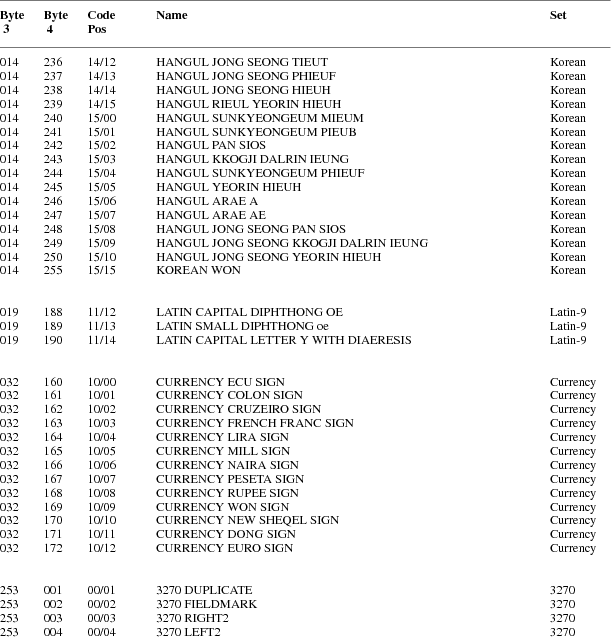
2
X Protocol X11,
Release 6.7 DRAFT
Appendix
B
Protocol
Encoding
Syntactic Conventions
All numbers
are in decimal, unless prefixed with #x, in which case they
are in hexadecimal (base 16).
The general
syntax used to describe requests, replies, errors, events,
and compound types is:
NameofThing
encode-form
...
encode-form
Each
encode-form describes a single component.
For components
described in the protocol as:
name: TYPE
the
encode-form is:
N TYPE name
N is the
number of bytes occupied in the data stream, and TYPE is the
interpretation of those bytes. For example,
depth:
CARD8
becomes:
1 CARD8
depth
For components
with a static numeric value the encode-form is:
N value
name
The value is
always interpreted as an N-byte unsigned integer. For
example, the first two bytes of a Window error are
always zero (indicating an error in general) and three
(indicating the Window error in
particular):
1 0 Error
For components
described in the protocol as:
name:
{Name1,..., NameI}
the
encode-form is:
|
N |
|
name |
|
|
|
value1 Name1 |
|
|
|
|
... |
|
|
|
|
valueI NameI |
|
|
The value is
always interpreted as an N-byte unsigned integer. Note that
the size of N is sometimes larger than that strictly
required to encode the values. For example:
class:
{InputOutput, InputOnly,
CopyFromParent}
becomes:
|
2 |
|
|
class |
|
|
|
0 |
CopyFromParent |
|
|
|
|
1 |
InputOutput |
|
|
|
|
2 |
InputOnly |
|
|
For components
described in the protocol as:
NAME: TYPE or
Alternative1...or AlternativeI
the
encode-form is:
|
N |
TYPE |
|
|
NAME |
|
|
|
value1 |
|
Alternative1 |
|
|
|
|
... |
|
|
|
|
|
|
valueI |
|
AlternativeI |
|
|
The
alternative values are guaranteed not to conflict with the
encoding of TYPE. For example:
destination:
WINDOW or PointerWindow or InputFocus
becomes:
|
4 |
WINDOW |
|
destination |
|
|
0 |
PointerWindow |
|
|
|
1 |
InputFocus |
|
For components
described in the protocol as:
value-mask:
BITMASK
the
encode-form is:
|
N |
BITMASK |
|
|
value-mask |
|
|
mask1 |
|
mask-name1 |
|
|
|
... |
|
|
|
|
|
maskI |
|
mask-nameI |
|
The individual
bits in the mask are specified and named, and N is 2 or 4.
The most-significant bit in a BITMASK is reserved for use in
defining chained (multiword) bitmasks, as extensions augment
existing core requests. The precise interpretation of this
bit is not yet defined here, although a probable mechanism
is that a 1-bit indicates that another N bytes of bitmask
follows, with bits within the overall mask still interpreted
from least-significant to most-significant with an N-byte
unit, with N-byte units interpreted in stream order, and
with the overall mask being byte-swapped in individual
N-byte units.
For
LISTofVALUE encodings, the request is followed by a section
of the form:
VALUEs
encode-form
...
encode-form
listing an
encode-form for each VALUE. The NAME in each encode-form
keys to the corresponding BITMASK bit. The encoding of a
VALUE always occupies four bytes, but the number of bytes
specified in the encoding-form indicates how many of the
least-significant bytes are actually used; the remaining
bytes are unused and their values do not matter.
In various
cases, the number of bytes occupied by a component will be
specified by a lowercase single-letter variable name instead
of a specific numeric value, and often some other component
will have its value specified as a simple numeric expression
involving these variables. Components specified with such
expressions are always interpreted as unsigned integers. The
scope of such variables is always just the enclosing
request, reply, error, event, or compound type structure.
For example:
2 3+n request
length
For unused
bytes (the values of the bytes are undefined and do no
matter), the encode-form is:
If the number
of unused bytes is variable, the encode-form typically
is:
where E is
some expression, and pad(E) is the number of bytes needed to
round E up to a multiple of four.
pad(E) = (4 -
(E mod 4)) mod 4
Common Types
LISTofFOO
In this
document the LISTof notation strictly means some number of
repetitions of the FOO encoding; the actual length of the
list is encoded elsewhere.
SETofFOO
A set is
always represented by a bitmask, with a 1-bit indicating
presence in the set.
BITMASK: CARD32
WINDOW: CARD32
PIXMAP: CARD32
CURSOR: CARD32
FONT: CARD32
GCONTEXT:
CARD32
COLORMAP:
CARD32
DRAWABLE:
CARD32
FONTABLE:
CARD32
ATOM: CARD32
VISUALID:
CARD32
BYTE: 8-bit
value
INT8: 8-bit signed
integer
INT16: 16-bit
signed integer
INT32: 32-bit
signed integer
CARD8: 8-bit
unsigned integer
CARD16: 16-bit
unsigned integer
CARD32: 32-bit
unsigned integer
TIMESTAMP:
CARD32
BITGRAVITY
|
0 |
Forget |
|
1 |
NorthWest |
|
2 |
North |
|
3 |
NorthEast |
|
4 |
West |
|
5 |
Center |
|
6 |
East |
|
7 |
SouthWest |
|
8 |
South |
|
9 |
SouthEast |
|
10 |
Static |
WINGRAVITY
|
0 |
Unmap |
|
1 |
NorthWest |
|
2 |
North |
|
3 |
NorthEast |
|
4 |
West |
|
5 |
Center |
|
6 |
East |
|
7 |
SouthWest |
|
8 |
South |
|
9 |
SouthEast |
|
10 |
Static |
BOOL
SETofEVENT
|
#x00000001KeyPress |
|
#x00000002KeyRelease |
|
#x00000004ButtonPress |
|
#x00000008ButtonRelease |
|
#x00000010EnterWindow |
|
#x00000020LeaveWindow |
|
#x00000040PointerMotion |
|
#x00000080PointerMotionHint |
|
#x00000100Button1Motion |
|
#x00000200Button2Motion |
|
#x00000400Button3Motion |
|
#x00000800Button4Motion |
|
#x00001000Button5Motion |
|
#x00002000ButtonMotion |
|
#x00004000KeymapState |
|
#x00008000Exposure |
|
#x00010000VisibilityChange |
|
#x00020000StructureNotify |
|
#x00040000ResizeRedirect |
|
#x00080000SubstructureNotify |
|
#x00100000SubstructureRedirect |
|
#x00200000FocusChange |
|
#x00400000PropertyChange |
|
#x00800000ColormapChange |
|
#x01000000OwnerGrabButton |
|
#xFE000000unused but must be zero |
SETofPOINTEREVENT
|
encodings are the same as for SETofEVENT,
except with |
|
#xFFFF8003unused but must be zero |
SETofDEVICEEVENT
|
encodings are the same as for SETofEVENT,
except with |
|
#xFFFFC0B0unused but must be zero |
KEYSYM: CARD32
KEYCODE: CARD8
BUTTON: CARD8
SETofKEYBUTMASK
|
#x0001 |
Shift |
|
#x0002 |
Lock |
|
#x0004 |
Control |
|
#x0008 |
Mod1 |
|
#x0010 |
Mod2 |
|
#x0020 |
Mod3 |
|
#x0040 |
Mod4 |
|
#x0080 |
Mod5 |
|
#x0100 |
Button1 |
|
#x0200 |
Button2 |
|
#x0400 |
Button3 |
|
#x0800 |
Button4 |
|
#x1000 |
Button5 |
|
#xE000 |
unused but must be zero |
SETofKEYMASK
|
encodings are the same as for
SETofKEYBUTMASK, except with |
|
|
#xFF00 |
unused but must be zero |
STRING8:
LISTofCARD8
STRING16:
LISTofCHAR2B
CHAR2B
|
1 |
CARD8 |
byte1 |
|
1 |
CARD8 |
byte2 |
POINT
RECTANGLE
|
2 |
INT16 |
x |
|
2 |
INT16 |
y |
|
2 |
CARD16 |
width |
|
2 |
CARD16 |
height |
ARC
|
2 |
INT16 |
x |
|
2 |
INT16 |
y |
|
2 |
CARD16 |
width |
|
2 |
CARD16 |
height |
|
2 |
INT16 |
angle1 |
|
2 |
INT16 |
angle2 |
HOST
|
1 |
|
|
family |
|
|
0 |
Internet |
|
|
|
1 |
DECnet |
|
|
|
2 |
Chaos |
|
|
|
5 |
ServerInterpreted |
|
|
|
6 |
InternetV6 |
|
|
1 |
|
|
unused |
|
2 |
n |
|
length of address |
|
n |
LISTofBYTE |
|
address |
|
p |
|
|
unused, p=pad(n) |
STR
|
1 |
n |
|
length of name in bytes |
|
n |
STRING8 |
|
name |
Errors
Request
|
1 |
0 |
|
Error |
|
1 |
1 |
|
code |
|
2 |
CARD16 |
|
sequence number |
|
4 |
|
|
unused |
|
2 |
CARD16 |
|
minor opcode |
|
1 |
CARD8 |
|
major opcode |
|
21 |
|
|
unused |
Value
|
1 |
0 |
|
Error |
|
1 |
2 |
|
code |
|
2 |
CARD16 |
|
sequence number |
|
4 |
<32-bits> |
|
bad value |
|
2 |
CARD16 |
|
minor opcode |
|
1 |
CARD8 |
|
major opcode |
|
21 |
|
|
unused |
Window
|
1 |
0 |
|
Error |
|
1 |
3 |
|
code |
|
2 |
CARD16 |
|
sequence number |
|
4 |
CARD32 |
|
bad resource id |
|
2 |
CARD16 |
|
minor opcode |
|
1 |
CARD8 |
|
major opcode |
|
21 |
|
|
unused |
Pixmap
|
1 |
0 |
|
Error |
|
1 |
4 |
|
code |
|
2 |
CARD16 |
|
sequence number |
|
4 |
CARD32 |
|
bad resource id |
|
2 |
CARD16 |
|
minor opcode |
|
1 |
CARD8 |
|
major opcode |
|
21 |
|
|
unused |
Atom
|
1 |
0 |
|
Error |
|
1 |
5 |
|
code |
|
2 |
CARD16 |
|
sequence number |
|
4 |
CARD32 |
|
bad atom id |
|
2 |
CARD16 |
|
minor opcode |
|
1 |
CARD8 |
|
major opcode |
|
21 |
|
|
unused |
Cursor
|
1 |
0 |
|
Error |
|
1 |
6 |
|
code |
|
2 |
CARD16 |
|
sequence number |
|
4 |
CARD32 |
|
bad resource id |
|
2 |
CARD16 |
|
minor opcode |
|
1 |
CARD8 |
|
major opcode |
|
21 |
|
|
unused |
Font
|
1 |
0 |
|
Error |
|
1 |
7 |
|
code |
|
2 |
CARD16 |
|
sequence number |
|
4 |
CARD32 |
|
bad resource id |
|
2 |
CARD16 |
|
minor opcode |
|
1 |
CARD8 |
|
major opcode |
|
21 |
|
|
unused |
Match
|
1 |
0 |
|
Error |
|
1 |
8 |
|
code |
|
2 |
CARD16 |
|
sequence number |
|
4 |
|
|
unused |
|
2 |
CARD16 |
|
minor opcode |
|
1 |
CARD8 |
|
major opcode |
|
21 |
|
|
unused |
Drawable
|
1 |
0 |
|
Error |
|
1 |
9 |
|
code |
|
2 |
CARD16 |
|
sequence number |
|
4 |
CARD32 |
|
bad resource id |
|
2 |
CARD16 |
|
minor opcode |
|
1 |
CARD8 |
|
major opcode |
|
21 |
|
|
unused |
Access
|
1 |
0 |
|
Error |
|
1 |
10 |
|
code |
|
2 |
CARD16 |
|
sequence number |
|
4 |
|
|
unused |
|
2 |
CARD16 |
|
minor opcode |
|
1 |
CARD8 |
|
major opcode |
|
21 |
|
|
unused |
Alloc
|
1 |
0 |
|
Error |
|
1 |
11 |
|
code |
|
2 |
CARD16 |
|
sequence number |
|
4 |
|
|
unused |
|
2 |
CARD16 |
|
minor opcode |
|
1 |
CARD8 |
|
major opcode |
|
21 |
|
|
unused |
Colormap
|
1 |
0 |
|
Error |
|
1 |
12 |
|
code |
|
2 |
CARD16 |
|
sequence number |
|
4 |
CARD32 |
|
bad resource id |
|
2 |
CARD16 |
|
minor opcode |
|
1 |
CARD8 |
|
major opcode |
|
21 |
|
|
unused |
GContext
|
1 |
0 |
|
Error |
|
1 |
13 |
|
code |
|
2 |
CARD16 |
|
sequence number |
|
4 |
CARD32 |
|
bad resource id |
|
2 |
CARD16 |
|
minor opcode |
|
1 |
CARD8 |
|
major opcode |
|
21 |
|
|
unused |
IDChoice
|
1 |
0 |
|
Error |
|
1 |
14 |
|
code |
|
2 |
CARD16 |
|
sequence number |
|
4 |
CARD32 |
|
bad resource id |
|
2 |
CARD16 |
|
minor opcode |
|
1 |
CARD8 |
|
major opcode |
|
21 |
|
|
unused |
Name
|
1 |
0 |
|
Error |
|
1 |
15 |
|
code |
|
2 |
CARD16 |
|
sequence number |
|
4 |
|
|
unused |
|
2 |
CARD16 |
|
minor opcode |
|
1 |
CARD8 |
|
major opcode |
|
21 |
|
|
unused |
Length
|
1 |
0 |
|
Error |
|
1 |
16 |
|
code |
|
2 |
CARD16 |
|
sequence number |
|
4 |
|
|
unused |
|
2 |
CARD16 |
|
minor opcode |
|
1 |
CARD8 |
|
major opcode |
|
21 |
|
|
unused |
Implementation
|
1 |
0 |
|
Error |
|
1 |
17 |
|
code |
|
2 |
CARD16 |
|
sequence number |
|
4 |
|
|
unused |
|
2 |
CARD16 |
|
minor opcode |
|
1 |
CARD8 |
|
major opcode |
|
21 |
|
|
unused |
Keyboards
KEYCODE values
are always greater than 7 (and less than 256).
KEYSYM values
with the bit #x10000000 set are reserved as
vendor-specific.
The names and
encodings of the standard KEYSYM values are contained in
Appendix A, Keysym Encoding.
Pointers
BUTTON values
are numbered starting with one.
Predefined Atoms
|
PRIMARY |
1 |
WM_NORMAL_HINTS |
40 |
|
SECONDARY |
2 |
WM_SIZE_HINTS |
41 |
|
ARC |
3 |
WM_ZOOM_HINTS |
42 |
|
ATOM |
4 |
MIN_SPACE |
43 |
|
BITMAP |
5 |
NORM_SPACE |
44 |
|
CARDINAL |
6 |
MAX_SPACE |
45 |
|
COLORMAP |
7 |
END_SPACE |
46 |
|
CURSOR |
8 |
SUPERSCRIPT_X |
47 |
|
CUT_BUFFER0 |
9 |
SUPERSCRIPT_Y |
48 |
|
CUT_BUFFER1 |
10 |
SUBSCRIPT_X |
49 |
|
CUT_BUFFER2 |
11 |
SUBSCRIPT_Y |
50 |
|
CUT_BUFFER3 |
12 |
UNDERLINE_POSITION51 |
|
|
CUT_BUFFER4 |
13 |
UNDERLINE_THICKNESS52 |
|
|
CUT_BUFFER5 |
14 |
STRIKEOUT_ASCENT |
53 |
|
CUT_BUFFER6 |
15 |
STRIKEOUT_DESCENT54 |
|
|
CUT_BUFFER7 |
16 |
ITALIC_ANGLE |
55 |
|
DRAWABLE |
17 |
X_HEIGHT |
56 |
|
FONT |
18 |
QUAD_WIDTH |
57 |
|
INTEGER |
19 |
WEIGHT |
58 |
|
PIXMAP |
20 |
POINT_SIZE |
59 |
|
POINT |
21 |
RESOLUTION |
60 |
|
RECTANGLE |
22 |
COPYRIGHT |
61 |
|
RESOURCE_MANAGER |
23 |
NOTICE |
62 |
|
RGB_COLOR_MAP |
24 |
FONT_NAME |
63 |
|
RGB_BEST_MAP |
25 |
FAMILY_NAME |
64 |
|
RGB_BLUE_MAP |
26 |
FULL_NAME |
65 |
|
RGB_DEFAULT_MAP |
27 |
CAP_HEIGHT |
66 |
|
RGB_GRAY_MAP |
28 |
WM_CLASS |
67 |
|
RGB_GREEN_MAP |
29 |
WM_TRANSIENT_FOR |
68 |
|
RGB_RED_MAP |
30 |
|
|
|
STRING |
31 |
|
|
|
VISUALID |
32 |
|
|
|
WINDOW |
33 |
|
|
|
WM_COMMAND |
34 |
|
|
|
WM_HINTS |
35 |
|
|
|
WM_CLIENT_MACHINE |
|
36 |
|
|
WM_ICON_NAME |
37 |
|
|
|
WM_ICON_SIZE |
38 |
|
|
|
WM_NAME |
39 |
|
|
Connection Setup
For TCP
connections, displays on a given host are numbered starting
from 0, and the server for display N listens and accepts
connections on port 6000 + N. For DECnet connections,
displays on a given host are numbered starting from 0, and
the server for display N listens and accepts connections on
the object name obtained by concatenating
‘‘X$X’’ with the decimal
representation of N, for example, X$X0 and X$X1.
Information
sent by the client at connection setup:
|
1 |
|
|
byte-order |
|
|
#x42 |
MSB first |
|
|
|
#x6C |
LSB first |
|
|
1 |
|
|
unused |
|
2 |
CARD16 |
|
protocol-major-version |
|
2 |
CARD16 |
|
protocol-minor-version |
|
2 |
n |
|
length of authorization-protocol-name |
|
2 |
d |
|
length of authorization-protocol-data |
|
2 |
|
|
unused |
|
n |
STRING8 |
|
authorization-protocol-name |
|
p |
|
|
unused, p=pad(n) |
|
d |
STRING8 |
|
authorization-protocol-data |
|
q |
|
|
unused, q=pad(d) |
Except where
explicitly noted in the protocol, all 16-bit and 32-bit
quantities sent by the client must be transmitted with the
specified byte order, and all 16-bit and 32-bit quantities
returned by the server will be transmitted with this byte
order.
Information
received by the client if the connection is
refused:
|
1 |
0 |
|
Failed |
|
1 |
n |
|
length of reason in bytes |
|
2 |
CARD16 |
|
protocol-major-version |
|
2 |
CARD16 |
|
protocol-minor-version |
|
2 |
(n+p)/4 |
|
length in 4-byte units of
‘‘additional data’’ |
|
n |
STRING8 |
|
reason |
|
p |
|
|
unused, p=pad(n) |
Information
received by the client if further authentication is
required:
|
1 |
2 |
|
Authenticate |
|
5 |
|
|
unused |
|
2 |
(n+p)/4 |
|
length in 4-byte units of
‘‘additional data’’ |
|
n |
STRING8 |
|
reason |
|
p |
|
|
unused, p=pad(n) |
Information
received by the client if the connection is
accepted:
|
1 |
1 |
|
Success |
|
1 |
|
|
unused |
|
2 |
CARD16 |
|
protocol-major-version |
|
2 |
CARD16 |
|
protocol-minor-version |
|
2 |
8+2n+(v+p+m)/4 |
|
length in 4-byte units of
‘‘additional data’’ |
|
4 |
CARD32 |
|
release-number |
|
4 |
CARD32 |
|
resource-id-base |
|
4 |
CARD32 |
|
resource-id-mask |
|
4 |
CARD32 |
|
motion-buffer-size |
|
2 |
v |
|
length of vendor |
|
2 |
CARD16 |
|
maximum-request-length |
|
1 |
CARD8 |
|
number of SCREENs in roots |
|
1 |
n |
|
number for FORMATs in pixmap-formats |
|
1 |
|
|
image-byte-order |
|
|
0 |
LSBFirst |
|
|
|
1 |
MSBFirst |
|
|
1 |
|
|
bitmap-format-bit-order |
|
|
0 |
LeastSignificant |
|
|
|
1 |
MostSignificant |
|
|
1 |
CARD8 |
|
bitmap-format-scanline-unit |
|
1 |
CARD8 |
|
bitmap-format-scanline-pad |
|
1 |
KEYCODE |
|
min-keycode |
|
1 |
KEYCODE |
|
max-keycode |
|
4 |
|
|
unused |
|
v |
STRING8 |
|
vendor |
|
p |
|
|
unused, p=pad(v) |
|
8n |
LISTofFORMAT |
|
pixmap-formats |
|
m |
LISTofSCREEN |
|
roots (m is always a multiple of 4) |
FORMAT
|
1 |
CARD8 |
|
depth |
|
1 |
CARD8 |
|
bits-per-pixel |
|
1 |
CARD8 |
|
scanline-pad |
|
5 |
|
|
unused |
SCREEN
|
4 |
WINDOW |
|
root |
|
4 |
COLORMAP |
|
default-colormap |
|
4 |
CARD32 |
|
white-pixel |
|
4 |
CARD32 |
|
black-pixel |
|
4 |
SETofEVENT |
|
current-input-masks |
|
2 |
CARD16 |
|
width-in-pixels |
|
2 |
CARD16 |
|
height-in-pixels |
|
2 |
CARD16 |
|
width-in-millimeters |
|
2 |
CARD16 |
|
height-in-millimeters |
|
2 |
CARD16 |
|
min-installed-maps |
|
2 |
CARD16 |
|
max-installed-maps |
|
4 |
VISUALID |
|
root-visual |
|
1 |
|
|
backing-stores |
|
|
0 |
Never |
|
|
|
1 |
WhenMapped |
|
|
|
2 |
Always |
|
|
1 |
BOOL |
|
save-unders |
|
1 |
CARD8 |
|
root-depth |
|
1 |
CARD8 |
|
number of DEPTHs in allowed-depths |
|
n |
LISTofDEPTH |
|
allowed-depths (n is always a multiple of
4) |
DEPTH
|
1 |
CARD8 |
|
depth |
|
1 |
|
|
unused |
|
2 |
n |
|
number of VISUALTYPES in visuals |
|
4 |
|
|
unused |
|
24n |
|
LISTofVISUALTYPEvisuals |
|
VISUALTYPE
|
4 |
VISUALID |
|
visual-id |
|
1 |
|
|
class |
|
|
0 |
StaticGray |
|
|
|
1 |
GrayScale |
|
|
|
2 |
StaticColor |
|
|
|
3 |
PseudoColor |
|
|
|
4 |
TrueColor |
|
|
|
5 |
DirectColor |
|
|
1 |
CARD8 |
|
bits-per-rgb-value |
|
2 |
CARD16 |
|
colormap-entries |
|
4 |
CARD32 |
|
red-mask |
|
4 |
CARD32 |
|
green-mask |
|
4 |
CARD32 |
|
blue-mask |
|
4 |
|
|
unused |
Requests
CreateWindow
|
1 |
1 |
|
opcode |
|
1 |
CARD8 |
|
depth |
|
2 |
8+n |
|
request length |
|
4 |
WINDOW |
|
wid |
|
4 |
WINDOW |
|
parent |
|
2 |
INT16 |
|
x |
|
2 |
INT16 |
|
y |
|
2 |
CARD16 |
|
width |
|
2 |
CARD16 |
|
height |
|
2 |
CARD16 |
|
border-width |
|
2 |
|
|
class |
|
|
0 |
CopyFromParent |
|
|
|
1 |
InputOutput |
|
|
|
2 |
InputOnly |
|
|
4 |
VISUALID |
|
visual |
|
|
0 |
CopyFromParent |
|
|
4 |
BITMASK |
|
value-mask (has n bits set to 1) |
|
|
#x00000001 |
|
background-pixmap |
|
|
#x00000002 |
|
background-pixel |
|
|
#x00000004 |
|
border-pixmap |
|
|
#x00000008 |
|
border-pixel |
|
|
#x00000010 |
|
bit-gravity |
|
|
#x00000020 |
|
win-gravity |
|
|
#x00000040 |
|
backing-store |
|
|
#x00000080 |
|
backing-planes |
|
|
#x00000100 |
|
backing-pixel |
|
|
#x00000200 |
|
override-redirect |
|
|
#x00000400 |
|
save-under |
|
|
#x00000800 |
|
event-mask |
|
|
#x00001000 |
|
do-not-propagate-mask |
|
|
#x00002000 |
|
colormap |
|
|
#x00004000 |
|
cursor |
|
4n |
LISTofVALUE |
|
value-list |
VALUEs
|
4 |
PIXMAP |
|
background-pixmap |
|
|
0 |
None |
|
|
|
1 |
ParentRelative |
|
|
4 |
CARD32 |
|
background-pixel |
|
4 |
PIXMAP |
|
border-pixmap |
|
|
0 |
CopyFromParent |
|
|
4 |
CARD32 |
|
border-pixel |
|
1 |
BITGRAVITY |
|
bit-gravity |
|
1 |
WINGRAVITY |
|
win-gravity |
|
1 |
|
|
backing-store |
|
|
0 |
NotUseful |
|
|
|
1 |
WhenMapped |
|
|
|
2 |
Always |
|
|
4 |
CARD32 |
|
backing-planes |
|
4 |
CARD32 |
|
backing-pixel |
|
1 |
BOOL |
|
override-redirect |
|
1 |
BOOL |
|
save-under |
|
4 |
SETofEVENT |
|
event-mask |
|
4 |
SETofDEVICEEVENT |
|
do-not-propagate-mask |
|
4 |
COLORMAP |
|
colormap |
|
|
0 |
CopyFromParent |
|
|
4 |
CURSOR |
|
cursor |
|
|
0 |
None |
|
ChangeWindowAttributes
|
1 |
2 |
|
opcode |
|
1 |
|
|
unused |
|
2 |
3+n |
|
request length |
|
4 |
WINDOW |
|
window |
|
4 |
BITMASK |
|
value-mask (has n bits set to 1) |
|
|
encodings are the same as for
CreateWindow |
|
|
|
4n |
LISTofVALUE |
|
value-list |
|
|
encodings are the same as for
CreateWindow |
|
|
GetWindowAttributes
|
1 |
3 |
|
opcode |
|
1 |
|
|
unused |
|
2 |
2 |
|
request length |
|
4 |
WINDOW |
|
window |
→
|
1 |
1 |
|
Reply |
|
1 |
|
|
backing-store |
|
|
0 |
NotUseful |
|
|
|
1 |
WhenMapped |
|
|
|
2 |
Always |
|
|
2 |
CARD16 |
|
sequence number |
|
4 |
3 |
|
reply length |
|
4 |
VISUALID |
|
visual |
|
2 |
|
|
class |
|
|
1 |
InputOutput |
|
|
|
2 |
InputOnly |
|
|
1 |
BITGRAVITY |
|
bit-gravity |
|
1 |
WINGRAVITY |
|
win-gravity |
|
4 |
CARD32 |
|
backing-planes |
|
4 |
CARD32 |
|
backing-pixel |
|
1 |
BOOL |
|
save-under |
|
1 |
BOOL |
|
map-is-installed |
|
1 |
|
|
map-state |
|
|
0 |
Unmapped |
|
|
|
1 |
Unviewable |
|
|
|
2 |
Viewable |
|
|
1 |
BOOL |
|
override-redirect |
|
4 |
COLORMAP |
|
colormap |
|
|
0 |
None |
|
|
4 |
SETofEVENT |
|
all-event-masks |
|
4 |
SETofEVENT |
|
your-event-mask |
|
2 |
SETofDEVICEEVENT |
|
do-not-propagate-mask |
|
2 |
|
|
unused |
DestroyWindow
|
1 |
4 |
|
opcode |
|
1 |
|
|
unused |
|
2 |
2 |
|
request length |
|
4 |
WINDOW |
|
window |
DestroySubwindows
|
1 |
5 |
|
opcode |
|
1 |
|
|
unused |
|
2 |
2 |
|
request length |
|
4 |
WINDOW |
|
window |
ChangeSaveSet
|
1 |
6 |
|
opcode |
|
1 |
|
|
mode |
|
|
0 |
Insert |
|
|
|
1 |
Delete |
|
|
2 |
2 |
|
request length |
|
4 |
WINDOW |
|
window |
ReparentWindow
|
1 |
7 |
|
opcode |
|
1 |
|
|
unused |
|
2 |
4 |
|
request length |
|
4 |
WINDOW |
|
window |
|
4 |
WINDOW |
|
parent |
|
2 |
INT16 |
|
x |
|
2 |
INT16 |
|
y |
MapWindow
|
1 |
8 |
|
opcode |
|
1 |
|
|
unused |
|
2 |
2 |
|
request length |
|
4 |
WINDOW |
|
window |
MapSubwindows
|
1 |
9 |
|
opcode |
|
1 |
|
|
unused |
|
2 |
2 |
|
request length |
|
4 |
WINDOW |
|
window |
UnmapWindow
|
1 |
10 |
|
opcode |
|
1 |
|
|
unused |
|
2 |
2 |
|
request length |
|
4 |
WINDOW |
|
window |
UnmapSubwindows
|
1 |
11 |
|
opcode |
|
1 |
|
|
unused |
|
2 |
2 |
|
request length |
|
4 |
WINDOW |
|
window |
ConfigureWindow
|
1 |
12 |
|
opcode |
|
1 |
|
|
unused |
|
2 |
3+n |
|
request length |
|
4 |
WINDOW |
|
window |
|
2 |
BITMASK |
|
value-mask (has n bits set to 1) |
|
|
#x0001 |
x |
|
|
|
#x0002 |
y |
|
|
|
#x0004 |
width |
|
|
|
#x0008 |
height |
|
|
|
#x0010 |
border-width |
|
|
|
#x0020 |
sibling |
|
|
|
#x0040 |
stack-mode |
|
|
2 |
|
|
unused |
|
4n |
LISTofVALUE |
|
value-list |
VALUEs
|
2 |
INT16 |
|
x |
|
2 |
INT16 |
|
y |
|
2 |
CARD16 |
|
width |
|
2 |
CARD16 |
|
height |
|
2 |
CARD16 |
|
border-width |
|
4 |
WINDOW |
|
sibling |
|
1 |
|
|
stack-mode |
|
|
0 |
Above |
|
|
|
1 |
Below |
|
|
|
2 |
TopIf |
|
|
|
3 |
BottomIf |
|
|
|
4 |
Opposite |
|
CirculateWindow
|
1 |
13 |
|
opcode |
|
1 |
|
|
direction |
|
|
0 |
RaiseLowest |
|
|
|
1 |
LowerHighest |
|
|
2 |
2 |
|
request length |
|
4 |
WINDOW |
|
window |
GetGeometry
|
1 |
14 |
|
opcode |
|
1 |
|
|
unused |
|
2 |
2 |
|
request length |
|
4 |
DRAWABLE |
|
drawable |
→
|
1 |
1 |
|
Reply |
|
1 |
CARD8 |
|
depth |
|
2 |
CARD16 |
|
sequence number |
|
4 |
0 |
|
reply length |
|
4 |
WINDOW |
|
root |
|
2 |
INT16 |
|
x |
|
2 |
INT16 |
|
y |
|
2 |
CARD16 |
|
width |
|
2 |
CARD16 |
|
height |
|
2 |
CARD16 |
|
border-width |
|
10 |
|
|
unused |
QueryTree
|
1 |
15 |
|
opcode |
|
1 |
|
|
unused |
|
2 |
2 |
|
request length |
|
4 |
WINDOW |
|
window |
→
|
1 |
1 |
|
Reply |
|
1 |
|
|
unused |
|
2 |
CARD16 |
|
sequence number |
|
4 |
n |
|
reply length |
|
4 |
WINDOW |
|
root |
|
4 |
WINDOW |
|
parent |
|
|
0 |
None |
|
|
2 |
n |
|
number of WINDOWs in children |
|
14 |
|
|
unused |
|
4n |
LISTofWINDOW |
|
children |
InternAtom
|
1 |
16 |
|
opcode |
|
1 |
BOOL |
|
only-if-exists |
|
2 |
2+(n+p)/4 |
|
request length |
|
2 |
n |
|
length of name |
|
2 |
|
|
unused |
|
n |
STRING8 |
|
name |
|
p |
|
|
unused, p=pad(n) |
→
|
1 |
1 |
|
Reply |
|
1 |
|
|
unused |
|
2 |
CARD16 |
|
sequence number |
|
4 |
0 |
|
reply length |
|
4 |
ATOM |
|
atom |
|
|
0 |
None |
|
|
20 |
|
|
unused |
GetAtomName
|
1 |
17 |
|
opcode |
|
1 |
|
|
unused |
|
2 |
2 |
|
request length |
|
4 |
ATOM |
|
atom |
→
|
1 |
1 |
|
Reply |
|
1 |
|
|
unused |
|
2 |
CARD16 |
|
sequence number |
|
4 |
(n+p)/4 |
|
reply length |
|
2 |
n |
|
length of name |
|
22 |
|
|
unused |
|
n |
STRING8 |
|
name |
|
p |
|
|
unused, p=pad(n) |
ChangeProperty
|
1 |
18 |
|
opcode |
|
1 |
|
|
mode |
|
|
0 |
Replace |
|
|
|
1 |
Prepend |
|
|
|
2 |
Append |
|
|
2 |
6+(n+p)/4 |
|
request length |
|
4 |
WINDOW |
|
window |
|
4 |
ATOM |
|
property |
|
4 |
ATOM |
|
type |
|
1 |
CARD8 |
|
format |
|
3 |
|
|
unused |
|
4 |
CARD32 |
|
length of data in format units |
|
|
|
|
(= n for format = 8) |
|
|
|
|
(= n/2 for format = 16) |
|
|
|
|
(= n/4 for format = 32) |
|
n |
LISTofBYTE |
|
data |
|
|
|
|
(n is a multiple of 2 for format = 16) |
|
|
|
|
(n is a multiple of 4 for format = 32) |
|
p |
|
|
unused, p=pad(n) |
DeleteProperty
|
1 |
19 |
|
opcode |
|
1 |
|
|
unused |
|
2 |
3 |
|
request length |
|
4 |
WINDOW |
|
window |
|
4 |
ATOM |
|
property |
GetProperty
|
1 |
20 |
|
opcode |
|
1 |
BOOL |
|
delete |
|
2 |
6 |
|
request length |
|
4 |
WINDOW |
|
window |
|
4 |
ATOM |
|
property |
|
4 |
ATOM |
|
type |
|
|
0 |
AnyPropertyType |
|
|
4 |
CARD32 |
|
long-offset |
|
4 |
CARD32 |
|
long-length |
→
|
1 |
1 |
|
Reply |
|
1 |
CARD8 |
|
format |
|
2 |
CARD16 |
|
sequence number |
|
4 |
(n+p)/4 |
|
reply length |
|
4 |
ATOM |
|
type |
|
|
0 |
None |
|
|
4 |
CARD32 |
|
bytes-after |
|
4 |
CARD32 |
|
length of value in format units |
|
|
|
|
(= 0 for format = 0) |
|
|
|
|
(= n for format = 8) |
|
|
|
|
(= n/2 for format = 16) |
|
|
|
|
(= n/4 for format = 32) |
|
12 |
|
|
unused |
|
n |
LISTofBYTE |
|
value |
|
|
|
|
(n is zero for format = 0) |
|
|
|
|
(n is a multiple of 2 for format = 16) |
|
|
|
|
(n is a multiple of 4 for format = 32) |
|
p |
|
|
unused, p=pad(n) |
ListProperties
|
1 |
21 |
|
opcode |
|
1 |
|
|
unused |
|
2 |
2 |
|
request length |
|
4 |
WINDOW |
|
window |
→
|
1 |
1 |
|
Reply |
|
1 |
|
|
unused |
|
2 |
CARD16 |
|
sequence number |
|
4 |
n |
|
reply length |
|
2 |
n |
|
number of ATOMs in atoms |
|
22 |
|
|
unused |
|
4n |
LISTofATOM |
|
atoms |
SetSelectionOwner
|
1 |
22 |
|
opcode |
|
1 |
|
|
unused |
|
2 |
4 |
|
request length |
|
4 |
WINDOW |
|
owner |
|
|
0 |
None |
|
|
4 |
ATOM |
|
selection |
|
4 |
TIMESTAMP |
|
time |
|
|
0 |
CurrentTime |
|
GetSelectionOwner
|
1 |
23 |
|
opcode |
|
1 |
|
|
unused |
|
2 |
2 |
|
request length |
|
4 |
ATOM |
|
selection |
→
|
1 |
1 |
|
Reply |
|
1 |
|
|
unused |
|
2 |
CARD16 |
|
sequence number |
|
4 |
0 |
|
reply length |
|
4 |
WINDOW |
|
owner |
|
|
0 |
None |
|
|
20 |
|
|
unused |
ConvertSelection
|
1 |
24 |
|
opcode |
|
1 |
|
|
unused |
|
2 |
6 |
|
request length |
|
4 |
WINDOW |
|
requestor |
|
4 |
ATOM |
|
selection |
|
4 |
ATOM |
|
target |
|
4 |
ATOM |
|
property |
|
|
0 |
None |
|
|
4 |
TIMESTAMP |
|
time |
|
|
0 |
CurrentTime |
|
SendEvent
|
1 |
25 |
|
opcode |
|
1 |
BOOL |
|
propagate |
|
2 |
11 |
|
request length |
|
4 |
WINDOW |
|
destination |
|
|
0 |
PointerWindow |
|
|
|
1 |
InputFocus |
|
|
4 |
SETofEVENT |
|
event-mask |
|
32 |
|
|
event |
|
|
standard event format (see the Events
section) |
|
|
GrabPointer
|
1 |
26 |
|
opcode |
|
1 |
BOOL |
|
owner-events |
|
2 |
6 |
|
request length |
|
4 |
WINDOW |
|
grab-window |
|
2 |
SETofPOINTEREVENT |
|
event-mask |
|
1 |
|
|
pointer-mode |
|
|
0 |
Synchronous |
|
|
|
1 |
Asynchronous |
|
|
1 |
|
|
keyboard-mode |
|
|
0 |
Synchronous |
|
|
|
1 |
Asynchronous |
|
|
4 |
WINDOW |
|
confine-to |
|
|
0 |
None |
|
|
4 |
CURSOR |
|
cursor |
|
|
0 |
None |
|
|
4 |
TIMESTAMP |
|
time |
|
|
0 |
CurrentTime |
|
→
|
1 |
1 |
|
Reply |
|
1 |
|
|
status |
|
|
0 |
Success |
|
|
|
1 |
AlreadyGrabbed |
|
|
|
2 |
InvalidTime |
|
|
|
3 |
NotViewable |
|
|
|
4 |
Frozen |
|
|
2 |
CARD16 |
|
sequence number |
|
4 |
0 |
|
reply length |
|
24 |
|
|
unused |
UngrabPointer
|
1 |
27 |
|
opcode |
|
1 |
|
|
unused |
|
2 |
2 |
|
request length |
|
4 |
TIMESTAMP |
|
time |
|
|
0 |
CurrentTime |
|
GrabButton
|
1 |
28 |
|
opcode |
|
1 |
BOOL |
|
owner-events |
|
2 |
6 |
|
request length |
|
4 |
WINDOW |
|
grab-window |
|
2 |
SETofPOINTEREVENT |
|
event-mask |
|
1 |
|
|
pointer-mode |
|
|
0 |
Synchronous |
|
|
|
1 |
Asynchronous |
|
|
1 |
|
|
keyboard-mode |
|
|
0 |
Synchronous |
|
|
|
1 |
Asynchronous |
|
|
4 |
WINDOW |
|
confine-to |
|
|
0 |
None |
|
|
4 |
CURSOR |
|
cursor |
|
|
0 |
None |
|
|
1 |
BUTTON |
|
button |
|
|
0 |
AnyButton |
|
|
1 |
|
|
unused |
|
2 |
SETofKEYMASK |
|
modifiers |
|
|
#x8000 |
AnyModifier |
|
UngrabButton
|
1 |
29 |
|
opcode |
|
1 |
BUTTON |
|
button |
|
|
0 |
AnyButton |
|
|
2 |
3 |
|
request length |
|
4 |
WINDOW |
|
grab-window |
|
2 |
SETofKEYMASK |
|
modifiers |
|
|
#x8000 |
AnyModifier |
|
|
2 |
|
|
unused |
ChangeActivePointerGrab
|
1 |
30 |
|
opcode |
|
1 |
|
|
unused |
|
2 |
4 |
|
request length |
|
4 |
CURSOR |
|
cursor |
|
|
0 |
None |
|
|
4 |
TIMESTAMP |
|
time |
|
|
0 |
CurrentTime |
|
|
2 |
SETofPOINTEREVENT |
|
event-mask |
|
2 |
|
|
unused |
GrabKeyboard
|
1 |
31 |
|
opcode |
|
1 |
BOOL |
|
owner-events |
|
2 |
4 |
|
request length |
|
4 |
WINDOW |
|
grab-window |
|
4 |
TIMESTAMP |
|
time |
|
|
0 |
CurrentTime |
|
|
1 |
|
|
pointer-mode |
|
|
0 |
Synchronous |
|
|
|
1 |
Asynchronous |
|
|
1 |
|
|
keyboard-mode |
|
|
0 |
Synchronous |
|
|
|
1 |
Asynchronous |
|
|
2 |
|
|
unused |
→
|
1 |
1 |
|
Reply |
|
1 |
|
|
status |
|
|
0 |
Success |
|
|
|
1 |
AlreadyGrabbed |
|
|
|
2 |
InvalidTime |
|
|
|
3 |
NotViewable |
|
|
|
4 |
Frozen |
|
|
2 |
CARD16 |
|
sequence number |
|
4 |
0 |
|
reply length |
|
24 |
|
|
unused |
UngrabKeyboard
|
1 |
32 |
|
opcode |
|
1 |
|
|
unused |
|
2 |
2 |
|
request length |
|
4 |
TIMESTAMP |
|
time |
|
|
0 |
CurrentTime |
|
GrabKey
|
1 |
33 |
|
opcode |
|
1 |
BOOL |
|
owner-events |
|
2 |
4 |
|
request length |
|
4 |
WINDOW |
|
grab-window |
|
2 |
SETofKEYMASK |
|
modifiers |
|
|
#x8000 |
AnyModifier |
|
|
1 |
KEYCODE |
|
key |
|
|
0 |
AnyKey |
|
|
1 |
|
|
pointer-mode |
|
|
0 |
Synchronous |
|
|
|
1 |
Asynchronous |
|
|
1 |
|
|
keyboard-mode |
|
|
0 |
Synchronous |
|
|
|
1 |
Asynchronous |
|
|
3 |
|
|
unused |
UngrabKey
|
1 |
34 |
|
opcode |
|
1 |
KEYCODE |
|
key |
|
|
0 |
AnyKey |
|
|
2 |
3 |
|
request length |
|
4 |
WINDOW |
|
grab-window |
|
2 |
SETofKEYMASK |
|
modifiers |
|
|
#x8000 |
AnyModifier |
|
|
2 |
|
|
unused |
AllowEvents
|
1 |
35 |
|
opcode |
|
1 |
|
|
mode |
|
|
0 |
AsyncPointer |
|
|
|
1 |
SyncPointer |
|
|
|
2 |
ReplayPointer |
|
|
|
3 |
AsyncKeyboard |
|
|
|
4 |
SyncKeyboard |
|
|
|
5 |
ReplayKeyboard |
|
|
|
6 |
AsyncBoth |
|
|
|
7 |
SyncBoth |
|
|
2 |
2 |
|
request length |
|
4 |
TIMESTAMP |
|
time |
|
|
0 |
CurrentTime |
|
GrabServer
|
1 |
36 |
|
opcode |
|
1 |
|
|
unused |
|
2 |
1 |
|
request length |
UngrabServer
|
1 |
37 |
|
opcode |
|
1 |
|
|
unused |
|
2 |
1 |
|
request length |
QueryPointer
|
1 |
38 |
|
opcode |
|
1 |
|
|
unused |
|
2 |
2 |
|
request length |
|
4 |
WINDOW |
|
window |
→
|
1 |
1 |
|
Reply |
|
1 |
BOOL |
|
same-screen |
|
2 |
CARD16 |
|
sequence number |
|
4 |
0 |
|
reply length |
|
4 |
WINDOW |
|
root |
|
4 |
WINDOW |
|
child |
|
|
0 |
None |
|
|
2 |
INT16 |
|
root-x |
|
2 |
INT16 |
|
root-y |
|
2 |
INT16 |
|
win-x |
|
2 |
INT16 |
|
win-y |
|
2 |
SETofKEYBUTMASK |
|
mask |
|
6 |
|
|
unused |
GetMotionEvents
|
1 |
39 |
|
opcode |
|
1 |
|
|
unused |
|
2 |
4 |
|
request length |
|
4 |
WINDOW |
|
window |
|
4 |
TIMESTAMP |
|
start |
|
|
0 |
CurrentTime |
|
|
4 |
TIMESTAMP |
|
stop |
|
|
0 |
CurrentTime |
|
→
|
1 |
1 |
|
Reply |
|
1 |
|
|
unused |
|
2 |
CARD16 |
|
sequence number |
|
4 |
2n |
|
reply length |
|
4 |
n |
|
number of TIMECOORDs in events |
|
20 |
|
|
unused |
|
8n |
LISTofTIMECOORD |
|
events |
TIMECOORD
|
4 |
TIMESTAMP |
|
time |
|
2 |
INT16 |
|
x |
|
2 |
INT16 |
|
y |
TranslateCoordinates
|
1 |
40 |
|
opcode |
|
1 |
|
|
unused |
|
2 |
4 |
|
request length |
|
4 |
WINDOW |
|
src-window |
|
4 |
WINDOW |
|
dst-window |
|
2 |
INT16 |
|
src-x |
|
2 |
INT16 |
|
src-y |
→
|
1 |
1 |
|
Reply |
|
1 |
BOOL |
|
same-screen |
|
2 |
CARD16 |
|
sequence number |
|
4 |
0 |
|
reply length |
|
4 |
WINDOW |
|
child |
|
|
0 |
None |
|
|
2 |
INT16 |
|
dst-x |
|
2 |
INT16 |
|
dst-y |
|
16 |
|
|
unused |
WarpPointer
|
1 |
41 |
|
opcode |
|
1 |
|
|
unused |
|
2 |
6 |
|
request length |
|
4 |
WINDOW |
|
src-window |
|
|
0 |
None |
|
|
4 |
WINDOW |
|
dst-window |
|
|
0 |
None |
|
|
2 |
INT16 |
|
src-x |
|
2 |
INT16 |
|
src-y |
|
2 |
CARD16 |
|
src-width |
|
2 |
CARD16 |
|
src-height |
|
2 |
INT16 |
|
dst-x |
|
2 |
INT16 |
|
dst-y |
SetInputFocus
|
1 |
42 |
|
opcode |
|
1 |
|
|
revert-to |
|
|
0 |
None |
|
|
|
1 |
PointerRoot |
|
|
|
2 |
Parent |
|
|
2 |
3 |
|
request length |
|
4 |
WINDOW |
|
focus |
|
|
0 |
None |
|
|
|
1 |
PointerRoot |
|
|
4 |
TIMESTAMP |
|
time |
|
|
0 |
CurrentTime |
|
GetInputFocus
|
1 |
43 |
|
opcode |
|
1 |
|
|
unused |
|
2 |
1 |
|
request length |
→
|
1 |
1 |
|
Reply |
|
1 |
|
|
revert-to |
|
|
0 |
None |
|
|
|
1 |
PointerRoot |
|
|
|
2 |
Parent |
|
|
2 |
CARD16 |
|
sequence number |
|
4 |
0 |
|
reply length |
|
4 |
WINDOW |
|
focus |
|
|
0 |
None |
|
|
|
1 |
PointerRoot |
|
|
20 |
|
|
unused |
QueryKeymap
|
1 |
44 |
|
opcode |
|
1 |
|
|
unused |
|
2 |
1 |
|
request length |
→
|
1 |
1 |
|
Reply |
|
1 |
|
|
unused |
|
2 |
CARD16 |
|
sequence number |
|
4 |
2 |
|
reply length |
|
32 |
LISTofCARD8 |
|
keys |
OpenFont
|
1 |
45 |
|
opcode |
|
1 |
|
|
unused |
|
2 |
3+(n+p)/4 |
|
request length |
|
4 |
FONT |
|
fid |
|
2 |
n |
|
length of name |
|
2 |
|
|
unused |
|
n |
STRING8 |
|
name |
|
p |
|
|
unused, p=pad(n) |
CloseFont
|
1 |
46 |
|
opcode |
|
1 |
|
|
unused |
|
2 |
2 |
|
request length |
|
4 |
FONT |
|
font |
QueryFont
|
1 |
47 |
|
opcode |
|
1 |
|
|
unused |
|
2 |
2 |
|
request length |
|
4 |
FONTABLE |
|
font |
→
|
1 |
1 |
|
Reply |
|
1 |
|
|
unused |
|
2 |
CARD16 |
|
sequence number |
|
4 |
7+2n+3m |
|
reply length |
|
12 |
CHARINFO |
|
min-bounds |
|
4 |
|
|
unused |
|
12 |
CHARINFO |
|
max-bounds |
|
4 |
|
|
unused |
|
2 |
CARD16 |
|
min-char-or-byte2 |
|
2 |
CARD16 |
|
max-char-or-byte2 |
|
2 |
CARD16 |
|
default-char |
|
2 |
n |
|
number of FONTPROPs in properties |
|
1 |
|
|
draw-direction |
|
|
0 |
LeftToRight |
|
|
|
1 |
RightToLeft |
|
|
1 |
CARD8 |
|
min-byte1 |
|
1 |
CARD8 |
|
max-byte1 |
|
1 |
BOOL |
|
all-chars-exist |
|
2 |
INT16 |
|
font-ascent |
|
2 |
INT16 |
|
font-descent |
|
4 |
m |
|
number of CHARINFOs in char-infos |
|
8n |
LISTofFONTPROP |
|
properties |
|
12m |
|
LISTofCHARINFOchar-infos |
|
FONTPROP
|
4 |
ATOM |
|
name |
|
4 |
<32-bits> |
|
value |
CHARINFO
|
2 |
INT16 |
|
left-side-bearing |
|
2 |
INT16 |
|
right-side-bearing |
|
2 |
INT16 |
|
character-width |
|
2 |
INT16 |
|
ascent |
|
2 |
INT16 |
|
descent |
|
2 |
CARD16 |
|
attributes |
QueryTextExtents
|
1 |
48 |
|
opcode |
|
1 |
BOOL |
|
odd length, True if p = 2 |
|
2 |
2+(2n+p)/4 |
|
request length |
|
4 |
FONTABLE |
|
font |
|
2n |
STRING16 |
|
string |
|
p |
|
|
unused, p=pad(2n) |
→
|
1 |
1 |
|
Reply |
|
1 |
|
|
draw-direction |
|
|
0 |
LeftToRight |
|
|
|
1 |
RightToLeft |
|
|
2 |
CARD16 |
|
sequence number |
|
4 |
0 |
|
reply length |
|
2 |
INT16 |
|
font-ascent |
|
2 |
INT16 |
|
font-descent |
|
2 |
INT16 |
|
overall-ascent |
|
2 |
INT16 |
|
overall-descent |
|
4 |
INT32 |
|
overall-width |
|
4 |
INT32 |
|
overall-left |
|
4 |
INT32 |
|
overall-right |
|
4 |
|
|
unused |
ListFonts
|
1 |
49 |
|
opcode |
|
1 |
|
|
unused |
|
2 |
2+(n+p)/4 |
|
request length |
|
2 |
CARD16 |
|
max-names |
|
2 |
n |
|
length of pattern |
|
n |
STRING8 |
|
pattern |
|
p |
|
|
unused, p=pad(n) |
→
|
1 |
1 |
|
Reply |
|
1 |
|
|
unused |
|
2 |
CARD16 |
|
sequence number |
|
4 |
(n+p)/4 |
|
reply length |
|
2 |
CARD16 |
|
number of STRs in names |
|
22 |
|
|
unused |
|
n |
LISTofSTR |
|
names |
|
p |
|
|
unused, p=pad(n) |
ListFontsWithInfo
|
1 |
50 |
|
opcode |
|
1 |
|
|
unused |
|
2 |
2+(n+p)/4 |
|
request length |
|
2 |
CARD16 |
|
max-names |
|
2 |
n |
|
length of pattern |
|
n |
STRING8 |
|
pattern |
|
p |
|
|
unused, p=pad(n) |
→ (except for
last in series)
|
1 |
1 |
|
Reply |
|
1 |
n |
|
length of name in bytes |
|
2 |
CARD16 |
|
sequence number |
|
4 |
7+2m+(n+p)/4 |
|
reply length |
|
12 |
CHARINFO |
|
min-bounds |
|
4 |
|
|
unused |
|
12 |
CHARINFO |
|
max-bounds |
|
4 |
|
|
unused |
|
2 |
CARD16 |
|
min-char-or-byte2 |
|
2 |
CARD16 |
|
max-char-or-byte2 |
|
2 |
CARD16 |
|
default-char |
|
2 |
m |
|
number of FONTPROPs in properties |
|
1 |
|
|
draw-direction |
|
|
0 |
LeftToRight |
|
|
|
1 |
RightToLeft |
|
|
1 |
CARD8 |
|
min-byte1 |
|
1 |
CARD8 |
|
max-byte1 |
|
1 |
BOOL |
|
all-chars-exist |
|
2 |
INT16 |
|
font-ascent |
|
2 |
INT16 |
|
font-descent |
|
4 |
CARD32 |
|
replies-hint |
|
8m |
LISTofFONTPROP |
|
properties |
|
n |
STRING8 |
|
name |
|
p |
|
|
unused, p=pad(n) |
FONTPROP
|
encodings are the same as for QueryFont |
CHARINFO
|
encodings are the same as for QueryFont |
→ (last in
series)
|
1 |
1 |
|
Reply |
|
1 |
0 |
|
last-reply indicator |
|
2 |
CARD16 |
|
sequence number |
|
4 |
7 |
|
reply length |
|
52 |
|
|
unused |
SetFontPath
|
1 |
51 |
|
opcode |
|
1 |
|
|
unused |
|
2 |
2+(n+p)/4 |
|
request length |
|
2 |
CARD16 |
|
number of STRs in path |
|
2 |
|
|
unused |
|
n |
LISTofSTR |
|
path |
|
p |
|
|
unused, p=pad(n) |
GetFontPath
|
1 |
52 |
|
opcode |
|
1 |
|
|
unused |
|
2 |
1 |
|
request list |
→
|
1 |
1 |
|
Reply |
|
1 |
|
|
unused |
|
2 |
CARD16 |
|
sequence number |
|
4 |
(n+p)/4 |
|
reply length |
|
2 |
CARD16 |
|
number of STRs in path |
|
22 |
|
|
unused |
|
n |
LISTofSTR |
|
path |
|
p |
|
|
unused, p=pad(n) |
CreatePixmap
|
1 |
53 |
|
opcode |
|
1 |
CARD8 |
|
depth |
|
2 |
4 |
|
request length |
|
4 |
PIXMAP |
|
pid |
|
4 |
DRAWABLE |
|
drawable |
|
2 |
CARD16 |
|
width |
|
2 |
CARD16 |
|
height |
FreePixmap
|
1 |
54 |
|
opcode |
|
1 |
|
|
unused |
|
2 |
2 |
|
request length |
|
4 |
PIXMAP |
|
pixmap |
CreateGC
|
1 |
55 |
|
opcode |
|
1 |
|
|
unused |
|
2 |
4+n |
|
request length |
|
4 |
GCONTEXT |
|
cid |
|
4 |
DRAWABLE |
|
drawable |
|
4 |
BITMASK |
|
value-mask (has n bits set to 1) |
|
|
#x00000001 |
|
function |
|
|
#x00000002 |
|
plane-mask |
|
|
#x00000004 |
|
foreground |
|
|
#x00000008 |
|
background |
|
|
#x00000010 |
|
line-width |
|
|
#x00000020 |
|
line-style |
|
|
#x00000040 |
|
cap-style |
|
|
#x00000080 |
|
join-style |
|
|
#x00000100 |
|
fill-style |
|
|
#x00000200 |
|
fill-rule |
|
|
#x00000400 |
|
tile |
|
|
#x00000800 |
|
stipple |
|
|
#x00001000 |
|
tile-stipple-x-origin |
|
|
#x00002000 |
|
tile-stipple-y-origin |
|
|
#x00004000 |
|
font |
|
|
#x00008000 |
|
subwindow-mode |
|
|
#x00010000 |
|
graphics-exposures |
|
|
#x00020000 |
|
clip-x-origin |
|
|
#x00040000 |
|
clip-y-origin |
|
|
#x00080000 |
|
clip-mask |
|
|
#x00100000 |
|
dash-offset |
|
|
#x00200000 |
|
dashes |
|
|
#x00400000 |
|
arc-mode |
|
4n |
LISTofVALUE |
|
value-list |
VALUEs
|
1 |
|
|
function |
|
|
0 |
Clear |
|
|
|
1 |
And |
|
|
|
2 |
AndReverse |
|
|
|
3 |
Copy |
|
|
|
4 |
AndInverted |
|
|
|
5 |
NoOp |
|
|
|
6 |
Xor |
|
|
|
7 |
Or |
|
|
|
8 |
Nor |
|
|
|
9 |
Equiv |
|
|
|
10 |
Invert |
|
|
|
11 |
OrReverse |
|
|
|
12 |
CopyInverted |
|
|
|
13 |
OrInverted |
|
|
|
14 |
Nand |
|
|
|
15 |
Set |
|
|
4 |
CARD32 |
|
plane-mask |
|
4 |
CARD32 |
|
foreground |
|
4 |
CARD32 |
|
background |
|
2 |
CARD16 |
|
line-width |
|
1 |
|
|
line-style |
|
|
0 |
Solid |
|
|
|
1 |
OnOffDash |
|
|
|
2 |
DoubleDash |
|
|
1 |
|
|
cap-style |
|
|
0 |
NotLast |
|
|
|
1 |
Butt |
|
|
|
2 |
Round |
|
|
|
3 |
Projecting |
|
|
1 |
|
|
join-style |
|
|
0 |
Miter |
|
|
|
1 |
Round |
|
|
|
2 |
Bevel |
|
|
1 |
|
|
fill-style |
|
|
0 |
Solid |
|
|
|
1 |
Tiled |
|
|
|
2 |
Stippled |
|
|
|
3 |
OpaqueStippled |
|
|
1 |
|
|
fill-rule |
|
|
0 |
EvenOdd |
|
|
|
1 |
Winding |
|
|
4 |
PIXMAP |
|
tile |
|
4 |
PIXMAP |
|
stipple |
|
2 |
INT16 |
|
tile-stipple-x-origin |
|
2 |
INT16 |
|
tile-stipple-y-origin |
|
4 |
FONT |
|
font |
|
1 |
|
|
subwindow-mode |
|
|
0 |
ClipByChildren |
|
|
|
1 |
IncludeInferiors |
|
|
1 |
BOOL |
|
graphics-exposures |
|
2 |
INT16 |
|
clip-x-origin |
|
2 |
INT16 |
|
clip-y-origin |
|
4 |
PIXMAP |
|
clip-mask |
|
|
0 |
None |
|
|
2 |
CARD16 |
|
dash-offset |
|
1 |
CARD8 |
|
dashes |
|
1 |
|
|
arc-mode |
|
|
0 |
Chord |
|
|
|
1 |
PieSlice |
|
ChangeGC
|
1 |
56 |
|
opcode |
|
1 |
|
|
unused |
|
2 |
3+n |
|
request length |
|
4 |
GCONTEXT |
|
gc |
|
4 |
BITMASK |
|
value-mask (has n bits set to 1) |
|
|
encodings are the same as for CreateGC |
|
|
|
4n |
LISTofVALUE |
|
value-list |
|
|
encodings are the same as for CreateGC |
|
|
CopyGC
|
1 |
57 |
|
opcode |
|
1 |
|
|
unused |
|
2 |
4 |
|
request length |
|
4 |
GCONTEXT |
|
src-gc |
|
4 |
GCONTEXT |
|
dst-gc |
|
4 |
BITMASK |
|
value-mask |
|
|
encodings are the same as for CreateGC |
|
|
SetDashes
|
1 |
58 |
|
opcode |
|
1 |
|
|
unused |
|
2 |
3+(n+p)/4 |
|
request length |
|
4 |
GCONTEXT |
|
gc |
|
2 |
CARD16 |
|
dash-offset |
|
2 |
n |
|
length of dashes |
|
n |
LISTofCARD8 |
|
dashes |
|
p |
|
|
unused, p=pad(n) |
SetClipRectangles
|
1 |
59 |
|
opcode |
|
1 |
|
|
ordering |
|
|
0 |
UnSorted |
|
|
|
1 |
YSorted |
|
|
|
2 |
YXSorted |
|
|
|
3 |
YXBanded |
|
|
2 |
3+2n |
|
request length |
|
4 |
GCONTEXT |
|
gc |
|
2 |
INT16 |
|
clip-x-origin |
|
2 |
INT16 |
|
clip-y-origin |
|
8n |
LISTofRECTANGLE |
|
rectangles |
FreeGC
|
1 |
60 |
|
opcode |
|
1 |
|
|
unused |
|
2 |
2 |
|
request length |
|
4 |
GCONTEXT |
|
gc |
ClearArea
|
1 |
61 |
|
opcode |
|
1 |
BOOL |
|
exposures |
|
2 |
4 |
|
request length |
|
4 |
WINDOW |
|
window |
|
2 |
INT16 |
|
x |
|
2 |
INT16 |
|
y |
|
2 |
CARD16 |
|
width |
|
2 |
CARD16 |
|
height |
CopyArea
|
1 |
62 |
|
opcode |
|
1 |
|
|
unused |
|
2 |
7 |
|
request length |
|
4 |
DRAWABLE |
|
src-drawable |
|
4 |
DRAWABLE |
|
dst-drawable |
|
4 |
GCONTEXT |
|
gc |
|
2 |
INT16 |
|
src-x |
|
2 |
INT16 |
|
src-y |
|
2 |
INT16 |
|
dst-x |
|
2 |
INT16 |
|
dst-y |
|
2 |
CARD16 |
|
width |
|
2 |
CARD16 |
|
height |
CopyPlane
|
1 |
63 |
|
opcode |
|
1 |
|
|
unused |
|
2 |
8 |
|
request length |
|
4 |
DRAWABLE |
|
src-drawable |
|
4 |
DRAWABLE |
|
dst-drawable |
|
4 |
GCONTEXT |
|
gc |
|
2 |
INT16 |
|
src-x |
|
2 |
INT16 |
|
src-y |
|
2 |
INT16 |
|
dst-x |
|
2 |
INT16 |
|
dst-y |
|
2 |
CARD16 |
|
width |
|
2 |
CARD16 |
|
height |
|
4 |
CARD32 |
|
bit-plane |
PolyPoint
|
1 |
64 |
|
opcode |
|
1 |
|
|
coordinate-mode |
|
|
0 |
Origin |
|
|
|
1 |
Previous |
|
|
2 |
3+n |
|
request length |
|
4 |
DRAWABLE |
|
drawable |
|
4 |
GCONTEXT |
|
gc |
|
4n |
LISTofPOINT |
|
points |
PolyLine
|
1 |
65 |
|
opcode |
|
1 |
|
|
coordinate-mode |
|
|
0 |
Origin |
|
|
|
1 |
Previous |
|
|
2 |
3+n |
|
request length |
|
4 |
DRAWABLE |
|
drawable |
|
4 |
GCONTEXT |
|
gc |
|
4n |
LISTofPOINT |
|
points |
PolySegment
|
1 |
66 |
|
opcode |
|
1 |
|
|
unused |
|
2 |
3+2n |
|
request length |
|
4 |
DRAWABLE |
|
drawable |
|
4 |
GCONTEXT |
|
gc |
|
8n |
LISTofSEGMENT |
|
segments |
SEGMENT
|
2 |
INT16 |
|
x1 |
|
2 |
INT16 |
|
y1 |
|
2 |
INT16 |
|
x2 |
|
2 |
INT16 |
|
y2 |
PolyRectangle
|
1 |
67 |
|
opcode |
|
1 |
|
|
unused |
|
2 |
3+2n |
|
request length |
|
4 |
DRAWABLE |
|
drawable |
|
4 |
GCONTEXT |
|
gc |
|
8n |
LISTofRECTANGLE |
|
rectangles |
PolyArc
|
1 |
68 |
|
opcode |
|
1 |
|
|
unused |
|
2 |
3+3n |
|
request length |
|
4 |
DRAWABLE |
|
drawable |
|
4 |
GCONTEXT |
|
gc |
|
12n |
|
LISTofARC |
arcs |
FillPoly
|
1 |
69 |
|
opcode |
|
1 |
|
|
unused |
|
2 |
4+n |
|
request length |
|
4 |
DRAWABLE |
|
drawable |
|
4 |
GCONTEXT |
|
gc |
|
1 |
|
|
shape |
|
|
0 |
Complex |
|
|
|
1 |
Nonconvex |
|
|
|
2 |
Convex |
|
|
1 |
|
|
coordinate-mode |
|
|
0 |
Origin |
|
|
|
1 |
Previous |
|
|
2 |
|
|
unused |
|
4n |
LISTofPOINT |
|
points |
PolyFillRectangle
|
1 |
70 |
|
opcode |
|
1 |
|
|
unused |
|
2 |
3+2n |
|
request length |
|
4 |
DRAWABLE |
|
drawable |
|
4 |
GCONTEXT |
|
gc |
|
8n |
LISTofRECTANGLE |
|
rectangles |
PolyFillArc
|
1 |
71 |
|
opcode |
|
1 |
|
|
unused |
|
2 |
3+3n |
|
request length |
|
4 |
DRAWABLE |
|
drawable |
|
4 |
GCONTEXT |
|
gc |
|
12n |
|
LISTofARC |
arcs |
PutImage
|
1 |
72 |
|
opcode |
|
1 |
|
|
format |
|
|
0 |
Bitmap |
|
|
|
1 |
XYPixmap |
|
|
|
2 |
ZPixmap |
|
|
2 |
6+(n+p)/4 |
|
request length |
|
4 |
DRAWABLE |
|
drawable |
|
4 |
GCONTEXT |
|
gc |
|
2 |
CARD16 |
|
width |
|
2 |
CARD16 |
|
height |
|
2 |
INT16 |
|
dst-x |
|
2 |
INT16 |
|
dst-y |
|
1 |
CARD8 |
|
left-pad |
|
1 |
CARD8 |
|
depth |
|
2 |
|
|
unused |
|
n |
LISTofBYTE |
|
data |
|
p |
|
|
unused, p=pad(n) |
GetImage
|
1 |
73 |
|
opcode |
|
1 |
|
|
format |
|
|
1 |
XYPixmap |
|
|
|
2 |
ZPixmap |
|
|
2 |
5 |
|
request length |
|
4 |
DRAWABLE |
|
drawable |
|
2 |
INT16 |
|
x |
|
2 |
INT16 |
|
y |
|
2 |
CARD16 |
|
width |
|
2 |
CARD16 |
|
height |
|
4 |
CARD32 |
|
plane-mask |
→
|
1 |
1 |
|
Reply |
|
1 |
CARD8 |
|
depth |
|
2 |
CARD16 |
|
sequence number |
|
4 |
(n+p)/4 |
|
reply length |
|
4 |
VISUALID |
|
visual |
|
|
0 |
None |
|
|
20 |
|
|
unused |
|
n |
LISTofBYTE |
|
data |
|
p |
|
|
unused, p=pad(n) |
PolyText8
|
1 |
74 |
|
opcode |
|
1 |
|
|
unused |
|
2 |
4+(n+p)/4 |
|
request length |
|
4 |
DRAWABLE |
|
drawable |
|
4 |
GCONTEXT |
|
gc |
|
2 |
INT16 |
|
x |
|
2 |
INT16 |
|
y |
|
n |
LISTofTEXTITEM8 |
|
items |
|
p |
|
|
unused, p=pad(n) (p is always 0 or 1) |
TEXTITEM8
|
1 |
m |
|
length of string (cannot be 255) |
|
1 |
INT8 |
|
delta |
|
m |
STRING8 |
|
string |
or
|
1 |
255 |
|
font-shift indicator |
|
1 |
|
|
font byte 3 (most-significant) |
|
1 |
|
|
font byte 2 |
|
1 |
|
|
font byte 1 |
|
1 |
|
|
font byte 0 (least-significant) |
PolyText16
|
1 |
75 |
|
opcode |
|
1 |
|
|
unused |
|
2 |
4+(n+p)/4 |
|
request length |
|
4 |
DRAWABLE |
|
drawable |
|
4 |
GCONTEXT |
|
gc |
|
2 |
INT16 |
|
x |
|
2 |
INT16 |
|
y |
|
n |
LISTofTEXTITEM16 |
|
items |
|
p |
|
|
unused, p=pad(n) (p must be 0 or 1) |
TEXTITEM16
|
1 |
m |
|
number of CHAR2Bs in string (cannot be
255) |
|
1 |
INT8 |
|
delta |
|
2m |
STRING16 |
|
string |
or
|
1 |
255 |
|
font-shift indicator |
|
1 |
|
|
font byte 3 (most-significant) |
|
1 |
|
|
font byte 2 |
|
1 |
|
|
font byte 1 |
|
1 |
|
|
font byte 0 (least-significant) |
ImageText8
|
1 |
76 |
|
opcode |
|
1 |
n |
|
length of string |
|
2 |
4+(n+p)/4 |
|
request length |
|
4 |
DRAWABLE |
|
drawable |
|
4 |
GCONTEXT |
|
gc |
|
2 |
INT16 |
|
x |
|
2 |
INT16 |
|
y |
|
n |
STRING8 |
|
string |
|
p |
|
|
unused, p=pad(n) |
ImageText16
|
1 |
77 |
|
opcode |
|
1 |
n |
|
number of CHAR2Bs in string |
|
2 |
4+(2n+p)/4 |
|
request length |
|
4 |
DRAWABLE |
|
drawable |
|
4 |
GCONTEXT |
|
gc |
|
2 |
INT16 |
|
x |
|
2 |
INT16 |
|
y |
|
2n |
STRING16 |
|
string |
|
p |
|
|
unused, p=pad(2n) |
CreateColormap
|
1 |
78 |
|
opcode |
|
1 |
|
|
alloc |
|
|
0 |
None |
|
|
|
1 |
All |
|
|
2 |
4 |
|
request length |
|
4 |
COLORMAP |
|
mid |
|
4 |
WINDOW |
|
window |
|
4 |
VISUALID |
|
visual |
FreeColormap
|
1 |
79 |
|
opcode |
|
1 |
|
|
unused |
|
2 |
2 |
|
request length |
|
4 |
COLORMAP |
|
cmap |
CopyColormapAndFree
|
1 |
80 |
|
opcode |
|
1 |
|
|
unused |
|
2 |
3 |
|
request length |
|
4 |
COLORMAP |
|
mid |
|
4 |
COLORMAP |
|
src-cmap |
InstallColormap
|
1 |
81 |
|
opcode |
|
1 |
|
|
unused |
|
2 |
2 |
|
request length |
|
4 |
COLORMAP |
|
cmap |
UninstallColormap
|
1 |
82 |
|
opcode |
|
1 |
|
|
unused |
|
2 |
2 |
|
request length |
|
4 |
COLORMAP |
|
cmap |
ListInstalledColormaps
|
1 |
83 |
|
opcode |
|
1 |
|
|
unused |
|
2 |
2 |
|
request length |
|
4 |
WINDOW |
|
window |
→
|
1 |
1 |
|
Reply |
|
1 |
|
|
unused |
|
2 |
CARD16 |
|
sequence number |
|
4 |
n |
|
reply length |
|
2 |
n |
|
number of COLORMAPs in cmaps |
|
22 |
|
|
unused |
|
4n |
LISTofCOLORMAP |
|
cmaps |
AllocColor
|
1 |
84 |
|
opcode |
|
1 |
|
|
unused |
|
2 |
4 |
|
request length |
|
4 |
COLORMAP |
|
cmap |
|
2 |
CARD16 |
|
red |
|
2 |
CARD16 |
|
green |
|
2 |
CARD16 |
|
blue |
|
2 |
|
|
unused |
→
|
1 |
1 |
|
Reply |
|
1 |
|
|
unused |
|
2 |
CARD16 |
|
sequence number |
|
4 |
0 |
|
reply length |
|
2 |
CARD16 |
|
red |
|
2 |
CARD16 |
|
green |
|
2 |
CARD16 |
|
blue |
|
2 |
|
|
unused |
|
4 |
CARD32 |
|
pixel |
|
12 |
|
|
unused |
AllocNamedColor
|
1 |
85 |
|
opcode |
|
1 |
|
|
unused |
|
2 |
3+(n+p)/4 |
|
request length |
|
4 |
COLORMAP |
|
cmap |
|
2 |
n |
|
length of name |
|
2 |
|
|
unused |
|
n |
STRING8 |
|
name |
|
p |
|
|
unused, p=pad(n) |
→
|
1 |
1 |
|
Reply |
|
1 |
|
|
unused |
|
2 |
CARD16 |
|
sequence number |
|
4 |
0 |
|
reply length |
|
4 |
CARD32 |
|
pixel |
|
2 |
CARD16 |
|
exact-red |
|
2 |
CARD16 |
|
exact-green |
|
2 |
CARD16 |
|
exact-blue |
|
2 |
CARD16 |
|
visual-red |
|
2 |
CARD16 |
|
visual-green |
|
2 |
CARD16 |
|
visual-blue |
|
8 |
|
|
unused |
AllocColorCells
|
1 |
86 |
|
opcode |
|
1 |
BOOL |
|
contiguous |
|
2 |
3 |
|
request length |
|
4 |
COLORMAP |
|
cmap |
|
2 |
CARD16 |
|
colors |
|
2 |
CARD16 |
|
planes |
→
|
1 |
1 |
|
Reply |
|
1 |
|
|
unused |
|
2 |
CARD16 |
|
sequence number |
|
4 |
n+m |
|
reply length |
|
2 |
n |
|
number of CARD32s in pixels |
|
2 |
m |
|
number of CARD32s in masks |
|
20 |
|
|
unused |
|
4n |
LISTofCARD32 |
|
pixels |
|
4m |
LISTofCARD32 |
|
masks |
AllocColorPlanes
|
1 |
87 |
|
opcode |
|
1 |
BOOL |
|
contiguous |
|
2 |
4 |
|
request length |
|
4 |
COLORMAP |
|
cmap |
|
2 |
CARD16 |
|
colors |
|
2 |
CARD16 |
|
reds |
|
2 |
CARD16 |
|
greens |
|
2 |
CARD16 |
|
blues |
→
|
1 |
1 |
|
Reply |
|
1 |
|
|
unused |
|
2 |
CARD16 |
|
sequence number |
|
4 |
n |
|
reply length |
|
2 |
n |
|
number of CARD32s in pixels |
|
2 |
|
|
unused |
|
4 |
CARD32 |
|
red-mask |
|
4 |
CARD32 |
|
green-mask |
|
4 |
CARD32 |
|
blue-mask |
|
8 |
|
|
unused |
|
4n |
LISTofCARD32 |
|
pixels |
FreeColors
|
1 |
88 |
|
opcode |
|
1 |
|
|
unused |
|
2 |
3+n |
|
request length |
|
4 |
COLORMAP |
|
cmap |
|
4 |
CARD32 |
|
plane-mask |
|
4n |
LISTofCARD32 |
|
pixels |
StoreColors
|
1 |
89 |
|
opcode |
|
1 |
|
|
unused |
|
2 |
2+3n |
|
request length |
|
4 |
COLORMAP |
|
cmap |
|
12n |
|
LISTofCOLORITEMitems |
|
COLORITEM
|
4 |
CARD32 |
|
pixel |
|
2 |
CARD16 |
|
red |
|
2 |
CARD16 |
|
green |
|
2 |
CARD16 |
|
blue |
|
1 |
|
|
do-red, do-green, do-blue |
|
|
#x01 |
do-red (1 is True, 0 is False) |
|
|
|
#x02 |
do-green (1 is True, 0 is False) |
|
|
|
#x04 |
do-blue (1 is True, 0 is False) |
|
|
|
#xF8 |
unused |
|
|
1 |
|
|
unused |
StoreNamedColor
|
1 |
90 |
|
opcode |
|
1 |
|
|
do-red, do-green, do-blue |
|
|
#x01 |
do-red (1 is True, 0 is False) |
|
|
|
#x02 |
do-green (1 is True, 0 is False) |
|
|
|
#x04 |
do-blue (1 is True, 0 is False) |
|
|
|
#xF8 |
unused |
|
|
2 |
4+(n+p)/4 |
|
request length |
|
4 |
COLORMAP |
|
cmap |
|
4 |
CARD32 |
|
pixel |
|
2 |
n |
|
length of name |
|
2 |
|
|
unused |
|
n |
STRING8 |
|
name |
|
p |
|
|
unused, p=pad(n) |
QueryColors
|
1 |
91 |
|
opcode |
|
1 |
|
|
unused |
|
2 |
2+n |
|
request length |
|
4 |
COLORMAP |
|
cmap |
|
4n |
LISTofCARD32 |
|
pixels |
→
|
1 |
1 |
|
Reply |
|
1 |
|
|
unused |
|
2 |
CARD16 |
|
sequence number |
|
4 |
2n |
|
reply length |
|
2 |
n |
|
number of RGBs in colors |
|
22 |
|
|
unused |
|
8n |
LISTofRGB |
|
colors |
RGB
|
2 |
CARD16 |
|
red |
|
2 |
CARD16 |
|
green |
|
2 |
CARD16 |
|
blue |
|
2 |
|
|
unused |
LookupColor
|
1 |
92 |
|
opcode |
|
1 |
|
|
unused |
|
2 |
3+(n+p)/4 |
|
request length |
|
4 |
COLORMAP |
|
cmap |
|
2 |
n |
|
length of name |
|
2 |
|
|
unused |
|
n |
STRING8 |
|
name |
|
p |
|
|
unused, p=pad(n) |
→
|
1 |
1 |
|
Reply |
|
1 |
|
|
unused |
|
2 |
CARD16 |
|
sequence number |
|
4 |
0 |
|
reply length |
|
2 |
CARD16 |
|
exact-red |
|
2 |
CARD16 |
|
exact-green |
|
2 |
CARD16 |
|
exact-blue |
|
2 |
CARD16 |
|
visual-red |
|
2 |
CARD16 |
|
visual-green |
|
2 |
CARD16 |
|
visual-blue |
|
12 |
|
|
unused |
CreateCursor
|
1 |
93 |
|
opcode |
|
1 |
|
|
unused |
|
2 |
8 |
|
request length |
|
4 |
CURSOR |
|
cid |
|
4 |
PIXMAP |
|
source |
|
4 |
PIXMAP |
|
mask |
|
|
0 |
None |
|
|
2 |
CARD16 |
|
fore-red |
|
2 |
CARD16 |
|
fore-green |
|
2 |
CARD16 |
|
fore-blue |
|
2 |
CARD16 |
|
back-red |
|
2 |
CARD16 |
|
back-green |
|
2 |
CARD16 |
|
back-blue |
|
2 |
CARD16 |
|
x |
|
2 |
CARD16 |
|
y |
CreateGlyphCursor
|
1 |
94 |
|
opcode |
|
1 |
|
|
unused |
|
2 |
8 |
|
request length |
|
4 |
CURSOR |
|
cid |
|
4 |
FONT |
|
source-font |
|
4 |
FONT |
|
mask-font |
|
|
0 |
None |
|
|
2 |
CARD16 |
|
source-char |
|
2 |
CARD16 |
|
mask-char |
|
2 |
CARD16 |
|
fore-red |
|
2 |
CARD16 |
|
fore-green |
|
2 |
CARD16 |
|
fore-blue |
|
2 |
CARD16 |
|
back-red |
|
2 |
CARD16 |
|
back-green |
|
2 |
CARD16 |
|
back-blue |
FreeCursor
|
1 |
95 |
|
opcode |
|
1 |
|
|
unused |
|
2 |
2 |
|
request length |
|
4 |
CURSOR |
|
cursor |
RecolorCursor
|
1 |
96 |
|
opcode |
|
1 |
|
|
unused |
|
2 |
5 |
|
request length |
|
4 |
CURSOR |
|
cursor |
|
2 |
CARD16 |
|
fore-red |
|
2 |
CARD16 |
|
fore-green |
|
2 |
CARD16 |
|
fore-blue |
|
2 |
CARD16 |
|
back-red |
|
2 |
CARD16 |
|
back-green |
|
2 |
CARD16 |
|
back-blue |
QueryBestSize
|
1 |
97 |
|
opcode |
|
1 |
|
|
class |
|
|
0 |
Cursor |
|
|
|
1 |
Tile |
|
|
|
2 |
Stipple |
|
|
2 |
3 |
|
request length |
|
4 |
DRAWABLE |
|
drawable |
|
2 |
CARD16 |
|
width |
|
2 |
CARD16 |
|
height |
→
|
1 |
1 |
|
Reply |
|
1 |
|
|
unused |
|
2 |
CARD16 |
|
sequence number |
|
4 |
0 |
|
reply length |
|
2 |
CARD16 |
|
width |
|
2 |
CARD16 |
|
height |
|
20 |
|
|
unused |
QueryExtension
|
1 |
98 |
|
opcode |
|
1 |
|
|
unused |
|
2 |
2+(n+p)/4 |
|
request length |
|
2 |
n |
|
length of name |
|
2 |
|
|
unused |
|
n |
STRING8 |
|
name |
|
p |
|
|
unused, p=pad(n) |
→
|
1 |
1 |
|
Reply |
|
1 |
|
|
unused |
|
2 |
CARD16 |
|
sequence number |
|
4 |
0 |
|
reply length |
|
1 |
BOOL |
|
present |
|
1 |
CARD8 |
|
major-opcode |
|
1 |
CARD8 |
|
first-event |
|
1 |
CARD8 |
|
first-error |
|
20 |
|
|
unused |
ListExtensions
|
1 |
99 |
|
opcode |
|
1 |
|
|
unused |
|
2 |
1 |
|
request length |
→
|
1 |
1 |
|
Reply |
|
1 |
CARD8 |
|
number of STRs in names |
|
2 |
CARD16 |
|
sequence number |
|
4 |
(n+p)/4 |
|
reply length |
|
24 |
|
|
unused |
|
n |
LISTofSTR |
|
names |
|
p |
|
|
unused, p=pad(n) |
ChangeKeyboardMapping
|
1 |
100 |
|
opcode |
|
1 |
n |
|
keycode-count |
|
2 |
2+nm |
|
request length |
|
1 |
KEYCODE |
|
first-keycode |
|
1 |
m |
|
keysyms-per-keycode |
|
2 |
|
|
unused |
|
4nm |
|
LISTofKEYSYMkeysyms |
|
GetKeyboardMapping
|
1 |
101 |
|
opcode |
|
1 |
|
|
unused |
|
2 |
2 |
|
request length |
|
1 |
KEYCODE |
|
first-keycode |
|
1 |
m |
|
count |
|
2 |
|
|
unused |
→
|
1 |
1 |
|
Reply |
|
1 |
n |
|
keysyms-per-keycode |
|
2 |
CARD16 |
|
sequence number |
|
4 |
nm |
|
reply length (m = count field from the
request) |
|
24 |
|
|
unused |
|
4nm |
|
LISTofKEYSYMkeysyms |
|
ChangeKeyboardControl
|
1 |
102 |
|
opcode |
|
1 |
|
|
unused |
|
2 |
2+n |
|
request length |
|
4 |
BITMASK |
|
value-mask (has n bits set to 1) |
|
|
#x0001 |
key-click-percent |
|
|
|
#x0002 |
bell-percent |
|
|
|
#x0004 |
bell-pitch |
|
|
|
#x0008 |
bell-duration |
|
|
|
#x0010 |
led |
|
|
|
#x0020 |
led-mode |
|
|
|
#x0040 |
key |
|
|
|
#x0080 |
auto-repeat-mode |
|
|
4n |
LISTofVALUE |
|
value-list |
VALUEs
|
1 |
INT8 |
|
key-click-percent |
|
1 |
INT8 |
|
bell-percent |
|
2 |
INT16 |
|
bell-pitch |
|
2 |
INT16 |
|
bell-duration |
|
1 |
CARD8 |
|
led |
|
1 |
|
|
led-mode |
|
|
0 |
Off |
|
|
|
1 |
On |
|
|
1 |
KEYCODE |
|
key |
|
1 |
|
|
auto-repeat-mode |
|
|
0 |
Off |
|
|
|
1 |
On |
|
|
|
2 |
Default |
|
GetKeyboardControl
|
1 |
103 |
|
opcode |
|
1 |
|
|
unused |
|
2 |
1 |
|
request length |
→
|
1 |
1 |
|
Reply |
|
1 |
|
|
global-auto-repeat |
|
|
0 |
Off |
|
|
|
1 |
On |
|
|
2 |
CARD16 |
|
sequence number |
|
4 |
5 |
|
reply length |
|
4 |
CARD32 |
|
led-mask |
|
1 |
CARD8 |
|
key-click-percent |
|
1 |
CARD8 |
|
bell-percent |
|
2 |
CARD16 |
|
bell-pitch |
|
2 |
CARD16 |
|
bell-duration |
|
2 |
|
|
unused |
|
32 |
LISTofCARD8 |
|
auto-repeats |
Bell
|
1 |
104 |
|
opcode |
|
1 |
INT8 |
|
percent |
|
2 |
1 |
|
request length |
ChangePointerControl
|
1 |
105 |
|
opcode |
|
1 |
|
|
unused |
|
2 |
3 |
|
request length |
|
2 |
INT16 |
|
acceleration-numerator |
|
2 |
INT16 |
|
acceleration-denominator |
|
2 |
INT16 |
|
threshold |
|
1 |
BOOL |
|
do-acceleration |
|
1 |
BOOL |
|
do-threshold |
GetPointerControl
|
1 |
106 |
|
opcode |
|
1 |
|
|
unused |
|
2 |
1 |
|
request length |
→
|
1 |
1 |
|
Reply |
|
1 |
|
|
unused |
|
2 |
CARD16 |
|
sequence number |
|
4 |
0 |
|
reply length |
|
2 |
CARD16 |
|
acceleration-numerator |
|
2 |
CARD16 |
|
acceleration-denominator |
|
2 |
CARD16 |
|
threshold |
|
18 |
|
|
unused |
SetScreenSaver
|
1 |
107 |
|
opcode |
|
1 |
|
|
unused |
|
2 |
3 |
|
request length |
|
2 |
INT16 |
|
timeout |
|
2 |
INT16 |
|
interval |
|
1 |
|
|
prefer-blanking |
|
|
0 |
No |
|
|
|
1 |
Yes |
|
|
|
2 |
Default |
|
|
1 |
|
|
allow-exposures |
|
|
0 |
No |
|
|
|
1 |
Yes |
|
|
|
2 |
Default |
|
|
2 |
|
|
unused |
GetScreenSaver
|
1 |
108 |
|
opcode |
|
1 |
|
|
unused |
|
2 |
1 |
|
request length |
→
|
1 |
1 |
|
Reply |
|
1 |
|
|
unused |
|
2 |
CARD16 |
|
sequence number |
|
4 |
0 |
|
reply length |
|
2 |
CARD16 |
|
timeout |
|
2 |
CARD16 |
|
interval |
|
1 |
|
|
prefer-blanking |
|
|
0 |
No |
|
|
|
1 |
Yes |
|
|
1 |
|
|
allow-exposures |
|
|
0 |
No |
|
|
|
1 |
Yes |
|
|
18 |
|
|
unused |
ChangeHosts
|
1 |
109 |
|
opcode |
|
1 |
|
|
mode |
|
|
0 |
Insert |
|
|
|
1 |
Delete |
|
|
2 |
2+(n+p)/4 |
|
request length |
|
1 |
|
|
family |
|
|
0 |
Internet |
|
|
|
1 |
DECnet |
|
|
|
2 |
Chaos |
|
|
1 |
|
|
unused |
|
2 |
n |
|
length of address |
|
n |
LISTofCARD8 |
|
address |
|
p |
|
|
unused, p=pad(n) |
ListHosts
|
1 |
110 |
|
opcode |
|
1 |
|
|
unused |
|
2 |
1 |
|
request length |
→
|
1 |
1 |
|
Reply |
|
1 |
|
|
mode |
|
|
0 |
Disabled |
|
|
|
1 |
Enabled |
|
|
2 |
CARD16 |
|
sequence number |
|
4 |
n/4 |
|
reply length |
|
2 |
CARD16 |
|
number of HOSTs in hosts |
|
22 |
|
|
unused |
|
n |
LISTofHOST |
|
hosts (n always a multiple of 4) |
SetAccessControl
|
1 |
111 |
|
opcode |
|
1 |
|
|
mode |
|
|
0 |
Disable |
|
|
|
1 |
Enable |
|
|
2 |
1 |
|
request length |
SetCloseDownMode
|
1 |
112 |
|
opcode |
|
1 |
|
|
mode |
|
|
0 |
Destroy |
|
|
|
1 |
RetainPermanent |
|
|
|
2 |
RetainTemporary |
|
|
2 |
1 |
|
request length |
KillClient
|
1 |
113 |
|
opcode |
|
1 |
|
|
unused |
|
2 |
2 |
|
request length |
|
4 |
CARD32 |
|
resource |
|
|
0 |
AllTemporary |
|
RotateProperties
|
1 |
114 |
|
opcode |
|
1 |
|
|
unused |
|
2 |
3+n |
|
request length |
|
4 |
WINDOW |
|
window |
|
2 |
n |
|
number of properties |
|
2 |
INT16 |
|
delta |
|
4n |
LISTofATOM |
|
properties |
ForceScreenSaver
|
1 |
115 |
|
opcode |
|
1 |
|
|
mode |
|
|
0 |
Reset |
|
|
|
1 |
Activate |
|
|
2 |
1 |
|
request length |
SetPointerMapping
|
1 |
116 |
|
opcode |
|
1 |
n |
|
length of map |
|
2 |
1+(n+p)/4 |
|
request length |
|
n |
LISTofCARD8 |
|
map |
|
p |
|
|
unused, p=pad(n) |
→
|
1 |
1 |
|
Reply |
|
1 |
|
|
status |
|
|
0 |
Success |
|
|
|
1 |
Busy |
|
|
2 |
CARD16 |
|
sequence number |
|
4 |
0 |
|
reply length |
|
24 |
|
|
unused |
GetPointerMapping
|
1 |
117 |
|
opcode |
|
1 |
|
|
unused |
|
2 |
1 |
|
request length |
→
|
1 |
1 |
|
Reply |
|
1 |
n |
|
length of map |
|
2 |
CARD16 |
|
sequence number |
|
4 |
(n+p)/4 |
|
reply length |
|
24 |
|
|
unused |
|
n |
LISTofCARD8 |
|
map |
|
p |
|
|
unused, p=pad(n) |
SetModifierMapping
|
1 |
118 |
|
opcode |
|
1 |
n |
|
keycodes-per-modifier |
|
2 |
1+2n |
|
request length |
|
8n |
LISTofKEYCODE |
|
keycodes |
→
|
1 |
1 |
|
Reply |
|
1 |
|
|
status |
|
|
0 |
Success |
|
|
|
1 |
Busy |
|
|
|
2 |
Failed |
|
|
2 |
CARD16 |
|
sequence number |
|
4 |
0 |
|
reply length |
|
24 |
|
|
unused |
GetModifierMapping
|
1 |
119 |
|
opcode |
|
1 |
|
|
unused |
|
2 |
1 |
|
request length |
→
|
1 |
1 |
|
Reply |
|
1 |
n |
|
keycodes-per-modifier |
|
2 |
CARD16 |
|
sequence number |
|
4 |
2n |
|
reply length |
|
24 |
|
|
unused |
|
8n |
LISTofKEYCODE |
|
keycodes |
NoOperation
|
1 |
127 |
|
opcode |
|
1 |
|
|
unused |
|
2 |
1+n |
|
request length |
|
4n |
|
|
unused |
Events
KeyPress
|
1 |
2 |
|
code |
|
1 |
KEYCODE |
|
detail |
|
2 |
CARD16 |
|
sequence number |
|
4 |
TIMESTAMP |
|
time |
|
4 |
WINDOW |
|
root |
|
4 |
WINDOW |
|
event |
|
4 |
WINDOW |
|
child |
|
|
0 |
None |
|
|
2 |
INT16 |
|
root-x |
|
2 |
INT16 |
|
root-y |
|
2 |
INT16 |
|
event-x |
|
2 |
INT16 |
|
event-y |
|
2 |
SETofKEYBUTMASK |
|
state |
|
1 |
BOOL |
|
same-screen |
|
1 |
|
|
unused |
KeyRelease
|
1 |
3 |
|
code |
|
1 |
KEYCODE |
|
detail |
|
2 |
CARD16 |
|
sequence number |
|
4 |
TIMESTAMP |
|
time |
|
4 |
WINDOW |
|
root |
|
4 |
WINDOW |
|
event |
|
4 |
WINDOW |
|
child |
|
|
0 |
None |
|
|
2 |
INT16 |
|
root-x |
|
2 |
INT16 |
|
root-y |
|
2 |
INT16 |
|
event-x |
|
2 |
INT16 |
|
event-y |
|
2 |
SETofKEYBUTMASK |
|
state |
|
1 |
BOOL |
|
same-screen |
|
1 |
|
|
unused |
ButtonPress
|
1 |
4 |
|
code |
|
1 |
BUTTON |
|
detail |
|
2 |
CARD16 |
|
sequence number |
|
4 |
TIMESTAMP |
|
time |
|
4 |
WINDOW |
|
root |
|
4 |
WINDOW |
|
event |
|
4 |
WINDOW |
|
child |
|
|
0 |
None |
|
|
2 |
INT16 |
|
root-x |
|
2 |
INT16 |
|
root-y |
|
2 |
INT16 |
|
event-x |
|
2 |
INT16 |
|
event-y |
|
2 |
SETofKEYBUTMASK |
|
state |
|
1 |
BOOL |
|
same-screen |
|
1 |
|
|
unused |
ButtonRelease
|
1 |
5 |
|
code |
|
1 |
BUTTON |
|
detail |
|
2 |
CARD16 |
|
sequence number |
|
4 |
TIMESTAMP |
|
time |
|
4 |
WINDOW |
|
root |
|
4 |
WINDOW |
|
event |
|
4 |
WINDOW |
|
child |
|
|
0 |
None |
|
|
2 |
INT16 |
|
root-x |
|
2 |
INT16 |
|
root-y |
|
2 |
INT16 |
|
event-x |
|
2 |
INT16 |
|
event-y |
|
2 |
SETofKEYBUTMASK |
|
state |
|
1 |
BOOL |
|
same-screen |
|
1 |
|
|
unused |
MotionNotify
|
1 |
6 |
|
code |
|
1 |
|
|
detail |
|
|
0 |
Normal |
|
|
|
1 |
Hint |
|
|
2 |
CARD16 |
|
sequence number |
|
4 |
TIMESTAMP |
|
time |
|
4 |
WINDOW |
|
root |
|
4 |
WINDOW |
|
event |
|
4 |
WINDOW |
|
child |
|
|
0 |
None |
|
|
2 |
INT16 |
|
root-x |
|
2 |
INT16 |
|
root-y |
|
2 |
INT16 |
|
event-x |
|
2 |
INT16 |
|
event-y |
|
2 |
SETofKEYBUTMASK |
|
state |
|
1 |
BOOL |
|
same-screen |
|
1 |
|
|
unused |
EnterNotify
|
1 |
7 |
|
code |
|
1 |
|
|
detail |
|
|
0 |
Ancestor |
|
|
|
1 |
Virtual |
|
|
|
2 |
Inferior |
|
|
|
3 |
Nonlinear |
|
|
|
4 |
NonlinearVirtual |
|
|
2 |
CARD16 |
|
sequence number |
|
4 |
TIMESTAMP |
|
time |
|
4 |
WINDOW |
|
root |
|
4 |
WINDOW |
|
event |
|
4 |
WINDOW |
|
child |
|
|
0 |
None |
|
|
2 |
INT16 |
|
root-x |
|
2 |
INT16 |
|
root-y |
|
2 |
INT16 |
|
event-x |
|
2 |
INT16 |
|
event-y |
|
2 |
SETofKEYBUTMASK |
|
state |
|
1 |
|
|
mode |
|
|
0 |
Normal |
|
|
|
1 |
Grab |
|
|
|
2 |
Ungrab |
|
|
1 |
|
|
same-screen, focus |
|
|
#x01 |
focus (1 is True, 0 is False) |
|
|
|
#x02 |
same-screen (1 is True, 0 is False) |
|
|
|
#xFC |
unused |
|
LeaveNotify
|
1 |
8 |
|
code |
|
1 |
|
|
detail |
|
|
0 |
Ancestor |
|
|
|
1 |
Virtual |
|
|
|
2 |
Inferior |
|
|
|
3 |
Nonlinear |
|
|
|
4 |
NonlinearVirtual |
|
|
2 |
CARD16 |
|
sequence number |
|
4 |
TIMESTAMP |
|
time |
|
4 |
WINDOW |
|
root |
|
4 |
WINDOW |
|
event |
|
4 |
WINDOW |
|
child |
|
|
0 |
None |
|
|
2 |
INT16 |
|
root-x |
|
2 |
INT16 |
|
root-y |
|
2 |
INT16 |
|
event-x |
|
2 |
INT16 |
|
event-y |
|
2 |
SETofKEYBUTMASK |
|
state |
|
1 |
|
|
mode |
|
|
0 |
Normal |
|
|
|
1 |
Grab |
|
|
|
2 |
Ungrab |
|
|
1 |
|
|
same-screen, focus |
|
|
#x01 |
focus (1 is True, 0 is False) |
|
|
|
#x02 |
same-screen (1 is True, 0 is False) |
|
|
|
#xFC |
unused |
|
FocusIn
|
1 |
9 |
|
code |
|
1 |
|
|
detail |
|
|
0 |
Ancestor |
|
|
|
1 |
Virtual |
|
|
|
2 |
Inferior |
|
|
|
3 |
Nonlinear |
|
|
|
4 |
NonlinearVirtual |
|
|
|
5 |
Pointer |
|
|
|
6 |
PointerRoot |
|
|
|
7 |
None |
|
|
2 |
CARD16 |
|
sequence number |
|
4 |
WINDOW |
|
event |
|
1 |
|
|
mode |
|
|
0 |
Normal |
|
|
|
1 |
Grab |
|
|
|
2 |
Ungrab |
|
|
|
3 |
WhileGrabbed |
|
|
23 |
|
|
unused |
FocusOut
|
1 |
10 |
|
code |
|
1 |
|
|
detail |
|
|
0 |
Ancestor |
|
|
|
1 |
Virtual |
|
|
|
2 |
Inferior |
|
|
|
3 |
Nonlinear |
|
|
|
4 |
NonlinearVirtual |
|
|
|
5 |
Pointer |
|
|
|
6 |
PointerRoot |
|
|
|
7 |
None |
|
|
2 |
CARD16 |
|
sequence number |
|
4 |
WINDOW |
|
event |
|
1 |
|
|
mode |
|
|
0 |
Normal |
|
|
|
1 |
Grab |
|
|
|
2 |
Ungrab |
|
|
|
3 |
WhileGrabbed |
|
|
23 |
|
|
unused |
KeymapNotify
|
1 |
11 |
|
code |
|
31 |
LISTofCARD8 |
|
keys (byte for keycodes 0−7 is
omitted) |
Expose
|
1 |
12 |
|
code |
|
1 |
|
|
unused |
|
2 |
CARD16 |
|
sequence number |
|
4 |
WINDOW |
|
window |
|
2 |
CARD16 |
|
x |
|
2 |
CARD16 |
|
y |
|
2 |
CARD16 |
|
width |
|
2 |
CARD16 |
|
height |
|
2 |
CARD16 |
|
count |
|
14 |
|
|
unused |
GraphicsExposure
|
1 |
13 |
|
code |
|
1 |
|
|
unused |
|
2 |
CARD16 |
|
sequence number |
|
4 |
DRAWABLE |
|
drawable |
|
2 |
CARD16 |
|
x |
|
2 |
CARD16 |
|
y |
|
2 |
CARD16 |
|
width |
|
2 |
CARD16 |
|
height |
|
2 |
CARD16 |
|
minor-opcode |
|
2 |
CARD16 |
|
count |
|
1 |
CARD8 |
|
major-opcode |
|
11 |
|
|
unused |
NoExposure
|
1 |
14 |
|
code |
|
1 |
|
|
unused |
|
2 |
CARD16 |
|
sequence number |
|
4 |
DRAWABLE |
|
drawable |
|
2 |
CARD16 |
|
minor-opcode |
|
1 |
CARD8 |
|
major-opcode |
|
21 |
|
|
unused |
VisibilityNotify
|
1 |
15 |
|
code |
|
1 |
|
|
unused |
|
2 |
CARD16 |
|
sequence number |
|
4 |
WINDOW |
|
window |
|
1 |
|
|
state |
|
|
0 |
Unobscured |
|
|
|
1 |
PartiallyObscured |
|
|
|
2 |
FullyObscured |
|
|
23 |
|
|
unused |
CreateNotify
|
1 |
16 |
|
code |
|
1 |
|
|
unused |
|
2 |
CARD16 |
|
sequence number |
|
4 |
WINDOW |
|
parent |
|
4 |
WINDOW |
|
window |
|
2 |
INT16 |
|
x |
|
2 |
INT16 |
|
y |
|
2 |
CARD16 |
|
width |
|
2 |
CARD16 |
|
height |
|
2 |
CARD16 |
|
border-width |
|
1 |
BOOL |
|
override-redirect |
|
9 |
|
|
unused |
DestroyNotify
|
1 |
17 |
|
code |
|
1 |
|
|
unused |
|
2 |
CARD16 |
|
sequence number |
|
4 |
WINDOW |
|
event |
|
4 |
WINDOW |
|
window |
|
20 |
|
|
unused |
UnmapNotify
|
1 |
18 |
|
code |
|
1 |
|
|
unused |
|
2 |
CARD16 |
|
sequence number |
|
4 |
WINDOW |
|
event |
|
4 |
WINDOW |
|
window |
|
1 |
BOOL |
|
from-configure |
|
19 |
|
|
unused |
MapNotify
|
1 |
19 |
|
code |
|
1 |
|
|
unused |
|
2 |
CARD16 |
|
sequence number |
|
4 |
WINDOW |
|
event |
|
4 |
WINDOW |
|
window |
|
1 |
BOOL |
|
override-redirect |
|
19 |
|
|
unused |
MapRequest
|
1 |
20 |
|
code |
|
1 |
|
|
unused |
|
2 |
CARD16 |
|
sequence number |
|
4 |
WINDOW |
|
parent |
|
4 |
WINDOW |
|
window |
|
20 |
|
|
unused |
ReparentNotify
|
1 |
21 |
|
code |
|
1 |
|
|
unused |
|
2 |
CARD16 |
|
sequence number |
|
4 |
WINDOW |
|
event |
|
4 |
WINDOW |
|
window |
|
4 |
WINDOW |
|
parent |
|
2 |
INT16 |
|
x |
|
2 |
INT16 |
|
y |
|
1 |
BOOL |
|
override-redirect |
|
11 |
|
|
unused |
ConfigureNotify
|
1 |
22 |
|
code |
|
1 |
|
|
unused |
|
2 |
CARD16 |
|
sequence number |
|
4 |
WINDOW |
|
event |
|
4 |
WINDOW |
|
window |
|
4 |
WINDOW |
|
above-sibling |
|
|
0 |
None |
|
|
2 |
INT16 |
|
x |
|
2 |
INT16 |
|
y |
|
2 |
CARD16 |
|
width |
|
2 |
CARD16 |
|
height |
|
2 |
CARD16 |
|
border-width |
|
1 |
BOOL |
|
override-redirect |
|
5 |
|
|
unused |
ConfigureRequest
|
1 |
23 |
|
code |
|
1 |
|
|
stack-mode |
|
|
0 |
Above |
|
|
|
1 |
Below |
|
|
|
2 |
TopIf |
|
|
|
3 |
BottomIf |
|
|
|
4 |
Opposite |
|
|
2 |
CARD16 |
|
sequence number |
|
4 |
WINDOW |
|
parent |
|
4 |
WINDOW |
|
window |
|
4 |
WINDOW |
|
sibling |
|
|
0 |
None |
|
|
2 |
INT16 |
|
x |
|
2 |
INT16 |
|
y |
|
2 |
CARD16 |
|
width |
|
2 |
CARD16 |
|
height |
|
2 |
CARD16 |
|
border-width |
|
2 |
BITMASK |
|
value-mask |
|
|
#x0001 |
x |
|
|
|
#x0002 |
y |
|
|
|
#x0004 |
width |
|
|
|
#x0008 |
height |
|
|
|
#x0010 |
border-width |
|
|
|
#x0020 |
sibling |
|
|
|
#x0040 |
stack-mode |
|
|
4 |
|
|
unused |
GravityNotify
|
1 |
24 |
|
code |
|
1 |
|
|
unused |
|
2 |
CARD16 |
|
sequence number |
|
4 |
WINDOW |
|
event |
|
4 |
WINDOW |
|
window |
|
2 |
INT16 |
|
x |
|
2 |
INT16 |
|
y |
|
16 |
|
|
unused |
ResizeRequest
|
1 |
25 |
|
code |
|
1 |
|
|
unused |
|
2 |
CARD16 |
|
sequence number |
|
4 |
WINDOW |
|
window |
|
2 |
CARD16 |
|
width |
|
2 |
CARD16 |
|
height |
|
20 |
|
|
unused |
CirculateNotify
|
1 |
26 |
|
code |
|
1 |
|
|
unused |
|
2 |
CARD16 |
|
sequence number |
|
4 |
WINDOW |
|
event |
|
4 |
WINDOW |
|
window |
|
4 |
WINDOW |
|
unused |
|
1 |
|
|
place |
|
|
0 |
Top |
|
|
|
1 |
Bottom |
|
|
15 |
|
|
unused |
CirculateRequest
|
1 |
27 |
|
code |
|
1 |
|
|
unused |
|
2 |
CARD16 |
|
sequence number |
|
4 |
WINDOW |
|
parent |
|
4 |
WINDOW |
|
window |
|
4 |
|
|
unused |
|
1 |
|
|
place |
|
|
0 |
Top |
|
|
|
1 |
Bottom |
|
|
15 |
|
|
unused |
PropertyNotify
|
1 |
28 |
|
code |
|
1 |
|
|
unused |
|
2 |
CARD16 |
|
sequence number |
|
4 |
WINDOW |
|
window |
|
4 |
ATOM |
|
atom |
|
4 |
TIMESTAMP |
|
time |
|
1 |
|
|
state |
|
|
0 |
NewValue |
|
|
|
1 |
Deleted |
|
|
15 |
|
|
unused |
SelectionClear
|
1 |
29 |
|
code |
|
1 |
|
|
unused |
|
2 |
CARD16 |
|
sequence number |
|
4 |
TIMESTAMP |
|
time |
|
4 |
WINDOW |
|
owner |
|
4 |
ATOM |
|
selection |
|
16 |
|
|
unused |
SelectionRequest
|
1 |
30 |
|
code |
|
1 |
|
|
unused |
|
2 |
CARD16 |
|
sequence number |
|
4 |
TIMESTAMP |
|
time |
|
|
0 |
CurrentTime |
|
|
4 |
WINDOW |
|
owner |
|
4 |
WINDOW |
|
requestor |
|
4 |
ATOM |
|
selection |
|
4 |
ATOM |
|
target |
|
4 |
ATOM |
|
property |
|
|
0 |
None |
|
|
4 |
|
|
unused |
SelectionNotify
|
1 |
31 |
|
code |
|
1 |
|
|
unused |
|
2 |
CARD16 |
|
sequence number |
|
4 |
TIMESTAMP |
|
time |
|
|
0 |
CurrentTime |
|
|
4 |
WINDOW |
|
requestor |
|
4 |
ATOM |
|
selection |
|
4 |
ATOM |
|
target |
|
4 |
ATOM |
|
property |
|
|
0 |
None |
|
|
8 |
|
|
unused |
ColormapNotify
|
1 |
32 |
|
code |
|
1 |
|
|
unused |
|
2 |
CARD16 |
|
sequence number |
|
4 |
WINDOW |
|
window |
|
4 |
COLORMAP |
|
colormap |
|
|
0 |
None |
|
|
1 |
BOOL |
|
new |
|
1 |
|
|
state |
|
|
0 |
Uninstalled |
|
|
|
1 |
Installed |
|
|
18 |
|
|
unused |
ClientMessage
|
1 |
33 |
|
code |
|
1 |
CARD8 |
|
format |
|
2 |
CARD16 |
|
sequence number |
|
4 |
WINDOW |
|
window |
|
4 |
ATOM |
|
type |
|
20 |
|
|
data |
MappingNotify
|
1 |
34 |
|
code |
|
1 |
|
|
unused |
|
2 |
CARD16 |
|
sequence number |
|
1 |
|
|
request |
|
|
0 |
Modifier |
|
|
|
1 |
Keyboard |
|
|
|
2 |
Pointer |
|
|
1 |
KEYCODE |
|
first-keycode |
|
1 |
CARD8 |
|
count |
|
25 |
|
|
unused |
3
X Protocol X11,
Release 6.7 DRAFT
Glossary
Access control list
X maintains a list
of hosts from which client programs can be run. By default,
only programs on the local host and hosts specified in an
initial list read by the server can use the display. Clients
on the local host can change this access control list. Some
server implementations can also implement other
authorization mechanisms in addition to or in place of this
mechanism. The action of this mechanism can be conditional
based on the authorization protocol name and data received
by the server at connection setup.
Active
grab
A grab is
active when the pointer or keyboard is actually owned by the
single grabbing client.
Ancestors
If W is an
inferior of A, then A is an ancestor of W.
Atom
An atom is a
unique ID corresponding to a string name. Atoms are used to
identify properties, types, and selections.
Background
An
InputOutput window can have a background, which is
defined as a pixmap. When regions of the window have their
contents lost or invalidated, the server will automatically
tile those regions with the background.
Backing
store
When a server
maintains the contents of a window, the pixels saved off
screen are known as a backing store.
Bit
gravity
When a window
is resized, the contents of the window are not necessarily
discarded. It is possible to request that the server
relocate the previous contents to some region of the window
(though no guarantees are made). This attraction of window
contents for some location of a window is known as bit
gravity.
Bit
plane
When a pixmap
or window is thought of as a stack of bitmaps, each bitmap
is called a bit plane or plane.
Bitmap
A bitmap is a
pixmap of depth one.
Border
An
InputOutput window can have a border of equal
thickness on all four sides of the window. A pixmap defines
the contents of the border, and the server automatically
maintains the contents of the border. Exposure events are
never generated for border regions.
Button
grabbing
Buttons on the
pointer may be passively grabbed by a client. When the
button is pressed, the pointer is then actively grabbed by
the client.
Byte
order
For image
(pixmap/bitmap) data, the server defines the byte order, and
clients with different native byte ordering must swap bytes
as necessary. For all other parts of the protocol, the
client defines the byte order, and the server swaps bytes as
necessary.
Children
The children of
a window are its first-level subwindows.
Client
An application
program connects to the window system server by some
interprocess communication path, such as a TCP connection or
a shared memory buffer. This program is referred to as a
client of the window system server. More precisely, the
client is the communication path itself; a program with
multiple paths open to the server is viewed as multiple
clients by the protocol. Resource lifetimes are controlled
by connection lifetimes, not by program lifetimes.
Clipping
region
In a graphics
context, a bitmap or list of rectangles can be specified to
restrict output to a particular region of the window. The
image defined by the bitmap or rectangles is called a
clipping region.
Colormap
A colormap
consists of a set of entries defining color values. The
colormap associated with a window is used to display the
contents of the window; each pixel value indexes the
colormap to produce RGB values that drive the guns of a
monitor. Depending on hardware limitations, one or more
colormaps may be installed at one time, so that windows
associated with those maps display with correct colors.
Connection
The
interprocess communication path between the server and
client program is known as a connection. A client program
typically (but not necessarily) has one connection to the
server over which requests and events are sent.
Containment
A window
‘‘contains’’ the pointer if the
window is viewable and the hotspot of the cursor is within a
visible region of the window or a visible region of one of
its inferiors. The border of the window is included as part
of the window for containment. The pointer is
‘‘in’’ a window if the window
contains the pointer but no inferior contains the
pointer.
Coordinate
system
The coordinate
system has the X axis horizontal and the Y axis vertical,
with the origin [0, 0] at the upper left. Coordinates are
integral, in terms of pixels, and coincide with pixel
centers. Each window and pixmap has its own coordinate
system. For a window, the origin is inside the border at the
inside upper left.
Cursor
A cursor is the
visible shape of the pointer on a screen. It consists of a
hot spot, a source bitmap, a shape bitmap, and a pair of
colors. The cursor defined for a window controls the visible
appearance when the pointer is in that window.
Depth
The depth of a
window or pixmap is the number of bits per pixel that it
has. The depth of a graphics context is the depth of the
drawables it can be used in conjunction with for graphics
output.
Device
Keyboards,
mice, tablets, track-balls, button boxes, and so on are all
collectively known as input devices. The core protocol only
deals with two devices, ‘‘the
keyboard’’ and ‘‘the
pointer.’’
DirectColor
DirectColor
is a class of colormap in which a pixel value is decomposed
into three separate subfields for indexing. The first
subfield indexes an array to produce red intensity values.
The second subfield indexes a second array to produce blue
intensity values. The third subfield indexes a third array
to produce green intensity values. The RGB values can be
changed dynamically.
Display
A server,
together with its screens and input devices, is called a
display.
Drawable
Both windows
and pixmaps can be used as sources and destinations in
graphics operations. These windows and pixmaps are
collectively known as drawables. However, an
InputOnly window cannot be used as a source or
destination in a graphics operation.
Event
Clients are
informed of information asynchronously by means of events.
These events can be generated either asynchronously from
devices or as side effects of client requests. Events are
grouped into types. The server never sends events to a
client unless the client has specificially asked to be
informed of that type of event. However, other clients can
force events to be sent to other clients. Events are
typically reported relative to a window.
Event
mask
Events are
requested relative to a window. The set of event types that
a client requests relative to a window is described by using
an event mask.
Event
synchronization
There are
certain race conditions possible when demultiplexing device
events to clients (in particular deciding where pointer and
keyboard events should be sent when in the middle of window
management operations). The event synchronization mechanism
allows synchronous processing of device events.
Event
propagation
Device-related
events propagate from the source window to ancestor windows
until some client has expressed interest in handling that
type of event or until the event is discarded
explicitly.
Event
source
The window the
pointer is in is the source of a device-related event.
Exposure
event
Servers do not
guarantee to preserve the contents of windows when windows
are obscured or reconfigured. Exposure events are sent to
clients to inform them when contents of regions of windows
have been lost.
Extension
Named
extensions to the core protocol can be defined to extend the
system. Extension to output requests, resources, and event
types are all possible and are expected.
Focus
window
The focus
window is another term for the input focus.
Font
A font is a
matrix of glyphs (typically characters). The protocol does
no translation or interpretation of character sets. The
client simply indicates values used to index the glyph
array. A font contains additional metric information to
determine interglyph and interline spacing.
GC,
GContext
GC and gcontext
are abbreviations for graphics context.
Glyph
A glyph is an
image, typically of a character, in a font.
Grab
Keyboard keys,
the keyboard, pointer buttons, the pointer, and the server
can be grabbed for exclusive use by a client. In general,
these facilities are not intended to be used by normal
applications but are intended for various input and window
managers to implement various styles of user interfaces.
Graphics
context
Various
information for graphics output is stored in a graphics
context such as foreground pixel, background pixel, line
width, clipping region, and so on. A graphics context can
only be used with drawables that have the same root and the
same depth as the graphics context.
Gravity
See bit
gravity and window gravity.
GrayScale
GrayScale
can be viewed as a degenerate case of PseudoColor, in
which the red, green, and blue values in any given colormap
entry are equal, thus producing shades of gray. The gray
values can be changed dynamically.
Hotspot
A cursor has an
associated hotspot that defines the point in the cursor
corresponding to the coordinates reported for the
pointer.
Identifier
An identifier
is a unique value associated with a resource that clients
use to name that resource. The identifier can be used over
any connection.
Inferiors
The inferiors
of a window are all of the subwindows nested below it: the
children, the children’s children, and so on.
Input
focus
The input focus
is normally a window defining the scope for processing of
keyboard input. If a generated keyboard event would normally
be reported to this window or one of its inferiors, the
event is reported normally. Otherwise, the event is reported
with respect to the focus window. The input focus also can
be set such that all keyboard events are discarded and such
that the focus window is dynamically taken to be the root
window of whatever screen the pointer is on at each keyboard
event.
Input
manager
Control over
keyboard input is typically provided by an input manager
client.
InputOnly
window
An
InputOnly window is a window that cannot be used for
graphics requests. InputOnly windows are invisible
and can be used to control such things as cursors, input
event generation, and grabbing. InputOnly windows
cannot have InputOutput windows as inferiors.
InputOutput
window
An
InputOutput window is the normal kind of opaque
window, used for both input and output. InputOutput
windows can have both InputOutput and
InputOnly windows as inferiors.
Key
grabbing
Keys on the
keyboard can be passively grabbed by a client. When the key
is pressed, the keyboard is then actively grabbed by the
client.
Keyboard
grabbing
A client can
actively grab control of the keyboard, and key events will
be sent to that client rather than the client the events
would normally have been sent to.
Keysym
An encoding of
a symbol on a keycap on a keyboard.
Mapped
A window is
said to be mapped if a map call has been performed on it.
Unmapped windows and their inferiors are never viewable or
visible.
Modifier
keys
Shift, Control,
Meta, Super, Hyper, Alt, Compose, Apple, CapsLock,
ShiftLock, and similar keys are called modifier keys.
Monochrome
Monochrome is a
special case of StaticGray in which there are only
two colormap entries.
Obscure
A window is
obscured if some other window obscures it. Window A obscures
window B if both are viewable InputOutput windows, A
is higher in the global stacking order, and the rectangle
defined by the outside edges of A intersects the rectangle
defined by the outside edges of B. Note the distinction
between obscure and occludes. Also note that window borders
are included in the calculation and that a window can be
obscured and yet still have visible regions.
Occlude
A window is
occluded if some other window occludes it. Window A occludes
window B if both are mapped, A is higher in the global
stacking order, and the rectangle defined by the outside
edges of A intersects the rectangle defined by the outside
edges of B. Note the distinction between occludes and
obscures. Also note that window borders are included in the
calculation.
Padding
Some padding
bytes are inserted in the data stream to maintain alignment
of the protocol requests on natural boundaries. This
increases ease of portability to some machine
architectures.
Parent
window
If C is a child
of P, then P is the parent of C.
Passive
grab
Grabbing a key
or button is a passive grab. The grab activates when the key
or button is actually pressed.
Pixel
value
A pixel is an
N-bit value, where N is the number of bit planes used in a
particular window or pixmap (that is, N is the depth of the
window or pixmap). For a window, a pixel value indexes a
colormap to derive an actual color to be displayed.
Pixmap
A pixmap is a
three-dimensional array of bits. A pixmap is normally
thought of as a two-dimensional array of pixels, where each
pixel can be a value from 0 to (2^N)-1 and where N is the
depth (z axis) of the pixmap. A pixmap can also be thought
of as a stack of N bitmaps.
Plane
When a pixmap
or window is thought of as a stack of bitmaps, each bitmap
is called a plane or bit plane.
Plane
mask
Graphics
operations can be restricted to only affect a subset of bit
planes of a destination. A plane mask is a bit mask
describing which planes are to be modified. The plane mask
is stored in a graphics context.
Pointer
The pointer is
the pointing device attached to the cursor and tracked on
the screens.
Pointer
grabbing
A client can
actively grab control of the pointer. Then button and motion
events will be sent to that client rather than the client
the events would normally have been sent to.
Pointing
device
A pointing
device is typically a mouse, tablet, or some other device
with effective dimensional motion. There is only one visible
cursor defined by the core protocol, and it tracks whatever
pointing device is attached as the pointer.
Property
Windows may
have associated properties, which consist of a name, a type,
a data format, and some data. The protocol places no
interpretation on properties. They are intended as a
general-purpose naming mechanism for clients. For example,
clients might use properties to share information such as
resize hints, program names, and icon formats with a window
manager.
Property
list
The property
list of a window is the list of properties that have been
defined for the window.
PseudoColor
PseudoColor
is a class of colormap in which a pixel value indexes the
colormap to produce independent red, green, and blue values;
that is, the colormap is viewed as an array of triples (RGB
values). The RGB values can be changed dynamically.
Redirecting
control
Window managers
(or client programs) may want to enforce window layout
policy in various ways. When a client attempts to change the
size or position of a window, the operation may be
redirected to a specified client rather than the operation
actually being performed.
Reply
Information
requested by a client program is sent back to the client
with a reply. Both events and replies are multiplexed on the
same connection. Most requests do not generate replies,
although some requests generate multiple replies.
Request
A command to
the server is called a request. It is a single block of data
sent over a connection.
Resource
Windows,
pixmaps, cursors, fonts, graphics contexts, and colormaps
are known as resources. They all have unique identifiers
associated with them for naming purposes. The lifetime of a
resource usually is bounded by the lifetime of the
connection over which the resource was created.
RGB
values
Red, green, and
blue (RGB) intensity values are used to define color. These
values are always represented as 16-bit unsigned numbers,
with 0 being the minimum intensity and 65535 being the
maximum intensity. The server scales the values to match the
display hardware.
Root
The root of a
pixmap, colormap, or graphics context is the same as the
root of whatever drawable was used when the pixmap,
colormap, or graphics context was created. The root of a
window is the root window under which the window was
created.
Root
window
Each screen has
a root window covering it. It cannot be reconfigured or
unmapped, but it otherwise acts as a full-fledged window. A
root window has no parent.
Save set
The save set of
a client is a list of other clients’ windows that, if
they are inferiors of one of the client’s windows at
connection close, should not be destroyed and that should be
remapped if currently unmapped. Save sets are typically used
by window managers to avoid lost windows if the manager
terminates abnormally.
Scanline
A scanline is a
list of pixel or bit values viewed as a horizontal row (all
values having the same y coordinate) of an image, with the
values ordered by increasing x coordinate.
Scanline
order
An image
represented in scanline order contains scanlines ordered by
increasing y coordinate.
Screen
A server can
provide several independent screens, which typically have
physically independent monitors. This would be the expected
configuration when there is only a single keyboard and
pointer shared among the screens.
Selection
A selection can
be thought of as an indirect property with dynamic type;
that is, rather than having the property stored in the
server, it is maintained by some client (the
‘‘owner’’). A selection is global in
nature and is thought of as belonging to the user (although
maintained by clients), rather than as being private to a
particular window subhierarchy or a particular set of
clients. When a client asks for the contents of a selection,
it specifies a selection ‘‘target
type’’. This target type can be used to control
the transmitted representation of the contents. For example,
if the selection is ‘‘the last thing the user
clicked on’’ and that is currently an image,
then the target type might specify whether the contents of
the image should be sent in XY format or Z format. The
target type can also be used to control the class of
contents transmitted; for example, asking for the
‘‘looks’’ (fonts, line spacing,
indentation, and so on) of a paragraph selection rather than
the text of the paragraph. The target type can also be used
for other purposes. The protocol does not constrain the
semantics.
Server
The server
provides the basic windowing mechanism. It handles
connections from clients, multiplexes graphics requests onto
the screens, and demultiplexes input back to the appropriate
clients.
Server
grabbing
The server can
be grabbed by a single client for exclusive use. This
prevents processing of any requests from other client
connections until the grab is completed. This is typically
only a transient state for such things as rubber-banding,
pop-up menus, or to execute requests indivisibly.
Sibling
Children of the
same parent window are known as sibling windows.
Stacking
order
Sibling windows
may stack on top of each other. Windows above other windows
both obscure and occlude those lower windows. This is
similar to paper on a desk. The relationship between sibling
windows is known as the stacking order.
StaticColor
StaticColor
can be viewed as a degenerate case of PseudoColor in
which the RGB values are predefined and read-only.
StaticGray
StaticGray
can be viewed as a degenerate case of GrayScale in
which the gray values are predefined and read-only. The
values are typically linear or near-linear increasing
ramps.
Stipple
A stipple
pattern is a bitmap that is used to tile a region that will
serve as an additional clip mask for a fill operation with
the foreground color.
String
Equivalence
Two ISO Latin-1
STRING8 values are considered equal if they are the same
length and if corresponding bytes are either equal or are
equivalent as follows: decimal values 65 to 90 inclusive
(characters ‘‘A’’ to
‘‘Z’’) are pairwise equivalent to
decimal values 97 to 122 inclusive (characters
‘‘a’’ to
‘‘z’’), decimal values 192 to 214
inclusive (characters ‘‘A grave’’ to
‘‘O diaeresis’’) are pairwise
equivalent to decimal values 224 to 246 inclusive
(characters ‘‘a grave’’ to
‘‘o diaeresis’’), and decimal values
216 to 222 inclusive (characters ‘‘O
oblique’’ to ‘‘THORN’’)
are pairwise equivalent to decimal values 246 to 254
inclusive (characters ‘‘o oblique’’
to ‘‘thorn’’).
Tile
A pixmap can be
replicated in two dimensions to tile a region. The pixmap
itself is also known as a tile.
Timestamp
A timestamp is
a time value, expressed in milliseconds. It typically is the
time since the last server reset. Timestamp values wrap
around (after about 49.7 days). The server, given its
current time is represented by timestamp T, always
interprets timestamps from clients by treating half of the
timestamp space as being earlier in time than T and half of
the timestamp space as being later in time than T. One
timestamp value (named CurrentTime) is never
generated by the server. This value is reserved for use in
requests to represent the current server time.
TrueColor
TrueColor
can be viewed as a degenerate case of DirectColor in
which the subfields in the pixel value directly encode the
corresponding RGB values; that is, the colormap has
predefined read-only RGB values. The values are typically
linear or near-linear increasing ramps.
Type
A type is an
arbitrary atom used to identify the interpretation of
property data. Types are completely uninterpreted by the
server and are solely for the benefit of clients.
Viewable
A window is
viewable if it and all of its ancestors are mapped. This
does not imply that any portion of the window is actually
visible. Graphics requests can be performed on a window when
it is not viewable, but output will not be retained unless
the server is maintaining backing store.
Visible
A region of a
window is visible if someone looking at the screen can
actually see it; that is, the window is viewable and the
region is not occluded by any other window.
Window
gravity
When windows
are resized, subwindows may be repositioned automatically
relative to some position in the window. This attraction of
a subwindow to some part of its parent is known as window
gravity.
Window
manager
Manipulation of
windows on the screen and much of the user interface
(policy) is typically provided by a window manager
client.
XYFormat
The data for a
pixmap is said to be in XY format if it is organized as a
set of bitmaps representing individual bit planes, with the
planes appearing from most-significant to least-significant
in bit order.
ZFormat
The data for a
pixmap is said to be in Z format if it is organized as a set
of pixel values in scanline order.
4
X Protocol X11,
Release 6.7 DRAFT
Table
of Contents
Acknowledgments . .
. . . . . . . . . . . . . . . . . .
iii
. . . . . . . . . . . . . . . . . .
1
. . . . . . . . . . . . . . . .
1
. . . . . . . . . . . . . . . . . . . .
1
. . . . . . . . . . . . . . . . . . . . . .
.
1
. . . . . . . . . . . . . . . . . . . . . .
1
. . . . . . . . . . . . . . . . . . . . . .
1
. . . . . . . . . . . . . . . . . .
1
. . . . . . . . . . . . . . . . . .
1
. . . . . . . . . . . . . . . . . . . . . .
1
. . . . . . . . . . . . . . . . . .
1
. . . . . . . . . . . . . . . . . . . . . .
.
1
|
12. Flow Control and Concurrency |
|
. . . . . . . . . . . .
1
|
Appendix A − KEYSYM Encoding |
|
. . . . . . . . . . . . . .
2
|
Appendix B − Protocol Encoding |
|
. . . . . . . . . . . . .
3
. . . . . . . . . . . . . . . . . . . . . .
. .
4
. . . . . . . . . . . . . . . . . . . . . .
. . .
5