Release 1
Release 4
Release 5
Release 6
1.1. Overview of the X Window SystemSome of the terms used in this book are unique to X, andother terms that are common to other window systems havedifferent meanings in X. You may find it helpful to referto the glossary, which is located at the end of the book.The X Window System supports one or more screens containingoverlapping windows or subwindows. A screen is a physicalmonitor and hardware that can be color, grayscale, ormonochrome. There can be multiple screens for each displayor workstation. A single X server can provide displayservices for any number of screens. A set of screens for asingle user with one keyboard and one pointer (usually amouse) is called a display.All the windows in an X server are arranged in stricthierarchies. At the top of each hierarchy is a root window,which covers each of the display screens. Each root windowis partially or completely covered by child windows. Allwindows, except for root windows, have parents. There isusually at least one window for each application program.Child windows may in turn have their own children. In thisway, an application program can create an arbitrarily deeptree on each screen. X provides graphics, text, and rasteroperations for windows.A child window can be larger than its parent. That is, partor all of the child window can extend beyond the boundariesof the parent, but all output to a window is clipped by itsparent. If several children of a window have overlappinglocations, one of the children is considered to be on top ofor raised over the others, thus obscuring them. Output toareas covered by other windows is suppressed by the windowsystem unless the window has backing store. If a window isobscured by a second window, the second window obscures onlythose ancestors of the second window that are also ancestorsof the first window.A window has a border zero or more pixels in width, whichcan be any pattern (pixmap) or solid color you like. Awindow usually but not always has a background pattern,which will be repainted by the window system when uncovered.Child windows obscure their parents, and graphic operationsin the parent window usually are clipped by the children.Each window and pixmap has its own coordinate system. Thecoordinate system has the X axis horizontal and the Y axisvertical with the origin [0, 0] at the upper-left corner.Coordinates are integral, in terms of pixels, and coincidewith pixel centers. For a window, the origin is inside theborder at the inside, upper-left corner.X does not guarantee to preserve the contents of windows.When part or all of a window is hidden and then brought backonto the screen, its contents may be lost. The server thensends the client program an Expose event to notify it thatpart or all of the window needs to be repainted. Programsmust be prepared to regenerate the contents of windows ondemand.X also provides off-screen storage of graphics objects,called pixmaps. Single plane (depth 1) pixmaps aresometimes referred to as bitmaps. Pixmaps can be used inmost graphics functions interchangeably with windows and areused in various graphics operations to define patterns ortiles. Windows and pixmaps together are referred to asdrawables.Most of the functions in Xlib just add requests to an outputbuffer. These requests later execute asynchronously on theX server. Functions that return values of informationstored in the server do not return (that is, they block)until an explicit reply is received or an error occurs. Youcan provide an error handler, which will be called when theerror is reported.If a client does not want a request to executeasynchronously, it can follow the request with a call toXSync, which blocks until all previously bufferedasynchronous events have been sent and acted on. As animportant side effect, the output buffer in Xlib is alwaysflushed by a call to any function that returns a value fromthe server or waits for input.Many Xlib functions will return an integer resource ID,which allows you to refer to objects stored on the X server.These can be of type Window, Font, Pixmap, Colormap, Cursor,and GContext, as defined in the file <X11/X.h>. Theseresources are created by requests and are destroyed (orfreed) by requests or when connections are closed. Most ofthese resources are potentially sharable betweenapplications, and in fact, windows are manipulatedexplicitly by window manager programs. Fonts and cursorsare shared automatically across multiple screens. Fonts areloaded and unloaded as needed and are shared by multipleclients. Fonts are often cached in the server. Xlibprovides no support for sharing graphics contexts betweenapplications.Client programs are informed of events. Events may eitherbe side effects of a request (for example, restackingwindows generates Expose events) or completely asynchronous(for example, from the keyboard). A client program asks tobe informed of events. Because other applications can sendevents to your application, programs must be prepared tohandle (or ignore) events of all types.Input events (for example, a key pressed or the pointermoved) arrive asynchronously from the server and are queueduntil they are requested by an explicit call (for example,XNextEvent or XWindowEvent). In addition, some libraryfunctions (for example, XRaiseWindow) generate Expose andConfigureRequest events. These events also arriveasynchronously, but the client may wish to explicitly waitfor them by calling XSync after calling a function that cancause the server to generate events.1.2. ErrorsSome functions return Status, an integer error indication.If the function fails, it returns a zero. If the functionreturns a status of zero, it has not updated the returnarguments. Because C does not provide multiple returnvalues, many functions must return their results by writinginto client-passed storage. By default, errors are handledeither by a standard library function or by one that youprovide. Functions that return pointers to strings returnNULL pointers if the string does not exist.The X server reports protocol errors at the time that itdetects them. If more than one error could be generated fora given request, the server can report any of them.Because Xlib usually does not transmit requests to theserver immediately (that is, it buffers them), errors can bereported much later than they actually occur. For debuggingpurposes, however, Xlib provides a mechanism for forcingsynchronous behavior (see section 11.8.1). Whensynchronization is enabled, errors are reported as they aregenerated.When Xlib detects an error, it calls an error handler, whichyour program can provide. If you do not provide an errorhandler, the error is printed, and your program terminates.1.3. Standard Header FilesThe following include files are part of the Xlib standard:• <X11/Xlib.h>This is the main header file for Xlib. The majority ofall Xlib symbols are declared by including this file.This file also contains the preprocessor symbolXlibSpecificationRelease. This symbol is defined tohave the 6 in this release of the standard. (Release 5of Xlib was the first release to have this symbol.)• <X11/X.h>This file declares types and constants for the Xprotocol that are to be used by applications. It isincluded automatically from <X11/Xlib.h>, soapplication code should never need to reference thisfile directly.• <X11/Xcms.h>This file contains symbols for much of the colormanagement facilities described in chapter 6. Allfunctions, types, and symbols with the prefix ‘‘Xcms’’,plus the Color Conversion Contexts macros, are declaredin this file. <X11/Xlib.h> must be included beforeincluding this file.• <X11/Xutil.h>This file declares various functions, types, andsymbols used for inter-client communication andapplication utility functions, which are described inchapters 14 and 16. <X11/Xlib.h> must be includedbefore including this file.• <X11/Xresource.h>This file declares all functions, types, and symbolsfor the resource manager facilities, which aredescribed in chapter 15. <X11/Xlib.h> must be includedbefore including this file.• <X11/Xatom.h>This file declares all predefined atoms, which aresymbols with the prefix ‘‘XA_’’.• <X11/cursorfont.h>This file declares the cursor symbols for the standardcursor font, which are listed in appendix B. Allcursor symbols have the prefix ‘‘XC_’’.• <X11/keysymdef.h>This file declares all standard KeySym values, whichare symbols with the prefix ‘‘XK_’’. The KeySyms arearranged in groups, and a preprocessor symbol controlsinclusion of each group. The preprocessor symbol mustbe defined prior to inclusion of the file to obtain theassociated values. The preprocessor symbols areXK_MISCELLANY, XK_XKB_KEYS, XK_3270, XK_LATIN1,XK_LATIN2, XK_LATIN3, XK_LATIN4, XK_KATAKANA,XK_ARABIC, XK_CYRILLIC, XK_GREEK, XK_TECHNICAL,XK_SPECIAL, XK_PUBLISHING, XK_APL, XK_HEBREW, XK_THAI,and XK_KOREAN.• <X11/keysym.h>This file defines the preprocessor symbolsXK_MISCELLANY, XK_XKB_KEYS, XK_LATIN1, XK_LATIN2,XK_LATIN3, XK_LATIN4, and XK_GREEK and then includes<X11/keysymdef.h>.• <X11/Xlibint.h>This file declares all the functions, types, andsymbols used for extensions, which are described inappendix C. This file automatically includes<X11/Xlib.h>.• <X11/Xproto.h>This file declares types and symbols for the basic Xprotocol, for use in implementing extensions. It isincluded automatically from <X11/Xlibint.h>, soapplication and extension code should never need toreference this file directly.• <X11/Xprotostr.h>This file declares types and symbols for the basic Xprotocol, for use in implementing extensions. It isincluded automatically from <X11/Xproto.h>, soapplication and extension code should never need toreference this file directly.• <X11/X10.h>This file declares all the functions, types, andsymbols used for the X10 compatibility functions, whichare described in appendix D.1.4. Generic Values and TypesThe following symbols are defined by Xlib and usedthroughout the manual:• Xlib defines the type Bool and the Boolean values Trueand False.• None is the universal null resource ID or atom.• The type XID is used for generic resource IDs.• The type XPointer is defined to be char* and is used asa generic opaque pointer to data.1.5. Naming and Argument Conventions within XlibXlib follows a number of conventions for the naming andsyntax of the functions. Given that you remember whatinformation the function requires, these conventions areintended to make the syntax of the functions morepredictable.The major naming conventions are:• To differentiate the X symbols from the other symbols,the library uses mixed case for external symbols. Itleaves lowercase for variables and all uppercase foruser macros, as per existing convention.• All Xlib functions begin with a capital X.• The beginnings of all function names and symbols arecapitalized.• All user-visible data structures begin with a capitalX. More generally, anything that a user mightdereference begins with a capital X.• Macros and other symbols do not begin with a capital X.To distinguish them from all user symbols, each word inthe macro is capitalized.• All elements of or variables in a data structure arein lowercase. Compound words, where needed, areconstructed with underscores (_).• The display argument, where used, is always first inthe argument list.• All resource objects, where used, occur at thebeginning of the argument list immediately after thedisplay argument.• When a graphics context is present together withanother type of resource (most commonly, a drawable),the graphics context occurs in the argument list afterthe other resource. Drawables outrank all otherresources.• Source arguments always precede the destinationarguments in the argument list.• The x argument always precedes the y argument in theargument list.• The width argument always precedes the height argumentin the argument list.• Where the x, y, width, and height arguments are usedtogether, the x and y arguments always precede thewidth and height arguments.• Where a mask is accompanied with a structure, the maskalways precedes the pointer to the structure in theargument list.1.6. Programming ConsiderationsThe major programming considerations are:• Coordinates and sizes in X are actually 16-bitquantities. This decision was made to minimize thebandwidth required for a given level of performance.Coordinates usually are declared as an int in theinterface. Values larger than 16 bits are truncatedsilently. Sizes (width and height) are declared asunsigned quantities.• Keyboards are the greatest variable between differentmanufacturers’ workstations. If you want your programto be portable, you should be particularly conservativehere.• Many display systems have limited amounts of off-screenmemory. If you can, you should minimize use of pixmapsand backing store.• The user should have control of his screen real estate.Therefore, you should write your applications to reactto window management rather than presume control of theentire screen. What you do inside of your top-levelwindow, however, is up to your application. Forfurther information, see chapter 14 and theInter-Client Communication Conventions Manual.1.7. Character Sets and EncodingsSome of the Xlib functions make reference to specificcharacter sets and character encodings. The following arethe most common:• X Portable Character SetA basic set of 97 characters, which are assumed toexist in all locales supported by Xlib. This setcontains the following characters:a..z A..Z 0..9!"#$%&’()*+,-./:;<=>?@[\]^_‘{|}~<space>, <tab>, and <newline>This set is the left/lower half of the graphiccharacter set of ISO8859-1 plus space, tab, andnewline. It is also the set of graphic characters in7-bit ASCII plus the same three control characters.The actual encoding of these characters on the host issystem dependent.• Host Portable Character EncodingThe encoding of the X Portable Character Set on thehost. The encoding itself is not defined by thisstandard, but the encoding must be the same in alllocales supported by Xlib on the host. If a string issaid to be in the Host Portable Character Encoding,then it only contains characters from the X PortableCharacter Set, in the host encoding.• Latin-1The coded character set defined by the ISO 8859-1standard.• Latin Portable Character EncodingThe encoding of the X Portable Character Set using theLatin-1 codepoints plus ASCII control characters. If astring is said to be in the Latin Portable CharacterEncoding, then it only contains characters from the XPortable Character Set, not all of Latin-1.• STRING EncodingLatin-1, plus tab and newline.• UTF-8 EncodingThe ASCII compatible character encoding scheme definedby the ISO 10646-1 standard.• POSIX Portable Filename Character SetThe set of 65 characters, which can be used in namingfiles on a POSIX-compliant host, that are correctlyprocessed in all locales. The set is:a..z A..Z 0..9 ._-1.8. Formatting ConventionsXlib − C Language X Interface uses the followingconventions:• Global symbols are printed in this special font. Thesecan be either function names, symbols defined ininclude files, or structure names. When declared anddefined, function arguments are printed in italics. Inthe explanatory text that follows, they usually areprinted in regular type.• Each function is introduced by a general discussionthat distinguishes it from other functions. Thefunction declaration itself follows, and each argumentis specifically explained. Although ANSI C functionprototype syntax is not used, Xlib header filesnormally declare functions using function prototypes inANSI C environments. General discussion of thefunction, if any is required, follows the arguments.Where applicable, the last paragraph of the explanationlists the possible Xlib error codes that the functioncan generate. For a complete discussion of the Xliberror codes, see section 11.8.2.• To eliminate any ambiguity between those arguments thatyou pass and those that a function returns to you, theexplanations for all arguments that you pass start withthe word specifies or, in the case of multiplearguments, the word specify. The explanations for allarguments that are returned to you start with the wordreturns or, in the case of multiple arguments, the wordreturn. The explanations for all arguments that youcan pass and are returned start with the wordsspecifies and returns.• Any pointer to a structure that is used to return avalue is designated as such by the _return suffix aspart of its name. All other pointers passed to thesefunctions are used for reading only. A few argumentsuse pointers to structures that are used for both inputand output and are indicated by using the _in_outsuffix. 1
2.1. Opening the DisplayTo open a connection to the X server that controls adisplay, use XOpenDisplay.__│ Display *XOpenDisplay(display_name)char *display_name;display_nameSpecifies the hardware display name, whichdetermines the display and communications domainto be used. On a POSIX-conformant system, if thedisplay_name is NULL, it defaults to the value ofthe DISPLAY environment variable.│__ The encoding and interpretation of the display name areimplementation-dependent. Strings in the Host PortableCharacter Encoding are supported; support for othercharacters is implementation-dependent. On POSIX-conformantsystems, the display name or DISPLAY environment variablecan be a string in the format:__│ protocol/hostname:number.screen_numberprotocol Specifies a protocol family or an alias for aprotocol family. Supported protocol families areimplementation dependent. The protocol entry isoptional. If protocol is not specified, the /separating protocol and hostname must also not bespecified.hostname Specifies the name of the host machine on whichthe display is physically attached. You followthe hostname with either a single colon (:) or adouble colon (::).number Specifies the number of the display server on thathost machine. You may optionally follow thisdisplay number with a period (.). A single CPUcan have more than one display. Multiple displaysare usually numbered starting with zero.screen_numberSpecifies the screen to be used on that server.Multiple screens can be controlled by a single Xserver. The screen_number sets an internalvariable that can be accessed by using theDefaultScreen macro or the XDefaultScreen functionif you are using languages other than C (seesection 2.2.1).│__ For example, the following would specify screen 1 of display0 on the machine named ‘‘dual-headed’’:dual-headed:0.1The XOpenDisplay function returns a Display structure thatserves as the connection to the X server and that containsall the information about that X server. XOpenDisplayconnects your application to the X server through TCP orDECnet communications protocols, or through some localinter-process communication protocol. If the protocol isspecified as "tcp", "inet", or "inet6", or if no protocol isspecified and the hostname is a host machine name and asingle colon (:) separates the hostname and display number,XOpenDisplay connects using TCP streams. (If the protocolis specified as "inet", TCP over IPv4 is used. If theprotocol is specified as "inet6", TCP over IPv6 is used.Otherwise, the implementation determines which IP version isused.) If the hostname and protocol are both not specified,Xlib uses whatever it believes is the fastest transport. Ifthe hostname is a host machine name and a double colon (::)separates the hostname and display number, XOpenDisplayconnects using DECnet. A single X server can support any orall of these transport mechanisms simultaneously. Aparticular Xlib implementation can support many more ofthese transport mechanisms.If successful, XOpenDisplay returns a pointer to a Displaystructure, which is defined in <X11/Xlib.h>. IfXOpenDisplay does not succeed, it returns NULL. After asuccessful call to XOpenDisplay, all of the screens in thedisplay can be used by the client. The screen numberspecified in the display_name argument is returned by theDefaultScreen macro (or the XDefaultScreen function). Youcan access elements of the Display and Screen structuresonly by using the information macros or functions. Forinformation about using macros and functions to obtaininformation from the Display structure, see section 2.2.1.X servers may implement various types of access controlmechanisms (see section 9.8).2.2. Obtaining Information about the Display, ImageFormats, or ScreensThe Xlib library provides a number of useful macros andcorresponding functions that return data from the Displaystructure. The macros are used for C programming, and theircorresponding function equivalents are for other languagebindings. This section discusses the:• Display macros• Image format functions and macros• Screen information macrosAll other members of the Display structure (that is, thosefor which no macros are defined) are private to Xlib andmust not be used. Applications must never directly modifyor inspect these private members of the Display structure.NoteThe XDisplayWidth, XDisplayHeight, XDisplayCells,XDisplayPlanes, XDisplayWidthMM, andXDisplayHeightMM functions in the next sectionsare misnamed. These functions really should benamed Screenwhatever and XScreenwhatever, notDisplaywhatever or XDisplaywhatever. Ourapologies for the resulting confusion.2.2.1. Display MacrosApplications should not directly modify any part of theDisplay and Screen structures. The members should beconsidered read-only, although they may change as the resultof other operations on the display.The following lists the C language macros, theircorresponding function equivalents that are for otherlanguage bindings, and what data both can return.__│ AllPlanesunsigned long XAllPlanes()│__ Both return a value with all bits set to 1 suitable for usein a plane argument to a procedure.Both BlackPixel and WhitePixel can be used in implementing amonochrome application. These pixel values are forpermanently allocated entries in the default colormap. Theactual RGB (red, green, and blue) values are settable onsome screens and, in any case, may not actually be black orwhite. The names are intended to convey the expectedrelative intensity of the colors.__│ BlackPixel(display, screen_number)unsigned long XBlackPixel(display, screen_number)Display *display;int screen_number;display Specifies the connection to the X server.screen_numberSpecifies the appropriate screen number on thehost server.│__ Both return the black pixel value for the specified screen.__│ WhitePixel(display, screen_number)unsigned long XWhitePixel(display, screen_number)Display *display;int screen_number;display Specifies the connection to the X server.screen_numberSpecifies the appropriate screen number on thehost server.│__ Both return the white pixel value for the specified screen.__│ ConnectionNumber(display)int XConnectionNumber(display)Display *display;display Specifies the connection to the X server.│__ Both return a connection number for the specified display.On a POSIX-conformant system, this is the file descriptor ofthe connection.__│ DefaultColormap(display, screen_number)Colormap XDefaultColormap(display, screen_number)Display *display;int screen_number;display Specifies the connection to the X server.screen_numberSpecifies the appropriate screen number on thehost server.│__ Both return the default colormap ID for allocation on thespecified screen. Most routine allocations of color shouldbe made out of this colormap.__│ DefaultDepth(display, screen_number)int XDefaultDepth(display, screen_number)Display *display;int screen_number;display Specifies the connection to the X server.screen_numberSpecifies the appropriate screen number on thehost server.│__ Both return the depth (number of planes) of the default rootwindow for the specified screen. Other depths may also besupported on this screen (see XMatchVisualInfo).To determine the number of depths that are available on agiven screen, use XListDepths.__│ int *XListDepths(display, screen_number, count_return)Display *display;int screen_number;int *count_return;display Specifies the connection to the X server.screen_numberSpecifies the appropriate screen number on thehost server.count_returnReturns the number of depths.│__ The XListDepths function returns the array of depths thatare available on the specified screen. If the specifiedscreen_number is valid and sufficient memory for the arraycan be allocated, XListDepths sets count_return to thenumber of available depths. Otherwise, it does not setcount_return and returns NULL. To release the memoryallocated for the array of depths, use XFree.__│ DefaultGC(display, screen_number)GC XDefaultGC(display, screen_number)Display *display;int screen_number;display Specifies the connection to the X server.screen_numberSpecifies the appropriate screen number on thehost server.│__ Both return the default graphics context for the root windowof the specified screen. This GC is created for theconvenience of simple applications and contains the defaultGC components with the foreground and background pixelvalues initialized to the black and white pixels for thescreen, respectively. You can modify its contents freelybecause it is not used in any Xlib function. This GC shouldnever be freed.__│ DefaultRootWindow(display)Window XDefaultRootWindow(display)Display *display;display Specifies the connection to the X server.│__ Both return the root window for the default screen.__│ DefaultScreenOfDisplay(display)Screen *XDefaultScreenOfDisplay(display)Display *display;display Specifies the connection to the X server.│__ Both return a pointer to the default screen.__│ ScreenOfDisplay(display, screen_number)Screen *XScreenOfDisplay(display, screen_number)Display *display;int screen_number;display Specifies the connection to the X server.screen_numberSpecifies the appropriate screen number on thehost server.│__ Both return a pointer to the indicated screen.__│ DefaultScreen(display)int XDefaultScreen(display)Display *display;display Specifies the connection to the X server.│__ Both return the default screen number referenced by theXOpenDisplay function. This macro or function should beused to retrieve the screen number in applications that willuse only a single screen.__│ DefaultVisual(display, screen_number)Visual *XDefaultVisual(display, screen_number)Display *display;int screen_number;display Specifies the connection to the X server.screen_numberSpecifies the appropriate screen number on thehost server.│__ Both return the default visual type for the specifiedscreen. For further information about visual types, seesection 3.1.__│ DisplayCells(display, screen_number)int XDisplayCells(display, screen_number)Display *display;int screen_number;display Specifies the connection to the X server.screen_numberSpecifies the appropriate screen number on thehost server.│__ Both return the number of entries in the default colormap.__│ DisplayPlanes(display, screen_number)int XDisplayPlanes(display, screen_number)Display *display;int screen_number;display Specifies the connection to the X server.screen_numberSpecifies the appropriate screen number on thehost server.│__ Both return the depth of the root window of the specifiedscreen. For an explanation of depth, see the glossary.__│ DisplayString(display)char *XDisplayString(display)Display *display;display Specifies the connection to the X server.│__ Both return the string that was passed to XOpenDisplay whenthe current display was opened. On POSIX-conformantsystems, if the passed string was NULL, these return thevalue of the DISPLAY environment variable when the currentdisplay was opened. These are useful to applications thatinvoke the fork system call and want to open a newconnection to the same display from the child process aswell as for printing error messages.__│ long XExtendedMaxRequestSize(display)Display *display;display Specifies the connection to the X server.│__ The XExtendedMaxRequestSize function returns zero if thespecified display does not support an extended-lengthprotocol encoding; otherwise, it returns the maximum requestsize (in 4-byte units) supported by the server using theextended-length encoding. The Xlib functions XDrawLines,XDrawArcs, XFillPolygon, XChangeProperty,XSetClipRectangles, and XSetRegion will use theextended-length encoding as necessary, if supported by theserver. Use of the extended-length encoding in other Xlibfunctions (for example, XDrawPoints, XDrawRectangles,XDrawSegments, XFillArcs, XFillRectangles, XPutImage) ispermitted but not required; an Xlib implementation maychoose to split the data across multiple smaller requestsinstead.__│ long XMaxRequestSize(display)Display *display;display Specifies the connection to the X server.│__ The XMaxRequestSize function returns the maximum requestsize (in 4-byte units) supported by the server without usingan extended-length protocol encoding. Single protocolrequests to the server can be no larger than this sizeunless an extended-length protocol encoding is supported bythe server. The protocol guarantees the size to be nosmaller than 4096 units (16384 bytes). Xlib automaticallybreaks data up into multiple protocol requests as necessaryfor the following functions: XDrawPoints, XDrawRectangles,XDrawSegments, XFillArcs, XFillRectangles, and XPutImage.__│ LastKnownRequestProcessed(display)unsigned long XLastKnownRequestProcessed(display)Display *display;display Specifies the connection to the X server.│__ Both extract the full serial number of the last requestknown by Xlib to have been processed by the X server. Xlibautomatically sets this number when replies, events, anderrors are received.__│ NextRequest(display)unsigned long XNextRequest(display)Display *display;display Specifies the connection to the X server.│__ Both extract the full serial number that is to be used forthe next request. Serial numbers are maintained separatelyfor each display connection.__│ ProtocolVersion(display)int XProtocolVersion(display)Display *display;display Specifies the connection to the X server.│__ Both return the major version number (11) of the X protocolassociated with the connected display.__│ ProtocolRevision(display)int XProtocolRevision(display)Display *display;display Specifies the connection to the X server.│__ Both return the minor protocol revision number of the Xserver.__│ QLength(display)int XQLength(display)Display *display;display Specifies the connection to the X server.│__ Both return the length of the event queue for the connecteddisplay. Note that there may be more events that have notbeen read into the queue yet (see XEventsQueued).__│ RootWindow(display, screen_number)Window XRootWindow(display, screen_number)Display *display;int screen_number;display Specifies the connection to the X server.screen_numberSpecifies the appropriate screen number on thehost server.│__ Both return the root window. These are useful withfunctions that need a drawable of a particular screen andfor creating top-level windows.__│ ScreenCount(display)int XScreenCount(display)Display *display;display Specifies the connection to the X server.│__ Both return the number of available screens.__│ ServerVendor(display)char *XServerVendor(display)Display *display;display Specifies the connection to the X server.│__ Both return a pointer to a null-terminated string thatprovides some identification of the owner of the X serverimplementation. If the data returned by the server is inthe Latin Portable Character Encoding, then the string is inthe Host Portable Character Encoding. Otherwise, thecontents of the string are implementation-dependent.__│ VendorRelease(display)int XVendorRelease(display)Display *display;display Specifies the connection to the X server.│__ Both return a number related to a vendor’s release of the Xserver.2.2.2. Image Format Functions and MacrosApplications are required to present data to the X server ina format that the server demands. To help simplifyapplications, most of the work required to convert the datais provided by Xlib (see sections 8.7 and 16.8).The XPixmapFormatValues structure provides an interface tothe pixmap format information that is returned at the timeof a connection setup. It contains:__│ typedef struct {int depth;int bits_per_pixel;int scanline_pad;} XPixmapFormatValues;│__ To obtain the pixmap format information for a given display,use XListPixmapFormats.__│ XPixmapFormatValues *XListPixmapFormats(display, count_return)Display *display;int *count_return;display Specifies the connection to the X server.count_returnReturns the number of pixmap formats that aresupported by the display.│__ The XListPixmapFormats function returns an array ofXPixmapFormatValues structures that describe the types of Zformat images supported by the specified display. Ifinsufficient memory is available, XListPixmapFormats returnsNULL. To free the allocated storage for theXPixmapFormatValues structures, use XFree.The following lists the C language macros, theircorresponding function equivalents that are for otherlanguage bindings, and what data they both return for thespecified server and screen. These are often used bytoolkits as well as by simple applications.__│ ImageByteOrder(display)int XImageByteOrder(display)Display *display;display Specifies the connection to the X server.│__ Both specify the required byte order for images for eachscanline unit in XY format (bitmap) or for each pixel valuein Z format. The macro or function can return eitherLSBFirst or MSBFirst.__│ BitmapUnit(display)int XBitmapUnit(display)Display *display;display Specifies the connection to the X server.│__ Both return the size of a bitmap’s scanline unit in bits.The scanline is calculated in multiples of this value.__│ BitmapBitOrder(display)int XBitmapBitOrder(display)Display *display;display Specifies the connection to the X server.│__ Within each bitmap unit, the left-most bit in the bitmap asdisplayed on the screen is either the least significant ormost significant bit in the unit. This macro or functioncan return LSBFirst or MSBFirst.__│ BitmapPad(display)int XBitmapPad(display)Display *display;display Specifies the connection to the X server.│__ Each scanline must be padded to a multiple of bits returnedby this macro or function.__│ DisplayHeight(display, screen_number)int XDisplayHeight(display, screen_number)Display *display;int screen_number;display Specifies the connection to the X server.screen_numberSpecifies the appropriate screen number on thehost server.│__ Both return an integer that describes the height of thescreen in pixels.__│ DisplayHeightMM(display, screen_number)int XDisplayHeightMM(display, screen_number)Display *display;int screen_number;display Specifies the connection to the X server.screen_numberSpecifies the appropriate screen number on thehost server.│__ Both return the height of the specified screen inmillimeters.__│ DisplayWidth(display, screen_number)int XDisplayWidth(display, screen_number)Display *display;int screen_number;display Specifies the connection to the X server.screen_numberSpecifies the appropriate screen number on thehost server.│__ Both return the width of the screen in pixels.__│ DisplayWidthMM(display, screen_number)int XDisplayWidthMM(display, screen_number)Display *display;int screen_number;display Specifies the connection to the X server.screen_numberSpecifies the appropriate screen number on thehost server.│__ Both return the width of the specified screen inmillimeters.2.2.3. Screen Information MacrosThe following lists the C language macros, theircorresponding function equivalents that are for otherlanguage bindings, and what data they both can return.These macros or functions all take a pointer to theappropriate screen structure.__│ BlackPixelOfScreen(screen)unsigned long XBlackPixelOfScreen(screen)Screen *screen;screen Specifies the appropriate Screen structure.│__ Both return the black pixel value of the specified screen.__│ WhitePixelOfScreen(screen)unsigned long XWhitePixelOfScreen(screen)Screen *screen;screen Specifies the appropriate Screen structure.│__ Both return the white pixel value of the specified screen.__│ CellsOfScreen(screen)int XCellsOfScreen(screen)Screen *screen;screen Specifies the appropriate Screen structure.│__ Both return the number of colormap cells in the defaultcolormap of the specified screen.__│ DefaultColormapOfScreen(screen)Colormap XDefaultColormapOfScreen(screen)Screen *screen;screen Specifies the appropriate Screen structure.│__ Both return the default colormap of the specified screen.__│ DefaultDepthOfScreen(screen)int XDefaultDepthOfScreen(screen)Screen *screen;screen Specifies the appropriate Screen structure.│__ Both return the depth of the root window.__│ DefaultGCOfScreen(screen)GC XDefaultGCOfScreen(screen)Screen *screen;screen Specifies the appropriate Screen structure.│__ Both return a default graphics context (GC) of the specifiedscreen, which has the same depth as the root window of thescreen. The GC must never be freed.__│ DefaultVisualOfScreen(screen)Visual *XDefaultVisualOfScreen(screen)Screen *screen;screen Specifies the appropriate Screen structure.│__ Both return the default visual of the specified screen. Forinformation on visual types, see section 3.1.__│ DoesBackingStore(screen)int XDoesBackingStore(screen)Screen *screen;screen Specifies the appropriate Screen structure.│__ Both return a value indicating whether the screen supportsbacking stores. The value returned can be one ofWhenMapped, NotUseful, or Always (see section 3.2.4).__│ DoesSaveUnders(screen)Bool XDoesSaveUnders(screen)Screen *screen;screen Specifies the appropriate Screen structure.│__ Both return a Boolean value indicating whether the screensupports save unders. If True, the screen supports saveunders. If False, the screen does not support save unders(see section 3.2.5).__│ DisplayOfScreen(screen)Display *XDisplayOfScreen(screen)Screen *screen;screen Specifies the appropriate Screen structure.│__ Both return the display of the specified screen.__│ int XScreenNumberOfScreen(screen)Screen *screen;screen Specifies the appropriate Screen structure.│__ The XScreenNumberOfScreen function returns the screen indexnumber of the specified screen.__│ EventMaskOfScreen(screen)long XEventMaskOfScreen(screen)Screen *screen;screen Specifies the appropriate Screen structure.│__ Both return the event mask of the root window for thespecified screen at connection setup time.__│ WidthOfScreen(screen)int XWidthOfScreen(screen)Screen *screen;screen Specifies the appropriate Screen structure.│__ Both return the width of the specified screen in pixels.__│ HeightOfScreen(screen)int XHeightOfScreen(screen)Screen *screen;screen Specifies the appropriate Screen structure.│__ Both return the height of the specified screen in pixels.__│ WidthMMOfScreen(screen)int XWidthMMOfScreen(screen)Screen *screen;screen Specifies the appropriate Screen structure.│__ Both return the width of the specified screen inmillimeters.__│ HeightMMOfScreen(screen)int XHeightMMOfScreen(screen)Screen *screen;screen Specifies the appropriate Screen structure.│__ Both return the height of the specified screen inmillimeters.__│ MaxCmapsOfScreen(screen)int XMaxCmapsOfScreen(screen)Screen *screen;screen Specifies the appropriate Screen structure.│__ Both return the maximum number of installed colormapssupported by the specified screen (see section 9.3).__│ MinCmapsOfScreen(screen)int XMinCmapsOfScreen(screen)Screen *screen;screen Specifies the appropriate Screen structure.│__ Both return the minimum number of installed colormapssupported by the specified screen (see section 9.3).__│ PlanesOfScreen(screen)int XPlanesOfScreen(screen)Screen *screen;screen Specifies the appropriate Screen structure.│__ Both return the depth of the root window.__│ RootWindowOfScreen(screen)Window XRootWindowOfScreen(screen)Screen *screen;screen Specifies the appropriate Screen structure.│__ Both return the root window of the specified screen.2.3. Generating a NoOperation Protocol RequestTo execute a NoOperation protocol request, use XNoOp.__│ XNoOp(display)Display *display;display Specifies the connection to the X server.│__ The XNoOp function sends a NoOperation protocol request tothe X server, thereby exercising the connection.2.4. Freeing Client-Created DataTo free in-memory data that was created by an Xlib function,use XFree.__│ XFree(data)void *data;data Specifies the data that is to be freed.│__ The XFree function is a general-purpose Xlib routine thatfrees the specified data. You must use it to free anyobjects that were allocated by Xlib, unless an alternatefunction is explicitly specified for the object. A NULLpointer cannot be passed to this function.2.5. Closing the DisplayTo close a display or disconnect from the X server, useXCloseDisplay.__│ XCloseDisplay(display)Display *display;display Specifies the connection to the X server.│__ The XCloseDisplay function closes the connection to the Xserver for the display specified in the Display structureand destroys all windows, resource IDs (Window, Font,Pixmap, Colormap, Cursor, and GContext), or other resourcesthat the client has created on this display, unless theclose-down mode of the resource has been changed (seeXSetCloseDownMode). Therefore, these windows, resource IDs,and other resources should never be referenced again or anerror will be generated. Before exiting, you should callXCloseDisplay explicitly so that any pending errors arereported as XCloseDisplay performs a final XSync operation.XCloseDisplay can generate a BadGC error.Xlib provides a function to permit the resources owned by aclient to survive after the client’s connection is closed.To change a client’s close-down mode, use XSetCloseDownMode.__│ XSetCloseDownMode(display, close_mode)Display *display;int close_mode;display Specifies the connection to the X server.close_modeSpecifies the client close-down mode. You canpass DestroyAll, RetainPermanent, orRetainTemporary.│__ The XSetCloseDownMode defines what will happen to theclient’s resources at connection close. A connection startsin DestroyAll mode. For information on what happens to theclient’s resources when the close_mode argument isRetainPermanent or RetainTemporary, see section 2.6.XSetCloseDownMode can generate a BadValue error.2.6. Using X Server Connection Close OperationsWhen the X server’s connection to a client is closed eitherby an explicit call to XCloseDisplay or by a process thatexits, the X server performs the following automaticoperations:• It disowns all selections owned by the client (seeXSetSelectionOwner).• It performs an XUngrabPointer and XUngrabKeyboard ifthe client has actively grabbed the pointer or thekeyboard.• It performs an XUngrabServer if the client has grabbedthe server.• It releases all passive grabs made by the client.• It marks all resources (including colormap entries)allocated by the client either as permanent ortemporary, depending on whether the close-down mode isRetainPermanent or RetainTemporary. However, this doesnot prevent other client applications from explicitlydestroying the resources (see XSetCloseDownMode).When the close-down mode is DestroyAll, the X serverdestroys all of a client’s resources as follows:• It examines each window in the client’s save-set todetermine if it is an inferior (subwindow) of a windowcreated by the client. (The save-set is a list ofother clients’ windows that are referred to as save-setwindows.) If so, the X server reparents the save-setwindow to the closest ancestor so that the save-setwindow is not an inferior of a window created by theclient. The reparenting leaves unchanged the absolutecoordinates (with respect to the root window) of theupper-left outer corner of the save-set window.• It performs a MapWindow request on the save-set windowif the save-set window is unmapped. The X server doesthis even if the save-set window was not an inferior ofa window created by the client.• It destroys all windows created by the client.• It performs the appropriate free request on eachnonwindow resource created by the client in the server(for example, Font, Pixmap, Cursor, Colormap, andGContext).• It frees all colors and colormap entries allocated by aclient application.Additional processing occurs when the last connection to theX server closes. An X server goes through a cycle of havingno connections and having some connections. When the lastconnection to the X server closes as a result of aconnection closing with the close_mode of DestroyAll, the Xserver does the following:• It resets its state as if it had just been started.The X server begins by destroying all lingeringresources from clients that have terminated inRetainPermanent or RetainTemporary mode.• It deletes all but the predefined atom identifiers.• It deletes all properties on all root windows (seesection 4.3).• It resets all device maps and attributes (for example,key click, bell volume, and acceleration) as well asthe access control list.• It restores the standard root tiles and cursors.• It restores the default font path.• It restores the input focus to state PointerRoot.However, the X server does not reset if you close aconnection with a close-down mode set to RetainPermanent orRetainTemporary.2.7. Using Xlib with ThreadsOn systems that have threads, support may be provided topermit multiple threads to use Xlib concurrently.To initialize support for concurrent threads, useXInitThreads.__│ Status XInitThreads();│__ The XInitThreads function initializes Xlib support forconcurrent threads. This function must be the first Xlibfunction a multi-threaded program calls, and it mustcomplete before any other Xlib call is made. This functionreturns a nonzero status if initialization was successful;otherwise, it returns zero. On systems that do not supportthreads, this function always returns zero.It is only necessary to call this function if multiplethreads might use Xlib concurrently. If all calls to Xlibfunctions are protected by some other access mechanism (forexample, a mutual exclusion lock in a toolkit or throughexplicit client programming), Xlib thread initialization isnot required. It is recommended that single-threadedprograms not call this function.To lock a display across several Xlib calls, useXLockDisplay.__│ void XLockDisplay(display)Display *display;display Specifies the connection to the X server.│__ The XLockDisplay function locks out all other threads fromusing the specified display. Other threads attempting touse the display will block until the display is unlocked bythis thread. Nested calls to XLockDisplay work correctly;the display will not actually be unlocked untilXUnlockDisplay has been called the same number of times asXLockDisplay. This function has no effect unless Xlib wassuccessfully initialized for threads using XInitThreads.To unlock a display, use XUnlockDisplay.__│ void XUnlockDisplay(display)Display *display;display Specifies the connection to the X server.│__ The XUnlockDisplay function allows other threads to use thespecified display again. Any threads that have blocked onthe display are allowed to continue. Nested locking workscorrectly; if XLockDisplay has been called multiple times bya thread, then XUnlockDisplay must be called an equal numberof times before the display is actually unlocked. Thisfunction has no effect unless Xlib was successfullyinitialized for threads using XInitThreads.2.8. Using Internal ConnectionsIn addition to the connection to the X server, an Xlibimplementation may require connections to other kinds ofservers (for example, to input method servers as describedin chapter 13). Toolkits and clients that use multipledisplays, or that use displays in combination with otherinputs, need to obtain these additional connections tocorrectly block until input is available and need to processthat input when it is available. Simple clients that use asingle display and block for input in an Xlib event functiondo not need to use these facilities.To track internal connections for a display, useXAddConnectionWatch.__│ typedef void (*XConnectionWatchProc)(display, client_data, fd, opening, watch_data)Display *display;XPointer client_data;int fd;Bool opening;XPointer *watch_data;Status XAddConnectionWatch(display, procedure, client_data)Display *display;XWatchProc procedure;XPointer client_data;display Specifies the connection to the X server.procedure Specifies the procedure to be called.client_dataSpecifies the additional client data.│__ The XAddConnectionWatch function registers a procedure to becalled each time Xlib opens or closes an internal connectionfor the specified display. The procedure is passed thedisplay, the specified client_data, the file descriptor forthe connection, a Boolean indicating whether the connectionis being opened or closed, and a pointer to a location forprivate watch data. If opening is True, the procedure canstore a pointer to private data in the location pointed toby watch_data; when the procedure is later called for thissame connection and opening is False, the location pointedto by watch_data will hold this same private data pointer.This function can be called at any time after a display isopened. If internal connections already exist, theregistered procedure will immediately be called for each ofthem, before XAddConnectionWatch returns.XAddConnectionWatch returns a nonzero status if theprocedure is successfully registered; otherwise, it returnszero.The registered procedure should not call any Xlib functions.If the procedure directly or indirectly causes the state ofinternal connections or watch procedures to change, theresult is not defined. If Xlib has been initialized forthreads, the procedure is called with the display locked andthe result of a call by the procedure to any Xlib functionthat locks the display is not defined unless the executingthread has externally locked the display using XLockDisplay.To stop tracking internal connections for a display, useXRemoveConnectionWatch.__│ Status XRemoveConnectionWatch(display, procedure, client_data)Display *display;XWatchProc procedure;XPointer client_data;display Specifies the connection to the X server.procedure Specifies the procedure to be called.client_dataSpecifies the additional client data.│__ The XRemoveConnectionWatch function removes a previouslyregistered connection watch procedure. The client_data mustmatch the client_data used when the procedure was initiallyregistered.To process input on an internal connection, useXProcessInternalConnection.__│ void XProcessInternalConnection(display, fd)Display *display;int fd;display Specifies the connection to the X server.fd Specifies the file descriptor.│__ The XProcessInternalConnection function processes inputavailable on an internal connection. This function shouldbe called for an internal connection only after an operatingsystem facility (for example, select or poll) has indicatedthat input is available; otherwise, the effect is notdefined.To obtain all of the current internal connections for adisplay, use XInternalConnectionNumbers.__│ Status XInternalConnectionNumbers(display, fd_return, count_return)Display *display;int **fd_return;int *count_return;display Specifies the connection to the X server.fd_return Returns the file descriptors.count_returnReturns the number of file descriptors.│__ The XInternalConnectionNumbers function returns a list ofthe file descriptors for all internal connections currentlyopen for the specified display. When the allocated list isno longer needed, free it by using XFree. This functionsreturns a nonzero status if the list is successfullyallocated; otherwise, it returns zero.2
3.1. Visual TypesOn some display hardware, it may be possible to deal withcolor resources in more than one way. For example, you maybe able to deal with a screen of either 12-bit depth witharbitrary mapping of pixel to color (pseudo-color) or 24-bitdepth with 8 bits of the pixel dedicated to each of red,green, and blue. These different ways of dealing with thevisual aspects of the screen are called visuals. For eachscreen of the display, there may be a list of valid visualtypes supported at different depths of the screen. Becausedefault windows and visual types are defined for eachscreen, most simple applications need not deal with thiscomplexity. Xlib provides macros and functions that returnthe default root window, the default depth of the defaultroot window, and the default visual type (see sections 2.2.1and 16.7).Xlib uses an opaque Visual structure that containsinformation about the possible color mapping. The visualutility functions (see section 16.7) use an XVisualInfostructure to return this information to an application. Themembers of this structure pertinent to this discussion areclass, red_mask, green_mask, blue_mask, bits_per_rgb, andcolormap_size. The class member specifies one of thepossible visual classes of the screen and can be StaticGray,StaticColor, TrueColor, GrayScale, PseudoColor, orDirectColor.The following concepts may serve to make the explanation ofvisual types clearer. The screen can be color or grayscale,can have a colormap that is writable or read-only, and canalso have a colormap whose indices are decomposed intoseparate RGB pieces, provided one is not on a grayscalescreen. This leads to the following diagram:Conceptually, as each pixel is read out of video memory fordisplay on the screen, it goes through a look-up stage byindexing into a colormap. Colormaps can be manipulatedarbitrarily on some hardware, in limited ways on otherhardware, and not at all on other hardware. The visualtypes affect the colormap and the RGB values in thefollowing ways:• For PseudoColor, a pixel value indexes a colormap toproduce independent RGB values, and the RGB values canbe changed dynamically.• GrayScale is treated the same way as PseudoColor exceptthat the primary that drives the screen is undefined.Thus, the client should always store the same value forred, green, and blue in the colormaps.• For DirectColor, a pixel value is decomposed intoseparate RGB subfields, and each subfield separatelyindexes the colormap for the corresponding value. TheRGB values can be changed dynamically.• TrueColor is treated the same way as DirectColor exceptthat the colormap has predefined, read-only RGB values.These RGB values are server dependent but providelinear or near-linear ramps in each primary.• StaticColor is treated the same way as PseudoColorexcept that the colormap has predefined, read-only,server-dependent RGB values.• StaticGray is treated the same way as StaticColorexcept that the RGB values are equal for any singlepixel value, thus resulting in shades of gray.StaticGray with a two-entry colormap can be thought ofas monochrome.The red_mask, green_mask, and blue_mask members are onlydefined for DirectColor and TrueColor. Each has onecontiguous set of bits with no intersections. Thebits_per_rgb member specifies the log base 2 of the numberof distinct color values (individually) of red, green, andblue. Actual RGB values are unsigned 16-bit numbers. Thecolormap_size member defines the number of availablecolormap entries in a newly created colormap. ForDirectColor and TrueColor, this is the size of an individualpixel subfield.To obtain the visual ID from a Visual, useXVisualIDFromVisual.__│ VisualID XVisualIDFromVisual(visual)Visual *visual;visual Specifies the visual type.│__ The XVisualIDFromVisual function returns the visual ID forthe specified visual type.3.2. Window AttributesAll InputOutput windows have a border width of zero or morepixels, an optional background, an event suppression mask(which suppresses propagation of events from children), anda property list (see section 4.3). The window border andbackground can be a solid color or a pattern, called a tile.All windows except the root have a parent and are clipped bytheir parent. If a window is stacked on top of anotherwindow, it obscures that other window for the purpose ofinput. If a window has a background (almost all do), itobscures the other window for purposes of output. Attemptsto output to the obscured area do nothing, and no inputevents (for example, pointer motion) are generated for theobscured area.Windows also have associated property lists (see section4.3).Both InputOutput and InputOnly windows have the followingcommon attributes, which are the only attributes of anInputOnly window:• win-gravity• event-mask• do-not-propagate-mask• override-redirect• cursorIf you specify any other attributes for an InputOnly window,a BadMatch error results.InputOnly windows are used for controlling input events insituations where InputOutput windows are unnecessary.InputOnly windows are invisible; can only be used to controlsuch things as cursors, input event generation, andgrabbing; and cannot be used in any graphics requests. Notethat InputOnly windows cannot have InputOutput windows asinferiors.Windows have borders of a programmable width and pattern aswell as a background pattern or tile. Pixel values can beused for solid colors. The background and border pixmapscan be destroyed immediately after creating the window if nofurther explicit references to them are to be made. Thepattern can either be relative to the parent or absolute.If ParentRelative, the parent’s background is used.When windows are first created, they are not visible (notmapped) on the screen. Any output to a window that is notvisible on the screen and that does not have backing storewill be discarded. An application may wish to create awindow long before it is mapped to the screen. When awindow is eventually mapped to the screen (usingXMapWindow), the X server generates an Expose event for thewindow if backing store has not been maintained.A window manager can override your choice of size, borderwidth, and position for a top-level window. Your programmust be prepared to use the actual size and position of thetop window. It is not acceptable for a client applicationto resize itself unless in direct response to a humancommand to do so. Instead, either your program should usethe space given to it, or if the space is too small for anyuseful work, your program might ask the user to resize thewindow. The border of your top-level window is consideredfair game for window managers.To set an attribute of a window, set the appropriate memberof the XSetWindowAttributes structure and OR in thecorresponding value bitmask in your subsequent calls toXCreateWindow and XChangeWindowAttributes, or use one of theother convenience functions that set the appropriateattribute. The symbols for the value mask bits and theXSetWindowAttributes structure are:__│ /* Window attribute value mask bits *//* Values */typedef struct {Pixmap background_pixmap;/* background, None, or ParentRelative */unsigned long background_pixel;/* background pixel */Pixmap border_pixmap; /* border of the window or CopyFromParent */unsigned long border_pixel;/* border pixel value */int bit_gravity; /* one of bit gravity values */int win_gravity; /* one of the window gravity values */int backing_store; /* NotUseful, WhenMapped, Always */unsigned long backing_planes;/* planes to be preserved if possible */unsigned long backing_pixel;/* value to use in restoring planes */Bool save_under; /* should bits under be saved? (popups) */long event_mask; /* set of events that should be saved */long do_not_propagate_mask;/* set of events that should not propagate */Bool override_redirect; /* boolean value for override_redirect */Colormap colormap; /* color map to be associated with window */Cursor cursor; /* cursor to be displayed (or None) */} XSetWindowAttributes;│__ The following lists the defaults for each window attributeand indicates whether the attribute is applicable toInputOutput and InputOnly windows:3.2.1. Background AttributeOnly InputOutput windows can have a background. You can setthe background of an InputOutput window by using a pixel ora pixmap.The background-pixmap attribute of a window specifies thepixmap to be used for a window’s background. This pixmapcan be of any size, although some sizes may be faster thanothers. The background-pixel attribute of a windowspecifies a pixel value used to paint a window’s backgroundin a single color.You can set the background-pixmap to a pixmap, None(default), or ParentRelative. You can set thebackground-pixel of a window to any pixel value (nodefault). If you specify a background-pixel, it overrideseither the default background-pixmap or any value you mayhave set in the background-pixmap. A pixmap of an undefinedsize that is filled with the background-pixel is used forthe background. Range checking is not performed on thebackground pixel; it simply is truncated to the appropriatenumber of bits.If you set the background-pixmap, it overrides the default.The background-pixmap and the window must have the samedepth, or a BadMatch error results. If you setbackground-pixmap to None, the window has no definedbackground. If you set the background-pixmap toParentRelative:• The parent window’s background-pixmap is used. Thechild window, however, must have the same depth as itsparent, or a BadMatch error results.• If the parent window has a background-pixmap of None,the window also has a background-pixmap of None.• A copy of the parent window’s background-pixmap is notmade. The parent’s background-pixmap is examined eachtime the child window’s background-pixmap is required.• The background tile origin always aligns with theparent window’s background tile origin. If thebackground-pixmap is not ParentRelative, the backgroundtile origin is the child window’s origin.Setting a new background, whether by settingbackground-pixmap or background-pixel, overrides anyprevious background. The background-pixmap can be freedimmediately if no further explicit reference is made to it(the X server will keep a copy to use when needed). If youlater draw into the pixmap used for the background, whathappens is undefined because the X implementation is free tomake a copy of the pixmap or to use the same pixmap.When no valid contents are available for regions of a windowand either the regions are visible or the server ismaintaining backing store, the server automatically tilesthe regions with the window’s background unless the windowhas a background of None. If the background is None, theprevious screen contents from other windows of the samedepth as the window are simply left in place as long as thecontents come from the parent of the window or an inferiorof the parent. Otherwise, the initial contents of theexposed regions are undefined. Expose events are thengenerated for the regions, even if the background-pixmap isNone (see section 10.9).3.2.2. Border AttributeOnly InputOutput windows can have a border. You can set theborder of an InputOutput window by using a pixel or apixmap.The border-pixmap attribute of a window specifies the pixmapto be used for a window’s border. The border-pixelattribute of a window specifies a pixmap of undefined sizefilled with that pixel be used for a window’s border. Rangechecking is not performed on the background pixel; it simplyis truncated to the appropriate number of bits. The bordertile origin is always the same as the background tileorigin.You can also set the border-pixmap to a pixmap of any size(some may be faster than others) or to CopyFromParent(default). You can set the border-pixel to any pixel value(no default).If you set a border-pixmap, it overrides the default. Theborder-pixmap and the window must have the same depth, or aBadMatch error results. If you set the border-pixmap toCopyFromParent, the parent window’s border-pixmap is copied.Subsequent changes to the parent window’s border attributedo not affect the child window. However, the child windowmust have the same depth as the parent window, or a BadMatcherror results.The border-pixmap can be freed immediately if no furtherexplicit reference is made to it. If you later draw intothe pixmap used for the border, what happens is undefinedbecause the X implementation is free either to make a copyof the pixmap or to use the same pixmap. If you specify aborder-pixel, it overrides either the default border-pixmapor any value you may have set in the border-pixmap. Allpixels in the window’s border will be set to theborder-pixel. Setting a new border, whether by settingborder-pixel or by setting border-pixmap, overrides anyprevious border.Output to a window is always clipped to the inside of thewindow. Therefore, graphics operations never affect thewindow border.3.2.3. Gravity AttributesThe bit gravity of a window defines which region of thewindow should be retained when an InputOutput window isresized. The default value for the bit-gravity attribute isForgetGravity. The window gravity of a window allows you todefine how the InputOutput or InputOnly window should berepositioned if its parent is resized. The default valuefor the win-gravity attribute is NorthWestGravity.If the inside width or height of a window is not changed andif the window is moved or its border is changed, then thecontents of the window are not lost but move with thewindow. Changing the inside width or height of the windowcauses its contents to be moved or lost (depending on thebit-gravity of the window) and causes children to bereconfigured (depending on their win-gravity). For a changeof width and height, the (x, y) pairs are defined:When a window with one of these bit-gravity values isresized, the corresponding pair defines the change inposition of each pixel in the window. When a window withone of these win-gravities has its parent window resized,the corresponding pair defines the change in position of thewindow within the parent. When a window is so repositioned,a GravityNotify event is generated (see section 10.10.5).A bit-gravity of StaticGravity indicates that the contentsor origin should not move relative to the origin of the rootwindow. If the change in size of the window is coupled witha change in position (x, y), then for bit-gravity the changein position of each pixel is (−x, −y), and for win-gravitythe change in position of a child when its parent is soresized is (−x, −y). Note that StaticGravity still onlytakes effect when the width or height of the window ischanged, not when the window is moved.A bit-gravity of ForgetGravity indicates that the window’scontents are always discarded after a size change, even if abacking store or save under has been requested. The windowis tiled with its background and zero or more Expose eventsare generated. If no background is defined, the existingscreen contents are not altered. Some X servers may alsoignore the specified bit-gravity and always generate Exposeevents.The contents and borders of inferiors are not affected bytheir parent’s bit-gravity. A server is permitted to ignorethe specified bit-gravity and use Forget instead.A win-gravity of UnmapGravity is like NorthWestGravity (thewindow is not moved), except the child is also unmapped whenthe parent is resized, and an UnmapNotify event isgenerated.3.2.4. Backing Store AttributeSome implementations of the X server may choose to maintainthe contents of InputOutput windows. If the X servermaintains the contents of a window, the off-screen savedpixels are known as backing store. The backing storeadvises the X server on what to do with the contents of awindow. The backing-store attribute can be set to NotUseful(default), WhenMapped, or Always.A backing-store attribute of NotUseful advises the X serverthat maintaining contents is unnecessary, although some Ximplementations may still choose to maintain contents and,therefore, not generate Expose events. A backing-storeattribute of WhenMapped advises the X server thatmaintaining contents of obscured regions when the window ismapped would be beneficial. In this case, the server maygenerate an Expose event when the window is created. Abacking-store attribute of Always advises the X server thatmaintaining contents even when the window is unmapped wouldbe beneficial. Even if the window is larger than itsparent, this is a request to the X server to maintaincomplete contents, not just the region within the parentwindow boundaries. While the X server maintains thewindow’s contents, Expose events normally are not generated,but the X server may stop maintaining contents at any time.When the contents of obscured regions of a window are beingmaintained, regions obscured by noninferior windows areincluded in the destination of graphics requests (andsource, when the window is the source). However, regionsobscured by inferior windows are not included.3.2.5. Save Under FlagSome server implementations may preserve contents ofInputOutput windows under other InputOutput windows. Thisis not the same as preserving the contents of a window foryou. You may get better visual appeal if transient windows(for example, pop-up menus) request that the system preservethe screen contents under them, so the temporarily obscuredapplications do not have to repaint.You can set the save-under flag to True or False (default).If save-under is True, the X server is advised that, whenthis window is mapped, saving the contents of windows itobscures would be beneficial.3.2.6. Backing Planes and Backing Pixel AttributesYou can set backing planes to indicate (with bits set to 1)which bit planes of an InputOutput window hold dynamic datathat must be preserved in backing store and during saveunders. The default value for the backing-planes attributeis all bits set to 1. You can set backing pixel to specifywhat bits to use in planes not covered by backing planes.The default value for the backing-pixel attribute is allbits set to 0. The X server is free to save only thespecified bit planes in the backing store or the save underand is free to regenerate the remaining planes with thespecified pixel value. Any extraneous bits in these values(that is, those bits beyond the specified depth of thewindow) may be simply ignored. If you request backing storeor save unders, you should use these members to minimize theamount of off-screen memory required to store your window.3.2.7. Event Mask and Do Not Propagate Mask AttributesThe event mask defines which events the client is interestedin for this InputOutput or InputOnly window (or, for someevent types, inferiors of this window). The event mask isthe bitwise inclusive OR of zero or more of the valid eventmask bits. You can specify that no maskable events arereported by setting NoEventMask (default).The do-not-propagate-mask attribute defines which eventsshould not be propagated to ancestor windows when no clienthas the event type selected in this InputOutput or InputOnlywindow. The do-not-propagate-mask is the bitwise inclusiveOR of zero or more of the following masks: KeyPress,KeyRelease, ButtonPress, ButtonRelease, PointerMotion,Button1Motion, Button2Motion, Button3Motion, Button4Motion,Button5Motion, and ButtonMotion. You can specify that allevents are propagated by setting NoEventMask (default).3.2.8. Override Redirect FlagTo control window placement or to add decoration, a windowmanager often needs to intercept (redirect) any map orconfigure request. Pop-up windows, however, often need tobe mapped without a window manager getting in the way. Tocontrol whether an InputOutput or InputOnly window is toignore these structure control facilities, use theoverride-redirect flag.The override-redirect flag specifies whether map andconfigure requests on this window should override aSubstructureRedirectMask on the parent. You can set theoverride-redirect flag to True or False (default). Windowmanagers use this information to avoid tampering with pop-upwindows (see also chapter 14).3.2.9. Colormap AttributeThe colormap attribute specifies which colormap bestreflects the true colors of the InputOutput window. Thecolormap must have the same visual type as the window, or aBadMatch error results. X servers capable of supportingmultiple hardware colormaps can use this information, andwindow managers can use it for calls to XInstallColormap.You can set the colormap attribute to a colormap or toCopyFromParent (default).If you set the colormap to CopyFromParent, the parentwindow’s colormap is copied and used by its child. However,the child window must have the same visual type as theparent, or a BadMatch error results. The parent window mustnot have a colormap of None, or a BadMatch error results.The colormap is copied by sharing the colormap objectbetween the child and parent, not by making a complete copyof the colormap contents. Subsequent changes to the parentwindow’s colormap attribute do not affect the child window.3.2.10. Cursor AttributeThe cursor attribute specifies which cursor is to be usedwhen the pointer is in the InputOutput or InputOnly window.You can set the cursor to a cursor or None (default).If you set the cursor to None, the parent’s cursor is usedwhen the pointer is in the InputOutput or InputOnly window,and any change in the parent’s cursor will cause animmediate change in the displayed cursor. By callingXFreeCursor, the cursor can be freed immediately as long asno further explicit reference to it is made.3.3. Creating WindowsXlib provides basic ways for creating windows, and toolkitsoften supply higher-level functions specifically forcreating and placing top-level windows, which are discussedin the appropriate toolkit documentation. If you do not usea toolkit, however, you must provide some standardinformation or hints for the window manager by using theXlib inter-client communication functions (see chapter 14).If you use Xlib to create your own top-level windows (directchildren of the root window), you must observe the followingrules so that all applications interact reasonably acrossthe different styles of window management:• You must never fight with the window manager for thesize or placement of your top-level window.• You must be able to deal with whatever size window youget, even if this means that your application justprints a message like ‘‘Please make me bigger’’ in itswindow.• You should only attempt to resize or move top-levelwindows in direct response to a user request. If arequest to change the size of a top-level window fails,you must be prepared to live with what you get. Youare free to resize or move the children of top-levelwindows as necessary. (Toolkits often have facilitiesfor automatic relayout.)• If you do not use a toolkit that automatically setsstandard window properties, you should set theseproperties for top-level windows before mapping them.For further information, see chapter 14 and the Inter-ClientCommunication Conventions Manual.XCreateWindow is the more general function that allows youto set specific window attributes when you create a window.XCreateSimpleWindow creates a window that inherits itsattributes from its parent window.The X server acts as if InputOnly windows do not exist forthe purposes of graphics requests, exposure processing, andVisibilityNotify events. An InputOnly window cannot be usedas a drawable (that is, as a source or destination forgraphics requests). InputOnly and InputOutput windows actidentically in other respects (properties, grabs, inputcontrol, and so on). Extension packages can define otherclasses of windows.To create an unmapped window and set its window attributes,use XCreateWindow.__│ Window XCreateWindow(display, parent, x, y, width, height, border_width, depth,class, visual, valuemask, attributes)Display *display;Window parent;int x, y;unsigned int width, height;unsigned int border_width;int depth;unsigned int class;Visual *visual;unsigned long valuemask;XSetWindowAttributes *attributes;display Specifies the connection to the X server.parent Specifies the parent window.xy Specify the x and y coordinates, which are thetop-left outside corner of the created window’sborders and are relative to the inside of theparent window’s borders.widthheight Specify the width and height, which are thecreated window’s inside dimensions and do notinclude the created window’s borders. Thedimensions must be nonzero, or a BadValue errorresults.border_widthSpecifies the width of the created window’s borderin pixels.depth Specifies the window’s depth. A depth ofCopyFromParent means the depth is taken from theparent.class Specifies the created window’s class. You canpass InputOutput, InputOnly, or CopyFromParent. Aclass of CopyFromParent means the class is takenfrom the parent.visual Specifies the visual type. A visual ofCopyFromParent means the visual type is taken fromthe parent.valuemask Specifies which window attributes are defined inthe attributes argument. This mask is the bitwiseinclusive OR of the valid attribute mask bits. Ifvaluemask is zero, the attributes are ignored andare not referenced.attributesSpecifies the structure from which the values (asspecified by the value mask) are to be taken. Thevalue mask should have the appropriate bits set toindicate which attributes have been set in thestructure.│__ The XCreateWindow function creates an unmapped subwindow fora specified parent window, returns the window ID of thecreated window, and causes the X server to generate aCreateNotify event. The created window is placed on top inthe stacking order with respect to siblings.The coordinate system has the X axis horizontal and the Yaxis vertical with the origin [0, 0] at the upper-leftcorner. Coordinates are integral, in terms of pixels, andcoincide with pixel centers. Each window and pixmap has itsown coordinate system. For a window, the origin is insidethe border at the inside, upper-left corner.The border_width for an InputOnly window must be zero, or aBadMatch error results. For class InputOutput, the visualtype and depth must be a combination supported for thescreen, or a BadMatch error results. The depth need not bethe same as the parent, but the parent must not be a windowof class InputOnly, or a BadMatch error results. For anInputOnly window, the depth must be zero, and the visualmust be one supported by the screen. If either condition isnot met, a BadMatch error results. The parent window,however, may have any depth and class. If you specify anyinvalid window attribute for a window, a BadMatch errorresults.The created window is not yet displayed (mapped) on theuser’s display. To display the window, call XMapWindow.The new window initially uses the same cursor as its parent.A new cursor can be defined for the new window by callingXDefineCursor. The window will not be visible on the screenunless it and all of its ancestors are mapped and it is notobscured by any of its ancestors.XCreateWindow can generate BadAlloc, BadColor, BadCursor,BadMatch, BadPixmap, BadValue, and BadWindow errors.To create an unmapped InputOutput subwindow of a givenparent window, use XCreateSimpleWindow.__│ Window XCreateSimpleWindow(display, parent, x, y, width, height, border_width,border, background)Display *display;Window parent;int x, y;unsigned int width, height;unsigned int border_width;unsigned long border;unsigned long background;display Specifies the connection to the X server.parent Specifies the parent window.xy Specify the x and y coordinates, which are thetop-left outside corner of the new window’sborders and are relative to the inside of theparent window’s borders.widthheight Specify the width and height, which are thecreated window’s inside dimensions and do notinclude the created window’s borders. Thedimensions must be nonzero, or a BadValue errorresults.border_widthSpecifies the width of the created window’s borderin pixels.border Specifies the border pixel value of the window.backgroundSpecifies the background pixel value of thewindow.│__ The XCreateSimpleWindow function creates an unmappedInputOutput subwindow for a specified parent window, returnsthe window ID of the created window, and causes the X serverto generate a CreateNotify event. The created window isplaced on top in the stacking order with respect tosiblings. Any part of the window that extends outside itsparent window is clipped. The border_width for an InputOnlywindow must be zero, or a BadMatch error results.XCreateSimpleWindow inherits its depth, class, and visualfrom its parent. All other window attributes, exceptbackground and border, have their default values.XCreateSimpleWindow can generate BadAlloc, BadMatch,BadValue, and BadWindow errors.3.4. Destroying WindowsXlib provides functions that you can use to destroy a windowor destroy all subwindows of a window.To destroy a window and all of its subwindows, useXDestroyWindow.__│ XDestroyWindow(display, w)Display *display;Window w;display Specifies the connection to the X server.w Specifies the window.│__ The XDestroyWindow function destroys the specified window aswell as all of its subwindows and causes the X server togenerate a DestroyNotify event for each window. The windowshould never be referenced again. If the window specifiedby the w argument is mapped, it is unmapped automatically.The ordering of the DestroyNotify events is such that forany given window being destroyed, DestroyNotify is generatedon any inferiors of the window before being generated on thewindow itself. The ordering among siblings and acrosssubhierarchies is not otherwise constrained. If the windowyou specified is a root window, no windows are destroyed.Destroying a mapped window will generate Expose events onother windows that were obscured by the window beingdestroyed.XDestroyWindow can generate a BadWindow error.To destroy all subwindows of a specified window, useXDestroySubwindows.__│ XDestroySubwindows(display, w)Display *display;Window w;display Specifies the connection to the X server.w Specifies the window.│__ The XDestroySubwindows function destroys all inferiorwindows of the specified window, in bottom-to-top stackingorder. It causes the X server to generate a DestroyNotifyevent for each window. If any mapped subwindows wereactually destroyed, XDestroySubwindows causes the X serverto generate Expose events on the specified window. This ismuch more efficient than deleting many windows one at a timebecause much of the work need be performed only once for allof the windows, rather than for each window. The subwindowsshould never be referenced again.XDestroySubwindows can generate a BadWindow error.3.5. Mapping WindowsA window is considered mapped if an XMapWindow call has beenmade on it. It may not be visible on the screen for one ofthe following reasons:• It is obscured by another opaque window.• One of its ancestors is not mapped.• It is entirely clipped by an ancestor.Expose events are generated for the window when part or allof it becomes visible on the screen. A client receives theExpose events only if it has asked for them. Windows retaintheir position in the stacking order when they are unmapped.A window manager may want to control the placement ofsubwindows. If SubstructureRedirectMask has been selectedby a window manager on a parent window (usually a rootwindow), a map request initiated by other clients on a childwindow is not performed, and the window manager is sent aMapRequest event. However, if the override-redirect flag onthe child had been set to True (usually only on pop-upmenus), the map request is performed.A tiling window manager might decide to reposition andresize other clients’ windows and then decide to map thewindow to its final location. A window manager that wantsto provide decoration might reparent the child into a framefirst. For further information, see sections 3.2.8 and10.10. Only a single client at a time can select forSubstructureRedirectMask.Similarly, a single client can select for ResizeRedirectMaskon a parent window. Then, any attempt to resize the windowby another client is suppressed, and the client receives aResizeRequest event.To map a given window, use XMapWindow.__│ XMapWindow(display, w)Display *display;Window w;display Specifies the connection to the X server.w Specifies the window.│__ The XMapWindow function maps the window and all of itssubwindows that have had map requests. Mapping a windowthat has an unmapped ancestor does not display the windowbut marks it as eligible for display when the ancestorbecomes mapped. Such a window is called unviewable. Whenall its ancestors are mapped, the window becomes viewableand will be visible on the screen if it is not obscured byanother window. This function has no effect if the windowis already mapped.If the override-redirect of the window is False and if someother client has selected SubstructureRedirectMask on theparent window, then the X server generates a MapRequestevent, and the XMapWindow function does not map the window.Otherwise, the window is mapped, and the X server generatesa MapNotify event.If the window becomes viewable and no earlier contents forit are remembered, the X server tiles the window with itsbackground. If the window’s background is undefined, theexisting screen contents are not altered, and the X servergenerates zero or more Expose events. If backing-store wasmaintained while the window was unmapped, no Expose eventsare generated. If backing-store will now be maintained, afull-window exposure is always generated. Otherwise, onlyvisible regions may be reported. Similar tiling andexposure take place for any newly viewable inferiors.If the window is an InputOutput window, XMapWindow generatesExpose events on each InputOutput window that it causes tobe displayed. If the client maps and paints the window andif the client begins processing events, the window ispainted twice. To avoid this, first ask for Expose eventsand then map the window, so the client processes inputevents as usual. The event list will include Expose foreach window that has appeared on the screen. The client’snormal response to an Expose event should be to repaint thewindow. This method usually leads to simpler programs andto proper interaction with window managers.XMapWindow can generate a BadWindow error.To map and raise a window, use XMapRaised.__│ XMapRaised(display, w)Display *display;Window w;display Specifies the connection to the X server.w Specifies the window.│__ The XMapRaised function essentially is similar to XMapWindowin that it maps the window and all of its subwindows thathave had map requests. However, it also raises thespecified window to the top of the stack. For additionalinformation, see XMapWindow.XMapRaised can generate multiple BadWindow errors.To map all subwindows for a specified window, useXMapSubwindows.__│ XMapSubwindows(display, w)Display *display;Window w;display Specifies the connection to the X server.w Specifies the window.│__ The XMapSubwindows function maps all subwindows for aspecified window in top-to-bottom stacking order. The Xserver generates Expose events on each newly displayedwindow. This may be much more efficient than mapping manywindows one at a time because the server needs to performmuch of the work only once, for all of the windows, ratherthan for each window.XMapSubwindows can generate a BadWindow error.3.6. Unmapping WindowsXlib provides functions that you can use to unmap a windowor all subwindows.To unmap a window, use XUnmapWindow.__│ XUnmapWindow(display, w)Display *display;Window w;display Specifies the connection to the X server.w Specifies the window.│__ The XUnmapWindow function unmaps the specified window andcauses the X server to generate an UnmapNotify event. Ifthe specified window is already unmapped, XUnmapWindow hasno effect. Normal exposure processing on formerly obscuredwindows is performed. Any child window will no longer bevisible until another map call is made on the parent. Inother words, the subwindows are still mapped but are notvisible until the parent is mapped. Unmapping a window willgenerate Expose events on windows that were formerlyobscured by it.XUnmapWindow can generate a BadWindow error.To unmap all subwindows for a specified window, useXUnmapSubwindows.__│ XUnmapSubwindows(display, w)Display *display;Window w;display Specifies the connection to the X server.w Specifies the window.│__ The XUnmapSubwindows function unmaps all subwindows for thespecified window in bottom-to-top stacking order. It causesthe X server to generate an UnmapNotify event on eachsubwindow and Expose events on formerly obscured windows.Using this function is much more efficient than unmappingmultiple windows one at a time because the server needs toperform much of the work only once, for all of the windows,rather than for each window.XUnmapSubwindows can generate a BadWindow error.3.7. Configuring WindowsXlib provides functions that you can use to move a window,resize a window, move and resize a window, or change awindow’s border width. To change one of these parameters,set the appropriate member of the XWindowChanges structureand OR in the corresponding value mask in subsequent callsto XConfigureWindow. The symbols for the value mask bitsand the XWindowChanges structure are:__│ /* Configure window value mask bits *//* Values */typedef struct {int x, y;int width, height;int border_width;Window sibling;int stack_mode;} XWindowChanges;│__ The x and y members are used to set the window’s x and ycoordinates, which are relative to the parent’s origin andindicate the position of the upper-left outer corner of thewindow. The width and height members are used to set theinside size of the window, not including the border, andmust be nonzero, or a BadValue error results. Attempts toconfigure a root window have no effect.The border_width member is used to set the width of theborder in pixels. Note that setting just the border widthleaves the outer-left corner of the window in a fixedposition but moves the absolute position of the window’sorigin. If you attempt to set the border-width attribute ofan InputOnly window nonzero, a BadMatch error results.The sibling member is used to set the sibling window forstacking operations. The stack_mode member is used to sethow the window is to be restacked and can be set to Above,Below, TopIf, BottomIf, or Opposite.If the override-redirect flag of the window is False and ifsome other client has selected SubstructureRedirectMask onthe parent, the X server generates a ConfigureRequest event,and no further processing is performed. Otherwise, if someother client has selected ResizeRedirectMask on the windowand the inside width or height of the window is beingchanged, a ResizeRequest event is generated, and the currentinside width and height are used instead. Note that theoverride-redirect flag of the window has no effect onResizeRedirectMask and that SubstructureRedirectMask on theparent has precedence over ResizeRedirectMask on the window.When the geometry of the window is changed as specified, thewindow is restacked among siblings, and a ConfigureNotifyevent is generated if the state of the window actuallychanges. GravityNotify events are generated afterConfigureNotify events. If the inside width or height ofthe window has actually changed, children of the window areaffected as specified.If a window’s size actually changes, the window’s subwindowsmove according to their window gravity. Depending on thewindow’s bit gravity, the contents of the window also may bemoved (see section 3.2.3).If regions of the window were obscured but now are not,exposure processing is performed on these formerly obscuredwindows, including the window itself and its inferiors. Asa result of increasing the width or height, exposureprocessing is also performed on any new regions of thewindow and any regions where window contents are lost.The restack check (specifically, the computation forBottomIf, TopIf, and Opposite) is performed with respect tothe window’s final size and position (as controlled by theother arguments of the request), not its initial position.If a sibling is specified without a stack_mode, a BadMatcherror results.If a sibling and a stack_mode are specified, the window isrestacked as follows:If a stack_mode is specified but no sibling is specified,the window is restacked as follows:Attempts to configure a root window have no effect.To configure a window’s size, location, stacking, or border,use XConfigureWindow.__│ XConfigureWindow(display, w, value_mask, values)Display *display;Window w;unsigned int value_mask;XWindowChanges *values;display Specifies the connection to the X server.w Specifies the window to be reconfigured.value_maskSpecifies which values are to be set usinginformation in the values structure. This mask isthe bitwise inclusive OR of the valid configurewindow values bits.values Specifies the XWindowChanges structure.│__ The XConfigureWindow function uses the values specified inthe XWindowChanges structure to reconfigure a window’s size,position, border, and stacking order. Values not specifiedare taken from the existing geometry of the window.If a sibling is specified without a stack_mode or if thewindow is not actually a sibling, a BadMatch error results.Note that the computations for BottomIf, TopIf, and Oppositeare performed with respect to the window’s final geometry(as controlled by the other arguments passed toXConfigureWindow), not its initial geometry. Any backingstore contents of the window, its inferiors, and other newlyvisible windows are either discarded or changed to reflectthe current screen contents (depending on theimplementation).XConfigureWindow can generate BadMatch, BadValue, andBadWindow errors.To move a window without changing its size, use XMoveWindow.__│ XMoveWindow(display, w, x, y)Display *display;Window w;int x, y;display Specifies the connection to the X server.w Specifies the window to be moved.xy Specify the x and y coordinates, which define thenew location of the top-left pixel of the window’sborder or the window itself if it has no border.│__ The XMoveWindow function moves the specified window to thespecified x and y coordinates, but it does not change thewindow’s size, raise the window, or change the mapping stateof the window. Moving a mapped window may or may not losethe window’s contents depending on if the window is obscuredby nonchildren and if no backing store exists. If thecontents of the window are lost, the X server generatesExpose events. Moving a mapped window generates Exposeevents on any formerly obscured windows.If the override-redirect flag of the window is False andsome other client has selected SubstructureRedirectMask onthe parent, the X server generates a ConfigureRequest event,and no further processing is performed. Otherwise, thewindow is moved.XMoveWindow can generate a BadWindow error.To change a window’s size without changing the upper-leftcoordinate, use XResizeWindow.__│ XResizeWindow(display, w, width, height)Display *display;Window w;unsigned int width, height;display Specifies the connection to the X server.w Specifies the window.widthheight Specify the width and height, which are theinterior dimensions of the window after the callcompletes.│__ The XResizeWindow function changes the inside dimensions ofthe specified window, not including its borders. Thisfunction does not change the window’s upper-left coordinateor the origin and does not restack the window. Changing thesize of a mapped window may lose its contents and generateExpose events. If a mapped window is made smaller, changingits size generates Expose events on windows that the mappedwindow formerly obscured.If the override-redirect flag of the window is False andsome other client has selected SubstructureRedirectMask onthe parent, the X server generates a ConfigureRequest event,and no further processing is performed. If either width orheight is zero, a BadValue error results.XResizeWindow can generate BadValue and BadWindow errors.To change the size and location of a window, useXMoveResizeWindow.__│ XMoveResizeWindow(display, w, x, y, width, height)Display *display;Window w;int x, y;unsigned int width, height;display Specifies the connection to the X server.w Specifies the window to be reconfigured.xy Specify the x and y coordinates, which define thenew position of the window relative to its parent.widthheight Specify the width and height, which define theinterior size of the window.│__ The XMoveResizeWindow function changes the size and locationof the specified window without raising it. Moving andresizing a mapped window may generate an Expose event on thewindow. Depending on the new size and location parameters,moving and resizing a window may generate Expose events onwindows that the window formerly obscured.If the override-redirect flag of the window is False andsome other client has selected SubstructureRedirectMask onthe parent, the X server generates a ConfigureRequest event,and no further processing is performed. Otherwise, thewindow size and location are changed.XMoveResizeWindow can generate BadValue and BadWindowerrors.To change the border width of a given window, useXSetWindowBorderWidth.__│ XSetWindowBorderWidth(display, w, width)Display *display;Window w;unsigned int width;display Specifies the connection to the X server.w Specifies the window.width Specifies the width of the window border.│__ The XSetWindowBorderWidth function sets the specifiedwindow’s border width to the specified width.XSetWindowBorderWidth can generate a BadWindow error.3.8. Changing Window Stacking OrderXlib provides functions that you can use to raise, lower,circulate, or restack windows.To raise a window so that no sibling window obscures it, useXRaiseWindow.__│ XRaiseWindow(display, w)Display *display;Window w;display Specifies the connection to the X server.w Specifies the window.│__ The XRaiseWindow function raises the specified window to thetop of the stack so that no sibling window obscures it. Ifthe windows are regarded as overlapping sheets of paperstacked on a desk, then raising a window is analogous tomoving the sheet to the top of the stack but leaving its xand y location on the desk constant. Raising a mappedwindow may generate Expose events for the window and anymapped subwindows that were formerly obscured.If the override-redirect attribute of the window is Falseand some other client has selected SubstructureRedirectMaskon the parent, the X server generates a ConfigureRequestevent, and no processing is performed. Otherwise, thewindow is raised.XRaiseWindow can generate a BadWindow error.To lower a window so that it does not obscure any siblingwindows, use XLowerWindow.__│ XLowerWindow(display, w)Display *display;Window w;display Specifies the connection to the X server.w Specifies the window.│__ The XLowerWindow function lowers the specified window to thebottom of the stack so that it does not obscure any siblingwindows. If the windows are regarded as overlapping sheetsof paper stacked on a desk, then lowering a window isanalogous to moving the sheet to the bottom of the stack butleaving its x and y location on the desk constant. Loweringa mapped window will generate Expose events on any windowsit formerly obscured.If the override-redirect attribute of the window is Falseand some other client has selected SubstructureRedirectMaskon the parent, the X server generates a ConfigureRequestevent, and no processing is performed. Otherwise, thewindow is lowered to the bottom of the stack.XLowerWindow can generate a BadWindow error.To circulate a subwindow up or down, useXCirculateSubwindows.__│ XCirculateSubwindows(display, w, direction)Display *display;Window w;int direction;display Specifies the connection to the X server.w Specifies the window.direction Specifies the direction (up or down) that you wantto circulate the window. You can pass RaiseLowestor LowerHighest.│__ The XCirculateSubwindows function circulates children of thespecified window in the specified direction. If you specifyRaiseLowest, XCirculateSubwindows raises the lowest mappedchild (if any) that is occluded by another child to the topof the stack. If you specify LowerHighest,XCirculateSubwindows lowers the highest mapped child (ifany) that occludes another child to the bottom of the stack.Exposure processing is then performed on formerly obscuredwindows. If some other client has selectedSubstructureRedirectMask on the window, the X servergenerates a CirculateRequest event, and no furtherprocessing is performed. If a child is actually restacked,the X server generates a CirculateNotify event.XCirculateSubwindows can generate BadValue and BadWindowerrors.To raise the lowest mapped child of a window that ispartially or completely occluded by another child, useXCirculateSubwindowsUp.__│ XCirculateSubwindowsUp(display, w)Display *display;Window w;display Specifies the connection to the X server.w Specifies the window.│__ The XCirculateSubwindowsUp function raises the lowest mappedchild of the specified window that is partially orcompletely occluded by another child. Completely unobscuredchildren are not affected. This is a convenience functionequivalent to XCirculateSubwindows with RaiseLowestspecified.XCirculateSubwindowsUp can generate a BadWindow error.To lower the highest mapped child of a window that partiallyor completely occludes another child, useXCirculateSubwindowsDown.__│ XCirculateSubwindowsDown(display, w)Display *display;Window w;display Specifies the connection to the X server.w Specifies the window.│__ The XCirculateSubwindowsDown function lowers the highestmapped child of the specified window that partially orcompletely occludes another child. Completely unobscuredchildren are not affected. This is a convenience functionequivalent to XCirculateSubwindows with LowerHighestspecified.XCirculateSubwindowsDown can generate a BadWindow error.To restack a set of windows from top to bottom, useXRestackWindows.__│ XRestackWindows(display, windows, nwindows);Display *display;Window windows[];int nwindows;display Specifies the connection to the X server.windows Specifies an array containing the windows to berestacked.nwindows Specifies the number of windows to be restacked.│__ The XRestackWindows function restacks the windows in theorder specified, from top to bottom. The stacking order ofthe first window in the windows array is unaffected, but theother windows in the array are stacked underneath the firstwindow, in the order of the array. The stacking order ofthe other windows is not affected. For each window in thewindow array that is not a child of the specified window, aBadMatch error results.If the override-redirect attribute of a window is False andsome other client has selected SubstructureRedirectMask onthe parent, the X server generates ConfigureRequest eventsfor each window whose override-redirect flag is not set, andno further processing is performed. Otherwise, the windowswill be restacked in top-to-bottom order.XRestackWindows can generate a BadWindow error.3.9. Changing Window AttributesXlib provides functions that you can use to set windowattributes. XChangeWindowAttributes is the more generalfunction that allows you to set one or more windowattributes provided by the XSetWindowAttributes structure.The other functions described in this section allow you toset one specific window attribute, such as a window’sbackground.To change one or more attributes for a given window, useXChangeWindowAttributes.__│ XChangeWindowAttributes(display, w, valuemask, attributes)Display *display;Window w;unsigned long valuemask;XSetWindowAttributes *attributes;display Specifies the connection to the X server.w Specifies the window.valuemask Specifies which window attributes are defined inthe attributes argument. This mask is the bitwiseinclusive OR of the valid attribute mask bits. Ifvaluemask is zero, the attributes are ignored andare not referenced. The values and restrictionsare the same as for XCreateWindow.attributesSpecifies the structure from which the values (asspecified by the value mask) are to be taken. Thevalue mask should have the appropriate bits set toindicate which attributes have been set in thestructure (see section 3.2).│__ Depending on the valuemask, the XChangeWindowAttributesfunction uses the window attributes in theXSetWindowAttributes structure to change the specifiedwindow attributes. Changing the background does not causethe window contents to be changed. To repaint the windowand its background, use XClearWindow. Setting the border orchanging the background such that the border tile originchanges causes the border to be repainted. Changing thebackground of a root window to None or ParentRelativerestores the default background pixmap. Changing the borderof a root window to CopyFromParent restores the defaultborder pixmap. Changing the win-gravity does not affect thecurrent position of the window. Changing the backing-storeof an obscured window to WhenMapped or Always, or changingthe backing-planes, backing-pixel, or save-under of a mappedwindow may have no immediate effect. Changing the colormapof a window (that is, defining a new map, not changing thecontents of the existing map) generates a ColormapNotifyevent. Changing the colormap of a visible window may haveno immediate effect on the screen because the map may not beinstalled (see XInstallColormap). Changing the cursor of aroot window to None restores the default cursor. Wheneverpossible, you are encouraged to share colormaps.Multiple clients can select input on the same window. Theirevent masks are maintained separately. When an event isgenerated, it is reported to all interested clients.However, only one client at a time can select forSubstructureRedirectMask, ResizeRedirectMask, andButtonPressMask. If a client attempts to select any ofthese event masks and some other client has already selectedone, a BadAccess error results. There is only onedo-not-propagate-mask for a window, not one per client.XChangeWindowAttributes can generate BadAccess, BadColor,BadCursor, BadMatch, BadPixmap, BadValue, and BadWindowerrors.To set the background of a window to a given pixel, useXSetWindowBackground.__│ XSetWindowBackground(display, w, background_pixel)Display *display;Window w;unsigned long background_pixel;display Specifies the connection to the X server.w Specifies the window.background_pixelSpecifies the pixel that is to be used for thebackground.│__ The XSetWindowBackground function sets the background of thewindow to the specified pixel value. Changing thebackground does not cause the window contents to be changed.XSetWindowBackground uses a pixmap of undefined size filledwith the pixel value you passed. If you try to change thebackground of an InputOnly window, a BadMatch error results.XSetWindowBackground can generate BadMatch and BadWindowerrors.To set the background of a window to a given pixmap, useXSetWindowBackgroundPixmap.__│ XSetWindowBackgroundPixmap(display, w, background_pixmap)Display *display;Window w;Pixmap background_pixmap;display Specifies the connection to the X server.w Specifies the window.background_pixmapSpecifies the background pixmap, ParentRelative,or None.│__ The XSetWindowBackgroundPixmap function sets the backgroundpixmap of the window to the specified pixmap. Thebackground pixmap can immediately be freed if no furtherexplicit references to it are to be made. If ParentRelativeis specified, the background pixmap of the window’s parentis used, or on the root window, the default background isrestored. If you try to change the background of anInputOnly window, a BadMatch error results. If thebackground is set to None, the window has no definedbackground.XSetWindowBackgroundPixmap can generate BadMatch, BadPixmap,and BadWindow errors. NoteXSetWindowBackground andXSetWindowBackgroundPixmap do not change thecurrent contents of the window.To change and repaint a window’s border to a given pixel,use XSetWindowBorder.__│ XSetWindowBorder(display, w, border_pixel)Display *display;Window w;unsigned long border_pixel;display Specifies the connection to the X server.w Specifies the window.border_pixelSpecifies the entry in the colormap.│__ The XSetWindowBorder function sets the border of the windowto the pixel value you specify. If you attempt to performthis on an InputOnly window, a BadMatch error results.XSetWindowBorder can generate BadMatch and BadWindow errors.To change and repaint the border tile of a given window, useXSetWindowBorderPixmap.__│ XSetWindowBorderPixmap(display, w, border_pixmap)Display *display;Window w;Pixmap border_pixmap;display Specifies the connection to the X server.w Specifies the window.border_pixmapSpecifies the border pixmap or CopyFromParent.│__ The XSetWindowBorderPixmap function sets the border pixmapof the window to the pixmap you specify. The border pixmapcan be freed immediately if no further explicit referencesto it are to be made. If you specify CopyFromParent, a copyof the parent window’s border pixmap is used. If youattempt to perform this on an InputOnly window, a BadMatcherror results.XSetWindowBorderPixmap can generate BadMatch, BadPixmap, andBadWindow errors.To set the colormap of a given window, useXSetWindowColormap.__│ XSetWindowColormap(display, w, colormap)Display *display;Window w;Colormap colormap;display Specifies the connection to the X server.w Specifies the window.colormap Specifies the colormap.│__ The XSetWindowColormap function sets the specified colormapof the specified window. The colormap must have the samevisual type as the window, or a BadMatch error results.XSetWindowColormap can generate BadColor, BadMatch, andBadWindow errors.To define which cursor will be used in a window, useXDefineCursor.__│ XDefineCursor(display, w, cursor)Display *display;Window w;Cursor cursor;display Specifies the connection to the X server.w Specifies the window.cursor Specifies the cursor that is to be displayed orNone.│__ If a cursor is set, it will be used when the pointer is inthe window. If the cursor is None, it is equivalent toXUndefineCursor.XDefineCursor can generate BadCursor and BadWindow errors.To undefine the cursor in a given window, useXUndefineCursor.__│ XUndefineCursor(display, w)Display *display;Window w;display Specifies the connection to the X server.w Specifies the window.│__ The XUndefineCursor function undoes the effect of a previousXDefineCursor for this window. When the pointer is in thewindow, the parent’s cursor will now be used. On the rootwindow, the default cursor is restored.XUndefineCursor can generate a BadWindow error.3
4.1. Obtaining Window InformationXlib provides functions that you can use to obtaininformation about the window tree, the window’s currentattributes, the window’s current geometry, or the currentpointer coordinates. Because they are most frequently usedby window managers, these functions all return a status toindicate whether the window still exists.To obtain the parent, a list of children, and number ofchildren for a given window, use XQueryTree.__│ Status XQueryTree(display, w, root_return, parent_return, children_return, nchildren_return)Display *display;Window w;Window *root_return;Window *parent_return;Window **children_return;unsigned int *nchildren_return;display Specifies the connection to the X server.w Specifies the window whose list of children, root,parent, and number of children you want to obtain.root_returnReturns the root window.parent_returnReturns the parent window.children_returnReturns the list of children.nchildren_returnReturns the number of children.│__ The XQueryTree function returns the root ID, the parentwindow ID, a pointer to the list of children windows (NULLwhen there are no children), and the number of children inthe list for the specified window. The children are listedin current stacking order, from bottom-most (first) totop-most (last). XQueryTree returns zero if it fails andnonzero if it succeeds. To free a non-NULL children listwhen it is no longer needed, use XFree.XQueryTree can generate a BadWindow error.To obtain the current attributes of a given window, useXGetWindowAttributes.__│ Status XGetWindowAttributes(display, w, window_attributes_return)Display *display;Window w;XWindowAttributes *window_attributes_return;display Specifies the connection to the X server.w Specifies the window whose current attributes youwant to obtain.window_attributes_returnReturns the specified window’s attributes in theXWindowAttributes structure.│__ The XGetWindowAttributes function returns the currentattributes for the specified window to an XWindowAttributesstructure.__│ typedef struct {int x, y; /* location of window */int width, height; /* width and height of window */int border_width; /* border width of window */int depth; /* depth of window */Visual *visual; /* the associated visual structure */Window root; /* root of screen containing window */int class; /* InputOutput, InputOnly*/int bit_gravity; /* one of the bit gravity values */int win_gravity; /* one of the window gravity values */int backing_store; /* NotUseful, WhenMapped, Always */unsigned long backing_planes;/* planes to be preserved if possible */unsigned long backing_pixel;/* value to be used when restoring planes */Bool save_under; /* boolean, should bits under be saved? */Colormap colormap; /* color map to be associated with window */Bool map_installed; /* boolean, is color map currently installed*/int map_state; /* IsUnmapped, IsUnviewable, IsViewable */long all_event_masks; /* set of events all people have interest in*/long your_event_mask; /* my event mask */long do_not_propagate_mask;/* set of events that should not propagate */Bool override_redirect; /* boolean value for override-redirect */Screen *screen; /* back pointer to correct screen */} XWindowAttributes;│__ The x and y members are set to the upper-left outer cornerrelative to the parent window’s origin. The width andheight members are set to the inside size of the window, notincluding the border. The border_width member is set to thewindow’s border width in pixels. The depth member is set tothe depth of the window (that is, bits per pixel for theobject). The visual member is a pointer to the screen’sassociated Visual structure. The root member is set to theroot window of the screen containing the window. The classmember is set to the window’s class and can be eitherInputOutput or InputOnly.The bit_gravity member is set to the window’s bit gravityand can be one of the following:The win_gravity member is set to the window’s window gravityand can be one of the following:For additional information on gravity, see section 3.2.3.The backing_store member is set to indicate how the X servershould maintain the contents of a window and can beWhenMapped, Always, or NotUseful. The backing_planes memberis set to indicate (with bits set to 1) which bit planes ofthe window hold dynamic data that must be preserved inbacking_stores and during save_unders. The backing_pixelmember is set to indicate what values to use for planes notset in backing_planes.The save_under member is set to True or False. The colormapmember is set to the colormap for the specified window andcan be a colormap ID or None. The map_installed member isset to indicate whether the colormap is currently installedand can be True or False. The map_state member is set toindicate the state of the window and can be IsUnmapped,IsUnviewable, or IsViewable. IsUnviewable is used if thewindow is mapped but some ancestor is unmapped.The all_event_masks member is set to the bitwise inclusiveOR of all event masks selected on the window by all clients.The your_event_mask member is set to the bitwise inclusiveOR of all event masks selected by the querying client. Thedo_not_propagate_mask member is set to the bitwise inclusiveOR of the set of events that should not propagate.The override_redirect member is set to indicate whether thiswindow overrides structure control facilities and can beTrue or False. Window manager clients should ignore thewindow if this member is True.The screen member is set to a screen pointer that gives youa back pointer to the correct screen. This makes it easierto obtain the screen information without having to loop overthe root window fields to see which field matches.XGetWindowAttributes can generate BadDrawable and BadWindowerrors.To obtain the current geometry of a given drawable, useXGetGeometry.__│ Status XGetGeometry(display, d, root_return, x_return, y_return, width_return,height_return, border_width_return, depth_return)Display *display;Drawable d;Window *root_return;int *x_return, *y_return;unsigned int *width_return, *height_return;unsigned int *border_width_return;unsigned int *depth_return;display Specifies the connection to the X server.d Specifies the drawable, which can be a window or apixmap.root_returnReturns the root window.x_returny_return Return the x and y coordinates that define thelocation of the drawable. For a window, thesecoordinates specify the upper-left outer cornerrelative to its parent’s origin. For pixmaps,these coordinates are always zero.width_returnheight_returnReturn the drawable’s dimensions (width andheight). For a window, these dimensions specifythe inside size, not including the border.border_width_returnReturns the border width in pixels. If thedrawable is a pixmap, it returns zero.depth_returnReturns the depth of the drawable (bits per pixelfor the object).│__ The XGetGeometry function returns the root window and thecurrent geometry of the drawable. The geometry of thedrawable includes the x and y coordinates, width and height,border width, and depth. These are described in theargument list. It is legal to pass to this function awindow whose class is InputOnly.XGetGeometry can generate a BadDrawable error.4.2. Translating Screen CoordinatesApplications sometimes need to perform a coordinatetransformation from the coordinate space of one window toanother window or need to determine which window thepointing device is in. XTranslateCoordinates andXQueryPointer fulfill these needs (and avoid any raceconditions) by asking the X server to perform theseoperations.To translate a coordinate in one window to the coordinatespace of another window, use XTranslateCoordinates.__│ Bool XTranslateCoordinates(display, src_w, dest_w, src_x, src_y, dest_x_return,dest_y_return, child_return)Display *display;Window src_w, dest_w;int src_x, src_y;int *dest_x_return, *dest_y_return;Window *child_return;display Specifies the connection to the X server.src_w Specifies the source window.dest_w Specifies the destination window.src_xsrc_y Specify the x and y coordinates within the sourcewindow.dest_x_returndest_y_returnReturn the x and y coordinates within thedestination window.child_returnReturns the child if the coordinates are containedin a mapped child of the destination window.│__ If XTranslateCoordinates returns True, it takes the src_xand src_y coordinates relative to the source window’s originand returns these coordinates to dest_x_return anddest_y_return relative to the destination window’s origin.If XTranslateCoordinates returns False, src_w and dest_w areon different screens, and dest_x_return and dest_y_returnare zero. If the coordinates are contained in a mappedchild of dest_w, that child is returned to child_return.Otherwise, child_return is set to None.XTranslateCoordinates can generate a BadWindow error.To obtain the screen coordinates of the pointer or todetermine the pointer coordinates relative to a specifiedwindow, use XQueryPointer.__│ Bool XQueryPointer(display, w, root_return, child_return, root_x_return, root_y_return,win_x_return, win_y_return, mask_return)Display *display;Window w;Window *root_return, *child_return;int *root_x_return, *root_y_return;int *win_x_return, *win_y_return;unsigned int *mask_return;display Specifies the connection to the X server.w Specifies the window.root_returnReturns the root window that the pointer is in.child_returnReturns the child window that the pointer islocated in, if any.root_x_returnroot_y_returnReturn the pointer coordinates relative to theroot window’s origin.win_x_returnwin_y_returnReturn the pointer coordinates relative to thespecified window.mask_returnReturns the current state of the modifier keys andpointer buttons.│__ The XQueryPointer function returns the root window thepointer is logically on and the pointer coordinates relativeto the root window’s origin. If XQueryPointer returnsFalse, the pointer is not on the same screen as thespecified window, and XQueryPointer returns None tochild_return and zero to win_x_return and win_y_return. IfXQueryPointer returns True, the pointer coordinates returnedto win_x_return and win_y_return are relative to the originof the specified window. In this case, XQueryPointerreturns the child that contains the pointer, if any, or elseNone to child_return.XQueryPointer returns the current logical state of thekeyboard buttons and the modifier keys in mask_return. Itsets mask_return to the bitwise inclusive OR of one or moreof the button or modifier key bitmasks to match the currentstate of the mouse buttons and the modifier keys.Note that the logical state of a device (as seen throughXlib) may lag the physical state if device event processingis frozen (see section 12.1).XQueryPointer can generate a BadWindow error.4.3. Properties and AtomsA property is a collection of named, typed data. The windowsystem has a set of predefined properties (for example, thename of a window, size hints, and so on), and users candefine any other arbitrary information and associate it withwindows. Each property has a name, which is an ISO Latin-1string. For each named property, a unique identifier (atom)is associated with it. A property also has a type, forexample, string or integer. These types are also indicatedusing atoms, so arbitrary new types can be defined. Data ofonly one type may be associated with a single property name.Clients can store and retrieve properties associated withwindows. For efficiency reasons, an atom is used ratherthan a character string. XInternAtom can be used to obtainthe atom for property names.A property is also stored in one of several possibleformats. The X server can store the information as 8-bitquantities, 16-bit quantities, or 32-bit quantities. Thispermits the X server to present the data in the byte orderthat the client expects. NoteIf you define further properties of complex type,you must encode and decode them yourself. Thesefunctions must be carefully written if they are tobe portable. For further information about how towrite a library extension, see appendix C.The type of a property is defined by an atom, which allowsfor arbitrary extension in this type scheme.Certain property names are predefined in the server forcommonly used functions. The atoms for these properties aredefined in <X11/Xatom.h>. To avoid name clashes with usersymbols, the #define name for each atom has the XA_ prefix.For an explanation of the functions that let you get and setmuch of the information stored in these predefinedproperties, see chapter 14.The core protocol imposes no semantics on these propertynames, but semantics are specified in other X Consortiumstandards, such as the Inter-Client CommunicationConventions Manual and the X Logical Font DescriptionConventions.You can use properties to communicate other informationbetween applications. The functions described in thissection let you define new properties and get the uniqueatom IDs in your applications.Although any particular atom can have some clientinterpretation within each of the name spaces, atoms occurin five distinct name spaces within the protocol:• Selections• Property names• Property types• Font properties• Type of a ClientMessage event (none are built into theX server)The built-in selection property names are:PRIMARYSECONDARYThe built-in property names are:The built-in property types are:The built-in font property names are:For further information about font properties, see section8.5.To return an atom for a given name, use XInternAtom.__│ Atom XInternAtom(display, atom_name, only_if_exists)Display *display;char *atom_name;Bool only_if_exists;display Specifies the connection to the X server.atom_name Specifies the name associated with the atom youwant returned.only_if_existsSpecifies a Boolean value that indicates whetherthe atom must be created.│__ The XInternAtom function returns the atom identifierassociated with the specified atom_name string. Ifonly_if_exists is False, the atom is created if it does notexist. Therefore, XInternAtom can return None. If the atomname is not in the Host Portable Character Encoding, theresult is implementation-dependent. Uppercase and lowercasematter; the strings ‘‘thing’’, ‘‘Thing’’, and ‘‘thinG’’ alldesignate different atoms. The atom will remain definedeven after the client’s connection closes. It will becomeundefined only when the last connection to the X servercloses.XInternAtom can generate BadAlloc and BadValue errors.To return atoms for an array of names, use XInternAtoms.__│ Status XInternAtoms(display, names, count, only_if_exists, atoms_return)Display *display;char **names;int count;Bool only_if_exists;Atom *atoms_return;display Specifies the connection to the X server.names Specifies the array of atom names.count Specifies the number of atom names in the array.only_if_existsSpecifies a Boolean value that indicates whetherthe atom must be created.atoms_returnReturns the atoms.│__ The XInternAtoms function returns the atom identifiersassociated with the specified names. The atoms are storedin the atoms_return array supplied by the caller. Callingthis function is equivalent to calling XInternAtom for eachof the names in turn with the specified value ofonly_if_exists, but this function minimizes the number ofround-trip protocol exchanges between the client and the Xserver.This function returns a nonzero status if atoms are returnedfor all of the names; otherwise, it returns zero.XInternAtoms can generate BadAlloc and BadValue errors.To return a name for a given atom identifier, useXGetAtomName.__│ char *XGetAtomName(display, atom)Display *display;Atom atom;display Specifies the connection to the X server.atom Specifies the atom for the property name you wantreturned.│__ The XGetAtomName function returns the name associated withthe specified atom. If the data returned by the server isin the Latin Portable Character Encoding, then the returnedstring is in the Host Portable Character Encoding.Otherwise, the result is implementation-dependent. To freethe resulting string, call XFree.XGetAtomName can generate a BadAtom error.To return the names for an array of atom identifiers, useXGetAtomNames.__│ Status XGetAtomNames(display, atoms, count, names_return)Display *display;Atom *atoms;int count;char **names_return;display Specifies the connection to the X server.atoms Specifies the array of atoms.count Specifies the number of atoms in the array.names_returnReturns the atom names.│__ The XGetAtomNames function returns the names associated withthe specified atoms. The names are stored in thenames_return array supplied by the caller. Calling thisfunction is equivalent to calling XGetAtomName for each ofthe atoms in turn, but this function minimizes the number ofround-trip protocol exchanges between the client and the Xserver.This function returns a nonzero status if names are returnedfor all of the atoms; otherwise, it returns zero.XGetAtomNames can generate a BadAtom error.4.4. Obtaining and Changing Window PropertiesYou can attach a property list to every window. Eachproperty has a name, a type, and a value (see section 4.3).The value is an array of 8-bit, 16-bit, or 32-bitquantities, whose interpretation is left to the clients.The type char is used to represent 8-bit quantities, thetype short is used to represent 16-bit quantities, and thetype long is used to represent 32-bit quantities.Xlib provides functions that you can use to obtain, change,update, or interchange window properties. In addition, Xlibprovides other utility functions for inter-clientcommunication (see chapter 14).To obtain the type, format, and value of a property of agiven window, use XGetWindowProperty.__│ int XGetWindowProperty(display, w, property, long_offset, long_length, delete, req_type,actual_type_return, actual_format_return, nitems_return, bytes_after_return,prop_return)Display *display;Window w;Atom property;long long_offset, long_length;Bool delete;Atom req_type;Atom *actual_type_return;int *actual_format_return;unsigned long *nitems_return;unsigned long *bytes_after_return;unsigned char **prop_return;display Specifies the connection to the X server.w Specifies the window whose property you want toobtain.property Specifies the property name.long_offsetSpecifies the offset in the specified property (in32-bit quantities) where the data is to beretrieved.long_lengthSpecifies the length in 32-bit multiples of thedata to be retrieved.delete Specifies a Boolean value that determines whetherthe property is deleted.req_type Specifies the atom identifier associated with theproperty type or AnyPropertyType.actual_type_returnReturns the atom identifier that defines theactual type of the property.actual_format_returnReturns the actual format of the property.nitems_returnReturns the actual number of 8-bit, 16-bit, or32-bit items stored in the prop_return data.bytes_after_returnReturns the number of bytes remaining to be readin the property if a partial read was performed.prop_returnReturns the data in the specified format.│__ The XGetWindowProperty function returns the actual type ofthe property; the actual format of the property; the numberof 8-bit, 16-bit, or 32-bit items transferred; the number ofbytes remaining to be read in the property; and a pointer tothe data actually returned. XGetWindowProperty sets thereturn arguments as follows:• If the specified property does not exist for thespecified window, XGetWindowProperty returns None toactual_type_return and the value zero toactual_format_return and bytes_after_return. Thenitems_return argument is empty. In this case, thedelete argument is ignored.• If the specified property exists but its type does notmatch the specified type, XGetWindowProperty returnsthe actual property type to actual_type_return, theactual property format (never zero) toactual_format_return, and the property length in bytes(even if the actual_format_return is 16 or 32) tobytes_after_return. It also ignores the deleteargument. The nitems_return argument is empty.• If the specified property exists and either you assignAnyPropertyType to the req_type argument or thespecified type matches the actual property type,XGetWindowProperty returns the actual property type toactual_type_return and the actual property format(never zero) to actual_format_return. It also returnsa value to bytes_after_return and nitems_return, bydefining the following values:N = actual length of the stored property in bytes(even if the format is 16 or 32)I = 4 * long_offsetT = N - IL = MINIMUM(T, 4 * long_length)A = N - (I + L)The returned value starts at byte index I in theproperty (indexing from zero), and its length in bytesis L. If the value for long_offset causes L to benegative, a BadValue error results. The value ofbytes_after_return is A, giving the number of trailingunread bytes in the stored property.If the returned format is 8, the returned data isrepresented as a char array. If the returned format is 16,the returned data is represented as a short array and shouldbe cast to that type to obtain the elements. If thereturned format is 32, the returned data is represented as along array and should be cast to that type to obtain theelements.XGetWindowProperty always allocates one extra byte inprop_return (even if the property is zero length) and setsit to zero so that simple properties consisting ofcharacters do not have to be copied into yet another stringbefore use.If delete is True and bytes_after_return is zero,XGetWindowProperty deletes the property from the window andgenerates a PropertyNotify event on the window.The function returns Success if it executes successfully.To free the resulting data, use XFree.XGetWindowProperty can generate BadAtom, BadValue, andBadWindow errors.To obtain a given window’s property list, useXListProperties.__│ Atom *XListProperties(display, w, num_prop_return)Display *display;Window w;int *num_prop_return;display Specifies the connection to the X server.w Specifies the window whose property list you wantto obtain.num_prop_returnReturns the length of the properties array.│__ The XListProperties function returns a pointer to an arrayof atom properties that are defined for the specified windowor returns NULL if no properties were found. To free thememory allocated by this function, use XFree.XListProperties can generate a BadWindow error.To change a property of a given window, use XChangeProperty.__│ XChangeProperty(display, w, property, type, format, mode, data, nelements)Display *display;Window w;Atom property, type;int format;int mode;unsigned char *data;int nelements;display Specifies the connection to the X server.w Specifies the window whose property you want tochange.property Specifies the property name.type Specifies the type of the property. The X serverdoes not interpret the type but simply passes itback to an application that later callsXGetWindowProperty.format Specifies whether the data should be viewed as alist of 8-bit, 16-bit, or 32-bit quantities.Possible values are 8, 16, and 32. Thisinformation allows the X server to correctlyperform byte-swap operations as necessary. If theformat is 16-bit or 32-bit, you must explicitlycast your data pointer to an (unsigned char *) inthe call to XChangeProperty.mode Specifies the mode of the operation. You can passPropModeReplace, PropModePrepend, orPropModeAppend.data Specifies the property data.nelements Specifies the number of elements of the specifieddata format.│__ The XChangeProperty function alters the property for thespecified window and causes the X server to generate aPropertyNotify event on that window. XChangePropertyperforms the following:• If mode is PropModeReplace, XChangeProperty discardsthe previous property value and stores the new data.• If mode is PropModePrepend or PropModeAppend,XChangeProperty inserts the specified data before thebeginning of the existing data or onto the end of theexisting data, respectively. The type and format mustmatch the existing property value, or a BadMatch errorresults. If the property is undefined, it is treatedas defined with the correct type and format withzero-length data.If the specified format is 8, the property data must be achar array. If the specified format is 16, the propertydata must be a short array. If the specified format is 32,the property data must be a long array.The lifetime of a property is not tied to the storingclient. Properties remain until explicitly deleted, untilthe window is destroyed, or until the server resets. For adiscussion of what happens when the connection to the Xserver is closed, see section 2.6. The maximum size of aproperty is server dependent and can vary dynamicallydepending on the amount of memory the server has available.(If there is insufficient space, a BadAlloc error results.)XChangeProperty can generate BadAlloc, BadAtom, BadMatch,BadValue, and BadWindow errors.To rotate a window’s property list, useXRotateWindowProperties.__│ XRotateWindowProperties(display, w, properties, num_prop, npositions)Display *display;Window w;Atom properties[];int num_prop;int npositions;display Specifies the connection to the X server.w Specifies the window.propertiesSpecifies the array of properties that are to berotated.num_prop Specifies the length of the properties array.npositionsSpecifies the rotation amount.│__ The XRotateWindowProperties function allows you to rotateproperties on a window and causes the X server to generatePropertyNotify events. If the property names in theproperties array are viewed as being numbered starting fromzero and if there are num_prop property names in the list,then the value associated with property name I becomes thevalue associated with property name (I + npositions) mod Nfor all I from zero to N − 1. The effect is to rotate thestates by npositions places around the virtual ring ofproperty names (right for positive npositions, left fornegative npositions). If npositions mod N is nonzero, the Xserver generates a PropertyNotify event for each property inthe order that they are listed in the array. If an atomoccurs more than once in the list or no property with thatname is defined for the window, a BadMatch error results.If a BadAtom or BadMatch error results, no properties arechanged.XRotateWindowProperties can generate BadAtom, BadMatch, andBadWindow errors.To delete a property on a given window, use XDeleteProperty.__│ XDeleteProperty(display, w, property)Display *display;Window w;Atom property;display Specifies the connection to the X server.w Specifies the window whose property you want todelete.property Specifies the property name.│__ The XDeleteProperty function deletes the specified propertyonly if the property was defined on the specified window andcauses the X server to generate a PropertyNotify event onthe window unless the property does not exist.XDeleteProperty can generate BadAtom and BadWindow errors.4.5. SelectionsSelections are one method used by applications to exchangedata. By using the property mechanism, applications canexchange data of arbitrary types and can negotiate the typeof the data. A selection can be thought of as an indirectproperty with a dynamic type. That is, rather than havingthe property stored in the X server, the property ismaintained by some client (the owner). A selection isglobal in nature (considered to belong to the user but bemaintained by clients) rather than being private to aparticular window subhierarchy or a particular set ofclients.Xlib provides functions that you can use to set, get, orrequest conversion of selections. This allows applicationsto implement the notion of current selection, which requiresthat notification be sent to applications when they nolonger own the selection. Applications that supportselection often highlight the current selection and so mustbe informed when another application has acquired theselection so that they can unhighlight the selection.When a client asks for the contents of a selection, itspecifies a selection target type. This target type can beused to control the transmitted representation of thecontents. For example, if the selection is ‘‘the last thingthe user clicked on’’ and that is currently an image, thenthe target type might specify whether the contents of theimage should be sent in XY format or Z format.The target type can also be used to control the class ofcontents transmitted, for example, asking for the ‘‘looks’’(fonts, line spacing, indentation, and so forth) of aparagraph selection, not the text of the paragraph. Thetarget type can also be used for other purposes. Theprotocol does not constrain the semantics.To set the selection owner, use XSetSelectionOwner.__│ XSetSelectionOwner(display, selection, owner, time)Display *display;Atom selection;Window owner;Time time;display Specifies the connection to the X server.selection Specifies the selection atom.owner Specifies the owner of the specified selectionatom. You can pass a window or None.time Specifies the time. You can pass either atimestamp or CurrentTime.│__ The XSetSelectionOwner function changes the owner andlast-change time for the specified selection and has noeffect if the specified time is earlier than the currentlast-change time of the specified selection or is later thanthe current X server time. Otherwise, the last-change timeis set to the specified time, with CurrentTime replaced bythe current server time. If the owner window is specifiedas None, then the owner of the selection becomes None (thatis, no owner). Otherwise, the owner of the selectionbecomes the client executing the request.If the new owner (whether a client or None) is not the sameas the current owner of the selection and the current owneris not None, the current owner is sent a SelectionClearevent. If the client that is the owner of a selection islater terminated (that is, its connection is closed) or ifthe owner window it has specified in the request is laterdestroyed, the owner of the selection automatically revertsto None, but the last-change time is not affected. Theselection atom is uninterpreted by the X server.XGetSelectionOwner returns the owner window, which isreported in SelectionRequest and SelectionClear events.Selections are global to the X server.XSetSelectionOwner can generate BadAtom and BadWindowerrors.To return the selection owner, use XGetSelectionOwner.__│ Window XGetSelectionOwner(display, selection)Display *display;Atom selection;display Specifies the connection to the X server.selection Specifies the selection atom whose owner you wantreturned.│__ The XGetSelectionOwner function returns the window IDassociated with the window that currently owns the specifiedselection. If no selection was specified, the functionreturns the constant None. If None is returned, there is noowner for the selection.XGetSelectionOwner can generate a BadAtom error.To request conversion of a selection, use XConvertSelection.__│ XConvertSelection(display, selection, target, property, requestor, time)Display *display;Atom selection, target;Atom property;Window requestor;Time time;display Specifies the connection to the X server.selection Specifies the selection atom.target Specifies the target atom.property Specifies the property name. You also can passNone.requestor Specifies the requestor.time Specifies the time. You can pass either atimestamp or CurrentTime.│__ XConvertSelection requests that the specified selection beconverted to the specified target type:• If the specified selection has an owner, the X serversends a SelectionRequest event to that owner.• If no owner for the specified selection exists, the Xserver generates a SelectionNotify event to therequestor with property None.The arguments are passed on unchanged in either of theevents. There are two predefined selection atoms: PRIMARYand SECONDARY.XConvertSelection can generate BadAtom and BadWindow errors.4
5.1. Creating and Freeing PixmapsPixmaps can only be used on the screen on which they werecreated. Pixmaps are off-screen resources that are used forvarious operations, such as defining cursors as tilingpatterns or as the source for certain raster operations.Most graphics requests can operate either on a window or ona pixmap. A bitmap is a single bit-plane pixmap.To create a pixmap of a given size, use XCreatePixmap.__│ Pixmap XCreatePixmap(display, d, width, height, depth)Display *display;Drawable d;unsigned int width, height;unsigned int depth;display Specifies the connection to the X server.d Specifies which screen the pixmap is created on.widthheight Specify the width and height, which define thedimensions of the pixmap.depth Specifies the depth of the pixmap.│__ The XCreatePixmap function creates a pixmap of the width,height, and depth you specified and returns a pixmap ID thatidentifies it. It is valid to pass an InputOnly window tothe drawable argument. The width and height arguments mustbe nonzero, or a BadValue error results. The depth argumentmust be one of the depths supported by the screen of thespecified drawable, or a BadValue error results.The server uses the specified drawable to determine on whichscreen to create the pixmap. The pixmap can be used only onthis screen and only with other drawables of the same depth(see XCopyPlane for an exception to this rule). The initialcontents of the pixmap are undefined.XCreatePixmap can generate BadAlloc, BadDrawable, andBadValue errors.To free all storage associated with a specified pixmap, useXFreePixmap.__│ XFreePixmap(display, pixmap)Display *display;Pixmap pixmap;display Specifies the connection to the X server.pixmap Specifies the pixmap.│__ The XFreePixmap function first deletes the associationbetween the pixmap ID and the pixmap. Then, the X serverfrees the pixmap storage when there are no references to it.The pixmap should never be referenced again.XFreePixmap can generate a BadPixmap error.5.2. Creating, Recoloring, and Freeing CursorsEach window can have a different cursor defined for it.Whenever the pointer is in a visible window, it is set tothe cursor defined for that window. If no cursor wasdefined for that window, the cursor is the one defined forthe parent window.From X’s perspective, a cursor consists of a cursor source,mask, colors, and a hotspot. The mask pixmap determines theshape of the cursor and must be a depth of one. The sourcepixmap must have a depth of one, and the colors determinethe colors of the source. The hotspot defines the point onthe cursor that is reported when a pointer event occurs.There may be limitations imposed by the hardware on cursorsas to size and whether a mask is implemented.XQueryBestCursor can be used to find out what sizes arepossible. There is a standard font for creating cursors,but Xlib provides functions that you can use to createcursors from an arbitrary font or from bitmaps.To create a cursor from the standard cursor font, useXCreateFontCursor.__│ #include <X11/cursorfont.h>Cursor XCreateFontCursor(display, shape)Display *display;unsigned int shape;display Specifies the connection to the X server.shape Specifies the shape of the cursor.│__ X provides a set of standard cursor shapes in a special fontnamed cursor. Applications are encouraged to use thisinterface for their cursors because the font can becustomized for the individual display type. The shapeargument specifies which glyph of the standard fonts to use.The hotspot comes from the information stored in the cursorfont. The initial colors of a cursor are a black foregroundand a white background (see XRecolorCursor). For furtherinformation about cursor shapes, see appendix B.XCreateFontCursor can generate BadAlloc and BadValue errors.To create a cursor from font glyphs, use XCreateGlyphCursor.__│ Cursor XCreateGlyphCursor(display, source_font, mask_font, source_char, mask_char,foreground_color, background_color)Display *display;Font source_font, mask_font;unsigned int source_char, mask_char;XColor *foreground_color;XColor *background_color;display Specifies the connection to the X server.source_fontSpecifies the font for the source glyph.mask_font Specifies the font for the mask glyph or None.source_charSpecifies the character glyph for the source.mask_char Specifies the glyph character for the mask.foreground_colorSpecifies the RGB values for the foreground of thesource.background_colorSpecifies the RGB values for the background of thesource.│__ The XCreateGlyphCursor function is similar toXCreatePixmapCursor except that the source and mask bitmapsare obtained from the specified font glyphs. Thesource_char must be a defined glyph in source_font, or aBadValue error results. If mask_font is given, mask_charmust be a defined glyph in mask_font, or a BadValue errorresults. The mask_font and character are optional. Theorigins of the source_char and mask_char (if defined) glyphsare positioned coincidently and define the hotspot. Thesource_char and mask_char need not have the same boundingbox metrics, and there is no restriction on the placement ofthe hotspot relative to the bounding boxes. If no mask_charis given, all pixels of the source are displayed. You canfree the fonts immediately by calling XFreeFont if nofurther explicit references to them are to be made.For 2-byte matrix fonts, the 16-bit value should be formedwith the byte1 member in the most significant byte and thebyte2 member in the least significant byte.XCreateGlyphCursor can generate BadAlloc, BadFont, andBadValue errors.To create a cursor from two bitmaps, useXCreatePixmapCursor.__│ Cursor XCreatePixmapCursor(display, source, mask, foreground_color, background_color, x, y)Display *display;Pixmap source;Pixmap mask;XColor *foreground_color;XColor *background_color;unsigned int x, y;display Specifies the connection to the X server.source Specifies the shape of the source cursor.mask Specifies the cursor’s source bits to be displayedor None.foreground_colorSpecifies the RGB values for the foreground of thesource.background_colorSpecifies the RGB values for the background of thesource.xy Specify the x and y coordinates, which indicatethe hotspot relative to the source’s origin.│__ The XCreatePixmapCursor function creates a cursor andreturns the cursor ID associated with it. The foregroundand background RGB values must be specified usingforeground_color and background_color, even if the X serveronly has a StaticGray or GrayScale screen. The foregroundcolor is used for the pixels set to 1 in the source, and thebackground color is used for the pixels set to 0. Bothsource and mask, if specified, must have depth one (or aBadMatch error results) but can have any root. The maskargument defines the shape of the cursor. The pixels set to1 in the mask define which source pixels are displayed, andthe pixels set to 0 define which pixels are ignored. If nomask is given, all pixels of the source are displayed. Themask, if present, must be the same size as the pixmapdefined by the source argument, or a BadMatch error results.The hotspot must be a point within the source, or a BadMatcherror results.The components of the cursor can be transformed arbitrarilyto meet display limitations. The pixmaps can be freedimmediately if no further explicit references to them are tobe made. Subsequent drawing in the source or mask pixmaphas an undefined effect on the cursor. The X server mightor might not make a copy of the pixmap.XCreatePixmapCursor can generate BadAlloc and BadPixmaperrors.To determine useful cursor sizes, use XQueryBestCursor.__│ Status XQueryBestCursor(display, d, width, height, width_return, height_return)Display *display;Drawable d;unsigned int width, height;unsigned int *width_return, *height_return;display Specifies the connection to the X server.d Specifies the drawable, which indicates thescreen.widthheight Specify the width and height of the cursor thatyou want the size information for.width_returnheight_returnReturn the best width and height that is closestto the specified width and height.│__ Some displays allow larger cursors than other displays. TheXQueryBestCursor function provides a way to find out whatsize cursors are actually possible on the display. Itreturns the largest size that can be displayed.Applications should be prepared to use smaller cursors ondisplays that cannot support large ones.XQueryBestCursor can generate a BadDrawable error.To change the color of a given cursor, use XRecolorCursor.__│ XRecolorCursor(display, cursor, foreground_color, background_color)Display *display;Cursor cursor;XColor *foreground_color, *background_color;display Specifies the connection to the X server.cursor Specifies the cursor.foreground_colorSpecifies the RGB values for the foreground of thesource.background_colorSpecifies the RGB values for the background of thesource.│__ The XRecolorCursor function changes the color of thespecified cursor, and if the cursor is being displayed on ascreen, the change is visible immediately. The pixelmembers of the XColor structures are ignored; only the RGBvalues are used.XRecolorCursor can generate a BadCursor error.To free (destroy) a given cursor, use XFreeCursor.__│ XFreeCursor(display, cursor)Display *display;Cursor cursor;display Specifies the connection to the X server.cursor Specifies the cursor.│__ The XFreeCursor function deletes the association between thecursor resource ID and the specified cursor. The cursorstorage is freed when no other resource references it. Thespecified cursor ID should not be referred to again.XFreeCursor can generate a BadCursor error.5
6.1. Color StructuresFunctions that operate only on RGB color space values use anXColor structure, which contains:__│ typedef struct {unsigned long pixel;/* pixel value */unsigned short red, green, blue;/* rgb values */char flags; /* DoRed, DoGreen, DoBlue */char pad;} XColor;│__ The red, green, and blue values are always in the range 0 to65535 inclusive, independent of the number of bits actuallyused in the display hardware. The server scales thesevalues down to the range used by the hardware. Black isrepresented by (0,0,0), and white is represented by(65535,65535,65535). In some functions, the flags membercontrols which of the red, green, and blue members is usedand can be the inclusive OR of zero or more of DoRed,DoGreen, and DoBlue.Functions that operate on all color space values use anXcmsColor structure. This structure contains a union ofsubstructures, each supporting color specification encodingfor a particular color space. Like the XColor structure,the XcmsColor structure contains pixel and colorspecification information (the spec member in the XcmsColorstructure).__│ typedef unsigned long XcmsColorFormat;/* Color Specification Format */typedef struct {union {XcmsRGB RGB;XcmsRGBi RGBi;XcmsCIEXYZ CIEXYZ;XcmsCIEuvY CIEuvY;XcmsCIExyY CIExyY;XcmsCIELab CIELab;XcmsCIELuv CIELuv;XcmsTekHVC TekHVC;XcmsPad Pad;} spec;unsigned long pixel;XcmsColorFormat format;} XcmsColor; /* Xcms Color Structure */│__ Because the color specification can be encoded for thevarious color spaces, encoding for the spec member isidentified by the format member, which is of typeXcmsColorFormat. The following macros define standardformats.__││__ Formats for device-independent color spaces aredistinguishable from those for device-dependent spaces bythe 32nd bit. If this bit is set, it indicates that thecolor specification is in a device-dependent form;otherwise, it is in a device-independent form. If the 31stbit is set, this indicates that the color space has beenadded to Xlib at run time (see section 6.12.4). The formatvalue for a color space added at run time may be differenteach time the program is executed. If references to such acolor space must be made outside the client (for example,storing a color specification in a file), then referenceshould be made by color space string prefix (seeXcmsFormatOfPrefix and XcmsPrefixOfFormat).Data types that describe the color specification encodingfor the various color spaces are defined as follows:__│ typedef double XcmsFloat;typedef struct {unsigned short red; /* 0x0000 to 0xffff */unsigned short green;/* 0x0000 to 0xffff */unsigned short blue;/* 0x0000 to 0xffff */} XcmsRGB; /* RGB Device */typedef struct {XcmsFloat red; /* 0.0 to 1.0 */XcmsFloat green; /* 0.0 to 1.0 */XcmsFloat blue; /* 0.0 to 1.0 */} XcmsRGBi; /* RGB Intensity */typedef struct {XcmsFloat X;XcmsFloat Y; /* 0.0 to 1.0 */XcmsFloat Z;} XcmsCIEXYZ; /* CIE XYZ */typedef struct {XcmsFloat u_prime; /* 0.0 to ~0.6 */XcmsFloat v_prime; /* 0.0 to ~0.6 */XcmsFloat Y; /* 0.0 to 1.0 */} XcmsCIEuvY; /* CIE u’v’Y */typedef struct {XcmsFloat x; /* 0.0 to ~.75 */XcmsFloat y; /* 0.0 to ~.85 */XcmsFloat Y; /* 0.0 to 1.0 */} XcmsCIExyY; /* CIE xyY */typedef struct {XcmsFloat L_star; /* 0.0 to 100.0 */XcmsFloat a_star;XcmsFloat b_star;} XcmsCIELab; /* CIE L*a*b* */typedef struct {XcmsFloat L_star; /* 0.0 to 100.0 */XcmsFloat u_star;XcmsFloat v_star;} XcmsCIELuv; /* CIE L*u*v* */typedef struct {XcmsFloat H; /* 0.0 to 360.0 */XcmsFloat V; /* 0.0 to 100.0 */XcmsFloat C; /* 0.0 to 100.0 */} XcmsTekHVC; /* TekHVC */typedef struct {XcmsFloat pad0;XcmsFloat pad1;XcmsFloat pad2;XcmsFloat pad3;} XcmsPad; /* four doubles */│__ The device-dependent formats provided allow colorspecification in:• RGB Intensity (XcmsRGBi)Red, green, and blue linear intensity values,floating-point values from 0.0 to 1.0, where 1.0indicates full intensity, 0.5 half intensity, and soon.• RGB Device (XcmsRGB)Red, green, and blue values appropriate for thespecified output device. XcmsRGB values are of typeunsigned short, scaled from 0 to 65535 inclusive, andare interchangeable with the red, green, and bluevalues in an XColor structure.It is important to note that RGB Intensity values are notgamma corrected values. In contrast, RGB Device valuesgenerated as a result of converting color specifications arealways gamma corrected, and RGB Device values acquired as aresult of querying a colormap or passed in by the client areassumed by Xlib to be gamma corrected. The term RGB valuein this manual always refers to an RGB Device value.6.2. Color StringsXlib provides a mechanism for using string names for colors.A color string may either contain an abstract color name ora numerical color specification. Color strings arecase-insensitive.Color strings are used in the following functions:• XAllocNamedColor• XcmsAllocNamedColor• XLookupColor• XcmsLookupColor• XParseColor• XStoreNamedColorXlib supports the use of abstract color names, for example,red or blue. A value for this abstract name is obtained bysearching one or more color name databases. Xlib firstsearches zero or more client-side databases; the number,location, and content of these databases isimplementation-dependent and might depend on the currentlocale. If the name is not found, Xlib then looks for thecolor in the X server’s database. If the color name is notin the Host Portable Character Encoding, the result isimplementation-dependent.A numerical color specification consists of a color spacename and a set of values in the following syntax:__│ <color_space_name>:<value>/.../<value>│__ The following are examples of valid color strings."CIEXYZ:0.3227/0.28133/0.2493""RGBi:1.0/0.0/0.0""rgb:00/ff/00""CIELuv:50.0/0.0/0.0"The syntax and semantics of numerical specifications aregiven for each standard color space in the followingsections.6.2.1. RGB Device String SpecificationAn RGB Device specification is identified by the prefix‘‘rgb:’’ and conforms to the following syntax:rgb:<red>/<green>/<blue><red>, <green>, <blue> := h | hh | hhh | hhhhh := single hexadecimal digits (case insignificant)Note that h indicates the value scaled in 4 bits, hh thevalue scaled in 8 bits, hhh the value scaled in 12 bits, andhhhh the value scaled in 16 bits, respectively.Typical examples are the strings ‘‘rgb:ea/75/52’’ and‘‘rgb:ccc/320/320’’, but mixed numbers of hexadecimal digitstrings (‘‘rgb:ff/a5/0’’ and ‘‘rgb:ccc/32/0’’) are alsoallowed.For backward compatibility, an older syntax for RGB Deviceis supported, but its continued use is not encouraged. Thesyntax is an initial sharp sign character followed by anumeric specification, in one of the following formats:#RGB (4 bits each)#RRGGBB (8 bits each)#RRRGGGBBB (12 bits each)#RRRRGGGGBBBB (16 bits each)The R, G, and B represent single hexadecimal digits. Whenfewer than 16 bits each are specified, they represent themost significant bits of the value (unlike the ‘‘rgb:’’syntax, in which values are scaled). For example, thestring ‘‘#3a7’’ is the same as ‘‘#3000a0007000’’.6.2.2. RGB Intensity String SpecificationAn RGB intensity specification is identified by the prefix‘‘rgbi:’’ and conforms to the following syntax:rgbi:<red>/<green>/<blue>Note that red, green, and blue are floating-point valuesbetween 0.0 and 1.0, inclusive. The input format for thesevalues is an optional sign, a string of numbers possiblycontaining a decimal point, and an optional exponent fieldcontaining an E or e followed by a possibly signed integerstring.6.2.3. Device-Independent String SpecificationsThe standard device-independent string specifications havethe following syntax:CIEXYZ:<X>/<Y>/<Z>CIEuvY:<u>/<v>/<Y>CIExyY:<x>/<y>/<Y>CIELab:<L>/<a>/<b>CIELuv:<L>/<u>/<v>TekHVC:<H>/<V>/<C>All of the values (C, H, V, X, Y, Z, a, b, u, v, y, x) arefloating-point values. The syntax for these values is anoptional plus or minus sign, a string of digits possiblycontaining a decimal point, and an optional exponent fieldconsisting of an ‘‘E’’ or ‘‘e’’ followed by an optional plusor minus followed by a string of digits.6.3. Color Conversion Contexts and Gamut MappingWhen Xlib converts device-independent color specificationsinto device-dependent specifications and vice versa, it usesknowledge about the color limitations of the screenhardware. This information, typically called the deviceprofile, is available in a Color Conversion Context (CCC).Because a specified color may be outside the color gamut ofthe target screen and the white point associated with thecolor specification may differ from the white point inherentto the screen, Xlib applies gamut mapping when it encounterscertain conditions:• Gamut compression occurs when conversion ofdevice-independent color specifications todevice-dependent color specifications results in acolor out of the target screen’s gamut.• White adjustment occurs when the inherent white pointof the screen differs from the white point assumed bythe client.Gamut handling methods are stored as callbacks in the CCC,which in turn are used by the color space conversionroutines. Client data is also stored in the CCC for eachcallback. The CCC also contains the white point the clientassumes to be associated with color specifications (that is,the Client White Point). The client can specify the gamuthandling callbacks and client data as well as the ClientWhite Point. Xlib does not preclude the X client fromperforming other forms of gamut handling (for example, gamutexpansion); however, Xlib does not provide direct supportfor gamut handling other than white adjustment and gamutcompression.Associated with each colormap is an initial CCCtransparently generated by Xlib. Therefore, when youspecify a colormap as an argument to an Xlib function, youare indirectly specifying a CCC. There is a default CCCassociated with each screen. Newly created CCCs inheritattributes from the default CCC, so the default CCCattributes can be modified to affect new CCCs.Xcms functions in which gamut mapping can occur returnStatus and have specific status values defined for them, asfollows:• XcmsFailure indicates that the function failed.• XcmsSuccess indicates that the function succeeded. Inaddition, if the function performed any colorconversion, the colors did not need to be compressed.• XcmsSuccessWithCompression indicates the functionperformed color conversion and at least one of thecolors needed to be compressed. The gamut compressionmethod is determined by the gamut compression procedurein the CCC that is specified directly as a functionargument or in the CCC indirectly specified by means ofthe colormap argument.6.4. Creating, Copying, and Destroying ColormapsTo create a colormap for a screen, use XCreateColormap.__│ Colormap XCreateColormap(display, w, visual, alloc)Display *display;Window w;Visual *visual;int alloc;display Specifies the connection to the X server.w Specifies the window on whose screen you want tocreate a colormap.visual Specifies a visual type supported on the screen.If the visual type is not one supported by thescreen, a BadMatch error results.alloc Specifies the colormap entries to be allocated.You can pass AllocNone or AllocAll.│__ The XCreateColormap function creates a colormap of thespecified visual type for the screen on which the specifiedwindow resides and returns the colormap ID associated withit. Note that the specified window is only used todetermine the screen.The initial values of the colormap entries are undefined forthe visual classes GrayScale, PseudoColor, and DirectColor.For StaticGray, StaticColor, and TrueColor, the entries havedefined values, but those values are specific to the visualand are not defined by X. For StaticGray, StaticColor, andTrueColor, alloc must be AllocNone, or a BadMatch errorresults. For the other visual classes, if alloc isAllocNone, the colormap initially has no allocated entries,and clients can allocate them. For information about thevisual types, see section 3.1.If alloc is AllocAll, the entire colormap is allocatedwritable. The initial values of all allocated entries areundefined. For GrayScale and PseudoColor, the effect is asif an XAllocColorCells call returned all pixel values fromzero to N − 1, where N is the colormap entries value in thespecified visual. For DirectColor, the effect is as if anXAllocColorPlanes call returned a pixel value of zero andred_mask, green_mask, and blue_mask values containing thesame bits as the corresponding masks in the specifiedvisual. However, in all cases, none of these entries can befreed by using XFreeColors.XCreateColormap can generate BadAlloc, BadMatch, BadValue,and BadWindow errors.To create a new colormap when the allocation out of apreviously shared colormap has failed because of resourceexhaustion, use XCopyColormapAndFree.__│ Colormap XCopyColormapAndFree(display, colormap)Display *display;Colormap colormap;display Specifies the connection to the X server.colormap Specifies the colormap.│__ The XCopyColormapAndFree function creates a colormap of thesame visual type and for the same screen as the specifiedcolormap and returns the new colormap ID. It also moves allof the client’s existing allocation from the specifiedcolormap to the new colormap with their color values intactand their read-only or writable characteristics intact andfrees those entries in the specified colormap. Color valuesin other entries in the new colormap are undefined. If thespecified colormap was created by the client with alloc setto AllocAll, the new colormap is also created with AllocAll,all color values for all entries are copied from thespecified colormap, and then all entries in the specifiedcolormap are freed. If the specified colormap was notcreated by the client with AllocAll, the allocations to bemoved are all those pixels and planes that have beenallocated by the client using XAllocColor, XAllocNamedColor,XAllocColorCells, or XAllocColorPlanes and that have notbeen freed since they were allocated.XCopyColormapAndFree can generate BadAlloc and BadColorerrors.To destroy a colormap, use XFreeColormap.__│ XFreeColormap(display, colormap)Display *display;Colormap colormap;display Specifies the connection to the X server.colormap Specifies the colormap that you want to destroy.│__ The XFreeColormap function deletes the association betweenthe colormap resource ID and the colormap and frees thecolormap storage. However, this function has no effect onthe default colormap for a screen. If the specifiedcolormap is an installed map for a screen, it is uninstalled(see XUninstallColormap). If the specified colormap isdefined as the colormap for a window (by XCreateWindow,XSetWindowColormap, or XChangeWindowAttributes),XFreeColormap changes the colormap associated with thewindow to None and generates a ColormapNotify event. X doesnot define the colors displayed for a window with a colormapof None.XFreeColormap can generate a BadColor error.6.5. Mapping Color Names to ValuesTo map a color name to an RGB value, use XLookupColor.__│ Status XLookupColor(display, colormap, color_name, exact_def_return, screen_def_return)Display *display;Colormap colormap;char *color_name;XColor *exact_def_return, *screen_def_return;display Specifies the connection to the X server.colormap Specifies the colormap.color_nameSpecifies the color name string (for example, red)whose color definition structure you wantreturned.exact_def_returnReturns the exact RGB values.screen_def_returnReturns the closest RGB values provided by thehardware.│__ The XLookupColor function looks up the string name of acolor with respect to the screen associated with thespecified colormap. It returns both the exact color valuesand the closest values provided by the screen with respectto the visual type of the specified colormap. If the colorname is not in the Host Portable Character Encoding, theresult is implementation-dependent. Use of uppercase orlowercase does not matter. XLookupColor returns nonzero ifthe name is resolved; otherwise, it returns zero.XLookupColor can generate a BadColor error.To map a color name to the exact RGB value, use XParseColor.__│ Status XParseColor(display, colormap, spec, exact_def_return)Display *display;Colormap colormap;char *spec;XColor *exact_def_return;display Specifies the connection to the X server.colormap Specifies the colormap.spec Specifies the color name string; case is ignored.exact_def_returnReturns the exact color value for later use andsets the DoRed, DoGreen, and DoBlue flags.│__ The XParseColor function looks up the string name of a colorwith respect to the screen associated with the specifiedcolormap. It returns the exact color value. If the colorname is not in the Host Portable Character Encoding, theresult is implementation-dependent. Use of uppercase orlowercase does not matter. XParseColor returns nonzero ifthe name is resolved; otherwise, it returns zero.XParseColor can generate a BadColor error.To map a color name to a value in an arbitrary color space,use XcmsLookupColor.__│ Status XcmsLookupColor(display, colormap, color_string, color_exact_return, color_screen_return,result_format)Display *display;Colormap colormap;char *color_string;XcmsColor *color_exact_return, *color_screen_return;XcmsColorFormat result_format;display Specifies the connection to the X server.colormap Specifies the colormap.color_stringSpecifies the color string.color_exact_returnReturns the color specification parsed from thecolor string or parsed from the correspondingstring found in a color-name database.color_screen_returnReturns the color that can be reproduced on thescreen.result_formatSpecifies the color format for the returned colorspecifications (color_screen_return andcolor_exact_return arguments). If the format isXcmsUndefinedFormat and the color string containsa numerical color specification, the specificationis returned in the format used in that numericalcolor specification. If the format isXcmsUndefinedFormat and the color string containsa color name, the specification is returned in theformat used to store the color in the database.│__ The XcmsLookupColor function looks up the string name of acolor with respect to the screen associated with thespecified colormap. It returns both the exact color valuesand the closest values provided by the screen with respectto the visual type of the specified colormap. The valuesare returned in the format specified by result_format. Ifthe color name is not in the Host Portable CharacterEncoding, the result is implementation-dependent. Use ofuppercase or lowercase does not matter. XcmsLookupColorreturns XcmsSuccess or XcmsSuccessWithCompression if thename is resolved; otherwise, it returns XcmsFailure. IfXcmsSuccessWithCompression is returned, the colorspecification returned in color_screen_return is the resultof gamut compression.6.6. Allocating and Freeing Color CellsThere are two ways of allocating color cells: explicitly asread-only entries, one pixel value at a time, or read/write,where you can allocate a number of color cells and planessimultaneously. A read-only cell has its RGB value set bythe server. Read/write cells do not have defined colorsinitially; functions described in the next section must beused to store values into them. Although it is possible forany client to store values into a read/write cell allocatedby another client, read/write cells normally should beconsidered private to the client that allocated them.Read-only colormap cells are shared among clients. Theserver counts each allocation and freeing of the cell byclients. When the last client frees a shared cell, the cellis finally deallocated. If a single client allocates thesame read-only cell multiple times, the server counts eachsuch allocation, not just the first one.To allocate a read-only color cell with an RGB value, useXAllocColor.__│ Status XAllocColor(display, colormap, screen_in_out)Display *display;Colormap colormap;XColor *screen_in_out;display Specifies the connection to the X server.colormap Specifies the colormap.screen_in_outSpecifies and returns the values actually used inthe colormap.│__ The XAllocColor function allocates a read-only colormapentry corresponding to the closest RGB value supported bythe hardware. XAllocColor returns the pixel value of thecolor closest to the specified RGB elements supported by thehardware and returns the RGB value actually used. Thecorresponding colormap cell is read-only. In addition,XAllocColor returns nonzero if it succeeded or zero if itfailed. Multiple clients that request the same effectiveRGB value can be assigned the same read-only entry, thusallowing entries to be shared. When the last clientdeallocates a shared cell, it is deallocated. XAllocColordoes not use or affect the flags in the XColor structure.XAllocColor can generate a BadColor error.To allocate a read-only color cell with a color in arbitraryformat, use XcmsAllocColor.__│ Status XcmsAllocColor(display, colormap, color_in_out, result_format)Display *display;Colormap colormap;XcmsColor *color_in_out;XcmsColorFormat result_format;display Specifies the connection to the X server.colormap Specifies the colormap.color_in_outSpecifies the color to allocate and returns thepixel and color that is actually used in thecolormap.result_formatSpecifies the color format for the returned colorspecification.│__ The XcmsAllocColor function is similar to XAllocColor exceptthe color can be specified in any format. TheXcmsAllocColor function ultimately calls XAllocColor toallocate a read-only color cell (colormap entry) with thespecified color. XcmsAllocColor first converts the colorspecified to an RGB value and then passes this toXAllocColor. XcmsAllocColor returns the pixel value of thecolor cell and the color specification actually allocated.This returned color specification is the result ofconverting the RGB value returned by XAllocColor into theformat specified with the result_format argument. If thereis no interest in a returned color specification,unnecessary computation can be bypassed if result_format isset to XcmsRGBFormat. The corresponding colormap cell isread-only. If this routine returns XcmsFailure, thecolor_in_out color specification is left unchanged.XcmsAllocColor can generate a BadColor error.To allocate a read-only color cell using a color name andreturn the closest color supported by the hardware in RGBformat, use XAllocNamedColor.__│ Status XAllocNamedColor(display, colormap, color_name, screen_def_return, exact_def_return)Display *display;Colormap colormap;char *color_name;XColor *screen_def_return, *exact_def_return;display Specifies the connection to the X server.colormap Specifies the colormap.color_nameSpecifies the color name string (for example, red)whose color definition structure you wantreturned.screen_def_returnReturns the closest RGB values provided by thehardware.exact_def_returnReturns the exact RGB values.│__ The XAllocNamedColor function looks up the named color withrespect to the screen that is associated with the specifiedcolormap. It returns both the exact database definition andthe closest color supported by the screen. The allocatedcolor cell is read-only. The pixel value is returned inscreen_def_return. If the color name is not in the HostPortable Character Encoding, the result isimplementation-dependent. Use of uppercase or lowercasedoes not matter. If screen_def_return and exact_def_returnpoint to the same structure, the pixel field will be setcorrectly, but the color values are undefined.XAllocNamedColor returns nonzero if a cell is allocated;otherwise, it returns zero.XAllocNamedColor can generate a BadColor error.To allocate a read-only color cell using a color name andreturn the closest color supported by the hardware in anarbitrary format, use XcmsAllocNamedColor.__│ Status XcmsAllocNamedColor(display, colormap, color_string, color_screen_return, color_exact_return,result_format)Display *display;Colormap colormap;char *color_string;XcmsColor *color_screen_return;XcmsColor *color_exact_return;XcmsColorFormat result_format;display Specifies the connection to the X server.colormap Specifies the colormap.color_stringSpecifies the color string whose color definitionstructure is to be returned.color_screen_returnReturns the pixel value of the color cell andcolor specification that actually is stored forthat cell.color_exact_returnReturns the color specification parsed from thecolor string or parsed from the correspondingstring found in a color-name database.result_formatSpecifies the color format for the returned colorspecifications (color_screen_return andcolor_exact_return arguments). If the format isXcmsUndefinedFormat and the color string containsa numerical color specification, the specificationis returned in the format used in that numericalcolor specification. If the format isXcmsUndefinedFormat and the color string containsa color name, the specification is returned in theformat used to store the color in the database.│__ The XcmsAllocNamedColor function is similar toXAllocNamedColor except that the color returned can be inany format specified. This function ultimately callsXAllocColor to allocate a read-only color cell with thecolor specified by a color string. The color string isparsed into an XcmsColor structure (see XcmsLookupColor),converted to an RGB value, and finally passed toXAllocColor. If the color name is not in the Host PortableCharacter Encoding, the result is implementation-dependent.Use of uppercase or lowercase does not matter.This function returns both the color specification as aresult of parsing (exact specification) and the actual colorspecification stored (screen specification). This screenspecification is the result of converting the RGB valuereturned by XAllocColor into the format specified inresult_format. If there is no interest in a returned colorspecification, unnecessary computation can be bypassed ifresult_format is set to XcmsRGBFormat. Ifcolor_screen_return and color_exact_return point to the samestructure, the pixel field will be set correctly, but thecolor values are undefined.XcmsAllocNamedColor can generate a BadColor error.To allocate read/write color cell and color planecombinations for a PseudoColor model, use XAllocColorCells.__│ Status XAllocColorCells(display, colormap, contig, plane_masks_return, nplanes,pixels_return, npixels)Display *display;Colormap colormap;Bool contig;unsigned long plane_masks_return[];unsigned int nplanes;unsigned long pixels_return[];unsigned int npixels;display Specifies the connection to the X server.colormap Specifies the colormap.contig Specifies a Boolean value that indicates whetherthe planes must be contiguous.plane_mask_returnReturns an array of plane masks.nplanes Specifies the number of plane masks that are to bereturned in the plane masks array.pixels_returnReturns an array of pixel values.npixels Specifies the number of pixel values that are tobe returned in the pixels_return array.│__ TheXAllocColorCellsfunction allocates read/write color cells.The number of colors must be positive and the number of planes nonnegative,or aBadValueerror results.If ncolors and nplanes are requested,then ncolors pixelsand nplane plane masks are returned.No mask will have any bits set to 1 in common withany other mask or with any of the pixels.By ORing together each pixel with zero or more masks,ncolors * 2nplanes distinct pixels can be produced.All of these areallocated writable by the request.ForGrayScaleorPseudoColor,each mask has exactly one bit set to 1.ForDirectColor,each has exactly three bits set to 1.If contig isTrueand if all masks are ORedtogether, a single contiguous set of bits set to 1 will be formed forGrayScaleorPseudoColorand three contiguous sets of bits set to 1 (one within eachpixel subfield) forDirectColor.The RGB values of the allocatedentries are undefined.XAllocColorCellsreturns nonzero if it succeeded or zero if it failed.XAllocColorCells can generate BadColor and BadValue errors.To allocate read/write color resources for a DirectColormodel, use XAllocColorPlanes.__│ Status XAllocColorPlanes(display, colormap, contig, pixels_return, ncolors, nreds, ngreens,nblues, rmask_return, gmask_return, bmask_return)Display *display;Colormap colormap;Bool contig;unsigned long pixels_return[];int ncolors;int nreds, ngreens, nblues;unsigned long *rmask_return, *gmask_return, *bmask_return;display Specifies the connection to the X server.colormap Specifies the colormap.contig Specifies a Boolean value that indicates whetherthe planes must be contiguous.pixels_returnReturns an array of pixel values.XAllocColorPlanes returns the pixel values in thisarray.ncolors Specifies the number of pixel values that are tobe returned in the pixels_return array.nredsngreensnblues Specify the number of red, green, and blue planes.The value you pass must be nonnegative.rmask_returngmask_returnbmask_returnReturn bit masks for the red, green, and blueplanes.│__ The specified ncolors must be positive;and nreds, ngreens, and nblues must be nonnegative,or aBadValueerror results.If ncolors colors, nreds reds, ngreens greens, and nblues blues are requested,ncolors pixels are returned; and the masks have nreds, ngreens, andnblues bits set to 1, respectively.If contig isTrue,each mask will havea contiguous set of bits set to 1.No mask will have any bits set to 1 in common withany other mask or with any of the pixels.ForDirectColor,each maskwill lie within the corresponding pixel subfield.By ORing togethersubsets of masks with each pixel value,ncolors * 2(nreds+ngreens+nblues) distinct pixel values can be produced.All of these are allocated by the request.However, in thecolormap, there are only ncolors * 2nreds independent red entries,ncolors * 2ngreens independent green entries,and ncolors * 2nblues independent blue entries.This is true even forPseudoColor.When the colormap entry of a pixelvalue is changed (usingXStoreColors,XStoreColor,orXStoreNamedColor),the pixel is decomposed according to the masks,and the corresponding independent entries are updated.XAllocColorPlanesreturns nonzero if it succeeded or zero if it failed.XAllocColorPlanes can generate BadColor and BadValue errors.To free colormap cells, use XFreeColors.__│ XFreeColors(display, colormap, pixels, npixels, planes)Display *display;Colormap colormap;unsigned long pixels[];int npixels;unsigned long planes;display Specifies the connection to the X server.colormap Specifies the colormap.pixels Specifies an array of pixel values that map to thecells in the specified colormap.npixels Specifies the number of pixels.planes Specifies the planes you want to free.│__ The XFreeColors function frees the cells represented bypixels whose values are in the pixels array. The planesargument should not have any bits set to 1 in common withany of the pixels. The set of all pixels is produced byORing together subsets of the planes argument with thepixels. The request frees all of these pixels that wereallocated by the client (using XAllocColor,XAllocNamedColor, XAllocColorCells, and XAllocColorPlanes).Note that freeing an individual pixel obtained fromXAllocColorPlanes may not actually allow it to be reuseduntil all of its related pixels are also freed. Similarly,a read-only entry is not actually freed until it has beenfreed by all clients, and if a client allocates the sameread-only entry multiple times, it must free the entry thatmany times before the entry is actually freed.All specified pixels that are allocated by the client in thecolormap are freed, even if one or more pixels produce anerror. If a specified pixel is not a valid index into thecolormap, a BadValue error results. If a specified pixel isnot allocated by the client (that is, is unallocated or isonly allocated by another client) or if the colormap wascreated with all entries writable (by passing AllocAll toXCreateColormap), a BadAccess error results. If more thanone pixel is in error, the one that gets reported isarbitrary.XFreeColors can generate BadAccess, BadColor, and BadValueerrors.6.7. Modifying and Querying Colormap CellsTo store an RGB value in a single colormap cell, useXStoreColor.__│ XStoreColor(display, colormap, color)Display *display;Colormap colormap;XColor *color;display Specifies the connection to the X server.colormap Specifies the colormap.color Specifies the pixel and RGB values.│__ The XStoreColor function changes the colormap entry of thepixel value specified in the pixel member of the XColorstructure. You specified this value in the pixel member ofthe XColor structure. This pixel value must be a read/writecell and a valid index into the colormap. If a specifiedpixel is not a valid index into the colormap, a BadValueerror results. XStoreColor also changes the red, green,and/or blue color components. You specify which colorcomponents are to be changed by setting DoRed, DoGreen,and/or DoBlue in the flags member of the XColor structure.If the colormap is an installed map for its screen, thechanges are visible immediately.XStoreColor can generate BadAccess, BadColor, and BadValueerrors.To store multiple RGB values in multiple colormap cells, useXStoreColors.__│ XStoreColors(display, colormap, color, ncolors)Display *display;Colormap colormap;XColor color[];int ncolors;display Specifies the connection to the X server.colormap Specifies the colormap.color Specifies an array of color definition structuresto be stored.ncolors Specifies the number of XColor structures in thecolor definition array.│__ The XStoreColors function changes the colormap entries ofthe pixel values specified in the pixel members of theXColor structures. You specify which color components areto be changed by setting DoRed, DoGreen, and/or DoBlue inthe flags member of the XColor structures. If the colormapis an installed map for its screen, the changes are visibleimmediately. XStoreColors changes the specified pixels ifthey are allocated writable in the colormap by any client,even if one or more pixels generates an error. If aspecified pixel is not a valid index into the colormap, aBadValue error results. If a specified pixel either isunallocated or is allocated read-only, a BadAccess errorresults. If more than one pixel is in error, the one thatgets reported is arbitrary.XStoreColors can generate BadAccess, BadColor, and BadValueerrors.To store a color of arbitrary format in a single colormapcell, use XcmsStoreColor.__│ Status XcmsStoreColor(display, colormap, color)Display *display;Colormap colormap;XcmsColor *color;display Specifies the connection to the X server.colormap Specifies the colormap.color Specifies the color cell and the color to store.Values specified in this XcmsColor structureremain unchanged on return.│__ The XcmsStoreColor function converts the color specified inthe XcmsColor structure into RGB values. It then uses thisRGB specification in an XColor structure, whose three flags(DoRed, DoGreen, and DoBlue) are set, in a call toXStoreColor to change the color cell specified by the pixelmember of the XcmsColor structure. This pixel value must bea valid index for the specified colormap, and the color cellspecified by the pixel value must be a read/write cell. Ifthe pixel value is not a valid index, a BadValue errorresults. If the color cell is unallocated or is allocatedread-only, a BadAccess error results. If the colormap is aninstalled map for its screen, the changes are visibleimmediately.Note that XStoreColor has no return value; therefore, anXcmsSuccess return value from this function indicates thatthe conversion to RGB succeeded and the call to XStoreColorwas made. To obtain the actual color stored, useXcmsQueryColor. Because of the screen’s hardwarelimitations or gamut compression, the color stored in thecolormap may not be identical to the color specified.XcmsStoreColor can generate BadAccess, BadColor, andBadValue errors.To store multiple colors of arbitrary format in multiplecolormap cells, use XcmsStoreColors.__│ Status XcmsStoreColors(display, colormap, colors, ncolors, compression_flags_return)Display *display;Colormap colormap;XcmsColor colors[];int ncolors;Bool compression_flags_return[];display Specifies the connection to the X server.colormap Specifies the colormap.colors Specifies the color specification array ofXcmsColor structures, each specifying a color celland the color to store in that cell. Valuesspecified in the array remain unchanged uponreturn.ncolors Specifies the number of XcmsColor structures inthe color-specification array.compression_flags_returnReturns an array of Boolean values indicatingcompression status. If a non-NULL pointer issupplied, each element of the array is set to Trueif the corresponding color was compressed andFalse otherwise. Pass NULL if the compressionstatus is not useful.│__ The XcmsStoreColors function converts the colors specifiedin the array of XcmsColor structures into RGB values andthen uses these RGB specifications in XColor structures,whose three flags (DoRed, DoGreen, and DoBlue) are set, in acall to XStoreColors to change the color cells specified bythe pixel member of the corresponding XcmsColor structure.Each pixel value must be a valid index for the specifiedcolormap, and the color cell specified by each pixel valuemust be a read/write cell. If a pixel value is not a validindex, a BadValue error results. If a color cell isunallocated or is allocated read-only, a BadAccess errorresults. If more than one pixel is in error, the one thatgets reported is arbitrary. If the colormap is an installedmap for its screen, the changes are visible immediately.Note that XStoreColors has no return value; therefore, anXcmsSuccess return value from this function indicates thatconversions to RGB succeeded and the call to XStoreColorswas made. To obtain the actual colors stored, useXcmsQueryColors. Because of the screen’s hardwarelimitations or gamut compression, the colors stored in thecolormap may not be identical to the colors specified.XcmsStoreColors can generate BadAccess, BadColor, andBadValue errors.To store a color specified by name in a single colormapcell, use XStoreNamedColor.__│ XStoreNamedColor(display, colormap, color, pixel, flags)Display *display;Colormap colormap;char *color;unsigned long pixel;int flags;display Specifies the connection to the X server.colormap Specifies the colormap.color Specifies the color name string (for example,red).pixel Specifies the entry in the colormap.flags Specifies which red, green, and blue componentsare set.│__ The XStoreNamedColor function looks up the named color withrespect to the screen associated with the colormap andstores the result in the specified colormap. The pixelargument determines the entry in the colormap. The flagsargument determines which of the red, green, and bluecomponents are set. You can set this member to the bitwiseinclusive OR of the bits DoRed, DoGreen, and DoBlue. If thecolor name is not in the Host Portable Character Encoding,the result is implementation-dependent. Use of uppercase orlowercase does not matter. If the specified pixel is not avalid index into the colormap, a BadValue error results. Ifthe specified pixel either is unallocated or is allocatedread-only, a BadAccess error results.XStoreNamedColor can generate BadAccess, BadColor, BadName,and BadValue errors.The XQueryColor and XQueryColors functions take pixel valuesin the pixel member of XColor structures and store in thestructures the RGB values for those pixels from thespecified colormap. The values returned for an unallocatedentry are undefined. These functions also set the flagsmember in the XColor structure to all three colors. If apixel is not a valid index into the specified colormap, aBadValue error results. If more than one pixel is in error,the one that gets reported is arbitrary.To query the RGB value of a single colormap cell, useXQueryColor.__│ XQueryColor(display, colormap, def_in_out)Display *display;Colormap colormap;XColor *def_in_out;display Specifies the connection to the X server.colormap Specifies the colormap.def_in_outSpecifies and returns the RGB values for the pixelspecified in the structure.│__ The XQueryColor function returns the current RGB value forthe pixel in the XColor structure and sets the DoRed,DoGreen, and DoBlue flags.XQueryColor can generate BadColor and BadValue errors.To query the RGB values of multiple colormap cells, useXQueryColors.__│ XQueryColors(display, colormap, defs_in_out, ncolors)Display *display;Colormap colormap;XColor defs_in_out[];int ncolors;display Specifies the connection to the X server.colormap Specifies the colormap.defs_in_outSpecifies and returns an array of color definitionstructures for the pixel specified in thestructure.ncolors Specifies the number of XColor structures in thecolor definition array.│__ The XQueryColors function returns the RGB value for eachpixel in each XColor structure and sets the DoRed, DoGreen,and DoBlue flags in each structure.XQueryColors can generate BadColor and BadValue errors.To query the color of a single colormap cell in an arbitraryformat, use XcmsQueryColor.__│ Status XcmsQueryColor(display, colormap, color_in_out, result_format)Display *display;Colormap colormap;XcmsColor *color_in_out;XcmsColorFormat result_format;display Specifies the connection to the X server.colormap Specifies the colormap.color_in_outSpecifies the pixel member that indicates thecolor cell to query. The color specificationstored for the color cell is returned in thisXcmsColor structure.result_formatSpecifies the color format for the returned colorspecification.│__ The XcmsQueryColor function obtains the RGB value for thepixel value in the pixel member of the specified XcmsColorstructure and then converts the value to the target formatas specified by the result_format argument. If the pixel isnot a valid index in the specified colormap, a BadValueerror results.XcmsQueryColor can generate BadColor and BadValue errors.To query the color of multiple colormap cells in anarbitrary format, use XcmsQueryColors.__│ Status XcmsQueryColors(display, colormap, colors_in_out, ncolors, result_format)Display *display;Colormap colormap;XcmsColor colors_in_out[];unsigned int ncolors;XcmsColorFormat result_format;display Specifies the connection to the X server.colormap Specifies the colormap.colors_in_outSpecifies an array of XcmsColor structures, eachpixel member indicating the color cell to query.The color specifications for the color cells arereturned in these structures.ncolors Specifies the number of XcmsColor structures inthe color-specification array.result_formatSpecifies the color format for the returned colorspecification.│__ The XcmsQueryColors function obtains the RGB values forpixel values in the pixel members of XcmsColor structuresand then converts the values to the target format asspecified by the result_format argument. If a pixel is nota valid index into the specified colormap, a BadValue errorresults. If more than one pixel is in error, the one thatgets reported is arbitrary.XcmsQueryColors can generate BadColor and BadValue errors.6.8. Color Conversion Context FunctionsThis section describes functions to create, modify, andquery Color Conversion Contexts (CCCs).Associated with each colormap is an initial CCCtransparently generated by Xlib. Therefore, when youspecify a colormap as an argument to a function, you areindirectly specifying a CCC. The CCC attributes that can bemodified by the X client are:• Client White Point• Gamut compression procedure and client data• White point adjustment procedure and client dataThe initial values for these attributes are implementationspecific. The CCC attributes for subsequently created CCCscan be defined by changing the CCC attributes of the defaultCCC. There is a default CCC associated with each screen.6.8.1. Getting and Setting the Color Conversion Context ofa ColormapTo obtain the CCC associated with a colormap, useXcmsCCCOfColormap.__│ XcmsCCC XcmsCCCOfColormap(display, colormap)Display *display;Colormap colormap;display Specifies the connection to the X server.colormap Specifies the colormap.│__ The XcmsCCCOfColormap function returns the CCC associatedwith the specified colormap. Once obtained, the CCCattributes can be queried or modified. Unless the CCCassociated with the specified colormap is changed withXcmsSetCCCOfColormap, this CCC is used when the specifiedcolormap is used as an argument to color functions.To change the CCC associated with a colormap, useXcmsSetCCCOfColormap.__│ XcmsCCC XcmsSetCCCOfColormap(display, colormap, ccc)Display *display;Colormap colormap;XcmsCCC ccc;display Specifies the connection to the X server.colormap Specifies the colormap.ccc Specifies the CCC.│__ The XcmsSetCCCOfColormap function changes the CCC associatedwith the specified colormap. It returns the CCC previouslyassociated with the colormap. If they are not used again inthe application, CCCs should be freed by callingXcmsFreeCCC. Several colormaps may share the same CCCwithout restriction; this includes the CCCs generated byXlib with each colormap. Xlib, however, creates a new CCCwith each new colormap.6.8.2. Obtaining the Default Color Conversion ContextYou can change the default CCC attributes for subsequentlycreated CCCs by changing the CCC attributes of the defaultCCC. A default CCC is associated with each screen.To obtain the default CCC for a screen, use XcmsDefaultCCC.__│ XcmsCCC XcmsDefaultCCC(display, screen_number)Display *display;int screen_number;display Specifies the connection to the X server.screen_numberSpecifies the appropriate screen number on thehost server.│__ The XcmsDefaultCCC function returns the default CCC for thespecified screen. Its visual is the default visual of thescreen. Its initial gamut compression and white pointadjustment procedures as well as the associated client dataare implementation specific.6.8.3. Color Conversion Context MacrosApplications should not directly modify any part of theXcmsCCC. The following lists the C language macros, theircorresponding function equivalents for other languagebindings, and what data they both can return.__│ DisplayOfCCC(ccc)XcmsCCC ccc;Display *XcmsDisplayOfCCC(ccc)XcmsCCC ccc;ccc Specifies the CCC.│__ Both return the display associated with the specified CCC.__│ VisualOfCCC(ccc)XcmsCCC ccc;Visual *XcmsVisualOfCCC(ccc)XcmsCCC ccc;ccc Specifies the CCC.│__ Both return the visual associated with the specified CCC.__│ ScreenNumberOfCCC(ccc)XcmsCCC ccc;int XcmsScreenNumberOfCCC(ccc)XcmsCCC ccc;ccc Specifies the CCC.│__ Both return the number of the screen associated with thespecified CCC.__│ ScreenWhitePointOfCCC(ccc)XcmsCCC ccc;XcmsColor *XcmsScreenWhitePointOfCCC(ccc)XcmsCCC ccc;ccc Specifies the CCC.│__ Both return the white point of the screen associated withthe specified CCC.__│ ClientWhitePointOfCCC(ccc)XcmsCCC ccc;XcmsColor *XcmsClientWhitePointOfCCC(ccc)XcmsCCC ccc;ccc Specifies the CCC.│__ Both return the Client White Point of the specified CCC.6.8.4. Modifying Attributes of a Color Conversion ContextTo set the Client White Point in the CCC, useXcmsSetWhitePoint.__│ Status XcmsSetWhitePoint(ccc, color)XcmsCCC ccc;XcmsColor *color;ccc Specifies the CCC.color Specifies the new Client White Point.│__ The XcmsSetWhitePoint function changes the Client WhitePoint in the specified CCC. Note that the pixel member isignored and that the color specification is left unchangedupon return. The format for the new white point must beXcmsCIEXYZFormat, XcmsCIEuvYFormat, XcmsCIExyYFormat, orXcmsUndefinedFormat. If the color argument is NULL, thisfunction sets the format component of the Client White Pointspecification to XcmsUndefinedFormat, indicating that theClient White Point is assumed to be the same as the ScreenWhite Point.This function returns nonzero status if the format for thenew white point is valid; otherwise, it returns zero.To set the gamut compression procedure and correspondingclient data in a specified CCC, use XcmsSetCompressionProc.__│ XcmsCompressionProc XcmsSetCompressionProc(ccc, compression_proc, client_data)XcmsCCC ccc;XcmsCompressionProc compression_proc;XPointer client_data;ccc Specifies the CCC.compression_procSpecifies the gamut compression procedure that isto be applied when a color lies outside thescreen’s color gamut. If NULL is specified and afunction using this CCC must convert a colorspecification to a device-dependent format andencounters a color that lies outside the screen’scolor gamut, that function will returnXcmsFailure.client_dataSpecifies client data for the gamut compressionprocedure or NULL.│__ The XcmsSetCompressionProc function first sets the gamutcompression procedure and client data in the specified CCCwith the newly specified procedure and client data and thenreturns the old procedure.To set the white point adjustment procedure andcorresponding client data in a specified CCC, useXcmsSetWhiteAdjustProc.__│ XcmsWhiteAdjustProc XcmsSetWhiteAdjustProc(ccc, white_adjust_proc, client_data)XcmsCCC ccc;XcmsWhiteAdjustProc white_adjust_proc;XPointer client_data;ccc Specifies the CCC.white_adjust_procSpecifies the white point adjustment procedure.client_dataSpecifies client data for the white pointadjustment procedure or NULL.│__ The XcmsSetWhiteAdjustProc function first sets the whitepoint adjustment procedure and client data in the specifiedCCC with the newly specified procedure and client data andthen returns the old procedure.6.8.5. Creating and Freeing a Color Conversion ContextYou can explicitly create a CCC within your application bycalling XcmsCreateCCC. These created CCCs can then be usedby those functions that explicitly call for a CCC argument.Old CCCs that will not be used by the application should befreed using XcmsFreeCCC.To create a CCC, use XcmsCreateCCC.__│ XcmsCCC XcmsCreateCCC(display, screen_number, visual, client_white_point, compression_proc,compression_client_data, white_adjust_proc, white_adjust_client_data)Display *display;int screen_number;Visual *visual;XcmsColor *client_white_point;XcmsCompressionProc compression_proc;XPointer compression_client_data;XcmsWhiteAdjustProc white_adjust_proc;XPointer white_adjust_client_data;display Specifies the connection to the X server.screen_numberSpecifies the appropriate screen number on thehost server.visual Specifies the visual type.client_white_pointSpecifies the Client White Point. If NULL isspecified, the Client White Point is to be assumedto be the same as the Screen White Point. Notethat the pixel member is ignored.compression_procSpecifies the gamut compression procedure that isto be applied when a color lies outside thescreen’s color gamut. If NULL is specified and afunction using this CCC must convert a colorspecification to a device-dependent format andencounters a color that lies outside the screen’scolor gamut, that function will returnXcmsFailure.compression_client_dataSpecifies client data for use by the gamutcompression procedure or NULL.white_adjust_procSpecifies the white adjustment procedure that isto be applied when the Client White Point differsfrom the Screen White Point. NULL indicates thatno white point adjustment is desired.white_adjust_client_dataSpecifies client data for use with the white pointadjustment procedure or NULL.│__ The XcmsCreateCCC function creates a CCC for the specifieddisplay, screen, and visual.To free a CCC, use XcmsFreeCCC.__│ void XcmsFreeCCC(ccc)XcmsCCC ccc;ccc Specifies the CCC.│__ The XcmsFreeCCC function frees the memory used for thespecified CCC. Note that default CCCs and those currentlyassociated with colormaps are ignored.6.9. Converting between Color SpacesTo convert an array of color specifications in arbitrarycolor formats to a single destination format, useXcmsConvertColors.__│ Status XcmsConvertColors(ccc, colors_in_out, ncolors, target_format, compression_flags_return)XcmsCCC ccc;XcmsColor colors_in_out[];unsigned int ncolors;XcmsColorFormat target_format;Bool compression_flags_return[];ccc Specifies the CCC. If conversion is betweendevice-independent color spaces only (for example,TekHVC to CIELuv), the CCC is necessary only tospecify the Client White Point.colors_in_outSpecifies an array of color specifications. Pixelmembers are ignored and remain unchanged uponreturn.ncolors Specifies the number of XcmsColor structures inthe color-specification array.target_formatSpecifies the target color specification format.compression_flags_returnReturns an array of Boolean values indicatingcompression status. If a non-NULL pointer issupplied, each element of the array is set to Trueif the corresponding color was compressed andFalse otherwise. Pass NULL if the compressionstatus is not useful.│__ The XcmsConvertColors function converts the colorspecifications in the specified array of XcmsColorstructures from their current format to a single targetformat, using the specified CCC. When the return value isXcmsFailure, the contents of the color specification arrayare left unchanged.The array may contain a mixture of color specificationformats (for example, 3 CIE XYZ, 2 CIE Luv, and so on).When the array contains both device-independent anddevice-dependent color specifications and the target_formatargument specifies a device-dependent format (for example,XcmsRGBiFormat, XcmsRGBFormat), all specifications areconverted to CIE XYZ format and then to the targetdevice-dependent format.6.10. Callback FunctionsThis section describes the gamut compression and white pointadjustment callbacks.The gamut compression procedure specified in the CCC iscalled when an attempt to convert a color specification fromXcmsCIEXYZ to a device-dependent format (typically XcmsRGBi)results in a color that lies outside the screen’s colorgamut. If the gamut compression procedure requires clientdata, this data is passed via the gamut compression clientdata in the CCC.During color specification conversion betweendevice-independent and device-dependent color spaces, if awhite point adjustment procedure is specified in the CCC, itis triggered when the Client White Point and Screen WhitePoint differ. If required, the client data is obtained fromthe CCC.6.10.1. Prototype Gamut Compression ProcedureThe gamut compression callback interface must adhere to thefollowing:__│ typedef Status (*XcmsCompressionProc)(ccc, colors_in_out, ncolors, index, compression_flags_return)XcmsCCC ccc;XcmsColor colors_in_out[];unsigned int ncolors;unsigned int index;Bool compression_flags_return[];ccc Specifies the CCC.colors_in_outSpecifies an array of color specifications. Pixelmembers should be ignored and must remainunchanged upon return.ncolors Specifies the number of XcmsColor structures inthe color-specification array.index Specifies the index into the array of XcmsColorstructures for the encountered color specificationthat lies outside the screen’s color gamut. Validvalues are 0 (for the first element) to ncolors −1.compression_flags_returnReturns an array of Boolean values for indicatingcompression status. If a non-NULL pointer issupplied and a color at a given index iscompressed, then True should be stored at thecorresponding index in this array; otherwise, thearray should not be modified.│__ When implementing a gamut compression procedure, considerthe following rules and assumptions:• The gamut compression procedure can attempt to compressone or multiple specifications at a time.• When called, elements 0 to index − 1 in the colorspecification array can be assumed to fall within thescreen’s color gamut. In addition, these colorspecifications are already in some device-dependentformat (typically XcmsRGBi). If any modifications aremade to these color specifications, they must be intheir initial device-dependent format upon return.• When called, the element in the color specificationarray specified by the index argument contains thecolor specification outside the screen’s color gamutencountered by the calling routine. In addition, thiscolor specification can be assumed to be in XcmsCIEXYZ.Upon return, this color specification must be inXcmsCIEXYZ.• When called, elements from index to ncolors − 1 in thecolor specification array may or may not fall withinthe screen’s color gamut. In addition, these colorspecifications can be assumed to be in XcmsCIEXYZ. Ifany modifications are made to these colorspecifications, they must be in XcmsCIEXYZ upon return.• The color specifications passed to the gamutcompression procedure have already been adjusted to theScreen White Point. This means that at this point thecolor specification’s white point is the Screen WhitePoint.• If the gamut compression procedure uses adevice-independent color space not initially accessiblefor use in the color management system, useXcmsAddColorSpace to ensure that it is added.6.10.2. Supplied Gamut Compression ProceduresThe following equations are useful in describing gamutcompression functions:CIELabPsychometricChroma=sqrt(a_star2+b_star2)CIELabPsychometricHue=tan−1⎣b__staa star⎦CIELuvPsychometricChroma=sqrt(u_star2+v_star2)CIELuvPsychometricHue=tan−1⎣v__stau star⎦The gamut compression callback procedures provided by Xlibare as follows:• XcmsCIELabClipLThis brings the encountered out-of-gamut colorspecification into the screen’s color gamut by reducingor increasing CIE metric lightness (L*) in the CIEL*a*b* color space until the color is within the gamut.If the Psychometric Chroma of the color specificationis beyond maximum for the Psychometric Hue Angle, thenwhile maintaining the same Psychometric Hue Angle, thecolor will be clipped to the CIE L*a*b* coordinates ofmaximum Psychometric Chroma. See XcmsCIELabQueryMaxC.No client data is necessary.• XcmsCIELabClipabThis brings the encountered out-of-gamut colorspecification into the screen’s color gamut by reducingPsychometric Chroma, while maintaining Psychometric HueAngle, until the color is within the gamut. No clientdata is necessary.• XcmsCIELabClipLabThis brings the encountered out-of-gamut colorspecification into the screen’s color gamut byreplacing it with CIE L*a*b* coordinates that fallwithin the color gamut while maintaining the originalPsychometric Hue Angle and whose vector to the originalcoordinates is the shortest attainable. No client datais necessary.• XcmsCIELuvClipLThis brings the encountered out-of-gamut colorspecification into the screen’s color gamut by reducingor increasing CIE metric lightness (L*) in the CIEL*u*v* color space until the color is within the gamut.If the Psychometric Chroma of the color specificationis beyond maximum for the Psychometric Hue Angle, then,while maintaining the same Psychometric Hue Angle, thecolor will be clipped to the CIE L*u*v* coordinates ofmaximum Psychometric Chroma. See XcmsCIELuvQueryMaxC.No client data is necessary.• XcmsCIELuvClipuvThis brings the encountered out-of-gamut colorspecification into the screen’s color gamut by reducingPsychometric Chroma, while maintaining Psychometric HueAngle, until the color is within the gamut. No clientdata is necessary.• XcmsCIELuvClipLuvThis brings the encountered out-of-gamut colorspecification into the screen’s color gamut byreplacing it with CIE L*u*v* coordinates that fallwithin the color gamut while maintaining the originalPsychometric Hue Angle and whose vector to the originalcoordinates is the shortest attainable. No client datais necessary.• XcmsTekHVCClipVThis brings the encountered out-of-gamut colorspecification into the screen’s color gamut by reducingor increasing the Value dimension in the TekHVC colorspace until the color is within the gamut. If Chromaof the color specification is beyond maximum for theparticular Hue, then, while maintaining the same Hue,the color will be clipped to the Value and Chromacoordinates that represent maximum Chroma for thatparticular Hue. No client data is necessary.• XcmsTekHVCClipCThis brings the encountered out-of-gamut colorspecification into the screen’s color gamut by reducingthe Chroma dimension in the TekHVC color space untilthe color is within the gamut. No client data isnecessary.• XcmsTekHVCClipVCThis brings the encountered out-of-gamut colorspecification into the screen’s color gamut byreplacing it with TekHVC coordinates that fall withinthe color gamut while maintaining the original Hue andwhose vector to the original coordinates is theshortest attainable. No client data is necessary.6.10.3. Prototype White Point Adjustment ProcedureThe white point adjustment procedure interface must adhereto the following:__│ typedef Status (*XcmsWhiteAdjustProc)(ccc, initial_white_point, target_white_point, target_format,colors_in_out, ncolors, compression_flags_return)XcmsCCC ccc;XcmsColor *initial_white_point;XcmsColor *target_white_point;XcmsColorFormat target_format;XcmsColor colors_in_out[];unsigned int ncolors;Bool compression_flags_return[];ccc Specifies the CCC.initial_white_pointSpecifies the initial white point.target_white_pointSpecifies the target white point.target_formatSpecifies the target color specification format.colors_in_outSpecifies an array of color specifications. Pixelmembers should be ignored and must remainunchanged upon return.ncolors Specifies the number of XcmsColor structures inthe color-specification array.compression_flags_returnReturns an array of Boolean values for indicatingcompression status. If a non-NULL pointer issupplied and a color at a given index iscompressed, then True should be stored at thecorresponding index in this array; otherwise, thearray should not be modified.│__ 6.10.4. Supplied White Point Adjustment ProceduresWhite point adjustment procedures provided by Xlib are asfollows:• XcmsCIELabWhiteShiftColorsThis uses the CIE L*a*b* color space for adjusting thechromatic character of colors to compensate for thechromatic differences between the source anddestination white points. This procedure simplyconverts the color specifications to XcmsCIELab usingthe source white point and then converts to the targetspecification format using the destination’s whitepoint. No client data is necessary.• XcmsCIELuvWhiteShiftColorsThis uses the CIE L*u*v* color space for adjusting thechromatic character of colors to compensate for thechromatic differences between the source anddestination white points. This procedure simplyconverts the color specifications to XcmsCIELuv usingthe source white point and then converts to the targetspecification format using the destination’s whitepoint. No client data is necessary.• XcmsTekHVCWhiteShiftColorsThis uses the TekHVC color space for adjusting thechromatic character of colors to compensate for thechromatic differences between the source anddestination white points. This procedure simplyconverts the color specifications to XcmsTekHVC usingthe source white point and then converts to the targetspecification format using the destination’s whitepoint. An advantage of this procedure over thosepreviously described is an attempt to minimize hueshift. No client data is necessary.From an implementation point of view, these white pointadjustment procedures convert the color specifications to adevice-independent but white-point-dependent color space(for example, CIE L*u*v*, CIE L*a*b*, TekHVC) using onewhite point and then converting those specifications to thetarget color space using another white point. In otherwords, the specification goes in the color space with onewhite point but comes out with another white point,resulting in a chromatic shift based on the chromaticdisplacement between the initial white point and targetwhite point. The CIE color spaces that are assumed to bewhite-point-independent are CIE u’v’Y, CIE XYZ, and CIE xyY.When developing a custom white point adjustment procedurethat uses a device-independent color space not initiallyaccessible for use in the color management system, useXcmsAddColorSpace to ensure that it is added.As an example, if the CCC specifies a white point adjustmentprocedure and if the Client White Point and Screen WhitePoint differ, the XcmsAllocColor function will use the whitepoint adjustment procedure twice:• Once to convert to XcmsRGB• A second time to convert from XcmsRGBFor example, assume the specification is in XcmsCIEuvY andthe adjustment procedure is XcmsCIELuvWhiteShiftColors.During conversion to XcmsRGB, the call to XcmsAllocColorresults in the following series of color specificationconversions:• From XcmsCIEuvY to XcmsCIELuv using the Client WhitePoint• From XcmsCIELuv to XcmsCIEuvY using the Screen WhitePoint• From XcmsCIEuvY to XcmsCIEXYZ (CIE u’v’Y and XYZ arewhite-point-independent color spaces)• From XcmsCIEXYZ to XcmsRGBi• From XcmsRGBi to XcmsRGBThe resulting RGB specification is passed to XAllocColor,and the RGB specification returned by XAllocColor isconverted back to XcmsCIEuvY by reversing the colorconversion sequence.6.11. Gamut Querying FunctionsThis section describes the gamut querying functions thatXlib provides. These functions allow the client to querythe boundary of the screen’s color gamut in terms of the CIEL*a*b*, CIE L*u*v*, and TekHVC color spaces. Functions arealso provided that allow you to query the colorspecification of:• White (full-intensity red, green, and blue)• Red (full-intensity red while green and blue are zero)• Green (full-intensity green while red and blue arezero)• Blue (full-intensity blue while red and green are zero)• Black (zero-intensity red, green, and blue)The white point associated with color specifications passedto and returned from these gamut querying functions isassumed to be the Screen White Point. This is a reasonableassumption, because the client is trying to query thescreen’s color gamut.The following naming convention is used for the Max and Minfunctions:Xcms<color_space>QueryMax<dimensions>Xcms<color_space>QueryMin<dimensions>The <dimensions> consists of a letter or letters thatidentify the dimensions of the color space that are notfixed. For example, XcmsTekHVCQueryMaxC is given a fixedHue and Value for which maximum Chroma is found.6.11.1. Red, Green, and Blue QueriesTo obtain the color specification for black (zero-intensityred, green, and blue), use XcmsQueryBlack.__│ Status XcmsQueryBlack(ccc, target_format, color_return)XcmsCCC ccc;XcmsColorFormat target_format;XcmsColor *color_return;ccc Specifies the CCC. The CCC’s Client White Pointand white point adjustment procedures are ignored.target_formatSpecifies the target color specification format.color_returnReturns the color specification in the specifiedtarget format for zero-intensity red, green, andblue. The white point associated with thereturned color specification is the Screen WhitePoint. The value returned in the pixel member isundefined.│__ The XcmsQueryBlack function returns the color specificationin the specified target format for zero-intensity red,green, and blue.To obtain the color specification for blue (full-intensityblue while red and green are zero), use XcmsQueryBlue.__│ Status XcmsQueryBlue(ccc, target_format, color_return)XcmsCCC ccc;XcmsColorFormat target_format;XcmsColor *color_return;ccc Specifies the CCC. The CCC’s Client White Pointand white point adjustment procedures are ignored.target_formatSpecifies the target color specification format.color_returnReturns the color specification in the specifiedtarget format for full-intensity blue while redand green are zero. The white point associatedwith the returned color specification is theScreen White Point. The value returned in thepixel member is undefined.│__ The XcmsQueryBlue function returns the color specificationin the specified target format for full-intensity blue whilered and green are zero.To obtain the color specification for green (full-intensitygreen while red and blue are zero), use XcmsQueryGreen.__│ Status XcmsQueryGreen(ccc, target_format, color_return)XcmsCCC ccc;XcmsColorFormat target_format;XcmsColor *color_return;ccc Specifies the CCC. The CCC’s Client White Pointand white point adjustment procedures are ignored.target_formatSpecifies the target color specification format.color_returnReturns the color specification in the specifiedtarget format for full-intensity green while redand blue are zero. The white point associatedwith the returned color specification is theScreen White Point. The value returned in thepixel member is undefined.│__ The XcmsQueryGreen function returns the color specificationin the specified target format for full-intensity greenwhile red and blue are zero.To obtain the color specification for red (full-intensityred while green and blue are zero), use XcmsQueryRed.__│ Status XcmsQueryRed(ccc, target_format, color_return)XcmsCCC ccc;XcmsColorFormat target_format;XcmsColor *color_return;ccc Specifies the CCC. The CCC’s Client White Pointand white point adjustment procedures are ignored.target_formatSpecifies the target color specification format.color_returnReturns the color specification in the specifiedtarget format for full-intensity red while greenand blue are zero. The white point associatedwith the returned color specification is theScreen White Point. The value returned in thepixel member is undefined.│__ The XcmsQueryRed function returns the color specification inthe specified target format for full-intensity red whilegreen and blue are zero.To obtain the color specification for white (full-intensityred, green, and blue), use XcmsQueryWhite.__│ Status XcmsQueryWhite(ccc, target_format, color_return)XcmsCCC ccc;XcmsColorFormat target_format;XcmsColor *color_return;ccc Specifies the CCC. The CCC’s Client White Pointand white point adjustment procedures are ignored.target_formatSpecifies the target color specification format.color_returnReturns the color specification in the specifiedtarget format for full-intensity red, green, andblue. The white point associated with thereturned color specification is the Screen WhitePoint. The value returned in the pixel member isundefined.│__ The XcmsQueryWhite function returns the color specificationin the specified target format for full-intensity red,green, and blue.6.11.2. CIELab QueriesThe following equations are useful in describing the CIELabquery functions:CIELabPsychometricChroma=sqrt(a_star2+b_star2)CIELabPsychometricHue=tan−1⎣b__staa star⎦To obtain the CIE L*a*b* coordinates of maximum PsychometricChroma for a given Psychometric Hue Angle and CIE metriclightness (L*), use XcmsCIELabQueryMaxC.__│ Status XcmsCIELabQueryMaxC(ccc, hue_angle, L_star, color_return)XcmsCCC ccc;XcmsFloat hue_angle;XcmsFloat L_star;XcmsColor *color_return;ccc Specifies the CCC. The CCC’s Client White Pointand white point adjustment procedures are ignored.hue_angle Specifies the hue angle (in degrees) at which tofind maximum chroma.L_star Specifies the lightness (L*) at which to findmaximum chroma.color_returnReturns the CIE L*a*b* coordinates of maximumchroma displayable by the screen for the given hueangle and lightness. The white point associatedwith the returned color specification is theScreen White Point. The value returned in thepixel member is undefined.│__ The XcmsCIELabQueryMaxC function, given a hue angle andlightness, finds the point of maximum chroma displayable bythe screen. It returns this point in CIE L*a*b*coordinates.To obtain the CIE L*a*b* coordinates of maximum CIE metriclightness (L*) for a given Psychometric Hue Angle andPsychometric Chroma, use XcmsCIELabQueryMaxL.__│ Status XcmsCIELabQueryMaxL(ccc, hue_angle, chroma, color_return)XcmsCCC ccc;XcmsFloat hue_angle;XcmsFloat chroma;XcmsColor *color_return;ccc Specifies the CCC. The CCC’s Client White Pointand white point adjustment procedures are ignored.hue_angle Specifies the hue angle (in degrees) at which tofind maximum lightness.chroma Specifies the chroma at which to find maximumlightness.color_returnReturns the CIE L*a*b* coordinates of maximumlightness displayable by the screen for the givenhue angle and chroma. The white point associatedwith the returned color specification is theScreen White Point. The value returned in thepixel member is undefined.│__ The XcmsCIELabQueryMaxL function, given a hue angle andchroma, finds the point in CIE L*a*b* color space of maximumlightness (L*) displayable by the screen. It returns thispoint in CIE L*a*b* coordinates. An XcmsFailure returnvalue usually indicates that the given chroma is beyondmaximum for the given hue angle.To obtain the CIE L*a*b* coordinates of maximum PsychometricChroma for a given Psychometric Hue Angle, useXcmsCIELabQueryMaxLC.__│ Status XcmsCIELabQueryMaxLC(ccc, hue_angle, color_return)XcmsCCC ccc;XcmsFloat hue_angle;XcmsColor *color_return;ccc Specifies the CCC. The CCC’s Client White Pointand white point adjustment procedures are ignored.hue_angle Specifies the hue angle (in degrees) at which tofind maximum chroma.color_returnReturns the CIE L*a*b* coordinates of maximumchroma displayable by the screen for the given hueangle. The white point associated with thereturned color specification is the Screen WhitePoint. The value returned in the pixel member isundefined.│__ The XcmsCIELabQueryMaxLC function, given a hue angle, findsthe point of maximum chroma displayable by the screen. Itreturns this point in CIE L*a*b* coordinates.To obtain the CIE L*a*b* coordinates of minimum CIE metriclightness (L*) for a given Psychometric Hue Angle andPsychometric Chroma, use XcmsCIELabQueryMinL.__│ Status XcmsCIELabQueryMinL(ccc, hue_angle, chroma, color_return)XcmsCCC ccc;XcmsFloat hue_angle;XcmsFloat chroma;XcmsColor *color_return;ccc Specifies the CCC. The CCC’s Client White Pointand white point adjustment procedures are ignored.hue_angle Specifies the hue angle (in degrees) at which tofind minimum lightness.chroma Specifies the chroma at which to find minimumlightness.color_returnReturns the CIE L*a*b* coordinates of minimumlightness displayable by the screen for the givenhue angle and chroma. The white point associatedwith the returned color specification is theScreen White Point. The value returned in thepixel member is undefined.│__ The XcmsCIELabQueryMinL function, given a hue angle andchroma, finds the point of minimum lightness (L*)displayable by the screen. It returns this point in CIEL*a*b* coordinates. An XcmsFailure return value usuallyindicates that the given chroma is beyond maximum for thegiven hue angle.6.11.3. CIELuv QueriesThe following equations are useful in describing the CIELuvquery functions:CIELuvPsychometricChroma=sqrt(u_star2+v_star2)CIELuvPsychometricHue=tan−1⎣v__stau star⎦To obtain the CIE L*u*v* coordinates of maximum PsychometricChroma for a given Psychometric Hue Angle and CIE metriclightness (L*), use XcmsCIELuvQueryMaxC.__│ Status XcmsCIELuvQueryMaxC(ccc, hue_angle, L_star, color_return)XcmsCCC ccc;XcmsFloat hue_angle;XcmsFloat L_star;XcmsColor *color_return;ccc Specifies the CCC. The CCC’s Client White Pointand white point adjustment procedures are ignored.hue_angle Specifies the hue angle (in degrees) at which tofind maximum chroma.L_star Specifies the lightness (L*) at which to findmaximum chroma.color_returnReturns the CIE L*u*v* coordinates of maximumchroma displayable by the screen for the given hueangle and lightness. The white point associatedwith the returned color specification is theScreen White Point. The value returned in thepixel member is undefined.│__ The XcmsCIELuvQueryMaxC function, given a hue angle andlightness, finds the point of maximum chroma displayable bythe screen. It returns this point in CIE L*u*v*coordinates.To obtain the CIE L*u*v* coordinates of maximum CIE metriclightness (L*) for a given Psychometric Hue Angle andPsychometric Chroma, use XcmsCIELuvQueryMaxL.__│ Status XcmsCIELuvQueryMaxL(ccc, hue_angle, chroma, color_return)XcmsCCC ccc;XcmsFloat hue_angle;XcmsFloat chroma;XcmsColor *color_return;ccc Specifies the CCC. The CCC’s Client White Pointand white point adjustment procedures are ignored.hue_angle Specifies the hue angle (in degrees) at which tofind maximum lightness.L_star Specifies the lightness (L*) at which to findmaximum lightness.color_returnReturns the CIE L*u*v* coordinates of maximumlightness displayable by the screen for the givenhue angle and chroma. The white point associatedwith the returned color specification is theScreen White Point. The value returned in thepixel member is undefined.│__ The XcmsCIELuvQueryMaxL function, given a hue angle andchroma, finds the point in CIE L*u*v* color space of maximumlightness (L*) displayable by the screen. It returns thispoint in CIE L*u*v* coordinates. An XcmsFailure returnvalue usually indicates that the given chroma is beyondmaximum for the given hue angle.To obtain the CIE L*u*v* coordinates of maximum PsychometricChroma for a given Psychometric Hue Angle, useXcmsCIELuvQueryMaxLC.__│ Status XcmsCIELuvQueryMaxLC(ccc, hue_angle, color_return)XcmsCCC ccc;XcmsFloat hue_angle;XcmsColor *color_return;ccc Specifies the CCC. The CCC’s Client White Pointand white point adjustment procedures are ignored.hue_angle Specifies the hue angle (in degrees) at which tofind maximum chroma.color_returnReturns the CIE L*u*v* coordinates of maximumchroma displayable by the screen for the given hueangle. The white point associated with thereturned color specification is the Screen WhitePoint. The value returned in the pixel member isundefined.│__ The XcmsCIELuvQueryMaxLC function, given a hue angle, findsthe point of maximum chroma displayable by the screen. Itreturns this point in CIE L*u*v* coordinates.To obtain the CIE L*u*v* coordinates of minimum CIE metriclightness (L*) for a given Psychometric Hue Angle andPsychometric Chroma, use XcmsCIELuvQueryMinL.__│ Status XcmsCIELuvQueryMinL(ccc, hue_angle, chroma, color_return)XcmsCCC ccc;XcmsFloat hue_angle;XcmsFloat chroma;XcmsColor *color_return;ccc Specifies the CCC. The CCC’s Client White Pointand white point adjustment procedures are ignored.hue_angle Specifies the hue angle (in degrees) at which tofind minimum lightness.chroma Specifies the chroma at which to find minimumlightness.color_returnReturns the CIE L*u*v* coordinates of minimumlightness displayable by the screen for the givenhue angle and chroma. The white point associatedwith the returned color specification is theScreen White Point. The value returned in thepixel member is undefined.│__ The XcmsCIELuvQueryMinL function, given a hue angle andchroma, finds the point of minimum lightness (L*)displayable by the screen. It returns this point in CIEL*u*v* coordinates. An XcmsFailure return value usuallyindicates that the given chroma is beyond maximum for thegiven hue angle.6.11.4. TekHVC QueriesTo obtain the maximum Chroma for a given Hue and Value, useXcmsTekHVCQueryMaxC.__│ Status XcmsTekHVCQueryMaxC(ccc, hue, value, color_return)XcmsCCC ccc;XcmsFloat hue;XcmsFloat value;XcmsColor *color_return;ccc Specifies the CCC. The CCC’s Client White Pointand white point adjustment procedures are ignored.hue Specifies the Hue in which to find the maximumChroma.value Specifies the Value in which to find the maximumChroma.color_returnReturns the maximum Chroma along with the actualHue and Value at which the maximum Chroma wasfound. The white point associated with thereturned color specification is the Screen WhitePoint. The value returned in the pixel member isundefined.│__ The XcmsTekHVCQueryMaxC function, given a Hue and Value,determines the maximum Chroma in TekHVC color spacedisplayable by the screen. It returns the maximum Chromaalong with the actual Hue and Value at which the maximumChroma was found.To obtain the maximum Value for a given Hue and Chroma, useXcmsTekHVCQueryMaxV.__│ Status XcmsTekHVCQueryMaxV(ccc, hue, chroma, color_return)XcmsCCC ccc;XcmsFloat hue;XcmsFloat chroma;XcmsColor *color_return;ccc Specifies the CCC. The CCC’s Client White Pointand white point adjustment procedures are ignored.hue Specifies the Hue in which to find the maximumValue.chroma Specifies the chroma at which to find maximumValue.color_returnReturns the maximum Value along with the Hue andChroma at which the maximum Value was found. Thewhite point associated with the returned colorspecification is the Screen White Point. Thevalue returned in the pixel member is undefined.│__ The XcmsTekHVCQueryMaxV function, given a Hue and Chroma,determines the maximum Value in TekHVC color spacedisplayable by the screen. It returns the maximum Value andthe actual Hue and Chroma at which the maximum Value wasfound.To obtain the maximum Chroma and Value at which it isreached for a specified Hue, use XcmsTekHVCQueryMaxVC.__│ Status XcmsTekHVCQueryMaxVC(ccc, hue, color_return)XcmsCCC ccc;XcmsFloat hue;XcmsColor *color_return;ccc Specifies the CCC. The CCC’s Client White Pointand white point adjustment procedures are ignored.hue Specifies the Hue in which to find the maximumChroma.color_returnReturns the color specification in XcmsTekHVC forthe maximum Chroma, the Value at which thatmaximum Chroma is reached, and the actual Hue atwhich the maximum Chroma was found. The whitepoint associated with the returned colorspecification is the Screen White Point. Thevalue returned in the pixel member is undefined.│__ The XcmsTekHVCQueryMaxVC function, given a Hue, determinesthe maximum Chroma in TekHVC color space displayable by thescreen and the Value at which that maximum Chroma isreached. It returns the maximum Chroma, the Value at whichthat maximum Chroma is reached, and the actual Hue for whichthe maximum Chroma was found.To obtain a specified number of TekHVC specifications suchthat they contain maximum Values for a specified Hue and theChroma at which the maximum Values are reached, useXcmsTekHVCQueryMaxVSamples.__│ Status XcmsTekHVCQueryMaxVSamples(ccc, hue, colors_return, nsamples)XcmsCCC ccc;XcmsFloat hue;XcmsColor colors_return[];unsigned int nsamples;ccc Specifies the CCC. The CCC’s Client White Pointand white point adjustment procedures are ignored.hue Specifies the Hue for maximum Chroma/Valuesamples.nsamples Specifies the number of samples.colors_returnReturns nsamples of color specifications inXcmsTekHVC such that the Chroma is the maximumattainable for the Value and Hue. The white pointassociated with the returned color specificationis the Screen White Point. The value returned inthe pixel member is undefined.│__ The XcmsTekHVCQueryMaxVSamples returns nsamples of maximumValue, the Chroma at which that maximum Value is reached,and the actual Hue for which the maximum Chroma was found.These sample points may then be used to plot the maximumValue/Chroma boundary of the screen’s color gamut for thespecified Hue in TekHVC color space.To obtain the minimum Value for a given Hue and Chroma, useXcmsTekHVCQueryMinV.__│ Status XcmsTekHVCQueryMinV(ccc, hue, chroma, color_return)XcmsCCC ccc;XcmsFloat hue;XcmsFloat chroma;XcmsColor *color_return;ccc Specifies the CCC. The CCC’s Client White Pointand white point adjustment procedures are ignored.hue Specifies the Hue in which to find the minimumValue.value Specifies the Value in which to find the minimumValue.color_returnReturns the minimum Value and the actual Hue andChroma at which the minimum Value was found. Thewhite point associated with the returned colorspecification is the Screen White Point. Thevalue returned in the pixel member is undefined.│__ The XcmsTekHVCQueryMinV function, given a Hue and Chroma,determines the minimum Value in TekHVC color spacedisplayable by the screen. It returns the minimum Value andthe actual Hue and Chroma at which the minimum Value wasfound.6.12. Color Management ExtensionsThe Xlib color management facilities can be extended in twoways:• Device-Independent Color SpacesDevice-independent color spaces that are derivable toCIE XYZ space can be added using the XcmsAddColorSpacefunction.• Color Characterization Function SetA Color Characterization Function Set consists ofdevice-dependent color spaces and their functions thatconvert between these color spaces and the CIE XYZcolor space, bundled together for a specific class ofoutput devices. A function set can be added using theXcmsAddFunctionSet function.6.12.1. Color SpacesThe CIE XYZ color space serves as the hub for allconversions between device-independent and device-dependentcolor spaces. Therefore, the knowledge to convert anXcmsColor structure to and from CIE XYZ format is associatedwith each color space. For example, conversion from CIEL*u*v* to RGB requires the knowledge to convert from CIEL*u*v* to CIE XYZ and from CIE XYZ to RGB. This knowledgeis stored as an array of functions that, when applied inseries, will convert the XcmsColor structure to or from CIEXYZ format. This color specification conversion mechanismfacilitates the addition of color spaces.Of course, when converting between only device-independentcolor spaces or only device-dependent color spaces,shortcuts are taken whenever possible. For example,conversion from TekHVC to CIE L*u*v* is performed byintermediate conversion to CIE u*v*Y and then to CIE L*u*v*,thus bypassing conversion between CIE u*v*Y and CIE XYZ.6.12.2. Adding Device-Independent Color SpacesTo add a device-independent color space, useXcmsAddColorSpace.__│ Status XcmsAddColorSpace(color_space)XcmsColorSpace *color_space;color_spaceSpecifies the device-independent color space toadd.│__ The XcmsAddColorSpace function makes a device-independentcolor space (actually an XcmsColorSpace structure)accessible by the color management system. Because formatvalues for unregistered color spaces are assigned at runtime, they should be treated as private to the client. Ifreferences to an unregistered color space must be madeoutside the client (for example, storing colorspecifications in a file using the unregistered colorspace), then reference should be made by color space prefix(see XcmsFormatOfPrefix and XcmsPrefixOfFormat).If the XcmsColorSpace structure is already accessible in thecolor management system, XcmsAddColorSpace returnsXcmsSuccess.Note that added XcmsColorSpaces must be retained forreference by Xlib.6.12.3. Querying Color Space Format and PrefixTo obtain the format associated with the color spaceassociated with a specified color string prefix, useXcmsFormatOfPrefix.__│ XcmsColorFormat XcmsFormatOfPrefix(prefix)char *prefix;prefix Specifies the string that contains the color spaceprefix.│__ The XcmsFormatOfPrefix function returns the format for thespecified color space prefix (for example, the string‘‘CIEXYZ’’). The prefix is case-insensitive. If the colorspace is not accessible in the color management system,XcmsFormatOfPrefix returns XcmsUndefinedFormat.To obtain the color string prefix associated with the colorspace specified by a color format, use XcmsPrefixOfFormat.__│ char *XcmsPrefixOfFormat(format)XcmsColorFormat format;format Specifies the color specification format.│__ The XcmsPrefixOfFormat function returns the string prefixassociated with the color specification encoding specifiedby the format argument. Otherwise, if no encoding is found,it returns NULL. The returned string must be treated asread-only.6.12.4. Creating Additional Color SpacesColor space specific information necessary for color spaceconversion and color string parsing is stored in anXcmsColorSpace structure. Therefore, a new structurecontaining this information is required for each additionalcolor space. In the case of device-independent colorspaces, a handle to this new structure (that is, by means ofa global variable) is usually made accessible to the clientprogram for use with the XcmsAddColorSpace function.If a new XcmsColorSpace structure specifies a color spacenot registered with the X Consortium, they should be treatedas private to the client because format values forunregistered color spaces are assigned at run time. Ifreferences to an unregistered color space must be madeoutside the client (for example, storing colorspecifications in a file using the unregistered colorspace), then reference should be made by color space prefix(see XcmsFormatOfPrefix and XcmsPrefixOfFormat).__│ typedef (*XcmsConversionProc)();typedef XcmsConversionProc *XcmsFuncListPtr;/* A NULL terminated list of function pointers*/typedef struct _XcmsColorSpace {char *prefix;XcmsColorFormat format;XcmsParseStringProc parseString;XcmsFuncListPtr to_CIEXYZ;XcmsFuncListPtr from_CIEXYZ;int inverse_flag;} XcmsColorSpace;│__ The prefix member specifies the prefix that indicates acolor string is in this color space’s string format. Forexample, the strings ‘‘ciexyz’’ or ‘‘CIEXYZ’’ for CIE XYZ,and ‘‘rgb’’ or ‘‘RGB’’ for RGB. The prefix is caseinsensitive. The format member specifies the colorspecification format. Formats for unregistered color spacesare assigned at run time. The parseString member contains apointer to the function that can parse a color string intoan XcmsColor structure. This function returns an integer(int): nonzero if it succeeded and zero otherwise. Theto_CIEXYZ and from_CIEXYZ members contain pointers, each toa NULL terminated list of function pointers. When the listof functions is executed in series, it will convert thecolor specified in an XcmsColor structure from/to thecurrent color space format to/from the CIE XYZ format. Eachfunction returns an integer (int): nonzero if it succeededand zero otherwise. The white point to be associated withthe colors is specified explicitly, even though white pointscan be found in the CCC. The inverse_flag member, ifnonzero, specifies that for each function listed into_CIEXYZ, its inverse function can be found in from_CIEXYZsuch that:Given: n = number of functions in each listfor each i, such that 0 <= i < nfrom_CIEXYZ[n - i - 1] is the inverse of to_CIEXYZ[i].This allows Xlib to use the shortest conversion path, thusbypassing CIE XYZ if possible (for example, TekHVC to CIEL*u*v*).6.12.5. Parse String CallbackThe callback in the XcmsColorSpace structure for parsing acolor string for the particular color space must adhere tothe following software interface specification:__│ typedef int (*XcmsParseStringProc)(color_string, color_return)char *color_string;XcmsColor *color_return;color_stringSpecifies the color string to parse.color_returnReturns the color specification in the colorspace’s format.│__ 6.12.6. Color Specification Conversion CallbackCallback functions in the XcmsColorSpace structure forconverting a color specification between device-independentspaces must adhere to the following software interfacespecification:__│ Status ConversionProc(ccc, white_point, colors_in_out, ncolors)XcmsCCC ccc;XcmsColor *white_point;XcmsColor *colors_in_out;unsigned int ncolors;ccc Specifies the CCC.white_pointSpecifies the white point associated with colorspecifications. The pixel member should beignored, and the entire structure remain unchangedupon return.colors_in_outSpecifies an array of color specifications. Pixelmembers should be ignored and must remainunchanged upon return.ncolors Specifies the number of XcmsColor structures inthe color-specification array.│__ Callback functions in the XcmsColorSpace structure forconverting a color specification to or from adevice-dependent space must adhere to the following softwareinterface specification:__│ Status ConversionProc(ccc, colors_in_out, ncolors, compression_flags_return)XcmsCCC ccc;XcmsColor *colors_in_out;unsigned int ncolors;Bool compression_flags_return[];ccc Specifies the CCC.colors_in_outSpecifies an array of color specifications. Pixelmembers should be ignored and must remainunchanged upon return.ncolors Specifies the number of XcmsColor structures inthe color-specification array.compression_flags_returnReturns an array of Boolean values for indicatingcompression status. If a non-NULL pointer issupplied and a color at a given index iscompressed, then True should be stored at thecorresponding index in this array; otherwise, thearray should not be modified.│__ Conversion functions are available globally for use by othercolor spaces. The conversion functions provided by Xlibare:6.12.7. Function SetsFunctions to convert between device-dependent color spacesand CIE XYZ may differ for different classes of outputdevices (for example, color versus gray monitors).Therefore, the notion of a Color Characterization FunctionSet has been developed. A function set consists ofdevice-dependent color spaces and the functions that convertcolor specifications between these device-dependent colorspaces and the CIE XYZ color space appropriate for aparticular class of output devices. The function set alsocontains a function that reads color characterization dataoff root window properties. It is this characterizationdata that will differ between devices within a class ofoutput devices. For details about how colorcharacterization data is stored in root window properties,see the section on Device Color Characterization in theInter-Client Communication Conventions Manual. TheLINEAR_RGB function set is provided by Xlib and will supportmost color monitors. Function sets may require data thatdiffers from those needed for the LINEAR_RGB function set.In that case, its corresponding data may be stored ondifferent root window properties.6.12.8. Adding Function SetsTo add a function set, use XcmsAddFunctionSet.__│ Status XcmsAddFunctionSet(function_set)XcmsFunctionSet *function_set;function_setSpecifies the function set to add.│__ The XcmsAddFunctionSet function adds a function set to thecolor management system. If the function set usesdevice-dependent XcmsColorSpace structures not accessible inthe color management system, XcmsAddFunctionSet adds them.If an added XcmsColorSpace structure is for adevice-dependent color space not registered with the XConsortium, they should be treated as private to the clientbecause format values for unregistered color spaces areassigned at run time. If references to an unregisteredcolor space must be made outside the client (for example,storing color specifications in a file using theunregistered color space), then reference should be made bycolor space prefix (see XcmsFormatOfPrefix andXcmsPrefixOfFormat).Additional function sets should be added before any calls toother Xlib routines are made. If not, the XcmsPerScrnInfomember of a previously created XcmsCCC does not have theopportunity to initialize with the added function set.6.12.9. Creating Additional Function SetsThe creation of additional function sets should be requiredonly when an output device does not conform to existingfunction sets or when additional device-dependent colorspaces are necessary. A function set consists primarily ofa collection of device-dependent XcmsColorSpace structuresand a means to read and store a screen’s colorcharacterization data. This data is stored in anXcmsFunctionSet structure. A handle to this structure (thatis, by means of global variable) is usually made accessibleto the client program for use with XcmsAddFunctionSet.If a function set uses new device-dependent XcmsColorSpacestructures, they will be transparently processed into thecolor management system. Function sets can share anXcmsColorSpace structure for a device-dependent color space.In addition, multiple XcmsColorSpace structures are allowedfor a device-dependent color space; however, a function setcan reference only one of them. These XcmsColorSpacestructures will differ in the functions to convert to andfrom CIE XYZ, thus tailored for the specific function set.__│ typedef struct _XcmsFunctionSet {XcmsColorSpace **DDColorSpaces;XcmsScreenInitProc screenInitProc;XcmsScreenFreeProc screenFreeProc;} XcmsFunctionSet;│__ The DDColorSpaces member is a pointer to a NULL terminatedlist of pointers to XcmsColorSpace structures for thedevice-dependent color spaces that are supported by thefunction set. The screenInitProc member is set to thecallback procedure (see the following interfacespecification) that initializes the XcmsPerScrnInfostructure for a particular screen.The screen initialization callback must adhere to thefollowing software interface specification:__│ typedef Status (*XcmsScreenInitProc)(display, screen_number, screen_info)Display *display;int screen_number;XcmsPerScrnInfo *screen_info;display Specifies the connection to the X server.screen_numberSpecifies the appropriate screen number on thehost server.screen_infoSpecifies the XcmsPerScrnInfo structure, whichcontains the per screen information.│__ The screen initialization callback in the XcmsFunctionSetstructure fetches the color characterization data (deviceprofile) for the specified screen, typically off propertieson the screen’s root window. It then initializes thespecified XcmsPerScrnInfo structure. If successful, theprocedure fills in the XcmsPerScrnInfo structure as follows:• It sets the screenData member to the address of thecreated device profile data structure (contents knownonly by the function set).• It next sets the screenWhitePoint member.• It next sets the functionSet member to the address ofthe XcmsFunctionSet structure.• It then sets the state member to XcmsInitSuccess andfinally returns XcmsSuccess.If unsuccessful, the procedure sets the state member toXcmsInitFailure and returns XcmsFailure.The XcmsPerScrnInfo structure contains:__│ typedef struct _XcmsPerScrnInfo {XcmsColor screenWhitePoint;XPointer functionSet;XPointer screenData;unsigned char state;char pad[3];} XcmsPerScrnInfo;│__ The screenWhitePoint member specifies the white pointinherent to the screen. The functionSet member specifiesthe appropriate function set. The screenData memberspecifies the device profile. The state member is set toone of the following:• XcmsInitNone indicates initialization has not beenpreviously attempted.• XcmsInitFailure indicates initialization has beenpreviously attempted but failed.• XcmsInitSuccess indicates initialization has beenpreviously attempted and succeeded.The screen free callback must adhere to the followingsoftware interface specification:__│ typedef void (*XcmsScreenFreeProc)(screenData)XPointer screenData;screenDataSpecifies the data to be freed.│__ This function is called to free the screenData stored in anXcmsPerScrnInfo structure. 6
7.1. Manipulating Graphics Context/StateMost attributes of graphics operations are stored in GCs.These include line width, line style, plane mask,foreground, background, tile, stipple, clipping region, endstyle, join style, and so on. Graphics operations (forexample, drawing lines) use these values to determine theactual drawing operation. Extensions to X may addadditional components to GCs. The contents of a GC areprivate to Xlib.Xlib implements a write-back cache for all elements of a GCthat are not resource IDs to allow Xlib to implement thetransparent coalescing of changes to GCs. For example, acall to XSetForeground of a GC followed by a call toXSetLineAttributes results in only a single-change GCprotocol request to the server. GCs are neither expectednor encouraged to be shared between client applications, sothis write-back caching should present no problems.Applications cannot share GCs without externalsynchronization. Therefore, sharing GCs betweenapplications is highly discouraged.To set an attribute of a GC, set the appropriate member ofthe XGCValues structure and OR in the corresponding valuebitmask in your subsequent calls to XCreateGC. The symbolsfor the value mask bits and the XGCValues structure are:__│ /* GC attribute value mask bits *//* Values */typedef struct {int function; /* logical operation */unsigned long plane_mask;/* plane mask */unsigned long foreground;/* foreground pixel */unsigned long background;/* background pixel */int line_width; /* line width (in pixels) */int line_style; /* LineSolid, LineOnOffDash, LineDoubleDash */int cap_style; /* CapNotLast, CapButt, CapRound, CapProjecting */int join_style; /* JoinMiter, JoinRound, JoinBevel */int fill_style; /* FillSolid, FillTiled, FillStippled FillOpaqueStippled*/int fill_rule; /* EvenOddRule, WindingRule */int arc_mode; /* ArcChord, ArcPieSlice */Pixmap tile; /* tile pixmap for tiling operations */Pixmap stipple; /* stipple 1 plane pixmap for stippling */int ts_x_origin; /* offset for tile or stipple operations */int ts_y_origin;Font font; /* default text font for text operations */int subwindow_mode; /* ClipByChildren, IncludeInferiors */Bool graphics_exposures; /* boolean, should exposures be generated */int clip_x_origin; /* origin for clipping */int clip_y_origin;Pixmap clip_mask; /* bitmap clipping; other calls for rects */int dash_offset; /* patterned/dashed line information */char dashes;} XGCValues;│__ The default GC values are:Note that foreground and background are not set to anyvalues likely to be useful in a window.The function attributes of a GC are used when you update asection of a drawable (the destination) with bits fromsomewhere else (the source). The function in a GC defineshow the new destination bits are to be computed from thesource bits and the old destination bits. GXcopy istypically the most useful because it will work on a colordisplay, but special applications may use other functions,particularly in concert with particular planes of a colordisplay. The 16 GC functions, defined in <X11/X.h>, are:Many graphics operations depend on either pixel values orplanes in a GC. The planes attribute is of type long, andit specifies which planes of the destination are to bemodified, one bit per plane. A monochrome display has onlyone plane and will be the least significant bit of the word.As planes are added to the display hardware, they willoccupy more significant bits in the plane mask.In graphics operations, given a source and destinationpixel, the result is computed bitwise on corresponding bitsof the pixels. That is, a Boolean operation is performed ineach bit plane. The plane_mask restricts the operation to asubset of planes. A macro constant AllPlanes can be used torefer to all planes of the screen simultaneously. Theresult is computed by the following:((src FUNC dst) AND plane-mask) OR (dst AND (NOT plane-mask))Range checking is not performed on the values forforeground, background, or plane_mask. They are simplytruncated to the appropriate number of bits. The line-widthis measured in pixels and either can be greater than orequal to one (wide line) or can be the special value zero(thin line).Wide lines are drawn centered on the path described by thegraphics request. Unless otherwise specified by thejoin-style or cap-style, the bounding box of a wide linewith endpoints [x1, y1], [x2, y2] and width w is a rectanglewith vertices at the following real coordinates:[x1-(w*sn/2), y1+(w*cs/2)], [x1+(w*sn/2), y1-(w*cs/2)],[x2-(w*sn/2), y2+(w*cs/2)], [x2+(w*sn/2), y2-(w*cs/2)]Here sn is the sine of the angle of the line, and cs is thecosine of the angle of the line. A pixel is part of theline and so is drawn if the center of the pixel is fullyinside the bounding box (which is viewed as havinginfinitely thin edges). If the center of the pixel isexactly on the bounding box, it is part of the line if andonly if the interior is immediately to its right (xincreasing direction). Pixels with centers on a horizontaledge are a special case and are part of the line if and onlyif the interior or the boundary is immediately below (yincreasing direction) and the interior or the boundary isimmediately to the right (x increasing direction).Thin lines (zero line-width) are one-pixel-wide lines drawnusing an unspecified, device-dependent algorithm. There areonly two constraints on this algorithm.1. If a line is drawn unclipped from [x1,y1] to [x2,y2]and if another line is drawn unclipped from[x1+dx,y1+dy] to [x2+dx,y2+dy], a point [x,y] istouched by drawing the first line if and only if thepoint [x+dx,y+dy] is touched by drawing the secondline.2. The effective set of points comprising a line cannot beaffected by clipping. That is, a point is touched in aclipped line if and only if the point lies inside theclipping region and the point would be touched by theline when drawn unclipped.A wide line drawn from [x1,y1] to [x2,y2] always draws thesame pixels as a wide line drawn from [x2,y2] to [x1,y1],not counting cap-style and join-style. It is recommendedthat this property be true for thin lines, but this is notrequired. A line-width of zero may differ from a line-widthof one in which pixels are drawn. This permits the use ofmany manufacturers’ line drawing hardware, which may runmany times faster than the more precisely specified widelines.In general, drawing a thin line will be faster than drawinga wide line of width one. However, because of theirdifferent drawing algorithms, thin lines may not mix wellaesthetically with wide lines. If it is desirable to obtainprecise and uniform results across all displays, a clientshould always use a line-width of one rather than aline-width of zero.The line-style defines which sections of a line are drawn:The cap-style defines how the endpoints of a path are drawn:The join-style defines how corners are drawn for wide lines:For a line with coincident endpoints (x1=x2, y1=y2), whenthe cap-style is applied to both endpoints, the semanticsdepends on the line-width and the cap-style:For a line with coincident endpoints (x1=x2, y1=y2), whenthe join-style is applied at one or both endpoints, theeffect is as if the line was removed from the overall path.However, if the total path consists of or is reduced to asingle point joined with itself, the effect is the same aswhen the cap-style is applied at both endpoints.The tile/stipple represents an infinite two-dimensionalplane, with the tile/stipple replicated in all dimensions.When that plane is superimposed on the drawable for use in agraphics operation, the upper-left corner of some instanceof the tile/stipple is at the coordinates within thedrawable specified by the tile/stipple origin. Thetile/stipple and clip origins are interpreted relative tothe origin of whatever destination drawable is specified ina graphics request. The tile pixmap must have the same rootand depth as the GC, or a BadMatch error results. Thestipple pixmap must have depth one and must have the sameroot as the GC, or a BadMatch error results. For stippleoperations where the fill-style is FillStippled but notFillOpaqueStippled, the stipple pattern is tiled in a singleplane and acts as an additional clip mask to be ANDed withthe clip-mask. Although some sizes may be faster to usethan others, any size pixmap can be used for tiling orstippling.The fill-style defines the contents of the source for line,text, and fill requests. For all text and fill requests(for example, XDrawText, XDrawText16, XFillRectangle,XFillPolygon, and XFillArc); for line requests withline-style LineSolid (for example, XDrawLine, XDrawSegments,XDrawRectangle, XDrawArc); and for the even dashes for linerequests with line-style LineOnOffDash or LineDoubleDash,the following apply:When drawing lines with line-style LineDoubleDash, the odddashes are controlled by the fill-style in the followingmanner:Storing a pixmap in a GC might or might not result in a copybeing made. If the pixmap is later used as the destinationfor a graphics request, the change might or might not bereflected in the GC. If the pixmap is used simultaneouslyin a graphics request both as a destination and as a tile orstipple, the results are undefined.For optimum performance, you should draw as much as possiblewith the same GC (without changing its components). Thecosts of changing GC components relative to using differentGCs depend on the display hardware and the serverimplementation. It is quite likely that some amount of GCinformation will be cached in display hardware and that suchhardware can only cache a small number of GCs.The dashes value is actually a simplified form of the moregeneral patterns that can be set with XSetDashes.Specifying a value of N is equivalent to specifying thetwo-element list [N, N] in XSetDashes. The value must benonzero, or a BadValue error results.The clip-mask restricts writes to the destination drawable.If the clip-mask is set to a pixmap, it must have depth oneand have the same root as the GC, or a BadMatch errorresults. If clip-mask is set to None, the pixels are alwaysdrawn regardless of the clip origin. The clip-mask also canbe set by calling the XSetClipRectangles or XSetRegionfunctions. Only pixels where the clip-mask has a bit set to1 are drawn. Pixels are not drawn outside the area coveredby the clip-mask or where the clip-mask has a bit set to 0.The clip-mask affects all graphics requests. The clip-maskdoes not clip sources. The clip-mask origin is interpretedrelative to the origin of whatever destination drawable isspecified in a graphics request.You can set the subwindow-mode to ClipByChildren orIncludeInferiors. For ClipByChildren, both source anddestination windows are additionally clipped by all viewableInputOutput children. For IncludeInferiors, neither sourcenor destination window is clipped by inferiors. This willresult in including subwindow contents in the source anddrawing through subwindow boundaries of the destination.The use of IncludeInferiors on a window of one depth withmapped inferiors of differing depth is not illegal, but thesemantics are undefined by the core protocol.The fill-rule defines what pixels are inside (drawn) forpaths given in XFillPolygon requests and can be set toEvenOddRule or WindingRule. For EvenOddRule, a point isinside if an infinite ray with the point as origin crossesthe path an odd number of times. For WindingRule, a pointis inside if an infinite ray with the point as origincrosses an unequal number of clockwise and counterclockwisedirected path segments. A clockwise directed path segmentis one that crosses the ray from left to right as observedfrom the point. A counterclockwise segment is one thatcrosses the ray from right to left as observed from thepoint. The case where a directed line segment is coincidentwith the ray is uninteresting because you can simply choosea different ray that is not coincident with a segment.For both EvenOddRule and WindingRule, a point is infinitelysmall, and the path is an infinitely thin line. A pixel isinside if the center point of the pixel is inside and thecenter point is not on the boundary. If the center point ison the boundary, the pixel is inside if and only if thepolygon interior is immediately to its right (x increasingdirection). Pixels with centers on a horizontal edge are aspecial case and are inside if and only if the polygoninterior is immediately below (y increasing direction).The arc-mode controls filling in the XFillArcs function andcan be set to ArcPieSlice or ArcChord. For ArcPieSlice, thearcs are pie-slice filled. For ArcChord, the arcs are chordfilled.The graphics-exposure flag controls GraphicsExpose eventgeneration for XCopyArea and XCopyPlane requests (and anysimilar requests defined by extensions).To create a new GC that is usable on a given screen with adepth of drawable, use XCreateGC.__│ GC XCreateGC(display, d, valuemask, values)Display *display;Drawable d;unsigned long valuemask;XGCValues *values;display Specifies the connection to the X server.d Specifies the drawable.valuemask Specifies which components in the GC are to be setusing the information in the specified valuesstructure. This argument is the bitwise inclusiveOR of zero or more of the valid GC component maskbits.values Specifies any values as specified by thevaluemask.│__ The XCreateGC function creates a graphics context andreturns a GC. The GC can be used with any destinationdrawable having the same root and depth as the specifieddrawable. Use with other drawables results in a BadMatcherror.XCreateGC can generate BadAlloc, BadDrawable, BadFont,BadMatch, BadPixmap, and BadValue errors.To copy components from a source GC to a destination GC, useXCopyGC.__│ XCopyGC(display, src, valuemask, dest)Display *display;GC src, dest;unsigned long valuemask;display Specifies the connection to the X server.src Specifies the components of the source GC.valuemask Specifies which components in the GC are to becopied to the destination GC. This argument isthe bitwise inclusive OR of zero or more of thevalid GC component mask bits.dest Specifies the destination GC.│__ The XCopyGC function copies the specified components fromthe source GC to the destination GC. The source anddestination GCs must have the same root and depth, or aBadMatch error results. The valuemask specifies whichcomponent to copy, as for XCreateGC.XCopyGC can generate BadAlloc, BadGC, and BadMatch errors.To change the components in a given GC, use XChangeGC.__│ XChangeGC(display, gc, valuemask, values)Display *display;GC gc;unsigned long valuemask;XGCValues *values;display Specifies the connection to the X server.gc Specifies the GC.valuemask Specifies which components in the GC are to bechanged using information in the specified valuesstructure. This argument is the bitwise inclusiveOR of zero or more of the valid GC component maskbits.values Specifies any values as specified by thevaluemask.│__ The XChangeGC function changes the components specified byvaluemask for the specified GC. The values argumentcontains the values to be set. The values and restrictionsare the same as for XCreateGC. Changing the clip-maskoverrides any previous XSetClipRectangles request on thecontext. Changing the dash-offset or dash-list overridesany previous XSetDashes request on the context. The orderin which components are verified and altered is serverdependent. If an error is generated, a subset of thecomponents may have been altered.XChangeGC can generate BadAlloc, BadFont, BadGC, BadMatch,BadPixmap, and BadValue errors.To obtain components of a given GC, use XGetGCValues.__│ Status XGetGCValues(display, gc, valuemask, values_return)Display *display;GC gc;unsigned long valuemask;XGCValues *values_return;display Specifies the connection to the X server.gc Specifies the GC.valuemask Specifies which components in the GC are to bereturned in the values_return argument. Thisargument is the bitwise inclusive OR of zero ormore of the valid GC component mask bits.values_returnReturns the GC values in the specified XGCValuesstructure.│__ The XGetGCValues function returns the components specifiedby valuemask for the specified GC. If the valuemaskcontains a valid set of GC mask bits (GCFunction,GCPlaneMask, GCForeground, GCBackground, GCLineWidth,GCLineStyle, GCCapStyle, GCJoinStyle, GCFillStyle,GCFillRule, GCTile, GCStipple, GCTileStipXOrigin,GCTileStipYOrigin, GCFont, GCSubwindowMode,GCGraphicsExposures, GCClipXOrigin, GCCLipYOrigin,GCDashOffset, or GCArcMode) and no error occurs,XGetGCValues sets the requested components in values_returnand returns a nonzero status. Otherwise, it returns a zerostatus. Note that the clip-mask and dash-list (representedby the GCClipMask and GCDashList bits, respectively, in thevaluemask) cannot be requested. Also note that an invalidresource ID (with one or more of the three most significantbits set to 1) will be returned for GCFont, GCTile, andGCStipple if the component has never been explicitly set bythe client.To free a given GC, use XFreeGC.__│ XFreeGC(display, gc)Display *display;GC gc;display Specifies the connection to the X server.gc Specifies the GC.│__ The XFreeGC function destroys the specified GC as well asall the associated storage.XFreeGC can generate a BadGC error.To obtain the GContext resource ID for a given GC, useXGContextFromGC.__│ GContext XGContextFromGC(gc)GC gc;gc Specifies the GC for which you want the resourceID.│__ Xlib usually defers sending changes to the components of aGC to the server until a graphics function is actuallycalled with that GC. This permits batching of componentchanges into a single server request. In somecircumstances, however, it may be necessary for the clientto explicitly force sending the changes to the server. Anexample might be when a protocol extension uses the GCindirectly, in such a way that the extension interfacecannot know what GC will be used. To force sending GCcomponent changes, use XFlushGC.__│ void XFlushGC(display, gc)Display *display;GC gc;display Specifies the connection to the X server.gc Specifies the GC.│__ 7.2. Using Graphics Context Convenience RoutinesThis section discusses how to set the:• Foreground, background, plane mask, or functioncomponents• Line attributes and dashes components• Fill style and fill rule components• Fill tile and stipple components• Font component• Clip region component• Arc mode, subwindow mode, and graphics exposurecomponents7.2.1. Setting the Foreground, Background, Function, orPlane MaskTo set the foreground, background, plane mask, and functioncomponents for a given GC, use XSetState.__│ XSetState(display, gc, foreground, background, function, plane_mask)Display *display;GC gc;unsigned long foreground, background;int function;unsigned long plane_mask;display Specifies the connection to the X server.gc Specifies the GC.foregroundSpecifies the foreground you want to set for thespecified GC.backgroundSpecifies the background you want to set for thespecified GC.function Specifies the function you want to set for thespecified GC.plane_maskSpecifies the plane mask.│__ XSetState can generate BadAlloc, BadGC, and BadValue errors.To set the foreground of a given GC, use XSetForeground.__│ XSetForeground(display, gc, foreground)Display *display;GC gc;unsigned long foreground;display Specifies the connection to the X server.gc Specifies the GC.foregroundSpecifies the foreground you want to set for thespecified GC.│__ XSetForeground can generate BadAlloc and BadGC errors.To set the background of a given GC, use XSetBackground.__│ XSetBackground(display, gc, background)Display *display;GC gc;unsigned long background;display Specifies the connection to the X server.gc Specifies the GC.backgroundSpecifies the background you want to set for thespecified GC.│__ XSetBackground can generate BadAlloc and BadGC errors.To set the display function in a given GC, use XSetFunction.__│ XSetFunction(display, gc, function)Display *display;GC gc;int function;display Specifies the connection to the X server.gc Specifies the GC.function Specifies the function you want to set for thespecified GC.│__ XSetFunction can generate BadAlloc, BadGC, and BadValueerrors.To set the plane mask of a given GC, use XSetPlaneMask.__│ XSetPlaneMask(display, gc, plane_mask)Display *display;GC gc;unsigned long plane_mask;display Specifies the connection to the X server.gc Specifies the GC.plane_maskSpecifies the plane mask.│__ XSetPlaneMask can generate BadAlloc and BadGC errors.7.2.2. Setting the Line Attributes and DashesTo set the line drawing components of a given GC, useXSetLineAttributes.__│ XSetLineAttributes(display, gc, line_width, line_style, cap_style, join_style)Display *display;GC gc;unsigned int line_width;int line_style;int cap_style;int join_style;display Specifies the connection to the X server.gc Specifies the GC.line_widthSpecifies the line-width you want to set for thespecified GC.line_styleSpecifies the line-style you want to set for thespecified GC. You can pass LineSolid,LineOnOffDash, or LineDoubleDash.cap_style Specifies the line-style and cap-style you want toset for the specified GC. You can passCapNotLast, CapButt, CapRound, or CapProjecting.join_styleSpecifies the line join-style you want to set forthe specified GC. You can pass JoinMiter,JoinRound, or JoinBevel.│__ XSetLineAttributes can generate BadAlloc, BadGC, andBadValue errors.To set the dash-offset and dash-list for dashed line stylesof a given GC, use XSetDashes.__│ XSetDashes(display, gc, dash_offset, dash_list, n)Display *display;GC gc;int dash_offset;char dash_list[];int n;display Specifies the connection to the X server.gc Specifies the GC.dash_offsetSpecifies the phase of the pattern for the dashedline-style you want to set for the specified GC.dash_list Specifies the dash-list for the dashed line-styleyou want to set for the specified GC.n Specifies the number of elements in dash_list.│__ The XSetDashes function sets the dash-offset and dash-listattributes for dashed line styles in the specified GC.There must be at least one element in the specifieddash_list, or a BadValue error results. The initial andalternating elements (second, fourth, and so on) of thedash_list are the even dashes, and the others are the odddashes. Each element specifies a dash length in pixels.All of the elements must be nonzero, or a BadValue errorresults. Specifying an odd-length list is equivalent tospecifying the same list concatenated with itself to producean even-length list.The dash-offset defines the phase of the pattern, specifyinghow many pixels into the dash-list the pattern shouldactually begin in any single graphics request. Dashing iscontinuous through path elements combined with a join-stylebut is reset to the dash-offset between each sequence ofjoined lines.The unit of measure for dashes is the same for the ordinarycoordinate system. Ideally, a dash length is measured alongthe slope of the line, but implementations are only requiredto match this ideal for horizontal and vertical lines.Failing the ideal semantics, it is suggested that the lengthbe measured along the major axis of the line. The majoraxis is defined as the x axis for lines drawn at an angle ofbetween −45 and +45 degrees or between 135 and 225 degreesfrom the x axis. For all other lines, the major axis is they axis.XSetDashes can generate BadAlloc, BadGC, and BadValueerrors.7.2.3. Setting the Fill Style and Fill RuleTo set the fill-style of a given GC, use XSetFillStyle.__│ XSetFillStyle(display, gc, fill_style)Display *display;GC gc;int fill_style;display Specifies the connection to the X server.gc Specifies the GC.fill_styleSpecifies the fill-style you want to set for thespecified GC. You can pass FillSolid, FillTiled,FillStippled, or FillOpaqueStippled.│__ XSetFillStyle can generate BadAlloc, BadGC, and BadValueerrors.To set the fill-rule of a given GC, use XSetFillRule.__│ XSetFillRule(display, gc, fill_rule)Display *display;GC gc;int fill_rule;display Specifies the connection to the X server.gc Specifies the GC.fill_rule Specifies the fill-rule you want to set for thespecified GC. You can pass EvenOddRule orWindingRule.│__ XSetFillRule can generate BadAlloc, BadGC, and BadValueerrors.7.2.4. Setting the Fill Tile and StippleSome displays have hardware support for tiling or stipplingwith patterns of specific sizes. Tiling and stipplingoperations that restrict themselves to those specific sizesrun much faster than such operations with arbitrary sizepatterns. Xlib provides functions that you can use todetermine the best size, tile, or stipple for the display aswell as to set the tile or stipple shape and the tile orstipple origin.To obtain the best size of a tile, stipple, or cursor, useXQueryBestSize.__│ Status XQueryBestSize(display, class, which_screen, width, height, width_return, height_return)Display *display;int class;Drawable which_screen;unsigned int width, height;unsigned int *width_return, *height_return;display Specifies the connection to the X server.class Specifies the class that you are interested in.You can pass TileShape, CursorShape, orStippleShape.which_screenSpecifies any drawable on the screen.widthheight Specify the width and height.width_returnheight_returnReturn the width and height of the object bestsupported by the display hardware.│__ The XQueryBestSize function returns the best or closest sizeto the specified size. For CursorShape, this is the largestsize that can be fully displayed on the screen specified bywhich_screen. For TileShape, this is the size that can betiled fastest. For StippleShape, this is the size that canbe stippled fastest. For CursorShape, the drawableindicates the desired screen. For TileShape andStippleShape, the drawable indicates the screen and possiblythe window class and depth. An InputOnly window cannot beused as the drawable for TileShape or StippleShape, or aBadMatch error results.XQueryBestSize can generate BadDrawable, BadMatch, andBadValue errors.To obtain the best fill tile shape, use XQueryBestTile.__│ Status XQueryBestTile(display, which_screen, width, height, width_return, height_return)Display *display;Drawable which_screen;unsigned int width, height;unsigned int *width_return, *height_return;display Specifies the connection to the X server.which_screenSpecifies any drawable on the screen.widthheight Specify the width and height.width_returnheight_returnReturn the width and height of the object bestsupported by the display hardware.│__ The XQueryBestTile function returns the best or closestsize, that is, the size that can be tiled fastest on thescreen specified by which_screen. The drawable indicatesthe screen and possibly the window class and depth. If anInputOnly window is used as the drawable, a BadMatch errorresults.XQueryBestTile can generate BadDrawable and BadMatch errors.To obtain the best stipple shape, use XQueryBestStipple.__│ Status XQueryBestStipple(display, which_screen, width, height, width_return, height_return)Display *display;Drawable which_screen;unsigned int width, height;unsigned int *width_return, *height_return;display Specifies the connection to the X server.which_screenSpecifies any drawable on the screen.widthheight Specify the width and height.width_returnheight_returnReturn the width and height of the object bestsupported by the display hardware.│__ The XQueryBestStipple function returns the best or closestsize, that is, the size that can be stippled fastest on thescreen specified by which_screen. The drawable indicatesthe screen and possibly the window class and depth. If anInputOnly window is used as the drawable, a BadMatch errorresults.XQueryBestStipple can generate BadDrawable and BadMatcherrors.To set the fill tile of a given GC, use XSetTile.__│ XSetTile(display, gc, tile)Display *display;GC gc;Pixmap tile;display Specifies the connection to the X server.gc Specifies the GC.tile Specifies the fill tile you want to set for thespecified GC.│__ The tile and GC must have the same depth, or a BadMatcherror results.XSetTile can generate BadAlloc, BadGC, BadMatch, andBadPixmap errors.To set the stipple of a given GC, use XSetStipple.__│ XSetStipple(display, gc, stipple)Display *display;GC gc;Pixmap stipple;display Specifies the connection to the X server.gc Specifies the GC.stipple Specifies the stipple you want to set for thespecified GC.│__ The stipple must have a depth of one, or a BadMatch errorresults.XSetStipple can generate BadAlloc, BadGC, BadMatch, andBadPixmap errors.To set the tile or stipple origin of a given GC, useXSetTSOrigin.__│ XSetTSOrigin(display, gc, ts_x_origin, ts_y_origin)Display *display;GC gc;int ts_x_origin, ts_y_origin;display Specifies the connection to the X server.gc Specifies the GC.ts_x_origints_y_originSpecify the x and y coordinates of the tile andstipple origin.│__ When graphics requests call for tiling or stippling, theparent’s origin will be interpreted relative to whateverdestination drawable is specified in the graphics request.XSetTSOrigin can generate BadAlloc and BadGC errors.7.2.5. Setting the Current FontTo set the current font of a given GC, use XSetFont.__│ XSetFont(display, gc, font)Display *display;GC gc;Font font;display Specifies the connection to the X server.gc Specifies the GC.font Specifies the font.│__ XSetFont can generate BadAlloc, BadFont, and BadGC errors.7.2.6. Setting the Clip RegionXlib provides functions that you can use to set theclip-origin and the clip-mask or set the clip-mask to a listof rectangles.To set the clip-origin of a given GC, use XSetClipOrigin.__│ XSetClipOrigin(display, gc, clip_x_origin, clip_y_origin)Display *display;GC gc;int clip_x_origin, clip_y_origin;display Specifies the connection to the X server.gc Specifies the GC.clip_x_originclip_y_originSpecify the x and y coordinates of the clip-maskorigin.│__ The clip-mask origin is interpreted relative to the originof whatever destination drawable is specified in thegraphics request.XSetClipOrigin can generate BadAlloc and BadGC errors.To set the clip-mask of a given GC to the specified pixmap,use XSetClipMask.__│ XSetClipMask(display, gc, pixmap)Display *display;GC gc;Pixmap pixmap;display Specifies the connection to the X server.gc Specifies the GC.pixmap Specifies the pixmap or None.│__ If the clip-mask is set to None, the pixels are always drawn(regardless of the clip-origin).XSetClipMask can generate BadAlloc, BadGC, BadMatch, andBadPixmap errors.To set the clip-mask of a given GC to the specified list ofrectangles, use XSetClipRectangles.__│ XSetClipRectangles(display, gc, clip_x_origin, clip_y_origin, rectangles, n, ordering)Display *display;GC gc;int clip_x_origin, clip_y_origin;XRectangle rectangles[];int n;int ordering;display Specifies the connection to the X server.gc Specifies the GC.clip_x_originclip_y_originSpecify the x and y coordinates of the clip-maskorigin.rectanglesSpecifies an array of rectangles that define theclip-mask.n Specifies the number of rectangles.ordering Specifies the ordering relations on therectangles. You can pass Unsorted, YSorted,YXSorted, or YXBanded.│__ The XSetClipRectangles function changes the clip-mask in thespecified GC to the specified list of rectangles and setsthe clip origin. The output is clipped to remain containedwithin the rectangles. The clip-origin is interpretedrelative to the origin of whatever destination drawable isspecified in a graphics request. The rectangle coordinatesare interpreted relative to the clip-origin. The rectanglesshould be nonintersecting, or the graphics results will beundefined. Note that the list of rectangles can be empty,which effectively disables output. This is the opposite ofpassing None as the clip-mask in XCreateGC, XChangeGC, andXSetClipMask.If known by the client, ordering relations on the rectanglescan be specified with the ordering argument. This mayprovide faster operation by the server. If an incorrectordering is specified, the X server may generate a BadMatcherror, but it is not required to do so. If no error isgenerated, the graphics results are undefined. Unsortedmeans the rectangles are in arbitrary order. YSorted meansthat the rectangles are nondecreasing in their Y origin.YXSorted additionally constrains YSorted order in that allrectangles with an equal Y origin are nondecreasing in theirX origin. YXBanded additionally constrains YXSorted byrequiring that, for every possible Y scanline, allrectangles that include that scanline have an identical Yorigins and Y extents.XSetClipRectangles can generate BadAlloc, BadGC, BadMatch,and BadValue errors.Xlib provides a set of basic functions for performing regionarithmetic. For information about these functions, seesection 16.5.7.2.7. Setting the Arc Mode, Subwindow Mode, and GraphicsExposureTo set the arc mode of a given GC, use XSetArcMode.__│ XSetArcMode(display, gc, arc_mode)Display *display;GC gc;int arc_mode;display Specifies the connection to the X server.gc Specifies the GC.arc_mode Specifies the arc mode. You can pass ArcChord orArcPieSlice.│__ XSetArcMode can generate BadAlloc, BadGC, and BadValueerrors.To set the subwindow mode of a given GC, useXSetSubwindowMode.__│ XSetSubwindowMode(display, gc, subwindow_mode)Display *display;GC gc;int subwindow_mode;display Specifies the connection to the X server.gc Specifies the GC.subwindow_modeSpecifies the subwindow mode. You can passClipByChildren or IncludeInferiors.│__ XSetSubwindowMode can generate BadAlloc, BadGC, and BadValueerrors.To set the graphics-exposures flag of a given GC, useXSetGraphicsExposures.__│ XSetGraphicsExposures(display, gc, graphics_exposures)Display *display;GC gc;Bool graphics_exposures;display Specifies the connection to the X server.gc Specifies the GC.graphics_exposuresSpecifies a Boolean value that indicates whetheryou want GraphicsExpose and NoExpose events to bereported when calling XCopyArea and XCopyPlanewith this GC.│__ XSetGraphicsExposures can generate BadAlloc, BadGC, andBadValue errors. 7
8.1. Clearing AreasXlib provides functions that you can use to clear an area orthe entire window. Because pixmaps do not have definedbackgrounds, they cannot be filled by using the functionsdescribed in this section. Instead, to accomplish ananalogous operation on a pixmap, you should useXFillRectangle, which sets the pixmap to a known value.To clear a rectangular area of a given window, useXClearArea.__│ XClearArea(display, w, x, y, width, height, exposures)Display *display;Window w;int x, y;unsigned int width, height;Bool exposures;display Specifies the connection to the X server.w Specifies the window.xy Specify the x and y coordinates, which arerelative to the origin of the window and specifythe upper-left corner of the rectangle.widthheight Specify the width and height, which are thedimensions of the rectangle.exposures Specifies a Boolean value that indicates if Exposeevents are to be generated.│__ The XClearArea function paints a rectangular area in thespecified window according to the specified dimensions withthe window’s background pixel or pixmap. The subwindow-modeeffectively is ClipByChildren. If width is zero, it isreplaced with the current width of the window minus x. Ifheight is zero, it is replaced with the current height ofthe window minus y. If the window has a defined backgroundtile, the rectangle clipped by any children is filled withthis tile. If the window has background None, the contentsof the window are not changed. In either case, if exposuresis True, one or more Expose events are generated for regionsof the rectangle that are either visible or are beingretained in a backing store. If you specify a window whoseclass is InputOnly, a BadMatch error results.XClearArea can generate BadMatch, BadValue, and BadWindowerrors.To clear the entire area in a given window, useXClearWindow.__│ XClearWindow(display, w)Display *display;Window w;display Specifies the connection to the X server.w Specifies the window.│__ The XClearWindow function clears the entire area in thespecified window and is equivalent to XClearArea (display,w, 0, 0, 0, 0, False). If the window has a definedbackground tile, the rectangle is tiled with a plane-mask ofall ones and GXcopy function. If the window has backgroundNone, the contents of the window are not changed. If youspecify a window whose class is InputOnly, a BadMatch errorresults.XClearWindow can generate BadMatch and BadWindow errors.8.2. Copying AreasXlib provides functions that you can use to copy an area ora bit plane.To copy an area between drawables of the same root anddepth, use XCopyArea.__│ XCopyArea(display, src, dest, gc, src_x, src_y, width, height, dest_x, dest_y)Display *display;Drawable src, dest;GC gc;int src_x, src_y;unsigned int width, height;int dest_x, dest_y;display Specifies the connection to the X server.srcdest Specify the source and destination rectangles tobe combined.gc Specifies the GC.src_xsrc_y Specify the x and y coordinates, which arerelative to the origin of the source rectangle andspecify its upper-left corner.widthheight Specify the width and height, which are thedimensions of both the source and destinationrectangles.dest_xdest_y Specify the x and y coordinates, which arerelative to the origin of the destinationrectangle and specify its upper-left corner.│__ The XCopyArea function combines the specified rectangle ofsrc with the specified rectangle of dest. The drawablesmust have the same root and depth, or a BadMatch errorresults.If regions of the source rectangle are obscured and have notbeen retained in backing store or if regions outside theboundaries of the source drawable are specified, thoseregions are not copied. Instead, the following occurs onall corresponding destination regions that are eithervisible or are retained in backing store. If thedestination is a window with a background other than None,corresponding regions of the destination are tiled with thatbackground (with plane-mask of all ones and GXcopyfunction). Regardless of tiling or whether the destinationis a window or a pixmap, if graphics-exposures is True, thenGraphicsExpose events for all corresponding destinationregions are generated. If graphics-exposures is True but noGraphicsExpose events are generated, a NoExpose event isgenerated. Note that by default graphics-exposures is Truein new GCs.This function uses these GC components: function,plane-mask, subwindow-mode, graphics-exposures,clip-x-origin, clip-y-origin, and clip-mask.XCopyArea can generate BadDrawable, BadGC, and BadMatcherrors.To copy a single bit plane of a given drawable, useXCopyPlane.__│ XCopyPlane(display, src, dest, gc, src_x, src_y, width, height, dest_x, dest_y, plane)Display *display;Drawable src, dest;GC gc;int src_x, src_y;unsigned int width, height;int dest_x, dest_y;unsigned long plane;display Specifies the connection to the X server.srcdest Specify the source and destination rectangles tobe combined.gc Specifies the GC.src_xsrc_y Specify the x and y coordinates, which arerelative to the origin of the source rectangle andspecify its upper-left corner.widthheight Specify the width and height, which are thedimensions of both the source and destinationrectangles.dest_xdest_y Specify the x and y coordinates, which arerelative to the origin of the destinationrectangle and specify its upper-left corner.plane Specifies the bit plane. You must set exactly onebit to 1.│__ The XCopyPlane function uses a single bit plane of thespecified source rectangle combined with the specified GC tomodify the specified rectangle of dest. The drawables musthave the same root but need not have the same depth. If thedrawables do not have the same root, a BadMatch errorresults. If plane does not have exactly one bit set to 1and the value of plane is not less than 2n, where n is thedepth of src, a BadValue error results.Effectively, XCopyPlane forms a pixmap of the same depth asthe rectangle of dest and with a size specified by thesource region. It uses the foreground/background pixels inthe GC (foreground everywhere the bit plane in src containsa bit set to 1, background everywhere the bit plane in srccontains a bit set to 0) and the equivalent of a CopyAreaprotocol request is performed with all the same exposuresemantics. This can also be thought of as using thespecified region of the source bit plane as a stipple with afill-style of FillOpaqueStippled for filling a rectangulararea of the destination.This function uses these GC components: function,plane-mask, foreground, background, subwindow-mode,graphics-exposures, clip-x-origin, clip-y-origin, andclip-mask.XCopyPlane can generate BadDrawable, BadGC, BadMatch, andBadValue errors.8.3. Drawing Points, Lines, Rectangles, and ArcsXlib provides functions that you can use to draw:• A single point or multiple points• A single line or multiple lines• A single rectangle or multiple rectangles• A single arc or multiple arcsSome of the functions described in the following sectionsuse these structures:__│ typedef struct {short x1, y1, x2, y2;} XSegment;│____│ typedef struct {short x, y;} XPoint;│____│ typedef struct {short x, y;unsigned short width, height;} XRectangle;│____│ typedef struct {short x, y;unsigned short width, height;short angle1, angle2; /* Degrees * 64 */} XArc;│__ All x and y members are signed integers. The width andheight members are 16-bit unsigned integers. You should becareful not to generate coordinates and sizes out of the16-bit ranges, because the protocol only has 16-bit fieldsfor these values.8.3.1. Drawing Single and Multiple PointsTo draw a single point in a given drawable, use XDrawPoint.__│ XDrawPoint(display, d, gc, x, y)Display *display;Drawable d;GC gc;int x, y;display Specifies the connection to the X server.d Specifies the drawable.gc Specifies the GC.xy Specify the x and y coordinates where you want thepoint drawn.│__ To draw multiple points in a given drawable, useXDrawPoints.__│ XDrawPoints(display, d, gc, points, npoints, mode)Display *display;Drawable d;GC gc;XPoint *points;int npoints;int mode;display Specifies the connection to the X server.d Specifies the drawable.gc Specifies the GC.points Specifies an array of points.npoints Specifies the number of points in the array.mode Specifies the coordinate mode. You can passCoordModeOrigin or CoordModePrevious.│__ The XDrawPoint function uses the foreground pixel andfunction components of the GC to draw a single point intothe specified drawable; XDrawPoints draws multiple pointsthis way. CoordModeOrigin treats all coordinates asrelative to the origin, and CoordModePrevious treats allcoordinates after the first as relative to the previouspoint. XDrawPoints draws the points in the order listed inthe array.Both functions use these GC components: function,plane-mask, foreground, subwindow-mode, clip-x-origin,clip-y-origin, and clip-mask.XDrawPoint can generate BadDrawable, BadGC, and BadMatcherrors. XDrawPoints can generate BadDrawable, BadGC,BadMatch, and BadValue errors.8.3.2. Drawing Single and Multiple LinesTo draw a single line between two points in a givendrawable, use XDrawLine.__│ XDrawLine(display, d, gc, x1, y1, x2, y2)Display *display;Drawable d;GC gc;int x1, y1, x2, y2;display Specifies the connection to the X server.d Specifies the drawable.gc Specifies the GC.x1y1x2y2 Specify the points (x1, y1) and (x2, y2) to beconnected.│__ To draw multiple lines in a given drawable, use XDrawLines.__│ XDrawLines(display, d, gc, points, npoints, mode)Display *display;Drawable d;GC gc;XPoint *points;int npoints;int mode;display Specifies the connection to the X server.d Specifies the drawable.gc Specifies the GC.points Specifies an array of points.npoints Specifies the number of points in the array.mode Specifies the coordinate mode. You can passCoordModeOrigin or CoordModePrevious.│__ To draw multiple, unconnected lines in a given drawable, useXDrawSegments.__│ XDrawSegments(display, d, gc, segments, nsegments)Display *display;Drawable d;GC gc;XSegment *segments;int nsegments;display Specifies the connection to the X server.d Specifies the drawable.gc Specifies the GC.segments Specifies an array of segments.nsegments Specifies the number of segments in the array.│__ The XDrawLine function uses the components of the specifiedGC to draw a line between the specified set of points (x1,y1) and (x2, y2). It does not perform joining at coincidentendpoints. For any given line, XDrawLine does not draw apixel more than once. If lines intersect, the intersectingpixels are drawn multiple times.The XDrawLines function uses the components of the specifiedGC to draw npoints−1 lines between each pair of points(point[i], point[i+1]) in the array of XPoint structures.It draws the lines in the order listed in the array. Thelines join correctly at all intermediate points, and if thefirst and last points coincide, the first and last linesalso join correctly. For any given line, XDrawLines doesnot draw a pixel more than once. If thin (zero line-width)lines intersect, the intersecting pixels are drawn multipletimes. If wide lines intersect, the intersecting pixels aredrawn only once, as though the entire PolyLine protocolrequest were a single, filled shape. CoordModeOrigin treatsall coordinates as relative to the origin, andCoordModePrevious treats all coordinates after the first asrelative to the previous point.The XDrawSegments function draws multiple, unconnectedlines. For each segment, XDrawSegments draws a line between(x1, y1) and (x2, y2). It draws the lines in the orderlisted in the array of XSegment structures and does notperform joining at coincident endpoints. For any givenline, XDrawSegments does not draw a pixel more than once.If lines intersect, the intersecting pixels are drawnmultiple times.All three functions use these GC components: function,plane-mask, line-width, line-style, cap-style, fill-style,subwindow-mode, clip-x-origin, clip-y-origin, and clip-mask.The XDrawLines function also uses the join-style GCcomponent. All three functions also use these GCmode-dependent components: foreground, background, tile,stipple, tile-stipple-x-origin, tile-stipple-y-origin,dash-offset, and dash-list.XDrawLine, XDrawLines, and XDrawSegments can generateBadDrawable, BadGC, and BadMatch errors. XDrawLines alsocan generate BadValue errors.8.3.3. Drawing Single and Multiple RectanglesTo draw the outline of a single rectangle in a givendrawable, use XDrawRectangle.__│ XDrawRectangle(display, d, gc, x, y, width, height)Display *display;Drawable d;GC gc;int x, y;unsigned int width, height;display Specifies the connection to the X server.d Specifies the drawable.gc Specifies the GC.xy Specify the x and y coordinates, which specify theupper-left corner of the rectangle.widthheight Specify the width and height, which specify thedimensions of the rectangle.│__ To draw the outline of multiple rectangles in a givendrawable, use XDrawRectangles.__│ XDrawRectangles(display, d, gc, rectangles, nrectangles)Display *display;Drawable d;GC gc;XRectangle rectangles[];int nrectangles;display Specifies the connection to the X server.d Specifies the drawable.gc Specifies the GC.rectanglesSpecifies an array of rectangles.nrectanglesSpecifies the number of rectangles in the array.│__ The XDrawRectangle and XDrawRectangles functions draw theoutlines of the specified rectangle or rectangles as if afive-point PolyLine protocol request were specified for eachrectangle:[x,y] [x+width,y] [x+width,y+height] [x,y+height] [x,y]For the specified rectangle or rectangles, these functionsdo not draw a pixel more than once. XDrawRectangles drawsthe rectangles in the order listed in the array. Ifrectangles intersect, the intersecting pixels are drawnmultiple times.Both functions use these GC components: function,plane-mask, line-width, line-style, cap-style, join-style,fill-style, subwindow-mode, clip-x-origin, clip-y-origin,and clip-mask. They also use these GC mode-dependentcomponents: foreground, background, tile, stipple,tile-stipple-x-origin, tile-stipple-y-origin, dash-offset,and dash-list.XDrawRectangle and XDrawRectangles can generate BadDrawable,BadGC, and BadMatch errors.8.3.4. Drawing Single and Multiple ArcsTo draw a single arc in a given drawable, use XDrawArc.__│ XDrawArc(display, d, gc, x, y, width, height, angle1, angle2)Display *display;Drawable d;GC gc;int x, y;unsigned int width, height;int angle1, angle2;display Specifies the connection to the X server.d Specifies the drawable.gc Specifies the GC.xy Specify the x and y coordinates, which arerelative to the origin of the drawable and specifythe upper-left corner of the bounding rectangle.widthheight Specify the width and height, which are the majorand minor axes of the arc.angle1 Specifies the start of the arc relative to thethree-o’clock position from the center, in unitsof degrees * 64.angle2 Specifies the path and extent of the arc relativeto the start of the arc, in units of degrees * 64.│__ To draw multiple arcs in a given drawable, use XDrawArcs.__│ XDrawArcs(display, d, gc, arcs, narcs)Display *display;Drawable d;GC gc;XArc *arcs;int narcs;display Specifies the connection to the X server.d Specifies the drawable.gc Specifies the GC.arcs Specifies an array of arcs.narcs Specifies the number of arcs in the array.│__ XDrawArcdraws a single circular or elliptical arc, andXDrawArcsdraws multiple circular or elliptical arcs.Each arc is specified by a rectangle and two angles.The center of the circle or ellipse is the center of therectangle, and the major and minor axes are specified by the width and height.Positive angles indicate counterclockwise motion,and negative angles indicate clockwise motion.If the magnitude of angle2 is greater than 360 degrees,XDrawArcorXDrawArcstruncates it to 360 degrees.For an arc specified as [x,y,width,height,angle1,angle2],the origin of the major and minor axes is at[x+width2 ,y+height2 ], and the infinitely thin path describingthe entire circle or ellipse intersects the horizontal axisat [x,y+height2 ] and [x+width,y+height2 ] and intersects thevertical axis at [x+width2 ,y] and [x+width2 ,y+height]. Thesecoordinates can be fractional and so are not truncated todiscrete coordinates. The path should be defined by theideal mathematical path. For a wide line with line-widthlw, the bounding outlines for filling are given by the twoinfinitely thin paths consisting of all points whoseperpendicular distance from the path of the circle/ellipseis equal to lw/2 (which may be a fractional value). Thecap-style and join-style are applied the same as for a linecorresponding to the tangent of the circle/ellipse at theendpoint.For an arc specified as [x,y,width,height,angle1,angle2],the angles must be specified in the effectively skewedcoordinate system of the ellipse (for a circle, the anglesand coordinate systems are identical). The relationshipbetween these angles and angles expressed in the normalcoordinate system of the screen (as measured with aprotractor) is as follows:skewed-angle=atan⎝tan(normal-angle)* widtheight⎠+adjustThe skewed-angle and normal-angle are expressed in radians(rather than in degrees scaled by 64) in the range [0,2π]and where atan returns a value in the range [−2,2] andadjust is:0 for normal-angle in the range [0,2]π for normal-angle in the range [2,32]2π for normal-angle in the range [32,2π]For any given arc, XDrawArc and XDrawArcs do not draw apixel more than once. If two arcs join correctly and if theline-width is greater than zero and the arcs intersect,XDrawArc and XDrawArcs do not draw a pixel more than once.Otherwise, the intersecting pixels of intersecting arcs aredrawn multiple times. Specifying an arc with one endpointand a clockwise extent draws the same pixels as specifyingthe other endpoint and an equivalent counterclockwiseextent, except as it affects joins.If the last point in one arc coincides with the first pointin the following arc, the two arcs will join correctly. Ifthe first point in the first arc coincides with the lastpoint in the last arc, the two arcs will join correctly. Byspecifying one axis to be zero, a horizontal or verticalline can be drawn. Angles are computed based solely on thecoordinate system and ignore the aspect ratio.Both functions use these GC components: function,plane-mask, line-width, line-style, cap-style, join-style,fill-style, subwindow-mode, clip-x-origin, clip-y-origin,and clip-mask. They also use these GC mode-dependentcomponents: foreground, background, tile, stipple,tile-stipple-x-origin, tile-stipple-y-origin, dash-offset,and dash-list.XDrawArc and XDrawArcs can generate BadDrawable, BadGC, andBadMatch errors.8.4. Filling AreasXlib provides functions that you can use to fill:• A single rectangle or multiple rectangles• A single polygon• A single arc or multiple arcs8.4.1. Filling Single and Multiple RectanglesTo fill a single rectangular area in a given drawable, useXFillRectangle.__│ XFillRectangle(display, d, gc, x, y, width, height)Display *display;Drawable d;GC gc;int x, y;unsigned int width, height;display Specifies the connection to the X server.d Specifies the drawable.gc Specifies the GC.xy Specify the x and y coordinates, which arerelative to the origin of the drawable and specifythe upper-left corner of the rectangle.widthheight Specify the width and height, which are thedimensions of the rectangle to be filled.│__ To fill multiple rectangular areas in a given drawable, useXFillRectangles.__│ XFillRectangles(display, d, gc, rectangles, nrectangles)Display *display;Drawable d;GC gc;XRectangle *rectangles;int nrectangles;display Specifies the connection to the X server.d Specifies the drawable.gc Specifies the GC.rectanglesSpecifies an array of rectangles.nrectanglesSpecifies the number of rectangles in the array.│__ The XFillRectangle and XFillRectangles functions fill thespecified rectangle or rectangles as if a four-pointFillPolygon protocol request were specified for eachrectangle:[x,y] [x+width,y] [x+width,y+height] [x,y+height]Each function uses the x and y coordinates, width and heightdimensions, and GC you specify.XFillRectangles fills the rectangles in the order listed inthe array. For any given rectangle, XFillRectangle andXFillRectangles do not draw a pixel more than once. Ifrectangles intersect, the intersecting pixels are drawnmultiple times.Both functions use these GC components: function,plane-mask, fill-style, subwindow-mode, clip-x-origin,clip-y-origin, and clip-mask. They also use these GCmode-dependent components: foreground, background, tile,stipple, tile-stipple-x-origin, and tile-stipple-y-origin.XFillRectangle and XFillRectangles can generate BadDrawable,BadGC, and BadMatch errors.8.4.2. Filling a Single PolygonTo fill a polygon area in a given drawable, useXFillPolygon.__│ XFillPolygon(display, d, gc, points, npoints, shape, mode)Display *display;Drawable d;GC gc;XPoint *points;int npoints;int shape;int mode;display Specifies the connection to the X server.d Specifies the drawable.gc Specifies the GC.points Specifies an array of points.npoints Specifies the number of points in the array.shape Specifies a shape that helps the server to improveperformance. You can pass Complex, Convex, orNonconvex.mode Specifies the coordinate mode. You can passCoordModeOrigin or CoordModePrevious.│__ XFillPolygon fills the region closed by the specified path.The path is closed automatically if the last point in thelist does not coincide with the first point. XFillPolygondoes not draw a pixel of the region more than once.CoordModeOrigin treats all coordinates as relative to theorigin, and CoordModePrevious treats all coordinates afterthe first as relative to the previous point.Depending on the specified shape, the following occurs:• If shape is Complex, the path may self-intersect. Notethat contiguous coincident points in the path are nottreated as self-intersection.• If shape is Convex, for every pair of points inside thepolygon, the line segment connecting them does notintersect the path. If known by the client, specifyingConvex can improve performance. If you specify Convexfor a path that is not convex, the graphics results areundefined.• If shape is Nonconvex, the path does notself-intersect, but the shape is not wholly convex. Ifknown by the client, specifying Nonconvex instead ofComplex may improve performance. If you specifyNonconvex for a self-intersecting path, the graphicsresults are undefined.The fill-rule of the GC controls the filling behavior ofself-intersecting polygons.This function uses these GC components: function,plane-mask, fill-style, fill-rule, subwindow-mode,clip-x-origin, clip-y-origin, and clip-mask. It also usesthese GC mode-dependent components: foreground, background,tile, stipple, tile-stipple-x-origin, andtile-stipple-y-origin.XFillPolygon can generate BadDrawable, BadGC, BadMatch, andBadValue errors.8.4.3. Filling Single and Multiple ArcsTo fill a single arc in a given drawable, use XFillArc.__│ XFillArc(display, d, gc, x, y, width, height, angle1, angle2)Display *display;Drawable d;GC gc;int x, y;unsigned int width, height;int angle1, angle2;display Specifies the connection to the X server.d Specifies the drawable.gc Specifies the GC.xy Specify the x and y coordinates, which arerelative to the origin of the drawable and specifythe upper-left corner of the bounding rectangle.widthheight Specify the width and height, which are the majorand minor axes of the arc.angle1 Specifies the start of the arc relative to thethree-o’clock position from the center, in unitsof degrees * 64.angle2 Specifies the path and extent of the arc relativeto the start of the arc, in units of degrees * 64.│__ To fill multiple arcs in a given drawable, use XFillArcs.__│ XFillArcs(display, d, gc, arcs, narcs)Display *display;Drawable d;GC gc;XArc *arcs;int narcs;display Specifies the connection to the X server.d Specifies the drawable.gc Specifies the GC.arcs Specifies an array of arcs.narcs Specifies the number of arcs in the array.│__ For each arc, XFillArc or XFillArcs fills the region closedby the infinitely thin path described by the specified arcand, depending on the arc-mode specified in the GC, one ortwo line segments. For ArcChord, the single line segmentjoining the endpoints of the arc is used. For ArcPieSlice,the two line segments joining the endpoints of the arc withthe center point are used. XFillArcs fills the arcs in theorder listed in the array. For any given arc, XFillArc andXFillArcs do not draw a pixel more than once. If regionsintersect, the intersecting pixels are drawn multiple times.Both functions use these GC components: function,plane-mask, fill-style, arc-mode, subwindow-mode,clip-x-origin, clip-y-origin, and clip-mask. They also usethese GC mode-dependent components: foreground, background,tile, stipple, tile-stipple-x-origin, andtile-stipple-y-origin.XFillArc and XFillArcs can generate BadDrawable, BadGC, andBadMatch errors.8.5. Font MetricsA font is a graphical description of a set of charactersthat are used to increase efficiency whenever a set ofsmall, similar sized patterns are repeatedly used.This section discusses how to:• Load and free fonts• Obtain and free font names• Compute character string sizes• Compute logical extents• Query character string sizesThe X server loads fonts whenever a program requests a newfont. The server can cache fonts for quick lookup. Fontsare global across all screens in a server. Several levelsare possible when dealing with fonts. Most applicationssimply use XLoadQueryFont to load a font and query the fontmetrics.Characters in fonts are regarded as masks. Except for imagetext requests, the only pixels modified are those in whichbits are set to 1 in the character. This means that itmakes sense to draw text using stipples or tiles (forexample, many menus gray-out unusable entries).__│ The XFontStruct structure contains all of the informationfor the font and consists of the font-specific informationas well as a pointer to an array of XCharStruct structuresfor the characters contained in the font. The XFontStruct,XFontProp, and XCharStruct structures contain:typedef struct {short lbearing; /* origin to left edge of raster */short rbearing; /* origin to right edge of raster */short width; /* advance to next char’s origin */short ascent; /* baseline to top edge of raster */short descent; /* baseline to bottom edge of raster */unsigned short attributes;/* per char flags (not predefined) */} XCharStruct;typedef struct {Atom name;unsigned long card32;} XFontProp;typedef struct { /* normal 16 bit characters are two bytes */unsigned char byte1;unsigned char byte2;} XChar2b;typedef struct {XExtData *ext_data; /* hook for extension to hang data */Font fid; /* Font id for this font */unsigned direction; /* hint about the direction font is painted */unsigned min_char_or_byte2;/* first character */unsigned max_char_or_byte2;/* last character */unsigned min_byte1; /* first row that exists */unsigned max_byte1; /* last row that exists */Bool all_chars_exist; /* flag if all characters have nonzero size */unsigned default_char; /* char to print for undefined character */int n_properties; /* how many properties there are */XFontProp *properties; /* pointer to array of additional properties */XCharStruct min_bounds; /* minimum bounds over all existing char */XCharStruct max_bounds; /* maximum bounds over all existing char */XCharStruct *per_char; /* first_char to last_char information */int ascent; /* logical extent above baseline for spacing */int descent; /* logical descent below baseline for spacing */} XFontStruct;│__ X supports single byte/character, two bytes/charactermatrix, and 16-bit character text operations. Note that anyof these forms can be used with a font, but a singlebyte/character text request can only specify a single byte(that is, the first row of a 2-byte font). You should view2-byte fonts as a two-dimensional matrix of definedcharacters: byte1 specifies the range of defined rows andbyte2 defines the range of defined columns of the font.Single byte/character fonts have one row defined, and thebyte2 range specified in the structure defines a range ofcharacters.The bounding box of a character is defined by theXCharStruct of that character. When characters are absentfrom a font, the default_char is used. When fonts have allcharacters of the same size, only the information in theXFontStruct min and max bounds are used.The members of the XFontStruct have the following semantics:• The direction member can be either FontLeftToRight orFontRightToLeft. It is just a hint as to whether mostXCharStruct elements have a positive (FontLeftToRight)or a negative (FontRightToLeft) character width metric.The core protocol defines no support for vertical text.• If the min_byte1 and max_byte1 members are both zero,min_char_or_byte2 specifies the linear character indexcorresponding to the first element of the per_chararray, and max_char_or_byte2 specifies the linearcharacter index of the last element.If either min_byte1 or max_byte1 are nonzero, bothmin_char_or_byte2 and max_char_or_byte2 are less than256, and the 2-byte character index valuescorresponding to the per_char array element N (countingfrom 0) are:byte1 = N/D + min_byte1byte2 = N\D + min_char_or_byte2where: D = max_char_or_byte2 − min_char_or_byte2 + 1/ = integer division\ = integer modulus• If the per_char pointer is NULL, all glyphs between thefirst and last character indexes inclusive have thesame information, as given by both min_bounds andmax_bounds.• If all_chars_exist is True, all characters in theper_char array have nonzero bounding boxes.• The default_char member specifies the character thatwill be used when an undefined or nonexistent characteris printed. The default_char is a 16-bit character(not a 2-byte character). For a font using 2-bytematrix format, the default_char has byte1 in themost-significant byte and byte2 in the leastsignificant byte. If the default_char itself specifiesan undefined or nonexistent character, no printing isperformed for an undefined or nonexistent character.• The min_bounds and max_bounds members contain the mostextreme values of each individual XCharStruct componentover all elements of this array (and ignore nonexistentcharacters). The bounding box of the font (thesmallest rectangle enclosing the shape obtained bysuperimposing all of the characters at the same origin[x,y]) has its upper-left coordinate at:[x + min_bounds.lbearing, y − max_bounds.ascent]Its width is:max_bounds.rbearing − min_bounds.lbearingIts height is:max_bounds.ascent + max_bounds.descent• The ascent member is the logical extent of the fontabove the baseline that is used for determining linespacing. Specific characters may extend beyond this.• The descent member is the logical extent of the font ator below the baseline that is used for determining linespacing. Specific characters may extend beyond this.• If the baseline is at Y-coordinate y, the logicalextent of the font is inclusive between theY-coordinate values (y − font.ascent) and (y +font.descent − 1). Typically, the minimum interlinespacing between rows of text is given by ascent +descent.For a character origin at [x,y], the bounding box of acharacter (that is, the smallest rectangle that encloses thecharacter’s shape) described in terms of XCharStructcomponents is a rectangle with its upper-left corner at:[x + lbearing, y − ascent]Its width is:rbearing − lbearingIts height is:ascent + descentThe origin for the next character is defined to be:[x + width, y]The lbearing member defines the extent of the left edge ofthe character ink from the origin. The rbearing memberdefines the extent of the right edge of the character inkfrom the origin. The ascent member defines the extent ofthe top edge of the character ink from the origin. Thedescent member defines the extent of the bottom edge of thecharacter ink from the origin. The width member defines thelogical width of the character.Note that the baseline (the y position of the characterorigin) is logically viewed as being the scanline just belownondescending characters. When descent is zero, only pixelswith Y-coordinates less than y are drawn, and the origin islogically viewed as being coincident with the left edge of anonkerned character. When lbearing is zero, no pixels withX-coordinate less than x are drawn. Any of the XCharStructmetric members could be negative. If the width is negative,the next character will be placed to the left of the currentorigin.The X protocol does not define the interpretation of theattributes member in the XCharStruct structure. Anonexistent character is represented with all members of itsXCharStruct set to zero.A font is not guaranteed to have any properties. Theinterpretation of the property value (for example, long orunsigned long) must be derived from a priori knowledge ofthe property. A basic set of font properties is specifiedin the X Consortium standard X Logical Font DescriptionConventions.8.5.1. Loading and Freeing FontsXlib provides functions that you can use to load fonts, getfont information, unload fonts, and free font information.A few font functions use a GContext resource ID or a font IDinterchangeably.To load a given font, use XLoadFont.__│ Font XLoadFont(display, name)Display *display;char *name;display Specifies the connection to the X server.name Specifies the name of the font, which is anull-terminated string.│__ The XLoadFont function loads the specified font and returnsits associated font ID. If the font name is not in the HostPortable Character Encoding, the result isimplementation-dependent. Use of uppercase or lowercasedoes not matter. When the characters ‘‘?’’ and ‘‘*’’ areused in a font name, a pattern match is performed and anymatching font is used. In the pattern, the ‘‘?’’ characterwill match any single character, and the ‘‘*’’ characterwill match any number of characters. A structured formatfor font names is specified in the X Consortium standard XLogical Font Description Conventions. If XLoadFont wasunsuccessful at loading the specified font, a BadName errorresults. Fonts are not associated with a particular screenand can be stored as a component of any GC. When the fontis no longer needed, call XUnloadFont.XLoadFont can generate BadAlloc and BadName errors.To return information about an available font, useXQueryFont.__│ XFontStruct *XQueryFont(display, font_ID)Display *display;XID font_ID;display Specifies the connection to the X server.font_ID Specifies the font ID or the GContext ID.│__ The XQueryFont function returns a pointer to the XFontStructstructure, which contains information associated with thefont. You can query a font or the font stored in a GC. Thefont ID stored in the XFontStruct structure will be theGContext ID, and you need to be careful when using this IDin other functions (see XGContextFromGC). If the font doesnot exist, XQueryFont returns NULL. To free this data, useXFreeFontInfo.To perform a XLoadFont and XQueryFont in a single operation,use XLoadQueryFont.__│ XFontStruct *XLoadQueryFont(display, name)Display *display;char *name;display Specifies the connection to the X server.name Specifies the name of the font, which is anull-terminated string.│__ The XLoadQueryFont function provides the most common way foraccessing a font. XLoadQueryFont both opens (loads) thespecified font and returns a pointer to the appropriateXFontStruct structure. If the font name is not in the HostPortable Character Encoding, the result isimplementation-dependent. If the font does not exist,XLoadQueryFont returns NULL.XLoadQueryFont can generate a BadAlloc error.To unload the font and free the storage used by the fontstructure that was allocated by XQueryFont orXLoadQueryFont, use XFreeFont.__│ XFreeFont(display, font_struct)Display *display;XFontStruct *font_struct;display Specifies the connection to the X server.font_structSpecifies the storage associated with the font.│__ The XFreeFont function deletes the association between thefont resource ID and the specified font and frees theXFontStruct structure. The font itself will be freed whenno other resource references it. The data and the fontshould not be referenced again.XFreeFont can generate a BadFont error.To return a given font property, use XGetFontProperty.__│ Bool XGetFontProperty(font_struct, atom, value_return)XFontStruct *font_struct;Atom atom;unsigned long *value_return;font_structSpecifies the storage associated with the font.atom Specifies the atom for the property name you wantreturned.value_returnReturns the value of the font property.│__ Given the atom for that property, the XGetFontPropertyfunction returns the value of the specified font property.XGetFontProperty also returns False if the property was notdefined or True if it was defined. A set of predefinedatoms exists for font properties, which can be found in<X11/Xatom.h>. This set contains the standard propertiesassociated with a font. Although it is not guaranteed, itis likely that the predefined font properties will bepresent.To unload a font that was loaded by XLoadFont, useXUnloadFont.__│ XUnloadFont(display, font)Display *display;Font font;display Specifies the connection to the X server.font Specifies the font.│__ The XUnloadFont function deletes the association between thefont resource ID and the specified font. The font itselfwill be freed when no other resource references it. Thefont should not be referenced again.XUnloadFont can generate a BadFont error.8.5.2. Obtaining and Freeing Font Names and InformationYou obtain font names and information by matching a wildcardspecification when querying a font type for a list ofavailable sizes and so on.To return a list of the available font names, useXListFonts.__│ char **XListFonts(display, pattern, maxnames, actual_count_return)Display *display;char *pattern;int maxnames;int *actual_count_return;display Specifies the connection to the X server.pattern Specifies the null-terminated pattern string thatcan contain wildcard characters.maxnames Specifies the maximum number of names to bereturned.actual_count_returnReturns the actual number of font names.│__ The XListFonts function returns an array of available fontnames (as controlled by the font search path; seeXSetFontPath) that match the string you passed to thepattern argument. The pattern string can contain anycharacters, but each asterisk (*) is a wildcard for anynumber of characters, and each question mark (?) is awildcard for a single character. If the pattern string isnot in the Host Portable Character Encoding, the result isimplementation-dependent. Use of uppercase or lowercasedoes not matter. Each returned string is null-terminated.If the data returned by the server is in the Latin PortableCharacter Encoding, then the returned strings are in theHost Portable Character Encoding. Otherwise, the result isimplementation-dependent. If there are no matching fontnames, XListFonts returns NULL. The client should callXFreeFontNames when finished with the result to free thememory.To free a font name array, use XFreeFontNames.__│ XFreeFontNames(list)char *list[];list Specifies the array of strings you want to free.│__ The XFreeFontNames function frees the array and stringsreturned by XListFonts or XListFontsWithInfo.To obtain the names and information about available fonts,use XListFontsWithInfo.__│ char **XListFontsWithInfo(display, pattern, maxnames, count_return, info_return)Display *display;char *pattern;int maxnames;int *count_return;XFontStruct **info_return;display Specifies the connection to the X server.pattern Specifies the null-terminated pattern string thatcan contain wildcard characters.maxnames Specifies the maximum number of names to bereturned.count_returnReturns the actual number of matched font names.info_returnReturns the font information.│__ The XListFontsWithInfo function returns a list of font namesthat match the specified pattern and their associated fontinformation. The list of names is limited to size specifiedby maxnames. The information returned for each font isidentical to what XLoadQueryFont would return except thatthe per-character metrics are not returned. The patternstring can contain any characters, but each asterisk (*) isa wildcard for any number of characters, and each questionmark (?) is a wildcard for a single character. If thepattern string is not in the Host Portable CharacterEncoding, the result is implementation-dependent. Use ofuppercase or lowercase does not matter. Each returnedstring is null-terminated. If the data returned by theserver is in the Latin Portable Character Encoding, then thereturned strings are in the Host Portable CharacterEncoding. Otherwise, the result isimplementation-dependent. If there are no matching fontnames, XListFontsWithInfo returns NULL.To free only the allocated name array, the client shouldcall XFreeFontNames. To free both the name array and thefont information array or to free just the font informationarray, the client should call XFreeFontInfo.To free font structures and font names, use XFreeFontInfo.__│ XFreeFontInfo(names, free_info, actual_count)char **names;XFontStruct *free_info;int actual_count;names Specifies the list of font names.free_info Specifies the font information.actual_countSpecifies the actual number of font names.│__ The XFreeFontInfo function frees a font structure or anarray of font structures and optionally an array of fontnames. If NULL is passed for names, no font names arefreed. If a font structure for an open font (returned byXLoadQueryFont) is passed, the structure is freed, but thefont is not closed; use XUnloadFont to close the font.8.5.3. Computing Character String SizesXlib provides functions that you can use to compute thewidth, the logical extents, and the server information about8-bit and 2-byte text strings. The width is computed byadding the character widths of all the characters. It doesnot matter if the font is an 8-bit or 2-byte font. Thesefunctions return the sum of the character metrics in pixels.To determine the width of an 8-bit character string, useXTextWidth.__│ int XTextWidth(font_struct, string, count)XFontStruct *font_struct;char *string;int count;font_structSpecifies the font used for the width computation.string Specifies the character string.count Specifies the character count in the specifiedstring.│__ To determine the width of a 2-byte character string, useXTextWidth16.__│ int XTextWidth16(font_struct, string, count)XFontStruct *font_struct;XChar2b *string;int count;font_structSpecifies the font used for the width computation.string Specifies the character string.count Specifies the character count in the specifiedstring.│__ 8.5.4. Computing Logical ExtentsTo compute the bounding box of an 8-bit character string ina given font, use XTextExtents.__│ XTextExtents(font_struct, string, nchars, direction_return, font_ascent_return,font_descent_return, overall_return)XFontStruct *font_struct;char *string;int nchars;int *direction_return;int *font_ascent_return, *font_descent_return;XCharStruct *overall_return;font_structSpecifies the XFontStruct structure.string Specifies the character string.nchars Specifies the number of characters in thecharacter string.direction_returnReturns the value of the direction hint(FontLeftToRight or FontRightToLeft).font_ascent_returnReturns the font ascent.font_descent_returnReturns the font descent.overall_returnReturns the overall size in the specifiedXCharStruct structure.│__ To compute the bounding box of a 2-byte character string ina given font, use XTextExtents16.__│ XTextExtents16(font_struct, string, nchars, direction_return, font_ascent_return,font_descent_return, overall_return)XFontStruct *font_struct;XChar2b *string;int nchars;int *direction_return;int *font_ascent_return, *font_descent_return;XCharStruct *overall_return;font_structSpecifies the XFontStruct structure.string Specifies the character string.nchars Specifies the number of characters in thecharacter string.direction_returnReturns the value of the direction hint(FontLeftToRight or FontRightToLeft).font_ascent_returnReturns the font ascent.font_descent_returnReturns the font descent.overall_returnReturns the overall size in the specifiedXCharStruct structure.│__ The XTextExtents and XTextExtents16 functions perform thesize computation locally and, thereby, avoid the round-tripoverhead of XQueryTextExtents and XQueryTextExtents16. Bothfunctions return an XCharStruct structure, whose members areset to the values as follows.The ascent member is set to the maximum of the ascentmetrics of all characters in the string. The descent memberis set to the maximum of the descent metrics. The widthmember is set to the sum of the character-width metrics ofall characters in the string. For each character in thestring, let W be the sum of the character-width metrics ofall characters preceding it in the string. Let L be theleft-side-bearing metric of the character plus W. Let R bethe right-side-bearing metric of the character plus W. Thelbearing member is set to the minimum L of all characters inthe string. The rbearing member is set to the maximum R.For fonts defined with linear indexing rather than 2-bytematrix indexing, each XChar2b structure is interpreted as a16-bit number with byte1 as the most significant byte. Ifthe font has no defined default character, undefinedcharacters in the string are taken to have all zero metrics.8.5.5. Querying Character String SizesTo query the server for the bounding box of an 8-bitcharacter string in a given font, use XQueryTextExtents.__│ XQueryTextExtents(display, font_ID, string, nchars, direction_return, font_ascent_return,font_descent_return, overall_return)Display *display;XID font_ID;char *string;int nchars;int *direction_return;int *font_ascent_return, *font_descent_return;XCharStruct *overall_return;display Specifies the connection to the X server.font_ID Specifies either the font ID or the GContext IDthat contains the font.string Specifies the character string.nchars Specifies the number of characters in thecharacter string.direction_returnReturns the value of the direction hint(FontLeftToRight or FontRightToLeft).font_ascent_returnReturns the font ascent.font_descent_returnReturns the font descent.overall_returnReturns the overall size in the specifiedXCharStruct structure.│__ To query the server for the bounding box of a 2-bytecharacter string in a given font, use XQueryTextExtents16.__│ XQueryTextExtents16(display, font_ID, string, nchars, direction_return, font_ascent_return,font_descent_return, overall_return)Display *display;XID font_ID;XChar2b *string;int nchars;int *direction_return;int *font_ascent_return, *font_descent_return;XCharStruct *overall_return;display Specifies the connection to the X server.font_ID Specifies either the font ID or the GContext IDthat contains the font.string Specifies the character string.nchars Specifies the number of characters in thecharacter string.direction_returnReturns the value of the direction hint(FontLeftToRight or FontRightToLeft).font_ascent_returnReturns the font ascent.font_descent_returnReturns the font descent.overall_returnReturns the overall size in the specifiedXCharStruct structure.│__ The XQueryTextExtents and XQueryTextExtents16 functionsreturn the bounding box of the specified 8-bit and 16-bitcharacter string in the specified font or the font containedin the specified GC. These functions query the X serverand, therefore, suffer the round-trip overhead that isavoided by XTextExtents and XTextExtents16. Both functionsreturn a XCharStruct structure, whose members are set to thevalues as follows.The ascent member is set to the maximum of the ascentmetrics of all characters in the string. The descent memberis set to the maximum of the descent metrics. The widthmember is set to the sum of the character-width metrics ofall characters in the string. For each character in thestring, let W be the sum of the character-width metrics ofall characters preceding it in the string. Let L be theleft-side-bearing metric of the character plus W. Let R bethe right-side-bearing metric of the character plus W. Thelbearing member is set to the minimum L of all characters inthe string. The rbearing member is set to the maximum R.For fonts defined with linear indexing rather than 2-bytematrix indexing, each XChar2b structure is interpreted as a16-bit number with byte1 as the most significant byte. Ifthe font has no defined default character, undefinedcharacters in the string are taken to have all zero metrics.Characters with all zero metrics are ignored. If the fonthas no defined default_char, the undefined characters in thestring are also ignored.XQueryTextExtents and XQueryTextExtents16 can generateBadFont and BadGC errors.8.6. Drawing TextThis section discusses how to draw:• Complex text• Text characters• Image text charactersThe fundamental text functions XDrawText and XDrawText16 usethe following structures:__│ typedef struct {char *chars; /* pointer to string */int nchars; /* number of characters */int delta; /* delta between strings */Font font; /* Font to print it in, None don’t change */} XTextItem;typedef struct {XChar2b *chars; /* pointer to two-byte characters */int nchars; /* number of characters */int delta; /* delta between strings */Font font; /* font to print it in, None don’t change */} XTextItem16;│__ If the font member is not None, the font is changed beforeprinting and also is stored in the GC. If an error wasgenerated during text drawing, the previous items may havebeen drawn. The baseline of the characters are drawnstarting at the x and y coordinates that you pass in thetext drawing functions.For example, consider the background rectangle drawn byXDrawImageString. If you want the upper-left corner of thebackground rectangle to be at pixel coordinate (x,y), passthe (x,y + ascent) as the baseline origin coordinates to thetext functions. The ascent is the font ascent, as given inthe XFontStruct structure. If you want the lower-leftcorner of the background rectangle to be at pixel coordinate(x,y), pass the (x,y − descent + 1) as the baseline origincoordinates to the text functions. The descent is the fontdescent, as given in the XFontStruct structure.8.6.1. Drawing Complex TextTo draw 8-bit characters in a given drawable, use XDrawText.__│ XDrawText(display, d, gc, x, y, items, nitems)Display *display;Drawable d;GC gc;int x, y;XTextItem *items;int nitems;display Specifies the connection to the X server.d Specifies the drawable.gc Specifies the GC.xy Specify the x and y coordinates, which arerelative to the origin of the specified drawableand define the origin of the first character.items Specifies an array of text items.nitems Specifies the number of text items in the array.│__ To draw 2-byte characters in a given drawable, useXDrawText16.__│ XDrawText16(display, d, gc, x, y, items, nitems)Display *display;Drawable d;GC gc;int x, y;XTextItem16 *items;int nitems;display Specifies the connection to the X server.d Specifies the drawable.gc Specifies the GC.xy Specify the x and y coordinates, which arerelative to the origin of the specified drawableand define the origin of the first character.items Specifies an array of text items.nitems Specifies the number of text items in the array.│__ The XDrawText16 function is similar to XDrawText except thatit uses 2-byte or 16-bit characters. Both functions allowcomplex spacing and font shifts between counted strings.Each text item is processed in turn. A font member otherthan None in an item causes the font to be stored in the GCand used for subsequent text. A text element deltaspecifies an additional change in the position along the xaxis before the string is drawn. The delta is always addedto the character origin and is not dependent on anycharacteristics of the font. Each character image, asdefined by the font in the GC, is treated as an additionalmask for a fill operation on the drawable. The drawable ismodified only where the font character has a bit set to 1.If a text item generates a BadFont error, the previous textitems may have been drawn.For fonts defined with linear indexing rather than 2-bytematrix indexing, each XChar2b structure is interpreted as a16-bit number with byte1 as the most significant byte.Both functions use these GC components: function,plane-mask, fill-style, font, subwindow-mode, clip-x-origin,clip-y-origin, and clip-mask. They also use these GCmode-dependent components: foreground, background, tile,stipple, tile-stipple-x-origin, and tile-stipple-y-origin.XDrawText and XDrawText16 can generate BadDrawable, BadFont,BadGC, and BadMatch errors.8.6.2. Drawing Text CharactersTo draw 8-bit characters in a given drawable, useXDrawString.__│ XDrawString(display, d, gc, x, y, string, length)Display *display;Drawable d;GC gc;int x, y;char *string;int length;display Specifies the connection to the X server.d Specifies the drawable.gc Specifies the GC.xy Specify the x and y coordinates, which arerelative to the origin of the specified drawableand define the origin of the first character.string Specifies the character string.length Specifies the number of characters in the stringargument.│__ To draw 2-byte characters in a given drawable, useXDrawString16.__│ XDrawString16(display, d, gc, x, y, string, length)Display *display;Drawable d;GC gc;int x, y;XChar2b *string;int length;display Specifies the connection to the X server.d Specifies the drawable.gc Specifies the GC.xy Specify the x and y coordinates, which arerelative to the origin of the specified drawableand define the origin of the first character.string Specifies the character string.length Specifies the number of characters in the stringargument.│__ Each character image, as defined by the font in the GC, istreated as an additional mask for a fill operation on thedrawable. The drawable is modified only where the fontcharacter has a bit set to 1. For fonts defined with 2-bytematrix indexing and used with XDrawString16, each byte isused as a byte2 with a byte1 of zero.Both functions use these GC components: function,plane-mask, fill-style, font, subwindow-mode, clip-x-origin,clip-y-origin, and clip-mask. They also use these GCmode-dependent components: foreground, background, tile,stipple, tile-stipple-x-origin, and tile-stipple-y-origin.XDrawString and XDrawString16 can generate BadDrawable,BadGC, and BadMatch errors.8.6.3. Drawing Image Text CharactersSome applications, in particular terminal emulators, need toprint image text in which both the foreground and backgroundbits of each character are painted. This prevents annoyingflicker on many displays.To draw 8-bit image text characters in a given drawable, useXDrawImageString.__│ XDrawImageString(display, d, gc, x, y, string, length)Display *display;Drawable d;GC gc;int x, y;char *string;int length;display Specifies the connection to the X server.d Specifies the drawable.gc Specifies the GC.xy Specify the x and y coordinates, which arerelative to the origin of the specified drawableand define the origin of the first character.string Specifies the character string.length Specifies the number of characters in the stringargument.│__ To draw 2-byte image text characters in a given drawable,use XDrawImageString16.__│ XDrawImageString16(display, d, gc, x, y, string, length)Display *display;Drawable d;GC gc;int x, y;XChar2b *string;int length;display Specifies the connection to the X server.d Specifies the drawable.gc Specifies the GC.xy Specify the x and y coordinates, which arerelative to the origin of the specified drawableand define the origin of the first character.string Specifies the character string.length Specifies the number of characters in the stringargument.│__ The XDrawImageString16 function is similar toXDrawImageString except that it uses 2-byte or 16-bitcharacters. Both functions also use both the foreground andbackground pixels of the GC in the destination.The effect is first to fill a destination rectangle with thebackground pixel defined in the GC and then to paint thetext with the foreground pixel. The upper-left corner ofthe filled rectangle is at:[x, y − font-ascent]The width is:overall-widthThe height is:font-ascent + font-descentThe overall-width, font-ascent, and font-descent are aswould be returned by XQueryTextExtents using gc and string.The function and fill-style defined in the GC are ignoredfor these functions. The effective function is GXcopy, andthe effective fill-style is FillSolid.For fonts defined with 2-byte matrix indexing and used withXDrawImageString, each byte is used as a byte2 with a byte1of zero.Both functions use these GC components: plane-mask,foreground, background, font, subwindow-mode, clip-x-origin,clip-y-origin, and clip-mask.XDrawImageString and XDrawImageString16 can generateBadDrawable, BadGC, and BadMatch errors.8.7. Transferring Images between Client and ServerXlib provides functions that you can use to transfer imagesbetween a client and the server. Because the server mayrequire diverse data formats, Xlib provides an image objectthat fully describes the data in memory and that providesfor basic operations on that data. You should reference thedata through the image object rather than referencing thedata directly. However, some implementations of the Xliblibrary may efficiently deal with frequently used dataformats by replacing functions in the procedure vector withspecial case functions. Supported operations includedestroying the image, getting a pixel, storing a pixel,extracting a subimage of an image, and adding a constant toan image (see section 16.8).All the image manipulation functions discussed in thissection make use of the XImage structure, which describes animage as it exists in the client’s memory.__│ typedef struct _XImage {int width, height; /* size of image */int xoffset; /* number of pixels offset in X direction */int format; /* XYBitmap, XYPixmap, ZPixmap */char *data; /* pointer to image data */int byte_order; /* data byte order, LSBFirst, MSBFirst */int bitmap_unit; /* quant. of scanline 8, 16, 32 */int bitmap_bit_order; /* LSBFirst, MSBFirst */int bitmap_pad; /* 8, 16, 32 either XY or ZPixmap */int depth; /* depth of image */int bytes_per_line; /* accelerator to next scanline */int bits_per_pixel; /* bits per pixel (ZPixmap) */unsigned long red_mask; /* bits in z arrangement */unsigned long green_mask;unsigned long blue_mask;XPointer obdata; /* hook for the object routines to hang on */struct funcs { /* image manipulation routines */struct _XImage *(*create_image)();int (*destroy_image)();unsigned long (*get_pixel)();int (*put_pixel)();struct _XImage *(*sub_image)();int (*add_pixel)();} f;} XImage;│__ To initialize the image manipulation routines of an imagestructure, use XInitImage.__│ Status XInitImage(image)XImage *image;ximage Specifies the image.│__ The XInitImage function initializes the internal imagemanipulation routines of an image structure, based on thevalues of the various structure members. All fields otherthan the manipulation routines must already be initialized.If the bytes_per_line member is zero, XInitImage will assumethe image data is contiguous in memory and set thebytes_per_line member to an appropriate value based on theother members; otherwise, the value of bytes_per_line is notchanged. All of the manipulation routines are initializedto functions that other Xlib image manipulation functionsneed to operate on the type of image specified by the restof the structure.This function must be called for any image constructed bythe client before passing it to any other Xlib function.Image structures created or returned by Xlib do not need tobe initialized in this fashion.This function returns a nonzero status if initialization ofthe structure is successful. It returns zero if it detectedsome error or inconsistency in the structure, in which casethe image is not changed.To combine an image with a rectangle of a drawable on thedisplay, use XPutImage.__│ XPutImage(display, d, gc, image, src_x, src_y, dest_x, dest_y, width, height)Display *display;Drawable d;GC gc;XImage *image;int src_x, src_y;int dest_x, dest_y;unsigned int width, height;display Specifies the connection to the X server.d Specifies the drawable.gc Specifies the GC.image Specifies the image you want combined with therectangle.src_x Specifies the offset in X from the left edge ofthe image defined by the XImage structure.src_y Specifies the offset in Y from the top edge of theimage defined by the XImage structure.dest_xdest_y Specify the x and y coordinates, which arerelative to the origin of the drawable and are thecoordinates of the subimage.widthheight Specify the width and height of the subimage,which define the dimensions of the rectangle.│__ The XPutImage function combines an image with a rectangle ofthe specified drawable. The section of the image defined bythe src_x, src_y, width, and height arguments is drawn onthe specified part of the drawable. If XYBitmap format isused, the depth of the image must be one, or a BadMatcherror results. The foreground pixel in the GC defines thesource for the one bits in the image, and the backgroundpixel defines the source for the zero bits. For XYPixmapand ZPixmap, the depth of the image must match the depth ofthe drawable, or a BadMatch error results.If the characteristics of the image (for example, byte_orderand bitmap_unit) differ from what the server requires,XPutImage automatically makes the appropriate conversions.This function uses these GC components: function,plane-mask, subwindow-mode, clip-x-origin, clip-y-origin,and clip-mask. It also uses these GC mode-dependentcomponents: foreground and background.XPutImage can generate BadDrawable, BadGC, BadMatch, andBadValue errors.To return the contents of a rectangle in a given drawable onthe display, use XGetImage. This function specificallysupports rudimentary screen dumps.__│ XImage *XGetImage(display, d, x, y, width, height, plane_mask, format)Display *display;Drawable d;int x, y;unsigned int width, height;unsigned long plane_mask;int format;display Specifies the connection to the X server.d Specifies the drawable.xy Specify the x and y coordinates, which arerelative to the origin of the drawable and definethe upper-left corner of the rectangle.widthheight Specify the width and height of the subimage,which define the dimensions of the rectangle.plane_maskSpecifies the plane mask.format Specifies the format for the image. You can passXYPixmap or ZPixmap.│__ The XGetImage function returns a pointer to an XImagestructure. This structure provides you with the contents ofthe specified rectangle of the drawable in the format youspecify. If the format argument is XYPixmap, the imagecontains only the bit planes you passed to the plane_maskargument. If the plane_mask argument only requests a subsetof the planes of the display, the depth of the returnedimage will be the number of planes requested. If the formatargument is ZPixmap, XGetImage returns as zero the bits inall planes not specified in the plane_mask argument. Thefunction performs no range checking on the values inplane_mask and ignores extraneous bits.XGetImage returns the depth of the image to the depth memberof the XImage structure. The depth of the image is asspecified when the drawable was created, except when gettinga subset of the planes in XYPixmap format, when the depth isgiven by the number of bits set to 1 in plane_mask.If the drawable is a pixmap, the given rectangle must bewholly contained within the pixmap, or a BadMatch errorresults. If the drawable is a window, the window must beviewable, and it must be the case that if there were noinferiors or overlapping windows, the specified rectangle ofthe window would be fully visible on the screen and whollycontained within the outside edges of the window, or aBadMatch error results. Note that the borders of the windowcan be included and read with this request. If the windowhas backing-store, the backing-store contents are returnedfor regions of the window that are obscured by noninferiorwindows. If the window does not have backing-store, thereturned contents of such obscured regions are undefined.The returned contents of visible regions of inferiors of adifferent depth than the specified window’s depth are alsoundefined. The pointer cursor image is not included in thereturned contents. If a problem occurs, XGetImage returnsNULL.XGetImage can generate BadDrawable, BadMatch, and BadValueerrors.To copy the contents of a rectangle on the display to alocation within a preexisting image structure, useXGetSubImage.__│ XImage *XGetSubImage(display, d, x, y, width, height, plane_mask, format, dest_image, dest_x,dest_y)Display *display;Drawable d;int x, y;unsigned int width, height;unsigned long plane_mask;int format;XImage *dest_image;int dest_x, dest_y;display Specifies the connection to the X server.d Specifies the drawable.xy Specify the x and y coordinates, which arerelative to the origin of the drawable and definethe upper-left corner of the rectangle.widthheight Specify the width and height of the subimage,which define the dimensions of the rectangle.plane_maskSpecifies the plane mask.format Specifies the format for the image. You can passXYPixmap or ZPixmap.dest_imageSpecifies the destination image.dest_xdest_y Specify the x and y coordinates, which arerelative to the origin of the destinationrectangle, specify its upper-left corner, anddetermine where the subimage is placed in thedestination image.│__ The XGetSubImage function updates dest_image with thespecified subimage in the same manner as XGetImage. If theformat argument is XYPixmap, the image contains only the bitplanes you passed to the plane_mask argument. If the formatargument is ZPixmap, XGetSubImage returns as zero the bitsin all planes not specified in the plane_mask argument. Thefunction performs no range checking on the values inplane_mask and ignores extraneous bits. As a convenience,XGetSubImage returns a pointer to the same XImage structurespecified by dest_image.The depth of the destination XImage structure must be thesame as that of the drawable. If the specified subimagedoes not fit at the specified location on the destinationimage, the right and bottom edges are clipped. If thedrawable is a pixmap, the given rectangle must be whollycontained within the pixmap, or a BadMatch error results.If the drawable is a window, the window must be viewable,and it must be the case that if there were no inferiors oroverlapping windows, the specified rectangle of the windowwould be fully visible on the screen and wholly containedwithin the outside edges of the window, or a BadMatch errorresults. If the window has backing-store, then thebacking-store contents are returned for regions of thewindow that are obscured by noninferior windows. If thewindow does not have backing-store, the returned contents ofsuch obscured regions are undefined. The returned contentsof visible regions of inferiors of a different depth thanthe specified window’s depth are also undefined. If aproblem occurs, XGetSubImage returns NULL.XGetSubImage can generate BadDrawable, BadGC, BadMatch, andBadValue errors. 8
9.1. Changing the Parent of a WindowTo change a window’s parent to another window on the samescreen, use XReparentWindow. There is no way to move awindow between screens.__│ XReparentWindow(display, w, parent, x, y)Display *display;Window w;Window parent;int x, y;display Specifies the connection to the X server.w Specifies the window.parent Specifies the parent window.xy Specify the x and y coordinates of the position inthe new parent window.│__ If the specified window is mapped, XReparentWindowautomatically performs an UnmapWindow request on it, removesit from its current position in the hierarchy, and insertsit as the child of the specified parent. The window isplaced in the stacking order on top with respect to siblingwindows.After reparenting the specified window, XReparentWindowcauses the X server to generate a ReparentNotify event. Theoverride_redirect member returned in this event is set tothe window’s corresponding attribute. Window managerclients usually should ignore this window if this member isset to True. Finally, if the specified window wasoriginally mapped, the X server automatically performs aMapWindow request on it.The X server performs normal exposure processing on formerlyobscured windows. The X server might not generate Exposeevents for regions from the initial UnmapWindow request thatare immediately obscured by the final MapWindow request. ABadMatch error results if:• The new parent window is not on the same screen as theold parent window.• The new parent window is the specified window or aninferior of the specified window.• The new parent is InputOnly, and the window is not.• The specified window has a ParentRelative background,and the new parent window is not the same depth as thespecified window.XReparentWindow can generate BadMatch and BadWindow errors.9.2. Controlling the Lifetime of a WindowThe save-set of a client is a list of other clients’ windowsthat, if they are inferiors of one of the client’s windowsat connection close, should not be destroyed and should beremapped if they are unmapped. For further informationabout close-connection processing, see section 2.6. Toallow an application’s window to survive when a windowmanager that has reparented a window fails, Xlib providesthe save-set functions that you can use to control thelongevity of subwindows that are normally destroyed when theparent is destroyed. For example, a window manager thatwants to add decoration to a window by adding a frame mightreparent an application’s window. When the frame isdestroyed, the application’s window should not be destroyedbut be returned to its previous place in the windowhierarchy.The X server automatically removes windows from the save-setwhen they are destroyed.To add or remove a window from the client’s save-set, useXChangeSaveSet.__│ XChangeSaveSet(display, w, change_mode)Display *display;Window w;int change_mode;display Specifies the connection to the X server.w Specifies the window that you want to add to ordelete from the client’s save-set.change_modeSpecifies the mode. You can pass SetModeInsert orSetModeDelete.│__ Depending on the specified mode, XChangeSaveSet eitherinserts or deletes the specified window from the client’ssave-set. The specified window must have been created bysome other client, or a BadMatch error results.XChangeSaveSet can generate BadMatch, BadValue, andBadWindow errors.To add a window to the client’s save-set, use XAddToSaveSet.__│ XAddToSaveSet(display, w)Display *display;Window w;display Specifies the connection to the X server.w Specifies the window that you want to add to theclient’s save-set.│__ The XAddToSaveSet function adds the specified window to theclient’s save-set. The specified window must have beencreated by some other client, or a BadMatch error results.XAddToSaveSet can generate BadMatch and BadWindow errors.To remove a window from the client’s save-set, useXRemoveFromSaveSet.__│ XRemoveFromSaveSet(display, w)Display *display;Window w;display Specifies the connection to the X server.w Specifies the window that you want to delete fromthe client’s save-set.│__ The XRemoveFromSaveSet function removes the specified windowfrom the client’s save-set. The specified window must havebeen created by some other client, or a BadMatch errorresults.XRemoveFromSaveSet can generate BadMatch and BadWindowerrors.9.3. Managing Installed ColormapsThe X server maintains a list of installed colormaps.Windows using these colormaps are guaranteed to display withcorrect colors; windows using other colormaps may or may notdisplay with correct colors. Xlib provides functions thatyou can use to install a colormap, uninstall a colormap, andobtain a list of installed colormaps.At any time, there is a subset of the installed maps that isviewed as an ordered list and is called the required list.The length of the required list is at most M, where M is theminimum number of installed colormaps specified for thescreen in the connection setup. The required list ismaintained as follows. When a colormap is specified toXInstallColormap, it is added to the head of the list; thelist is truncated at the tail, if necessary, to keep itslength to at most M. When a colormap is specified toXUninstallColormap and it is in the required list, it isremoved from the list. A colormap is not added to therequired list when it is implicitly installed by the Xserver, and the X server cannot implicitly uninstall acolormap that is in the required list.To install a colormap, use XInstallColormap.__│ XInstallColormap(display, colormap)Display *display;Colormap colormap;display Specifies the connection to the X server.colormap Specifies the colormap.│__ The XInstallColormap function installs the specifiedcolormap for its associated screen. All windows associatedwith this colormap immediately display with true colors.You associated the windows with this colormap when youcreated them by calling XCreateWindow, XCreateSimpleWindow,XChangeWindowAttributes, or XSetWindowColormap.If the specified colormap is not already an installedcolormap, the X server generates a ColormapNotify event oneach window that has that colormap. In addition, for everyother colormap that is installed as a result of a call toXInstallColormap, the X server generates a ColormapNotifyevent on each window that has that colormap.XInstallColormap can generate a BadColor error.To uninstall a colormap, use XUninstallColormap.__│ XUninstallColormap(display, colormap)Display *display;Colormap colormap;display Specifies the connection to the X server.colormap Specifies the colormap.│__ The XUninstallColormap function removes the specifiedcolormap from the required list for its screen. As aresult, the specified colormap might be uninstalled, and theX server might implicitly install or uninstall additionalcolormaps. Which colormaps get installed or uninstalled isserver dependent except that the required list must remaininstalled.If the specified colormap becomes uninstalled, the X servergenerates a ColormapNotify event on each window that hasthat colormap. In addition, for every other colormap thatis installed or uninstalled as a result of a call toXUninstallColormap, the X server generates a ColormapNotifyevent on each window that has that colormap.XUninstallColormap can generate a BadColor error.To obtain a list of the currently installed colormaps for agiven screen, use XListInstalledColormaps.__│ Colormap *XListInstalledColormaps(display, w, num_return)Display *display;Window w;int *num_return;display Specifies the connection to the X server.w Specifies the window that determines the screen.num_returnReturns the number of currently installedcolormaps.│__ The XListInstalledColormaps function returns a list of thecurrently installed colormaps for the screen of thespecified window. The order of the colormaps in the list isnot significant and is no explicit indication of therequired list. When the allocated list is no longer needed,free it by using XFree.XListInstalledColormaps can generate a BadWindow error.9.4. Setting and Retrieving the Font Search PathThe set of fonts available from a server depends on a fontsearch path. Xlib provides functions to set and retrievethe search path for a server.To set the font search path, use XSetFontPath.__│ XSetFontPath(display, directories, ndirs)Display *display;char **directories;int ndirs;display Specifies the connection to the X server.directoriesSpecifies the directory path used to look for afont. Setting the path to the empty list restoresthe default path defined for the X server.ndirs Specifies the number of directories in the path.│__ The XSetFontPath function defines the directory search pathfor font lookup. There is only one search path per Xserver, not one per client. The encoding and interpretationof the strings are implementation-dependent, but typicallythey specify directories or font servers to be searched inthe order listed. An X server is permitted to cache fontinformation internally; for example, it might cache anentire font from a file and not check on subsequent opens ofthat font to see if the underlying font file has changed.However, when the font path is changed, the X server isguaranteed to flush all cached information about fonts forwhich there currently are no explicit resource IDsallocated. The meaning of an error from this request isimplementation-dependent.XSetFontPath can generate a BadValue error.To get the current font search path, use XGetFontPath.__│ char **XGetFontPath(display, npaths_return)Display *display;int *npaths_return;display Specifies the connection to the X server.npaths_returnReturns the number of strings in the font patharray.│__ The XGetFontPath function allocates and returns an array ofstrings containing the search path. The contents of thesestrings are implementation-dependent and are not intended tobe interpreted by client applications. When it is no longerneeded, the data in the font path should be freed by usingXFreeFontPath.To free data returned by XGetFontPath, use XFreeFontPath.__│ XFreeFontPath(list)char **list;list Specifies the array of strings you want to free.│__ The XFreeFontPath function frees the data allocated byXGetFontPath.9.5. Grabbing the ServerXlib provides functions that you can use to grab and ungrabthe server. These functions can be used to controlprocessing of output on other connections by the windowsystem server. While the server is grabbed, no processingof requests or close downs on any other connection willoccur. A client closing its connection automaticallyungrabs the server. Although grabbing the server is highlydiscouraged, it is sometimes necessary.To grab the server, use XGrabServer.__│ XGrabServer(display)Display *display;display Specifies the connection to the X server.│__ The XGrabServer function disables processing of requests andclose downs on all other connections than the one thisrequest arrived on. You should not grab the X server anymore than is absolutely necessary.To ungrab the server, use XUngrabServer.__│ XUngrabServer(display)Display *display;display Specifies the connection to the X server.│__ The XUngrabServer function restarts processing of requestsand close downs on other connections. You should avoidgrabbing the X server as much as possible.9.6. Killing ClientsXlib provides a function to cause the connection to a clientto be closed and its resources to be destroyed. To destroya client, use XKillClient.__│ XKillClient(display, resource)Display *display;XID resource;display Specifies the connection to the X server.resource Specifies any resource associated with the clientthat you want to destroy or AllTemporary.│__ The XKillClient function forces a close down of the clientthat created the resource if a valid resource is specified.If the client has already terminated in eitherRetainPermanent or RetainTemporary mode, all of the client’sresources are destroyed. If AllTemporary is specified, theresources of all clients that have terminated inRetainTemporary are destroyed (see section 2.5). Thispermits implementation of window manager facilities that aiddebugging. A client can set its close-down mode toRetainTemporary. If the client then crashes, its windowswould not be destroyed. The programmer can then inspect theapplication’s window tree and use the window manager todestroy the zombie windows.XKillClient can generate a BadValue error.9.7. Controlling the Screen SaverXlib provides functions that you can use to set or reset themode of the screen saver, to force or activate the screensaver, or to obtain the current screen saver values.To set the screen saver mode, use XSetScreenSaver.__│ XSetScreenSaver(display, timeout, interval, prefer_blanking, allow_exposures)Display *display;int timeout, interval;int prefer_blanking;int allow_exposures;display Specifies the connection to the X server.timeout Specifies the timeout, in seconds, until thescreen saver turns on.interval Specifies the interval, in seconds, between screensaver alterations.prefer_blankingSpecifies how to enable screen blanking. You canpass DontPreferBlanking, PreferBlanking, orDefaultBlanking.allow_exposuresSpecifies the screen save control values. You canpass DontAllowExposures, AllowExposures, orDefaultExposures.│__ Timeout and interval are specified in seconds. A timeout of0 disables the screen saver (but an activated screen saveris not deactivated), and a timeout of −1 restores thedefault. Other negative values generate a BadValue error.If the timeout value is nonzero, XSetScreenSaver enables thescreen saver. An interval of 0 disables the random-patternmotion. If no input from devices (keyboard, mouse, and soon) is generated for the specified number of timeout secondsonce the screen saver is enabled, the screen saver isactivated.For each screen, if blanking is preferred and the hardwaresupports video blanking, the screen simply goes blank.Otherwise, if either exposures are allowed or the screen canbe regenerated without sending Expose events to clients, thescreen is tiled with the root window background tilerandomly re-origined each interval seconds. Otherwise, thescreens’ state do not change, and the screen saver is notactivated. The screen saver is deactivated, and all screenstates are restored at the next keyboard or pointer input orat the next call to XForceScreenSaver with modeScreenSaverReset.If the server-dependent screen saver method supportsperiodic change, the interval argument serves as a hintabout how long the change period should be, and zero hintsthat no periodic change should be made. Examples of ways tochange the screen include scrambling the colormapperiodically, moving an icon image around the screenperiodically, or tiling the screen with the root windowbackground tile, randomly re-origined periodically.XSetScreenSaver can generate a BadValue error.To force the screen saver on or off, use XForceScreenSaver.__│ XForceScreenSaver(display, mode)Display *display;int mode;display Specifies the connection to the X server.mode Specifies the mode that is to be applied. You canpass ScreenSaverActive or ScreenSaverReset.│__ If the specified mode is ScreenSaverActive and the screensaver currently is deactivated, XForceScreenSaver activatesthe screen saver even if the screen saver had been disabledwith a timeout of zero. If the specified mode isScreenSaverReset and the screen saver currently is enabled,XForceScreenSaver deactivates the screen saver if it wasactivated, and the activation timer is reset to its initialstate (as if device input had been received).XForceScreenSaver can generate a BadValue error.To activate the screen saver, use XActivateScreenSaver.__│ XActivateScreenSaver(display)Display *display;display Specifies the connection to the X server.│__ To reset the screen saver, use XResetScreenSaver.__│ XResetScreenSaver(display)Display *display;display Specifies the connection to the X server.│__ To get the current screen saver values, use XGetScreenSaver.__│ XGetScreenSaver(display, timeout_return, interval_return, prefer_blanking_return,allow_exposures_return)Display *display;int *timeout_return, *interval_return;int *prefer_blanking_return;int *allow_exposures_return;display Specifies the connection to the X server.timeout_returnReturns the timeout, in seconds, until the screensaver turns on.interval_returnReturns the interval between screen saverinvocations.prefer_blanking_returnReturns the current screen blanking preference(DontPreferBlanking, PreferBlanking, orDefaultBlanking).allow_exposures_returnReturns the current screen save control value(DontAllowExposures, AllowExposures, orDefaultExposures).│__ 9.8. Controlling Host AccessThis section discusses how to:• Add, get, or remove hosts from the access control list• Change, enable, or disable accessX does not provide any protection on a per-window basis. Ifyou find out the resource ID of a resource, you canmanipulate it. To provide some minimal level of protection,however, connections are permitted only from machines youtrust. This is adequate on single-user workstations butobviously breaks down on timesharing machines. Althoughprovisions exist in the X protocol for proper connectionauthentication, the lack of a standard authentication serverleaves host-level access control as the only commonmechanism.The initial set of hosts allowed to open connectionstypically consists of:• The host the window system is running on.• On POSIX-conformant systems, each host listed in the/etc/X?.hosts file. The ? indicates the number of thedisplay. This file should consist of host namesseparated by newlines. DECnet nodes must terminate in:: to distinguish them from Internet hosts.If a host is not in the access control list when the accesscontrol mechanism is enabled and if the host attempts toestablish a connection, the server refuses the connection.To change the access list, the client must reside on thesame host as the server and/or must have been grantedpermission in the initial authorization at connection setup.Servers also can implement other access control policies inaddition to or in place of this host access facility. Forfurther information about other access controlimplementations, see ‘‘X Window System Protocol.’’9.8.1. Adding, Getting, or Removing HostsXlib provides functions that you can use to add, get, orremove hosts from the access control list. All the hostaccess control functions use the XHostAddress structure,which contains:__│ typedef struct {int family; /* for example FamilyInternet */int length; /* length of address, in bytes */char *address; /* pointer to where to find the address */} XHostAddress;│__ The family member specifies which protocol address family touse (for example, TCP/IP or DECnet) and can beFamilyInternet, FamilyInternet6, FamilyDECnet, orFamilyChaos. The length member specifies the length of theaddress in bytes. The address member specifies a pointer tothe address.For TCP/IP, the address should be in network byte order.For IP version 4 addresses, the family should beFamilyInternet and the length should be 4 bytes. For IPversion 6 addresses, the family should be FamilyInternet6and the length should be 16 bytes.For the DECnet family, the server performs no automaticswapping on the address bytes. A Phase IV address is 2bytes long. The first byte contains the least significant 8bits of the node number. The second byte contains the mostsignificant 2 bits of the node number in the leastsignificant 2 bits of the byte and the area in the mostsignificant 6 bits of the byte.To add a single host, use XAddHost.__│ XAddHost(display, host)Display *display;XHostAddress *host;display Specifies the connection to the X server.host Specifies the host that is to be added.│__ The XAddHost function adds the specified host to the accesscontrol list for that display. The server must be on thesame host as the client issuing the command, or a BadAccesserror results.XAddHost can generate BadAccess and BadValue errors.To add multiple hosts at one time, use XAddHosts.__│ XAddHosts(display, hosts, num_hosts)Display *display;XHostAddress *hosts;int num_hosts;display Specifies the connection to the X server.hosts Specifies each host that is to be added.num_hosts Specifies the number of hosts.│__ The XAddHosts function adds each specified host to theaccess control list for that display. The server must be onthe same host as the client issuing the command, or aBadAccess error results.XAddHosts can generate BadAccess and BadValue errors.To obtain a host list, use XListHosts.__│ XHostAddress *XListHosts(display, nhosts_return, state_return)Display *display;int *nhosts_return;Bool *state_return;display Specifies the connection to the X server.nhosts_returnReturns the number of hosts currently in theaccess control list.state_returnReturns the state of the access control.│__ The XListHosts function returns the current access controllist as well as whether the use of the list at connectionsetup was enabled or disabled. XListHosts allows a programto find out what machines can make connections. It alsoreturns a pointer to a list of host structures that wereallocated by the function. When no longer needed, thismemory should be freed by calling XFree.To remove a single host, use XRemoveHost.__│ XRemoveHost(display, host)Display *display;XHostAddress *host;display Specifies the connection to the X server.host Specifies the host that is to be removed.│__ The XRemoveHost function removes the specified host from theaccess control list for that display. The server must be onthe same host as the client process, or a BadAccess errorresults. If you remove your machine from the access list,you can no longer connect to that server, and this operationcannot be reversed unless you reset the server.XRemoveHost can generate BadAccess and BadValue errors.To remove multiple hosts at one time, use XRemoveHosts.__│ XRemoveHosts(display, hosts, num_hosts)Display *display;XHostAddress *hosts;int num_hosts;display Specifies the connection to the X server.hosts Specifies each host that is to be removed.num_hosts Specifies the number of hosts.│__ The XRemoveHosts function removes each specified host fromthe access control list for that display. The X server mustbe on the same host as the client process, or a BadAccesserror results. If you remove your machine from the accesslist, you can no longer connect to that server, and thisoperation cannot be reversed unless you reset the server.XRemoveHosts can generate BadAccess and BadValue errors.9.8.2. Changing, Enabling, or Disabling Access ControlXlib provides functions that you can use to enable, disable,or change access control.For these functions to execute successfully, the clientapplication must reside on the same host as the X serverand/or have been given permission in the initialauthorization at connection setup.To change access control, use XSetAccessControl.__│ XSetAccessControl(display, mode)Display *display;int mode;display Specifies the connection to the X server.mode Specifies the mode. You can pass EnableAccess orDisableAccess.│__ The XSetAccessControl function either enables or disablesthe use of the access control list at each connection setup.XSetAccessControl can generate BadAccess and BadValueerrors.To enable access control, use XEnableAccessControl.__│ XEnableAccessControl(display)Display *display;display Specifies the connection to the X server.│__ The XEnableAccessControl function enables the use of theaccess control list at each connection setup.XEnableAccessControl can generate a BadAccess error.To disable access control, use XDisableAccessControl.__│ XDisableAccessControl(display)Display *display;display Specifies the connection to the X server.│__ The XDisableAccessControl function disables the use of theaccess control list at each connection setup.XDisableAccessControl can generate a BadAccess error.9
10.1. Event TypesAn event is data generated asynchronously by the X server asa result of some device activity or as side effects of arequest sent by an Xlib function. Device-related eventspropagate from the source window to ancestor windows untilsome client application has selected that event type oruntil the event is explicitly discarded. The X servergenerally sends an event to a client application only if theclient has specifically asked to be informed of that eventtype, typically by setting the event-mask attribute of thewindow. The mask can also be set when you create a windowor by changing the window’s event-mask. You can also maskout events that would propagate to ancestor windows bymanipulating the do-not-propagate mask of the window’sattributes. However, MappingNotify events are always sentto all clients.An event type describes a specific event generated by the Xserver. For each event type, a corresponding constant nameis defined in <X11/X.h>, which is used when referring to anevent type. The following table lists the event categoryand its associated event type or types. The processingassociated with these events is discussed in section 10.5.10.2. Event StructuresFor each event type, a corresponding structure is declaredin <X11/Xlib.h>. All the event structures have thefollowing common members:__│ typedef struct {int type;unsigned long serial; /* # of last request processed by server */Bool send_event; /* true if this came from a SendEvent request */Display *display; /* Display the event was read from */Window window;} XAnyEvent;│__ The type member is set to the event type constant name thatuniquely identifies it. For example, when the X serverreports a GraphicsExpose event to a client application, itsends an XGraphicsExposeEvent structure with the type memberset to GraphicsExpose. The display member is set to apointer to the display the event was read on. Thesend_event member is set to True if the event came from aSendEvent protocol request. The serial member is set fromthe serial number reported in the protocol but expanded fromthe 16-bit least-significant bits to a full 32-bit value.The window member is set to the window that is most usefulto toolkit dispatchers.The X server can send events at any time in the inputstream. Xlib stores any events received while waiting for areply in an event queue for later use. Xlib also providesfunctions that allow you to check events in the event queue(see section 11.3).In addition to the individual structures declared for eachevent type, the XEvent structure is a union of theindividual structures declared for each event type.Depending on the type, you should access members of eachevent by using the XEvent union.__│ typedef union _XEvent {int type; /* must not be changed */XAnyEvent xany;XKeyEvent xkey;XButtonEvent xbutton;XMotionEvent xmotion;XCrossingEvent xcrossing;XFocusChangeEvent xfocus;XExposeEvent xexpose;XGraphicsExposeEvent xgraphicsexpose;XNoExposeEvent xnoexpose;XVisibilityEvent xvisibility;XCreateWindowEvent xcreatewindow;XDestroyWindowEvent xdestroywindow;XUnmapEvent xunmap;XMapEvent xmap;XMapRequestEvent xmaprequest;XReparentEvent xreparent;XConfigureEvent xconfigure;XGravityEvent xgravity;XResizeRequestEvent xresizerequest;XConfigureRequestEvent xconfigurerequest;XCirculateEvent xcirculate;XCirculateRequestEvent xcirculaterequest;XPropertyEvent xproperty;XSelectionClearEvent xselectionclear;XSelectionRequestEvent xselectionrequest;XSelectionEvent xselection;XColormapEvent xcolormap;XClientMessageEvent xclient;XMappingEvent xmapping;XErrorEvent xerror;XKeymapEvent xkeymap;long pad[24];} XEvent;│__ An XEvent structure’s first entry always is the type member,which is set to the event type. The second member always isthe serial number of the protocol request that generated theevent. The third member always is send_event, which is aBool that indicates if the event was sent by a differentclient. The fourth member always is a display, which is thedisplay that the event was read from. Except for keymapevents, the fifth member always is a window, which has beencarefully selected to be useful to toolkit dispatchers. Toavoid breaking toolkits, the order of these first fiveentries is not to change. Most events also contain a timemember, which is the time at which an event occurred. Inaddition, a pointer to the generic event must be cast beforeit is used to access any other information in the structure.10.3. Event MasksClients select event reporting of most events relative to awindow. To do this, pass an event mask to an Xlibevent-handling function that takes an event_mask argument.The bits of the event mask are defined in <X11/X.h>. Eachbit in the event mask maps to an event mask name, whichdescribes the event or events you want the X server toreturn to a client application.Unless the client has specifically asked for them, mostevents are not reported to clients when they are generated.Unless the client suppresses them by settinggraphics-exposures in the GC to False, GraphicsExpose andNoExpose are reported by default as a result of XCopyPlaneand XCopyArea. SelectionClear, SelectionRequest,SelectionNotify, or ClientMessage cannot be masked.Selection-related events are only sent to clientscooperating with selections (see section 4.5). When thekeyboard or pointer mapping is changed, MappingNotify isalways sent to clients.The following table lists the event mask constants you canpass to the event_mask argument and the circumstances inwhich you would want to specify the event mask:10.4. Event Processing OverviewThe event reported to a client application during eventprocessing depends on which event masks you provide as theevent-mask attribute for a window. For some event masks,there is a one-to-one correspondence between the event maskconstant and the event type constant. For example, if youpass the event mask ButtonPressMask, the X server sends backonly ButtonPress events. Most events contain a time member,which is the time at which an event occurred.In other cases, one event mask constant can map to severalevent type constants. For example, if you pass the eventmask SubstructureNotifyMask, the X server can send backCirculateNotify, ConfigureNotify, CreateNotify,DestroyNotify, GravityNotify, MapNotify, ReparentNotify, orUnmapNotify events.In another case, two event masks can map to one event type.For example, if you pass either PointerMotionMask orButtonMotionMask, the X server sends back a MotionNotifyevent.The following table lists the event mask, its associatedevent type or types, and the structure name associated withthe event type. Some of these structures actually aretypedefs to a generic structure that is shared between twoevent types. Note that N.A. appears in columns for whichthe information is not applicable.The sections that follow describe the processing that occurswhen you select the different event masks. The sections areorganized according to these processing categories:• Keyboard and pointer events• Window crossing events• Input focus events• Keymap state notification events• Exposure events• Window state notification events• Structure control events• Colormap state notification events• Client communication events10.5. Keyboard and Pointer EventsThis section discusses:• Pointer button events• Keyboard and pointer events10.5.1. Pointer Button EventsThe following describes the event processing that occurswhen a pointer button press is processed with the pointer insome window w and when no active pointer grab is inprogress.The X server searches the ancestors of w from the root down,looking for a passive grab to activate. If no matchingpassive grab on the button exists, the X serverautomatically starts an active grab for the client receivingthe event and sets the last-pointer-grab time to the currentserver time. The effect is essentially equivalent to anXGrabButton with these client passed arguments:The active grab is automatically terminated when the logicalstate of the pointer has all buttons released. Clients canmodify the active grab by calling XUngrabPointer andXChangeActivePointerGrab.10.5.2. Keyboard and Pointer EventsThis section discusses the processing that occurs for thekeyboard events KeyPress and KeyRelease and the pointerevents ButtonPress, ButtonRelease, and MotionNotify. Forinformation about the keyboard event-handling utilities, seechapter 11.The X server reports KeyPress or KeyRelease events toclients wanting information about keys that logically changestate. Note that these events are generated for all keys,even those mapped to modifier bits. The X server reportsButtonPress or ButtonRelease events to clients wantinginformation about buttons that logically change state.The X server reports MotionNotify events to clients wantinginformation about when the pointer logically moves. The Xserver generates this event whenever the pointer is movedand the pointer motion begins and ends in the window. Thegranularity of MotionNotify events is not guaranteed, but aclient that selects this event type is guaranteed to receiveat least one event when the pointer moves and then rests.The generation of the logical changes lags the physicalchanges if device event processing is frozen.To receive KeyPress, KeyRelease, ButtonPress, andButtonRelease events, set KeyPressMask, KeyReleaseMask,ButtonPressMask, and ButtonReleaseMask bits in theevent-mask attribute of the window.To receive MotionNotify events, set one or more of thefollowing event masks bits in the event-mask attribute ofthe window.• Button1MotionMask − Button5MotionMaskThe client application receives MotionNotify eventsonly when one or more of the specified buttons ispressed.• ButtonMotionMaskThe client application receives MotionNotify eventsonly when at least one button is pressed.• PointerMotionMaskThe client application receives MotionNotify eventsindependent of the state of the pointer buttons.• PointerMotionHintMaskIf PointerMotionHintMask is selected in combinationwith one or more of the above masks, the X server isfree to send only one MotionNotify event (with theis_hint member of the XPointerMovedEvent structure setto NotifyHint) to the client for the event window,until either the key or button state changes, thepointer leaves the event window, or the client callsXQueryPointer or XGetMotionEvents. The server stillmay send MotionNotify events without is_hint set toNotifyHint.The source of the event is the viewable window that thepointer is in. The window used by the X server to reportthese events depends on the window’s position in the windowhierarchy and whether any intervening window prohibits thegeneration of these events. Starting with the sourcewindow, the X server searches up the window hierarchy untilit locates the first window specified by a client as havingan interest in these events. If one of the interveningwindows has its do-not-propagate-mask set to prohibitgeneration of the event type, the events of those types willbe suppressed. Clients can modify the actual window usedfor reporting by performing active grabs and, in the case ofkeyboard events, by using the focus window.The structures for these event types contain:__│ typedef struct {int type; /* ButtonPress or ButtonRelease */unsigned long serial; /* # of last request processed by server */Bool send_event; /* true if this came from a SendEvent request */Display *display; /* Display the event was read from */Window window; /* ‘‘event’’ window it is reported relative to */Window root; /* root window that the event occurred on */Window subwindow; /* child window */Time time; /* milliseconds */int x, y; /* pointer x, y coordinates in event window */int x_root, y_root; /* coordinates relative to root */unsigned int state; /* key or button mask */unsigned int button; /* detail */Bool same_screen; /* same screen flag */} XButtonEvent;typedef XButtonEvent XButtonPressedEvent;typedef XButtonEvent XButtonReleasedEvent;typedef struct {int type; /* KeyPress or KeyRelease */unsigned long serial; /* # of last request processed by server */Bool send_event; /* true if this came from a SendEvent request */Display *display; /* Display the event was read from */Window window; /* ‘‘event’’ window it is reported relative to */Window root; /* root window that the event occurred on */Window subwindow; /* child window */Time time; /* milliseconds */int x, y; /* pointer x, y coordinates in event window */int x_root, y_root; /* coordinates relative to root */unsigned int state; /* key or button mask */unsigned int keycode; /* detail */Bool same_screen; /* same screen flag */} XKeyEvent;typedef XKeyEvent XKeyPressedEvent;typedef XKeyEvent XKeyReleasedEvent;typedef struct {int type; /* MotionNotify */unsigned long serial; /* # of last request processed by server */Bool send_event; /* true if this came from a SendEvent request */Display *display; /* Display the event was read from */Window window; /* ‘‘event’’ window reported relative to */Window root; /* root window that the event occurred on */Window subwindow; /* child window */Time time; /* milliseconds */int x, y; /* pointer x, y coordinates in event window */int x_root, y_root; /* coordinates relative to root */unsigned int state; /* key or button mask */char is_hint; /* detail */Bool same_screen; /* same screen flag */} XMotionEvent;typedef XMotionEvent XPointerMovedEvent;│__ These structures have the following common members: window,root, subwindow, time, x, y, x_root, y_root, state, andsame_screen. The window member is set to the window onwhich the event was generated and is referred to as theevent window. As long as the conditions previouslydiscussed are met, this is the window used by the X serverto report the event. The root member is set to the sourcewindow’s root window. The x_root and y_root members are setto the pointer’s coordinates relative to the root window’sorigin at the time of the event.The same_screen member is set to indicate whether the eventwindow is on the same screen as the root window and can beeither True or False. If True, the event and root windowsare on the same screen. If False, the event and rootwindows are not on the same screen.If the source window is an inferior of the event window, thesubwindow member of the structure is set to the child of theevent window that is the source window or the child of theevent window that is an ancestor of the source window.Otherwise, the X server sets the subwindow member to None.The time member is set to the time when the event wasgenerated and is expressed in milliseconds.If the event window is on the same screen as the rootwindow, the x and y members are set to the coordinatesrelative to the event window’s origin. Otherwise, thesemembers are set to zero.The state member is set to indicate the logical state of thepointer buttons and modifier keys just prior to the event,which is the bitwise inclusive OR of one or more of thebutton or modifier key masks: Button1Mask, Button2Mask,Button3Mask, Button4Mask, Button5Mask, ShiftMask, LockMask,ControlMask, Mod1Mask, Mod2Mask, Mod3Mask, Mod4Mask, andMod5Mask.Each of these structures also has a member that indicatesthe detail. For the XKeyPressedEvent and XKeyReleasedEventstructures, this member is called a keycode. It is set to anumber that represents a physical key on the keyboard. Thekeycode is an arbitrary representation for any key on thekeyboard (see sections 12.7 and 16.1).For the XButtonPressedEvent and XButtonReleasedEventstructures, this member is called button. It represents thepointer button that changed state and can be the Button1,Button2, Button3, Button4, or Button5 value. For theXPointerMovedEvent structure, this member is called is_hint.It can be set to NotifyNormal or NotifyHint.Some of the symbols mentioned in this section have fixedvalues, as follows:10.6. Window Entry/Exit EventsThis section describes the processing that occurs for thewindow crossing events EnterNotify and LeaveNotify. If apointer motion or a window hierarchy change causes thepointer to be in a different window than before, the Xserver reports EnterNotify or LeaveNotify events to clientswho have selected for these events. All EnterNotify andLeaveNotify events caused by a hierarchy change aregenerated after any hierarchy event (UnmapNotify, MapNotify,ConfigureNotify, GravityNotify, CirculateNotify) caused bythat change; however, the X protocol does not constrain theordering of EnterNotify and LeaveNotify events with respectto FocusOut, VisibilityNotify, and Expose events.This contrasts with MotionNotify events, which are alsogenerated when the pointer moves but only when the pointermotion begins and ends in a single window. An EnterNotifyor LeaveNotify event also can be generated when some clientapplication calls XGrabPointer and XUngrabPointer.To receive EnterNotify or LeaveNotify events, set theEnterWindowMask or LeaveWindowMask bits of the event-maskattribute of the window.The structure for these event types contains:__│ typedef struct {int type; /* EnterNotify or LeaveNotify */unsigned long serial; /* # of last request processed by server */Bool send_event; /* true if this came from a SendEvent request */Display *display; /* Display the event was read from */Window window; /* ‘‘event’’ window reported relative to */Window root; /* root window that the event occurred on */Window subwindow; /* child window */Time time; /* milliseconds */int x, y; /* pointer x, y coordinates in event window */int x_root, y_root; /* coordinates relative to root */int mode; /* NotifyNormal, NotifyGrab, NotifyUngrab */int detail; /** NotifyAncestor, NotifyVirtual, NotifyInferior,* NotifyNonlinear,NotifyNonlinearVirtual*/Bool same_screen; /* same screen flag */Bool focus; /* boolean focus */unsigned int state; /* key or button mask */} XCrossingEvent;typedef XCrossingEvent XEnterWindowEvent;typedef XCrossingEvent XLeaveWindowEvent;│__ The window member is set to the window on which theEnterNotify or LeaveNotify event was generated and isreferred to as the event window. This is the window used bythe X server to report the event, and is relative to theroot window on which the event occurred. The root member isset to the root window of the screen on which the eventoccurred.For a LeaveNotify event, if a child of the event windowcontains the initial position of the pointer, the subwindowcomponent is set to that child. Otherwise, the X serversets the subwindow member to None. For an EnterNotifyevent, if a child of the event window contains the finalpointer position, the subwindow component is set to thatchild or None.The time member is set to the time when the event wasgenerated and is expressed in milliseconds. The x and ymembers are set to the coordinates of the pointer positionin the event window. This position is always the pointer’sfinal position, not its initial position. If the eventwindow is on the same screen as the root window, x and y arethe pointer coordinates relative to the event window’sorigin. Otherwise, x and y are set to zero. The x_root andy_root members are set to the pointer’s coordinates relativeto the root window’s origin at the time of the event.The same_screen member is set to indicate whether the eventwindow is on the same screen as the root window and can beeither True or False. If True, the event and root windowsare on the same screen. If False, the event and rootwindows are not on the same screen.The focus member is set to indicate whether the event windowis the focus window or an inferior of the focus window. TheX server can set this member to either True or False. IfTrue, the event window is the focus window or an inferior ofthe focus window. If False, the event window is not thefocus window or an inferior of the focus window.The state member is set to indicate the state of the pointerbuttons and modifier keys just prior to the event. The Xserver can set this member to the bitwise inclusive OR ofone or more of the button or modifier key masks:Button1Mask, Button2Mask, Button3Mask, Button4Mask,Button5Mask, ShiftMask, LockMask, ControlMask, Mod1Mask,Mod2Mask, Mod3Mask, Mod4Mask, Mod5Mask.The mode member is set to indicate whether the events arenormal events, pseudo-motion events when a grab activates,or pseudo-motion events when a grab deactivates. The Xserver can set this member to NotifyNormal, NotifyGrab, orNotifyUngrab.The detail member is set to indicate the notify detail andcan be NotifyAncestor, NotifyVirtual, NotifyInferior,NotifyNonlinear, or NotifyNonlinearVirtual.10.6.1. Normal Entry/Exit EventsEnterNotify and LeaveNotify events are generated when thepointer moves from one window to another window. Normalevents are identified by XEnterWindowEvent orXLeaveWindowEvent structures whose mode member is set toNotifyNormal.• When the pointer moves from window A to window B and Ais an inferior of B, the X server does the following:− It generates a LeaveNotify event on window A, withthe detail member of the XLeaveWindowEventstructure set to NotifyAncestor.− It generates a LeaveNotify event on each windowbetween window A and window B, exclusive, with thedetail member of each XLeaveWindowEvent structureset to NotifyVirtual.− It generates an EnterNotify event on window B,with the detail member of the XEnterWindowEventstructure set to NotifyInferior.• When the pointer moves from window A to window B and Bis an inferior of A, the X server does the following:− It generates a LeaveNotify event on window A, withthe detail member of the XLeaveWindowEventstructure set to NotifyInferior.− It generates an EnterNotify event on each windowbetween window A and window B, exclusive, with thedetail member of each XEnterWindowEvent structureset to NotifyVirtual.− It generates an EnterNotify event on window B,with the detail member of the XEnterWindowEventstructure set to NotifyAncestor.• When the pointer moves from window A to window B andwindow C is their least common ancestor, the X serverdoes the following:− It generates a LeaveNotify event on window A, withthe detail member of the XLeaveWindowEventstructure set to NotifyNonlinear.− It generates a LeaveNotify event on each windowbetween window A and window C, exclusive, with thedetail member of each XLeaveWindowEvent structureset to NotifyNonlinearVirtual.− It generates an EnterNotify event on each windowbetween window C and window B, exclusive, with thedetail member of each XEnterWindowEvent structureset to NotifyNonlinearVirtual.− It generates an EnterNotify event on window B,with the detail member of the XEnterWindowEventstructure set to NotifyNonlinear.• When the pointer moves from window A to window B ondifferent screens, the X server does the following:− It generates a LeaveNotify event on window A, withthe detail member of the XLeaveWindowEventstructure set to NotifyNonlinear.− If window A is not a root window, it generates aLeaveNotify event on each window above window A upto and including its root, with the detail memberof each XLeaveWindowEvent structure set toNotifyNonlinearVirtual.− If window B is not a root window, it generates anEnterNotify event on each window from window B’sroot down to but not including window B, with thedetail member of each XEnterWindowEvent structureset to NotifyNonlinearVirtual.− It generates an EnterNotify event on window B,with the detail member of the XEnterWindowEventstructure set to NotifyNonlinear.10.6.2. Grab and Ungrab Entry/Exit EventsPseudo-motion mode EnterNotify and LeaveNotify events aregenerated when a pointer grab activates or deactivates.Events in which the pointer grab activates are identified byXEnterWindowEvent or XLeaveWindowEvent structures whose modemember is set to NotifyGrab. Events in which the pointergrab deactivates are identified by XEnterWindowEvent orXLeaveWindowEvent structures whose mode member is set toNotifyUngrab (see XGrabPointer).• When a pointer grab activates after any initial warpinto a confine_to window and before generating anyactual ButtonPress event that activates the grab, G isthe grab_window for the grab, and P is the window thepointer is in, the X server does the following:− It generates EnterNotify and LeaveNotify events(see section 10.6.1) with the mode members of theXEnterWindowEvent and XLeaveWindowEvent structuresset to NotifyGrab. These events are generated asif the pointer were to suddenly warp from itscurrent position in P to some position in G.However, the pointer does not warp, and the Xserver uses the pointer position as both theinitial and final positions for the events.• When a pointer grab deactivates after generating anyactual ButtonRelease event that deactivates the grab, Gis the grab_window for the grab, and P is the windowthe pointer is in, the X server does the following:− It generates EnterNotify and LeaveNotify events(see section 10.6.1) with the mode members of theXEnterWindowEvent and XLeaveWindowEvent structuresset to NotifyUngrab. These events are generatedas if the pointer were to suddenly warp from someposition in G to its current position in P.However, the pointer does not warp, and the Xserver uses the current pointer position as boththe initial and final positions for the events.10.7. Input Focus EventsThis section describes the processing that occurs for theinput focus events FocusIn and FocusOut. The X server canreport FocusIn or FocusOut events to clients wantinginformation about when the input focus changes. Thekeyboard is always attached to some window (typically, theroot window or a top-level window), which is called thefocus window. The focus window and the position of thepointer determine the window that receives keyboard input.Clients may need to know when the input focus changes tocontrol highlighting of areas on the screen.To receive FocusIn or FocusOut events, set theFocusChangeMask bit in the event-mask attribute of thewindow.The structure for these event types contains:__│ typedef struct {int type; /* FocusIn or FocusOut */unsigned long serial; /* # of last request processed by server */Bool send_event; /* true if this came from a SendEvent request */Display *display; /* Display the event was read from */Window window; /* window of event */int mode; /* NotifyNormal, NotifyGrab, NotifyUngrab */int detail; /** NotifyAncestor, NotifyVirtual, NotifyInferior,* NotifyNonlinear,NotifyNonlinearVirtual, NotifyPointer,* NotifyPointerRoot, NotifyDetailNone*/} XFocusChangeEvent;typedef XFocusChangeEvent XFocusInEvent;typedef XFocusChangeEvent XFocusOutEvent;│__ The window member is set to the window on which the FocusInor FocusOut event was generated. This is the window used bythe X server to report the event. The mode member is set toindicate whether the focus events are normal focus events,focus events while grabbed, focus events when a grabactivates, or focus events when a grab deactivates. The Xserver can set the mode member to NotifyNormal,NotifyWhileGrabbed, NotifyGrab, or NotifyUngrab.All FocusOut events caused by a window unmap are generatedafter any UnmapNotify event; however, the X protocol doesnot constrain the ordering of FocusOut events with respectto generated EnterNotify, LeaveNotify, VisibilityNotify, andExpose events.Depending on the event mode, the detail member is set toindicate the notify detail and can be NotifyAncestor,NotifyVirtual, NotifyInferior, NotifyNonlinear,NotifyNonlinearVirtual, NotifyPointer, NotifyPointerRoot, orNotifyDetailNone.10.7.1. Normal Focus Events and Focus Events While GrabbedNormal focus events are identified by XFocusInEvent orXFocusOutEvent structures whose mode member is set toNotifyNormal. Focus events while grabbed are identified byXFocusInEvent or XFocusOutEvent structures whose mode memberis set to NotifyWhileGrabbed. The X server processes normalfocus and focus events while grabbed according to thefollowing:• When the focus moves from window A to window B, A is aninferior of B, and the pointer is in window P, the Xserver does the following:− It generates a FocusOut event on window A, withthe detail member of the XFocusOutEvent structureset to NotifyAncestor.− It generates a FocusOut event on each windowbetween window A and window B, exclusive, with thedetail member of each XFocusOutEvent structure setto NotifyVirtual.− It generates a FocusIn event on window B, with thedetail member of the XFocusOutEvent structure setto NotifyInferior.− If window P is an inferior of window B but windowP is not window A or an inferior or ancestor ofwindow A, it generates a FocusIn event on eachwindow below window B, down to and includingwindow P, with the detail member of eachXFocusInEvent structure set to NotifyPointer.• When the focus moves from window A to window B, B is aninferior of A, and the pointer is in window P, the Xserver does the following:− If window P is an inferior of window A but P isnot an inferior of window B or an ancestor of B,it generates a FocusOut event on each window fromwindow P up to but not including window A, withthe detail member of each XFocusOutEvent structureset to NotifyPointer.− It generates a FocusOut event on window A, withthe detail member of the XFocusOutEvent structureset to NotifyInferior.− It generates a FocusIn event on each windowbetween window A and window B, exclusive, with thedetail member of each XFocusInEvent structure setto NotifyVirtual.− It generates a FocusIn event on window B, with thedetail member of the XFocusInEvent structure setto NotifyAncestor.• When the focus moves from window A to window B, windowC is their least common ancestor, and the pointer is inwindow P, the X server does the following:− If window P is an inferior of window A, itgenerates a FocusOut event on each window fromwindow P up to but not including window A, withthe detail member of the XFocusOutEvent structureset to NotifyPointer.− It generates a FocusOut event on window A, withthe detail member of the XFocusOutEvent structureset to NotifyNonlinear.− It generates a FocusOut event on each windowbetween window A and window C, exclusive, with thedetail member of each XFocusOutEvent structure setto NotifyNonlinearVirtual.− It generates a FocusIn event on each windowbetween C and B, exclusive, with the detail memberof each XFocusInEvent structure set toNotifyNonlinearVirtual.− It generates a FocusIn event on window B, with thedetail member of the XFocusInEvent structure setto NotifyNonlinear.− If window P is an inferior of window B, itgenerates a FocusIn event on each window belowwindow B down to and including window P, with thedetail member of the XFocusInEvent structure setto NotifyPointer.• When the focus moves from window A to window B ondifferent screens and the pointer is in window P, the Xserver does the following:− If window P is an inferior of window A, itgenerates a FocusOut event on each window fromwindow P up to but not including window A, withthe detail member of each XFocusOutEvent structureset to NotifyPointer.− It generates a FocusOut event on window A, withthe detail member of the XFocusOutEvent structureset to NotifyNonlinear.− If window A is not a root window, it generates aFocusOut event on each window above window A up toand including its root, with the detail member ofeach XFocusOutEvent structure set toNotifyNonlinearVirtual.− If window B is not a root window, it generates aFocusIn event on each window from window B’s rootdown to but not including window B, with thedetail member of each XFocusInEvent structure setto NotifyNonlinearVirtual.− It generates a FocusIn event on window B, with thedetail member of each XFocusInEvent structure setto NotifyNonlinear.− If window P is an inferior of window B, itgenerates a FocusIn event on each window belowwindow B down to and including window P, with thedetail member of each XFocusInEvent structure setto NotifyPointer.• When the focus moves from window A to PointerRoot(events sent to the window under the pointer) or None(discard), and the pointer is in window P, the X serverdoes the following:− If window P is an inferior of window A, itgenerates a FocusOut event on each window fromwindow P up to but not including window A, withthe detail member of each XFocusOutEvent structureset to NotifyPointer.− It generates a FocusOut event on window A, withthe detail member of the XFocusOutEvent structureset to NotifyNonlinear.− If window A is not a root window, it generates aFocusOut event on each window above window A up toand including its root, with the detail member ofeach XFocusOutEvent structure set toNotifyNonlinearVirtual.− It generates a FocusIn event on the root window ofall screens, with the detail member of eachXFocusInEvent structure set to NotifyPointerRoot(or NotifyDetailNone).− If the new focus is PointerRoot, it generates aFocusIn event on each window from window P’s rootdown to and including window P, with the detailmember of each XFocusInEvent structure set toNotifyPointer.• When the focus moves from PointerRoot (events sent tothe window under the pointer) or None to window A, andthe pointer is in window P, the X server does thefollowing:− If the old focus is PointerRoot, it generates aFocusOut event on each window from window P up toand including window P’s root, with the detailmember of each XFocusOutEvent structure set toNotifyPointer.− It generates a FocusOut event on all root windows,with the detail member of each XFocusOutEventstructure set to NotifyPointerRoot (orNotifyDetailNone).− If window A is not a root window, it generates aFocusIn event on each window from window A’s rootdown to but not including window A, with thedetail member of each XFocusInEvent structure setto NotifyNonlinearVirtual.− It generates a FocusIn event on window A, with thedetail member of the XFocusInEvent structure setto NotifyNonlinear.− If window P is an inferior of window A, itgenerates a FocusIn event on each window belowwindow A down to and including window P, with thedetail member of each XFocusInEvent structure setto NotifyPointer.• When the focus moves from PointerRoot (events sent tothe window under the pointer) to None (or vice versa),and the pointer is in window P, the X server does thefollowing:− If the old focus is PointerRoot, it generates aFocusOut event on each window from window P up toand including window P’s root, with the detailmember of each XFocusOutEvent structure set toNotifyPointer.− It generates a FocusOut event on all root windows,with the detail member of each XFocusOutEventstructure set to either NotifyPointerRoot orNotifyDetailNone.− It generates a FocusIn event on all root windows,with the detail member of each XFocusInEventstructure set to NotifyDetailNone orNotifyPointerRoot.− If the new focus is PointerRoot, it generates aFocusIn event on each window from window P’s rootdown to and including window P, with the detailmember of each XFocusInEvent structure set toNotifyPointer.10.7.2. Focus Events Generated by GrabsFocus events in which the keyboard grab activates areidentified by XFocusInEvent or XFocusOutEvent structureswhose mode member is set to NotifyGrab. Focus events inwhich the keyboard grab deactivates are identified byXFocusInEvent or XFocusOutEvent structures whose mode memberis set to NotifyUngrab (see XGrabKeyboard).• When a keyboard grab activates before generating anyactual KeyPress event that activates the grab, G is thegrab_window, and F is the current focus, the X serverdoes the following:− It generates FocusIn and FocusOut events, with themode members of the XFocusInEvent andXFocusOutEvent structures set to NotifyGrab.These events are generated as if the focus were tochange from F to G.• When a keyboard grab deactivates after generating anyactual KeyRelease event that deactivates the grab, G isthe grab_window, and F is the current focus, the Xserver does the following:− It generates FocusIn and FocusOut events, with themode members of the XFocusInEvent andXFocusOutEvent structures set to NotifyUngrab.These events are generated as if the focus were tochange from G to F.10.8. Key Map State Notification EventsThe X server can report KeymapNotify events to clients thatwant information about changes in their keyboard state.To receive KeymapNotify events, set the KeymapStateMask bitin the event-mask attribute of the window. The X servergenerates this event immediately after every EnterNotify andFocusIn event.The structure for this event type contains:__│ /* generated on EnterWindow and FocusIn when KeymapState selected */typedef struct {int type; /* KeymapNotify */unsigned long serial; /* # of last request processed by server */Bool send_event; /* true if this came from a SendEvent request */Display *display; /* Display the event was read from */Window window;char key_vector[32];} XKeymapEvent;│__ The window member is not used but is present to aid sometoolkits. The key_vector member is set to the bit vector ofthe keyboard. Each bit set to 1 indicates that thecorresponding key is currently pressed. The vector isrepresented as 32 bytes. Byte N (from 0) contains the bitsfor keys 8N to 8N + 7 with the least significant bit in thebyte representing key 8N.10.9. Exposure EventsThe X protocol does not guarantee to preserve the contentsof window regions when the windows are obscured orreconfigured. Some implementations may preserve thecontents of windows. Other implementations are free todestroy the contents of windows when exposed. X expectsclient applications to assume the responsibility forrestoring the contents of an exposed window region. (Anexposed window region describes a formerly obscured windowwhose region becomes visible.) Therefore, the X serversends Expose events describing the window and the region ofthe window that has been exposed. A naive clientapplication usually redraws the entire window. A moresophisticated client application redraws only the exposedregion.10.9.1. Expose EventsThe X server can report Expose events to clients wantinginformation about when the contents of window regions havebeen lost. The circumstances in which the X servergenerates Expose events are not as definite as those forother events. However, the X server never generates Exposeevents on windows whose class you specified as InputOnly.The X server can generate Expose events when no validcontents are available for regions of a window and eitherthe regions are visible, the regions are viewable and theserver is (perhaps newly) maintaining backing store on thewindow, or the window is not viewable but the server is(perhaps newly) honoring the window’s backing-storeattribute of Always or WhenMapped. The regions decomposeinto an (arbitrary) set of rectangles, and an Expose eventis generated for each rectangle. For any given window, theX server guarantees to report contiguously all of theregions exposed by some action that causes Expose events,such as raising a window.To receive Expose events, set the ExposureMask bit in theevent-mask attribute of the window.The structure for this event type contains:__│ typedef struct {int type; /* Expose */unsigned long serial; /* # of last request processed by server */Bool send_event; /* true if this came from a SendEvent request */Display *display; /* Display the event was read from */Window window;int x, y;int width, height;int count; /* if nonzero, at least this many more */} XExposeEvent;│__ The window member is set to the exposed (damaged) window.The x and y members are set to the coordinates relative tothe window’s origin and indicate the upper-left corner ofthe rectangle. The width and height members are set to thesize (extent) of the rectangle. The count member is set tothe number of Expose events that are to follow. If count iszero, no more Expose events follow for this window.However, if count is nonzero, at least that number of Exposeevents (and possibly more) follow for this window. Simpleapplications that do not want to optimize redisplay bydistinguishing between subareas of its window can justignore all Expose events with nonzero counts and performfull redisplays on events with zero counts.10.9.2. GraphicsExpose and NoExpose EventsThe X server can report GraphicsExpose events to clientswanting information about when a destination region couldnot be computed during certain graphics requests: XCopyAreaor XCopyPlane. The X server generates this event whenever adestination region could not be computed because of anobscured or out-of-bounds source region. In addition, the Xserver guarantees to report contiguously all of the regionsexposed by some graphics request (for example, copying anarea of a drawable to a destination drawable).The X server generates a NoExpose event whenever a graphicsrequest that might produce a GraphicsExpose event does notproduce any. In other words, the client is really askingfor a GraphicsExpose event but instead receives a NoExposeevent.To receive GraphicsExpose or NoExpose events, you must firstset the graphics-exposure attribute of the graphics contextto True. You also can set the graphics-expose attributewhen creating a graphics context using XCreateGC or bycalling XSetGraphicsExposures.The structures for these event types contain:__│ typedef struct {int type; /* GraphicsExpose */unsigned long serial; /* # of last request processed by server */Bool send_event; /* true if this came from a SendEvent request */Display *display; /* Display the event was read from */Drawable drawable;int x, y;int width, height;int count; /* if nonzero, at least this many more */int major_code; /* core is CopyArea or CopyPlane */int minor_code; /* not defined in the core */} XGraphicsExposeEvent;typedef struct {int type; /* NoExpose */unsigned long serial; /* # of last request processed by server */Bool send_event; /* true if this came from a SendEvent request */Display *display; /* Display the event was read from */Drawable drawable;int major_code; /* core is CopyArea or CopyPlane */int minor_code; /* not defined in the core */} XNoExposeEvent;│__ Both structures have these common members: drawable,major_code, and minor_code. The drawable member is set tothe drawable of the destination region on which the graphicsrequest was to be performed. The major_code member is setto the graphics request initiated by the client and can beeither X_CopyArea or X_CopyPlane. If it is X_CopyArea, acall to XCopyArea initiated the request. If it isX_CopyPlane, a call to XCopyPlane initiated the request.These constants are defined in <X11/Xproto.h>. Theminor_code member, like the major_code member, indicateswhich graphics request was initiated by the client.However, the minor_code member is not defined by the core Xprotocol and will be zero in these cases, although it may beused by an extension.The XGraphicsExposeEvent structure has these additionalmembers: x, y, width, height, and count. The x and ymembers are set to the coordinates relative to thedrawable’s origin and indicate the upper-left corner of therectangle. The width and height members are set to the size(extent) of the rectangle. The count member is set to thenumber of GraphicsExpose events to follow. If count iszero, no more GraphicsExpose events follow for this window.However, if count is nonzero, at least that number ofGraphicsExpose events (and possibly more) are to follow forthis window.10.10. Window State Change EventsThe following sections discuss:• CirculateNotify events• ConfigureNotify events• CreateNotify events• DestroyNotify events• GravityNotify events• MapNotify events• MappingNotify events• ReparentNotify events• UnmapNotify events• VisibilityNotify events10.10.1. CirculateNotify EventsThe X server can report CirculateNotify events to clientswanting information about when a window changes its positionin the stack. The X server generates this event typewhenever a window is actually restacked as a result of aclient application calling XCirculateSubwindows,XCirculateSubwindowsUp, or XCirculateSubwindowsDown.To receive CirculateNotify events, set theStructureNotifyMask bit in the event-mask attribute of thewindow or the SubstructureNotifyMask bit in the event-maskattribute of the parent window (in which case, circulatingany child generates an event).The structure for this event type contains:__│ typedef struct {int type; /* CirculateNotify */unsigned long serial; /* # of last request processed by server */Bool send_event; /* true if this came from a SendEvent request */Display *display; /* Display the event was read from */Window event;Window window;int place; /* PlaceOnTop, PlaceOnBottom */} XCirculateEvent;│__ The event member is set either to the restacked window or toits parent, depending on whether StructureNotify orSubstructureNotify was selected. The window member is setto the window that was restacked. The place member is setto the window’s position after the restack occurs and iseither PlaceOnTop or PlaceOnBottom. If it is PlaceOnTop,the window is now on top of all siblings. If it isPlaceOnBottom, the window is now below all siblings.10.10.2. ConfigureNotify EventsThe X server can report ConfigureNotify events to clientswanting information about actual changes to a window’sstate, such as size, position, border, and stacking order.The X server generates this event type whenever one of thefollowing configure window requests made by a clientapplication actually completes:• A window’s size, position, border, and/or stackingorder is reconfigured by calling XConfigureWindow.• The window’s position in the stacking order is changedby calling XLowerWindow, XRaiseWindow, orXRestackWindows.• A window is moved by calling XMoveWindow.• A window’s size is changed by calling XResizeWindow.• A window’s size and location is changed by callingXMoveResizeWindow.• A window is mapped and its position in the stackingorder is changed by calling XMapRaised.• A window’s border width is changed by callingXSetWindowBorderWidth.To receive ConfigureNotify events, set theStructureNotifyMask bit in the event-mask attribute of thewindow or the SubstructureNotifyMask bit in the event-maskattribute of the parent window (in which case, configuringany child generates an event).The structure for this event type contains:__│ typedef struct {int type; /* ConfigureNotify */unsigned long serial; /* # of last request processed by server */Bool send_event; /* true if this came from a SendEvent request */Display *display; /* Display the event was read from */Window event;Window window;int x, y;int width, height;int border_width;Window above;Bool override_redirect;} XConfigureEvent;│__ The event member is set either to the reconfigured window orto its parent, depending on whether StructureNotify orSubstructureNotify was selected. The window member is setto the window whose size, position, border, and/or stackingorder was changed.The x and y members are set to the coordinates relative tothe parent window’s origin and indicate the position of theupper-left outside corner of the window. The width andheight members are set to the inside size of the window, notincluding the border. The border_width member is set to thewidth of the window’s border, in pixels.The above member is set to the sibling window and is usedfor stacking operations. If the X server sets this memberto None, the window whose state was changed is on the bottomof the stack with respect to sibling windows. However, ifthis member is set to a sibling window, the window whosestate was changed is placed on top of this sibling window.The override_redirect member is set to the override-redirectattribute of the window. Window manager clients normallyshould ignore this window if the override_redirect member isTrue.10.10.3. CreateNotify EventsThe X server can report CreateNotify events to clientswanting information about creation of windows. The X servergenerates this event whenever a client application creates awindow by calling XCreateWindow or XCreateSimpleWindow.To receive CreateNotify events, set theSubstructureNotifyMask bit in the event-mask attribute ofthe window. Creating any children then generates an event.The structure for the event type contains:__│ typedef struct {int type; /* CreateNotify */unsigned long serial; /* # of last request processed by server */Bool send_event; /* true if this came from a SendEvent request */Display *display; /* Display the event was read from */Window parent; /* parent of the window */Window window; /* window id of window created */int x, y; /* window location */int width, height; /* size of window */int border_width; /* border width */Bool override_redirect; /* creation should be overridden */} XCreateWindowEvent;│__ The parent member is set to the created window’s parent.The window member specifies the created window. The x and ymembers are set to the created window’s coordinates relativeto the parent window’s origin and indicate the position ofthe upper-left outside corner of the created window. Thewidth and height members are set to the inside size of thecreated window (not including the border) and are alwaysnonzero. The border_width member is set to the width of thecreated window’s border, in pixels. The override_redirectmember is set to the override-redirect attribute of thewindow. Window manager clients normally should ignore thiswindow if the override_redirect member is True.10.10.4. DestroyNotify EventsThe X server can report DestroyNotify events to clientswanting information about which windows are destroyed. TheX server generates this event whenever a client applicationdestroys a window by calling XDestroyWindow orXDestroySubwindows.The ordering of the DestroyNotify events is such that forany given window, DestroyNotify is generated on allinferiors of the window before being generated on the windowitself. The X protocol does not constrain the orderingamong siblings and across subhierarchies.To receive DestroyNotify events, set the StructureNotifyMaskbit in the event-mask attribute of the window or theSubstructureNotifyMask bit in the event-mask attribute ofthe parent window (in which case, destroying any childgenerates an event).The structure for this event type contains:__│ typedef struct {int type; /* DestroyNotify */unsigned long serial; /* # of last request processed by server */Bool send_event; /* true if this came from a SendEvent request */Display *display; /* Display the event was read from */Window event;Window window;} XDestroyWindowEvent;│__ The event member is set either to the destroyed window or toits parent, depending on whether StructureNotify orSubstructureNotify was selected. The window member is setto the window that is destroyed.10.10.5. GravityNotify EventsThe X server can report GravityNotify events to clientswanting information about when a window is moved because ofa change in the size of its parent. The X server generatesthis event whenever a client application actually moves achild window as a result of resizing its parent by callingXConfigureWindow, XMoveResizeWindow, or XResizeWindow.To receive GravityNotify events, set the StructureNotifyMaskbit in the event-mask attribute of the window or theSubstructureNotifyMask bit in the event-mask attribute ofthe parent window (in which case, any child that is movedbecause its parent has been resized generates an event).The structure for this event type contains:__│ typedef struct {int type; /* GravityNotify */unsigned long serial; /* # of last request processed by server */Bool send_event; /* true if this came from a SendEvent request */Display *display; /* Display the event was read from */Window event;Window window;int x, y;} XGravityEvent;│__ The event member is set either to the window that was movedor to its parent, depending on whether StructureNotify orSubstructureNotify was selected. The window member is setto the child window that was moved. The x and y members areset to the coordinates relative to the new parent window’sorigin and indicate the position of the upper-left outsidecorner of the window.10.10.6. MapNotify EventsThe X server can report MapNotify events to clients wantinginformation about which windows are mapped. The X servergenerates this event type whenever a client applicationchanges the window’s state from unmapped to mapped bycalling XMapWindow, XMapRaised, XMapSubwindows,XReparentWindow, or as a result of save-set processing.To receive MapNotify events, set the StructureNotifyMask bitin the event-mask attribute of the window or theSubstructureNotifyMask bit in the event-mask attribute ofthe parent window (in which case, mapping any childgenerates an event).The structure for this event type contains:__│ typedef struct {int type; /* MapNotify */unsigned long serial; /* # of last request processed by server */Bool send_event; /* true if this came from a SendEvent request */Display *display; /* Display the event was read from */Window event;Window window;Bool override_redirect; /* boolean, is override set... */} XMapEvent;│__ The event member is set either to the window that was mappedor to its parent, depending on whether StructureNotify orSubstructureNotify was selected. The window member is setto the window that was mapped. The override_redirect memberis set to the override-redirect attribute of the window.Window manager clients normally should ignore this window ifthe override-redirect attribute is True, because theseevents usually are generated from pop-ups, which overridestructure control.10.10.7. MappingNotify EventsThe X server reports MappingNotify events to all clients.There is no mechanism to express disinterest in this event.The X server generates this event type whenever a clientapplication successfully calls:• XSetModifierMapping to indicate which KeyCodes are tobe used as modifiers• XChangeKeyboardMapping to change the keyboard mapping• XSetPointerMapping to set the pointer mappingThe structure for this event type contains:__│ typedef struct {int type; /* MappingNotify */unsigned long serial; /* # of last request processed by server */Bool send_event; /* true if this came from a SendEvent request */Display *display; /* Display the event was read from */Window window; /* unused */int request; /* one of MappingModifier, MappingKeyboard,MappingPointer */int first_keycode; /* first keycode */int count; /* defines range of change w. first_keycode*/} XMappingEvent;│__ The request member is set to indicate the kind of mappingchange that occurred and can be MappingModifier,MappingKeyboard, or MappingPointer. If it isMappingModifier, the modifier mapping was changed. If it isMappingKeyboard, the keyboard mapping was changed. If it isMappingPointer, the pointer button mapping was changed. Thefirst_keycode and count members are set only if the requestmember was set to MappingKeyboard. The number infirst_keycode represents the first number in the range ofthe altered mapping, and count represents the number ofkeycodes altered.To update the client application’s knowledge of thekeyboard, you should call XRefreshKeyboardMapping.10.10.8. ReparentNotify EventsThe X server can report ReparentNotify events to clientswanting information about changing a window’s parent. The Xserver generates this event whenever a client applicationcalls XReparentWindow and the window is actually reparented.To receive ReparentNotify events, set theStructureNotifyMask bit in the event-mask attribute of thewindow or the SubstructureNotifyMask bit in the event-maskattribute of either the old or the new parent window (inwhich case, reparenting any child generates an event).The structure for this event type contains:__│ typedef struct {int type; /* ReparentNotify */unsigned long serial; /* # of last request processed by server */Bool send_event; /* true if this came from a SendEvent request */Display *display; /* Display the event was read from */Window event;Window window;Window parent;int x, y;Bool override_redirect;} XReparentEvent;│__ The event member is set either to the reparented window orto the old or the new parent, depending on whetherStructureNotify or SubstructureNotify was selected. Thewindow member is set to the window that was reparented. Theparent member is set to the new parent window. The x and ymembers are set to the reparented window’s coordinatesrelative to the new parent window’s origin and define theupper-left outer corner of the reparented window. Theoverride_redirect member is set to the override-redirectattribute of the window specified by the window member.Window manager clients normally should ignore this window ifthe override_redirect member is True.10.10.9. UnmapNotify EventsThe X server can report UnmapNotify events to clientswanting information about which windows are unmapped. The Xserver generates this event type whenever a clientapplication changes the window’s state from mapped tounmapped.To receive UnmapNotify events, set the StructureNotifyMaskbit in the event-mask attribute of the window or theSubstructureNotifyMask bit in the event-mask attribute ofthe parent window (in which case, unmapping any child windowgenerates an event).The structure for this event type contains:__│ typedef struct {int type; /* UnmapNotify */unsigned long serial; /* # of last request processed by server */Bool send_event; /* true if this came from a SendEvent request */Display *display; /* Display the event was read from */Window event;Window window;Bool from_configure;} XUnmapEvent;│__ The event member is set either to the unmapped window or toits parent, depending on whether StructureNotify orSubstructureNotify was selected. This is the window used bythe X server to report the event. The window member is setto the window that was unmapped. The from_configure memberis set to True if the event was generated as a result of aresizing of the window’s parent when the window itself had awin_gravity of UnmapGravity.10.10.10. VisibilityNotify EventsThe X server can report VisibilityNotify events to clientswanting any change in the visibility of the specifiedwindow. A region of a window is visible if someone lookingat the screen can actually see it. The X server generatesthis event whenever the visibility changes state. However,this event is never generated for windows whose class isInputOnly.All VisibilityNotify events caused by a hierarchy change aregenerated after any hierarchy event (UnmapNotify, MapNotify,ConfigureNotify, GravityNotify, CirculateNotify) caused bythat change. Any VisibilityNotify event on a given windowis generated before any Expose events on that window, but itis not required that all VisibilityNotify events on allwindows be generated before all Expose events on allwindows. The X protocol does not constrain the ordering ofVisibilityNotify events with respect to FocusOut,EnterNotify, and LeaveNotify events.To receive VisibilityNotify events, set theVisibilityChangeMask bit in the event-mask attribute of thewindow.The structure for this event type contains:__│ typedef struct {int type; /* VisibilityNotify */unsigned long serial; /* # of last request processed by server */Bool send_event; /* true if this came from a SendEvent request */Display *display; /* Display the event was read from */Window window;int state;} XVisibilityEvent;│__ The window member is set to the window whose visibilitystate changes. The state member is set to the state of thewindow’s visibility and can be VisibilityUnobscured,VisibilityPartiallyObscured, or VisibilityFullyObscured.The X server ignores all of a window’s subwindows whendetermining the visibility state of the window and processesVisibilityNotify events according to the following:• When the window changes state from partially obscured,fully obscured, or not viewable to viewable andcompletely unobscured, the X server generates the eventwith the state member of the XVisibilityEvent structureset to VisibilityUnobscured.• When the window changes state from viewable andcompletely unobscured or not viewable to viewable andpartially obscured, the X server generates the eventwith the state member of the XVisibilityEvent structureset to VisibilityPartiallyObscured.• When the window changes state from viewable andcompletely unobscured, viewable and partially obscured,or not viewable to viewable and fully obscured, the Xserver generates the event with the state member of theXVisibilityEvent structure set toVisibilityFullyObscured.10.11. Structure Control EventsThis section discusses:• CirculateRequest events• ConfigureRequest events• MapRequest events• ResizeRequest events10.11.1. CirculateRequest EventsThe X server can report CirculateRequest events to clientswanting information about when another client initiates acirculate window request on a specified window. The Xserver generates this event type whenever a client initiatesa circulate window request on a window and a subwindowactually needs to be restacked. The client initiates acirculate window request on the window by callingXCirculateSubwindows, XCirculateSubwindowsUp, orXCirculateSubwindowsDown.To receive CirculateRequest events, set theSubstructureRedirectMask in the event-mask attribute of thewindow. Then, in the future, the circulate window requestfor the specified window is not executed, and thus, anysubwindow’s position in the stack is not changed. Forexample, suppose a client application callsXCirculateSubwindowsUp to raise a subwindow to the top ofthe stack. If you had selected SubstructureRedirectMask onthe window, the X server reports to you a CirculateRequestevent and does not raise the subwindow to the top of thestack.The structure for this event type contains:__│ typedef struct {int type; /* CirculateRequest */unsigned long serial; /* # of last request processed by server */Bool send_event; /* true if this came from a SendEvent request */Display *display; /* Display the event was read from */Window parent;Window window;int place; /* PlaceOnTop, PlaceOnBottom */} XCirculateRequestEvent;│__ The parent member is set to the parent window. The windowmember is set to the subwindow to be restacked. The placemember is set to what the new position in the stacking ordershould be and is either PlaceOnTop or PlaceOnBottom. If itis PlaceOnTop, the subwindow should be on top of allsiblings. If it is PlaceOnBottom, the subwindow should bebelow all siblings.10.11.2. ConfigureRequest EventsThe X server can report ConfigureRequest events to clientswanting information about when a different client initiatesa configure window request on any child of a specifiedwindow. The configure window request attempts toreconfigure a window’s size, position, border, and stackingorder. The X server generates this event whenever adifferent client initiates a configure window request on awindow by calling XConfigureWindow, XLowerWindow,XRaiseWindow, XMapRaised, XMoveResizeWindow, XMoveWindow,XResizeWindow, XRestackWindows, or XSetWindowBorderWidth.To receive ConfigureRequest events, set theSubstructureRedirectMask bit in the event-mask attribute ofthe window. ConfigureRequest events are generated when aConfigureWindow protocol request is issued on a child windowby another client. For example, suppose a clientapplication calls XLowerWindow to lower a window. If youhad selected SubstructureRedirectMask on the parent windowand if the override-redirect attribute of the window is setto False, the X server reports a ConfigureRequest event toyou and does not lower the specified window.The structure for this event type contains:__│ typedef struct {int type; /* ConfigureRequest */unsigned long serial; /* # of last request processed by server */Bool send_event; /* true if this came from a SendEvent request */Display *display; /* Display the event was read from */Window parent;Window window;int x, y;int width, height;int border_width;Window above;int detail; /* Above, Below, TopIf, BottomIf, Opposite */unsigned long value_mask;} XConfigureRequestEvent;│__ The parent member is set to the parent window. The windowmember is set to the window whose size, position, borderwidth, and/or stacking order is to be reconfigured. Thevalue_mask member indicates which components were specifiedin the ConfigureWindow protocol request. The correspondingvalues are reported as given in the request. The remainingvalues are filled in from the current geometry of thewindow, except in the case of above (sibling) and detail(stack-mode), which are reported as None and Above,respectively, if they are not given in the request.10.11.3. MapRequest EventsThe X server can report MapRequest events to clients wantinginformation about a different client’s desire to mapwindows. A window is considered mapped when a map windowrequest completes. The X server generates this eventwhenever a different client initiates a map window requeston an unmapped window whose override_redirect member is setto False. Clients initiate map window requests by callingXMapWindow, XMapRaised, or XMapSubwindows.To receive MapRequest events, set theSubstructureRedirectMask bit in the event-mask attribute ofthe window. This means another client’s attempts to map achild window by calling one of the map window requestfunctions is intercepted, and you are sent a MapRequestinstead. For example, suppose a client application callsXMapWindow to map a window. If you (usually a windowmanager) had selected SubstructureRedirectMask on the parentwindow and if the override-redirect attribute of the windowis set to False, the X server reports a MapRequest event toyou and does not map the specified window. Thus, this eventgives your window manager client the ability to control theplacement of subwindows.The structure for this event type contains:__│ typedef struct {int type; /* MapRequest */unsigned long serial; /* # of last request processed by server */Bool send_event; /* true if this came from a SendEvent request */Display *display; /* Display the event was read from */Window parent;Window window;} XMapRequestEvent;│__ The parent member is set to the parent window. The windowmember is set to the window to be mapped.10.11.4. ResizeRequest EventsThe X server can report ResizeRequest events to clientswanting information about another client’s attempts tochange the size of a window. The X server generates thisevent whenever some other client attempts to change the sizeof the specified window by calling XConfigureWindow,XResizeWindow, or XMoveResizeWindow.To receive ResizeRequest events, set the ResizeRedirect bitin the event-mask attribute of the window. Any attempts tochange the size by other clients are then redirected.The structure for this event type contains:__│ typedef struct {int type; /* ResizeRequest */unsigned long serial; /* # of last request processed by server */Bool send_event; /* true if this came from a SendEvent request */Display *display; /* Display the event was read from */Window window;int width, height;} XResizeRequestEvent;│__ The window member is set to the window whose size anotherclient attempted to change. The width and height membersare set to the inside size of the window, excluding theborder.10.12. Colormap State Change EventsThe X server can report ColormapNotify events to clientswanting information about when the colormap changes and whena colormap is installed or uninstalled. The X servergenerates this event type whenever a client application:• Changes the colormap member of the XSetWindowAttributesstructure by calling XChangeWindowAttributes,XFreeColormap, or XSetWindowColormap• Installs or uninstalls the colormap by callingXInstallColormap or XUninstallColormapTo receive ColormapNotify events, set the ColormapChangeMaskbit in the event-mask attribute of the window.The structure for this event type contains:__│ typedef struct {int type; /* ColormapNotify */unsigned long serial; /* # of last request processed by server */Bool send_event; /* true if this came from a SendEvent request */Display *display; /* Display the event was read from */Window window;Colormap colormap; /* colormap or None */Bool new;int state; /* ColormapInstalled, ColormapUninstalled */} XColormapEvent;│__ The window member is set to the window whose associatedcolormap is changed, installed, or uninstalled. For acolormap that is changed, installed, or uninstalled, thecolormap member is set to the colormap associated with thewindow. For a colormap that is changed by a call toXFreeColormap, the colormap member is set to None. The newmember is set to indicate whether the colormap for thespecified window was changed or installed or uninstalled andcan be True or False. If it is True, the colormap waschanged. If it is False, the colormap was installed oruninstalled. The state member is always set to indicatewhether the colormap is installed or uninstalled and can beColormapInstalled or ColormapUninstalled.10.13. Client Communication EventsThis section discusses:• ClientMessage events• PropertyNotify events• SelectionClear events• SelectionNotify events• SelectionRequest events10.13.1. ClientMessage EventsThe X server generates ClientMessage events only when aclient calls the function XSendEvent.The structure for this event type contains:__│ typedef struct {int type; /* ClientMessage */unsigned long serial; /* # of last request processed by server */Bool send_event; /* true if this came from a SendEvent request */Display *display; /* Display the event was read from */Window window;Atom message_type;int format;union {char b[20];short s[10];long l[5];} data;} XClientMessageEvent;│__ The message_type member is set to an atom that indicates howthe data should be interpreted by the receiving client. Theformat member is set to 8, 16, or 32 and specifies whetherthe data should be viewed as a list of bytes, shorts, orlongs. The data member is a union that contains the membersb, s, and l. The b, s, and l members represent data oftwenty 8-bit values, ten 16-bit values, and five 32-bitvalues. Particular message types might not make use of allthese values. The X server places no interpretation on thevalues in the window, message_type, or data members.10.13.2. PropertyNotify EventsThe X server can report PropertyNotify events to clientswanting information about property changes for a specifiedwindow.To receive PropertyNotify events, set the PropertyChangeMaskbit in the event-mask attribute of the window.The structure for this event type contains:__│ typedef struct {int type; /* PropertyNotify */unsigned long serial; /* # of last request processed by server */Bool send_event; /* true if this came from a SendEvent request */Display *display; /* Display the event was read from */Window window;Atom atom;Time time;int state; /* PropertyNewValue or PropertyDelete */} XPropertyEvent;│__ The window member is set to the window whose associatedproperty was changed. The atom member is set to theproperty’s atom and indicates which property was changed ordesired. The time member is set to the server time when theproperty was changed. The state member is set to indicatewhether the property was changed to a new value or deletedand can be PropertyNewValue or PropertyDelete. The statemember is set to PropertyNewValue when a property of thewindow is changed using XChangeProperty orXRotateWindowProperties (even when adding zero-length datausing XChangeProperty) and when replacing all or part of aproperty with identical data using XChangeProperty orXRotateWindowProperties. The state member is set toPropertyDelete when a property of the window is deletedusing XDeleteProperty or, if the delete argument is True,XGetWindowProperty.10.13.3. SelectionClear EventsThe X server reports SelectionClear events to the clientlosing ownership of a selection. The X server generatesthis event type when another client asserts ownership of theselection by calling XSetSelectionOwner.The structure for this event type contains:__│ typedef struct {int type; /* SelectionClear */unsigned long serial; /* # of last request processed by server */Bool send_event; /* true if this came from a SendEvent request */Display *display; /* Display the event was read from */Window window;Atom selection;Time time;} XSelectionClearEvent;│__ The selection member is set to the selection atom. The timemember is set to the last change time recorded for theselection. The window member is the window that wasspecified by the current owner (the owner losing theselection) in its XSetSelectionOwner call.10.13.4. SelectionRequest EventsThe X server reports SelectionRequest events to the owner ofa selection. The X server generates this event whenever aclient requests a selection conversion by callingXConvertSelection for the owned selection.The structure for this event type contains:__│ typedef struct {int type; /* SelectionRequest */unsigned long serial; /* # of last request processed by server */Bool send_event; /* true if this came from a SendEvent request */Display *display; /* Display the event was read from */Window owner;Window requestor;Atom selection;Atom target;Atom property;Time time;} XSelectionRequestEvent;│__ The owner member is set to the window that was specified bythe current owner in its XSetSelectionOwner call. Therequestor member is set to the window requesting theselection. The selection member is set to the atom thatnames the selection. For example, PRIMARY is used toindicate the primary selection. The target member is set tothe atom that indicates the type the selection is desiredin. The property member can be a property name or None.The time member is set to the timestamp or CurrentTime valuefrom the ConvertSelection request.The owner should convert the selection based on thespecified target type and send a SelectionNotify event backto the requestor. A complete specification for usingselections is given in the X Consortium standardInter-Client Communication Conventions Manual.10.13.5. SelectionNotify EventsThis event is generated by the X server in response to aConvertSelection protocol request when there is no owner forthe selection. When there is an owner, it should begenerated by the owner of the selection by using XSendEvent.The owner of a selection should send this event to arequestor when a selection has been converted and stored asa property or when a selection conversion could not beperformed (which is indicated by setting the property memberto None).If None is specified as the property in the ConvertSelectionprotocol request, the owner should choose a property name,store the result as that property on the requestor window,and then send a SelectionNotify giving that actual propertyname.The structure for this event type contains:__│ typedef struct {int type; /* SelectionNotify */unsigned long serial; /* # of last request processed by server */Bool send_event; /* true if this came from a SendEvent request */Display *display; /* Display the event was read from */Window requestor;Atom selection;Atom target;Atom property; /* atom or None */Time time;} XSelectionEvent;│__ The requestor member is set to the window associated withthe requestor of the selection. The selection member is setto the atom that indicates the selection. For example,PRIMARY is used for the primary selection. The targetmember is set to the atom that indicates the converted type.For example, PIXMAP is used for a pixmap. The propertymember is set to the atom that indicates which property theresult was stored on. If the conversion failed, theproperty member is set to None. The time member is set tothe time the conversion took place and can be a timestamp orCurrentTime. 10
11.1. Selecting EventsThere are two ways to select the events you want reported toyour client application. One way is to set the event_maskmember of the XSetWindowAttributes structure when you callXCreateWindow and XChangeWindowAttributes. Another way isto use XSelectInput.__│ XSelectInput(display, w, event_mask)Display *display;Window w;long event_mask;display Specifies the connection to the X server.w Specifies the window whose events you areinterested in.event_maskSpecifies the event mask.│__ The XSelectInput function requests that the X server reportthe events associated with the specified event mask.Initially, X will not report any of these events. Eventsare reported relative to a window. If a window is notinterested in a device event, it usually propagates to theclosest ancestor that is interested, unless thedo_not_propagate mask prohibits it.Setting the event-mask attribute of a window overrides anyprevious call for the same window but not for other clients.Multiple clients can select for the same events on the samewindow with the following restrictions:• Multiple clients can select events on the same windowbecause their event masks are disjoint. When the Xserver generates an event, it reports it to allinterested clients.• Only one client at a time can select CirculateRequest,ConfigureRequest, or MapRequest events, which areassociated with the event maskSubstructureRedirectMask.• Only one client at a time can select a ResizeRequestevent, which is associated with the event maskResizeRedirectMask.• Only one client at a time can select a ButtonPressevent, which is associated with the event maskButtonPressMask.The server reports the event to all interested clients.XSelectInput can generate a BadWindow error.11.2. Handling the Output BufferThe output buffer is an area used by Xlib to store requests.The functions described in this section flush the outputbuffer if the function would block or not return an event.That is, all requests residing in the output buffer thathave not yet been sent are transmitted to the X server.These functions differ in the additional tasks they mightperform.To flush the output buffer, use XFlush.__│ XFlush(display)Display *display;display Specifies the connection to the X server.│__ The XFlush function flushes the output buffer. Most clientapplications need not use this function because the outputbuffer is automatically flushed as needed by calls toXPending, XNextEvent, and XWindowEvent. Events generated bythe server may be enqueued into the library’s event queue.To flush the output buffer and then wait until all requestshave been processed, use XSync.__│ XSync(display, discard)Display *display;Bool discard;display Specifies the connection to the X server.discard Specifies a Boolean value that indicates whetherXSync discards all events on the event queue.│__ The XSync function flushes the output buffer and then waitsuntil all requests have been received and processed by the Xserver. Any errors generated must be handled by the errorhandler. For each protocol error received by Xlib, XSynccalls the client application’s error handling routine (seesection 11.8.2). Any events generated by the server areenqueued into the library’s event queue.Finally, if you passed False, XSync does not discard theevents in the queue. If you passed True, XSync discards allevents in the queue, including those events that were on thequeue before XSync was called. Client applications seldomneed to call XSync.11.3. Event Queue ManagementXlib maintains an event queue. However, the operatingsystem also may be buffering data in its network connectionthat is not yet read into the event queue.To check the number of events in the event queue, useXEventsQueued.__│ int XEventsQueued(display, mode)Display *display;int mode;display Specifies the connection to the X server.mode Specifies the mode. You can pass QueuedAlready,QueuedAfterFlush, or QueuedAfterReading.│__ If mode is QueuedAlready, XEventsQueued returns the numberof events already in the event queue (and never performs asystem call). If mode is QueuedAfterFlush, XEventsQueuedreturns the number of events already in the queue if thenumber is nonzero. If there are no events in the queue,XEventsQueued flushes the output buffer, attempts to readmore events out of the application’s connection, and returnsthe number read. If mode is QueuedAfterReading,XEventsQueued returns the number of events already in thequeue if the number is nonzero. If there are no events inthe queue, XEventsQueued attempts to read more events out ofthe application’s connection without flushing the outputbuffer and returns the number read.XEventsQueued always returns immediately without I/O ifthere are events already in the queue. XEventsQueued withmode QueuedAfterFlush is identical in behavior to XPending.XEventsQueued with mode QueuedAlready is identical to theXQLength function.To return the number of events that are pending, useXPending.__│ int XPending(display)Display *display;display Specifies the connection to the X server.│__ The XPending function returns the number of events that havebeen received from the X server but have not been removedfrom the event queue. XPending is identical toXEventsQueued with the mode QueuedAfterFlush specified.11.4. Manipulating the Event QueueXlib provides functions that let you manipulate the eventqueue. This section discusses how to:• Obtain events, in order, and remove them from the queue• Peek at events in the queue without removing them• Obtain events that match the event mask or thearbitrary predicate procedures that you provide11.4.1. Returning the Next EventTo get the next event and remove it from the queue, useXNextEvent.__│ XNextEvent(display, event_return)Display *display;XEvent *event_return;display Specifies the connection to the X server.event_returnReturns the next event in the queue.│__ The XNextEvent function copies the first event from theevent queue into the specified XEvent structure and thenremoves it from the queue. If the event queue is empty,XNextEvent flushes the output buffer and blocks until anevent is received.To peek at the event queue, use XPeekEvent.__│ XPeekEvent(display, event_return)Display *display;XEvent *event_return;display Specifies the connection to the X server.event_returnReturns a copy of the matched event’s associatedstructure.│__ The XPeekEvent function returns the first event from theevent queue, but it does not remove the event from thequeue. If the queue is empty, XPeekEvent flushes the outputbuffer and blocks until an event is received. It thencopies the event into the client-supplied XEvent structurewithout removing it from the event queue.11.4.2. Selecting Events Using a Predicate ProcedureEach of the functions discussed in this section requires youto pass a predicate procedure that determines if an eventmatches what you want. Your predicate procedure must decideif the event is useful without calling any Xlib functions.If the predicate directly or indirectly causes the state ofthe event queue to change, the result is not defined. IfXlib has been initialized for threads, the predicate iscalled with the display locked and the result of a call bythe predicate to any Xlib function that locks the display isnot defined unless the caller has first called XLockDisplay.The predicate procedure and its associated arguments are:__│ Bool (*predicate)(display, event, arg)Display *display;XEvent *event;XPointer arg;display Specifies the connection to the X server.event Specifies the XEvent structure.arg Specifies the argument passed in from theXIfEvent, XCheckIfEvent, or XPeekIfEvent function.│__ The predicate procedure is called once for each event in thequeue until it finds a match. After finding a match, thepredicate procedure must return True. If it did not find amatch, it must return False.To check the event queue for a matching event and, if found,remove the event from the queue, use XIfEvent.__│ XIfEvent(display, event_return, predicate, arg)Display *display;XEvent *event_return;Bool (*predicate)();XPointer arg;display Specifies the connection to the X server.event_returnReturns the matched event’s associated structure.predicate Specifies the procedure that is to be called todetermine if the next event in the queue matcheswhat you want.arg Specifies the user-supplied argument that will bepassed to the predicate procedure.│__ The XIfEvent function completes only when the specifiedpredicate procedure returns True for an event, whichindicates an event in the queue matches. XIfEvent flushesthe output buffer if it blocks waiting for additionalevents. XIfEvent removes the matching event from the queueand copies the structure into the client-supplied XEventstructure.To check the event queue for a matching event withoutblocking, use XCheckIfEvent.__│ Bool XCheckIfEvent(display, event_return, predicate, arg)Display *display;XEvent *event_return;Bool (*predicate)();XPointer arg;display Specifies the connection to the X server.event_returnReturns a copy of the matched event’s associatedstructure.predicate Specifies the procedure that is to be called todetermine if the next event in the queue matcheswhat you want.arg Specifies the user-supplied argument that will bepassed to the predicate procedure.│__ When the predicate procedure finds a match, XCheckIfEventcopies the matched event into the client-supplied XEventstructure and returns True. (This event is removed from thequeue.) If the predicate procedure finds no match,XCheckIfEvent returns False, and the output buffer will havebeen flushed. All earlier events stored in the queue arenot discarded.To check the event queue for a matching event withoutremoving the event from the queue, use XPeekIfEvent.__│ XPeekIfEvent(display, event_return, predicate, arg)Display *display;XEvent *event_return;Bool (*predicate)();XPointer arg;display Specifies the connection to the X server.event_returnReturns a copy of the matched event’s associatedstructure.predicate Specifies the procedure that is to be called todetermine if the next event in the queue matcheswhat you want.arg Specifies the user-supplied argument that will bepassed to the predicate procedure.│__ The XPeekIfEvent function returns only when the specifiedpredicate procedure returns True for an event. After thepredicate procedure finds a match, XPeekIfEvent copies thematched event into the client-supplied XEvent structurewithout removing the event from the queue. XPeekIfEventflushes the output buffer if it blocks waiting foradditional events.11.4.3. Selecting Events Using a Window or Event MaskThe functions discussed in this section let you selectevents by window or event types, allowing you to processevents out of order.To remove the next event that matches both a window and anevent mask, use XWindowEvent.__│ XWindowEvent(display, w, event_mask, event_return)Display *display;Window w;long event_mask;XEvent *event_return;display Specifies the connection to the X server.w Specifies the window whose events you areinterested in.event_maskSpecifies the event mask.event_returnReturns the matched event’s associated structure.│__ The XWindowEvent function searches the event queue for anevent that matches both the specified window and event mask.When it finds a match, XWindowEvent removes that event fromthe queue and copies it into the specified XEvent structure.The other events stored in the queue are not discarded. Ifa matching event is not in the queue, XWindowEvent flushesthe output buffer and blocks until one is received.To remove the next event that matches both a window and anevent mask (if any), use XCheckWindowEvent. This functionis similar to XWindowEvent except that it never blocks andit returns a Bool indicating if the event was returned.__│ Bool XCheckWindowEvent(display, w, event_mask, event_return)Display *display;Window w;long event_mask;XEvent *event_return;display Specifies the connection to the X server.w Specifies the window whose events you areinterested in.event_maskSpecifies the event mask.event_returnReturns the matched event’s associated structure.│__ The XCheckWindowEvent function searches the event queue andthen the events available on the server connection for thefirst event that matches the specified window and eventmask. If it finds a match, XCheckWindowEvent removes thatevent, copies it into the specified XEvent structure, andreturns True. The other events stored in the queue are notdiscarded. If the event you requested is not available,XCheckWindowEvent returns False, and the output buffer willhave been flushed.To remove the next event that matches an event mask, useXMaskEvent.__│ XMaskEvent(display, event_mask, event_return)Display *display;long event_mask;XEvent *event_return;display Specifies the connection to the X server.event_maskSpecifies the event mask.event_returnReturns the matched event’s associated structure.│__ The XMaskEvent function searches the event queue for theevents associated with the specified mask. When it finds amatch, XMaskEvent removes that event and copies it into thespecified XEvent structure. The other events stored in thequeue are not discarded. If the event you requested is notin the queue, XMaskEvent flushes the output buffer andblocks until one is received.To return and remove the next event that matches an eventmask (if any), use XCheckMaskEvent. This function issimilar to XMaskEvent except that it never blocks and itreturns a Bool indicating if the event was returned.__│ Bool XCheckMaskEvent(display, event_mask, event_return)Display *display;long event_mask;XEvent *event_return;display Specifies the connection to the X server.event_maskSpecifies the event mask.event_returnReturns the matched event’s associated structure.│__ The XCheckMaskEvent function searches the event queue andthen any events available on the server connection for thefirst event that matches the specified mask. If it finds amatch, XCheckMaskEvent removes that event, copies it intothe specified XEvent structure, and returns True. The otherevents stored in the queue are not discarded. If the eventyou requested is not available, XCheckMaskEvent returnsFalse, and the output buffer will have been flushed.To return and remove the next event in the queue thatmatches an event type, use XCheckTypedEvent.__│ Bool XCheckTypedEvent(display, event_type, event_return)Display *display;int event_type;XEvent *event_return;display Specifies the connection to the X server.event_typeSpecifies the event type to be compared.event_returnReturns the matched event’s associated structure.│__ The XCheckTypedEvent function searches the event queue andthen any events available on the server connection for thefirst event that matches the specified type. If it finds amatch, XCheckTypedEvent removes that event, copies it intothe specified XEvent structure, and returns True. The otherevents in the queue are not discarded. If the event is notavailable, XCheckTypedEvent returns False, and the outputbuffer will have been flushed.To return and remove the next event in the queue thatmatches an event type and a window, useXCheckTypedWindowEvent.__│ Bool XCheckTypedWindowEvent(display, w, event_type, event_return)Display *display;Window w;int event_type;XEvent *event_return;display Specifies the connection to the X server.w Specifies the window.event_typeSpecifies the event type to be compared.event_returnReturns the matched event’s associated structure.│__ The XCheckTypedWindowEvent function searches the event queueand then any events available on the server connection forthe first event that matches the specified type and window.If it finds a match, XCheckTypedWindowEvent removes theevent from the queue, copies it into the specified XEventstructure, and returns True. The other events in the queueare not discarded. If the event is not available,XCheckTypedWindowEvent returns False, and the output bufferwill have been flushed.11.5. Putting an Event Back into the QueueTo push an event back into the event queue, useXPutBackEvent.__│ XPutBackEvent(display, event)Display *display;XEvent *event;display Specifies the connection to the X server.event Specifies the event.│__ The XPutBackEvent function pushes an event back onto thehead of the display’s event queue by copying the event intothe queue. This can be useful if you read an event and thendecide that you would rather deal with it later. There isno limit to the number of times in succession that you cancall XPutBackEvent.11.6. Sending Events to Other ApplicationsTo send an event to a specified window, use XSendEvent.This function is often used in selection processing. Forexample, the owner of a selection should use XSendEvent tosend a SelectionNotify event to a requestor when a selectionhas been converted and stored as a property.__│ Status XSendEvent(display, w, propagate, event_mask, event_send)Display *display;Window w;Bool propagate;long event_mask;XEvent *event_send;display Specifies the connection to the X server.w Specifies the window the event is to be sent to,or PointerWindow, or InputFocus.propagate Specifies a Boolean value.event_maskSpecifies the event mask.event_sendSpecifies the event that is to be sent.│__ The XSendEvent function identifies the destination window,determines which clients should receive the specifiedevents, and ignores any active grabs. This functionrequires you to pass an event mask. For a discussion of thevalid event mask names, see section 10.3. This functionuses the w argument to identify the destination window asfollows:• If w is PointerWindow, the destination window is thewindow that contains the pointer.• If w is InputFocus and if the focus window contains thepointer, the destination window is the window thatcontains the pointer; otherwise, the destination windowis the focus window.To determine which clients should receive the specifiedevents, XSendEvent uses the propagate argument as follows:• If event_mask is the empty set, the event is sent tothe client that created the destination window. Ifthat client no longer exists, no event is sent.• If propagate is False, the event is sent to everyclient selecting on destination any of the event typesin the event_mask argument.• If propagate is True and no clients have selected ondestination any of the event types in event-mask, thedestination is replaced with the closest ancestor ofdestination for which some client has selected a typein event-mask and for which no intervening window hasthat type in its do-not-propagate-mask. If no suchwindow exists or if the window is an ancestor of thefocus window and InputFocus was originally specified asthe destination, the event is not sent to any clients.Otherwise, the event is reported to every clientselecting on the final destination any of the typesspecified in event_mask.The event in the XEvent structure must be one of the coreevents or one of the events defined by an extension (or aBadValue error results) so that the X server can correctlybyte-swap the contents as necessary. The contents of theevent are otherwise unaltered and unchecked by the X serverexcept to force send_event to True in the forwarded eventand to set the serial number in the event correctly;therefore these fields and the display field are ignored byXSendEvent.XSendEvent returns zero if the conversion to wire protocolformat failed and returns nonzero otherwise.XSendEvent can generate BadValue and BadWindow errors.11.7. Getting Pointer Motion HistorySome X server implementations will maintain a more completehistory of pointer motion than is reported by eventnotification. The pointer position at each pointer hardwareinterrupt may be stored in a buffer for later retrieval.This buffer is called the motion history buffer. Forexample, a few applications, such as paint programs, want tohave a precise history of where the pointer traveled.However, this historical information is highly excessive formost applications.To determine the approximate maximum number of elements inthe motion buffer, use XDisplayMotionBufferSize.__│ unsigned long XDisplayMotionBufferSize(display)Display *display;display Specifies the connection to the X server.│__ The server may retain the recent history of the pointermotion and do so to a finer granularity than is reported byMotionNotify events. The XGetMotionEvents function makesthis history available.To get the motion history for a specified window and time,use XGetMotionEvents.__│ XTimeCoord *XGetMotionEvents(display, w, start, stop, nevents_return)Display *display;Window w;Time start, stop;int *nevents_return;display Specifies the connection to the X server.w Specifies the window.startstop Specify the time interval in which the events arereturned from the motion history buffer. You canpass a timestamp or CurrentTime.nevents_returnReturns the number of events from the motionhistory buffer.│__ The XGetMotionEvents function returns all events in themotion history buffer that fall between the specified startand stop times, inclusive, and that have coordinates thatlie within the specified window (including its borders) atits present placement. If the server does not supportmotion history, if the start time is later than the stoptime, or if the start time is in the future, no events arereturned; XGetMotionEvents returns NULL. If the stop timeis in the future, it is equivalent to specifyingCurrentTime. The return type for this function is astructure defined as follows:__│ typedef struct {Time time;short x, y;} XTimeCoord;│__ The time member is set to the time, in milliseconds. The xand y members are set to the coordinates of the pointer andare reported relative to the origin of the specified window.To free the data returned from this call, use XFree.XGetMotionEvents can generate a BadWindow error.11.8. Handling Protocol ErrorsXlib provides functions that you can use to enable ordisable synchronization and to use the default errorhandlers.11.8.1. Enabling or Disabling SynchronizationWhen debugging X applications, it often is very convenientto require Xlib to behave synchronously so that errors arereported as they occur. The following function lets youdisable or enable synchronous behavior. Note that graphicsmay occur 30 or more times more slowly when synchronizationis enabled. On POSIX-conformant systems, there is also aglobal variable _Xdebug that, if set to nonzero beforestarting a program under a debugger, will force synchronouslibrary behavior.After completing their work, all Xlib functions thatgenerate protocol requests call what is known as an afterfunction. XSetAfterFunction sets which function is to becalled.__│ int (*XSetAfterFunction(display, procedure))()Display *display;int (*procedure)();display Specifies the connection to the X server.procedure Specifies the procedure to be called.│__ The specified procedure is called with only a displaypointer. XSetAfterFunction returns the previous afterfunction.To enable or disable synchronization, use XSynchronize.__│ int (*XSynchronize(display, onoff))()Display *display;Bool onoff;display Specifies the connection to the X server.onoff Specifies a Boolean value that indicates whetherto enable or disable synchronization.│__ The XSynchronize function returns the previous afterfunction. If onoff is True, XSynchronize turns onsynchronous behavior. If onoff is False, XSynchronize turnsoff synchronous behavior.11.8.2. Using the Default Error HandlersThere are two default error handlers in Xlib: one to handletypically fatal conditions (for example, the connection to adisplay server dying because a machine crashed) and one tohandle protocol errors from the X server. These errorhandlers can be changed to user-supplied routines if youprefer your own error handling and can be changed as oftenas you like. If either function is passed a NULL pointer,it will reinvoke the default handler. The action of thedefault handlers is to print an explanatory message andexit.To set the error handler, use XSetErrorHandler.__│ int (*XSetErrorHandler(handler))()int (*handler)(Display *, XErrorEvent *)handler Specifies the program’s supplied error handler.│__ Xlib generally calls the program’s supplied error handlerwhenever an error is received. It is not called on BadNameerrors from OpenFont, LookupColor, or AllocNamedColorprotocol requests or on BadFont errors from a QueryFontprotocol request. These errors generally are reflected backto the program through the procedural interface. Becausethis condition is not assumed to be fatal, it is acceptablefor your error handler to return; the returned value isignored. However, the error handler should not call anyfunctions (directly or indirectly) on the display that willgenerate protocol requests or that will look for inputevents. The previous error handler is returned.The XErrorEvent structure contains:typedef struct {int type;Display *display; /* Display the event was read from */unsigned long serial;/* serial number of failed request */unsigned char error_code;/* error code of failed request */unsigned char request_code;/* Major op-code of failed request */unsigned char minor_code;/* Minor op-code of failed request */XID resourceid; /* resource id */} XErrorEvent;The serial member is the number of requests, starting fromone, sent over the network connection since it was opened.It is the number that was the value of NextRequestimmediately before the failing call was made. Therequest_code member is a protocol request of the procedurethat failed, as defined in <X11/Xproto.h>. The followingerror codes can be returned by the functions described inthis chapter: NoteThe BadAtom, BadColor, BadCursor, BadDrawable,BadFont, BadGC, BadPixmap, and BadWindow errorsare also used when the argument type is extendedby a set of fixed alternatives.To obtain textual descriptions of the specified error code,use XGetErrorText.__│ XGetErrorText(display, code, buffer_return, length)Display *display;int code;char *buffer_return;int length;display Specifies the connection to the X server.code Specifies the error code for which you want toobtain a description.buffer_returnReturns the error description.length Specifies the size of the buffer.│__ The XGetErrorText function copies a null-terminated stringdescribing the specified error code into the specifiedbuffer. The returned text is in the encoding of the currentlocale. It is recommended that you use this function toobtain an error description because extensions to Xlib maydefine their own error codes and error strings.To obtain error messages from the error database, useXGetErrorDatabaseText.__│ XGetErrorDatabaseText(display, name, message, default_string, buffer_return, length)Display *display;char *name, *message;char *default_string;char *buffer_return;int length;display Specifies the connection to the X server.name Specifies the name of the application.message Specifies the type of the error message.default_stringSpecifies the default error message if none isfound in the database.buffer_returnReturns the error description.length Specifies the size of the buffer.│__ The XGetErrorDatabaseText function returns a null-terminatedmessage (or the default message) from the error messagedatabase. Xlib uses this function internally to look up itserror messages. The text in the default_string argument isassumed to be in the encoding of the current locale, and thetext stored in the buffer_return argument is in the encodingof the current locale.The name argument should generally be the name of yourapplication. The message argument should indicate whichtype of error message you want. If the name and message arenot in the Host Portable Character Encoding, the result isimplementation-dependent. Xlib uses three predefined‘‘application names’’ to report errors. In these names,uppercase and lowercase matter.XProtoErrorThe protocol error number is used as a string forthe message argument.XlibMessageThese are the message strings that are usedinternally by the library.XRequest For a core protocol request, the major requestprotocol number is used for the message argument.For an extension request, the extension name (asgiven by InitExtension) followed by a period (.)and the minor request protocol number is used forthe message argument. If no string is found inthe error database, the default_string is returnedto the buffer argument.To report an error to the user when the requested displaydoes not exist, use XDisplayName.__│ char *XDisplayName(string)char *string;string Specifies the character string.│__ The XDisplayName function returns the name of the displaythat XOpenDisplay would attempt to use. If a NULL string isspecified, XDisplayName looks in the environment for thedisplay and returns the display name that XOpenDisplay wouldattempt to use. This makes it easier to report to the userprecisely which display the program attempted to open whenthe initial connection attempt failed.To handle fatal I/O errors, use XSetIOErrorHandler.__│ int (*XSetIOErrorHandler(handler))()int (*handler)(Display *);handler Specifies the program’s supplied error handler.│__ The XSetIOErrorHandler sets the fatal I/O error handler.Xlib calls the program’s supplied error handler if any sortof system call error occurs (for example, the connection tothe server was lost). This is assumed to be a fatalcondition, and the called routine should not return. If theI/O error handler does return, the client process exits.Note that the previous error handler is returned.11
12.1. Pointer GrabbingXlib provides functions that you can use to control inputfrom the pointer, which usually is a mouse. Usually, assoon as keyboard and mouse events occur, the X serverdelivers them to the appropriate client, which is determinedby the window and input focus. The X server providessufficient control over event delivery to allow windowmanagers to support mouse ahead and various other styles ofuser interface. Many of these user interfaces depend onsynchronous delivery of events. The delivery of pointerand keyboard events can be controlled independently.When mouse buttons or keyboard keys are grabbed, events willbe sent to the grabbing client rather than the normal clientwho would have received the event. If the keyboard orpointer is in asynchronous mode, further mouse and keyboardevents will continue to be processed. If the keyboard orpointer is in synchronous mode, no further events areprocessed until the grabbing client allows them (seeXAllowEvents). The keyboard or pointer is considered frozenduring this interval. The event that triggered the grab canalso be replayed.Note that the logical state of a device (as seen by clientapplications) may lag the physical state if device eventprocessing is frozen.There are two kinds of grabs: active and passive. An activegrab occurs when a single client grabs the keyboard and/orpointer explicitly (see XGrabPointer and XGrabKeyboard). Apassive grab occurs when clients grab a particular keyboardkey or pointer button in a window, and the grab willactivate when the key or button is actually pressed.Passive grabs are convenient for implementing reliablepop-up menus. For example, you can guarantee that thepop-up is mapped before the up pointer button event occursby grabbing a button requesting synchronous behavior. Thedown event will trigger the grab and freeze furtherprocessing of pointer events until you have the chance tomap the pop-up window. You can then allow further eventprocessing. The up event will then be correctly processedrelative to the pop-up window.For many operations, there are functions that take a timeargument. The X server includes a timestamp in variousevents. One special time, called CurrentTime, representsthe current server time. The X server maintains the timewhen the input focus was last changed, when the keyboard waslast grabbed, when the pointer was last grabbed, or when aselection was last changed. Your application may be slowreacting to an event. You often need some way to specifythat your request should not occur if another applicationhas in the meanwhile taken control of the keyboard, pointer,or selection. By providing the timestamp from the event inthe request, you can arrange that the operation not takeeffect if someone else has performed an operation in themeanwhile.A timestamp is a time value, expressed in milliseconds. Ittypically is the time since the last server reset.Timestamp values wrap around (after about 49.7 days). Theserver, given its current time is represented by timestampT, always interprets timestamps from clients by treatinghalf of the timestamp space as being later in time than T.One timestamp value, named CurrentTime, is never generatedby the server. This value is reserved for use in requeststo represent the current server time.For many functions in this section, you pass pointer eventmask bits. The valid pointer event mask bits are:ButtonPressMask, ButtonReleaseMask, EnterWindowMask,LeaveWindowMask, PointerMotionMask, PointerMotionHintMask,Button1MotionMask, Button2MotionMask, Button3MotionMask,Button4MotionMask, Button5MotionMask, ButtonMotionMask, andKeyMapStateMask. For other functions in this section, youpass keymask bits. The valid keymask bits are: ShiftMask,LockMask, ControlMask, Mod1Mask, Mod2Mask, Mod3Mask,Mod4Mask, and Mod5Mask.To grab the pointer, use XGrabPointer.__│ int XGrabPointer(display, grab_window, owner_events, event_mask, pointer_mode,keyboard_mode, confine_to, cursor, time)Display *display;Window grab_window;Bool owner_events;unsigned int event_mask;int pointer_mode, keyboard_mode;Window confine_to;Cursor cursor;Time time;display Specifies the connection to the X server.grab_windowSpecifies the grab window.owner_eventsSpecifies a Boolean value that indicates whetherthe pointer events are to be reported as usual orreported with respect to the grab window ifselected by the event mask.event_maskSpecifies which pointer events are reported to theclient. The mask is the bitwise inclusive OR ofthe valid pointer event mask bits.pointer_modeSpecifies further processing of pointer events.You can pass GrabModeSync or GrabModeAsync.keyboard_modeSpecifies further processing of keyboard events.You can pass GrabModeSync or GrabModeAsync.confine_toSpecifies the window to confine the pointer in orNone.cursor Specifies the cursor that is to be displayedduring the grab or None.time Specifies the time. You can pass either atimestamp or CurrentTime.│__ The XGrabPointer function actively grabs control of thepointer and returns GrabSuccess if the grab was successful.Further pointer events are reported only to the grabbingclient. XGrabPointer overrides any active pointer grab bythis client. If owner_events is False, all generatedpointer events are reported with respect to grab_window andare reported only if selected by event_mask. Ifowner_events is True and if a generated pointer event wouldnormally be reported to this client, it is reported asusual. Otherwise, the event is reported with respect to thegrab_window and is reported only if selected by event_mask.For either value of owner_events, unreported events arediscarded.If the pointer_mode is GrabModeAsync, pointer eventprocessing continues as usual. If the pointer is currentlyfrozen by this client, the processing of events for thepointer is resumed. If the pointer_mode is GrabModeSync,the state of the pointer, as seen by client applications,appears to freeze, and the X server generates no furtherpointer events until the grabbing client calls XAllowEventsor until the pointer grab is released. Actual pointerchanges are not lost while the pointer is frozen; they aresimply queued in the server for later processing.If the keyboard_mode is GrabModeAsync, keyboard eventprocessing is unaffected by activation of the grab. If thekeyboard_mode is GrabModeSync, the state of the keyboard, asseen by client applications, appears to freeze, and the Xserver generates no further keyboard events until thegrabbing client calls XAllowEvents or until the pointer grabis released. Actual keyboard changes are not lost while thepointer is frozen; they are simply queued in the server forlater processing.If a cursor is specified, it is displayed regardless of whatwindow the pointer is in. If None is specified, the normalcursor for that window is displayed when the pointer is ingrab_window or one of its subwindows; otherwise, the cursorfor grab_window is displayed.If a confine_to window is specified, the pointer isrestricted to stay contained in that window. The confine_towindow need have no relationship to the grab_window. If thepointer is not initially in the confine_to window, it iswarped automatically to the closest edge just before thegrab activates and enter/leave events are generated asusual. If the confine_to window is subsequentlyreconfigured, the pointer is warped automatically, asnecessary, to keep it contained in the window.The time argument allows you to avoid certain circumstancesthat come up if applications take a long time to respond orif there are long network delays. Consider a situationwhere you have two applications, both of which normally grabthe pointer when clicked on. If both applications specifythe timestamp from the event, the second application maywake up faster and successfully grab the pointer before thefirst application. The first application then will get anindication that the other application grabbed the pointerbefore its request was processed.XGrabPointer generates EnterNotify and LeaveNotify events.Either if grab_window or confine_to window is not viewableor if the confine_to window lies completely outside theboundaries of the root window, XGrabPointer fails andreturns GrabNotViewable. If the pointer is actively grabbedby some other client, it fails and returns AlreadyGrabbed.If the pointer is frozen by an active grab of anotherclient, it fails and returns GrabFrozen. If the specifiedtime is earlier than the last-pointer-grab time or laterthan the current X server time, it fails and returnsGrabInvalidTime. Otherwise, the last-pointer-grab time isset to the specified time (CurrentTime is replaced by thecurrent X server time).XGrabPointer can generate BadCursor, BadValue, and BadWindowerrors.To ungrab the pointer, use XUngrabPointer.__│ XUngrabPointer(display, time)Display *display;Time time;display Specifies the connection to the X server.time Specifies the time. You can pass either atimestamp or CurrentTime.│__ The XUngrabPointer function releases the pointer and anyqueued events if this client has actively grabbed thepointer from XGrabPointer, XGrabButton, or from a normalbutton press. XUngrabPointer does not release the pointerif the specified time is earlier than the last-pointer-grabtime or is later than the current X server time. It alsogenerates EnterNotify and LeaveNotify events. The X serverperforms an UngrabPointer request automatically if the eventwindow or confine_to window for an active pointer grabbecomes not viewable or if window reconfiguration causes theconfine_to window to lie completely outside the boundariesof the root window.To change an active pointer grab, useXChangeActivePointerGrab.__│ XChangeActivePointerGrab(display, event_mask, cursor, time)Display *display;unsigned int event_mask;Cursor cursor;Time time;display Specifies the connection to the X server.event_maskSpecifies which pointer events are reported to theclient. The mask is the bitwise inclusive OR ofthe valid pointer event mask bits.cursor Specifies the cursor that is to be displayed orNone.time Specifies the time. You can pass either atimestamp or CurrentTime.│__ The XChangeActivePointerGrab function changes the specifieddynamic parameters if the pointer is actively grabbed by theclient and if the specified time is no earlier than thelast-pointer-grab time and no later than the current Xserver time. This function has no effect on the passiveparameters of an XGrabButton. The interpretation ofevent_mask and cursor is the same as described inXGrabPointer.XChangeActivePointerGrab can generate BadCursor and BadValueerrors.To grab a pointer button, use XGrabButton.__│ XGrabButton(display, button, modifiers, grab_window, owner_events, event_mask,pointer_mode, keyboard_mode, confine_to, cursor)Display *display;unsigned int button;unsigned int modifiers;Window grab_window;Bool owner_events;unsigned int event_mask;int pointer_mode, keyboard_mode;Window confine_to;Cursor cursor;display Specifies the connection to the X server.button Specifies the pointer button that is to be grabbedor AnyButton.modifiers Specifies the set of keymasks or AnyModifier. Themask is the bitwise inclusive OR of the validkeymask bits.grab_windowSpecifies the grab window.owner_eventsSpecifies a Boolean value that indicates whetherthe pointer events are to be reported as usual orreported with respect to the grab window ifselected by the event mask.event_maskSpecifies which pointer events are reported to theclient. The mask is the bitwise inclusive OR ofthe valid pointer event mask bits.pointer_modeSpecifies further processing of pointer events.You can pass GrabModeSync or GrabModeAsync.keyboard_modeSpecifies further processing of keyboard events.You can pass GrabModeSync or GrabModeAsync.confine_toSpecifies the window to confine the pointer in orNone.cursor Specifies the cursor that is to be displayed orNone.│__ The XGrabButton function establishes a passive grab. In thefuture, the pointer is actively grabbed (as forXGrabPointer), the last-pointer-grab time is set to the timeat which the button was pressed (as transmitted in theButtonPress event), and the ButtonPress event is reported ifall of the following conditions are true:• The pointer is not grabbed, and the specified button islogically pressed when the specified modifier keys arelogically down, and no other buttons or modifier keysare logically down.• The grab_window contains the pointer.• The confine_to window (if any) is viewable.• A passive grab on the same button/key combination doesnot exist on any ancestor of grab_window.The interpretation of the remaining arguments is as forXGrabPointer. The active grab is terminated automaticallywhen the logical state of the pointer has all buttonsreleased (independent of the state of the logical modifierkeys).Note that the logical state of a device (as seen by clientapplications) may lag the physical state if device eventprocessing is frozen.This request overrides all previous grabs by the same clienton the same button/key combinations on the same window. Amodifiers of AnyModifier is equivalent to issuing the grabrequest for all possible modifier combinations (includingthe combination of no modifiers). It is not required thatall modifiers specified have currently assigned KeyCodes. Abutton of AnyButton is equivalent to issuing the request forall possible buttons. Otherwise, it is not required thatthe specified button currently be assigned to a physicalbutton.If some other client has already issued an XGrabButton withthe same button/key combination on the same window, aBadAccess error results. When using AnyModifier orAnyButton, the request fails completely, and a BadAccesserror results (no grabs are established) if there is aconflicting grab for any combination. XGrabButton has noeffect on an active grab.XGrabButton can generate BadCursor, BadValue, and BadWindowerrors.To ungrab a pointer button, use XUngrabButton.__│ XUngrabButton(display, button, modifiers, grab_window)Display *display;unsigned int button;unsigned int modifiers;Window grab_window;display Specifies the connection to the X server.button Specifies the pointer button that is to bereleased or AnyButton.modifiers Specifies the set of keymasks or AnyModifier. Themask is the bitwise inclusive OR of the validkeymask bits.grab_windowSpecifies the grab window.│__ The XUngrabButton function releases the passive button/keycombination on the specified window if it was grabbed bythis client. A modifiers of AnyModifier is equivalent toissuing the ungrab request for all possible modifiercombinations, including the combination of no modifiers. Abutton of AnyButton is equivalent to issuing the request forall possible buttons. XUngrabButton has no effect on anactive grab.XUngrabButton can generate BadValue and BadWindow errors.12.2. Keyboard GrabbingXlib provides functions that you can use to grab or ungrabthe keyboard as well as allow events.For many functions in this section, you pass keymask bits.The valid keymask bits are: ShiftMask, LockMask,ControlMask, Mod1Mask, Mod2Mask, Mod3Mask, Mod4Mask, andMod5Mask.To grab the keyboard, use XGrabKeyboard.__│ int XGrabKeyboard(display, grab_window, owner_events, pointer_mode, keyboard_mode, time)Display *display;Window grab_window;Bool owner_events;int pointer_mode, keyboard_mode;Time time;display Specifies the connection to the X server.grab_windowSpecifies the grab window.owner_eventsSpecifies a Boolean value that indicates whetherthe keyboard events are to be reported as usual.pointer_modeSpecifies further processing of pointer events.You can pass GrabModeSync or GrabModeAsync.keyboard_modeSpecifies further processing of keyboard events.You can pass GrabModeSync or GrabModeAsync.time Specifies the time. You can pass either atimestamp or CurrentTime.│__ The XGrabKeyboard function actively grabs control of thekeyboard and generates FocusIn and FocusOut events. Furtherkey events are reported only to the grabbing client.XGrabKeyboard overrides any active keyboard grab by thisclient. If owner_events is False, all generated key eventsare reported with respect to grab_window. If owner_eventsis True and if a generated key event would normally bereported to this client, it is reported normally; otherwise,the event is reported with respect to the grab_window. BothKeyPress and KeyRelease events are always reported,independent of any event selection made by the client.If the keyboard_mode argument is GrabModeAsync, keyboardevent processing continues as usual. If the keyboard iscurrently frozen by this client, then processing of keyboardevents is resumed. If the keyboard_mode argument isGrabModeSync, the state of the keyboard (as seen by clientapplications) appears to freeze, and the X server generatesno further keyboard events until the grabbing client issuesa releasing XAllowEvents call or until the keyboard grab isreleased. Actual keyboard changes are not lost while thekeyboard is frozen; they are simply queued in the server forlater processing.If pointer_mode is GrabModeAsync, pointer event processingis unaffected by activation of the grab. If pointer_mode isGrabModeSync, the state of the pointer (as seen by clientapplications) appears to freeze, and the X server generatesno further pointer events until the grabbing client issues areleasing XAllowEvents call or until the keyboard grab isreleased. Actual pointer changes are not lost while thepointer is frozen; they are simply queued in the server forlater processing.If the keyboard is actively grabbed by some other client,XGrabKeyboard fails and returns AlreadyGrabbed. Ifgrab_window is not viewable, it fails and returnsGrabNotViewable. If the keyboard is frozen by an activegrab of another client, it fails and returns GrabFrozen. Ifthe specified time is earlier than the last-keyboard-grabtime or later than the current X server time, it fails andreturns GrabInvalidTime. Otherwise, the last-keyboard-grabtime is set to the specified time (CurrentTime is replacedby the current X server time).XGrabKeyboard can generate BadValue and BadWindow errors.To ungrab the keyboard, use XUngrabKeyboard.__│ XUngrabKeyboard(display, time)Display *display;Time time;display Specifies the connection to the X server.time Specifies the time. You can pass either atimestamp or CurrentTime.│__ The XUngrabKeyboard function releases the keyboard and anyqueued events if this client has it actively grabbed fromeither XGrabKeyboard or XGrabKey. XUngrabKeyboard does notrelease the keyboard and any queued events if the specifiedtime is earlier than the last-keyboard-grab time or is laterthan the current X server time. It also generates FocusInand FocusOut events. The X server automatically performs anUngrabKeyboard request if the event window for an activekeyboard grab becomes not viewable.To passively grab a single key of the keyboard, useXGrabKey.__│ XGrabKey(display, keycode, modifiers, grab_window, owner_events, pointer_mode,keyboard_mode)Display *display;int keycode;unsigned int modifiers;Window grab_window;Bool owner_events;int pointer_mode, keyboard_mode;display Specifies the connection to the X server.keycode Specifies the KeyCode or AnyKey.modifiers Specifies the set of keymasks or AnyModifier. Themask is the bitwise inclusive OR of the validkeymask bits.grab_windowSpecifies the grab window.owner_eventsSpecifies a Boolean value that indicates whetherthe keyboard events are to be reported as usual.pointer_modeSpecifies further processing of pointer events.You can pass GrabModeSync or GrabModeAsync.keyboard_modeSpecifies further processing of keyboard events.You can pass GrabModeSync or GrabModeAsync.│__ The XGrabKey function establishes a passive grab on thekeyboard. In the future, the keyboard is actively grabbed(as for XGrabKeyboard), the last-keyboard-grab time is setto the time at which the key was pressed (as transmitted inthe KeyPress event), and the KeyPress event is reported ifall of the following conditions are true:• The keyboard is not grabbed and the specified key(which can itself be a modifier key) is logicallypressed when the specified modifier keys are logicallydown, and no other modifier keys are logically down.• Either the grab_window is an ancestor of (or is) thefocus window, or the grab_window is a descendant of thefocus window and contains the pointer.• A passive grab on the same key combination does notexist on any ancestor of grab_window.The interpretation of the remaining arguments is as forXGrabKeyboard. The active grab is terminated automaticallywhen the logical state of the keyboard has the specified keyreleased (independent of the logical state of the modifierkeys).Note that the logical state of a device (as seen by clientapplications) may lag the physical state if device eventprocessing is frozen.A modifiers argument of AnyModifier is equivalent to issuingthe request for all possible modifier combinations(including the combination of no modifiers). It is notrequired that all modifiers specified have currentlyassigned KeyCodes. A keycode argument of AnyKey isequivalent to issuing the request for all possible KeyCodes.Otherwise, the specified keycode must be in the rangespecified by min_keycode and max_keycode in the connectionsetup, or a BadValue error results.If some other client has issued a XGrabKey with the same keycombination on the same window, a BadAccess error results.When using AnyModifier or AnyKey, the request failscompletely, and a BadAccess error results (no grabs areestablished) if there is a conflicting grab for anycombination.XGrabKey can generate BadAccess, BadValue, and BadWindowerrors.To ungrab a key, use XUngrabKey.__│ XUngrabKey(display, keycode, modifiers, grab_window)Display *display;int keycode;unsigned int modifiers;Window grab_window;display Specifies the connection to the X server.keycode Specifies the KeyCode or AnyKey.modifiers Specifies the set of keymasks or AnyModifier. Themask is the bitwise inclusive OR of the validkeymask bits.grab_windowSpecifies the grab window.│__ The XUngrabKey function releases the key combination on thespecified window if it was grabbed by this client. It hasno effect on an active grab. A modifiers of AnyModifier isequivalent to issuing the request for all possible modifiercombinations (including the combination of no modifiers). Akeycode argument of AnyKey is equivalent to issuing therequest for all possible key codes.XUngrabKey can generate BadValue and BadWindow errors.12.3. Resuming Event ProcessingThe previous sections discussed grab mechanisms with whichprocessing of events by the server can be temporarilysuspended. This section describes the mechanism forresuming event processing.To allow further events to be processed when the device hasbeen frozen, use XAllowEvents.__│ XAllowEvents(display, event_mode, time)Display *display;int event_mode;Time time;display Specifies the connection to the X server.event_modeSpecifies the event mode. You can passAsyncPointer, SyncPointer, AsyncKeyboard,SyncKeyboard, ReplayPointer, ReplayKeyboard,AsyncBoth, or SyncBoth.time Specifies the time. You can pass either atimestamp or CurrentTime.│__ The XAllowEvents function releases some queued events if theclient has caused a device to freeze. It has no effect ifthe specified time is earlier than the last-grab time of themost recent active grab for the client or if the specifiedtime is later than the current X server time. Depending onthe event_mode argument, the following occurs:AsyncPointer, SyncPointer, and ReplayPointer have no effecton the processing of keyboard events. AsyncKeyboard,SyncKeyboard, and ReplayKeyboard have no effect on theprocessing of pointer events. It is possible for both apointer grab and a keyboard grab (by the same or differentclients) to be active simultaneously. If a device is frozenon behalf of either grab, no event processing is performedfor the device. It is possible for a single device to befrozen because of both grabs. In this case, the freeze mustbe released on behalf of both grabs before events can againbe processed. If a device is frozen twice by a singleclient, then a single AllowEvents releases both.XAllowEvents can generate a BadValue error.12.4. Moving the PointerAlthough movement of the pointer normally should be left tothe control of the end user, sometimes it is necessary tomove the pointer to a new position under program control.To move the pointer to an arbitrary point in a window, useXWarpPointer.__│ XWarpPointer(display, src_w, dest_w, src_x, src_y, src_width, src_height, dest_x,dest_y)Display *display;Window src_w, dest_w;int src_x, src_y;unsigned int src_width, src_height;int dest_x, dest_y;display Specifies the connection to the X server.src_w Specifies the source window or None.dest_w Specifies the destination window or None.src_xsrc_ysrc_widthsrc_heightSpecify a rectangle in the source window.dest_xdest_y Specify the x and y coordinates within thedestination window.│__ If dest_w is None, XWarpPointer moves the pointer by theoffsets (dest_x, dest_y) relative to the current position ofthe pointer. If dest_w is a window, XWarpPointer moves thepointer to the offsets (dest_x, dest_y) relative to theorigin of dest_w. However, if src_w is a window, the moveonly takes place if the window src_w contains the pointerand if the specified rectangle of src_w contains thepointer.The src_x and src_y coordinates are relative to the originof src_w. If src_height is zero, it is replaced with thecurrent height of src_w minus src_y. If src_width is zero,it is replaced with the current width of src_w minus src_x.There is seldom any reason for calling this function. Thepointer should normally be left to the user. If you do usethis function, however, it generates events just as if theuser had instantaneously moved the pointer from one positionto another. Note that you cannot use XWarpPointer to movethe pointer outside the confine_to window of an activepointer grab. An attempt to do so will only move thepointer as far as the closest edge of the confine_to window.XWarpPointer can generate a BadWindow error.12.5. Controlling Input FocusXlib provides functions that you can use to set and get theinput focus. The input focus is a shared resource, andcooperation among clients is required for correctinteraction. See the Inter-Client Communication ConventionsManual for input focus policy.To set the input focus, use XSetInputFocus.__│ XSetInputFocus(display, focus, revert_to, time)Display *display;Window focus;int revert_to;Time time;display Specifies the connection to the X server.focus Specifies the window, PointerRoot, or None.revert_to Specifies where the input focus reverts to if thewindow becomes not viewable. You can passRevertToParent, RevertToPointerRoot, orRevertToNone.time Specifies the time. You can pass either atimestamp or CurrentTime.│__ The XSetInputFocus function changes the input focus and thelast-focus-change time. It has no effect if the specifiedtime is earlier than the current last-focus-change time oris later than the current X server time. Otherwise, thelast-focus-change time is set to the specified time(CurrentTime is replaced by the current X server time).XSetInputFocus causes the X server to generate FocusIn andFocusOut events.Depending on the focus argument, the following occurs:• If focus is None, all keyboard events are discardeduntil a new focus window is set, and the revert_toargument is ignored.• If focus is a window, it becomes the keyboard’s focuswindow. If a generated keyboard event would normallybe reported to this window or one of its inferiors, theevent is reported as usual. Otherwise, the event isreported relative to the focus window.• If focus is PointerRoot, the focus window isdynamically taken to be the root window of whateverscreen the pointer is on at each keyboard event. Inthis case, the revert_to argument is ignored.The specified focus window must be viewable at the timeXSetInputFocus is called, or a BadMatch error results. Ifthe focus window later becomes not viewable, the X serverevaluates the revert_to argument to determine the new focuswindow as follows:• If revert_to is RevertToParent, the focus reverts tothe parent (or the closest viewable ancestor), and thenew revert_to value is taken to be RevertToNone.• If revert_to is RevertToPointerRoot or RevertToNone,the focus reverts to PointerRoot or None, respectively.When the focus reverts, the X server generates FocusInand FocusOut events, but the last-focus-change time isnot affected.XSetInputFocus can generate BadMatch, BadValue, andBadWindow errors.To obtain the current input focus, use XGetInputFocus.__│ XGetInputFocus(display, focus_return, revert_to_return)Display *display;Window *focus_return;int *revert_to_return;display Specifies the connection to the X server.focus_returnReturns the focus window, PointerRoot, or None.revert_to_returnReturns the current focus state (RevertToParent,RevertToPointerRoot, or RevertToNone).│__ The XGetInputFocus function returns the focus window and thecurrent focus state.12.6. Manipulating the Keyboard and Pointer SettingsXlib provides functions that you can use to change thekeyboard control, obtain a list of the auto-repeat keys,turn keyboard auto-repeat on or off, ring the bell, set orobtain the pointer button or keyboard mapping, and obtain abit vector for the keyboard.This section discusses the user-preference options of bell,key click, pointer behavior, and so on. The default valuesfor many of these options are server dependent. Not allimplementations will actually be able to control all ofthese parameters.The XChangeKeyboardControl function changes control of akeyboard and operates on a XKeyboardControl structure:__│ /* Mask bits for ChangeKeyboardControl *//* Values */typedef struct {int key_click_percent;int bell_percent;int bell_pitch;int bell_duration;int led;int led_mode; /* LedModeOn, LedModeOff */int key;int auto_repeat_mode;/* AutoRepeatModeOff, AutoRepeatModeOn,AutoRepeatModeDefault */} XKeyboardControl;│__ The key_click_percent member sets the volume for key clicksbetween 0 (off) and 100 (loud) inclusive, if possible. Asetting of −1 restores the default. Other negative valuesgenerate a BadValue error.The bell_percent sets the base volume for the bell between 0(off) and 100 (loud) inclusive, if possible. A setting of−1 restores the default. Other negative values generate aBadValue error. The bell_pitch member sets the pitch(specified in Hz) of the bell, if possible. A setting of −1restores the default. Other negative values generate aBadValue error. The bell_duration member sets the durationof the bell specified in milliseconds, if possible. Asetting of −1 restores the default. Other negative valuesgenerate a BadValue error.If both the led_mode and led members are specified, thestate of that LED is changed, if possible. The led_modemember can be set to LedModeOn or LedModeOff. If onlyled_mode is specified, the state of all LEDs are changed, ifpossible. At most 32 LEDs numbered from one are supported.No standard interpretation of LEDs is defined. If led isspecified without led_mode, a BadMatch error results.If both the auto_repeat_mode and key members are specified,the auto_repeat_mode of that key is changed (according toAutoRepeatModeOn, AutoRepeatModeOff, orAutoRepeatModeDefault), if possible. If onlyauto_repeat_mode is specified, the global auto_repeat_modefor the entire keyboard is changed, if possible, and doesnot affect the per-key settings. If a key is specifiedwithout an auto_repeat_mode, a BadMatch error results. Eachkey has an individual mode of whether or not it shouldauto-repeat and a default setting for the mode. Inaddition, there is a global mode of whether auto-repeatshould be enabled or not and a default setting for thatmode. When global mode is AutoRepeatModeOn, keys shouldobey their individual auto-repeat modes. When global modeis AutoRepeatModeOff, no keys should auto-repeat. Anauto-repeating key generates alternating KeyPress andKeyRelease events. When a key is used as a modifier, it isdesirable for the key not to auto-repeat, regardless of itsauto-repeat setting.A bell generator connected with the console but not directlyon a keyboard is treated as if it were part of the keyboard.The order in which controls are verified and altered isserver-dependent. If an error is generated, a subset of thecontrols may have been altered.__│ XChangeKeyboardControl(display, value_mask, values)Display *display;unsigned long value_mask;XKeyboardControl *values;display Specifies the connection to the X server.value_maskSpecifies which controls to change. This mask isthe bitwise inclusive OR of the valid control maskbits.values Specifies one value for each bit set to 1 in themask.│__ The XChangeKeyboardControl function controls the keyboardcharacteristics defined by the XKeyboardControl structure.The value_mask argument specifies which values are to bechanged.XChangeKeyboardControl can generate BadMatch and BadValueerrors.To obtain the current control values for the keyboard, useXGetKeyboardControl.__│ XGetKeyboardControl(display, values_return)Display *display;XKeyboardState *values_return;display Specifies the connection to the X server.values_returnReturns the current keyboard controls in thespecified XKeyboardState structure.│__ The XGetKeyboardControl function returns the current controlvalues for the keyboard to the XKeyboardState structure.__│ typedef struct {int key_click_percent;int bell_percent;unsigned int bell_pitch, bell_duration;unsigned long led_mask;int global_auto_repeat;char auto_repeats[32];} XKeyboardState;│__ For the LEDs, the least significant bit of led_maskcorresponds to LED one, and each bit set to 1 in led_maskindicates an LED that is lit. The global_auto_repeat membercan be set to AutoRepeatModeOn or AutoRepeatModeOff. Theauto_repeats member is a bit vector. Each bit set to 1indicates that auto-repeat is enabled for the correspondingkey. The vector is represented as 32 bytes. Byte N (from0) contains the bits for keys 8N to 8N + 7 with the leastsignificant bit in the byte representing key 8N.To turn on keyboard auto-repeat, use XAutoRepeatOn.__│ XAutoRepeatOn(display)Display *display;display Specifies the connection to the X server.│__ The XAutoRepeatOn function turns on auto-repeat for thekeyboard on the specified display.To turn off keyboard auto-repeat, use XAutoRepeatOff.__│ XAutoRepeatOff(display)Display *display;display Specifies the connection to the X server.│__ The XAutoRepeatOff function turns off auto-repeat for thekeyboard on the specified display.To ring the bell, use XBell.__│ XBell(display, percent)Display *display;int percent;display Specifies the connection to the X server.percent Specifies the volume for the bell, which can rangefrom −100 to 100 inclusive.│__ The XBell function rings the bell on the keyboard on thespecified display, if possible. The specified volume isrelative to the base volume for the keyboard. If the valuefor the percent argument is not in the range −100 to 100inclusive, a BadValue error results. The volume at whichthe bell rings when the percent argument is nonnegative is:base − [(base * percent) / 100] + percentThe volume at which the bell rings when the percent argumentis negative is:base + [(base * percent) / 100]To change the base volume of the bell, useXChangeKeyboardControl.XBell can generate a BadValue error.To obtain a bit vector that describes the state of thekeyboard, use XQueryKeymap.__│ XQueryKeymap(display, keys_return)Display *display;char keys_return[32];display Specifies the connection to the X server.keys_returnReturns an array of bytes that identifies whichkeys are pressed down. Each bit represents onekey of the keyboard.│__ The XQueryKeymap function returns a bit vector for thelogical state of the keyboard, where each bit set to 1indicates that the corresponding key is currently presseddown. The vector is represented as 32 bytes. Byte N (from0) contains the bits for keys 8N to 8N + 7 with the leastsignificant bit in the byte representing key 8N.Note that the logical state of a device (as seen by clientapplications) may lag the physical state if device eventprocessing is frozen.To set the mapping of the pointer buttons, useXSetPointerMapping.__│ int XSetPointerMapping(display, map, nmap)Display *display;unsigned char map[];int nmap;display Specifies the connection to the X server.map Specifies the mapping list.nmap Specifies the number of items in the mapping list.│__ The XSetPointerMapping function sets the mapping of thepointer. If it succeeds, the X server generates aMappingNotify event, and XSetPointerMapping returnsMappingSuccess. Element map[i] defines the logical buttonnumber for the physical button i+1. The length of the listmust be the same as XGetPointerMapping would return, or aBadValue error results. A zero element disables a button,and elements are not restricted in value by the number ofphysical buttons. However, no two elements can have thesame nonzero value, or a BadValue error results. If any ofthe buttons to be altered are logically in the down state,XSetPointerMapping returns MappingBusy, and the mapping isnot changed.XSetPointerMapping can generate a BadValue error.To get the pointer mapping, use XGetPointerMapping.__│ int XGetPointerMapping(display, map_return, nmap)Display *display;unsigned char map_return[];int nmap;display Specifies the connection to the X server.map_returnReturns the mapping list.nmap Specifies the number of items in the mapping list.│__ The XGetPointerMapping function returns the current mappingof the pointer. Pointer buttons are numbered starting fromone. XGetPointerMapping returns the number of physicalbuttons actually on the pointer. The nominal mapping for apointer is map[i]=i+1. The nmap argument specifies thelength of the array where the pointer mapping is returned,and only the first nmap elements are returned in map_return.To control the pointer’s interactive feel, useXChangePointerControl.__│ XChangePointerControl(display, do_accel, do_threshold, accel_numerator,accel_denominator, threshold)Display *display;Bool do_accel, do_threshold;int accel_numerator, accel_denominator;int threshold;display Specifies the connection to the X server.do_accel Specifies a Boolean value that controls whetherthe values for the accel_numerator oraccel_denominator are used.do_thresholdSpecifies a Boolean value that controls whetherthe value for the threshold is used.accel_numeratorSpecifies the numerator for the accelerationmultiplier.accel_denominatorSpecifies the denominator for the accelerationmultiplier.threshold Specifies the acceleration threshold.│__ The XChangePointerControl function defines how the pointingdevice moves. The acceleration, expressed as a fraction, isa multiplier for movement. For example, specifying 3/1means the pointer moves three times as fast as normal. Thefraction may be rounded arbitrarily by the X server.Acceleration only takes effect if the pointer moves morethan threshold pixels at once and only applies to the amountbeyond the value in the threshold argument. Setting a valueto −1 restores the default. The values of the do_accel anddo_threshold arguments must be True for the pointer valuesto be set, or the parameters are unchanged. Negative values(other than −1) generate a BadValue error, as does a zerovalue for the accel_denominator argument.XChangePointerControl can generate a BadValue error.To get the current pointer parameters, useXGetPointerControl.__│ XGetPointerControl(display, accel_numerator_return, accel_denominator_return,threshold_return)Display *display;int *accel_numerator_return, *accel_denominator_return;int *threshold_return;display Specifies the connection to the X server.accel_numerator_returnReturns the numerator for the accelerationmultiplier.accel_denominator_returnReturns the denominator for the accelerationmultiplier.threshold_returnReturns the acceleration threshold.│__ The XGetPointerControl function returns the pointer’scurrent acceleration multiplier and acceleration threshold.12.7. Manipulating the Keyboard EncodingA KeyCode represents a physical (or logical) key. KeyCodeslie in the inclusive range [8,255]. A KeyCode value carriesno intrinsic information, although server implementors mayattempt to encode geometry (for example, matrix) informationin some fashion so that it can be interpreted in aserver-dependent fashion. The mapping between keys andKeyCodes cannot be changed.A KeySym is an encoding of a symbol on the cap of a key.The set of defined KeySyms includes the ISO Latin charactersets (1−4), Katakana, Arabic, Cyrillic, Greek, Technical,Special, Publishing, APL, Hebrew, Thai, Korean and amiscellany of keys found on keyboards (Return, Help, Tab,and so on). To the extent possible, these sets are derivedfrom international standards. In areas where no standardsexist, some of these sets are derived from Digital EquipmentCorporation standards. The list of defined symbols can befound in <X11/keysymdef.h>. Unfortunately, some Cpreprocessors have limits on the number of defined symbols.If you must use KeySyms not in the Latin 1−4, Greek, andmiscellaneous classes, you may have to define a symbol forthose sets. Most applications usually only include<X11/keysym.h>, which defines symbols for ISO Latin 1−4,Greek, and miscellaneous.A list of KeySyms is associated with each KeyCode. The listis intended to convey the set of symbols on thecorresponding key. If the list (ignoring trailing NoSymbolentries) is a single KeySym ‘‘K’’, then the list is treatedas if it were the list ‘‘K NoSymbol K NoSymbol’’. If thelist (ignoring trailing NoSymbol entries) is a pair ofKeySyms ‘‘K1 K2’’, then the list is treated as if it werethe list ‘‘K1 K2 K1 K2’’. If the list (ignoring trailingNoSymbol entries) is a triple of KeySyms ‘‘K1 K2 K3’’, thenthe list is treated as if it were the list ‘‘K1 K2 K3NoSymbol’’. When an explicit ‘‘void’’ element is desired inthe list, the value VoidSymbol can be used.The first four elements of the list are split into twogroups of KeySyms. Group 1 contains the first and secondKeySyms; Group 2 contains the third and fourth KeySyms.Within each group, if the second element of the group isNoSymbol, then the group should be treated as if the secondelement were the same as the first element, except when thefirst element is an alphabetic KeySym ‘‘K’’ for which bothlowercase and uppercase forms are defined. In that case,the group should be treated as if the first element were thelowercase form of ‘‘K’’ and the second element were theuppercase form of ‘‘K’’.The standard rules for obtaining a KeySym from a KeyPressevent make use of only the Group 1 and Group 2 KeySyms; nointerpretation of other KeySyms in the list is given. Whichgroup to use is determined by the modifier state. Switchingbetween groups is controlled by the KeySym named MODESWITCH, by attaching that KeySym to some KeyCode andattaching that KeyCode to any one of the modifiers Mod1through Mod5. This modifier is called the group modifier.For any KeyCode, Group 1 is used when the group modifier isoff, and Group 2 is used when the group modifier is on.The Lock modifier is interpreted as CapsLock when the KeySymnamed XK_Caps_Lock is attached to some KeyCode and thatKeyCode is attached to the Lock modifier. The Lock modifieris interpreted as ShiftLock when the KeySym namedXK_Shift_Lock is attached to some KeyCode and that KeyCodeis attached to the Lock modifier. If the Lock modifiercould be interpreted as both CapsLock and ShiftLock, theCapsLock interpretation is used.The operation of keypad keys is controlled by the KeySymnamed XK_Num_Lock, by attaching that KeySym to some KeyCodeand attaching that KeyCode to any one of the modifiers Mod1through Mod5. This modifier is called the numlock modifier.The standard KeySyms with the prefix ‘‘XK_KP_’’ in theirname are called keypad KeySyms; these are KeySyms withnumeric value in the hexadecimal range 0xFF80 to 0xFFBDinclusive. In addition, vendor-specific KeySyms in thehexadecimal range 0x11000000 to 0x1100FFFF are also keypadKeySyms.Within a group, the choice of KeySym is determined byapplying the first rule that is satisfied from the followinglist:• The numlock modifier is on and the second KeySym is akeypad KeySym. In this case, if the Shift modifier ison, or if the Lock modifier is on and is interpreted asShiftLock, then the first KeySym is used, otherwise thesecond KeySym is used.• The Shift and Lock modifiers are both off. In thiscase, the first KeySym is used.• The Shift modifier is off, and the Lock modifier is onand is interpreted as CapsLock. In this case, thefirst KeySym is used, but if that KeySym is lowercasealphabetic, then the corresponding uppercase KeySym isused instead.• The Shift modifier is on, and the Lock modifier is onand is interpreted as CapsLock. In this case, thesecond KeySym is used, but if that KeySym is lowercasealphabetic, then the corresponding uppercase KeySym isused instead.• The Shift modifier is on, or the Lock modifier is onand is interpreted as ShiftLock, or both. In thiscase, the second KeySym is used.No spatial geometry of the symbols on the key is defined bytheir order in the KeySym list, although a geometry might bedefined on a server-specific basis. The X server does notuse the mapping between KeyCodes and KeySyms. Rather, itmerely stores it for reading and writing by clients.To obtain the legal KeyCodes for a display, useXDisplayKeycodes.__│ XDisplayKeycodes(display, min_keycodes_return, max_keycodes_return)Display *display;int *min_keycodes_return, *max_keycodes_return;display Specifies the connection to the X server.min_keycodes_returnReturns the minimum number of KeyCodes.max_keycodes_returnReturns the maximum number of KeyCodes.│__ The XDisplayKeycodes function returns the min-keycodes andmax-keycodes supported by the specified display. Theminimum number of KeyCodes returned is never less than 8,and the maximum number of KeyCodes returned is never greaterthan 255. Not all KeyCodes in this range are required tohave corresponding keys.To obtain the symbols for the specified KeyCodes, useXGetKeyboardMapping.__│ KeySym *XGetKeyboardMapping(display, first_keycode, keycode_count,keysyms_per_keycode_return)Display *display;KeyCode first_keycode;int keycode_count;int *keysyms_per_keycode_return;display Specifies the connection to the X server.first_keycodeSpecifies the first KeyCode that is to bereturned.keycode_countSpecifies the number of KeyCodes that are to bereturned.keysyms_per_keycode_returnReturns the number of KeySyms per KeyCode.│__ The XGetKeyboardMapping function returns the symbols for thespecified number of KeyCodes starting with first_keycode.The value specified in first_keycode must be greater than orequal to min_keycode as returned by XDisplayKeycodes, or aBadValue error results. In addition, the followingexpression must be less than or equal to max_keycode asreturned by XDisplayKeycodes:first_keycode + keycode_count − 1If this is not the case, a BadValue error results. Thenumber of elements in the KeySyms list is:keycode_count * keysyms_per_keycode_returnKeySym number N, counting from zero, for KeyCode K has thefollowing index in the list, counting from zero:(K − first_code) * keysyms_per_code_return + NThe X server arbitrarily chooses thekeysyms_per_keycode_return value to be large enough toreport all requested symbols. A special KeySym value ofNoSymbol is used to fill in unused elements for individualKeyCodes. To free the storage returned byXGetKeyboardMapping, use XFree.XGetKeyboardMapping can generate a BadValue error.To change the keyboard mapping, use XChangeKeyboardMapping.__│ XChangeKeyboardMapping(display, first_keycode, keysyms_per_keycode, keysyms, num_codes)Display *display;int first_keycode;int keysyms_per_keycode;KeySym *keysyms;int num_codes;display Specifies the connection to the X server.first_keycodeSpecifies the first KeyCode that is to be changed.keysyms_per_keycodeSpecifies the number of KeySyms per KeyCode.keysyms Specifies an array of KeySyms.num_codes Specifies the number of KeyCodes that are to bechanged.│__ The XChangeKeyboardMapping function defines the symbols forthe specified number of KeyCodes starting withfirst_keycode. The symbols for KeyCodes outside this rangeremain unchanged. The number of elements in keysyms mustbe: num_codes * keysyms_per_keycodeThe specified first_keycode must be greater than or equal tomin_keycode returned by XDisplayKeycodes, or a BadValueerror results. In addition, the following expression mustbe less than or equal to max_keycode as returned byXDisplayKeycodes, or a BadValue error results:first_keycode + num_codes − 1KeySym number N, counting from zero, for KeyCode K has thefollowing index in keysyms, counting from zero:(K − first_keycode) * keysyms_per_keycode + NThe specified keysyms_per_keycode can be chosen arbitrarilyby the client to be large enough to hold all desiredsymbols. A special KeySym value of NoSymbol should be usedto fill in unused elements for individual KeyCodes. It islegal for NoSymbol to appear in nontrailing positions of theeffective list for a KeyCode. XChangeKeyboardMappinggenerates a MappingNotify event.There is no requirement that the X server interpret thismapping. It is merely stored for reading and writing byclients.XChangeKeyboardMapping can generate BadAlloc and BadValueerrors.The next six functions make use of the XModifierKeymap datastructure, which contains:__│ typedef struct {int max_keypermod; /* This server’s max number of keys per modifier */KeyCode *modifiermap;/* An 8 by max_keypermod array of the modifiers */} XModifierKeymap;│__ To create an XModifierKeymap structure, use XNewModifiermap.__│ XModifierKeymap *XNewModifiermap(max_keys_per_mod)int max_keys_per_mod;max_keys_per_modSpecifies the number of KeyCode entriespreallocated to the modifiers in the map.│__ The XNewModifiermap function returns a pointer toXModifierKeymap structure for later use.To add a new entry to an XModifierKeymap structure, useXInsertModifiermapEntry.__│ XModifierKeymap *XInsertModifiermapEntry(modmap, keycode_entry, modifier)XModifierKeymap *modmap;KeyCode keycode_entry;int modifier;modmap Specifies the XModifierKeymap structure.keycode_entrySpecifies the KeyCode.modifier Specifies the modifier.│__ The XInsertModifiermapEntry function adds the specifiedKeyCode to the set that controls the specified modifier andreturns the resulting XModifierKeymap structure (expanded asneeded).To delete an entry from an XModifierKeymap structure, useXDeleteModifiermapEntry.__│ XModifierKeymap *XDeleteModifiermapEntry(modmap, keycode_entry, modifier)XModifierKeymap *modmap;KeyCode keycode_entry;int modifier;modmap Specifies the XModifierKeymap structure.keycode_entrySpecifies the KeyCode.modifier Specifies the modifier.│__ The XDeleteModifiermapEntry function deletes the specifiedKeyCode from the set that controls the specified modifierand returns a pointer to the resulting XModifierKeymapstructure.To destroy an XModifierKeymap structure, useXFreeModifiermap.__│ XFreeModifiermap(modmap)XModifierKeymap *modmap;modmap Specifies the XModifierKeymap structure.│__ The XFreeModifiermap function frees the specifiedXModifierKeymap structure.To set the KeyCodes to be used as modifiers, useXSetModifierMapping.__│ int XSetModifierMapping(display, modmap)Display *display;XModifierKeymap *modmap;display Specifies the connection to the X server.modmap Specifies the XModifierKeymap structure.│__ The XSetModifierMapping function specifies the KeyCodes ofthe keys (if any) that are to be used as modifiers. If itsucceeds, the X server generates a MappingNotify event, andXSetModifierMapping returns MappingSuccess. X permits atmost 8 modifier keys. If more than 8 are specified in theXModifierKeymap structure, a BadLength error results.The modifiermap member of the XModifierKeymap structurecontains 8 sets of max_keypermod KeyCodes, one for eachmodifier in the order Shift, Lock, Control, Mod1, Mod2,Mod3, Mod4, and Mod5. Only nonzero KeyCodes have meaning ineach set, and zero KeyCodes are ignored. In addition, allof the nonzero KeyCodes must be in the range specified bymin_keycode and max_keycode in the Display structure, or aBadValue error results.An X server can impose restrictions on how modifiers can bechanged, for example, if certain keys do not generate uptransitions in hardware, if auto-repeat cannot be disabledon certain keys, or if multiple modifier keys are notsupported. If some such restriction is violated, the statusreply is MappingFailed, and none of the modifiers arechanged. If the new KeyCodes specified for a modifierdiffer from those currently defined and any (current or new)keys for that modifier are in the logically down state,XSetModifierMapping returns MappingBusy, and none of themodifiers is changed.XSetModifierMapping can generate BadAlloc and BadValueerrors.To obtain the KeyCodes used as modifiers, useXGetModifierMapping.__│ XModifierKeymap *XGetModifierMapping(display)Display *display;display Specifies the connection to the X server.│__ The XGetModifierMapping function returns a pointer to anewly created XModifierKeymap structure that contains thekeys being used as modifiers. The structure should be freedafter use by calling XFreeModifiermap. If only zero valuesappear in the set for any modifier, that modifier isdisabled. 12
13.1. X Locale ManagementX supports one or more of the locales defined by the hostenvironment. On implementations that conform to the ANSI Clibrary, the locale announcement method is setlocale. Thisfunction configures the locale operation of both the host Clibrary and Xlib. The operation of Xlib is governed by theLC_CTYPE category; this is called the current locale. Animplementation is permitted to provideimplementation-dependent mechanisms for announcing thelocale in addition to setlocale.On implementations that do not conform to the ANSI Clibrary, the locale announcement method is Xlibimplementation-dependent.The mechanism by which the semantic operation of Xlib isdefined for a specific locale is implementation-dependent.X is not required to support all the locales supported bythe host. To determine if the current locale is supportedby X, use XSupportsLocale.__│ Bool XSupportsLocale()│__ The XSupportsLocale function returns True if Xlib functionsare capable of operating under the current locale. If itreturns False, Xlib locale-dependent functions for which theXLocaleNotSupported return status is defined will returnXLocaleNotSupported. Other Xlib locale-dependent routineswill operate in the ‘‘C’’ locale.The client is responsible for selecting its locale and Xmodifiers. Clients should provide a means for the user tooverride the clients’ locale selection at client invocation.Most single-display X clients operate in a single locale forboth X and the host processing environment. They willconfigure the locale by calling three functions: the hostlocale configuration function, XSupportsLocale, andXSetLocaleModifiers.The semantics of certain categories of Xinternationalization capabilities can be configured bysetting modifiers. Modifiers are named byimplementation-dependent and locale-specific strings. Theonly standard use for this capability at present isselecting one of several styles of keyboard input method.To configure Xlib locale modifiers for the current locale,use XSetLocaleModifiers.__│ char *XSetLocaleModifiers(modifier_list)char *modifier_list;modifier_listSpecifies the modifiers.│__ The XSetLocaleModifiers function sets the X modifiers forthe current locale setting. The modifier_list argument is anull-terminated string of the form ‘‘{@category=value}’’,that is, having zero or more concatenated‘‘@category=value’’ entries, where category is a categoryname and value is the (possibly empty) setting for thatcategory. The values are encoded in the current locale.Category names are restricted to the POSIX Portable FilenameCharacter Set.The local host X locale modifiers announcer (onPOSIX-compliant systems, the XMODIFIERS environmentvariable) is appended to the modifier_list to providedefault values on the local host. If a given categoryappears more than once in the list, the first setting in thelist is used. If a given category is not included in thefull modifier list, the category is set to animplementation-dependent default for the current locale. Anempty value for a category explicitly specifies theimplementation-dependent default.If the function is successful, it returns a pointer to astring. The contents of the string are such that asubsequent call with that string (in the same locale) willrestore the modifiers to the same settings. Ifmodifier_list is a NULL pointer, XSetLocaleModifiers alsoreturns a pointer to such a string, and the current localemodifiers are not changed.If invalid values are given for one or more modifiercategories supported by the locale, a NULL pointer isreturned, and none of the current modifiers are changed.At program startup, the modifiers that are in effect areunspecified until the first successful call to set them.Whenever the locale is changed, the modifiers that are ineffect become unspecified until the next successful call toset them. Clients should always call XSetLocaleModifierswith a non-NULL modifier_list after setting the localebefore they call any locale-dependent Xlib routine.The only standard modifier category currently defined is‘‘im’’, which identifies the desired input method. Thevalues for input method are not standardized. A singlelocale may use multiple input methods, switching inputmethod under user control. The modifier may specify theinitial input method in effect or an ordered list of inputmethods. Multiple input methods may be specified in asingle im value string in an implementation-dependentmanner.The returned modifiers string is owned by Xlib and shouldnot be modified or freed by the client. It may be freed byXlib after the current locale or modifiers are changed.Until freed, it will not be modified by Xlib.The recommended procedure for clients initializing theirlocale and modifiers is to obtain locale and modifierannouncers separately from one of the following prioritizedsources:• A command line option• A resource• The empty string ("")The first of these that is defined should be used. Notethat when a locale command line option or locale resource isdefined, the effect should be to set all categories to thespecified locale, overriding any category-specific settingsin the local host environment.13.2. Locale and Modifier DependenciesThe internationalized Xlib functions operate in the currentlocale configured by the host environment and X localemodifiers set by XSetLocaleModifiers or in the locale andmodifiers configured at the time some object supplied to thefunction was created. For each locale-dependent function,the following table describes the locale (and modifiers)dependency:Clients may assume that a locale-encoded text stringreturned by an X function can be passed to a C libraryroutine, or vice versa, if the locale is the same at the twocalls.All text strings processed by internationalized Xlibfunctions are assumed to begin in the initial state of theencoding of the locale, if the encoding is state-dependent.All Xlib functions behave as if they do not change thecurrent locale or X modifier setting. (This means that ifthey do change locale or call XSetLocaleModifiers with anon-NULL argument, they must save and restore the currentstate on entry and exit.) Also, Xlib functions onimplementations that conform to the ANSI C library do notalter the global state associated with the ANSI C functionsmblen, mbtowc, wctomb, and strtok.13.3. Variable Argument ListsVarious functions in this chapter have arguments thatconform to the ANSI C variable argument list callingconvention. Each function denoted with an argument of theform ‘‘...’’ takes a variable-length list of name and valuepairs, where each name is a string and each value is of typeXPointer. A name argument that is NULL identifies the endof the list.A variable-length argument list may contain a nested list.If the name XNVaNestedList is specified in place of anargument name, then the following value is interpreted as anXVaNestedList value that specifies a list of valueslogically inserted into the original list at the point ofdeclaration. A NULL identifies the end of a nested list.To allocate a nested variable argument list dynamically, useXVaCreateNestedList.__│ typedef void * XVaNestedList;XVaNestedList XVaCreateNestedList(dummy, ...)int dummy;dummy Specifies an unused argument (required by ANSI C).... Specifies the variable length argument list.│__ The XVaCreateNestedList function allocates memory and copiesits arguments into a single list pointer, which may be usedas a value for arguments requiring a list value. Anyentries are copied as specified. Data passed by referenceis not copied; the caller must ensure data remains valid forthe lifetime of the nested list. The list should be freedusing XFree when it is no longer needed.13.4. Output MethodsThis section provides discussions of the following X OutputMethod (XOM) topics:• Output method overview• Output method functions• Output method values• Output context functions• Output context values• Creating and freeing a font set• Obtaining font set metrics• Drawing text using font sets13.4.1. Output Method OverviewLocale-dependent text may include one or more textcomponents, each of which may require different fonts andcharacter set encodings. In some languages, each componentmight have a different drawing direction, and somecomponents might contain context-dependent characters thatchange shape based on relationships with neighboringcharacters.When drawing such locale-dependent text, somelocale-specific knowledge is required; for example, whatfonts are required to draw the text, how the text can beseparated into components, and which fonts are selected todraw each component. Further, when bidirectional text mustbe drawn, the internal representation order of the text mustbe changed into the visual representation order to be drawn.An X Output Method provides a functional interface so thatclients do not have to deal directly with suchlocale-dependent details. Output methods provide thefollowing capabilities:• Creating a set of fonts required to drawlocale-dependent text.• Drawing locale-dependent text with a font set withoutthe caller needing to be aware of locale dependencies.• Obtaining the escapement and extents in pixels oflocale-dependent text.• Determining if bidirectional or context-dependentdrawing is required in a specific locale with aspecific font set.Two different abstractions are used in the representation ofthe output method for clients.The abstraction used to communicate with an output method isan opaque data structure represented by the XOM data type.The abstraction for representing the state of a particularoutput thread is called an output context. The Xlibrepresentation of an output context is an XOC, which iscompatible with XFontSet in terms of its functionalinterface, but is a broader, more generalized abstraction.13.4.2. Output Method FunctionsTo open an output method, use XOpenOM.__│ XOM XOpenOM(display, db, res_name, res_class)Display *display;XrmDatabase db;char *res_name;char *res_class;display Specifies the connection to the X server.db Specifies a pointer to the resource database.res_name Specifies the full resource name of theapplication.res_class Specifies the full class name of the application.│__ The XOpenOM function opens an output method matching thecurrent locale and modifiers specification. The currentlocale and modifiers are bound to the output method whenXOpenOM is called. The locale associated with an outputmethod cannot be changed.The specific output method to which this call will be routedis identified on the basis of the current locale andmodifiers. XOpenOM will identify a default output methodcorresponding to the current locale. That default can bemodified using XSetLocaleModifiers to set the output methodmodifier.The db argument is the resource database to be used by theoutput method for looking up resources that are private tothe output method. It is not intended that this database beused to look up values that can be set as OC values in anoutput context. If db is NULL, no database is passed to theoutput method.The res_name and res_class arguments specify the resourcename and class of the application. They are intended to beused as prefixes by the output method when looking upresources that are common to all output contexts that may becreated for this output method. The characters used forresource names and classes must be in the X PortableCharacter Set. The resources looked up are not fullyspecified if res_name or res_class is NULL.The res_name and res_class arguments are not assumed toexist beyond the call to XOpenOM. The specified resourcedatabase is assumed to exist for the lifetime of the outputmethod.XOpenOM returns NULL if no output method could be opened.To close an output method, use XCloseOM.__│ Status XCloseOM(om)XOM om;om Specifies the output method.│__ The XCloseOM function closes the specified output method.To set output method attributes, use XSetOMValues.__│ char * XSetOMValues(om, ...)XOM om;om Specifies the output method.... Specifies the variable-length argument list to setXOM values.│__ The XSetOMValues function presents a variable argument listprogramming interface for setting properties or features ofthe specified output method. This function returns NULL ifit succeeds; otherwise, it returns the name of the firstargument that could not be set. Xlib does not attempt toset arguments from the supplied list that follow the failedargument; all arguments in the list preceding the failedargument have been set correctly.No standard arguments are currently defined by Xlib.To query an output method, use XGetOMValues.__│ char * XGetOMValues(om, ...)XOM om;om Specifies the output method.... Specifies the variable-length argument list to getXOM values.│__ The XGetOMValues function presents a variable argument listprogramming interface for querying properties or features ofthe specified output method. This function returns NULL ifit succeeds; otherwise, it returns the name of the firstargument that could not be obtained.To obtain the display associated with an output method, useXDisplayOfOM.__│ Display * XDisplayOfOM(om)XOM om;om Specifies the output method.│__ The XDisplayOfOM function returns the display associatedwith the specified output method.To get the locale associated with an output method, useXLocaleOfOM.__│ char * XLocaleOfOM(om)XOM om;om Specifies the output method.│__ The XLocaleOfOM returns the locale associated with thespecified output method.13.4.3. X Output Method ValuesThe following table describes how XOM values are interpretedby an output method. The first column lists the XOM values.The second column indicates how each of the XOM values aretreated by a particular output style.The following key applies to this table.13.4.3.1. Required Char SetThe XNRequiredCharSet argument returns the list of charsetsthat are required for loading the fonts needed for thelocale. The value of the argument is a pointer to astructure of type XOMCharSetList.The XOMCharSetList structure is defined as follows:__│ typedef struct {int charset_count;char **charset_list;} XOMCharSetList;│__ The charset_list member is a list of one or morenull-terminated charset names, and the charset_count memberis the number of charset names.The required charset list is owned by Xlib and should not bemodified or freed by the client. It will be freed by a callto XCloseOM with the associated XOM. Until freed, itscontents will not be modified by Xlib.13.4.3.2. Query OrientationThe XNQueryOrientation argument returns the globalorientation of text when drawn. Other thanXOMOrientation_LTR_TTB, the set of orientations supported islocale-dependent. The value of the argument is a pointer toa structure of type XOMOrientation. Clients are responsiblefor freeing the XOMOrientation structure by using XFree;this also frees the contents of the structure.__│ typedef struct {int num_orientation;XOrientation *orientation;/* Input Text description */} XOMOrientation;typedef enum {XOMOrientation_LTR_TTB,XOMOrientation_RTL_TTB,XOMOrientation_TTB_LTR,XOMOrientation_TTB_RTL,XOMOrientation_Context} XOrientation;│__ The possible value for XOrientation may be:• XOMOrientation_LTR_TTB left-to-right, top-to-bottomglobal orientation• XOMOrientation_RTL_TTB right-to-left, top-to-bottomglobal orientation• XOMOrientation_TTB_LTR top-to-bottom, left-to-rightglobal orientation• XOMOrientation_TTB_RTL top-to-bottom, right-to-leftglobal orientation• XOMOrientation_Context contextual global orientation13.4.3.3. Directional Dependent DrawingThe XNDirectionalDependentDrawing argument indicates whetherthe text rendering functions implement implicit handling ofdirectional text. If this value is True, the output methodhas knowledge of directional dependencies and reorders textas necessary when rendering text. If this value is False,the output method does not implement any directional texthandling, and all character directions are assumed to beleft-to-right.Regardless of the rendering order of characters, the originsof all characters are on the primary draw direction side ofthe drawing origin.This OM value presents functionality identical to theXDirectionalDependentDrawing function.13.4.3.4. Context Dependent DrawingThe XNContextualDrawing argument indicates whether the textrendering functions implement implicit context-dependentdrawing. If this value is True, the output method hasknowledge of context dependencies and performs charactershape editing, combining glyphs to present a singlecharacter as necessary. The actual shape editing isdependent on the locale implementation and the font setused.This OM value presents functionality identical to theXContextualDrawing function.13.4.4. Output Context FunctionsAn output context is an abstraction that contains both thedata required by an output method and the informationrequired to display that data. There can be multiple outputcontexts for one output method. The programming interfacesfor creating, reading, or modifying an output context use avariable argument list. The name elements of the argumentlists are referred to as XOC values. It is intended thatoutput methods be controlled by these XOC values. As newXOC values are created, they should be registered with the XConsortium. An XOC can be used anywhere an XFontSet can beused, and vice versa; XFontSet is retained for compatibilitywith previous releases. The concepts of output methods andoutput contexts include broader, more generalizedabstraction than font set, supporting complex and moreintelligent text display, and dealing not only with multiplefonts but also with context dependencies. However, XFontSetis widely used in several interfaces, so XOC is defined asan upward compatible type of XFontSet.To create an output context, use XCreateOC.__│ XOC XCreateOC(om, ...)XOM om;om Specifies the output method.... Specifies the variable-length argument list to setXOC values.│__ The XCreateOC function creates an output context within thespecified output method.The base font names argument is mandatory at creation time,and the output context will not be created unless it isprovided. All other output context values can be set later.XCreateOC returns NULL if no output context could becreated. NULL can be returned for any of the followingreasons:• A required argument was not set.• A read-only argument was set.• An argument name is not recognized.• The output method encountered an output methodimplementation-dependent error.XCreateOC can generate a BadAtom error.To destroy an output context, use XDestroyOC.__│ void XDestroyOC(oc)XOC oc;oc Specifies the output context.│__ The XDestroyOC function destroys the specified outputcontext.To get the output method associated with an output context,use XOMOfOC.__│ XOM XOMOfOC(oc)XOC oc;oc Specifies the output context.│__ The XOMOfOC function returns the output method associatedwith the specified output context.Xlib provides two functions for setting and reading outputcontext values, respectively, XSetOCValues and XGetOCValues.Both functions have a variable-length argument list. Inthat argument list, any XOC value’s name must be denotedwith a character string using the X Portable Character Set.To set XOC values, use XSetOCValues.__│ char * XSetOCValues(oc, ...)XOC oc;oc Specifies the output context.... Specifies the variable-length argument list to setXOC values.│__ The XSetOCValues function returns NULL if no error occurred;otherwise, it returns the name of the first argument thatcould not be set. An argument might not be set for any ofthe following reasons:• The argument is read-only.• The argument name is not recognized.• An implementation-dependent error occurs.Each value to be set must be an appropriate datum, matchingthe data type imposed by the semantics of the argument.XSetOCValues can generate a BadAtom error.To obtain XOC values, use XGetOCValues.__│ char * XGetOCValues(oc, ...)XOC oc;oc Specifies the output context.... Specifies the variable-length argument list to getXOC values.│__ The XGetOCValues function returns NULL if no error occurred;otherwise, it returns the name of the first argument thatcould not be obtained. An argument might not be obtainedfor any of the following reasons:• The argument name is not recognized.• An implementation-dependent error occurs.Each argument value following a name must point to alocation where the value is to be stored.13.4.5. Output Context ValuesThe following table describes how XOC values are interpretedby an output method. The first column lists the XOC values.The second column indicates the alternative interfaces thatfunction identically and are provided for compatibility withprevious releases. The third column indicates how each ofthe XOC values is treated.The following keys apply to this table.13.4.5.1. Base Font NameThe XNBaseFontName argument is a list of base font namesthat Xlib uses to load the fonts needed for the locale. Thebase font names are a comma-separated list. The string isnull-terminated and is assumed to be in the Host PortableCharacter Encoding; otherwise, the result isimplementation-dependent. White space immediately on eitherside of a separating comma is ignored.Use of XLFD font names permits Xlib to obtain the fontsneeded for a variety of locales from a singlelocale-independent base font name. The single base fontname should name a family of fonts whose members are encodedin the various charsets needed by the locales of interest.An XLFD base font name can explicitly name a charset neededfor the locale. This allows the user to specify an exactfont for use with a charset required by a locale, fullycontrolling the font selection.If a base font name is not an XLFD name, Xlib will attemptto obtain an XLFD name from the font properties for thefont. If Xlib is successful, the XGetOCValues function willreturn this XLFD name instead of the client-supplied name.This argument must be set at creation time and cannot bechanged. If no fonts exist for any of the requiredcharsets, or if the locale definition in Xlib requires thata font exist for a particular charset and a font is notfound for that charset, XCreateOC returns NULL.When querying for the XNBaseFontName XOC value, XGetOCValuesreturns a null-terminated string identifying the base fontnames that Xlib used to load the fonts needed for thelocale. This string is owned by Xlib and should not bemodified or freed by the client. The string will be freedby a call to XDestroyOC with the associated XOC. Untilfreed, the string contents will not be modified by Xlib.13.4.5.2. Missing CharSetThe XNMissingCharSet argument returns the list of requiredcharsets that are missing from the font set. The value ofthe argument is a pointer to a structure of typeXOMCharSetList.If fonts exist for all of the charsets required by thecurrent locale, charset_list is set to NULL andcharset_count is set to zero. If no fonts exist for one ormore of the required charsets, charset_list is set to a listof one or more null-terminated charset names for which nofonts exist, and charset_count is set to the number ofmissing charsets. The charsets are from the list of therequired charsets for the encoding of the locale and do notinclude any charsets to which Xlib may be able to remap arequired charset.The missing charset list is owned by Xlib and should not bemodified or freed by the client. It will be freed by a callto XDestroyOC with the associated XOC. Until freed, itscontents will not be modified by Xlib.13.4.5.3. Default StringWhen a drawing or measuring function is called with an XOCthat has missing charsets, some characters in the localewill not be drawable. The XNDefaultString argument returnsa pointer to a string that represents the glyphs that aredrawn with this XOC when the charsets of the available fontsdo not include all glyphs required to draw a character. Thestring does not necessarily consist of valid characters inthe current locale and is not necessarily drawn with thefonts loaded for the font set, but the client can draw ormeasure the default glyphs by including this string in astring being drawn or measured with the XOC.If the XNDefaultString argument returned the empty string(""), no glyphs are drawn and the escapement is zero. Thereturned string is null-terminated. It is owned by Xlib andshould not be modified or freed by the client. It will befreed by a call to XDestroyOC with the associated XOC.Until freed, its contents will not be modified by Xlib.13.4.5.4. OrientationThe XNOrientation argument specifies the current orientationof text when drawn. The value of this argument is one ofthe values returned by the XGetOMValues function with theXNQueryOrientation argument specified in the XOrientationlist. The value of the argument is of type XOrientation.When XNOrientation is queried, the value specifies thecurrent orientation. When XNOrientation is set, a value isused to set the current orientation.When XOMOrientation_Context is set, the text orientation ofthe text is determined according to animplementation-defined method (for example, ISO 6429 controlsequences), and the initial text orientation forlocale-dependent Xlib functions is assumed to beXOMOrientation_LTR_TTB.The XNOrientation value does not change the prime drawingdirection for Xlib drawing functions.13.4.5.5. Resource Name and ClassThe XNResourceName and XNResourceClass arguments are stringsthat specify the full name and class used by the client toobtain resources for the display of the output context.These values should be used as prefixes for name and classwhen looking up resources that may vary according to theoutput context. If these values are not set, the resourceswill not be fully specified.It is not intended that values that can be set as XOM valuesbe set as resources.When querying for the XNResourceName or XNResourceClass XOCvalue, XGetOCValues returns a null-terminated string. Thisstring is owned by Xlib and should not be modified or freedby the client. The string will be freed by a call toXDestroyOC with the associated XOC or when the associatedvalue is changed via XSetOCValues. Until freed, the stringcontents will not be modified by Xlib.13.4.5.6. Font InfoThe XNFontInfo argument specifies a list of one or moreXFontStruct structures and font names for the fonts used fordrawing by the given output context. The value of theargument is a pointer to a structure of type XOMFontInfo.__│ typedef struct {int num_font;XFontStruct **font_struct_list;char **font_name_list;} XOMFontInfo;│__ A list of pointers to the XFontStruct structures is returnedto font_struct_list. A list of pointers to null-terminated,fully-specified font name strings in the locale of theoutput context is returned to font_name_list. Thefont_name_list order corresponds to the font_struct_listorder. The number of XFontStruct structures and font namesis returned to num_font.Because it is not guaranteed that a given character will beimaged using a single font glyph, there is no provision formapping a character or default string to the fontproperties, font ID, or direction hint for the font for thecharacter. The client may access the XFontStruct list toobtain these values for all the fonts currently in use.Xlib does not guarantee that fonts are loaded from theserver at the creation of an XOC. Xlib may choose to cachefont data, loading it only as needed to draw text or computetext dimensions. Therefore, existence of the per_charmetrics in the XFontStruct structures in the XFontStructSetis undefined. Also, note that all properties in theXFontStruct structures are in the STRING encoding.The client must not free the XOMFontInfo struct itself; itwill be freed when the XOC is closed.13.4.5.7. OM AutomaticThe XNOMAutomatic argument returns whether the associatedoutput context was created by XCreateFontSet or not.Because the XFreeFontSet function not only destroys theoutput context but also closes the implicit output methodassociated with it, XFreeFontSet should be used with anyoutput context created by XCreateFontSet. However, it ispossible that a client does not know how the output contextwas created. Before a client destroys the output context,it can query whether XNOMAutomatic is set to determinewhether XFreeFontSet or XDestroyOC should be used to destroythe output context.13.4.6. Creating and Freeing a Font SetXlib international text drawing is done using a set of oneor more fonts, as needed for the locale of the text. Fontsare loaded according to a list of base font names suppliedby the client and the charsets required by the locale. TheXFontSet is an opaque type representing the state of aparticular output thread and is equivalent to the type XOC.The XCreateFontSet function is a convenience function forcreating an output context using only default values. Thereturned XFontSet has an implicitly created XOM. This XOMhas an OM value XNOMAutomatic automatically set to True sothat the output context self indicates whether it wascreated by XCreateOC or XCreateFontSet.__│ XFontSet XCreateFontSet(display, base_font_name_list, missing_charset_list_return,missing_charset_count_return, def_string_return)Display *display;char *base_font_name_list;char ***missing_charset_list_return;int *missing_charset_count_return;char **def_string_return;display Specifies the connection to the X server.base_font_name_listSpecifies the base font names.missing_charset_list_returnReturns the missing charsets.missing_charset_count_returnReturns the number of missing charsets.def_string_returnReturns the string drawn for missing charsets.│__ The XCreateFontSet function creates a font set for thespecified display. The font set is bound to the currentlocale when XCreateFontSet is called. The font set may beused in subsequent calls to obtain font and characterinformation and to image text in the locale of the font set.The base_font_name_list argument is a list of base fontnames that Xlib uses to load the fonts needed for thelocale. The base font names are a comma-separated list.The string is null-terminated and is assumed to be in theHost Portable Character Encoding; otherwise, the result isimplementation-dependent. White space immediately on eitherside of a separating comma is ignored.Use of XLFD font names permits Xlib to obtain the fontsneeded for a variety of locales from a singlelocale-independent base font name. The single base fontname should name a family of fonts whose members are encodedin the various charsets needed by the locales of interest.An XLFD base font name can explicitly name a charset neededfor the locale. This allows the user to specify an exactfont for use with a charset required by a locale, fullycontrolling the font selection.If a base font name is not an XLFD name, Xlib will attemptto obtain an XLFD name from the font properties for thefont. If this action is successful in obtaining an XLFDname, the XBaseFontNameListOfFontSet function will returnthis XLFD name instead of the client-supplied name.Xlib uses the following algorithm to select the fonts thatwill be used to display text with the XFontSet.For each font charset required by the locale, the base fontname list is searched for the first appearance of one of thefollowing cases that names a set of fonts that exist at theserver:• The first XLFD-conforming base font name that specifiesthe required charset or a superset of the requiredcharset in its CharSetRegistry and CharSetEncodingfields. The implementation may use a base font namewhose specified charset is a superset of the requiredcharset, for example, an ISO8859-1 font for an ASCIIcharset.• The first set of one or more XLFD-conforming base fontnames that specify one or more charsets that can beremapped to support the required charset. The Xlibimplementation may recognize various mappings from arequired charset to one or more other charsets and usethe fonts for those charsets. For example, JIS Romanis ASCII with tilde and backslash replaced by yen andoverbar; Xlib may load an ISO8859-1 font to supportthis character set if a JIS Roman font is notavailable.• The first XLFD-conforming font name or the firstnon-XLFD font name for which an XLFD font name can beobtained, combined with the required charset (replacingthe CharSetRegistry and CharSetEncoding fields in theXLFD font name). As in case 1, the implementation mayuse a charset that is a superset of the requiredcharset.• The first font name that can be mapped in someimplementation-dependent manner to one or more fontsthat support imaging text in the charset.For example, assume that a locale required the charsets:ISO8859-1JISX0208.1983JISX0201.1976GB2312-1980.0The user could supply a base_font_name_list that explicitlyspecifies the charsets, ensuring that specific fonts areused if they exist. For example:"-JIS-Fixed-Medium-R-Normal--26-180-100-100-C-240-JISX0208.1983-0,\-JIS-Fixed-Medium-R-Normal--26-180-100-100-C-120-JISX0201.1976-0,\-GB-Fixed-Medium-R-Normal--26-180-100-100-C-240-GB2312-1980.0,\-Adobe-Courier-Bold-R-Normal--25-180-75-75-M-150-ISO8859-1"Alternatively, the user could supply a base_font_name_listthat omits the charsets, letting Xlib select font charsetsrequired for the locale. For example:"-JIS-Fixed-Medium-R-Normal--26-180-100-100-C-240,\-JIS-Fixed-Medium-R-Normal--26-180-100-100-C-120,\-GB-Fixed-Medium-R-Normal--26-180-100-100-C-240,\-Adobe-Courier-Bold-R-Normal--25-180-100-100-M-150"Alternatively, the user could simply supply a single basefont name that allows Xlib to select from all availablefonts that meet certain minimum XLFD property requirements.For example:"-*-*-*-R-Normal--*-180-100-100-*-*"If XCreateFontSet is unable to create the font set, eitherbecause there is insufficient memory or because the currentlocale is not supported, XCreateFontSet returns NULL,missing_charset_list_return is set to NULL, andmissing_charset_count_return is set to zero. If fonts existfor all of the charsets required by the current locale,XCreateFontSet returns a valid XFontSet,missing_charset_list_return is set to NULL, andmissing_charset_count_return is set to zero.If no font exists for one or more of the required charsets,XCreateFontSet sets missing_charset_list_return to a list ofone or more null-terminated charset names for which no fontexists and sets missing_charset_count_return to the numberof missing fonts. The charsets are from the list of therequired charsets for the encoding of the locale and do notinclude any charsets to which Xlib may be able to remap arequired charset.If no font exists for any of the required charsets or if thelocale definition in Xlib requires that a font exist for aparticular charset and a font is not found for that charset,XCreateFontSet returns NULL. Otherwise, XCreateFontSetreturns a valid XFontSet to font_set.When an Xmb/wc/utf8 drawing or measuring function is calledwith an XFontSet that has missing charsets, some charactersin the locale will not be drawable. If def_string_return isnon-NULL, XCreateFontSet returns a pointer to a string thatrepresents the glyphs that are drawn with this XFontSet whenthe charsets of the available fonts do not include all fontglyphs required to draw a codepoint. The string does notnecessarily consist of valid characters in the currentlocale and is not necessarily drawn with the fonts loadedfor the font set, but the client can draw and measure thedefault glyphs by including this string in a string beingdrawn or measured with the XFontSet.If the string returned to def_string_return is the emptystring (""), no glyphs are drawn, and the escapement iszero. The returned string is null-terminated. It is ownedby Xlib and should not be modified or freed by the client.It will be freed by a call to XFreeFontSet with theassociated XFontSet. Until freed, its contents will not bemodified by Xlib.The client is responsible for constructing an error messagefrom the missing charset and default string information andmay choose to continue operation in the case that some fontsdid not exist.The returned XFontSet and missing charset list should befreed with XFreeFontSet and XFreeStringList, respectively.The client-supplied base_font_name_list may be freed by theclient after calling XCreateFontSet.To obtain a list of XFontStruct structures and full fontnames given an XFontSet, use XFontsOfFontSet.__│ int XFontsOfFontSet(font_set, font_struct_list_return, font_name_list_return)XFontSet font_set;XFontStruct ***font_struct_list_return;char ***font_name_list_return;font_set Specifies the font set.font_struct_list_returnReturns the list of font structs.font_name_list_returnReturns the list of font names.│__ The XFontsOfFontSet function returns a list of one or moreXFontStructs and font names for the fonts used by theXmb/wc/utf8 layer for the given font set. A list ofpointers to the XFontStruct structures is returned tofont_struct_list_return. A list of pointers tonull-terminated, fully specified font name strings in thelocale of the font set is returned to font_name_list_return.The font_name_list order corresponds to the font_struct_listorder. The number of XFontStruct structures and font namesis returned as the value of the function.Because it is not guaranteed that a given character will beimaged using a single font glyph, there is no provision formapping a character or default string to the fontproperties, font ID, or direction hint for the font for thecharacter. The client may access the XFontStruct list toobtain these values for all the fonts currently in use.Xlib does not guarantee that fonts are loaded from theserver at the creation of an XFontSet. Xlib may choose tocache font data, loading it only as needed to draw text orcompute text dimensions. Therefore, existence of theper_char metrics in the XFontStruct structures in theXFontStructSet is undefined. Also, note that all propertiesin the XFontStruct structures are in the STRING encoding.The XFontStruct and font name lists are owned by Xlib andshould not be modified or freed by the client. They will befreed by a call to XFreeFontSet with the associatedXFontSet. Until freed, their contents will not be modifiedby Xlib.To obtain the base font name list and the selected font namelist given an XFontSet, use XBaseFontNameListOfFontSet.__│ char *XBaseFontNameListOfFontSet(font_set)XFontSet font_set;font_set Specifies the font set.│__ The XBaseFontNameListOfFontSet function returns the originalbase font name list supplied by the client when the XFontSetwas created. A null-terminated string containing a list ofcomma-separated font names is returned as the value of thefunction. White space may appear immediately on either sideof separating commas.If XCreateFontSet obtained an XLFD name from the fontproperties for the font specified by a non-XLFD base name,the XBaseFontNameListOfFontSet function will return the XLFDname instead of the non-XLFD base name.The base font name list is owned by Xlib and should not bemodified or freed by the client. It will be freed by a callto XFreeFontSet with the associated XFontSet. Until freed,its contents will not be modified by Xlib.To obtain the locale name given an XFontSet, useXLocaleOfFontSet.__│ char *XLocaleOfFontSet(font_set)XFontSet font_set;font_set Specifies the font set.│__ The XLocaleOfFontSet function returns the name of the localebound to the specified XFontSet, as a null-terminatedstring.The returned locale name string is owned by Xlib and shouldnot be modified or freed by the client. It may be freed bya call to XFreeFontSet with the associated XFontSet. Untilfreed, it will not be modified by Xlib.The XFreeFontSet function is a convenience function forfreeing an output context. XFreeFontSet also frees itsassociated XOM if the output context was created byXCreateFontSet.__│ void XFreeFontSet(display, font_set)Display *display;XFontSet font_set;display Specifies the connection to the X server.font_set Specifies the font set.│__ The XFreeFontSet function frees the specified font set. Theassociated base font name list, font name list, XFontStructlist, and XFontSetExtents, if any, are freed.13.4.7. Obtaining Font Set MetricsMetrics for the internationalized text drawing functions aredefined in terms of a primary draw direction, which is thedefault direction in which the character origin advances foreach succeeding character in the string. The Xlib interfaceis currently defined to support only a left-to-right primarydraw direction. The drawing origin is the position passedto the drawing function when the text is drawn. Thebaseline is a line drawn through the drawing origin parallelto the primary draw direction. Character ink is the pixelspainted in the foreground color and does not includeinterline or intercharacter spacing or image text backgroundpixels.The drawing functions are allowed to implement implicit textdirectionality control, reversing the order in whichcharacters are rendered along the primary draw direction inresponse to locale-specific lexical analysis of the string.Regardless of the character rendering order, the origins ofall characters are on the primary draw direction side of thedrawing origin. The screen location of a particularcharacter image may be determined withXmbTextPerCharExtents, XwcTextPerCharExtents orXutf8TextPerCharExtents.The drawing functions are allowed to implementcontext-dependent rendering, where the glyphs drawn for astring are not simply a concatenation of the glyphs thatrepresent each individual character. A string of twocharacters drawn with XmbDrawString may render differentlythan if the two characters were drawn with separate calls toXmbDrawString. If the client appends or inserts a characterin a previously drawn string, the client may need to redrawsome adjacent characters to obtain proper rendering.To find out about direction-dependent rendering, useXDirectionalDependentDrawing.__│ Bool XDirectionalDependentDrawing(font_set)XFontSet font_set;font_set Specifies the font set.│__ The XDirectionalDependentDrawing function returns True ifthe drawing functions implement implicit textdirectionality; otherwise, it returns False.To find out about context-dependent rendering, useXContextualDrawing.__│ Bool XContextualDrawing(font_set)XFontSet font_set;font_set Specifies the font set.│__ The XContextualDrawing function returns True if text drawnwith the font set might include context-dependent drawing;otherwise, it returns False.To find out about context-dependent or direction-dependentrendering, use XContextDependentDrawing.__│ Bool XContextDependentDrawing(font_set)XFontSet font_set;font_set Specifies the font set.│__ The XContextDependentDrawing function returns True if thedrawing functions implement implicit text directionality orif text drawn with the font_set might includecontext-dependent drawing; otherwise, it returns False.The drawing functions do not interpret newline, tab, orother control characters. The behavior when nonprintingcharacters other than space are drawn isimplementation-dependent. It is the client’s responsibilityto interpret control characters in a text stream.The maximum character extents for the fonts that are used bythe text drawing layers can be accessed by theXFontSetExtents structure:typedef struct {XRectangle max_ink_extent;/* over all drawable characters */XRectangle max_logical_extent;/* over all drawable characters */} XFontSetExtents;The XRectangle structures used to return font set metricsare the usual Xlib screen-oriented rectangles with x, ygiving the upper left corner, and width and height alwayspositive.The max_ink_extent member gives the maximum extent, over alldrawable characters, of the rectangles that bound thecharacter glyph image drawn in the foreground color,relative to a constant origin. See XmbTextExtents,XwcTextExtents and Xutf8TextExtents for detailed semantics.The max_logical_extent member gives the maximum extent, overall drawable characters, of the rectangles that specifyminimum spacing to other graphical features, relative to aconstant origin. Other graphical features drawn by theclient, for example, a border surrounding the text, shouldnot intersect this rectangle. The max_logical_extent membershould be used to compute minimum interline spacing and theminimum area that must be allowed in a text field to draw agiven number of arbitrary characters.Due to context-dependent rendering, appending a givencharacter to a string may change the string’s extent by anamount other than that character’s individual extent.The rectangles for a given character in a string can beobtained from XmbPerCharExtents, XwcPerCharExtents orXutf8PerCharExtents.To obtain the maximum extents structure given an XFontSet,use XExtentsOfFontSet.__│ XFontSetExtents *XExtentsOfFontSet(font_set)XFontSet font_set;font_set Specifies the font set.│__ The XExtentsOfFontSet function returns an XFontSetExtentsstructure for the fonts used by the Xmb/wc/utf8 layer forthe given font set.The XFontSetExtents structure is owned by Xlib and shouldnot be modified or freed by the client. It will be freed bya call to XFreeFontSet with the associated XFontSet. Untilfreed, its contents will not be modified by Xlib.To obtain the escapement in pixels of the specified text asa value, use XmbTextEscapement, XwcTextEscapement orXutf8TextEscapement.__│ int XmbTextEscapement(font_set, string, num_bytes)XFontSet font_set;char *string;int num_bytes;int XwcTextEscapement(font_set, string, num_wchars)XFontSet font_set;wchar_t *string;int num_wchars;int Xutf8TextEscapement(font_set, string, num_bytes)XFontSet font_set;char *string;int num_bytes;font_set Specifies the font set.string Specifies the character string.num_bytes Specifies the number of bytes in the stringargument.num_wcharsSpecifies the number of characters in the stringargument.│__ The XmbTextEscapement, XwcTextEscapement andXutf8TextEscapement functions return the escapement inpixels of the specified string as a value, using the fontsloaded for the specified font set. The escapement is thedistance in pixels in the primary draw direction from thedrawing origin to the origin of the next character to bedrawn, assuming that the rendering of the next character isnot dependent on the supplied string.Regardless of the character rendering order, the escapementis always positive.The function Xutf8TextEscapement is an XFree86 extensionintroduced in XFree86 4.0.2. Its presence is indicated bythe macro X_HAVE_UTF8_STRING.To obtain the overall_ink_return and overall_logical_returnarguments, the overall bounding box of the string’s image,and a logical bounding box, use XmbTextExtents,XwcTextExtents or Xutf8TextExtents.__│ int XmbTextExtents(font_set, string, num_bytes, overall_ink_return, overall_logical_return)XFontSet font_set;char *string;int num_bytes;XRectangle *overall_ink_return;XRectangle *overall_logical_return;int XwcTextExtents(font_set, string, num_wchars,overall_ink_return, overall_logical_return)XFontSet font_set;wchar_t *string;int num_wchars;XRectangle *overall_ink_return;XRectangle *overall_logical_return;int Xutf8TextExtents(font_set, string, num_bytes, overall_ink_return, overall_logical_return)XFontSet font_set;char *string;int num_bytes;XRectangle *overall_ink_return;XRectangle *overall_logical_return;font_set Specifies the font set.string Specifies the character string.num_bytes Specifies the number of bytes in the stringargument.num_wcharsSpecifies the number of characters in the stringargument.overall_ink_returnReturns the overall ink dimensions.overall_logical_returnReturns the overall logical dimensions.│__ The XmbTextExtents, XwcTextExtents and Xutf8TextExtentsfunctions set the components of the specifiedoverall_ink_return and overall_logical_return arguments tothe overall bounding box of the string’s image and a logicalbounding box for spacing purposes, respectively. Theyreturn the value returned by XmbTextEscapement,XwcTextEscapement or Xutf8TextEscapement. These metrics arerelative to the drawing origin of the string, using thefonts loaded for the specified font set.If the overall_ink_return argument is non-NULL, it is set tothe bounding box of the string’s character ink. Theoverall_ink_return for a nondescending, horizontally drawnLatin character is conventionally entirely above thebaseline; that is, overall_ink_return.height <=−overall_ink_return.y. The overall_ink_return for anonkerned character is entirely at, and to the right of, theorigin; that is, overall_ink_return.x >= 0. A characterconsisting of a single pixel at the origin would setoverall_ink_return fields y = 0, x = 0, width = 1, andheight = 1.If the overall_logical_return argument is non-NULL, it isset to the bounding box that provides minimum spacing toother graphical features for the string. Other graphicalfeatures, for example, a border surrounding the text, shouldnot intersect this rectangle.When the XFontSet has missing charsets, metrics for eachunavailable character are taken from the default stringreturned by XCreateFontSet so that the metrics represent thetext as it will actually be drawn. The behavior for aninvalid codepoint is undefined.To determine the effective drawing origin for a character ina drawn string, the client should call XmbTextPerCharExtentson the entire string, then on the character, and subtractthe x values of the returned rectangles for the character.This is useful to redraw portions of a line of text or tojustify words, but for context-dependent rendering, theclient should not assume that it can redraw the character byitself and get the same rendering.The function Xutf8TextExtents is an XFree86 extensionintroduced in XFree86 4.0.2. Its presence is indicated bythe macro X_HAVE_UTF8_STRING.To obtain per-character information for a text string, useXmbTextPerCharExtents, XwcTextPerCharExtents orXutf8TextPerCharExtents.__│ Status XmbTextPerCharExtents(font_set, string, num_bytes, ink_array_return,logical_array_return, array_size, num_chars_return, overall_ink_return, overall_logical_return)XFontSet font_set;char *string;int num_bytes;XRectangle *ink_array_return;XRectangle *logical_array_return;int array_size;int *num_chars_return;XRectangle *overall_ink_return;XRectangle *overall_logical_return;Status XwcTextPerCharExtents(font_set, string, num_wchars, ink_array_return,logical_array_return, array_size, num_chars_return, overall_ink_return, overall_ink_return)XFontSet font_set;wchar_t *string;int num_wchars;XRectangle *ink_array_return;XRectangle *logical_array_return;int array_size;int *num_chars_return;XRectangle *overall_ink_return;XRectangle *overall_logical_return;Status Xutf8TextPerCharExtents(font_set, string, num_bytes, ink_array_return,logical_array_return, array_size, num_chars_return, overall_ink_return, overall_logical_return)XFontSet font_set;char *string;int num_bytes;XRectangle *ink_array_return;XRectangle *logical_array_return;int array_size;int *num_chars_return;XRectangle *overall_ink_return;XRectangle *overall_logical_return;font_set Specifies the font set.string Specifies the character string.num_bytes Specifies the number of bytes in the stringargument.num_wcharsSpecifies the number of characters in the stringargument.ink_array_returnReturns the ink dimensions for each character.logical_array_returnReturns the logical dimensions for each character.array_sizeSpecifies the size of ink_array_return andlogical_array_return. The caller must pass inarrays of this size.num_chars_returnReturns the number of characters in the stringargument.overall_ink_returnReturns the overall ink extents of the entirestring.overall_logical_returnReturns the overall logical extents of the entirestring.│__ The XmbTextPerCharExtents, XwcTextPerCharExtents andXutf8TextPerCharExtents functions return the text dimensionsof each character of the specified text, using the fontsloaded for the specified font set. Each successive elementof ink_array_return and logical_array_return is set to thesuccessive character’s drawn metrics, relative to thedrawing origin of the string and one rectangle for eachcharacter in the supplied text string. The number ofelements of ink_array_return and logical_array_return thathave been set is returned to num_chars_return.Each element of ink_array_return is set to the bounding boxof the corresponding character’s drawn foreground color.Each element of logical_array_return is set to the boundingbox that provides minimum spacing to other graphicalfeatures for the corresponding character. Other graphicalfeatures should not intersect any of thelogical_array_return rectangles.Note that an XRectangle represents the effective drawingdimensions of the character, regardless of the number offont glyphs that are used to draw the character or thedirection in which the character is drawn. If multiplecharacters map to a single character glyph, the dimensionsof all the XRectangles of those characters are the same.When the XFontSet has missing charsets, metrics for eachunavailable character are taken from the default stringreturned by XCreateFontSet so that the metrics represent thetext as it will actually be drawn. The behavior for aninvalid codepoint is undefined.If the array_size is too small for the number of charactersin the supplied text, the functions return zero andnum_chars_return is set to the number of rectanglesrequired. Otherwise, the functions return a nonzero value.If the overall_ink_return or overall_logical_return argumentis non-NULL, XmbTextPerCharExtents, XwcTextPerCharExtentsand Xutf8TextPerCharExtents return the maximum extent of thestring’s metrics to overall_ink_return oroverall_logical_return, as returned by XmbTextExtents,XwcTextExtents or Xutf8TextExtents.The function Xutf8TextPerCharExtents is an XFree86 extensionintroduced in XFree86 4.0.2. Its presence is indicated bythe macro X_HAVE_UTF8_STRING.13.4.8. Drawing Text Using Font SetsThe functions defined in this section draw text at aspecified location in a drawable. They are similar to thefunctions XDrawText, XDrawString, and XDrawImageStringexcept that they work with font sets instead of single fontsand interpret the text based on the locale of the font set(for functions whose name starts with Xmb or Xwc) or asUTF-8 encoded text (for functions whose name starts withXutf8), instead of treating the bytes of the string asdirect font indexes. See section 8.6 for details of the useof Graphics Contexts (GCs) and possible protocol errors. Ifa BadFont error is generated, characters prior to theoffending character may have been drawn.The text is drawn using the fonts loaded for the specifiedfont set; the font in the GC is ignored and may be modifiedby the functions. No validation that all fonts conform tosome width rule is performed.The text functions XmbDrawText, XwcDrawText andXutf8DrawText use the following structures:__│ typedef struct {char *chars; /* pointer to string */int nchars; /* number of bytes */int delta; /* pixel delta between strings */XFontSet font_set; /* fonts, None means don’t change */} XmbTextItem;typedef struct {wchar_t *chars; /* pointer to wide char string */int nchars; /* number of wide characters */int delta; /* pixel delta between strings */XFontSet font_set; /* fonts, None means don’t change */} XwcTextItem;│__ To draw text using multiple font sets in a given drawable,use XmbDrawText, XwcDrawText or Xutf8DrawText.__│ void XmbDrawText(display, d, gc, x, y, items, nitems)Display *display;Drawable d;GC gc;int x, y;XmbTextItem *items;int nitems;void XwcDrawText(display, d, gc, x, y, items, nitems)Display *display;Drawable d;GC gc;int x, y;XwcTextItem *items;int nitems;void Xutf8DrawText(display, d, gc, x, y, items, nitems)Display *display;Drawable d;GC gc;int x, y;XmbTextItem *items;int nitems;display Specifies the connection to the X server.d Specifies the drawable.gc Specifies the GC.xy Specify the x and y coordinates.items Specifies an array of text items.nitems Specifies the number of text items in the array.│__ The XmbDrawText, XwcDrawText and Xutf8DrawText functionsallow complex spacing and font set shifts between textstrings. Each text item is processed in turn, with theorigin of a text element advanced in the primary drawdirection by the escapement of the previous text item. Atext item delta specifies an additional escapement of thetext item drawing origin in the primary draw direction. Afont_set member other than None in an item causes the fontset to be used for this and subsequent text items in thetext_items list. Leading text items with a font_set memberset to None will not be drawn.XmbDrawText, XwcDrawText and Xutf8DrawText do not performany context-dependent rendering between text segments.Clients may compute the drawing metrics by passing each textsegment to XmbTextExtents, XwcTextExtents, Xutf8TextExtentsor XmbTextPerCharExtents, XwcTextPerCharExtents.Xutf8TextPerCharExtents. When the XFontSet has missingcharsets, each unavailable character is drawn with thedefault string returned by XCreateFontSet. The behavior foran invalid codepoint is undefined.The function Xutf8DrawText is an XFree86 extensionintroduced in XFree86 4.0.2. Its presence is indicated bythe macro X_HAVE_UTF8_STRING.To draw text using a single font set in a given drawable,use XmbDrawString, XwcDrawString or Xutf8DrawString.__│ void XmbDrawString(display, d, font_set, gc, x, y, string, num_bytes)Display *display;Drawable d;XFontSet font_set;GC gc;int x, y;char *string;int num_bytes;void XwcDrawString(display, d, font_set, gc, x, y, string, num_wchars)Display *display;Drawable d;XFontSet font_set;GC gc;int x, y;wchar_t *string;int num_wchars;void Xutf8DrawString(display, d, font_set, gc, x, y, string, num_bytes)Display *display;Drawable d;XFontSet font_set;GC gc;int x, y;char *string;int num_bytes;display Specifies the connection to the X server.d Specifies the drawable.font_set Specifies the font set.gc Specifies the GC.xy Specify the x and y coordinates.string Specifies the character string.num_bytes Specifies the number of bytes in the stringargument.num_wcharsSpecifies the number of characters in the stringargument.│__ The XmbDrawString, XwcDrawString and Xutf8DrawStringfunctions draw the specified text with the foreground pixel.When the XFontSet has missing charsets, each unavailablecharacter is drawn with the default string returned byXCreateFontSet. The behavior for an invalid codepoint isundefined.The function Xutf8DrawString is an XFree86 extensionintroduced in XFree86 4.0.2. Its presence is indicated bythe macro X_HAVE_UTF8_STRING.To draw image text using a single font set in a givendrawable, use XmbDrawImageString, XwcDrawImageString orXutf8DrawImageString.__│ void XmbDrawImageString(display, d, font_set, gc, x, y, string, num_bytes)Display *display;Drawable d;XFontSet font_set;GC gc;int x, y;char *string;int num_bytes;void XwcDrawImageString(display, d, font_set, gc, x, y, string, num_wchars)Display *display;Drawable d;XFontSet font_set;GC gc;int x, y;wchar_t *string;int num_wchars;void Xutf8DrawImageString(display, d, font_set, gc, x, y, string, num_bytes)Display *display;Drawable d;XFontSet font_set;GC gc;int x, y;char *string;int num_bytes;display Specifies the connection to the X server.d Specifies the drawable.font_set Specifies the font set.gc Specifies the GC.xy Specify the x and y coordinates.string Specifies the character string.num_bytes Specifies the number of bytes in the stringargument.num_wcharsSpecifies the number of characters in the stringargument.│__ The XmbDrawImageString, XwcDrawImageString andXutf8DrawImageString functions fill a destination rectanglewith the background pixel defined in the GC and then paintthe text with the foreground pixel. The filled rectangle isthe rectangle returned to overall_logical_return byXmbTextExtents, XwcTextExtents or Xutf8TextExtents for thesame text and XFontSet.When the XFontSet has missing charsets, each unavailablecharacter is drawn with the default string returned byXCreateFontSet. The behavior for an invalid codepoint isundefined.The function Xutf8TextExtents is an XFree86 extensionintroduced in XFree86 4.0.2. Its presence is indicated bythe macro X_HAVE_UTF8_STRING.13.5. Input MethodsThis section provides discussions of the following X InputMethod (XIM) topics:• Input method overview• Input method management• Input method functions• Input method values• Input context functions• Input context values• Input method callback semantics• Event filtering• Getting keyboard input• Input method conventions13.5.1. Input Method OverviewThis section provides definitions for terms and conceptsused for internationalized text input and a brief overviewof the intended use of the mechanisms provided by Xlib.A large number of languages in the world use alphabetsconsisting of a small set of symbols (letters) to formwords. To enter text into a computer in an alphabeticlanguage, a user usually has a keyboard on which there existkey symbols corresponding to the alphabet. Sometimes, a fewcharacters of an alphabetic language are missing on thekeyboard. Many computer users who speak aLatin-alphabet-based language only have an English-basedkeyboard. They need to hit a combination of keystrokes toenter a character that does not exist directly on thekeyboard. A number of algorithms have been developed forentering such characters. These are known as European inputmethods, compose input methods, or dead-key input methods.Japanese is an example of a language with a phonetic symbolset, where each symbol represents a specific sound. Thereare two phonetic symbol sets in Japanese: Katakana andHiragana. In general, Katakana is used for words that areof foreign origin, and Hiragana is used for writing nativeJapanese words. Collectively, the two systems are calledKana. Each set consists of 48 characters.Korean also has a phonetic symbol set, called Hangul. Eachof the 24 basic phonetic symbols (14 consonants and 10vowels) represents a specific sound. A syllable is composedof two or three parts: the initial consonants, the vowels,and the optional last consonants. With Hangul, syllablescan be treated as the basic units on which text processingis done. For example, a delete operation may work on aphonetic symbol or a syllable. Korean code sets includeseveral thousands of these syllables. A user types thephonetic symbols that make up the syllables of the words tobe entered. The display may change as each phonetic symbolis entered. For example, when the second phonetic symbol ofa syllable is entered, the first phonetic symbol may changeits shape and size. Likewise, when the third phoneticsymbol is entered, the first two phonetic symbols may changetheir shape and size.Not all languages rely solely on alphabetic or phoneticsystems. Some languages, including Japanese and Korean,employ an ideographic writing system. In an ideographicsystem, rather than taking a small set of symbols andcombining them in different ways to create words, each wordconsists of one unique symbol (or, occasionally, severalsymbols). The number of symbols can be very large:approximately 50,000 have been identified in Hanzi, theChinese ideographic system.Two major aspects of ideographic systems impact their usewith computers. First, the standard computer character setsin Japan, China, and Korea include roughly 8,000 characters,while sets in Taiwan have between 15,000 and 30,000characters. This makes it necessary to use more than onebyte to represent a character. Second, it obviously isimpractical to have a keyboard that includes all of a givenlanguage’s ideographic symbols. Therefore, a mechanism isrequired for entering characters so that a keyboard with areasonable number of keys can be used. Those input methodsare usually based on phonetics, but there also exist methodsbased on the graphical properties of characters.In Japan, both Kana and the ideographic system Kanji areused. In Korea, Hangul and sometimes the ideographic systemHanja are used. Now consider entering ideographs in Japan,Korea, China, and Taiwan.In Japan, either Kana or English characters are typed andthen a region is selected (sometimes automatically) forconversion to Kanji. Several Kanji characters may have thesame phonetic representation. If that is the case with thestring entered, a menu of characters is presented and theuser must choose the appropriate one. If no choice isnecessary or a preference has been established, the inputmethod does the substitution directly. When Latincharacters are converted to Kana or Kanji, it is called aromaji conversion.In Korea, it is usually acceptable to keep Korean text inHangul form, but some people may choose to writeHanja-originated words in Hanja rather than in Hangul. Tochange Hangul to Hanja, the user selects a region forconversion and then follows the same basic method as thatdescribed for Japanese.Probably because there are well-accepted phonetic writingsystems for Japanese and Korean, computer input methods inthese countries for entering ideographs are fairly standard.Keyboard keys have both English characters and phoneticsymbols engraved on them, and the user can switch betweenthe two sets.The situation is different for Chinese. While there is aphonetic system called Pinyin promoted by authorities, thereis no consensus for entering Chinese text. Some vendors usea phonetic decomposition (Pinyin or another), others useideographic decomposition of Chinese words, with variousimplementations and keyboard layouts. There are about 16known methods, none of which is a clear standard.Also, there are actually two ideographic sets used:Traditional Chinese (the original written Chinese) andSimplified Chinese. Several years ago, the People’sRepublic of China launched a campaign to simplify someideographic characters and eliminate redundanciesaltogether. Under the plan, characters would be streamlinedevery five years. Characters have been revised severaltimes now, resulting in the smaller, simpler set that makesup Simplified Chinese.13.5.1.1. Input Method ArchitectureAs shown in the previous section, there are many differentinput methods in use today, each varying with language,culture, and history. A common feature of many inputmethods is that the user may type multiple keystrokes tocompose a single character (or set of characters). Theprocess of composing characters from keystrokes is calledpreediting. It may require complex algorithms and largedictionaries involving substantial computer resources.Input methods may require one or more areas in which to showthe feedback of the actual keystrokes, to proposedisambiguation to the user, to list dictionaries, and so on.The input method areas of concern are as follows:• The status area is a logical extension of the LEDs thatexist on the physical keyboard. It is a window that isintended to present the internal state of the inputmethod that is critical to the user. The status areamay consist of text data and bitmaps or somecombination.• The preedit area displays the intermediate text forthose languages that are composing prior to the clienthandling the data.• The auxiliary area is used for pop-up menus andcustomizing dialogs that may be required for an inputmethod. There may be multiple auxiliary areas for aninput method. Auxiliary areas are managed by the inputmethod independent of the client. Auxiliary areas areassumed to be separate dialogs, which are maintained bythe input method.There are various user interaction styles used forpreediting. The ones supported by Xlib are as follows:• For on-the-spot input methods, preediting data will bedisplayed directly in the application window.Application data is moved to allow preedit data toappear at the point of insertion.• Over-the-spot preediting means that the data isdisplayed in a preedit window that is placed over thepoint of insertion.• Off-the-spot preediting means that the preedit windowis inside the application window but not at the pointof insertion. Often, this type of window is placed atthe bottom of the application window.• Root-window preediting refers to input methods that usea preedit window that is the child of RootWindow.It would require a lot of computing resources if portableapplications had to include input methods for all thelanguages in the world. To avoid this, a goal of the Xlibdesign is to allow an application to communicate with aninput method placed in a separate process. Such a processis called an input server. The server to which theapplication should connect is dependent on the environmentwhen the application is started up, that is, the userlanguage and the actual encoding to be used for it. Theinput method connection is said to be locale-dependent. Itis also user-dependent. For a given language, the user canchoose, to some extent, the user interface style of inputmethod (if choice is possible among several).Using an input server implies communication overhead, butapplications can be migrated without relinking. Inputmethods can be implemented either as a stub communicating toan input server or as a local library.An input method may be based on a front-end or a back-endarchitecture. In a front-end architecture, there are twoseparate connections to the X server: keystrokes go directlyfrom the X server to the input method on one connection andother events to the regular client connection. The inputmethod is then acting as a filter and sends composed stringsto the client. A front-end architecture requiressynchronization between the two connections to avoid lostkey events or locking issues.In a back-end architecture, a single X server connection isused. A dispatching mechanism must decide on this channelto delegate appropriate keystrokes to the input method. Forinstance, it may retain a Help keystroke for its ownpurpose. In the case where the input method is a separateprocess (that is, a server), there must be a specialcommunication protocol between the back-end client and theinput server.A front-end architecture introduces synchronization issuesand a filtering mechanism for noncharacter keystrokes(Function keys, Help, and so on). A back-end architecturesometimes implies more communication overhead and moreprocess switching. If all three processes (X server, inputserver, client) are running on a single workstation, thereare two process switches for each keystroke in a back-endarchitecture, but there is only one in a front-endarchitecture.The abstraction used by a client to communicate with aninput method is an opaque data structure represented by theXIM data type. This data structure is returned by theXOpenIM function, which opens an input method on a givendisplay. Subsequent operations on this data structureencapsulate all communication between client and inputmethod. There is no need for an X client to use anynetworking library or natural language package to use aninput method.A single input server may be used for one or more languages,supporting one or more encoding schemes. But the stringsreturned from an input method will always be encoded in the(single) locale associated with the XIM object.13.5.1.2. Input ContextsXlib provides the ability to manage a multi-threaded statefor text input. A client may be using multiple windows,each window with multiple text entry areas, and the userpossibly switching among them at any time. The abstractionfor representing the state of a particular input thread iscalled an input context. The Xlib representation of aninput context is an XIC.An input context is the abstraction retaining the state,properties, and semantics of communication between a clientand an input method. An input context is a combination ofan input method, a locale specifying the encoding of thecharacter strings to be returned, a client window, internalstate information, and various layout or appearancecharacteristics. The input context concept somewhat matchesfor input the graphics context abstraction defined forgraphics output.One input context belongs to exactly one input method.Different input contexts may be associated with the sameinput method, possibly with the same client window. An XICis created with the XCreateIC function, providing an XIMargument and affiliating the input context to the inputmethod for its lifetime. When an input method is closedwith XCloseIM, all of its affiliated input contexts shouldnot be used any more (and should preferably be destroyedbefore closing the input method).Considering the example of a client window with multipletext entry areas, the application programmer could, forexample, choose to implement as follows:• As many input contexts are created as text entry areas,and the client will get the input accumulated on eachcontext each time it looks up in that context.• A single context is created for a top-level window inthe application. If such a window contains severaltext entry areas, each time the user moves to anothertext entry area, the client has to indicate changes inthe context.A range of choices can be made by application designers touse either a single or multiple input contexts, according tothe needs of their application.13.5.1.3. Getting Keyboard InputTo obtain characters from an input method, a client mustcall the function XmbLookupString, XwcLookupString orXutf8LookupString with an input context created from thatinput method. Both a locale and display are bound to aninput method when it is opened, and an input contextinherits this locale and display. Any strings returned byXmbLookupString or XwcLookupString will be encoded in thatlocale. Strings returned by Xutf8LookupString are encoded inUTF-8.13.5.1.4. Focus ManagementFor each text entry area in which the XmbLookupString,XwcLookupString or Xutf8LookupString functions are used,there will be an associated input context.When the application focus moves to a text entry area, theapplication must set the input context focus to the inputcontext associated with that area. The input context focusis set by calling XSetICFocus with the appropriate inputcontext.Also, when the application focus moves out of a text entryarea, the application should unset the focus for theassociated input context by calling XUnsetICFocus. As anoptimization, if XSetICFocus is called successively on twodifferent input contexts, setting the focus on the secondwill automatically unset the focus on the first.To set and unset the input context focus correctly, it isnecessary to track application-level focus changes. Suchfocus changes do not necessarily correspond to X serverfocus changes.If a single input context is being used to do input formultiple text entry areas, it will also be necessary to setthe focus window of the input context whenever the focuswindow changes (see section 13.5.6.3).13.5.1.5. Geometry ManagementIn most input method architectures (on-the-spot being thenotable exception), the input method will perform thedisplay of its own data. To provide better visual locality,it is often desirable to have the input method areasembedded within a client. To do this, the client may needto allocate space for an input method. Xlib providessupport that allows the size and position of input methodareas to be provided by a client. The input method areasthat are supported for geometry management are the statusarea and the preedit area.The fundamental concept on which geometry management forinput method windows is based is the proper division ofresponsibilities between the client (or toolkit) and theinput method. The division of responsibilities is asfollows:• The client is responsible for the geometry of the inputmethod window.• The input method is responsible for the contents of theinput method window.An input method is able to suggest a size to the client, butit cannot suggest a placement. Also the input method canonly suggest a size. It does not determine the size, and itmust accept the size it is given.Before a client provides geometry management for an inputmethod, it must determine if geometry management is needed.The input method indicates the need for geometry managementby setting XIMPreeditArea or XIMStatusArea in its XIMStylesvalue returned by XGetIMValues. When a client has decidedthat it will provide geometry management for an inputmethod, it indicates that decision by setting theXNInputStyle value in the XIC.After a client has established with the input method that itwill do geometry management, the client must negotiate thegeometry with the input method. The geometry is negotiatedby the following steps:• The client suggests an area to the input method bysetting the XNAreaNeeded value for that area. If theclient has no constraints for the input method, iteither will not suggest an area or will set the widthand height to zero. Otherwise, it will set one of thevalues.• The client will get the XIC value XNAreaNeeded. Theinput method will return its suggested size in thisvalue. The input method should pay attention to anyconstraints suggested by the client.• The client sets the XIC value XNArea to inform theinput method of the geometry of its window. The clientshould try to honor the geometry requested by the inputmethod. The input method must accept this geometry.Clients doing geometry management must be aware that settingother XIC values may affect the geometry desired by an inputmethod. For example, XNFontSet and XNLineSpacing may changethe geometry desired by the input method.The table of XIC values (see section 13.5.6) indicates thevalues that can cause the desired geometry to change whenthey are set. It is the responsibility of the client torenegotiate the geometry of the input method window when itis needed.In addition, a geometry management callback is provided bywhich an input method can initiate a geometry change.13.5.1.6. Event FilteringA filtering mechanism is provided to allow input methods tocapture X events transparently to clients. It is expectedthat toolkits (or clients) using XmbLookupString,XwcLookupString or Xutf8LookupString will call this filterat some point in the event processing mechanism to make surethat events needed by an input method can be filtered bythat input method.If there were no filter, a client could receive and discardevents that are necessary for the proper functioning of aninput method. The following provides a few examples of suchevents:• Expose events on preedit window in local mode.• Events may be used by an input method to communicatewith an input server. Such input serverprotocol-related events have to be intercepted if onedoes not want to disturb client code.• Key events can be sent to a filter before they arebound to translations such as those the X ToolkitIntrinsics library provides.Clients are expected to get the XIC value XNFilterEvents andaugment the event mask for the client window with that eventmask. This mask may be zero.13.5.1.7. CallbacksWhen an on-the-spot input method is implemented, only theclient can insert or delete preedit data in place andpossibly scroll existing text. This means that the echo ofthe keystrokes has to be achieved by the client itself,tightly coupled with the input method logic.When the user enters a keystroke, the client callsXmbLookupString, XwcLookupString or Xutf8LookupString. Atthis point, in the on-the-spot case, the echo of thekeystroke in the preedit has not yet been done. Beforereturning to the client logic that handles the inputcharacters, the look-up function must call the echoing logicto insert the new keystroke. If the keystrokes entered sofar make up a character, the keystrokes entered need to bedeleted, and the composed character will be returned.Hence, what happens is that, while being called by clientcode, the input method logic has to call back to the clientbefore it returns. The client code, that is, a callbackprocedure, is called from the input method logic.There are a number of cases where the input method logic hasto call back the client. Each of those cases is associatedwith a well-defined callback action. It is possible for theclient to specify, for each input context, what callback isto be called for each action.There are also callbacks provided for feedback of statusinformation and a callback to initiate a geometry requestfor an input method.13.5.1.8. Visible Position Feedback MasksIn the on-the-spot input style, there is a problem whenattempting to draw preedit strings that are longer than theavailable space. Once the display area is exceeded, it isnot clear how best to display the preedit string. Thevisible position feedback masks of XIMText help resolve thisproblem by allowing the input method to specify hints thatindicate the essential portions of the preedit string. Forexample, such hints can help developers implement scrollingof a long preedit string within a short preedit displayarea.13.5.1.9. Preedit String ManagementAs highlighted before, the input method architectureprovides preediting, which supports a type of preprocessorinput composition. In this case, composition consists ofinterpreting a sequence of key events and returning acommitted string via XmbLookupString, XwcLookupString orXutf8LookupString. This provides the basics for inputmethods.In addition to preediting based on key events, a generalframework is provided to give a client that desires it moreadvanced preediting based on the text within the client.This framework is called string conversion and is providedusing XIC values. The fundamental concept of stringconversion is to allow the input method to manipulate theclient’s text independent of any user preediting operation.The need for string conversion is based on language needsand input method capabilities. The following are someexamples of string conversion:• Transliteration conversion provides language-specificconversions within the input method. In the case ofKorean input, users wish to convert a Hangul stringinto a Hanja string while in preediting, afterpreediting, or in other situations (for example, on aselected string). The conversion is triggered when theuser presses a Hangul-to-Hanja key sequence (which maybe input method specific). Sometimes the user may wantto invoke the conversion after finishing preediting oron a user-selected string. Thus, the string to beconverted is in an application buffer, not in thepreedit area of the input method. The stringconversion services allow the client to request thistransliteration conversion from the input method.There are many other transliteration conversionsdefined for various languages, for example,Kana-to-Kanji conversion in Japanese.The key to remember is that transliteration conversionsare triggered at the request of the user and returnedto the client immediately without affecting the preeditarea of the input method.• Reconversion of a previously committed string or aselected string is supported by many input methods as aconvenience to the user. For example, a user tends tomistype the commit key while preediting. In that case,some input methods provide a special key sequence torequest a ‘‘reconvert’’ operation on the committedstring, similiar to the undo facility provided by mosttext editors. Another example is where the user isproofreading a document that has some misconversionsfrom preediting and wants to correct the misconvertedtext. Such reconversion is again triggered by the userinvoking some special action, but reconversions shouldnot affect the state of the preedit area.• Context-sensitive conversion is required for somelanguages and input methods that need to retrieve textthat surrounds the current spot location (cursorposition) of the client’s buffer. Such text is neededwhen the preediting operation depends on somesurrounding characters (usually preceding the spotlocation). For example, in Thai language input,certain character sequences may be invalid and theinput method may want to check whether charactersconstitute a valid word. Input methods that do suchcontext-dependent checking need to retrieve thecharacters surrounding the current cursor position toobtain complete words.Unlike other conversions, this conversion is notexplicitly requested by the user. Input methods thatprovide such context-sensitive conversion continuouslyneed to request context from the client, and any changein the context of the spot location may affect suchconversions. The client’s context would be needed ifthe user moves the cursor and starts editing again.For this reason, an input method supporting this typeof conversion should take notice of when the clientcalls XmbResetIC, XwcResetIC or Xutf8ResetIC, which isusually an indication of a context change.Context-sensitive conversions just need a copy of theclient’s text, while other conversions replace the client’stext with new text to achieve the reconversion ortransliteration. Yet in all cases the result of aconversion, either immediately or via preediting, isreturned by the XmbLookupString, XwcLookupString andXutf8LookupString functions.String conversion support is dependent on the availabilityof the XNStringConversion or XNStringConversionCallback XICvalues. Because the input method may not support stringconversions, clients have to query the availability ofstring conversion operations by checking the supported XICvalues list by calling XGetIMValues with theXNQueryICValuesList IM value.The difference between these two values is whether theconversion is invoked by the client or the input method.The XNStringConversion XIC value is used by clients torequest a string conversion from the input method. Theclient is responsible for determining which events are usedto trigger the string conversion and whether the string tobe converted should be copied or deleted. The type ofconversion is determined by the input method; the client canonly pass the string to be converted. The client isguaranteed that no XNStringConversionCallback will be issuedwhen this value is set; thus, the client need only set oneof these values.The XNStringConversionCallback XIC value is used by theclient to notify the input method that it will acceptrequests from the input method for string conversion. Ifthis value is set, it is the input method’s responsibilityto determine which events are used to trigger the stringconversion. When such events occur, the input method issuesa call to the client-supplied procedure to retrieve thestring to be converted. The client’s callback procedure isnotified whether to copy or delete the string and isprovided with hints as to the amount of text needed. TheXIMStringConversionCallbackStruct specifies which textshould be passed back to the input method.Finally, the input method may call the client’sXNStringConversionCallback procedure multiple times if thestring returned from the callback is not sufficient toperform a successful conversion. The arguments to theclient’s procedure allow the input method to define aposition (in character units) relative to the client’scursor position and the size of the text needed. By varyingthe position and size of the desired text in subsequentcallbacks, the input method can retrieve additional text.13.5.2. Input Method ManagementThe interface to input methods might appear to be simplycreating an input method (XOpenIM) and freeing an inputmethod (XCloseIM). However, input methods may requirecomplex communication with input method servers (IMservers), for example:• If the X server, IM server, and X clients are startedasynchronously, some clients may attempt to connect tothe IM server before it is fully operational, and fail.Therefore, some mechanism is needed to allow clients todetect when an IM server has started.It is up to clients to decide what should be done when an IMserver is not available (for example, wait, or use someother IM server).• Some input methods may allow the underlying IM serverto be switched. Such customization may be desiredwithout restarting the entire client.To support management of input methods in these cases, thefollowing functions are provided:Input methods that support switching of IM servers mayexhibit some side-effects:• The input method will ensure that any new IM serversupports any of the input styles being used by inputcontexts already associated with the input method.However, the list of supported input styles may bedifferent.• Geometry management requests on previously createdinput contexts may be initiated by the new IM server.13.5.2.1. Hot KeysSome clients need to guarantee which keys can be used toescape from the input method, regardless of the input methodstate; for example, the client-specific Help key or the keysto move the input focus. The HotKey mechanism allowsclients to specify a set of keys for this purpose. However,the input method might not allow clients to specify hotkeys. Therefore, clients have to query support of hot keysby checking the supported XIC values list by callingXGetIMValues with the XNQueryICValuesList IM value. Whenthe hot keys specified conflict with the key bindings of theinput method, hot keys take precedence over the key bindingsof the input method.13.5.2.2. Preedit State OperationAn input method may have several internal states, dependingon its implementation and the locale. However, one statethat is independent of locale and implementation is whetherthe input method is currently performing a preeditingoperation. Xlib provides the ability for an application tomanage the preedit state programmatically. Two methods areprovided for retrieving the preedit state of an inputcontext. One method is to query the state by callingXGetICValues with the XNPreeditState XIC value. Anothermethod is to receive notification whenever the preedit stateis changed. To receive such notification, an applicationneeds to register a callback by calling XSetICValues withthe XNPreeditStateNotifyCallback XIC value. In order tochange the preedit state programmatically, an applicationneeds to call XSetICValues with XNPreeditState.Availability of the preedit state is input method dependent.The input method may not provide the ability to set thestate or to retrieve the state programmatically. Therefore,clients have to query availability of preedit stateoperations by checking the supported XIC values list bycalling XGetIMValues with the XNQueryICValuesList IM value.13.5.3. Input Method FunctionsTo open a connection, use XOpenIM.__│ XIM XOpenIM(display, db, res_name, res_class)Display *display;XrmDatabase db;char *res_name;char *res_class;display Specifies the connection to the X server.db Specifies a pointer to the resource database.res_name Specifies the full resource name of theapplication.res_class Specifies the full class name of the application.│__ The XOpenIM function opens an input method, matching thecurrent locale and modifiers specification. Current localeand modifiers are bound to the input method at opening time.The locale associated with an input method cannot be changeddynamically. This implies that the strings returned byXmbLookupString or XwcLookupString, for any input contextaffiliated with a given input method, will be encoded in thelocale current at the time the input method is opened.The specific input method to which this call will be routedis identified on the basis of the current locale. XOpenIMwill identify a default input method corresponding to thecurrent locale. That default can be modified usingXSetLocaleModifiers for the input method modifier.The db argument is the resource database to be used by theinput method for looking up resources that are private tothe input method. It is not intended that this database beused to look up values that can be set as IC values in aninput context. If db is NULL, no database is passed to theinput method.The res_name and res_class arguments specify the resourcename and class of the application. They are intended to beused as prefixes by the input method when looking upresources that are common to all input contexts that may becreated for this input method. The characters used forresource names and classes must be in the X PortableCharacter Set. The resources looked up are not fullyspecified if res_name or res_class is NULL.The res_name and res_class arguments are not assumed toexist beyond the call to XOpenIM. The specified resourcedatabase is assumed to exist for the lifetime of the inputmethod.XOpenIM returns NULL if no input method could be opened.To close a connection, use XCloseIM.__│ Status XCloseIM(im)XIM im;im Specifies the input method.│__ The XCloseIM function closes the specified input method.To set input method attributes, use XSetIMValues.__│ char * XSetIMValues(im, ...)XIM im;im Specifies the input method.... Specifies the variable-length argument list to setXIM values.│__ The XSetIMValues function presents a variable argument listprogramming interface for setting attributes of thespecified input method. It returns NULL if it succeeds;otherwise, it returns the name of the first argument thatcould not be set. Xlib does not attempt to set argumentsfrom the supplied list that follow the failed argument; allarguments in the list preceding the failed argument havebeen set correctly.To query an input method, use XGetIMValues.__│ char * XGetIMValues(im, ...)XIM im;im Specifies the input method.... Specifies the variable length argument list to getXIM values.│__ The XGetIMValues function presents a variable argument listprogramming interface for querying properties or features ofthe specified input method. This function returns NULL ifit succeeds; otherwise, it returns the name of the firstargument that could not be obtained.Each XIM value argument (following a name) must point to alocation where the XIM value is to be stored. That is, ifthe XIM value is of type T, the argument must be of type T*.If T itself is a pointer type, then XGetIMValues allocatesmemory to store the actual data, and the client isresponsible for freeing this data by calling XFree with thereturned pointer.To obtain the display associated with an input method, useXDisplayOfIM.__│ Display * XDisplayOfIM(im)XIM im;im Specifies the input method.│__ The XDisplayOfIM function returns the display associatedwith the specified input method.To get the locale associated with an input method, useXLocaleOfIM.__│ char * XLocaleOfIM(im)XIM im;im Specifies the input method.│__ The XLocaleOfIM function returns the locale associated withthe specified input method.To register an input method instantiate callback, useXRegisterIMInstantiateCallback.__│ Bool XRegisterIMInstantiateCallback(display, db, res_name, res_class, callback, client_data)Display *display;XrmDatabase db;char *res_name;char *res_class;XIMProc callback;XPointer *client_data;display Specifies the connection to the X server.db Specifies a pointer to the resource database.res_name Specifies the full resource name of theapplication.res_class Specifies the full class name of the application.callback Specifies a pointer to the input methodinstantiate callback.client_dataSpecifies the additional client data.│__ The XRegisterIMInstantiateCallback function registers acallback to be invoked whenever a new input method becomesavailable for the specified display that matches the currentlocale and modifiers.The function returns Trueif it succeeds; otherwise, it returns False.The generic prototype is as follows:__│ void IMInstantiateCallback(display, client_data, call_data)Display *display;XPointer client_data;XPointer call_data;display Specifies the connection to the X server.client_dataSpecifies the additional client data.call_data Not used for this callback and always passed asNULL.│__ To unregister an input method instantiation callback, useXUnregisterIMInstantiateCallback.__│ Bool XUnregisterIMInstantiateCallback(display, db, res_name, res_class, callback, client_data)Display *display;XrmDatabase db;char *res_name;char *res_class;XIMProc callback;XPointer *client_data;display Specifies the connection to the X server.db Specifies a pointer to the resource database.res_name Specifies the full resource name of theapplication.res_class Specifies the full class name of the application.callback Specifies a pointer to the input methodinstantiate callback.client_dataSpecifies the additional client data.│__ The XUnregisterIMInstantiateCallback function removes aninput method instantiation callback previously registered.The function returns True if it succeeds; otherwise, itreturns False.13.5.4. Input Method ValuesThe following table describes how XIM values are interpretedby an input method. The first column lists the XIM values.The second column indicates how each of the XIM values aretreated by that input style.The following keys apply to this table.XNR6PreeditCallbackBehavior is obsolete and its use is notrecommended (see section 13.5.4.6).13.5.4.1. Query Input StyleA client should always query the input method to determinewhich input styles are supported. The client should thenfind an input style it is capable of supporting.If the client cannot find an input style that it cansupport, it should negotiate with the user the continuationof the program (exit, choose another input method, and soon).The argument value must be a pointer to a location where thereturned value will be stored. The returned value is apointer to a structure of type XIMStyles. Clients areresponsible for freeing the XIMStyles structure. To do so,use XFree.The XIMStyles structure is defined as follows:__│ typedef unsigned long XIMStyle;typedef struct {unsigned short count_styles;XIMStyle * supported_styles;} XIMStyles;│__ An XIMStyles structure contains the number of input stylessupported in its count_styles field. This is also the sizeof the supported_styles array.The supported styles is a list of bitmask combinations,which indicate the combination of styles for each of theareas supported. These areas are described later. Eachelement in the list should select one of the bitmask valuesfor each area. The list describes the complete set ofcombinations supported. Only these combinations aresupported by the input method.The preedit category defines what type of support isprovided by the input method for preedit information.The status category defines what type of support is providedby the input method for status information.13.5.4.2. Resource Name and ClassThe XNResourceName and XNResourceClass arguments are stringsthat specify the full name and class used by the inputmethod. These values should be used as prefixes for thename and class when looking up resources that may varyaccording to the input method. If these values are not set,the resources will not be fully specified.It is not intended that values that can be set as XIM valuesbe set as resources.13.5.4.3. Destroy CallbackThe XNDestroyCallback argument is a pointer to a structureof type XIMCallback. XNDestroyCallback is triggered when aninput method stops its service for any reason. After thecallback is invoked, the input method is closed and theassociated input context(s) are destroyed by Xlib.Therefore, the client should not call XCloseIM orXDestroyIC.The generic prototype of this callback function is asfollows:__│ void DestroyCallback(im, client_data, call_data)XIM im;XPointer client_data;XPointer call_data;im Specifies the input method.client_dataSpecifies the additional client data.call_data Not used for this callback and always passed asNULL.│__ A DestroyCallback is always called with a NULL call_dataargument.13.5.4.4. Query IM/IC Values ListXNQueryIMValuesList and XNQueryICValuesList are used toquery about XIM and XIC values supported by the inputmethod.The argument value must be a pointer to a location where thereturned value will be stored. The returned value is apointer to a structure of type XIMValuesList. Clients areresponsible for freeing the XIMValuesList structure. To doso, use XFree.The XIMValuesList structure is defined as follows:__│ typedef struct {unsigned short count_values;char **supported_values;} XIMValuesList;│__ 13.5.4.5. Visible PositionThe XNVisiblePosition argument indicates whether the visibleposition masks of XIMFeedback in XIMText are available.The argument value must be a pointer to a location where thereturned value will be stored. The returned value is oftype Bool. If the returned value is True, the input methoduses the visible position masks of XIMFeedback in XIMText;otherwise, the input method does not use the masks.Because this XIM value is optional, a client should callXGetIMValues with argument XNQueryIMValues before using thisargument. If the XNVisiblePosition does not exist in the IMvalues list returned from XNQueryIMValues, the visibleposition masks of XIMFeedback in XIMText are not used toindicate the visible position.13.5.4.6. Preedit Callback BehaviorThe XNR6PreeditCallbackBehavior argument originally includedin the X11R6 specification has been deprecated.†The XNR6PreeditCallbackBehavior argument indicates whetherthe behavior of preedit callbacks regardingXIMPreeditDrawCallbackStruct values follows Release 5 orRelease 6 semantics.The value is of type Bool. When querying forXNR6PreeditCallbackBehavior, if the returned value is True,the input method uses the Release 6 behavior; otherwise, ituses the Release 5 behavior. The default value is False.In order to use Release 6 semantics, the value ofXNR6PreeditCallbackBehavior must be set to True.Because this XIM value is optional, a client should callXGetIMValues with argument XNQueryIMValues before using thisargument. If the XNR6PreeditCallbackBehavior does not existin the IM values list returned from XNQueryIMValues, thePreeditCallback behavior is Release 5 semantics.13.5.5. Input Context FunctionsAn input context is an abstraction that is used to containboth the data required (if any) by an input method and theinformation required to display that data. There may bemultiple input contexts for one input method. Theprogramming interfaces for creating, reading, or modifyingan input context use a variable argument list. The nameelements of the argument lists are referred to as XICvalues. It is intended that input methods be controlled bythese XIC values. As new XIC values are created, theyshould be registered with the X Consortium.To create an input context, use XCreateIC.__│ XIC XCreateIC(im, ...)XIM im;im Specifies the input method.... Specifies the variable length argument list to setXIC values.│__ The XCreateIC function creates a context within thespecified input method.Some of the arguments are mandatory at creation time, andthe input context will not be created if those arguments arenot provided. The mandatory arguments are the input styleand the set of text callbacks (if the input style selectedrequires callbacks). All other input context values can beset later.XCreateIC returns a NULL value if no input context could becreated. A NULL value could be returned for any of thefollowing reasons:• A required argument was not set.• A read-only argument was set (for example,XNFilterEvents).• The argument name is not recognized.• The input method encountered an input methodimplementation-dependent error.XCreateIC can generate BadAtom, BadColor, BadPixmap, andBadWindow errors.To destroy an input context, use XDestroyIC.__│ void XDestroyIC(ic)XIC ic;ic Specifies the input context.│__ XDestroyIC destroys the specified input context.To communicate to and synchronize with input method for anychanges in keyboard focus from the client side, useXSetICFocus and XUnsetICFocus.__│ void XSetICFocus(ic)XIC ic;ic Specifies the input context.│__ The XSetICFocus function allows a client to notify an inputmethod that the focus window attached to the specified inputcontext has received keyboard focus. The input methodshould take action to provide appropriate feedback.Complete feedback specification is a matter of userinterface policy.Calling XSetICFocus does not affect the focus window value.__│ void XUnsetICFocus(ic)XIC ic;ic Specifies the input context.│__ The XUnsetICFocus function allows a client to notify aninput method that the specified input context has lost thekeyboard focus and that no more input is expected on thefocus window attached to that input context. The inputmethod should take action to provide appropriate feedback.Complete feedback specification is a matter of userinterface policy.Calling XUnsetICFocus does not affect the focus windowvalue; the client may still receive events from the inputmethod that are directed to the focus window.To reset the state of an input context to its initial state,use XmbResetIC, XwcResetIC or Xutf8ResetIC.__│ char * XmbResetIC(ic)XIC ic;wchar_t * XwcResetIC(ic)XIC ic;char * Xutf8ResetIC(ic)XIC ic;ic Specifies the input context.│__ When XNResetState is set to XIMInitialState, XmbResetIC,XwcResetIC and Xutf8ResetIC reset an input context to itsinitial state; when XNResetState is set to XIMPreserveState,the current input context state is preserved. In bothcases, any input pending on that context is deleted. Theinput method is required to clear the preedit area, if any,and update the status accordingly. Calling XmbResetIC,XwcResetIC or Xutf8ResetIC does not change the focus.The return value of XmbResetIC is its current preedit stringas a multibyte string. The return value of XwcResetIC isits current preedit string as a wide character string. Thereturn value of Xutf8ResetIC is its current preedit stringas an UTF-8 string. If there is any preedit text drawn orvisible to the user, then these procedures must return anon-NULL string. If there is no visible preedit text, thenit is input method implementation-dependent whether theseprocedures return a non-NULL string or NULL.The client should free the returned string by calling XFree.The function Xutf8ResetIC is an XFree86 extension introducedin XFree86 4.0.2. Its presence is indicated by the macroX_HAVE_UTF8_STRING.To get the input method associated with an input context,use XIMOfIC.__│ XIM XIMOfIC(ic)XIC ic;ic Specifies the input context.│__ The XIMOfIC function returns the input method associatedwith the specified input context.Xlib provides two functions for setting and reading XICvalues, respectively, XSetICValues and XGetICValues. Bothfunctions have a variable-length argument list. In thatargument list, any XIC value’s name must be denoted with acharacter string using the X Portable Character Set.To set XIC values, use XSetICValues.__│ char * XSetICValues(ic, ...)XIC ic;ic Specifies the input context.... Specifies the variable length argument list to setXIC values.│__ The XSetICValues function returns NULL if no error occurred;otherwise, it returns the name of the first argument thatcould not be set. An argument might not be set for any ofthe following reasons:• The argument is read-only (for example,XNFilterEvents).• The argument name is not recognized.• An implementation-dependent error occurs.Each value to be set must be an appropriate datum, matchingthe data type imposed by the semantics of the argument.XSetICValues can generate BadAtom, BadColor, BadCursor,BadPixmap, and BadWindow errors.To obtain XIC values, use XGetICValues.__│ char * XGetICValues(ic, ...)XIC ic;ic Specifies the input context.... Specifies the variable length argument list to getXIC values.│__ The XGetICValues function returns NULL if no error occurred;otherwise, it returns the name of the first argument thatcould not be obtained. An argument could not be obtainedfor any of the following reasons:• The argument name is not recognized.• The input method encountered animplementation-dependent error.Each IC attribute value argument (following a name) mustpoint to a location where the IC value is to be stored.That is, if the IC value is of type T, the argument must beof type T*. If T itself is a pointer type, thenXGetICValues allocates memory to store the actual data, andthe client is responsible for freeing this data by callingXFree with the returned pointer. The exception to this ruleis for an IC value of type XVaNestedList (for preedit andstatus attributes). In this case, the argument must alsobe of type XVaNestedList. Then, the rule of changing type Tto T* and freeing the allocated data applies to each elementof the nested list.13.5.6. Input Context ValuesThe following tables describe how XIC values are interpretedby an input method depending on the input style chosen bythe user.The first column lists the XIC values. The second columnindicates which values are involved in affecting,negotiating, and setting the geometry of the input methodwindows. The subentries under the third column indicate thedifferent input styles that are supported. Each of thesecolumns indicates how each of the XIC values are treated bythat input style.The following keys apply to these tables.13.5.6.1. Input StyleThe XNInputStyle argument specifies the input style to beused. The value of this argument must be one of the valuesreturned by the XGetIMValues function with theXNQueryInputStyle argument specified in the supported_styleslist.Note that this argument must be set at creation time andcannot be changed.13.5.6.2. Client WindowThe XNClientWindow argument specifies to the input methodthe client window in which the input method can display dataor create subwindows. Geometry values for input methodareas are given with respect to the client window. Dynamicchange of client window is not supported. This argument maybe set only once and should be set before any input is doneusing this input context. If it is not set, the inputmethod may not operate correctly.If an attempt is made to set this value a second time withXSetICValues, the string XNClientWindow will be returned byXSetICValues, and the client window will not be changed.If the client window is not a valid window ID on the displayattached to the input method, a BadWindow error can begenerated when this value is used by the input method.13.5.6.3. Focus WindowThe XNFocusWindow argument specifies the focus window. Theprimary purpose of the XNFocusWindow is to identify thewindow that will receive the key event when input iscomposed. In addition, the input method may possibly affectthe focus window as follows:• Select events on it• Send events to it• Modify its properties• Grab the keyboard within that windowThe associated value must be of type Window. If the focuswindow is not a valid window ID on the display attached tothe input method, a BadWindow error can be generated whenthis value is used by the input method.When this XIC value is left unspecified, the input methodwill use the client window as the default focus window.13.5.6.4. Resource Name and ClassThe XNResourceName and XNResourceClass arguments are stringsthat specify the full name and class used by the client toobtain resources for the client window. These values shouldbe used as prefixes for name and class when looking upresources that may vary according to the input context. Ifthese values are not set, the resources will not be fullyspecified.It is not intended that values that can be set as XIC valuesbe set as resources.13.5.6.5. Geometry CallbackThe XNGeometryCallback argument is a structure of typeXIMCallback (see section 13.5.6.13.12).The XNGeometryCallback argument specifies the geometrycallback that a client can set. This callback is notrequired for correct operation of either an input method ora client. It can be set for a client whose user interfacepolicy permits an input method to request the dynamic changeof that input method’s window. An input method that doesdynamic change will need to filter any events that it usesto initiate the change.13.5.6.6. Filter EventsThe XNFilterEvents argument returns the event mask that aninput method needs to have selected for. The client isexpected to augment its own event mask for the client windowwith this one.This argument is read-only, is set by the input method atcreate time, and is never changed.The type of this argument is unsigned long. Setting thisvalue will cause an error.13.5.6.7. Destroy CallbackThe XNDestroyCallback argument is a pointer to a structureof type XIMCallback (see section 13.5.6.13.12). Thiscallback is triggered when the input method stops itsservice for any reason; for example, when a connection to anIM server is broken. After the destroy callback is called,the input context is destroyed and the input method isclosed. Therefore, the client should not call XDestroyICand XCloseIM.13.5.6.8. String Conversion CallbackThe XNStringConversionCallback argument is a structure oftype XIMCallback (see section 13.5.6.13.12).The XNStringConversionCallback argument specifies a stringconversion callback. This callback is not required forcorrect operation of either the input method or the client.It can be set by a client to support string conversions thatmay be requested by the input method. An input method thatdoes string conversions will filter any events that it usesto initiate the conversion.Because this XIC value is optional, a client should callXGetIMValues with argument XNQueryICValuesList before usingthis argument.13.5.6.9. String ConversionThe XNStringConversion argument is a structure of typeXIMStringConversionText.The XNStringConversion argument specifies the string to beconverted by an input method. This argument is not requiredfor correct operation of either the input method or theclient.String conversion facilitates the manipulation of textindependent of preediting. It is essential for some inputmethods and clients to manipulate text by performingcontext-sensitive conversion, reconversion, ortransliteration conversion on it.Because this XIC value is optional, a client should callXGetIMValues with argument XNQueryICValuesList before usingthis argument.The XIMStringConversionText structure is defined as follows:__│ typedef struct _XIMStringConversionText {unsigned short length;XIMStringConversionFeedback *feedback;Bool encoding_is_wchar;union {char *mbs;wchar_t *wcs;} string;} XIMStringConversionText;typedef unsigned long XIMStringConversionFeedback;│__ The feedback member is reserved for future use. The text tobe converted is defined by the string and length members.The length is indicated in characters. To prevent thelibrary from freeing memory pointed to by an uninitializedpointer, the client should set the feedback element to NULL.13.5.6.10. Reset StateThe XNResetState argument specifies the state the inputcontext will return to after calling XmbResetIC, XwcResetICor Xutf8ResetIC.The XIC state may be set to its initial state, as specifiedby the XNPreeditState value when XCreateIC was called, or itmay be set to preserve the current state.The valid masks for XIMResetState are as follows:__│ typedef unsigned long XIMResetState;│__ If XIMInitialState is set, then XmbResetIC, XwcResetIC andXutf8ResetIC will return to the initial XNPreeditState stateof the XIC.If XIMPreserveState is set, then XmbResetIC, XwcResetIC andXutf8ResetIC will preserve the current state of the XIC.If XNResetState is left unspecified, the default isXIMInitialState.XIMResetState values other than those specified above willdefault to XIMInitialState.Because this XIC value is optional, a client should callXGetIMValues with argument XNQueryICValuesList before usingthis argument.13.5.6.11. Hot KeysThe XNHotKey argument specifies the hot key list to the XIC.The hot key list is a pointer to the structure of typeXIMHotKeyTriggers, which specifies the key events that mustbe received without any interruption of the input method.For the hot key list set with this argument to be utilized,the client must also set XNHotKeyState to XIMHotKeyStateON.Because this XIC value is optional, a client should callXGetIMValues with argument XNQueryICValuesList before usingthis functionality.The value of the argument is a pointer to a structure oftype XIMHotKeyTriggers.If an event for a key in the hot key list is found, then theprocess will receive the event and it will be processedinside the client.__│ typedef struct {KeySym keysym;unsigned int modifier;unsigned int modifier_mask;} XIMHotKeyTrigger;typedef struct {int num_hot_key;XIMHotKeyTrigger *key;} XIMHotKeyTriggers;│__ The combination of modifier and modifier_mask are used torepresent one of three states for each modifier: either themodifier must be on, or the modifier must be off, or themodifier is a ‘‘don’t care’’ − it may be on or off. When amodifier_mask bit is set to 0, the state of the associatedmodifier is ignored when evaluating whether the key is hotor not.13.5.6.12. Hot Key StateThe XNHotKeyState argument specifies the hot key state ofthe input method. This is usually used to switch the inputmethod between hot key operation and normal inputprocessing.The value of the argument is a pointer to a structure oftype XIMHotKeyState .__│ typedef unsigned long XIMHotKeyState;│__ If not specified, the default is XIMHotKeyStateOFF.13.5.6.13. Preedit and Status AttributesThe XNPreeditAttributes and XNStatusAttributes argumentsspecify to an input method the attributes to be used for thepreedit and status areas, if any. Those attributes arepassed to XSetICValues or XGetICValues as a nestedvariable-length list. The names to be used in these listsare described in the following sections.13.5.6.13.1. AreaThe value of the XNArea argument must be a pointer to astructure of type XRectangle. The interpretation of theXNArea argument is dependent on the input method style thathas been set.If the input method style is XIMPreeditPosition, XNAreaspecifies the clipping region within which preediting willtake place. If the focus window has been set, thecoordinates are assumed to be relative to the focus window.Otherwise, the coordinates are assumed to be relative to theclient window. If neither has been set, the results areundefined.If XNArea is not specified, is set to NULL, or is invalid,the input method will default the clipping region to thegeometry of the XNFocusWindow. If the area specified isNULL or invalid, the results are undefined.If the input style is XIMPreeditArea or XIMStatusArea,XNArea specifies the geometry provided by the client to theinput method. The input method may use this area to displayits data, either preedit or status depending on the areadesignated. The input method may create a window as a childof the client window with dimensions that fit the XNArea.The coordinates are relative to the client window. If theclient window has not been set yet, the input method shouldsave these values and apply them when the client window isset. If XNArea is not specified, is set to NULL, or isinvalid, the results are undefined.13.5.6.13.2. Area NeededWhen set, the XNAreaNeeded argument specifies the geometrysuggested by the client for this area (preedit or status).The value associated with the argument must be a pointer toa structure of type XRectangle. Note that the x, y valuesare not used and that nonzero values for width or height arethe constraints that the client wishes the input method torespect.When read, the XNAreaNeeded argument specifies the preferredgeometry desired by the input method for the area.This argument is only valid if the input style isXIMPreeditArea or XIMStatusArea. It is used for geometrynegotiation between the client and the input method and hasno other effect on the input method (see section 13.5.1.5).13.5.6.13.3. Spot LocationThe XNSpotLocation argument specifies to the input methodthe coordinates of the spot to be used by an input methodexecuting with XNInputStyle set to XIMPreeditPosition. Whenspecified to any input method other than XIMPreeditPosition,this XIC value is ignored.The x coordinate specifies the position where the nextcharacter would be inserted. The y coordinate is theposition of the baseline used by the current text line inthe focus window. The x and y coordinates are relative tothe focus window, if it has been set; otherwise, they arerelative to the client window. If neither the focus windownor the client window has been set, the results areundefined.The value of the argument is a pointer to a structure oftype XPoint.13.5.6.13.4. ColormapTwo different arguments can be used to indicate whatcolormap the input method should use to allocate colors, acolormap ID, or a standard colormap name.The XNColormap argument is used to specify a colormap ID.The argument value is of type Colormap. An invalid argumentmay generate a BadColor error when it is used by the inputmethod.The XNStdColormap argument is used to indicate the name ofthe standard colormap in which the input method shouldallocate colors. The argument value is an Atom that shouldbe a valid atom for calling XGetRGBColormaps. An invalidargument may generate a BadAtom error when it is used by theinput method.If the colormap is left unspecified, the client windowcolormap becomes the default.13.5.6.13.5. Foreground and BackgroundThe XNForeground and XNBackground arguments specify theforeground and background pixel, respectively. The argumentvalue is of type unsigned long. It must be a valid pixel inthe input method colormap.If these values are left unspecified, the default isdetermined by the input method.13.5.6.13.6. Background PixmapThe XNBackgroundPixmap argument specifies a backgroundpixmap to be used as the background of the window. Thevalue must be of type Pixmap. An invalid argument maygenerate a BadPixmap error when it is used by the inputmethod.If this value is left unspecified, the default is determinedby the input method.13.5.6.13.7. Font SetThe XNFontSet argument specifies to the input method whatfont set is to be used. The argument value is of typeXFontSet.If this value is left unspecified, the default is determinedby the input method.13.5.6.13.8. Line SpacingThe XNLineSpace argument specifies to the input method whatline spacing is to be used in the preedit window if morethan one line is to be used. This argument is of type int.If this value is left unspecified, the default is determinedby the input method.13.5.6.13.9. CursorThe XNCursor argument specifies to the input method whatcursor is to be used in the specified window. This argumentis of type Cursor.An invalid argument may generate a BadCursor error when itis used by the input method. If this value is leftunspecified, the default is determined by the input method.13.5.6.13.10. Preedit StateThe XNPreeditState argument specifies the state of inputpreediting for the input method. Input preediting can be onor off.The valid mask names for XNPreeditState are as follows:__│ typedef unsigned long XIMPreeditState;│__ If a value of XIMPreeditEnable is set, then input preeditingis turned on by the input method.If a value of XIMPreeditDisable is set, then inputpreediting is turned off by the input method.If XNPreeditState is left unspecified, then the state willbe implementation-dependent.When XNResetState is set to XIMInitialState, theXNPreeditState value specified at the creation time will bereflected as the initial state for XmbResetIC, XwcResetICand Xutf8ResetIC.Because this XIC value is optional, a client should callXGetIMValues with argument XNQueryICValuesList before usingthis argument.13.5.6.13.11. Preedit State Notify CallbackThe preedit state notify callback is triggered by the inputmethod when the preediting state has changed. The value ofthe XNPreeditStateNotifyCallback argument is a pointer to astructure of type XIMCallback. The generic prototype is asfollows:__│ void PreeditStateNotifyCallback(ic, client_data, call_data)XIC ic;XPointer client_data;XIMPreeditStateNotifyCallbackStruct *call_data;ic Specifies the input context.client_dataSpecifies the additional client data.call_data Specifies the current preedit state.│__ The XIMPreeditStateNotifyCallbackStruct structure is definedas follows:__│ typedef struct _XIMPreeditStateNotifyCallbackStruct {XIMPreeditState state;} XIMPreeditStateNotifyCallbackStruct;│__ Because this XIC value is optional, a client should callXGetIMValues with argument XNQueryICValuesList before usingthis argument.13.5.6.13.12. Preedit and Status CallbacksA client that wants to support the input styleXIMPreeditCallbacks must provide a set of preedit callbacksto the input method. The set of preedit callbacks is asfollows:A client that wants to support the input styleXIMStatusCallbacks must provide a set of status callbacks tothe input method. The set of status callbacks is asfollows:The value of any status or preedit argument is a pointer toa structure of type XIMCallback.__│ typedef void (*XIMProc)();typedef struct {XPointer client_data;XIMProc callback;} XIMCallback;│__ Each callback has some particular semantics and will carrythe data that expresses the environment necessary to theclient into a specific data structure. This paragraph onlydescribes the arguments to be used to set the callback.Setting any of these values while doing preedit may causeunexpected results.13.5.7. Input Method Callback SemanticsXIM callbacks are procedures defined by clients or textdrawing packages that are to be called from the input methodwhen selected events occur. Most clients will use a textediting package or a toolkit and, hence, will not need todefine such callbacks. This section defines the callbacksemantics, when they are triggered, and what their argumentsare. This information is mostly useful for X toolkitimplementors.Callbacks are mostly provided so that clients (or textediting packages) can implement on-the-spot preediting intheir own window. In that case, the input method needs tocommunicate and synchronize with the client. The inputmethod needs to communicate changes in the preedit windowwhen it is under control of the client. Those callbacksallow the client to initialize the preedit area, display anew preedit string, move the text insertion point duringpreedit, terminate preedit, or update the status area.All callback procedures follow the generic prototype:__│ void CallbackPrototype(ic, client_data, call_data)XIC ic;XPointer client_data;SomeType call_data;ic Specifies the input context.client_dataSpecifies the additional client data.call_data Specifies data specific to the callback.│__ The call_data argument is a structure that expresses thearguments needed to achieve the semantics; that is, it is aspecific data structure appropriate to the callback. Incases where no data is needed in the callback, thiscall_data argument is NULL. The client_data argument is aclosure that has been initially specified by the client whenspecifying the callback and passed back. It may serve, forexample, to inherit application context in the callback.The following paragraphs describe the programming semanticsand specific data structure associated with the differentreasons.13.5.7.1. Geometry CallbackThe geometry callback is triggered by the input method toindicate that it wants the client to negotiate geometry.The generic prototype is as follows:__│ void GeometryCallback(ic, client_data, call_data)XIC ic;XPointer client_data;XPointer call_data;ic Specifies the input context.client_dataSpecifies the additional client data.call_data Not used for this callback and always passed asNULL.│__ The callback is called with a NULL call_data argument.13.5.7.2. Destroy CallbackThe destroy callback is triggered by the input method whenit stops service for any reason. After the callback isinvoked, the input context will be freed by Xlib. Thegeneric prototype is as follows:__│ void DestroyCallback(ic, client_data, call_data)XIC ic;XPointer client_data;XPointer call_data;ic Specifies the input context.client_dataSpecifies the additional client data.call_data Not used for this callback and always passed asNULL.│__ The callback is called with a NULL call_data argument.13.5.7.3. String Conversion CallbackThe string conversion callback is triggered by the inputmethod to request the client to return the string to beconverted. The returned string may be either a multibyte orwide character string, with an encoding matching the localebound to the input context. The callback prototype is asfollows:__│ void StringConversionCallback(ic, client_data, call_data)XIC ic;XPointer client_data;XIMStringConversionCallbackStruct *call_data;ic Specifies the input method.client_dataSpecifies the additional client data.call_data Specifies the amount of the string to beconverted.│__ The callback is passed an XIMStringConversionCallbackStructstructure in the call_data argument. The text member is anXIMStringConversionText structure (see section 13.5.6.9) tobe filled in by the client and describes the text to be sentto the input method. The data pointed to by the string andfeedback elements of the XIMStringConversionText structurewill be freed using XFree by the input method after thecallback returns. So the client should not point tointernal buffers that are critical to the client.Similarly, because the feedback element is currentlyreserved for future use, the client should set feedback toNULL to prevent the library from freeing memory at somerandom location due to an uninitialized pointer.The XIMStringConversionCallbackStruct structure is definedas follows:__│ typedef struct _XIMStringConversionCallbackStruct {XIMStringConversionPosition position;XIMCaretDirection direction;short factor;XIMStringConversionOperation operation;XIMStringConversionText *text;} XIMStringConversionCallbackStruct;typedef short XIMStringConversionPosition;typedef unsigned short XIMStringConversionOperation;│__ XIMStringConversionPosition specifies the starting positionof the string to be returned in the XIMStringConversionTextstructure. The value identifies a position, in units ofcharacters, relative to the client’s cursor position in theclient’s buffer.The ending position of the text buffer is determined by thedirection and factor members. Specifically, it is thecharacter position relative to the starting point as definedby the XIMCaretDirection. The factor member ofXIMStringConversionCallbackStruct specifies the number ofXIMCaretDirection positions to be applied. For example, ifthe direction specifies XIMLineEnd and factor is 1, then allcharacters from the starting position to the end of thecurrent display line are returned. If the directionspecifies XIMForwardChar or XIMBackwardChar, then the factorspecifies a relative position, indicated in characters, fromthe starting position.XIMStringConversionOperation specifies whether the string tobe converted should be deleted (substitution) or copied(retrieval) from the client’s buffer. When theXIMStringConversionOperation isXIMStringConversionSubstitution, the client must delete thestring to be converted from its own buffer. When theXIMStringConversionOperation isXIMStringConversionRetrieval, the client must not delete thestring to be converted from its buffer. The substituteoperation is typically used for reconversion andtransliteration conversion, while the retrieval operation istypically used for context-sensitive conversion.13.5.7.4. Preedit State CallbacksWhen the input method turns preediting on or off, aPreeditStartCallback or PreeditDoneCallback callback istriggered to let the toolkit do the setup or the cleanup forthe preedit region.__│ int PreeditStartCallback(ic, client_data, call_data)XIC ic;XPointer client_data;XPointer call_data;ic Specifies the input context.client_dataSpecifies the additional client data.call_data Not used for this callback and always passed asNULL.│__ When preedit starts on the specified input context, thecallback is called with a NULL call_data argument.PreeditStartCallback will return the maximum size of thepreedit string. A positive number indicates the maximumnumber of bytes allowed in the preedit string, and a valueof −1 indicates there is no limit.__│ void PreeditDoneCallback(ic, client_data, call_data)XIC ic;XPointer client_data;XPointer call_data;ic Specifies the input context.client_dataSpecifies the additional client data.call_data Not used for this callback and always passed asNULL.│__ When preedit stops on the specified input context, thecallback is called with a NULL call_data argument. Theclient can release the data allocated byPreeditStartCallback.PreeditStartCallback should initialize appropriate dataneeded for displaying preedit information and for handlingfurther PreeditDrawCallback calls. OncePreeditStartCallback is called, it will not be called againbefore PreeditDoneCallback has been called.13.5.7.5. Preedit Draw CallbackThis callback is triggered to draw and insert, delete orreplace, preedit text in the preedit region. The preedittext may include unconverted input text such as JapaneseKana, converted text such as Japanese Kanji characters, orcharacters of both kinds. That string is either a multibyteor wide character string, whose encoding matches the localebound to the input context. The callback prototype is asfollows:__│ void PreeditDrawCallback(ic, client_data, call_data)XIC ic;XPointer client_data;XIMPreeditDrawCallbackStruct *call_data;ic Specifies the input context.client_dataSpecifies the additional client data.call_data Specifies the preedit drawing information.│__ The callback is passed an XIMPreeditDrawCallbackStructstructure in the call_data argument. The text member ofthis structure contains the text to be drawn. After thestring has been drawn, the caret should be moved to thespecified location.The XIMPreeditDrawCallbackStruct structure is defined asfollows:__│ typedef struct _XIMPreeditDrawCallbackStruct {int caret; /* Cursor offset within preedit string */int chg_first; /* Starting change position */int chg_length; /* Length of the change in character count */XIMText *text;} XIMPreeditDrawCallbackStruct;│__ The client must keep updating a buffer of the preedit textand the callback arguments referring to indexes in thatbuffer. The call_data fields have specific meaningsaccording to the operation, as follows:• To indicate text deletion, the call_data memberspecifies a NULL text field. The text to be deleted isthen the current text in the buffer from positionchg_first (starting at zero) on a character length ofchg_length.• When text is non-NULL, it indicates insertion orreplacement of text in the buffer.The chg_length member identifies the number ofcharacters in the current preedit buffer that areaffected by this call. A positive chg_length indicatesthat chg_length number of characters, starting atchg_first, must be deleted or must be replaced by text,whose length is specified in the XIMText structure.A chg_length value of zero indicates that text must beinserted right at the position specified by chg_first.A value of zero for chg_first specifies the firstcharacter in the buffer.chg_length and chg_first combine to identify themodification required to the preedit buffer; beginningat chg_first, replace chg_length number of characterswith the text in the supplied XIMText structure. Forexample, suppose the preedit buffer contains the string"ABCDE".Text: A B C D E^ ^ ^ ^ ^ ^CharPos: 0 1 2 3 4 5The CharPos in the diagram shows the location of thecharacter position relative to the character.If the value of chg_first is 1 and the value ofchg_length is 3, this says to replace 3 charactersbeginning at character position 1 with the string inthe XIMText structure. Hence, BCD would be replaced bythe value in the structure.Though chg_length and chg_first are both signedintegers they will never have a negative value.• The caret member identifies the character positionbefore which the cursor should be placed − aftermodification to the preedit buffer has been completed.For example, if caret is zero, the cursor is at thebeginning of the buffer. If the caret is one, thecursor is between the first and second character.__│ typedef struct _XIMText {unsigned short length;XIMFeedback * feedback;Bool encoding_is_wchar;union {char * multi_byte;wchar_t * wide_char;} string;} XIMText;│__ The text string passed is actually a structure specifying asfollows:• The length member is the text length in characters.• The encoding_is_wchar member is a value that indicatesif the text string is encoded in wide character ormultibyte format. The text string may be passed eitheras multibyte or as wide character; the input methodcontrols in which form data is passed. The client’scallback routine must be able to handle data passed ineither form.• The string member is the text string.• The feedback member indicates rendering type for eachcharacter in the string member. If string is NULL(indicating that only highlighting of the existingpreedit buffer should be updated), feedback points tolength highlight elements that should be applied to theexisting preedit buffer, beginning at chg_first.The feedback member expresses the types of renderingfeedback the callback should apply when drawing text.Rendering of the text to be drawn is specified either ingeneric ways (for example, primary, secondary) or inspecific ways (reverse, underline). When genericindications are given, the client is free to choose therendering style. It is necessary, however, that primary andsecondary be mapped to two distinct rendering styles.If an input method wants to control display of the preeditstring, an input method can indicate the visibility hintsusing feedbacks in a specific way. The XIMVisibleToForward,XIMVisibleToBackward, and XIMVisibleCenter masks areexclusively used for these visibility hints. TheXIMVisibleToForward mask indicates that the preedit text ispreferably displayed in the primary draw direction from thecaret position in the preedit area forward. TheXIMVisibleToBackward mask indicates that the preedit text ispreferably displayed from the caret position in the preeditarea backward, relative to the primary draw direction. TheXIMVisibleCenter mask indicates that the preedit text ispreferably displayed with the caret position in the preeditarea centered.The insertion point of the preedit string could existoutside of the visible area when visibility hints are used.Only one of the masks is valid for the entire preeditstring, and only one character can hold one of thesefeedbacks for a given input context at one time. Thisfeedback may be OR’ed together with another highlight (suchas XIMReverse). Only the most recently set feedback isvalid, and any previous feedback is automatically canceled.This is a hint to the client, and the client is free tochoose how to display the preedit string.The feedback member also specifies how rendering of the textargument should be performed. If the feedback is NULL, thecallback should apply the same feedback as is used for thesurrounding characters in the preedit buffer; if chg_firstis at a highlight boundary, the client can choose which ofthe two highlights to use. If feedback is not NULL,feedback specifies an array defining the rendering for eachcharacter of the string, and the length of the array is thuslength.If an input method wants to indicate that it is onlyupdating the feedback of the preedit text without changingthe content of it, the XIMText structure will contain a NULLvalue for the string field, the number of charactersaffected (relative to chg_first) will be in the lengthfield, and the feedback field will point to an array ofXIMFeedback.Each element in the feedback array is a bitmask representedby a value of type XIMFeedback. The valid mask names are asfollows:__│ typedef unsigned long XIMFeedback;│__ Characters drawn with the XIMReverse highlight should bedrawn by swapping the foreground and background colors usedto draw normal, unhighlighted characters. Characters drawnwith the XIMUnderline highlight should be underlined.Characters drawn with the XIMHighlight, XIMPrimary,XIMSecondary, and XIMTertiary highlights should be drawn insome unique manner that must be different from XIMReverseand XIMUnderline.13.5.7.6. Preedit Caret CallbackAn input method may have its own navigation keys to allowthe user to move the text insertion point in the preeditarea (for example, to move backward or forward).Consequently, input method needs to indicate to the clientthat it should move the text insertion point. It then callsthe PreeditCaretCallback.__│ void PreeditCaretCallback(ic, client_data, call_data)XIC ic;XPointer client_data;XIMPreeditCaretCallbackStruct *call_data;ic Specifies the input context.client_dataSpecifies the additional client data.call_data Specifies the preedit caret information.│__ The input method will trigger PreeditCaretCallback to movethe text insertion point during preedit. The call_dataargument contains a pointer to anXIMPreeditCaretCallbackStruct structure, which indicateswhere the caret should be moved. The callback must move theinsertion point to its new location and return, in fieldposition, the new offset value from the initial position.The XIMPreeditCaretCallbackStruct structure is defined asfollows:__│ typedef struct _XIMPreeditCaretCallbackStruct {int position; /* Caret offset within preedit string */XIMCaretDirection direction;/* Caret moves direction */XIMCaretStyle style;/* Feedback of the caret */} XIMPreeditCaretCallbackStruct;│__ The XIMCaretStyle structure is defined as follows:__│ typedef enum {XIMIsInvisible, /* Disable caret feedback */XIMIsPrimary, /* UI defined caret feedback */XIMIsSecondary, /* UI defined caret feedback */} XIMCaretStyle;│__ The XIMCaretDirection structure is defined as follows:__│ typedef enum {XIMForwardChar, XIMBackwardChar,XIMForwardWord, XIMBackwardWord,XIMCaretUp, XIMCaretDown,XIMNextLine, XIMPreviousLine,XIMLineStart, XIMLineEnd,XIMAbsolutePosition,XIMDontChange,} XIMCaretDirection;│__ These values are defined as follows:13.5.7.7. Status CallbacksAn input method may communicate changes in the status of aninput context (for example, created, destroyed, or focuschanges) with three status callbacks: StatusStartCallback,StatusDoneCallback, and StatusDrawCallback.When the input context is created or gains focus, the inputmethod calls the StatusStartCallback callback.__│ void StatusStartCallback(ic, client_data, call_data)XIC ic;XPointer client_data;XPointer call_data;ic Specifies the input context.client_dataSpecifies the additional client data.call_data Not used for this callback and always passed asNULL.│__ The callback should initialize appropriate data fordisplaying status and for responding to StatusDrawCallbackcalls. Once StatusStartCallback is called, it will not becalled again before StatusDoneCallback has been called.When an input context is destroyed or when it loses focus,the input method calls StatusDoneCallback.__│ void StatusDoneCallback(ic, client_data, call_data)XIC ic;XPointer client_data;XPointer call_data;ic Specifies the input context.client_dataSpecifies the additional client data.call_data Not used for this callback and always passed asNULL.│__ The callback may release any data allocated on StatusStart.When an input context status has to be updated, the inputmethod calls StatusDrawCallback.__│ void StatusDrawCallback(ic, client_data, call_data)XIC ic;XPointer client_data;XIMStatusDrawCallbackStruct *call_data;ic Specifies the input context.client_dataSpecifies the additional client data.call_data Specifies the status drawing information.│__ The callback should update the status area by either drawinga string or imaging a bitmap in the status area.The XIMStatusDataType and XIMStatusDrawCallbackStructstructures are defined as follows:__│ typedef enum {XIMTextType,XIMBitmapType,} XIMStatusDataType;typedef struct _XIMStatusDrawCallbackStruct {XIMStatusDataType type;union {XIMText *text;Pixmap bitmap;} data;} XIMStatusDrawCallbackStruct;│__ The feedback styles XIMVisibleToForward,XIMVisibleToBackward, and XIMVisibleToCenter are notrelevant and will not appear in the XIMFeedback element ofthe XIMText structure.13.5.8. Event FilteringXlib provides the ability for an input method to register afilter internal to Xlib. This filter is called by a client(or toolkit) by calling XFilterEvent after callingXNextEvent. Any client that uses the XIM interface shouldcall XFilterEvent to allow input methods to process theirevents without knowledge of the client’s dispatchingmechanism. A client’s user interface policy may determinethe priority of event filters with respect to otherevent-handling mechanisms (for example, modal grabs).Clients may not know how many filters there are, if any, andwhat they do. They may only know if an event has beenfiltered on return of XFilterEvent. Clients should discardfiltered events.To filter an event, use XFilterEvent.__│ Bool XFilterEvent(event, w)XEvent *event;Window w;event Specifies the event to filter.w Specifies the window for which the filter is to beapplied.│__ If the window argument is None, XFilterEvent applies thefilter to the window specified in the XEvent structure. Thewindow argument is provided so that layers above Xlib thatdo event redirection can indicate to which window an eventhas been redirected.If XFilterEvent returns True, then some input method hasfiltered the event, and the client should discard the event.If XFilterEvent returns False, then the client shouldcontinue processing the event.If a grab has occurred in the client and XFilterEventreturns True, the client should ungrab the keyboard.13.5.9. Getting Keyboard InputTo get composed input from an input method, useXmbLookupString, XwcLookupString or Xutf8LookupString.__│ int XmbLookupString(ic, event, buffer_return, bytes_buffer, keysym_return, status_return)XIC ic;XKeyPressedEvent *event;char *buffer_return;int bytes_buffer;KeySym *keysym_return;Status *status_return;int XwcLookupString(ic, event, buffer_return, bytes_buffer, keysym_return, status_return)XIC ic;XKeyPressedEvent *event;wchar_t *buffer_return;int wchars_buffer;KeySym *keysym_return;Status *status_return;int Xutf8LookupString(ic, event, buffer_return, bytes_buffer, keysym_return, status_return)XIC ic;XKeyPressedEvent *event;char *buffer_return;int bytes_buffer;KeySym *keysym_return;Status *status_return;ic Specifies the input context.event Specifies the key event to be used.buffer_returnReturns a multibyte string or wide characterstring (if any) from the input method.bytes_bufferwchars_bufferSpecifies space available in the return buffer.keysym_returnReturns the KeySym computed from the event if thisargument is not NULL.status_returnReturns a value indicating what kind of data isreturned.│__ The XmbLookupString, XwcLookupString and Xutf8LookupStringfunctions return the string from the input method specifiedin the buffer_return argument. If no string is returned,the buffer_return argument is unchanged.The KeySym into which the KeyCode from the event was mappedis returned in the keysym_return argument if it is non-NULLand the status_return argument indicates that a KeySym wasreturned. If both a string and a KeySym are returned, theKeySym value does not necessarily correspond to the stringreturned.XmbLookupString and Xutf8LookupString return the length ofthe string in bytes, and XwcLookupString returns the lengthof the string in characters. Both XmbLookupString andXwcLookupString return text in the encoding of the localebound to the input method of the specified input context,and Xutf8LookupString returns text in UTF-8 encoding.Each string returned by XmbLookupString and XwcLookupStringbegins in the initial state of the encoding of the locale(if the encoding of the locale is state-dependent).NoteTo ensure proper input processing, it is essentialthat the client pass only KeyPress events toXmbLookupString, XwcLookupString andXutf8LookupString. Their behavior when a clientpasses a KeyRelease event is undefined.Clients should check the status_return argument before usingthe other returned values. These three functions eachreturn a value to status_return that indicates what has beenreturned in the other arguments. The possible valuesreturned are:It does not make any difference if the input context passedas an argument to XmbLookupString, XwcLookupString andXutf8LookupString is the one currently in possession of thefocus or not. Input may have been composed within an inputcontext before it lost the focus, and that input may bereturned on subsequent calls to XmbLookupString,XwcLookupString or Xutf8LookupString even though it does nothave any more keyboard focus.The function Xutf8LookupString is an XFree86 extensionintroduced in XFree86 4.0.2. Its presence is indicated bythe macro X_HAVE_UTF8_STRING.13.5.10. Input Method ConventionsThe input method architecture is transparent to the client.However, clients should respect a number of conventions inorder to work properly. Clients must also be aware ofpossible effects of synchronization between input method andlibrary in the case of a remote input server.13.5.10.1. Client ConventionsA well-behaved client (or toolkit) should first query theinput method style. If the client cannot satisfy therequirements of the supported styles (in terms of geometrymanagement or callbacks), it should negotiate with the usercontinuation of the program or raise an exception or errorof some sort.13.5.10.2. Synchronization ConventionsA KeyPress event with a KeyCode of zero is used exclusivelyas a signal that an input method has composed input that canbe returned by XmbLookupString, XwcLookupString orXutf8LookupString. No other use is made of a KeyPress eventwith KeyCode of zero.Such an event may be generated by either a front-end or aback-end input method in an implementation-dependent manner.Some possible ways to generate this event include:• A synthetic event sent by an input method server• An artificial event created by a input method filterand pushed onto a client’s event queue• A KeyPress event whose KeyCode value is modified by aninput method filterWhen callback support is specified by the client, inputmethods will not take action unless they explicitly calledback the client and obtained no response (the callback isnot specified or returned invalid data).13.6. String ConstantsThe following symbols for string constants are defined in<X11/Xlib.h>. Although they are shown here with particularmacro definitions, they may be implemented as macros, asglobal symbols, or as a mixture of the two. The stringpointer value itself is not significant; clients must notassume that inequality of two values implies inequality ofthe actual string data. 13
14.1. Client to Window Manager CommunicationThis section discusses how to:• Manipulate top-level windows• Convert string lists• Set and read text properties• Set and read the WM_NAME property• Set and read the WM_ICON_NAME property• Set and read the WM_HINTS property• Set and read the WM_NORMAL_HINTS property• Set and read the WM_CLASS property• Set and read the WM_TRANSIENT_FOR property• Set and read the WM_PROTOCOLS property• Set and read the WM_COLORMAP_WINDOWS property• Set and read the WM_ICON_SIZE property• Use window manager convenience functions14.1.1. Manipulating Top-Level WindowsXlib provides functions that you can use to change thevisibility or size of top-level windows (that is, those thatwere created as children of the root window). Note that thesubwindows that you create are ignored by window managers.Therefore, you should use the basic window functionsdescribed in chapter 3 to manipulate your application’ssubwindows.To request that a top-level window be iconified, useXIconifyWindow.__│ Status XIconifyWindow(display, w, screen_number)Display *display;Window w;int screen_number;display Specifies the connection to the X server.w Specifies the window.screen_numberSpecifies the appropriate screen number on thehost server.│__ The XIconifyWindow function sends a WM_CHANGE_STATEClientMessage event with a format of 32 and a first dataelement of IconicState (as described in section 4.1.4 of theInter-Client Communication Conventions Manual) and a windowof w to the root window of the specified screen with anevent mask set to SubstructureNotifyMask|SubstructureRedirectMask. Window managers may elect toreceive this message and if the window is in its normalstate, may treat it as a request to change the window’sstate from normal to iconic. If the WM_CHANGE_STATEproperty cannot be interned, XIconifyWindow does not send amessage and returns a zero status. It returns a nonzerostatus if the client message is sent successfully;otherwise, it returns a zero status.To request that a top-level window be withdrawn, useXWithdrawWindow.__│ Status XWithdrawWindow(display, w, screen_number)Display *display;Window w;int screen_number;display Specifies the connection to the X server.w Specifies the window.screen_numberSpecifies the appropriate screen number on thehost server.│__ The XWithdrawWindow function unmaps the specified window andsends a synthetic UnmapNotify event to the root window ofthe specified screen. Window managers may elect to receivethis message and may treat it as a request to change thewindow’s state to withdrawn. When a window is in thewithdrawn state, neither its normal nor its iconicrepresentations is visible. It returns a nonzero status ifthe UnmapNotify event is successfully sent; otherwise, itreturns a zero status.XWithdrawWindow can generate a BadWindow error.To request that a top-level window be reconfigured, useXReconfigureWMWindow.__│ Status XReconfigureWMWindow(display, w, screen_number, value_mask, values)Display *display;Window w;int screen_number;unsigned int value_mask;XWindowChanges *values;display Specifies the connection to the X server.w Specifies the window.screen_numberSpecifies the appropriate screen number on thehost server.value_maskSpecifies which values are to be set usinginformation in the values structure. This mask isthe bitwise inclusive OR of the valid configurewindow values bits.values Specifies the XWindowChanges structure.│__ The XReconfigureWMWindow function issues a ConfigureWindowrequest on the specified top-level window. If the stackingmode is changed and the request fails with a BadMatch error,the error is trapped by Xlib and a syntheticConfigureRequestEvent containing the same configurationparameters is sent to the root of the specified window.Window managers may elect to receive this event and treat itas a request to reconfigure the indicated window. Itreturns a nonzero status if the request or event issuccessfully sent; otherwise, it returns a zero status.XReconfigureWMWindow can generate BadValue and BadWindowerrors.14.1.2. Converting String ListsMany of the text properties allow a variety of types andformats. Because the data stored in these properties arenot simple null-terminated strings, an XTextPropertystructure is used to describe the encoding, type, and lengthof the text as well as its value. The XTextPropertystructure contains:__│ typedef struct {unsigned char *value;/* property data */Atom encoding; /* type of property */int format; /* 8, 16, or 32 */unsigned long nitems;/* number of items in value */} XTextProperty;│__ Xlib provides functions to convert localized text to or fromencodings that support the inter-client communicationconventions for text. In addition, functions are providedfor converting between lists of pointers to characterstrings and text properties in the STRING encoding.The functions for localized text return a signed integererror status that encodes Success as zero, specific errorconditions as negative numbers, and partial conversion as acount of unconvertible characters.__│ typedef enum {XStringStyle, /* STRING */XCompoundTextStyle, /* COMPOUND_TEXT */XTextStyle, /* text in owner’s encoding (current locale) */XStdICCTextStyle, /* STRING, else COMPOUND_TEXT */XUTF8StringStyle /* UTF8_STRING */} XICCEncodingStyle;│__ The value XUTF8StringStyle is an XFree86 extensionintroduced in XFree86 4.0.2. Its presence is indicated bythe macro X_HAVE_UTF8_STRING.To convert a list of text strings to an XTextPropertystructure, use XmbTextListToTextProperty,XwcTextListToTextProperty or Xutf8TextListToTextProperty.__│ int XmbTextListToTextProperty(display, list, count, style, text_prop_return)Display *display;char **list;int count;XICCEncodingStyle style;XTextProperty *text_prop_return;int XwcTextListToTextProperty(display, list, count, style, text_prop_return)Display *display;wchar_t **list;int count;XICCEncodingStyle style;XTextProperty *text_prop_return;int Xutf8TextListToTextProperty(display, list, count, style, text_prop_return)Display *display;char **list;int count;XICCEncodingStyle style;XTextProperty *text_prop_return;display Specifies the connection to the X server.list Specifies a list of null-terminated characterstrings.count Specifies the number of strings specified.style Specifies the manner in which the property isencoded.text_prop_returnReturns the XTextProperty structure.│__ The XmbTextListToTextProperty, XwcTextListToTextProperty andXutf8TextListToTextProperty functions set the specifiedXTextProperty value to a set of null-separated elementsrepresenting the concatenation of the specified list ofnull-terminated text strings. The input text strings must begiven in the current locale encoding (forXmbTextListToTextProperty and XwcTextListToTextProperty), orin UTF-8 encoding (for Xutf8TextListToTextProperty).The functions set the encoding field of text_prop_return toan Atom for the specified display naming the encodingdetermined by the specified style and convert the specifiedtext list to this encoding for storage in thetext_prop_return value field. If the style XStringStyle orXCompoundTextStyle is specified, this encoding is ‘‘STRING’’or ‘‘COMPOUND_TEXT’’, respectively. If the styleXUTF8StringStyle is specified, this encoding is‘‘UTF8_STRING’’. (This is an XFree86 extension introduced inXFree86 4.0.2. Its presence is indicated by the macroX_HAVE_UTF8_STRING.) If the style XTextStyle is specified,this encoding is the encoding of the current locale. If thestyle XStdICCTextStyle is specified, this encoding is‘‘STRING’’ if the text is fully convertible to STRING, else‘‘COMPOUND_TEXT’’. A final terminating null byte is storedat the end of the value field of text_prop_return but is notincluded in the nitems member.If insufficient memory is available for the new valuestring, the functions return XNoMemory. If the currentlocale is not supported, the functions returnXLocaleNotSupported. In both of these error cases, thefunctions do not set text_prop_return.To determine if the functions are guaranteed not to returnXLocaleNotSupported, use XSupportsLocale.If the supplied text is not fully convertible to thespecified encoding, the functions return the number ofunconvertible characters. Each unconvertible character isconverted to an implementation-defined and encoding-specificdefault string. Otherwise, the functions return Success.Note that full convertibility to all styles exceptXStringStyle is guaranteed.To free the storage for the value field, use XFree.The function Xutf8TextListToTextProperty is an XFree86extension introduced in XFree86 4.0.2. Its presence isindicated by the macro X_HAVE_UTF8_STRING.To obtain a list of text strings from an XTextPropertystructure, use XmbTextPropertyToTextList,XwcTextPropertyToTextList or Xutf8TextPropertyToTextList.__│ int XmbTextPropertyToTextList(display, text_prop, list_return, count_return)Display *display;XTextProperty *text_prop;char ***list_return;int *count_return;int XwcTextPropertyToTextList(display, text_prop, list_return, count_return)Display *display;XTextProperty *text_prop;wchar_t ***list_return;int *count_return;int Xutf8TextPropertyToTextList(display, text_prop, list_return, count_return)Display *display;XTextProperty *text_prop;char ***list_return;int *count_return;display Specifies the connection to the X server.text_prop Specifies the XTextProperty structure to be used.list_returnReturns a list of null-terminated characterstrings.count_returnReturns the number of strings.│__ The XmbTextPropertyToTextList, XwcTextPropertyToTextList andXutf8TextPropertyToTextList functions return a list of textstrings representing the null-separated elements of thespecified XTextProperty structure. The returned strings areencoded using the current locale encoding (forXmbTextPropertyToTextList and XwcTextPropertyToTextList) orin UTF-8 (for Xutf8TextPropertyToTextList). The data intext_prop must be format 8.Multiple elements of the property (for example, the stringsin a disjoint text selection) are separated by a null byte.The contents of the property are not required to benull-terminated; any terminating null should not be includedin text_prop.nitems.If insufficient memory is available for the list and itselements, XmbTextPropertyToTextList,XwcTextPropertyToTextList and Xutf8TextPropertyToTextListreturn XNoMemory. If the current locale is not supported,the functions return XLocaleNotSupported. Otherwise, if theencoding field of text_prop is not convertible to theencoding of the current locale, the functions returnXConverterNotFound. For supported locales, existence of aconverter from COMPOUND_TEXT, STRING, UTF8_STRING or theencoding of the current locale is guaranteed ifXSupportsLocale returns True for the current locale (but theactual text may contain unconvertible characters).Conversion of other encodings is implementation-dependent.In all of these error cases, the functions do not set anyreturn values.Otherwise, XmbTextPropertyToTextList,XwcTextPropertyToTextList and Xutf8TextPropertyToTextListreturn the list of null-terminated text strings tolist_return and the number of text strings to count_return.If the value field of text_prop is not fully convertible tothe encoding of the current locale, the functions return thenumber of unconvertible characters. Each unconvertiblecharacter is converted to a string in the current localethat is specific to the current locale. To obtain the valueof this string, use XDefaultString. Otherwise,XmbTextPropertyToTextList, XwcTextPropertyToTextList andXutf8TextPropertyToTextList return Success.To free the storage for the list and its contents returnedby XmbTextPropertyToTextList or Xutf8TextPropertyToTextList,use XFreeStringList. To free the storage for the list andits contents returned by XwcTextPropertyToTextList, useXwcFreeStringList.The function Xutf8TextPropertyToTextList is an XFree86extension introduced in XFree86 4.0.2. Its presence isindicated by the macro X_HAVE_UTF8_STRING.To free the in-memory data associated with the specifiedwide character string list, use XwcFreeStringList.__│ void XwcFreeStringList(list)wchar_t **list;list Specifies the list of strings to be freed.│__ The XwcFreeStringList function frees memory allocated byXwcTextPropertyToTextList.To obtain the default string for text conversion in thecurrent locale, use XDefaultString.__│ char *XDefaultString()│__ The XDefaultString function returns the default string usedby Xlib for text conversion (for example, inXmbTextPropertyToTextList). The default string is thestring in the current locale that is output when anunconvertible character is found during text conversion. Ifthe string returned by XDefaultString is the empty string(""), no character is output in the converted text.XDefaultString does not return NULL.The string returned by XDefaultString is independent of thedefault string for text drawing; see XCreateFontSet toobtain the default string for an XFontSet.The behavior when an invalid codepoint is supplied to anyXlib function is undefined.The returned string is null-terminated. It is owned by Xliband should not be modified or freed by the client. It maybe freed after the current locale is changed. Until freed,it will not be modified by Xlib.To set the specified list of strings in the STRING encodingto a XTextProperty structure, use XStringListToTextProperty.__│ Status XStringListToTextProperty(list, count, text_prop_return)char **list;int count;XTextProperty *text_prop_return;list Specifies a list of null-terminated characterstrings.count Specifies the number of strings.text_prop_returnReturns the XTextProperty structure.│__ The XStringListToTextProperty function sets the specifiedXTextProperty to be of type STRING (format 8) with a valuerepresenting the concatenation of the specified list ofnull-separated character strings. An extra null byte (whichis not included in the nitems member) is stored at the endof the value field of text_prop_return. The strings areassumed (without verification) to be in the STRING encoding.If insufficient memory is available for the new valuestring, XStringListToTextProperty does not set any fields inthe XTextProperty structure and returns a zero status.Otherwise, it returns a nonzero status. To free the storagefor the value field, use XFree.To obtain a list of strings from a specified XTextPropertystructure in the STRING encoding, useXTextPropertyToStringList.__│ Status XTextPropertyToStringList(text_prop, list_return, count_return)XTextProperty *text_prop;char ***list_return;int *count_return;text_prop Specifies the XTextProperty structure to be used.list_returnReturns a list of null-terminated characterstrings.count_returnReturns the number of strings.│__ The XTextPropertyToStringList function returns a list ofstrings representing the null-separated elements of thespecified XTextProperty structure. The data in text_propmust be of type STRING and format 8. Multiple elements ofthe property (for example, the strings in a disjoint textselection) are separated by NULL (encoding 0). The contentsof the property are not null-terminated. If insufficientmemory is available for the list and its elements,XTextPropertyToStringList sets no return values and returnsa zero status. Otherwise, it returns a nonzero status. Tofree the storage for the list and its contents, useXFreeStringList.To free the in-memory data associated with the specifiedstring list, use XFreeStringList.__│ void XFreeStringList(list)char **list;list Specifies the list of strings to be freed.│__ The XFreeStringList function releases memory allocated byXmbTextPropertyToTextList, Xutf8TextPropertyToTextList andXTextPropertyToStringList and the missing charset listallocated by XCreateFontSet.14.1.3. Setting and Reading Text PropertiesXlib provides two functions that you can use to set and readthe text properties for a given window. You can use thesefunctions to set and read those properties of type TEXT(WM_NAME, WM_ICON_NAME, WM_COMMAND, and WM_CLIENT_MACHINE).In addition, Xlib provides separate convenience functionsthat you can use to set each of these properties. Forfurther information about these convenience functions, seesections 14.1.4, 14.1.5, 14.2.1, and 14.2.2, respectively.To set one of a window’s text properties, useXSetTextProperty.__│ void XSetTextProperty(display, w, text_prop, property)Display *display;Window w;XTextProperty *text_prop;Atom property;display Specifies the connection to the X server.w Specifies the window.text_prop Specifies the XTextProperty structure to be used.property Specifies the property name.│__ The XSetTextProperty function replaces the existingspecified property for the named window with the data, type,format, and number of items determined by the value field,the encoding field, the format field, and the nitems field,respectively, of the specified XTextProperty structure. Ifthe property does not already exist, XSetTextProperty setsit for the specified window.XSetTextProperty can generate BadAlloc, BadAtom, BadValue,and BadWindow errors.To read one of a window’s text properties, useXGetTextProperty.__│ Status XGetTextProperty(display, w, text_prop_return, property)Display *display;Window w;XTextProperty *text_prop_return;Atom property;display Specifies the connection to the X server.w Specifies the window.text_prop_returnReturns the XTextProperty structure.property Specifies the property name.│__ The XGetTextProperty function reads the specified propertyfrom the window and stores the data in the returnedXTextProperty structure. It stores the data in the valuefield, the type of the data in the encoding field, theformat of the data in the format field, and the number ofitems of data in the nitems field. An extra byte containingnull (which is not included in the nitems member) is storedat the end of the value field of text_prop_return. Theparticular interpretation of the property’s encoding anddata as text is left to the calling application. If thespecified property does not exist on the window,XGetTextProperty sets the value field to NULL, the encodingfield to None, the format field to zero, and the nitemsfield to zero.If it was able to read and store the data in theXTextProperty structure, XGetTextProperty returns a nonzerostatus; otherwise, it returns a zero status.XGetTextProperty can generate BadAtom and BadWindow errors.14.1.4. Setting and Reading the WM_NAME PropertyXlib provides convenience functions that you can use to setand read the WM_NAME property for a given window.To set a window’s WM_NAME property with the suppliedconvenience function, use XSetWMName.__│ void XSetWMName(display, w, text_prop)Display *display;Window w;XTextProperty *text_prop;display Specifies the connection to the X server.w Specifies the window.text_prop Specifies the XTextProperty structure to be used.│__ The XSetWMName convenience function calls XSetTextPropertyto set the WM_NAME property.To read a window’s WM_NAME property with the suppliedconvenience function, use XGetWMName.__│ Status XGetWMName(display, w, text_prop_return)Display *display;Window w;XTextProperty *text_prop_return;display Specifies the connection to the X server.w Specifies the window.text_prop_returnReturns the XTextProperty structure.│__ The XGetWMName convenience function calls XGetTextPropertyto obtain the WM_NAME property. It returns a nonzero statuson success; otherwise, it returns a zero status.The following two functions have been superseded byXSetWMName and XGetWMName, respectively. You can use theseadditional convenience functions for window names that areencoded as STRING properties.To assign a name to a window, use XStoreName.__│ XStoreName(display, w, window_name)Display *display;Window w;char *window_name;display Specifies the connection to the X server.w Specifies the window.window_nameSpecifies the window name, which should be anull-terminated string.│__ The XStoreName function assigns the name passed towindow_name to the specified window. A window manager candisplay the window name in some prominent place, such as thetitle bar, to allow users to identify windows easily. Somewindow managers may display a window’s name in the window’sicon, although they are encouraged to use the window’s iconname if one is provided by the application. If the stringis not in the Host Portable Character Encoding, the resultis implementation-dependent.XStoreName can generate BadAlloc and BadWindow errors.To get the name of a window, use XFetchName.__│ Status XFetchName(display, w, window_name_return)Display *display;Window w;char **window_name_return;display Specifies the connection to the X server.w Specifies the window.window_name_returnReturns the window name, which is anull-terminated string.│__ The XFetchName function returns the name of the specifiedwindow. If it succeeds, it returns a nonzero status;otherwise, no name has been set for the window, and itreturns zero. If the WM_NAME property has not been set forthis window, XFetchName sets window_name_return to NULL. Ifthe data returned by the server is in the Latin PortableCharacter Encoding, then the returned string is in the HostPortable Character Encoding. Otherwise, the result isimplementation-dependent. When finished with it, a clientmust free the window name string using XFree.XFetchName can generate a BadWindow error.14.1.5. Setting and Reading the WM_ICON_NAME PropertyXlib provides convenience functions that you can use to setand read the WM_ICON_NAME property for a given window.To set a window’s WM_ICON_NAME property, use XSetWMIconName.__│ void XSetWMIconName(display, w, text_prop)Display *display;Window w;XTextProperty *text_prop;display Specifies the connection to the X server.w Specifies the window.text_prop Specifies the XTextProperty structure to be used.│__ The XSetWMIconName convenience function callsXSetTextProperty to set the WM_ICON_NAME property.To read a window’s WM_ICON_NAME property, useXGetWMIconName.__│ Status XGetWMIconName(display, w, text_prop_return)Display *display;Window w;XTextProperty *text_prop_return;display Specifies the connection to the X server.w Specifies the window.text_prop_returnReturns the XTextProperty structure.│__ The XGetWMIconName convenience function callsXGetTextProperty to obtain the WM_ICON_NAME property. Itreturns a nonzero status on success; otherwise, it returns azero status.The next two functions have been superseded byXSetWMIconName and XGetWMIconName, respectively. You canuse these additional convenience functions for window namesthat are encoded as STRING properties.To set the name to be displayed in a window’s icon, useXSetIconName.__│ XSetIconName(display, w, icon_name)Display *display;Window w;char *icon_name;display Specifies the connection to the X server.w Specifies the window.icon_name Specifies the icon name, which should be anull-terminated string.│__ If the string is not in the Host Portable CharacterEncoding, the result is implementation-dependent.XSetIconName can generate BadAlloc and BadWindow errors.To get the name a window wants displayed in its icon, useXGetIconName.__│ Status XGetIconName(display, w, icon_name_return)Display *display;Window w;char **icon_name_return;display Specifies the connection to the X server.w Specifies the window.icon_name_returnReturns the window’s icon name, which is anull-terminated string.│__ The XGetIconName function returns the name to be displayedin the specified window’s icon. If it succeeds, it returnsa nonzero status; otherwise, if no icon name has been setfor the window, it returns zero. If you never assigned aname to the window, XGetIconName sets icon_name_return toNULL. If the data returned by the server is in the LatinPortable Character Encoding, then the returned string is inthe Host Portable Character Encoding. Otherwise, the resultis implementation-dependent. When finished with it, aclient must free the icon name string using XFree.XGetIconName can generate a BadWindow error.14.1.6. Setting and Reading the WM_HINTS PropertyXlib provides functions that you can use to set and read theWM_HINTS property for a given window. These functions usethe flags and the XWMHints structure, as defined in the<X11/Xutil.h> header file.To allocate an XWMHints structure, use XAllocWMHints.__│ XWMHints *XAllocWMHints()│__ The XAllocWMHints function allocates and returns a pointerto an XWMHints structure. Note that all fields in theXWMHints structure are initially set to zero. Ifinsufficient memory is available, XAllocWMHints returnsNULL. To free the memory allocated to this structure, useXFree.The XWMHints structure contains:__│ /* Window manager hints mask bits *//* Values */typedef struct {long flags; /* marks which fields in this structure are defined */Bool input; /* does this application rely on the window manager toget keyboard input? */int initial_state; /* see below */Pixmap icon_pixmap; /* pixmap to be used as icon */Window icon_window; /* window to be used as icon */int icon_x, icon_y; /* initial position of icon */Pixmap icon_mask; /* pixmap to be used as mask for icon_pixmap */XID window_group; /* id of related window group *//* this structure may be extended in the future */} XWMHints;│__ The input member is used to communicate to the windowmanager the input focus model used by the application.Applications that expect input but never explicitly setfocus to any of their subwindows (that is, use the pushmodel of focus management), such as X Version 10 styleapplications that use real-estate driven focus, should setthis member to True. Similarly, applications that set inputfocus to their subwindows only when it is given to theirtop-level window by a window manager should also set thismember to True. Applications that manage their own inputfocus by explicitly setting focus to one of their subwindowswhenever they want keyboard input (that is, use the pullmodel of focus management) should set this member to False.Applications that never expect any keyboard input alsoshould set this member to False.Pull model window managers should make it possible for pushmodel applications to get input by setting input focus tothe top-level windows of applications whose input member isTrue. Push model window managers should make sure that pullmodel applications do not break them by resetting inputfocus to PointerRoot when it is appropriate (for example,whenever an application whose input member is False setsinput focus to one of its subwindows).The definitions for the initial_state flag are:The icon_mask specifies which pixels of the icon_pixmapshould be used as the icon. This allows for nonrectangularicons. Both icon_pixmap and icon_mask must be bitmaps. Theicon_window lets an application provide a window for use asan icon for window managers that support such use. Thewindow_group lets you specify that this window belongs to agroup of other windows. For example, if a singleapplication manipulates multiple top-level windows, thisallows you to provide enough information that a windowmanager can iconify all of the windows rather than just theone window.The UrgencyHint flag, if set in the flags field, indicatesthat the client deems the window contents to be urgent,requiring the timely response of the user. The windowmanager will make some effort to draw the user’s attentionto this window while this flag is set. The client mustprovide some means by which the user can cause the urgencyflag to be cleared (either mitigating the condition thatmade the window urgent or merely shutting off the alarm) orthe window to be withdrawn.To set a window’s WM_HINTS property, use XSetWMHints.__│ XSetWMHints(display, w, wmhints)Display *display;Window w;XWMHints *wmhints;display Specifies the connection to the X server.w Specifies the window.wmhints Specifies the XWMHints structure to be used.│__ The XSetWMHints function sets the window manager hints thatinclude icon information and location, the initial state ofthe window, and whether the application relies on the windowmanager to get keyboard input.XSetWMHints can generate BadAlloc and BadWindow errors.To read a window’s WM_HINTS property, use XGetWMHints.__│ XWMHints *XGetWMHints(display, w)Display *display;Window w;display Specifies the connection to the X server.w Specifies the window.│__ The XGetWMHints function reads the window manager hints andreturns NULL if no WM_HINTS property was set on the windowor returns a pointer to an XWMHints structure if itsucceeds. When finished with the data, free the space usedfor it by calling XFree.XGetWMHints can generate a BadWindow error.14.1.7. Setting and Reading the WM_NORMAL_HINTS PropertyXlib provides functions that you can use to set or read theWM_NORMAL_HINTS property for a given window. The functionsuse the flags and the XSizeHints structure, as defined inthe <X11/Xutil.h> header file.The size of the XSizeHints structure may grow in futurereleases, as new components are added to support new ICCCMfeatures. Passing statically allocated instances of thisstructure into Xlib may result in memory corruption whenrunning against a future release of the library. As such,it is recommended that only dynamically allocated instancesof the structure be used.To allocate an XSizeHints structure, use XAllocSizeHints.__│ XSizeHints *XAllocSizeHints()│__ The XAllocSizeHints function allocates and returns a pointerto an XSizeHints structure. Note that all fields in theXSizeHints structure are initially set to zero. Ifinsufficient memory is available, XAllocSizeHints returnsNULL. To free the memory allocated to this structure, useXFree.The XSizeHints structure contains:__│ /* Size hints mask bits *//* Values */typedef struct {long flags; /* marks which fields in this structure are defined */int x, y; /* Obsolete */int width, height; /* Obsolete */int min_width, min_height;int max_width, max_height;int width_inc, height_inc;struct {int x; /* numerator */int y; /* denominator */} min_aspect, max_aspect;int base_width, base_height;int win_gravity;/* this structure may be extended in the future */} XSizeHints;│__ The x, y, width, and height members are now obsolete and areleft solely for compatibility reasons. The min_width andmin_height members specify the minimum window size thatstill allows the application to be useful. The max_widthand max_height members specify the maximum window size. Thewidth_inc and height_inc members define an arithmeticprogression of sizes (minimum to maximum) into which thewindow prefers to be resized. The min_aspect and max_aspectmembers are expressed as ratios of x and y, and they allowan application to specify the range of aspect ratios itprefers. The base_width and base_height members define thedesired size of the window. The window manager willinterpret the position of the window and its border width toposition the point of the outer rectangle of the overallwindow specified by the win_gravity member. The outerrectangle of the window includes any borders or decorationssupplied by the window manager. In other words, if thewindow manager decides to place the window where the clientasked, the position on the parent window’s border named bythe win_gravity will be placed where the client window wouldhave been placed in the absence of a window manager.Note that use of the PAllHints macro is highly discouraged.To set a window’s WM_NORMAL_HINTS property, useXSetWMNormalHints.__│ void XSetWMNormalHints(display, w, hints)Display *display;Window w;XSizeHints *hints;display Specifies the connection to the X server.w Specifies the window.hints Specifies the size hints for the window in itsnormal state.│__ The XSetWMNormalHints function replaces the size hints forthe WM_NORMAL_HINTS property on the specified window. Ifthe property does not already exist, XSetWMNormalHints setsthe size hints for the WM_NORMAL_HINTS property on thespecified window. The property is stored with a type ofWM_SIZE_HINTS and a format of 32.XSetWMNormalHints can generate BadAlloc and BadWindowerrors.To read a window’s WM_NORMAL_HINTS property, useXGetWMNormalHints.__│ Status XGetWMNormalHints(display, w, hints_return, supplied_return)Display *display;Window w;XSizeHints *hints_return;long *supplied_return;display Specifies the connection to the X server.w Specifies the window.hints_returnReturns the size hints for the window in itsnormal state.supplied_returnReturns the hints that were supplied by the user.│__ The XGetWMNormalHints function returns the size hints storedin the WM_NORMAL_HINTS property on the specified window. Ifthe property is of type WM_SIZE_HINTS, is of format 32, andis long enough to contain either an old (pre-ICCCM) or newsize hints structure, XGetWMNormalHints sets the variousfields of the XSizeHints structure, sets the supplied_returnargument to the list of fields that were supplied by theuser (whether or not they contained defined values), andreturns a nonzero status. Otherwise, it returns a zerostatus.If XGetWMNormalHints returns successfully and a pre-ICCCMsize hints property is read, the supplied_return argumentwill contain the following bits:(USPosition|USSize|PPosition|PSize|PMinSize|PMaxSize|PResizeInc|PAspect)If the property is large enough to contain the base size andwindow gravity fields as well, the supplied_return argumentwill also contain the following bits:PBaseSize|PWinGravityXGetWMNormalHints can generate a BadWindow error.To set a window’s WM_SIZE_HINTS property, useXSetWMSizeHints.__│ void XSetWMSizeHints(display, w, hints, property)Display *display;Window w;XSizeHints *hints;Atom property;display Specifies the connection to the X server.w Specifies the window.hints Specifies the XSizeHints structure to be used.property Specifies the property name.│__ The XSetWMSizeHints function replaces the size hints for thespecified property on the named window. If the specifiedproperty does not already exist, XSetWMSizeHints sets thesize hints for the specified property on the named window.The property is stored with a type of WM_SIZE_HINTS and aformat of 32. To set a window’s normal size hints, you canuse the XSetWMNormalHints function.XSetWMSizeHints can generate BadAlloc, BadAtom, andBadWindow errors.To read a window’s WM_SIZE_HINTS property, useXGetWMSizeHints.__│ Status XGetWMSizeHints(display, w, hints_return, supplied_return, property)Display *display;Window w;XSizeHints *hints_return;long *supplied_return;Atom property;display Specifies the connection to the X server.w Specifies the window.hints_returnReturns the XSizeHints structure.supplied_returnReturns the hints that were supplied by the user.property Specifies the property name.│__ The XGetWMSizeHints function returns the size hints storedin the specified property on the named window. If theproperty is of type WM_SIZE_HINTS, is of format 32, and islong enough to contain either an old (pre-ICCCM) or new sizehints structure, XGetWMSizeHints sets the various fields ofthe XSizeHints structure, sets the supplied_return argumentto the list of fields that were supplied by the user(whether or not they contained defined values), and returnsa nonzero status. Otherwise, it returns a zero status. Toget a window’s normal size hints, you can use theXGetWMNormalHints function.If XGetWMSizeHints returns successfully and a pre-ICCCM sizehints property is read, the supplied_return argument willcontain the following bits:(USPosition|USSize|PPosition|PSize|PMinSize|PMaxSize|PResizeInc|PAspect)If the property is large enough to contain the base size andwindow gravity fields as well, the supplied_return argumentwill also contain the following bits:PBaseSize|PWinGravityXGetWMSizeHints can generate BadAtom and BadWindow errors.14.1.8. Setting and Reading the WM_CLASS PropertyXlib provides functions that you can use to set and get theWM_CLASS property for a given window. These functions usethe XClassHint structure, which is defined in the<X11/Xutil.h> header file.To allocate an XClassHint structure, use XAllocClassHint.__│ XClassHint *XAllocClassHint()│__ The XAllocClassHint function allocates and returns a pointerto an XClassHint structure. Note that the pointer fields inthe XClassHint structure are initially set to NULL. Ifinsufficient memory is available, XAllocClassHint returnsNULL. To free the memory allocated to this structure, useXFree.The XClassHint contains:__│ typedef struct {char *res_name;char *res_class;} XClassHint;│__ The res_name member contains the application name, and theres_class member contains the application class. Note thatthe name set in this property may differ from the name setas WM_NAME. That is, WM_NAME specifies what should bedisplayed in the title bar and, therefore, can containtemporal information (for example, the name of a filecurrently in an editor’s buffer). On the other hand, thename specified as part of WM_CLASS is the formal name of theapplication that should be used when retrieving theapplication’s resources from the resource database.To set a window’s WM_CLASS property, use XSetClassHint.__│ XSetClassHint(display, w, class_hints)Display *display;Window w;XClassHint *class_hints;display Specifies the connection to the X server.w Specifies the window.class_hintsSpecifies the XClassHint structure that is to beused.│__ The XSetClassHint function sets the class hint for thespecified window. If the strings are not in the HostPortable Character Encoding, the result isimplementation-dependent.XSetClassHint can generate BadAlloc and BadWindow errors.To read a window’s WM_CLASS property, use XGetClassHint.__│ Status XGetClassHint(display, w, class_hints_return)Display *display;Window w;XClassHint *class_hints_return;display Specifies the connection to the X server.w Specifies the window.class_hints_returnReturns the XClassHint structure.│__ The XGetClassHint function returns the class hint of thespecified window to the members of the supplied structure.If the data returned by the server is in the Latin PortableCharacter Encoding, then the returned strings are in theHost Portable Character Encoding. Otherwise, the result isimplementation-dependent. It returns a nonzero status onsuccess; otherwise, it returns a zero status. To freeres_name and res_class when finished with the strings, useXFree on each individually.XGetClassHint can generate a BadWindow error.14.1.9. Setting and Reading the WM_TRANSIENT_FOR PropertyXlib provides functions that you can use to set and read theWM_TRANSIENT_FOR property for a given window.To set a window’s WM_TRANSIENT_FOR property, useXSetTransientForHint.__│ XSetTransientForHint(display, w, prop_window)Display *display;Window w;Window prop_window;display Specifies the connection to the X server.w Specifies the window.prop_windowSpecifies the window that the WM_TRANSIENT_FORproperty is to be set to.│__ The XSetTransientForHint function sets the WM_TRANSIENT_FORproperty of the specified window to the specifiedprop_window.XSetTransientForHint can generate BadAlloc and BadWindowerrors.To read a window’s WM_TRANSIENT_FOR property, useXGetTransientForHint.__│ Status XGetTransientForHint(display, w, prop_window_return)Display *display;Window w;Window *prop_window_return;display Specifies the connection to the X server.w Specifies the window.prop_window_returnReturns the WM_TRANSIENT_FOR property of thespecified window.│__ The XGetTransientForHint function returns theWM_TRANSIENT_FOR property for the specified window. Itreturns a nonzero status on success; otherwise, it returns azero status.XGetTransientForHint can generate a BadWindow error.14.1.10. Setting and Reading the WM_PROTOCOLS PropertyXlib provides functions that you can use to set and read theWM_PROTOCOLS property for a given window.To set a window’s WM_PROTOCOLS property, useXSetWMProtocols.__│ Status XSetWMProtocols(display, w, protocols, count)Display *display;Window w;Atom *protocols;int count;display Specifies the connection to the X server.w Specifies the window.protocols Specifies the list of protocols.count Specifies the number of protocols in the list.│__ The XSetWMProtocols function replaces the WM_PROTOCOLSproperty on the specified window with the list of atomsspecified by the protocols argument. If the property doesnot already exist, XSetWMProtocols sets the WM_PROTOCOLSproperty on the specified window to the list of atomsspecified by the protocols argument. The property is storedwith a type of ATOM and a format of 32. If it cannot internthe WM_PROTOCOLS atom, XSetWMProtocols returns a zerostatus. Otherwise, it returns a nonzero status.XSetWMProtocols can generate BadAlloc and BadWindow errors.To read a window’s WM_PROTOCOLS property, useXGetWMProtocols.__│ Status XGetWMProtocols(display, w, protocols_return, count_return)Display *display;Window w;Atom **protocols_return;int *count_return;display Specifies the connection to the X server.w Specifies the window.protocols_returnReturns the list of protocols.count_returnReturns the number of protocols in the list.│__ The XGetWMProtocols function returns the list of atomsstored in the WM_PROTOCOLS property on the specified window.These atoms describe window manager protocols in which theowner of this window is willing to participate. If theproperty exists, is of type ATOM, is of format 32, and theatom WM_PROTOCOLS can be interned, XGetWMProtocols sets theprotocols_return argument to a list of atoms, sets thecount_return argument to the number of elements in the list,and returns a nonzero status. Otherwise, it sets neither ofthe return arguments and returns a zero status. To releasethe list of atoms, use XFree.XGetWMProtocols can generate a BadWindow error.14.1.11. Setting and Reading the WM_COLORMAP_WINDOWSPropertyXlib provides functions that you can use to set and read theWM_COLORMAP_WINDOWS property for a given window.To set a window’s WM_COLORMAP_WINDOWS property, useXSetWMColormapWindows.__│ Status XSetWMColormapWindows(display, w, colormap_windows, count)Display *display;Window w;Window *colormap_windows;int count;display Specifies the connection to the X server.w Specifies the window.colormap_windowsSpecifies the list of windows.count Specifies the number of windows in the list.│__ The XSetWMColormapWindows function replaces theWM_COLORMAP_WINDOWS property on the specified window withthe list of windows specified by the colormap_windowsargument. If the property does not already exist,XSetWMColormapWindows sets the WM_COLORMAP_WINDOWS propertyon the specified window to the list of windows specified bythe colormap_windows argument. The property is stored witha type of WINDOW and a format of 32. If it cannot internthe WM_COLORMAP_WINDOWS atom, XSetWMColormapWindows returnsa zero status. Otherwise, it returns a nonzero status.XSetWMColormapWindows can generate BadAlloc and BadWindowerrors.To read a window’s WM_COLORMAP_WINDOWS property, useXGetWMColormapWindows.__│ Status XGetWMColormapWindows(display, w, colormap_windows_return, count_return)Display *display;Window w;Window **colormap_windows_return;int *count_return;display Specifies the connection to the X server.w Specifies the window.colormap_windows_returnReturns the list of windows.count_returnReturns the number of windows in the list.│__ The XGetWMColormapWindows function returns the list ofwindow identifiers stored in the WM_COLORMAP_WINDOWSproperty on the specified window. These identifiersindicate the colormaps that the window manager may need toinstall for this window. If the property exists, is of typeWINDOW, is of format 32, and the atom WM_COLORMAP_WINDOWScan be interned, XGetWMColormapWindows sets thewindows_return argument to a list of window identifiers,sets the count_return argument to the number of elements inthe list, and returns a nonzero status. Otherwise, it setsneither of the return arguments and returns a zero status.To release the list of window identifiers, use XFree.XGetWMColormapWindows can generate a BadWindow error.14.1.12. Setting and Reading the WM_ICON_SIZE PropertyXlib provides functions that you can use to set and read theWM_ICON_SIZE property for a given window. These functionsuse the XIconSize structure, which is defined in the<X11/Xutil.h> header file.To allocate an XIconSize structure, use XAllocIconSize.__│ XIconSize *XAllocIconSize()│__ The XAllocIconSize function allocates and returns a pointerto an XIconSize structure. Note that all fields in theXIconSize structure are initially set to zero. Ifinsufficient memory is available, XAllocIconSize returnsNULL. To free the memory allocated to this structure, useXFree.The XIconSize structure contains:__│ typedef struct {int min_width, min_height;int max_width, max_height;int width_inc, height_inc;} XIconSize;│__ The width_inc and height_inc members define an arithmeticprogression of sizes (minimum to maximum) that represent thesupported icon sizes.To set a window’s WM_ICON_SIZE property, use XSetIconSizes.__│ XSetIconSizes(display, w, size_list, count)Display *display;Window w;XIconSize *size_list;int count;display Specifies the connection to the X server.w Specifies the window.size_list Specifies the size list.count Specifies the number of items in the size list.│__ The XSetIconSizes function is used only by window managersto set the supported icon sizes.XSetIconSizes can generate BadAlloc and BadWindow errors.To read a window’s WM_ICON_SIZE property, use XGetIconSizes.__│ Status XGetIconSizes(display, w, size_list_return, count_return)Display *display;Window w;XIconSize **size_list_return;int *count_return;display Specifies the connection to the X server.w Specifies the window.size_list_returnReturns the size list.count_returnReturns the number of items in the size list.│__ The XGetIconSizes function returns zero if a window managerhas not set icon sizes; otherwise, it returns nonzero.XGetIconSizes should be called by an application that wantsto find out what icon sizes would be most appreciated by thewindow manager under which the application is running. Theapplication should then use XSetWMHints to supply the windowmanager with an icon pixmap or window in one of thesupported sizes. To free the data allocated insize_list_return, use XFree.XGetIconSizes can generate a BadWindow error.14.1.13. Using Window Manager Convenience FunctionsThe XmbSetWMProperties and Xutf8SetWMProperties functionsstore the standard set of window manager properties, withtext properties in standard encodings for internationalizedtext communication. The standard window manager propertiesfor a given window are WM_NAME, WM_ICON_NAME, WM_HINTS,WM_NORMAL_HINTS, WM_CLASS, WM_COMMAND, WM_CLIENT_MACHINE,and WM_LOCALE_NAME.__│ void XmbSetWMProperties(display, w, window_name, icon_name, argv, argc,normal_hints, wm_hints, class_hints)Display *display;Window w;char *window_name;char *icon_name;char *argv[];int argc;XSizeHints *normal_hints;XWMHints *wm_hints;XClassHint *class_hints;void Xutf8SetWMProperties(display, w, window_name, icon_name, argv, argc,normal_hints, wm_hints, class_hints)Display *display;Window w;char *window_name;char *icon_name;char *argv[];int argc;XSizeHints *normal_hints;XWMHints *wm_hints;XClassHint *class_hints;display Specifies the connection to the X server.w Specifies the window.window_nameSpecifies the window name, which should be anull-terminated string.icon_name Specifies the icon name, which should be anull-terminated string.argv Specifies the application’s argument list.argc Specifies the number of arguments.hints Specifies the size hints for the window in itsnormal state.wm_hints Specifies the XWMHints structure to be used.class_hintsSpecifies the XClassHint structure to be used.│__ The XmbSetWMProperties and Xutf8SetWMProperties conveniencefunctions provide a simple programming interface for settingthose essential window properties that are used forcommunicating with other clients (particularly window andsession managers).If the window_name argument is non-NULL, they set theWM_NAME property. If the icon_name argument is non-NULL,they set the WM_ICON_NAME property. The window_name andicon_name arguments are null-terminated strings, forXmbSetWMProperties in the encoding of the current locale,for Xutf8SetWMProperties in UTF-8 encoding. If thearguments can be fully converted to the STRING encoding, theproperties are created with type ‘‘STRING’’; otherwise, thearguments are converted to Compound Text, and the propertiesare created with type ‘‘COMPOUND_TEXT’’.If the normal_hints argument is non-NULL, XmbSetWMPropertiesand Xutf8SetWMProperties call XSetWMNormalHints, which setsthe WM_NORMAL_HINTS property (see section 14.1.7). If thewm_hints argument is non-NULL, XmbSetWMProperties andXutf8SetWMProperties call XSetWMHints, which sets theWM_HINTS property (see section 14.1.6).If the argv argument is non-NULL, XmbSetWMProperties andXutf8SetWMProperties set the WM_COMMAND property from argvand argc. An argc of zero indicates a zero-length command.The hostname of the machine is stored usingXSetWMClientMachine (see section 14.2.2).If the class_hints argument is non-NULL, XmbSetWMPropertiesand Xutf8SetWMProperties set the WM_CLASS property. If theres_name member in the XClassHint structure is set to theNULL pointer and the RESOURCE_NAME environment variable isset, the value of the environment variable is substitutedfor res_name. If the res_name member is NULL, theenvironment variable is not set, and argv and argv[0] areset, then the value of argv[0], stripped of any directoryprefixes, is substituted for res_name.It is assumed that the supplied class_hints.res_name andargv, the RESOURCE_NAME environment variable, and thehostname of the machine are in the encoding of the currentlocale. The corresponding WM_CLASS, WM_COMMAND, andWM_CLIENT_MACHINE properties are typed according to thelocal host locale announcer. No encoding conversion isperformed for these strings prior to storage in theproperties.For clients that need to process the property text in alocale, XmbSetWMProperties and Xutf8SetWMProperties set theWM_LOCALE_NAME property to be the name of the currentlocale. The name is assumed to be in the Host PortableCharacter Encoding and is converted to STRING for storage inthe property.XmbSetWMProperties and Xutf8SetWMProperties can generateBadAlloc and BadWindow errors.The function Xutf8SetWMProperties is an XFree86 extensionintroduced in XFree86 4.0.2. Its presence is indicated bythe macro X_HAVE_UTF8_STRING.To set a window’s standard window manager properties withstrings in client-specified encodings, use XSetWMProperties.The standard window manager properties for a given windoware WM_NAME, WM_ICON_NAME, WM_HINTS, WM_NORMAL_HINTS,WM_CLASS, WM_COMMAND, and WM_CLIENT_MACHINE.__│ void XSetWMProperties(display, w, window_name, icon_name, argv, argc, normal_hints, wm_hints, class_hints)Display *display;Window w;XTextProperty *window_name;XTextProperty *icon_name;char **argv;int argc;XSizeHints *normal_hints;XWMHints *wm_hints;XClassHint *class_hints;display Specifies the connection to the X server.w Specifies the window.window_nameSpecifies the window name, which should be anull-terminated string.icon_name Specifies the icon name, which should be anull-terminated string.argv Specifies the application’s argument list.argc Specifies the number of arguments.normal_hintsSpecifies the size hints for the window in itsnormal state.wm_hints Specifies the XWMHints structure to be used.class_hintsSpecifies the XClassHint structure to be used.│__ The XSetWMProperties convenience function provides a singleprogramming interface for setting those essential windowproperties that are used for communicating with otherclients (particularly window and session managers).If the window_name argument is non-NULL, XSetWMPropertiescalls XSetWMName, which, in turn, sets the WM_NAME property(see section 14.1.4). If the icon_name argument isnon-NULL, XSetWMProperties calls XSetWMIconName, which setsthe WM_ICON_NAME property (see section 14.1.5). If the argvargument is non-NULL, XSetWMProperties calls XSetCommand,which sets the WM_COMMAND property (see section 14.2.1).Note that an argc of zero is allowed to indicate azero-length command. Note also that the hostname of thismachine is stored using XSetWMClientMachine (see section14.2.2).If the normal_hints argument is non-NULL, XSetWMPropertiescalls XSetWMNormalHints, which sets the WM_NORMAL_HINTSproperty (see section 14.1.7). If the wm_hints argument isnon-NULL, XSetWMProperties calls XSetWMHints, which sets theWM_HINTS property (see section 14.1.6).If the class_hints argument is non-NULL, XSetWMPropertiescalls XSetClassHint, which sets the WM_CLASS property (seesection 14.1.8). If the res_name member in the XClassHintstructure is set to the NULL pointer and the RESOURCE_NAMEenvironment variable is set, then the value of theenvironment variable is substituted for res_name. If theres_name member is NULL, the environment variable is notset, and argv and argv[0] are set, then the value ofargv[0], stripped of any directory prefixes, is substitutedfor res_name.XSetWMProperties can generate BadAlloc and BadWindow errors.14.2. Client to Session Manager CommunicationThis section discusses how to:• Set and read the WM_COMMAND property• Set and read the WM_CLIENT_MACHINE property14.2.1. Setting and Reading the WM_COMMAND PropertyXlib provides functions that you can use to set and read theWM_COMMAND property for a given window.To set a window’s WM_COMMAND property, use XSetCommand.__│ XSetCommand(display, w, argv, argc)Display *display;Window w;char **argv;int argc;display Specifies the connection to the X server.w Specifies the window.argv Specifies the application’s argument list.argc Specifies the number of arguments.│__ The XSetCommand function sets the command and arguments usedto invoke the application. (Typically, argv is the argvarray of your main program.) If the strings are not in theHost Portable Character Encoding, the result isimplementation-dependent.XSetCommand can generate BadAlloc and BadWindow errors.To read a window’s WM_COMMAND property, use XGetCommand.__│ Status XGetCommand(display, w, argv_return, argc_return)Display *display;Window w;char ***argv_return;int *argc_return;display Specifies the connection to the X server.w Specifies the window.argv_returnReturns the application’s argument list.argc_returnReturns the number of arguments returned.│__ The XGetCommand function reads the WM_COMMAND property fromthe specified window and returns a string list. If theWM_COMMAND property exists, it is of type STRING and format8. If sufficient memory can be allocated to contain thestring list, XGetCommand fills in the argv_return andargc_return arguments and returns a nonzero status.Otherwise, it returns a zero status. If the data returnedby the server is in the Latin Portable Character Encoding,then the returned strings are in the Host Portable CharacterEncoding. Otherwise, the result isimplementation-dependent. To free the memory allocated tothe string list, use XFreeStringList.14.2.2. Setting and Reading the WM_CLIENT_MACHINE PropertyXlib provides functions that you can use to set and read theWM_CLIENT_MACHINE property for a given window.To set a window’s WM_CLIENT_MACHINE property, useXSetWMClientMachine.__│ void XSetWMClientMachine(display, w, text_prop)Display *display;Window w;XTextProperty *text_prop;display Specifies the connection to the X server.w Specifies the window.text_prop Specifies the XTextProperty structure to be used.│__ The XSetWMClientMachine convenience function callsXSetTextProperty to set the WM_CLIENT_MACHINE property.To read a window’s WM_CLIENT_MACHINE property, useXGetWMClientMachine.__│ Status XGetWMClientMachine(display, w, text_prop_return)Display *display;Window w;XTextProperty *text_prop_return;display Specifies the connection to the X server.w Specifies the window.text_prop_returnReturns the XTextProperty structure.│__ The XGetWMClientMachine convenience function performs anXGetTextProperty on the WM_CLIENT_MACHINE property. Itreturns a nonzero status on success; otherwise, it returns azero status.14.3. Standard ColormapsApplications with color palettes, smooth-shaded drawings, ordigitized images demand large numbers of colors. Inaddition, these applications often require an efficientmapping from color triples to pixel values that display theappropriate colors.As an example, consider a three-dimensional display programthat wants to draw a smoothly shaded sphere. At each pixelin the image of the sphere, the program computes theintensity and color of light reflected back to the viewer.The result of each computation is a triple of red, green,and blue (RGB) coefficients in the range 0.0 to 1.0. Todraw the sphere, the program needs a colormap that providesa large range of uniformly distributed colors. The colormapshould be arranged so that the program can convert its RGBtriples into pixel values very quickly, because drawing theentire sphere requires many such conversions.On many current workstations, the display is limited to 256or fewer colors. Applications must allocate colorscarefully, not only to make sure they cover the entire rangethey need but also to make use of as many of the availablecolors as possible. On a typical X display, manyapplications are active at once. Most workstations haveonly one hardware look-up table for colors, so only oneapplication colormap can be installed at a given time. Theapplication using the installed colormap is displayedcorrectly, and the other applications go technicolor and aredisplayed with false colors.As another example, consider a user who is running an imageprocessing program to display earth-resources data. Theimage processing program needs a colormap set up with 8reds, 8 greens, and 4 blues, for a total of 256 colors.Because some colors are already in use in the defaultcolormap, the image processing program allocates andinstalls a new colormap.The user decides to alter some of the colors in the image byinvoking a color palette program to mix and choose colors.The color palette program also needs a colormap with eightreds, eight greens, and four blues, so just like the imageprocessing program, it must allocate and install a newcolormap.Because only one colormap can be installed at a time, thecolor palette may be displayed incorrectly whenever theimage processing program is active. Conversely, wheneverthe palette program is active, the image may be displayedincorrectly. The user can never match or compare colors inthe palette and image. Contention for colormap resourcescan be reduced if applications with similar color needsshare colormaps.The image processing program and the color palette programcould share the same colormap if there existed a conventionthat described how the colormap was set up. Whenever eitherprogram was active, both would be displayed correctly.The standard colormap properties define a set of commonlyused colormaps. Applications that share these colormaps andconventions display true colors more often and provide abetter interface to the user.Standard colormaps allow applications to share commonly usedcolor resources. This allows many applications to bedisplayed in true colors simultaneously, even when eachapplication needs an entirely filled colormap.Several standard colormaps are described in this section.Usually, a window manager creates these colormaps.Applications should use the standard colormaps if theyalready exist.To allocate an XStandardColormap structure, useXAllocStandardColormap.__│ XStandardColormap *XAllocStandardColormap()│__ The XAllocStandardColormap function allocates and returns apointer to an XStandardColormap structure. Note that allfields in the XStandardColormap structure are initially setto zero. If insufficient memory is available,XAllocStandardColormap returns NULL. To free the memoryallocated to this structure, use XFree.The XStandardColormap structure contains:__│ /* Hints *//* Values */typedef struct {Colormap colormap;unsigned long red_max;unsigned long red_mult;unsigned long green_max;unsigned long green_mult;unsigned long blue_max;unsigned long blue_mult;unsigned long base_pixel;VisualID visualid;XID killid;} XStandardColormap;│__ The colormap member is the colormap created by theXCreateColormap function. The red_max, green_max, andblue_max members give the maximum red, green, and bluevalues, respectively. Each color coefficient ranges fromzero to its max, inclusive. For example, a common colormapallocation is 3/3/2 (3 planes for red, 3 planes for green,and 2 planes for blue). This colormap would have red_max =7, green_max = 7, and blue_max = 3. An alternate allocationthat uses only 216 colors is red_max = 5, green_max = 5, andblue_max = 5.The red_mult, green_mult, and blue_mult members give thescale factors used to compose a full pixel value. (See thediscussion of the base_pixel members for furtherinformation.) For a 3/3/2 allocation, red_mult might be 32,green_mult might be 4, and blue_mult might be 1. For a6-colors-each allocation, red_mult might be 36, green_multmight be 6, and blue_mult might be 1.The base_pixel member gives the base pixel value used tocompose a full pixel value. Usually, the base_pixel isobtained from a call to the XAllocColorPlanes function.Given integer red, green, and blue coefficients in theirappropriate ranges, one then can compute a correspondingpixel value by using the following expression:(r * red_mult + g * green_mult + b * blue_mult + base_pixel) & 0xFFFFFFFFFor GrayScale colormaps, only the colormap, red_max,red_mult, and base_pixel members are defined. The othermembers are ignored. To compute a GrayScale pixel value,use the following expression:(gray * red_mult + base_pixel) & 0xFFFFFFFFNegative multipliers can be represented by converting the2’s complement representation of the multiplier into anunsigned long and storing the result in the appropriate_mult field. The step of masking by 0xFFFFFFFF effectivelyconverts the resulting positive multiplier into a negativeone. The masking step will take place automatically on manymachine architectures, depending on the size of the integertype used to do the computation.The visualid member gives the ID number of the visual fromwhich the colormap was created. The killid member gives aresource ID that indicates whether the cells held by thisstandard colormap are to be released by freeing the colormapID or by calling the XKillClient function on the indicatedresource. (Note that this method is necessary forallocating out of an existing colormap.)The properties containing the XStandardColormap informationhave the type RGB_COLOR_MAP.The remainder of this section discusses standard colormapproperties and atoms as well as how to manipulate standardcolormaps.14.3.1. Standard Colormap Properties and AtomsSeveral standard colormaps are available. Each standardcolormap is defined by a property, and each such property isidentified by an atom. The following list names the atomsand describes the colormap associated with each one. The<X11/Xatom.h> header file contains the definitions for eachof the following atoms, which are prefixed with XA_.RGB_DEFAULT_MAPThis atom names a property. The value of the propertyis an array of XStandardColormap structures. Eachentry in the array describes an RGB subset of thedefault color map for the Visual specified byvisual_id.Some applications only need a few RGB colors and may beable to allocate them from the system default colormap.This is the ideal situation because the fewer colormapsthat are active in the system the more applications aredisplayed with correct colors at all times.A typical allocation for the RGB_DEFAULT_MAP on 8-planedisplays is 6 reds, 6 greens, and 6 blues. This gives216 uniformly distributed colors (6 intensities of 36different hues) and still leaves 40 elements of a256-element colormap available for special-purposecolors for text, borders, and so on.RGB_BEST_MAPThis atom names a property. The value of the propertyis an XStandardColormap.The property defines the best RGB colormap available onthe screen. (Of course, this is a subjectiveevaluation.) Many image processing andthree-dimensional applications need to use allavailable colormap cells and to distribute as manyperceptually distinct colors as possible over thosecells. This implies that there may be more greenvalues available than red, as well as more green or redthan blue.For an 8-plane PseudoColor visual, RGB_BEST_MAP islikely to be a 3/3/2 allocation. For a 24-planeDirectColor visual, RGB_BEST_MAP is normally an 8/8/8allocation.RGB_RED_MAPRGB_GREEN_MAPRGB_BLUE_MAPThese atoms name properties. The value of eachproperty is an XStandardColormap.The properties define all-red, all-green, and all-bluecolormaps, respectively. These maps are used byapplications that want to make color-separated images.For example, a user might generate a full-color imageon an 8-plane display both by rendering an image threetimes (once with high color resolution in red, oncewith green, and once with blue) and by multiplyexposing a single frame in a camera.RGB_GRAY_MAPThis atom names a property. The value of the propertyis an XStandardColormap.The property describes the best GrayScale colormapavailable on the screen. As previously mentioned, onlythe colormap, red_max, red_mult, and base_pixel membersof the XStandardColormap structure are used forGrayScale colormaps.14.3.2. Setting and Obtaining Standard ColormapsXlib provides functions that you can use to set and obtainan XStandardColormap structure.To set an XStandardColormap structure, use XSetRGBColormaps.__│ void XSetRGBColormaps(display, w, std_colormap, count, property)Display *display;Window w;XStandardColormap *std_colormap;int count;Atom property;display Specifies the connection to the X server.w Specifies the window.std_colormapSpecifies the XStandardColormap structure to beused.count Specifies the number of colormaps.property Specifies the property name.│__ The XSetRGBColormaps function replaces the RGB colormapdefinition in the specified property on the named window.If the property does not already exist, XSetRGBColormapssets the RGB colormap definition in the specified propertyon the named window. The property is stored with a type ofRGB_COLOR_MAP and a format of 32. Note that it is thecaller’s responsibility to honor the ICCCM restriction thatonly RGB_DEFAULT_MAP contain more than one definition.The XSetRGBColormaps function usually is only used by windowor session managers. To create a standard colormap, followthis procedure:1. Open a new connection to the same server.2. Grab the server.3. See if the property is on the property list of the rootwindow for the screen.4. If the desired property is not present:• Create a colormap (unless you are using thedefault colormap of the screen).• Determine the color characteristics of the visual.• Allocate cells in the colormap (or create it withAllocAll).• Call XStoreColors to store appropriate colorvalues in the colormap.• Fill in the descriptive members in theXStandardColormap structure.• Attach the property to the root window.• Use XSetCloseDownMode to make the resourcepermanent.5. Ungrab the server.XSetRGBColormaps can generate BadAlloc, BadAtom, andBadWindow errors.To obtain the XStandardColormap structure associated withthe specified property, use XGetRGBColormaps.__│ Status XGetRGBColormaps(display, w, std_colormap_return, count_return, property)Display *display;Window w;XStandardColormap **std_colormap_return;int *count_return;Atom property;display Specifies the connection to the X server.w Specifies the window.std_colormap_returnReturns the XStandardColormap structure.count_returnReturns the number of colormaps.property Specifies the property name.│__ The XGetRGBColormaps function returns the RGB colormapdefinitions stored in the specified property on the namedwindow. If the property exists, is of type RGB_COLOR_MAP,is of format 32, and is long enough to contain a colormapdefinition, XGetRGBColormaps allocates and fills in spacefor the returned colormaps and returns a nonzero status. Ifthe visualid is not present, XGetRGBColormaps assumes thedefault visual for the screen on which the window islocated; if the killid is not present, None is assumed,which indicates that the resources cannot be released.Otherwise, none of the fields are set, and XGetRGBColormapsreturns a zero status. Note that it is the caller’sresponsibility to honor the ICCCM restriction that onlyRGB_DEFAULT_MAP contain more than one definition.XGetRGBColormaps can generate BadAtom and BadWindow errors.14
15.1. Resource File SyntaxThe syntax of a resource file is a sequence of resourcelines terminated by newline characters or the end of thefile. The syntax of an individual resource line is:ResourceLine = Comment | IncludeFile | ResourceSpec | <empty line>Comment = "!" {<any character except null or newline>}IncludeFile = "#" WhiteSpace "include" WhiteSpace FileName WhiteSpaceFileName = <valid filename for operating system>ResourceSpec = WhiteSpace ResourceName WhiteSpace ":" WhiteSpace ValueResourceName = [Binding] {Component Binding} ComponentNameBinding = "." | "*"WhiteSpace = {<space> | <horizontal tab>}Component = "?" | ComponentNameComponentName = NameChar {NameChar}NameChar = "a"−"z" | "A"−"Z" | "0"−"9" | "_" | "-"Value = {<any character except null or unescaped newline>}Elements separated by vertical bar (|) are alternatives.Curly braces ({...}) indicate zero or more repetitions ofthe enclosed elements. Square brackets ([...]) indicatethat the enclosed element is optional. Quotes ("...") areused around literal characters.IncludeFile lines are interpreted by replacing the line withthe contents of the specified file. The word ‘‘include’’must be in lowercase. The file name is interpreted relativeto the directory of the file in which the line occurs (forexample, if the file name contains no directory or containsa relative directory specification).If a ResourceName contains a contiguous sequence of two ormore Binding characters, the sequence will be replaced witha single ‘‘.’’ character if the sequence contains only ‘‘.’’characters; otherwise, the sequence will be replaced with asingle ‘‘*’’ character.A resource database never contains more than one entry for agiven ResourceName. If a resource file contains multiplelines with the same ResourceName, the last line in the fileis used.Any white space characters before or after the name or colonin a ResourceSpec are ignored. To allow a Value to beginwith white space, the two-character sequence ‘‘\space’’(backslash followed by space) is recognized and replaced bya space character, and the two-character sequence ‘‘\tab’’(backslash followed by horizontal tab) is recognized andreplaced by a horizontal tab character. To allow a Value tocontain embedded newline characters, the two-charactersequence ‘‘\n’’ is recognized and replaced by a newlinecharacter. To allow a Value to be broken across multiplelines in a text file, the two-character sequence‘‘\newline’’ (backslash followed by newline) is recognizedand removed from the value. To allow a Value to containarbitrary character codes, the four-character sequence‘‘\nnn’’, where each n is a digit character in the range of‘‘0’’−‘‘7’’, is recognized and replaced with a single bytethat contains the octal value specified by the sequence.Finally, the two-character sequence ‘‘\\’’ is recognized andreplaced with a single backslash.As an example of these sequences, the following resourceline contains a value consisting of four characters: abackslash, a null, a ‘‘z’’, and a newline:magic.values: \\\000\z\n15.2. Resource Manager Matching RulesThe algorithm for determining which resource database entrymatches a given query is the heart of the resource manager.All queries must fully specify the name and class of thedesired resource (use of the characters ‘‘*’’ and ‘‘?’’ isnot permitted). The library supports up to 100 componentsin a full name or class. Resources are stored in thedatabase with only partially specified names and classes,using pattern matching constructs. An asterisk (*) is aloose binding and is used to represent any number ofintervening components, including none. A period (.) is atight binding and is used to separate immediately adjacentcomponents. A question mark (?) is used to match any singlecomponent name or class. A database entry cannot end in aloose binding; the final component (which cannot be thecharacter ‘‘?’’) must be specified. The lookup algorithmsearches the database for the entry that most closelymatches (is most specific for) the full name and class beingqueried. When more than one database entry matches the fullname and class, precedence rules are used to select justone.The full name and class are scanned from left to right (fromhighest level in the hierarchy to lowest), one component ata time. At each level, the corresponding component and/orbinding of each matching entry is determined, and thesematching components and bindings are compared according toprecedence rules. Each of the rules is applied at eachlevel before moving to the next level, until a rule selectsa single entry over all others. The rules, in order ofprecedence, are:1. An entry that contains a matching component (whethername, class, or the character ‘‘?’’) takes precedenceover entries that elide the level (that is, entriesthat match the level in a loose binding).2. An entry with a matching name takes precedence overboth entries with a matching class and entries thatmatch using the character ‘‘?’’. An entry with amatching class takes precedence over entries that matchusing the character ‘‘?’’.3. An entry preceded by a tight binding takes precedenceover entries preceded by a loose binding.To illustrate these rules, consider the following resourcedatabase entries:xmh*Paned*activeForeground: red(entry A)*incorporate.Foreground: blue (entry B)xmh.toc*Command*activeForeground: green(entry C)xmh.toc*?.Foreground: white (entry D)xmh.toc*Command.activeForeground: black(entry E)Consider a query for the resource:xmh.toc.messagefunctions.incorporate.activeForeground(name)Xmh.Paned.Box.Command.Foreground (class)At the first level (xmh, Xmh), rule 1 eliminates entry B.At the second level (toc, Paned), rule 2 eliminates entry A.At the third level (messagefunctions, Box), no entries areeliminated. At the fourth level (incorporate, Command),rule 2 eliminates entry D. At the fifth level(activeForeground, Foreground), rule 3 eliminates entry C.15.3. QuarksMost uses of the resource manager involve defining names,classes, and representation types as string constants.However, always referring to strings in the resource managercan be slow, because it is so heavily used in some toolkits.To solve this problem, a shorthand for a string is used inplace of the string in many of the resource managerfunctions. Simple comparisons can be performed rather thanstring comparisons. The shorthand name for a string iscalled a quark and is the type XrmQuark. On some occasions,you may want to allocate a quark that has no stringequivalent.A quark is to a string what an atom is to a string in theserver, but its use is entirely local to your application.To allocate a new quark, use XrmUniqueQuark.__│ XrmQuark XrmUniqueQuark()│__ The XrmUniqueQuark function allocates a quark that isguaranteed not to represent any string that is known to theresource manager.Each name, class, and representation type is typedef’d as anXrmQuark.__│ typedef int XrmQuark, *XrmQuarkList;typedef XrmQuark XrmName;typedef XrmQuark XrmClass;typedef XrmQuark XrmRepresentation;#define NULLQUARK ((XrmQuark) 0)│__ Lists are represented as null-terminated arrays of quarks.The size of the array must be large enough for the number ofcomponents used.__│ typedef XrmQuarkList XrmNameList;typedef XrmQuarkList XrmClassList;│__ To convert a string to a quark, use XrmStringToQuark orXrmPermStringToQuark.__│ #define XrmStringToName(string) XrmStringToQuark(string)#define XrmStringToClass(string) XrmStringToQuark(string)#define XrmStringToRepresentation(string) XrmStringToQuark(string)XrmQuark XrmStringToQuark(string)char *string;XrmQuark XrmPermStringToQuark(string)char *string;string Specifies the string for which a quark is to beallocated.│__ These functions can be used to convert from string to quarkrepresentation. If the string is not in the Host PortableCharacter Encoding, the conversion isimplementation-dependent. The string argument toXrmStringToQuark need not be permanently allocated storage.XrmPermStringToQuark is just like XrmStringToQuark, exceptthat Xlib is permitted to assume the string argument ispermanently allocated, and, hence, that it can be used asthe value to be returned by XrmQuarkToString.For any given quark, if XrmStringToQuark returns a non-NULLvalue, all future calls will return the same value(identical address).To convert a quark to a string, use XrmQuarkToString.__│ #define XrmNameToString(name) XrmQuarkToString(name)#define XrmClassToString(class) XrmQuarkToString(class)#define XrmRepresentationToString(type) XrmQuarkToString(type)char *XrmQuarkToString(quark)XrmQuark quark;quark Specifies the quark for which the equivalentstring is desired.│__ These functions can be used to convert from quarkrepresentation to string. The string pointed to by thereturn value must not be modified or freed. The returnedstring is byte-for-byte equal to the original string passedto one of the string-to-quark routines. If no string existsfor that quark, XrmQuarkToString returns NULL. For anygiven quark, if XrmQuarkToString returns a non-NULL value,all future calls will return the same value (identicaladdress).To convert a string with one or more components to a quarklist, use XrmStringToQuarkList.__│ #define XrmStringToNameList(str, name) XrmStringToQuarkList((str), (name))#define XrmStringToClassList(str, class) XrmStringToQuarkList((str), (class))void XrmStringToQuarkList(string, quarks_return)char *string;XrmQuarkList quarks_return;string Specifies the string for which a quark list is tobe allocated.quarks_returnReturns the list of quarks. The caller mustallocate sufficient space for the quarks listbefore calling XrmStringToQuarkList.│__ The XrmStringToQuarkList function converts thenull-terminated string (generally a fully qualified name) toa list of quarks. Note that the string must be in the validResourceName format (see section 15.1). If the string isnot in the Host Portable Character Encoding, the conversionis implementation-dependent.A binding list is a list of type XrmBindingList andindicates if components of name or class lists are boundtightly or loosely (that is, if wildcarding of intermediatecomponents is specified).typedef enum {XrmBindTightly, XrmBindLoosely} XrmBinding, *XrmBindingList;XrmBindTightly indicates that a period separates thecomponents, and XrmBindLoosely indicates that an asteriskseparates the components.To convert a string with one or more components to a bindinglist and a quark list, use XrmStringToBindingQuarkList.__│ XrmStringToBindingQuarkList(string, bindings_return, quarks_return)char *string;XrmBindingList bindings_return;XrmQuarkList quarks_return;string Specifies the string for which a quark list is tobe allocated.bindings_returnReturns the binding list. The caller mustallocate sufficient space for the binding listbefore calling XrmStringToBindingQuarkList.quarks_returnReturns the list of quarks. The caller mustallocate sufficient space for the quarks listbefore calling XrmStringToBindingQuarkList.│__ Component names in the list are separated by a period or anasterisk character. The string must be in the format of avalid ResourceName (see section 15.1). If the string doesnot start with a period or an asterisk, a tight binding isassumed. For example, the string ‘‘*a.b*c’’ becomes:quarks: a bcbindings: loose tightloose15.4. Creating and Storing DatabasesA resource database is an opaque type, XrmDatabase. Eachdatabase value is stored in an XrmValue structure. Thisstructure consists of a size, an address, and arepresentation type. The size is specified in bytes. Therepresentation type is a way for you to store data tagged bysome application-defined type (for example, the strings‘‘font’’ or ‘‘color’’). It has nothing to do with the Cdata type or with its class. The XrmValue structure isdefined as:__│ typedef struct {unsigned int size;XPointer addr;} XrmValue, *XrmValuePtr;│__ To initialize the resource manager, use XrmInitialize.__│ void XrmInitialize();│__ To retrieve a database from disk, use XrmGetFileDatabase.__│ XrmDatabase XrmGetFileDatabase(filename)char *filename;filename Specifies the resource database file name.│__ The XrmGetFileDatabase function opens the specified file,creates a new resource database, and loads it with thespecifications read in from the specified file. Thespecified file should contain a sequence of entries in validResourceLine format (see section 15.1); the database thatresults from reading a file with incorrect syntax isimplementation-dependent. The file is parsed in the currentlocale, and the database is created in the current locale.If it cannot open the specified file, XrmGetFileDatabasereturns NULL.To store a copy of a database to disk, useXrmPutFileDatabase.__│ void XrmPutFileDatabase(database, stored_db)XrmDatabase database;char *stored_db;database Specifies the database that is to be used.stored_db Specifies the file name for the stored database.│__ The XrmPutFileDatabase function stores a copy of thespecified database in the specified file. Text is writtento the file as a sequence of entries in valid ResourceLineformat (see section 15.1). The file is written in thelocale of the database. Entries containing resource namesthat are not in the Host Portable Character Encoding orcontaining values that are not in the encoding of thedatabase locale, are written in an implementation-dependentmanner. The order in which entries are written isimplementation-dependent. Entries with representation typesother than ‘‘String’’ are ignored.To obtain a pointer to the screen-independent resources of adisplay, use XResourceManagerString.__│ char *XResourceManagerString(display)Display *display;display Specifies the connection to the X server.│__ The XResourceManagerString function returns theRESOURCE_MANAGER property from the server’s root window ofscreen zero, which was returned when the connection wasopened using XOpenDisplay. The property is converted fromtype STRING to the current locale. The conversion isidentical to that produced by XmbTextPropertyToTextList fora single element STRING property. The returned string isowned by Xlib and should not be freed by the client. Theproperty value must be in a format that is acceptable toXrmGetStringDatabase. If no property exists, NULL isreturned.To obtain a pointer to the screen-specific resources of ascreen, use XScreenResourceString.__│ char *XScreenResourceString(screen)Screen *screen;screen Specifies the screen.│__ The XScreenResourceString function returns theSCREEN_RESOURCES property from the root window of thespecified screen. The property is converted from typeSTRING to the current locale. The conversion is identicalto that produced by XmbTextPropertyToTextList for a singleelement STRING property. The property value must be in aformat that is acceptable to XrmGetStringDatabase. If noproperty exists, NULL is returned. The caller isresponsible for freeing the returned string by using XFree.To create a database from a string, useXrmGetStringDatabase.__│ XrmDatabase XrmGetStringDatabase(data)char *data;data Specifies the database contents using a string.│__ The XrmGetStringDatabase function creates a new database andstores the resources specified in the specifiednull-terminated string. XrmGetStringDatabase is similar toXrmGetFileDatabase except that it reads the information outof a string instead of out of a file. The string shouldcontain a sequence of entries in valid ResourceLine format(see section 15.1) terminated by a null character; thedatabase that results from using a string with incorrectsyntax is implementation-dependent. The string is parsed inthe current locale, and the database is created in thecurrent locale.To obtain the locale name of a database, useXrmLocaleOfDatabase.__│ char *XrmLocaleOfDatabase(database)XrmDatabase database;database Specifies the resource database.│__ The XrmLocaleOfDatabase function returns the name of thelocale bound to the specified database, as a null-terminatedstring. The returned locale name string is owned by Xliband should not be modified or freed by the client. Xlib isnot permitted to free the string until the database isdestroyed. Until the string is freed, it will not bemodified by Xlib.To destroy a resource database and free its allocatedmemory, use XrmDestroyDatabase.__│ void XrmDestroyDatabase(database)XrmDatabase database;database Specifies the resource database.│__ If database is NULL, XrmDestroyDatabase returns immediately.To associate a resource database with a display, useXrmSetDatabase.__│ void XrmSetDatabase(display, database)Display *display;XrmDatabase database;display Specifies the connection to the X server.database Specifies the resource database.│__ The XrmSetDatabase function associates the specifiedresource database (or NULL) with the specified display. Thedatabase previously associated with the display (if any) isnot destroyed. A client or toolkit may find this functionconvenient for retaining a database once it is constructed.To get the resource database associated with a display, useXrmGetDatabase.__│ XrmDatabase XrmGetDatabase(display)Display *display;display Specifies the connection to the X server.│__ The XrmGetDatabase function returns the database associatedwith the specified display. It returns NULL if a databasehas not yet been set.15.5. Merging Resource DatabasesTo merge the contents of a resource file into a database,use XrmCombineFileDatabase.__│ Status XrmCombineFileDatabase(filename, target_db, override)char *filename;XrmDatabase *target_db;Bool override;filename Specifies the resource database file name.target_db Specifies the resource database into which thesource database is to be merged.override Specifies whether source entries override targetones.│__ The XrmCombineFileDatabase function merges the contents of aresource file into a database. If the same specifier isused for an entry in both the file and the database, theentry in the file will replace the entry in the database ifoverride is True; otherwise, the entry in the file isdiscarded. The file is parsed in the current locale. Ifthe file cannot be read, a zero status is returned;otherwise, a nonzero status is returned. If target_dbcontains NULL, XrmCombineFileDatabase creates and returns anew database to it. Otherwise, the database pointed to bytarget_db is not destroyed by the merge. The databaseentries are merged without changing values or types,regardless of the locale of the database. The locale of thetarget database is not modified.To merge the contents of one database into another database,use XrmCombineDatabase.__│ void XrmCombineDatabase(source_db, target_db, override)XrmDatabase source_db, *target_db;Bool override;source_db Specifies the resource database that is to bemerged into the target database.target_db Specifies the resource database into which thesource database is to be merged.override Specifies whether source entries override targetones.│__ The XrmCombineDatabase function merges the contents of onedatabase into another. If the same specifier is used for anentry in both databases, the entry in the source_db willreplace the entry in the target_db if override is True;otherwise, the entry in source_db is discarded. Iftarget_db contains NULL, XrmCombineDatabase simply storessource_db in it. Otherwise, source_db is destroyed by themerge, but the database pointed to by target_db is notdestroyed. The database entries are merged without changingvalues or types, regardless of the locales of the databases.The locale of the target database is not modified.To merge the contents of one database into another databasewith override semantics, use XrmMergeDatabases.__│ void XrmMergeDatabases(source_db, target_db)XrmDatabase source_db, *target_db;source_db Specifies the resource database that is to bemerged into the target database.target_db Specifies the resource database into which thesource database is to be merged.│__ Calling the XrmMergeDatabases function is equivalent tocalling the XrmCombineDatabase function with an overrideargument of True.15.6. Looking Up ResourcesTo retrieve a resource from a resource database, useXrmGetResource, XrmQGetResource, or XrmQGetSearchResource.__│ Bool XrmGetResource(database, str_name, str_class, str_type_return, value_return)XrmDatabase database;char *str_name;char *str_class;char **str_type_return;XrmValue *value_return;database Specifies the database that is to be used.str_name Specifies the fully qualified name of the valuebeing retrieved (as a string).str_class Specifies the fully qualified class of the valuebeing retrieved (as a string).str_type_returnReturns the representation type of the destination(as a string).value_returnReturns the value in the database.│____│ Bool XrmQGetResource(database, quark_name, quark_class, quark_type_return, value_return)XrmDatabase database;XrmNameList quark_name;XrmClassList quark_class;XrmRepresentation *quark_type_return;XrmValue *value_return;database Specifies the database that is to be used.quark_nameSpecifies the fully qualified name of the valuebeing retrieved (as a quark).quark_classSpecifies the fully qualified class of the valuebeing retrieved (as a quark).quark_type_returnReturns the representation type of the destination(as a quark).value_returnReturns the value in the database.│__ The XrmGetResource and XrmQGetResource functions retrieve aresource from the specified database. Both take a fullyqualified name/class pair, a destination resourcerepresentation, and the address of a value (size/addresspair). The value and returned type point into databasememory; therefore, you must not modify the data.The database only frees or overwrites entries onXrmPutResource, XrmQPutResource, or XrmMergeDatabases. Aclient that is not storing new values into the database oris not merging the database should be safe using the addresspassed back at any time until it exits. If a resource wasfound, both XrmGetResource and XrmQGetResource return True;otherwise, they return False.Most applications and toolkits do not make random probesinto a resource database to fetch resources.The X toolkit access pattern for a resource database is quite stylized.A series of from 1 to 20 probes is made with only thelast name/class differing in each probe.TheXrmGetResourcefunction is at worst a 2n algorithm,where n is the length of the name/class list.This can be improved upon by the application programmer by prefetching a listof database levels that might match the first part of a name/class list.To obtain a list of database levels, use XrmQGetSearchList.__│ typedef XrmHashTable *XrmSearchList;Bool XrmQGetSearchList(database, names, classes, list_return, list_length)XrmDatabase database;XrmNameList names;XrmClassList classes;XrmSearchList list_return;int list_length;database Specifies the database that is to be used.names Specifies a list of resource names.classes Specifies a list of resource classes.list_returnReturns a search list for further use. The callermust allocate sufficient space for the list beforecalling XrmQGetSearchList.list_lengthSpecifies the number of entries (not the bytesize) allocated for list_return.│__ The XrmQGetSearchList function takes a list of names andclasses and returns a list of database levels where a matchmight occur. The returned list is in best-to-worst orderand uses the same algorithm as XrmGetResource fordetermining precedence. If list_return was large enough forthe search list, XrmQGetSearchList returns True; otherwise,it returns False.The size of the search list that the caller must allocate isdependent upon the number of levels and wildcards in theresource specifiers that are stored in the database. Theworst case length is 3n, where n is the number of name orclass components in names or classes.When using XrmQGetSearchList followed by multiple probes forresources with a common name and class prefix, only thecommon prefix should be specified in the name and class listto XrmQGetSearchList.To search resource database levels for a given resource, useXrmQGetSearchResource.__│ Bool XrmQGetSearchResource(list, name, class, type_return, value_return)XrmSearchList list;XrmName name;XrmClass class;XrmRepresentation *type_return;XrmValue *value_return;list Specifies the search list returned byXrmQGetSearchList.name Specifies the resource name.class Specifies the resource class.type_returnReturns data representation type.value_returnReturns the value in the database.│__ The XrmQGetSearchResource function searches the specifieddatabase levels for the resource that is fully identified bythe specified name and class. The search stops with thefirst match. XrmQGetSearchResource returns True if theresource was found; otherwise, it returns False.A call to XrmQGetSearchList with a name and class listcontaining all but the last component of a resource namefollowed by a call to XrmQGetSearchResource with the lastcomponent name and class returns the same database entry asXrmGetResource and XrmQGetResource with the fully qualifiedname and class.15.7. Storing into a Resource DatabaseTo store resources into the database, use XrmPutResource orXrmQPutResource. Both functions take a partial resourcespecification, a representation type, and a value. Thisvalue is copied into the specified database.__│ void XrmPutResource(database, specifier, type, value)XrmDatabase *database;char *specifier;char *type;XrmValue *value;database Specifies the resource database.specifier Specifies a complete or partial specification ofthe resource.type Specifies the type of the resource.value Specifies the value of the resource, which isspecified as a string.│__ If database contains NULL, XrmPutResource creates a newdatabase and returns a pointer to it. XrmPutResource is aconvenience function that calls XrmStringToBindingQuarkListfollowed by:XrmQPutResource(database, bindings, quarks, XrmStringToQuark(type), value)If the specifier and type are not in the Host PortableCharacter Encoding, the result is implementation-dependent.The value is stored in the database without modification.__│ void XrmQPutResource(database, bindings, quarks, type, value)XrmDatabase *database;XrmBindingList bindings;XrmQuarkList quarks;XrmRepresentation type;XrmValue *value;database Specifies the resource database.bindings Specifies a list of bindings.quarks Specifies the complete or partial name or theclass list of the resource.type Specifies the type of the resource.value Specifies the value of the resource, which isspecified as a string.│__ If database contains NULL, XrmQPutResource creates a newdatabase and returns a pointer to it. If a resource entrywith the identical bindings and quarks already exists in thedatabase, the previous type and value are replaced by thenew specified type and value. The value is stored in thedatabase without modification.To add a resource that is specified as a string, useXrmPutStringResource.__│ void XrmPutStringResource(database, specifier, value)XrmDatabase *database;char *specifier;char *value;database Specifies the resource database.specifier Specifies a complete or partial specification ofthe resource.value Specifies the value of the resource, which isspecified as a string.│__ If database contains NULL, XrmPutStringResource creates anew database and returns a pointer to it.XrmPutStringResource adds a resource with the specifiedvalue to the specified database. XrmPutStringResource is aconvenience function that first callsXrmStringToBindingQuarkList on the specifier and then callsXrmQPutResource, using a ‘‘String’’ representation type. Ifthe specifier is not in the Host Portable CharacterEncoding, the result is implementation-dependent. The valueis stored in the database without modification.To add a string resource using quarks as a specification,use XrmQPutStringResource.__│ void XrmQPutStringResource(database, bindings, quarks, value)XrmDatabase *database;XrmBindingList bindings;XrmQuarkList quarks;char *value;database Specifies the resource database.bindings Specifies a list of bindings.quarks Specifies the complete or partial name or theclass list of the resource.value Specifies the value of the resource, which isspecified as a string.│__ If database contains NULL, XrmQPutStringResource creates anew database and returns a pointer to it.XrmQPutStringResource is a convenience routine thatconstructs an XrmValue for the value string (by callingstrlen to compute the size) and then calls XrmQPutResource,using a ‘‘String’’ representation type. The value is storedin the database without modification.To add a single resource entry that is specified as a stringthat contains both a name and a value, useXrmPutLineResource.__│ void XrmPutLineResource(database, line)XrmDatabase *database;char *line;database Specifies the resource database.line Specifies the resource name and value pair as asingle string.│__ If database contains NULL, XrmPutLineResource creates a newdatabase and returns a pointer to it. XrmPutLineResourceadds a single resource entry to the specified database. Theline should be in valid ResourceLine format (see section15.1) terminated by a newline or null character; thedatabase that results from using a string with incorrectsyntax is implementation-dependent. The string is parsed inthe locale of the database. If the ResourceName is not inthe Host Portable Character Encoding, the result isimplementation-dependent. Note that comment lines are notstored.15.8. Enumerating Database EntriesTo enumerate the entries of a database, useXrmEnumerateDatabase.__│ Bool XrmEnumerateDatabase(database, name_prefix, class_prefix, mode, proc, arg)XrmDatabase database;XrmNameList name_prefix;XrmClassList class_prefix;int mode;Bool (*proc)();XPointer arg;database Specifies the resource database.name_prefixSpecifies the resource name prefix.class_prefixSpecifies the resource class prefix.mode Specifies the number of levels to enumerate.proc Specifies the procedure that is to be called foreach matching entry.arg Specifies the user-supplied argument that will bepassed to the procedure.│__ The XrmEnumerateDatabase function calls the specifiedprocedure for each resource in the database that would matchsome completion of the given name/class resource prefix.The order in which resources are found isimplementation-dependent. If mode is XrmEnumOneLevel, aresource must match the given name/class prefix with just asingle name and class appended. If mode isXrmEnumAllLevels, the resource must match the givenname/class prefix with one or more names and classesappended. If the procedure returns True, the enumerationterminates and the function returns True. If the procedurealways returns False, all matching resources are enumeratedand the function returns False.The procedure is called with the following arguments:(*proc)(database, bindings, quarks, type, value, arg)XrmDatabase *database;XrmBindingList bindings;XrmQuarkList quarks;XrmRepresentation *type;XrmValue *value;XPointer arg;The bindings and quarks lists are terminated by NULLQUARK.Note that pointers to the database and type are passed, butthese values should not be modified.The procedure must not modify the database. If Xlib hasbeen initialized for threads, the procedure is called withthe database locked and the result of a call by theprocedure to any Xlib function using the same database isnot defined.15.9. Parsing Command Line OptionsThe XrmParseCommand function can be used to parse thecommand line arguments to a program and modify a resourcedatabase with selected entries from the command line.__│ typedef enum {XrmoptionNoArg, /* Value is specified in XrmOptionDescRec.value */XrmoptionIsArg, /* Value is the option string itself */XrmoptionStickyArg, /* Value is characters immediately following option */XrmoptionSepArg, /* Value is next argument in argv */XrmoptionResArg, /* Resource and value in next argument in argv */XrmoptionSkipArg, /* Ignore this option and the next argument in argv */XrmoptionSkipLine, /* Ignore this option and the rest of argv */XrmoptionSkipNArgs /* Ignore this option and the next XrmOptionDescRec.value arguments in argv */} XrmOptionKind;│__ Note that XrmoptionSkipArg is equivalent toXrmoptionSkipNArgs with the XrmOptionDescRec.value fieldcontaining the value one. Note also that the value zero forXrmoptionSkipNArgs indicates that only the option itself isto be skipped.__│ typedef struct {char *option; /* Option specification string in argv */char *specifier; /* Binding and resource name (sans application name) */XrmOptionKind argKind;/* Which style of option it is */XPointer value; /* Value to provide if XrmoptionNoArg or XrmoptionSkipNArgs */} XrmOptionDescRec, *XrmOptionDescList;│__ To load a resource database from a C command line, useXrmParseCommand.__│ void XrmParseCommand(database, table, table_count, name, argc_in_out, argv_in_out)XrmDatabase *database;XrmOptionDescList table;int table_count;char *name;int *argc_in_out;char **argv_in_out;database Specifies the resource database.table Specifies the table of command line arguments tobe parsed.table_countSpecifies the number of entries in the table.name Specifies the application name.argc_in_outSpecifies the number of arguments and returns thenumber of remaining arguments.argv_in_outSpecifies the command line arguments and returnsthe remaining arguments.│__ The XrmParseCommand function parses an (argc, argv) pairaccording to the specified option table, loads recognizedoptions into the specified database with type ‘‘String,’’and modifies the (argc, argv) pair to remove all recognizedoptions. If database contains NULL, XrmParseCommand createsa new database and returns a pointer to it. Otherwise,entries are added to the database specified. If a databaseis created, it is created in the current locale.The specified table is used to parse the command line.Recognized options in the table are removed from argv, andentries are added to the specified resource database in theorder they occur in argv. The table entries containinformation on the option string, the option name, the styleof option, and a value to provide if the option kind isXrmoptionNoArg. The option names are compared byte-for-byteto arguments in argv, independent of any locale. Theresource values given in the table are stored in theresource database without modification. All resourcedatabase entries are created using a ‘‘String’’representation type. The argc argument specifies the numberof arguments in argv and is set on return to the remainingnumber of arguments that were not parsed. The name argumentshould be the name of your application for use in buildingthe database entry. The name argument is prefixed to theresourceName in the option table before storing a databaseentry. The name argument is treated as a single component,even if it has embedded periods. No separating (binding)character is inserted, so the table must contain either aperiod (.) or an asterisk (*) as the first character in eachresourceName entry. To specify a more completely qualifiedresource name, the resourceName entry can contain multiplecomponents. If the name argument and the resourceNames arenot in the Host Portable Character Encoding, the result isimplementation-dependent.The following provides a sample option table:static XrmOptionDescRec opTable[] = {{"−background", "*background", XrmoptionSepArg,(XPointer) NULL},{"−bd", "*borderColor", XrmoptionSepArg,(XPointer) NULL},{"−bg", "*background", XrmoptionSepArg,(XPointer) NULL},{"−borderwidth", "*TopLevelShell.borderWidth",XrmoptionSepArg,(XPointer) NULL},{"−bordercolor", "*borderColor",XrmoptionSepArg,(XPointer) NULL},{"−bw", "*TopLevelShell.borderWidth", XrmoptionSepArg,(XPointer) NULL},{"−display", ".display", XrmoptionSepArg,(XPointer) NULL},{"−fg", "*foreground", XrmoptionSepArg,(XPointer) NULL},{"−fn", "*font", XrmoptionSepArg,(XPointer) NULL},{"−font", "*font", XrmoptionSepArg,(XPointer) NULL},{"−foreground", "*foreground", XrmoptionSepArg,(XPointer) NULL},{"−geometry", ".TopLevelShell.geometry",XrmoptionSepArg,(XPointer) NULL},{"−iconic", ".TopLevelShell.iconic", XrmoptionNoArg,(XPointer) "on"},{"−name", ".name", XrmoptionSepArg,(XPointer) NULL},{"−reverse", "*reverseVideo",XrmoptionNoArg,(XPointer) "on"},{"−rv", "*reverseVideo", XrmoptionNoArg,(XPointer) "on"},{"−synchronous", "*synchronous",XrmoptionNoArg,(XPointer) "on"},{"−title", ".TopLevelShell.title", XrmoptionSepArg,(XPointer) NULL},{"−xrm", NULL, XrmoptionResArg,(XPointer) NULL},};In this table, if the −background (or −bg) option is used toset background colors, the stored resource specifier matchesall resources of attribute background. If the −borderwidthoption is used, the stored resource specifier applies onlyto border width attributes of class TopLevelShell (that is,outer-most windows, including pop-up windows). If the−title option is used to set a window name, only the topmostapplication windows receive the resource.When parsing the command line, any unique unambiguousabbreviation for an option name in the table is considered amatch for the option. Note that uppercase and lowercasematter. 15
16.1. Using Keyboard Utility FunctionsThis section discusses mapping between KeyCodes and KeySyms,classifying KeySyms, and mapping between KeySyms and stringnames. The first three functions in this section operate ona cached copy of the server keyboard mapping. The firstfour KeySyms for each KeyCode are modified according to therules given in section 12.7. To obtain the untransformedKeySyms defined for a key, use the functions described insection 12.7.To obtain a KeySym for the KeyCode of an event, useXLookupKeysym.__│ KeySym XLookupKeysym(key_event, index)XKeyEvent *key_event;int index;key_event Specifies the KeyPress or KeyRelease event.index Specifies the index into the KeySyms list for theevent’s KeyCode.│__ The XLookupKeysym function uses a given keyboard event andthe index you specified to return the KeySym from the listthat corresponds to the KeyCode member in theXKeyPressedEvent or XKeyReleasedEvent structure. If noKeySym is defined for the KeyCode of the event,XLookupKeysym returns NoSymbol.To obtain a KeySym for a specific KeyCode, useXKeycodeToKeysym.__│ KeySym XKeycodeToKeysym(display, keycode, index)Display *display;KeyCode keycode;int index;display Specifies the connection to the X server.keycode Specifies the KeyCode.index Specifies the element of KeyCode vector.│__ The XKeycodeToKeysym function uses internal Xlib tables andreturns the KeySym defined for the specified KeyCode and theelement of the KeyCode vector. If no symbol is defined,XKeycodeToKeysym returns NoSymbol.To obtain a KeyCode for a key having a specific KeySym, useXKeysymToKeycode.__│ KeyCode XKeysymToKeycode(display, keysym)Display *display;KeySym keysym;display Specifies the connection to the X server.keysym Specifies the KeySym that is to be searched for.│__ If the specified KeySym is not defined for any KeyCode,XKeysymToKeycode returns zero.The mapping between KeyCodes and KeySyms is cached internalto Xlib. When this information is changed at the server, anXlib function must be called to refresh the cache. Torefresh the stored modifier and keymap information, useXRefreshKeyboardMapping.__│ XRefreshKeyboardMapping(event_map)XMappingEvent *event_map;event_map Specifies the mapping event that is to be used.│__ The XRefreshKeyboardMapping function refreshes the storedmodifier and keymap information. You usually call thisfunction when a MappingNotify event with a request member ofMappingKeyboard or MappingModifier occurs. The result is toupdate Xlib’s knowledge of the keyboard.To obtain the uppercase and lowercase forms of a KeySym, useXConvertCase.__│ void XConvertCase(keysym, lower_return, upper_return)KeySym keysym;KeySym *lower_return;KeySym *upper_return;keysym Specifies the KeySym that is to be converted.lower_returnReturns the lowercase form of keysym, or keysym.upper_returnReturns the uppercase form of keysym, or keysym.│__ The XConvertCase function returns the uppercase andlowercase forms of the specified Keysym, if the KeySym issubject to case conversion; otherwise, the specified KeySymis returned to both lower_return and upper_return. Supportfor conversion of other than Latin and Cyrillic KeySyms isimplementation-dependent.KeySyms have string names as well as numeric codes. Toconvert the name of the KeySym to the KeySym code, useXStringToKeysym.__│ KeySym XStringToKeysym(string)char *string;string Specifies the name of the KeySym that is to beconverted.│__ Standard KeySym names are obtained from <X11/keysymdef.h> byremoving the XK_ prefix from each name. KeySyms that arenot part of the Xlib standard also may be obtained with thisfunction. The set of KeySyms that are available in thismanner and the mechanisms by which Xlib obtains them isimplementation-dependent.If the KeySym name is not in the Host Portable CharacterEncoding, the result is implementation-dependent. If thespecified string does not match a valid KeySym,XStringToKeysym returns NoSymbol.To convert a KeySym code to the name of the KeySym, useXKeysymToString.__│ char *XKeysymToString(keysym)KeySym keysym;keysym Specifies the KeySym that is to be converted.│__ The returned string is in a static area and must not bemodified. The returned string is in the Host PortableCharacter Encoding. If the specified KeySym is not defined,XKeysymToString returns a NULL.16.1.1. KeySym Classification MacrosYou may want to test if a KeySym is, for example, on thekeypad or on one of the function keys. You can use KeySymmacros to perform the following tests.__│ IsCursorKey(keysym)keysym Specifies the KeySym that is to be tested.│__ Returns True if the specified KeySym is a cursor key.__│ IsFunctionKey(keysym)keysym Specifies the KeySym that is to be tested.│__ Returns True if the specified KeySym is a function key.__│ IsKeypadKey(keysym)keysym Specifies the KeySym that is to be tested.│__ Returns True if the specified KeySym is a standard keypadkey.__│ IsPrivateKeypadKey(keysym)keysym Specifies the KeySym that is to be tested.│__ Returns True if the specified KeySym is a vendor-privatekeypad key.__│ IsMiscFunctionKey(keysym)keysym Specifies the KeySym that is to be tested.│__ Returns True if the specified KeySym is a miscellaneousfunction key.__│ IsModifierKey(keysym)keysym Specifies the KeySym that is to be tested.│__ Returns True if the specified KeySym is a modifier key.__│ IsPFKey(keysym)keysym Specifies the KeySym that is to be tested.│__ Returns True if the specified KeySym is a PF key.16.2. Using Latin-1 Keyboard Event FunctionsChapter 13 describes internationalized text inputfacilities, but sometimes it is expedient to write anapplication that only deals with Latin-1 characters andASCII controls, so Xlib provides a simple function for thatpurpose. XLookupString handles the standard modifiersemantics described in section 12.7. This function does notuse any of the input method facilities described in chapter13 and does not depend on the current locale.To map a key event to an ISO Latin-1 string, useXLookupString.__│ int XLookupString(event_struct, buffer_return, bytes_buffer, keysym_return, status_in_out)XKeyEvent *event_struct;char *buffer_return;int bytes_buffer;KeySym *keysym_return;XComposeStatus *status_in_out;event_structSpecifies the key event structure to be used. Youcan pass XKeyPressedEvent or XKeyReleasedEvent.buffer_returnReturns the translated characters.bytes_bufferSpecifies the length of the buffer. No more thanbytes_buffer of translation are returned.keysym_returnReturns the KeySym computed from the event if thisargument is not NULL.status_in_outSpecifies or returns the XComposeStatus structureor NULL.│__ The XLookupString function translates a key event to aKeySym and a string. The KeySym is obtained by using thestandard interpretation of the Shift, Lock, group, andnumlock modifiers as defined in the X Protocolspecification. If the KeySym has been rebound (seeXRebindKeysym), the bound string will be stored in thebuffer. Otherwise, the KeySym is mapped, if possible, to anISO Latin-1 character or (if the Control modifier is on) toan ASCII control character, and that character is stored inthe buffer. XLookupString returns the number of charactersthat are stored in the buffer.If present (non-NULL), the XComposeStatus structure recordsthe state, which is private to Xlib, that needs preservationacross calls to XLookupString to implement composeprocessing. The creation of XComposeStatus structures isimplementation-dependent; a portable program must pass NULLfor this argument.XLookupString depends on the cached keyboard informationmentioned in the previous section, so it is necessary to useXRefreshKeyboardMapping to keep this information up-to-date.To rebind the meaning of a KeySym for XLookupString, useXRebindKeysym.__│ XRebindKeysym(display, keysym, list, mod_count, string, num_bytes)Display *display;KeySym keysym;KeySym list[];int mod_count;unsigned char *string;int num_bytes;display Specifies the connection to the X server.keysym Specifies the KeySym that is to be rebound.list Specifies the KeySyms to be used as modifiers.mod_count Specifies the number of modifiers in the modifierlist.string Specifies the string that is copied and will bereturned by XLookupString.num_bytes Specifies the number of bytes in the stringargument.│__ The XRebindKeysym function can be used to rebind the meaningof a KeySym for the client. It does not redefine any key inthe X server but merely provides an easy way for longstrings to be attached to keys. XLookupString returns thisstring when the appropriate set of modifier keys are pressedand when the KeySym would have been used for thetranslation. No text conversions are performed; the clientis responsible for supplying appropriately encoded strings.Note that you can rebind a KeySym that may not exist.16.3. Allocating Permanent StorageTo allocate some memory you will never give back, useXpermalloc.__│ char *Xpermalloc(size)unsigned int size;│__ The Xpermalloc function allocates storage that can never befreed for the life of the program. The memory is allocatedwith alignment for the C type double. This function mayprovide some performance and space savings over the standardoperating system memory allocator.16.4. Parsing the Window GeometryTo parse standard window geometry strings, useXParseGeometry.__│ int XParseGeometry(parsestring, x_return, y_return, width_return, height_return)char *parsestring;int *x_return, *y_return;unsigned int *width_return, *height_return;parsestringSpecifies the string you want to parse.x_returny_return Return the x and y offsets.width_returnheight_returnReturn the width and height determined.│__ By convention, X applications use a standard string toindicate window size and placement. XParseGeometry makes iteasier to conform to this standard because it allows you toparse the standard window geometry. Specifically, thisfunction lets you parse strings of the form:[=][<width>{xX}<height>][{+-}<xoffset>{+-}<yoffset>]The fields map into the arguments associated with thisfunction. (Items enclosed in <> are integers, items in []are optional, and items enclosed in {} indicate ‘‘choose oneof.’’ Note that the brackets should not appear in theactual string.) If the string is not in the Host PortableCharacter Encoding, the result is implementation-dependent.The XParseGeometry function returns a bitmask that indicateswhich of the four values (width, height, xoffset, andyoffset) were actually found in the string and whether the xand y values are negative. By convention, −0 is not equalto +0, because the user needs to be able to say ‘‘positionthe window relative to the right or bottom edge.’’ For eachvalue found, the corresponding argument is updated. Foreach value not found, the argument is left unchanged. Thebits are represented by XValue, YValue, WidthValue,HeightValue, XNegative, or YNegative and are defined in<X11/Xutil.h>. They will be set whenever one of the valuesis defined or one of the signs is set.If the function returns either the XValue or YValue flag,you should place the window at the requested position.To construct a window’s geometry information, useXWMGeometry.__│ int XWMGeometry(display, screen, user_geom, def_geom, bwidth, hints, x_return, y_return,width_return, height_return, gravity_return)Display *display;int screen;char *user_geom;char *def_geom;unsigned int bwidth;XSizeHints *hints;int *x_return, *y_return;int *width_return;int *height_return;int *gravity_return;display Specifies the connection to the X server.screen Specifies the screen.user_geom Specifies the user-specified geometry or NULL.def_geom Specifies the application’s default geometry orNULL.bwidth Specifies the border width.hints Specifies the size hints for the window in itsnormal state.x_returny_return Return the x and y offsets.width_returnheight_returnReturn the width and height determined.gravity_returnReturns the window gravity.│__ The XWMGeometry function combines any geometry information(given in the format used by XParseGeometry) specified bythe user and by the calling program with size hints (usuallythe ones to be stored in WM_NORMAL_HINTS) and returns theposition, size, and gravity (NorthWestGravity,NorthEastGravity, SouthEastGravity, or SouthWestGravity)that describe the window. If the base size is not set inthe XSizeHints structure, the minimum size is used if set.Otherwise, a base size of zero is assumed. If no minimumsize is set in the hints structure, the base size is used.A mask (in the form returned by XParseGeometry) thatdescribes which values came from the user specification andwhether or not the position coordinates are relative to theright and bottom edges is returned. Note that thesecoordinates will have already been accounted for in thex_return and y_return values.Note that invalid geometry specifications can cause a widthor height of zero to be returned. The caller may pass theaddress of the hints win_gravity field as gravity_return toupdate the hints directly.16.5. Manipulating RegionsRegions are arbitrary sets of pixel locations. Xlibprovides functions for manipulating regions. The opaquetype Region is defined in <X11/Xutil.h>. Xlib providesfunctions that you can use to manipulate regions. Thissection discusses how to:• Create, copy, or destroy regions• Move or shrink regions• Compute with regions• Determine if regions are empty or equal• Locate a point or rectangle in a region16.5.1. Creating, Copying, or Destroying RegionsTo create a new empty region, use XCreateRegion.__│ Region XCreateRegion()│__ To generate a region from a polygon, use XPolygonRegion.__│ Region XPolygonRegion(points, n, fill_rule)XPoint points[];int n;int fill_rule;points Specifies an array of points.n Specifies the number of points in the polygon.fill_rule Specifies the fill-rule you want to set for thespecified GC. You can pass EvenOddRule orWindingRule.│__ The XPolygonRegion function returns a region for the polygondefined by the points array. For an explanation offill_rule, see XCreateGC.To set the clip-mask of a GC to a region, use XSetRegion.__│ XSetRegion(display, gc, r)Display *display;GC gc;Region r;display Specifies the connection to the X server.gc Specifies the GC.r Specifies the region.│__ The XSetRegion function sets the clip-mask in the GC to thespecified region. The region is specified relative to thedrawable’s origin. The resulting GC clip origin isimplementation-dependent. Once it is set in the GC, theregion can be destroyed.To deallocate the storage associated with a specifiedregion, use XDestroyRegion.__│ XDestroyRegion(r)Region r;r Specifies the region.│__ 16.5.2. Moving or Shrinking RegionsTo move a region by a specified amount, use XOffsetRegion.__│ XOffsetRegion(r, dx, dy)Region r;int dx, dy;r Specifies the region.dxdy Specify the x and y coordinates, which define theamount you want to move the specified region.│__ To reduce a region by a specified amount, use XShrinkRegion.__│ XShrinkRegion(r, dx, dy)Region r;int dx, dy;r Specifies the region.dxdy Specify the x and y coordinates, which define theamount you want to shrink the specified region.│__ Positive values shrink the size of the region, and negativevalues expand the region.16.5.3. Computing with RegionsTo generate the smallest rectangle enclosing a region, useXClipBox.__│ XClipBox(r, rect_return)Region r;XRectangle *rect_return;r Specifies the region.rect_returnReturns the smallest enclosing rectangle.│__ The XClipBox function returns the smallest rectangleenclosing the specified region.To compute the intersection of two regions, useXIntersectRegion.__│ XIntersectRegion(sra, srb, dr_return)Region sra, srb, dr_return;srasrb Specify the two regions with which you want toperform the computation.dr_return Returns the result of the computation.│__ To compute the union of two regions, use XUnionRegion.__│ XUnionRegion(sra, srb, dr_return)Region sra, srb, dr_return;srasrb Specify the two regions with which you want toperform the computation.dr_return Returns the result of the computation.│__ To create a union of a source region and a rectangle, useXUnionRectWithRegion.__│ XUnionRectWithRegion(rectangle, src_region, dest_region_return)XRectangle *rectangle;Region src_region;Region dest_region_return;rectangle Specifies the rectangle.src_regionSpecifies the source region to be used.dest_region_returnReturns the destination region.│__ The XUnionRectWithRegion function updates the destinationregion from a union of the specified rectangle and thespecified source region.To subtract two regions, use XSubtractRegion.__│ XSubtractRegion(sra, srb, dr_return)Region sra, srb, dr_return;srasrb Specify the two regions with which you want toperform the computation.dr_return Returns the result of the computation.│__ The XSubtractRegion function subtracts srb from sra andstores the results in dr_return.To calculate the difference between the union andintersection of two regions, use XXorRegion.__│ XXorRegion(sra, srb, dr_return)Region sra, srb, dr_return;srasrb Specify the two regions with which you want toperform the computation.dr_return Returns the result of the computation.│__ 16.5.4. Determining if Regions Are Empty or EqualTo determine if the specified region is empty, useXEmptyRegion.__│ Bool XEmptyRegion(r)Region r;r Specifies the region.│__ The XEmptyRegion function returns True if the region isempty.To determine if two regions have the same offset, size, andshape, use XEqualRegion.__│ Bool XEqualRegion(r1, r2)Region r1, r2;r1r2 Specify the two regions.│__ The XEqualRegion function returns True if the two regionshave the same offset, size, and shape.16.5.5. Locating a Point or a Rectangle in a RegionTo determine if a specified point resides in a specifiedregion, use XPointInRegion.__│ Bool XPointInRegion(r, x, y)Region r;int x, y;r Specifies the region.xy Specify the x and y coordinates, which define thepoint.│__ The XPointInRegion function returns True if the point (x, y)is contained in the region r.To determine if a specified rectangle is inside a region,use XRectInRegion.__│ int XRectInRegion(r, x, y, width, height)Region r;int x, y;unsigned int width, height;r Specifies the region.xy Specify the x and y coordinates, which define thecoordinates of the upper-left corner of therectangle.widthheight Specify the width and height, which define therectangle.│__ The XRectInRegion function returns RectangleIn if therectangle is entirely in the specified region, RectangleOutif the rectangle is entirely out of the specified region,and RectanglePart if the rectangle is partially in thespecified region.16.6. Using Cut BuffersXlib provides functions to manipulate cut buffers, a verysimple form of cut-and-paste inter-client communication.Selections are a much more powerful and useful mechanism forinterchanging data between clients (see section 4.5) andgenerally should be used instead of cut buffers.Cut buffers are implemented as properties on the first rootwindow of the display. The buffers can only contain text,in the STRING encoding. The text encoding is not changed byXlib when fetching or storing. Eight buffers are providedand can be accessed as a ring or as explicit buffers(numbered 0 through 7).To store data in cut buffer 0, use XStoreBytes.__│ XStoreBytes(display, bytes, nbytes)Display *display;char *bytes;int nbytes;display Specifies the connection to the X server.bytes Specifies the bytes, which are not necessarilyASCII or null-terminated.nbytes Specifies the number of bytes to be stored.│__ The data can have embedded null characters and need not benull-terminated. The cut buffer’s contents can be retrievedlater by any client calling XFetchBytes.XStoreBytes can generate a BadAlloc error.To store data in a specified cut buffer, use XStoreBuffer.__│ XStoreBuffer(display, bytes, nbytes, buffer)Display *display;char *bytes;int nbytes;int buffer;display Specifies the connection to the X server.bytes Specifies the bytes, which are not necessarilyASCII or null-terminated.nbytes Specifies the number of bytes to be stored.buffer Specifies the buffer in which you want to storethe bytes.│__ If an invalid buffer is specified, the call has no effect.The data can have embedded null characters and need not benull-terminated.XStoreBuffer can generate a BadAlloc error.To return data from cut buffer 0, use XFetchBytes.__│ char *XFetchBytes(display, nbytes_return)Display *display;int *nbytes_return;display Specifies the connection to the X server.nbytes_returnReturns the number of bytes in the buffer.│__ The XFetchBytes function returns the number of bytes in thenbytes_return argument, if the buffer contains data.Otherwise, the function returns NULL and sets nbytes to 0.The appropriate amount of storage is allocated and thepointer returned. The client must free this storage whenfinished with it by calling XFree.To return data from a specified cut buffer, useXFetchBuffer.__│ char *XFetchBuffer(display, nbytes_return, buffer)Display *display;int *nbytes_return;int buffer;display Specifies the connection to the X server.nbytes_returnReturns the number of bytes in the buffer.buffer Specifies the buffer from which you want thestored data returned.│__ The XFetchBuffer function returns zero to the nbytes_returnargument if there is no data in the buffer or if an invalidbuffer is specified.To rotate the cut buffers, use XRotateBuffers.__│ XRotateBuffers(display, rotate)Display *display;int rotate;display Specifies the connection to the X server.rotate Specifies how much to rotate the cut buffers.│__ The XRotateBuffers function rotates the cut buffers, suchthat buffer 0 becomes buffer n, buffer 1 becomes n + 1 mod8, and so on. This cut buffer numbering is global to thedisplay. Note that XRotateBuffers generates BadMatch errorsif any of the eight buffers have not been created.16.7. Determining the Appropriate Visual TypeA single display can support multiple screens. Each screencan have several different visual types supported atdifferent depths. You can use the functions described inthis section to determine which visual to use for yourapplication.The functions in this section use the visual informationmasks and the XVisualInfo structure, which is defined in<X11/Xutil.h> and contains:__│ /* Visual information mask bits *//* Values */typedef struct {Visual *visual;VisualID visualid;int screen;unsigned int depth;int class;unsigned long red_mask;unsigned long green_mask;unsigned long blue_mask;int colormap_size;int bits_per_rgb;} XVisualInfo;│__ To obtain a list of visual information structures that matcha specified template, use XGetVisualInfo.__│ XVisualInfo *XGetVisualInfo(display, vinfo_mask, vinfo_template, nitems_return)Display *display;long vinfo_mask;XVisualInfo *vinfo_template;int *nitems_return;display Specifies the connection to the X server.vinfo_maskSpecifies the visual mask value.vinfo_templateSpecifies the visual attributes that are to beused in matching the visual structures.nitems_returnReturns the number of matching visual structures.│__ The XGetVisualInfo function returns a list of visualstructures that have attributes equal to the attributesspecified by vinfo_template. If no visual structures matchthe template using the specified vinfo_mask, XGetVisualInforeturns a NULL. To free the data returned by this function,use XFree.To obtain the visual information that matches the specifieddepth and class of the screen, use XMatchVisualInfo.__│ Status XMatchVisualInfo(display, screen, depth, class, vinfo_return)Display *display;int screen;int depth;int class;XVisualInfo *vinfo_return;display Specifies the connection to the X server.screen Specifies the screen.depth Specifies the depth of the screen.class Specifies the class of the screen.vinfo_returnReturns the matched visual information.│__ The XMatchVisualInfo function returns the visual informationfor a visual that matches the specified depth and class fora screen. Because multiple visuals that match the specifieddepth and class can exist, the exact visual chosen isundefined. If a visual is found, XMatchVisualInfo returnsnonzero and the information on the visual to vinfo_return.Otherwise, when a visual is not found, XMatchVisualInforeturns zero.16.8. Manipulating ImagesXlib provides several functions that perform basicoperations on images. All operations on images are definedusing an XImage structure, as defined in <X11/Xlib.h>.Because the number of different types of image formats canbe very large, this hides details of image storage properlyfrom applications.This section describes the functions for generic operationson images. Manufacturers can provide very fastimplementations of these for the formats frequentlyencountered on their hardware. These functions are neithersufficient nor desirable to use for general imageprocessing. Rather, they are here to provide minimalfunctions on screen format images. The basic operations forgetting and putting images are XGetImage and XPutImage.Note that no functions have been defined, as yet, to readand write images to and from disk files.The XImage structure describes an image as it exists in theclient’s memory. The user can request that some of themembers such as height, width, and xoffset be changed whenthe image is sent to the server. Note that bytes_per_linein concert with offset can be used to extract a subset ofthe image. Other members (for example, byte order,bitmap_unit, and so forth) are characteristics of both theimage and the server. If these members differ between theimage and the server, XPutImage makes the appropriateconversions. The first byte of the first line of plane nmust be located at the address (data + (n * height *bytes_per_line)). For a description of the XImagestructure, see section 8.7.To allocate an XImage structure and initialize it with imageformat values from a display, use XCreateImage.__│ XImage *XCreateImage(display, visual, depth, format, offset, data, width, height, bitmap_pad,bytes_per_line)Display *display;Visual *visual;unsigned int depth;int format;int offset;char *data;unsigned int width;unsigned int height;int bitmap_pad;int bytes_per_line;display Specifies the connection to the X server.visual Specifies the Visual structure.depth Specifies the depth of the image.format Specifies the format for the image. You can passXYBitmap, XYPixmap, or ZPixmap.offset Specifies the number of pixels to ignore at thebeginning of the scanline.data Specifies the image data.width Specifies the width of the image, in pixels.height Specifies the height of the image, in pixels.bitmap_padSpecifies the quantum of a scanline (8, 16, or32). In other words, the start of one scanline isseparated in client memory from the start of thenext scanline by an integer multiple of this manybits.bytes_per_lineSpecifies the number of bytes in the client imagebetween the start of one scanline and the start ofthe next.│__ The XCreateImage function allocates the memory needed for anXImage structure for the specified display but does notallocate space for the image itself. Rather, it initializesthe structure byte-order, bit-order, and bitmap-unit valuesfrom the display and returns a pointer to the XImagestructure. The red, green, and blue mask values are definedfor Z format images only and are derived from the Visualstructure passed in. Other values also are passed in. Theoffset permits the rapid displaying of the image withoutrequiring each scanline to be shifted into position. If youpass a zero value in bytes_per_line, Xlib assumes that thescanlines are contiguous in memory and calculates the valueof bytes_per_line itself.Note that when the image is created using XCreateImage,XGetImage, or XSubImage, the destroy procedure that theXDestroyImage function calls frees both the image structureand the data pointed to by the image structure.The basic functions used to get a pixel, set a pixel, createa subimage, and add a constant value to an image are definedin the image object. The functions in this section arereally macro invocations of the functions in the imageobject and are defined in <X11/Xutil.h>.To obtain a pixel value in an image, use XGetPixel.__│ unsigned long XGetPixel(ximage, x, y)XImage *ximage;int x;int y;ximage Specifies the image.xy Specify the x and y coordinates.│__ The XGetPixel function returns the specified pixel from thenamed image. The pixel value is returned in normalizedformat (that is, the least significant byte of the long isthe least significant byte of the pixel). The image mustcontain the x and y coordinates.To set a pixel value in an image, use XPutPixel.__│ XPutPixel(ximage, x, y, pixel)XImage *ximage;int x;int y;unsigned long pixel;ximage Specifies the image.xy Specify the x and y coordinates.pixel Specifies the new pixel value.│__ The XPutPixel function overwrites the pixel in the namedimage with the specified pixel value. The input pixel valuemust be in normalized format (that is, the least significantbyte of the long is the least significant byte of thepixel). The image must contain the x and y coordinates.To create a subimage, use XSubImage.__│ XImage *XSubImage(ximage, x, y, subimage_width, subimage_height)XImage *ximage;int x;int y;unsigned int subimage_width;unsigned int subimage_height;ximage Specifies the image.xy Specify the x and y coordinates.subimage_widthSpecifies the width of the new subimage, inpixels.subimage_heightSpecifies the height of the new subimage, inpixels.│__ The XSubImage function creates a new image that is asubsection of an existing one. It allocates the memorynecessary for the new XImage structure and returns a pointerto the new image. The data is copied from the source image,and the image must contain the rectangle defined by x, y,subimage_width, and subimage_height.To increment each pixel in an image by a constant value, useXAddPixel.__│ XAddPixel(ximage, value)XImage *ximage;long value;ximage Specifies the image.value Specifies the constant value that is to be added.│__ The XAddPixel function adds a constant value to every pixelin an image. It is useful when you have a base pixel valuefrom allocating color resources and need to manipulate theimage to that form.To deallocate the memory allocated in a previous call toXCreateImage, use XDestroyImage.__│ XDestroyImage(ximage)XImage *ximage;ximage Specifies the image.│__ The XDestroyImage function deallocates the memory associatedwith the XImage structure.Note that when the image is created using XCreateImage,XGetImage, or XSubImage, the destroy procedure that thismacro calls frees both the image structure and the datapointed to by the image structure.16.9. Manipulating BitmapsXlib provides functions that you can use to read a bitmapfrom a file, save a bitmap to a file, or create a bitmap.This section describes those functions that transfer bitmapsto and from the client’s file system, thus allowing theirreuse in a later connection (for example, from an entirelydifferent client or to a different display or server).The X version 11 bitmap file format is:__│ #define name_width width#define name_height height#define name_x_hot x#define name_y_hot ystatic unsigned char name_bits[] = { 0xNN,... }│__ The lines for the variables ending with _x_hot and _y_hotsuffixes are optional because they are present only if ahotspot has been defined for this bitmap. The lines for theother variables are required. The word ‘‘unsigned’’ isoptional; that is, the type of the _bits array can be‘‘char’’ or ‘‘unsigned char’’. The _bits array must belarge enough to contain the size bitmap. The bitmap unit is8.To read a bitmap from a file and store it in a pixmap, useXReadBitmapFile.__│ int XReadBitmapFile(display, d, filename, width_return, height_return, bitmap_return, x_hot_return,y_hot_return)Display *display;Drawable d;char *filename;unsigned int *width_return, *height_return;Pixmap *bitmap_return;int *x_hot_return, *y_hot_return;display Specifies the connection to the X server.d Specifies the drawable that indicates the screen.filename Specifies the file name to use. The format of thefile name is operating-system dependent.width_returnheight_returnReturn the width and height values of the read inbitmap file.bitmap_returnReturns the bitmap that is created.x_hot_returny_hot_returnReturn the hotspot coordinates.│__ The XReadBitmapFile function reads in a file containing abitmap. The file is parsed in the encoding of the currentlocale. The ability to read other than the standard formatis implementation-dependent. If the file cannot be opened,XReadBitmapFile returns BitmapOpenFailed. If the file canbe opened but does not contain valid bitmap data, it returnsBitmapFileInvalid. If insufficient working storage isallocated, it returns BitmapNoMemory. If the file isreadable and valid, it returns BitmapSuccess.XReadBitmapFile returns the bitmap’s height and width, asread from the file, to width_return and height_return. Itthen creates a pixmap of the appropriate size, reads thebitmap data from the file into the pixmap, and assigns thepixmap to the caller’s variable bitmap. The caller mustfree the bitmap using XFreePixmap when finished. Ifname_x_hot and name_y_hot exist, XReadBitmapFile returnsthem to x_hot_return and y_hot_return; otherwise, it returns−1,−1.XReadBitmapFile can generate BadAlloc, BadDrawable, andBadGC errors.To read a bitmap from a file and return it as data, useXReadBitmapFileData.__│ int XReadBitmapFileData(filename, width_return, height_return, data_return, x_hot_return, y_hot_return)char *filename;unsigned int *width_return, *height_return;unsigned char *data_return;int *x_hot_return, *y_hot_return;filename Specifies the file name to use. The format of thefile name is operating-system dependent.width_returnheight_returnReturn the width and height values of the read inbitmap file.data_returnReturns the bitmap data.x_hot_returny_hot_returnReturn the hotspot coordinates.│__ The XReadBitmapFileData function reads in a file containinga bitmap, in the same manner as XReadBitmapFile, but returnsthe data directly rather than creating a pixmap in theserver. The bitmap data is returned in data_return; theclient must free this storage when finished with it bycalling XFree. The status and other return values are thesame as for XReadBitmapFile.To write out a bitmap from a pixmap to a file, useXWriteBitmapFile.__│ int XWriteBitmapFile(display, filename, bitmap, width, height, x_hot, y_hot)Display *display;char *filename;Pixmap bitmap;unsigned int width, height;int x_hot, y_hot;display Specifies the connection to the X server.filename Specifies the file name to use. The format of thefile name is operating-system dependent.bitmap Specifies the bitmap.widthheight Specify the width and height.x_hoty_hot Specify where to place the hotspot coordinates (or−1,−1 if none are present) in the file.│__ The XWriteBitmapFile function writes a bitmap out to a filein the X Version 11 format. The name used in the outputfile is derived from the file name by deleting the directoryprefix. The file is written in the encoding of the currentlocale. If the file cannot be opened for writing, itreturns BitmapOpenFailed. If insufficient memory isallocated, XWriteBitmapFile returns BitmapNoMemory;otherwise, on no error, it returns BitmapSuccess. If x_hotand y_hot are not −1, −1, XWriteBitmapFile writes them outas the hotspot coordinates for the bitmap.XWriteBitmapFile can generate BadDrawable and BadMatcherrors.To create a pixmap and then store bitmap-format data intoit, use XCreatePixmapFromBitmapData.__│ Pixmap XCreatePixmapFromBitmapData(display, d, data, width, height, fg, bg, depth)Display *display;Drawable d;char *data;unsigned int width, height;unsigned long fg, bg;unsigned int depth;display Specifies the connection to the X server.d Specifies the drawable that indicates the screen.data Specifies the data in bitmap format.widthheight Specify the width and height.fgbg Specify the foreground and background pixel valuesto use.depth Specifies the depth of the pixmap.│__ The XCreatePixmapFromBitmapData function creates a pixmap ofthe given depth and then does a bitmap-format XPutImage ofthe data into it. The depth must be supported by the screenof the specified drawable, or a BadMatch error results.XCreatePixmapFromBitmapData can generate BadAlloc,BadDrawable, BadGC, and BadValue errors.To include a bitmap written out by XWriteBitmapFile in aprogram directly, as opposed to reading it in every time atrun time, use XCreateBitmapFromData.__│ Pixmap XCreateBitmapFromData(display, d, data, width, height)Display *display;Drawable d;char *data;unsigned int width, height;display Specifies the connection to the X server.d Specifies the drawable that indicates the screen.data Specifies the location of the bitmap data.widthheight Specify the width and height.│__ The XCreateBitmapFromData function allows you to include inyour C program (using #include) a bitmap file that waswritten out by XWriteBitmapFile (X version 11 format only)without reading in the bitmap file. The following examplecreates a gray bitmap:#include "gray.bitmap"Pixmap bitmap;bitmap = XCreateBitmapFromData(display, window, gray_bits, gray_width, gray_height);If insufficient working storage was allocated,XCreateBitmapFromData returns None. It is yourresponsibility to free the bitmap using XFreePixmap whenfinished.XCreateBitmapFromData can generate BadAlloc and BadGCerrors.16.10. Using the Context ManagerThe context manager provides a way of associating data withan X resource ID (mostly typically a window) in yourprogram. Note that this is local to your program; the datais not stored in the server on a property list. Any amountof data in any number of pieces can be associated with aresource ID, and each piece of data has a type associatedwith it. The context manager requires knowledge of theresource ID and type to store or retrieve data.Essentially, the context manager can be viewed as atwo-dimensional, sparse array: one dimension is subscriptedby the X resource ID and the other by a context type field.Each entry in the array contains a pointer to the data.Xlib provides context management functions with which youcan save data values, get data values, delete entries, andcreate a unique context type. The symbols used are in<X11/Xutil.h>.To save a data value that corresponds to a resource ID andcontext type, use XSaveContext.__│ int XSaveContext(display, rid, context, data)Display *display;XID rid;XContext context;XPointer data;display Specifies the connection to the X server.rid Specifies the resource ID with which the data isassociated.context Specifies the context type to which the databelongs.data Specifies the data to be associated with thewindow and type.│__ If an entry with the specified resource ID and type alreadyexists, XSaveContext overrides it with the specifiedcontext. The XSaveContext function returns a nonzero errorcode if an error has occurred and zero otherwise. Possibleerrors are XCNOMEM (out of memory).To get the data associated with a resource ID and type, useXFindContext.__│ int XFindContext(display, rid, context, data_return)Display *display;XID rid;XContext context;XPointer *data_return;display Specifies the connection to the X server.rid Specifies the resource ID with which the data isassociated.context Specifies the context type to which the databelongs.data_returnReturns the data.│__ Because it is a return value, the data is a pointer. TheXFindContext function returns a nonzero error code if anerror has occurred and zero otherwise. Possible errors areXCNOENT (context-not-found).To delete an entry for a given resource ID and type, useXDeleteContext.__│ int XDeleteContext(display, rid, context)Display *display;XID rid;XContext context;display Specifies the connection to the X server.rid Specifies the resource ID with which the data isassociated.context Specifies the context type to which the databelongs.│__ The XDeleteContext function deletes the entry for the givenresource ID and type from the data structure. This functionreturns the same error codes that XFindContext returns ifcalled with the same arguments. XDeleteContext does notfree the data whose address was saved.To create a unique context type that may be used insubsequent calls to XSaveContext and XFindContext, useXUniqueContext.__│ XContext XUniqueContext()│__ 16
Basic Protocol Support Routines
Hooking into Xlib
Hooks into the Library
Hooks onto Xlib Data Structures
GC Caching
Graphics Batching
Writing Extension Stubs
Requests, Replies, and Xproto.h
Request Format
Starting to Write a Stub Procedure
Locking Data Structures
Sending the Protocol Request and Arguments
Variable Length Arguments
Replies
Synchronous Calling
Allocating and Deallocating Memory
Portability Considerations
Deriving the Correct Extension Opcode
X Version 11 Compatibility Functions
Setting Standard Properties
Setting and Getting Window Sizing Hints
Getting and Setting an XStandardColormap Structure
Parsing Window Geometry
Getting the X Environment Defaults
X Version 10 Compatibility Functions
Drawing and Filling Polygons and Curves
Associating User Data with a Value
Xlib
− C Language X Interface
X
Consortium Standard
X
Version 11, Release 6.7 DRAFT
James
Gettys
Cambridge Research Laboratory Digital Equipment
Corporation
Robert
W. Scheifler
Laboratory for Computer Science Massachusetts Institute of
Technology
with
contributions from
Chuck
Adams, Tektronix, Inc.
Vania
Joloboff, Open Software Foundation
Hideki
Hiura, Sun Microsystems, Inc.
Bill
McMahon, Hewlett-Packard Company
Ron
Newman, Massachusetts Institute of
Technology
Al
Tabayoyon, Tektronix, Inc.
Glenn
Widener, Tektronix, Inc.
Shigeru
Yamada, Fujitsu OSSI
The X Window System
is a trademark of The Open Group.
TekHVC is a
trademark of Tektronix, Inc.
Copyright ©
1985, 1986, 1987, 1988, 1989, 1990, 1991, 1994, 1996, 2002
The Open Group
Permission is
hereby granted, free of charge, to any person obtaining a
copy of this software and associated documentation files
(the "Software"), to deal in the Software without
restriction, including without limitation the rights to use,
copy, modify, merge, publish, distribute, sublicense, and/or
sell copies of the Software, and to permit persons to whom
the Software is furnished to do so, subject to the following
conditions:
The above copyright
notice and this permission notice shall be included in all
copies or substantial portions of the Software.
THE SOFTWARE IS
PROVIDED "AS IS", WITHOUT WARRANTY OF ANY KIND,
EXPRESS OR IMPLIED, INCLUDING BUT NOT LIMITED TO THE
WARRANTIES OF MERCHANTABILITY, FITNESS FOR A PARTICULAR
PURPOSE AND NONINFRINGEMENT. IN NO EVENT SHALL THE X
CONSORTIUM BE LIABLE FOR ANY CLAIM, DAMAGES OR OTHER
LIABILITY, WHETHER IN AN ACTION OF CONTRACT, TORT OR
OTHERWISE, ARISING FROM, OUT OF OR IN CONNECTION WITH THE
SOFTWARE OR THE USE OR OTHER DEALINGS IN THE SOFTWARE.
Except as contained
in this notice, the name of The Open Group shall not be used
in advertising or otherwise to promote the sale, use or
other dealings in this Software without prior written
authorization from The Open Group.
Copyright ©
1985, 1986, 1987, 1988, 1989, 1990, 1991 by Digital
Equipment Corporation
Portions Copyright
© 1990, 1991 by Tektronix, Inc.
Permission to use,
copy, modify and distribute this documentation for any
purpose and without fee is hereby granted, provided that the
above copyright notice appears in all copies and that both
that copyright notice and this permission notice appear in
all copies, and that the names of Digital and Tektronix not
be used in in advertising or publicity pertaining to this
documentation without specific, written prior permission.
Digital and Tektronix makes no representations about the
suitability of this documentation for any purpose. It is
provided ‘‘as is’’ without express
or implied warranty.
Acknowledgments
The design
and implementation of the first 10 versions of X were
primarily the work of three individuals: Robert Scheifler of
the MIT Laboratory for Computer Science and Jim Gettys of
Digital Equipment Corporation and Ron Newman of MIT, both at
MIT Project Athena. X version 11, however, is the result of
the efforts of dozens of individuals at almost as many
locations and organizations. At the risk of offending some
of the players by exclusion, we would like to acknowledge
some of the people who deserve special credit and
recognition for their work on Xlib. Our apologies to anyone
inadvertently overlooked.
Release 1
Our thanks
does to Ron Newman (MIT Project Athena), who contributed
substantially to the design and implementation of the
Version 11 Xlib interface.
Our thanks
also goes to Ralph Swick (Project Athena and Digital) who
kept it all together for us during the early releases. He
handled literally thousands of requests from people
everywhere and saved the sanity of at least one of us. His
calm good cheer was a foundation on which we could
build.
Our thanks
also goes to Todd Brunhoff (Tektronix) who was
‘‘loaned’’ to Project Athena at
exactly the right moment to provide very capable and
much-needed assistance during the alpha and beta releases.
He was responsible for the successful integration of sources
from multiple sites; we would not have had a release without
him.
Our thanks
also goes to Al Mento and Al Wojtas of Digital’s
ULTRIX Documentation Group. With good humor and cheer, they
took a rough draft and made it an infinitely better and more
useful document. The work they have done will help many
everywhere. We also would like to thank Hal Murray (Digital
SRC) and Peter George (Digital VMS) who contributed much by
proofreading the early drafts of this document.
Our thanks
also goes to Jeff Dike (Digital UEG), Tom Benson, Jackie
Granfield, and Vince Orgovan (Digital VMS) who helped with
the library utilities implementation; to Hania Gajewska
(Digital UEG-WSL) who, along with Ellis Cohen (CMU and
Siemens), was instrumental in the semantic design of the
window manager properties; and to Dave Rosenthal (Sun
Microsystems) who also contributed to the protocol and
provided the sample generic color frame buffer
device-dependent code.
The alpha
and beta test participants deserve special recognition and
thanks as well. It is significant that the bug reports (and
many fixes) during alpha and beta test came almost
exclusively from just a few of the alpha testers, mostly
hardware vendors working on product implementations of X.
The continued public contribution of vendors and
universities is certainly to the benefit of the entire X
community.
Our special
thanks must go to Sam Fuller, Vice-President of Corporate
Research at Digital, who has remained committed to the
widest public availability of X and who made it possible to
greatly supplement MIT’s resources with the Digital
staff in order to make version 11 a reality. Many of the
people mentioned here are part of the Western Software
Laboratory (Digital UEG-WSL) of the ULTRIX Engineering group
and work for Smokey Wallace, who has been vital to the
project’s success. Others not mentioned here worked on
the toolkit and are acknowledged in the X Toolkit
documentation.
Of course,
we must particularly thank Paul Asente, formerly of Stanford
University and now of Digital UEG-WSL, who wrote W, the
predecessor to X, and Brian Reid, formerly of Stanford
University and now of Digital WRL, who had much to do with
W’s design.
Finally, our
thanks goes to MIT, Digital Equipment Corporation, and IBM
for providing the environment where it could
happen.
Release 4
Our thanks
go to Jim Fulton (MIT X Consortium) for designing and
specifying the new Xlib functions for Inter-Client
Communication Conventions (ICCCM) support.
We also
thank Al Mento of Digital for his continued effort in
maintaining this document and Jim Fulton and Donna Converse
(MIT X Consortium) for their much-appreciated efforts in
reviewing the changes.
Release 5
The
principal authors of the Input Method facilities are Vania
Joloboff (Open Software Foundation) and Bill McMahon
(Hewlett-Packard). The principal author of the rest of the
internationalization facilities is Glenn Widener
(Tektronix). Our thanks to them for keeping their sense of
humor through a long and sometimes difficult design process.
Although the words and much of the design are due to them,
many others have contributed substantially to the design and
implementation. Tom McFarland (HP) and Frank Rojas (IBM)
deserve particular recognition for their contributions.
Other contributors were: Tim Anderson (Motorola), Alka
Badshah (OSF), Gabe Beged-Dov (HP), Chih-Chung Ko (III),
Vera Cheng (III), Michael Collins (Digital), Walt Daniels
(IBM), Noritoshi Demizu (OMRON), Keisuke Fukui (Fujitsu),
Hitoshoi Fukumoto (Nihon Sun), Tim Greenwood (Digital), John
Harvey (IBM), Hideki Hiura (Sun), Fred Horman (AT&T),
Norikazu Kaiya (Fujitsu), Yuji Kamata (IBM), Yutaka Kataoka
(Waseda University), Ranee Khubchandani (Sun), Akira Kon
(NEC), Hiroshi Kuribayashi (OMRON), Teruhiko Kurosaka (Sun),
Seiji Kuwari (OMRON), Sandra Martin (OSF), Narita Masahiko
(Fujitsu), Masato Morisaki (NTT), Nelson Ng (Sun), Takashi
Nishimura (NTT America), Makato Nishino (IBM), Akira Ohsone
(Nihon Sun), Chris Peterson (MIT), Sam Shteingart
(AT&T), Manish Sheth (AT&T), Muneiyoshi Suzuki
(NTT), Cori Mehring (Digital), Shoji Sugiyama (IBM), and
Eiji Tosa (IBM).
We are
deeply indebted to Tatsuya Kato (NTT), Hiroshi Kuribayashi
(OMRON), Seiji Kuwari (OMRON), Muneiyoshi Suzuki (NTT), and
Li Yuhong (OMRON) for producing one of the first complete
sample implementation of the internationalization
facilities, and Hiromu Inukai (Nihon Sun), Takashi Fujiwara
(Fujitsu), Hideki Hiura (Sun), Yasuhiro Kawai (Oki
Technosystems Laboratory), Kazunori Nishihara (Fuji Xerox),
Masaki Takeuchi (Sony), Katsuhisa Yano (Toshiba), Makoto
Wakamatsu (Sony Corporation) for producing the another
complete sample implementation of the internationalization
facilities.
The
principal authors (design and implementation) of the Xcms
color management facilities are Al Tabayoyon (Tektronix) and
Chuck Adams (Tektronix). Joann Taylor (Tektronix), Bob Toole
(Tektronix), and Keith Packard (MIT X Consortium) also
contributed significantly to the design. Others who
contributed are: Harold Boll (Kodak), Ken Bronstein (HP),
Nancy Cam (SGI), Donna Converse (MIT X Consortium), Elias
Israel (ISC), Deron Johnson (Sun), Jim King (Adobe), Ricardo
Motta (HP), Chuck Peek (IBM), Wil Plouffe (IBM), Dave
Sternlicht (MIT X Consortium), Kumar Talluri (AT&T), and
Richard Verberg (IBM).
We also once
again thank Al Mento of Digital for his work in formatting
and reformatting text for this manual, and for producing man
pages. Thanks also to Clive Feather (IXI) for proof-reading
and finding a number of small errors.
Release 6
Stephen
Gildea (X Consortium) authored the threads support. Ovais
Ashraf (Sun) and Greg Olsen (Sun) contributed substantially
by testing the facilities and reporting bugs in a timely
fashion.
The
principal authors of the internationalization facilities,
including Input and Output Methods, are Hideki Hiura
(SunSoft) and Shigeru Yamada (Fujitsu OSSI). Although the
words and much of the design are due to them, many others
have contributed substantially to the design and
implementation. They are: Takashi Fujiwara (Fujitsu), Yoshio
Horiuchi (IBM), Makoto Inada (Digital), Hiromu Inukai (Nihon
SunSoft), Song JaeKyung (KAIST), Franky Ling (Digital), Tom
McFarland (HP), Hiroyuki Miyamoto (Digital), Masahiko Narita
(Fujitsu), Frank Rojas (IBM), Hidetoshi Tajima (HP), Masaki
Takeuchi (Sony), Makoto Wakamatsu (Sony), Masaki Wakao
(IBM), Katsuhisa Yano(Toshiba) and Jinsoo Yoon
(KAIST).
The
principal producers of the sample implementation of the
internationalization facilities are: Jeffrey Bloomfield
(Fujitsu OSSI), Takashi Fujiwara (Fujitsu), Hideki Hiura
(SunSoft), Yoshio Horiuchi (IBM), Makoto Inada (Digital),
Hiromu Inukai (Nihon SunSoft), Song JaeKyung (KAIST), Riki
Kawaguchi (Fujitsu), Franky Ling (Digital), Hiroyuki
Miyamoto (Digital), Hidetoshi Tajima (HP), Toshimitsu
Terazono (Fujitsu), Makoto Wakamatsu (Sony), Masaki Wakao
(IBM), Shigeru Yamada (Fujitsu OSSI) and Katsuhisa Yano
(Toshiba).
The
coordinators of the integration, testing, and release of
this implementation of the internationalization facilities
are Nobuyuki Tanaka (Sony) and Makoto Wakamatsu
(Sony).
Others who
have contributed to the architectural design or testing of
the sample implementation of the internationalization
facilities are: Hector Chan (Digital), Michael Kung (IBM),
Joseph Kwok (Digital), Hiroyuki Machida (Sony), Nelson Ng
(SunSoft), Frank Rojas (IBM), Yoshiyuki Segawa (Fujitsu
OSSI), Makiko Shimamura (Fujitsu), Shoji Sugiyama (IBM),
Lining Sun (SGI), Masaki Takeuchi (Sony), Jinsoo Yoon
(KAIST) and Akiyasu Zen (HP).
Jim Gettys
Cambridge Research Laboratory
Digital Equipment Corporation
Robert W.
Scheifler
Laboratory for Computer Science
Massachusetts Institute of Technology
Chapter
1
Introduction
to Xlib
The X Window
System is a network-transparent window system that was
designed at MIT. X display servers run on computers with
either monochrome or color bitmap display hardware. The
server distributes user input to and accepts output requests
from various client programs located either on the same
machine or elsewhere in the network. Xlib is a C subroutine
library that application programs (clients) use to interface
with the window system by means of a stream connection.
Although a client usually runs on the same machine as the X
server it is talking to, this need not be the
case.
Xlib
− C Language X Interface is a reference guide to
the low-level C language interface to the X Window System
protocol. It is neither a tutorial nor a user’s guide
to programming the X Window System. Rather, it provides a
detailed description of each function in the library as well
as a discussion of the related background information.
Xlib − C Language X Interface assumes a basic
understanding of a graphics window system and of the C
programming language. Other higher-level abstractions (for
example, those provided by the toolkits for X) are built on
top of the Xlib library. For further information about these
higher-level libraries, see the appropriate toolkit
documentation. The X Window System Protocol provides
the definitive word on the behavior of X. Although
additional information appears here, the protocol document
is the ruling document.
To provide
an introduction to X programming, this chapter
discusses:
|
• |
|
Overview of
the X Window System |
|
|
• |
|
Errors |
|
|
• |
|
Standard
header files |
|
|
• |
|
Generic
values and types |
|
|
• |
|
Naming and
argument conventions within Xlib |
|
|
• |
|
Programming
considerations |
|
|
• |
|
Character
sets and encodings |
|
|
• |
|
Formatting
conventions |
|
1.1. Overview of the X Window SystemSome of the terms used in this book are unique to X, andother terms that are common to other window systems havedifferent meanings in X. You may find it helpful to referto the glossary, which is located at the end of the book.The X Window System supports one or more screens containingoverlapping windows or subwindows. A screen is a physicalmonitor and hardware that can be color, grayscale, ormonochrome. There can be multiple screens for each displayor workstation. A single X server can provide displayservices for any number of screens. A set of screens for asingle user with one keyboard and one pointer (usually amouse) is called a display.All the windows in an X server are arranged in stricthierarchies. At the top of each hierarchy is a root window,which covers each of the display screens. Each root windowis partially or completely covered by child windows. Allwindows, except for root windows, have parents. There isusually at least one window for each application program.Child windows may in turn have their own children. In thisway, an application program can create an arbitrarily deeptree on each screen. X provides graphics, text, and rasteroperations for windows.A child window can be larger than its parent. That is, partor all of the child window can extend beyond the boundariesof the parent, but all output to a window is clipped by itsparent. If several children of a window have overlappinglocations, one of the children is considered to be on top ofor raised over the others, thus obscuring them. Output toareas covered by other windows is suppressed by the windowsystem unless the window has backing store. If a window isobscured by a second window, the second window obscures onlythose ancestors of the second window that are also ancestorsof the first window.A window has a border zero or more pixels in width, whichcan be any pattern (pixmap) or solid color you like. Awindow usually but not always has a background pattern,which will be repainted by the window system when uncovered.Child windows obscure their parents, and graphic operationsin the parent window usually are clipped by the children.Each window and pixmap has its own coordinate system. Thecoordinate system has the X axis horizontal and the Y axisvertical with the origin [0, 0] at the upper-left corner.Coordinates are integral, in terms of pixels, and coincidewith pixel centers. For a window, the origin is inside theborder at the inside, upper-left corner.X does not guarantee to preserve the contents of windows.When part or all of a window is hidden and then brought backonto the screen, its contents may be lost. The server thensends the client program an Expose event to notify it thatpart or all of the window needs to be repainted. Programsmust be prepared to regenerate the contents of windows ondemand.X also provides off-screen storage of graphics objects,called pixmaps. Single plane (depth 1) pixmaps aresometimes referred to as bitmaps. Pixmaps can be used inmost graphics functions interchangeably with windows and areused in various graphics operations to define patterns ortiles. Windows and pixmaps together are referred to asdrawables.Most of the functions in Xlib just add requests to an outputbuffer. These requests later execute asynchronously on theX server. Functions that return values of informationstored in the server do not return (that is, they block)until an explicit reply is received or an error occurs. Youcan provide an error handler, which will be called when theerror is reported.If a client does not want a request to executeasynchronously, it can follow the request with a call toXSync, which blocks until all previously bufferedasynchronous events have been sent and acted on. As animportant side effect, the output buffer in Xlib is alwaysflushed by a call to any function that returns a value fromthe server or waits for input.Many Xlib functions will return an integer resource ID,which allows you to refer to objects stored on the X server.These can be of type Window, Font, Pixmap, Colormap, Cursor,and GContext, as defined in the file <X11/X.h>. Theseresources are created by requests and are destroyed (orfreed) by requests or when connections are closed. Most ofthese resources are potentially sharable betweenapplications, and in fact, windows are manipulatedexplicitly by window manager programs. Fonts and cursorsare shared automatically across multiple screens. Fonts areloaded and unloaded as needed and are shared by multipleclients. Fonts are often cached in the server. Xlibprovides no support for sharing graphics contexts betweenapplications.Client programs are informed of events. Events may eitherbe side effects of a request (for example, restackingwindows generates Expose events) or completely asynchronous(for example, from the keyboard). A client program asks tobe informed of events. Because other applications can sendevents to your application, programs must be prepared tohandle (or ignore) events of all types.Input events (for example, a key pressed or the pointermoved) arrive asynchronously from the server and are queueduntil they are requested by an explicit call (for example,XNextEvent or XWindowEvent). In addition, some libraryfunctions (for example, XRaiseWindow) generate Expose andConfigureRequest events. These events also arriveasynchronously, but the client may wish to explicitly waitfor them by calling XSync after calling a function that cancause the server to generate events.1.2. ErrorsSome functions return Status, an integer error indication.If the function fails, it returns a zero. If the functionreturns a status of zero, it has not updated the returnarguments. Because C does not provide multiple returnvalues, many functions must return their results by writinginto client-passed storage. By default, errors are handledeither by a standard library function or by one that youprovide. Functions that return pointers to strings returnNULL pointers if the string does not exist.The X server reports protocol errors at the time that itdetects them. If more than one error could be generated fora given request, the server can report any of them.Because Xlib usually does not transmit requests to theserver immediately (that is, it buffers them), errors can bereported much later than they actually occur. For debuggingpurposes, however, Xlib provides a mechanism for forcingsynchronous behavior (see section 11.8.1). Whensynchronization is enabled, errors are reported as they aregenerated.When Xlib detects an error, it calls an error handler, whichyour program can provide. If you do not provide an errorhandler, the error is printed, and your program terminates.1.3. Standard Header FilesThe following include files are part of the Xlib standard:• <X11/Xlib.h>This is the main header file for Xlib. The majority ofall Xlib symbols are declared by including this file.This file also contains the preprocessor symbolXlibSpecificationRelease. This symbol is defined tohave the 6 in this release of the standard. (Release 5of Xlib was the first release to have this symbol.)• <X11/X.h>This file declares types and constants for the Xprotocol that are to be used by applications. It isincluded automatically from <X11/Xlib.h>, soapplication code should never need to reference thisfile directly.• <X11/Xcms.h>This file contains symbols for much of the colormanagement facilities described in chapter 6. Allfunctions, types, and symbols with the prefix ‘‘Xcms’’,plus the Color Conversion Contexts macros, are declaredin this file. <X11/Xlib.h> must be included beforeincluding this file.• <X11/Xutil.h>This file declares various functions, types, andsymbols used for inter-client communication andapplication utility functions, which are described inchapters 14 and 16. <X11/Xlib.h> must be includedbefore including this file.• <X11/Xresource.h>This file declares all functions, types, and symbolsfor the resource manager facilities, which aredescribed in chapter 15. <X11/Xlib.h> must be includedbefore including this file.• <X11/Xatom.h>This file declares all predefined atoms, which aresymbols with the prefix ‘‘XA_’’.• <X11/cursorfont.h>This file declares the cursor symbols for the standardcursor font, which are listed in appendix B. Allcursor symbols have the prefix ‘‘XC_’’.• <X11/keysymdef.h>This file declares all standard KeySym values, whichare symbols with the prefix ‘‘XK_’’. The KeySyms arearranged in groups, and a preprocessor symbol controlsinclusion of each group. The preprocessor symbol mustbe defined prior to inclusion of the file to obtain theassociated values. The preprocessor symbols areXK_MISCELLANY, XK_XKB_KEYS, XK_3270, XK_LATIN1,XK_LATIN2, XK_LATIN3, XK_LATIN4, XK_KATAKANA,XK_ARABIC, XK_CYRILLIC, XK_GREEK, XK_TECHNICAL,XK_SPECIAL, XK_PUBLISHING, XK_APL, XK_HEBREW, XK_THAI,and XK_KOREAN.• <X11/keysym.h>This file defines the preprocessor symbolsXK_MISCELLANY, XK_XKB_KEYS, XK_LATIN1, XK_LATIN2,XK_LATIN3, XK_LATIN4, and XK_GREEK and then includes<X11/keysymdef.h>.• <X11/Xlibint.h>This file declares all the functions, types, andsymbols used for extensions, which are described inappendix C. This file automatically includes<X11/Xlib.h>.• <X11/Xproto.h>This file declares types and symbols for the basic Xprotocol, for use in implementing extensions. It isincluded automatically from <X11/Xlibint.h>, soapplication and extension code should never need toreference this file directly.• <X11/Xprotostr.h>This file declares types and symbols for the basic Xprotocol, for use in implementing extensions. It isincluded automatically from <X11/Xproto.h>, soapplication and extension code should never need toreference this file directly.• <X11/X10.h>This file declares all the functions, types, andsymbols used for the X10 compatibility functions, whichare described in appendix D.1.4. Generic Values and TypesThe following symbols are defined by Xlib and usedthroughout the manual:• Xlib defines the type Bool and the Boolean values Trueand False.• None is the universal null resource ID or atom.• The type XID is used for generic resource IDs.• The type XPointer is defined to be char* and is used asa generic opaque pointer to data.1.5. Naming and Argument Conventions within XlibXlib follows a number of conventions for the naming andsyntax of the functions. Given that you remember whatinformation the function requires, these conventions areintended to make the syntax of the functions morepredictable.The major naming conventions are:• To differentiate the X symbols from the other symbols,the library uses mixed case for external symbols. Itleaves lowercase for variables and all uppercase foruser macros, as per existing convention.• All Xlib functions begin with a capital X.• The beginnings of all function names and symbols arecapitalized.• All user-visible data structures begin with a capitalX. More generally, anything that a user mightdereference begins with a capital X.• Macros and other symbols do not begin with a capital X.To distinguish them from all user symbols, each word inthe macro is capitalized.• All elements of or variables in a data structure arein lowercase. Compound words, where needed, areconstructed with underscores (_).• The display argument, where used, is always first inthe argument list.• All resource objects, where used, occur at thebeginning of the argument list immediately after thedisplay argument.• When a graphics context is present together withanother type of resource (most commonly, a drawable),the graphics context occurs in the argument list afterthe other resource. Drawables outrank all otherresources.• Source arguments always precede the destinationarguments in the argument list.• The x argument always precedes the y argument in theargument list.• The width argument always precedes the height argumentin the argument list.• Where the x, y, width, and height arguments are usedtogether, the x and y arguments always precede thewidth and height arguments.• Where a mask is accompanied with a structure, the maskalways precedes the pointer to the structure in theargument list.1.6. Programming ConsiderationsThe major programming considerations are:• Coordinates and sizes in X are actually 16-bitquantities. This decision was made to minimize thebandwidth required for a given level of performance.Coordinates usually are declared as an int in theinterface. Values larger than 16 bits are truncatedsilently. Sizes (width and height) are declared asunsigned quantities.• Keyboards are the greatest variable between differentmanufacturers’ workstations. If you want your programto be portable, you should be particularly conservativehere.• Many display systems have limited amounts of off-screenmemory. If you can, you should minimize use of pixmapsand backing store.• The user should have control of his screen real estate.Therefore, you should write your applications to reactto window management rather than presume control of theentire screen. What you do inside of your top-levelwindow, however, is up to your application. Forfurther information, see chapter 14 and theInter-Client Communication Conventions Manual.1.7. Character Sets and EncodingsSome of the Xlib functions make reference to specificcharacter sets and character encodings. The following arethe most common:• X Portable Character SetA basic set of 97 characters, which are assumed toexist in all locales supported by Xlib. This setcontains the following characters:a..z A..Z 0..9!"#$%&’()*+,-./:;<=>?@[\]^_‘{|}~<space>, <tab>, and <newline>This set is the left/lower half of the graphiccharacter set of ISO8859-1 plus space, tab, andnewline. It is also the set of graphic characters in7-bit ASCII plus the same three control characters.The actual encoding of these characters on the host issystem dependent.• Host Portable Character EncodingThe encoding of the X Portable Character Set on thehost. The encoding itself is not defined by thisstandard, but the encoding must be the same in alllocales supported by Xlib on the host. If a string issaid to be in the Host Portable Character Encoding,then it only contains characters from the X PortableCharacter Set, in the host encoding.• Latin-1The coded character set defined by the ISO 8859-1standard.• Latin Portable Character EncodingThe encoding of the X Portable Character Set using theLatin-1 codepoints plus ASCII control characters. If astring is said to be in the Latin Portable CharacterEncoding, then it only contains characters from the XPortable Character Set, not all of Latin-1.• STRING EncodingLatin-1, plus tab and newline.• UTF-8 EncodingThe ASCII compatible character encoding scheme definedby the ISO 10646-1 standard.• POSIX Portable Filename Character SetThe set of 65 characters, which can be used in namingfiles on a POSIX-compliant host, that are correctlyprocessed in all locales. The set is:a..z A..Z 0..9 ._-1.8. Formatting ConventionsXlib − C Language X Interface uses the followingconventions:• Global symbols are printed in this special font. Thesecan be either function names, symbols defined ininclude files, or structure names. When declared anddefined, function arguments are printed in italics. Inthe explanatory text that follows, they usually areprinted in regular type.• Each function is introduced by a general discussionthat distinguishes it from other functions. Thefunction declaration itself follows, and each argumentis specifically explained. Although ANSI C functionprototype syntax is not used, Xlib header filesnormally declare functions using function prototypes inANSI C environments. General discussion of thefunction, if any is required, follows the arguments.Where applicable, the last paragraph of the explanationlists the possible Xlib error codes that the functioncan generate. For a complete discussion of the Xliberror codes, see section 11.8.2.• To eliminate any ambiguity between those arguments thatyou pass and those that a function returns to you, theexplanations for all arguments that you pass start withthe word specifies or, in the case of multiplearguments, the word specify. The explanations for allarguments that are returned to you start with the wordreturns or, in the case of multiple arguments, the wordreturn. The explanations for all arguments that youcan pass and are returned start with the wordsspecifies and returns.• Any pointer to a structure that is used to return avalue is designated as such by the _return suffix aspart of its name. All other pointers passed to thesefunctions are used for reading only. A few argumentsuse pointers to structures that are used for both inputand output and are indicated by using the _in_outsuffix. 1
Xlib − C
Library X11, Release 6.7 DRAFT
Chapter
2
Display
Functions
Before your program
can use a display, you must establish a connection to the X
server. Once you have established a connection, you then can
use the Xlib macros and functions discussed in this chapter
to return information about the display. This chapter
discusses how to:
|
• |
|
Open (connect to)
the display |
|
• |
|
Obtain information
about the display, image formats, or screens |
|
• |
|
Generate a
NoOperation protocol request |
|
• |
|
Free client-created
data |
|
• |
|
Close (disconnect
from) a display |
|
• |
|
Use X Server
connection close operations |
|
• |
|
Use Xlib with
threads |
|
• |
|
Use internal
connections |
2.1. Opening the DisplayTo open a connection to the X server that controls adisplay, use XOpenDisplay.__│ Display *XOpenDisplay(display_name)char *display_name;display_nameSpecifies the hardware display name, whichdetermines the display and communications domainto be used. On a POSIX-conformant system, if thedisplay_name is NULL, it defaults to the value ofthe DISPLAY environment variable.│__ The encoding and interpretation of the display name areimplementation-dependent. Strings in the Host PortableCharacter Encoding are supported; support for othercharacters is implementation-dependent. On POSIX-conformantsystems, the display name or DISPLAY environment variablecan be a string in the format:__│ protocol/hostname:number.screen_numberprotocol Specifies a protocol family or an alias for aprotocol family. Supported protocol families areimplementation dependent. The protocol entry isoptional. If protocol is not specified, the /separating protocol and hostname must also not bespecified.hostname Specifies the name of the host machine on whichthe display is physically attached. You followthe hostname with either a single colon (:) or adouble colon (::).number Specifies the number of the display server on thathost machine. You may optionally follow thisdisplay number with a period (.). A single CPUcan have more than one display. Multiple displaysare usually numbered starting with zero.screen_numberSpecifies the screen to be used on that server.Multiple screens can be controlled by a single Xserver. The screen_number sets an internalvariable that can be accessed by using theDefaultScreen macro or the XDefaultScreen functionif you are using languages other than C (seesection 2.2.1).│__ For example, the following would specify screen 1 of display0 on the machine named ‘‘dual-headed’’:dual-headed:0.1The XOpenDisplay function returns a Display structure thatserves as the connection to the X server and that containsall the information about that X server. XOpenDisplayconnects your application to the X server through TCP orDECnet communications protocols, or through some localinter-process communication protocol. If the protocol isspecified as "tcp", "inet", or "inet6", or if no protocol isspecified and the hostname is a host machine name and asingle colon (:) separates the hostname and display number,XOpenDisplay connects using TCP streams. (If the protocolis specified as "inet", TCP over IPv4 is used. If theprotocol is specified as "inet6", TCP over IPv6 is used.Otherwise, the implementation determines which IP version isused.) If the hostname and protocol are both not specified,Xlib uses whatever it believes is the fastest transport. Ifthe hostname is a host machine name and a double colon (::)separates the hostname and display number, XOpenDisplayconnects using DECnet. A single X server can support any orall of these transport mechanisms simultaneously. Aparticular Xlib implementation can support many more ofthese transport mechanisms.If successful, XOpenDisplay returns a pointer to a Displaystructure, which is defined in <X11/Xlib.h>. IfXOpenDisplay does not succeed, it returns NULL. After asuccessful call to XOpenDisplay, all of the screens in thedisplay can be used by the client. The screen numberspecified in the display_name argument is returned by theDefaultScreen macro (or the XDefaultScreen function). Youcan access elements of the Display and Screen structuresonly by using the information macros or functions. Forinformation about using macros and functions to obtaininformation from the Display structure, see section 2.2.1.X servers may implement various types of access controlmechanisms (see section 9.8).2.2. Obtaining Information about the Display, ImageFormats, or ScreensThe Xlib library provides a number of useful macros andcorresponding functions that return data from the Displaystructure. The macros are used for C programming, and theircorresponding function equivalents are for other languagebindings. This section discusses the:• Display macros• Image format functions and macros• Screen information macrosAll other members of the Display structure (that is, thosefor which no macros are defined) are private to Xlib andmust not be used. Applications must never directly modifyor inspect these private members of the Display structure.NoteThe XDisplayWidth, XDisplayHeight, XDisplayCells,XDisplayPlanes, XDisplayWidthMM, andXDisplayHeightMM functions in the next sectionsare misnamed. These functions really should benamed Screenwhatever and XScreenwhatever, notDisplaywhatever or XDisplaywhatever. Ourapologies for the resulting confusion.2.2.1. Display MacrosApplications should not directly modify any part of theDisplay and Screen structures. The members should beconsidered read-only, although they may change as the resultof other operations on the display.The following lists the C language macros, theircorresponding function equivalents that are for otherlanguage bindings, and what data both can return.__│ AllPlanesunsigned long XAllPlanes()│__ Both return a value with all bits set to 1 suitable for usein a plane argument to a procedure.Both BlackPixel and WhitePixel can be used in implementing amonochrome application. These pixel values are forpermanently allocated entries in the default colormap. Theactual RGB (red, green, and blue) values are settable onsome screens and, in any case, may not actually be black orwhite. The names are intended to convey the expectedrelative intensity of the colors.__│ BlackPixel(display, screen_number)unsigned long XBlackPixel(display, screen_number)Display *display;int screen_number;display Specifies the connection to the X server.screen_numberSpecifies the appropriate screen number on thehost server.│__ Both return the black pixel value for the specified screen.__│ WhitePixel(display, screen_number)unsigned long XWhitePixel(display, screen_number)Display *display;int screen_number;display Specifies the connection to the X server.screen_numberSpecifies the appropriate screen number on thehost server.│__ Both return the white pixel value for the specified screen.__│ ConnectionNumber(display)int XConnectionNumber(display)Display *display;display Specifies the connection to the X server.│__ Both return a connection number for the specified display.On a POSIX-conformant system, this is the file descriptor ofthe connection.__│ DefaultColormap(display, screen_number)Colormap XDefaultColormap(display, screen_number)Display *display;int screen_number;display Specifies the connection to the X server.screen_numberSpecifies the appropriate screen number on thehost server.│__ Both return the default colormap ID for allocation on thespecified screen. Most routine allocations of color shouldbe made out of this colormap.__│ DefaultDepth(display, screen_number)int XDefaultDepth(display, screen_number)Display *display;int screen_number;display Specifies the connection to the X server.screen_numberSpecifies the appropriate screen number on thehost server.│__ Both return the depth (number of planes) of the default rootwindow for the specified screen. Other depths may also besupported on this screen (see XMatchVisualInfo).To determine the number of depths that are available on agiven screen, use XListDepths.__│ int *XListDepths(display, screen_number, count_return)Display *display;int screen_number;int *count_return;display Specifies the connection to the X server.screen_numberSpecifies the appropriate screen number on thehost server.count_returnReturns the number of depths.│__ The XListDepths function returns the array of depths thatare available on the specified screen. If the specifiedscreen_number is valid and sufficient memory for the arraycan be allocated, XListDepths sets count_return to thenumber of available depths. Otherwise, it does not setcount_return and returns NULL. To release the memoryallocated for the array of depths, use XFree.__│ DefaultGC(display, screen_number)GC XDefaultGC(display, screen_number)Display *display;int screen_number;display Specifies the connection to the X server.screen_numberSpecifies the appropriate screen number on thehost server.│__ Both return the default graphics context for the root windowof the specified screen. This GC is created for theconvenience of simple applications and contains the defaultGC components with the foreground and background pixelvalues initialized to the black and white pixels for thescreen, respectively. You can modify its contents freelybecause it is not used in any Xlib function. This GC shouldnever be freed.__│ DefaultRootWindow(display)Window XDefaultRootWindow(display)Display *display;display Specifies the connection to the X server.│__ Both return the root window for the default screen.__│ DefaultScreenOfDisplay(display)Screen *XDefaultScreenOfDisplay(display)Display *display;display Specifies the connection to the X server.│__ Both return a pointer to the default screen.__│ ScreenOfDisplay(display, screen_number)Screen *XScreenOfDisplay(display, screen_number)Display *display;int screen_number;display Specifies the connection to the X server.screen_numberSpecifies the appropriate screen number on thehost server.│__ Both return a pointer to the indicated screen.__│ DefaultScreen(display)int XDefaultScreen(display)Display *display;display Specifies the connection to the X server.│__ Both return the default screen number referenced by theXOpenDisplay function. This macro or function should beused to retrieve the screen number in applications that willuse only a single screen.__│ DefaultVisual(display, screen_number)Visual *XDefaultVisual(display, screen_number)Display *display;int screen_number;display Specifies the connection to the X server.screen_numberSpecifies the appropriate screen number on thehost server.│__ Both return the default visual type for the specifiedscreen. For further information about visual types, seesection 3.1.__│ DisplayCells(display, screen_number)int XDisplayCells(display, screen_number)Display *display;int screen_number;display Specifies the connection to the X server.screen_numberSpecifies the appropriate screen number on thehost server.│__ Both return the number of entries in the default colormap.__│ DisplayPlanes(display, screen_number)int XDisplayPlanes(display, screen_number)Display *display;int screen_number;display Specifies the connection to the X server.screen_numberSpecifies the appropriate screen number on thehost server.│__ Both return the depth of the root window of the specifiedscreen. For an explanation of depth, see the glossary.__│ DisplayString(display)char *XDisplayString(display)Display *display;display Specifies the connection to the X server.│__ Both return the string that was passed to XOpenDisplay whenthe current display was opened. On POSIX-conformantsystems, if the passed string was NULL, these return thevalue of the DISPLAY environment variable when the currentdisplay was opened. These are useful to applications thatinvoke the fork system call and want to open a newconnection to the same display from the child process aswell as for printing error messages.__│ long XExtendedMaxRequestSize(display)Display *display;display Specifies the connection to the X server.│__ The XExtendedMaxRequestSize function returns zero if thespecified display does not support an extended-lengthprotocol encoding; otherwise, it returns the maximum requestsize (in 4-byte units) supported by the server using theextended-length encoding. The Xlib functions XDrawLines,XDrawArcs, XFillPolygon, XChangeProperty,XSetClipRectangles, and XSetRegion will use theextended-length encoding as necessary, if supported by theserver. Use of the extended-length encoding in other Xlibfunctions (for example, XDrawPoints, XDrawRectangles,XDrawSegments, XFillArcs, XFillRectangles, XPutImage) ispermitted but not required; an Xlib implementation maychoose to split the data across multiple smaller requestsinstead.__│ long XMaxRequestSize(display)Display *display;display Specifies the connection to the X server.│__ The XMaxRequestSize function returns the maximum requestsize (in 4-byte units) supported by the server without usingan extended-length protocol encoding. Single protocolrequests to the server can be no larger than this sizeunless an extended-length protocol encoding is supported bythe server. The protocol guarantees the size to be nosmaller than 4096 units (16384 bytes). Xlib automaticallybreaks data up into multiple protocol requests as necessaryfor the following functions: XDrawPoints, XDrawRectangles,XDrawSegments, XFillArcs, XFillRectangles, and XPutImage.__│ LastKnownRequestProcessed(display)unsigned long XLastKnownRequestProcessed(display)Display *display;display Specifies the connection to the X server.│__ Both extract the full serial number of the last requestknown by Xlib to have been processed by the X server. Xlibautomatically sets this number when replies, events, anderrors are received.__│ NextRequest(display)unsigned long XNextRequest(display)Display *display;display Specifies the connection to the X server.│__ Both extract the full serial number that is to be used forthe next request. Serial numbers are maintained separatelyfor each display connection.__│ ProtocolVersion(display)int XProtocolVersion(display)Display *display;display Specifies the connection to the X server.│__ Both return the major version number (11) of the X protocolassociated with the connected display.__│ ProtocolRevision(display)int XProtocolRevision(display)Display *display;display Specifies the connection to the X server.│__ Both return the minor protocol revision number of the Xserver.__│ QLength(display)int XQLength(display)Display *display;display Specifies the connection to the X server.│__ Both return the length of the event queue for the connecteddisplay. Note that there may be more events that have notbeen read into the queue yet (see XEventsQueued).__│ RootWindow(display, screen_number)Window XRootWindow(display, screen_number)Display *display;int screen_number;display Specifies the connection to the X server.screen_numberSpecifies the appropriate screen number on thehost server.│__ Both return the root window. These are useful withfunctions that need a drawable of a particular screen andfor creating top-level windows.__│ ScreenCount(display)int XScreenCount(display)Display *display;display Specifies the connection to the X server.│__ Both return the number of available screens.__│ ServerVendor(display)char *XServerVendor(display)Display *display;display Specifies the connection to the X server.│__ Both return a pointer to a null-terminated string thatprovides some identification of the owner of the X serverimplementation. If the data returned by the server is inthe Latin Portable Character Encoding, then the string is inthe Host Portable Character Encoding. Otherwise, thecontents of the string are implementation-dependent.__│ VendorRelease(display)int XVendorRelease(display)Display *display;display Specifies the connection to the X server.│__ Both return a number related to a vendor’s release of the Xserver.2.2.2. Image Format Functions and MacrosApplications are required to present data to the X server ina format that the server demands. To help simplifyapplications, most of the work required to convert the datais provided by Xlib (see sections 8.7 and 16.8).The XPixmapFormatValues structure provides an interface tothe pixmap format information that is returned at the timeof a connection setup. It contains:__│ typedef struct {int depth;int bits_per_pixel;int scanline_pad;} XPixmapFormatValues;│__ To obtain the pixmap format information for a given display,use XListPixmapFormats.__│ XPixmapFormatValues *XListPixmapFormats(display, count_return)Display *display;int *count_return;display Specifies the connection to the X server.count_returnReturns the number of pixmap formats that aresupported by the display.│__ The XListPixmapFormats function returns an array ofXPixmapFormatValues structures that describe the types of Zformat images supported by the specified display. Ifinsufficient memory is available, XListPixmapFormats returnsNULL. To free the allocated storage for theXPixmapFormatValues structures, use XFree.The following lists the C language macros, theircorresponding function equivalents that are for otherlanguage bindings, and what data they both return for thespecified server and screen. These are often used bytoolkits as well as by simple applications.__│ ImageByteOrder(display)int XImageByteOrder(display)Display *display;display Specifies the connection to the X server.│__ Both specify the required byte order for images for eachscanline unit in XY format (bitmap) or for each pixel valuein Z format. The macro or function can return eitherLSBFirst or MSBFirst.__│ BitmapUnit(display)int XBitmapUnit(display)Display *display;display Specifies the connection to the X server.│__ Both return the size of a bitmap’s scanline unit in bits.The scanline is calculated in multiples of this value.__│ BitmapBitOrder(display)int XBitmapBitOrder(display)Display *display;display Specifies the connection to the X server.│__ Within each bitmap unit, the left-most bit in the bitmap asdisplayed on the screen is either the least significant ormost significant bit in the unit. This macro or functioncan return LSBFirst or MSBFirst.__│ BitmapPad(display)int XBitmapPad(display)Display *display;display Specifies the connection to the X server.│__ Each scanline must be padded to a multiple of bits returnedby this macro or function.__│ DisplayHeight(display, screen_number)int XDisplayHeight(display, screen_number)Display *display;int screen_number;display Specifies the connection to the X server.screen_numberSpecifies the appropriate screen number on thehost server.│__ Both return an integer that describes the height of thescreen in pixels.__│ DisplayHeightMM(display, screen_number)int XDisplayHeightMM(display, screen_number)Display *display;int screen_number;display Specifies the connection to the X server.screen_numberSpecifies the appropriate screen number on thehost server.│__ Both return the height of the specified screen inmillimeters.__│ DisplayWidth(display, screen_number)int XDisplayWidth(display, screen_number)Display *display;int screen_number;display Specifies the connection to the X server.screen_numberSpecifies the appropriate screen number on thehost server.│__ Both return the width of the screen in pixels.__│ DisplayWidthMM(display, screen_number)int XDisplayWidthMM(display, screen_number)Display *display;int screen_number;display Specifies the connection to the X server.screen_numberSpecifies the appropriate screen number on thehost server.│__ Both return the width of the specified screen inmillimeters.2.2.3. Screen Information MacrosThe following lists the C language macros, theircorresponding function equivalents that are for otherlanguage bindings, and what data they both can return.These macros or functions all take a pointer to theappropriate screen structure.__│ BlackPixelOfScreen(screen)unsigned long XBlackPixelOfScreen(screen)Screen *screen;screen Specifies the appropriate Screen structure.│__ Both return the black pixel value of the specified screen.__│ WhitePixelOfScreen(screen)unsigned long XWhitePixelOfScreen(screen)Screen *screen;screen Specifies the appropriate Screen structure.│__ Both return the white pixel value of the specified screen.__│ CellsOfScreen(screen)int XCellsOfScreen(screen)Screen *screen;screen Specifies the appropriate Screen structure.│__ Both return the number of colormap cells in the defaultcolormap of the specified screen.__│ DefaultColormapOfScreen(screen)Colormap XDefaultColormapOfScreen(screen)Screen *screen;screen Specifies the appropriate Screen structure.│__ Both return the default colormap of the specified screen.__│ DefaultDepthOfScreen(screen)int XDefaultDepthOfScreen(screen)Screen *screen;screen Specifies the appropriate Screen structure.│__ Both return the depth of the root window.__│ DefaultGCOfScreen(screen)GC XDefaultGCOfScreen(screen)Screen *screen;screen Specifies the appropriate Screen structure.│__ Both return a default graphics context (GC) of the specifiedscreen, which has the same depth as the root window of thescreen. The GC must never be freed.__│ DefaultVisualOfScreen(screen)Visual *XDefaultVisualOfScreen(screen)Screen *screen;screen Specifies the appropriate Screen structure.│__ Both return the default visual of the specified screen. Forinformation on visual types, see section 3.1.__│ DoesBackingStore(screen)int XDoesBackingStore(screen)Screen *screen;screen Specifies the appropriate Screen structure.│__ Both return a value indicating whether the screen supportsbacking stores. The value returned can be one ofWhenMapped, NotUseful, or Always (see section 3.2.4).__│ DoesSaveUnders(screen)Bool XDoesSaveUnders(screen)Screen *screen;screen Specifies the appropriate Screen structure.│__ Both return a Boolean value indicating whether the screensupports save unders. If True, the screen supports saveunders. If False, the screen does not support save unders(see section 3.2.5).__│ DisplayOfScreen(screen)Display *XDisplayOfScreen(screen)Screen *screen;screen Specifies the appropriate Screen structure.│__ Both return the display of the specified screen.__│ int XScreenNumberOfScreen(screen)Screen *screen;screen Specifies the appropriate Screen structure.│__ The XScreenNumberOfScreen function returns the screen indexnumber of the specified screen.__│ EventMaskOfScreen(screen)long XEventMaskOfScreen(screen)Screen *screen;screen Specifies the appropriate Screen structure.│__ Both return the event mask of the root window for thespecified screen at connection setup time.__│ WidthOfScreen(screen)int XWidthOfScreen(screen)Screen *screen;screen Specifies the appropriate Screen structure.│__ Both return the width of the specified screen in pixels.__│ HeightOfScreen(screen)int XHeightOfScreen(screen)Screen *screen;screen Specifies the appropriate Screen structure.│__ Both return the height of the specified screen in pixels.__│ WidthMMOfScreen(screen)int XWidthMMOfScreen(screen)Screen *screen;screen Specifies the appropriate Screen structure.│__ Both return the width of the specified screen inmillimeters.__│ HeightMMOfScreen(screen)int XHeightMMOfScreen(screen)Screen *screen;screen Specifies the appropriate Screen structure.│__ Both return the height of the specified screen inmillimeters.__│ MaxCmapsOfScreen(screen)int XMaxCmapsOfScreen(screen)Screen *screen;screen Specifies the appropriate Screen structure.│__ Both return the maximum number of installed colormapssupported by the specified screen (see section 9.3).__│ MinCmapsOfScreen(screen)int XMinCmapsOfScreen(screen)Screen *screen;screen Specifies the appropriate Screen structure.│__ Both return the minimum number of installed colormapssupported by the specified screen (see section 9.3).__│ PlanesOfScreen(screen)int XPlanesOfScreen(screen)Screen *screen;screen Specifies the appropriate Screen structure.│__ Both return the depth of the root window.__│ RootWindowOfScreen(screen)Window XRootWindowOfScreen(screen)Screen *screen;screen Specifies the appropriate Screen structure.│__ Both return the root window of the specified screen.2.3. Generating a NoOperation Protocol RequestTo execute a NoOperation protocol request, use XNoOp.__│ XNoOp(display)Display *display;display Specifies the connection to the X server.│__ The XNoOp function sends a NoOperation protocol request tothe X server, thereby exercising the connection.2.4. Freeing Client-Created DataTo free in-memory data that was created by an Xlib function,use XFree.__│ XFree(data)void *data;data Specifies the data that is to be freed.│__ The XFree function is a general-purpose Xlib routine thatfrees the specified data. You must use it to free anyobjects that were allocated by Xlib, unless an alternatefunction is explicitly specified for the object. A NULLpointer cannot be passed to this function.2.5. Closing the DisplayTo close a display or disconnect from the X server, useXCloseDisplay.__│ XCloseDisplay(display)Display *display;display Specifies the connection to the X server.│__ The XCloseDisplay function closes the connection to the Xserver for the display specified in the Display structureand destroys all windows, resource IDs (Window, Font,Pixmap, Colormap, Cursor, and GContext), or other resourcesthat the client has created on this display, unless theclose-down mode of the resource has been changed (seeXSetCloseDownMode). Therefore, these windows, resource IDs,and other resources should never be referenced again or anerror will be generated. Before exiting, you should callXCloseDisplay explicitly so that any pending errors arereported as XCloseDisplay performs a final XSync operation.XCloseDisplay can generate a BadGC error.Xlib provides a function to permit the resources owned by aclient to survive after the client’s connection is closed.To change a client’s close-down mode, use XSetCloseDownMode.__│ XSetCloseDownMode(display, close_mode)Display *display;int close_mode;display Specifies the connection to the X server.close_modeSpecifies the client close-down mode. You canpass DestroyAll, RetainPermanent, orRetainTemporary.│__ The XSetCloseDownMode defines what will happen to theclient’s resources at connection close. A connection startsin DestroyAll mode. For information on what happens to theclient’s resources when the close_mode argument isRetainPermanent or RetainTemporary, see section 2.6.XSetCloseDownMode can generate a BadValue error.2.6. Using X Server Connection Close OperationsWhen the X server’s connection to a client is closed eitherby an explicit call to XCloseDisplay or by a process thatexits, the X server performs the following automaticoperations:• It disowns all selections owned by the client (seeXSetSelectionOwner).• It performs an XUngrabPointer and XUngrabKeyboard ifthe client has actively grabbed the pointer or thekeyboard.• It performs an XUngrabServer if the client has grabbedthe server.• It releases all passive grabs made by the client.• It marks all resources (including colormap entries)allocated by the client either as permanent ortemporary, depending on whether the close-down mode isRetainPermanent or RetainTemporary. However, this doesnot prevent other client applications from explicitlydestroying the resources (see XSetCloseDownMode).When the close-down mode is DestroyAll, the X serverdestroys all of a client’s resources as follows:• It examines each window in the client’s save-set todetermine if it is an inferior (subwindow) of a windowcreated by the client. (The save-set is a list ofother clients’ windows that are referred to as save-setwindows.) If so, the X server reparents the save-setwindow to the closest ancestor so that the save-setwindow is not an inferior of a window created by theclient. The reparenting leaves unchanged the absolutecoordinates (with respect to the root window) of theupper-left outer corner of the save-set window.• It performs a MapWindow request on the save-set windowif the save-set window is unmapped. The X server doesthis even if the save-set window was not an inferior ofa window created by the client.• It destroys all windows created by the client.• It performs the appropriate free request on eachnonwindow resource created by the client in the server(for example, Font, Pixmap, Cursor, Colormap, andGContext).• It frees all colors and colormap entries allocated by aclient application.Additional processing occurs when the last connection to theX server closes. An X server goes through a cycle of havingno connections and having some connections. When the lastconnection to the X server closes as a result of aconnection closing with the close_mode of DestroyAll, the Xserver does the following:• It resets its state as if it had just been started.The X server begins by destroying all lingeringresources from clients that have terminated inRetainPermanent or RetainTemporary mode.• It deletes all but the predefined atom identifiers.• It deletes all properties on all root windows (seesection 4.3).• It resets all device maps and attributes (for example,key click, bell volume, and acceleration) as well asthe access control list.• It restores the standard root tiles and cursors.• It restores the default font path.• It restores the input focus to state PointerRoot.However, the X server does not reset if you close aconnection with a close-down mode set to RetainPermanent orRetainTemporary.2.7. Using Xlib with ThreadsOn systems that have threads, support may be provided topermit multiple threads to use Xlib concurrently.To initialize support for concurrent threads, useXInitThreads.__│ Status XInitThreads();│__ The XInitThreads function initializes Xlib support forconcurrent threads. This function must be the first Xlibfunction a multi-threaded program calls, and it mustcomplete before any other Xlib call is made. This functionreturns a nonzero status if initialization was successful;otherwise, it returns zero. On systems that do not supportthreads, this function always returns zero.It is only necessary to call this function if multiplethreads might use Xlib concurrently. If all calls to Xlibfunctions are protected by some other access mechanism (forexample, a mutual exclusion lock in a toolkit or throughexplicit client programming), Xlib thread initialization isnot required. It is recommended that single-threadedprograms not call this function.To lock a display across several Xlib calls, useXLockDisplay.__│ void XLockDisplay(display)Display *display;display Specifies the connection to the X server.│__ The XLockDisplay function locks out all other threads fromusing the specified display. Other threads attempting touse the display will block until the display is unlocked bythis thread. Nested calls to XLockDisplay work correctly;the display will not actually be unlocked untilXUnlockDisplay has been called the same number of times asXLockDisplay. This function has no effect unless Xlib wassuccessfully initialized for threads using XInitThreads.To unlock a display, use XUnlockDisplay.__│ void XUnlockDisplay(display)Display *display;display Specifies the connection to the X server.│__ The XUnlockDisplay function allows other threads to use thespecified display again. Any threads that have blocked onthe display are allowed to continue. Nested locking workscorrectly; if XLockDisplay has been called multiple times bya thread, then XUnlockDisplay must be called an equal numberof times before the display is actually unlocked. Thisfunction has no effect unless Xlib was successfullyinitialized for threads using XInitThreads.2.8. Using Internal ConnectionsIn addition to the connection to the X server, an Xlibimplementation may require connections to other kinds ofservers (for example, to input method servers as describedin chapter 13). Toolkits and clients that use multipledisplays, or that use displays in combination with otherinputs, need to obtain these additional connections tocorrectly block until input is available and need to processthat input when it is available. Simple clients that use asingle display and block for input in an Xlib event functiondo not need to use these facilities.To track internal connections for a display, useXAddConnectionWatch.__│ typedef void (*XConnectionWatchProc)(display, client_data, fd, opening, watch_data)Display *display;XPointer client_data;int fd;Bool opening;XPointer *watch_data;Status XAddConnectionWatch(display, procedure, client_data)Display *display;XWatchProc procedure;XPointer client_data;display Specifies the connection to the X server.procedure Specifies the procedure to be called.client_dataSpecifies the additional client data.│__ The XAddConnectionWatch function registers a procedure to becalled each time Xlib opens or closes an internal connectionfor the specified display. The procedure is passed thedisplay, the specified client_data, the file descriptor forthe connection, a Boolean indicating whether the connectionis being opened or closed, and a pointer to a location forprivate watch data. If opening is True, the procedure canstore a pointer to private data in the location pointed toby watch_data; when the procedure is later called for thissame connection and opening is False, the location pointedto by watch_data will hold this same private data pointer.This function can be called at any time after a display isopened. If internal connections already exist, theregistered procedure will immediately be called for each ofthem, before XAddConnectionWatch returns.XAddConnectionWatch returns a nonzero status if theprocedure is successfully registered; otherwise, it returnszero.The registered procedure should not call any Xlib functions.If the procedure directly or indirectly causes the state ofinternal connections or watch procedures to change, theresult is not defined. If Xlib has been initialized forthreads, the procedure is called with the display locked andthe result of a call by the procedure to any Xlib functionthat locks the display is not defined unless the executingthread has externally locked the display using XLockDisplay.To stop tracking internal connections for a display, useXRemoveConnectionWatch.__│ Status XRemoveConnectionWatch(display, procedure, client_data)Display *display;XWatchProc procedure;XPointer client_data;display Specifies the connection to the X server.procedure Specifies the procedure to be called.client_dataSpecifies the additional client data.│__ The XRemoveConnectionWatch function removes a previouslyregistered connection watch procedure. The client_data mustmatch the client_data used when the procedure was initiallyregistered.To process input on an internal connection, useXProcessInternalConnection.__│ void XProcessInternalConnection(display, fd)Display *display;int fd;display Specifies the connection to the X server.fd Specifies the file descriptor.│__ The XProcessInternalConnection function processes inputavailable on an internal connection. This function shouldbe called for an internal connection only after an operatingsystem facility (for example, select or poll) has indicatedthat input is available; otherwise, the effect is notdefined.To obtain all of the current internal connections for adisplay, use XInternalConnectionNumbers.__│ Status XInternalConnectionNumbers(display, fd_return, count_return)Display *display;int **fd_return;int *count_return;display Specifies the connection to the X server.fd_return Returns the file descriptors.count_returnReturns the number of file descriptors.│__ The XInternalConnectionNumbers function returns a list ofthe file descriptors for all internal connections currentlyopen for the specified display. When the allocated list isno longer needed, free it by using XFree. This functionsreturns a nonzero status if the list is successfullyallocated; otherwise, it returns zero.2
Xlib − C
Library X11, Release 6.7 DRAFT
Chapter
3
Window
Functions
In the X Window
System, a window is a rectangular area on the screen that
lets you view graphic output. Client applications can
display overlapping and nested windows on one or more
screens that are driven by X servers on one or more
machines. Clients who want to create windows must first
connect their program to the X server by calling
XOpenDisplay. This chapter begins with a discussion
of visual types and window attributes. The chapter continues
with a discussion of the Xlib functions you can use to:
|
• |
|
Create windows |
|
|
• |
|
Destroy windows |
|
|
• |
|
Map windows |
|
|
• |
|
Unmap windows |
|
|
• |
|
Configure
windows |
|
|
• |
|
Change window
stacking order |
|
|
• |
|
Change window
attributes |
|
This chapter also
identifies the window actions that may generate events.
Note that it is
vital that your application conform to the established
conventions for communicating with window managers for it to
work well with the various window managers in use (see
section 14.1). Toolkits generally adhere to these
conventions for you, relieving you of the burden. Toolkits
also often supersede many functions in this chapter with
versions of their own. For more information, refer to the
documentation for the toolkit that you are using.
3.1. Visual TypesOn some display hardware, it may be possible to deal withcolor resources in more than one way. For example, you maybe able to deal with a screen of either 12-bit depth witharbitrary mapping of pixel to color (pseudo-color) or 24-bitdepth with 8 bits of the pixel dedicated to each of red,green, and blue. These different ways of dealing with thevisual aspects of the screen are called visuals. For eachscreen of the display, there may be a list of valid visualtypes supported at different depths of the screen. Becausedefault windows and visual types are defined for eachscreen, most simple applications need not deal with thiscomplexity. Xlib provides macros and functions that returnthe default root window, the default depth of the defaultroot window, and the default visual type (see sections 2.2.1and 16.7).Xlib uses an opaque Visual structure that containsinformation about the possible color mapping. The visualutility functions (see section 16.7) use an XVisualInfostructure to return this information to an application. Themembers of this structure pertinent to this discussion areclass, red_mask, green_mask, blue_mask, bits_per_rgb, andcolormap_size. The class member specifies one of thepossible visual classes of the screen and can be StaticGray,StaticColor, TrueColor, GrayScale, PseudoColor, orDirectColor.The following concepts may serve to make the explanation ofvisual types clearer. The screen can be color or grayscale,can have a colormap that is writable or read-only, and canalso have a colormap whose indices are decomposed intoseparate RGB pieces, provided one is not on a grayscalescreen. This leads to the following diagram:Conceptually, as each pixel is read out of video memory fordisplay on the screen, it goes through a look-up stage byindexing into a colormap. Colormaps can be manipulatedarbitrarily on some hardware, in limited ways on otherhardware, and not at all on other hardware. The visualtypes affect the colormap and the RGB values in thefollowing ways:• For PseudoColor, a pixel value indexes a colormap toproduce independent RGB values, and the RGB values canbe changed dynamically.• GrayScale is treated the same way as PseudoColor exceptthat the primary that drives the screen is undefined.Thus, the client should always store the same value forred, green, and blue in the colormaps.• For DirectColor, a pixel value is decomposed intoseparate RGB subfields, and each subfield separatelyindexes the colormap for the corresponding value. TheRGB values can be changed dynamically.• TrueColor is treated the same way as DirectColor exceptthat the colormap has predefined, read-only RGB values.These RGB values are server dependent but providelinear or near-linear ramps in each primary.• StaticColor is treated the same way as PseudoColorexcept that the colormap has predefined, read-only,server-dependent RGB values.• StaticGray is treated the same way as StaticColorexcept that the RGB values are equal for any singlepixel value, thus resulting in shades of gray.StaticGray with a two-entry colormap can be thought ofas monochrome.The red_mask, green_mask, and blue_mask members are onlydefined for DirectColor and TrueColor. Each has onecontiguous set of bits with no intersections. Thebits_per_rgb member specifies the log base 2 of the numberof distinct color values (individually) of red, green, andblue. Actual RGB values are unsigned 16-bit numbers. Thecolormap_size member defines the number of availablecolormap entries in a newly created colormap. ForDirectColor and TrueColor, this is the size of an individualpixel subfield.To obtain the visual ID from a Visual, useXVisualIDFromVisual.__│ VisualID XVisualIDFromVisual(visual)Visual *visual;visual Specifies the visual type.│__ The XVisualIDFromVisual function returns the visual ID forthe specified visual type.3.2. Window AttributesAll InputOutput windows have a border width of zero or morepixels, an optional background, an event suppression mask(which suppresses propagation of events from children), anda property list (see section 4.3). The window border andbackground can be a solid color or a pattern, called a tile.All windows except the root have a parent and are clipped bytheir parent. If a window is stacked on top of anotherwindow, it obscures that other window for the purpose ofinput. If a window has a background (almost all do), itobscures the other window for purposes of output. Attemptsto output to the obscured area do nothing, and no inputevents (for example, pointer motion) are generated for theobscured area.Windows also have associated property lists (see section4.3).Both InputOutput and InputOnly windows have the followingcommon attributes, which are the only attributes of anInputOnly window:• win-gravity• event-mask• do-not-propagate-mask• override-redirect• cursorIf you specify any other attributes for an InputOnly window,a BadMatch error results.InputOnly windows are used for controlling input events insituations where InputOutput windows are unnecessary.InputOnly windows are invisible; can only be used to controlsuch things as cursors, input event generation, andgrabbing; and cannot be used in any graphics requests. Notethat InputOnly windows cannot have InputOutput windows asinferiors.Windows have borders of a programmable width and pattern aswell as a background pattern or tile. Pixel values can beused for solid colors. The background and border pixmapscan be destroyed immediately after creating the window if nofurther explicit references to them are to be made. Thepattern can either be relative to the parent or absolute.If ParentRelative, the parent’s background is used.When windows are first created, they are not visible (notmapped) on the screen. Any output to a window that is notvisible on the screen and that does not have backing storewill be discarded. An application may wish to create awindow long before it is mapped to the screen. When awindow is eventually mapped to the screen (usingXMapWindow), the X server generates an Expose event for thewindow if backing store has not been maintained.A window manager can override your choice of size, borderwidth, and position for a top-level window. Your programmust be prepared to use the actual size and position of thetop window. It is not acceptable for a client applicationto resize itself unless in direct response to a humancommand to do so. Instead, either your program should usethe space given to it, or if the space is too small for anyuseful work, your program might ask the user to resize thewindow. The border of your top-level window is consideredfair game for window managers.To set an attribute of a window, set the appropriate memberof the XSetWindowAttributes structure and OR in thecorresponding value bitmask in your subsequent calls toXCreateWindow and XChangeWindowAttributes, or use one of theother convenience functions that set the appropriateattribute. The symbols for the value mask bits and theXSetWindowAttributes structure are:__│ /* Window attribute value mask bits *//* Values */typedef struct {Pixmap background_pixmap;/* background, None, or ParentRelative */unsigned long background_pixel;/* background pixel */Pixmap border_pixmap; /* border of the window or CopyFromParent */unsigned long border_pixel;/* border pixel value */int bit_gravity; /* one of bit gravity values */int win_gravity; /* one of the window gravity values */int backing_store; /* NotUseful, WhenMapped, Always */unsigned long backing_planes;/* planes to be preserved if possible */unsigned long backing_pixel;/* value to use in restoring planes */Bool save_under; /* should bits under be saved? (popups) */long event_mask; /* set of events that should be saved */long do_not_propagate_mask;/* set of events that should not propagate */Bool override_redirect; /* boolean value for override_redirect */Colormap colormap; /* color map to be associated with window */Cursor cursor; /* cursor to be displayed (or None) */} XSetWindowAttributes;│__ The following lists the defaults for each window attributeand indicates whether the attribute is applicable toInputOutput and InputOnly windows:3.2.1. Background AttributeOnly InputOutput windows can have a background. You can setthe background of an InputOutput window by using a pixel ora pixmap.The background-pixmap attribute of a window specifies thepixmap to be used for a window’s background. This pixmapcan be of any size, although some sizes may be faster thanothers. The background-pixel attribute of a windowspecifies a pixel value used to paint a window’s backgroundin a single color.You can set the background-pixmap to a pixmap, None(default), or ParentRelative. You can set thebackground-pixel of a window to any pixel value (nodefault). If you specify a background-pixel, it overrideseither the default background-pixmap or any value you mayhave set in the background-pixmap. A pixmap of an undefinedsize that is filled with the background-pixel is used forthe background. Range checking is not performed on thebackground pixel; it simply is truncated to the appropriatenumber of bits.If you set the background-pixmap, it overrides the default.The background-pixmap and the window must have the samedepth, or a BadMatch error results. If you setbackground-pixmap to None, the window has no definedbackground. If you set the background-pixmap toParentRelative:• The parent window’s background-pixmap is used. Thechild window, however, must have the same depth as itsparent, or a BadMatch error results.• If the parent window has a background-pixmap of None,the window also has a background-pixmap of None.• A copy of the parent window’s background-pixmap is notmade. The parent’s background-pixmap is examined eachtime the child window’s background-pixmap is required.• The background tile origin always aligns with theparent window’s background tile origin. If thebackground-pixmap is not ParentRelative, the backgroundtile origin is the child window’s origin.Setting a new background, whether by settingbackground-pixmap or background-pixel, overrides anyprevious background. The background-pixmap can be freedimmediately if no further explicit reference is made to it(the X server will keep a copy to use when needed). If youlater draw into the pixmap used for the background, whathappens is undefined because the X implementation is free tomake a copy of the pixmap or to use the same pixmap.When no valid contents are available for regions of a windowand either the regions are visible or the server ismaintaining backing store, the server automatically tilesthe regions with the window’s background unless the windowhas a background of None. If the background is None, theprevious screen contents from other windows of the samedepth as the window are simply left in place as long as thecontents come from the parent of the window or an inferiorof the parent. Otherwise, the initial contents of theexposed regions are undefined. Expose events are thengenerated for the regions, even if the background-pixmap isNone (see section 10.9).3.2.2. Border AttributeOnly InputOutput windows can have a border. You can set theborder of an InputOutput window by using a pixel or apixmap.The border-pixmap attribute of a window specifies the pixmapto be used for a window’s border. The border-pixelattribute of a window specifies a pixmap of undefined sizefilled with that pixel be used for a window’s border. Rangechecking is not performed on the background pixel; it simplyis truncated to the appropriate number of bits. The bordertile origin is always the same as the background tileorigin.You can also set the border-pixmap to a pixmap of any size(some may be faster than others) or to CopyFromParent(default). You can set the border-pixel to any pixel value(no default).If you set a border-pixmap, it overrides the default. Theborder-pixmap and the window must have the same depth, or aBadMatch error results. If you set the border-pixmap toCopyFromParent, the parent window’s border-pixmap is copied.Subsequent changes to the parent window’s border attributedo not affect the child window. However, the child windowmust have the same depth as the parent window, or a BadMatcherror results.The border-pixmap can be freed immediately if no furtherexplicit reference is made to it. If you later draw intothe pixmap used for the border, what happens is undefinedbecause the X implementation is free either to make a copyof the pixmap or to use the same pixmap. If you specify aborder-pixel, it overrides either the default border-pixmapor any value you may have set in the border-pixmap. Allpixels in the window’s border will be set to theborder-pixel. Setting a new border, whether by settingborder-pixel or by setting border-pixmap, overrides anyprevious border.Output to a window is always clipped to the inside of thewindow. Therefore, graphics operations never affect thewindow border.3.2.3. Gravity AttributesThe bit gravity of a window defines which region of thewindow should be retained when an InputOutput window isresized. The default value for the bit-gravity attribute isForgetGravity. The window gravity of a window allows you todefine how the InputOutput or InputOnly window should berepositioned if its parent is resized. The default valuefor the win-gravity attribute is NorthWestGravity.If the inside width or height of a window is not changed andif the window is moved or its border is changed, then thecontents of the window are not lost but move with thewindow. Changing the inside width or height of the windowcauses its contents to be moved or lost (depending on thebit-gravity of the window) and causes children to bereconfigured (depending on their win-gravity). For a changeof width and height, the (x, y) pairs are defined:When a window with one of these bit-gravity values isresized, the corresponding pair defines the change inposition of each pixel in the window. When a window withone of these win-gravities has its parent window resized,the corresponding pair defines the change in position of thewindow within the parent. When a window is so repositioned,a GravityNotify event is generated (see section 10.10.5).A bit-gravity of StaticGravity indicates that the contentsor origin should not move relative to the origin of the rootwindow. If the change in size of the window is coupled witha change in position (x, y), then for bit-gravity the changein position of each pixel is (−x, −y), and for win-gravitythe change in position of a child when its parent is soresized is (−x, −y). Note that StaticGravity still onlytakes effect when the width or height of the window ischanged, not when the window is moved.A bit-gravity of ForgetGravity indicates that the window’scontents are always discarded after a size change, even if abacking store or save under has been requested. The windowis tiled with its background and zero or more Expose eventsare generated. If no background is defined, the existingscreen contents are not altered. Some X servers may alsoignore the specified bit-gravity and always generate Exposeevents.The contents and borders of inferiors are not affected bytheir parent’s bit-gravity. A server is permitted to ignorethe specified bit-gravity and use Forget instead.A win-gravity of UnmapGravity is like NorthWestGravity (thewindow is not moved), except the child is also unmapped whenthe parent is resized, and an UnmapNotify event isgenerated.3.2.4. Backing Store AttributeSome implementations of the X server may choose to maintainthe contents of InputOutput windows. If the X servermaintains the contents of a window, the off-screen savedpixels are known as backing store. The backing storeadvises the X server on what to do with the contents of awindow. The backing-store attribute can be set to NotUseful(default), WhenMapped, or Always.A backing-store attribute of NotUseful advises the X serverthat maintaining contents is unnecessary, although some Ximplementations may still choose to maintain contents and,therefore, not generate Expose events. A backing-storeattribute of WhenMapped advises the X server thatmaintaining contents of obscured regions when the window ismapped would be beneficial. In this case, the server maygenerate an Expose event when the window is created. Abacking-store attribute of Always advises the X server thatmaintaining contents even when the window is unmapped wouldbe beneficial. Even if the window is larger than itsparent, this is a request to the X server to maintaincomplete contents, not just the region within the parentwindow boundaries. While the X server maintains thewindow’s contents, Expose events normally are not generated,but the X server may stop maintaining contents at any time.When the contents of obscured regions of a window are beingmaintained, regions obscured by noninferior windows areincluded in the destination of graphics requests (andsource, when the window is the source). However, regionsobscured by inferior windows are not included.3.2.5. Save Under FlagSome server implementations may preserve contents ofInputOutput windows under other InputOutput windows. Thisis not the same as preserving the contents of a window foryou. You may get better visual appeal if transient windows(for example, pop-up menus) request that the system preservethe screen contents under them, so the temporarily obscuredapplications do not have to repaint.You can set the save-under flag to True or False (default).If save-under is True, the X server is advised that, whenthis window is mapped, saving the contents of windows itobscures would be beneficial.3.2.6. Backing Planes and Backing Pixel AttributesYou can set backing planes to indicate (with bits set to 1)which bit planes of an InputOutput window hold dynamic datathat must be preserved in backing store and during saveunders. The default value for the backing-planes attributeis all bits set to 1. You can set backing pixel to specifywhat bits to use in planes not covered by backing planes.The default value for the backing-pixel attribute is allbits set to 0. The X server is free to save only thespecified bit planes in the backing store or the save underand is free to regenerate the remaining planes with thespecified pixel value. Any extraneous bits in these values(that is, those bits beyond the specified depth of thewindow) may be simply ignored. If you request backing storeor save unders, you should use these members to minimize theamount of off-screen memory required to store your window.3.2.7. Event Mask and Do Not Propagate Mask AttributesThe event mask defines which events the client is interestedin for this InputOutput or InputOnly window (or, for someevent types, inferiors of this window). The event mask isthe bitwise inclusive OR of zero or more of the valid eventmask bits. You can specify that no maskable events arereported by setting NoEventMask (default).The do-not-propagate-mask attribute defines which eventsshould not be propagated to ancestor windows when no clienthas the event type selected in this InputOutput or InputOnlywindow. The do-not-propagate-mask is the bitwise inclusiveOR of zero or more of the following masks: KeyPress,KeyRelease, ButtonPress, ButtonRelease, PointerMotion,Button1Motion, Button2Motion, Button3Motion, Button4Motion,Button5Motion, and ButtonMotion. You can specify that allevents are propagated by setting NoEventMask (default).3.2.8. Override Redirect FlagTo control window placement or to add decoration, a windowmanager often needs to intercept (redirect) any map orconfigure request. Pop-up windows, however, often need tobe mapped without a window manager getting in the way. Tocontrol whether an InputOutput or InputOnly window is toignore these structure control facilities, use theoverride-redirect flag.The override-redirect flag specifies whether map andconfigure requests on this window should override aSubstructureRedirectMask on the parent. You can set theoverride-redirect flag to True or False (default). Windowmanagers use this information to avoid tampering with pop-upwindows (see also chapter 14).3.2.9. Colormap AttributeThe colormap attribute specifies which colormap bestreflects the true colors of the InputOutput window. Thecolormap must have the same visual type as the window, or aBadMatch error results. X servers capable of supportingmultiple hardware colormaps can use this information, andwindow managers can use it for calls to XInstallColormap.You can set the colormap attribute to a colormap or toCopyFromParent (default).If you set the colormap to CopyFromParent, the parentwindow’s colormap is copied and used by its child. However,the child window must have the same visual type as theparent, or a BadMatch error results. The parent window mustnot have a colormap of None, or a BadMatch error results.The colormap is copied by sharing the colormap objectbetween the child and parent, not by making a complete copyof the colormap contents. Subsequent changes to the parentwindow’s colormap attribute do not affect the child window.3.2.10. Cursor AttributeThe cursor attribute specifies which cursor is to be usedwhen the pointer is in the InputOutput or InputOnly window.You can set the cursor to a cursor or None (default).If you set the cursor to None, the parent’s cursor is usedwhen the pointer is in the InputOutput or InputOnly window,and any change in the parent’s cursor will cause animmediate change in the displayed cursor. By callingXFreeCursor, the cursor can be freed immediately as long asno further explicit reference to it is made.3.3. Creating WindowsXlib provides basic ways for creating windows, and toolkitsoften supply higher-level functions specifically forcreating and placing top-level windows, which are discussedin the appropriate toolkit documentation. If you do not usea toolkit, however, you must provide some standardinformation or hints for the window manager by using theXlib inter-client communication functions (see chapter 14).If you use Xlib to create your own top-level windows (directchildren of the root window), you must observe the followingrules so that all applications interact reasonably acrossthe different styles of window management:• You must never fight with the window manager for thesize or placement of your top-level window.• You must be able to deal with whatever size window youget, even if this means that your application justprints a message like ‘‘Please make me bigger’’ in itswindow.• You should only attempt to resize or move top-levelwindows in direct response to a user request. If arequest to change the size of a top-level window fails,you must be prepared to live with what you get. Youare free to resize or move the children of top-levelwindows as necessary. (Toolkits often have facilitiesfor automatic relayout.)• If you do not use a toolkit that automatically setsstandard window properties, you should set theseproperties for top-level windows before mapping them.For further information, see chapter 14 and the Inter-ClientCommunication Conventions Manual.XCreateWindow is the more general function that allows youto set specific window attributes when you create a window.XCreateSimpleWindow creates a window that inherits itsattributes from its parent window.The X server acts as if InputOnly windows do not exist forthe purposes of graphics requests, exposure processing, andVisibilityNotify events. An InputOnly window cannot be usedas a drawable (that is, as a source or destination forgraphics requests). InputOnly and InputOutput windows actidentically in other respects (properties, grabs, inputcontrol, and so on). Extension packages can define otherclasses of windows.To create an unmapped window and set its window attributes,use XCreateWindow.__│ Window XCreateWindow(display, parent, x, y, width, height, border_width, depth,class, visual, valuemask, attributes)Display *display;Window parent;int x, y;unsigned int width, height;unsigned int border_width;int depth;unsigned int class;Visual *visual;unsigned long valuemask;XSetWindowAttributes *attributes;display Specifies the connection to the X server.parent Specifies the parent window.xy Specify the x and y coordinates, which are thetop-left outside corner of the created window’sborders and are relative to the inside of theparent window’s borders.widthheight Specify the width and height, which are thecreated window’s inside dimensions and do notinclude the created window’s borders. Thedimensions must be nonzero, or a BadValue errorresults.border_widthSpecifies the width of the created window’s borderin pixels.depth Specifies the window’s depth. A depth ofCopyFromParent means the depth is taken from theparent.class Specifies the created window’s class. You canpass InputOutput, InputOnly, or CopyFromParent. Aclass of CopyFromParent means the class is takenfrom the parent.visual Specifies the visual type. A visual ofCopyFromParent means the visual type is taken fromthe parent.valuemask Specifies which window attributes are defined inthe attributes argument. This mask is the bitwiseinclusive OR of the valid attribute mask bits. Ifvaluemask is zero, the attributes are ignored andare not referenced.attributesSpecifies the structure from which the values (asspecified by the value mask) are to be taken. Thevalue mask should have the appropriate bits set toindicate which attributes have been set in thestructure.│__ The XCreateWindow function creates an unmapped subwindow fora specified parent window, returns the window ID of thecreated window, and causes the X server to generate aCreateNotify event. The created window is placed on top inthe stacking order with respect to siblings.The coordinate system has the X axis horizontal and the Yaxis vertical with the origin [0, 0] at the upper-leftcorner. Coordinates are integral, in terms of pixels, andcoincide with pixel centers. Each window and pixmap has itsown coordinate system. For a window, the origin is insidethe border at the inside, upper-left corner.The border_width for an InputOnly window must be zero, or aBadMatch error results. For class InputOutput, the visualtype and depth must be a combination supported for thescreen, or a BadMatch error results. The depth need not bethe same as the parent, but the parent must not be a windowof class InputOnly, or a BadMatch error results. For anInputOnly window, the depth must be zero, and the visualmust be one supported by the screen. If either condition isnot met, a BadMatch error results. The parent window,however, may have any depth and class. If you specify anyinvalid window attribute for a window, a BadMatch errorresults.The created window is not yet displayed (mapped) on theuser’s display. To display the window, call XMapWindow.The new window initially uses the same cursor as its parent.A new cursor can be defined for the new window by callingXDefineCursor. The window will not be visible on the screenunless it and all of its ancestors are mapped and it is notobscured by any of its ancestors.XCreateWindow can generate BadAlloc, BadColor, BadCursor,BadMatch, BadPixmap, BadValue, and BadWindow errors.To create an unmapped InputOutput subwindow of a givenparent window, use XCreateSimpleWindow.__│ Window XCreateSimpleWindow(display, parent, x, y, width, height, border_width,border, background)Display *display;Window parent;int x, y;unsigned int width, height;unsigned int border_width;unsigned long border;unsigned long background;display Specifies the connection to the X server.parent Specifies the parent window.xy Specify the x and y coordinates, which are thetop-left outside corner of the new window’sborders and are relative to the inside of theparent window’s borders.widthheight Specify the width and height, which are thecreated window’s inside dimensions and do notinclude the created window’s borders. Thedimensions must be nonzero, or a BadValue errorresults.border_widthSpecifies the width of the created window’s borderin pixels.border Specifies the border pixel value of the window.backgroundSpecifies the background pixel value of thewindow.│__ The XCreateSimpleWindow function creates an unmappedInputOutput subwindow for a specified parent window, returnsthe window ID of the created window, and causes the X serverto generate a CreateNotify event. The created window isplaced on top in the stacking order with respect tosiblings. Any part of the window that extends outside itsparent window is clipped. The border_width for an InputOnlywindow must be zero, or a BadMatch error results.XCreateSimpleWindow inherits its depth, class, and visualfrom its parent. All other window attributes, exceptbackground and border, have their default values.XCreateSimpleWindow can generate BadAlloc, BadMatch,BadValue, and BadWindow errors.3.4. Destroying WindowsXlib provides functions that you can use to destroy a windowor destroy all subwindows of a window.To destroy a window and all of its subwindows, useXDestroyWindow.__│ XDestroyWindow(display, w)Display *display;Window w;display Specifies the connection to the X server.w Specifies the window.│__ The XDestroyWindow function destroys the specified window aswell as all of its subwindows and causes the X server togenerate a DestroyNotify event for each window. The windowshould never be referenced again. If the window specifiedby the w argument is mapped, it is unmapped automatically.The ordering of the DestroyNotify events is such that forany given window being destroyed, DestroyNotify is generatedon any inferiors of the window before being generated on thewindow itself. The ordering among siblings and acrosssubhierarchies is not otherwise constrained. If the windowyou specified is a root window, no windows are destroyed.Destroying a mapped window will generate Expose events onother windows that were obscured by the window beingdestroyed.XDestroyWindow can generate a BadWindow error.To destroy all subwindows of a specified window, useXDestroySubwindows.__│ XDestroySubwindows(display, w)Display *display;Window w;display Specifies the connection to the X server.w Specifies the window.│__ The XDestroySubwindows function destroys all inferiorwindows of the specified window, in bottom-to-top stackingorder. It causes the X server to generate a DestroyNotifyevent for each window. If any mapped subwindows wereactually destroyed, XDestroySubwindows causes the X serverto generate Expose events on the specified window. This ismuch more efficient than deleting many windows one at a timebecause much of the work need be performed only once for allof the windows, rather than for each window. The subwindowsshould never be referenced again.XDestroySubwindows can generate a BadWindow error.3.5. Mapping WindowsA window is considered mapped if an XMapWindow call has beenmade on it. It may not be visible on the screen for one ofthe following reasons:• It is obscured by another opaque window.• One of its ancestors is not mapped.• It is entirely clipped by an ancestor.Expose events are generated for the window when part or allof it becomes visible on the screen. A client receives theExpose events only if it has asked for them. Windows retaintheir position in the stacking order when they are unmapped.A window manager may want to control the placement ofsubwindows. If SubstructureRedirectMask has been selectedby a window manager on a parent window (usually a rootwindow), a map request initiated by other clients on a childwindow is not performed, and the window manager is sent aMapRequest event. However, if the override-redirect flag onthe child had been set to True (usually only on pop-upmenus), the map request is performed.A tiling window manager might decide to reposition andresize other clients’ windows and then decide to map thewindow to its final location. A window manager that wantsto provide decoration might reparent the child into a framefirst. For further information, see sections 3.2.8 and10.10. Only a single client at a time can select forSubstructureRedirectMask.Similarly, a single client can select for ResizeRedirectMaskon a parent window. Then, any attempt to resize the windowby another client is suppressed, and the client receives aResizeRequest event.To map a given window, use XMapWindow.__│ XMapWindow(display, w)Display *display;Window w;display Specifies the connection to the X server.w Specifies the window.│__ The XMapWindow function maps the window and all of itssubwindows that have had map requests. Mapping a windowthat has an unmapped ancestor does not display the windowbut marks it as eligible for display when the ancestorbecomes mapped. Such a window is called unviewable. Whenall its ancestors are mapped, the window becomes viewableand will be visible on the screen if it is not obscured byanother window. This function has no effect if the windowis already mapped.If the override-redirect of the window is False and if someother client has selected SubstructureRedirectMask on theparent window, then the X server generates a MapRequestevent, and the XMapWindow function does not map the window.Otherwise, the window is mapped, and the X server generatesa MapNotify event.If the window becomes viewable and no earlier contents forit are remembered, the X server tiles the window with itsbackground. If the window’s background is undefined, theexisting screen contents are not altered, and the X servergenerates zero or more Expose events. If backing-store wasmaintained while the window was unmapped, no Expose eventsare generated. If backing-store will now be maintained, afull-window exposure is always generated. Otherwise, onlyvisible regions may be reported. Similar tiling andexposure take place for any newly viewable inferiors.If the window is an InputOutput window, XMapWindow generatesExpose events on each InputOutput window that it causes tobe displayed. If the client maps and paints the window andif the client begins processing events, the window ispainted twice. To avoid this, first ask for Expose eventsand then map the window, so the client processes inputevents as usual. The event list will include Expose foreach window that has appeared on the screen. The client’snormal response to an Expose event should be to repaint thewindow. This method usually leads to simpler programs andto proper interaction with window managers.XMapWindow can generate a BadWindow error.To map and raise a window, use XMapRaised.__│ XMapRaised(display, w)Display *display;Window w;display Specifies the connection to the X server.w Specifies the window.│__ The XMapRaised function essentially is similar to XMapWindowin that it maps the window and all of its subwindows thathave had map requests. However, it also raises thespecified window to the top of the stack. For additionalinformation, see XMapWindow.XMapRaised can generate multiple BadWindow errors.To map all subwindows for a specified window, useXMapSubwindows.__│ XMapSubwindows(display, w)Display *display;Window w;display Specifies the connection to the X server.w Specifies the window.│__ The XMapSubwindows function maps all subwindows for aspecified window in top-to-bottom stacking order. The Xserver generates Expose events on each newly displayedwindow. This may be much more efficient than mapping manywindows one at a time because the server needs to performmuch of the work only once, for all of the windows, ratherthan for each window.XMapSubwindows can generate a BadWindow error.3.6. Unmapping WindowsXlib provides functions that you can use to unmap a windowor all subwindows.To unmap a window, use XUnmapWindow.__│ XUnmapWindow(display, w)Display *display;Window w;display Specifies the connection to the X server.w Specifies the window.│__ The XUnmapWindow function unmaps the specified window andcauses the X server to generate an UnmapNotify event. Ifthe specified window is already unmapped, XUnmapWindow hasno effect. Normal exposure processing on formerly obscuredwindows is performed. Any child window will no longer bevisible until another map call is made on the parent. Inother words, the subwindows are still mapped but are notvisible until the parent is mapped. Unmapping a window willgenerate Expose events on windows that were formerlyobscured by it.XUnmapWindow can generate a BadWindow error.To unmap all subwindows for a specified window, useXUnmapSubwindows.__│ XUnmapSubwindows(display, w)Display *display;Window w;display Specifies the connection to the X server.w Specifies the window.│__ The XUnmapSubwindows function unmaps all subwindows for thespecified window in bottom-to-top stacking order. It causesthe X server to generate an UnmapNotify event on eachsubwindow and Expose events on formerly obscured windows.Using this function is much more efficient than unmappingmultiple windows one at a time because the server needs toperform much of the work only once, for all of the windows,rather than for each window.XUnmapSubwindows can generate a BadWindow error.3.7. Configuring WindowsXlib provides functions that you can use to move a window,resize a window, move and resize a window, or change awindow’s border width. To change one of these parameters,set the appropriate member of the XWindowChanges structureand OR in the corresponding value mask in subsequent callsto XConfigureWindow. The symbols for the value mask bitsand the XWindowChanges structure are:__│ /* Configure window value mask bits *//* Values */typedef struct {int x, y;int width, height;int border_width;Window sibling;int stack_mode;} XWindowChanges;│__ The x and y members are used to set the window’s x and ycoordinates, which are relative to the parent’s origin andindicate the position of the upper-left outer corner of thewindow. The width and height members are used to set theinside size of the window, not including the border, andmust be nonzero, or a BadValue error results. Attempts toconfigure a root window have no effect.The border_width member is used to set the width of theborder in pixels. Note that setting just the border widthleaves the outer-left corner of the window in a fixedposition but moves the absolute position of the window’sorigin. If you attempt to set the border-width attribute ofan InputOnly window nonzero, a BadMatch error results.The sibling member is used to set the sibling window forstacking operations. The stack_mode member is used to sethow the window is to be restacked and can be set to Above,Below, TopIf, BottomIf, or Opposite.If the override-redirect flag of the window is False and ifsome other client has selected SubstructureRedirectMask onthe parent, the X server generates a ConfigureRequest event,and no further processing is performed. Otherwise, if someother client has selected ResizeRedirectMask on the windowand the inside width or height of the window is beingchanged, a ResizeRequest event is generated, and the currentinside width and height are used instead. Note that theoverride-redirect flag of the window has no effect onResizeRedirectMask and that SubstructureRedirectMask on theparent has precedence over ResizeRedirectMask on the window.When the geometry of the window is changed as specified, thewindow is restacked among siblings, and a ConfigureNotifyevent is generated if the state of the window actuallychanges. GravityNotify events are generated afterConfigureNotify events. If the inside width or height ofthe window has actually changed, children of the window areaffected as specified.If a window’s size actually changes, the window’s subwindowsmove according to their window gravity. Depending on thewindow’s bit gravity, the contents of the window also may bemoved (see section 3.2.3).If regions of the window were obscured but now are not,exposure processing is performed on these formerly obscuredwindows, including the window itself and its inferiors. Asa result of increasing the width or height, exposureprocessing is also performed on any new regions of thewindow and any regions where window contents are lost.The restack check (specifically, the computation forBottomIf, TopIf, and Opposite) is performed with respect tothe window’s final size and position (as controlled by theother arguments of the request), not its initial position.If a sibling is specified without a stack_mode, a BadMatcherror results.If a sibling and a stack_mode are specified, the window isrestacked as follows:If a stack_mode is specified but no sibling is specified,the window is restacked as follows:Attempts to configure a root window have no effect.To configure a window’s size, location, stacking, or border,use XConfigureWindow.__│ XConfigureWindow(display, w, value_mask, values)Display *display;Window w;unsigned int value_mask;XWindowChanges *values;display Specifies the connection to the X server.w Specifies the window to be reconfigured.value_maskSpecifies which values are to be set usinginformation in the values structure. This mask isthe bitwise inclusive OR of the valid configurewindow values bits.values Specifies the XWindowChanges structure.│__ The XConfigureWindow function uses the values specified inthe XWindowChanges structure to reconfigure a window’s size,position, border, and stacking order. Values not specifiedare taken from the existing geometry of the window.If a sibling is specified without a stack_mode or if thewindow is not actually a sibling, a BadMatch error results.Note that the computations for BottomIf, TopIf, and Oppositeare performed with respect to the window’s final geometry(as controlled by the other arguments passed toXConfigureWindow), not its initial geometry. Any backingstore contents of the window, its inferiors, and other newlyvisible windows are either discarded or changed to reflectthe current screen contents (depending on theimplementation).XConfigureWindow can generate BadMatch, BadValue, andBadWindow errors.To move a window without changing its size, use XMoveWindow.__│ XMoveWindow(display, w, x, y)Display *display;Window w;int x, y;display Specifies the connection to the X server.w Specifies the window to be moved.xy Specify the x and y coordinates, which define thenew location of the top-left pixel of the window’sborder or the window itself if it has no border.│__ The XMoveWindow function moves the specified window to thespecified x and y coordinates, but it does not change thewindow’s size, raise the window, or change the mapping stateof the window. Moving a mapped window may or may not losethe window’s contents depending on if the window is obscuredby nonchildren and if no backing store exists. If thecontents of the window are lost, the X server generatesExpose events. Moving a mapped window generates Exposeevents on any formerly obscured windows.If the override-redirect flag of the window is False andsome other client has selected SubstructureRedirectMask onthe parent, the X server generates a ConfigureRequest event,and no further processing is performed. Otherwise, thewindow is moved.XMoveWindow can generate a BadWindow error.To change a window’s size without changing the upper-leftcoordinate, use XResizeWindow.__│ XResizeWindow(display, w, width, height)Display *display;Window w;unsigned int width, height;display Specifies the connection to the X server.w Specifies the window.widthheight Specify the width and height, which are theinterior dimensions of the window after the callcompletes.│__ The XResizeWindow function changes the inside dimensions ofthe specified window, not including its borders. Thisfunction does not change the window’s upper-left coordinateor the origin and does not restack the window. Changing thesize of a mapped window may lose its contents and generateExpose events. If a mapped window is made smaller, changingits size generates Expose events on windows that the mappedwindow formerly obscured.If the override-redirect flag of the window is False andsome other client has selected SubstructureRedirectMask onthe parent, the X server generates a ConfigureRequest event,and no further processing is performed. If either width orheight is zero, a BadValue error results.XResizeWindow can generate BadValue and BadWindow errors.To change the size and location of a window, useXMoveResizeWindow.__│ XMoveResizeWindow(display, w, x, y, width, height)Display *display;Window w;int x, y;unsigned int width, height;display Specifies the connection to the X server.w Specifies the window to be reconfigured.xy Specify the x and y coordinates, which define thenew position of the window relative to its parent.widthheight Specify the width and height, which define theinterior size of the window.│__ The XMoveResizeWindow function changes the size and locationof the specified window without raising it. Moving andresizing a mapped window may generate an Expose event on thewindow. Depending on the new size and location parameters,moving and resizing a window may generate Expose events onwindows that the window formerly obscured.If the override-redirect flag of the window is False andsome other client has selected SubstructureRedirectMask onthe parent, the X server generates a ConfigureRequest event,and no further processing is performed. Otherwise, thewindow size and location are changed.XMoveResizeWindow can generate BadValue and BadWindowerrors.To change the border width of a given window, useXSetWindowBorderWidth.__│ XSetWindowBorderWidth(display, w, width)Display *display;Window w;unsigned int width;display Specifies the connection to the X server.w Specifies the window.width Specifies the width of the window border.│__ The XSetWindowBorderWidth function sets the specifiedwindow’s border width to the specified width.XSetWindowBorderWidth can generate a BadWindow error.3.8. Changing Window Stacking OrderXlib provides functions that you can use to raise, lower,circulate, or restack windows.To raise a window so that no sibling window obscures it, useXRaiseWindow.__│ XRaiseWindow(display, w)Display *display;Window w;display Specifies the connection to the X server.w Specifies the window.│__ The XRaiseWindow function raises the specified window to thetop of the stack so that no sibling window obscures it. Ifthe windows are regarded as overlapping sheets of paperstacked on a desk, then raising a window is analogous tomoving the sheet to the top of the stack but leaving its xand y location on the desk constant. Raising a mappedwindow may generate Expose events for the window and anymapped subwindows that were formerly obscured.If the override-redirect attribute of the window is Falseand some other client has selected SubstructureRedirectMaskon the parent, the X server generates a ConfigureRequestevent, and no processing is performed. Otherwise, thewindow is raised.XRaiseWindow can generate a BadWindow error.To lower a window so that it does not obscure any siblingwindows, use XLowerWindow.__│ XLowerWindow(display, w)Display *display;Window w;display Specifies the connection to the X server.w Specifies the window.│__ The XLowerWindow function lowers the specified window to thebottom of the stack so that it does not obscure any siblingwindows. If the windows are regarded as overlapping sheetsof paper stacked on a desk, then lowering a window isanalogous to moving the sheet to the bottom of the stack butleaving its x and y location on the desk constant. Loweringa mapped window will generate Expose events on any windowsit formerly obscured.If the override-redirect attribute of the window is Falseand some other client has selected SubstructureRedirectMaskon the parent, the X server generates a ConfigureRequestevent, and no processing is performed. Otherwise, thewindow is lowered to the bottom of the stack.XLowerWindow can generate a BadWindow error.To circulate a subwindow up or down, useXCirculateSubwindows.__│ XCirculateSubwindows(display, w, direction)Display *display;Window w;int direction;display Specifies the connection to the X server.w Specifies the window.direction Specifies the direction (up or down) that you wantto circulate the window. You can pass RaiseLowestor LowerHighest.│__ The XCirculateSubwindows function circulates children of thespecified window in the specified direction. If you specifyRaiseLowest, XCirculateSubwindows raises the lowest mappedchild (if any) that is occluded by another child to the topof the stack. If you specify LowerHighest,XCirculateSubwindows lowers the highest mapped child (ifany) that occludes another child to the bottom of the stack.Exposure processing is then performed on formerly obscuredwindows. If some other client has selectedSubstructureRedirectMask on the window, the X servergenerates a CirculateRequest event, and no furtherprocessing is performed. If a child is actually restacked,the X server generates a CirculateNotify event.XCirculateSubwindows can generate BadValue and BadWindowerrors.To raise the lowest mapped child of a window that ispartially or completely occluded by another child, useXCirculateSubwindowsUp.__│ XCirculateSubwindowsUp(display, w)Display *display;Window w;display Specifies the connection to the X server.w Specifies the window.│__ The XCirculateSubwindowsUp function raises the lowest mappedchild of the specified window that is partially orcompletely occluded by another child. Completely unobscuredchildren are not affected. This is a convenience functionequivalent to XCirculateSubwindows with RaiseLowestspecified.XCirculateSubwindowsUp can generate a BadWindow error.To lower the highest mapped child of a window that partiallyor completely occludes another child, useXCirculateSubwindowsDown.__│ XCirculateSubwindowsDown(display, w)Display *display;Window w;display Specifies the connection to the X server.w Specifies the window.│__ The XCirculateSubwindowsDown function lowers the highestmapped child of the specified window that partially orcompletely occludes another child. Completely unobscuredchildren are not affected. This is a convenience functionequivalent to XCirculateSubwindows with LowerHighestspecified.XCirculateSubwindowsDown can generate a BadWindow error.To restack a set of windows from top to bottom, useXRestackWindows.__│ XRestackWindows(display, windows, nwindows);Display *display;Window windows[];int nwindows;display Specifies the connection to the X server.windows Specifies an array containing the windows to berestacked.nwindows Specifies the number of windows to be restacked.│__ The XRestackWindows function restacks the windows in theorder specified, from top to bottom. The stacking order ofthe first window in the windows array is unaffected, but theother windows in the array are stacked underneath the firstwindow, in the order of the array. The stacking order ofthe other windows is not affected. For each window in thewindow array that is not a child of the specified window, aBadMatch error results.If the override-redirect attribute of a window is False andsome other client has selected SubstructureRedirectMask onthe parent, the X server generates ConfigureRequest eventsfor each window whose override-redirect flag is not set, andno further processing is performed. Otherwise, the windowswill be restacked in top-to-bottom order.XRestackWindows can generate a BadWindow error.3.9. Changing Window AttributesXlib provides functions that you can use to set windowattributes. XChangeWindowAttributes is the more generalfunction that allows you to set one or more windowattributes provided by the XSetWindowAttributes structure.The other functions described in this section allow you toset one specific window attribute, such as a window’sbackground.To change one or more attributes for a given window, useXChangeWindowAttributes.__│ XChangeWindowAttributes(display, w, valuemask, attributes)Display *display;Window w;unsigned long valuemask;XSetWindowAttributes *attributes;display Specifies the connection to the X server.w Specifies the window.valuemask Specifies which window attributes are defined inthe attributes argument. This mask is the bitwiseinclusive OR of the valid attribute mask bits. Ifvaluemask is zero, the attributes are ignored andare not referenced. The values and restrictionsare the same as for XCreateWindow.attributesSpecifies the structure from which the values (asspecified by the value mask) are to be taken. Thevalue mask should have the appropriate bits set toindicate which attributes have been set in thestructure (see section 3.2).│__ Depending on the valuemask, the XChangeWindowAttributesfunction uses the window attributes in theXSetWindowAttributes structure to change the specifiedwindow attributes. Changing the background does not causethe window contents to be changed. To repaint the windowand its background, use XClearWindow. Setting the border orchanging the background such that the border tile originchanges causes the border to be repainted. Changing thebackground of a root window to None or ParentRelativerestores the default background pixmap. Changing the borderof a root window to CopyFromParent restores the defaultborder pixmap. Changing the win-gravity does not affect thecurrent position of the window. Changing the backing-storeof an obscured window to WhenMapped or Always, or changingthe backing-planes, backing-pixel, or save-under of a mappedwindow may have no immediate effect. Changing the colormapof a window (that is, defining a new map, not changing thecontents of the existing map) generates a ColormapNotifyevent. Changing the colormap of a visible window may haveno immediate effect on the screen because the map may not beinstalled (see XInstallColormap). Changing the cursor of aroot window to None restores the default cursor. Wheneverpossible, you are encouraged to share colormaps.Multiple clients can select input on the same window. Theirevent masks are maintained separately. When an event isgenerated, it is reported to all interested clients.However, only one client at a time can select forSubstructureRedirectMask, ResizeRedirectMask, andButtonPressMask. If a client attempts to select any ofthese event masks and some other client has already selectedone, a BadAccess error results. There is only onedo-not-propagate-mask for a window, not one per client.XChangeWindowAttributes can generate BadAccess, BadColor,BadCursor, BadMatch, BadPixmap, BadValue, and BadWindowerrors.To set the background of a window to a given pixel, useXSetWindowBackground.__│ XSetWindowBackground(display, w, background_pixel)Display *display;Window w;unsigned long background_pixel;display Specifies the connection to the X server.w Specifies the window.background_pixelSpecifies the pixel that is to be used for thebackground.│__ The XSetWindowBackground function sets the background of thewindow to the specified pixel value. Changing thebackground does not cause the window contents to be changed.XSetWindowBackground uses a pixmap of undefined size filledwith the pixel value you passed. If you try to change thebackground of an InputOnly window, a BadMatch error results.XSetWindowBackground can generate BadMatch and BadWindowerrors.To set the background of a window to a given pixmap, useXSetWindowBackgroundPixmap.__│ XSetWindowBackgroundPixmap(display, w, background_pixmap)Display *display;Window w;Pixmap background_pixmap;display Specifies the connection to the X server.w Specifies the window.background_pixmapSpecifies the background pixmap, ParentRelative,or None.│__ The XSetWindowBackgroundPixmap function sets the backgroundpixmap of the window to the specified pixmap. Thebackground pixmap can immediately be freed if no furtherexplicit references to it are to be made. If ParentRelativeis specified, the background pixmap of the window’s parentis used, or on the root window, the default background isrestored. If you try to change the background of anInputOnly window, a BadMatch error results. If thebackground is set to None, the window has no definedbackground.XSetWindowBackgroundPixmap can generate BadMatch, BadPixmap,and BadWindow errors. NoteXSetWindowBackground andXSetWindowBackgroundPixmap do not change thecurrent contents of the window.To change and repaint a window’s border to a given pixel,use XSetWindowBorder.__│ XSetWindowBorder(display, w, border_pixel)Display *display;Window w;unsigned long border_pixel;display Specifies the connection to the X server.w Specifies the window.border_pixelSpecifies the entry in the colormap.│__ The XSetWindowBorder function sets the border of the windowto the pixel value you specify. If you attempt to performthis on an InputOnly window, a BadMatch error results.XSetWindowBorder can generate BadMatch and BadWindow errors.To change and repaint the border tile of a given window, useXSetWindowBorderPixmap.__│ XSetWindowBorderPixmap(display, w, border_pixmap)Display *display;Window w;Pixmap border_pixmap;display Specifies the connection to the X server.w Specifies the window.border_pixmapSpecifies the border pixmap or CopyFromParent.│__ The XSetWindowBorderPixmap function sets the border pixmapof the window to the pixmap you specify. The border pixmapcan be freed immediately if no further explicit referencesto it are to be made. If you specify CopyFromParent, a copyof the parent window’s border pixmap is used. If youattempt to perform this on an InputOnly window, a BadMatcherror results.XSetWindowBorderPixmap can generate BadMatch, BadPixmap, andBadWindow errors.To set the colormap of a given window, useXSetWindowColormap.__│ XSetWindowColormap(display, w, colormap)Display *display;Window w;Colormap colormap;display Specifies the connection to the X server.w Specifies the window.colormap Specifies the colormap.│__ The XSetWindowColormap function sets the specified colormapof the specified window. The colormap must have the samevisual type as the window, or a BadMatch error results.XSetWindowColormap can generate BadColor, BadMatch, andBadWindow errors.To define which cursor will be used in a window, useXDefineCursor.__│ XDefineCursor(display, w, cursor)Display *display;Window w;Cursor cursor;display Specifies the connection to the X server.w Specifies the window.cursor Specifies the cursor that is to be displayed orNone.│__ If a cursor is set, it will be used when the pointer is inthe window. If the cursor is None, it is equivalent toXUndefineCursor.XDefineCursor can generate BadCursor and BadWindow errors.To undefine the cursor in a given window, useXUndefineCursor.__│ XUndefineCursor(display, w)Display *display;Window w;display Specifies the connection to the X server.w Specifies the window.│__ The XUndefineCursor function undoes the effect of a previousXDefineCursor for this window. When the pointer is in thewindow, the parent’s cursor will now be used. On the rootwindow, the default cursor is restored.XUndefineCursor can generate a BadWindow error.3
Xlib − C
Library X11, Release 6.7 DRAFT
Chapter
4
Window
Information Functions
After you connect
the display to the X server and create a window, you can use
the Xlib window information functions to:
|
• |
|
Obtain information
about a window |
|
|
• |
|
Translate screen
coordinates |
|
|
• |
|
Manipulate property
lists |
|
|
• |
|
Obtain and change
window properties |
|
|
• |
|
Manipulate
selections |
|
4.1. Obtaining Window InformationXlib provides functions that you can use to obtaininformation about the window tree, the window’s currentattributes, the window’s current geometry, or the currentpointer coordinates. Because they are most frequently usedby window managers, these functions all return a status toindicate whether the window still exists.To obtain the parent, a list of children, and number ofchildren for a given window, use XQueryTree.__│ Status XQueryTree(display, w, root_return, parent_return, children_return, nchildren_return)Display *display;Window w;Window *root_return;Window *parent_return;Window **children_return;unsigned int *nchildren_return;display Specifies the connection to the X server.w Specifies the window whose list of children, root,parent, and number of children you want to obtain.root_returnReturns the root window.parent_returnReturns the parent window.children_returnReturns the list of children.nchildren_returnReturns the number of children.│__ The XQueryTree function returns the root ID, the parentwindow ID, a pointer to the list of children windows (NULLwhen there are no children), and the number of children inthe list for the specified window. The children are listedin current stacking order, from bottom-most (first) totop-most (last). XQueryTree returns zero if it fails andnonzero if it succeeds. To free a non-NULL children listwhen it is no longer needed, use XFree.XQueryTree can generate a BadWindow error.To obtain the current attributes of a given window, useXGetWindowAttributes.__│ Status XGetWindowAttributes(display, w, window_attributes_return)Display *display;Window w;XWindowAttributes *window_attributes_return;display Specifies the connection to the X server.w Specifies the window whose current attributes youwant to obtain.window_attributes_returnReturns the specified window’s attributes in theXWindowAttributes structure.│__ The XGetWindowAttributes function returns the currentattributes for the specified window to an XWindowAttributesstructure.__│ typedef struct {int x, y; /* location of window */int width, height; /* width and height of window */int border_width; /* border width of window */int depth; /* depth of window */Visual *visual; /* the associated visual structure */Window root; /* root of screen containing window */int class; /* InputOutput, InputOnly*/int bit_gravity; /* one of the bit gravity values */int win_gravity; /* one of the window gravity values */int backing_store; /* NotUseful, WhenMapped, Always */unsigned long backing_planes;/* planes to be preserved if possible */unsigned long backing_pixel;/* value to be used when restoring planes */Bool save_under; /* boolean, should bits under be saved? */Colormap colormap; /* color map to be associated with window */Bool map_installed; /* boolean, is color map currently installed*/int map_state; /* IsUnmapped, IsUnviewable, IsViewable */long all_event_masks; /* set of events all people have interest in*/long your_event_mask; /* my event mask */long do_not_propagate_mask;/* set of events that should not propagate */Bool override_redirect; /* boolean value for override-redirect */Screen *screen; /* back pointer to correct screen */} XWindowAttributes;│__ The x and y members are set to the upper-left outer cornerrelative to the parent window’s origin. The width andheight members are set to the inside size of the window, notincluding the border. The border_width member is set to thewindow’s border width in pixels. The depth member is set tothe depth of the window (that is, bits per pixel for theobject). The visual member is a pointer to the screen’sassociated Visual structure. The root member is set to theroot window of the screen containing the window. The classmember is set to the window’s class and can be eitherInputOutput or InputOnly.The bit_gravity member is set to the window’s bit gravityand can be one of the following:The win_gravity member is set to the window’s window gravityand can be one of the following:For additional information on gravity, see section 3.2.3.The backing_store member is set to indicate how the X servershould maintain the contents of a window and can beWhenMapped, Always, or NotUseful. The backing_planes memberis set to indicate (with bits set to 1) which bit planes ofthe window hold dynamic data that must be preserved inbacking_stores and during save_unders. The backing_pixelmember is set to indicate what values to use for planes notset in backing_planes.The save_under member is set to True or False. The colormapmember is set to the colormap for the specified window andcan be a colormap ID or None. The map_installed member isset to indicate whether the colormap is currently installedand can be True or False. The map_state member is set toindicate the state of the window and can be IsUnmapped,IsUnviewable, or IsViewable. IsUnviewable is used if thewindow is mapped but some ancestor is unmapped.The all_event_masks member is set to the bitwise inclusiveOR of all event masks selected on the window by all clients.The your_event_mask member is set to the bitwise inclusiveOR of all event masks selected by the querying client. Thedo_not_propagate_mask member is set to the bitwise inclusiveOR of the set of events that should not propagate.The override_redirect member is set to indicate whether thiswindow overrides structure control facilities and can beTrue or False. Window manager clients should ignore thewindow if this member is True.The screen member is set to a screen pointer that gives youa back pointer to the correct screen. This makes it easierto obtain the screen information without having to loop overthe root window fields to see which field matches.XGetWindowAttributes can generate BadDrawable and BadWindowerrors.To obtain the current geometry of a given drawable, useXGetGeometry.__│ Status XGetGeometry(display, d, root_return, x_return, y_return, width_return,height_return, border_width_return, depth_return)Display *display;Drawable d;Window *root_return;int *x_return, *y_return;unsigned int *width_return, *height_return;unsigned int *border_width_return;unsigned int *depth_return;display Specifies the connection to the X server.d Specifies the drawable, which can be a window or apixmap.root_returnReturns the root window.x_returny_return Return the x and y coordinates that define thelocation of the drawable. For a window, thesecoordinates specify the upper-left outer cornerrelative to its parent’s origin. For pixmaps,these coordinates are always zero.width_returnheight_returnReturn the drawable’s dimensions (width andheight). For a window, these dimensions specifythe inside size, not including the border.border_width_returnReturns the border width in pixels. If thedrawable is a pixmap, it returns zero.depth_returnReturns the depth of the drawable (bits per pixelfor the object).│__ The XGetGeometry function returns the root window and thecurrent geometry of the drawable. The geometry of thedrawable includes the x and y coordinates, width and height,border width, and depth. These are described in theargument list. It is legal to pass to this function awindow whose class is InputOnly.XGetGeometry can generate a BadDrawable error.4.2. Translating Screen CoordinatesApplications sometimes need to perform a coordinatetransformation from the coordinate space of one window toanother window or need to determine which window thepointing device is in. XTranslateCoordinates andXQueryPointer fulfill these needs (and avoid any raceconditions) by asking the X server to perform theseoperations.To translate a coordinate in one window to the coordinatespace of another window, use XTranslateCoordinates.__│ Bool XTranslateCoordinates(display, src_w, dest_w, src_x, src_y, dest_x_return,dest_y_return, child_return)Display *display;Window src_w, dest_w;int src_x, src_y;int *dest_x_return, *dest_y_return;Window *child_return;display Specifies the connection to the X server.src_w Specifies the source window.dest_w Specifies the destination window.src_xsrc_y Specify the x and y coordinates within the sourcewindow.dest_x_returndest_y_returnReturn the x and y coordinates within thedestination window.child_returnReturns the child if the coordinates are containedin a mapped child of the destination window.│__ If XTranslateCoordinates returns True, it takes the src_xand src_y coordinates relative to the source window’s originand returns these coordinates to dest_x_return anddest_y_return relative to the destination window’s origin.If XTranslateCoordinates returns False, src_w and dest_w areon different screens, and dest_x_return and dest_y_returnare zero. If the coordinates are contained in a mappedchild of dest_w, that child is returned to child_return.Otherwise, child_return is set to None.XTranslateCoordinates can generate a BadWindow error.To obtain the screen coordinates of the pointer or todetermine the pointer coordinates relative to a specifiedwindow, use XQueryPointer.__│ Bool XQueryPointer(display, w, root_return, child_return, root_x_return, root_y_return,win_x_return, win_y_return, mask_return)Display *display;Window w;Window *root_return, *child_return;int *root_x_return, *root_y_return;int *win_x_return, *win_y_return;unsigned int *mask_return;display Specifies the connection to the X server.w Specifies the window.root_returnReturns the root window that the pointer is in.child_returnReturns the child window that the pointer islocated in, if any.root_x_returnroot_y_returnReturn the pointer coordinates relative to theroot window’s origin.win_x_returnwin_y_returnReturn the pointer coordinates relative to thespecified window.mask_returnReturns the current state of the modifier keys andpointer buttons.│__ The XQueryPointer function returns the root window thepointer is logically on and the pointer coordinates relativeto the root window’s origin. If XQueryPointer returnsFalse, the pointer is not on the same screen as thespecified window, and XQueryPointer returns None tochild_return and zero to win_x_return and win_y_return. IfXQueryPointer returns True, the pointer coordinates returnedto win_x_return and win_y_return are relative to the originof the specified window. In this case, XQueryPointerreturns the child that contains the pointer, if any, or elseNone to child_return.XQueryPointer returns the current logical state of thekeyboard buttons and the modifier keys in mask_return. Itsets mask_return to the bitwise inclusive OR of one or moreof the button or modifier key bitmasks to match the currentstate of the mouse buttons and the modifier keys.Note that the logical state of a device (as seen throughXlib) may lag the physical state if device event processingis frozen (see section 12.1).XQueryPointer can generate a BadWindow error.4.3. Properties and AtomsA property is a collection of named, typed data. The windowsystem has a set of predefined properties (for example, thename of a window, size hints, and so on), and users candefine any other arbitrary information and associate it withwindows. Each property has a name, which is an ISO Latin-1string. For each named property, a unique identifier (atom)is associated with it. A property also has a type, forexample, string or integer. These types are also indicatedusing atoms, so arbitrary new types can be defined. Data ofonly one type may be associated with a single property name.Clients can store and retrieve properties associated withwindows. For efficiency reasons, an atom is used ratherthan a character string. XInternAtom can be used to obtainthe atom for property names.A property is also stored in one of several possibleformats. The X server can store the information as 8-bitquantities, 16-bit quantities, or 32-bit quantities. Thispermits the X server to present the data in the byte orderthat the client expects. NoteIf you define further properties of complex type,you must encode and decode them yourself. Thesefunctions must be carefully written if they are tobe portable. For further information about how towrite a library extension, see appendix C.The type of a property is defined by an atom, which allowsfor arbitrary extension in this type scheme.Certain property names are predefined in the server forcommonly used functions. The atoms for these properties aredefined in <X11/Xatom.h>. To avoid name clashes with usersymbols, the #define name for each atom has the XA_ prefix.For an explanation of the functions that let you get and setmuch of the information stored in these predefinedproperties, see chapter 14.The core protocol imposes no semantics on these propertynames, but semantics are specified in other X Consortiumstandards, such as the Inter-Client CommunicationConventions Manual and the X Logical Font DescriptionConventions.You can use properties to communicate other informationbetween applications. The functions described in thissection let you define new properties and get the uniqueatom IDs in your applications.Although any particular atom can have some clientinterpretation within each of the name spaces, atoms occurin five distinct name spaces within the protocol:• Selections• Property names• Property types• Font properties• Type of a ClientMessage event (none are built into theX server)The built-in selection property names are:PRIMARYSECONDARYThe built-in property names are:The built-in property types are:The built-in font property names are:For further information about font properties, see section8.5.To return an atom for a given name, use XInternAtom.__│ Atom XInternAtom(display, atom_name, only_if_exists)Display *display;char *atom_name;Bool only_if_exists;display Specifies the connection to the X server.atom_name Specifies the name associated with the atom youwant returned.only_if_existsSpecifies a Boolean value that indicates whetherthe atom must be created.│__ The XInternAtom function returns the atom identifierassociated with the specified atom_name string. Ifonly_if_exists is False, the atom is created if it does notexist. Therefore, XInternAtom can return None. If the atomname is not in the Host Portable Character Encoding, theresult is implementation-dependent. Uppercase and lowercasematter; the strings ‘‘thing’’, ‘‘Thing’’, and ‘‘thinG’’ alldesignate different atoms. The atom will remain definedeven after the client’s connection closes. It will becomeundefined only when the last connection to the X servercloses.XInternAtom can generate BadAlloc and BadValue errors.To return atoms for an array of names, use XInternAtoms.__│ Status XInternAtoms(display, names, count, only_if_exists, atoms_return)Display *display;char **names;int count;Bool only_if_exists;Atom *atoms_return;display Specifies the connection to the X server.names Specifies the array of atom names.count Specifies the number of atom names in the array.only_if_existsSpecifies a Boolean value that indicates whetherthe atom must be created.atoms_returnReturns the atoms.│__ The XInternAtoms function returns the atom identifiersassociated with the specified names. The atoms are storedin the atoms_return array supplied by the caller. Callingthis function is equivalent to calling XInternAtom for eachof the names in turn with the specified value ofonly_if_exists, but this function minimizes the number ofround-trip protocol exchanges between the client and the Xserver.This function returns a nonzero status if atoms are returnedfor all of the names; otherwise, it returns zero.XInternAtoms can generate BadAlloc and BadValue errors.To return a name for a given atom identifier, useXGetAtomName.__│ char *XGetAtomName(display, atom)Display *display;Atom atom;display Specifies the connection to the X server.atom Specifies the atom for the property name you wantreturned.│__ The XGetAtomName function returns the name associated withthe specified atom. If the data returned by the server isin the Latin Portable Character Encoding, then the returnedstring is in the Host Portable Character Encoding.Otherwise, the result is implementation-dependent. To freethe resulting string, call XFree.XGetAtomName can generate a BadAtom error.To return the names for an array of atom identifiers, useXGetAtomNames.__│ Status XGetAtomNames(display, atoms, count, names_return)Display *display;Atom *atoms;int count;char **names_return;display Specifies the connection to the X server.atoms Specifies the array of atoms.count Specifies the number of atoms in the array.names_returnReturns the atom names.│__ The XGetAtomNames function returns the names associated withthe specified atoms. The names are stored in thenames_return array supplied by the caller. Calling thisfunction is equivalent to calling XGetAtomName for each ofthe atoms in turn, but this function minimizes the number ofround-trip protocol exchanges between the client and the Xserver.This function returns a nonzero status if names are returnedfor all of the atoms; otherwise, it returns zero.XGetAtomNames can generate a BadAtom error.4.4. Obtaining and Changing Window PropertiesYou can attach a property list to every window. Eachproperty has a name, a type, and a value (see section 4.3).The value is an array of 8-bit, 16-bit, or 32-bitquantities, whose interpretation is left to the clients.The type char is used to represent 8-bit quantities, thetype short is used to represent 16-bit quantities, and thetype long is used to represent 32-bit quantities.Xlib provides functions that you can use to obtain, change,update, or interchange window properties. In addition, Xlibprovides other utility functions for inter-clientcommunication (see chapter 14).To obtain the type, format, and value of a property of agiven window, use XGetWindowProperty.__│ int XGetWindowProperty(display, w, property, long_offset, long_length, delete, req_type,actual_type_return, actual_format_return, nitems_return, bytes_after_return,prop_return)Display *display;Window w;Atom property;long long_offset, long_length;Bool delete;Atom req_type;Atom *actual_type_return;int *actual_format_return;unsigned long *nitems_return;unsigned long *bytes_after_return;unsigned char **prop_return;display Specifies the connection to the X server.w Specifies the window whose property you want toobtain.property Specifies the property name.long_offsetSpecifies the offset in the specified property (in32-bit quantities) where the data is to beretrieved.long_lengthSpecifies the length in 32-bit multiples of thedata to be retrieved.delete Specifies a Boolean value that determines whetherthe property is deleted.req_type Specifies the atom identifier associated with theproperty type or AnyPropertyType.actual_type_returnReturns the atom identifier that defines theactual type of the property.actual_format_returnReturns the actual format of the property.nitems_returnReturns the actual number of 8-bit, 16-bit, or32-bit items stored in the prop_return data.bytes_after_returnReturns the number of bytes remaining to be readin the property if a partial read was performed.prop_returnReturns the data in the specified format.│__ The XGetWindowProperty function returns the actual type ofthe property; the actual format of the property; the numberof 8-bit, 16-bit, or 32-bit items transferred; the number ofbytes remaining to be read in the property; and a pointer tothe data actually returned. XGetWindowProperty sets thereturn arguments as follows:• If the specified property does not exist for thespecified window, XGetWindowProperty returns None toactual_type_return and the value zero toactual_format_return and bytes_after_return. Thenitems_return argument is empty. In this case, thedelete argument is ignored.• If the specified property exists but its type does notmatch the specified type, XGetWindowProperty returnsthe actual property type to actual_type_return, theactual property format (never zero) toactual_format_return, and the property length in bytes(even if the actual_format_return is 16 or 32) tobytes_after_return. It also ignores the deleteargument. The nitems_return argument is empty.• If the specified property exists and either you assignAnyPropertyType to the req_type argument or thespecified type matches the actual property type,XGetWindowProperty returns the actual property type toactual_type_return and the actual property format(never zero) to actual_format_return. It also returnsa value to bytes_after_return and nitems_return, bydefining the following values:N = actual length of the stored property in bytes(even if the format is 16 or 32)I = 4 * long_offsetT = N - IL = MINIMUM(T, 4 * long_length)A = N - (I + L)The returned value starts at byte index I in theproperty (indexing from zero), and its length in bytesis L. If the value for long_offset causes L to benegative, a BadValue error results. The value ofbytes_after_return is A, giving the number of trailingunread bytes in the stored property.If the returned format is 8, the returned data isrepresented as a char array. If the returned format is 16,the returned data is represented as a short array and shouldbe cast to that type to obtain the elements. If thereturned format is 32, the returned data is represented as along array and should be cast to that type to obtain theelements.XGetWindowProperty always allocates one extra byte inprop_return (even if the property is zero length) and setsit to zero so that simple properties consisting ofcharacters do not have to be copied into yet another stringbefore use.If delete is True and bytes_after_return is zero,XGetWindowProperty deletes the property from the window andgenerates a PropertyNotify event on the window.The function returns Success if it executes successfully.To free the resulting data, use XFree.XGetWindowProperty can generate BadAtom, BadValue, andBadWindow errors.To obtain a given window’s property list, useXListProperties.__│ Atom *XListProperties(display, w, num_prop_return)Display *display;Window w;int *num_prop_return;display Specifies the connection to the X server.w Specifies the window whose property list you wantto obtain.num_prop_returnReturns the length of the properties array.│__ The XListProperties function returns a pointer to an arrayof atom properties that are defined for the specified windowor returns NULL if no properties were found. To free thememory allocated by this function, use XFree.XListProperties can generate a BadWindow error.To change a property of a given window, use XChangeProperty.__│ XChangeProperty(display, w, property, type, format, mode, data, nelements)Display *display;Window w;Atom property, type;int format;int mode;unsigned char *data;int nelements;display Specifies the connection to the X server.w Specifies the window whose property you want tochange.property Specifies the property name.type Specifies the type of the property. The X serverdoes not interpret the type but simply passes itback to an application that later callsXGetWindowProperty.format Specifies whether the data should be viewed as alist of 8-bit, 16-bit, or 32-bit quantities.Possible values are 8, 16, and 32. Thisinformation allows the X server to correctlyperform byte-swap operations as necessary. If theformat is 16-bit or 32-bit, you must explicitlycast your data pointer to an (unsigned char *) inthe call to XChangeProperty.mode Specifies the mode of the operation. You can passPropModeReplace, PropModePrepend, orPropModeAppend.data Specifies the property data.nelements Specifies the number of elements of the specifieddata format.│__ The XChangeProperty function alters the property for thespecified window and causes the X server to generate aPropertyNotify event on that window. XChangePropertyperforms the following:• If mode is PropModeReplace, XChangeProperty discardsthe previous property value and stores the new data.• If mode is PropModePrepend or PropModeAppend,XChangeProperty inserts the specified data before thebeginning of the existing data or onto the end of theexisting data, respectively. The type and format mustmatch the existing property value, or a BadMatch errorresults. If the property is undefined, it is treatedas defined with the correct type and format withzero-length data.If the specified format is 8, the property data must be achar array. If the specified format is 16, the propertydata must be a short array. If the specified format is 32,the property data must be a long array.The lifetime of a property is not tied to the storingclient. Properties remain until explicitly deleted, untilthe window is destroyed, or until the server resets. For adiscussion of what happens when the connection to the Xserver is closed, see section 2.6. The maximum size of aproperty is server dependent and can vary dynamicallydepending on the amount of memory the server has available.(If there is insufficient space, a BadAlloc error results.)XChangeProperty can generate BadAlloc, BadAtom, BadMatch,BadValue, and BadWindow errors.To rotate a window’s property list, useXRotateWindowProperties.__│ XRotateWindowProperties(display, w, properties, num_prop, npositions)Display *display;Window w;Atom properties[];int num_prop;int npositions;display Specifies the connection to the X server.w Specifies the window.propertiesSpecifies the array of properties that are to berotated.num_prop Specifies the length of the properties array.npositionsSpecifies the rotation amount.│__ The XRotateWindowProperties function allows you to rotateproperties on a window and causes the X server to generatePropertyNotify events. If the property names in theproperties array are viewed as being numbered starting fromzero and if there are num_prop property names in the list,then the value associated with property name I becomes thevalue associated with property name (I + npositions) mod Nfor all I from zero to N − 1. The effect is to rotate thestates by npositions places around the virtual ring ofproperty names (right for positive npositions, left fornegative npositions). If npositions mod N is nonzero, the Xserver generates a PropertyNotify event for each property inthe order that they are listed in the array. If an atomoccurs more than once in the list or no property with thatname is defined for the window, a BadMatch error results.If a BadAtom or BadMatch error results, no properties arechanged.XRotateWindowProperties can generate BadAtom, BadMatch, andBadWindow errors.To delete a property on a given window, use XDeleteProperty.__│ XDeleteProperty(display, w, property)Display *display;Window w;Atom property;display Specifies the connection to the X server.w Specifies the window whose property you want todelete.property Specifies the property name.│__ The XDeleteProperty function deletes the specified propertyonly if the property was defined on the specified window andcauses the X server to generate a PropertyNotify event onthe window unless the property does not exist.XDeleteProperty can generate BadAtom and BadWindow errors.4.5. SelectionsSelections are one method used by applications to exchangedata. By using the property mechanism, applications canexchange data of arbitrary types and can negotiate the typeof the data. A selection can be thought of as an indirectproperty with a dynamic type. That is, rather than havingthe property stored in the X server, the property ismaintained by some client (the owner). A selection isglobal in nature (considered to belong to the user but bemaintained by clients) rather than being private to aparticular window subhierarchy or a particular set ofclients.Xlib provides functions that you can use to set, get, orrequest conversion of selections. This allows applicationsto implement the notion of current selection, which requiresthat notification be sent to applications when they nolonger own the selection. Applications that supportselection often highlight the current selection and so mustbe informed when another application has acquired theselection so that they can unhighlight the selection.When a client asks for the contents of a selection, itspecifies a selection target type. This target type can beused to control the transmitted representation of thecontents. For example, if the selection is ‘‘the last thingthe user clicked on’’ and that is currently an image, thenthe target type might specify whether the contents of theimage should be sent in XY format or Z format.The target type can also be used to control the class ofcontents transmitted, for example, asking for the ‘‘looks’’(fonts, line spacing, indentation, and so forth) of aparagraph selection, not the text of the paragraph. Thetarget type can also be used for other purposes. Theprotocol does not constrain the semantics.To set the selection owner, use XSetSelectionOwner.__│ XSetSelectionOwner(display, selection, owner, time)Display *display;Atom selection;Window owner;Time time;display Specifies the connection to the X server.selection Specifies the selection atom.owner Specifies the owner of the specified selectionatom. You can pass a window or None.time Specifies the time. You can pass either atimestamp or CurrentTime.│__ The XSetSelectionOwner function changes the owner andlast-change time for the specified selection and has noeffect if the specified time is earlier than the currentlast-change time of the specified selection or is later thanthe current X server time. Otherwise, the last-change timeis set to the specified time, with CurrentTime replaced bythe current server time. If the owner window is specifiedas None, then the owner of the selection becomes None (thatis, no owner). Otherwise, the owner of the selectionbecomes the client executing the request.If the new owner (whether a client or None) is not the sameas the current owner of the selection and the current owneris not None, the current owner is sent a SelectionClearevent. If the client that is the owner of a selection islater terminated (that is, its connection is closed) or ifthe owner window it has specified in the request is laterdestroyed, the owner of the selection automatically revertsto None, but the last-change time is not affected. Theselection atom is uninterpreted by the X server.XGetSelectionOwner returns the owner window, which isreported in SelectionRequest and SelectionClear events.Selections are global to the X server.XSetSelectionOwner can generate BadAtom and BadWindowerrors.To return the selection owner, use XGetSelectionOwner.__│ Window XGetSelectionOwner(display, selection)Display *display;Atom selection;display Specifies the connection to the X server.selection Specifies the selection atom whose owner you wantreturned.│__ The XGetSelectionOwner function returns the window IDassociated with the window that currently owns the specifiedselection. If no selection was specified, the functionreturns the constant None. If None is returned, there is noowner for the selection.XGetSelectionOwner can generate a BadAtom error.To request conversion of a selection, use XConvertSelection.__│ XConvertSelection(display, selection, target, property, requestor, time)Display *display;Atom selection, target;Atom property;Window requestor;Time time;display Specifies the connection to the X server.selection Specifies the selection atom.target Specifies the target atom.property Specifies the property name. You also can passNone.requestor Specifies the requestor.time Specifies the time. You can pass either atimestamp or CurrentTime.│__ XConvertSelection requests that the specified selection beconverted to the specified target type:• If the specified selection has an owner, the X serversends a SelectionRequest event to that owner.• If no owner for the specified selection exists, the Xserver generates a SelectionNotify event to therequestor with property None.The arguments are passed on unchanged in either of theevents. There are two predefined selection atoms: PRIMARYand SECONDARY.XConvertSelection can generate BadAtom and BadWindow errors.4
Xlib − C
Library X11, Release 6.7 DRAFT
Chapter
5
Pixmap
and Cursor Functions
Once you have
connected to an X server, you can use the Xlib functions
to:
|
• |
|
Create and free
pixmaps |
|
|
• |
|
Create, recolor,
and free cursors |
|
5.1. Creating and Freeing PixmapsPixmaps can only be used on the screen on which they werecreated. Pixmaps are off-screen resources that are used forvarious operations, such as defining cursors as tilingpatterns or as the source for certain raster operations.Most graphics requests can operate either on a window or ona pixmap. A bitmap is a single bit-plane pixmap.To create a pixmap of a given size, use XCreatePixmap.__│ Pixmap XCreatePixmap(display, d, width, height, depth)Display *display;Drawable d;unsigned int width, height;unsigned int depth;display Specifies the connection to the X server.d Specifies which screen the pixmap is created on.widthheight Specify the width and height, which define thedimensions of the pixmap.depth Specifies the depth of the pixmap.│__ The XCreatePixmap function creates a pixmap of the width,height, and depth you specified and returns a pixmap ID thatidentifies it. It is valid to pass an InputOnly window tothe drawable argument. The width and height arguments mustbe nonzero, or a BadValue error results. The depth argumentmust be one of the depths supported by the screen of thespecified drawable, or a BadValue error results.The server uses the specified drawable to determine on whichscreen to create the pixmap. The pixmap can be used only onthis screen and only with other drawables of the same depth(see XCopyPlane for an exception to this rule). The initialcontents of the pixmap are undefined.XCreatePixmap can generate BadAlloc, BadDrawable, andBadValue errors.To free all storage associated with a specified pixmap, useXFreePixmap.__│ XFreePixmap(display, pixmap)Display *display;Pixmap pixmap;display Specifies the connection to the X server.pixmap Specifies the pixmap.│__ The XFreePixmap function first deletes the associationbetween the pixmap ID and the pixmap. Then, the X serverfrees the pixmap storage when there are no references to it.The pixmap should never be referenced again.XFreePixmap can generate a BadPixmap error.5.2. Creating, Recoloring, and Freeing CursorsEach window can have a different cursor defined for it.Whenever the pointer is in a visible window, it is set tothe cursor defined for that window. If no cursor wasdefined for that window, the cursor is the one defined forthe parent window.From X’s perspective, a cursor consists of a cursor source,mask, colors, and a hotspot. The mask pixmap determines theshape of the cursor and must be a depth of one. The sourcepixmap must have a depth of one, and the colors determinethe colors of the source. The hotspot defines the point onthe cursor that is reported when a pointer event occurs.There may be limitations imposed by the hardware on cursorsas to size and whether a mask is implemented.XQueryBestCursor can be used to find out what sizes arepossible. There is a standard font for creating cursors,but Xlib provides functions that you can use to createcursors from an arbitrary font or from bitmaps.To create a cursor from the standard cursor font, useXCreateFontCursor.__│ #include <X11/cursorfont.h>Cursor XCreateFontCursor(display, shape)Display *display;unsigned int shape;display Specifies the connection to the X server.shape Specifies the shape of the cursor.│__ X provides a set of standard cursor shapes in a special fontnamed cursor. Applications are encouraged to use thisinterface for their cursors because the font can becustomized for the individual display type. The shapeargument specifies which glyph of the standard fonts to use.The hotspot comes from the information stored in the cursorfont. The initial colors of a cursor are a black foregroundand a white background (see XRecolorCursor). For furtherinformation about cursor shapes, see appendix B.XCreateFontCursor can generate BadAlloc and BadValue errors.To create a cursor from font glyphs, use XCreateGlyphCursor.__│ Cursor XCreateGlyphCursor(display, source_font, mask_font, source_char, mask_char,foreground_color, background_color)Display *display;Font source_font, mask_font;unsigned int source_char, mask_char;XColor *foreground_color;XColor *background_color;display Specifies the connection to the X server.source_fontSpecifies the font for the source glyph.mask_font Specifies the font for the mask glyph or None.source_charSpecifies the character glyph for the source.mask_char Specifies the glyph character for the mask.foreground_colorSpecifies the RGB values for the foreground of thesource.background_colorSpecifies the RGB values for the background of thesource.│__ The XCreateGlyphCursor function is similar toXCreatePixmapCursor except that the source and mask bitmapsare obtained from the specified font glyphs. Thesource_char must be a defined glyph in source_font, or aBadValue error results. If mask_font is given, mask_charmust be a defined glyph in mask_font, or a BadValue errorresults. The mask_font and character are optional. Theorigins of the source_char and mask_char (if defined) glyphsare positioned coincidently and define the hotspot. Thesource_char and mask_char need not have the same boundingbox metrics, and there is no restriction on the placement ofthe hotspot relative to the bounding boxes. If no mask_charis given, all pixels of the source are displayed. You canfree the fonts immediately by calling XFreeFont if nofurther explicit references to them are to be made.For 2-byte matrix fonts, the 16-bit value should be formedwith the byte1 member in the most significant byte and thebyte2 member in the least significant byte.XCreateGlyphCursor can generate BadAlloc, BadFont, andBadValue errors.To create a cursor from two bitmaps, useXCreatePixmapCursor.__│ Cursor XCreatePixmapCursor(display, source, mask, foreground_color, background_color, x, y)Display *display;Pixmap source;Pixmap mask;XColor *foreground_color;XColor *background_color;unsigned int x, y;display Specifies the connection to the X server.source Specifies the shape of the source cursor.mask Specifies the cursor’s source bits to be displayedor None.foreground_colorSpecifies the RGB values for the foreground of thesource.background_colorSpecifies the RGB values for the background of thesource.xy Specify the x and y coordinates, which indicatethe hotspot relative to the source’s origin.│__ The XCreatePixmapCursor function creates a cursor andreturns the cursor ID associated with it. The foregroundand background RGB values must be specified usingforeground_color and background_color, even if the X serveronly has a StaticGray or GrayScale screen. The foregroundcolor is used for the pixels set to 1 in the source, and thebackground color is used for the pixels set to 0. Bothsource and mask, if specified, must have depth one (or aBadMatch error results) but can have any root. The maskargument defines the shape of the cursor. The pixels set to1 in the mask define which source pixels are displayed, andthe pixels set to 0 define which pixels are ignored. If nomask is given, all pixels of the source are displayed. Themask, if present, must be the same size as the pixmapdefined by the source argument, or a BadMatch error results.The hotspot must be a point within the source, or a BadMatcherror results.The components of the cursor can be transformed arbitrarilyto meet display limitations. The pixmaps can be freedimmediately if no further explicit references to them are tobe made. Subsequent drawing in the source or mask pixmaphas an undefined effect on the cursor. The X server mightor might not make a copy of the pixmap.XCreatePixmapCursor can generate BadAlloc and BadPixmaperrors.To determine useful cursor sizes, use XQueryBestCursor.__│ Status XQueryBestCursor(display, d, width, height, width_return, height_return)Display *display;Drawable d;unsigned int width, height;unsigned int *width_return, *height_return;display Specifies the connection to the X server.d Specifies the drawable, which indicates thescreen.widthheight Specify the width and height of the cursor thatyou want the size information for.width_returnheight_returnReturn the best width and height that is closestto the specified width and height.│__ Some displays allow larger cursors than other displays. TheXQueryBestCursor function provides a way to find out whatsize cursors are actually possible on the display. Itreturns the largest size that can be displayed.Applications should be prepared to use smaller cursors ondisplays that cannot support large ones.XQueryBestCursor can generate a BadDrawable error.To change the color of a given cursor, use XRecolorCursor.__│ XRecolorCursor(display, cursor, foreground_color, background_color)Display *display;Cursor cursor;XColor *foreground_color, *background_color;display Specifies the connection to the X server.cursor Specifies the cursor.foreground_colorSpecifies the RGB values for the foreground of thesource.background_colorSpecifies the RGB values for the background of thesource.│__ The XRecolorCursor function changes the color of thespecified cursor, and if the cursor is being displayed on ascreen, the change is visible immediately. The pixelmembers of the XColor structures are ignored; only the RGBvalues are used.XRecolorCursor can generate a BadCursor error.To free (destroy) a given cursor, use XFreeCursor.__│ XFreeCursor(display, cursor)Display *display;Cursor cursor;display Specifies the connection to the X server.cursor Specifies the cursor.│__ The XFreeCursor function deletes the association between thecursor resource ID and the specified cursor. The cursorstorage is freed when no other resource references it. Thespecified cursor ID should not be referred to again.XFreeCursor can generate a BadCursor error.5
Xlib − C
Library X11, Release 6.7 DRAFT
Chapter
6
Color
Management Functions
Each X window
always has an associated colormap that provides a level of
indirection between pixel values and colors displayed on the
screen. Xlib provides functions that you can use to
manipulate a colormap. The X protocol defines colors using
values in the RGB color space. The RGB color space is device
dependent; rendering an RGB value on differing output
devices typically results in different colors. Xlib also
provides a means for clients to specify color using
device-independent color spaces for consistent results
across devices. Xlib supports device-independent color
spaces derivable from the CIE XYZ color space. This includes
the CIE XYZ, xyY, L*u*v*, and L*a*b* color spaces as well as
the TekHVC color space.
This chapter
discusses how to:
|
• |
|
Create, copy, and
destroy a colormap |
|
|
• |
|
Specify colors by
name or value |
|
|
• |
|
Allocate, modify,
and free color cells |
|
|
• |
|
Read entries in a
colormap |
|
|
• |
|
Convert between
color spaces |
|
|
• |
|
Control aspects of
color conversion |
|
|
• |
|
Query the color
gamut of a screen |
|
|
• |
|
Add new color
spaces |
|
All functions,
types, and symbols in this chapter with the prefix
‘‘Xcms’’ are defined in
<X11/Xcms.h>. The remaining functions and types
are defined in <X11/Xlib.h>.
Functions in this
chapter manipulate the representation of color on the
screen. For each possible value that a pixel can take in a
window, there is a color cell in the colormap. For example,
if a window is 4 bits deep, pixel values 0 through 15 are
defined. A colormap is a collection of color cells. A color
cell consists of a triple of red, green, and blue (RGB)
values. The hardware imposes limits on the number of
significant bits in these values. As each pixel is read out
of display memory, the pixel is looked up in a colormap. The
RGB value of the cell determines what color is displayed on
the screen. On a grayscale display with a black-and-white
monitor, the values are combined to determine the brightness
on the screen.
Typically, an
application allocates color cells or sets of color cells to
obtain the desired colors. The client can allocate read-only
cells. In which case, the pixel values for these colors can
be shared among multiple applications, and the RGB value of
the cell cannot be changed. If the client allocates
read/write cells, they are exclusively owned by the client,
and the color associated with the pixel value can be changed
at will. Cells must be allocated (and, if read/write,
initialized with an RGB value) by a client to obtain desired
colors. The use of pixel value for an unallocated cell
results in an undefined color.
Because colormaps
are associated with windows, X supports displays with
multiple colormaps and, indeed, different types of
colormaps. If there are insufficient colormap resources in
the display, some windows will display in their true colors,
and others will display with incorrect colors. A window
manager usually controls which windows are displayed in
their true colors if more than one colormap is required for
the color resources the applications are using. At any time,
there is a set of installed colormaps for a screen. Windows
using one of the installed colormaps display with true
colors, and windows using other colormaps generally display
with incorrect colors. You can control the set of installed
colormaps by using XInstallColormap and
XUninstallColormap.
Colormaps are local
to a particular screen. Screens always have a default
colormap, and programs typically allocate cells out of this
colormap. Generally, you should not write applications that
monopolize color resources. Although some hardware supports
multiple colormaps installed at one time, many of the
hardware displays built today support only a single
installed colormap, so the primitives are written to
encourage sharing of colormap entries between
applications.
The
DefaultColormap macro returns the default colormap.
The DefaultVisual macro returns the default visual
type for the specified screen. Possible visual types are
StaticGray, GrayScale, StaticColor,
PseudoColor, TrueColor, or DirectColor
(see section 3.1).
6.1. Color StructuresFunctions that operate only on RGB color space values use anXColor structure, which contains:__│ typedef struct {unsigned long pixel;/* pixel value */unsigned short red, green, blue;/* rgb values */char flags; /* DoRed, DoGreen, DoBlue */char pad;} XColor;│__ The red, green, and blue values are always in the range 0 to65535 inclusive, independent of the number of bits actuallyused in the display hardware. The server scales thesevalues down to the range used by the hardware. Black isrepresented by (0,0,0), and white is represented by(65535,65535,65535). In some functions, the flags membercontrols which of the red, green, and blue members is usedand can be the inclusive OR of zero or more of DoRed,DoGreen, and DoBlue.Functions that operate on all color space values use anXcmsColor structure. This structure contains a union ofsubstructures, each supporting color specification encodingfor a particular color space. Like the XColor structure,the XcmsColor structure contains pixel and colorspecification information (the spec member in the XcmsColorstructure).__│ typedef unsigned long XcmsColorFormat;/* Color Specification Format */typedef struct {union {XcmsRGB RGB;XcmsRGBi RGBi;XcmsCIEXYZ CIEXYZ;XcmsCIEuvY CIEuvY;XcmsCIExyY CIExyY;XcmsCIELab CIELab;XcmsCIELuv CIELuv;XcmsTekHVC TekHVC;XcmsPad Pad;} spec;unsigned long pixel;XcmsColorFormat format;} XcmsColor; /* Xcms Color Structure */│__ Because the color specification can be encoded for thevarious color spaces, encoding for the spec member isidentified by the format member, which is of typeXcmsColorFormat. The following macros define standardformats.__││__ Formats for device-independent color spaces aredistinguishable from those for device-dependent spaces bythe 32nd bit. If this bit is set, it indicates that thecolor specification is in a device-dependent form;otherwise, it is in a device-independent form. If the 31stbit is set, this indicates that the color space has beenadded to Xlib at run time (see section 6.12.4). The formatvalue for a color space added at run time may be differenteach time the program is executed. If references to such acolor space must be made outside the client (for example,storing a color specification in a file), then referenceshould be made by color space string prefix (seeXcmsFormatOfPrefix and XcmsPrefixOfFormat).Data types that describe the color specification encodingfor the various color spaces are defined as follows:__│ typedef double XcmsFloat;typedef struct {unsigned short red; /* 0x0000 to 0xffff */unsigned short green;/* 0x0000 to 0xffff */unsigned short blue;/* 0x0000 to 0xffff */} XcmsRGB; /* RGB Device */typedef struct {XcmsFloat red; /* 0.0 to 1.0 */XcmsFloat green; /* 0.0 to 1.0 */XcmsFloat blue; /* 0.0 to 1.0 */} XcmsRGBi; /* RGB Intensity */typedef struct {XcmsFloat X;XcmsFloat Y; /* 0.0 to 1.0 */XcmsFloat Z;} XcmsCIEXYZ; /* CIE XYZ */typedef struct {XcmsFloat u_prime; /* 0.0 to ~0.6 */XcmsFloat v_prime; /* 0.0 to ~0.6 */XcmsFloat Y; /* 0.0 to 1.0 */} XcmsCIEuvY; /* CIE u’v’Y */typedef struct {XcmsFloat x; /* 0.0 to ~.75 */XcmsFloat y; /* 0.0 to ~.85 */XcmsFloat Y; /* 0.0 to 1.0 */} XcmsCIExyY; /* CIE xyY */typedef struct {XcmsFloat L_star; /* 0.0 to 100.0 */XcmsFloat a_star;XcmsFloat b_star;} XcmsCIELab; /* CIE L*a*b* */typedef struct {XcmsFloat L_star; /* 0.0 to 100.0 */XcmsFloat u_star;XcmsFloat v_star;} XcmsCIELuv; /* CIE L*u*v* */typedef struct {XcmsFloat H; /* 0.0 to 360.0 */XcmsFloat V; /* 0.0 to 100.0 */XcmsFloat C; /* 0.0 to 100.0 */} XcmsTekHVC; /* TekHVC */typedef struct {XcmsFloat pad0;XcmsFloat pad1;XcmsFloat pad2;XcmsFloat pad3;} XcmsPad; /* four doubles */│__ The device-dependent formats provided allow colorspecification in:• RGB Intensity (XcmsRGBi)Red, green, and blue linear intensity values,floating-point values from 0.0 to 1.0, where 1.0indicates full intensity, 0.5 half intensity, and soon.• RGB Device (XcmsRGB)Red, green, and blue values appropriate for thespecified output device. XcmsRGB values are of typeunsigned short, scaled from 0 to 65535 inclusive, andare interchangeable with the red, green, and bluevalues in an XColor structure.It is important to note that RGB Intensity values are notgamma corrected values. In contrast, RGB Device valuesgenerated as a result of converting color specifications arealways gamma corrected, and RGB Device values acquired as aresult of querying a colormap or passed in by the client areassumed by Xlib to be gamma corrected. The term RGB valuein this manual always refers to an RGB Device value.6.2. Color StringsXlib provides a mechanism for using string names for colors.A color string may either contain an abstract color name ora numerical color specification. Color strings arecase-insensitive.Color strings are used in the following functions:• XAllocNamedColor• XcmsAllocNamedColor• XLookupColor• XcmsLookupColor• XParseColor• XStoreNamedColorXlib supports the use of abstract color names, for example,red or blue. A value for this abstract name is obtained bysearching one or more color name databases. Xlib firstsearches zero or more client-side databases; the number,location, and content of these databases isimplementation-dependent and might depend on the currentlocale. If the name is not found, Xlib then looks for thecolor in the X server’s database. If the color name is notin the Host Portable Character Encoding, the result isimplementation-dependent.A numerical color specification consists of a color spacename and a set of values in the following syntax:__│ <color_space_name>:<value>/.../<value>│__ The following are examples of valid color strings."CIEXYZ:0.3227/0.28133/0.2493""RGBi:1.0/0.0/0.0""rgb:00/ff/00""CIELuv:50.0/0.0/0.0"The syntax and semantics of numerical specifications aregiven for each standard color space in the followingsections.6.2.1. RGB Device String SpecificationAn RGB Device specification is identified by the prefix‘‘rgb:’’ and conforms to the following syntax:rgb:<red>/<green>/<blue><red>, <green>, <blue> := h | hh | hhh | hhhhh := single hexadecimal digits (case insignificant)Note that h indicates the value scaled in 4 bits, hh thevalue scaled in 8 bits, hhh the value scaled in 12 bits, andhhhh the value scaled in 16 bits, respectively.Typical examples are the strings ‘‘rgb:ea/75/52’’ and‘‘rgb:ccc/320/320’’, but mixed numbers of hexadecimal digitstrings (‘‘rgb:ff/a5/0’’ and ‘‘rgb:ccc/32/0’’) are alsoallowed.For backward compatibility, an older syntax for RGB Deviceis supported, but its continued use is not encouraged. Thesyntax is an initial sharp sign character followed by anumeric specification, in one of the following formats:#RGB (4 bits each)#RRGGBB (8 bits each)#RRRGGGBBB (12 bits each)#RRRRGGGGBBBB (16 bits each)The R, G, and B represent single hexadecimal digits. Whenfewer than 16 bits each are specified, they represent themost significant bits of the value (unlike the ‘‘rgb:’’syntax, in which values are scaled). For example, thestring ‘‘#3a7’’ is the same as ‘‘#3000a0007000’’.6.2.2. RGB Intensity String SpecificationAn RGB intensity specification is identified by the prefix‘‘rgbi:’’ and conforms to the following syntax:rgbi:<red>/<green>/<blue>Note that red, green, and blue are floating-point valuesbetween 0.0 and 1.0, inclusive. The input format for thesevalues is an optional sign, a string of numbers possiblycontaining a decimal point, and an optional exponent fieldcontaining an E or e followed by a possibly signed integerstring.6.2.3. Device-Independent String SpecificationsThe standard device-independent string specifications havethe following syntax:CIEXYZ:<X>/<Y>/<Z>CIEuvY:<u>/<v>/<Y>CIExyY:<x>/<y>/<Y>CIELab:<L>/<a>/<b>CIELuv:<L>/<u>/<v>TekHVC:<H>/<V>/<C>All of the values (C, H, V, X, Y, Z, a, b, u, v, y, x) arefloating-point values. The syntax for these values is anoptional plus or minus sign, a string of digits possiblycontaining a decimal point, and an optional exponent fieldconsisting of an ‘‘E’’ or ‘‘e’’ followed by an optional plusor minus followed by a string of digits.6.3. Color Conversion Contexts and Gamut MappingWhen Xlib converts device-independent color specificationsinto device-dependent specifications and vice versa, it usesknowledge about the color limitations of the screenhardware. This information, typically called the deviceprofile, is available in a Color Conversion Context (CCC).Because a specified color may be outside the color gamut ofthe target screen and the white point associated with thecolor specification may differ from the white point inherentto the screen, Xlib applies gamut mapping when it encounterscertain conditions:• Gamut compression occurs when conversion ofdevice-independent color specifications todevice-dependent color specifications results in acolor out of the target screen’s gamut.• White adjustment occurs when the inherent white pointof the screen differs from the white point assumed bythe client.Gamut handling methods are stored as callbacks in the CCC,which in turn are used by the color space conversionroutines. Client data is also stored in the CCC for eachcallback. The CCC also contains the white point the clientassumes to be associated with color specifications (that is,the Client White Point). The client can specify the gamuthandling callbacks and client data as well as the ClientWhite Point. Xlib does not preclude the X client fromperforming other forms of gamut handling (for example, gamutexpansion); however, Xlib does not provide direct supportfor gamut handling other than white adjustment and gamutcompression.Associated with each colormap is an initial CCCtransparently generated by Xlib. Therefore, when youspecify a colormap as an argument to an Xlib function, youare indirectly specifying a CCC. There is a default CCCassociated with each screen. Newly created CCCs inheritattributes from the default CCC, so the default CCCattributes can be modified to affect new CCCs.Xcms functions in which gamut mapping can occur returnStatus and have specific status values defined for them, asfollows:• XcmsFailure indicates that the function failed.• XcmsSuccess indicates that the function succeeded. Inaddition, if the function performed any colorconversion, the colors did not need to be compressed.• XcmsSuccessWithCompression indicates the functionperformed color conversion and at least one of thecolors needed to be compressed. The gamut compressionmethod is determined by the gamut compression procedurein the CCC that is specified directly as a functionargument or in the CCC indirectly specified by means ofthe colormap argument.6.4. Creating, Copying, and Destroying ColormapsTo create a colormap for a screen, use XCreateColormap.__│ Colormap XCreateColormap(display, w, visual, alloc)Display *display;Window w;Visual *visual;int alloc;display Specifies the connection to the X server.w Specifies the window on whose screen you want tocreate a colormap.visual Specifies a visual type supported on the screen.If the visual type is not one supported by thescreen, a BadMatch error results.alloc Specifies the colormap entries to be allocated.You can pass AllocNone or AllocAll.│__ The XCreateColormap function creates a colormap of thespecified visual type for the screen on which the specifiedwindow resides and returns the colormap ID associated withit. Note that the specified window is only used todetermine the screen.The initial values of the colormap entries are undefined forthe visual classes GrayScale, PseudoColor, and DirectColor.For StaticGray, StaticColor, and TrueColor, the entries havedefined values, but those values are specific to the visualand are not defined by X. For StaticGray, StaticColor, andTrueColor, alloc must be AllocNone, or a BadMatch errorresults. For the other visual classes, if alloc isAllocNone, the colormap initially has no allocated entries,and clients can allocate them. For information about thevisual types, see section 3.1.If alloc is AllocAll, the entire colormap is allocatedwritable. The initial values of all allocated entries areundefined. For GrayScale and PseudoColor, the effect is asif an XAllocColorCells call returned all pixel values fromzero to N − 1, where N is the colormap entries value in thespecified visual. For DirectColor, the effect is as if anXAllocColorPlanes call returned a pixel value of zero andred_mask, green_mask, and blue_mask values containing thesame bits as the corresponding masks in the specifiedvisual. However, in all cases, none of these entries can befreed by using XFreeColors.XCreateColormap can generate BadAlloc, BadMatch, BadValue,and BadWindow errors.To create a new colormap when the allocation out of apreviously shared colormap has failed because of resourceexhaustion, use XCopyColormapAndFree.__│ Colormap XCopyColormapAndFree(display, colormap)Display *display;Colormap colormap;display Specifies the connection to the X server.colormap Specifies the colormap.│__ The XCopyColormapAndFree function creates a colormap of thesame visual type and for the same screen as the specifiedcolormap and returns the new colormap ID. It also moves allof the client’s existing allocation from the specifiedcolormap to the new colormap with their color values intactand their read-only or writable characteristics intact andfrees those entries in the specified colormap. Color valuesin other entries in the new colormap are undefined. If thespecified colormap was created by the client with alloc setto AllocAll, the new colormap is also created with AllocAll,all color values for all entries are copied from thespecified colormap, and then all entries in the specifiedcolormap are freed. If the specified colormap was notcreated by the client with AllocAll, the allocations to bemoved are all those pixels and planes that have beenallocated by the client using XAllocColor, XAllocNamedColor,XAllocColorCells, or XAllocColorPlanes and that have notbeen freed since they were allocated.XCopyColormapAndFree can generate BadAlloc and BadColorerrors.To destroy a colormap, use XFreeColormap.__│ XFreeColormap(display, colormap)Display *display;Colormap colormap;display Specifies the connection to the X server.colormap Specifies the colormap that you want to destroy.│__ The XFreeColormap function deletes the association betweenthe colormap resource ID and the colormap and frees thecolormap storage. However, this function has no effect onthe default colormap for a screen. If the specifiedcolormap is an installed map for a screen, it is uninstalled(see XUninstallColormap). If the specified colormap isdefined as the colormap for a window (by XCreateWindow,XSetWindowColormap, or XChangeWindowAttributes),XFreeColormap changes the colormap associated with thewindow to None and generates a ColormapNotify event. X doesnot define the colors displayed for a window with a colormapof None.XFreeColormap can generate a BadColor error.6.5. Mapping Color Names to ValuesTo map a color name to an RGB value, use XLookupColor.__│ Status XLookupColor(display, colormap, color_name, exact_def_return, screen_def_return)Display *display;Colormap colormap;char *color_name;XColor *exact_def_return, *screen_def_return;display Specifies the connection to the X server.colormap Specifies the colormap.color_nameSpecifies the color name string (for example, red)whose color definition structure you wantreturned.exact_def_returnReturns the exact RGB values.screen_def_returnReturns the closest RGB values provided by thehardware.│__ The XLookupColor function looks up the string name of acolor with respect to the screen associated with thespecified colormap. It returns both the exact color valuesand the closest values provided by the screen with respectto the visual type of the specified colormap. If the colorname is not in the Host Portable Character Encoding, theresult is implementation-dependent. Use of uppercase orlowercase does not matter. XLookupColor returns nonzero ifthe name is resolved; otherwise, it returns zero.XLookupColor can generate a BadColor error.To map a color name to the exact RGB value, use XParseColor.__│ Status XParseColor(display, colormap, spec, exact_def_return)Display *display;Colormap colormap;char *spec;XColor *exact_def_return;display Specifies the connection to the X server.colormap Specifies the colormap.spec Specifies the color name string; case is ignored.exact_def_returnReturns the exact color value for later use andsets the DoRed, DoGreen, and DoBlue flags.│__ The XParseColor function looks up the string name of a colorwith respect to the screen associated with the specifiedcolormap. It returns the exact color value. If the colorname is not in the Host Portable Character Encoding, theresult is implementation-dependent. Use of uppercase orlowercase does not matter. XParseColor returns nonzero ifthe name is resolved; otherwise, it returns zero.XParseColor can generate a BadColor error.To map a color name to a value in an arbitrary color space,use XcmsLookupColor.__│ Status XcmsLookupColor(display, colormap, color_string, color_exact_return, color_screen_return,result_format)Display *display;Colormap colormap;char *color_string;XcmsColor *color_exact_return, *color_screen_return;XcmsColorFormat result_format;display Specifies the connection to the X server.colormap Specifies the colormap.color_stringSpecifies the color string.color_exact_returnReturns the color specification parsed from thecolor string or parsed from the correspondingstring found in a color-name database.color_screen_returnReturns the color that can be reproduced on thescreen.result_formatSpecifies the color format for the returned colorspecifications (color_screen_return andcolor_exact_return arguments). If the format isXcmsUndefinedFormat and the color string containsa numerical color specification, the specificationis returned in the format used in that numericalcolor specification. If the format isXcmsUndefinedFormat and the color string containsa color name, the specification is returned in theformat used to store the color in the database.│__ The XcmsLookupColor function looks up the string name of acolor with respect to the screen associated with thespecified colormap. It returns both the exact color valuesand the closest values provided by the screen with respectto the visual type of the specified colormap. The valuesare returned in the format specified by result_format. Ifthe color name is not in the Host Portable CharacterEncoding, the result is implementation-dependent. Use ofuppercase or lowercase does not matter. XcmsLookupColorreturns XcmsSuccess or XcmsSuccessWithCompression if thename is resolved; otherwise, it returns XcmsFailure. IfXcmsSuccessWithCompression is returned, the colorspecification returned in color_screen_return is the resultof gamut compression.6.6. Allocating and Freeing Color CellsThere are two ways of allocating color cells: explicitly asread-only entries, one pixel value at a time, or read/write,where you can allocate a number of color cells and planessimultaneously. A read-only cell has its RGB value set bythe server. Read/write cells do not have defined colorsinitially; functions described in the next section must beused to store values into them. Although it is possible forany client to store values into a read/write cell allocatedby another client, read/write cells normally should beconsidered private to the client that allocated them.Read-only colormap cells are shared among clients. Theserver counts each allocation and freeing of the cell byclients. When the last client frees a shared cell, the cellis finally deallocated. If a single client allocates thesame read-only cell multiple times, the server counts eachsuch allocation, not just the first one.To allocate a read-only color cell with an RGB value, useXAllocColor.__│ Status XAllocColor(display, colormap, screen_in_out)Display *display;Colormap colormap;XColor *screen_in_out;display Specifies the connection to the X server.colormap Specifies the colormap.screen_in_outSpecifies and returns the values actually used inthe colormap.│__ The XAllocColor function allocates a read-only colormapentry corresponding to the closest RGB value supported bythe hardware. XAllocColor returns the pixel value of thecolor closest to the specified RGB elements supported by thehardware and returns the RGB value actually used. Thecorresponding colormap cell is read-only. In addition,XAllocColor returns nonzero if it succeeded or zero if itfailed. Multiple clients that request the same effectiveRGB value can be assigned the same read-only entry, thusallowing entries to be shared. When the last clientdeallocates a shared cell, it is deallocated. XAllocColordoes not use or affect the flags in the XColor structure.XAllocColor can generate a BadColor error.To allocate a read-only color cell with a color in arbitraryformat, use XcmsAllocColor.__│ Status XcmsAllocColor(display, colormap, color_in_out, result_format)Display *display;Colormap colormap;XcmsColor *color_in_out;XcmsColorFormat result_format;display Specifies the connection to the X server.colormap Specifies the colormap.color_in_outSpecifies the color to allocate and returns thepixel and color that is actually used in thecolormap.result_formatSpecifies the color format for the returned colorspecification.│__ The XcmsAllocColor function is similar to XAllocColor exceptthe color can be specified in any format. TheXcmsAllocColor function ultimately calls XAllocColor toallocate a read-only color cell (colormap entry) with thespecified color. XcmsAllocColor first converts the colorspecified to an RGB value and then passes this toXAllocColor. XcmsAllocColor returns the pixel value of thecolor cell and the color specification actually allocated.This returned color specification is the result ofconverting the RGB value returned by XAllocColor into theformat specified with the result_format argument. If thereis no interest in a returned color specification,unnecessary computation can be bypassed if result_format isset to XcmsRGBFormat. The corresponding colormap cell isread-only. If this routine returns XcmsFailure, thecolor_in_out color specification is left unchanged.XcmsAllocColor can generate a BadColor error.To allocate a read-only color cell using a color name andreturn the closest color supported by the hardware in RGBformat, use XAllocNamedColor.__│ Status XAllocNamedColor(display, colormap, color_name, screen_def_return, exact_def_return)Display *display;Colormap colormap;char *color_name;XColor *screen_def_return, *exact_def_return;display Specifies the connection to the X server.colormap Specifies the colormap.color_nameSpecifies the color name string (for example, red)whose color definition structure you wantreturned.screen_def_returnReturns the closest RGB values provided by thehardware.exact_def_returnReturns the exact RGB values.│__ The XAllocNamedColor function looks up the named color withrespect to the screen that is associated with the specifiedcolormap. It returns both the exact database definition andthe closest color supported by the screen. The allocatedcolor cell is read-only. The pixel value is returned inscreen_def_return. If the color name is not in the HostPortable Character Encoding, the result isimplementation-dependent. Use of uppercase or lowercasedoes not matter. If screen_def_return and exact_def_returnpoint to the same structure, the pixel field will be setcorrectly, but the color values are undefined.XAllocNamedColor returns nonzero if a cell is allocated;otherwise, it returns zero.XAllocNamedColor can generate a BadColor error.To allocate a read-only color cell using a color name andreturn the closest color supported by the hardware in anarbitrary format, use XcmsAllocNamedColor.__│ Status XcmsAllocNamedColor(display, colormap, color_string, color_screen_return, color_exact_return,result_format)Display *display;Colormap colormap;char *color_string;XcmsColor *color_screen_return;XcmsColor *color_exact_return;XcmsColorFormat result_format;display Specifies the connection to the X server.colormap Specifies the colormap.color_stringSpecifies the color string whose color definitionstructure is to be returned.color_screen_returnReturns the pixel value of the color cell andcolor specification that actually is stored forthat cell.color_exact_returnReturns the color specification parsed from thecolor string or parsed from the correspondingstring found in a color-name database.result_formatSpecifies the color format for the returned colorspecifications (color_screen_return andcolor_exact_return arguments). If the format isXcmsUndefinedFormat and the color string containsa numerical color specification, the specificationis returned in the format used in that numericalcolor specification. If the format isXcmsUndefinedFormat and the color string containsa color name, the specification is returned in theformat used to store the color in the database.│__ The XcmsAllocNamedColor function is similar toXAllocNamedColor except that the color returned can be inany format specified. This function ultimately callsXAllocColor to allocate a read-only color cell with thecolor specified by a color string. The color string isparsed into an XcmsColor structure (see XcmsLookupColor),converted to an RGB value, and finally passed toXAllocColor. If the color name is not in the Host PortableCharacter Encoding, the result is implementation-dependent.Use of uppercase or lowercase does not matter.This function returns both the color specification as aresult of parsing (exact specification) and the actual colorspecification stored (screen specification). This screenspecification is the result of converting the RGB valuereturned by XAllocColor into the format specified inresult_format. If there is no interest in a returned colorspecification, unnecessary computation can be bypassed ifresult_format is set to XcmsRGBFormat. Ifcolor_screen_return and color_exact_return point to the samestructure, the pixel field will be set correctly, but thecolor values are undefined.XcmsAllocNamedColor can generate a BadColor error.To allocate read/write color cell and color planecombinations for a PseudoColor model, use XAllocColorCells.__│ Status XAllocColorCells(display, colormap, contig, plane_masks_return, nplanes,pixels_return, npixels)Display *display;Colormap colormap;Bool contig;unsigned long plane_masks_return[];unsigned int nplanes;unsigned long pixels_return[];unsigned int npixels;display Specifies the connection to the X server.colormap Specifies the colormap.contig Specifies a Boolean value that indicates whetherthe planes must be contiguous.plane_mask_returnReturns an array of plane masks.nplanes Specifies the number of plane masks that are to bereturned in the plane masks array.pixels_returnReturns an array of pixel values.npixels Specifies the number of pixel values that are tobe returned in the pixels_return array.│__ TheXAllocColorCellsfunction allocates read/write color cells.The number of colors must be positive and the number of planes nonnegative,or aBadValueerror results.If ncolors and nplanes are requested,then ncolors pixelsand nplane plane masks are returned.No mask will have any bits set to 1 in common withany other mask or with any of the pixels.By ORing together each pixel with zero or more masks,ncolors * 2nplanes distinct pixels can be produced.All of these areallocated writable by the request.ForGrayScaleorPseudoColor,each mask has exactly one bit set to 1.ForDirectColor,each has exactly three bits set to 1.If contig isTrueand if all masks are ORedtogether, a single contiguous set of bits set to 1 will be formed forGrayScaleorPseudoColorand three contiguous sets of bits set to 1 (one within eachpixel subfield) forDirectColor.The RGB values of the allocatedentries are undefined.XAllocColorCellsreturns nonzero if it succeeded or zero if it failed.XAllocColorCells can generate BadColor and BadValue errors.To allocate read/write color resources for a DirectColormodel, use XAllocColorPlanes.__│ Status XAllocColorPlanes(display, colormap, contig, pixels_return, ncolors, nreds, ngreens,nblues, rmask_return, gmask_return, bmask_return)Display *display;Colormap colormap;Bool contig;unsigned long pixels_return[];int ncolors;int nreds, ngreens, nblues;unsigned long *rmask_return, *gmask_return, *bmask_return;display Specifies the connection to the X server.colormap Specifies the colormap.contig Specifies a Boolean value that indicates whetherthe planes must be contiguous.pixels_returnReturns an array of pixel values.XAllocColorPlanes returns the pixel values in thisarray.ncolors Specifies the number of pixel values that are tobe returned in the pixels_return array.nredsngreensnblues Specify the number of red, green, and blue planes.The value you pass must be nonnegative.rmask_returngmask_returnbmask_returnReturn bit masks for the red, green, and blueplanes.│__ The specified ncolors must be positive;and nreds, ngreens, and nblues must be nonnegative,or aBadValueerror results.If ncolors colors, nreds reds, ngreens greens, and nblues blues are requested,ncolors pixels are returned; and the masks have nreds, ngreens, andnblues bits set to 1, respectively.If contig isTrue,each mask will havea contiguous set of bits set to 1.No mask will have any bits set to 1 in common withany other mask or with any of the pixels.ForDirectColor,each maskwill lie within the corresponding pixel subfield.By ORing togethersubsets of masks with each pixel value,ncolors * 2(nreds+ngreens+nblues) distinct pixel values can be produced.All of these are allocated by the request.However, in thecolormap, there are only ncolors * 2nreds independent red entries,ncolors * 2ngreens independent green entries,and ncolors * 2nblues independent blue entries.This is true even forPseudoColor.When the colormap entry of a pixelvalue is changed (usingXStoreColors,XStoreColor,orXStoreNamedColor),the pixel is decomposed according to the masks,and the corresponding independent entries are updated.XAllocColorPlanesreturns nonzero if it succeeded or zero if it failed.XAllocColorPlanes can generate BadColor and BadValue errors.To free colormap cells, use XFreeColors.__│ XFreeColors(display, colormap, pixels, npixels, planes)Display *display;Colormap colormap;unsigned long pixels[];int npixels;unsigned long planes;display Specifies the connection to the X server.colormap Specifies the colormap.pixels Specifies an array of pixel values that map to thecells in the specified colormap.npixels Specifies the number of pixels.planes Specifies the planes you want to free.│__ The XFreeColors function frees the cells represented bypixels whose values are in the pixels array. The planesargument should not have any bits set to 1 in common withany of the pixels. The set of all pixels is produced byORing together subsets of the planes argument with thepixels. The request frees all of these pixels that wereallocated by the client (using XAllocColor,XAllocNamedColor, XAllocColorCells, and XAllocColorPlanes).Note that freeing an individual pixel obtained fromXAllocColorPlanes may not actually allow it to be reuseduntil all of its related pixels are also freed. Similarly,a read-only entry is not actually freed until it has beenfreed by all clients, and if a client allocates the sameread-only entry multiple times, it must free the entry thatmany times before the entry is actually freed.All specified pixels that are allocated by the client in thecolormap are freed, even if one or more pixels produce anerror. If a specified pixel is not a valid index into thecolormap, a BadValue error results. If a specified pixel isnot allocated by the client (that is, is unallocated or isonly allocated by another client) or if the colormap wascreated with all entries writable (by passing AllocAll toXCreateColormap), a BadAccess error results. If more thanone pixel is in error, the one that gets reported isarbitrary.XFreeColors can generate BadAccess, BadColor, and BadValueerrors.6.7. Modifying and Querying Colormap CellsTo store an RGB value in a single colormap cell, useXStoreColor.__│ XStoreColor(display, colormap, color)Display *display;Colormap colormap;XColor *color;display Specifies the connection to the X server.colormap Specifies the colormap.color Specifies the pixel and RGB values.│__ The XStoreColor function changes the colormap entry of thepixel value specified in the pixel member of the XColorstructure. You specified this value in the pixel member ofthe XColor structure. This pixel value must be a read/writecell and a valid index into the colormap. If a specifiedpixel is not a valid index into the colormap, a BadValueerror results. XStoreColor also changes the red, green,and/or blue color components. You specify which colorcomponents are to be changed by setting DoRed, DoGreen,and/or DoBlue in the flags member of the XColor structure.If the colormap is an installed map for its screen, thechanges are visible immediately.XStoreColor can generate BadAccess, BadColor, and BadValueerrors.To store multiple RGB values in multiple colormap cells, useXStoreColors.__│ XStoreColors(display, colormap, color, ncolors)Display *display;Colormap colormap;XColor color[];int ncolors;display Specifies the connection to the X server.colormap Specifies the colormap.color Specifies an array of color definition structuresto be stored.ncolors Specifies the number of XColor structures in thecolor definition array.│__ The XStoreColors function changes the colormap entries ofthe pixel values specified in the pixel members of theXColor structures. You specify which color components areto be changed by setting DoRed, DoGreen, and/or DoBlue inthe flags member of the XColor structures. If the colormapis an installed map for its screen, the changes are visibleimmediately. XStoreColors changes the specified pixels ifthey are allocated writable in the colormap by any client,even if one or more pixels generates an error. If aspecified pixel is not a valid index into the colormap, aBadValue error results. If a specified pixel either isunallocated or is allocated read-only, a BadAccess errorresults. If more than one pixel is in error, the one thatgets reported is arbitrary.XStoreColors can generate BadAccess, BadColor, and BadValueerrors.To store a color of arbitrary format in a single colormapcell, use XcmsStoreColor.__│ Status XcmsStoreColor(display, colormap, color)Display *display;Colormap colormap;XcmsColor *color;display Specifies the connection to the X server.colormap Specifies the colormap.color Specifies the color cell and the color to store.Values specified in this XcmsColor structureremain unchanged on return.│__ The XcmsStoreColor function converts the color specified inthe XcmsColor structure into RGB values. It then uses thisRGB specification in an XColor structure, whose three flags(DoRed, DoGreen, and DoBlue) are set, in a call toXStoreColor to change the color cell specified by the pixelmember of the XcmsColor structure. This pixel value must bea valid index for the specified colormap, and the color cellspecified by the pixel value must be a read/write cell. Ifthe pixel value is not a valid index, a BadValue errorresults. If the color cell is unallocated or is allocatedread-only, a BadAccess error results. If the colormap is aninstalled map for its screen, the changes are visibleimmediately.Note that XStoreColor has no return value; therefore, anXcmsSuccess return value from this function indicates thatthe conversion to RGB succeeded and the call to XStoreColorwas made. To obtain the actual color stored, useXcmsQueryColor. Because of the screen’s hardwarelimitations or gamut compression, the color stored in thecolormap may not be identical to the color specified.XcmsStoreColor can generate BadAccess, BadColor, andBadValue errors.To store multiple colors of arbitrary format in multiplecolormap cells, use XcmsStoreColors.__│ Status XcmsStoreColors(display, colormap, colors, ncolors, compression_flags_return)Display *display;Colormap colormap;XcmsColor colors[];int ncolors;Bool compression_flags_return[];display Specifies the connection to the X server.colormap Specifies the colormap.colors Specifies the color specification array ofXcmsColor structures, each specifying a color celland the color to store in that cell. Valuesspecified in the array remain unchanged uponreturn.ncolors Specifies the number of XcmsColor structures inthe color-specification array.compression_flags_returnReturns an array of Boolean values indicatingcompression status. If a non-NULL pointer issupplied, each element of the array is set to Trueif the corresponding color was compressed andFalse otherwise. Pass NULL if the compressionstatus is not useful.│__ The XcmsStoreColors function converts the colors specifiedin the array of XcmsColor structures into RGB values andthen uses these RGB specifications in XColor structures,whose three flags (DoRed, DoGreen, and DoBlue) are set, in acall to XStoreColors to change the color cells specified bythe pixel member of the corresponding XcmsColor structure.Each pixel value must be a valid index for the specifiedcolormap, and the color cell specified by each pixel valuemust be a read/write cell. If a pixel value is not a validindex, a BadValue error results. If a color cell isunallocated or is allocated read-only, a BadAccess errorresults. If more than one pixel is in error, the one thatgets reported is arbitrary. If the colormap is an installedmap for its screen, the changes are visible immediately.Note that XStoreColors has no return value; therefore, anXcmsSuccess return value from this function indicates thatconversions to RGB succeeded and the call to XStoreColorswas made. To obtain the actual colors stored, useXcmsQueryColors. Because of the screen’s hardwarelimitations or gamut compression, the colors stored in thecolormap may not be identical to the colors specified.XcmsStoreColors can generate BadAccess, BadColor, andBadValue errors.To store a color specified by name in a single colormapcell, use XStoreNamedColor.__│ XStoreNamedColor(display, colormap, color, pixel, flags)Display *display;Colormap colormap;char *color;unsigned long pixel;int flags;display Specifies the connection to the X server.colormap Specifies the colormap.color Specifies the color name string (for example,red).pixel Specifies the entry in the colormap.flags Specifies which red, green, and blue componentsare set.│__ The XStoreNamedColor function looks up the named color withrespect to the screen associated with the colormap andstores the result in the specified colormap. The pixelargument determines the entry in the colormap. The flagsargument determines which of the red, green, and bluecomponents are set. You can set this member to the bitwiseinclusive OR of the bits DoRed, DoGreen, and DoBlue. If thecolor name is not in the Host Portable Character Encoding,the result is implementation-dependent. Use of uppercase orlowercase does not matter. If the specified pixel is not avalid index into the colormap, a BadValue error results. Ifthe specified pixel either is unallocated or is allocatedread-only, a BadAccess error results.XStoreNamedColor can generate BadAccess, BadColor, BadName,and BadValue errors.The XQueryColor and XQueryColors functions take pixel valuesin the pixel member of XColor structures and store in thestructures the RGB values for those pixels from thespecified colormap. The values returned for an unallocatedentry are undefined. These functions also set the flagsmember in the XColor structure to all three colors. If apixel is not a valid index into the specified colormap, aBadValue error results. If more than one pixel is in error,the one that gets reported is arbitrary.To query the RGB value of a single colormap cell, useXQueryColor.__│ XQueryColor(display, colormap, def_in_out)Display *display;Colormap colormap;XColor *def_in_out;display Specifies the connection to the X server.colormap Specifies the colormap.def_in_outSpecifies and returns the RGB values for the pixelspecified in the structure.│__ The XQueryColor function returns the current RGB value forthe pixel in the XColor structure and sets the DoRed,DoGreen, and DoBlue flags.XQueryColor can generate BadColor and BadValue errors.To query the RGB values of multiple colormap cells, useXQueryColors.__│ XQueryColors(display, colormap, defs_in_out, ncolors)Display *display;Colormap colormap;XColor defs_in_out[];int ncolors;display Specifies the connection to the X server.colormap Specifies the colormap.defs_in_outSpecifies and returns an array of color definitionstructures for the pixel specified in thestructure.ncolors Specifies the number of XColor structures in thecolor definition array.│__ The XQueryColors function returns the RGB value for eachpixel in each XColor structure and sets the DoRed, DoGreen,and DoBlue flags in each structure.XQueryColors can generate BadColor and BadValue errors.To query the color of a single colormap cell in an arbitraryformat, use XcmsQueryColor.__│ Status XcmsQueryColor(display, colormap, color_in_out, result_format)Display *display;Colormap colormap;XcmsColor *color_in_out;XcmsColorFormat result_format;display Specifies the connection to the X server.colormap Specifies the colormap.color_in_outSpecifies the pixel member that indicates thecolor cell to query. The color specificationstored for the color cell is returned in thisXcmsColor structure.result_formatSpecifies the color format for the returned colorspecification.│__ The XcmsQueryColor function obtains the RGB value for thepixel value in the pixel member of the specified XcmsColorstructure and then converts the value to the target formatas specified by the result_format argument. If the pixel isnot a valid index in the specified colormap, a BadValueerror results.XcmsQueryColor can generate BadColor and BadValue errors.To query the color of multiple colormap cells in anarbitrary format, use XcmsQueryColors.__│ Status XcmsQueryColors(display, colormap, colors_in_out, ncolors, result_format)Display *display;Colormap colormap;XcmsColor colors_in_out[];unsigned int ncolors;XcmsColorFormat result_format;display Specifies the connection to the X server.colormap Specifies the colormap.colors_in_outSpecifies an array of XcmsColor structures, eachpixel member indicating the color cell to query.The color specifications for the color cells arereturned in these structures.ncolors Specifies the number of XcmsColor structures inthe color-specification array.result_formatSpecifies the color format for the returned colorspecification.│__ The XcmsQueryColors function obtains the RGB values forpixel values in the pixel members of XcmsColor structuresand then converts the values to the target format asspecified by the result_format argument. If a pixel is nota valid index into the specified colormap, a BadValue errorresults. If more than one pixel is in error, the one thatgets reported is arbitrary.XcmsQueryColors can generate BadColor and BadValue errors.6.8. Color Conversion Context FunctionsThis section describes functions to create, modify, andquery Color Conversion Contexts (CCCs).Associated with each colormap is an initial CCCtransparently generated by Xlib. Therefore, when youspecify a colormap as an argument to a function, you areindirectly specifying a CCC. The CCC attributes that can bemodified by the X client are:• Client White Point• Gamut compression procedure and client data• White point adjustment procedure and client dataThe initial values for these attributes are implementationspecific. The CCC attributes for subsequently created CCCscan be defined by changing the CCC attributes of the defaultCCC. There is a default CCC associated with each screen.6.8.1. Getting and Setting the Color Conversion Context ofa ColormapTo obtain the CCC associated with a colormap, useXcmsCCCOfColormap.__│ XcmsCCC XcmsCCCOfColormap(display, colormap)Display *display;Colormap colormap;display Specifies the connection to the X server.colormap Specifies the colormap.│__ The XcmsCCCOfColormap function returns the CCC associatedwith the specified colormap. Once obtained, the CCCattributes can be queried or modified. Unless the CCCassociated with the specified colormap is changed withXcmsSetCCCOfColormap, this CCC is used when the specifiedcolormap is used as an argument to color functions.To change the CCC associated with a colormap, useXcmsSetCCCOfColormap.__│ XcmsCCC XcmsSetCCCOfColormap(display, colormap, ccc)Display *display;Colormap colormap;XcmsCCC ccc;display Specifies the connection to the X server.colormap Specifies the colormap.ccc Specifies the CCC.│__ The XcmsSetCCCOfColormap function changes the CCC associatedwith the specified colormap. It returns the CCC previouslyassociated with the colormap. If they are not used again inthe application, CCCs should be freed by callingXcmsFreeCCC. Several colormaps may share the same CCCwithout restriction; this includes the CCCs generated byXlib with each colormap. Xlib, however, creates a new CCCwith each new colormap.6.8.2. Obtaining the Default Color Conversion ContextYou can change the default CCC attributes for subsequentlycreated CCCs by changing the CCC attributes of the defaultCCC. A default CCC is associated with each screen.To obtain the default CCC for a screen, use XcmsDefaultCCC.__│ XcmsCCC XcmsDefaultCCC(display, screen_number)Display *display;int screen_number;display Specifies the connection to the X server.screen_numberSpecifies the appropriate screen number on thehost server.│__ The XcmsDefaultCCC function returns the default CCC for thespecified screen. Its visual is the default visual of thescreen. Its initial gamut compression and white pointadjustment procedures as well as the associated client dataare implementation specific.6.8.3. Color Conversion Context MacrosApplications should not directly modify any part of theXcmsCCC. The following lists the C language macros, theircorresponding function equivalents for other languagebindings, and what data they both can return.__│ DisplayOfCCC(ccc)XcmsCCC ccc;Display *XcmsDisplayOfCCC(ccc)XcmsCCC ccc;ccc Specifies the CCC.│__ Both return the display associated with the specified CCC.__│ VisualOfCCC(ccc)XcmsCCC ccc;Visual *XcmsVisualOfCCC(ccc)XcmsCCC ccc;ccc Specifies the CCC.│__ Both return the visual associated with the specified CCC.__│ ScreenNumberOfCCC(ccc)XcmsCCC ccc;int XcmsScreenNumberOfCCC(ccc)XcmsCCC ccc;ccc Specifies the CCC.│__ Both return the number of the screen associated with thespecified CCC.__│ ScreenWhitePointOfCCC(ccc)XcmsCCC ccc;XcmsColor *XcmsScreenWhitePointOfCCC(ccc)XcmsCCC ccc;ccc Specifies the CCC.│__ Both return the white point of the screen associated withthe specified CCC.__│ ClientWhitePointOfCCC(ccc)XcmsCCC ccc;XcmsColor *XcmsClientWhitePointOfCCC(ccc)XcmsCCC ccc;ccc Specifies the CCC.│__ Both return the Client White Point of the specified CCC.6.8.4. Modifying Attributes of a Color Conversion ContextTo set the Client White Point in the CCC, useXcmsSetWhitePoint.__│ Status XcmsSetWhitePoint(ccc, color)XcmsCCC ccc;XcmsColor *color;ccc Specifies the CCC.color Specifies the new Client White Point.│__ The XcmsSetWhitePoint function changes the Client WhitePoint in the specified CCC. Note that the pixel member isignored and that the color specification is left unchangedupon return. The format for the new white point must beXcmsCIEXYZFormat, XcmsCIEuvYFormat, XcmsCIExyYFormat, orXcmsUndefinedFormat. If the color argument is NULL, thisfunction sets the format component of the Client White Pointspecification to XcmsUndefinedFormat, indicating that theClient White Point is assumed to be the same as the ScreenWhite Point.This function returns nonzero status if the format for thenew white point is valid; otherwise, it returns zero.To set the gamut compression procedure and correspondingclient data in a specified CCC, use XcmsSetCompressionProc.__│ XcmsCompressionProc XcmsSetCompressionProc(ccc, compression_proc, client_data)XcmsCCC ccc;XcmsCompressionProc compression_proc;XPointer client_data;ccc Specifies the CCC.compression_procSpecifies the gamut compression procedure that isto be applied when a color lies outside thescreen’s color gamut. If NULL is specified and afunction using this CCC must convert a colorspecification to a device-dependent format andencounters a color that lies outside the screen’scolor gamut, that function will returnXcmsFailure.client_dataSpecifies client data for the gamut compressionprocedure or NULL.│__ The XcmsSetCompressionProc function first sets the gamutcompression procedure and client data in the specified CCCwith the newly specified procedure and client data and thenreturns the old procedure.To set the white point adjustment procedure andcorresponding client data in a specified CCC, useXcmsSetWhiteAdjustProc.__│ XcmsWhiteAdjustProc XcmsSetWhiteAdjustProc(ccc, white_adjust_proc, client_data)XcmsCCC ccc;XcmsWhiteAdjustProc white_adjust_proc;XPointer client_data;ccc Specifies the CCC.white_adjust_procSpecifies the white point adjustment procedure.client_dataSpecifies client data for the white pointadjustment procedure or NULL.│__ The XcmsSetWhiteAdjustProc function first sets the whitepoint adjustment procedure and client data in the specifiedCCC with the newly specified procedure and client data andthen returns the old procedure.6.8.5. Creating and Freeing a Color Conversion ContextYou can explicitly create a CCC within your application bycalling XcmsCreateCCC. These created CCCs can then be usedby those functions that explicitly call for a CCC argument.Old CCCs that will not be used by the application should befreed using XcmsFreeCCC.To create a CCC, use XcmsCreateCCC.__│ XcmsCCC XcmsCreateCCC(display, screen_number, visual, client_white_point, compression_proc,compression_client_data, white_adjust_proc, white_adjust_client_data)Display *display;int screen_number;Visual *visual;XcmsColor *client_white_point;XcmsCompressionProc compression_proc;XPointer compression_client_data;XcmsWhiteAdjustProc white_adjust_proc;XPointer white_adjust_client_data;display Specifies the connection to the X server.screen_numberSpecifies the appropriate screen number on thehost server.visual Specifies the visual type.client_white_pointSpecifies the Client White Point. If NULL isspecified, the Client White Point is to be assumedto be the same as the Screen White Point. Notethat the pixel member is ignored.compression_procSpecifies the gamut compression procedure that isto be applied when a color lies outside thescreen’s color gamut. If NULL is specified and afunction using this CCC must convert a colorspecification to a device-dependent format andencounters a color that lies outside the screen’scolor gamut, that function will returnXcmsFailure.compression_client_dataSpecifies client data for use by the gamutcompression procedure or NULL.white_adjust_procSpecifies the white adjustment procedure that isto be applied when the Client White Point differsfrom the Screen White Point. NULL indicates thatno white point adjustment is desired.white_adjust_client_dataSpecifies client data for use with the white pointadjustment procedure or NULL.│__ The XcmsCreateCCC function creates a CCC for the specifieddisplay, screen, and visual.To free a CCC, use XcmsFreeCCC.__│ void XcmsFreeCCC(ccc)XcmsCCC ccc;ccc Specifies the CCC.│__ The XcmsFreeCCC function frees the memory used for thespecified CCC. Note that default CCCs and those currentlyassociated with colormaps are ignored.6.9. Converting between Color SpacesTo convert an array of color specifications in arbitrarycolor formats to a single destination format, useXcmsConvertColors.__│ Status XcmsConvertColors(ccc, colors_in_out, ncolors, target_format, compression_flags_return)XcmsCCC ccc;XcmsColor colors_in_out[];unsigned int ncolors;XcmsColorFormat target_format;Bool compression_flags_return[];ccc Specifies the CCC. If conversion is betweendevice-independent color spaces only (for example,TekHVC to CIELuv), the CCC is necessary only tospecify the Client White Point.colors_in_outSpecifies an array of color specifications. Pixelmembers are ignored and remain unchanged uponreturn.ncolors Specifies the number of XcmsColor structures inthe color-specification array.target_formatSpecifies the target color specification format.compression_flags_returnReturns an array of Boolean values indicatingcompression status. If a non-NULL pointer issupplied, each element of the array is set to Trueif the corresponding color was compressed andFalse otherwise. Pass NULL if the compressionstatus is not useful.│__ The XcmsConvertColors function converts the colorspecifications in the specified array of XcmsColorstructures from their current format to a single targetformat, using the specified CCC. When the return value isXcmsFailure, the contents of the color specification arrayare left unchanged.The array may contain a mixture of color specificationformats (for example, 3 CIE XYZ, 2 CIE Luv, and so on).When the array contains both device-independent anddevice-dependent color specifications and the target_formatargument specifies a device-dependent format (for example,XcmsRGBiFormat, XcmsRGBFormat), all specifications areconverted to CIE XYZ format and then to the targetdevice-dependent format.6.10. Callback FunctionsThis section describes the gamut compression and white pointadjustment callbacks.The gamut compression procedure specified in the CCC iscalled when an attempt to convert a color specification fromXcmsCIEXYZ to a device-dependent format (typically XcmsRGBi)results in a color that lies outside the screen’s colorgamut. If the gamut compression procedure requires clientdata, this data is passed via the gamut compression clientdata in the CCC.During color specification conversion betweendevice-independent and device-dependent color spaces, if awhite point adjustment procedure is specified in the CCC, itis triggered when the Client White Point and Screen WhitePoint differ. If required, the client data is obtained fromthe CCC.6.10.1. Prototype Gamut Compression ProcedureThe gamut compression callback interface must adhere to thefollowing:__│ typedef Status (*XcmsCompressionProc)(ccc, colors_in_out, ncolors, index, compression_flags_return)XcmsCCC ccc;XcmsColor colors_in_out[];unsigned int ncolors;unsigned int index;Bool compression_flags_return[];ccc Specifies the CCC.colors_in_outSpecifies an array of color specifications. Pixelmembers should be ignored and must remainunchanged upon return.ncolors Specifies the number of XcmsColor structures inthe color-specification array.index Specifies the index into the array of XcmsColorstructures for the encountered color specificationthat lies outside the screen’s color gamut. Validvalues are 0 (for the first element) to ncolors −1.compression_flags_returnReturns an array of Boolean values for indicatingcompression status. If a non-NULL pointer issupplied and a color at a given index iscompressed, then True should be stored at thecorresponding index in this array; otherwise, thearray should not be modified.│__ When implementing a gamut compression procedure, considerthe following rules and assumptions:• The gamut compression procedure can attempt to compressone or multiple specifications at a time.• When called, elements 0 to index − 1 in the colorspecification array can be assumed to fall within thescreen’s color gamut. In addition, these colorspecifications are already in some device-dependentformat (typically XcmsRGBi). If any modifications aremade to these color specifications, they must be intheir initial device-dependent format upon return.• When called, the element in the color specificationarray specified by the index argument contains thecolor specification outside the screen’s color gamutencountered by the calling routine. In addition, thiscolor specification can be assumed to be in XcmsCIEXYZ.Upon return, this color specification must be inXcmsCIEXYZ.• When called, elements from index to ncolors − 1 in thecolor specification array may or may not fall withinthe screen’s color gamut. In addition, these colorspecifications can be assumed to be in XcmsCIEXYZ. Ifany modifications are made to these colorspecifications, they must be in XcmsCIEXYZ upon return.• The color specifications passed to the gamutcompression procedure have already been adjusted to theScreen White Point. This means that at this point thecolor specification’s white point is the Screen WhitePoint.• If the gamut compression procedure uses adevice-independent color space not initially accessiblefor use in the color management system, useXcmsAddColorSpace to ensure that it is added.6.10.2. Supplied Gamut Compression ProceduresThe following equations are useful in describing gamutcompression functions:CIELabPsychometricChroma=sqrt(a_star2+b_star2)CIELabPsychometricHue=tan−1⎣b__staa star⎦CIELuvPsychometricChroma=sqrt(u_star2+v_star2)CIELuvPsychometricHue=tan−1⎣v__stau star⎦The gamut compression callback procedures provided by Xlibare as follows:• XcmsCIELabClipLThis brings the encountered out-of-gamut colorspecification into the screen’s color gamut by reducingor increasing CIE metric lightness (L*) in the CIEL*a*b* color space until the color is within the gamut.If the Psychometric Chroma of the color specificationis beyond maximum for the Psychometric Hue Angle, thenwhile maintaining the same Psychometric Hue Angle, thecolor will be clipped to the CIE L*a*b* coordinates ofmaximum Psychometric Chroma. See XcmsCIELabQueryMaxC.No client data is necessary.• XcmsCIELabClipabThis brings the encountered out-of-gamut colorspecification into the screen’s color gamut by reducingPsychometric Chroma, while maintaining Psychometric HueAngle, until the color is within the gamut. No clientdata is necessary.• XcmsCIELabClipLabThis brings the encountered out-of-gamut colorspecification into the screen’s color gamut byreplacing it with CIE L*a*b* coordinates that fallwithin the color gamut while maintaining the originalPsychometric Hue Angle and whose vector to the originalcoordinates is the shortest attainable. No client datais necessary.• XcmsCIELuvClipLThis brings the encountered out-of-gamut colorspecification into the screen’s color gamut by reducingor increasing CIE metric lightness (L*) in the CIEL*u*v* color space until the color is within the gamut.If the Psychometric Chroma of the color specificationis beyond maximum for the Psychometric Hue Angle, then,while maintaining the same Psychometric Hue Angle, thecolor will be clipped to the CIE L*u*v* coordinates ofmaximum Psychometric Chroma. See XcmsCIELuvQueryMaxC.No client data is necessary.• XcmsCIELuvClipuvThis brings the encountered out-of-gamut colorspecification into the screen’s color gamut by reducingPsychometric Chroma, while maintaining Psychometric HueAngle, until the color is within the gamut. No clientdata is necessary.• XcmsCIELuvClipLuvThis brings the encountered out-of-gamut colorspecification into the screen’s color gamut byreplacing it with CIE L*u*v* coordinates that fallwithin the color gamut while maintaining the originalPsychometric Hue Angle and whose vector to the originalcoordinates is the shortest attainable. No client datais necessary.• XcmsTekHVCClipVThis brings the encountered out-of-gamut colorspecification into the screen’s color gamut by reducingor increasing the Value dimension in the TekHVC colorspace until the color is within the gamut. If Chromaof the color specification is beyond maximum for theparticular Hue, then, while maintaining the same Hue,the color will be clipped to the Value and Chromacoordinates that represent maximum Chroma for thatparticular Hue. No client data is necessary.• XcmsTekHVCClipCThis brings the encountered out-of-gamut colorspecification into the screen’s color gamut by reducingthe Chroma dimension in the TekHVC color space untilthe color is within the gamut. No client data isnecessary.• XcmsTekHVCClipVCThis brings the encountered out-of-gamut colorspecification into the screen’s color gamut byreplacing it with TekHVC coordinates that fall withinthe color gamut while maintaining the original Hue andwhose vector to the original coordinates is theshortest attainable. No client data is necessary.6.10.3. Prototype White Point Adjustment ProcedureThe white point adjustment procedure interface must adhereto the following:__│ typedef Status (*XcmsWhiteAdjustProc)(ccc, initial_white_point, target_white_point, target_format,colors_in_out, ncolors, compression_flags_return)XcmsCCC ccc;XcmsColor *initial_white_point;XcmsColor *target_white_point;XcmsColorFormat target_format;XcmsColor colors_in_out[];unsigned int ncolors;Bool compression_flags_return[];ccc Specifies the CCC.initial_white_pointSpecifies the initial white point.target_white_pointSpecifies the target white point.target_formatSpecifies the target color specification format.colors_in_outSpecifies an array of color specifications. Pixelmembers should be ignored and must remainunchanged upon return.ncolors Specifies the number of XcmsColor structures inthe color-specification array.compression_flags_returnReturns an array of Boolean values for indicatingcompression status. If a non-NULL pointer issupplied and a color at a given index iscompressed, then True should be stored at thecorresponding index in this array; otherwise, thearray should not be modified.│__ 6.10.4. Supplied White Point Adjustment ProceduresWhite point adjustment procedures provided by Xlib are asfollows:• XcmsCIELabWhiteShiftColorsThis uses the CIE L*a*b* color space for adjusting thechromatic character of colors to compensate for thechromatic differences between the source anddestination white points. This procedure simplyconverts the color specifications to XcmsCIELab usingthe source white point and then converts to the targetspecification format using the destination’s whitepoint. No client data is necessary.• XcmsCIELuvWhiteShiftColorsThis uses the CIE L*u*v* color space for adjusting thechromatic character of colors to compensate for thechromatic differences between the source anddestination white points. This procedure simplyconverts the color specifications to XcmsCIELuv usingthe source white point and then converts to the targetspecification format using the destination’s whitepoint. No client data is necessary.• XcmsTekHVCWhiteShiftColorsThis uses the TekHVC color space for adjusting thechromatic character of colors to compensate for thechromatic differences between the source anddestination white points. This procedure simplyconverts the color specifications to XcmsTekHVC usingthe source white point and then converts to the targetspecification format using the destination’s whitepoint. An advantage of this procedure over thosepreviously described is an attempt to minimize hueshift. No client data is necessary.From an implementation point of view, these white pointadjustment procedures convert the color specifications to adevice-independent but white-point-dependent color space(for example, CIE L*u*v*, CIE L*a*b*, TekHVC) using onewhite point and then converting those specifications to thetarget color space using another white point. In otherwords, the specification goes in the color space with onewhite point but comes out with another white point,resulting in a chromatic shift based on the chromaticdisplacement between the initial white point and targetwhite point. The CIE color spaces that are assumed to bewhite-point-independent are CIE u’v’Y, CIE XYZ, and CIE xyY.When developing a custom white point adjustment procedurethat uses a device-independent color space not initiallyaccessible for use in the color management system, useXcmsAddColorSpace to ensure that it is added.As an example, if the CCC specifies a white point adjustmentprocedure and if the Client White Point and Screen WhitePoint differ, the XcmsAllocColor function will use the whitepoint adjustment procedure twice:• Once to convert to XcmsRGB• A second time to convert from XcmsRGBFor example, assume the specification is in XcmsCIEuvY andthe adjustment procedure is XcmsCIELuvWhiteShiftColors.During conversion to XcmsRGB, the call to XcmsAllocColorresults in the following series of color specificationconversions:• From XcmsCIEuvY to XcmsCIELuv using the Client WhitePoint• From XcmsCIELuv to XcmsCIEuvY using the Screen WhitePoint• From XcmsCIEuvY to XcmsCIEXYZ (CIE u’v’Y and XYZ arewhite-point-independent color spaces)• From XcmsCIEXYZ to XcmsRGBi• From XcmsRGBi to XcmsRGBThe resulting RGB specification is passed to XAllocColor,and the RGB specification returned by XAllocColor isconverted back to XcmsCIEuvY by reversing the colorconversion sequence.6.11. Gamut Querying FunctionsThis section describes the gamut querying functions thatXlib provides. These functions allow the client to querythe boundary of the screen’s color gamut in terms of the CIEL*a*b*, CIE L*u*v*, and TekHVC color spaces. Functions arealso provided that allow you to query the colorspecification of:• White (full-intensity red, green, and blue)• Red (full-intensity red while green and blue are zero)• Green (full-intensity green while red and blue arezero)• Blue (full-intensity blue while red and green are zero)• Black (zero-intensity red, green, and blue)The white point associated with color specifications passedto and returned from these gamut querying functions isassumed to be the Screen White Point. This is a reasonableassumption, because the client is trying to query thescreen’s color gamut.The following naming convention is used for the Max and Minfunctions:Xcms<color_space>QueryMax<dimensions>Xcms<color_space>QueryMin<dimensions>The <dimensions> consists of a letter or letters thatidentify the dimensions of the color space that are notfixed. For example, XcmsTekHVCQueryMaxC is given a fixedHue and Value for which maximum Chroma is found.6.11.1. Red, Green, and Blue QueriesTo obtain the color specification for black (zero-intensityred, green, and blue), use XcmsQueryBlack.__│ Status XcmsQueryBlack(ccc, target_format, color_return)XcmsCCC ccc;XcmsColorFormat target_format;XcmsColor *color_return;ccc Specifies the CCC. The CCC’s Client White Pointand white point adjustment procedures are ignored.target_formatSpecifies the target color specification format.color_returnReturns the color specification in the specifiedtarget format for zero-intensity red, green, andblue. The white point associated with thereturned color specification is the Screen WhitePoint. The value returned in the pixel member isundefined.│__ The XcmsQueryBlack function returns the color specificationin the specified target format for zero-intensity red,green, and blue.To obtain the color specification for blue (full-intensityblue while red and green are zero), use XcmsQueryBlue.__│ Status XcmsQueryBlue(ccc, target_format, color_return)XcmsCCC ccc;XcmsColorFormat target_format;XcmsColor *color_return;ccc Specifies the CCC. The CCC’s Client White Pointand white point adjustment procedures are ignored.target_formatSpecifies the target color specification format.color_returnReturns the color specification in the specifiedtarget format for full-intensity blue while redand green are zero. The white point associatedwith the returned color specification is theScreen White Point. The value returned in thepixel member is undefined.│__ The XcmsQueryBlue function returns the color specificationin the specified target format for full-intensity blue whilered and green are zero.To obtain the color specification for green (full-intensitygreen while red and blue are zero), use XcmsQueryGreen.__│ Status XcmsQueryGreen(ccc, target_format, color_return)XcmsCCC ccc;XcmsColorFormat target_format;XcmsColor *color_return;ccc Specifies the CCC. The CCC’s Client White Pointand white point adjustment procedures are ignored.target_formatSpecifies the target color specification format.color_returnReturns the color specification in the specifiedtarget format for full-intensity green while redand blue are zero. The white point associatedwith the returned color specification is theScreen White Point. The value returned in thepixel member is undefined.│__ The XcmsQueryGreen function returns the color specificationin the specified target format for full-intensity greenwhile red and blue are zero.To obtain the color specification for red (full-intensityred while green and blue are zero), use XcmsQueryRed.__│ Status XcmsQueryRed(ccc, target_format, color_return)XcmsCCC ccc;XcmsColorFormat target_format;XcmsColor *color_return;ccc Specifies the CCC. The CCC’s Client White Pointand white point adjustment procedures are ignored.target_formatSpecifies the target color specification format.color_returnReturns the color specification in the specifiedtarget format for full-intensity red while greenand blue are zero. The white point associatedwith the returned color specification is theScreen White Point. The value returned in thepixel member is undefined.│__ The XcmsQueryRed function returns the color specification inthe specified target format for full-intensity red whilegreen and blue are zero.To obtain the color specification for white (full-intensityred, green, and blue), use XcmsQueryWhite.__│ Status XcmsQueryWhite(ccc, target_format, color_return)XcmsCCC ccc;XcmsColorFormat target_format;XcmsColor *color_return;ccc Specifies the CCC. The CCC’s Client White Pointand white point adjustment procedures are ignored.target_formatSpecifies the target color specification format.color_returnReturns the color specification in the specifiedtarget format for full-intensity red, green, andblue. The white point associated with thereturned color specification is the Screen WhitePoint. The value returned in the pixel member isundefined.│__ The XcmsQueryWhite function returns the color specificationin the specified target format for full-intensity red,green, and blue.6.11.2. CIELab QueriesThe following equations are useful in describing the CIELabquery functions:CIELabPsychometricChroma=sqrt(a_star2+b_star2)CIELabPsychometricHue=tan−1⎣b__staa star⎦To obtain the CIE L*a*b* coordinates of maximum PsychometricChroma for a given Psychometric Hue Angle and CIE metriclightness (L*), use XcmsCIELabQueryMaxC.__│ Status XcmsCIELabQueryMaxC(ccc, hue_angle, L_star, color_return)XcmsCCC ccc;XcmsFloat hue_angle;XcmsFloat L_star;XcmsColor *color_return;ccc Specifies the CCC. The CCC’s Client White Pointand white point adjustment procedures are ignored.hue_angle Specifies the hue angle (in degrees) at which tofind maximum chroma.L_star Specifies the lightness (L*) at which to findmaximum chroma.color_returnReturns the CIE L*a*b* coordinates of maximumchroma displayable by the screen for the given hueangle and lightness. The white point associatedwith the returned color specification is theScreen White Point. The value returned in thepixel member is undefined.│__ The XcmsCIELabQueryMaxC function, given a hue angle andlightness, finds the point of maximum chroma displayable bythe screen. It returns this point in CIE L*a*b*coordinates.To obtain the CIE L*a*b* coordinates of maximum CIE metriclightness (L*) for a given Psychometric Hue Angle andPsychometric Chroma, use XcmsCIELabQueryMaxL.__│ Status XcmsCIELabQueryMaxL(ccc, hue_angle, chroma, color_return)XcmsCCC ccc;XcmsFloat hue_angle;XcmsFloat chroma;XcmsColor *color_return;ccc Specifies the CCC. The CCC’s Client White Pointand white point adjustment procedures are ignored.hue_angle Specifies the hue angle (in degrees) at which tofind maximum lightness.chroma Specifies the chroma at which to find maximumlightness.color_returnReturns the CIE L*a*b* coordinates of maximumlightness displayable by the screen for the givenhue angle and chroma. The white point associatedwith the returned color specification is theScreen White Point. The value returned in thepixel member is undefined.│__ The XcmsCIELabQueryMaxL function, given a hue angle andchroma, finds the point in CIE L*a*b* color space of maximumlightness (L*) displayable by the screen. It returns thispoint in CIE L*a*b* coordinates. An XcmsFailure returnvalue usually indicates that the given chroma is beyondmaximum for the given hue angle.To obtain the CIE L*a*b* coordinates of maximum PsychometricChroma for a given Psychometric Hue Angle, useXcmsCIELabQueryMaxLC.__│ Status XcmsCIELabQueryMaxLC(ccc, hue_angle, color_return)XcmsCCC ccc;XcmsFloat hue_angle;XcmsColor *color_return;ccc Specifies the CCC. The CCC’s Client White Pointand white point adjustment procedures are ignored.hue_angle Specifies the hue angle (in degrees) at which tofind maximum chroma.color_returnReturns the CIE L*a*b* coordinates of maximumchroma displayable by the screen for the given hueangle. The white point associated with thereturned color specification is the Screen WhitePoint. The value returned in the pixel member isundefined.│__ The XcmsCIELabQueryMaxLC function, given a hue angle, findsthe point of maximum chroma displayable by the screen. Itreturns this point in CIE L*a*b* coordinates.To obtain the CIE L*a*b* coordinates of minimum CIE metriclightness (L*) for a given Psychometric Hue Angle andPsychometric Chroma, use XcmsCIELabQueryMinL.__│ Status XcmsCIELabQueryMinL(ccc, hue_angle, chroma, color_return)XcmsCCC ccc;XcmsFloat hue_angle;XcmsFloat chroma;XcmsColor *color_return;ccc Specifies the CCC. The CCC’s Client White Pointand white point adjustment procedures are ignored.hue_angle Specifies the hue angle (in degrees) at which tofind minimum lightness.chroma Specifies the chroma at which to find minimumlightness.color_returnReturns the CIE L*a*b* coordinates of minimumlightness displayable by the screen for the givenhue angle and chroma. The white point associatedwith the returned color specification is theScreen White Point. The value returned in thepixel member is undefined.│__ The XcmsCIELabQueryMinL function, given a hue angle andchroma, finds the point of minimum lightness (L*)displayable by the screen. It returns this point in CIEL*a*b* coordinates. An XcmsFailure return value usuallyindicates that the given chroma is beyond maximum for thegiven hue angle.6.11.3. CIELuv QueriesThe following equations are useful in describing the CIELuvquery functions:CIELuvPsychometricChroma=sqrt(u_star2+v_star2)CIELuvPsychometricHue=tan−1⎣v__stau star⎦To obtain the CIE L*u*v* coordinates of maximum PsychometricChroma for a given Psychometric Hue Angle and CIE metriclightness (L*), use XcmsCIELuvQueryMaxC.__│ Status XcmsCIELuvQueryMaxC(ccc, hue_angle, L_star, color_return)XcmsCCC ccc;XcmsFloat hue_angle;XcmsFloat L_star;XcmsColor *color_return;ccc Specifies the CCC. The CCC’s Client White Pointand white point adjustment procedures are ignored.hue_angle Specifies the hue angle (in degrees) at which tofind maximum chroma.L_star Specifies the lightness (L*) at which to findmaximum chroma.color_returnReturns the CIE L*u*v* coordinates of maximumchroma displayable by the screen for the given hueangle and lightness. The white point associatedwith the returned color specification is theScreen White Point. The value returned in thepixel member is undefined.│__ The XcmsCIELuvQueryMaxC function, given a hue angle andlightness, finds the point of maximum chroma displayable bythe screen. It returns this point in CIE L*u*v*coordinates.To obtain the CIE L*u*v* coordinates of maximum CIE metriclightness (L*) for a given Psychometric Hue Angle andPsychometric Chroma, use XcmsCIELuvQueryMaxL.__│ Status XcmsCIELuvQueryMaxL(ccc, hue_angle, chroma, color_return)XcmsCCC ccc;XcmsFloat hue_angle;XcmsFloat chroma;XcmsColor *color_return;ccc Specifies the CCC. The CCC’s Client White Pointand white point adjustment procedures are ignored.hue_angle Specifies the hue angle (in degrees) at which tofind maximum lightness.L_star Specifies the lightness (L*) at which to findmaximum lightness.color_returnReturns the CIE L*u*v* coordinates of maximumlightness displayable by the screen for the givenhue angle and chroma. The white point associatedwith the returned color specification is theScreen White Point. The value returned in thepixel member is undefined.│__ The XcmsCIELuvQueryMaxL function, given a hue angle andchroma, finds the point in CIE L*u*v* color space of maximumlightness (L*) displayable by the screen. It returns thispoint in CIE L*u*v* coordinates. An XcmsFailure returnvalue usually indicates that the given chroma is beyondmaximum for the given hue angle.To obtain the CIE L*u*v* coordinates of maximum PsychometricChroma for a given Psychometric Hue Angle, useXcmsCIELuvQueryMaxLC.__│ Status XcmsCIELuvQueryMaxLC(ccc, hue_angle, color_return)XcmsCCC ccc;XcmsFloat hue_angle;XcmsColor *color_return;ccc Specifies the CCC. The CCC’s Client White Pointand white point adjustment procedures are ignored.hue_angle Specifies the hue angle (in degrees) at which tofind maximum chroma.color_returnReturns the CIE L*u*v* coordinates of maximumchroma displayable by the screen for the given hueangle. The white point associated with thereturned color specification is the Screen WhitePoint. The value returned in the pixel member isundefined.│__ The XcmsCIELuvQueryMaxLC function, given a hue angle, findsthe point of maximum chroma displayable by the screen. Itreturns this point in CIE L*u*v* coordinates.To obtain the CIE L*u*v* coordinates of minimum CIE metriclightness (L*) for a given Psychometric Hue Angle andPsychometric Chroma, use XcmsCIELuvQueryMinL.__│ Status XcmsCIELuvQueryMinL(ccc, hue_angle, chroma, color_return)XcmsCCC ccc;XcmsFloat hue_angle;XcmsFloat chroma;XcmsColor *color_return;ccc Specifies the CCC. The CCC’s Client White Pointand white point adjustment procedures are ignored.hue_angle Specifies the hue angle (in degrees) at which tofind minimum lightness.chroma Specifies the chroma at which to find minimumlightness.color_returnReturns the CIE L*u*v* coordinates of minimumlightness displayable by the screen for the givenhue angle and chroma. The white point associatedwith the returned color specification is theScreen White Point. The value returned in thepixel member is undefined.│__ The XcmsCIELuvQueryMinL function, given a hue angle andchroma, finds the point of minimum lightness (L*)displayable by the screen. It returns this point in CIEL*u*v* coordinates. An XcmsFailure return value usuallyindicates that the given chroma is beyond maximum for thegiven hue angle.6.11.4. TekHVC QueriesTo obtain the maximum Chroma for a given Hue and Value, useXcmsTekHVCQueryMaxC.__│ Status XcmsTekHVCQueryMaxC(ccc, hue, value, color_return)XcmsCCC ccc;XcmsFloat hue;XcmsFloat value;XcmsColor *color_return;ccc Specifies the CCC. The CCC’s Client White Pointand white point adjustment procedures are ignored.hue Specifies the Hue in which to find the maximumChroma.value Specifies the Value in which to find the maximumChroma.color_returnReturns the maximum Chroma along with the actualHue and Value at which the maximum Chroma wasfound. The white point associated with thereturned color specification is the Screen WhitePoint. The value returned in the pixel member isundefined.│__ The XcmsTekHVCQueryMaxC function, given a Hue and Value,determines the maximum Chroma in TekHVC color spacedisplayable by the screen. It returns the maximum Chromaalong with the actual Hue and Value at which the maximumChroma was found.To obtain the maximum Value for a given Hue and Chroma, useXcmsTekHVCQueryMaxV.__│ Status XcmsTekHVCQueryMaxV(ccc, hue, chroma, color_return)XcmsCCC ccc;XcmsFloat hue;XcmsFloat chroma;XcmsColor *color_return;ccc Specifies the CCC. The CCC’s Client White Pointand white point adjustment procedures are ignored.hue Specifies the Hue in which to find the maximumValue.chroma Specifies the chroma at which to find maximumValue.color_returnReturns the maximum Value along with the Hue andChroma at which the maximum Value was found. Thewhite point associated with the returned colorspecification is the Screen White Point. Thevalue returned in the pixel member is undefined.│__ The XcmsTekHVCQueryMaxV function, given a Hue and Chroma,determines the maximum Value in TekHVC color spacedisplayable by the screen. It returns the maximum Value andthe actual Hue and Chroma at which the maximum Value wasfound.To obtain the maximum Chroma and Value at which it isreached for a specified Hue, use XcmsTekHVCQueryMaxVC.__│ Status XcmsTekHVCQueryMaxVC(ccc, hue, color_return)XcmsCCC ccc;XcmsFloat hue;XcmsColor *color_return;ccc Specifies the CCC. The CCC’s Client White Pointand white point adjustment procedures are ignored.hue Specifies the Hue in which to find the maximumChroma.color_returnReturns the color specification in XcmsTekHVC forthe maximum Chroma, the Value at which thatmaximum Chroma is reached, and the actual Hue atwhich the maximum Chroma was found. The whitepoint associated with the returned colorspecification is the Screen White Point. Thevalue returned in the pixel member is undefined.│__ The XcmsTekHVCQueryMaxVC function, given a Hue, determinesthe maximum Chroma in TekHVC color space displayable by thescreen and the Value at which that maximum Chroma isreached. It returns the maximum Chroma, the Value at whichthat maximum Chroma is reached, and the actual Hue for whichthe maximum Chroma was found.To obtain a specified number of TekHVC specifications suchthat they contain maximum Values for a specified Hue and theChroma at which the maximum Values are reached, useXcmsTekHVCQueryMaxVSamples.__│ Status XcmsTekHVCQueryMaxVSamples(ccc, hue, colors_return, nsamples)XcmsCCC ccc;XcmsFloat hue;XcmsColor colors_return[];unsigned int nsamples;ccc Specifies the CCC. The CCC’s Client White Pointand white point adjustment procedures are ignored.hue Specifies the Hue for maximum Chroma/Valuesamples.nsamples Specifies the number of samples.colors_returnReturns nsamples of color specifications inXcmsTekHVC such that the Chroma is the maximumattainable for the Value and Hue. The white pointassociated with the returned color specificationis the Screen White Point. The value returned inthe pixel member is undefined.│__ The XcmsTekHVCQueryMaxVSamples returns nsamples of maximumValue, the Chroma at which that maximum Value is reached,and the actual Hue for which the maximum Chroma was found.These sample points may then be used to plot the maximumValue/Chroma boundary of the screen’s color gamut for thespecified Hue in TekHVC color space.To obtain the minimum Value for a given Hue and Chroma, useXcmsTekHVCQueryMinV.__│ Status XcmsTekHVCQueryMinV(ccc, hue, chroma, color_return)XcmsCCC ccc;XcmsFloat hue;XcmsFloat chroma;XcmsColor *color_return;ccc Specifies the CCC. The CCC’s Client White Pointand white point adjustment procedures are ignored.hue Specifies the Hue in which to find the minimumValue.value Specifies the Value in which to find the minimumValue.color_returnReturns the minimum Value and the actual Hue andChroma at which the minimum Value was found. Thewhite point associated with the returned colorspecification is the Screen White Point. Thevalue returned in the pixel member is undefined.│__ The XcmsTekHVCQueryMinV function, given a Hue and Chroma,determines the minimum Value in TekHVC color spacedisplayable by the screen. It returns the minimum Value andthe actual Hue and Chroma at which the minimum Value wasfound.6.12. Color Management ExtensionsThe Xlib color management facilities can be extended in twoways:• Device-Independent Color SpacesDevice-independent color spaces that are derivable toCIE XYZ space can be added using the XcmsAddColorSpacefunction.• Color Characterization Function SetA Color Characterization Function Set consists ofdevice-dependent color spaces and their functions thatconvert between these color spaces and the CIE XYZcolor space, bundled together for a specific class ofoutput devices. A function set can be added using theXcmsAddFunctionSet function.6.12.1. Color SpacesThe CIE XYZ color space serves as the hub for allconversions between device-independent and device-dependentcolor spaces. Therefore, the knowledge to convert anXcmsColor structure to and from CIE XYZ format is associatedwith each color space. For example, conversion from CIEL*u*v* to RGB requires the knowledge to convert from CIEL*u*v* to CIE XYZ and from CIE XYZ to RGB. This knowledgeis stored as an array of functions that, when applied inseries, will convert the XcmsColor structure to or from CIEXYZ format. This color specification conversion mechanismfacilitates the addition of color spaces.Of course, when converting between only device-independentcolor spaces or only device-dependent color spaces,shortcuts are taken whenever possible. For example,conversion from TekHVC to CIE L*u*v* is performed byintermediate conversion to CIE u*v*Y and then to CIE L*u*v*,thus bypassing conversion between CIE u*v*Y and CIE XYZ.6.12.2. Adding Device-Independent Color SpacesTo add a device-independent color space, useXcmsAddColorSpace.__│ Status XcmsAddColorSpace(color_space)XcmsColorSpace *color_space;color_spaceSpecifies the device-independent color space toadd.│__ The XcmsAddColorSpace function makes a device-independentcolor space (actually an XcmsColorSpace structure)accessible by the color management system. Because formatvalues for unregistered color spaces are assigned at runtime, they should be treated as private to the client. Ifreferences to an unregistered color space must be madeoutside the client (for example, storing colorspecifications in a file using the unregistered colorspace), then reference should be made by color space prefix(see XcmsFormatOfPrefix and XcmsPrefixOfFormat).If the XcmsColorSpace structure is already accessible in thecolor management system, XcmsAddColorSpace returnsXcmsSuccess.Note that added XcmsColorSpaces must be retained forreference by Xlib.6.12.3. Querying Color Space Format and PrefixTo obtain the format associated with the color spaceassociated with a specified color string prefix, useXcmsFormatOfPrefix.__│ XcmsColorFormat XcmsFormatOfPrefix(prefix)char *prefix;prefix Specifies the string that contains the color spaceprefix.│__ The XcmsFormatOfPrefix function returns the format for thespecified color space prefix (for example, the string‘‘CIEXYZ’’). The prefix is case-insensitive. If the colorspace is not accessible in the color management system,XcmsFormatOfPrefix returns XcmsUndefinedFormat.To obtain the color string prefix associated with the colorspace specified by a color format, use XcmsPrefixOfFormat.__│ char *XcmsPrefixOfFormat(format)XcmsColorFormat format;format Specifies the color specification format.│__ The XcmsPrefixOfFormat function returns the string prefixassociated with the color specification encoding specifiedby the format argument. Otherwise, if no encoding is found,it returns NULL. The returned string must be treated asread-only.6.12.4. Creating Additional Color SpacesColor space specific information necessary for color spaceconversion and color string parsing is stored in anXcmsColorSpace structure. Therefore, a new structurecontaining this information is required for each additionalcolor space. In the case of device-independent colorspaces, a handle to this new structure (that is, by means ofa global variable) is usually made accessible to the clientprogram for use with the XcmsAddColorSpace function.If a new XcmsColorSpace structure specifies a color spacenot registered with the X Consortium, they should be treatedas private to the client because format values forunregistered color spaces are assigned at run time. Ifreferences to an unregistered color space must be madeoutside the client (for example, storing colorspecifications in a file using the unregistered colorspace), then reference should be made by color space prefix(see XcmsFormatOfPrefix and XcmsPrefixOfFormat).__│ typedef (*XcmsConversionProc)();typedef XcmsConversionProc *XcmsFuncListPtr;/* A NULL terminated list of function pointers*/typedef struct _XcmsColorSpace {char *prefix;XcmsColorFormat format;XcmsParseStringProc parseString;XcmsFuncListPtr to_CIEXYZ;XcmsFuncListPtr from_CIEXYZ;int inverse_flag;} XcmsColorSpace;│__ The prefix member specifies the prefix that indicates acolor string is in this color space’s string format. Forexample, the strings ‘‘ciexyz’’ or ‘‘CIEXYZ’’ for CIE XYZ,and ‘‘rgb’’ or ‘‘RGB’’ for RGB. The prefix is caseinsensitive. The format member specifies the colorspecification format. Formats for unregistered color spacesare assigned at run time. The parseString member contains apointer to the function that can parse a color string intoan XcmsColor structure. This function returns an integer(int): nonzero if it succeeded and zero otherwise. Theto_CIEXYZ and from_CIEXYZ members contain pointers, each toa NULL terminated list of function pointers. When the listof functions is executed in series, it will convert thecolor specified in an XcmsColor structure from/to thecurrent color space format to/from the CIE XYZ format. Eachfunction returns an integer (int): nonzero if it succeededand zero otherwise. The white point to be associated withthe colors is specified explicitly, even though white pointscan be found in the CCC. The inverse_flag member, ifnonzero, specifies that for each function listed into_CIEXYZ, its inverse function can be found in from_CIEXYZsuch that:Given: n = number of functions in each listfor each i, such that 0 <= i < nfrom_CIEXYZ[n - i - 1] is the inverse of to_CIEXYZ[i].This allows Xlib to use the shortest conversion path, thusbypassing CIE XYZ if possible (for example, TekHVC to CIEL*u*v*).6.12.5. Parse String CallbackThe callback in the XcmsColorSpace structure for parsing acolor string for the particular color space must adhere tothe following software interface specification:__│ typedef int (*XcmsParseStringProc)(color_string, color_return)char *color_string;XcmsColor *color_return;color_stringSpecifies the color string to parse.color_returnReturns the color specification in the colorspace’s format.│__ 6.12.6. Color Specification Conversion CallbackCallback functions in the XcmsColorSpace structure forconverting a color specification between device-independentspaces must adhere to the following software interfacespecification:__│ Status ConversionProc(ccc, white_point, colors_in_out, ncolors)XcmsCCC ccc;XcmsColor *white_point;XcmsColor *colors_in_out;unsigned int ncolors;ccc Specifies the CCC.white_pointSpecifies the white point associated with colorspecifications. The pixel member should beignored, and the entire structure remain unchangedupon return.colors_in_outSpecifies an array of color specifications. Pixelmembers should be ignored and must remainunchanged upon return.ncolors Specifies the number of XcmsColor structures inthe color-specification array.│__ Callback functions in the XcmsColorSpace structure forconverting a color specification to or from adevice-dependent space must adhere to the following softwareinterface specification:__│ Status ConversionProc(ccc, colors_in_out, ncolors, compression_flags_return)XcmsCCC ccc;XcmsColor *colors_in_out;unsigned int ncolors;Bool compression_flags_return[];ccc Specifies the CCC.colors_in_outSpecifies an array of color specifications. Pixelmembers should be ignored and must remainunchanged upon return.ncolors Specifies the number of XcmsColor structures inthe color-specification array.compression_flags_returnReturns an array of Boolean values for indicatingcompression status. If a non-NULL pointer issupplied and a color at a given index iscompressed, then True should be stored at thecorresponding index in this array; otherwise, thearray should not be modified.│__ Conversion functions are available globally for use by othercolor spaces. The conversion functions provided by Xlibare:6.12.7. Function SetsFunctions to convert between device-dependent color spacesand CIE XYZ may differ for different classes of outputdevices (for example, color versus gray monitors).Therefore, the notion of a Color Characterization FunctionSet has been developed. A function set consists ofdevice-dependent color spaces and the functions that convertcolor specifications between these device-dependent colorspaces and the CIE XYZ color space appropriate for aparticular class of output devices. The function set alsocontains a function that reads color characterization dataoff root window properties. It is this characterizationdata that will differ between devices within a class ofoutput devices. For details about how colorcharacterization data is stored in root window properties,see the section on Device Color Characterization in theInter-Client Communication Conventions Manual. TheLINEAR_RGB function set is provided by Xlib and will supportmost color monitors. Function sets may require data thatdiffers from those needed for the LINEAR_RGB function set.In that case, its corresponding data may be stored ondifferent root window properties.6.12.8. Adding Function SetsTo add a function set, use XcmsAddFunctionSet.__│ Status XcmsAddFunctionSet(function_set)XcmsFunctionSet *function_set;function_setSpecifies the function set to add.│__ The XcmsAddFunctionSet function adds a function set to thecolor management system. If the function set usesdevice-dependent XcmsColorSpace structures not accessible inthe color management system, XcmsAddFunctionSet adds them.If an added XcmsColorSpace structure is for adevice-dependent color space not registered with the XConsortium, they should be treated as private to the clientbecause format values for unregistered color spaces areassigned at run time. If references to an unregisteredcolor space must be made outside the client (for example,storing color specifications in a file using theunregistered color space), then reference should be made bycolor space prefix (see XcmsFormatOfPrefix andXcmsPrefixOfFormat).Additional function sets should be added before any calls toother Xlib routines are made. If not, the XcmsPerScrnInfomember of a previously created XcmsCCC does not have theopportunity to initialize with the added function set.6.12.9. Creating Additional Function SetsThe creation of additional function sets should be requiredonly when an output device does not conform to existingfunction sets or when additional device-dependent colorspaces are necessary. A function set consists primarily ofa collection of device-dependent XcmsColorSpace structuresand a means to read and store a screen’s colorcharacterization data. This data is stored in anXcmsFunctionSet structure. A handle to this structure (thatis, by means of global variable) is usually made accessibleto the client program for use with XcmsAddFunctionSet.If a function set uses new device-dependent XcmsColorSpacestructures, they will be transparently processed into thecolor management system. Function sets can share anXcmsColorSpace structure for a device-dependent color space.In addition, multiple XcmsColorSpace structures are allowedfor a device-dependent color space; however, a function setcan reference only one of them. These XcmsColorSpacestructures will differ in the functions to convert to andfrom CIE XYZ, thus tailored for the specific function set.__│ typedef struct _XcmsFunctionSet {XcmsColorSpace **DDColorSpaces;XcmsScreenInitProc screenInitProc;XcmsScreenFreeProc screenFreeProc;} XcmsFunctionSet;│__ The DDColorSpaces member is a pointer to a NULL terminatedlist of pointers to XcmsColorSpace structures for thedevice-dependent color spaces that are supported by thefunction set. The screenInitProc member is set to thecallback procedure (see the following interfacespecification) that initializes the XcmsPerScrnInfostructure for a particular screen.The screen initialization callback must adhere to thefollowing software interface specification:__│ typedef Status (*XcmsScreenInitProc)(display, screen_number, screen_info)Display *display;int screen_number;XcmsPerScrnInfo *screen_info;display Specifies the connection to the X server.screen_numberSpecifies the appropriate screen number on thehost server.screen_infoSpecifies the XcmsPerScrnInfo structure, whichcontains the per screen information.│__ The screen initialization callback in the XcmsFunctionSetstructure fetches the color characterization data (deviceprofile) for the specified screen, typically off propertieson the screen’s root window. It then initializes thespecified XcmsPerScrnInfo structure. If successful, theprocedure fills in the XcmsPerScrnInfo structure as follows:• It sets the screenData member to the address of thecreated device profile data structure (contents knownonly by the function set).• It next sets the screenWhitePoint member.• It next sets the functionSet member to the address ofthe XcmsFunctionSet structure.• It then sets the state member to XcmsInitSuccess andfinally returns XcmsSuccess.If unsuccessful, the procedure sets the state member toXcmsInitFailure and returns XcmsFailure.The XcmsPerScrnInfo structure contains:__│ typedef struct _XcmsPerScrnInfo {XcmsColor screenWhitePoint;XPointer functionSet;XPointer screenData;unsigned char state;char pad[3];} XcmsPerScrnInfo;│__ The screenWhitePoint member specifies the white pointinherent to the screen. The functionSet member specifiesthe appropriate function set. The screenData memberspecifies the device profile. The state member is set toone of the following:• XcmsInitNone indicates initialization has not beenpreviously attempted.• XcmsInitFailure indicates initialization has beenpreviously attempted but failed.• XcmsInitSuccess indicates initialization has beenpreviously attempted and succeeded.The screen free callback must adhere to the followingsoftware interface specification:__│ typedef void (*XcmsScreenFreeProc)(screenData)XPointer screenData;screenDataSpecifies the data to be freed.│__ This function is called to free the screenData stored in anXcmsPerScrnInfo structure. 6
Xlib − C
Library X11, Release 6.7 DRAFT
Chapter
7
Graphics
Context Functions
A number of
resources are used when performing graphics operations in X.
Most information about performing graphics (for example,
foreground color, background color, line style, and so on)
is stored in resources called graphics contexts (GCs). Most
graphics operations (see chapter 8) take a GC as an
argument. Although in theory the X protocol permits sharing
of GCs between applications, it is expected that
applications will use their own GCs when performing
operations. Sharing of GCs is highly discouraged because the
library may cache GC state.
Graphics operations
can be performed to either windows or pixmaps, which
collectively are called drawables. Each drawable exists on a
single screen. A GC is created for a specific screen and
drawable depth and can only be used with drawables of
matching screen and depth.
This chapter
discusses how to:
|
• |
|
Manipulate graphics
context/state |
|
|
• |
|
Use graphics
context convenience functions |
|
7.1. Manipulating Graphics Context/StateMost attributes of graphics operations are stored in GCs.These include line width, line style, plane mask,foreground, background, tile, stipple, clipping region, endstyle, join style, and so on. Graphics operations (forexample, drawing lines) use these values to determine theactual drawing operation. Extensions to X may addadditional components to GCs. The contents of a GC areprivate to Xlib.Xlib implements a write-back cache for all elements of a GCthat are not resource IDs to allow Xlib to implement thetransparent coalescing of changes to GCs. For example, acall to XSetForeground of a GC followed by a call toXSetLineAttributes results in only a single-change GCprotocol request to the server. GCs are neither expectednor encouraged to be shared between client applications, sothis write-back caching should present no problems.Applications cannot share GCs without externalsynchronization. Therefore, sharing GCs betweenapplications is highly discouraged.To set an attribute of a GC, set the appropriate member ofthe XGCValues structure and OR in the corresponding valuebitmask in your subsequent calls to XCreateGC. The symbolsfor the value mask bits and the XGCValues structure are:__│ /* GC attribute value mask bits *//* Values */typedef struct {int function; /* logical operation */unsigned long plane_mask;/* plane mask */unsigned long foreground;/* foreground pixel */unsigned long background;/* background pixel */int line_width; /* line width (in pixels) */int line_style; /* LineSolid, LineOnOffDash, LineDoubleDash */int cap_style; /* CapNotLast, CapButt, CapRound, CapProjecting */int join_style; /* JoinMiter, JoinRound, JoinBevel */int fill_style; /* FillSolid, FillTiled, FillStippled FillOpaqueStippled*/int fill_rule; /* EvenOddRule, WindingRule */int arc_mode; /* ArcChord, ArcPieSlice */Pixmap tile; /* tile pixmap for tiling operations */Pixmap stipple; /* stipple 1 plane pixmap for stippling */int ts_x_origin; /* offset for tile or stipple operations */int ts_y_origin;Font font; /* default text font for text operations */int subwindow_mode; /* ClipByChildren, IncludeInferiors */Bool graphics_exposures; /* boolean, should exposures be generated */int clip_x_origin; /* origin for clipping */int clip_y_origin;Pixmap clip_mask; /* bitmap clipping; other calls for rects */int dash_offset; /* patterned/dashed line information */char dashes;} XGCValues;│__ The default GC values are:Note that foreground and background are not set to anyvalues likely to be useful in a window.The function attributes of a GC are used when you update asection of a drawable (the destination) with bits fromsomewhere else (the source). The function in a GC defineshow the new destination bits are to be computed from thesource bits and the old destination bits. GXcopy istypically the most useful because it will work on a colordisplay, but special applications may use other functions,particularly in concert with particular planes of a colordisplay. The 16 GC functions, defined in <X11/X.h>, are:Many graphics operations depend on either pixel values orplanes in a GC. The planes attribute is of type long, andit specifies which planes of the destination are to bemodified, one bit per plane. A monochrome display has onlyone plane and will be the least significant bit of the word.As planes are added to the display hardware, they willoccupy more significant bits in the plane mask.In graphics operations, given a source and destinationpixel, the result is computed bitwise on corresponding bitsof the pixels. That is, a Boolean operation is performed ineach bit plane. The plane_mask restricts the operation to asubset of planes. A macro constant AllPlanes can be used torefer to all planes of the screen simultaneously. Theresult is computed by the following:((src FUNC dst) AND plane-mask) OR (dst AND (NOT plane-mask))Range checking is not performed on the values forforeground, background, or plane_mask. They are simplytruncated to the appropriate number of bits. The line-widthis measured in pixels and either can be greater than orequal to one (wide line) or can be the special value zero(thin line).Wide lines are drawn centered on the path described by thegraphics request. Unless otherwise specified by thejoin-style or cap-style, the bounding box of a wide linewith endpoints [x1, y1], [x2, y2] and width w is a rectanglewith vertices at the following real coordinates:[x1-(w*sn/2), y1+(w*cs/2)], [x1+(w*sn/2), y1-(w*cs/2)],[x2-(w*sn/2), y2+(w*cs/2)], [x2+(w*sn/2), y2-(w*cs/2)]Here sn is the sine of the angle of the line, and cs is thecosine of the angle of the line. A pixel is part of theline and so is drawn if the center of the pixel is fullyinside the bounding box (which is viewed as havinginfinitely thin edges). If the center of the pixel isexactly on the bounding box, it is part of the line if andonly if the interior is immediately to its right (xincreasing direction). Pixels with centers on a horizontaledge are a special case and are part of the line if and onlyif the interior or the boundary is immediately below (yincreasing direction) and the interior or the boundary isimmediately to the right (x increasing direction).Thin lines (zero line-width) are one-pixel-wide lines drawnusing an unspecified, device-dependent algorithm. There areonly two constraints on this algorithm.1. If a line is drawn unclipped from [x1,y1] to [x2,y2]and if another line is drawn unclipped from[x1+dx,y1+dy] to [x2+dx,y2+dy], a point [x,y] istouched by drawing the first line if and only if thepoint [x+dx,y+dy] is touched by drawing the secondline.2. The effective set of points comprising a line cannot beaffected by clipping. That is, a point is touched in aclipped line if and only if the point lies inside theclipping region and the point would be touched by theline when drawn unclipped.A wide line drawn from [x1,y1] to [x2,y2] always draws thesame pixels as a wide line drawn from [x2,y2] to [x1,y1],not counting cap-style and join-style. It is recommendedthat this property be true for thin lines, but this is notrequired. A line-width of zero may differ from a line-widthof one in which pixels are drawn. This permits the use ofmany manufacturers’ line drawing hardware, which may runmany times faster than the more precisely specified widelines.In general, drawing a thin line will be faster than drawinga wide line of width one. However, because of theirdifferent drawing algorithms, thin lines may not mix wellaesthetically with wide lines. If it is desirable to obtainprecise and uniform results across all displays, a clientshould always use a line-width of one rather than aline-width of zero.The line-style defines which sections of a line are drawn:The cap-style defines how the endpoints of a path are drawn:The join-style defines how corners are drawn for wide lines:For a line with coincident endpoints (x1=x2, y1=y2), whenthe cap-style is applied to both endpoints, the semanticsdepends on the line-width and the cap-style:For a line with coincident endpoints (x1=x2, y1=y2), whenthe join-style is applied at one or both endpoints, theeffect is as if the line was removed from the overall path.However, if the total path consists of or is reduced to asingle point joined with itself, the effect is the same aswhen the cap-style is applied at both endpoints.The tile/stipple represents an infinite two-dimensionalplane, with the tile/stipple replicated in all dimensions.When that plane is superimposed on the drawable for use in agraphics operation, the upper-left corner of some instanceof the tile/stipple is at the coordinates within thedrawable specified by the tile/stipple origin. Thetile/stipple and clip origins are interpreted relative tothe origin of whatever destination drawable is specified ina graphics request. The tile pixmap must have the same rootand depth as the GC, or a BadMatch error results. Thestipple pixmap must have depth one and must have the sameroot as the GC, or a BadMatch error results. For stippleoperations where the fill-style is FillStippled but notFillOpaqueStippled, the stipple pattern is tiled in a singleplane and acts as an additional clip mask to be ANDed withthe clip-mask. Although some sizes may be faster to usethan others, any size pixmap can be used for tiling orstippling.The fill-style defines the contents of the source for line,text, and fill requests. For all text and fill requests(for example, XDrawText, XDrawText16, XFillRectangle,XFillPolygon, and XFillArc); for line requests withline-style LineSolid (for example, XDrawLine, XDrawSegments,XDrawRectangle, XDrawArc); and for the even dashes for linerequests with line-style LineOnOffDash or LineDoubleDash,the following apply:When drawing lines with line-style LineDoubleDash, the odddashes are controlled by the fill-style in the followingmanner:Storing a pixmap in a GC might or might not result in a copybeing made. If the pixmap is later used as the destinationfor a graphics request, the change might or might not bereflected in the GC. If the pixmap is used simultaneouslyin a graphics request both as a destination and as a tile orstipple, the results are undefined.For optimum performance, you should draw as much as possiblewith the same GC (without changing its components). Thecosts of changing GC components relative to using differentGCs depend on the display hardware and the serverimplementation. It is quite likely that some amount of GCinformation will be cached in display hardware and that suchhardware can only cache a small number of GCs.The dashes value is actually a simplified form of the moregeneral patterns that can be set with XSetDashes.Specifying a value of N is equivalent to specifying thetwo-element list [N, N] in XSetDashes. The value must benonzero, or a BadValue error results.The clip-mask restricts writes to the destination drawable.If the clip-mask is set to a pixmap, it must have depth oneand have the same root as the GC, or a BadMatch errorresults. If clip-mask is set to None, the pixels are alwaysdrawn regardless of the clip origin. The clip-mask also canbe set by calling the XSetClipRectangles or XSetRegionfunctions. Only pixels where the clip-mask has a bit set to1 are drawn. Pixels are not drawn outside the area coveredby the clip-mask or where the clip-mask has a bit set to 0.The clip-mask affects all graphics requests. The clip-maskdoes not clip sources. The clip-mask origin is interpretedrelative to the origin of whatever destination drawable isspecified in a graphics request.You can set the subwindow-mode to ClipByChildren orIncludeInferiors. For ClipByChildren, both source anddestination windows are additionally clipped by all viewableInputOutput children. For IncludeInferiors, neither sourcenor destination window is clipped by inferiors. This willresult in including subwindow contents in the source anddrawing through subwindow boundaries of the destination.The use of IncludeInferiors on a window of one depth withmapped inferiors of differing depth is not illegal, but thesemantics are undefined by the core protocol.The fill-rule defines what pixels are inside (drawn) forpaths given in XFillPolygon requests and can be set toEvenOddRule or WindingRule. For EvenOddRule, a point isinside if an infinite ray with the point as origin crossesthe path an odd number of times. For WindingRule, a pointis inside if an infinite ray with the point as origincrosses an unequal number of clockwise and counterclockwisedirected path segments. A clockwise directed path segmentis one that crosses the ray from left to right as observedfrom the point. A counterclockwise segment is one thatcrosses the ray from right to left as observed from thepoint. The case where a directed line segment is coincidentwith the ray is uninteresting because you can simply choosea different ray that is not coincident with a segment.For both EvenOddRule and WindingRule, a point is infinitelysmall, and the path is an infinitely thin line. A pixel isinside if the center point of the pixel is inside and thecenter point is not on the boundary. If the center point ison the boundary, the pixel is inside if and only if thepolygon interior is immediately to its right (x increasingdirection). Pixels with centers on a horizontal edge are aspecial case and are inside if and only if the polygoninterior is immediately below (y increasing direction).The arc-mode controls filling in the XFillArcs function andcan be set to ArcPieSlice or ArcChord. For ArcPieSlice, thearcs are pie-slice filled. For ArcChord, the arcs are chordfilled.The graphics-exposure flag controls GraphicsExpose eventgeneration for XCopyArea and XCopyPlane requests (and anysimilar requests defined by extensions).To create a new GC that is usable on a given screen with adepth of drawable, use XCreateGC.__│ GC XCreateGC(display, d, valuemask, values)Display *display;Drawable d;unsigned long valuemask;XGCValues *values;display Specifies the connection to the X server.d Specifies the drawable.valuemask Specifies which components in the GC are to be setusing the information in the specified valuesstructure. This argument is the bitwise inclusiveOR of zero or more of the valid GC component maskbits.values Specifies any values as specified by thevaluemask.│__ The XCreateGC function creates a graphics context andreturns a GC. The GC can be used with any destinationdrawable having the same root and depth as the specifieddrawable. Use with other drawables results in a BadMatcherror.XCreateGC can generate BadAlloc, BadDrawable, BadFont,BadMatch, BadPixmap, and BadValue errors.To copy components from a source GC to a destination GC, useXCopyGC.__│ XCopyGC(display, src, valuemask, dest)Display *display;GC src, dest;unsigned long valuemask;display Specifies the connection to the X server.src Specifies the components of the source GC.valuemask Specifies which components in the GC are to becopied to the destination GC. This argument isthe bitwise inclusive OR of zero or more of thevalid GC component mask bits.dest Specifies the destination GC.│__ The XCopyGC function copies the specified components fromthe source GC to the destination GC. The source anddestination GCs must have the same root and depth, or aBadMatch error results. The valuemask specifies whichcomponent to copy, as for XCreateGC.XCopyGC can generate BadAlloc, BadGC, and BadMatch errors.To change the components in a given GC, use XChangeGC.__│ XChangeGC(display, gc, valuemask, values)Display *display;GC gc;unsigned long valuemask;XGCValues *values;display Specifies the connection to the X server.gc Specifies the GC.valuemask Specifies which components in the GC are to bechanged using information in the specified valuesstructure. This argument is the bitwise inclusiveOR of zero or more of the valid GC component maskbits.values Specifies any values as specified by thevaluemask.│__ The XChangeGC function changes the components specified byvaluemask for the specified GC. The values argumentcontains the values to be set. The values and restrictionsare the same as for XCreateGC. Changing the clip-maskoverrides any previous XSetClipRectangles request on thecontext. Changing the dash-offset or dash-list overridesany previous XSetDashes request on the context. The orderin which components are verified and altered is serverdependent. If an error is generated, a subset of thecomponents may have been altered.XChangeGC can generate BadAlloc, BadFont, BadGC, BadMatch,BadPixmap, and BadValue errors.To obtain components of a given GC, use XGetGCValues.__│ Status XGetGCValues(display, gc, valuemask, values_return)Display *display;GC gc;unsigned long valuemask;XGCValues *values_return;display Specifies the connection to the X server.gc Specifies the GC.valuemask Specifies which components in the GC are to bereturned in the values_return argument. Thisargument is the bitwise inclusive OR of zero ormore of the valid GC component mask bits.values_returnReturns the GC values in the specified XGCValuesstructure.│__ The XGetGCValues function returns the components specifiedby valuemask for the specified GC. If the valuemaskcontains a valid set of GC mask bits (GCFunction,GCPlaneMask, GCForeground, GCBackground, GCLineWidth,GCLineStyle, GCCapStyle, GCJoinStyle, GCFillStyle,GCFillRule, GCTile, GCStipple, GCTileStipXOrigin,GCTileStipYOrigin, GCFont, GCSubwindowMode,GCGraphicsExposures, GCClipXOrigin, GCCLipYOrigin,GCDashOffset, or GCArcMode) and no error occurs,XGetGCValues sets the requested components in values_returnand returns a nonzero status. Otherwise, it returns a zerostatus. Note that the clip-mask and dash-list (representedby the GCClipMask and GCDashList bits, respectively, in thevaluemask) cannot be requested. Also note that an invalidresource ID (with one or more of the three most significantbits set to 1) will be returned for GCFont, GCTile, andGCStipple if the component has never been explicitly set bythe client.To free a given GC, use XFreeGC.__│ XFreeGC(display, gc)Display *display;GC gc;display Specifies the connection to the X server.gc Specifies the GC.│__ The XFreeGC function destroys the specified GC as well asall the associated storage.XFreeGC can generate a BadGC error.To obtain the GContext resource ID for a given GC, useXGContextFromGC.__│ GContext XGContextFromGC(gc)GC gc;gc Specifies the GC for which you want the resourceID.│__ Xlib usually defers sending changes to the components of aGC to the server until a graphics function is actuallycalled with that GC. This permits batching of componentchanges into a single server request. In somecircumstances, however, it may be necessary for the clientto explicitly force sending the changes to the server. Anexample might be when a protocol extension uses the GCindirectly, in such a way that the extension interfacecannot know what GC will be used. To force sending GCcomponent changes, use XFlushGC.__│ void XFlushGC(display, gc)Display *display;GC gc;display Specifies the connection to the X server.gc Specifies the GC.│__ 7.2. Using Graphics Context Convenience RoutinesThis section discusses how to set the:• Foreground, background, plane mask, or functioncomponents• Line attributes and dashes components• Fill style and fill rule components• Fill tile and stipple components• Font component• Clip region component• Arc mode, subwindow mode, and graphics exposurecomponents7.2.1. Setting the Foreground, Background, Function, orPlane MaskTo set the foreground, background, plane mask, and functioncomponents for a given GC, use XSetState.__│ XSetState(display, gc, foreground, background, function, plane_mask)Display *display;GC gc;unsigned long foreground, background;int function;unsigned long plane_mask;display Specifies the connection to the X server.gc Specifies the GC.foregroundSpecifies the foreground you want to set for thespecified GC.backgroundSpecifies the background you want to set for thespecified GC.function Specifies the function you want to set for thespecified GC.plane_maskSpecifies the plane mask.│__ XSetState can generate BadAlloc, BadGC, and BadValue errors.To set the foreground of a given GC, use XSetForeground.__│ XSetForeground(display, gc, foreground)Display *display;GC gc;unsigned long foreground;display Specifies the connection to the X server.gc Specifies the GC.foregroundSpecifies the foreground you want to set for thespecified GC.│__ XSetForeground can generate BadAlloc and BadGC errors.To set the background of a given GC, use XSetBackground.__│ XSetBackground(display, gc, background)Display *display;GC gc;unsigned long background;display Specifies the connection to the X server.gc Specifies the GC.backgroundSpecifies the background you want to set for thespecified GC.│__ XSetBackground can generate BadAlloc and BadGC errors.To set the display function in a given GC, use XSetFunction.__│ XSetFunction(display, gc, function)Display *display;GC gc;int function;display Specifies the connection to the X server.gc Specifies the GC.function Specifies the function you want to set for thespecified GC.│__ XSetFunction can generate BadAlloc, BadGC, and BadValueerrors.To set the plane mask of a given GC, use XSetPlaneMask.__│ XSetPlaneMask(display, gc, plane_mask)Display *display;GC gc;unsigned long plane_mask;display Specifies the connection to the X server.gc Specifies the GC.plane_maskSpecifies the plane mask.│__ XSetPlaneMask can generate BadAlloc and BadGC errors.7.2.2. Setting the Line Attributes and DashesTo set the line drawing components of a given GC, useXSetLineAttributes.__│ XSetLineAttributes(display, gc, line_width, line_style, cap_style, join_style)Display *display;GC gc;unsigned int line_width;int line_style;int cap_style;int join_style;display Specifies the connection to the X server.gc Specifies the GC.line_widthSpecifies the line-width you want to set for thespecified GC.line_styleSpecifies the line-style you want to set for thespecified GC. You can pass LineSolid,LineOnOffDash, or LineDoubleDash.cap_style Specifies the line-style and cap-style you want toset for the specified GC. You can passCapNotLast, CapButt, CapRound, or CapProjecting.join_styleSpecifies the line join-style you want to set forthe specified GC. You can pass JoinMiter,JoinRound, or JoinBevel.│__ XSetLineAttributes can generate BadAlloc, BadGC, andBadValue errors.To set the dash-offset and dash-list for dashed line stylesof a given GC, use XSetDashes.__│ XSetDashes(display, gc, dash_offset, dash_list, n)Display *display;GC gc;int dash_offset;char dash_list[];int n;display Specifies the connection to the X server.gc Specifies the GC.dash_offsetSpecifies the phase of the pattern for the dashedline-style you want to set for the specified GC.dash_list Specifies the dash-list for the dashed line-styleyou want to set for the specified GC.n Specifies the number of elements in dash_list.│__ The XSetDashes function sets the dash-offset and dash-listattributes for dashed line styles in the specified GC.There must be at least one element in the specifieddash_list, or a BadValue error results. The initial andalternating elements (second, fourth, and so on) of thedash_list are the even dashes, and the others are the odddashes. Each element specifies a dash length in pixels.All of the elements must be nonzero, or a BadValue errorresults. Specifying an odd-length list is equivalent tospecifying the same list concatenated with itself to producean even-length list.The dash-offset defines the phase of the pattern, specifyinghow many pixels into the dash-list the pattern shouldactually begin in any single graphics request. Dashing iscontinuous through path elements combined with a join-stylebut is reset to the dash-offset between each sequence ofjoined lines.The unit of measure for dashes is the same for the ordinarycoordinate system. Ideally, a dash length is measured alongthe slope of the line, but implementations are only requiredto match this ideal for horizontal and vertical lines.Failing the ideal semantics, it is suggested that the lengthbe measured along the major axis of the line. The majoraxis is defined as the x axis for lines drawn at an angle ofbetween −45 and +45 degrees or between 135 and 225 degreesfrom the x axis. For all other lines, the major axis is they axis.XSetDashes can generate BadAlloc, BadGC, and BadValueerrors.7.2.3. Setting the Fill Style and Fill RuleTo set the fill-style of a given GC, use XSetFillStyle.__│ XSetFillStyle(display, gc, fill_style)Display *display;GC gc;int fill_style;display Specifies the connection to the X server.gc Specifies the GC.fill_styleSpecifies the fill-style you want to set for thespecified GC. You can pass FillSolid, FillTiled,FillStippled, or FillOpaqueStippled.│__ XSetFillStyle can generate BadAlloc, BadGC, and BadValueerrors.To set the fill-rule of a given GC, use XSetFillRule.__│ XSetFillRule(display, gc, fill_rule)Display *display;GC gc;int fill_rule;display Specifies the connection to the X server.gc Specifies the GC.fill_rule Specifies the fill-rule you want to set for thespecified GC. You can pass EvenOddRule orWindingRule.│__ XSetFillRule can generate BadAlloc, BadGC, and BadValueerrors.7.2.4. Setting the Fill Tile and StippleSome displays have hardware support for tiling or stipplingwith patterns of specific sizes. Tiling and stipplingoperations that restrict themselves to those specific sizesrun much faster than such operations with arbitrary sizepatterns. Xlib provides functions that you can use todetermine the best size, tile, or stipple for the display aswell as to set the tile or stipple shape and the tile orstipple origin.To obtain the best size of a tile, stipple, or cursor, useXQueryBestSize.__│ Status XQueryBestSize(display, class, which_screen, width, height, width_return, height_return)Display *display;int class;Drawable which_screen;unsigned int width, height;unsigned int *width_return, *height_return;display Specifies the connection to the X server.class Specifies the class that you are interested in.You can pass TileShape, CursorShape, orStippleShape.which_screenSpecifies any drawable on the screen.widthheight Specify the width and height.width_returnheight_returnReturn the width and height of the object bestsupported by the display hardware.│__ The XQueryBestSize function returns the best or closest sizeto the specified size. For CursorShape, this is the largestsize that can be fully displayed on the screen specified bywhich_screen. For TileShape, this is the size that can betiled fastest. For StippleShape, this is the size that canbe stippled fastest. For CursorShape, the drawableindicates the desired screen. For TileShape andStippleShape, the drawable indicates the screen and possiblythe window class and depth. An InputOnly window cannot beused as the drawable for TileShape or StippleShape, or aBadMatch error results.XQueryBestSize can generate BadDrawable, BadMatch, andBadValue errors.To obtain the best fill tile shape, use XQueryBestTile.__│ Status XQueryBestTile(display, which_screen, width, height, width_return, height_return)Display *display;Drawable which_screen;unsigned int width, height;unsigned int *width_return, *height_return;display Specifies the connection to the X server.which_screenSpecifies any drawable on the screen.widthheight Specify the width and height.width_returnheight_returnReturn the width and height of the object bestsupported by the display hardware.│__ The XQueryBestTile function returns the best or closestsize, that is, the size that can be tiled fastest on thescreen specified by which_screen. The drawable indicatesthe screen and possibly the window class and depth. If anInputOnly window is used as the drawable, a BadMatch errorresults.XQueryBestTile can generate BadDrawable and BadMatch errors.To obtain the best stipple shape, use XQueryBestStipple.__│ Status XQueryBestStipple(display, which_screen, width, height, width_return, height_return)Display *display;Drawable which_screen;unsigned int width, height;unsigned int *width_return, *height_return;display Specifies the connection to the X server.which_screenSpecifies any drawable on the screen.widthheight Specify the width and height.width_returnheight_returnReturn the width and height of the object bestsupported by the display hardware.│__ The XQueryBestStipple function returns the best or closestsize, that is, the size that can be stippled fastest on thescreen specified by which_screen. The drawable indicatesthe screen and possibly the window class and depth. If anInputOnly window is used as the drawable, a BadMatch errorresults.XQueryBestStipple can generate BadDrawable and BadMatcherrors.To set the fill tile of a given GC, use XSetTile.__│ XSetTile(display, gc, tile)Display *display;GC gc;Pixmap tile;display Specifies the connection to the X server.gc Specifies the GC.tile Specifies the fill tile you want to set for thespecified GC.│__ The tile and GC must have the same depth, or a BadMatcherror results.XSetTile can generate BadAlloc, BadGC, BadMatch, andBadPixmap errors.To set the stipple of a given GC, use XSetStipple.__│ XSetStipple(display, gc, stipple)Display *display;GC gc;Pixmap stipple;display Specifies the connection to the X server.gc Specifies the GC.stipple Specifies the stipple you want to set for thespecified GC.│__ The stipple must have a depth of one, or a BadMatch errorresults.XSetStipple can generate BadAlloc, BadGC, BadMatch, andBadPixmap errors.To set the tile or stipple origin of a given GC, useXSetTSOrigin.__│ XSetTSOrigin(display, gc, ts_x_origin, ts_y_origin)Display *display;GC gc;int ts_x_origin, ts_y_origin;display Specifies the connection to the X server.gc Specifies the GC.ts_x_origints_y_originSpecify the x and y coordinates of the tile andstipple origin.│__ When graphics requests call for tiling or stippling, theparent’s origin will be interpreted relative to whateverdestination drawable is specified in the graphics request.XSetTSOrigin can generate BadAlloc and BadGC errors.7.2.5. Setting the Current FontTo set the current font of a given GC, use XSetFont.__│ XSetFont(display, gc, font)Display *display;GC gc;Font font;display Specifies the connection to the X server.gc Specifies the GC.font Specifies the font.│__ XSetFont can generate BadAlloc, BadFont, and BadGC errors.7.2.6. Setting the Clip RegionXlib provides functions that you can use to set theclip-origin and the clip-mask or set the clip-mask to a listof rectangles.To set the clip-origin of a given GC, use XSetClipOrigin.__│ XSetClipOrigin(display, gc, clip_x_origin, clip_y_origin)Display *display;GC gc;int clip_x_origin, clip_y_origin;display Specifies the connection to the X server.gc Specifies the GC.clip_x_originclip_y_originSpecify the x and y coordinates of the clip-maskorigin.│__ The clip-mask origin is interpreted relative to the originof whatever destination drawable is specified in thegraphics request.XSetClipOrigin can generate BadAlloc and BadGC errors.To set the clip-mask of a given GC to the specified pixmap,use XSetClipMask.__│ XSetClipMask(display, gc, pixmap)Display *display;GC gc;Pixmap pixmap;display Specifies the connection to the X server.gc Specifies the GC.pixmap Specifies the pixmap or None.│__ If the clip-mask is set to None, the pixels are always drawn(regardless of the clip-origin).XSetClipMask can generate BadAlloc, BadGC, BadMatch, andBadPixmap errors.To set the clip-mask of a given GC to the specified list ofrectangles, use XSetClipRectangles.__│ XSetClipRectangles(display, gc, clip_x_origin, clip_y_origin, rectangles, n, ordering)Display *display;GC gc;int clip_x_origin, clip_y_origin;XRectangle rectangles[];int n;int ordering;display Specifies the connection to the X server.gc Specifies the GC.clip_x_originclip_y_originSpecify the x and y coordinates of the clip-maskorigin.rectanglesSpecifies an array of rectangles that define theclip-mask.n Specifies the number of rectangles.ordering Specifies the ordering relations on therectangles. You can pass Unsorted, YSorted,YXSorted, or YXBanded.│__ The XSetClipRectangles function changes the clip-mask in thespecified GC to the specified list of rectangles and setsthe clip origin. The output is clipped to remain containedwithin the rectangles. The clip-origin is interpretedrelative to the origin of whatever destination drawable isspecified in a graphics request. The rectangle coordinatesare interpreted relative to the clip-origin. The rectanglesshould be nonintersecting, or the graphics results will beundefined. Note that the list of rectangles can be empty,which effectively disables output. This is the opposite ofpassing None as the clip-mask in XCreateGC, XChangeGC, andXSetClipMask.If known by the client, ordering relations on the rectanglescan be specified with the ordering argument. This mayprovide faster operation by the server. If an incorrectordering is specified, the X server may generate a BadMatcherror, but it is not required to do so. If no error isgenerated, the graphics results are undefined. Unsortedmeans the rectangles are in arbitrary order. YSorted meansthat the rectangles are nondecreasing in their Y origin.YXSorted additionally constrains YSorted order in that allrectangles with an equal Y origin are nondecreasing in theirX origin. YXBanded additionally constrains YXSorted byrequiring that, for every possible Y scanline, allrectangles that include that scanline have an identical Yorigins and Y extents.XSetClipRectangles can generate BadAlloc, BadGC, BadMatch,and BadValue errors.Xlib provides a set of basic functions for performing regionarithmetic. For information about these functions, seesection 16.5.7.2.7. Setting the Arc Mode, Subwindow Mode, and GraphicsExposureTo set the arc mode of a given GC, use XSetArcMode.__│ XSetArcMode(display, gc, arc_mode)Display *display;GC gc;int arc_mode;display Specifies the connection to the X server.gc Specifies the GC.arc_mode Specifies the arc mode. You can pass ArcChord orArcPieSlice.│__ XSetArcMode can generate BadAlloc, BadGC, and BadValueerrors.To set the subwindow mode of a given GC, useXSetSubwindowMode.__│ XSetSubwindowMode(display, gc, subwindow_mode)Display *display;GC gc;int subwindow_mode;display Specifies the connection to the X server.gc Specifies the GC.subwindow_modeSpecifies the subwindow mode. You can passClipByChildren or IncludeInferiors.│__ XSetSubwindowMode can generate BadAlloc, BadGC, and BadValueerrors.To set the graphics-exposures flag of a given GC, useXSetGraphicsExposures.__│ XSetGraphicsExposures(display, gc, graphics_exposures)Display *display;GC gc;Bool graphics_exposures;display Specifies the connection to the X server.gc Specifies the GC.graphics_exposuresSpecifies a Boolean value that indicates whetheryou want GraphicsExpose and NoExpose events to bereported when calling XCopyArea and XCopyPlanewith this GC.│__ XSetGraphicsExposures can generate BadAlloc, BadGC, andBadValue errors. 7
Xlib − C
Library X11, Release 6.7 DRAFT
Chapter
8
Graphics
Functions
Once you have
established a connection to a display, you can use the Xlib
graphics functions to:
|
• |
|
Clear and copy
areas |
|
• |
|
Draw points, lines,
rectangles, and arcs |
|
• |
|
Fill areas |
|
• |
|
Manipulate
fonts |
|
• |
|
Draw text |
|
• |
|
Transfer images
between clients and the server |
If the same
drawable and GC is used for each call, Xlib batches
back-to-back calls to XDrawPoint, XDrawLine,
XDrawRectangle, XFillArc, and
XFillRectangle. Note that this reduces the total
number of requests sent to the server.
8.1. Clearing AreasXlib provides functions that you can use to clear an area orthe entire window. Because pixmaps do not have definedbackgrounds, they cannot be filled by using the functionsdescribed in this section. Instead, to accomplish ananalogous operation on a pixmap, you should useXFillRectangle, which sets the pixmap to a known value.To clear a rectangular area of a given window, useXClearArea.__│ XClearArea(display, w, x, y, width, height, exposures)Display *display;Window w;int x, y;unsigned int width, height;Bool exposures;display Specifies the connection to the X server.w Specifies the window.xy Specify the x and y coordinates, which arerelative to the origin of the window and specifythe upper-left corner of the rectangle.widthheight Specify the width and height, which are thedimensions of the rectangle.exposures Specifies a Boolean value that indicates if Exposeevents are to be generated.│__ The XClearArea function paints a rectangular area in thespecified window according to the specified dimensions withthe window’s background pixel or pixmap. The subwindow-modeeffectively is ClipByChildren. If width is zero, it isreplaced with the current width of the window minus x. Ifheight is zero, it is replaced with the current height ofthe window minus y. If the window has a defined backgroundtile, the rectangle clipped by any children is filled withthis tile. If the window has background None, the contentsof the window are not changed. In either case, if exposuresis True, one or more Expose events are generated for regionsof the rectangle that are either visible or are beingretained in a backing store. If you specify a window whoseclass is InputOnly, a BadMatch error results.XClearArea can generate BadMatch, BadValue, and BadWindowerrors.To clear the entire area in a given window, useXClearWindow.__│ XClearWindow(display, w)Display *display;Window w;display Specifies the connection to the X server.w Specifies the window.│__ The XClearWindow function clears the entire area in thespecified window and is equivalent to XClearArea (display,w, 0, 0, 0, 0, False). If the window has a definedbackground tile, the rectangle is tiled with a plane-mask ofall ones and GXcopy function. If the window has backgroundNone, the contents of the window are not changed. If youspecify a window whose class is InputOnly, a BadMatch errorresults.XClearWindow can generate BadMatch and BadWindow errors.8.2. Copying AreasXlib provides functions that you can use to copy an area ora bit plane.To copy an area between drawables of the same root anddepth, use XCopyArea.__│ XCopyArea(display, src, dest, gc, src_x, src_y, width, height, dest_x, dest_y)Display *display;Drawable src, dest;GC gc;int src_x, src_y;unsigned int width, height;int dest_x, dest_y;display Specifies the connection to the X server.srcdest Specify the source and destination rectangles tobe combined.gc Specifies the GC.src_xsrc_y Specify the x and y coordinates, which arerelative to the origin of the source rectangle andspecify its upper-left corner.widthheight Specify the width and height, which are thedimensions of both the source and destinationrectangles.dest_xdest_y Specify the x and y coordinates, which arerelative to the origin of the destinationrectangle and specify its upper-left corner.│__ The XCopyArea function combines the specified rectangle ofsrc with the specified rectangle of dest. The drawablesmust have the same root and depth, or a BadMatch errorresults.If regions of the source rectangle are obscured and have notbeen retained in backing store or if regions outside theboundaries of the source drawable are specified, thoseregions are not copied. Instead, the following occurs onall corresponding destination regions that are eithervisible or are retained in backing store. If thedestination is a window with a background other than None,corresponding regions of the destination are tiled with thatbackground (with plane-mask of all ones and GXcopyfunction). Regardless of tiling or whether the destinationis a window or a pixmap, if graphics-exposures is True, thenGraphicsExpose events for all corresponding destinationregions are generated. If graphics-exposures is True but noGraphicsExpose events are generated, a NoExpose event isgenerated. Note that by default graphics-exposures is Truein new GCs.This function uses these GC components: function,plane-mask, subwindow-mode, graphics-exposures,clip-x-origin, clip-y-origin, and clip-mask.XCopyArea can generate BadDrawable, BadGC, and BadMatcherrors.To copy a single bit plane of a given drawable, useXCopyPlane.__│ XCopyPlane(display, src, dest, gc, src_x, src_y, width, height, dest_x, dest_y, plane)Display *display;Drawable src, dest;GC gc;int src_x, src_y;unsigned int width, height;int dest_x, dest_y;unsigned long plane;display Specifies the connection to the X server.srcdest Specify the source and destination rectangles tobe combined.gc Specifies the GC.src_xsrc_y Specify the x and y coordinates, which arerelative to the origin of the source rectangle andspecify its upper-left corner.widthheight Specify the width and height, which are thedimensions of both the source and destinationrectangles.dest_xdest_y Specify the x and y coordinates, which arerelative to the origin of the destinationrectangle and specify its upper-left corner.plane Specifies the bit plane. You must set exactly onebit to 1.│__ The XCopyPlane function uses a single bit plane of thespecified source rectangle combined with the specified GC tomodify the specified rectangle of dest. The drawables musthave the same root but need not have the same depth. If thedrawables do not have the same root, a BadMatch errorresults. If plane does not have exactly one bit set to 1and the value of plane is not less than 2n, where n is thedepth of src, a BadValue error results.Effectively, XCopyPlane forms a pixmap of the same depth asthe rectangle of dest and with a size specified by thesource region. It uses the foreground/background pixels inthe GC (foreground everywhere the bit plane in src containsa bit set to 1, background everywhere the bit plane in srccontains a bit set to 0) and the equivalent of a CopyAreaprotocol request is performed with all the same exposuresemantics. This can also be thought of as using thespecified region of the source bit plane as a stipple with afill-style of FillOpaqueStippled for filling a rectangulararea of the destination.This function uses these GC components: function,plane-mask, foreground, background, subwindow-mode,graphics-exposures, clip-x-origin, clip-y-origin, andclip-mask.XCopyPlane can generate BadDrawable, BadGC, BadMatch, andBadValue errors.8.3. Drawing Points, Lines, Rectangles, and ArcsXlib provides functions that you can use to draw:• A single point or multiple points• A single line or multiple lines• A single rectangle or multiple rectangles• A single arc or multiple arcsSome of the functions described in the following sectionsuse these structures:__│ typedef struct {short x1, y1, x2, y2;} XSegment;│____│ typedef struct {short x, y;} XPoint;│____│ typedef struct {short x, y;unsigned short width, height;} XRectangle;│____│ typedef struct {short x, y;unsigned short width, height;short angle1, angle2; /* Degrees * 64 */} XArc;│__ All x and y members are signed integers. The width andheight members are 16-bit unsigned integers. You should becareful not to generate coordinates and sizes out of the16-bit ranges, because the protocol only has 16-bit fieldsfor these values.8.3.1. Drawing Single and Multiple PointsTo draw a single point in a given drawable, use XDrawPoint.__│ XDrawPoint(display, d, gc, x, y)Display *display;Drawable d;GC gc;int x, y;display Specifies the connection to the X server.d Specifies the drawable.gc Specifies the GC.xy Specify the x and y coordinates where you want thepoint drawn.│__ To draw multiple points in a given drawable, useXDrawPoints.__│ XDrawPoints(display, d, gc, points, npoints, mode)Display *display;Drawable d;GC gc;XPoint *points;int npoints;int mode;display Specifies the connection to the X server.d Specifies the drawable.gc Specifies the GC.points Specifies an array of points.npoints Specifies the number of points in the array.mode Specifies the coordinate mode. You can passCoordModeOrigin or CoordModePrevious.│__ The XDrawPoint function uses the foreground pixel andfunction components of the GC to draw a single point intothe specified drawable; XDrawPoints draws multiple pointsthis way. CoordModeOrigin treats all coordinates asrelative to the origin, and CoordModePrevious treats allcoordinates after the first as relative to the previouspoint. XDrawPoints draws the points in the order listed inthe array.Both functions use these GC components: function,plane-mask, foreground, subwindow-mode, clip-x-origin,clip-y-origin, and clip-mask.XDrawPoint can generate BadDrawable, BadGC, and BadMatcherrors. XDrawPoints can generate BadDrawable, BadGC,BadMatch, and BadValue errors.8.3.2. Drawing Single and Multiple LinesTo draw a single line between two points in a givendrawable, use XDrawLine.__│ XDrawLine(display, d, gc, x1, y1, x2, y2)Display *display;Drawable d;GC gc;int x1, y1, x2, y2;display Specifies the connection to the X server.d Specifies the drawable.gc Specifies the GC.x1y1x2y2 Specify the points (x1, y1) and (x2, y2) to beconnected.│__ To draw multiple lines in a given drawable, use XDrawLines.__│ XDrawLines(display, d, gc, points, npoints, mode)Display *display;Drawable d;GC gc;XPoint *points;int npoints;int mode;display Specifies the connection to the X server.d Specifies the drawable.gc Specifies the GC.points Specifies an array of points.npoints Specifies the number of points in the array.mode Specifies the coordinate mode. You can passCoordModeOrigin or CoordModePrevious.│__ To draw multiple, unconnected lines in a given drawable, useXDrawSegments.__│ XDrawSegments(display, d, gc, segments, nsegments)Display *display;Drawable d;GC gc;XSegment *segments;int nsegments;display Specifies the connection to the X server.d Specifies the drawable.gc Specifies the GC.segments Specifies an array of segments.nsegments Specifies the number of segments in the array.│__ The XDrawLine function uses the components of the specifiedGC to draw a line between the specified set of points (x1,y1) and (x2, y2). It does not perform joining at coincidentendpoints. For any given line, XDrawLine does not draw apixel more than once. If lines intersect, the intersectingpixels are drawn multiple times.The XDrawLines function uses the components of the specifiedGC to draw npoints−1 lines between each pair of points(point[i], point[i+1]) in the array of XPoint structures.It draws the lines in the order listed in the array. Thelines join correctly at all intermediate points, and if thefirst and last points coincide, the first and last linesalso join correctly. For any given line, XDrawLines doesnot draw a pixel more than once. If thin (zero line-width)lines intersect, the intersecting pixels are drawn multipletimes. If wide lines intersect, the intersecting pixels aredrawn only once, as though the entire PolyLine protocolrequest were a single, filled shape. CoordModeOrigin treatsall coordinates as relative to the origin, andCoordModePrevious treats all coordinates after the first asrelative to the previous point.The XDrawSegments function draws multiple, unconnectedlines. For each segment, XDrawSegments draws a line between(x1, y1) and (x2, y2). It draws the lines in the orderlisted in the array of XSegment structures and does notperform joining at coincident endpoints. For any givenline, XDrawSegments does not draw a pixel more than once.If lines intersect, the intersecting pixels are drawnmultiple times.All three functions use these GC components: function,plane-mask, line-width, line-style, cap-style, fill-style,subwindow-mode, clip-x-origin, clip-y-origin, and clip-mask.The XDrawLines function also uses the join-style GCcomponent. All three functions also use these GCmode-dependent components: foreground, background, tile,stipple, tile-stipple-x-origin, tile-stipple-y-origin,dash-offset, and dash-list.XDrawLine, XDrawLines, and XDrawSegments can generateBadDrawable, BadGC, and BadMatch errors. XDrawLines alsocan generate BadValue errors.8.3.3. Drawing Single and Multiple RectanglesTo draw the outline of a single rectangle in a givendrawable, use XDrawRectangle.__│ XDrawRectangle(display, d, gc, x, y, width, height)Display *display;Drawable d;GC gc;int x, y;unsigned int width, height;display Specifies the connection to the X server.d Specifies the drawable.gc Specifies the GC.xy Specify the x and y coordinates, which specify theupper-left corner of the rectangle.widthheight Specify the width and height, which specify thedimensions of the rectangle.│__ To draw the outline of multiple rectangles in a givendrawable, use XDrawRectangles.__│ XDrawRectangles(display, d, gc, rectangles, nrectangles)Display *display;Drawable d;GC gc;XRectangle rectangles[];int nrectangles;display Specifies the connection to the X server.d Specifies the drawable.gc Specifies the GC.rectanglesSpecifies an array of rectangles.nrectanglesSpecifies the number of rectangles in the array.│__ The XDrawRectangle and XDrawRectangles functions draw theoutlines of the specified rectangle or rectangles as if afive-point PolyLine protocol request were specified for eachrectangle:[x,y] [x+width,y] [x+width,y+height] [x,y+height] [x,y]For the specified rectangle or rectangles, these functionsdo not draw a pixel more than once. XDrawRectangles drawsthe rectangles in the order listed in the array. Ifrectangles intersect, the intersecting pixels are drawnmultiple times.Both functions use these GC components: function,plane-mask, line-width, line-style, cap-style, join-style,fill-style, subwindow-mode, clip-x-origin, clip-y-origin,and clip-mask. They also use these GC mode-dependentcomponents: foreground, background, tile, stipple,tile-stipple-x-origin, tile-stipple-y-origin, dash-offset,and dash-list.XDrawRectangle and XDrawRectangles can generate BadDrawable,BadGC, and BadMatch errors.8.3.4. Drawing Single and Multiple ArcsTo draw a single arc in a given drawable, use XDrawArc.__│ XDrawArc(display, d, gc, x, y, width, height, angle1, angle2)Display *display;Drawable d;GC gc;int x, y;unsigned int width, height;int angle1, angle2;display Specifies the connection to the X server.d Specifies the drawable.gc Specifies the GC.xy Specify the x and y coordinates, which arerelative to the origin of the drawable and specifythe upper-left corner of the bounding rectangle.widthheight Specify the width and height, which are the majorand minor axes of the arc.angle1 Specifies the start of the arc relative to thethree-o’clock position from the center, in unitsof degrees * 64.angle2 Specifies the path and extent of the arc relativeto the start of the arc, in units of degrees * 64.│__ To draw multiple arcs in a given drawable, use XDrawArcs.__│ XDrawArcs(display, d, gc, arcs, narcs)Display *display;Drawable d;GC gc;XArc *arcs;int narcs;display Specifies the connection to the X server.d Specifies the drawable.gc Specifies the GC.arcs Specifies an array of arcs.narcs Specifies the number of arcs in the array.│__ XDrawArcdraws a single circular or elliptical arc, andXDrawArcsdraws multiple circular or elliptical arcs.Each arc is specified by a rectangle and two angles.The center of the circle or ellipse is the center of therectangle, and the major and minor axes are specified by the width and height.Positive angles indicate counterclockwise motion,and negative angles indicate clockwise motion.If the magnitude of angle2 is greater than 360 degrees,XDrawArcorXDrawArcstruncates it to 360 degrees.For an arc specified as [x,y,width,height,angle1,angle2],the origin of the major and minor axes is at[x+width2 ,y+height2 ], and the infinitely thin path describingthe entire circle or ellipse intersects the horizontal axisat [x,y+height2 ] and [x+width,y+height2 ] and intersects thevertical axis at [x+width2 ,y] and [x+width2 ,y+height]. Thesecoordinates can be fractional and so are not truncated todiscrete coordinates. The path should be defined by theideal mathematical path. For a wide line with line-widthlw, the bounding outlines for filling are given by the twoinfinitely thin paths consisting of all points whoseperpendicular distance from the path of the circle/ellipseis equal to lw/2 (which may be a fractional value). Thecap-style and join-style are applied the same as for a linecorresponding to the tangent of the circle/ellipse at theendpoint.For an arc specified as [x,y,width,height,angle1,angle2],the angles must be specified in the effectively skewedcoordinate system of the ellipse (for a circle, the anglesand coordinate systems are identical). The relationshipbetween these angles and angles expressed in the normalcoordinate system of the screen (as measured with aprotractor) is as follows:skewed-angle=atan⎝tan(normal-angle)* widtheight⎠+adjustThe skewed-angle and normal-angle are expressed in radians(rather than in degrees scaled by 64) in the range [0,2π]and where atan returns a value in the range [−2,2] andadjust is:0 for normal-angle in the range [0,2]π for normal-angle in the range [2,32]2π for normal-angle in the range [32,2π]For any given arc, XDrawArc and XDrawArcs do not draw apixel more than once. If two arcs join correctly and if theline-width is greater than zero and the arcs intersect,XDrawArc and XDrawArcs do not draw a pixel more than once.Otherwise, the intersecting pixels of intersecting arcs aredrawn multiple times. Specifying an arc with one endpointand a clockwise extent draws the same pixels as specifyingthe other endpoint and an equivalent counterclockwiseextent, except as it affects joins.If the last point in one arc coincides with the first pointin the following arc, the two arcs will join correctly. Ifthe first point in the first arc coincides with the lastpoint in the last arc, the two arcs will join correctly. Byspecifying one axis to be zero, a horizontal or verticalline can be drawn. Angles are computed based solely on thecoordinate system and ignore the aspect ratio.Both functions use these GC components: function,plane-mask, line-width, line-style, cap-style, join-style,fill-style, subwindow-mode, clip-x-origin, clip-y-origin,and clip-mask. They also use these GC mode-dependentcomponents: foreground, background, tile, stipple,tile-stipple-x-origin, tile-stipple-y-origin, dash-offset,and dash-list.XDrawArc and XDrawArcs can generate BadDrawable, BadGC, andBadMatch errors.8.4. Filling AreasXlib provides functions that you can use to fill:• A single rectangle or multiple rectangles• A single polygon• A single arc or multiple arcs8.4.1. Filling Single and Multiple RectanglesTo fill a single rectangular area in a given drawable, useXFillRectangle.__│ XFillRectangle(display, d, gc, x, y, width, height)Display *display;Drawable d;GC gc;int x, y;unsigned int width, height;display Specifies the connection to the X server.d Specifies the drawable.gc Specifies the GC.xy Specify the x and y coordinates, which arerelative to the origin of the drawable and specifythe upper-left corner of the rectangle.widthheight Specify the width and height, which are thedimensions of the rectangle to be filled.│__ To fill multiple rectangular areas in a given drawable, useXFillRectangles.__│ XFillRectangles(display, d, gc, rectangles, nrectangles)Display *display;Drawable d;GC gc;XRectangle *rectangles;int nrectangles;display Specifies the connection to the X server.d Specifies the drawable.gc Specifies the GC.rectanglesSpecifies an array of rectangles.nrectanglesSpecifies the number of rectangles in the array.│__ The XFillRectangle and XFillRectangles functions fill thespecified rectangle or rectangles as if a four-pointFillPolygon protocol request were specified for eachrectangle:[x,y] [x+width,y] [x+width,y+height] [x,y+height]Each function uses the x and y coordinates, width and heightdimensions, and GC you specify.XFillRectangles fills the rectangles in the order listed inthe array. For any given rectangle, XFillRectangle andXFillRectangles do not draw a pixel more than once. Ifrectangles intersect, the intersecting pixels are drawnmultiple times.Both functions use these GC components: function,plane-mask, fill-style, subwindow-mode, clip-x-origin,clip-y-origin, and clip-mask. They also use these GCmode-dependent components: foreground, background, tile,stipple, tile-stipple-x-origin, and tile-stipple-y-origin.XFillRectangle and XFillRectangles can generate BadDrawable,BadGC, and BadMatch errors.8.4.2. Filling a Single PolygonTo fill a polygon area in a given drawable, useXFillPolygon.__│ XFillPolygon(display, d, gc, points, npoints, shape, mode)Display *display;Drawable d;GC gc;XPoint *points;int npoints;int shape;int mode;display Specifies the connection to the X server.d Specifies the drawable.gc Specifies the GC.points Specifies an array of points.npoints Specifies the number of points in the array.shape Specifies a shape that helps the server to improveperformance. You can pass Complex, Convex, orNonconvex.mode Specifies the coordinate mode. You can passCoordModeOrigin or CoordModePrevious.│__ XFillPolygon fills the region closed by the specified path.The path is closed automatically if the last point in thelist does not coincide with the first point. XFillPolygondoes not draw a pixel of the region more than once.CoordModeOrigin treats all coordinates as relative to theorigin, and CoordModePrevious treats all coordinates afterthe first as relative to the previous point.Depending on the specified shape, the following occurs:• If shape is Complex, the path may self-intersect. Notethat contiguous coincident points in the path are nottreated as self-intersection.• If shape is Convex, for every pair of points inside thepolygon, the line segment connecting them does notintersect the path. If known by the client, specifyingConvex can improve performance. If you specify Convexfor a path that is not convex, the graphics results areundefined.• If shape is Nonconvex, the path does notself-intersect, but the shape is not wholly convex. Ifknown by the client, specifying Nonconvex instead ofComplex may improve performance. If you specifyNonconvex for a self-intersecting path, the graphicsresults are undefined.The fill-rule of the GC controls the filling behavior ofself-intersecting polygons.This function uses these GC components: function,plane-mask, fill-style, fill-rule, subwindow-mode,clip-x-origin, clip-y-origin, and clip-mask. It also usesthese GC mode-dependent components: foreground, background,tile, stipple, tile-stipple-x-origin, andtile-stipple-y-origin.XFillPolygon can generate BadDrawable, BadGC, BadMatch, andBadValue errors.8.4.3. Filling Single and Multiple ArcsTo fill a single arc in a given drawable, use XFillArc.__│ XFillArc(display, d, gc, x, y, width, height, angle1, angle2)Display *display;Drawable d;GC gc;int x, y;unsigned int width, height;int angle1, angle2;display Specifies the connection to the X server.d Specifies the drawable.gc Specifies the GC.xy Specify the x and y coordinates, which arerelative to the origin of the drawable and specifythe upper-left corner of the bounding rectangle.widthheight Specify the width and height, which are the majorand minor axes of the arc.angle1 Specifies the start of the arc relative to thethree-o’clock position from the center, in unitsof degrees * 64.angle2 Specifies the path and extent of the arc relativeto the start of the arc, in units of degrees * 64.│__ To fill multiple arcs in a given drawable, use XFillArcs.__│ XFillArcs(display, d, gc, arcs, narcs)Display *display;Drawable d;GC gc;XArc *arcs;int narcs;display Specifies the connection to the X server.d Specifies the drawable.gc Specifies the GC.arcs Specifies an array of arcs.narcs Specifies the number of arcs in the array.│__ For each arc, XFillArc or XFillArcs fills the region closedby the infinitely thin path described by the specified arcand, depending on the arc-mode specified in the GC, one ortwo line segments. For ArcChord, the single line segmentjoining the endpoints of the arc is used. For ArcPieSlice,the two line segments joining the endpoints of the arc withthe center point are used. XFillArcs fills the arcs in theorder listed in the array. For any given arc, XFillArc andXFillArcs do not draw a pixel more than once. If regionsintersect, the intersecting pixels are drawn multiple times.Both functions use these GC components: function,plane-mask, fill-style, arc-mode, subwindow-mode,clip-x-origin, clip-y-origin, and clip-mask. They also usethese GC mode-dependent components: foreground, background,tile, stipple, tile-stipple-x-origin, andtile-stipple-y-origin.XFillArc and XFillArcs can generate BadDrawable, BadGC, andBadMatch errors.8.5. Font MetricsA font is a graphical description of a set of charactersthat are used to increase efficiency whenever a set ofsmall, similar sized patterns are repeatedly used.This section discusses how to:• Load and free fonts• Obtain and free font names• Compute character string sizes• Compute logical extents• Query character string sizesThe X server loads fonts whenever a program requests a newfont. The server can cache fonts for quick lookup. Fontsare global across all screens in a server. Several levelsare possible when dealing with fonts. Most applicationssimply use XLoadQueryFont to load a font and query the fontmetrics.Characters in fonts are regarded as masks. Except for imagetext requests, the only pixels modified are those in whichbits are set to 1 in the character. This means that itmakes sense to draw text using stipples or tiles (forexample, many menus gray-out unusable entries).__│ The XFontStruct structure contains all of the informationfor the font and consists of the font-specific informationas well as a pointer to an array of XCharStruct structuresfor the characters contained in the font. The XFontStruct,XFontProp, and XCharStruct structures contain:typedef struct {short lbearing; /* origin to left edge of raster */short rbearing; /* origin to right edge of raster */short width; /* advance to next char’s origin */short ascent; /* baseline to top edge of raster */short descent; /* baseline to bottom edge of raster */unsigned short attributes;/* per char flags (not predefined) */} XCharStruct;typedef struct {Atom name;unsigned long card32;} XFontProp;typedef struct { /* normal 16 bit characters are two bytes */unsigned char byte1;unsigned char byte2;} XChar2b;typedef struct {XExtData *ext_data; /* hook for extension to hang data */Font fid; /* Font id for this font */unsigned direction; /* hint about the direction font is painted */unsigned min_char_or_byte2;/* first character */unsigned max_char_or_byte2;/* last character */unsigned min_byte1; /* first row that exists */unsigned max_byte1; /* last row that exists */Bool all_chars_exist; /* flag if all characters have nonzero size */unsigned default_char; /* char to print for undefined character */int n_properties; /* how many properties there are */XFontProp *properties; /* pointer to array of additional properties */XCharStruct min_bounds; /* minimum bounds over all existing char */XCharStruct max_bounds; /* maximum bounds over all existing char */XCharStruct *per_char; /* first_char to last_char information */int ascent; /* logical extent above baseline for spacing */int descent; /* logical descent below baseline for spacing */} XFontStruct;│__ X supports single byte/character, two bytes/charactermatrix, and 16-bit character text operations. Note that anyof these forms can be used with a font, but a singlebyte/character text request can only specify a single byte(that is, the first row of a 2-byte font). You should view2-byte fonts as a two-dimensional matrix of definedcharacters: byte1 specifies the range of defined rows andbyte2 defines the range of defined columns of the font.Single byte/character fonts have one row defined, and thebyte2 range specified in the structure defines a range ofcharacters.The bounding box of a character is defined by theXCharStruct of that character. When characters are absentfrom a font, the default_char is used. When fonts have allcharacters of the same size, only the information in theXFontStruct min and max bounds are used.The members of the XFontStruct have the following semantics:• The direction member can be either FontLeftToRight orFontRightToLeft. It is just a hint as to whether mostXCharStruct elements have a positive (FontLeftToRight)or a negative (FontRightToLeft) character width metric.The core protocol defines no support for vertical text.• If the min_byte1 and max_byte1 members are both zero,min_char_or_byte2 specifies the linear character indexcorresponding to the first element of the per_chararray, and max_char_or_byte2 specifies the linearcharacter index of the last element.If either min_byte1 or max_byte1 are nonzero, bothmin_char_or_byte2 and max_char_or_byte2 are less than256, and the 2-byte character index valuescorresponding to the per_char array element N (countingfrom 0) are:byte1 = N/D + min_byte1byte2 = N\D + min_char_or_byte2where: D = max_char_or_byte2 − min_char_or_byte2 + 1/ = integer division\ = integer modulus• If the per_char pointer is NULL, all glyphs between thefirst and last character indexes inclusive have thesame information, as given by both min_bounds andmax_bounds.• If all_chars_exist is True, all characters in theper_char array have nonzero bounding boxes.• The default_char member specifies the character thatwill be used when an undefined or nonexistent characteris printed. The default_char is a 16-bit character(not a 2-byte character). For a font using 2-bytematrix format, the default_char has byte1 in themost-significant byte and byte2 in the leastsignificant byte. If the default_char itself specifiesan undefined or nonexistent character, no printing isperformed for an undefined or nonexistent character.• The min_bounds and max_bounds members contain the mostextreme values of each individual XCharStruct componentover all elements of this array (and ignore nonexistentcharacters). The bounding box of the font (thesmallest rectangle enclosing the shape obtained bysuperimposing all of the characters at the same origin[x,y]) has its upper-left coordinate at:[x + min_bounds.lbearing, y − max_bounds.ascent]Its width is:max_bounds.rbearing − min_bounds.lbearingIts height is:max_bounds.ascent + max_bounds.descent• The ascent member is the logical extent of the fontabove the baseline that is used for determining linespacing. Specific characters may extend beyond this.• The descent member is the logical extent of the font ator below the baseline that is used for determining linespacing. Specific characters may extend beyond this.• If the baseline is at Y-coordinate y, the logicalextent of the font is inclusive between theY-coordinate values (y − font.ascent) and (y +font.descent − 1). Typically, the minimum interlinespacing between rows of text is given by ascent +descent.For a character origin at [x,y], the bounding box of acharacter (that is, the smallest rectangle that encloses thecharacter’s shape) described in terms of XCharStructcomponents is a rectangle with its upper-left corner at:[x + lbearing, y − ascent]Its width is:rbearing − lbearingIts height is:ascent + descentThe origin for the next character is defined to be:[x + width, y]The lbearing member defines the extent of the left edge ofthe character ink from the origin. The rbearing memberdefines the extent of the right edge of the character inkfrom the origin. The ascent member defines the extent ofthe top edge of the character ink from the origin. Thedescent member defines the extent of the bottom edge of thecharacter ink from the origin. The width member defines thelogical width of the character.Note that the baseline (the y position of the characterorigin) is logically viewed as being the scanline just belownondescending characters. When descent is zero, only pixelswith Y-coordinates less than y are drawn, and the origin islogically viewed as being coincident with the left edge of anonkerned character. When lbearing is zero, no pixels withX-coordinate less than x are drawn. Any of the XCharStructmetric members could be negative. If the width is negative,the next character will be placed to the left of the currentorigin.The X protocol does not define the interpretation of theattributes member in the XCharStruct structure. Anonexistent character is represented with all members of itsXCharStruct set to zero.A font is not guaranteed to have any properties. Theinterpretation of the property value (for example, long orunsigned long) must be derived from a priori knowledge ofthe property. A basic set of font properties is specifiedin the X Consortium standard X Logical Font DescriptionConventions.8.5.1. Loading and Freeing FontsXlib provides functions that you can use to load fonts, getfont information, unload fonts, and free font information.A few font functions use a GContext resource ID or a font IDinterchangeably.To load a given font, use XLoadFont.__│ Font XLoadFont(display, name)Display *display;char *name;display Specifies the connection to the X server.name Specifies the name of the font, which is anull-terminated string.│__ The XLoadFont function loads the specified font and returnsits associated font ID. If the font name is not in the HostPortable Character Encoding, the result isimplementation-dependent. Use of uppercase or lowercasedoes not matter. When the characters ‘‘?’’ and ‘‘*’’ areused in a font name, a pattern match is performed and anymatching font is used. In the pattern, the ‘‘?’’ characterwill match any single character, and the ‘‘*’’ characterwill match any number of characters. A structured formatfor font names is specified in the X Consortium standard XLogical Font Description Conventions. If XLoadFont wasunsuccessful at loading the specified font, a BadName errorresults. Fonts are not associated with a particular screenand can be stored as a component of any GC. When the fontis no longer needed, call XUnloadFont.XLoadFont can generate BadAlloc and BadName errors.To return information about an available font, useXQueryFont.__│ XFontStruct *XQueryFont(display, font_ID)Display *display;XID font_ID;display Specifies the connection to the X server.font_ID Specifies the font ID or the GContext ID.│__ The XQueryFont function returns a pointer to the XFontStructstructure, which contains information associated with thefont. You can query a font or the font stored in a GC. Thefont ID stored in the XFontStruct structure will be theGContext ID, and you need to be careful when using this IDin other functions (see XGContextFromGC). If the font doesnot exist, XQueryFont returns NULL. To free this data, useXFreeFontInfo.To perform a XLoadFont and XQueryFont in a single operation,use XLoadQueryFont.__│ XFontStruct *XLoadQueryFont(display, name)Display *display;char *name;display Specifies the connection to the X server.name Specifies the name of the font, which is anull-terminated string.│__ The XLoadQueryFont function provides the most common way foraccessing a font. XLoadQueryFont both opens (loads) thespecified font and returns a pointer to the appropriateXFontStruct structure. If the font name is not in the HostPortable Character Encoding, the result isimplementation-dependent. If the font does not exist,XLoadQueryFont returns NULL.XLoadQueryFont can generate a BadAlloc error.To unload the font and free the storage used by the fontstructure that was allocated by XQueryFont orXLoadQueryFont, use XFreeFont.__│ XFreeFont(display, font_struct)Display *display;XFontStruct *font_struct;display Specifies the connection to the X server.font_structSpecifies the storage associated with the font.│__ The XFreeFont function deletes the association between thefont resource ID and the specified font and frees theXFontStruct structure. The font itself will be freed whenno other resource references it. The data and the fontshould not be referenced again.XFreeFont can generate a BadFont error.To return a given font property, use XGetFontProperty.__│ Bool XGetFontProperty(font_struct, atom, value_return)XFontStruct *font_struct;Atom atom;unsigned long *value_return;font_structSpecifies the storage associated with the font.atom Specifies the atom for the property name you wantreturned.value_returnReturns the value of the font property.│__ Given the atom for that property, the XGetFontPropertyfunction returns the value of the specified font property.XGetFontProperty also returns False if the property was notdefined or True if it was defined. A set of predefinedatoms exists for font properties, which can be found in<X11/Xatom.h>. This set contains the standard propertiesassociated with a font. Although it is not guaranteed, itis likely that the predefined font properties will bepresent.To unload a font that was loaded by XLoadFont, useXUnloadFont.__│ XUnloadFont(display, font)Display *display;Font font;display Specifies the connection to the X server.font Specifies the font.│__ The XUnloadFont function deletes the association between thefont resource ID and the specified font. The font itselfwill be freed when no other resource references it. Thefont should not be referenced again.XUnloadFont can generate a BadFont error.8.5.2. Obtaining and Freeing Font Names and InformationYou obtain font names and information by matching a wildcardspecification when querying a font type for a list ofavailable sizes and so on.To return a list of the available font names, useXListFonts.__│ char **XListFonts(display, pattern, maxnames, actual_count_return)Display *display;char *pattern;int maxnames;int *actual_count_return;display Specifies the connection to the X server.pattern Specifies the null-terminated pattern string thatcan contain wildcard characters.maxnames Specifies the maximum number of names to bereturned.actual_count_returnReturns the actual number of font names.│__ The XListFonts function returns an array of available fontnames (as controlled by the font search path; seeXSetFontPath) that match the string you passed to thepattern argument. The pattern string can contain anycharacters, but each asterisk (*) is a wildcard for anynumber of characters, and each question mark (?) is awildcard for a single character. If the pattern string isnot in the Host Portable Character Encoding, the result isimplementation-dependent. Use of uppercase or lowercasedoes not matter. Each returned string is null-terminated.If the data returned by the server is in the Latin PortableCharacter Encoding, then the returned strings are in theHost Portable Character Encoding. Otherwise, the result isimplementation-dependent. If there are no matching fontnames, XListFonts returns NULL. The client should callXFreeFontNames when finished with the result to free thememory.To free a font name array, use XFreeFontNames.__│ XFreeFontNames(list)char *list[];list Specifies the array of strings you want to free.│__ The XFreeFontNames function frees the array and stringsreturned by XListFonts or XListFontsWithInfo.To obtain the names and information about available fonts,use XListFontsWithInfo.__│ char **XListFontsWithInfo(display, pattern, maxnames, count_return, info_return)Display *display;char *pattern;int maxnames;int *count_return;XFontStruct **info_return;display Specifies the connection to the X server.pattern Specifies the null-terminated pattern string thatcan contain wildcard characters.maxnames Specifies the maximum number of names to bereturned.count_returnReturns the actual number of matched font names.info_returnReturns the font information.│__ The XListFontsWithInfo function returns a list of font namesthat match the specified pattern and their associated fontinformation. The list of names is limited to size specifiedby maxnames. The information returned for each font isidentical to what XLoadQueryFont would return except thatthe per-character metrics are not returned. The patternstring can contain any characters, but each asterisk (*) isa wildcard for any number of characters, and each questionmark (?) is a wildcard for a single character. If thepattern string is not in the Host Portable CharacterEncoding, the result is implementation-dependent. Use ofuppercase or lowercase does not matter. Each returnedstring is null-terminated. If the data returned by theserver is in the Latin Portable Character Encoding, then thereturned strings are in the Host Portable CharacterEncoding. Otherwise, the result isimplementation-dependent. If there are no matching fontnames, XListFontsWithInfo returns NULL.To free only the allocated name array, the client shouldcall XFreeFontNames. To free both the name array and thefont information array or to free just the font informationarray, the client should call XFreeFontInfo.To free font structures and font names, use XFreeFontInfo.__│ XFreeFontInfo(names, free_info, actual_count)char **names;XFontStruct *free_info;int actual_count;names Specifies the list of font names.free_info Specifies the font information.actual_countSpecifies the actual number of font names.│__ The XFreeFontInfo function frees a font structure or anarray of font structures and optionally an array of fontnames. If NULL is passed for names, no font names arefreed. If a font structure for an open font (returned byXLoadQueryFont) is passed, the structure is freed, but thefont is not closed; use XUnloadFont to close the font.8.5.3. Computing Character String SizesXlib provides functions that you can use to compute thewidth, the logical extents, and the server information about8-bit and 2-byte text strings. The width is computed byadding the character widths of all the characters. It doesnot matter if the font is an 8-bit or 2-byte font. Thesefunctions return the sum of the character metrics in pixels.To determine the width of an 8-bit character string, useXTextWidth.__│ int XTextWidth(font_struct, string, count)XFontStruct *font_struct;char *string;int count;font_structSpecifies the font used for the width computation.string Specifies the character string.count Specifies the character count in the specifiedstring.│__ To determine the width of a 2-byte character string, useXTextWidth16.__│ int XTextWidth16(font_struct, string, count)XFontStruct *font_struct;XChar2b *string;int count;font_structSpecifies the font used for the width computation.string Specifies the character string.count Specifies the character count in the specifiedstring.│__ 8.5.4. Computing Logical ExtentsTo compute the bounding box of an 8-bit character string ina given font, use XTextExtents.__│ XTextExtents(font_struct, string, nchars, direction_return, font_ascent_return,font_descent_return, overall_return)XFontStruct *font_struct;char *string;int nchars;int *direction_return;int *font_ascent_return, *font_descent_return;XCharStruct *overall_return;font_structSpecifies the XFontStruct structure.string Specifies the character string.nchars Specifies the number of characters in thecharacter string.direction_returnReturns the value of the direction hint(FontLeftToRight or FontRightToLeft).font_ascent_returnReturns the font ascent.font_descent_returnReturns the font descent.overall_returnReturns the overall size in the specifiedXCharStruct structure.│__ To compute the bounding box of a 2-byte character string ina given font, use XTextExtents16.__│ XTextExtents16(font_struct, string, nchars, direction_return, font_ascent_return,font_descent_return, overall_return)XFontStruct *font_struct;XChar2b *string;int nchars;int *direction_return;int *font_ascent_return, *font_descent_return;XCharStruct *overall_return;font_structSpecifies the XFontStruct structure.string Specifies the character string.nchars Specifies the number of characters in thecharacter string.direction_returnReturns the value of the direction hint(FontLeftToRight or FontRightToLeft).font_ascent_returnReturns the font ascent.font_descent_returnReturns the font descent.overall_returnReturns the overall size in the specifiedXCharStruct structure.│__ The XTextExtents and XTextExtents16 functions perform thesize computation locally and, thereby, avoid the round-tripoverhead of XQueryTextExtents and XQueryTextExtents16. Bothfunctions return an XCharStruct structure, whose members areset to the values as follows.The ascent member is set to the maximum of the ascentmetrics of all characters in the string. The descent memberis set to the maximum of the descent metrics. The widthmember is set to the sum of the character-width metrics ofall characters in the string. For each character in thestring, let W be the sum of the character-width metrics ofall characters preceding it in the string. Let L be theleft-side-bearing metric of the character plus W. Let R bethe right-side-bearing metric of the character plus W. Thelbearing member is set to the minimum L of all characters inthe string. The rbearing member is set to the maximum R.For fonts defined with linear indexing rather than 2-bytematrix indexing, each XChar2b structure is interpreted as a16-bit number with byte1 as the most significant byte. Ifthe font has no defined default character, undefinedcharacters in the string are taken to have all zero metrics.8.5.5. Querying Character String SizesTo query the server for the bounding box of an 8-bitcharacter string in a given font, use XQueryTextExtents.__│ XQueryTextExtents(display, font_ID, string, nchars, direction_return, font_ascent_return,font_descent_return, overall_return)Display *display;XID font_ID;char *string;int nchars;int *direction_return;int *font_ascent_return, *font_descent_return;XCharStruct *overall_return;display Specifies the connection to the X server.font_ID Specifies either the font ID or the GContext IDthat contains the font.string Specifies the character string.nchars Specifies the number of characters in thecharacter string.direction_returnReturns the value of the direction hint(FontLeftToRight or FontRightToLeft).font_ascent_returnReturns the font ascent.font_descent_returnReturns the font descent.overall_returnReturns the overall size in the specifiedXCharStruct structure.│__ To query the server for the bounding box of a 2-bytecharacter string in a given font, use XQueryTextExtents16.__│ XQueryTextExtents16(display, font_ID, string, nchars, direction_return, font_ascent_return,font_descent_return, overall_return)Display *display;XID font_ID;XChar2b *string;int nchars;int *direction_return;int *font_ascent_return, *font_descent_return;XCharStruct *overall_return;display Specifies the connection to the X server.font_ID Specifies either the font ID or the GContext IDthat contains the font.string Specifies the character string.nchars Specifies the number of characters in thecharacter string.direction_returnReturns the value of the direction hint(FontLeftToRight or FontRightToLeft).font_ascent_returnReturns the font ascent.font_descent_returnReturns the font descent.overall_returnReturns the overall size in the specifiedXCharStruct structure.│__ The XQueryTextExtents and XQueryTextExtents16 functionsreturn the bounding box of the specified 8-bit and 16-bitcharacter string in the specified font or the font containedin the specified GC. These functions query the X serverand, therefore, suffer the round-trip overhead that isavoided by XTextExtents and XTextExtents16. Both functionsreturn a XCharStruct structure, whose members are set to thevalues as follows.The ascent member is set to the maximum of the ascentmetrics of all characters in the string. The descent memberis set to the maximum of the descent metrics. The widthmember is set to the sum of the character-width metrics ofall characters in the string. For each character in thestring, let W be the sum of the character-width metrics ofall characters preceding it in the string. Let L be theleft-side-bearing metric of the character plus W. Let R bethe right-side-bearing metric of the character plus W. Thelbearing member is set to the minimum L of all characters inthe string. The rbearing member is set to the maximum R.For fonts defined with linear indexing rather than 2-bytematrix indexing, each XChar2b structure is interpreted as a16-bit number with byte1 as the most significant byte. Ifthe font has no defined default character, undefinedcharacters in the string are taken to have all zero metrics.Characters with all zero metrics are ignored. If the fonthas no defined default_char, the undefined characters in thestring are also ignored.XQueryTextExtents and XQueryTextExtents16 can generateBadFont and BadGC errors.8.6. Drawing TextThis section discusses how to draw:• Complex text• Text characters• Image text charactersThe fundamental text functions XDrawText and XDrawText16 usethe following structures:__│ typedef struct {char *chars; /* pointer to string */int nchars; /* number of characters */int delta; /* delta between strings */Font font; /* Font to print it in, None don’t change */} XTextItem;typedef struct {XChar2b *chars; /* pointer to two-byte characters */int nchars; /* number of characters */int delta; /* delta between strings */Font font; /* font to print it in, None don’t change */} XTextItem16;│__ If the font member is not None, the font is changed beforeprinting and also is stored in the GC. If an error wasgenerated during text drawing, the previous items may havebeen drawn. The baseline of the characters are drawnstarting at the x and y coordinates that you pass in thetext drawing functions.For example, consider the background rectangle drawn byXDrawImageString. If you want the upper-left corner of thebackground rectangle to be at pixel coordinate (x,y), passthe (x,y + ascent) as the baseline origin coordinates to thetext functions. The ascent is the font ascent, as given inthe XFontStruct structure. If you want the lower-leftcorner of the background rectangle to be at pixel coordinate(x,y), pass the (x,y − descent + 1) as the baseline origincoordinates to the text functions. The descent is the fontdescent, as given in the XFontStruct structure.8.6.1. Drawing Complex TextTo draw 8-bit characters in a given drawable, use XDrawText.__│ XDrawText(display, d, gc, x, y, items, nitems)Display *display;Drawable d;GC gc;int x, y;XTextItem *items;int nitems;display Specifies the connection to the X server.d Specifies the drawable.gc Specifies the GC.xy Specify the x and y coordinates, which arerelative to the origin of the specified drawableand define the origin of the first character.items Specifies an array of text items.nitems Specifies the number of text items in the array.│__ To draw 2-byte characters in a given drawable, useXDrawText16.__│ XDrawText16(display, d, gc, x, y, items, nitems)Display *display;Drawable d;GC gc;int x, y;XTextItem16 *items;int nitems;display Specifies the connection to the X server.d Specifies the drawable.gc Specifies the GC.xy Specify the x and y coordinates, which arerelative to the origin of the specified drawableand define the origin of the first character.items Specifies an array of text items.nitems Specifies the number of text items in the array.│__ The XDrawText16 function is similar to XDrawText except thatit uses 2-byte or 16-bit characters. Both functions allowcomplex spacing and font shifts between counted strings.Each text item is processed in turn. A font member otherthan None in an item causes the font to be stored in the GCand used for subsequent text. A text element deltaspecifies an additional change in the position along the xaxis before the string is drawn. The delta is always addedto the character origin and is not dependent on anycharacteristics of the font. Each character image, asdefined by the font in the GC, is treated as an additionalmask for a fill operation on the drawable. The drawable ismodified only where the font character has a bit set to 1.If a text item generates a BadFont error, the previous textitems may have been drawn.For fonts defined with linear indexing rather than 2-bytematrix indexing, each XChar2b structure is interpreted as a16-bit number with byte1 as the most significant byte.Both functions use these GC components: function,plane-mask, fill-style, font, subwindow-mode, clip-x-origin,clip-y-origin, and clip-mask. They also use these GCmode-dependent components: foreground, background, tile,stipple, tile-stipple-x-origin, and tile-stipple-y-origin.XDrawText and XDrawText16 can generate BadDrawable, BadFont,BadGC, and BadMatch errors.8.6.2. Drawing Text CharactersTo draw 8-bit characters in a given drawable, useXDrawString.__│ XDrawString(display, d, gc, x, y, string, length)Display *display;Drawable d;GC gc;int x, y;char *string;int length;display Specifies the connection to the X server.d Specifies the drawable.gc Specifies the GC.xy Specify the x and y coordinates, which arerelative to the origin of the specified drawableand define the origin of the first character.string Specifies the character string.length Specifies the number of characters in the stringargument.│__ To draw 2-byte characters in a given drawable, useXDrawString16.__│ XDrawString16(display, d, gc, x, y, string, length)Display *display;Drawable d;GC gc;int x, y;XChar2b *string;int length;display Specifies the connection to the X server.d Specifies the drawable.gc Specifies the GC.xy Specify the x and y coordinates, which arerelative to the origin of the specified drawableand define the origin of the first character.string Specifies the character string.length Specifies the number of characters in the stringargument.│__ Each character image, as defined by the font in the GC, istreated as an additional mask for a fill operation on thedrawable. The drawable is modified only where the fontcharacter has a bit set to 1. For fonts defined with 2-bytematrix indexing and used with XDrawString16, each byte isused as a byte2 with a byte1 of zero.Both functions use these GC components: function,plane-mask, fill-style, font, subwindow-mode, clip-x-origin,clip-y-origin, and clip-mask. They also use these GCmode-dependent components: foreground, background, tile,stipple, tile-stipple-x-origin, and tile-stipple-y-origin.XDrawString and XDrawString16 can generate BadDrawable,BadGC, and BadMatch errors.8.6.3. Drawing Image Text CharactersSome applications, in particular terminal emulators, need toprint image text in which both the foreground and backgroundbits of each character are painted. This prevents annoyingflicker on many displays.To draw 8-bit image text characters in a given drawable, useXDrawImageString.__│ XDrawImageString(display, d, gc, x, y, string, length)Display *display;Drawable d;GC gc;int x, y;char *string;int length;display Specifies the connection to the X server.d Specifies the drawable.gc Specifies the GC.xy Specify the x and y coordinates, which arerelative to the origin of the specified drawableand define the origin of the first character.string Specifies the character string.length Specifies the number of characters in the stringargument.│__ To draw 2-byte image text characters in a given drawable,use XDrawImageString16.__│ XDrawImageString16(display, d, gc, x, y, string, length)Display *display;Drawable d;GC gc;int x, y;XChar2b *string;int length;display Specifies the connection to the X server.d Specifies the drawable.gc Specifies the GC.xy Specify the x and y coordinates, which arerelative to the origin of the specified drawableand define the origin of the first character.string Specifies the character string.length Specifies the number of characters in the stringargument.│__ The XDrawImageString16 function is similar toXDrawImageString except that it uses 2-byte or 16-bitcharacters. Both functions also use both the foreground andbackground pixels of the GC in the destination.The effect is first to fill a destination rectangle with thebackground pixel defined in the GC and then to paint thetext with the foreground pixel. The upper-left corner ofthe filled rectangle is at:[x, y − font-ascent]The width is:overall-widthThe height is:font-ascent + font-descentThe overall-width, font-ascent, and font-descent are aswould be returned by XQueryTextExtents using gc and string.The function and fill-style defined in the GC are ignoredfor these functions. The effective function is GXcopy, andthe effective fill-style is FillSolid.For fonts defined with 2-byte matrix indexing and used withXDrawImageString, each byte is used as a byte2 with a byte1of zero.Both functions use these GC components: plane-mask,foreground, background, font, subwindow-mode, clip-x-origin,clip-y-origin, and clip-mask.XDrawImageString and XDrawImageString16 can generateBadDrawable, BadGC, and BadMatch errors.8.7. Transferring Images between Client and ServerXlib provides functions that you can use to transfer imagesbetween a client and the server. Because the server mayrequire diverse data formats, Xlib provides an image objectthat fully describes the data in memory and that providesfor basic operations on that data. You should reference thedata through the image object rather than referencing thedata directly. However, some implementations of the Xliblibrary may efficiently deal with frequently used dataformats by replacing functions in the procedure vector withspecial case functions. Supported operations includedestroying the image, getting a pixel, storing a pixel,extracting a subimage of an image, and adding a constant toan image (see section 16.8).All the image manipulation functions discussed in thissection make use of the XImage structure, which describes animage as it exists in the client’s memory.__│ typedef struct _XImage {int width, height; /* size of image */int xoffset; /* number of pixels offset in X direction */int format; /* XYBitmap, XYPixmap, ZPixmap */char *data; /* pointer to image data */int byte_order; /* data byte order, LSBFirst, MSBFirst */int bitmap_unit; /* quant. of scanline 8, 16, 32 */int bitmap_bit_order; /* LSBFirst, MSBFirst */int bitmap_pad; /* 8, 16, 32 either XY or ZPixmap */int depth; /* depth of image */int bytes_per_line; /* accelerator to next scanline */int bits_per_pixel; /* bits per pixel (ZPixmap) */unsigned long red_mask; /* bits in z arrangement */unsigned long green_mask;unsigned long blue_mask;XPointer obdata; /* hook for the object routines to hang on */struct funcs { /* image manipulation routines */struct _XImage *(*create_image)();int (*destroy_image)();unsigned long (*get_pixel)();int (*put_pixel)();struct _XImage *(*sub_image)();int (*add_pixel)();} f;} XImage;│__ To initialize the image manipulation routines of an imagestructure, use XInitImage.__│ Status XInitImage(image)XImage *image;ximage Specifies the image.│__ The XInitImage function initializes the internal imagemanipulation routines of an image structure, based on thevalues of the various structure members. All fields otherthan the manipulation routines must already be initialized.If the bytes_per_line member is zero, XInitImage will assumethe image data is contiguous in memory and set thebytes_per_line member to an appropriate value based on theother members; otherwise, the value of bytes_per_line is notchanged. All of the manipulation routines are initializedto functions that other Xlib image manipulation functionsneed to operate on the type of image specified by the restof the structure.This function must be called for any image constructed bythe client before passing it to any other Xlib function.Image structures created or returned by Xlib do not need tobe initialized in this fashion.This function returns a nonzero status if initialization ofthe structure is successful. It returns zero if it detectedsome error or inconsistency in the structure, in which casethe image is not changed.To combine an image with a rectangle of a drawable on thedisplay, use XPutImage.__│ XPutImage(display, d, gc, image, src_x, src_y, dest_x, dest_y, width, height)Display *display;Drawable d;GC gc;XImage *image;int src_x, src_y;int dest_x, dest_y;unsigned int width, height;display Specifies the connection to the X server.d Specifies the drawable.gc Specifies the GC.image Specifies the image you want combined with therectangle.src_x Specifies the offset in X from the left edge ofthe image defined by the XImage structure.src_y Specifies the offset in Y from the top edge of theimage defined by the XImage structure.dest_xdest_y Specify the x and y coordinates, which arerelative to the origin of the drawable and are thecoordinates of the subimage.widthheight Specify the width and height of the subimage,which define the dimensions of the rectangle.│__ The XPutImage function combines an image with a rectangle ofthe specified drawable. The section of the image defined bythe src_x, src_y, width, and height arguments is drawn onthe specified part of the drawable. If XYBitmap format isused, the depth of the image must be one, or a BadMatcherror results. The foreground pixel in the GC defines thesource for the one bits in the image, and the backgroundpixel defines the source for the zero bits. For XYPixmapand ZPixmap, the depth of the image must match the depth ofthe drawable, or a BadMatch error results.If the characteristics of the image (for example, byte_orderand bitmap_unit) differ from what the server requires,XPutImage automatically makes the appropriate conversions.This function uses these GC components: function,plane-mask, subwindow-mode, clip-x-origin, clip-y-origin,and clip-mask. It also uses these GC mode-dependentcomponents: foreground and background.XPutImage can generate BadDrawable, BadGC, BadMatch, andBadValue errors.To return the contents of a rectangle in a given drawable onthe display, use XGetImage. This function specificallysupports rudimentary screen dumps.__│ XImage *XGetImage(display, d, x, y, width, height, plane_mask, format)Display *display;Drawable d;int x, y;unsigned int width, height;unsigned long plane_mask;int format;display Specifies the connection to the X server.d Specifies the drawable.xy Specify the x and y coordinates, which arerelative to the origin of the drawable and definethe upper-left corner of the rectangle.widthheight Specify the width and height of the subimage,which define the dimensions of the rectangle.plane_maskSpecifies the plane mask.format Specifies the format for the image. You can passXYPixmap or ZPixmap.│__ The XGetImage function returns a pointer to an XImagestructure. This structure provides you with the contents ofthe specified rectangle of the drawable in the format youspecify. If the format argument is XYPixmap, the imagecontains only the bit planes you passed to the plane_maskargument. If the plane_mask argument only requests a subsetof the planes of the display, the depth of the returnedimage will be the number of planes requested. If the formatargument is ZPixmap, XGetImage returns as zero the bits inall planes not specified in the plane_mask argument. Thefunction performs no range checking on the values inplane_mask and ignores extraneous bits.XGetImage returns the depth of the image to the depth memberof the XImage structure. The depth of the image is asspecified when the drawable was created, except when gettinga subset of the planes in XYPixmap format, when the depth isgiven by the number of bits set to 1 in plane_mask.If the drawable is a pixmap, the given rectangle must bewholly contained within the pixmap, or a BadMatch errorresults. If the drawable is a window, the window must beviewable, and it must be the case that if there were noinferiors or overlapping windows, the specified rectangle ofthe window would be fully visible on the screen and whollycontained within the outside edges of the window, or aBadMatch error results. Note that the borders of the windowcan be included and read with this request. If the windowhas backing-store, the backing-store contents are returnedfor regions of the window that are obscured by noninferiorwindows. If the window does not have backing-store, thereturned contents of such obscured regions are undefined.The returned contents of visible regions of inferiors of adifferent depth than the specified window’s depth are alsoundefined. The pointer cursor image is not included in thereturned contents. If a problem occurs, XGetImage returnsNULL.XGetImage can generate BadDrawable, BadMatch, and BadValueerrors.To copy the contents of a rectangle on the display to alocation within a preexisting image structure, useXGetSubImage.__│ XImage *XGetSubImage(display, d, x, y, width, height, plane_mask, format, dest_image, dest_x,dest_y)Display *display;Drawable d;int x, y;unsigned int width, height;unsigned long plane_mask;int format;XImage *dest_image;int dest_x, dest_y;display Specifies the connection to the X server.d Specifies the drawable.xy Specify the x and y coordinates, which arerelative to the origin of the drawable and definethe upper-left corner of the rectangle.widthheight Specify the width and height of the subimage,which define the dimensions of the rectangle.plane_maskSpecifies the plane mask.format Specifies the format for the image. You can passXYPixmap or ZPixmap.dest_imageSpecifies the destination image.dest_xdest_y Specify the x and y coordinates, which arerelative to the origin of the destinationrectangle, specify its upper-left corner, anddetermine where the subimage is placed in thedestination image.│__ The XGetSubImage function updates dest_image with thespecified subimage in the same manner as XGetImage. If theformat argument is XYPixmap, the image contains only the bitplanes you passed to the plane_mask argument. If the formatargument is ZPixmap, XGetSubImage returns as zero the bitsin all planes not specified in the plane_mask argument. Thefunction performs no range checking on the values inplane_mask and ignores extraneous bits. As a convenience,XGetSubImage returns a pointer to the same XImage structurespecified by dest_image.The depth of the destination XImage structure must be thesame as that of the drawable. If the specified subimagedoes not fit at the specified location on the destinationimage, the right and bottom edges are clipped. If thedrawable is a pixmap, the given rectangle must be whollycontained within the pixmap, or a BadMatch error results.If the drawable is a window, the window must be viewable,and it must be the case that if there were no inferiors oroverlapping windows, the specified rectangle of the windowwould be fully visible on the screen and wholly containedwithin the outside edges of the window, or a BadMatch errorresults. If the window has backing-store, then thebacking-store contents are returned for regions of thewindow that are obscured by noninferior windows. If thewindow does not have backing-store, the returned contents ofsuch obscured regions are undefined. The returned contentsof visible regions of inferiors of a different depth thanthe specified window’s depth are also undefined. If aproblem occurs, XGetSubImage returns NULL.XGetSubImage can generate BadDrawable, BadGC, BadMatch, andBadValue errors. 8
Xlib − C
Library X11, Release 6.7 DRAFT
Chapter
9
Window
and Session Manager Functions
Although it is
difficult to categorize functions as exclusively for an
application, a window manager, or a session manager, the
functions in this chapter are most often used by window
managers and session managers. It is not expected that these
functions will be used by most application programs. Xlib
provides management functions to:
|
• |
|
Change the parent
of a window |
|
|
• |
|
Control the
lifetime of a window |
|
|
• |
|
Manage installed
colormaps |
|
|
• |
|
Set and retrieve
the font search path |
|
|
• |
|
Grab the server |
|
|
• |
|
Kill a client |
|
|
• |
|
Control the screen
saver |
|
|
• |
|
Control host
access |
|
9.1. Changing the Parent of a WindowTo change a window’s parent to another window on the samescreen, use XReparentWindow. There is no way to move awindow between screens.__│ XReparentWindow(display, w, parent, x, y)Display *display;Window w;Window parent;int x, y;display Specifies the connection to the X server.w Specifies the window.parent Specifies the parent window.xy Specify the x and y coordinates of the position inthe new parent window.│__ If the specified window is mapped, XReparentWindowautomatically performs an UnmapWindow request on it, removesit from its current position in the hierarchy, and insertsit as the child of the specified parent. The window isplaced in the stacking order on top with respect to siblingwindows.After reparenting the specified window, XReparentWindowcauses the X server to generate a ReparentNotify event. Theoverride_redirect member returned in this event is set tothe window’s corresponding attribute. Window managerclients usually should ignore this window if this member isset to True. Finally, if the specified window wasoriginally mapped, the X server automatically performs aMapWindow request on it.The X server performs normal exposure processing on formerlyobscured windows. The X server might not generate Exposeevents for regions from the initial UnmapWindow request thatare immediately obscured by the final MapWindow request. ABadMatch error results if:• The new parent window is not on the same screen as theold parent window.• The new parent window is the specified window or aninferior of the specified window.• The new parent is InputOnly, and the window is not.• The specified window has a ParentRelative background,and the new parent window is not the same depth as thespecified window.XReparentWindow can generate BadMatch and BadWindow errors.9.2. Controlling the Lifetime of a WindowThe save-set of a client is a list of other clients’ windowsthat, if they are inferiors of one of the client’s windowsat connection close, should not be destroyed and should beremapped if they are unmapped. For further informationabout close-connection processing, see section 2.6. Toallow an application’s window to survive when a windowmanager that has reparented a window fails, Xlib providesthe save-set functions that you can use to control thelongevity of subwindows that are normally destroyed when theparent is destroyed. For example, a window manager thatwants to add decoration to a window by adding a frame mightreparent an application’s window. When the frame isdestroyed, the application’s window should not be destroyedbut be returned to its previous place in the windowhierarchy.The X server automatically removes windows from the save-setwhen they are destroyed.To add or remove a window from the client’s save-set, useXChangeSaveSet.__│ XChangeSaveSet(display, w, change_mode)Display *display;Window w;int change_mode;display Specifies the connection to the X server.w Specifies the window that you want to add to ordelete from the client’s save-set.change_modeSpecifies the mode. You can pass SetModeInsert orSetModeDelete.│__ Depending on the specified mode, XChangeSaveSet eitherinserts or deletes the specified window from the client’ssave-set. The specified window must have been created bysome other client, or a BadMatch error results.XChangeSaveSet can generate BadMatch, BadValue, andBadWindow errors.To add a window to the client’s save-set, use XAddToSaveSet.__│ XAddToSaveSet(display, w)Display *display;Window w;display Specifies the connection to the X server.w Specifies the window that you want to add to theclient’s save-set.│__ The XAddToSaveSet function adds the specified window to theclient’s save-set. The specified window must have beencreated by some other client, or a BadMatch error results.XAddToSaveSet can generate BadMatch and BadWindow errors.To remove a window from the client’s save-set, useXRemoveFromSaveSet.__│ XRemoveFromSaveSet(display, w)Display *display;Window w;display Specifies the connection to the X server.w Specifies the window that you want to delete fromthe client’s save-set.│__ The XRemoveFromSaveSet function removes the specified windowfrom the client’s save-set. The specified window must havebeen created by some other client, or a BadMatch errorresults.XRemoveFromSaveSet can generate BadMatch and BadWindowerrors.9.3. Managing Installed ColormapsThe X server maintains a list of installed colormaps.Windows using these colormaps are guaranteed to display withcorrect colors; windows using other colormaps may or may notdisplay with correct colors. Xlib provides functions thatyou can use to install a colormap, uninstall a colormap, andobtain a list of installed colormaps.At any time, there is a subset of the installed maps that isviewed as an ordered list and is called the required list.The length of the required list is at most M, where M is theminimum number of installed colormaps specified for thescreen in the connection setup. The required list ismaintained as follows. When a colormap is specified toXInstallColormap, it is added to the head of the list; thelist is truncated at the tail, if necessary, to keep itslength to at most M. When a colormap is specified toXUninstallColormap and it is in the required list, it isremoved from the list. A colormap is not added to therequired list when it is implicitly installed by the Xserver, and the X server cannot implicitly uninstall acolormap that is in the required list.To install a colormap, use XInstallColormap.__│ XInstallColormap(display, colormap)Display *display;Colormap colormap;display Specifies the connection to the X server.colormap Specifies the colormap.│__ The XInstallColormap function installs the specifiedcolormap for its associated screen. All windows associatedwith this colormap immediately display with true colors.You associated the windows with this colormap when youcreated them by calling XCreateWindow, XCreateSimpleWindow,XChangeWindowAttributes, or XSetWindowColormap.If the specified colormap is not already an installedcolormap, the X server generates a ColormapNotify event oneach window that has that colormap. In addition, for everyother colormap that is installed as a result of a call toXInstallColormap, the X server generates a ColormapNotifyevent on each window that has that colormap.XInstallColormap can generate a BadColor error.To uninstall a colormap, use XUninstallColormap.__│ XUninstallColormap(display, colormap)Display *display;Colormap colormap;display Specifies the connection to the X server.colormap Specifies the colormap.│__ The XUninstallColormap function removes the specifiedcolormap from the required list for its screen. As aresult, the specified colormap might be uninstalled, and theX server might implicitly install or uninstall additionalcolormaps. Which colormaps get installed or uninstalled isserver dependent except that the required list must remaininstalled.If the specified colormap becomes uninstalled, the X servergenerates a ColormapNotify event on each window that hasthat colormap. In addition, for every other colormap thatis installed or uninstalled as a result of a call toXUninstallColormap, the X server generates a ColormapNotifyevent on each window that has that colormap.XUninstallColormap can generate a BadColor error.To obtain a list of the currently installed colormaps for agiven screen, use XListInstalledColormaps.__│ Colormap *XListInstalledColormaps(display, w, num_return)Display *display;Window w;int *num_return;display Specifies the connection to the X server.w Specifies the window that determines the screen.num_returnReturns the number of currently installedcolormaps.│__ The XListInstalledColormaps function returns a list of thecurrently installed colormaps for the screen of thespecified window. The order of the colormaps in the list isnot significant and is no explicit indication of therequired list. When the allocated list is no longer needed,free it by using XFree.XListInstalledColormaps can generate a BadWindow error.9.4. Setting and Retrieving the Font Search PathThe set of fonts available from a server depends on a fontsearch path. Xlib provides functions to set and retrievethe search path for a server.To set the font search path, use XSetFontPath.__│ XSetFontPath(display, directories, ndirs)Display *display;char **directories;int ndirs;display Specifies the connection to the X server.directoriesSpecifies the directory path used to look for afont. Setting the path to the empty list restoresthe default path defined for the X server.ndirs Specifies the number of directories in the path.│__ The XSetFontPath function defines the directory search pathfor font lookup. There is only one search path per Xserver, not one per client. The encoding and interpretationof the strings are implementation-dependent, but typicallythey specify directories or font servers to be searched inthe order listed. An X server is permitted to cache fontinformation internally; for example, it might cache anentire font from a file and not check on subsequent opens ofthat font to see if the underlying font file has changed.However, when the font path is changed, the X server isguaranteed to flush all cached information about fonts forwhich there currently are no explicit resource IDsallocated. The meaning of an error from this request isimplementation-dependent.XSetFontPath can generate a BadValue error.To get the current font search path, use XGetFontPath.__│ char **XGetFontPath(display, npaths_return)Display *display;int *npaths_return;display Specifies the connection to the X server.npaths_returnReturns the number of strings in the font patharray.│__ The XGetFontPath function allocates and returns an array ofstrings containing the search path. The contents of thesestrings are implementation-dependent and are not intended tobe interpreted by client applications. When it is no longerneeded, the data in the font path should be freed by usingXFreeFontPath.To free data returned by XGetFontPath, use XFreeFontPath.__│ XFreeFontPath(list)char **list;list Specifies the array of strings you want to free.│__ The XFreeFontPath function frees the data allocated byXGetFontPath.9.5. Grabbing the ServerXlib provides functions that you can use to grab and ungrabthe server. These functions can be used to controlprocessing of output on other connections by the windowsystem server. While the server is grabbed, no processingof requests or close downs on any other connection willoccur. A client closing its connection automaticallyungrabs the server. Although grabbing the server is highlydiscouraged, it is sometimes necessary.To grab the server, use XGrabServer.__│ XGrabServer(display)Display *display;display Specifies the connection to the X server.│__ The XGrabServer function disables processing of requests andclose downs on all other connections than the one thisrequest arrived on. You should not grab the X server anymore than is absolutely necessary.To ungrab the server, use XUngrabServer.__│ XUngrabServer(display)Display *display;display Specifies the connection to the X server.│__ The XUngrabServer function restarts processing of requestsand close downs on other connections. You should avoidgrabbing the X server as much as possible.9.6. Killing ClientsXlib provides a function to cause the connection to a clientto be closed and its resources to be destroyed. To destroya client, use XKillClient.__│ XKillClient(display, resource)Display *display;XID resource;display Specifies the connection to the X server.resource Specifies any resource associated with the clientthat you want to destroy or AllTemporary.│__ The XKillClient function forces a close down of the clientthat created the resource if a valid resource is specified.If the client has already terminated in eitherRetainPermanent or RetainTemporary mode, all of the client’sresources are destroyed. If AllTemporary is specified, theresources of all clients that have terminated inRetainTemporary are destroyed (see section 2.5). Thispermits implementation of window manager facilities that aiddebugging. A client can set its close-down mode toRetainTemporary. If the client then crashes, its windowswould not be destroyed. The programmer can then inspect theapplication’s window tree and use the window manager todestroy the zombie windows.XKillClient can generate a BadValue error.9.7. Controlling the Screen SaverXlib provides functions that you can use to set or reset themode of the screen saver, to force or activate the screensaver, or to obtain the current screen saver values.To set the screen saver mode, use XSetScreenSaver.__│ XSetScreenSaver(display, timeout, interval, prefer_blanking, allow_exposures)Display *display;int timeout, interval;int prefer_blanking;int allow_exposures;display Specifies the connection to the X server.timeout Specifies the timeout, in seconds, until thescreen saver turns on.interval Specifies the interval, in seconds, between screensaver alterations.prefer_blankingSpecifies how to enable screen blanking. You canpass DontPreferBlanking, PreferBlanking, orDefaultBlanking.allow_exposuresSpecifies the screen save control values. You canpass DontAllowExposures, AllowExposures, orDefaultExposures.│__ Timeout and interval are specified in seconds. A timeout of0 disables the screen saver (but an activated screen saveris not deactivated), and a timeout of −1 restores thedefault. Other negative values generate a BadValue error.If the timeout value is nonzero, XSetScreenSaver enables thescreen saver. An interval of 0 disables the random-patternmotion. If no input from devices (keyboard, mouse, and soon) is generated for the specified number of timeout secondsonce the screen saver is enabled, the screen saver isactivated.For each screen, if blanking is preferred and the hardwaresupports video blanking, the screen simply goes blank.Otherwise, if either exposures are allowed or the screen canbe regenerated without sending Expose events to clients, thescreen is tiled with the root window background tilerandomly re-origined each interval seconds. Otherwise, thescreens’ state do not change, and the screen saver is notactivated. The screen saver is deactivated, and all screenstates are restored at the next keyboard or pointer input orat the next call to XForceScreenSaver with modeScreenSaverReset.If the server-dependent screen saver method supportsperiodic change, the interval argument serves as a hintabout how long the change period should be, and zero hintsthat no periodic change should be made. Examples of ways tochange the screen include scrambling the colormapperiodically, moving an icon image around the screenperiodically, or tiling the screen with the root windowbackground tile, randomly re-origined periodically.XSetScreenSaver can generate a BadValue error.To force the screen saver on or off, use XForceScreenSaver.__│ XForceScreenSaver(display, mode)Display *display;int mode;display Specifies the connection to the X server.mode Specifies the mode that is to be applied. You canpass ScreenSaverActive or ScreenSaverReset.│__ If the specified mode is ScreenSaverActive and the screensaver currently is deactivated, XForceScreenSaver activatesthe screen saver even if the screen saver had been disabledwith a timeout of zero. If the specified mode isScreenSaverReset and the screen saver currently is enabled,XForceScreenSaver deactivates the screen saver if it wasactivated, and the activation timer is reset to its initialstate (as if device input had been received).XForceScreenSaver can generate a BadValue error.To activate the screen saver, use XActivateScreenSaver.__│ XActivateScreenSaver(display)Display *display;display Specifies the connection to the X server.│__ To reset the screen saver, use XResetScreenSaver.__│ XResetScreenSaver(display)Display *display;display Specifies the connection to the X server.│__ To get the current screen saver values, use XGetScreenSaver.__│ XGetScreenSaver(display, timeout_return, interval_return, prefer_blanking_return,allow_exposures_return)Display *display;int *timeout_return, *interval_return;int *prefer_blanking_return;int *allow_exposures_return;display Specifies the connection to the X server.timeout_returnReturns the timeout, in seconds, until the screensaver turns on.interval_returnReturns the interval between screen saverinvocations.prefer_blanking_returnReturns the current screen blanking preference(DontPreferBlanking, PreferBlanking, orDefaultBlanking).allow_exposures_returnReturns the current screen save control value(DontAllowExposures, AllowExposures, orDefaultExposures).│__ 9.8. Controlling Host AccessThis section discusses how to:• Add, get, or remove hosts from the access control list• Change, enable, or disable accessX does not provide any protection on a per-window basis. Ifyou find out the resource ID of a resource, you canmanipulate it. To provide some minimal level of protection,however, connections are permitted only from machines youtrust. This is adequate on single-user workstations butobviously breaks down on timesharing machines. Althoughprovisions exist in the X protocol for proper connectionauthentication, the lack of a standard authentication serverleaves host-level access control as the only commonmechanism.The initial set of hosts allowed to open connectionstypically consists of:• The host the window system is running on.• On POSIX-conformant systems, each host listed in the/etc/X?.hosts file. The ? indicates the number of thedisplay. This file should consist of host namesseparated by newlines. DECnet nodes must terminate in:: to distinguish them from Internet hosts.If a host is not in the access control list when the accesscontrol mechanism is enabled and if the host attempts toestablish a connection, the server refuses the connection.To change the access list, the client must reside on thesame host as the server and/or must have been grantedpermission in the initial authorization at connection setup.Servers also can implement other access control policies inaddition to or in place of this host access facility. Forfurther information about other access controlimplementations, see ‘‘X Window System Protocol.’’9.8.1. Adding, Getting, or Removing HostsXlib provides functions that you can use to add, get, orremove hosts from the access control list. All the hostaccess control functions use the XHostAddress structure,which contains:__│ typedef struct {int family; /* for example FamilyInternet */int length; /* length of address, in bytes */char *address; /* pointer to where to find the address */} XHostAddress;│__ The family member specifies which protocol address family touse (for example, TCP/IP or DECnet) and can beFamilyInternet, FamilyInternet6, FamilyDECnet, orFamilyChaos. The length member specifies the length of theaddress in bytes. The address member specifies a pointer tothe address.For TCP/IP, the address should be in network byte order.For IP version 4 addresses, the family should beFamilyInternet and the length should be 4 bytes. For IPversion 6 addresses, the family should be FamilyInternet6and the length should be 16 bytes.For the DECnet family, the server performs no automaticswapping on the address bytes. A Phase IV address is 2bytes long. The first byte contains the least significant 8bits of the node number. The second byte contains the mostsignificant 2 bits of the node number in the leastsignificant 2 bits of the byte and the area in the mostsignificant 6 bits of the byte.To add a single host, use XAddHost.__│ XAddHost(display, host)Display *display;XHostAddress *host;display Specifies the connection to the X server.host Specifies the host that is to be added.│__ The XAddHost function adds the specified host to the accesscontrol list for that display. The server must be on thesame host as the client issuing the command, or a BadAccesserror results.XAddHost can generate BadAccess and BadValue errors.To add multiple hosts at one time, use XAddHosts.__│ XAddHosts(display, hosts, num_hosts)Display *display;XHostAddress *hosts;int num_hosts;display Specifies the connection to the X server.hosts Specifies each host that is to be added.num_hosts Specifies the number of hosts.│__ The XAddHosts function adds each specified host to theaccess control list for that display. The server must be onthe same host as the client issuing the command, or aBadAccess error results.XAddHosts can generate BadAccess and BadValue errors.To obtain a host list, use XListHosts.__│ XHostAddress *XListHosts(display, nhosts_return, state_return)Display *display;int *nhosts_return;Bool *state_return;display Specifies the connection to the X server.nhosts_returnReturns the number of hosts currently in theaccess control list.state_returnReturns the state of the access control.│__ The XListHosts function returns the current access controllist as well as whether the use of the list at connectionsetup was enabled or disabled. XListHosts allows a programto find out what machines can make connections. It alsoreturns a pointer to a list of host structures that wereallocated by the function. When no longer needed, thismemory should be freed by calling XFree.To remove a single host, use XRemoveHost.__│ XRemoveHost(display, host)Display *display;XHostAddress *host;display Specifies the connection to the X server.host Specifies the host that is to be removed.│__ The XRemoveHost function removes the specified host from theaccess control list for that display. The server must be onthe same host as the client process, or a BadAccess errorresults. If you remove your machine from the access list,you can no longer connect to that server, and this operationcannot be reversed unless you reset the server.XRemoveHost can generate BadAccess and BadValue errors.To remove multiple hosts at one time, use XRemoveHosts.__│ XRemoveHosts(display, hosts, num_hosts)Display *display;XHostAddress *hosts;int num_hosts;display Specifies the connection to the X server.hosts Specifies each host that is to be removed.num_hosts Specifies the number of hosts.│__ The XRemoveHosts function removes each specified host fromthe access control list for that display. The X server mustbe on the same host as the client process, or a BadAccesserror results. If you remove your machine from the accesslist, you can no longer connect to that server, and thisoperation cannot be reversed unless you reset the server.XRemoveHosts can generate BadAccess and BadValue errors.9.8.2. Changing, Enabling, or Disabling Access ControlXlib provides functions that you can use to enable, disable,or change access control.For these functions to execute successfully, the clientapplication must reside on the same host as the X serverand/or have been given permission in the initialauthorization at connection setup.To change access control, use XSetAccessControl.__│ XSetAccessControl(display, mode)Display *display;int mode;display Specifies the connection to the X server.mode Specifies the mode. You can pass EnableAccess orDisableAccess.│__ The XSetAccessControl function either enables or disablesthe use of the access control list at each connection setup.XSetAccessControl can generate BadAccess and BadValueerrors.To enable access control, use XEnableAccessControl.__│ XEnableAccessControl(display)Display *display;display Specifies the connection to the X server.│__ The XEnableAccessControl function enables the use of theaccess control list at each connection setup.XEnableAccessControl can generate a BadAccess error.To disable access control, use XDisableAccessControl.__│ XDisableAccessControl(display)Display *display;display Specifies the connection to the X server.│__ The XDisableAccessControl function disables the use of theaccess control list at each connection setup.XDisableAccessControl can generate a BadAccess error.9
Xlib − C
Library X11, Release 6.7 DRAFT
Chapter
10
Events
A client
application communicates with the X server through the
connection you establish with the XOpenDisplay
function. A client application sends requests to the X
server over this connection. These requests are made by the
Xlib functions that are called in the client application.
Many Xlib functions cause the X server to generate events,
and the user’s typing or moving the pointer can
generate events asynchronously. The X server returns events
to the client on the same connection.
This chapter
discusses the following topics associated with events:
|
• |
|
Event types |
|
|
• |
|
Event
structures |
|
|
• |
|
Event masks |
|
|
• |
|
Event
processing |
|
Functions for
handling events are dealt with in the next chapter.
10.1. Event TypesAn event is data generated asynchronously by the X server asa result of some device activity or as side effects of arequest sent by an Xlib function. Device-related eventspropagate from the source window to ancestor windows untilsome client application has selected that event type oruntil the event is explicitly discarded. The X servergenerally sends an event to a client application only if theclient has specifically asked to be informed of that eventtype, typically by setting the event-mask attribute of thewindow. The mask can also be set when you create a windowor by changing the window’s event-mask. You can also maskout events that would propagate to ancestor windows bymanipulating the do-not-propagate mask of the window’sattributes. However, MappingNotify events are always sentto all clients.An event type describes a specific event generated by the Xserver. For each event type, a corresponding constant nameis defined in <X11/X.h>, which is used when referring to anevent type. The following table lists the event categoryand its associated event type or types. The processingassociated with these events is discussed in section 10.5.10.2. Event StructuresFor each event type, a corresponding structure is declaredin <X11/Xlib.h>. All the event structures have thefollowing common members:__│ typedef struct {int type;unsigned long serial; /* # of last request processed by server */Bool send_event; /* true if this came from a SendEvent request */Display *display; /* Display the event was read from */Window window;} XAnyEvent;│__ The type member is set to the event type constant name thatuniquely identifies it. For example, when the X serverreports a GraphicsExpose event to a client application, itsends an XGraphicsExposeEvent structure with the type memberset to GraphicsExpose. The display member is set to apointer to the display the event was read on. Thesend_event member is set to True if the event came from aSendEvent protocol request. The serial member is set fromthe serial number reported in the protocol but expanded fromthe 16-bit least-significant bits to a full 32-bit value.The window member is set to the window that is most usefulto toolkit dispatchers.The X server can send events at any time in the inputstream. Xlib stores any events received while waiting for areply in an event queue for later use. Xlib also providesfunctions that allow you to check events in the event queue(see section 11.3).In addition to the individual structures declared for eachevent type, the XEvent structure is a union of theindividual structures declared for each event type.Depending on the type, you should access members of eachevent by using the XEvent union.__│ typedef union _XEvent {int type; /* must not be changed */XAnyEvent xany;XKeyEvent xkey;XButtonEvent xbutton;XMotionEvent xmotion;XCrossingEvent xcrossing;XFocusChangeEvent xfocus;XExposeEvent xexpose;XGraphicsExposeEvent xgraphicsexpose;XNoExposeEvent xnoexpose;XVisibilityEvent xvisibility;XCreateWindowEvent xcreatewindow;XDestroyWindowEvent xdestroywindow;XUnmapEvent xunmap;XMapEvent xmap;XMapRequestEvent xmaprequest;XReparentEvent xreparent;XConfigureEvent xconfigure;XGravityEvent xgravity;XResizeRequestEvent xresizerequest;XConfigureRequestEvent xconfigurerequest;XCirculateEvent xcirculate;XCirculateRequestEvent xcirculaterequest;XPropertyEvent xproperty;XSelectionClearEvent xselectionclear;XSelectionRequestEvent xselectionrequest;XSelectionEvent xselection;XColormapEvent xcolormap;XClientMessageEvent xclient;XMappingEvent xmapping;XErrorEvent xerror;XKeymapEvent xkeymap;long pad[24];} XEvent;│__ An XEvent structure’s first entry always is the type member,which is set to the event type. The second member always isthe serial number of the protocol request that generated theevent. The third member always is send_event, which is aBool that indicates if the event was sent by a differentclient. The fourth member always is a display, which is thedisplay that the event was read from. Except for keymapevents, the fifth member always is a window, which has beencarefully selected to be useful to toolkit dispatchers. Toavoid breaking toolkits, the order of these first fiveentries is not to change. Most events also contain a timemember, which is the time at which an event occurred. Inaddition, a pointer to the generic event must be cast beforeit is used to access any other information in the structure.10.3. Event MasksClients select event reporting of most events relative to awindow. To do this, pass an event mask to an Xlibevent-handling function that takes an event_mask argument.The bits of the event mask are defined in <X11/X.h>. Eachbit in the event mask maps to an event mask name, whichdescribes the event or events you want the X server toreturn to a client application.Unless the client has specifically asked for them, mostevents are not reported to clients when they are generated.Unless the client suppresses them by settinggraphics-exposures in the GC to False, GraphicsExpose andNoExpose are reported by default as a result of XCopyPlaneand XCopyArea. SelectionClear, SelectionRequest,SelectionNotify, or ClientMessage cannot be masked.Selection-related events are only sent to clientscooperating with selections (see section 4.5). When thekeyboard or pointer mapping is changed, MappingNotify isalways sent to clients.The following table lists the event mask constants you canpass to the event_mask argument and the circumstances inwhich you would want to specify the event mask:10.4. Event Processing OverviewThe event reported to a client application during eventprocessing depends on which event masks you provide as theevent-mask attribute for a window. For some event masks,there is a one-to-one correspondence between the event maskconstant and the event type constant. For example, if youpass the event mask ButtonPressMask, the X server sends backonly ButtonPress events. Most events contain a time member,which is the time at which an event occurred.In other cases, one event mask constant can map to severalevent type constants. For example, if you pass the eventmask SubstructureNotifyMask, the X server can send backCirculateNotify, ConfigureNotify, CreateNotify,DestroyNotify, GravityNotify, MapNotify, ReparentNotify, orUnmapNotify events.In another case, two event masks can map to one event type.For example, if you pass either PointerMotionMask orButtonMotionMask, the X server sends back a MotionNotifyevent.The following table lists the event mask, its associatedevent type or types, and the structure name associated withthe event type. Some of these structures actually aretypedefs to a generic structure that is shared between twoevent types. Note that N.A. appears in columns for whichthe information is not applicable.The sections that follow describe the processing that occurswhen you select the different event masks. The sections areorganized according to these processing categories:• Keyboard and pointer events• Window crossing events• Input focus events• Keymap state notification events• Exposure events• Window state notification events• Structure control events• Colormap state notification events• Client communication events10.5. Keyboard and Pointer EventsThis section discusses:• Pointer button events• Keyboard and pointer events10.5.1. Pointer Button EventsThe following describes the event processing that occurswhen a pointer button press is processed with the pointer insome window w and when no active pointer grab is inprogress.The X server searches the ancestors of w from the root down,looking for a passive grab to activate. If no matchingpassive grab on the button exists, the X serverautomatically starts an active grab for the client receivingthe event and sets the last-pointer-grab time to the currentserver time. The effect is essentially equivalent to anXGrabButton with these client passed arguments:The active grab is automatically terminated when the logicalstate of the pointer has all buttons released. Clients canmodify the active grab by calling XUngrabPointer andXChangeActivePointerGrab.10.5.2. Keyboard and Pointer EventsThis section discusses the processing that occurs for thekeyboard events KeyPress and KeyRelease and the pointerevents ButtonPress, ButtonRelease, and MotionNotify. Forinformation about the keyboard event-handling utilities, seechapter 11.The X server reports KeyPress or KeyRelease events toclients wanting information about keys that logically changestate. Note that these events are generated for all keys,even those mapped to modifier bits. The X server reportsButtonPress or ButtonRelease events to clients wantinginformation about buttons that logically change state.The X server reports MotionNotify events to clients wantinginformation about when the pointer logically moves. The Xserver generates this event whenever the pointer is movedand the pointer motion begins and ends in the window. Thegranularity of MotionNotify events is not guaranteed, but aclient that selects this event type is guaranteed to receiveat least one event when the pointer moves and then rests.The generation of the logical changes lags the physicalchanges if device event processing is frozen.To receive KeyPress, KeyRelease, ButtonPress, andButtonRelease events, set KeyPressMask, KeyReleaseMask,ButtonPressMask, and ButtonReleaseMask bits in theevent-mask attribute of the window.To receive MotionNotify events, set one or more of thefollowing event masks bits in the event-mask attribute ofthe window.• Button1MotionMask − Button5MotionMaskThe client application receives MotionNotify eventsonly when one or more of the specified buttons ispressed.• ButtonMotionMaskThe client application receives MotionNotify eventsonly when at least one button is pressed.• PointerMotionMaskThe client application receives MotionNotify eventsindependent of the state of the pointer buttons.• PointerMotionHintMaskIf PointerMotionHintMask is selected in combinationwith one or more of the above masks, the X server isfree to send only one MotionNotify event (with theis_hint member of the XPointerMovedEvent structure setto NotifyHint) to the client for the event window,until either the key or button state changes, thepointer leaves the event window, or the client callsXQueryPointer or XGetMotionEvents. The server stillmay send MotionNotify events without is_hint set toNotifyHint.The source of the event is the viewable window that thepointer is in. The window used by the X server to reportthese events depends on the window’s position in the windowhierarchy and whether any intervening window prohibits thegeneration of these events. Starting with the sourcewindow, the X server searches up the window hierarchy untilit locates the first window specified by a client as havingan interest in these events. If one of the interveningwindows has its do-not-propagate-mask set to prohibitgeneration of the event type, the events of those types willbe suppressed. Clients can modify the actual window usedfor reporting by performing active grabs and, in the case ofkeyboard events, by using the focus window.The structures for these event types contain:__│ typedef struct {int type; /* ButtonPress or ButtonRelease */unsigned long serial; /* # of last request processed by server */Bool send_event; /* true if this came from a SendEvent request */Display *display; /* Display the event was read from */Window window; /* ‘‘event’’ window it is reported relative to */Window root; /* root window that the event occurred on */Window subwindow; /* child window */Time time; /* milliseconds */int x, y; /* pointer x, y coordinates in event window */int x_root, y_root; /* coordinates relative to root */unsigned int state; /* key or button mask */unsigned int button; /* detail */Bool same_screen; /* same screen flag */} XButtonEvent;typedef XButtonEvent XButtonPressedEvent;typedef XButtonEvent XButtonReleasedEvent;typedef struct {int type; /* KeyPress or KeyRelease */unsigned long serial; /* # of last request processed by server */Bool send_event; /* true if this came from a SendEvent request */Display *display; /* Display the event was read from */Window window; /* ‘‘event’’ window it is reported relative to */Window root; /* root window that the event occurred on */Window subwindow; /* child window */Time time; /* milliseconds */int x, y; /* pointer x, y coordinates in event window */int x_root, y_root; /* coordinates relative to root */unsigned int state; /* key or button mask */unsigned int keycode; /* detail */Bool same_screen; /* same screen flag */} XKeyEvent;typedef XKeyEvent XKeyPressedEvent;typedef XKeyEvent XKeyReleasedEvent;typedef struct {int type; /* MotionNotify */unsigned long serial; /* # of last request processed by server */Bool send_event; /* true if this came from a SendEvent request */Display *display; /* Display the event was read from */Window window; /* ‘‘event’’ window reported relative to */Window root; /* root window that the event occurred on */Window subwindow; /* child window */Time time; /* milliseconds */int x, y; /* pointer x, y coordinates in event window */int x_root, y_root; /* coordinates relative to root */unsigned int state; /* key or button mask */char is_hint; /* detail */Bool same_screen; /* same screen flag */} XMotionEvent;typedef XMotionEvent XPointerMovedEvent;│__ These structures have the following common members: window,root, subwindow, time, x, y, x_root, y_root, state, andsame_screen. The window member is set to the window onwhich the event was generated and is referred to as theevent window. As long as the conditions previouslydiscussed are met, this is the window used by the X serverto report the event. The root member is set to the sourcewindow’s root window. The x_root and y_root members are setto the pointer’s coordinates relative to the root window’sorigin at the time of the event.The same_screen member is set to indicate whether the eventwindow is on the same screen as the root window and can beeither True or False. If True, the event and root windowsare on the same screen. If False, the event and rootwindows are not on the same screen.If the source window is an inferior of the event window, thesubwindow member of the structure is set to the child of theevent window that is the source window or the child of theevent window that is an ancestor of the source window.Otherwise, the X server sets the subwindow member to None.The time member is set to the time when the event wasgenerated and is expressed in milliseconds.If the event window is on the same screen as the rootwindow, the x and y members are set to the coordinatesrelative to the event window’s origin. Otherwise, thesemembers are set to zero.The state member is set to indicate the logical state of thepointer buttons and modifier keys just prior to the event,which is the bitwise inclusive OR of one or more of thebutton or modifier key masks: Button1Mask, Button2Mask,Button3Mask, Button4Mask, Button5Mask, ShiftMask, LockMask,ControlMask, Mod1Mask, Mod2Mask, Mod3Mask, Mod4Mask, andMod5Mask.Each of these structures also has a member that indicatesthe detail. For the XKeyPressedEvent and XKeyReleasedEventstructures, this member is called a keycode. It is set to anumber that represents a physical key on the keyboard. Thekeycode is an arbitrary representation for any key on thekeyboard (see sections 12.7 and 16.1).For the XButtonPressedEvent and XButtonReleasedEventstructures, this member is called button. It represents thepointer button that changed state and can be the Button1,Button2, Button3, Button4, or Button5 value. For theXPointerMovedEvent structure, this member is called is_hint.It can be set to NotifyNormal or NotifyHint.Some of the symbols mentioned in this section have fixedvalues, as follows:10.6. Window Entry/Exit EventsThis section describes the processing that occurs for thewindow crossing events EnterNotify and LeaveNotify. If apointer motion or a window hierarchy change causes thepointer to be in a different window than before, the Xserver reports EnterNotify or LeaveNotify events to clientswho have selected for these events. All EnterNotify andLeaveNotify events caused by a hierarchy change aregenerated after any hierarchy event (UnmapNotify, MapNotify,ConfigureNotify, GravityNotify, CirculateNotify) caused bythat change; however, the X protocol does not constrain theordering of EnterNotify and LeaveNotify events with respectto FocusOut, VisibilityNotify, and Expose events.This contrasts with MotionNotify events, which are alsogenerated when the pointer moves but only when the pointermotion begins and ends in a single window. An EnterNotifyor LeaveNotify event also can be generated when some clientapplication calls XGrabPointer and XUngrabPointer.To receive EnterNotify or LeaveNotify events, set theEnterWindowMask or LeaveWindowMask bits of the event-maskattribute of the window.The structure for these event types contains:__│ typedef struct {int type; /* EnterNotify or LeaveNotify */unsigned long serial; /* # of last request processed by server */Bool send_event; /* true if this came from a SendEvent request */Display *display; /* Display the event was read from */Window window; /* ‘‘event’’ window reported relative to */Window root; /* root window that the event occurred on */Window subwindow; /* child window */Time time; /* milliseconds */int x, y; /* pointer x, y coordinates in event window */int x_root, y_root; /* coordinates relative to root */int mode; /* NotifyNormal, NotifyGrab, NotifyUngrab */int detail; /** NotifyAncestor, NotifyVirtual, NotifyInferior,* NotifyNonlinear,NotifyNonlinearVirtual*/Bool same_screen; /* same screen flag */Bool focus; /* boolean focus */unsigned int state; /* key or button mask */} XCrossingEvent;typedef XCrossingEvent XEnterWindowEvent;typedef XCrossingEvent XLeaveWindowEvent;│__ The window member is set to the window on which theEnterNotify or LeaveNotify event was generated and isreferred to as the event window. This is the window used bythe X server to report the event, and is relative to theroot window on which the event occurred. The root member isset to the root window of the screen on which the eventoccurred.For a LeaveNotify event, if a child of the event windowcontains the initial position of the pointer, the subwindowcomponent is set to that child. Otherwise, the X serversets the subwindow member to None. For an EnterNotifyevent, if a child of the event window contains the finalpointer position, the subwindow component is set to thatchild or None.The time member is set to the time when the event wasgenerated and is expressed in milliseconds. The x and ymembers are set to the coordinates of the pointer positionin the event window. This position is always the pointer’sfinal position, not its initial position. If the eventwindow is on the same screen as the root window, x and y arethe pointer coordinates relative to the event window’sorigin. Otherwise, x and y are set to zero. The x_root andy_root members are set to the pointer’s coordinates relativeto the root window’s origin at the time of the event.The same_screen member is set to indicate whether the eventwindow is on the same screen as the root window and can beeither True or False. If True, the event and root windowsare on the same screen. If False, the event and rootwindows are not on the same screen.The focus member is set to indicate whether the event windowis the focus window or an inferior of the focus window. TheX server can set this member to either True or False. IfTrue, the event window is the focus window or an inferior ofthe focus window. If False, the event window is not thefocus window or an inferior of the focus window.The state member is set to indicate the state of the pointerbuttons and modifier keys just prior to the event. The Xserver can set this member to the bitwise inclusive OR ofone or more of the button or modifier key masks:Button1Mask, Button2Mask, Button3Mask, Button4Mask,Button5Mask, ShiftMask, LockMask, ControlMask, Mod1Mask,Mod2Mask, Mod3Mask, Mod4Mask, Mod5Mask.The mode member is set to indicate whether the events arenormal events, pseudo-motion events when a grab activates,or pseudo-motion events when a grab deactivates. The Xserver can set this member to NotifyNormal, NotifyGrab, orNotifyUngrab.The detail member is set to indicate the notify detail andcan be NotifyAncestor, NotifyVirtual, NotifyInferior,NotifyNonlinear, or NotifyNonlinearVirtual.10.6.1. Normal Entry/Exit EventsEnterNotify and LeaveNotify events are generated when thepointer moves from one window to another window. Normalevents are identified by XEnterWindowEvent orXLeaveWindowEvent structures whose mode member is set toNotifyNormal.• When the pointer moves from window A to window B and Ais an inferior of B, the X server does the following:− It generates a LeaveNotify event on window A, withthe detail member of the XLeaveWindowEventstructure set to NotifyAncestor.− It generates a LeaveNotify event on each windowbetween window A and window B, exclusive, with thedetail member of each XLeaveWindowEvent structureset to NotifyVirtual.− It generates an EnterNotify event on window B,with the detail member of the XEnterWindowEventstructure set to NotifyInferior.• When the pointer moves from window A to window B and Bis an inferior of A, the X server does the following:− It generates a LeaveNotify event on window A, withthe detail member of the XLeaveWindowEventstructure set to NotifyInferior.− It generates an EnterNotify event on each windowbetween window A and window B, exclusive, with thedetail member of each XEnterWindowEvent structureset to NotifyVirtual.− It generates an EnterNotify event on window B,with the detail member of the XEnterWindowEventstructure set to NotifyAncestor.• When the pointer moves from window A to window B andwindow C is their least common ancestor, the X serverdoes the following:− It generates a LeaveNotify event on window A, withthe detail member of the XLeaveWindowEventstructure set to NotifyNonlinear.− It generates a LeaveNotify event on each windowbetween window A and window C, exclusive, with thedetail member of each XLeaveWindowEvent structureset to NotifyNonlinearVirtual.− It generates an EnterNotify event on each windowbetween window C and window B, exclusive, with thedetail member of each XEnterWindowEvent structureset to NotifyNonlinearVirtual.− It generates an EnterNotify event on window B,with the detail member of the XEnterWindowEventstructure set to NotifyNonlinear.• When the pointer moves from window A to window B ondifferent screens, the X server does the following:− It generates a LeaveNotify event on window A, withthe detail member of the XLeaveWindowEventstructure set to NotifyNonlinear.− If window A is not a root window, it generates aLeaveNotify event on each window above window A upto and including its root, with the detail memberof each XLeaveWindowEvent structure set toNotifyNonlinearVirtual.− If window B is not a root window, it generates anEnterNotify event on each window from window B’sroot down to but not including window B, with thedetail member of each XEnterWindowEvent structureset to NotifyNonlinearVirtual.− It generates an EnterNotify event on window B,with the detail member of the XEnterWindowEventstructure set to NotifyNonlinear.10.6.2. Grab and Ungrab Entry/Exit EventsPseudo-motion mode EnterNotify and LeaveNotify events aregenerated when a pointer grab activates or deactivates.Events in which the pointer grab activates are identified byXEnterWindowEvent or XLeaveWindowEvent structures whose modemember is set to NotifyGrab. Events in which the pointergrab deactivates are identified by XEnterWindowEvent orXLeaveWindowEvent structures whose mode member is set toNotifyUngrab (see XGrabPointer).• When a pointer grab activates after any initial warpinto a confine_to window and before generating anyactual ButtonPress event that activates the grab, G isthe grab_window for the grab, and P is the window thepointer is in, the X server does the following:− It generates EnterNotify and LeaveNotify events(see section 10.6.1) with the mode members of theXEnterWindowEvent and XLeaveWindowEvent structuresset to NotifyGrab. These events are generated asif the pointer were to suddenly warp from itscurrent position in P to some position in G.However, the pointer does not warp, and the Xserver uses the pointer position as both theinitial and final positions for the events.• When a pointer grab deactivates after generating anyactual ButtonRelease event that deactivates the grab, Gis the grab_window for the grab, and P is the windowthe pointer is in, the X server does the following:− It generates EnterNotify and LeaveNotify events(see section 10.6.1) with the mode members of theXEnterWindowEvent and XLeaveWindowEvent structuresset to NotifyUngrab. These events are generatedas if the pointer were to suddenly warp from someposition in G to its current position in P.However, the pointer does not warp, and the Xserver uses the current pointer position as boththe initial and final positions for the events.10.7. Input Focus EventsThis section describes the processing that occurs for theinput focus events FocusIn and FocusOut. The X server canreport FocusIn or FocusOut events to clients wantinginformation about when the input focus changes. Thekeyboard is always attached to some window (typically, theroot window or a top-level window), which is called thefocus window. The focus window and the position of thepointer determine the window that receives keyboard input.Clients may need to know when the input focus changes tocontrol highlighting of areas on the screen.To receive FocusIn or FocusOut events, set theFocusChangeMask bit in the event-mask attribute of thewindow.The structure for these event types contains:__│ typedef struct {int type; /* FocusIn or FocusOut */unsigned long serial; /* # of last request processed by server */Bool send_event; /* true if this came from a SendEvent request */Display *display; /* Display the event was read from */Window window; /* window of event */int mode; /* NotifyNormal, NotifyGrab, NotifyUngrab */int detail; /** NotifyAncestor, NotifyVirtual, NotifyInferior,* NotifyNonlinear,NotifyNonlinearVirtual, NotifyPointer,* NotifyPointerRoot, NotifyDetailNone*/} XFocusChangeEvent;typedef XFocusChangeEvent XFocusInEvent;typedef XFocusChangeEvent XFocusOutEvent;│__ The window member is set to the window on which the FocusInor FocusOut event was generated. This is the window used bythe X server to report the event. The mode member is set toindicate whether the focus events are normal focus events,focus events while grabbed, focus events when a grabactivates, or focus events when a grab deactivates. The Xserver can set the mode member to NotifyNormal,NotifyWhileGrabbed, NotifyGrab, or NotifyUngrab.All FocusOut events caused by a window unmap are generatedafter any UnmapNotify event; however, the X protocol doesnot constrain the ordering of FocusOut events with respectto generated EnterNotify, LeaveNotify, VisibilityNotify, andExpose events.Depending on the event mode, the detail member is set toindicate the notify detail and can be NotifyAncestor,NotifyVirtual, NotifyInferior, NotifyNonlinear,NotifyNonlinearVirtual, NotifyPointer, NotifyPointerRoot, orNotifyDetailNone.10.7.1. Normal Focus Events and Focus Events While GrabbedNormal focus events are identified by XFocusInEvent orXFocusOutEvent structures whose mode member is set toNotifyNormal. Focus events while grabbed are identified byXFocusInEvent or XFocusOutEvent structures whose mode memberis set to NotifyWhileGrabbed. The X server processes normalfocus and focus events while grabbed according to thefollowing:• When the focus moves from window A to window B, A is aninferior of B, and the pointer is in window P, the Xserver does the following:− It generates a FocusOut event on window A, withthe detail member of the XFocusOutEvent structureset to NotifyAncestor.− It generates a FocusOut event on each windowbetween window A and window B, exclusive, with thedetail member of each XFocusOutEvent structure setto NotifyVirtual.− It generates a FocusIn event on window B, with thedetail member of the XFocusOutEvent structure setto NotifyInferior.− If window P is an inferior of window B but windowP is not window A or an inferior or ancestor ofwindow A, it generates a FocusIn event on eachwindow below window B, down to and includingwindow P, with the detail member of eachXFocusInEvent structure set to NotifyPointer.• When the focus moves from window A to window B, B is aninferior of A, and the pointer is in window P, the Xserver does the following:− If window P is an inferior of window A but P isnot an inferior of window B or an ancestor of B,it generates a FocusOut event on each window fromwindow P up to but not including window A, withthe detail member of each XFocusOutEvent structureset to NotifyPointer.− It generates a FocusOut event on window A, withthe detail member of the XFocusOutEvent structureset to NotifyInferior.− It generates a FocusIn event on each windowbetween window A and window B, exclusive, with thedetail member of each XFocusInEvent structure setto NotifyVirtual.− It generates a FocusIn event on window B, with thedetail member of the XFocusInEvent structure setto NotifyAncestor.• When the focus moves from window A to window B, windowC is their least common ancestor, and the pointer is inwindow P, the X server does the following:− If window P is an inferior of window A, itgenerates a FocusOut event on each window fromwindow P up to but not including window A, withthe detail member of the XFocusOutEvent structureset to NotifyPointer.− It generates a FocusOut event on window A, withthe detail member of the XFocusOutEvent structureset to NotifyNonlinear.− It generates a FocusOut event on each windowbetween window A and window C, exclusive, with thedetail member of each XFocusOutEvent structure setto NotifyNonlinearVirtual.− It generates a FocusIn event on each windowbetween C and B, exclusive, with the detail memberof each XFocusInEvent structure set toNotifyNonlinearVirtual.− It generates a FocusIn event on window B, with thedetail member of the XFocusInEvent structure setto NotifyNonlinear.− If window P is an inferior of window B, itgenerates a FocusIn event on each window belowwindow B down to and including window P, with thedetail member of the XFocusInEvent structure setto NotifyPointer.• When the focus moves from window A to window B ondifferent screens and the pointer is in window P, the Xserver does the following:− If window P is an inferior of window A, itgenerates a FocusOut event on each window fromwindow P up to but not including window A, withthe detail member of each XFocusOutEvent structureset to NotifyPointer.− It generates a FocusOut event on window A, withthe detail member of the XFocusOutEvent structureset to NotifyNonlinear.− If window A is not a root window, it generates aFocusOut event on each window above window A up toand including its root, with the detail member ofeach XFocusOutEvent structure set toNotifyNonlinearVirtual.− If window B is not a root window, it generates aFocusIn event on each window from window B’s rootdown to but not including window B, with thedetail member of each XFocusInEvent structure setto NotifyNonlinearVirtual.− It generates a FocusIn event on window B, with thedetail member of each XFocusInEvent structure setto NotifyNonlinear.− If window P is an inferior of window B, itgenerates a FocusIn event on each window belowwindow B down to and including window P, with thedetail member of each XFocusInEvent structure setto NotifyPointer.• When the focus moves from window A to PointerRoot(events sent to the window under the pointer) or None(discard), and the pointer is in window P, the X serverdoes the following:− If window P is an inferior of window A, itgenerates a FocusOut event on each window fromwindow P up to but not including window A, withthe detail member of each XFocusOutEvent structureset to NotifyPointer.− It generates a FocusOut event on window A, withthe detail member of the XFocusOutEvent structureset to NotifyNonlinear.− If window A is not a root window, it generates aFocusOut event on each window above window A up toand including its root, with the detail member ofeach XFocusOutEvent structure set toNotifyNonlinearVirtual.− It generates a FocusIn event on the root window ofall screens, with the detail member of eachXFocusInEvent structure set to NotifyPointerRoot(or NotifyDetailNone).− If the new focus is PointerRoot, it generates aFocusIn event on each window from window P’s rootdown to and including window P, with the detailmember of each XFocusInEvent structure set toNotifyPointer.• When the focus moves from PointerRoot (events sent tothe window under the pointer) or None to window A, andthe pointer is in window P, the X server does thefollowing:− If the old focus is PointerRoot, it generates aFocusOut event on each window from window P up toand including window P’s root, with the detailmember of each XFocusOutEvent structure set toNotifyPointer.− It generates a FocusOut event on all root windows,with the detail member of each XFocusOutEventstructure set to NotifyPointerRoot (orNotifyDetailNone).− If window A is not a root window, it generates aFocusIn event on each window from window A’s rootdown to but not including window A, with thedetail member of each XFocusInEvent structure setto NotifyNonlinearVirtual.− It generates a FocusIn event on window A, with thedetail member of the XFocusInEvent structure setto NotifyNonlinear.− If window P is an inferior of window A, itgenerates a FocusIn event on each window belowwindow A down to and including window P, with thedetail member of each XFocusInEvent structure setto NotifyPointer.• When the focus moves from PointerRoot (events sent tothe window under the pointer) to None (or vice versa),and the pointer is in window P, the X server does thefollowing:− If the old focus is PointerRoot, it generates aFocusOut event on each window from window P up toand including window P’s root, with the detailmember of each XFocusOutEvent structure set toNotifyPointer.− It generates a FocusOut event on all root windows,with the detail member of each XFocusOutEventstructure set to either NotifyPointerRoot orNotifyDetailNone.− It generates a FocusIn event on all root windows,with the detail member of each XFocusInEventstructure set to NotifyDetailNone orNotifyPointerRoot.− If the new focus is PointerRoot, it generates aFocusIn event on each window from window P’s rootdown to and including window P, with the detailmember of each XFocusInEvent structure set toNotifyPointer.10.7.2. Focus Events Generated by GrabsFocus events in which the keyboard grab activates areidentified by XFocusInEvent or XFocusOutEvent structureswhose mode member is set to NotifyGrab. Focus events inwhich the keyboard grab deactivates are identified byXFocusInEvent or XFocusOutEvent structures whose mode memberis set to NotifyUngrab (see XGrabKeyboard).• When a keyboard grab activates before generating anyactual KeyPress event that activates the grab, G is thegrab_window, and F is the current focus, the X serverdoes the following:− It generates FocusIn and FocusOut events, with themode members of the XFocusInEvent andXFocusOutEvent structures set to NotifyGrab.These events are generated as if the focus were tochange from F to G.• When a keyboard grab deactivates after generating anyactual KeyRelease event that deactivates the grab, G isthe grab_window, and F is the current focus, the Xserver does the following:− It generates FocusIn and FocusOut events, with themode members of the XFocusInEvent andXFocusOutEvent structures set to NotifyUngrab.These events are generated as if the focus were tochange from G to F.10.8. Key Map State Notification EventsThe X server can report KeymapNotify events to clients thatwant information about changes in their keyboard state.To receive KeymapNotify events, set the KeymapStateMask bitin the event-mask attribute of the window. The X servergenerates this event immediately after every EnterNotify andFocusIn event.The structure for this event type contains:__│ /* generated on EnterWindow and FocusIn when KeymapState selected */typedef struct {int type; /* KeymapNotify */unsigned long serial; /* # of last request processed by server */Bool send_event; /* true if this came from a SendEvent request */Display *display; /* Display the event was read from */Window window;char key_vector[32];} XKeymapEvent;│__ The window member is not used but is present to aid sometoolkits. The key_vector member is set to the bit vector ofthe keyboard. Each bit set to 1 indicates that thecorresponding key is currently pressed. The vector isrepresented as 32 bytes. Byte N (from 0) contains the bitsfor keys 8N to 8N + 7 with the least significant bit in thebyte representing key 8N.10.9. Exposure EventsThe X protocol does not guarantee to preserve the contentsof window regions when the windows are obscured orreconfigured. Some implementations may preserve thecontents of windows. Other implementations are free todestroy the contents of windows when exposed. X expectsclient applications to assume the responsibility forrestoring the contents of an exposed window region. (Anexposed window region describes a formerly obscured windowwhose region becomes visible.) Therefore, the X serversends Expose events describing the window and the region ofthe window that has been exposed. A naive clientapplication usually redraws the entire window. A moresophisticated client application redraws only the exposedregion.10.9.1. Expose EventsThe X server can report Expose events to clients wantinginformation about when the contents of window regions havebeen lost. The circumstances in which the X servergenerates Expose events are not as definite as those forother events. However, the X server never generates Exposeevents on windows whose class you specified as InputOnly.The X server can generate Expose events when no validcontents are available for regions of a window and eitherthe regions are visible, the regions are viewable and theserver is (perhaps newly) maintaining backing store on thewindow, or the window is not viewable but the server is(perhaps newly) honoring the window’s backing-storeattribute of Always or WhenMapped. The regions decomposeinto an (arbitrary) set of rectangles, and an Expose eventis generated for each rectangle. For any given window, theX server guarantees to report contiguously all of theregions exposed by some action that causes Expose events,such as raising a window.To receive Expose events, set the ExposureMask bit in theevent-mask attribute of the window.The structure for this event type contains:__│ typedef struct {int type; /* Expose */unsigned long serial; /* # of last request processed by server */Bool send_event; /* true if this came from a SendEvent request */Display *display; /* Display the event was read from */Window window;int x, y;int width, height;int count; /* if nonzero, at least this many more */} XExposeEvent;│__ The window member is set to the exposed (damaged) window.The x and y members are set to the coordinates relative tothe window’s origin and indicate the upper-left corner ofthe rectangle. The width and height members are set to thesize (extent) of the rectangle. The count member is set tothe number of Expose events that are to follow. If count iszero, no more Expose events follow for this window.However, if count is nonzero, at least that number of Exposeevents (and possibly more) follow for this window. Simpleapplications that do not want to optimize redisplay bydistinguishing between subareas of its window can justignore all Expose events with nonzero counts and performfull redisplays on events with zero counts.10.9.2. GraphicsExpose and NoExpose EventsThe X server can report GraphicsExpose events to clientswanting information about when a destination region couldnot be computed during certain graphics requests: XCopyAreaor XCopyPlane. The X server generates this event whenever adestination region could not be computed because of anobscured or out-of-bounds source region. In addition, the Xserver guarantees to report contiguously all of the regionsexposed by some graphics request (for example, copying anarea of a drawable to a destination drawable).The X server generates a NoExpose event whenever a graphicsrequest that might produce a GraphicsExpose event does notproduce any. In other words, the client is really askingfor a GraphicsExpose event but instead receives a NoExposeevent.To receive GraphicsExpose or NoExpose events, you must firstset the graphics-exposure attribute of the graphics contextto True. You also can set the graphics-expose attributewhen creating a graphics context using XCreateGC or bycalling XSetGraphicsExposures.The structures for these event types contain:__│ typedef struct {int type; /* GraphicsExpose */unsigned long serial; /* # of last request processed by server */Bool send_event; /* true if this came from a SendEvent request */Display *display; /* Display the event was read from */Drawable drawable;int x, y;int width, height;int count; /* if nonzero, at least this many more */int major_code; /* core is CopyArea or CopyPlane */int minor_code; /* not defined in the core */} XGraphicsExposeEvent;typedef struct {int type; /* NoExpose */unsigned long serial; /* # of last request processed by server */Bool send_event; /* true if this came from a SendEvent request */Display *display; /* Display the event was read from */Drawable drawable;int major_code; /* core is CopyArea or CopyPlane */int minor_code; /* not defined in the core */} XNoExposeEvent;│__ Both structures have these common members: drawable,major_code, and minor_code. The drawable member is set tothe drawable of the destination region on which the graphicsrequest was to be performed. The major_code member is setto the graphics request initiated by the client and can beeither X_CopyArea or X_CopyPlane. If it is X_CopyArea, acall to XCopyArea initiated the request. If it isX_CopyPlane, a call to XCopyPlane initiated the request.These constants are defined in <X11/Xproto.h>. Theminor_code member, like the major_code member, indicateswhich graphics request was initiated by the client.However, the minor_code member is not defined by the core Xprotocol and will be zero in these cases, although it may beused by an extension.The XGraphicsExposeEvent structure has these additionalmembers: x, y, width, height, and count. The x and ymembers are set to the coordinates relative to thedrawable’s origin and indicate the upper-left corner of therectangle. The width and height members are set to the size(extent) of the rectangle. The count member is set to thenumber of GraphicsExpose events to follow. If count iszero, no more GraphicsExpose events follow for this window.However, if count is nonzero, at least that number ofGraphicsExpose events (and possibly more) are to follow forthis window.10.10. Window State Change EventsThe following sections discuss:• CirculateNotify events• ConfigureNotify events• CreateNotify events• DestroyNotify events• GravityNotify events• MapNotify events• MappingNotify events• ReparentNotify events• UnmapNotify events• VisibilityNotify events10.10.1. CirculateNotify EventsThe X server can report CirculateNotify events to clientswanting information about when a window changes its positionin the stack. The X server generates this event typewhenever a window is actually restacked as a result of aclient application calling XCirculateSubwindows,XCirculateSubwindowsUp, or XCirculateSubwindowsDown.To receive CirculateNotify events, set theStructureNotifyMask bit in the event-mask attribute of thewindow or the SubstructureNotifyMask bit in the event-maskattribute of the parent window (in which case, circulatingany child generates an event).The structure for this event type contains:__│ typedef struct {int type; /* CirculateNotify */unsigned long serial; /* # of last request processed by server */Bool send_event; /* true if this came from a SendEvent request */Display *display; /* Display the event was read from */Window event;Window window;int place; /* PlaceOnTop, PlaceOnBottom */} XCirculateEvent;│__ The event member is set either to the restacked window or toits parent, depending on whether StructureNotify orSubstructureNotify was selected. The window member is setto the window that was restacked. The place member is setto the window’s position after the restack occurs and iseither PlaceOnTop or PlaceOnBottom. If it is PlaceOnTop,the window is now on top of all siblings. If it isPlaceOnBottom, the window is now below all siblings.10.10.2. ConfigureNotify EventsThe X server can report ConfigureNotify events to clientswanting information about actual changes to a window’sstate, such as size, position, border, and stacking order.The X server generates this event type whenever one of thefollowing configure window requests made by a clientapplication actually completes:• A window’s size, position, border, and/or stackingorder is reconfigured by calling XConfigureWindow.• The window’s position in the stacking order is changedby calling XLowerWindow, XRaiseWindow, orXRestackWindows.• A window is moved by calling XMoveWindow.• A window’s size is changed by calling XResizeWindow.• A window’s size and location is changed by callingXMoveResizeWindow.• A window is mapped and its position in the stackingorder is changed by calling XMapRaised.• A window’s border width is changed by callingXSetWindowBorderWidth.To receive ConfigureNotify events, set theStructureNotifyMask bit in the event-mask attribute of thewindow or the SubstructureNotifyMask bit in the event-maskattribute of the parent window (in which case, configuringany child generates an event).The structure for this event type contains:__│ typedef struct {int type; /* ConfigureNotify */unsigned long serial; /* # of last request processed by server */Bool send_event; /* true if this came from a SendEvent request */Display *display; /* Display the event was read from */Window event;Window window;int x, y;int width, height;int border_width;Window above;Bool override_redirect;} XConfigureEvent;│__ The event member is set either to the reconfigured window orto its parent, depending on whether StructureNotify orSubstructureNotify was selected. The window member is setto the window whose size, position, border, and/or stackingorder was changed.The x and y members are set to the coordinates relative tothe parent window’s origin and indicate the position of theupper-left outside corner of the window. The width andheight members are set to the inside size of the window, notincluding the border. The border_width member is set to thewidth of the window’s border, in pixels.The above member is set to the sibling window and is usedfor stacking operations. If the X server sets this memberto None, the window whose state was changed is on the bottomof the stack with respect to sibling windows. However, ifthis member is set to a sibling window, the window whosestate was changed is placed on top of this sibling window.The override_redirect member is set to the override-redirectattribute of the window. Window manager clients normallyshould ignore this window if the override_redirect member isTrue.10.10.3. CreateNotify EventsThe X server can report CreateNotify events to clientswanting information about creation of windows. The X servergenerates this event whenever a client application creates awindow by calling XCreateWindow or XCreateSimpleWindow.To receive CreateNotify events, set theSubstructureNotifyMask bit in the event-mask attribute ofthe window. Creating any children then generates an event.The structure for the event type contains:__│ typedef struct {int type; /* CreateNotify */unsigned long serial; /* # of last request processed by server */Bool send_event; /* true if this came from a SendEvent request */Display *display; /* Display the event was read from */Window parent; /* parent of the window */Window window; /* window id of window created */int x, y; /* window location */int width, height; /* size of window */int border_width; /* border width */Bool override_redirect; /* creation should be overridden */} XCreateWindowEvent;│__ The parent member is set to the created window’s parent.The window member specifies the created window. The x and ymembers are set to the created window’s coordinates relativeto the parent window’s origin and indicate the position ofthe upper-left outside corner of the created window. Thewidth and height members are set to the inside size of thecreated window (not including the border) and are alwaysnonzero. The border_width member is set to the width of thecreated window’s border, in pixels. The override_redirectmember is set to the override-redirect attribute of thewindow. Window manager clients normally should ignore thiswindow if the override_redirect member is True.10.10.4. DestroyNotify EventsThe X server can report DestroyNotify events to clientswanting information about which windows are destroyed. TheX server generates this event whenever a client applicationdestroys a window by calling XDestroyWindow orXDestroySubwindows.The ordering of the DestroyNotify events is such that forany given window, DestroyNotify is generated on allinferiors of the window before being generated on the windowitself. The X protocol does not constrain the orderingamong siblings and across subhierarchies.To receive DestroyNotify events, set the StructureNotifyMaskbit in the event-mask attribute of the window or theSubstructureNotifyMask bit in the event-mask attribute ofthe parent window (in which case, destroying any childgenerates an event).The structure for this event type contains:__│ typedef struct {int type; /* DestroyNotify */unsigned long serial; /* # of last request processed by server */Bool send_event; /* true if this came from a SendEvent request */Display *display; /* Display the event was read from */Window event;Window window;} XDestroyWindowEvent;│__ The event member is set either to the destroyed window or toits parent, depending on whether StructureNotify orSubstructureNotify was selected. The window member is setto the window that is destroyed.10.10.5. GravityNotify EventsThe X server can report GravityNotify events to clientswanting information about when a window is moved because ofa change in the size of its parent. The X server generatesthis event whenever a client application actually moves achild window as a result of resizing its parent by callingXConfigureWindow, XMoveResizeWindow, or XResizeWindow.To receive GravityNotify events, set the StructureNotifyMaskbit in the event-mask attribute of the window or theSubstructureNotifyMask bit in the event-mask attribute ofthe parent window (in which case, any child that is movedbecause its parent has been resized generates an event).The structure for this event type contains:__│ typedef struct {int type; /* GravityNotify */unsigned long serial; /* # of last request processed by server */Bool send_event; /* true if this came from a SendEvent request */Display *display; /* Display the event was read from */Window event;Window window;int x, y;} XGravityEvent;│__ The event member is set either to the window that was movedor to its parent, depending on whether StructureNotify orSubstructureNotify was selected. The window member is setto the child window that was moved. The x and y members areset to the coordinates relative to the new parent window’sorigin and indicate the position of the upper-left outsidecorner of the window.10.10.6. MapNotify EventsThe X server can report MapNotify events to clients wantinginformation about which windows are mapped. The X servergenerates this event type whenever a client applicationchanges the window’s state from unmapped to mapped bycalling XMapWindow, XMapRaised, XMapSubwindows,XReparentWindow, or as a result of save-set processing.To receive MapNotify events, set the StructureNotifyMask bitin the event-mask attribute of the window or theSubstructureNotifyMask bit in the event-mask attribute ofthe parent window (in which case, mapping any childgenerates an event).The structure for this event type contains:__│ typedef struct {int type; /* MapNotify */unsigned long serial; /* # of last request processed by server */Bool send_event; /* true if this came from a SendEvent request */Display *display; /* Display the event was read from */Window event;Window window;Bool override_redirect; /* boolean, is override set... */} XMapEvent;│__ The event member is set either to the window that was mappedor to its parent, depending on whether StructureNotify orSubstructureNotify was selected. The window member is setto the window that was mapped. The override_redirect memberis set to the override-redirect attribute of the window.Window manager clients normally should ignore this window ifthe override-redirect attribute is True, because theseevents usually are generated from pop-ups, which overridestructure control.10.10.7. MappingNotify EventsThe X server reports MappingNotify events to all clients.There is no mechanism to express disinterest in this event.The X server generates this event type whenever a clientapplication successfully calls:• XSetModifierMapping to indicate which KeyCodes are tobe used as modifiers• XChangeKeyboardMapping to change the keyboard mapping• XSetPointerMapping to set the pointer mappingThe structure for this event type contains:__│ typedef struct {int type; /* MappingNotify */unsigned long serial; /* # of last request processed by server */Bool send_event; /* true if this came from a SendEvent request */Display *display; /* Display the event was read from */Window window; /* unused */int request; /* one of MappingModifier, MappingKeyboard,MappingPointer */int first_keycode; /* first keycode */int count; /* defines range of change w. first_keycode*/} XMappingEvent;│__ The request member is set to indicate the kind of mappingchange that occurred and can be MappingModifier,MappingKeyboard, or MappingPointer. If it isMappingModifier, the modifier mapping was changed. If it isMappingKeyboard, the keyboard mapping was changed. If it isMappingPointer, the pointer button mapping was changed. Thefirst_keycode and count members are set only if the requestmember was set to MappingKeyboard. The number infirst_keycode represents the first number in the range ofthe altered mapping, and count represents the number ofkeycodes altered.To update the client application’s knowledge of thekeyboard, you should call XRefreshKeyboardMapping.10.10.8. ReparentNotify EventsThe X server can report ReparentNotify events to clientswanting information about changing a window’s parent. The Xserver generates this event whenever a client applicationcalls XReparentWindow and the window is actually reparented.To receive ReparentNotify events, set theStructureNotifyMask bit in the event-mask attribute of thewindow or the SubstructureNotifyMask bit in the event-maskattribute of either the old or the new parent window (inwhich case, reparenting any child generates an event).The structure for this event type contains:__│ typedef struct {int type; /* ReparentNotify */unsigned long serial; /* # of last request processed by server */Bool send_event; /* true if this came from a SendEvent request */Display *display; /* Display the event was read from */Window event;Window window;Window parent;int x, y;Bool override_redirect;} XReparentEvent;│__ The event member is set either to the reparented window orto the old or the new parent, depending on whetherStructureNotify or SubstructureNotify was selected. Thewindow member is set to the window that was reparented. Theparent member is set to the new parent window. The x and ymembers are set to the reparented window’s coordinatesrelative to the new parent window’s origin and define theupper-left outer corner of the reparented window. Theoverride_redirect member is set to the override-redirectattribute of the window specified by the window member.Window manager clients normally should ignore this window ifthe override_redirect member is True.10.10.9. UnmapNotify EventsThe X server can report UnmapNotify events to clientswanting information about which windows are unmapped. The Xserver generates this event type whenever a clientapplication changes the window’s state from mapped tounmapped.To receive UnmapNotify events, set the StructureNotifyMaskbit in the event-mask attribute of the window or theSubstructureNotifyMask bit in the event-mask attribute ofthe parent window (in which case, unmapping any child windowgenerates an event).The structure for this event type contains:__│ typedef struct {int type; /* UnmapNotify */unsigned long serial; /* # of last request processed by server */Bool send_event; /* true if this came from a SendEvent request */Display *display; /* Display the event was read from */Window event;Window window;Bool from_configure;} XUnmapEvent;│__ The event member is set either to the unmapped window or toits parent, depending on whether StructureNotify orSubstructureNotify was selected. This is the window used bythe X server to report the event. The window member is setto the window that was unmapped. The from_configure memberis set to True if the event was generated as a result of aresizing of the window’s parent when the window itself had awin_gravity of UnmapGravity.10.10.10. VisibilityNotify EventsThe X server can report VisibilityNotify events to clientswanting any change in the visibility of the specifiedwindow. A region of a window is visible if someone lookingat the screen can actually see it. The X server generatesthis event whenever the visibility changes state. However,this event is never generated for windows whose class isInputOnly.All VisibilityNotify events caused by a hierarchy change aregenerated after any hierarchy event (UnmapNotify, MapNotify,ConfigureNotify, GravityNotify, CirculateNotify) caused bythat change. Any VisibilityNotify event on a given windowis generated before any Expose events on that window, but itis not required that all VisibilityNotify events on allwindows be generated before all Expose events on allwindows. The X protocol does not constrain the ordering ofVisibilityNotify events with respect to FocusOut,EnterNotify, and LeaveNotify events.To receive VisibilityNotify events, set theVisibilityChangeMask bit in the event-mask attribute of thewindow.The structure for this event type contains:__│ typedef struct {int type; /* VisibilityNotify */unsigned long serial; /* # of last request processed by server */Bool send_event; /* true if this came from a SendEvent request */Display *display; /* Display the event was read from */Window window;int state;} XVisibilityEvent;│__ The window member is set to the window whose visibilitystate changes. The state member is set to the state of thewindow’s visibility and can be VisibilityUnobscured,VisibilityPartiallyObscured, or VisibilityFullyObscured.The X server ignores all of a window’s subwindows whendetermining the visibility state of the window and processesVisibilityNotify events according to the following:• When the window changes state from partially obscured,fully obscured, or not viewable to viewable andcompletely unobscured, the X server generates the eventwith the state member of the XVisibilityEvent structureset to VisibilityUnobscured.• When the window changes state from viewable andcompletely unobscured or not viewable to viewable andpartially obscured, the X server generates the eventwith the state member of the XVisibilityEvent structureset to VisibilityPartiallyObscured.• When the window changes state from viewable andcompletely unobscured, viewable and partially obscured,or not viewable to viewable and fully obscured, the Xserver generates the event with the state member of theXVisibilityEvent structure set toVisibilityFullyObscured.10.11. Structure Control EventsThis section discusses:• CirculateRequest events• ConfigureRequest events• MapRequest events• ResizeRequest events10.11.1. CirculateRequest EventsThe X server can report CirculateRequest events to clientswanting information about when another client initiates acirculate window request on a specified window. The Xserver generates this event type whenever a client initiatesa circulate window request on a window and a subwindowactually needs to be restacked. The client initiates acirculate window request on the window by callingXCirculateSubwindows, XCirculateSubwindowsUp, orXCirculateSubwindowsDown.To receive CirculateRequest events, set theSubstructureRedirectMask in the event-mask attribute of thewindow. Then, in the future, the circulate window requestfor the specified window is not executed, and thus, anysubwindow’s position in the stack is not changed. Forexample, suppose a client application callsXCirculateSubwindowsUp to raise a subwindow to the top ofthe stack. If you had selected SubstructureRedirectMask onthe window, the X server reports to you a CirculateRequestevent and does not raise the subwindow to the top of thestack.The structure for this event type contains:__│ typedef struct {int type; /* CirculateRequest */unsigned long serial; /* # of last request processed by server */Bool send_event; /* true if this came from a SendEvent request */Display *display; /* Display the event was read from */Window parent;Window window;int place; /* PlaceOnTop, PlaceOnBottom */} XCirculateRequestEvent;│__ The parent member is set to the parent window. The windowmember is set to the subwindow to be restacked. The placemember is set to what the new position in the stacking ordershould be and is either PlaceOnTop or PlaceOnBottom. If itis PlaceOnTop, the subwindow should be on top of allsiblings. If it is PlaceOnBottom, the subwindow should bebelow all siblings.10.11.2. ConfigureRequest EventsThe X server can report ConfigureRequest events to clientswanting information about when a different client initiatesa configure window request on any child of a specifiedwindow. The configure window request attempts toreconfigure a window’s size, position, border, and stackingorder. The X server generates this event whenever adifferent client initiates a configure window request on awindow by calling XConfigureWindow, XLowerWindow,XRaiseWindow, XMapRaised, XMoveResizeWindow, XMoveWindow,XResizeWindow, XRestackWindows, or XSetWindowBorderWidth.To receive ConfigureRequest events, set theSubstructureRedirectMask bit in the event-mask attribute ofthe window. ConfigureRequest events are generated when aConfigureWindow protocol request is issued on a child windowby another client. For example, suppose a clientapplication calls XLowerWindow to lower a window. If youhad selected SubstructureRedirectMask on the parent windowand if the override-redirect attribute of the window is setto False, the X server reports a ConfigureRequest event toyou and does not lower the specified window.The structure for this event type contains:__│ typedef struct {int type; /* ConfigureRequest */unsigned long serial; /* # of last request processed by server */Bool send_event; /* true if this came from a SendEvent request */Display *display; /* Display the event was read from */Window parent;Window window;int x, y;int width, height;int border_width;Window above;int detail; /* Above, Below, TopIf, BottomIf, Opposite */unsigned long value_mask;} XConfigureRequestEvent;│__ The parent member is set to the parent window. The windowmember is set to the window whose size, position, borderwidth, and/or stacking order is to be reconfigured. Thevalue_mask member indicates which components were specifiedin the ConfigureWindow protocol request. The correspondingvalues are reported as given in the request. The remainingvalues are filled in from the current geometry of thewindow, except in the case of above (sibling) and detail(stack-mode), which are reported as None and Above,respectively, if they are not given in the request.10.11.3. MapRequest EventsThe X server can report MapRequest events to clients wantinginformation about a different client’s desire to mapwindows. A window is considered mapped when a map windowrequest completes. The X server generates this eventwhenever a different client initiates a map window requeston an unmapped window whose override_redirect member is setto False. Clients initiate map window requests by callingXMapWindow, XMapRaised, or XMapSubwindows.To receive MapRequest events, set theSubstructureRedirectMask bit in the event-mask attribute ofthe window. This means another client’s attempts to map achild window by calling one of the map window requestfunctions is intercepted, and you are sent a MapRequestinstead. For example, suppose a client application callsXMapWindow to map a window. If you (usually a windowmanager) had selected SubstructureRedirectMask on the parentwindow and if the override-redirect attribute of the windowis set to False, the X server reports a MapRequest event toyou and does not map the specified window. Thus, this eventgives your window manager client the ability to control theplacement of subwindows.The structure for this event type contains:__│ typedef struct {int type; /* MapRequest */unsigned long serial; /* # of last request processed by server */Bool send_event; /* true if this came from a SendEvent request */Display *display; /* Display the event was read from */Window parent;Window window;} XMapRequestEvent;│__ The parent member is set to the parent window. The windowmember is set to the window to be mapped.10.11.4. ResizeRequest EventsThe X server can report ResizeRequest events to clientswanting information about another client’s attempts tochange the size of a window. The X server generates thisevent whenever some other client attempts to change the sizeof the specified window by calling XConfigureWindow,XResizeWindow, or XMoveResizeWindow.To receive ResizeRequest events, set the ResizeRedirect bitin the event-mask attribute of the window. Any attempts tochange the size by other clients are then redirected.The structure for this event type contains:__│ typedef struct {int type; /* ResizeRequest */unsigned long serial; /* # of last request processed by server */Bool send_event; /* true if this came from a SendEvent request */Display *display; /* Display the event was read from */Window window;int width, height;} XResizeRequestEvent;│__ The window member is set to the window whose size anotherclient attempted to change. The width and height membersare set to the inside size of the window, excluding theborder.10.12. Colormap State Change EventsThe X server can report ColormapNotify events to clientswanting information about when the colormap changes and whena colormap is installed or uninstalled. The X servergenerates this event type whenever a client application:• Changes the colormap member of the XSetWindowAttributesstructure by calling XChangeWindowAttributes,XFreeColormap, or XSetWindowColormap• Installs or uninstalls the colormap by callingXInstallColormap or XUninstallColormapTo receive ColormapNotify events, set the ColormapChangeMaskbit in the event-mask attribute of the window.The structure for this event type contains:__│ typedef struct {int type; /* ColormapNotify */unsigned long serial; /* # of last request processed by server */Bool send_event; /* true if this came from a SendEvent request */Display *display; /* Display the event was read from */Window window;Colormap colormap; /* colormap or None */Bool new;int state; /* ColormapInstalled, ColormapUninstalled */} XColormapEvent;│__ The window member is set to the window whose associatedcolormap is changed, installed, or uninstalled. For acolormap that is changed, installed, or uninstalled, thecolormap member is set to the colormap associated with thewindow. For a colormap that is changed by a call toXFreeColormap, the colormap member is set to None. The newmember is set to indicate whether the colormap for thespecified window was changed or installed or uninstalled andcan be True or False. If it is True, the colormap waschanged. If it is False, the colormap was installed oruninstalled. The state member is always set to indicatewhether the colormap is installed or uninstalled and can beColormapInstalled or ColormapUninstalled.10.13. Client Communication EventsThis section discusses:• ClientMessage events• PropertyNotify events• SelectionClear events• SelectionNotify events• SelectionRequest events10.13.1. ClientMessage EventsThe X server generates ClientMessage events only when aclient calls the function XSendEvent.The structure for this event type contains:__│ typedef struct {int type; /* ClientMessage */unsigned long serial; /* # of last request processed by server */Bool send_event; /* true if this came from a SendEvent request */Display *display; /* Display the event was read from */Window window;Atom message_type;int format;union {char b[20];short s[10];long l[5];} data;} XClientMessageEvent;│__ The message_type member is set to an atom that indicates howthe data should be interpreted by the receiving client. Theformat member is set to 8, 16, or 32 and specifies whetherthe data should be viewed as a list of bytes, shorts, orlongs. The data member is a union that contains the membersb, s, and l. The b, s, and l members represent data oftwenty 8-bit values, ten 16-bit values, and five 32-bitvalues. Particular message types might not make use of allthese values. The X server places no interpretation on thevalues in the window, message_type, or data members.10.13.2. PropertyNotify EventsThe X server can report PropertyNotify events to clientswanting information about property changes for a specifiedwindow.To receive PropertyNotify events, set the PropertyChangeMaskbit in the event-mask attribute of the window.The structure for this event type contains:__│ typedef struct {int type; /* PropertyNotify */unsigned long serial; /* # of last request processed by server */Bool send_event; /* true if this came from a SendEvent request */Display *display; /* Display the event was read from */Window window;Atom atom;Time time;int state; /* PropertyNewValue or PropertyDelete */} XPropertyEvent;│__ The window member is set to the window whose associatedproperty was changed. The atom member is set to theproperty’s atom and indicates which property was changed ordesired. The time member is set to the server time when theproperty was changed. The state member is set to indicatewhether the property was changed to a new value or deletedand can be PropertyNewValue or PropertyDelete. The statemember is set to PropertyNewValue when a property of thewindow is changed using XChangeProperty orXRotateWindowProperties (even when adding zero-length datausing XChangeProperty) and when replacing all or part of aproperty with identical data using XChangeProperty orXRotateWindowProperties. The state member is set toPropertyDelete when a property of the window is deletedusing XDeleteProperty or, if the delete argument is True,XGetWindowProperty.10.13.3. SelectionClear EventsThe X server reports SelectionClear events to the clientlosing ownership of a selection. The X server generatesthis event type when another client asserts ownership of theselection by calling XSetSelectionOwner.The structure for this event type contains:__│ typedef struct {int type; /* SelectionClear */unsigned long serial; /* # of last request processed by server */Bool send_event; /* true if this came from a SendEvent request */Display *display; /* Display the event was read from */Window window;Atom selection;Time time;} XSelectionClearEvent;│__ The selection member is set to the selection atom. The timemember is set to the last change time recorded for theselection. The window member is the window that wasspecified by the current owner (the owner losing theselection) in its XSetSelectionOwner call.10.13.4. SelectionRequest EventsThe X server reports SelectionRequest events to the owner ofa selection. The X server generates this event whenever aclient requests a selection conversion by callingXConvertSelection for the owned selection.The structure for this event type contains:__│ typedef struct {int type; /* SelectionRequest */unsigned long serial; /* # of last request processed by server */Bool send_event; /* true if this came from a SendEvent request */Display *display; /* Display the event was read from */Window owner;Window requestor;Atom selection;Atom target;Atom property;Time time;} XSelectionRequestEvent;│__ The owner member is set to the window that was specified bythe current owner in its XSetSelectionOwner call. Therequestor member is set to the window requesting theselection. The selection member is set to the atom thatnames the selection. For example, PRIMARY is used toindicate the primary selection. The target member is set tothe atom that indicates the type the selection is desiredin. The property member can be a property name or None.The time member is set to the timestamp or CurrentTime valuefrom the ConvertSelection request.The owner should convert the selection based on thespecified target type and send a SelectionNotify event backto the requestor. A complete specification for usingselections is given in the X Consortium standardInter-Client Communication Conventions Manual.10.13.5. SelectionNotify EventsThis event is generated by the X server in response to aConvertSelection protocol request when there is no owner forthe selection. When there is an owner, it should begenerated by the owner of the selection by using XSendEvent.The owner of a selection should send this event to arequestor when a selection has been converted and stored asa property or when a selection conversion could not beperformed (which is indicated by setting the property memberto None).If None is specified as the property in the ConvertSelectionprotocol request, the owner should choose a property name,store the result as that property on the requestor window,and then send a SelectionNotify giving that actual propertyname.The structure for this event type contains:__│ typedef struct {int type; /* SelectionNotify */unsigned long serial; /* # of last request processed by server */Bool send_event; /* true if this came from a SendEvent request */Display *display; /* Display the event was read from */Window requestor;Atom selection;Atom target;Atom property; /* atom or None */Time time;} XSelectionEvent;│__ The requestor member is set to the window associated withthe requestor of the selection. The selection member is setto the atom that indicates the selection. For example,PRIMARY is used for the primary selection. The targetmember is set to the atom that indicates the converted type.For example, PIXMAP is used for a pixmap. The propertymember is set to the atom that indicates which property theresult was stored on. If the conversion failed, theproperty member is set to None. The time member is set tothe time the conversion took place and can be a timestamp orCurrentTime. 10
Xlib − C
Library X11, Release 6.7 DRAFT
Chapter
11
Event
Handling Functions
This chapter
discusses the Xlib functions you can use to:
|
• |
|
Select events |
|
|
• |
|
Handle the output
buffer and the event queue |
|
|
• |
|
Select events from
the event queue |
|
|
• |
|
Send and get
events |
|
|
• |
|
Handle protocol
errors |
|
Note
Some toolkits use
their own event-handling functions and do not allow you to
interchange these event-handling functions with those in
Xlib. For further information, see the documentation
supplied with the toolkit.
Most applications
simply are event loops: they wait for an event, decide what
to do with it, execute some amount of code that results in
changes to the display, and then wait for the next
event.
11.1. Selecting EventsThere are two ways to select the events you want reported toyour client application. One way is to set the event_maskmember of the XSetWindowAttributes structure when you callXCreateWindow and XChangeWindowAttributes. Another way isto use XSelectInput.__│ XSelectInput(display, w, event_mask)Display *display;Window w;long event_mask;display Specifies the connection to the X server.w Specifies the window whose events you areinterested in.event_maskSpecifies the event mask.│__ The XSelectInput function requests that the X server reportthe events associated with the specified event mask.Initially, X will not report any of these events. Eventsare reported relative to a window. If a window is notinterested in a device event, it usually propagates to theclosest ancestor that is interested, unless thedo_not_propagate mask prohibits it.Setting the event-mask attribute of a window overrides anyprevious call for the same window but not for other clients.Multiple clients can select for the same events on the samewindow with the following restrictions:• Multiple clients can select events on the same windowbecause their event masks are disjoint. When the Xserver generates an event, it reports it to allinterested clients.• Only one client at a time can select CirculateRequest,ConfigureRequest, or MapRequest events, which areassociated with the event maskSubstructureRedirectMask.• Only one client at a time can select a ResizeRequestevent, which is associated with the event maskResizeRedirectMask.• Only one client at a time can select a ButtonPressevent, which is associated with the event maskButtonPressMask.The server reports the event to all interested clients.XSelectInput can generate a BadWindow error.11.2. Handling the Output BufferThe output buffer is an area used by Xlib to store requests.The functions described in this section flush the outputbuffer if the function would block or not return an event.That is, all requests residing in the output buffer thathave not yet been sent are transmitted to the X server.These functions differ in the additional tasks they mightperform.To flush the output buffer, use XFlush.__│ XFlush(display)Display *display;display Specifies the connection to the X server.│__ The XFlush function flushes the output buffer. Most clientapplications need not use this function because the outputbuffer is automatically flushed as needed by calls toXPending, XNextEvent, and XWindowEvent. Events generated bythe server may be enqueued into the library’s event queue.To flush the output buffer and then wait until all requestshave been processed, use XSync.__│ XSync(display, discard)Display *display;Bool discard;display Specifies the connection to the X server.discard Specifies a Boolean value that indicates whetherXSync discards all events on the event queue.│__ The XSync function flushes the output buffer and then waitsuntil all requests have been received and processed by the Xserver. Any errors generated must be handled by the errorhandler. For each protocol error received by Xlib, XSynccalls the client application’s error handling routine (seesection 11.8.2). Any events generated by the server areenqueued into the library’s event queue.Finally, if you passed False, XSync does not discard theevents in the queue. If you passed True, XSync discards allevents in the queue, including those events that were on thequeue before XSync was called. Client applications seldomneed to call XSync.11.3. Event Queue ManagementXlib maintains an event queue. However, the operatingsystem also may be buffering data in its network connectionthat is not yet read into the event queue.To check the number of events in the event queue, useXEventsQueued.__│ int XEventsQueued(display, mode)Display *display;int mode;display Specifies the connection to the X server.mode Specifies the mode. You can pass QueuedAlready,QueuedAfterFlush, or QueuedAfterReading.│__ If mode is QueuedAlready, XEventsQueued returns the numberof events already in the event queue (and never performs asystem call). If mode is QueuedAfterFlush, XEventsQueuedreturns the number of events already in the queue if thenumber is nonzero. If there are no events in the queue,XEventsQueued flushes the output buffer, attempts to readmore events out of the application’s connection, and returnsthe number read. If mode is QueuedAfterReading,XEventsQueued returns the number of events already in thequeue if the number is nonzero. If there are no events inthe queue, XEventsQueued attempts to read more events out ofthe application’s connection without flushing the outputbuffer and returns the number read.XEventsQueued always returns immediately without I/O ifthere are events already in the queue. XEventsQueued withmode QueuedAfterFlush is identical in behavior to XPending.XEventsQueued with mode QueuedAlready is identical to theXQLength function.To return the number of events that are pending, useXPending.__│ int XPending(display)Display *display;display Specifies the connection to the X server.│__ The XPending function returns the number of events that havebeen received from the X server but have not been removedfrom the event queue. XPending is identical toXEventsQueued with the mode QueuedAfterFlush specified.11.4. Manipulating the Event QueueXlib provides functions that let you manipulate the eventqueue. This section discusses how to:• Obtain events, in order, and remove them from the queue• Peek at events in the queue without removing them• Obtain events that match the event mask or thearbitrary predicate procedures that you provide11.4.1. Returning the Next EventTo get the next event and remove it from the queue, useXNextEvent.__│ XNextEvent(display, event_return)Display *display;XEvent *event_return;display Specifies the connection to the X server.event_returnReturns the next event in the queue.│__ The XNextEvent function copies the first event from theevent queue into the specified XEvent structure and thenremoves it from the queue. If the event queue is empty,XNextEvent flushes the output buffer and blocks until anevent is received.To peek at the event queue, use XPeekEvent.__│ XPeekEvent(display, event_return)Display *display;XEvent *event_return;display Specifies the connection to the X server.event_returnReturns a copy of the matched event’s associatedstructure.│__ The XPeekEvent function returns the first event from theevent queue, but it does not remove the event from thequeue. If the queue is empty, XPeekEvent flushes the outputbuffer and blocks until an event is received. It thencopies the event into the client-supplied XEvent structurewithout removing it from the event queue.11.4.2. Selecting Events Using a Predicate ProcedureEach of the functions discussed in this section requires youto pass a predicate procedure that determines if an eventmatches what you want. Your predicate procedure must decideif the event is useful without calling any Xlib functions.If the predicate directly or indirectly causes the state ofthe event queue to change, the result is not defined. IfXlib has been initialized for threads, the predicate iscalled with the display locked and the result of a call bythe predicate to any Xlib function that locks the display isnot defined unless the caller has first called XLockDisplay.The predicate procedure and its associated arguments are:__│ Bool (*predicate)(display, event, arg)Display *display;XEvent *event;XPointer arg;display Specifies the connection to the X server.event Specifies the XEvent structure.arg Specifies the argument passed in from theXIfEvent, XCheckIfEvent, or XPeekIfEvent function.│__ The predicate procedure is called once for each event in thequeue until it finds a match. After finding a match, thepredicate procedure must return True. If it did not find amatch, it must return False.To check the event queue for a matching event and, if found,remove the event from the queue, use XIfEvent.__│ XIfEvent(display, event_return, predicate, arg)Display *display;XEvent *event_return;Bool (*predicate)();XPointer arg;display Specifies the connection to the X server.event_returnReturns the matched event’s associated structure.predicate Specifies the procedure that is to be called todetermine if the next event in the queue matcheswhat you want.arg Specifies the user-supplied argument that will bepassed to the predicate procedure.│__ The XIfEvent function completes only when the specifiedpredicate procedure returns True for an event, whichindicates an event in the queue matches. XIfEvent flushesthe output buffer if it blocks waiting for additionalevents. XIfEvent removes the matching event from the queueand copies the structure into the client-supplied XEventstructure.To check the event queue for a matching event withoutblocking, use XCheckIfEvent.__│ Bool XCheckIfEvent(display, event_return, predicate, arg)Display *display;XEvent *event_return;Bool (*predicate)();XPointer arg;display Specifies the connection to the X server.event_returnReturns a copy of the matched event’s associatedstructure.predicate Specifies the procedure that is to be called todetermine if the next event in the queue matcheswhat you want.arg Specifies the user-supplied argument that will bepassed to the predicate procedure.│__ When the predicate procedure finds a match, XCheckIfEventcopies the matched event into the client-supplied XEventstructure and returns True. (This event is removed from thequeue.) If the predicate procedure finds no match,XCheckIfEvent returns False, and the output buffer will havebeen flushed. All earlier events stored in the queue arenot discarded.To check the event queue for a matching event withoutremoving the event from the queue, use XPeekIfEvent.__│ XPeekIfEvent(display, event_return, predicate, arg)Display *display;XEvent *event_return;Bool (*predicate)();XPointer arg;display Specifies the connection to the X server.event_returnReturns a copy of the matched event’s associatedstructure.predicate Specifies the procedure that is to be called todetermine if the next event in the queue matcheswhat you want.arg Specifies the user-supplied argument that will bepassed to the predicate procedure.│__ The XPeekIfEvent function returns only when the specifiedpredicate procedure returns True for an event. After thepredicate procedure finds a match, XPeekIfEvent copies thematched event into the client-supplied XEvent structurewithout removing the event from the queue. XPeekIfEventflushes the output buffer if it blocks waiting foradditional events.11.4.3. Selecting Events Using a Window or Event MaskThe functions discussed in this section let you selectevents by window or event types, allowing you to processevents out of order.To remove the next event that matches both a window and anevent mask, use XWindowEvent.__│ XWindowEvent(display, w, event_mask, event_return)Display *display;Window w;long event_mask;XEvent *event_return;display Specifies the connection to the X server.w Specifies the window whose events you areinterested in.event_maskSpecifies the event mask.event_returnReturns the matched event’s associated structure.│__ The XWindowEvent function searches the event queue for anevent that matches both the specified window and event mask.When it finds a match, XWindowEvent removes that event fromthe queue and copies it into the specified XEvent structure.The other events stored in the queue are not discarded. Ifa matching event is not in the queue, XWindowEvent flushesthe output buffer and blocks until one is received.To remove the next event that matches both a window and anevent mask (if any), use XCheckWindowEvent. This functionis similar to XWindowEvent except that it never blocks andit returns a Bool indicating if the event was returned.__│ Bool XCheckWindowEvent(display, w, event_mask, event_return)Display *display;Window w;long event_mask;XEvent *event_return;display Specifies the connection to the X server.w Specifies the window whose events you areinterested in.event_maskSpecifies the event mask.event_returnReturns the matched event’s associated structure.│__ The XCheckWindowEvent function searches the event queue andthen the events available on the server connection for thefirst event that matches the specified window and eventmask. If it finds a match, XCheckWindowEvent removes thatevent, copies it into the specified XEvent structure, andreturns True. The other events stored in the queue are notdiscarded. If the event you requested is not available,XCheckWindowEvent returns False, and the output buffer willhave been flushed.To remove the next event that matches an event mask, useXMaskEvent.__│ XMaskEvent(display, event_mask, event_return)Display *display;long event_mask;XEvent *event_return;display Specifies the connection to the X server.event_maskSpecifies the event mask.event_returnReturns the matched event’s associated structure.│__ The XMaskEvent function searches the event queue for theevents associated with the specified mask. When it finds amatch, XMaskEvent removes that event and copies it into thespecified XEvent structure. The other events stored in thequeue are not discarded. If the event you requested is notin the queue, XMaskEvent flushes the output buffer andblocks until one is received.To return and remove the next event that matches an eventmask (if any), use XCheckMaskEvent. This function issimilar to XMaskEvent except that it never blocks and itreturns a Bool indicating if the event was returned.__│ Bool XCheckMaskEvent(display, event_mask, event_return)Display *display;long event_mask;XEvent *event_return;display Specifies the connection to the X server.event_maskSpecifies the event mask.event_returnReturns the matched event’s associated structure.│__ The XCheckMaskEvent function searches the event queue andthen any events available on the server connection for thefirst event that matches the specified mask. If it finds amatch, XCheckMaskEvent removes that event, copies it intothe specified XEvent structure, and returns True. The otherevents stored in the queue are not discarded. If the eventyou requested is not available, XCheckMaskEvent returnsFalse, and the output buffer will have been flushed.To return and remove the next event in the queue thatmatches an event type, use XCheckTypedEvent.__│ Bool XCheckTypedEvent(display, event_type, event_return)Display *display;int event_type;XEvent *event_return;display Specifies the connection to the X server.event_typeSpecifies the event type to be compared.event_returnReturns the matched event’s associated structure.│__ The XCheckTypedEvent function searches the event queue andthen any events available on the server connection for thefirst event that matches the specified type. If it finds amatch, XCheckTypedEvent removes that event, copies it intothe specified XEvent structure, and returns True. The otherevents in the queue are not discarded. If the event is notavailable, XCheckTypedEvent returns False, and the outputbuffer will have been flushed.To return and remove the next event in the queue thatmatches an event type and a window, useXCheckTypedWindowEvent.__│ Bool XCheckTypedWindowEvent(display, w, event_type, event_return)Display *display;Window w;int event_type;XEvent *event_return;display Specifies the connection to the X server.w Specifies the window.event_typeSpecifies the event type to be compared.event_returnReturns the matched event’s associated structure.│__ The XCheckTypedWindowEvent function searches the event queueand then any events available on the server connection forthe first event that matches the specified type and window.If it finds a match, XCheckTypedWindowEvent removes theevent from the queue, copies it into the specified XEventstructure, and returns True. The other events in the queueare not discarded. If the event is not available,XCheckTypedWindowEvent returns False, and the output bufferwill have been flushed.11.5. Putting an Event Back into the QueueTo push an event back into the event queue, useXPutBackEvent.__│ XPutBackEvent(display, event)Display *display;XEvent *event;display Specifies the connection to the X server.event Specifies the event.│__ The XPutBackEvent function pushes an event back onto thehead of the display’s event queue by copying the event intothe queue. This can be useful if you read an event and thendecide that you would rather deal with it later. There isno limit to the number of times in succession that you cancall XPutBackEvent.11.6. Sending Events to Other ApplicationsTo send an event to a specified window, use XSendEvent.This function is often used in selection processing. Forexample, the owner of a selection should use XSendEvent tosend a SelectionNotify event to a requestor when a selectionhas been converted and stored as a property.__│ Status XSendEvent(display, w, propagate, event_mask, event_send)Display *display;Window w;Bool propagate;long event_mask;XEvent *event_send;display Specifies the connection to the X server.w Specifies the window the event is to be sent to,or PointerWindow, or InputFocus.propagate Specifies a Boolean value.event_maskSpecifies the event mask.event_sendSpecifies the event that is to be sent.│__ The XSendEvent function identifies the destination window,determines which clients should receive the specifiedevents, and ignores any active grabs. This functionrequires you to pass an event mask. For a discussion of thevalid event mask names, see section 10.3. This functionuses the w argument to identify the destination window asfollows:• If w is PointerWindow, the destination window is thewindow that contains the pointer.• If w is InputFocus and if the focus window contains thepointer, the destination window is the window thatcontains the pointer; otherwise, the destination windowis the focus window.To determine which clients should receive the specifiedevents, XSendEvent uses the propagate argument as follows:• If event_mask is the empty set, the event is sent tothe client that created the destination window. Ifthat client no longer exists, no event is sent.• If propagate is False, the event is sent to everyclient selecting on destination any of the event typesin the event_mask argument.• If propagate is True and no clients have selected ondestination any of the event types in event-mask, thedestination is replaced with the closest ancestor ofdestination for which some client has selected a typein event-mask and for which no intervening window hasthat type in its do-not-propagate-mask. If no suchwindow exists or if the window is an ancestor of thefocus window and InputFocus was originally specified asthe destination, the event is not sent to any clients.Otherwise, the event is reported to every clientselecting on the final destination any of the typesspecified in event_mask.The event in the XEvent structure must be one of the coreevents or one of the events defined by an extension (or aBadValue error results) so that the X server can correctlybyte-swap the contents as necessary. The contents of theevent are otherwise unaltered and unchecked by the X serverexcept to force send_event to True in the forwarded eventand to set the serial number in the event correctly;therefore these fields and the display field are ignored byXSendEvent.XSendEvent returns zero if the conversion to wire protocolformat failed and returns nonzero otherwise.XSendEvent can generate BadValue and BadWindow errors.11.7. Getting Pointer Motion HistorySome X server implementations will maintain a more completehistory of pointer motion than is reported by eventnotification. The pointer position at each pointer hardwareinterrupt may be stored in a buffer for later retrieval.This buffer is called the motion history buffer. Forexample, a few applications, such as paint programs, want tohave a precise history of where the pointer traveled.However, this historical information is highly excessive formost applications.To determine the approximate maximum number of elements inthe motion buffer, use XDisplayMotionBufferSize.__│ unsigned long XDisplayMotionBufferSize(display)Display *display;display Specifies the connection to the X server.│__ The server may retain the recent history of the pointermotion and do so to a finer granularity than is reported byMotionNotify events. The XGetMotionEvents function makesthis history available.To get the motion history for a specified window and time,use XGetMotionEvents.__│ XTimeCoord *XGetMotionEvents(display, w, start, stop, nevents_return)Display *display;Window w;Time start, stop;int *nevents_return;display Specifies the connection to the X server.w Specifies the window.startstop Specify the time interval in which the events arereturned from the motion history buffer. You canpass a timestamp or CurrentTime.nevents_returnReturns the number of events from the motionhistory buffer.│__ The XGetMotionEvents function returns all events in themotion history buffer that fall between the specified startand stop times, inclusive, and that have coordinates thatlie within the specified window (including its borders) atits present placement. If the server does not supportmotion history, if the start time is later than the stoptime, or if the start time is in the future, no events arereturned; XGetMotionEvents returns NULL. If the stop timeis in the future, it is equivalent to specifyingCurrentTime. The return type for this function is astructure defined as follows:__│ typedef struct {Time time;short x, y;} XTimeCoord;│__ The time member is set to the time, in milliseconds. The xand y members are set to the coordinates of the pointer andare reported relative to the origin of the specified window.To free the data returned from this call, use XFree.XGetMotionEvents can generate a BadWindow error.11.8. Handling Protocol ErrorsXlib provides functions that you can use to enable ordisable synchronization and to use the default errorhandlers.11.8.1. Enabling or Disabling SynchronizationWhen debugging X applications, it often is very convenientto require Xlib to behave synchronously so that errors arereported as they occur. The following function lets youdisable or enable synchronous behavior. Note that graphicsmay occur 30 or more times more slowly when synchronizationis enabled. On POSIX-conformant systems, there is also aglobal variable _Xdebug that, if set to nonzero beforestarting a program under a debugger, will force synchronouslibrary behavior.After completing their work, all Xlib functions thatgenerate protocol requests call what is known as an afterfunction. XSetAfterFunction sets which function is to becalled.__│ int (*XSetAfterFunction(display, procedure))()Display *display;int (*procedure)();display Specifies the connection to the X server.procedure Specifies the procedure to be called.│__ The specified procedure is called with only a displaypointer. XSetAfterFunction returns the previous afterfunction.To enable or disable synchronization, use XSynchronize.__│ int (*XSynchronize(display, onoff))()Display *display;Bool onoff;display Specifies the connection to the X server.onoff Specifies a Boolean value that indicates whetherto enable or disable synchronization.│__ The XSynchronize function returns the previous afterfunction. If onoff is True, XSynchronize turns onsynchronous behavior. If onoff is False, XSynchronize turnsoff synchronous behavior.11.8.2. Using the Default Error HandlersThere are two default error handlers in Xlib: one to handletypically fatal conditions (for example, the connection to adisplay server dying because a machine crashed) and one tohandle protocol errors from the X server. These errorhandlers can be changed to user-supplied routines if youprefer your own error handling and can be changed as oftenas you like. If either function is passed a NULL pointer,it will reinvoke the default handler. The action of thedefault handlers is to print an explanatory message andexit.To set the error handler, use XSetErrorHandler.__│ int (*XSetErrorHandler(handler))()int (*handler)(Display *, XErrorEvent *)handler Specifies the program’s supplied error handler.│__ Xlib generally calls the program’s supplied error handlerwhenever an error is received. It is not called on BadNameerrors from OpenFont, LookupColor, or AllocNamedColorprotocol requests or on BadFont errors from a QueryFontprotocol request. These errors generally are reflected backto the program through the procedural interface. Becausethis condition is not assumed to be fatal, it is acceptablefor your error handler to return; the returned value isignored. However, the error handler should not call anyfunctions (directly or indirectly) on the display that willgenerate protocol requests or that will look for inputevents. The previous error handler is returned.The XErrorEvent structure contains:typedef struct {int type;Display *display; /* Display the event was read from */unsigned long serial;/* serial number of failed request */unsigned char error_code;/* error code of failed request */unsigned char request_code;/* Major op-code of failed request */unsigned char minor_code;/* Minor op-code of failed request */XID resourceid; /* resource id */} XErrorEvent;The serial member is the number of requests, starting fromone, sent over the network connection since it was opened.It is the number that was the value of NextRequestimmediately before the failing call was made. Therequest_code member is a protocol request of the procedurethat failed, as defined in <X11/Xproto.h>. The followingerror codes can be returned by the functions described inthis chapter: NoteThe BadAtom, BadColor, BadCursor, BadDrawable,BadFont, BadGC, BadPixmap, and BadWindow errorsare also used when the argument type is extendedby a set of fixed alternatives.To obtain textual descriptions of the specified error code,use XGetErrorText.__│ XGetErrorText(display, code, buffer_return, length)Display *display;int code;char *buffer_return;int length;display Specifies the connection to the X server.code Specifies the error code for which you want toobtain a description.buffer_returnReturns the error description.length Specifies the size of the buffer.│__ The XGetErrorText function copies a null-terminated stringdescribing the specified error code into the specifiedbuffer. The returned text is in the encoding of the currentlocale. It is recommended that you use this function toobtain an error description because extensions to Xlib maydefine their own error codes and error strings.To obtain error messages from the error database, useXGetErrorDatabaseText.__│ XGetErrorDatabaseText(display, name, message, default_string, buffer_return, length)Display *display;char *name, *message;char *default_string;char *buffer_return;int length;display Specifies the connection to the X server.name Specifies the name of the application.message Specifies the type of the error message.default_stringSpecifies the default error message if none isfound in the database.buffer_returnReturns the error description.length Specifies the size of the buffer.│__ The XGetErrorDatabaseText function returns a null-terminatedmessage (or the default message) from the error messagedatabase. Xlib uses this function internally to look up itserror messages. The text in the default_string argument isassumed to be in the encoding of the current locale, and thetext stored in the buffer_return argument is in the encodingof the current locale.The name argument should generally be the name of yourapplication. The message argument should indicate whichtype of error message you want. If the name and message arenot in the Host Portable Character Encoding, the result isimplementation-dependent. Xlib uses three predefined‘‘application names’’ to report errors. In these names,uppercase and lowercase matter.XProtoErrorThe protocol error number is used as a string forthe message argument.XlibMessageThese are the message strings that are usedinternally by the library.XRequest For a core protocol request, the major requestprotocol number is used for the message argument.For an extension request, the extension name (asgiven by InitExtension) followed by a period (.)and the minor request protocol number is used forthe message argument. If no string is found inthe error database, the default_string is returnedto the buffer argument.To report an error to the user when the requested displaydoes not exist, use XDisplayName.__│ char *XDisplayName(string)char *string;string Specifies the character string.│__ The XDisplayName function returns the name of the displaythat XOpenDisplay would attempt to use. If a NULL string isspecified, XDisplayName looks in the environment for thedisplay and returns the display name that XOpenDisplay wouldattempt to use. This makes it easier to report to the userprecisely which display the program attempted to open whenthe initial connection attempt failed.To handle fatal I/O errors, use XSetIOErrorHandler.__│ int (*XSetIOErrorHandler(handler))()int (*handler)(Display *);handler Specifies the program’s supplied error handler.│__ The XSetIOErrorHandler sets the fatal I/O error handler.Xlib calls the program’s supplied error handler if any sortof system call error occurs (for example, the connection tothe server was lost). This is assumed to be a fatalcondition, and the called routine should not return. If theI/O error handler does return, the client process exits.Note that the previous error handler is returned.11
Xlib − C
Library X11, Release 6.7 DRAFT
Chapter
12
Input
Device Functions
You can use the
Xlib input device functions to:
|
• |
|
Grab the pointer
and individual buttons on the pointer |
|
• |
|
Grab the keyboard
and individual keys on the keyboard |
|
• |
|
Resume event
processing |
|
• |
|
Move the
pointer |
|
• |
|
Set the input
focus |
|
• |
|
Manipulate the
keyboard and pointer settings |
|
• |
|
Manipulate the
keyboard encoding |
12.1. Pointer GrabbingXlib provides functions that you can use to control inputfrom the pointer, which usually is a mouse. Usually, assoon as keyboard and mouse events occur, the X serverdelivers them to the appropriate client, which is determinedby the window and input focus. The X server providessufficient control over event delivery to allow windowmanagers to support mouse ahead and various other styles ofuser interface. Many of these user interfaces depend onsynchronous delivery of events. The delivery of pointerand keyboard events can be controlled independently.When mouse buttons or keyboard keys are grabbed, events willbe sent to the grabbing client rather than the normal clientwho would have received the event. If the keyboard orpointer is in asynchronous mode, further mouse and keyboardevents will continue to be processed. If the keyboard orpointer is in synchronous mode, no further events areprocessed until the grabbing client allows them (seeXAllowEvents). The keyboard or pointer is considered frozenduring this interval. The event that triggered the grab canalso be replayed.Note that the logical state of a device (as seen by clientapplications) may lag the physical state if device eventprocessing is frozen.There are two kinds of grabs: active and passive. An activegrab occurs when a single client grabs the keyboard and/orpointer explicitly (see XGrabPointer and XGrabKeyboard). Apassive grab occurs when clients grab a particular keyboardkey or pointer button in a window, and the grab willactivate when the key or button is actually pressed.Passive grabs are convenient for implementing reliablepop-up menus. For example, you can guarantee that thepop-up is mapped before the up pointer button event occursby grabbing a button requesting synchronous behavior. Thedown event will trigger the grab and freeze furtherprocessing of pointer events until you have the chance tomap the pop-up window. You can then allow further eventprocessing. The up event will then be correctly processedrelative to the pop-up window.For many operations, there are functions that take a timeargument. The X server includes a timestamp in variousevents. One special time, called CurrentTime, representsthe current server time. The X server maintains the timewhen the input focus was last changed, when the keyboard waslast grabbed, when the pointer was last grabbed, or when aselection was last changed. Your application may be slowreacting to an event. You often need some way to specifythat your request should not occur if another applicationhas in the meanwhile taken control of the keyboard, pointer,or selection. By providing the timestamp from the event inthe request, you can arrange that the operation not takeeffect if someone else has performed an operation in themeanwhile.A timestamp is a time value, expressed in milliseconds. Ittypically is the time since the last server reset.Timestamp values wrap around (after about 49.7 days). Theserver, given its current time is represented by timestampT, always interprets timestamps from clients by treatinghalf of the timestamp space as being later in time than T.One timestamp value, named CurrentTime, is never generatedby the server. This value is reserved for use in requeststo represent the current server time.For many functions in this section, you pass pointer eventmask bits. The valid pointer event mask bits are:ButtonPressMask, ButtonReleaseMask, EnterWindowMask,LeaveWindowMask, PointerMotionMask, PointerMotionHintMask,Button1MotionMask, Button2MotionMask, Button3MotionMask,Button4MotionMask, Button5MotionMask, ButtonMotionMask, andKeyMapStateMask. For other functions in this section, youpass keymask bits. The valid keymask bits are: ShiftMask,LockMask, ControlMask, Mod1Mask, Mod2Mask, Mod3Mask,Mod4Mask, and Mod5Mask.To grab the pointer, use XGrabPointer.__│ int XGrabPointer(display, grab_window, owner_events, event_mask, pointer_mode,keyboard_mode, confine_to, cursor, time)Display *display;Window grab_window;Bool owner_events;unsigned int event_mask;int pointer_mode, keyboard_mode;Window confine_to;Cursor cursor;Time time;display Specifies the connection to the X server.grab_windowSpecifies the grab window.owner_eventsSpecifies a Boolean value that indicates whetherthe pointer events are to be reported as usual orreported with respect to the grab window ifselected by the event mask.event_maskSpecifies which pointer events are reported to theclient. The mask is the bitwise inclusive OR ofthe valid pointer event mask bits.pointer_modeSpecifies further processing of pointer events.You can pass GrabModeSync or GrabModeAsync.keyboard_modeSpecifies further processing of keyboard events.You can pass GrabModeSync or GrabModeAsync.confine_toSpecifies the window to confine the pointer in orNone.cursor Specifies the cursor that is to be displayedduring the grab or None.time Specifies the time. You can pass either atimestamp or CurrentTime.│__ The XGrabPointer function actively grabs control of thepointer and returns GrabSuccess if the grab was successful.Further pointer events are reported only to the grabbingclient. XGrabPointer overrides any active pointer grab bythis client. If owner_events is False, all generatedpointer events are reported with respect to grab_window andare reported only if selected by event_mask. Ifowner_events is True and if a generated pointer event wouldnormally be reported to this client, it is reported asusual. Otherwise, the event is reported with respect to thegrab_window and is reported only if selected by event_mask.For either value of owner_events, unreported events arediscarded.If the pointer_mode is GrabModeAsync, pointer eventprocessing continues as usual. If the pointer is currentlyfrozen by this client, the processing of events for thepointer is resumed. If the pointer_mode is GrabModeSync,the state of the pointer, as seen by client applications,appears to freeze, and the X server generates no furtherpointer events until the grabbing client calls XAllowEventsor until the pointer grab is released. Actual pointerchanges are not lost while the pointer is frozen; they aresimply queued in the server for later processing.If the keyboard_mode is GrabModeAsync, keyboard eventprocessing is unaffected by activation of the grab. If thekeyboard_mode is GrabModeSync, the state of the keyboard, asseen by client applications, appears to freeze, and the Xserver generates no further keyboard events until thegrabbing client calls XAllowEvents or until the pointer grabis released. Actual keyboard changes are not lost while thepointer is frozen; they are simply queued in the server forlater processing.If a cursor is specified, it is displayed regardless of whatwindow the pointer is in. If None is specified, the normalcursor for that window is displayed when the pointer is ingrab_window or one of its subwindows; otherwise, the cursorfor grab_window is displayed.If a confine_to window is specified, the pointer isrestricted to stay contained in that window. The confine_towindow need have no relationship to the grab_window. If thepointer is not initially in the confine_to window, it iswarped automatically to the closest edge just before thegrab activates and enter/leave events are generated asusual. If the confine_to window is subsequentlyreconfigured, the pointer is warped automatically, asnecessary, to keep it contained in the window.The time argument allows you to avoid certain circumstancesthat come up if applications take a long time to respond orif there are long network delays. Consider a situationwhere you have two applications, both of which normally grabthe pointer when clicked on. If both applications specifythe timestamp from the event, the second application maywake up faster and successfully grab the pointer before thefirst application. The first application then will get anindication that the other application grabbed the pointerbefore its request was processed.XGrabPointer generates EnterNotify and LeaveNotify events.Either if grab_window or confine_to window is not viewableor if the confine_to window lies completely outside theboundaries of the root window, XGrabPointer fails andreturns GrabNotViewable. If the pointer is actively grabbedby some other client, it fails and returns AlreadyGrabbed.If the pointer is frozen by an active grab of anotherclient, it fails and returns GrabFrozen. If the specifiedtime is earlier than the last-pointer-grab time or laterthan the current X server time, it fails and returnsGrabInvalidTime. Otherwise, the last-pointer-grab time isset to the specified time (CurrentTime is replaced by thecurrent X server time).XGrabPointer can generate BadCursor, BadValue, and BadWindowerrors.To ungrab the pointer, use XUngrabPointer.__│ XUngrabPointer(display, time)Display *display;Time time;display Specifies the connection to the X server.time Specifies the time. You can pass either atimestamp or CurrentTime.│__ The XUngrabPointer function releases the pointer and anyqueued events if this client has actively grabbed thepointer from XGrabPointer, XGrabButton, or from a normalbutton press. XUngrabPointer does not release the pointerif the specified time is earlier than the last-pointer-grabtime or is later than the current X server time. It alsogenerates EnterNotify and LeaveNotify events. The X serverperforms an UngrabPointer request automatically if the eventwindow or confine_to window for an active pointer grabbecomes not viewable or if window reconfiguration causes theconfine_to window to lie completely outside the boundariesof the root window.To change an active pointer grab, useXChangeActivePointerGrab.__│ XChangeActivePointerGrab(display, event_mask, cursor, time)Display *display;unsigned int event_mask;Cursor cursor;Time time;display Specifies the connection to the X server.event_maskSpecifies which pointer events are reported to theclient. The mask is the bitwise inclusive OR ofthe valid pointer event mask bits.cursor Specifies the cursor that is to be displayed orNone.time Specifies the time. You can pass either atimestamp or CurrentTime.│__ The XChangeActivePointerGrab function changes the specifieddynamic parameters if the pointer is actively grabbed by theclient and if the specified time is no earlier than thelast-pointer-grab time and no later than the current Xserver time. This function has no effect on the passiveparameters of an XGrabButton. The interpretation ofevent_mask and cursor is the same as described inXGrabPointer.XChangeActivePointerGrab can generate BadCursor and BadValueerrors.To grab a pointer button, use XGrabButton.__│ XGrabButton(display, button, modifiers, grab_window, owner_events, event_mask,pointer_mode, keyboard_mode, confine_to, cursor)Display *display;unsigned int button;unsigned int modifiers;Window grab_window;Bool owner_events;unsigned int event_mask;int pointer_mode, keyboard_mode;Window confine_to;Cursor cursor;display Specifies the connection to the X server.button Specifies the pointer button that is to be grabbedor AnyButton.modifiers Specifies the set of keymasks or AnyModifier. Themask is the bitwise inclusive OR of the validkeymask bits.grab_windowSpecifies the grab window.owner_eventsSpecifies a Boolean value that indicates whetherthe pointer events are to be reported as usual orreported with respect to the grab window ifselected by the event mask.event_maskSpecifies which pointer events are reported to theclient. The mask is the bitwise inclusive OR ofthe valid pointer event mask bits.pointer_modeSpecifies further processing of pointer events.You can pass GrabModeSync or GrabModeAsync.keyboard_modeSpecifies further processing of keyboard events.You can pass GrabModeSync or GrabModeAsync.confine_toSpecifies the window to confine the pointer in orNone.cursor Specifies the cursor that is to be displayed orNone.│__ The XGrabButton function establishes a passive grab. In thefuture, the pointer is actively grabbed (as forXGrabPointer), the last-pointer-grab time is set to the timeat which the button was pressed (as transmitted in theButtonPress event), and the ButtonPress event is reported ifall of the following conditions are true:• The pointer is not grabbed, and the specified button islogically pressed when the specified modifier keys arelogically down, and no other buttons or modifier keysare logically down.• The grab_window contains the pointer.• The confine_to window (if any) is viewable.• A passive grab on the same button/key combination doesnot exist on any ancestor of grab_window.The interpretation of the remaining arguments is as forXGrabPointer. The active grab is terminated automaticallywhen the logical state of the pointer has all buttonsreleased (independent of the state of the logical modifierkeys).Note that the logical state of a device (as seen by clientapplications) may lag the physical state if device eventprocessing is frozen.This request overrides all previous grabs by the same clienton the same button/key combinations on the same window. Amodifiers of AnyModifier is equivalent to issuing the grabrequest for all possible modifier combinations (includingthe combination of no modifiers). It is not required thatall modifiers specified have currently assigned KeyCodes. Abutton of AnyButton is equivalent to issuing the request forall possible buttons. Otherwise, it is not required thatthe specified button currently be assigned to a physicalbutton.If some other client has already issued an XGrabButton withthe same button/key combination on the same window, aBadAccess error results. When using AnyModifier orAnyButton, the request fails completely, and a BadAccesserror results (no grabs are established) if there is aconflicting grab for any combination. XGrabButton has noeffect on an active grab.XGrabButton can generate BadCursor, BadValue, and BadWindowerrors.To ungrab a pointer button, use XUngrabButton.__│ XUngrabButton(display, button, modifiers, grab_window)Display *display;unsigned int button;unsigned int modifiers;Window grab_window;display Specifies the connection to the X server.button Specifies the pointer button that is to bereleased or AnyButton.modifiers Specifies the set of keymasks or AnyModifier. Themask is the bitwise inclusive OR of the validkeymask bits.grab_windowSpecifies the grab window.│__ The XUngrabButton function releases the passive button/keycombination on the specified window if it was grabbed bythis client. A modifiers of AnyModifier is equivalent toissuing the ungrab request for all possible modifiercombinations, including the combination of no modifiers. Abutton of AnyButton is equivalent to issuing the request forall possible buttons. XUngrabButton has no effect on anactive grab.XUngrabButton can generate BadValue and BadWindow errors.12.2. Keyboard GrabbingXlib provides functions that you can use to grab or ungrabthe keyboard as well as allow events.For many functions in this section, you pass keymask bits.The valid keymask bits are: ShiftMask, LockMask,ControlMask, Mod1Mask, Mod2Mask, Mod3Mask, Mod4Mask, andMod5Mask.To grab the keyboard, use XGrabKeyboard.__│ int XGrabKeyboard(display, grab_window, owner_events, pointer_mode, keyboard_mode, time)Display *display;Window grab_window;Bool owner_events;int pointer_mode, keyboard_mode;Time time;display Specifies the connection to the X server.grab_windowSpecifies the grab window.owner_eventsSpecifies a Boolean value that indicates whetherthe keyboard events are to be reported as usual.pointer_modeSpecifies further processing of pointer events.You can pass GrabModeSync or GrabModeAsync.keyboard_modeSpecifies further processing of keyboard events.You can pass GrabModeSync or GrabModeAsync.time Specifies the time. You can pass either atimestamp or CurrentTime.│__ The XGrabKeyboard function actively grabs control of thekeyboard and generates FocusIn and FocusOut events. Furtherkey events are reported only to the grabbing client.XGrabKeyboard overrides any active keyboard grab by thisclient. If owner_events is False, all generated key eventsare reported with respect to grab_window. If owner_eventsis True and if a generated key event would normally bereported to this client, it is reported normally; otherwise,the event is reported with respect to the grab_window. BothKeyPress and KeyRelease events are always reported,independent of any event selection made by the client.If the keyboard_mode argument is GrabModeAsync, keyboardevent processing continues as usual. If the keyboard iscurrently frozen by this client, then processing of keyboardevents is resumed. If the keyboard_mode argument isGrabModeSync, the state of the keyboard (as seen by clientapplications) appears to freeze, and the X server generatesno further keyboard events until the grabbing client issuesa releasing XAllowEvents call or until the keyboard grab isreleased. Actual keyboard changes are not lost while thekeyboard is frozen; they are simply queued in the server forlater processing.If pointer_mode is GrabModeAsync, pointer event processingis unaffected by activation of the grab. If pointer_mode isGrabModeSync, the state of the pointer (as seen by clientapplications) appears to freeze, and the X server generatesno further pointer events until the grabbing client issues areleasing XAllowEvents call or until the keyboard grab isreleased. Actual pointer changes are not lost while thepointer is frozen; they are simply queued in the server forlater processing.If the keyboard is actively grabbed by some other client,XGrabKeyboard fails and returns AlreadyGrabbed. Ifgrab_window is not viewable, it fails and returnsGrabNotViewable. If the keyboard is frozen by an activegrab of another client, it fails and returns GrabFrozen. Ifthe specified time is earlier than the last-keyboard-grabtime or later than the current X server time, it fails andreturns GrabInvalidTime. Otherwise, the last-keyboard-grabtime is set to the specified time (CurrentTime is replacedby the current X server time).XGrabKeyboard can generate BadValue and BadWindow errors.To ungrab the keyboard, use XUngrabKeyboard.__│ XUngrabKeyboard(display, time)Display *display;Time time;display Specifies the connection to the X server.time Specifies the time. You can pass either atimestamp or CurrentTime.│__ The XUngrabKeyboard function releases the keyboard and anyqueued events if this client has it actively grabbed fromeither XGrabKeyboard or XGrabKey. XUngrabKeyboard does notrelease the keyboard and any queued events if the specifiedtime is earlier than the last-keyboard-grab time or is laterthan the current X server time. It also generates FocusInand FocusOut events. The X server automatically performs anUngrabKeyboard request if the event window for an activekeyboard grab becomes not viewable.To passively grab a single key of the keyboard, useXGrabKey.__│ XGrabKey(display, keycode, modifiers, grab_window, owner_events, pointer_mode,keyboard_mode)Display *display;int keycode;unsigned int modifiers;Window grab_window;Bool owner_events;int pointer_mode, keyboard_mode;display Specifies the connection to the X server.keycode Specifies the KeyCode or AnyKey.modifiers Specifies the set of keymasks or AnyModifier. Themask is the bitwise inclusive OR of the validkeymask bits.grab_windowSpecifies the grab window.owner_eventsSpecifies a Boolean value that indicates whetherthe keyboard events are to be reported as usual.pointer_modeSpecifies further processing of pointer events.You can pass GrabModeSync or GrabModeAsync.keyboard_modeSpecifies further processing of keyboard events.You can pass GrabModeSync or GrabModeAsync.│__ The XGrabKey function establishes a passive grab on thekeyboard. In the future, the keyboard is actively grabbed(as for XGrabKeyboard), the last-keyboard-grab time is setto the time at which the key was pressed (as transmitted inthe KeyPress event), and the KeyPress event is reported ifall of the following conditions are true:• The keyboard is not grabbed and the specified key(which can itself be a modifier key) is logicallypressed when the specified modifier keys are logicallydown, and no other modifier keys are logically down.• Either the grab_window is an ancestor of (or is) thefocus window, or the grab_window is a descendant of thefocus window and contains the pointer.• A passive grab on the same key combination does notexist on any ancestor of grab_window.The interpretation of the remaining arguments is as forXGrabKeyboard. The active grab is terminated automaticallywhen the logical state of the keyboard has the specified keyreleased (independent of the logical state of the modifierkeys).Note that the logical state of a device (as seen by clientapplications) may lag the physical state if device eventprocessing is frozen.A modifiers argument of AnyModifier is equivalent to issuingthe request for all possible modifier combinations(including the combination of no modifiers). It is notrequired that all modifiers specified have currentlyassigned KeyCodes. A keycode argument of AnyKey isequivalent to issuing the request for all possible KeyCodes.Otherwise, the specified keycode must be in the rangespecified by min_keycode and max_keycode in the connectionsetup, or a BadValue error results.If some other client has issued a XGrabKey with the same keycombination on the same window, a BadAccess error results.When using AnyModifier or AnyKey, the request failscompletely, and a BadAccess error results (no grabs areestablished) if there is a conflicting grab for anycombination.XGrabKey can generate BadAccess, BadValue, and BadWindowerrors.To ungrab a key, use XUngrabKey.__│ XUngrabKey(display, keycode, modifiers, grab_window)Display *display;int keycode;unsigned int modifiers;Window grab_window;display Specifies the connection to the X server.keycode Specifies the KeyCode or AnyKey.modifiers Specifies the set of keymasks or AnyModifier. Themask is the bitwise inclusive OR of the validkeymask bits.grab_windowSpecifies the grab window.│__ The XUngrabKey function releases the key combination on thespecified window if it was grabbed by this client. It hasno effect on an active grab. A modifiers of AnyModifier isequivalent to issuing the request for all possible modifiercombinations (including the combination of no modifiers). Akeycode argument of AnyKey is equivalent to issuing therequest for all possible key codes.XUngrabKey can generate BadValue and BadWindow errors.12.3. Resuming Event ProcessingThe previous sections discussed grab mechanisms with whichprocessing of events by the server can be temporarilysuspended. This section describes the mechanism forresuming event processing.To allow further events to be processed when the device hasbeen frozen, use XAllowEvents.__│ XAllowEvents(display, event_mode, time)Display *display;int event_mode;Time time;display Specifies the connection to the X server.event_modeSpecifies the event mode. You can passAsyncPointer, SyncPointer, AsyncKeyboard,SyncKeyboard, ReplayPointer, ReplayKeyboard,AsyncBoth, or SyncBoth.time Specifies the time. You can pass either atimestamp or CurrentTime.│__ The XAllowEvents function releases some queued events if theclient has caused a device to freeze. It has no effect ifthe specified time is earlier than the last-grab time of themost recent active grab for the client or if the specifiedtime is later than the current X server time. Depending onthe event_mode argument, the following occurs:AsyncPointer, SyncPointer, and ReplayPointer have no effecton the processing of keyboard events. AsyncKeyboard,SyncKeyboard, and ReplayKeyboard have no effect on theprocessing of pointer events. It is possible for both apointer grab and a keyboard grab (by the same or differentclients) to be active simultaneously. If a device is frozenon behalf of either grab, no event processing is performedfor the device. It is possible for a single device to befrozen because of both grabs. In this case, the freeze mustbe released on behalf of both grabs before events can againbe processed. If a device is frozen twice by a singleclient, then a single AllowEvents releases both.XAllowEvents can generate a BadValue error.12.4. Moving the PointerAlthough movement of the pointer normally should be left tothe control of the end user, sometimes it is necessary tomove the pointer to a new position under program control.To move the pointer to an arbitrary point in a window, useXWarpPointer.__│ XWarpPointer(display, src_w, dest_w, src_x, src_y, src_width, src_height, dest_x,dest_y)Display *display;Window src_w, dest_w;int src_x, src_y;unsigned int src_width, src_height;int dest_x, dest_y;display Specifies the connection to the X server.src_w Specifies the source window or None.dest_w Specifies the destination window or None.src_xsrc_ysrc_widthsrc_heightSpecify a rectangle in the source window.dest_xdest_y Specify the x and y coordinates within thedestination window.│__ If dest_w is None, XWarpPointer moves the pointer by theoffsets (dest_x, dest_y) relative to the current position ofthe pointer. If dest_w is a window, XWarpPointer moves thepointer to the offsets (dest_x, dest_y) relative to theorigin of dest_w. However, if src_w is a window, the moveonly takes place if the window src_w contains the pointerand if the specified rectangle of src_w contains thepointer.The src_x and src_y coordinates are relative to the originof src_w. If src_height is zero, it is replaced with thecurrent height of src_w minus src_y. If src_width is zero,it is replaced with the current width of src_w minus src_x.There is seldom any reason for calling this function. Thepointer should normally be left to the user. If you do usethis function, however, it generates events just as if theuser had instantaneously moved the pointer from one positionto another. Note that you cannot use XWarpPointer to movethe pointer outside the confine_to window of an activepointer grab. An attempt to do so will only move thepointer as far as the closest edge of the confine_to window.XWarpPointer can generate a BadWindow error.12.5. Controlling Input FocusXlib provides functions that you can use to set and get theinput focus. The input focus is a shared resource, andcooperation among clients is required for correctinteraction. See the Inter-Client Communication ConventionsManual for input focus policy.To set the input focus, use XSetInputFocus.__│ XSetInputFocus(display, focus, revert_to, time)Display *display;Window focus;int revert_to;Time time;display Specifies the connection to the X server.focus Specifies the window, PointerRoot, or None.revert_to Specifies where the input focus reverts to if thewindow becomes not viewable. You can passRevertToParent, RevertToPointerRoot, orRevertToNone.time Specifies the time. You can pass either atimestamp or CurrentTime.│__ The XSetInputFocus function changes the input focus and thelast-focus-change time. It has no effect if the specifiedtime is earlier than the current last-focus-change time oris later than the current X server time. Otherwise, thelast-focus-change time is set to the specified time(CurrentTime is replaced by the current X server time).XSetInputFocus causes the X server to generate FocusIn andFocusOut events.Depending on the focus argument, the following occurs:• If focus is None, all keyboard events are discardeduntil a new focus window is set, and the revert_toargument is ignored.• If focus is a window, it becomes the keyboard’s focuswindow. If a generated keyboard event would normallybe reported to this window or one of its inferiors, theevent is reported as usual. Otherwise, the event isreported relative to the focus window.• If focus is PointerRoot, the focus window isdynamically taken to be the root window of whateverscreen the pointer is on at each keyboard event. Inthis case, the revert_to argument is ignored.The specified focus window must be viewable at the timeXSetInputFocus is called, or a BadMatch error results. Ifthe focus window later becomes not viewable, the X serverevaluates the revert_to argument to determine the new focuswindow as follows:• If revert_to is RevertToParent, the focus reverts tothe parent (or the closest viewable ancestor), and thenew revert_to value is taken to be RevertToNone.• If revert_to is RevertToPointerRoot or RevertToNone,the focus reverts to PointerRoot or None, respectively.When the focus reverts, the X server generates FocusInand FocusOut events, but the last-focus-change time isnot affected.XSetInputFocus can generate BadMatch, BadValue, andBadWindow errors.To obtain the current input focus, use XGetInputFocus.__│ XGetInputFocus(display, focus_return, revert_to_return)Display *display;Window *focus_return;int *revert_to_return;display Specifies the connection to the X server.focus_returnReturns the focus window, PointerRoot, or None.revert_to_returnReturns the current focus state (RevertToParent,RevertToPointerRoot, or RevertToNone).│__ The XGetInputFocus function returns the focus window and thecurrent focus state.12.6. Manipulating the Keyboard and Pointer SettingsXlib provides functions that you can use to change thekeyboard control, obtain a list of the auto-repeat keys,turn keyboard auto-repeat on or off, ring the bell, set orobtain the pointer button or keyboard mapping, and obtain abit vector for the keyboard.This section discusses the user-preference options of bell,key click, pointer behavior, and so on. The default valuesfor many of these options are server dependent. Not allimplementations will actually be able to control all ofthese parameters.The XChangeKeyboardControl function changes control of akeyboard and operates on a XKeyboardControl structure:__│ /* Mask bits for ChangeKeyboardControl *//* Values */typedef struct {int key_click_percent;int bell_percent;int bell_pitch;int bell_duration;int led;int led_mode; /* LedModeOn, LedModeOff */int key;int auto_repeat_mode;/* AutoRepeatModeOff, AutoRepeatModeOn,AutoRepeatModeDefault */} XKeyboardControl;│__ The key_click_percent member sets the volume for key clicksbetween 0 (off) and 100 (loud) inclusive, if possible. Asetting of −1 restores the default. Other negative valuesgenerate a BadValue error.The bell_percent sets the base volume for the bell between 0(off) and 100 (loud) inclusive, if possible. A setting of−1 restores the default. Other negative values generate aBadValue error. The bell_pitch member sets the pitch(specified in Hz) of the bell, if possible. A setting of −1restores the default. Other negative values generate aBadValue error. The bell_duration member sets the durationof the bell specified in milliseconds, if possible. Asetting of −1 restores the default. Other negative valuesgenerate a BadValue error.If both the led_mode and led members are specified, thestate of that LED is changed, if possible. The led_modemember can be set to LedModeOn or LedModeOff. If onlyled_mode is specified, the state of all LEDs are changed, ifpossible. At most 32 LEDs numbered from one are supported.No standard interpretation of LEDs is defined. If led isspecified without led_mode, a BadMatch error results.If both the auto_repeat_mode and key members are specified,the auto_repeat_mode of that key is changed (according toAutoRepeatModeOn, AutoRepeatModeOff, orAutoRepeatModeDefault), if possible. If onlyauto_repeat_mode is specified, the global auto_repeat_modefor the entire keyboard is changed, if possible, and doesnot affect the per-key settings. If a key is specifiedwithout an auto_repeat_mode, a BadMatch error results. Eachkey has an individual mode of whether or not it shouldauto-repeat and a default setting for the mode. Inaddition, there is a global mode of whether auto-repeatshould be enabled or not and a default setting for thatmode. When global mode is AutoRepeatModeOn, keys shouldobey their individual auto-repeat modes. When global modeis AutoRepeatModeOff, no keys should auto-repeat. Anauto-repeating key generates alternating KeyPress andKeyRelease events. When a key is used as a modifier, it isdesirable for the key not to auto-repeat, regardless of itsauto-repeat setting.A bell generator connected with the console but not directlyon a keyboard is treated as if it were part of the keyboard.The order in which controls are verified and altered isserver-dependent. If an error is generated, a subset of thecontrols may have been altered.__│ XChangeKeyboardControl(display, value_mask, values)Display *display;unsigned long value_mask;XKeyboardControl *values;display Specifies the connection to the X server.value_maskSpecifies which controls to change. This mask isthe bitwise inclusive OR of the valid control maskbits.values Specifies one value for each bit set to 1 in themask.│__ The XChangeKeyboardControl function controls the keyboardcharacteristics defined by the XKeyboardControl structure.The value_mask argument specifies which values are to bechanged.XChangeKeyboardControl can generate BadMatch and BadValueerrors.To obtain the current control values for the keyboard, useXGetKeyboardControl.__│ XGetKeyboardControl(display, values_return)Display *display;XKeyboardState *values_return;display Specifies the connection to the X server.values_returnReturns the current keyboard controls in thespecified XKeyboardState structure.│__ The XGetKeyboardControl function returns the current controlvalues for the keyboard to the XKeyboardState structure.__│ typedef struct {int key_click_percent;int bell_percent;unsigned int bell_pitch, bell_duration;unsigned long led_mask;int global_auto_repeat;char auto_repeats[32];} XKeyboardState;│__ For the LEDs, the least significant bit of led_maskcorresponds to LED one, and each bit set to 1 in led_maskindicates an LED that is lit. The global_auto_repeat membercan be set to AutoRepeatModeOn or AutoRepeatModeOff. Theauto_repeats member is a bit vector. Each bit set to 1indicates that auto-repeat is enabled for the correspondingkey. The vector is represented as 32 bytes. Byte N (from0) contains the bits for keys 8N to 8N + 7 with the leastsignificant bit in the byte representing key 8N.To turn on keyboard auto-repeat, use XAutoRepeatOn.__│ XAutoRepeatOn(display)Display *display;display Specifies the connection to the X server.│__ The XAutoRepeatOn function turns on auto-repeat for thekeyboard on the specified display.To turn off keyboard auto-repeat, use XAutoRepeatOff.__│ XAutoRepeatOff(display)Display *display;display Specifies the connection to the X server.│__ The XAutoRepeatOff function turns off auto-repeat for thekeyboard on the specified display.To ring the bell, use XBell.__│ XBell(display, percent)Display *display;int percent;display Specifies the connection to the X server.percent Specifies the volume for the bell, which can rangefrom −100 to 100 inclusive.│__ The XBell function rings the bell on the keyboard on thespecified display, if possible. The specified volume isrelative to the base volume for the keyboard. If the valuefor the percent argument is not in the range −100 to 100inclusive, a BadValue error results. The volume at whichthe bell rings when the percent argument is nonnegative is:base − [(base * percent) / 100] + percentThe volume at which the bell rings when the percent argumentis negative is:base + [(base * percent) / 100]To change the base volume of the bell, useXChangeKeyboardControl.XBell can generate a BadValue error.To obtain a bit vector that describes the state of thekeyboard, use XQueryKeymap.__│ XQueryKeymap(display, keys_return)Display *display;char keys_return[32];display Specifies the connection to the X server.keys_returnReturns an array of bytes that identifies whichkeys are pressed down. Each bit represents onekey of the keyboard.│__ The XQueryKeymap function returns a bit vector for thelogical state of the keyboard, where each bit set to 1indicates that the corresponding key is currently presseddown. The vector is represented as 32 bytes. Byte N (from0) contains the bits for keys 8N to 8N + 7 with the leastsignificant bit in the byte representing key 8N.Note that the logical state of a device (as seen by clientapplications) may lag the physical state if device eventprocessing is frozen.To set the mapping of the pointer buttons, useXSetPointerMapping.__│ int XSetPointerMapping(display, map, nmap)Display *display;unsigned char map[];int nmap;display Specifies the connection to the X server.map Specifies the mapping list.nmap Specifies the number of items in the mapping list.│__ The XSetPointerMapping function sets the mapping of thepointer. If it succeeds, the X server generates aMappingNotify event, and XSetPointerMapping returnsMappingSuccess. Element map[i] defines the logical buttonnumber for the physical button i+1. The length of the listmust be the same as XGetPointerMapping would return, or aBadValue error results. A zero element disables a button,and elements are not restricted in value by the number ofphysical buttons. However, no two elements can have thesame nonzero value, or a BadValue error results. If any ofthe buttons to be altered are logically in the down state,XSetPointerMapping returns MappingBusy, and the mapping isnot changed.XSetPointerMapping can generate a BadValue error.To get the pointer mapping, use XGetPointerMapping.__│ int XGetPointerMapping(display, map_return, nmap)Display *display;unsigned char map_return[];int nmap;display Specifies the connection to the X server.map_returnReturns the mapping list.nmap Specifies the number of items in the mapping list.│__ The XGetPointerMapping function returns the current mappingof the pointer. Pointer buttons are numbered starting fromone. XGetPointerMapping returns the number of physicalbuttons actually on the pointer. The nominal mapping for apointer is map[i]=i+1. The nmap argument specifies thelength of the array where the pointer mapping is returned,and only the first nmap elements are returned in map_return.To control the pointer’s interactive feel, useXChangePointerControl.__│ XChangePointerControl(display, do_accel, do_threshold, accel_numerator,accel_denominator, threshold)Display *display;Bool do_accel, do_threshold;int accel_numerator, accel_denominator;int threshold;display Specifies the connection to the X server.do_accel Specifies a Boolean value that controls whetherthe values for the accel_numerator oraccel_denominator are used.do_thresholdSpecifies a Boolean value that controls whetherthe value for the threshold is used.accel_numeratorSpecifies the numerator for the accelerationmultiplier.accel_denominatorSpecifies the denominator for the accelerationmultiplier.threshold Specifies the acceleration threshold.│__ The XChangePointerControl function defines how the pointingdevice moves. The acceleration, expressed as a fraction, isa multiplier for movement. For example, specifying 3/1means the pointer moves three times as fast as normal. Thefraction may be rounded arbitrarily by the X server.Acceleration only takes effect if the pointer moves morethan threshold pixels at once and only applies to the amountbeyond the value in the threshold argument. Setting a valueto −1 restores the default. The values of the do_accel anddo_threshold arguments must be True for the pointer valuesto be set, or the parameters are unchanged. Negative values(other than −1) generate a BadValue error, as does a zerovalue for the accel_denominator argument.XChangePointerControl can generate a BadValue error.To get the current pointer parameters, useXGetPointerControl.__│ XGetPointerControl(display, accel_numerator_return, accel_denominator_return,threshold_return)Display *display;int *accel_numerator_return, *accel_denominator_return;int *threshold_return;display Specifies the connection to the X server.accel_numerator_returnReturns the numerator for the accelerationmultiplier.accel_denominator_returnReturns the denominator for the accelerationmultiplier.threshold_returnReturns the acceleration threshold.│__ The XGetPointerControl function returns the pointer’scurrent acceleration multiplier and acceleration threshold.12.7. Manipulating the Keyboard EncodingA KeyCode represents a physical (or logical) key. KeyCodeslie in the inclusive range [8,255]. A KeyCode value carriesno intrinsic information, although server implementors mayattempt to encode geometry (for example, matrix) informationin some fashion so that it can be interpreted in aserver-dependent fashion. The mapping between keys andKeyCodes cannot be changed.A KeySym is an encoding of a symbol on the cap of a key.The set of defined KeySyms includes the ISO Latin charactersets (1−4), Katakana, Arabic, Cyrillic, Greek, Technical,Special, Publishing, APL, Hebrew, Thai, Korean and amiscellany of keys found on keyboards (Return, Help, Tab,and so on). To the extent possible, these sets are derivedfrom international standards. In areas where no standardsexist, some of these sets are derived from Digital EquipmentCorporation standards. The list of defined symbols can befound in <X11/keysymdef.h>. Unfortunately, some Cpreprocessors have limits on the number of defined symbols.If you must use KeySyms not in the Latin 1−4, Greek, andmiscellaneous classes, you may have to define a symbol forthose sets. Most applications usually only include<X11/keysym.h>, which defines symbols for ISO Latin 1−4,Greek, and miscellaneous.A list of KeySyms is associated with each KeyCode. The listis intended to convey the set of symbols on thecorresponding key. If the list (ignoring trailing NoSymbolentries) is a single KeySym ‘‘K’’, then the list is treatedas if it were the list ‘‘K NoSymbol K NoSymbol’’. If thelist (ignoring trailing NoSymbol entries) is a pair ofKeySyms ‘‘K1 K2’’, then the list is treated as if it werethe list ‘‘K1 K2 K1 K2’’. If the list (ignoring trailingNoSymbol entries) is a triple of KeySyms ‘‘K1 K2 K3’’, thenthe list is treated as if it were the list ‘‘K1 K2 K3NoSymbol’’. When an explicit ‘‘void’’ element is desired inthe list, the value VoidSymbol can be used.The first four elements of the list are split into twogroups of KeySyms. Group 1 contains the first and secondKeySyms; Group 2 contains the third and fourth KeySyms.Within each group, if the second element of the group isNoSymbol, then the group should be treated as if the secondelement were the same as the first element, except when thefirst element is an alphabetic KeySym ‘‘K’’ for which bothlowercase and uppercase forms are defined. In that case,the group should be treated as if the first element were thelowercase form of ‘‘K’’ and the second element were theuppercase form of ‘‘K’’.The standard rules for obtaining a KeySym from a KeyPressevent make use of only the Group 1 and Group 2 KeySyms; nointerpretation of other KeySyms in the list is given. Whichgroup to use is determined by the modifier state. Switchingbetween groups is controlled by the KeySym named MODESWITCH, by attaching that KeySym to some KeyCode andattaching that KeyCode to any one of the modifiers Mod1through Mod5. This modifier is called the group modifier.For any KeyCode, Group 1 is used when the group modifier isoff, and Group 2 is used when the group modifier is on.The Lock modifier is interpreted as CapsLock when the KeySymnamed XK_Caps_Lock is attached to some KeyCode and thatKeyCode is attached to the Lock modifier. The Lock modifieris interpreted as ShiftLock when the KeySym namedXK_Shift_Lock is attached to some KeyCode and that KeyCodeis attached to the Lock modifier. If the Lock modifiercould be interpreted as both CapsLock and ShiftLock, theCapsLock interpretation is used.The operation of keypad keys is controlled by the KeySymnamed XK_Num_Lock, by attaching that KeySym to some KeyCodeand attaching that KeyCode to any one of the modifiers Mod1through Mod5. This modifier is called the numlock modifier.The standard KeySyms with the prefix ‘‘XK_KP_’’ in theirname are called keypad KeySyms; these are KeySyms withnumeric value in the hexadecimal range 0xFF80 to 0xFFBDinclusive. In addition, vendor-specific KeySyms in thehexadecimal range 0x11000000 to 0x1100FFFF are also keypadKeySyms.Within a group, the choice of KeySym is determined byapplying the first rule that is satisfied from the followinglist:• The numlock modifier is on and the second KeySym is akeypad KeySym. In this case, if the Shift modifier ison, or if the Lock modifier is on and is interpreted asShiftLock, then the first KeySym is used, otherwise thesecond KeySym is used.• The Shift and Lock modifiers are both off. In thiscase, the first KeySym is used.• The Shift modifier is off, and the Lock modifier is onand is interpreted as CapsLock. In this case, thefirst KeySym is used, but if that KeySym is lowercasealphabetic, then the corresponding uppercase KeySym isused instead.• The Shift modifier is on, and the Lock modifier is onand is interpreted as CapsLock. In this case, thesecond KeySym is used, but if that KeySym is lowercasealphabetic, then the corresponding uppercase KeySym isused instead.• The Shift modifier is on, or the Lock modifier is onand is interpreted as ShiftLock, or both. In thiscase, the second KeySym is used.No spatial geometry of the symbols on the key is defined bytheir order in the KeySym list, although a geometry might bedefined on a server-specific basis. The X server does notuse the mapping between KeyCodes and KeySyms. Rather, itmerely stores it for reading and writing by clients.To obtain the legal KeyCodes for a display, useXDisplayKeycodes.__│ XDisplayKeycodes(display, min_keycodes_return, max_keycodes_return)Display *display;int *min_keycodes_return, *max_keycodes_return;display Specifies the connection to the X server.min_keycodes_returnReturns the minimum number of KeyCodes.max_keycodes_returnReturns the maximum number of KeyCodes.│__ The XDisplayKeycodes function returns the min-keycodes andmax-keycodes supported by the specified display. Theminimum number of KeyCodes returned is never less than 8,and the maximum number of KeyCodes returned is never greaterthan 255. Not all KeyCodes in this range are required tohave corresponding keys.To obtain the symbols for the specified KeyCodes, useXGetKeyboardMapping.__│ KeySym *XGetKeyboardMapping(display, first_keycode, keycode_count,keysyms_per_keycode_return)Display *display;KeyCode first_keycode;int keycode_count;int *keysyms_per_keycode_return;display Specifies the connection to the X server.first_keycodeSpecifies the first KeyCode that is to bereturned.keycode_countSpecifies the number of KeyCodes that are to bereturned.keysyms_per_keycode_returnReturns the number of KeySyms per KeyCode.│__ The XGetKeyboardMapping function returns the symbols for thespecified number of KeyCodes starting with first_keycode.The value specified in first_keycode must be greater than orequal to min_keycode as returned by XDisplayKeycodes, or aBadValue error results. In addition, the followingexpression must be less than or equal to max_keycode asreturned by XDisplayKeycodes:first_keycode + keycode_count − 1If this is not the case, a BadValue error results. Thenumber of elements in the KeySyms list is:keycode_count * keysyms_per_keycode_returnKeySym number N, counting from zero, for KeyCode K has thefollowing index in the list, counting from zero:(K − first_code) * keysyms_per_code_return + NThe X server arbitrarily chooses thekeysyms_per_keycode_return value to be large enough toreport all requested symbols. A special KeySym value ofNoSymbol is used to fill in unused elements for individualKeyCodes. To free the storage returned byXGetKeyboardMapping, use XFree.XGetKeyboardMapping can generate a BadValue error.To change the keyboard mapping, use XChangeKeyboardMapping.__│ XChangeKeyboardMapping(display, first_keycode, keysyms_per_keycode, keysyms, num_codes)Display *display;int first_keycode;int keysyms_per_keycode;KeySym *keysyms;int num_codes;display Specifies the connection to the X server.first_keycodeSpecifies the first KeyCode that is to be changed.keysyms_per_keycodeSpecifies the number of KeySyms per KeyCode.keysyms Specifies an array of KeySyms.num_codes Specifies the number of KeyCodes that are to bechanged.│__ The XChangeKeyboardMapping function defines the symbols forthe specified number of KeyCodes starting withfirst_keycode. The symbols for KeyCodes outside this rangeremain unchanged. The number of elements in keysyms mustbe: num_codes * keysyms_per_keycodeThe specified first_keycode must be greater than or equal tomin_keycode returned by XDisplayKeycodes, or a BadValueerror results. In addition, the following expression mustbe less than or equal to max_keycode as returned byXDisplayKeycodes, or a BadValue error results:first_keycode + num_codes − 1KeySym number N, counting from zero, for KeyCode K has thefollowing index in keysyms, counting from zero:(K − first_keycode) * keysyms_per_keycode + NThe specified keysyms_per_keycode can be chosen arbitrarilyby the client to be large enough to hold all desiredsymbols. A special KeySym value of NoSymbol should be usedto fill in unused elements for individual KeyCodes. It islegal for NoSymbol to appear in nontrailing positions of theeffective list for a KeyCode. XChangeKeyboardMappinggenerates a MappingNotify event.There is no requirement that the X server interpret thismapping. It is merely stored for reading and writing byclients.XChangeKeyboardMapping can generate BadAlloc and BadValueerrors.The next six functions make use of the XModifierKeymap datastructure, which contains:__│ typedef struct {int max_keypermod; /* This server’s max number of keys per modifier */KeyCode *modifiermap;/* An 8 by max_keypermod array of the modifiers */} XModifierKeymap;│__ To create an XModifierKeymap structure, use XNewModifiermap.__│ XModifierKeymap *XNewModifiermap(max_keys_per_mod)int max_keys_per_mod;max_keys_per_modSpecifies the number of KeyCode entriespreallocated to the modifiers in the map.│__ The XNewModifiermap function returns a pointer toXModifierKeymap structure for later use.To add a new entry to an XModifierKeymap structure, useXInsertModifiermapEntry.__│ XModifierKeymap *XInsertModifiermapEntry(modmap, keycode_entry, modifier)XModifierKeymap *modmap;KeyCode keycode_entry;int modifier;modmap Specifies the XModifierKeymap structure.keycode_entrySpecifies the KeyCode.modifier Specifies the modifier.│__ The XInsertModifiermapEntry function adds the specifiedKeyCode to the set that controls the specified modifier andreturns the resulting XModifierKeymap structure (expanded asneeded).To delete an entry from an XModifierKeymap structure, useXDeleteModifiermapEntry.__│ XModifierKeymap *XDeleteModifiermapEntry(modmap, keycode_entry, modifier)XModifierKeymap *modmap;KeyCode keycode_entry;int modifier;modmap Specifies the XModifierKeymap structure.keycode_entrySpecifies the KeyCode.modifier Specifies the modifier.│__ The XDeleteModifiermapEntry function deletes the specifiedKeyCode from the set that controls the specified modifierand returns a pointer to the resulting XModifierKeymapstructure.To destroy an XModifierKeymap structure, useXFreeModifiermap.__│ XFreeModifiermap(modmap)XModifierKeymap *modmap;modmap Specifies the XModifierKeymap structure.│__ The XFreeModifiermap function frees the specifiedXModifierKeymap structure.To set the KeyCodes to be used as modifiers, useXSetModifierMapping.__│ int XSetModifierMapping(display, modmap)Display *display;XModifierKeymap *modmap;display Specifies the connection to the X server.modmap Specifies the XModifierKeymap structure.│__ The XSetModifierMapping function specifies the KeyCodes ofthe keys (if any) that are to be used as modifiers. If itsucceeds, the X server generates a MappingNotify event, andXSetModifierMapping returns MappingSuccess. X permits atmost 8 modifier keys. If more than 8 are specified in theXModifierKeymap structure, a BadLength error results.The modifiermap member of the XModifierKeymap structurecontains 8 sets of max_keypermod KeyCodes, one for eachmodifier in the order Shift, Lock, Control, Mod1, Mod2,Mod3, Mod4, and Mod5. Only nonzero KeyCodes have meaning ineach set, and zero KeyCodes are ignored. In addition, allof the nonzero KeyCodes must be in the range specified bymin_keycode and max_keycode in the Display structure, or aBadValue error results.An X server can impose restrictions on how modifiers can bechanged, for example, if certain keys do not generate uptransitions in hardware, if auto-repeat cannot be disabledon certain keys, or if multiple modifier keys are notsupported. If some such restriction is violated, the statusreply is MappingFailed, and none of the modifiers arechanged. If the new KeyCodes specified for a modifierdiffer from those currently defined and any (current or new)keys for that modifier are in the logically down state,XSetModifierMapping returns MappingBusy, and none of themodifiers is changed.XSetModifierMapping can generate BadAlloc and BadValueerrors.To obtain the KeyCodes used as modifiers, useXGetModifierMapping.__│ XModifierKeymap *XGetModifierMapping(display)Display *display;display Specifies the connection to the X server.│__ The XGetModifierMapping function returns a pointer to anewly created XModifierKeymap structure that contains thekeys being used as modifiers. The structure should be freedafter use by calling XFreeModifiermap. If only zero valuesappear in the set for any modifier, that modifier isdisabled. 12
Xlib − C
Library X11, Release 6.7 DRAFT
Chapter
13
Locales
and Internationalized Text Functions
An
internationalized application is one that is adaptable to
the requirements of different native languages, local
customs, and character string encodings. The process of
adapting the operation to a particular native language,
local custom, or string encoding is called
localization. A goal of internationalization is to
permit localization without program source modifications or
recompilation.
As one of the
localization mechanisms, Xlib provides an X Input Method
(XIM) functional interface for internationalized text
input and an X Output Method (XOM) functional
interface for internationalized text output.
Internationalization
in X is based on the concept of a locale. A locale
defines the localized behavior of a program at run time.
Locales affect Xlib in its:
|
• |
|
Encoding and
processing of input method text |
|
|
• |
|
Encoding of
resource files and values |
|
|
• |
|
Encoding and
imaging of text strings |
|
|
• |
|
Encoding and
decoding for inter-client text communication |
|
Characters from
various languages are represented in a computer using an
encoding. Different languages have different encodings, and
there are even different encodings for the same characters
in the same language.
This chapter
defines support for localized text imaging and text input
and describes the locale mechanism that controls all
locale-dependent Xlib functions. Sets of functions are
provided for multibyte (char *) text as well as wide
character (wchar_t) text in the form supported by the host C
language environment. The multibyte and wide character
functions are equivalent except for the form of the text
argument.
The Xlib
internationalization functions are not meant to provide
support for multilingual applications (mixing multiple
languages within a single piece of text), but they make it
possible to implement applications that work in limited
fashion with more than one language in independent
contexts.
The remainder of
this chapter discusses:
|
• |
|
X locale
management |
|
|
• |
|
Locale and modifier
dependencies |
|
|
• |
|
Variable argument
lists |
|
|
• |
|
Output methods |
|
|
• |
|
Input methods |
|
|
• |
|
String
constants |
|
13.1. X Locale ManagementX supports one or more of the locales defined by the hostenvironment. On implementations that conform to the ANSI Clibrary, the locale announcement method is setlocale. Thisfunction configures the locale operation of both the host Clibrary and Xlib. The operation of Xlib is governed by theLC_CTYPE category; this is called the current locale. Animplementation is permitted to provideimplementation-dependent mechanisms for announcing thelocale in addition to setlocale.On implementations that do not conform to the ANSI Clibrary, the locale announcement method is Xlibimplementation-dependent.The mechanism by which the semantic operation of Xlib isdefined for a specific locale is implementation-dependent.X is not required to support all the locales supported bythe host. To determine if the current locale is supportedby X, use XSupportsLocale.__│ Bool XSupportsLocale()│__ The XSupportsLocale function returns True if Xlib functionsare capable of operating under the current locale. If itreturns False, Xlib locale-dependent functions for which theXLocaleNotSupported return status is defined will returnXLocaleNotSupported. Other Xlib locale-dependent routineswill operate in the ‘‘C’’ locale.The client is responsible for selecting its locale and Xmodifiers. Clients should provide a means for the user tooverride the clients’ locale selection at client invocation.Most single-display X clients operate in a single locale forboth X and the host processing environment. They willconfigure the locale by calling three functions: the hostlocale configuration function, XSupportsLocale, andXSetLocaleModifiers.The semantics of certain categories of Xinternationalization capabilities can be configured bysetting modifiers. Modifiers are named byimplementation-dependent and locale-specific strings. Theonly standard use for this capability at present isselecting one of several styles of keyboard input method.To configure Xlib locale modifiers for the current locale,use XSetLocaleModifiers.__│ char *XSetLocaleModifiers(modifier_list)char *modifier_list;modifier_listSpecifies the modifiers.│__ The XSetLocaleModifiers function sets the X modifiers forthe current locale setting. The modifier_list argument is anull-terminated string of the form ‘‘{@category=value}’’,that is, having zero or more concatenated‘‘@category=value’’ entries, where category is a categoryname and value is the (possibly empty) setting for thatcategory. The values are encoded in the current locale.Category names are restricted to the POSIX Portable FilenameCharacter Set.The local host X locale modifiers announcer (onPOSIX-compliant systems, the XMODIFIERS environmentvariable) is appended to the modifier_list to providedefault values on the local host. If a given categoryappears more than once in the list, the first setting in thelist is used. If a given category is not included in thefull modifier list, the category is set to animplementation-dependent default for the current locale. Anempty value for a category explicitly specifies theimplementation-dependent default.If the function is successful, it returns a pointer to astring. The contents of the string are such that asubsequent call with that string (in the same locale) willrestore the modifiers to the same settings. Ifmodifier_list is a NULL pointer, XSetLocaleModifiers alsoreturns a pointer to such a string, and the current localemodifiers are not changed.If invalid values are given for one or more modifiercategories supported by the locale, a NULL pointer isreturned, and none of the current modifiers are changed.At program startup, the modifiers that are in effect areunspecified until the first successful call to set them.Whenever the locale is changed, the modifiers that are ineffect become unspecified until the next successful call toset them. Clients should always call XSetLocaleModifierswith a non-NULL modifier_list after setting the localebefore they call any locale-dependent Xlib routine.The only standard modifier category currently defined is‘‘im’’, which identifies the desired input method. Thevalues for input method are not standardized. A singlelocale may use multiple input methods, switching inputmethod under user control. The modifier may specify theinitial input method in effect or an ordered list of inputmethods. Multiple input methods may be specified in asingle im value string in an implementation-dependentmanner.The returned modifiers string is owned by Xlib and shouldnot be modified or freed by the client. It may be freed byXlib after the current locale or modifiers are changed.Until freed, it will not be modified by Xlib.The recommended procedure for clients initializing theirlocale and modifiers is to obtain locale and modifierannouncers separately from one of the following prioritizedsources:• A command line option• A resource• The empty string ("")The first of these that is defined should be used. Notethat when a locale command line option or locale resource isdefined, the effect should be to set all categories to thespecified locale, overriding any category-specific settingsin the local host environment.13.2. Locale and Modifier DependenciesThe internationalized Xlib functions operate in the currentlocale configured by the host environment and X localemodifiers set by XSetLocaleModifiers or in the locale andmodifiers configured at the time some object supplied to thefunction was created. For each locale-dependent function,the following table describes the locale (and modifiers)dependency:Clients may assume that a locale-encoded text stringreturned by an X function can be passed to a C libraryroutine, or vice versa, if the locale is the same at the twocalls.All text strings processed by internationalized Xlibfunctions are assumed to begin in the initial state of theencoding of the locale, if the encoding is state-dependent.All Xlib functions behave as if they do not change thecurrent locale or X modifier setting. (This means that ifthey do change locale or call XSetLocaleModifiers with anon-NULL argument, they must save and restore the currentstate on entry and exit.) Also, Xlib functions onimplementations that conform to the ANSI C library do notalter the global state associated with the ANSI C functionsmblen, mbtowc, wctomb, and strtok.13.3. Variable Argument ListsVarious functions in this chapter have arguments thatconform to the ANSI C variable argument list callingconvention. Each function denoted with an argument of theform ‘‘...’’ takes a variable-length list of name and valuepairs, where each name is a string and each value is of typeXPointer. A name argument that is NULL identifies the endof the list.A variable-length argument list may contain a nested list.If the name XNVaNestedList is specified in place of anargument name, then the following value is interpreted as anXVaNestedList value that specifies a list of valueslogically inserted into the original list at the point ofdeclaration. A NULL identifies the end of a nested list.To allocate a nested variable argument list dynamically, useXVaCreateNestedList.__│ typedef void * XVaNestedList;XVaNestedList XVaCreateNestedList(dummy, ...)int dummy;dummy Specifies an unused argument (required by ANSI C).... Specifies the variable length argument list.│__ The XVaCreateNestedList function allocates memory and copiesits arguments into a single list pointer, which may be usedas a value for arguments requiring a list value. Anyentries are copied as specified. Data passed by referenceis not copied; the caller must ensure data remains valid forthe lifetime of the nested list. The list should be freedusing XFree when it is no longer needed.13.4. Output MethodsThis section provides discussions of the following X OutputMethod (XOM) topics:• Output method overview• Output method functions• Output method values• Output context functions• Output context values• Creating and freeing a font set• Obtaining font set metrics• Drawing text using font sets13.4.1. Output Method OverviewLocale-dependent text may include one or more textcomponents, each of which may require different fonts andcharacter set encodings. In some languages, each componentmight have a different drawing direction, and somecomponents might contain context-dependent characters thatchange shape based on relationships with neighboringcharacters.When drawing such locale-dependent text, somelocale-specific knowledge is required; for example, whatfonts are required to draw the text, how the text can beseparated into components, and which fonts are selected todraw each component. Further, when bidirectional text mustbe drawn, the internal representation order of the text mustbe changed into the visual representation order to be drawn.An X Output Method provides a functional interface so thatclients do not have to deal directly with suchlocale-dependent details. Output methods provide thefollowing capabilities:• Creating a set of fonts required to drawlocale-dependent text.• Drawing locale-dependent text with a font set withoutthe caller needing to be aware of locale dependencies.• Obtaining the escapement and extents in pixels oflocale-dependent text.• Determining if bidirectional or context-dependentdrawing is required in a specific locale with aspecific font set.Two different abstractions are used in the representation ofthe output method for clients.The abstraction used to communicate with an output method isan opaque data structure represented by the XOM data type.The abstraction for representing the state of a particularoutput thread is called an output context. The Xlibrepresentation of an output context is an XOC, which iscompatible with XFontSet in terms of its functionalinterface, but is a broader, more generalized abstraction.13.4.2. Output Method FunctionsTo open an output method, use XOpenOM.__│ XOM XOpenOM(display, db, res_name, res_class)Display *display;XrmDatabase db;char *res_name;char *res_class;display Specifies the connection to the X server.db Specifies a pointer to the resource database.res_name Specifies the full resource name of theapplication.res_class Specifies the full class name of the application.│__ The XOpenOM function opens an output method matching thecurrent locale and modifiers specification. The currentlocale and modifiers are bound to the output method whenXOpenOM is called. The locale associated with an outputmethod cannot be changed.The specific output method to which this call will be routedis identified on the basis of the current locale andmodifiers. XOpenOM will identify a default output methodcorresponding to the current locale. That default can bemodified using XSetLocaleModifiers to set the output methodmodifier.The db argument is the resource database to be used by theoutput method for looking up resources that are private tothe output method. It is not intended that this database beused to look up values that can be set as OC values in anoutput context. If db is NULL, no database is passed to theoutput method.The res_name and res_class arguments specify the resourcename and class of the application. They are intended to beused as prefixes by the output method when looking upresources that are common to all output contexts that may becreated for this output method. The characters used forresource names and classes must be in the X PortableCharacter Set. The resources looked up are not fullyspecified if res_name or res_class is NULL.The res_name and res_class arguments are not assumed toexist beyond the call to XOpenOM. The specified resourcedatabase is assumed to exist for the lifetime of the outputmethod.XOpenOM returns NULL if no output method could be opened.To close an output method, use XCloseOM.__│ Status XCloseOM(om)XOM om;om Specifies the output method.│__ The XCloseOM function closes the specified output method.To set output method attributes, use XSetOMValues.__│ char * XSetOMValues(om, ...)XOM om;om Specifies the output method.... Specifies the variable-length argument list to setXOM values.│__ The XSetOMValues function presents a variable argument listprogramming interface for setting properties or features ofthe specified output method. This function returns NULL ifit succeeds; otherwise, it returns the name of the firstargument that could not be set. Xlib does not attempt toset arguments from the supplied list that follow the failedargument; all arguments in the list preceding the failedargument have been set correctly.No standard arguments are currently defined by Xlib.To query an output method, use XGetOMValues.__│ char * XGetOMValues(om, ...)XOM om;om Specifies the output method.... Specifies the variable-length argument list to getXOM values.│__ The XGetOMValues function presents a variable argument listprogramming interface for querying properties or features ofthe specified output method. This function returns NULL ifit succeeds; otherwise, it returns the name of the firstargument that could not be obtained.To obtain the display associated with an output method, useXDisplayOfOM.__│ Display * XDisplayOfOM(om)XOM om;om Specifies the output method.│__ The XDisplayOfOM function returns the display associatedwith the specified output method.To get the locale associated with an output method, useXLocaleOfOM.__│ char * XLocaleOfOM(om)XOM om;om Specifies the output method.│__ The XLocaleOfOM returns the locale associated with thespecified output method.13.4.3. X Output Method ValuesThe following table describes how XOM values are interpretedby an output method. The first column lists the XOM values.The second column indicates how each of the XOM values aretreated by a particular output style.The following key applies to this table.13.4.3.1. Required Char SetThe XNRequiredCharSet argument returns the list of charsetsthat are required for loading the fonts needed for thelocale. The value of the argument is a pointer to astructure of type XOMCharSetList.The XOMCharSetList structure is defined as follows:__│ typedef struct {int charset_count;char **charset_list;} XOMCharSetList;│__ The charset_list member is a list of one or morenull-terminated charset names, and the charset_count memberis the number of charset names.The required charset list is owned by Xlib and should not bemodified or freed by the client. It will be freed by a callto XCloseOM with the associated XOM. Until freed, itscontents will not be modified by Xlib.13.4.3.2. Query OrientationThe XNQueryOrientation argument returns the globalorientation of text when drawn. Other thanXOMOrientation_LTR_TTB, the set of orientations supported islocale-dependent. The value of the argument is a pointer toa structure of type XOMOrientation. Clients are responsiblefor freeing the XOMOrientation structure by using XFree;this also frees the contents of the structure.__│ typedef struct {int num_orientation;XOrientation *orientation;/* Input Text description */} XOMOrientation;typedef enum {XOMOrientation_LTR_TTB,XOMOrientation_RTL_TTB,XOMOrientation_TTB_LTR,XOMOrientation_TTB_RTL,XOMOrientation_Context} XOrientation;│__ The possible value for XOrientation may be:• XOMOrientation_LTR_TTB left-to-right, top-to-bottomglobal orientation• XOMOrientation_RTL_TTB right-to-left, top-to-bottomglobal orientation• XOMOrientation_TTB_LTR top-to-bottom, left-to-rightglobal orientation• XOMOrientation_TTB_RTL top-to-bottom, right-to-leftglobal orientation• XOMOrientation_Context contextual global orientation13.4.3.3. Directional Dependent DrawingThe XNDirectionalDependentDrawing argument indicates whetherthe text rendering functions implement implicit handling ofdirectional text. If this value is True, the output methodhas knowledge of directional dependencies and reorders textas necessary when rendering text. If this value is False,the output method does not implement any directional texthandling, and all character directions are assumed to beleft-to-right.Regardless of the rendering order of characters, the originsof all characters are on the primary draw direction side ofthe drawing origin.This OM value presents functionality identical to theXDirectionalDependentDrawing function.13.4.3.4. Context Dependent DrawingThe XNContextualDrawing argument indicates whether the textrendering functions implement implicit context-dependentdrawing. If this value is True, the output method hasknowledge of context dependencies and performs charactershape editing, combining glyphs to present a singlecharacter as necessary. The actual shape editing isdependent on the locale implementation and the font setused.This OM value presents functionality identical to theXContextualDrawing function.13.4.4. Output Context FunctionsAn output context is an abstraction that contains both thedata required by an output method and the informationrequired to display that data. There can be multiple outputcontexts for one output method. The programming interfacesfor creating, reading, or modifying an output context use avariable argument list. The name elements of the argumentlists are referred to as XOC values. It is intended thatoutput methods be controlled by these XOC values. As newXOC values are created, they should be registered with the XConsortium. An XOC can be used anywhere an XFontSet can beused, and vice versa; XFontSet is retained for compatibilitywith previous releases. The concepts of output methods andoutput contexts include broader, more generalizedabstraction than font set, supporting complex and moreintelligent text display, and dealing not only with multiplefonts but also with context dependencies. However, XFontSetis widely used in several interfaces, so XOC is defined asan upward compatible type of XFontSet.To create an output context, use XCreateOC.__│ XOC XCreateOC(om, ...)XOM om;om Specifies the output method.... Specifies the variable-length argument list to setXOC values.│__ The XCreateOC function creates an output context within thespecified output method.The base font names argument is mandatory at creation time,and the output context will not be created unless it isprovided. All other output context values can be set later.XCreateOC returns NULL if no output context could becreated. NULL can be returned for any of the followingreasons:• A required argument was not set.• A read-only argument was set.• An argument name is not recognized.• The output method encountered an output methodimplementation-dependent error.XCreateOC can generate a BadAtom error.To destroy an output context, use XDestroyOC.__│ void XDestroyOC(oc)XOC oc;oc Specifies the output context.│__ The XDestroyOC function destroys the specified outputcontext.To get the output method associated with an output context,use XOMOfOC.__│ XOM XOMOfOC(oc)XOC oc;oc Specifies the output context.│__ The XOMOfOC function returns the output method associatedwith the specified output context.Xlib provides two functions for setting and reading outputcontext values, respectively, XSetOCValues and XGetOCValues.Both functions have a variable-length argument list. Inthat argument list, any XOC value’s name must be denotedwith a character string using the X Portable Character Set.To set XOC values, use XSetOCValues.__│ char * XSetOCValues(oc, ...)XOC oc;oc Specifies the output context.... Specifies the variable-length argument list to setXOC values.│__ The XSetOCValues function returns NULL if no error occurred;otherwise, it returns the name of the first argument thatcould not be set. An argument might not be set for any ofthe following reasons:• The argument is read-only.• The argument name is not recognized.• An implementation-dependent error occurs.Each value to be set must be an appropriate datum, matchingthe data type imposed by the semantics of the argument.XSetOCValues can generate a BadAtom error.To obtain XOC values, use XGetOCValues.__│ char * XGetOCValues(oc, ...)XOC oc;oc Specifies the output context.... Specifies the variable-length argument list to getXOC values.│__ The XGetOCValues function returns NULL if no error occurred;otherwise, it returns the name of the first argument thatcould not be obtained. An argument might not be obtainedfor any of the following reasons:• The argument name is not recognized.• An implementation-dependent error occurs.Each argument value following a name must point to alocation where the value is to be stored.13.4.5. Output Context ValuesThe following table describes how XOC values are interpretedby an output method. The first column lists the XOC values.The second column indicates the alternative interfaces thatfunction identically and are provided for compatibility withprevious releases. The third column indicates how each ofthe XOC values is treated.The following keys apply to this table.13.4.5.1. Base Font NameThe XNBaseFontName argument is a list of base font namesthat Xlib uses to load the fonts needed for the locale. Thebase font names are a comma-separated list. The string isnull-terminated and is assumed to be in the Host PortableCharacter Encoding; otherwise, the result isimplementation-dependent. White space immediately on eitherside of a separating comma is ignored.Use of XLFD font names permits Xlib to obtain the fontsneeded for a variety of locales from a singlelocale-independent base font name. The single base fontname should name a family of fonts whose members are encodedin the various charsets needed by the locales of interest.An XLFD base font name can explicitly name a charset neededfor the locale. This allows the user to specify an exactfont for use with a charset required by a locale, fullycontrolling the font selection.If a base font name is not an XLFD name, Xlib will attemptto obtain an XLFD name from the font properties for thefont. If Xlib is successful, the XGetOCValues function willreturn this XLFD name instead of the client-supplied name.This argument must be set at creation time and cannot bechanged. If no fonts exist for any of the requiredcharsets, or if the locale definition in Xlib requires thata font exist for a particular charset and a font is notfound for that charset, XCreateOC returns NULL.When querying for the XNBaseFontName XOC value, XGetOCValuesreturns a null-terminated string identifying the base fontnames that Xlib used to load the fonts needed for thelocale. This string is owned by Xlib and should not bemodified or freed by the client. The string will be freedby a call to XDestroyOC with the associated XOC. Untilfreed, the string contents will not be modified by Xlib.13.4.5.2. Missing CharSetThe XNMissingCharSet argument returns the list of requiredcharsets that are missing from the font set. The value ofthe argument is a pointer to a structure of typeXOMCharSetList.If fonts exist for all of the charsets required by thecurrent locale, charset_list is set to NULL andcharset_count is set to zero. If no fonts exist for one ormore of the required charsets, charset_list is set to a listof one or more null-terminated charset names for which nofonts exist, and charset_count is set to the number ofmissing charsets. The charsets are from the list of therequired charsets for the encoding of the locale and do notinclude any charsets to which Xlib may be able to remap arequired charset.The missing charset list is owned by Xlib and should not bemodified or freed by the client. It will be freed by a callto XDestroyOC with the associated XOC. Until freed, itscontents will not be modified by Xlib.13.4.5.3. Default StringWhen a drawing or measuring function is called with an XOCthat has missing charsets, some characters in the localewill not be drawable. The XNDefaultString argument returnsa pointer to a string that represents the glyphs that aredrawn with this XOC when the charsets of the available fontsdo not include all glyphs required to draw a character. Thestring does not necessarily consist of valid characters inthe current locale and is not necessarily drawn with thefonts loaded for the font set, but the client can draw ormeasure the default glyphs by including this string in astring being drawn or measured with the XOC.If the XNDefaultString argument returned the empty string(""), no glyphs are drawn and the escapement is zero. Thereturned string is null-terminated. It is owned by Xlib andshould not be modified or freed by the client. It will befreed by a call to XDestroyOC with the associated XOC.Until freed, its contents will not be modified by Xlib.13.4.5.4. OrientationThe XNOrientation argument specifies the current orientationof text when drawn. The value of this argument is one ofthe values returned by the XGetOMValues function with theXNQueryOrientation argument specified in the XOrientationlist. The value of the argument is of type XOrientation.When XNOrientation is queried, the value specifies thecurrent orientation. When XNOrientation is set, a value isused to set the current orientation.When XOMOrientation_Context is set, the text orientation ofthe text is determined according to animplementation-defined method (for example, ISO 6429 controlsequences), and the initial text orientation forlocale-dependent Xlib functions is assumed to beXOMOrientation_LTR_TTB.The XNOrientation value does not change the prime drawingdirection for Xlib drawing functions.13.4.5.5. Resource Name and ClassThe XNResourceName and XNResourceClass arguments are stringsthat specify the full name and class used by the client toobtain resources for the display of the output context.These values should be used as prefixes for name and classwhen looking up resources that may vary according to theoutput context. If these values are not set, the resourceswill not be fully specified.It is not intended that values that can be set as XOM valuesbe set as resources.When querying for the XNResourceName or XNResourceClass XOCvalue, XGetOCValues returns a null-terminated string. Thisstring is owned by Xlib and should not be modified or freedby the client. The string will be freed by a call toXDestroyOC with the associated XOC or when the associatedvalue is changed via XSetOCValues. Until freed, the stringcontents will not be modified by Xlib.13.4.5.6. Font InfoThe XNFontInfo argument specifies a list of one or moreXFontStruct structures and font names for the fonts used fordrawing by the given output context. The value of theargument is a pointer to a structure of type XOMFontInfo.__│ typedef struct {int num_font;XFontStruct **font_struct_list;char **font_name_list;} XOMFontInfo;│__ A list of pointers to the XFontStruct structures is returnedto font_struct_list. A list of pointers to null-terminated,fully-specified font name strings in the locale of theoutput context is returned to font_name_list. Thefont_name_list order corresponds to the font_struct_listorder. The number of XFontStruct structures and font namesis returned to num_font.Because it is not guaranteed that a given character will beimaged using a single font glyph, there is no provision formapping a character or default string to the fontproperties, font ID, or direction hint for the font for thecharacter. The client may access the XFontStruct list toobtain these values for all the fonts currently in use.Xlib does not guarantee that fonts are loaded from theserver at the creation of an XOC. Xlib may choose to cachefont data, loading it only as needed to draw text or computetext dimensions. Therefore, existence of the per_charmetrics in the XFontStruct structures in the XFontStructSetis undefined. Also, note that all properties in theXFontStruct structures are in the STRING encoding.The client must not free the XOMFontInfo struct itself; itwill be freed when the XOC is closed.13.4.5.7. OM AutomaticThe XNOMAutomatic argument returns whether the associatedoutput context was created by XCreateFontSet or not.Because the XFreeFontSet function not only destroys theoutput context but also closes the implicit output methodassociated with it, XFreeFontSet should be used with anyoutput context created by XCreateFontSet. However, it ispossible that a client does not know how the output contextwas created. Before a client destroys the output context,it can query whether XNOMAutomatic is set to determinewhether XFreeFontSet or XDestroyOC should be used to destroythe output context.13.4.6. Creating and Freeing a Font SetXlib international text drawing is done using a set of oneor more fonts, as needed for the locale of the text. Fontsare loaded according to a list of base font names suppliedby the client and the charsets required by the locale. TheXFontSet is an opaque type representing the state of aparticular output thread and is equivalent to the type XOC.The XCreateFontSet function is a convenience function forcreating an output context using only default values. Thereturned XFontSet has an implicitly created XOM. This XOMhas an OM value XNOMAutomatic automatically set to True sothat the output context self indicates whether it wascreated by XCreateOC or XCreateFontSet.__│ XFontSet XCreateFontSet(display, base_font_name_list, missing_charset_list_return,missing_charset_count_return, def_string_return)Display *display;char *base_font_name_list;char ***missing_charset_list_return;int *missing_charset_count_return;char **def_string_return;display Specifies the connection to the X server.base_font_name_listSpecifies the base font names.missing_charset_list_returnReturns the missing charsets.missing_charset_count_returnReturns the number of missing charsets.def_string_returnReturns the string drawn for missing charsets.│__ The XCreateFontSet function creates a font set for thespecified display. The font set is bound to the currentlocale when XCreateFontSet is called. The font set may beused in subsequent calls to obtain font and characterinformation and to image text in the locale of the font set.The base_font_name_list argument is a list of base fontnames that Xlib uses to load the fonts needed for thelocale. The base font names are a comma-separated list.The string is null-terminated and is assumed to be in theHost Portable Character Encoding; otherwise, the result isimplementation-dependent. White space immediately on eitherside of a separating comma is ignored.Use of XLFD font names permits Xlib to obtain the fontsneeded for a variety of locales from a singlelocale-independent base font name. The single base fontname should name a family of fonts whose members are encodedin the various charsets needed by the locales of interest.An XLFD base font name can explicitly name a charset neededfor the locale. This allows the user to specify an exactfont for use with a charset required by a locale, fullycontrolling the font selection.If a base font name is not an XLFD name, Xlib will attemptto obtain an XLFD name from the font properties for thefont. If this action is successful in obtaining an XLFDname, the XBaseFontNameListOfFontSet function will returnthis XLFD name instead of the client-supplied name.Xlib uses the following algorithm to select the fonts thatwill be used to display text with the XFontSet.For each font charset required by the locale, the base fontname list is searched for the first appearance of one of thefollowing cases that names a set of fonts that exist at theserver:• The first XLFD-conforming base font name that specifiesthe required charset or a superset of the requiredcharset in its CharSetRegistry and CharSetEncodingfields. The implementation may use a base font namewhose specified charset is a superset of the requiredcharset, for example, an ISO8859-1 font for an ASCIIcharset.• The first set of one or more XLFD-conforming base fontnames that specify one or more charsets that can beremapped to support the required charset. The Xlibimplementation may recognize various mappings from arequired charset to one or more other charsets and usethe fonts for those charsets. For example, JIS Romanis ASCII with tilde and backslash replaced by yen andoverbar; Xlib may load an ISO8859-1 font to supportthis character set if a JIS Roman font is notavailable.• The first XLFD-conforming font name or the firstnon-XLFD font name for which an XLFD font name can beobtained, combined with the required charset (replacingthe CharSetRegistry and CharSetEncoding fields in theXLFD font name). As in case 1, the implementation mayuse a charset that is a superset of the requiredcharset.• The first font name that can be mapped in someimplementation-dependent manner to one or more fontsthat support imaging text in the charset.For example, assume that a locale required the charsets:ISO8859-1JISX0208.1983JISX0201.1976GB2312-1980.0The user could supply a base_font_name_list that explicitlyspecifies the charsets, ensuring that specific fonts areused if they exist. For example:"-JIS-Fixed-Medium-R-Normal--26-180-100-100-C-240-JISX0208.1983-0,\-JIS-Fixed-Medium-R-Normal--26-180-100-100-C-120-JISX0201.1976-0,\-GB-Fixed-Medium-R-Normal--26-180-100-100-C-240-GB2312-1980.0,\-Adobe-Courier-Bold-R-Normal--25-180-75-75-M-150-ISO8859-1"Alternatively, the user could supply a base_font_name_listthat omits the charsets, letting Xlib select font charsetsrequired for the locale. For example:"-JIS-Fixed-Medium-R-Normal--26-180-100-100-C-240,\-JIS-Fixed-Medium-R-Normal--26-180-100-100-C-120,\-GB-Fixed-Medium-R-Normal--26-180-100-100-C-240,\-Adobe-Courier-Bold-R-Normal--25-180-100-100-M-150"Alternatively, the user could simply supply a single basefont name that allows Xlib to select from all availablefonts that meet certain minimum XLFD property requirements.For example:"-*-*-*-R-Normal--*-180-100-100-*-*"If XCreateFontSet is unable to create the font set, eitherbecause there is insufficient memory or because the currentlocale is not supported, XCreateFontSet returns NULL,missing_charset_list_return is set to NULL, andmissing_charset_count_return is set to zero. If fonts existfor all of the charsets required by the current locale,XCreateFontSet returns a valid XFontSet,missing_charset_list_return is set to NULL, andmissing_charset_count_return is set to zero.If no font exists for one or more of the required charsets,XCreateFontSet sets missing_charset_list_return to a list ofone or more null-terminated charset names for which no fontexists and sets missing_charset_count_return to the numberof missing fonts. The charsets are from the list of therequired charsets for the encoding of the locale and do notinclude any charsets to which Xlib may be able to remap arequired charset.If no font exists for any of the required charsets or if thelocale definition in Xlib requires that a font exist for aparticular charset and a font is not found for that charset,XCreateFontSet returns NULL. Otherwise, XCreateFontSetreturns a valid XFontSet to font_set.When an Xmb/wc/utf8 drawing or measuring function is calledwith an XFontSet that has missing charsets, some charactersin the locale will not be drawable. If def_string_return isnon-NULL, XCreateFontSet returns a pointer to a string thatrepresents the glyphs that are drawn with this XFontSet whenthe charsets of the available fonts do not include all fontglyphs required to draw a codepoint. The string does notnecessarily consist of valid characters in the currentlocale and is not necessarily drawn with the fonts loadedfor the font set, but the client can draw and measure thedefault glyphs by including this string in a string beingdrawn or measured with the XFontSet.If the string returned to def_string_return is the emptystring (""), no glyphs are drawn, and the escapement iszero. The returned string is null-terminated. It is ownedby Xlib and should not be modified or freed by the client.It will be freed by a call to XFreeFontSet with theassociated XFontSet. Until freed, its contents will not bemodified by Xlib.The client is responsible for constructing an error messagefrom the missing charset and default string information andmay choose to continue operation in the case that some fontsdid not exist.The returned XFontSet and missing charset list should befreed with XFreeFontSet and XFreeStringList, respectively.The client-supplied base_font_name_list may be freed by theclient after calling XCreateFontSet.To obtain a list of XFontStruct structures and full fontnames given an XFontSet, use XFontsOfFontSet.__│ int XFontsOfFontSet(font_set, font_struct_list_return, font_name_list_return)XFontSet font_set;XFontStruct ***font_struct_list_return;char ***font_name_list_return;font_set Specifies the font set.font_struct_list_returnReturns the list of font structs.font_name_list_returnReturns the list of font names.│__ The XFontsOfFontSet function returns a list of one or moreXFontStructs and font names for the fonts used by theXmb/wc/utf8 layer for the given font set. A list ofpointers to the XFontStruct structures is returned tofont_struct_list_return. A list of pointers tonull-terminated, fully specified font name strings in thelocale of the font set is returned to font_name_list_return.The font_name_list order corresponds to the font_struct_listorder. The number of XFontStruct structures and font namesis returned as the value of the function.Because it is not guaranteed that a given character will beimaged using a single font glyph, there is no provision formapping a character or default string to the fontproperties, font ID, or direction hint for the font for thecharacter. The client may access the XFontStruct list toobtain these values for all the fonts currently in use.Xlib does not guarantee that fonts are loaded from theserver at the creation of an XFontSet. Xlib may choose tocache font data, loading it only as needed to draw text orcompute text dimensions. Therefore, existence of theper_char metrics in the XFontStruct structures in theXFontStructSet is undefined. Also, note that all propertiesin the XFontStruct structures are in the STRING encoding.The XFontStruct and font name lists are owned by Xlib andshould not be modified or freed by the client. They will befreed by a call to XFreeFontSet with the associatedXFontSet. Until freed, their contents will not be modifiedby Xlib.To obtain the base font name list and the selected font namelist given an XFontSet, use XBaseFontNameListOfFontSet.__│ char *XBaseFontNameListOfFontSet(font_set)XFontSet font_set;font_set Specifies the font set.│__ The XBaseFontNameListOfFontSet function returns the originalbase font name list supplied by the client when the XFontSetwas created. A null-terminated string containing a list ofcomma-separated font names is returned as the value of thefunction. White space may appear immediately on either sideof separating commas.If XCreateFontSet obtained an XLFD name from the fontproperties for the font specified by a non-XLFD base name,the XBaseFontNameListOfFontSet function will return the XLFDname instead of the non-XLFD base name.The base font name list is owned by Xlib and should not bemodified or freed by the client. It will be freed by a callto XFreeFontSet with the associated XFontSet. Until freed,its contents will not be modified by Xlib.To obtain the locale name given an XFontSet, useXLocaleOfFontSet.__│ char *XLocaleOfFontSet(font_set)XFontSet font_set;font_set Specifies the font set.│__ The XLocaleOfFontSet function returns the name of the localebound to the specified XFontSet, as a null-terminatedstring.The returned locale name string is owned by Xlib and shouldnot be modified or freed by the client. It may be freed bya call to XFreeFontSet with the associated XFontSet. Untilfreed, it will not be modified by Xlib.The XFreeFontSet function is a convenience function forfreeing an output context. XFreeFontSet also frees itsassociated XOM if the output context was created byXCreateFontSet.__│ void XFreeFontSet(display, font_set)Display *display;XFontSet font_set;display Specifies the connection to the X server.font_set Specifies the font set.│__ The XFreeFontSet function frees the specified font set. Theassociated base font name list, font name list, XFontStructlist, and XFontSetExtents, if any, are freed.13.4.7. Obtaining Font Set MetricsMetrics for the internationalized text drawing functions aredefined in terms of a primary draw direction, which is thedefault direction in which the character origin advances foreach succeeding character in the string. The Xlib interfaceis currently defined to support only a left-to-right primarydraw direction. The drawing origin is the position passedto the drawing function when the text is drawn. Thebaseline is a line drawn through the drawing origin parallelto the primary draw direction. Character ink is the pixelspainted in the foreground color and does not includeinterline or intercharacter spacing or image text backgroundpixels.The drawing functions are allowed to implement implicit textdirectionality control, reversing the order in whichcharacters are rendered along the primary draw direction inresponse to locale-specific lexical analysis of the string.Regardless of the character rendering order, the origins ofall characters are on the primary draw direction side of thedrawing origin. The screen location of a particularcharacter image may be determined withXmbTextPerCharExtents, XwcTextPerCharExtents orXutf8TextPerCharExtents.The drawing functions are allowed to implementcontext-dependent rendering, where the glyphs drawn for astring are not simply a concatenation of the glyphs thatrepresent each individual character. A string of twocharacters drawn with XmbDrawString may render differentlythan if the two characters were drawn with separate calls toXmbDrawString. If the client appends or inserts a characterin a previously drawn string, the client may need to redrawsome adjacent characters to obtain proper rendering.To find out about direction-dependent rendering, useXDirectionalDependentDrawing.__│ Bool XDirectionalDependentDrawing(font_set)XFontSet font_set;font_set Specifies the font set.│__ The XDirectionalDependentDrawing function returns True ifthe drawing functions implement implicit textdirectionality; otherwise, it returns False.To find out about context-dependent rendering, useXContextualDrawing.__│ Bool XContextualDrawing(font_set)XFontSet font_set;font_set Specifies the font set.│__ The XContextualDrawing function returns True if text drawnwith the font set might include context-dependent drawing;otherwise, it returns False.To find out about context-dependent or direction-dependentrendering, use XContextDependentDrawing.__│ Bool XContextDependentDrawing(font_set)XFontSet font_set;font_set Specifies the font set.│__ The XContextDependentDrawing function returns True if thedrawing functions implement implicit text directionality orif text drawn with the font_set might includecontext-dependent drawing; otherwise, it returns False.The drawing functions do not interpret newline, tab, orother control characters. The behavior when nonprintingcharacters other than space are drawn isimplementation-dependent. It is the client’s responsibilityto interpret control characters in a text stream.The maximum character extents for the fonts that are used bythe text drawing layers can be accessed by theXFontSetExtents structure:typedef struct {XRectangle max_ink_extent;/* over all drawable characters */XRectangle max_logical_extent;/* over all drawable characters */} XFontSetExtents;The XRectangle structures used to return font set metricsare the usual Xlib screen-oriented rectangles with x, ygiving the upper left corner, and width and height alwayspositive.The max_ink_extent member gives the maximum extent, over alldrawable characters, of the rectangles that bound thecharacter glyph image drawn in the foreground color,relative to a constant origin. See XmbTextExtents,XwcTextExtents and Xutf8TextExtents for detailed semantics.The max_logical_extent member gives the maximum extent, overall drawable characters, of the rectangles that specifyminimum spacing to other graphical features, relative to aconstant origin. Other graphical features drawn by theclient, for example, a border surrounding the text, shouldnot intersect this rectangle. The max_logical_extent membershould be used to compute minimum interline spacing and theminimum area that must be allowed in a text field to draw agiven number of arbitrary characters.Due to context-dependent rendering, appending a givencharacter to a string may change the string’s extent by anamount other than that character’s individual extent.The rectangles for a given character in a string can beobtained from XmbPerCharExtents, XwcPerCharExtents orXutf8PerCharExtents.To obtain the maximum extents structure given an XFontSet,use XExtentsOfFontSet.__│ XFontSetExtents *XExtentsOfFontSet(font_set)XFontSet font_set;font_set Specifies the font set.│__ The XExtentsOfFontSet function returns an XFontSetExtentsstructure for the fonts used by the Xmb/wc/utf8 layer forthe given font set.The XFontSetExtents structure is owned by Xlib and shouldnot be modified or freed by the client. It will be freed bya call to XFreeFontSet with the associated XFontSet. Untilfreed, its contents will not be modified by Xlib.To obtain the escapement in pixels of the specified text asa value, use XmbTextEscapement, XwcTextEscapement orXutf8TextEscapement.__│ int XmbTextEscapement(font_set, string, num_bytes)XFontSet font_set;char *string;int num_bytes;int XwcTextEscapement(font_set, string, num_wchars)XFontSet font_set;wchar_t *string;int num_wchars;int Xutf8TextEscapement(font_set, string, num_bytes)XFontSet font_set;char *string;int num_bytes;font_set Specifies the font set.string Specifies the character string.num_bytes Specifies the number of bytes in the stringargument.num_wcharsSpecifies the number of characters in the stringargument.│__ The XmbTextEscapement, XwcTextEscapement andXutf8TextEscapement functions return the escapement inpixels of the specified string as a value, using the fontsloaded for the specified font set. The escapement is thedistance in pixels in the primary draw direction from thedrawing origin to the origin of the next character to bedrawn, assuming that the rendering of the next character isnot dependent on the supplied string.Regardless of the character rendering order, the escapementis always positive.The function Xutf8TextEscapement is an XFree86 extensionintroduced in XFree86 4.0.2. Its presence is indicated bythe macro X_HAVE_UTF8_STRING.To obtain the overall_ink_return and overall_logical_returnarguments, the overall bounding box of the string’s image,and a logical bounding box, use XmbTextExtents,XwcTextExtents or Xutf8TextExtents.__│ int XmbTextExtents(font_set, string, num_bytes, overall_ink_return, overall_logical_return)XFontSet font_set;char *string;int num_bytes;XRectangle *overall_ink_return;XRectangle *overall_logical_return;int XwcTextExtents(font_set, string, num_wchars,overall_ink_return, overall_logical_return)XFontSet font_set;wchar_t *string;int num_wchars;XRectangle *overall_ink_return;XRectangle *overall_logical_return;int Xutf8TextExtents(font_set, string, num_bytes, overall_ink_return, overall_logical_return)XFontSet font_set;char *string;int num_bytes;XRectangle *overall_ink_return;XRectangle *overall_logical_return;font_set Specifies the font set.string Specifies the character string.num_bytes Specifies the number of bytes in the stringargument.num_wcharsSpecifies the number of characters in the stringargument.overall_ink_returnReturns the overall ink dimensions.overall_logical_returnReturns the overall logical dimensions.│__ The XmbTextExtents, XwcTextExtents and Xutf8TextExtentsfunctions set the components of the specifiedoverall_ink_return and overall_logical_return arguments tothe overall bounding box of the string’s image and a logicalbounding box for spacing purposes, respectively. Theyreturn the value returned by XmbTextEscapement,XwcTextEscapement or Xutf8TextEscapement. These metrics arerelative to the drawing origin of the string, using thefonts loaded for the specified font set.If the overall_ink_return argument is non-NULL, it is set tothe bounding box of the string’s character ink. Theoverall_ink_return for a nondescending, horizontally drawnLatin character is conventionally entirely above thebaseline; that is, overall_ink_return.height <=−overall_ink_return.y. The overall_ink_return for anonkerned character is entirely at, and to the right of, theorigin; that is, overall_ink_return.x >= 0. A characterconsisting of a single pixel at the origin would setoverall_ink_return fields y = 0, x = 0, width = 1, andheight = 1.If the overall_logical_return argument is non-NULL, it isset to the bounding box that provides minimum spacing toother graphical features for the string. Other graphicalfeatures, for example, a border surrounding the text, shouldnot intersect this rectangle.When the XFontSet has missing charsets, metrics for eachunavailable character are taken from the default stringreturned by XCreateFontSet so that the metrics represent thetext as it will actually be drawn. The behavior for aninvalid codepoint is undefined.To determine the effective drawing origin for a character ina drawn string, the client should call XmbTextPerCharExtentson the entire string, then on the character, and subtractthe x values of the returned rectangles for the character.This is useful to redraw portions of a line of text or tojustify words, but for context-dependent rendering, theclient should not assume that it can redraw the character byitself and get the same rendering.The function Xutf8TextExtents is an XFree86 extensionintroduced in XFree86 4.0.2. Its presence is indicated bythe macro X_HAVE_UTF8_STRING.To obtain per-character information for a text string, useXmbTextPerCharExtents, XwcTextPerCharExtents orXutf8TextPerCharExtents.__│ Status XmbTextPerCharExtents(font_set, string, num_bytes, ink_array_return,logical_array_return, array_size, num_chars_return, overall_ink_return, overall_logical_return)XFontSet font_set;char *string;int num_bytes;XRectangle *ink_array_return;XRectangle *logical_array_return;int array_size;int *num_chars_return;XRectangle *overall_ink_return;XRectangle *overall_logical_return;Status XwcTextPerCharExtents(font_set, string, num_wchars, ink_array_return,logical_array_return, array_size, num_chars_return, overall_ink_return, overall_ink_return)XFontSet font_set;wchar_t *string;int num_wchars;XRectangle *ink_array_return;XRectangle *logical_array_return;int array_size;int *num_chars_return;XRectangle *overall_ink_return;XRectangle *overall_logical_return;Status Xutf8TextPerCharExtents(font_set, string, num_bytes, ink_array_return,logical_array_return, array_size, num_chars_return, overall_ink_return, overall_logical_return)XFontSet font_set;char *string;int num_bytes;XRectangle *ink_array_return;XRectangle *logical_array_return;int array_size;int *num_chars_return;XRectangle *overall_ink_return;XRectangle *overall_logical_return;font_set Specifies the font set.string Specifies the character string.num_bytes Specifies the number of bytes in the stringargument.num_wcharsSpecifies the number of characters in the stringargument.ink_array_returnReturns the ink dimensions for each character.logical_array_returnReturns the logical dimensions for each character.array_sizeSpecifies the size of ink_array_return andlogical_array_return. The caller must pass inarrays of this size.num_chars_returnReturns the number of characters in the stringargument.overall_ink_returnReturns the overall ink extents of the entirestring.overall_logical_returnReturns the overall logical extents of the entirestring.│__ The XmbTextPerCharExtents, XwcTextPerCharExtents andXutf8TextPerCharExtents functions return the text dimensionsof each character of the specified text, using the fontsloaded for the specified font set. Each successive elementof ink_array_return and logical_array_return is set to thesuccessive character’s drawn metrics, relative to thedrawing origin of the string and one rectangle for eachcharacter in the supplied text string. The number ofelements of ink_array_return and logical_array_return thathave been set is returned to num_chars_return.Each element of ink_array_return is set to the bounding boxof the corresponding character’s drawn foreground color.Each element of logical_array_return is set to the boundingbox that provides minimum spacing to other graphicalfeatures for the corresponding character. Other graphicalfeatures should not intersect any of thelogical_array_return rectangles.Note that an XRectangle represents the effective drawingdimensions of the character, regardless of the number offont glyphs that are used to draw the character or thedirection in which the character is drawn. If multiplecharacters map to a single character glyph, the dimensionsof all the XRectangles of those characters are the same.When the XFontSet has missing charsets, metrics for eachunavailable character are taken from the default stringreturned by XCreateFontSet so that the metrics represent thetext as it will actually be drawn. The behavior for aninvalid codepoint is undefined.If the array_size is too small for the number of charactersin the supplied text, the functions return zero andnum_chars_return is set to the number of rectanglesrequired. Otherwise, the functions return a nonzero value.If the overall_ink_return or overall_logical_return argumentis non-NULL, XmbTextPerCharExtents, XwcTextPerCharExtentsand Xutf8TextPerCharExtents return the maximum extent of thestring’s metrics to overall_ink_return oroverall_logical_return, as returned by XmbTextExtents,XwcTextExtents or Xutf8TextExtents.The function Xutf8TextPerCharExtents is an XFree86 extensionintroduced in XFree86 4.0.2. Its presence is indicated bythe macro X_HAVE_UTF8_STRING.13.4.8. Drawing Text Using Font SetsThe functions defined in this section draw text at aspecified location in a drawable. They are similar to thefunctions XDrawText, XDrawString, and XDrawImageStringexcept that they work with font sets instead of single fontsand interpret the text based on the locale of the font set(for functions whose name starts with Xmb or Xwc) or asUTF-8 encoded text (for functions whose name starts withXutf8), instead of treating the bytes of the string asdirect font indexes. See section 8.6 for details of the useof Graphics Contexts (GCs) and possible protocol errors. Ifa BadFont error is generated, characters prior to theoffending character may have been drawn.The text is drawn using the fonts loaded for the specifiedfont set; the font in the GC is ignored and may be modifiedby the functions. No validation that all fonts conform tosome width rule is performed.The text functions XmbDrawText, XwcDrawText andXutf8DrawText use the following structures:__│ typedef struct {char *chars; /* pointer to string */int nchars; /* number of bytes */int delta; /* pixel delta between strings */XFontSet font_set; /* fonts, None means don’t change */} XmbTextItem;typedef struct {wchar_t *chars; /* pointer to wide char string */int nchars; /* number of wide characters */int delta; /* pixel delta between strings */XFontSet font_set; /* fonts, None means don’t change */} XwcTextItem;│__ To draw text using multiple font sets in a given drawable,use XmbDrawText, XwcDrawText or Xutf8DrawText.__│ void XmbDrawText(display, d, gc, x, y, items, nitems)Display *display;Drawable d;GC gc;int x, y;XmbTextItem *items;int nitems;void XwcDrawText(display, d, gc, x, y, items, nitems)Display *display;Drawable d;GC gc;int x, y;XwcTextItem *items;int nitems;void Xutf8DrawText(display, d, gc, x, y, items, nitems)Display *display;Drawable d;GC gc;int x, y;XmbTextItem *items;int nitems;display Specifies the connection to the X server.d Specifies the drawable.gc Specifies the GC.xy Specify the x and y coordinates.items Specifies an array of text items.nitems Specifies the number of text items in the array.│__ The XmbDrawText, XwcDrawText and Xutf8DrawText functionsallow complex spacing and font set shifts between textstrings. Each text item is processed in turn, with theorigin of a text element advanced in the primary drawdirection by the escapement of the previous text item. Atext item delta specifies an additional escapement of thetext item drawing origin in the primary draw direction. Afont_set member other than None in an item causes the fontset to be used for this and subsequent text items in thetext_items list. Leading text items with a font_set memberset to None will not be drawn.XmbDrawText, XwcDrawText and Xutf8DrawText do not performany context-dependent rendering between text segments.Clients may compute the drawing metrics by passing each textsegment to XmbTextExtents, XwcTextExtents, Xutf8TextExtentsor XmbTextPerCharExtents, XwcTextPerCharExtents.Xutf8TextPerCharExtents. When the XFontSet has missingcharsets, each unavailable character is drawn with thedefault string returned by XCreateFontSet. The behavior foran invalid codepoint is undefined.The function Xutf8DrawText is an XFree86 extensionintroduced in XFree86 4.0.2. Its presence is indicated bythe macro X_HAVE_UTF8_STRING.To draw text using a single font set in a given drawable,use XmbDrawString, XwcDrawString or Xutf8DrawString.__│ void XmbDrawString(display, d, font_set, gc, x, y, string, num_bytes)Display *display;Drawable d;XFontSet font_set;GC gc;int x, y;char *string;int num_bytes;void XwcDrawString(display, d, font_set, gc, x, y, string, num_wchars)Display *display;Drawable d;XFontSet font_set;GC gc;int x, y;wchar_t *string;int num_wchars;void Xutf8DrawString(display, d, font_set, gc, x, y, string, num_bytes)Display *display;Drawable d;XFontSet font_set;GC gc;int x, y;char *string;int num_bytes;display Specifies the connection to the X server.d Specifies the drawable.font_set Specifies the font set.gc Specifies the GC.xy Specify the x and y coordinates.string Specifies the character string.num_bytes Specifies the number of bytes in the stringargument.num_wcharsSpecifies the number of characters in the stringargument.│__ The XmbDrawString, XwcDrawString and Xutf8DrawStringfunctions draw the specified text with the foreground pixel.When the XFontSet has missing charsets, each unavailablecharacter is drawn with the default string returned byXCreateFontSet. The behavior for an invalid codepoint isundefined.The function Xutf8DrawString is an XFree86 extensionintroduced in XFree86 4.0.2. Its presence is indicated bythe macro X_HAVE_UTF8_STRING.To draw image text using a single font set in a givendrawable, use XmbDrawImageString, XwcDrawImageString orXutf8DrawImageString.__│ void XmbDrawImageString(display, d, font_set, gc, x, y, string, num_bytes)Display *display;Drawable d;XFontSet font_set;GC gc;int x, y;char *string;int num_bytes;void XwcDrawImageString(display, d, font_set, gc, x, y, string, num_wchars)Display *display;Drawable d;XFontSet font_set;GC gc;int x, y;wchar_t *string;int num_wchars;void Xutf8DrawImageString(display, d, font_set, gc, x, y, string, num_bytes)Display *display;Drawable d;XFontSet font_set;GC gc;int x, y;char *string;int num_bytes;display Specifies the connection to the X server.d Specifies the drawable.font_set Specifies the font set.gc Specifies the GC.xy Specify the x and y coordinates.string Specifies the character string.num_bytes Specifies the number of bytes in the stringargument.num_wcharsSpecifies the number of characters in the stringargument.│__ The XmbDrawImageString, XwcDrawImageString andXutf8DrawImageString functions fill a destination rectanglewith the background pixel defined in the GC and then paintthe text with the foreground pixel. The filled rectangle isthe rectangle returned to overall_logical_return byXmbTextExtents, XwcTextExtents or Xutf8TextExtents for thesame text and XFontSet.When the XFontSet has missing charsets, each unavailablecharacter is drawn with the default string returned byXCreateFontSet. The behavior for an invalid codepoint isundefined.The function Xutf8TextExtents is an XFree86 extensionintroduced in XFree86 4.0.2. Its presence is indicated bythe macro X_HAVE_UTF8_STRING.13.5. Input MethodsThis section provides discussions of the following X InputMethod (XIM) topics:• Input method overview• Input method management• Input method functions• Input method values• Input context functions• Input context values• Input method callback semantics• Event filtering• Getting keyboard input• Input method conventions13.5.1. Input Method OverviewThis section provides definitions for terms and conceptsused for internationalized text input and a brief overviewof the intended use of the mechanisms provided by Xlib.A large number of languages in the world use alphabetsconsisting of a small set of symbols (letters) to formwords. To enter text into a computer in an alphabeticlanguage, a user usually has a keyboard on which there existkey symbols corresponding to the alphabet. Sometimes, a fewcharacters of an alphabetic language are missing on thekeyboard. Many computer users who speak aLatin-alphabet-based language only have an English-basedkeyboard. They need to hit a combination of keystrokes toenter a character that does not exist directly on thekeyboard. A number of algorithms have been developed forentering such characters. These are known as European inputmethods, compose input methods, or dead-key input methods.Japanese is an example of a language with a phonetic symbolset, where each symbol represents a specific sound. Thereare two phonetic symbol sets in Japanese: Katakana andHiragana. In general, Katakana is used for words that areof foreign origin, and Hiragana is used for writing nativeJapanese words. Collectively, the two systems are calledKana. Each set consists of 48 characters.Korean also has a phonetic symbol set, called Hangul. Eachof the 24 basic phonetic symbols (14 consonants and 10vowels) represents a specific sound. A syllable is composedof two or three parts: the initial consonants, the vowels,and the optional last consonants. With Hangul, syllablescan be treated as the basic units on which text processingis done. For example, a delete operation may work on aphonetic symbol or a syllable. Korean code sets includeseveral thousands of these syllables. A user types thephonetic symbols that make up the syllables of the words tobe entered. The display may change as each phonetic symbolis entered. For example, when the second phonetic symbol ofa syllable is entered, the first phonetic symbol may changeits shape and size. Likewise, when the third phoneticsymbol is entered, the first two phonetic symbols may changetheir shape and size.Not all languages rely solely on alphabetic or phoneticsystems. Some languages, including Japanese and Korean,employ an ideographic writing system. In an ideographicsystem, rather than taking a small set of symbols andcombining them in different ways to create words, each wordconsists of one unique symbol (or, occasionally, severalsymbols). The number of symbols can be very large:approximately 50,000 have been identified in Hanzi, theChinese ideographic system.Two major aspects of ideographic systems impact their usewith computers. First, the standard computer character setsin Japan, China, and Korea include roughly 8,000 characters,while sets in Taiwan have between 15,000 and 30,000characters. This makes it necessary to use more than onebyte to represent a character. Second, it obviously isimpractical to have a keyboard that includes all of a givenlanguage’s ideographic symbols. Therefore, a mechanism isrequired for entering characters so that a keyboard with areasonable number of keys can be used. Those input methodsare usually based on phonetics, but there also exist methodsbased on the graphical properties of characters.In Japan, both Kana and the ideographic system Kanji areused. In Korea, Hangul and sometimes the ideographic systemHanja are used. Now consider entering ideographs in Japan,Korea, China, and Taiwan.In Japan, either Kana or English characters are typed andthen a region is selected (sometimes automatically) forconversion to Kanji. Several Kanji characters may have thesame phonetic representation. If that is the case with thestring entered, a menu of characters is presented and theuser must choose the appropriate one. If no choice isnecessary or a preference has been established, the inputmethod does the substitution directly. When Latincharacters are converted to Kana or Kanji, it is called aromaji conversion.In Korea, it is usually acceptable to keep Korean text inHangul form, but some people may choose to writeHanja-originated words in Hanja rather than in Hangul. Tochange Hangul to Hanja, the user selects a region forconversion and then follows the same basic method as thatdescribed for Japanese.Probably because there are well-accepted phonetic writingsystems for Japanese and Korean, computer input methods inthese countries for entering ideographs are fairly standard.Keyboard keys have both English characters and phoneticsymbols engraved on them, and the user can switch betweenthe two sets.The situation is different for Chinese. While there is aphonetic system called Pinyin promoted by authorities, thereis no consensus for entering Chinese text. Some vendors usea phonetic decomposition (Pinyin or another), others useideographic decomposition of Chinese words, with variousimplementations and keyboard layouts. There are about 16known methods, none of which is a clear standard.Also, there are actually two ideographic sets used:Traditional Chinese (the original written Chinese) andSimplified Chinese. Several years ago, the People’sRepublic of China launched a campaign to simplify someideographic characters and eliminate redundanciesaltogether. Under the plan, characters would be streamlinedevery five years. Characters have been revised severaltimes now, resulting in the smaller, simpler set that makesup Simplified Chinese.13.5.1.1. Input Method ArchitectureAs shown in the previous section, there are many differentinput methods in use today, each varying with language,culture, and history. A common feature of many inputmethods is that the user may type multiple keystrokes tocompose a single character (or set of characters). Theprocess of composing characters from keystrokes is calledpreediting. It may require complex algorithms and largedictionaries involving substantial computer resources.Input methods may require one or more areas in which to showthe feedback of the actual keystrokes, to proposedisambiguation to the user, to list dictionaries, and so on.The input method areas of concern are as follows:• The status area is a logical extension of the LEDs thatexist on the physical keyboard. It is a window that isintended to present the internal state of the inputmethod that is critical to the user. The status areamay consist of text data and bitmaps or somecombination.• The preedit area displays the intermediate text forthose languages that are composing prior to the clienthandling the data.• The auxiliary area is used for pop-up menus andcustomizing dialogs that may be required for an inputmethod. There may be multiple auxiliary areas for aninput method. Auxiliary areas are managed by the inputmethod independent of the client. Auxiliary areas areassumed to be separate dialogs, which are maintained bythe input method.There are various user interaction styles used forpreediting. The ones supported by Xlib are as follows:• For on-the-spot input methods, preediting data will bedisplayed directly in the application window.Application data is moved to allow preedit data toappear at the point of insertion.• Over-the-spot preediting means that the data isdisplayed in a preedit window that is placed over thepoint of insertion.• Off-the-spot preediting means that the preedit windowis inside the application window but not at the pointof insertion. Often, this type of window is placed atthe bottom of the application window.• Root-window preediting refers to input methods that usea preedit window that is the child of RootWindow.It would require a lot of computing resources if portableapplications had to include input methods for all thelanguages in the world. To avoid this, a goal of the Xlibdesign is to allow an application to communicate with aninput method placed in a separate process. Such a processis called an input server. The server to which theapplication should connect is dependent on the environmentwhen the application is started up, that is, the userlanguage and the actual encoding to be used for it. Theinput method connection is said to be locale-dependent. Itis also user-dependent. For a given language, the user canchoose, to some extent, the user interface style of inputmethod (if choice is possible among several).Using an input server implies communication overhead, butapplications can be migrated without relinking. Inputmethods can be implemented either as a stub communicating toan input server or as a local library.An input method may be based on a front-end or a back-endarchitecture. In a front-end architecture, there are twoseparate connections to the X server: keystrokes go directlyfrom the X server to the input method on one connection andother events to the regular client connection. The inputmethod is then acting as a filter and sends composed stringsto the client. A front-end architecture requiressynchronization between the two connections to avoid lostkey events or locking issues.In a back-end architecture, a single X server connection isused. A dispatching mechanism must decide on this channelto delegate appropriate keystrokes to the input method. Forinstance, it may retain a Help keystroke for its ownpurpose. In the case where the input method is a separateprocess (that is, a server), there must be a specialcommunication protocol between the back-end client and theinput server.A front-end architecture introduces synchronization issuesand a filtering mechanism for noncharacter keystrokes(Function keys, Help, and so on). A back-end architecturesometimes implies more communication overhead and moreprocess switching. If all three processes (X server, inputserver, client) are running on a single workstation, thereare two process switches for each keystroke in a back-endarchitecture, but there is only one in a front-endarchitecture.The abstraction used by a client to communicate with aninput method is an opaque data structure represented by theXIM data type. This data structure is returned by theXOpenIM function, which opens an input method on a givendisplay. Subsequent operations on this data structureencapsulate all communication between client and inputmethod. There is no need for an X client to use anynetworking library or natural language package to use aninput method.A single input server may be used for one or more languages,supporting one or more encoding schemes. But the stringsreturned from an input method will always be encoded in the(single) locale associated with the XIM object.13.5.1.2. Input ContextsXlib provides the ability to manage a multi-threaded statefor text input. A client may be using multiple windows,each window with multiple text entry areas, and the userpossibly switching among them at any time. The abstractionfor representing the state of a particular input thread iscalled an input context. The Xlib representation of aninput context is an XIC.An input context is the abstraction retaining the state,properties, and semantics of communication between a clientand an input method. An input context is a combination ofan input method, a locale specifying the encoding of thecharacter strings to be returned, a client window, internalstate information, and various layout or appearancecharacteristics. The input context concept somewhat matchesfor input the graphics context abstraction defined forgraphics output.One input context belongs to exactly one input method.Different input contexts may be associated with the sameinput method, possibly with the same client window. An XICis created with the XCreateIC function, providing an XIMargument and affiliating the input context to the inputmethod for its lifetime. When an input method is closedwith XCloseIM, all of its affiliated input contexts shouldnot be used any more (and should preferably be destroyedbefore closing the input method).Considering the example of a client window with multipletext entry areas, the application programmer could, forexample, choose to implement as follows:• As many input contexts are created as text entry areas,and the client will get the input accumulated on eachcontext each time it looks up in that context.• A single context is created for a top-level window inthe application. If such a window contains severaltext entry areas, each time the user moves to anothertext entry area, the client has to indicate changes inthe context.A range of choices can be made by application designers touse either a single or multiple input contexts, according tothe needs of their application.13.5.1.3. Getting Keyboard InputTo obtain characters from an input method, a client mustcall the function XmbLookupString, XwcLookupString orXutf8LookupString with an input context created from thatinput method. Both a locale and display are bound to aninput method when it is opened, and an input contextinherits this locale and display. Any strings returned byXmbLookupString or XwcLookupString will be encoded in thatlocale. Strings returned by Xutf8LookupString are encoded inUTF-8.13.5.1.4. Focus ManagementFor each text entry area in which the XmbLookupString,XwcLookupString or Xutf8LookupString functions are used,there will be an associated input context.When the application focus moves to a text entry area, theapplication must set the input context focus to the inputcontext associated with that area. The input context focusis set by calling XSetICFocus with the appropriate inputcontext.Also, when the application focus moves out of a text entryarea, the application should unset the focus for theassociated input context by calling XUnsetICFocus. As anoptimization, if XSetICFocus is called successively on twodifferent input contexts, setting the focus on the secondwill automatically unset the focus on the first.To set and unset the input context focus correctly, it isnecessary to track application-level focus changes. Suchfocus changes do not necessarily correspond to X serverfocus changes.If a single input context is being used to do input formultiple text entry areas, it will also be necessary to setthe focus window of the input context whenever the focuswindow changes (see section 13.5.6.3).13.5.1.5. Geometry ManagementIn most input method architectures (on-the-spot being thenotable exception), the input method will perform thedisplay of its own data. To provide better visual locality,it is often desirable to have the input method areasembedded within a client. To do this, the client may needto allocate space for an input method. Xlib providessupport that allows the size and position of input methodareas to be provided by a client. The input method areasthat are supported for geometry management are the statusarea and the preedit area.The fundamental concept on which geometry management forinput method windows is based is the proper division ofresponsibilities between the client (or toolkit) and theinput method. The division of responsibilities is asfollows:• The client is responsible for the geometry of the inputmethod window.• The input method is responsible for the contents of theinput method window.An input method is able to suggest a size to the client, butit cannot suggest a placement. Also the input method canonly suggest a size. It does not determine the size, and itmust accept the size it is given.Before a client provides geometry management for an inputmethod, it must determine if geometry management is needed.The input method indicates the need for geometry managementby setting XIMPreeditArea or XIMStatusArea in its XIMStylesvalue returned by XGetIMValues. When a client has decidedthat it will provide geometry management for an inputmethod, it indicates that decision by setting theXNInputStyle value in the XIC.After a client has established with the input method that itwill do geometry management, the client must negotiate thegeometry with the input method. The geometry is negotiatedby the following steps:• The client suggests an area to the input method bysetting the XNAreaNeeded value for that area. If theclient has no constraints for the input method, iteither will not suggest an area or will set the widthand height to zero. Otherwise, it will set one of thevalues.• The client will get the XIC value XNAreaNeeded. Theinput method will return its suggested size in thisvalue. The input method should pay attention to anyconstraints suggested by the client.• The client sets the XIC value XNArea to inform theinput method of the geometry of its window. The clientshould try to honor the geometry requested by the inputmethod. The input method must accept this geometry.Clients doing geometry management must be aware that settingother XIC values may affect the geometry desired by an inputmethod. For example, XNFontSet and XNLineSpacing may changethe geometry desired by the input method.The table of XIC values (see section 13.5.6) indicates thevalues that can cause the desired geometry to change whenthey are set. It is the responsibility of the client torenegotiate the geometry of the input method window when itis needed.In addition, a geometry management callback is provided bywhich an input method can initiate a geometry change.13.5.1.6. Event FilteringA filtering mechanism is provided to allow input methods tocapture X events transparently to clients. It is expectedthat toolkits (or clients) using XmbLookupString,XwcLookupString or Xutf8LookupString will call this filterat some point in the event processing mechanism to make surethat events needed by an input method can be filtered bythat input method.If there were no filter, a client could receive and discardevents that are necessary for the proper functioning of aninput method. The following provides a few examples of suchevents:• Expose events on preedit window in local mode.• Events may be used by an input method to communicatewith an input server. Such input serverprotocol-related events have to be intercepted if onedoes not want to disturb client code.• Key events can be sent to a filter before they arebound to translations such as those the X ToolkitIntrinsics library provides.Clients are expected to get the XIC value XNFilterEvents andaugment the event mask for the client window with that eventmask. This mask may be zero.13.5.1.7. CallbacksWhen an on-the-spot input method is implemented, only theclient can insert or delete preedit data in place andpossibly scroll existing text. This means that the echo ofthe keystrokes has to be achieved by the client itself,tightly coupled with the input method logic.When the user enters a keystroke, the client callsXmbLookupString, XwcLookupString or Xutf8LookupString. Atthis point, in the on-the-spot case, the echo of thekeystroke in the preedit has not yet been done. Beforereturning to the client logic that handles the inputcharacters, the look-up function must call the echoing logicto insert the new keystroke. If the keystrokes entered sofar make up a character, the keystrokes entered need to bedeleted, and the composed character will be returned.Hence, what happens is that, while being called by clientcode, the input method logic has to call back to the clientbefore it returns. The client code, that is, a callbackprocedure, is called from the input method logic.There are a number of cases where the input method logic hasto call back the client. Each of those cases is associatedwith a well-defined callback action. It is possible for theclient to specify, for each input context, what callback isto be called for each action.There are also callbacks provided for feedback of statusinformation and a callback to initiate a geometry requestfor an input method.13.5.1.8. Visible Position Feedback MasksIn the on-the-spot input style, there is a problem whenattempting to draw preedit strings that are longer than theavailable space. Once the display area is exceeded, it isnot clear how best to display the preedit string. Thevisible position feedback masks of XIMText help resolve thisproblem by allowing the input method to specify hints thatindicate the essential portions of the preedit string. Forexample, such hints can help developers implement scrollingof a long preedit string within a short preedit displayarea.13.5.1.9. Preedit String ManagementAs highlighted before, the input method architectureprovides preediting, which supports a type of preprocessorinput composition. In this case, composition consists ofinterpreting a sequence of key events and returning acommitted string via XmbLookupString, XwcLookupString orXutf8LookupString. This provides the basics for inputmethods.In addition to preediting based on key events, a generalframework is provided to give a client that desires it moreadvanced preediting based on the text within the client.This framework is called string conversion and is providedusing XIC values. The fundamental concept of stringconversion is to allow the input method to manipulate theclient’s text independent of any user preediting operation.The need for string conversion is based on language needsand input method capabilities. The following are someexamples of string conversion:• Transliteration conversion provides language-specificconversions within the input method. In the case ofKorean input, users wish to convert a Hangul stringinto a Hanja string while in preediting, afterpreediting, or in other situations (for example, on aselected string). The conversion is triggered when theuser presses a Hangul-to-Hanja key sequence (which maybe input method specific). Sometimes the user may wantto invoke the conversion after finishing preediting oron a user-selected string. Thus, the string to beconverted is in an application buffer, not in thepreedit area of the input method. The stringconversion services allow the client to request thistransliteration conversion from the input method.There are many other transliteration conversionsdefined for various languages, for example,Kana-to-Kanji conversion in Japanese.The key to remember is that transliteration conversionsare triggered at the request of the user and returnedto the client immediately without affecting the preeditarea of the input method.• Reconversion of a previously committed string or aselected string is supported by many input methods as aconvenience to the user. For example, a user tends tomistype the commit key while preediting. In that case,some input methods provide a special key sequence torequest a ‘‘reconvert’’ operation on the committedstring, similiar to the undo facility provided by mosttext editors. Another example is where the user isproofreading a document that has some misconversionsfrom preediting and wants to correct the misconvertedtext. Such reconversion is again triggered by the userinvoking some special action, but reconversions shouldnot affect the state of the preedit area.• Context-sensitive conversion is required for somelanguages and input methods that need to retrieve textthat surrounds the current spot location (cursorposition) of the client’s buffer. Such text is neededwhen the preediting operation depends on somesurrounding characters (usually preceding the spotlocation). For example, in Thai language input,certain character sequences may be invalid and theinput method may want to check whether charactersconstitute a valid word. Input methods that do suchcontext-dependent checking need to retrieve thecharacters surrounding the current cursor position toobtain complete words.Unlike other conversions, this conversion is notexplicitly requested by the user. Input methods thatprovide such context-sensitive conversion continuouslyneed to request context from the client, and any changein the context of the spot location may affect suchconversions. The client’s context would be needed ifthe user moves the cursor and starts editing again.For this reason, an input method supporting this typeof conversion should take notice of when the clientcalls XmbResetIC, XwcResetIC or Xutf8ResetIC, which isusually an indication of a context change.Context-sensitive conversions just need a copy of theclient’s text, while other conversions replace the client’stext with new text to achieve the reconversion ortransliteration. Yet in all cases the result of aconversion, either immediately or via preediting, isreturned by the XmbLookupString, XwcLookupString andXutf8LookupString functions.String conversion support is dependent on the availabilityof the XNStringConversion or XNStringConversionCallback XICvalues. Because the input method may not support stringconversions, clients have to query the availability ofstring conversion operations by checking the supported XICvalues list by calling XGetIMValues with theXNQueryICValuesList IM value.The difference between these two values is whether theconversion is invoked by the client or the input method.The XNStringConversion XIC value is used by clients torequest a string conversion from the input method. Theclient is responsible for determining which events are usedto trigger the string conversion and whether the string tobe converted should be copied or deleted. The type ofconversion is determined by the input method; the client canonly pass the string to be converted. The client isguaranteed that no XNStringConversionCallback will be issuedwhen this value is set; thus, the client need only set oneof these values.The XNStringConversionCallback XIC value is used by theclient to notify the input method that it will acceptrequests from the input method for string conversion. Ifthis value is set, it is the input method’s responsibilityto determine which events are used to trigger the stringconversion. When such events occur, the input method issuesa call to the client-supplied procedure to retrieve thestring to be converted. The client’s callback procedure isnotified whether to copy or delete the string and isprovided with hints as to the amount of text needed. TheXIMStringConversionCallbackStruct specifies which textshould be passed back to the input method.Finally, the input method may call the client’sXNStringConversionCallback procedure multiple times if thestring returned from the callback is not sufficient toperform a successful conversion. The arguments to theclient’s procedure allow the input method to define aposition (in character units) relative to the client’scursor position and the size of the text needed. By varyingthe position and size of the desired text in subsequentcallbacks, the input method can retrieve additional text.13.5.2. Input Method ManagementThe interface to input methods might appear to be simplycreating an input method (XOpenIM) and freeing an inputmethod (XCloseIM). However, input methods may requirecomplex communication with input method servers (IMservers), for example:• If the X server, IM server, and X clients are startedasynchronously, some clients may attempt to connect tothe IM server before it is fully operational, and fail.Therefore, some mechanism is needed to allow clients todetect when an IM server has started.It is up to clients to decide what should be done when an IMserver is not available (for example, wait, or use someother IM server).• Some input methods may allow the underlying IM serverto be switched. Such customization may be desiredwithout restarting the entire client.To support management of input methods in these cases, thefollowing functions are provided:Input methods that support switching of IM servers mayexhibit some side-effects:• The input method will ensure that any new IM serversupports any of the input styles being used by inputcontexts already associated with the input method.However, the list of supported input styles may bedifferent.• Geometry management requests on previously createdinput contexts may be initiated by the new IM server.13.5.2.1. Hot KeysSome clients need to guarantee which keys can be used toescape from the input method, regardless of the input methodstate; for example, the client-specific Help key or the keysto move the input focus. The HotKey mechanism allowsclients to specify a set of keys for this purpose. However,the input method might not allow clients to specify hotkeys. Therefore, clients have to query support of hot keysby checking the supported XIC values list by callingXGetIMValues with the XNQueryICValuesList IM value. Whenthe hot keys specified conflict with the key bindings of theinput method, hot keys take precedence over the key bindingsof the input method.13.5.2.2. Preedit State OperationAn input method may have several internal states, dependingon its implementation and the locale. However, one statethat is independent of locale and implementation is whetherthe input method is currently performing a preeditingoperation. Xlib provides the ability for an application tomanage the preedit state programmatically. Two methods areprovided for retrieving the preedit state of an inputcontext. One method is to query the state by callingXGetICValues with the XNPreeditState XIC value. Anothermethod is to receive notification whenever the preedit stateis changed. To receive such notification, an applicationneeds to register a callback by calling XSetICValues withthe XNPreeditStateNotifyCallback XIC value. In order tochange the preedit state programmatically, an applicationneeds to call XSetICValues with XNPreeditState.Availability of the preedit state is input method dependent.The input method may not provide the ability to set thestate or to retrieve the state programmatically. Therefore,clients have to query availability of preedit stateoperations by checking the supported XIC values list bycalling XGetIMValues with the XNQueryICValuesList IM value.13.5.3. Input Method FunctionsTo open a connection, use XOpenIM.__│ XIM XOpenIM(display, db, res_name, res_class)Display *display;XrmDatabase db;char *res_name;char *res_class;display Specifies the connection to the X server.db Specifies a pointer to the resource database.res_name Specifies the full resource name of theapplication.res_class Specifies the full class name of the application.│__ The XOpenIM function opens an input method, matching thecurrent locale and modifiers specification. Current localeand modifiers are bound to the input method at opening time.The locale associated with an input method cannot be changeddynamically. This implies that the strings returned byXmbLookupString or XwcLookupString, for any input contextaffiliated with a given input method, will be encoded in thelocale current at the time the input method is opened.The specific input method to which this call will be routedis identified on the basis of the current locale. XOpenIMwill identify a default input method corresponding to thecurrent locale. That default can be modified usingXSetLocaleModifiers for the input method modifier.The db argument is the resource database to be used by theinput method for looking up resources that are private tothe input method. It is not intended that this database beused to look up values that can be set as IC values in aninput context. If db is NULL, no database is passed to theinput method.The res_name and res_class arguments specify the resourcename and class of the application. They are intended to beused as prefixes by the input method when looking upresources that are common to all input contexts that may becreated for this input method. The characters used forresource names and classes must be in the X PortableCharacter Set. The resources looked up are not fullyspecified if res_name or res_class is NULL.The res_name and res_class arguments are not assumed toexist beyond the call to XOpenIM. The specified resourcedatabase is assumed to exist for the lifetime of the inputmethod.XOpenIM returns NULL if no input method could be opened.To close a connection, use XCloseIM.__│ Status XCloseIM(im)XIM im;im Specifies the input method.│__ The XCloseIM function closes the specified input method.To set input method attributes, use XSetIMValues.__│ char * XSetIMValues(im, ...)XIM im;im Specifies the input method.... Specifies the variable-length argument list to setXIM values.│__ The XSetIMValues function presents a variable argument listprogramming interface for setting attributes of thespecified input method. It returns NULL if it succeeds;otherwise, it returns the name of the first argument thatcould not be set. Xlib does not attempt to set argumentsfrom the supplied list that follow the failed argument; allarguments in the list preceding the failed argument havebeen set correctly.To query an input method, use XGetIMValues.__│ char * XGetIMValues(im, ...)XIM im;im Specifies the input method.... Specifies the variable length argument list to getXIM values.│__ The XGetIMValues function presents a variable argument listprogramming interface for querying properties or features ofthe specified input method. This function returns NULL ifit succeeds; otherwise, it returns the name of the firstargument that could not be obtained.Each XIM value argument (following a name) must point to alocation where the XIM value is to be stored. That is, ifthe XIM value is of type T, the argument must be of type T*.If T itself is a pointer type, then XGetIMValues allocatesmemory to store the actual data, and the client isresponsible for freeing this data by calling XFree with thereturned pointer.To obtain the display associated with an input method, useXDisplayOfIM.__│ Display * XDisplayOfIM(im)XIM im;im Specifies the input method.│__ The XDisplayOfIM function returns the display associatedwith the specified input method.To get the locale associated with an input method, useXLocaleOfIM.__│ char * XLocaleOfIM(im)XIM im;im Specifies the input method.│__ The XLocaleOfIM function returns the locale associated withthe specified input method.To register an input method instantiate callback, useXRegisterIMInstantiateCallback.__│ Bool XRegisterIMInstantiateCallback(display, db, res_name, res_class, callback, client_data)Display *display;XrmDatabase db;char *res_name;char *res_class;XIMProc callback;XPointer *client_data;display Specifies the connection to the X server.db Specifies a pointer to the resource database.res_name Specifies the full resource name of theapplication.res_class Specifies the full class name of the application.callback Specifies a pointer to the input methodinstantiate callback.client_dataSpecifies the additional client data.│__ The XRegisterIMInstantiateCallback function registers acallback to be invoked whenever a new input method becomesavailable for the specified display that matches the currentlocale and modifiers.The function returns Trueif it succeeds; otherwise, it returns False.The generic prototype is as follows:__│ void IMInstantiateCallback(display, client_data, call_data)Display *display;XPointer client_data;XPointer call_data;display Specifies the connection to the X server.client_dataSpecifies the additional client data.call_data Not used for this callback and always passed asNULL.│__ To unregister an input method instantiation callback, useXUnregisterIMInstantiateCallback.__│ Bool XUnregisterIMInstantiateCallback(display, db, res_name, res_class, callback, client_data)Display *display;XrmDatabase db;char *res_name;char *res_class;XIMProc callback;XPointer *client_data;display Specifies the connection to the X server.db Specifies a pointer to the resource database.res_name Specifies the full resource name of theapplication.res_class Specifies the full class name of the application.callback Specifies a pointer to the input methodinstantiate callback.client_dataSpecifies the additional client data.│__ The XUnregisterIMInstantiateCallback function removes aninput method instantiation callback previously registered.The function returns True if it succeeds; otherwise, itreturns False.13.5.4. Input Method ValuesThe following table describes how XIM values are interpretedby an input method. The first column lists the XIM values.The second column indicates how each of the XIM values aretreated by that input style.The following keys apply to this table.XNR6PreeditCallbackBehavior is obsolete and its use is notrecommended (see section 13.5.4.6).13.5.4.1. Query Input StyleA client should always query the input method to determinewhich input styles are supported. The client should thenfind an input style it is capable of supporting.If the client cannot find an input style that it cansupport, it should negotiate with the user the continuationof the program (exit, choose another input method, and soon).The argument value must be a pointer to a location where thereturned value will be stored. The returned value is apointer to a structure of type XIMStyles. Clients areresponsible for freeing the XIMStyles structure. To do so,use XFree.The XIMStyles structure is defined as follows:__│ typedef unsigned long XIMStyle;typedef struct {unsigned short count_styles;XIMStyle * supported_styles;} XIMStyles;│__ An XIMStyles structure contains the number of input stylessupported in its count_styles field. This is also the sizeof the supported_styles array.The supported styles is a list of bitmask combinations,which indicate the combination of styles for each of theareas supported. These areas are described later. Eachelement in the list should select one of the bitmask valuesfor each area. The list describes the complete set ofcombinations supported. Only these combinations aresupported by the input method.The preedit category defines what type of support isprovided by the input method for preedit information.The status category defines what type of support is providedby the input method for status information.13.5.4.2. Resource Name and ClassThe XNResourceName and XNResourceClass arguments are stringsthat specify the full name and class used by the inputmethod. These values should be used as prefixes for thename and class when looking up resources that may varyaccording to the input method. If these values are not set,the resources will not be fully specified.It is not intended that values that can be set as XIM valuesbe set as resources.13.5.4.3. Destroy CallbackThe XNDestroyCallback argument is a pointer to a structureof type XIMCallback. XNDestroyCallback is triggered when aninput method stops its service for any reason. After thecallback is invoked, the input method is closed and theassociated input context(s) are destroyed by Xlib.Therefore, the client should not call XCloseIM orXDestroyIC.The generic prototype of this callback function is asfollows:__│ void DestroyCallback(im, client_data, call_data)XIM im;XPointer client_data;XPointer call_data;im Specifies the input method.client_dataSpecifies the additional client data.call_data Not used for this callback and always passed asNULL.│__ A DestroyCallback is always called with a NULL call_dataargument.13.5.4.4. Query IM/IC Values ListXNQueryIMValuesList and XNQueryICValuesList are used toquery about XIM and XIC values supported by the inputmethod.The argument value must be a pointer to a location where thereturned value will be stored. The returned value is apointer to a structure of type XIMValuesList. Clients areresponsible for freeing the XIMValuesList structure. To doso, use XFree.The XIMValuesList structure is defined as follows:__│ typedef struct {unsigned short count_values;char **supported_values;} XIMValuesList;│__ 13.5.4.5. Visible PositionThe XNVisiblePosition argument indicates whether the visibleposition masks of XIMFeedback in XIMText are available.The argument value must be a pointer to a location where thereturned value will be stored. The returned value is oftype Bool. If the returned value is True, the input methoduses the visible position masks of XIMFeedback in XIMText;otherwise, the input method does not use the masks.Because this XIM value is optional, a client should callXGetIMValues with argument XNQueryIMValues before using thisargument. If the XNVisiblePosition does not exist in the IMvalues list returned from XNQueryIMValues, the visibleposition masks of XIMFeedback in XIMText are not used toindicate the visible position.13.5.4.6. Preedit Callback BehaviorThe XNR6PreeditCallbackBehavior argument originally includedin the X11R6 specification has been deprecated.†The XNR6PreeditCallbackBehavior argument indicates whetherthe behavior of preedit callbacks regardingXIMPreeditDrawCallbackStruct values follows Release 5 orRelease 6 semantics.The value is of type Bool. When querying forXNR6PreeditCallbackBehavior, if the returned value is True,the input method uses the Release 6 behavior; otherwise, ituses the Release 5 behavior. The default value is False.In order to use Release 6 semantics, the value ofXNR6PreeditCallbackBehavior must be set to True.Because this XIM value is optional, a client should callXGetIMValues with argument XNQueryIMValues before using thisargument. If the XNR6PreeditCallbackBehavior does not existin the IM values list returned from XNQueryIMValues, thePreeditCallback behavior is Release 5 semantics.13.5.5. Input Context FunctionsAn input context is an abstraction that is used to containboth the data required (if any) by an input method and theinformation required to display that data. There may bemultiple input contexts for one input method. Theprogramming interfaces for creating, reading, or modifyingan input context use a variable argument list. The nameelements of the argument lists are referred to as XICvalues. It is intended that input methods be controlled bythese XIC values. As new XIC values are created, theyshould be registered with the X Consortium.To create an input context, use XCreateIC.__│ XIC XCreateIC(im, ...)XIM im;im Specifies the input method.... Specifies the variable length argument list to setXIC values.│__ The XCreateIC function creates a context within thespecified input method.Some of the arguments are mandatory at creation time, andthe input context will not be created if those arguments arenot provided. The mandatory arguments are the input styleand the set of text callbacks (if the input style selectedrequires callbacks). All other input context values can beset later.XCreateIC returns a NULL value if no input context could becreated. A NULL value could be returned for any of thefollowing reasons:• A required argument was not set.• A read-only argument was set (for example,XNFilterEvents).• The argument name is not recognized.• The input method encountered an input methodimplementation-dependent error.XCreateIC can generate BadAtom, BadColor, BadPixmap, andBadWindow errors.To destroy an input context, use XDestroyIC.__│ void XDestroyIC(ic)XIC ic;ic Specifies the input context.│__ XDestroyIC destroys the specified input context.To communicate to and synchronize with input method for anychanges in keyboard focus from the client side, useXSetICFocus and XUnsetICFocus.__│ void XSetICFocus(ic)XIC ic;ic Specifies the input context.│__ The XSetICFocus function allows a client to notify an inputmethod that the focus window attached to the specified inputcontext has received keyboard focus. The input methodshould take action to provide appropriate feedback.Complete feedback specification is a matter of userinterface policy.Calling XSetICFocus does not affect the focus window value.__│ void XUnsetICFocus(ic)XIC ic;ic Specifies the input context.│__ The XUnsetICFocus function allows a client to notify aninput method that the specified input context has lost thekeyboard focus and that no more input is expected on thefocus window attached to that input context. The inputmethod should take action to provide appropriate feedback.Complete feedback specification is a matter of userinterface policy.Calling XUnsetICFocus does not affect the focus windowvalue; the client may still receive events from the inputmethod that are directed to the focus window.To reset the state of an input context to its initial state,use XmbResetIC, XwcResetIC or Xutf8ResetIC.__│ char * XmbResetIC(ic)XIC ic;wchar_t * XwcResetIC(ic)XIC ic;char * Xutf8ResetIC(ic)XIC ic;ic Specifies the input context.│__ When XNResetState is set to XIMInitialState, XmbResetIC,XwcResetIC and Xutf8ResetIC reset an input context to itsinitial state; when XNResetState is set to XIMPreserveState,the current input context state is preserved. In bothcases, any input pending on that context is deleted. Theinput method is required to clear the preedit area, if any,and update the status accordingly. Calling XmbResetIC,XwcResetIC or Xutf8ResetIC does not change the focus.The return value of XmbResetIC is its current preedit stringas a multibyte string. The return value of XwcResetIC isits current preedit string as a wide character string. Thereturn value of Xutf8ResetIC is its current preedit stringas an UTF-8 string. If there is any preedit text drawn orvisible to the user, then these procedures must return anon-NULL string. If there is no visible preedit text, thenit is input method implementation-dependent whether theseprocedures return a non-NULL string or NULL.The client should free the returned string by calling XFree.The function Xutf8ResetIC is an XFree86 extension introducedin XFree86 4.0.2. Its presence is indicated by the macroX_HAVE_UTF8_STRING.To get the input method associated with an input context,use XIMOfIC.__│ XIM XIMOfIC(ic)XIC ic;ic Specifies the input context.│__ The XIMOfIC function returns the input method associatedwith the specified input context.Xlib provides two functions for setting and reading XICvalues, respectively, XSetICValues and XGetICValues. Bothfunctions have a variable-length argument list. In thatargument list, any XIC value’s name must be denoted with acharacter string using the X Portable Character Set.To set XIC values, use XSetICValues.__│ char * XSetICValues(ic, ...)XIC ic;ic Specifies the input context.... Specifies the variable length argument list to setXIC values.│__ The XSetICValues function returns NULL if no error occurred;otherwise, it returns the name of the first argument thatcould not be set. An argument might not be set for any ofthe following reasons:• The argument is read-only (for example,XNFilterEvents).• The argument name is not recognized.• An implementation-dependent error occurs.Each value to be set must be an appropriate datum, matchingthe data type imposed by the semantics of the argument.XSetICValues can generate BadAtom, BadColor, BadCursor,BadPixmap, and BadWindow errors.To obtain XIC values, use XGetICValues.__│ char * XGetICValues(ic, ...)XIC ic;ic Specifies the input context.... Specifies the variable length argument list to getXIC values.│__ The XGetICValues function returns NULL if no error occurred;otherwise, it returns the name of the first argument thatcould not be obtained. An argument could not be obtainedfor any of the following reasons:• The argument name is not recognized.• The input method encountered animplementation-dependent error.Each IC attribute value argument (following a name) mustpoint to a location where the IC value is to be stored.That is, if the IC value is of type T, the argument must beof type T*. If T itself is a pointer type, thenXGetICValues allocates memory to store the actual data, andthe client is responsible for freeing this data by callingXFree with the returned pointer. The exception to this ruleis for an IC value of type XVaNestedList (for preedit andstatus attributes). In this case, the argument must alsobe of type XVaNestedList. Then, the rule of changing type Tto T* and freeing the allocated data applies to each elementof the nested list.13.5.6. Input Context ValuesThe following tables describe how XIC values are interpretedby an input method depending on the input style chosen bythe user.The first column lists the XIC values. The second columnindicates which values are involved in affecting,negotiating, and setting the geometry of the input methodwindows. The subentries under the third column indicate thedifferent input styles that are supported. Each of thesecolumns indicates how each of the XIC values are treated bythat input style.The following keys apply to these tables.13.5.6.1. Input StyleThe XNInputStyle argument specifies the input style to beused. The value of this argument must be one of the valuesreturned by the XGetIMValues function with theXNQueryInputStyle argument specified in the supported_styleslist.Note that this argument must be set at creation time andcannot be changed.13.5.6.2. Client WindowThe XNClientWindow argument specifies to the input methodthe client window in which the input method can display dataor create subwindows. Geometry values for input methodareas are given with respect to the client window. Dynamicchange of client window is not supported. This argument maybe set only once and should be set before any input is doneusing this input context. If it is not set, the inputmethod may not operate correctly.If an attempt is made to set this value a second time withXSetICValues, the string XNClientWindow will be returned byXSetICValues, and the client window will not be changed.If the client window is not a valid window ID on the displayattached to the input method, a BadWindow error can begenerated when this value is used by the input method.13.5.6.3. Focus WindowThe XNFocusWindow argument specifies the focus window. Theprimary purpose of the XNFocusWindow is to identify thewindow that will receive the key event when input iscomposed. In addition, the input method may possibly affectthe focus window as follows:• Select events on it• Send events to it• Modify its properties• Grab the keyboard within that windowThe associated value must be of type Window. If the focuswindow is not a valid window ID on the display attached tothe input method, a BadWindow error can be generated whenthis value is used by the input method.When this XIC value is left unspecified, the input methodwill use the client window as the default focus window.13.5.6.4. Resource Name and ClassThe XNResourceName and XNResourceClass arguments are stringsthat specify the full name and class used by the client toobtain resources for the client window. These values shouldbe used as prefixes for name and class when looking upresources that may vary according to the input context. Ifthese values are not set, the resources will not be fullyspecified.It is not intended that values that can be set as XIC valuesbe set as resources.13.5.6.5. Geometry CallbackThe XNGeometryCallback argument is a structure of typeXIMCallback (see section 13.5.6.13.12).The XNGeometryCallback argument specifies the geometrycallback that a client can set. This callback is notrequired for correct operation of either an input method ora client. It can be set for a client whose user interfacepolicy permits an input method to request the dynamic changeof that input method’s window. An input method that doesdynamic change will need to filter any events that it usesto initiate the change.13.5.6.6. Filter EventsThe XNFilterEvents argument returns the event mask that aninput method needs to have selected for. The client isexpected to augment its own event mask for the client windowwith this one.This argument is read-only, is set by the input method atcreate time, and is never changed.The type of this argument is unsigned long. Setting thisvalue will cause an error.13.5.6.7. Destroy CallbackThe XNDestroyCallback argument is a pointer to a structureof type XIMCallback (see section 13.5.6.13.12). Thiscallback is triggered when the input method stops itsservice for any reason; for example, when a connection to anIM server is broken. After the destroy callback is called,the input context is destroyed and the input method isclosed. Therefore, the client should not call XDestroyICand XCloseIM.13.5.6.8. String Conversion CallbackThe XNStringConversionCallback argument is a structure oftype XIMCallback (see section 13.5.6.13.12).The XNStringConversionCallback argument specifies a stringconversion callback. This callback is not required forcorrect operation of either the input method or the client.It can be set by a client to support string conversions thatmay be requested by the input method. An input method thatdoes string conversions will filter any events that it usesto initiate the conversion.Because this XIC value is optional, a client should callXGetIMValues with argument XNQueryICValuesList before usingthis argument.13.5.6.9. String ConversionThe XNStringConversion argument is a structure of typeXIMStringConversionText.The XNStringConversion argument specifies the string to beconverted by an input method. This argument is not requiredfor correct operation of either the input method or theclient.String conversion facilitates the manipulation of textindependent of preediting. It is essential for some inputmethods and clients to manipulate text by performingcontext-sensitive conversion, reconversion, ortransliteration conversion on it.Because this XIC value is optional, a client should callXGetIMValues with argument XNQueryICValuesList before usingthis argument.The XIMStringConversionText structure is defined as follows:__│ typedef struct _XIMStringConversionText {unsigned short length;XIMStringConversionFeedback *feedback;Bool encoding_is_wchar;union {char *mbs;wchar_t *wcs;} string;} XIMStringConversionText;typedef unsigned long XIMStringConversionFeedback;│__ The feedback member is reserved for future use. The text tobe converted is defined by the string and length members.The length is indicated in characters. To prevent thelibrary from freeing memory pointed to by an uninitializedpointer, the client should set the feedback element to NULL.13.5.6.10. Reset StateThe XNResetState argument specifies the state the inputcontext will return to after calling XmbResetIC, XwcResetICor Xutf8ResetIC.The XIC state may be set to its initial state, as specifiedby the XNPreeditState value when XCreateIC was called, or itmay be set to preserve the current state.The valid masks for XIMResetState are as follows:__│ typedef unsigned long XIMResetState;│__ If XIMInitialState is set, then XmbResetIC, XwcResetIC andXutf8ResetIC will return to the initial XNPreeditState stateof the XIC.If XIMPreserveState is set, then XmbResetIC, XwcResetIC andXutf8ResetIC will preserve the current state of the XIC.If XNResetState is left unspecified, the default isXIMInitialState.XIMResetState values other than those specified above willdefault to XIMInitialState.Because this XIC value is optional, a client should callXGetIMValues with argument XNQueryICValuesList before usingthis argument.13.5.6.11. Hot KeysThe XNHotKey argument specifies the hot key list to the XIC.The hot key list is a pointer to the structure of typeXIMHotKeyTriggers, which specifies the key events that mustbe received without any interruption of the input method.For the hot key list set with this argument to be utilized,the client must also set XNHotKeyState to XIMHotKeyStateON.Because this XIC value is optional, a client should callXGetIMValues with argument XNQueryICValuesList before usingthis functionality.The value of the argument is a pointer to a structure oftype XIMHotKeyTriggers.If an event for a key in the hot key list is found, then theprocess will receive the event and it will be processedinside the client.__│ typedef struct {KeySym keysym;unsigned int modifier;unsigned int modifier_mask;} XIMHotKeyTrigger;typedef struct {int num_hot_key;XIMHotKeyTrigger *key;} XIMHotKeyTriggers;│__ The combination of modifier and modifier_mask are used torepresent one of three states for each modifier: either themodifier must be on, or the modifier must be off, or themodifier is a ‘‘don’t care’’ − it may be on or off. When amodifier_mask bit is set to 0, the state of the associatedmodifier is ignored when evaluating whether the key is hotor not.13.5.6.12. Hot Key StateThe XNHotKeyState argument specifies the hot key state ofthe input method. This is usually used to switch the inputmethod between hot key operation and normal inputprocessing.The value of the argument is a pointer to a structure oftype XIMHotKeyState .__│ typedef unsigned long XIMHotKeyState;│__ If not specified, the default is XIMHotKeyStateOFF.13.5.6.13. Preedit and Status AttributesThe XNPreeditAttributes and XNStatusAttributes argumentsspecify to an input method the attributes to be used for thepreedit and status areas, if any. Those attributes arepassed to XSetICValues or XGetICValues as a nestedvariable-length list. The names to be used in these listsare described in the following sections.13.5.6.13.1. AreaThe value of the XNArea argument must be a pointer to astructure of type XRectangle. The interpretation of theXNArea argument is dependent on the input method style thathas been set.If the input method style is XIMPreeditPosition, XNAreaspecifies the clipping region within which preediting willtake place. If the focus window has been set, thecoordinates are assumed to be relative to the focus window.Otherwise, the coordinates are assumed to be relative to theclient window. If neither has been set, the results areundefined.If XNArea is not specified, is set to NULL, or is invalid,the input method will default the clipping region to thegeometry of the XNFocusWindow. If the area specified isNULL or invalid, the results are undefined.If the input style is XIMPreeditArea or XIMStatusArea,XNArea specifies the geometry provided by the client to theinput method. The input method may use this area to displayits data, either preedit or status depending on the areadesignated. The input method may create a window as a childof the client window with dimensions that fit the XNArea.The coordinates are relative to the client window. If theclient window has not been set yet, the input method shouldsave these values and apply them when the client window isset. If XNArea is not specified, is set to NULL, or isinvalid, the results are undefined.13.5.6.13.2. Area NeededWhen set, the XNAreaNeeded argument specifies the geometrysuggested by the client for this area (preedit or status).The value associated with the argument must be a pointer toa structure of type XRectangle. Note that the x, y valuesare not used and that nonzero values for width or height arethe constraints that the client wishes the input method torespect.When read, the XNAreaNeeded argument specifies the preferredgeometry desired by the input method for the area.This argument is only valid if the input style isXIMPreeditArea or XIMStatusArea. It is used for geometrynegotiation between the client and the input method and hasno other effect on the input method (see section 13.5.1.5).13.5.6.13.3. Spot LocationThe XNSpotLocation argument specifies to the input methodthe coordinates of the spot to be used by an input methodexecuting with XNInputStyle set to XIMPreeditPosition. Whenspecified to any input method other than XIMPreeditPosition,this XIC value is ignored.The x coordinate specifies the position where the nextcharacter would be inserted. The y coordinate is theposition of the baseline used by the current text line inthe focus window. The x and y coordinates are relative tothe focus window, if it has been set; otherwise, they arerelative to the client window. If neither the focus windownor the client window has been set, the results areundefined.The value of the argument is a pointer to a structure oftype XPoint.13.5.6.13.4. ColormapTwo different arguments can be used to indicate whatcolormap the input method should use to allocate colors, acolormap ID, or a standard colormap name.The XNColormap argument is used to specify a colormap ID.The argument value is of type Colormap. An invalid argumentmay generate a BadColor error when it is used by the inputmethod.The XNStdColormap argument is used to indicate the name ofthe standard colormap in which the input method shouldallocate colors. The argument value is an Atom that shouldbe a valid atom for calling XGetRGBColormaps. An invalidargument may generate a BadAtom error when it is used by theinput method.If the colormap is left unspecified, the client windowcolormap becomes the default.13.5.6.13.5. Foreground and BackgroundThe XNForeground and XNBackground arguments specify theforeground and background pixel, respectively. The argumentvalue is of type unsigned long. It must be a valid pixel inthe input method colormap.If these values are left unspecified, the default isdetermined by the input method.13.5.6.13.6. Background PixmapThe XNBackgroundPixmap argument specifies a backgroundpixmap to be used as the background of the window. Thevalue must be of type Pixmap. An invalid argument maygenerate a BadPixmap error when it is used by the inputmethod.If this value is left unspecified, the default is determinedby the input method.13.5.6.13.7. Font SetThe XNFontSet argument specifies to the input method whatfont set is to be used. The argument value is of typeXFontSet.If this value is left unspecified, the default is determinedby the input method.13.5.6.13.8. Line SpacingThe XNLineSpace argument specifies to the input method whatline spacing is to be used in the preedit window if morethan one line is to be used. This argument is of type int.If this value is left unspecified, the default is determinedby the input method.13.5.6.13.9. CursorThe XNCursor argument specifies to the input method whatcursor is to be used in the specified window. This argumentis of type Cursor.An invalid argument may generate a BadCursor error when itis used by the input method. If this value is leftunspecified, the default is determined by the input method.13.5.6.13.10. Preedit StateThe XNPreeditState argument specifies the state of inputpreediting for the input method. Input preediting can be onor off.The valid mask names for XNPreeditState are as follows:__│ typedef unsigned long XIMPreeditState;│__ If a value of XIMPreeditEnable is set, then input preeditingis turned on by the input method.If a value of XIMPreeditDisable is set, then inputpreediting is turned off by the input method.If XNPreeditState is left unspecified, then the state willbe implementation-dependent.When XNResetState is set to XIMInitialState, theXNPreeditState value specified at the creation time will bereflected as the initial state for XmbResetIC, XwcResetICand Xutf8ResetIC.Because this XIC value is optional, a client should callXGetIMValues with argument XNQueryICValuesList before usingthis argument.13.5.6.13.11. Preedit State Notify CallbackThe preedit state notify callback is triggered by the inputmethod when the preediting state has changed. The value ofthe XNPreeditStateNotifyCallback argument is a pointer to astructure of type XIMCallback. The generic prototype is asfollows:__│ void PreeditStateNotifyCallback(ic, client_data, call_data)XIC ic;XPointer client_data;XIMPreeditStateNotifyCallbackStruct *call_data;ic Specifies the input context.client_dataSpecifies the additional client data.call_data Specifies the current preedit state.│__ The XIMPreeditStateNotifyCallbackStruct structure is definedas follows:__│ typedef struct _XIMPreeditStateNotifyCallbackStruct {XIMPreeditState state;} XIMPreeditStateNotifyCallbackStruct;│__ Because this XIC value is optional, a client should callXGetIMValues with argument XNQueryICValuesList before usingthis argument.13.5.6.13.12. Preedit and Status CallbacksA client that wants to support the input styleXIMPreeditCallbacks must provide a set of preedit callbacksto the input method. The set of preedit callbacks is asfollows:A client that wants to support the input styleXIMStatusCallbacks must provide a set of status callbacks tothe input method. The set of status callbacks is asfollows:The value of any status or preedit argument is a pointer toa structure of type XIMCallback.__│ typedef void (*XIMProc)();typedef struct {XPointer client_data;XIMProc callback;} XIMCallback;│__ Each callback has some particular semantics and will carrythe data that expresses the environment necessary to theclient into a specific data structure. This paragraph onlydescribes the arguments to be used to set the callback.Setting any of these values while doing preedit may causeunexpected results.13.5.7. Input Method Callback SemanticsXIM callbacks are procedures defined by clients or textdrawing packages that are to be called from the input methodwhen selected events occur. Most clients will use a textediting package or a toolkit and, hence, will not need todefine such callbacks. This section defines the callbacksemantics, when they are triggered, and what their argumentsare. This information is mostly useful for X toolkitimplementors.Callbacks are mostly provided so that clients (or textediting packages) can implement on-the-spot preediting intheir own window. In that case, the input method needs tocommunicate and synchronize with the client. The inputmethod needs to communicate changes in the preedit windowwhen it is under control of the client. Those callbacksallow the client to initialize the preedit area, display anew preedit string, move the text insertion point duringpreedit, terminate preedit, or update the status area.All callback procedures follow the generic prototype:__│ void CallbackPrototype(ic, client_data, call_data)XIC ic;XPointer client_data;SomeType call_data;ic Specifies the input context.client_dataSpecifies the additional client data.call_data Specifies data specific to the callback.│__ The call_data argument is a structure that expresses thearguments needed to achieve the semantics; that is, it is aspecific data structure appropriate to the callback. Incases where no data is needed in the callback, thiscall_data argument is NULL. The client_data argument is aclosure that has been initially specified by the client whenspecifying the callback and passed back. It may serve, forexample, to inherit application context in the callback.The following paragraphs describe the programming semanticsand specific data structure associated with the differentreasons.13.5.7.1. Geometry CallbackThe geometry callback is triggered by the input method toindicate that it wants the client to negotiate geometry.The generic prototype is as follows:__│ void GeometryCallback(ic, client_data, call_data)XIC ic;XPointer client_data;XPointer call_data;ic Specifies the input context.client_dataSpecifies the additional client data.call_data Not used for this callback and always passed asNULL.│__ The callback is called with a NULL call_data argument.13.5.7.2. Destroy CallbackThe destroy callback is triggered by the input method whenit stops service for any reason. After the callback isinvoked, the input context will be freed by Xlib. Thegeneric prototype is as follows:__│ void DestroyCallback(ic, client_data, call_data)XIC ic;XPointer client_data;XPointer call_data;ic Specifies the input context.client_dataSpecifies the additional client data.call_data Not used for this callback and always passed asNULL.│__ The callback is called with a NULL call_data argument.13.5.7.3. String Conversion CallbackThe string conversion callback is triggered by the inputmethod to request the client to return the string to beconverted. The returned string may be either a multibyte orwide character string, with an encoding matching the localebound to the input context. The callback prototype is asfollows:__│ void StringConversionCallback(ic, client_data, call_data)XIC ic;XPointer client_data;XIMStringConversionCallbackStruct *call_data;ic Specifies the input method.client_dataSpecifies the additional client data.call_data Specifies the amount of the string to beconverted.│__ The callback is passed an XIMStringConversionCallbackStructstructure in the call_data argument. The text member is anXIMStringConversionText structure (see section 13.5.6.9) tobe filled in by the client and describes the text to be sentto the input method. The data pointed to by the string andfeedback elements of the XIMStringConversionText structurewill be freed using XFree by the input method after thecallback returns. So the client should not point tointernal buffers that are critical to the client.Similarly, because the feedback element is currentlyreserved for future use, the client should set feedback toNULL to prevent the library from freeing memory at somerandom location due to an uninitialized pointer.The XIMStringConversionCallbackStruct structure is definedas follows:__│ typedef struct _XIMStringConversionCallbackStruct {XIMStringConversionPosition position;XIMCaretDirection direction;short factor;XIMStringConversionOperation operation;XIMStringConversionText *text;} XIMStringConversionCallbackStruct;typedef short XIMStringConversionPosition;typedef unsigned short XIMStringConversionOperation;│__ XIMStringConversionPosition specifies the starting positionof the string to be returned in the XIMStringConversionTextstructure. The value identifies a position, in units ofcharacters, relative to the client’s cursor position in theclient’s buffer.The ending position of the text buffer is determined by thedirection and factor members. Specifically, it is thecharacter position relative to the starting point as definedby the XIMCaretDirection. The factor member ofXIMStringConversionCallbackStruct specifies the number ofXIMCaretDirection positions to be applied. For example, ifthe direction specifies XIMLineEnd and factor is 1, then allcharacters from the starting position to the end of thecurrent display line are returned. If the directionspecifies XIMForwardChar or XIMBackwardChar, then the factorspecifies a relative position, indicated in characters, fromthe starting position.XIMStringConversionOperation specifies whether the string tobe converted should be deleted (substitution) or copied(retrieval) from the client’s buffer. When theXIMStringConversionOperation isXIMStringConversionSubstitution, the client must delete thestring to be converted from its own buffer. When theXIMStringConversionOperation isXIMStringConversionRetrieval, the client must not delete thestring to be converted from its buffer. The substituteoperation is typically used for reconversion andtransliteration conversion, while the retrieval operation istypically used for context-sensitive conversion.13.5.7.4. Preedit State CallbacksWhen the input method turns preediting on or off, aPreeditStartCallback or PreeditDoneCallback callback istriggered to let the toolkit do the setup or the cleanup forthe preedit region.__│ int PreeditStartCallback(ic, client_data, call_data)XIC ic;XPointer client_data;XPointer call_data;ic Specifies the input context.client_dataSpecifies the additional client data.call_data Not used for this callback and always passed asNULL.│__ When preedit starts on the specified input context, thecallback is called with a NULL call_data argument.PreeditStartCallback will return the maximum size of thepreedit string. A positive number indicates the maximumnumber of bytes allowed in the preedit string, and a valueof −1 indicates there is no limit.__│ void PreeditDoneCallback(ic, client_data, call_data)XIC ic;XPointer client_data;XPointer call_data;ic Specifies the input context.client_dataSpecifies the additional client data.call_data Not used for this callback and always passed asNULL.│__ When preedit stops on the specified input context, thecallback is called with a NULL call_data argument. Theclient can release the data allocated byPreeditStartCallback.PreeditStartCallback should initialize appropriate dataneeded for displaying preedit information and for handlingfurther PreeditDrawCallback calls. OncePreeditStartCallback is called, it will not be called againbefore PreeditDoneCallback has been called.13.5.7.5. Preedit Draw CallbackThis callback is triggered to draw and insert, delete orreplace, preedit text in the preedit region. The preedittext may include unconverted input text such as JapaneseKana, converted text such as Japanese Kanji characters, orcharacters of both kinds. That string is either a multibyteor wide character string, whose encoding matches the localebound to the input context. The callback prototype is asfollows:__│ void PreeditDrawCallback(ic, client_data, call_data)XIC ic;XPointer client_data;XIMPreeditDrawCallbackStruct *call_data;ic Specifies the input context.client_dataSpecifies the additional client data.call_data Specifies the preedit drawing information.│__ The callback is passed an XIMPreeditDrawCallbackStructstructure in the call_data argument. The text member ofthis structure contains the text to be drawn. After thestring has been drawn, the caret should be moved to thespecified location.The XIMPreeditDrawCallbackStruct structure is defined asfollows:__│ typedef struct _XIMPreeditDrawCallbackStruct {int caret; /* Cursor offset within preedit string */int chg_first; /* Starting change position */int chg_length; /* Length of the change in character count */XIMText *text;} XIMPreeditDrawCallbackStruct;│__ The client must keep updating a buffer of the preedit textand the callback arguments referring to indexes in thatbuffer. The call_data fields have specific meaningsaccording to the operation, as follows:• To indicate text deletion, the call_data memberspecifies a NULL text field. The text to be deleted isthen the current text in the buffer from positionchg_first (starting at zero) on a character length ofchg_length.• When text is non-NULL, it indicates insertion orreplacement of text in the buffer.The chg_length member identifies the number ofcharacters in the current preedit buffer that areaffected by this call. A positive chg_length indicatesthat chg_length number of characters, starting atchg_first, must be deleted or must be replaced by text,whose length is specified in the XIMText structure.A chg_length value of zero indicates that text must beinserted right at the position specified by chg_first.A value of zero for chg_first specifies the firstcharacter in the buffer.chg_length and chg_first combine to identify themodification required to the preedit buffer; beginningat chg_first, replace chg_length number of characterswith the text in the supplied XIMText structure. Forexample, suppose the preedit buffer contains the string"ABCDE".Text: A B C D E^ ^ ^ ^ ^ ^CharPos: 0 1 2 3 4 5The CharPos in the diagram shows the location of thecharacter position relative to the character.If the value of chg_first is 1 and the value ofchg_length is 3, this says to replace 3 charactersbeginning at character position 1 with the string inthe XIMText structure. Hence, BCD would be replaced bythe value in the structure.Though chg_length and chg_first are both signedintegers they will never have a negative value.• The caret member identifies the character positionbefore which the cursor should be placed − aftermodification to the preedit buffer has been completed.For example, if caret is zero, the cursor is at thebeginning of the buffer. If the caret is one, thecursor is between the first and second character.__│ typedef struct _XIMText {unsigned short length;XIMFeedback * feedback;Bool encoding_is_wchar;union {char * multi_byte;wchar_t * wide_char;} string;} XIMText;│__ The text string passed is actually a structure specifying asfollows:• The length member is the text length in characters.• The encoding_is_wchar member is a value that indicatesif the text string is encoded in wide character ormultibyte format. The text string may be passed eitheras multibyte or as wide character; the input methodcontrols in which form data is passed. The client’scallback routine must be able to handle data passed ineither form.• The string member is the text string.• The feedback member indicates rendering type for eachcharacter in the string member. If string is NULL(indicating that only highlighting of the existingpreedit buffer should be updated), feedback points tolength highlight elements that should be applied to theexisting preedit buffer, beginning at chg_first.The feedback member expresses the types of renderingfeedback the callback should apply when drawing text.Rendering of the text to be drawn is specified either ingeneric ways (for example, primary, secondary) or inspecific ways (reverse, underline). When genericindications are given, the client is free to choose therendering style. It is necessary, however, that primary andsecondary be mapped to two distinct rendering styles.If an input method wants to control display of the preeditstring, an input method can indicate the visibility hintsusing feedbacks in a specific way. The XIMVisibleToForward,XIMVisibleToBackward, and XIMVisibleCenter masks areexclusively used for these visibility hints. TheXIMVisibleToForward mask indicates that the preedit text ispreferably displayed in the primary draw direction from thecaret position in the preedit area forward. TheXIMVisibleToBackward mask indicates that the preedit text ispreferably displayed from the caret position in the preeditarea backward, relative to the primary draw direction. TheXIMVisibleCenter mask indicates that the preedit text ispreferably displayed with the caret position in the preeditarea centered.The insertion point of the preedit string could existoutside of the visible area when visibility hints are used.Only one of the masks is valid for the entire preeditstring, and only one character can hold one of thesefeedbacks for a given input context at one time. Thisfeedback may be OR’ed together with another highlight (suchas XIMReverse). Only the most recently set feedback isvalid, and any previous feedback is automatically canceled.This is a hint to the client, and the client is free tochoose how to display the preedit string.The feedback member also specifies how rendering of the textargument should be performed. If the feedback is NULL, thecallback should apply the same feedback as is used for thesurrounding characters in the preedit buffer; if chg_firstis at a highlight boundary, the client can choose which ofthe two highlights to use. If feedback is not NULL,feedback specifies an array defining the rendering for eachcharacter of the string, and the length of the array is thuslength.If an input method wants to indicate that it is onlyupdating the feedback of the preedit text without changingthe content of it, the XIMText structure will contain a NULLvalue for the string field, the number of charactersaffected (relative to chg_first) will be in the lengthfield, and the feedback field will point to an array ofXIMFeedback.Each element in the feedback array is a bitmask representedby a value of type XIMFeedback. The valid mask names are asfollows:__│ typedef unsigned long XIMFeedback;│__ Characters drawn with the XIMReverse highlight should bedrawn by swapping the foreground and background colors usedto draw normal, unhighlighted characters. Characters drawnwith the XIMUnderline highlight should be underlined.Characters drawn with the XIMHighlight, XIMPrimary,XIMSecondary, and XIMTertiary highlights should be drawn insome unique manner that must be different from XIMReverseand XIMUnderline.13.5.7.6. Preedit Caret CallbackAn input method may have its own navigation keys to allowthe user to move the text insertion point in the preeditarea (for example, to move backward or forward).Consequently, input method needs to indicate to the clientthat it should move the text insertion point. It then callsthe PreeditCaretCallback.__│ void PreeditCaretCallback(ic, client_data, call_data)XIC ic;XPointer client_data;XIMPreeditCaretCallbackStruct *call_data;ic Specifies the input context.client_dataSpecifies the additional client data.call_data Specifies the preedit caret information.│__ The input method will trigger PreeditCaretCallback to movethe text insertion point during preedit. The call_dataargument contains a pointer to anXIMPreeditCaretCallbackStruct structure, which indicateswhere the caret should be moved. The callback must move theinsertion point to its new location and return, in fieldposition, the new offset value from the initial position.The XIMPreeditCaretCallbackStruct structure is defined asfollows:__│ typedef struct _XIMPreeditCaretCallbackStruct {int position; /* Caret offset within preedit string */XIMCaretDirection direction;/* Caret moves direction */XIMCaretStyle style;/* Feedback of the caret */} XIMPreeditCaretCallbackStruct;│__ The XIMCaretStyle structure is defined as follows:__│ typedef enum {XIMIsInvisible, /* Disable caret feedback */XIMIsPrimary, /* UI defined caret feedback */XIMIsSecondary, /* UI defined caret feedback */} XIMCaretStyle;│__ The XIMCaretDirection structure is defined as follows:__│ typedef enum {XIMForwardChar, XIMBackwardChar,XIMForwardWord, XIMBackwardWord,XIMCaretUp, XIMCaretDown,XIMNextLine, XIMPreviousLine,XIMLineStart, XIMLineEnd,XIMAbsolutePosition,XIMDontChange,} XIMCaretDirection;│__ These values are defined as follows:13.5.7.7. Status CallbacksAn input method may communicate changes in the status of aninput context (for example, created, destroyed, or focuschanges) with three status callbacks: StatusStartCallback,StatusDoneCallback, and StatusDrawCallback.When the input context is created or gains focus, the inputmethod calls the StatusStartCallback callback.__│ void StatusStartCallback(ic, client_data, call_data)XIC ic;XPointer client_data;XPointer call_data;ic Specifies the input context.client_dataSpecifies the additional client data.call_data Not used for this callback and always passed asNULL.│__ The callback should initialize appropriate data fordisplaying status and for responding to StatusDrawCallbackcalls. Once StatusStartCallback is called, it will not becalled again before StatusDoneCallback has been called.When an input context is destroyed or when it loses focus,the input method calls StatusDoneCallback.__│ void StatusDoneCallback(ic, client_data, call_data)XIC ic;XPointer client_data;XPointer call_data;ic Specifies the input context.client_dataSpecifies the additional client data.call_data Not used for this callback and always passed asNULL.│__ The callback may release any data allocated on StatusStart.When an input context status has to be updated, the inputmethod calls StatusDrawCallback.__│ void StatusDrawCallback(ic, client_data, call_data)XIC ic;XPointer client_data;XIMStatusDrawCallbackStruct *call_data;ic Specifies the input context.client_dataSpecifies the additional client data.call_data Specifies the status drawing information.│__ The callback should update the status area by either drawinga string or imaging a bitmap in the status area.The XIMStatusDataType and XIMStatusDrawCallbackStructstructures are defined as follows:__│ typedef enum {XIMTextType,XIMBitmapType,} XIMStatusDataType;typedef struct _XIMStatusDrawCallbackStruct {XIMStatusDataType type;union {XIMText *text;Pixmap bitmap;} data;} XIMStatusDrawCallbackStruct;│__ The feedback styles XIMVisibleToForward,XIMVisibleToBackward, and XIMVisibleToCenter are notrelevant and will not appear in the XIMFeedback element ofthe XIMText structure.13.5.8. Event FilteringXlib provides the ability for an input method to register afilter internal to Xlib. This filter is called by a client(or toolkit) by calling XFilterEvent after callingXNextEvent. Any client that uses the XIM interface shouldcall XFilterEvent to allow input methods to process theirevents without knowledge of the client’s dispatchingmechanism. A client’s user interface policy may determinethe priority of event filters with respect to otherevent-handling mechanisms (for example, modal grabs).Clients may not know how many filters there are, if any, andwhat they do. They may only know if an event has beenfiltered on return of XFilterEvent. Clients should discardfiltered events.To filter an event, use XFilterEvent.__│ Bool XFilterEvent(event, w)XEvent *event;Window w;event Specifies the event to filter.w Specifies the window for which the filter is to beapplied.│__ If the window argument is None, XFilterEvent applies thefilter to the window specified in the XEvent structure. Thewindow argument is provided so that layers above Xlib thatdo event redirection can indicate to which window an eventhas been redirected.If XFilterEvent returns True, then some input method hasfiltered the event, and the client should discard the event.If XFilterEvent returns False, then the client shouldcontinue processing the event.If a grab has occurred in the client and XFilterEventreturns True, the client should ungrab the keyboard.13.5.9. Getting Keyboard InputTo get composed input from an input method, useXmbLookupString, XwcLookupString or Xutf8LookupString.__│ int XmbLookupString(ic, event, buffer_return, bytes_buffer, keysym_return, status_return)XIC ic;XKeyPressedEvent *event;char *buffer_return;int bytes_buffer;KeySym *keysym_return;Status *status_return;int XwcLookupString(ic, event, buffer_return, bytes_buffer, keysym_return, status_return)XIC ic;XKeyPressedEvent *event;wchar_t *buffer_return;int wchars_buffer;KeySym *keysym_return;Status *status_return;int Xutf8LookupString(ic, event, buffer_return, bytes_buffer, keysym_return, status_return)XIC ic;XKeyPressedEvent *event;char *buffer_return;int bytes_buffer;KeySym *keysym_return;Status *status_return;ic Specifies the input context.event Specifies the key event to be used.buffer_returnReturns a multibyte string or wide characterstring (if any) from the input method.bytes_bufferwchars_bufferSpecifies space available in the return buffer.keysym_returnReturns the KeySym computed from the event if thisargument is not NULL.status_returnReturns a value indicating what kind of data isreturned.│__ The XmbLookupString, XwcLookupString and Xutf8LookupStringfunctions return the string from the input method specifiedin the buffer_return argument. If no string is returned,the buffer_return argument is unchanged.The KeySym into which the KeyCode from the event was mappedis returned in the keysym_return argument if it is non-NULLand the status_return argument indicates that a KeySym wasreturned. If both a string and a KeySym are returned, theKeySym value does not necessarily correspond to the stringreturned.XmbLookupString and Xutf8LookupString return the length ofthe string in bytes, and XwcLookupString returns the lengthof the string in characters. Both XmbLookupString andXwcLookupString return text in the encoding of the localebound to the input method of the specified input context,and Xutf8LookupString returns text in UTF-8 encoding.Each string returned by XmbLookupString and XwcLookupStringbegins in the initial state of the encoding of the locale(if the encoding of the locale is state-dependent).NoteTo ensure proper input processing, it is essentialthat the client pass only KeyPress events toXmbLookupString, XwcLookupString andXutf8LookupString. Their behavior when a clientpasses a KeyRelease event is undefined.Clients should check the status_return argument before usingthe other returned values. These three functions eachreturn a value to status_return that indicates what has beenreturned in the other arguments. The possible valuesreturned are:It does not make any difference if the input context passedas an argument to XmbLookupString, XwcLookupString andXutf8LookupString is the one currently in possession of thefocus or not. Input may have been composed within an inputcontext before it lost the focus, and that input may bereturned on subsequent calls to XmbLookupString,XwcLookupString or Xutf8LookupString even though it does nothave any more keyboard focus.The function Xutf8LookupString is an XFree86 extensionintroduced in XFree86 4.0.2. Its presence is indicated bythe macro X_HAVE_UTF8_STRING.13.5.10. Input Method ConventionsThe input method architecture is transparent to the client.However, clients should respect a number of conventions inorder to work properly. Clients must also be aware ofpossible effects of synchronization between input method andlibrary in the case of a remote input server.13.5.10.1. Client ConventionsA well-behaved client (or toolkit) should first query theinput method style. If the client cannot satisfy therequirements of the supported styles (in terms of geometrymanagement or callbacks), it should negotiate with the usercontinuation of the program or raise an exception or errorof some sort.13.5.10.2. Synchronization ConventionsA KeyPress event with a KeyCode of zero is used exclusivelyas a signal that an input method has composed input that canbe returned by XmbLookupString, XwcLookupString orXutf8LookupString. No other use is made of a KeyPress eventwith KeyCode of zero.Such an event may be generated by either a front-end or aback-end input method in an implementation-dependent manner.Some possible ways to generate this event include:• A synthetic event sent by an input method server• An artificial event created by a input method filterand pushed onto a client’s event queue• A KeyPress event whose KeyCode value is modified by aninput method filterWhen callback support is specified by the client, inputmethods will not take action unless they explicitly calledback the client and obtained no response (the callback isnot specified or returned invalid data).13.6. String ConstantsThe following symbols for string constants are defined in<X11/Xlib.h>. Although they are shown here with particularmacro definitions, they may be implemented as macros, asglobal symbols, or as a mixture of the two. The stringpointer value itself is not significant; clients must notassume that inequality of two values implies inequality ofthe actual string data. 13
Xlib − C
Library X11, Release 6.7 DRAFT
Chapter
14
Inter-Client
Communication Functions
The Inter-Client
Communication Conventions Manual, hereafter referred to
as the ICCCM, details the X Consortium approved conventions
that govern inter-client communications. These conventions
ensure peer-to-peer client cooperation in the use of
selections, cut buffers, and shared resources as well as
client cooperation with window and session managers. For
further information, see the Inter-Client Communication
Conventions Manual.
Xlib provides a
number of standard properties and programming interfaces
that are ICCCM compliant. The predefined atoms for some of
these properties are defined in the
<X11/Xatom.h> header file, where to avoid name
conflicts with user symbols their #define name has an
XA_ prefix. For further information about atoms and
properties, see section 4.3.
Xlib’s
selection and cut buffer mechanisms provide the primary
programming interfaces by which peer client applications
communicate with each other (see sections 4.5 and 16.6). The
functions discussed in this chapter provide the primary
programming interfaces by which client applications
communicate with their window and session managers as well
as share standard colormaps.
The standard
properties that are of special interest for communicating
with window and session managers are:

The remainder of
this chapter discusses:
|
• |
|
Client to window
manager communication |
|
|
• |
|
Client to session
manager communication |
|
|
• |
|
Standard
colormaps |
|
14.1. Client to Window Manager CommunicationThis section discusses how to:• Manipulate top-level windows• Convert string lists• Set and read text properties• Set and read the WM_NAME property• Set and read the WM_ICON_NAME property• Set and read the WM_HINTS property• Set and read the WM_NORMAL_HINTS property• Set and read the WM_CLASS property• Set and read the WM_TRANSIENT_FOR property• Set and read the WM_PROTOCOLS property• Set and read the WM_COLORMAP_WINDOWS property• Set and read the WM_ICON_SIZE property• Use window manager convenience functions14.1.1. Manipulating Top-Level WindowsXlib provides functions that you can use to change thevisibility or size of top-level windows (that is, those thatwere created as children of the root window). Note that thesubwindows that you create are ignored by window managers.Therefore, you should use the basic window functionsdescribed in chapter 3 to manipulate your application’ssubwindows.To request that a top-level window be iconified, useXIconifyWindow.__│ Status XIconifyWindow(display, w, screen_number)Display *display;Window w;int screen_number;display Specifies the connection to the X server.w Specifies the window.screen_numberSpecifies the appropriate screen number on thehost server.│__ The XIconifyWindow function sends a WM_CHANGE_STATEClientMessage event with a format of 32 and a first dataelement of IconicState (as described in section 4.1.4 of theInter-Client Communication Conventions Manual) and a windowof w to the root window of the specified screen with anevent mask set to SubstructureNotifyMask|SubstructureRedirectMask. Window managers may elect toreceive this message and if the window is in its normalstate, may treat it as a request to change the window’sstate from normal to iconic. If the WM_CHANGE_STATEproperty cannot be interned, XIconifyWindow does not send amessage and returns a zero status. It returns a nonzerostatus if the client message is sent successfully;otherwise, it returns a zero status.To request that a top-level window be withdrawn, useXWithdrawWindow.__│ Status XWithdrawWindow(display, w, screen_number)Display *display;Window w;int screen_number;display Specifies the connection to the X server.w Specifies the window.screen_numberSpecifies the appropriate screen number on thehost server.│__ The XWithdrawWindow function unmaps the specified window andsends a synthetic UnmapNotify event to the root window ofthe specified screen. Window managers may elect to receivethis message and may treat it as a request to change thewindow’s state to withdrawn. When a window is in thewithdrawn state, neither its normal nor its iconicrepresentations is visible. It returns a nonzero status ifthe UnmapNotify event is successfully sent; otherwise, itreturns a zero status.XWithdrawWindow can generate a BadWindow error.To request that a top-level window be reconfigured, useXReconfigureWMWindow.__│ Status XReconfigureWMWindow(display, w, screen_number, value_mask, values)Display *display;Window w;int screen_number;unsigned int value_mask;XWindowChanges *values;display Specifies the connection to the X server.w Specifies the window.screen_numberSpecifies the appropriate screen number on thehost server.value_maskSpecifies which values are to be set usinginformation in the values structure. This mask isthe bitwise inclusive OR of the valid configurewindow values bits.values Specifies the XWindowChanges structure.│__ The XReconfigureWMWindow function issues a ConfigureWindowrequest on the specified top-level window. If the stackingmode is changed and the request fails with a BadMatch error,the error is trapped by Xlib and a syntheticConfigureRequestEvent containing the same configurationparameters is sent to the root of the specified window.Window managers may elect to receive this event and treat itas a request to reconfigure the indicated window. Itreturns a nonzero status if the request or event issuccessfully sent; otherwise, it returns a zero status.XReconfigureWMWindow can generate BadValue and BadWindowerrors.14.1.2. Converting String ListsMany of the text properties allow a variety of types andformats. Because the data stored in these properties arenot simple null-terminated strings, an XTextPropertystructure is used to describe the encoding, type, and lengthof the text as well as its value. The XTextPropertystructure contains:__│ typedef struct {unsigned char *value;/* property data */Atom encoding; /* type of property */int format; /* 8, 16, or 32 */unsigned long nitems;/* number of items in value */} XTextProperty;│__ Xlib provides functions to convert localized text to or fromencodings that support the inter-client communicationconventions for text. In addition, functions are providedfor converting between lists of pointers to characterstrings and text properties in the STRING encoding.The functions for localized text return a signed integererror status that encodes Success as zero, specific errorconditions as negative numbers, and partial conversion as acount of unconvertible characters.__│ typedef enum {XStringStyle, /* STRING */XCompoundTextStyle, /* COMPOUND_TEXT */XTextStyle, /* text in owner’s encoding (current locale) */XStdICCTextStyle, /* STRING, else COMPOUND_TEXT */XUTF8StringStyle /* UTF8_STRING */} XICCEncodingStyle;│__ The value XUTF8StringStyle is an XFree86 extensionintroduced in XFree86 4.0.2. Its presence is indicated bythe macro X_HAVE_UTF8_STRING.To convert a list of text strings to an XTextPropertystructure, use XmbTextListToTextProperty,XwcTextListToTextProperty or Xutf8TextListToTextProperty.__│ int XmbTextListToTextProperty(display, list, count, style, text_prop_return)Display *display;char **list;int count;XICCEncodingStyle style;XTextProperty *text_prop_return;int XwcTextListToTextProperty(display, list, count, style, text_prop_return)Display *display;wchar_t **list;int count;XICCEncodingStyle style;XTextProperty *text_prop_return;int Xutf8TextListToTextProperty(display, list, count, style, text_prop_return)Display *display;char **list;int count;XICCEncodingStyle style;XTextProperty *text_prop_return;display Specifies the connection to the X server.list Specifies a list of null-terminated characterstrings.count Specifies the number of strings specified.style Specifies the manner in which the property isencoded.text_prop_returnReturns the XTextProperty structure.│__ The XmbTextListToTextProperty, XwcTextListToTextProperty andXutf8TextListToTextProperty functions set the specifiedXTextProperty value to a set of null-separated elementsrepresenting the concatenation of the specified list ofnull-terminated text strings. The input text strings must begiven in the current locale encoding (forXmbTextListToTextProperty and XwcTextListToTextProperty), orin UTF-8 encoding (for Xutf8TextListToTextProperty).The functions set the encoding field of text_prop_return toan Atom for the specified display naming the encodingdetermined by the specified style and convert the specifiedtext list to this encoding for storage in thetext_prop_return value field. If the style XStringStyle orXCompoundTextStyle is specified, this encoding is ‘‘STRING’’or ‘‘COMPOUND_TEXT’’, respectively. If the styleXUTF8StringStyle is specified, this encoding is‘‘UTF8_STRING’’. (This is an XFree86 extension introduced inXFree86 4.0.2. Its presence is indicated by the macroX_HAVE_UTF8_STRING.) If the style XTextStyle is specified,this encoding is the encoding of the current locale. If thestyle XStdICCTextStyle is specified, this encoding is‘‘STRING’’ if the text is fully convertible to STRING, else‘‘COMPOUND_TEXT’’. A final terminating null byte is storedat the end of the value field of text_prop_return but is notincluded in the nitems member.If insufficient memory is available for the new valuestring, the functions return XNoMemory. If the currentlocale is not supported, the functions returnXLocaleNotSupported. In both of these error cases, thefunctions do not set text_prop_return.To determine if the functions are guaranteed not to returnXLocaleNotSupported, use XSupportsLocale.If the supplied text is not fully convertible to thespecified encoding, the functions return the number ofunconvertible characters. Each unconvertible character isconverted to an implementation-defined and encoding-specificdefault string. Otherwise, the functions return Success.Note that full convertibility to all styles exceptXStringStyle is guaranteed.To free the storage for the value field, use XFree.The function Xutf8TextListToTextProperty is an XFree86extension introduced in XFree86 4.0.2. Its presence isindicated by the macro X_HAVE_UTF8_STRING.To obtain a list of text strings from an XTextPropertystructure, use XmbTextPropertyToTextList,XwcTextPropertyToTextList or Xutf8TextPropertyToTextList.__│ int XmbTextPropertyToTextList(display, text_prop, list_return, count_return)Display *display;XTextProperty *text_prop;char ***list_return;int *count_return;int XwcTextPropertyToTextList(display, text_prop, list_return, count_return)Display *display;XTextProperty *text_prop;wchar_t ***list_return;int *count_return;int Xutf8TextPropertyToTextList(display, text_prop, list_return, count_return)Display *display;XTextProperty *text_prop;char ***list_return;int *count_return;display Specifies the connection to the X server.text_prop Specifies the XTextProperty structure to be used.list_returnReturns a list of null-terminated characterstrings.count_returnReturns the number of strings.│__ The XmbTextPropertyToTextList, XwcTextPropertyToTextList andXutf8TextPropertyToTextList functions return a list of textstrings representing the null-separated elements of thespecified XTextProperty structure. The returned strings areencoded using the current locale encoding (forXmbTextPropertyToTextList and XwcTextPropertyToTextList) orin UTF-8 (for Xutf8TextPropertyToTextList). The data intext_prop must be format 8.Multiple elements of the property (for example, the stringsin a disjoint text selection) are separated by a null byte.The contents of the property are not required to benull-terminated; any terminating null should not be includedin text_prop.nitems.If insufficient memory is available for the list and itselements, XmbTextPropertyToTextList,XwcTextPropertyToTextList and Xutf8TextPropertyToTextListreturn XNoMemory. If the current locale is not supported,the functions return XLocaleNotSupported. Otherwise, if theencoding field of text_prop is not convertible to theencoding of the current locale, the functions returnXConverterNotFound. For supported locales, existence of aconverter from COMPOUND_TEXT, STRING, UTF8_STRING or theencoding of the current locale is guaranteed ifXSupportsLocale returns True for the current locale (but theactual text may contain unconvertible characters).Conversion of other encodings is implementation-dependent.In all of these error cases, the functions do not set anyreturn values.Otherwise, XmbTextPropertyToTextList,XwcTextPropertyToTextList and Xutf8TextPropertyToTextListreturn the list of null-terminated text strings tolist_return and the number of text strings to count_return.If the value field of text_prop is not fully convertible tothe encoding of the current locale, the functions return thenumber of unconvertible characters. Each unconvertiblecharacter is converted to a string in the current localethat is specific to the current locale. To obtain the valueof this string, use XDefaultString. Otherwise,XmbTextPropertyToTextList, XwcTextPropertyToTextList andXutf8TextPropertyToTextList return Success.To free the storage for the list and its contents returnedby XmbTextPropertyToTextList or Xutf8TextPropertyToTextList,use XFreeStringList. To free the storage for the list andits contents returned by XwcTextPropertyToTextList, useXwcFreeStringList.The function Xutf8TextPropertyToTextList is an XFree86extension introduced in XFree86 4.0.2. Its presence isindicated by the macro X_HAVE_UTF8_STRING.To free the in-memory data associated with the specifiedwide character string list, use XwcFreeStringList.__│ void XwcFreeStringList(list)wchar_t **list;list Specifies the list of strings to be freed.│__ The XwcFreeStringList function frees memory allocated byXwcTextPropertyToTextList.To obtain the default string for text conversion in thecurrent locale, use XDefaultString.__│ char *XDefaultString()│__ The XDefaultString function returns the default string usedby Xlib for text conversion (for example, inXmbTextPropertyToTextList). The default string is thestring in the current locale that is output when anunconvertible character is found during text conversion. Ifthe string returned by XDefaultString is the empty string(""), no character is output in the converted text.XDefaultString does not return NULL.The string returned by XDefaultString is independent of thedefault string for text drawing; see XCreateFontSet toobtain the default string for an XFontSet.The behavior when an invalid codepoint is supplied to anyXlib function is undefined.The returned string is null-terminated. It is owned by Xliband should not be modified or freed by the client. It maybe freed after the current locale is changed. Until freed,it will not be modified by Xlib.To set the specified list of strings in the STRING encodingto a XTextProperty structure, use XStringListToTextProperty.__│ Status XStringListToTextProperty(list, count, text_prop_return)char **list;int count;XTextProperty *text_prop_return;list Specifies a list of null-terminated characterstrings.count Specifies the number of strings.text_prop_returnReturns the XTextProperty structure.│__ The XStringListToTextProperty function sets the specifiedXTextProperty to be of type STRING (format 8) with a valuerepresenting the concatenation of the specified list ofnull-separated character strings. An extra null byte (whichis not included in the nitems member) is stored at the endof the value field of text_prop_return. The strings areassumed (without verification) to be in the STRING encoding.If insufficient memory is available for the new valuestring, XStringListToTextProperty does not set any fields inthe XTextProperty structure and returns a zero status.Otherwise, it returns a nonzero status. To free the storagefor the value field, use XFree.To obtain a list of strings from a specified XTextPropertystructure in the STRING encoding, useXTextPropertyToStringList.__│ Status XTextPropertyToStringList(text_prop, list_return, count_return)XTextProperty *text_prop;char ***list_return;int *count_return;text_prop Specifies the XTextProperty structure to be used.list_returnReturns a list of null-terminated characterstrings.count_returnReturns the number of strings.│__ The XTextPropertyToStringList function returns a list ofstrings representing the null-separated elements of thespecified XTextProperty structure. The data in text_propmust be of type STRING and format 8. Multiple elements ofthe property (for example, the strings in a disjoint textselection) are separated by NULL (encoding 0). The contentsof the property are not null-terminated. If insufficientmemory is available for the list and its elements,XTextPropertyToStringList sets no return values and returnsa zero status. Otherwise, it returns a nonzero status. Tofree the storage for the list and its contents, useXFreeStringList.To free the in-memory data associated with the specifiedstring list, use XFreeStringList.__│ void XFreeStringList(list)char **list;list Specifies the list of strings to be freed.│__ The XFreeStringList function releases memory allocated byXmbTextPropertyToTextList, Xutf8TextPropertyToTextList andXTextPropertyToStringList and the missing charset listallocated by XCreateFontSet.14.1.3. Setting and Reading Text PropertiesXlib provides two functions that you can use to set and readthe text properties for a given window. You can use thesefunctions to set and read those properties of type TEXT(WM_NAME, WM_ICON_NAME, WM_COMMAND, and WM_CLIENT_MACHINE).In addition, Xlib provides separate convenience functionsthat you can use to set each of these properties. Forfurther information about these convenience functions, seesections 14.1.4, 14.1.5, 14.2.1, and 14.2.2, respectively.To set one of a window’s text properties, useXSetTextProperty.__│ void XSetTextProperty(display, w, text_prop, property)Display *display;Window w;XTextProperty *text_prop;Atom property;display Specifies the connection to the X server.w Specifies the window.text_prop Specifies the XTextProperty structure to be used.property Specifies the property name.│__ The XSetTextProperty function replaces the existingspecified property for the named window with the data, type,format, and number of items determined by the value field,the encoding field, the format field, and the nitems field,respectively, of the specified XTextProperty structure. Ifthe property does not already exist, XSetTextProperty setsit for the specified window.XSetTextProperty can generate BadAlloc, BadAtom, BadValue,and BadWindow errors.To read one of a window’s text properties, useXGetTextProperty.__│ Status XGetTextProperty(display, w, text_prop_return, property)Display *display;Window w;XTextProperty *text_prop_return;Atom property;display Specifies the connection to the X server.w Specifies the window.text_prop_returnReturns the XTextProperty structure.property Specifies the property name.│__ The XGetTextProperty function reads the specified propertyfrom the window and stores the data in the returnedXTextProperty structure. It stores the data in the valuefield, the type of the data in the encoding field, theformat of the data in the format field, and the number ofitems of data in the nitems field. An extra byte containingnull (which is not included in the nitems member) is storedat the end of the value field of text_prop_return. Theparticular interpretation of the property’s encoding anddata as text is left to the calling application. If thespecified property does not exist on the window,XGetTextProperty sets the value field to NULL, the encodingfield to None, the format field to zero, and the nitemsfield to zero.If it was able to read and store the data in theXTextProperty structure, XGetTextProperty returns a nonzerostatus; otherwise, it returns a zero status.XGetTextProperty can generate BadAtom and BadWindow errors.14.1.4. Setting and Reading the WM_NAME PropertyXlib provides convenience functions that you can use to setand read the WM_NAME property for a given window.To set a window’s WM_NAME property with the suppliedconvenience function, use XSetWMName.__│ void XSetWMName(display, w, text_prop)Display *display;Window w;XTextProperty *text_prop;display Specifies the connection to the X server.w Specifies the window.text_prop Specifies the XTextProperty structure to be used.│__ The XSetWMName convenience function calls XSetTextPropertyto set the WM_NAME property.To read a window’s WM_NAME property with the suppliedconvenience function, use XGetWMName.__│ Status XGetWMName(display, w, text_prop_return)Display *display;Window w;XTextProperty *text_prop_return;display Specifies the connection to the X server.w Specifies the window.text_prop_returnReturns the XTextProperty structure.│__ The XGetWMName convenience function calls XGetTextPropertyto obtain the WM_NAME property. It returns a nonzero statuson success; otherwise, it returns a zero status.The following two functions have been superseded byXSetWMName and XGetWMName, respectively. You can use theseadditional convenience functions for window names that areencoded as STRING properties.To assign a name to a window, use XStoreName.__│ XStoreName(display, w, window_name)Display *display;Window w;char *window_name;display Specifies the connection to the X server.w Specifies the window.window_nameSpecifies the window name, which should be anull-terminated string.│__ The XStoreName function assigns the name passed towindow_name to the specified window. A window manager candisplay the window name in some prominent place, such as thetitle bar, to allow users to identify windows easily. Somewindow managers may display a window’s name in the window’sicon, although they are encouraged to use the window’s iconname if one is provided by the application. If the stringis not in the Host Portable Character Encoding, the resultis implementation-dependent.XStoreName can generate BadAlloc and BadWindow errors.To get the name of a window, use XFetchName.__│ Status XFetchName(display, w, window_name_return)Display *display;Window w;char **window_name_return;display Specifies the connection to the X server.w Specifies the window.window_name_returnReturns the window name, which is anull-terminated string.│__ The XFetchName function returns the name of the specifiedwindow. If it succeeds, it returns a nonzero status;otherwise, no name has been set for the window, and itreturns zero. If the WM_NAME property has not been set forthis window, XFetchName sets window_name_return to NULL. Ifthe data returned by the server is in the Latin PortableCharacter Encoding, then the returned string is in the HostPortable Character Encoding. Otherwise, the result isimplementation-dependent. When finished with it, a clientmust free the window name string using XFree.XFetchName can generate a BadWindow error.14.1.5. Setting and Reading the WM_ICON_NAME PropertyXlib provides convenience functions that you can use to setand read the WM_ICON_NAME property for a given window.To set a window’s WM_ICON_NAME property, use XSetWMIconName.__│ void XSetWMIconName(display, w, text_prop)Display *display;Window w;XTextProperty *text_prop;display Specifies the connection to the X server.w Specifies the window.text_prop Specifies the XTextProperty structure to be used.│__ The XSetWMIconName convenience function callsXSetTextProperty to set the WM_ICON_NAME property.To read a window’s WM_ICON_NAME property, useXGetWMIconName.__│ Status XGetWMIconName(display, w, text_prop_return)Display *display;Window w;XTextProperty *text_prop_return;display Specifies the connection to the X server.w Specifies the window.text_prop_returnReturns the XTextProperty structure.│__ The XGetWMIconName convenience function callsXGetTextProperty to obtain the WM_ICON_NAME property. Itreturns a nonzero status on success; otherwise, it returns azero status.The next two functions have been superseded byXSetWMIconName and XGetWMIconName, respectively. You canuse these additional convenience functions for window namesthat are encoded as STRING properties.To set the name to be displayed in a window’s icon, useXSetIconName.__│ XSetIconName(display, w, icon_name)Display *display;Window w;char *icon_name;display Specifies the connection to the X server.w Specifies the window.icon_name Specifies the icon name, which should be anull-terminated string.│__ If the string is not in the Host Portable CharacterEncoding, the result is implementation-dependent.XSetIconName can generate BadAlloc and BadWindow errors.To get the name a window wants displayed in its icon, useXGetIconName.__│ Status XGetIconName(display, w, icon_name_return)Display *display;Window w;char **icon_name_return;display Specifies the connection to the X server.w Specifies the window.icon_name_returnReturns the window’s icon name, which is anull-terminated string.│__ The XGetIconName function returns the name to be displayedin the specified window’s icon. If it succeeds, it returnsa nonzero status; otherwise, if no icon name has been setfor the window, it returns zero. If you never assigned aname to the window, XGetIconName sets icon_name_return toNULL. If the data returned by the server is in the LatinPortable Character Encoding, then the returned string is inthe Host Portable Character Encoding. Otherwise, the resultis implementation-dependent. When finished with it, aclient must free the icon name string using XFree.XGetIconName can generate a BadWindow error.14.1.6. Setting and Reading the WM_HINTS PropertyXlib provides functions that you can use to set and read theWM_HINTS property for a given window. These functions usethe flags and the XWMHints structure, as defined in the<X11/Xutil.h> header file.To allocate an XWMHints structure, use XAllocWMHints.__│ XWMHints *XAllocWMHints()│__ The XAllocWMHints function allocates and returns a pointerto an XWMHints structure. Note that all fields in theXWMHints structure are initially set to zero. Ifinsufficient memory is available, XAllocWMHints returnsNULL. To free the memory allocated to this structure, useXFree.The XWMHints structure contains:__│ /* Window manager hints mask bits *//* Values */typedef struct {long flags; /* marks which fields in this structure are defined */Bool input; /* does this application rely on the window manager toget keyboard input? */int initial_state; /* see below */Pixmap icon_pixmap; /* pixmap to be used as icon */Window icon_window; /* window to be used as icon */int icon_x, icon_y; /* initial position of icon */Pixmap icon_mask; /* pixmap to be used as mask for icon_pixmap */XID window_group; /* id of related window group *//* this structure may be extended in the future */} XWMHints;│__ The input member is used to communicate to the windowmanager the input focus model used by the application.Applications that expect input but never explicitly setfocus to any of their subwindows (that is, use the pushmodel of focus management), such as X Version 10 styleapplications that use real-estate driven focus, should setthis member to True. Similarly, applications that set inputfocus to their subwindows only when it is given to theirtop-level window by a window manager should also set thismember to True. Applications that manage their own inputfocus by explicitly setting focus to one of their subwindowswhenever they want keyboard input (that is, use the pullmodel of focus management) should set this member to False.Applications that never expect any keyboard input alsoshould set this member to False.Pull model window managers should make it possible for pushmodel applications to get input by setting input focus tothe top-level windows of applications whose input member isTrue. Push model window managers should make sure that pullmodel applications do not break them by resetting inputfocus to PointerRoot when it is appropriate (for example,whenever an application whose input member is False setsinput focus to one of its subwindows).The definitions for the initial_state flag are:The icon_mask specifies which pixels of the icon_pixmapshould be used as the icon. This allows for nonrectangularicons. Both icon_pixmap and icon_mask must be bitmaps. Theicon_window lets an application provide a window for use asan icon for window managers that support such use. Thewindow_group lets you specify that this window belongs to agroup of other windows. For example, if a singleapplication manipulates multiple top-level windows, thisallows you to provide enough information that a windowmanager can iconify all of the windows rather than just theone window.The UrgencyHint flag, if set in the flags field, indicatesthat the client deems the window contents to be urgent,requiring the timely response of the user. The windowmanager will make some effort to draw the user’s attentionto this window while this flag is set. The client mustprovide some means by which the user can cause the urgencyflag to be cleared (either mitigating the condition thatmade the window urgent or merely shutting off the alarm) orthe window to be withdrawn.To set a window’s WM_HINTS property, use XSetWMHints.__│ XSetWMHints(display, w, wmhints)Display *display;Window w;XWMHints *wmhints;display Specifies the connection to the X server.w Specifies the window.wmhints Specifies the XWMHints structure to be used.│__ The XSetWMHints function sets the window manager hints thatinclude icon information and location, the initial state ofthe window, and whether the application relies on the windowmanager to get keyboard input.XSetWMHints can generate BadAlloc and BadWindow errors.To read a window’s WM_HINTS property, use XGetWMHints.__│ XWMHints *XGetWMHints(display, w)Display *display;Window w;display Specifies the connection to the X server.w Specifies the window.│__ The XGetWMHints function reads the window manager hints andreturns NULL if no WM_HINTS property was set on the windowor returns a pointer to an XWMHints structure if itsucceeds. When finished with the data, free the space usedfor it by calling XFree.XGetWMHints can generate a BadWindow error.14.1.7. Setting and Reading the WM_NORMAL_HINTS PropertyXlib provides functions that you can use to set or read theWM_NORMAL_HINTS property for a given window. The functionsuse the flags and the XSizeHints structure, as defined inthe <X11/Xutil.h> header file.The size of the XSizeHints structure may grow in futurereleases, as new components are added to support new ICCCMfeatures. Passing statically allocated instances of thisstructure into Xlib may result in memory corruption whenrunning against a future release of the library. As such,it is recommended that only dynamically allocated instancesof the structure be used.To allocate an XSizeHints structure, use XAllocSizeHints.__│ XSizeHints *XAllocSizeHints()│__ The XAllocSizeHints function allocates and returns a pointerto an XSizeHints structure. Note that all fields in theXSizeHints structure are initially set to zero. Ifinsufficient memory is available, XAllocSizeHints returnsNULL. To free the memory allocated to this structure, useXFree.The XSizeHints structure contains:__│ /* Size hints mask bits *//* Values */typedef struct {long flags; /* marks which fields in this structure are defined */int x, y; /* Obsolete */int width, height; /* Obsolete */int min_width, min_height;int max_width, max_height;int width_inc, height_inc;struct {int x; /* numerator */int y; /* denominator */} min_aspect, max_aspect;int base_width, base_height;int win_gravity;/* this structure may be extended in the future */} XSizeHints;│__ The x, y, width, and height members are now obsolete and areleft solely for compatibility reasons. The min_width andmin_height members specify the minimum window size thatstill allows the application to be useful. The max_widthand max_height members specify the maximum window size. Thewidth_inc and height_inc members define an arithmeticprogression of sizes (minimum to maximum) into which thewindow prefers to be resized. The min_aspect and max_aspectmembers are expressed as ratios of x and y, and they allowan application to specify the range of aspect ratios itprefers. The base_width and base_height members define thedesired size of the window. The window manager willinterpret the position of the window and its border width toposition the point of the outer rectangle of the overallwindow specified by the win_gravity member. The outerrectangle of the window includes any borders or decorationssupplied by the window manager. In other words, if thewindow manager decides to place the window where the clientasked, the position on the parent window’s border named bythe win_gravity will be placed where the client window wouldhave been placed in the absence of a window manager.Note that use of the PAllHints macro is highly discouraged.To set a window’s WM_NORMAL_HINTS property, useXSetWMNormalHints.__│ void XSetWMNormalHints(display, w, hints)Display *display;Window w;XSizeHints *hints;display Specifies the connection to the X server.w Specifies the window.hints Specifies the size hints for the window in itsnormal state.│__ The XSetWMNormalHints function replaces the size hints forthe WM_NORMAL_HINTS property on the specified window. Ifthe property does not already exist, XSetWMNormalHints setsthe size hints for the WM_NORMAL_HINTS property on thespecified window. The property is stored with a type ofWM_SIZE_HINTS and a format of 32.XSetWMNormalHints can generate BadAlloc and BadWindowerrors.To read a window’s WM_NORMAL_HINTS property, useXGetWMNormalHints.__│ Status XGetWMNormalHints(display, w, hints_return, supplied_return)Display *display;Window w;XSizeHints *hints_return;long *supplied_return;display Specifies the connection to the X server.w Specifies the window.hints_returnReturns the size hints for the window in itsnormal state.supplied_returnReturns the hints that were supplied by the user.│__ The XGetWMNormalHints function returns the size hints storedin the WM_NORMAL_HINTS property on the specified window. Ifthe property is of type WM_SIZE_HINTS, is of format 32, andis long enough to contain either an old (pre-ICCCM) or newsize hints structure, XGetWMNormalHints sets the variousfields of the XSizeHints structure, sets the supplied_returnargument to the list of fields that were supplied by theuser (whether or not they contained defined values), andreturns a nonzero status. Otherwise, it returns a zerostatus.If XGetWMNormalHints returns successfully and a pre-ICCCMsize hints property is read, the supplied_return argumentwill contain the following bits:(USPosition|USSize|PPosition|PSize|PMinSize|PMaxSize|PResizeInc|PAspect)If the property is large enough to contain the base size andwindow gravity fields as well, the supplied_return argumentwill also contain the following bits:PBaseSize|PWinGravityXGetWMNormalHints can generate a BadWindow error.To set a window’s WM_SIZE_HINTS property, useXSetWMSizeHints.__│ void XSetWMSizeHints(display, w, hints, property)Display *display;Window w;XSizeHints *hints;Atom property;display Specifies the connection to the X server.w Specifies the window.hints Specifies the XSizeHints structure to be used.property Specifies the property name.│__ The XSetWMSizeHints function replaces the size hints for thespecified property on the named window. If the specifiedproperty does not already exist, XSetWMSizeHints sets thesize hints for the specified property on the named window.The property is stored with a type of WM_SIZE_HINTS and aformat of 32. To set a window’s normal size hints, you canuse the XSetWMNormalHints function.XSetWMSizeHints can generate BadAlloc, BadAtom, andBadWindow errors.To read a window’s WM_SIZE_HINTS property, useXGetWMSizeHints.__│ Status XGetWMSizeHints(display, w, hints_return, supplied_return, property)Display *display;Window w;XSizeHints *hints_return;long *supplied_return;Atom property;display Specifies the connection to the X server.w Specifies the window.hints_returnReturns the XSizeHints structure.supplied_returnReturns the hints that were supplied by the user.property Specifies the property name.│__ The XGetWMSizeHints function returns the size hints storedin the specified property on the named window. If theproperty is of type WM_SIZE_HINTS, is of format 32, and islong enough to contain either an old (pre-ICCCM) or new sizehints structure, XGetWMSizeHints sets the various fields ofthe XSizeHints structure, sets the supplied_return argumentto the list of fields that were supplied by the user(whether or not they contained defined values), and returnsa nonzero status. Otherwise, it returns a zero status. Toget a window’s normal size hints, you can use theXGetWMNormalHints function.If XGetWMSizeHints returns successfully and a pre-ICCCM sizehints property is read, the supplied_return argument willcontain the following bits:(USPosition|USSize|PPosition|PSize|PMinSize|PMaxSize|PResizeInc|PAspect)If the property is large enough to contain the base size andwindow gravity fields as well, the supplied_return argumentwill also contain the following bits:PBaseSize|PWinGravityXGetWMSizeHints can generate BadAtom and BadWindow errors.14.1.8. Setting and Reading the WM_CLASS PropertyXlib provides functions that you can use to set and get theWM_CLASS property for a given window. These functions usethe XClassHint structure, which is defined in the<X11/Xutil.h> header file.To allocate an XClassHint structure, use XAllocClassHint.__│ XClassHint *XAllocClassHint()│__ The XAllocClassHint function allocates and returns a pointerto an XClassHint structure. Note that the pointer fields inthe XClassHint structure are initially set to NULL. Ifinsufficient memory is available, XAllocClassHint returnsNULL. To free the memory allocated to this structure, useXFree.The XClassHint contains:__│ typedef struct {char *res_name;char *res_class;} XClassHint;│__ The res_name member contains the application name, and theres_class member contains the application class. Note thatthe name set in this property may differ from the name setas WM_NAME. That is, WM_NAME specifies what should bedisplayed in the title bar and, therefore, can containtemporal information (for example, the name of a filecurrently in an editor’s buffer). On the other hand, thename specified as part of WM_CLASS is the formal name of theapplication that should be used when retrieving theapplication’s resources from the resource database.To set a window’s WM_CLASS property, use XSetClassHint.__│ XSetClassHint(display, w, class_hints)Display *display;Window w;XClassHint *class_hints;display Specifies the connection to the X server.w Specifies the window.class_hintsSpecifies the XClassHint structure that is to beused.│__ The XSetClassHint function sets the class hint for thespecified window. If the strings are not in the HostPortable Character Encoding, the result isimplementation-dependent.XSetClassHint can generate BadAlloc and BadWindow errors.To read a window’s WM_CLASS property, use XGetClassHint.__│ Status XGetClassHint(display, w, class_hints_return)Display *display;Window w;XClassHint *class_hints_return;display Specifies the connection to the X server.w Specifies the window.class_hints_returnReturns the XClassHint structure.│__ The XGetClassHint function returns the class hint of thespecified window to the members of the supplied structure.If the data returned by the server is in the Latin PortableCharacter Encoding, then the returned strings are in theHost Portable Character Encoding. Otherwise, the result isimplementation-dependent. It returns a nonzero status onsuccess; otherwise, it returns a zero status. To freeres_name and res_class when finished with the strings, useXFree on each individually.XGetClassHint can generate a BadWindow error.14.1.9. Setting and Reading the WM_TRANSIENT_FOR PropertyXlib provides functions that you can use to set and read theWM_TRANSIENT_FOR property for a given window.To set a window’s WM_TRANSIENT_FOR property, useXSetTransientForHint.__│ XSetTransientForHint(display, w, prop_window)Display *display;Window w;Window prop_window;display Specifies the connection to the X server.w Specifies the window.prop_windowSpecifies the window that the WM_TRANSIENT_FORproperty is to be set to.│__ The XSetTransientForHint function sets the WM_TRANSIENT_FORproperty of the specified window to the specifiedprop_window.XSetTransientForHint can generate BadAlloc and BadWindowerrors.To read a window’s WM_TRANSIENT_FOR property, useXGetTransientForHint.__│ Status XGetTransientForHint(display, w, prop_window_return)Display *display;Window w;Window *prop_window_return;display Specifies the connection to the X server.w Specifies the window.prop_window_returnReturns the WM_TRANSIENT_FOR property of thespecified window.│__ The XGetTransientForHint function returns theWM_TRANSIENT_FOR property for the specified window. Itreturns a nonzero status on success; otherwise, it returns azero status.XGetTransientForHint can generate a BadWindow error.14.1.10. Setting and Reading the WM_PROTOCOLS PropertyXlib provides functions that you can use to set and read theWM_PROTOCOLS property for a given window.To set a window’s WM_PROTOCOLS property, useXSetWMProtocols.__│ Status XSetWMProtocols(display, w, protocols, count)Display *display;Window w;Atom *protocols;int count;display Specifies the connection to the X server.w Specifies the window.protocols Specifies the list of protocols.count Specifies the number of protocols in the list.│__ The XSetWMProtocols function replaces the WM_PROTOCOLSproperty on the specified window with the list of atomsspecified by the protocols argument. If the property doesnot already exist, XSetWMProtocols sets the WM_PROTOCOLSproperty on the specified window to the list of atomsspecified by the protocols argument. The property is storedwith a type of ATOM and a format of 32. If it cannot internthe WM_PROTOCOLS atom, XSetWMProtocols returns a zerostatus. Otherwise, it returns a nonzero status.XSetWMProtocols can generate BadAlloc and BadWindow errors.To read a window’s WM_PROTOCOLS property, useXGetWMProtocols.__│ Status XGetWMProtocols(display, w, protocols_return, count_return)Display *display;Window w;Atom **protocols_return;int *count_return;display Specifies the connection to the X server.w Specifies the window.protocols_returnReturns the list of protocols.count_returnReturns the number of protocols in the list.│__ The XGetWMProtocols function returns the list of atomsstored in the WM_PROTOCOLS property on the specified window.These atoms describe window manager protocols in which theowner of this window is willing to participate. If theproperty exists, is of type ATOM, is of format 32, and theatom WM_PROTOCOLS can be interned, XGetWMProtocols sets theprotocols_return argument to a list of atoms, sets thecount_return argument to the number of elements in the list,and returns a nonzero status. Otherwise, it sets neither ofthe return arguments and returns a zero status. To releasethe list of atoms, use XFree.XGetWMProtocols can generate a BadWindow error.14.1.11. Setting and Reading the WM_COLORMAP_WINDOWSPropertyXlib provides functions that you can use to set and read theWM_COLORMAP_WINDOWS property for a given window.To set a window’s WM_COLORMAP_WINDOWS property, useXSetWMColormapWindows.__│ Status XSetWMColormapWindows(display, w, colormap_windows, count)Display *display;Window w;Window *colormap_windows;int count;display Specifies the connection to the X server.w Specifies the window.colormap_windowsSpecifies the list of windows.count Specifies the number of windows in the list.│__ The XSetWMColormapWindows function replaces theWM_COLORMAP_WINDOWS property on the specified window withthe list of windows specified by the colormap_windowsargument. If the property does not already exist,XSetWMColormapWindows sets the WM_COLORMAP_WINDOWS propertyon the specified window to the list of windows specified bythe colormap_windows argument. The property is stored witha type of WINDOW and a format of 32. If it cannot internthe WM_COLORMAP_WINDOWS atom, XSetWMColormapWindows returnsa zero status. Otherwise, it returns a nonzero status.XSetWMColormapWindows can generate BadAlloc and BadWindowerrors.To read a window’s WM_COLORMAP_WINDOWS property, useXGetWMColormapWindows.__│ Status XGetWMColormapWindows(display, w, colormap_windows_return, count_return)Display *display;Window w;Window **colormap_windows_return;int *count_return;display Specifies the connection to the X server.w Specifies the window.colormap_windows_returnReturns the list of windows.count_returnReturns the number of windows in the list.│__ The XGetWMColormapWindows function returns the list ofwindow identifiers stored in the WM_COLORMAP_WINDOWSproperty on the specified window. These identifiersindicate the colormaps that the window manager may need toinstall for this window. If the property exists, is of typeWINDOW, is of format 32, and the atom WM_COLORMAP_WINDOWScan be interned, XGetWMColormapWindows sets thewindows_return argument to a list of window identifiers,sets the count_return argument to the number of elements inthe list, and returns a nonzero status. Otherwise, it setsneither of the return arguments and returns a zero status.To release the list of window identifiers, use XFree.XGetWMColormapWindows can generate a BadWindow error.14.1.12. Setting and Reading the WM_ICON_SIZE PropertyXlib provides functions that you can use to set and read theWM_ICON_SIZE property for a given window. These functionsuse the XIconSize structure, which is defined in the<X11/Xutil.h> header file.To allocate an XIconSize structure, use XAllocIconSize.__│ XIconSize *XAllocIconSize()│__ The XAllocIconSize function allocates and returns a pointerto an XIconSize structure. Note that all fields in theXIconSize structure are initially set to zero. Ifinsufficient memory is available, XAllocIconSize returnsNULL. To free the memory allocated to this structure, useXFree.The XIconSize structure contains:__│ typedef struct {int min_width, min_height;int max_width, max_height;int width_inc, height_inc;} XIconSize;│__ The width_inc and height_inc members define an arithmeticprogression of sizes (minimum to maximum) that represent thesupported icon sizes.To set a window’s WM_ICON_SIZE property, use XSetIconSizes.__│ XSetIconSizes(display, w, size_list, count)Display *display;Window w;XIconSize *size_list;int count;display Specifies the connection to the X server.w Specifies the window.size_list Specifies the size list.count Specifies the number of items in the size list.│__ The XSetIconSizes function is used only by window managersto set the supported icon sizes.XSetIconSizes can generate BadAlloc and BadWindow errors.To read a window’s WM_ICON_SIZE property, use XGetIconSizes.__│ Status XGetIconSizes(display, w, size_list_return, count_return)Display *display;Window w;XIconSize **size_list_return;int *count_return;display Specifies the connection to the X server.w Specifies the window.size_list_returnReturns the size list.count_returnReturns the number of items in the size list.│__ The XGetIconSizes function returns zero if a window managerhas not set icon sizes; otherwise, it returns nonzero.XGetIconSizes should be called by an application that wantsto find out what icon sizes would be most appreciated by thewindow manager under which the application is running. Theapplication should then use XSetWMHints to supply the windowmanager with an icon pixmap or window in one of thesupported sizes. To free the data allocated insize_list_return, use XFree.XGetIconSizes can generate a BadWindow error.14.1.13. Using Window Manager Convenience FunctionsThe XmbSetWMProperties and Xutf8SetWMProperties functionsstore the standard set of window manager properties, withtext properties in standard encodings for internationalizedtext communication. The standard window manager propertiesfor a given window are WM_NAME, WM_ICON_NAME, WM_HINTS,WM_NORMAL_HINTS, WM_CLASS, WM_COMMAND, WM_CLIENT_MACHINE,and WM_LOCALE_NAME.__│ void XmbSetWMProperties(display, w, window_name, icon_name, argv, argc,normal_hints, wm_hints, class_hints)Display *display;Window w;char *window_name;char *icon_name;char *argv[];int argc;XSizeHints *normal_hints;XWMHints *wm_hints;XClassHint *class_hints;void Xutf8SetWMProperties(display, w, window_name, icon_name, argv, argc,normal_hints, wm_hints, class_hints)Display *display;Window w;char *window_name;char *icon_name;char *argv[];int argc;XSizeHints *normal_hints;XWMHints *wm_hints;XClassHint *class_hints;display Specifies the connection to the X server.w Specifies the window.window_nameSpecifies the window name, which should be anull-terminated string.icon_name Specifies the icon name, which should be anull-terminated string.argv Specifies the application’s argument list.argc Specifies the number of arguments.hints Specifies the size hints for the window in itsnormal state.wm_hints Specifies the XWMHints structure to be used.class_hintsSpecifies the XClassHint structure to be used.│__ The XmbSetWMProperties and Xutf8SetWMProperties conveniencefunctions provide a simple programming interface for settingthose essential window properties that are used forcommunicating with other clients (particularly window andsession managers).If the window_name argument is non-NULL, they set theWM_NAME property. If the icon_name argument is non-NULL,they set the WM_ICON_NAME property. The window_name andicon_name arguments are null-terminated strings, forXmbSetWMProperties in the encoding of the current locale,for Xutf8SetWMProperties in UTF-8 encoding. If thearguments can be fully converted to the STRING encoding, theproperties are created with type ‘‘STRING’’; otherwise, thearguments are converted to Compound Text, and the propertiesare created with type ‘‘COMPOUND_TEXT’’.If the normal_hints argument is non-NULL, XmbSetWMPropertiesand Xutf8SetWMProperties call XSetWMNormalHints, which setsthe WM_NORMAL_HINTS property (see section 14.1.7). If thewm_hints argument is non-NULL, XmbSetWMProperties andXutf8SetWMProperties call XSetWMHints, which sets theWM_HINTS property (see section 14.1.6).If the argv argument is non-NULL, XmbSetWMProperties andXutf8SetWMProperties set the WM_COMMAND property from argvand argc. An argc of zero indicates a zero-length command.The hostname of the machine is stored usingXSetWMClientMachine (see section 14.2.2).If the class_hints argument is non-NULL, XmbSetWMPropertiesand Xutf8SetWMProperties set the WM_CLASS property. If theres_name member in the XClassHint structure is set to theNULL pointer and the RESOURCE_NAME environment variable isset, the value of the environment variable is substitutedfor res_name. If the res_name member is NULL, theenvironment variable is not set, and argv and argv[0] areset, then the value of argv[0], stripped of any directoryprefixes, is substituted for res_name.It is assumed that the supplied class_hints.res_name andargv, the RESOURCE_NAME environment variable, and thehostname of the machine are in the encoding of the currentlocale. The corresponding WM_CLASS, WM_COMMAND, andWM_CLIENT_MACHINE properties are typed according to thelocal host locale announcer. No encoding conversion isperformed for these strings prior to storage in theproperties.For clients that need to process the property text in alocale, XmbSetWMProperties and Xutf8SetWMProperties set theWM_LOCALE_NAME property to be the name of the currentlocale. The name is assumed to be in the Host PortableCharacter Encoding and is converted to STRING for storage inthe property.XmbSetWMProperties and Xutf8SetWMProperties can generateBadAlloc and BadWindow errors.The function Xutf8SetWMProperties is an XFree86 extensionintroduced in XFree86 4.0.2. Its presence is indicated bythe macro X_HAVE_UTF8_STRING.To set a window’s standard window manager properties withstrings in client-specified encodings, use XSetWMProperties.The standard window manager properties for a given windoware WM_NAME, WM_ICON_NAME, WM_HINTS, WM_NORMAL_HINTS,WM_CLASS, WM_COMMAND, and WM_CLIENT_MACHINE.__│ void XSetWMProperties(display, w, window_name, icon_name, argv, argc, normal_hints, wm_hints, class_hints)Display *display;Window w;XTextProperty *window_name;XTextProperty *icon_name;char **argv;int argc;XSizeHints *normal_hints;XWMHints *wm_hints;XClassHint *class_hints;display Specifies the connection to the X server.w Specifies the window.window_nameSpecifies the window name, which should be anull-terminated string.icon_name Specifies the icon name, which should be anull-terminated string.argv Specifies the application’s argument list.argc Specifies the number of arguments.normal_hintsSpecifies the size hints for the window in itsnormal state.wm_hints Specifies the XWMHints structure to be used.class_hintsSpecifies the XClassHint structure to be used.│__ The XSetWMProperties convenience function provides a singleprogramming interface for setting those essential windowproperties that are used for communicating with otherclients (particularly window and session managers).If the window_name argument is non-NULL, XSetWMPropertiescalls XSetWMName, which, in turn, sets the WM_NAME property(see section 14.1.4). If the icon_name argument isnon-NULL, XSetWMProperties calls XSetWMIconName, which setsthe WM_ICON_NAME property (see section 14.1.5). If the argvargument is non-NULL, XSetWMProperties calls XSetCommand,which sets the WM_COMMAND property (see section 14.2.1).Note that an argc of zero is allowed to indicate azero-length command. Note also that the hostname of thismachine is stored using XSetWMClientMachine (see section14.2.2).If the normal_hints argument is non-NULL, XSetWMPropertiescalls XSetWMNormalHints, which sets the WM_NORMAL_HINTSproperty (see section 14.1.7). If the wm_hints argument isnon-NULL, XSetWMProperties calls XSetWMHints, which sets theWM_HINTS property (see section 14.1.6).If the class_hints argument is non-NULL, XSetWMPropertiescalls XSetClassHint, which sets the WM_CLASS property (seesection 14.1.8). If the res_name member in the XClassHintstructure is set to the NULL pointer and the RESOURCE_NAMEenvironment variable is set, then the value of theenvironment variable is substituted for res_name. If theres_name member is NULL, the environment variable is notset, and argv and argv[0] are set, then the value ofargv[0], stripped of any directory prefixes, is substitutedfor res_name.XSetWMProperties can generate BadAlloc and BadWindow errors.14.2. Client to Session Manager CommunicationThis section discusses how to:• Set and read the WM_COMMAND property• Set and read the WM_CLIENT_MACHINE property14.2.1. Setting and Reading the WM_COMMAND PropertyXlib provides functions that you can use to set and read theWM_COMMAND property for a given window.To set a window’s WM_COMMAND property, use XSetCommand.__│ XSetCommand(display, w, argv, argc)Display *display;Window w;char **argv;int argc;display Specifies the connection to the X server.w Specifies the window.argv Specifies the application’s argument list.argc Specifies the number of arguments.│__ The XSetCommand function sets the command and arguments usedto invoke the application. (Typically, argv is the argvarray of your main program.) If the strings are not in theHost Portable Character Encoding, the result isimplementation-dependent.XSetCommand can generate BadAlloc and BadWindow errors.To read a window’s WM_COMMAND property, use XGetCommand.__│ Status XGetCommand(display, w, argv_return, argc_return)Display *display;Window w;char ***argv_return;int *argc_return;display Specifies the connection to the X server.w Specifies the window.argv_returnReturns the application’s argument list.argc_returnReturns the number of arguments returned.│__ The XGetCommand function reads the WM_COMMAND property fromthe specified window and returns a string list. If theWM_COMMAND property exists, it is of type STRING and format8. If sufficient memory can be allocated to contain thestring list, XGetCommand fills in the argv_return andargc_return arguments and returns a nonzero status.Otherwise, it returns a zero status. If the data returnedby the server is in the Latin Portable Character Encoding,then the returned strings are in the Host Portable CharacterEncoding. Otherwise, the result isimplementation-dependent. To free the memory allocated tothe string list, use XFreeStringList.14.2.2. Setting and Reading the WM_CLIENT_MACHINE PropertyXlib provides functions that you can use to set and read theWM_CLIENT_MACHINE property for a given window.To set a window’s WM_CLIENT_MACHINE property, useXSetWMClientMachine.__│ void XSetWMClientMachine(display, w, text_prop)Display *display;Window w;XTextProperty *text_prop;display Specifies the connection to the X server.w Specifies the window.text_prop Specifies the XTextProperty structure to be used.│__ The XSetWMClientMachine convenience function callsXSetTextProperty to set the WM_CLIENT_MACHINE property.To read a window’s WM_CLIENT_MACHINE property, useXGetWMClientMachine.__│ Status XGetWMClientMachine(display, w, text_prop_return)Display *display;Window w;XTextProperty *text_prop_return;display Specifies the connection to the X server.w Specifies the window.text_prop_returnReturns the XTextProperty structure.│__ The XGetWMClientMachine convenience function performs anXGetTextProperty on the WM_CLIENT_MACHINE property. Itreturns a nonzero status on success; otherwise, it returns azero status.14.3. Standard ColormapsApplications with color palettes, smooth-shaded drawings, ordigitized images demand large numbers of colors. Inaddition, these applications often require an efficientmapping from color triples to pixel values that display theappropriate colors.As an example, consider a three-dimensional display programthat wants to draw a smoothly shaded sphere. At each pixelin the image of the sphere, the program computes theintensity and color of light reflected back to the viewer.The result of each computation is a triple of red, green,and blue (RGB) coefficients in the range 0.0 to 1.0. Todraw the sphere, the program needs a colormap that providesa large range of uniformly distributed colors. The colormapshould be arranged so that the program can convert its RGBtriples into pixel values very quickly, because drawing theentire sphere requires many such conversions.On many current workstations, the display is limited to 256or fewer colors. Applications must allocate colorscarefully, not only to make sure they cover the entire rangethey need but also to make use of as many of the availablecolors as possible. On a typical X display, manyapplications are active at once. Most workstations haveonly one hardware look-up table for colors, so only oneapplication colormap can be installed at a given time. Theapplication using the installed colormap is displayedcorrectly, and the other applications go technicolor and aredisplayed with false colors.As another example, consider a user who is running an imageprocessing program to display earth-resources data. Theimage processing program needs a colormap set up with 8reds, 8 greens, and 4 blues, for a total of 256 colors.Because some colors are already in use in the defaultcolormap, the image processing program allocates andinstalls a new colormap.The user decides to alter some of the colors in the image byinvoking a color palette program to mix and choose colors.The color palette program also needs a colormap with eightreds, eight greens, and four blues, so just like the imageprocessing program, it must allocate and install a newcolormap.Because only one colormap can be installed at a time, thecolor palette may be displayed incorrectly whenever theimage processing program is active. Conversely, wheneverthe palette program is active, the image may be displayedincorrectly. The user can never match or compare colors inthe palette and image. Contention for colormap resourcescan be reduced if applications with similar color needsshare colormaps.The image processing program and the color palette programcould share the same colormap if there existed a conventionthat described how the colormap was set up. Whenever eitherprogram was active, both would be displayed correctly.The standard colormap properties define a set of commonlyused colormaps. Applications that share these colormaps andconventions display true colors more often and provide abetter interface to the user.Standard colormaps allow applications to share commonly usedcolor resources. This allows many applications to bedisplayed in true colors simultaneously, even when eachapplication needs an entirely filled colormap.Several standard colormaps are described in this section.Usually, a window manager creates these colormaps.Applications should use the standard colormaps if theyalready exist.To allocate an XStandardColormap structure, useXAllocStandardColormap.__│ XStandardColormap *XAllocStandardColormap()│__ The XAllocStandardColormap function allocates and returns apointer to an XStandardColormap structure. Note that allfields in the XStandardColormap structure are initially setto zero. If insufficient memory is available,XAllocStandardColormap returns NULL. To free the memoryallocated to this structure, use XFree.The XStandardColormap structure contains:__│ /* Hints *//* Values */typedef struct {Colormap colormap;unsigned long red_max;unsigned long red_mult;unsigned long green_max;unsigned long green_mult;unsigned long blue_max;unsigned long blue_mult;unsigned long base_pixel;VisualID visualid;XID killid;} XStandardColormap;│__ The colormap member is the colormap created by theXCreateColormap function. The red_max, green_max, andblue_max members give the maximum red, green, and bluevalues, respectively. Each color coefficient ranges fromzero to its max, inclusive. For example, a common colormapallocation is 3/3/2 (3 planes for red, 3 planes for green,and 2 planes for blue). This colormap would have red_max =7, green_max = 7, and blue_max = 3. An alternate allocationthat uses only 216 colors is red_max = 5, green_max = 5, andblue_max = 5.The red_mult, green_mult, and blue_mult members give thescale factors used to compose a full pixel value. (See thediscussion of the base_pixel members for furtherinformation.) For a 3/3/2 allocation, red_mult might be 32,green_mult might be 4, and blue_mult might be 1. For a6-colors-each allocation, red_mult might be 36, green_multmight be 6, and blue_mult might be 1.The base_pixel member gives the base pixel value used tocompose a full pixel value. Usually, the base_pixel isobtained from a call to the XAllocColorPlanes function.Given integer red, green, and blue coefficients in theirappropriate ranges, one then can compute a correspondingpixel value by using the following expression:(r * red_mult + g * green_mult + b * blue_mult + base_pixel) & 0xFFFFFFFFFor GrayScale colormaps, only the colormap, red_max,red_mult, and base_pixel members are defined. The othermembers are ignored. To compute a GrayScale pixel value,use the following expression:(gray * red_mult + base_pixel) & 0xFFFFFFFFNegative multipliers can be represented by converting the2’s complement representation of the multiplier into anunsigned long and storing the result in the appropriate_mult field. The step of masking by 0xFFFFFFFF effectivelyconverts the resulting positive multiplier into a negativeone. The masking step will take place automatically on manymachine architectures, depending on the size of the integertype used to do the computation.The visualid member gives the ID number of the visual fromwhich the colormap was created. The killid member gives aresource ID that indicates whether the cells held by thisstandard colormap are to be released by freeing the colormapID or by calling the XKillClient function on the indicatedresource. (Note that this method is necessary forallocating out of an existing colormap.)The properties containing the XStandardColormap informationhave the type RGB_COLOR_MAP.The remainder of this section discusses standard colormapproperties and atoms as well as how to manipulate standardcolormaps.14.3.1. Standard Colormap Properties and AtomsSeveral standard colormaps are available. Each standardcolormap is defined by a property, and each such property isidentified by an atom. The following list names the atomsand describes the colormap associated with each one. The<X11/Xatom.h> header file contains the definitions for eachof the following atoms, which are prefixed with XA_.RGB_DEFAULT_MAPThis atom names a property. The value of the propertyis an array of XStandardColormap structures. Eachentry in the array describes an RGB subset of thedefault color map for the Visual specified byvisual_id.Some applications only need a few RGB colors and may beable to allocate them from the system default colormap.This is the ideal situation because the fewer colormapsthat are active in the system the more applications aredisplayed with correct colors at all times.A typical allocation for the RGB_DEFAULT_MAP on 8-planedisplays is 6 reds, 6 greens, and 6 blues. This gives216 uniformly distributed colors (6 intensities of 36different hues) and still leaves 40 elements of a256-element colormap available for special-purposecolors for text, borders, and so on.RGB_BEST_MAPThis atom names a property. The value of the propertyis an XStandardColormap.The property defines the best RGB colormap available onthe screen. (Of course, this is a subjectiveevaluation.) Many image processing andthree-dimensional applications need to use allavailable colormap cells and to distribute as manyperceptually distinct colors as possible over thosecells. This implies that there may be more greenvalues available than red, as well as more green or redthan blue.For an 8-plane PseudoColor visual, RGB_BEST_MAP islikely to be a 3/3/2 allocation. For a 24-planeDirectColor visual, RGB_BEST_MAP is normally an 8/8/8allocation.RGB_RED_MAPRGB_GREEN_MAPRGB_BLUE_MAPThese atoms name properties. The value of eachproperty is an XStandardColormap.The properties define all-red, all-green, and all-bluecolormaps, respectively. These maps are used byapplications that want to make color-separated images.For example, a user might generate a full-color imageon an 8-plane display both by rendering an image threetimes (once with high color resolution in red, oncewith green, and once with blue) and by multiplyexposing a single frame in a camera.RGB_GRAY_MAPThis atom names a property. The value of the propertyis an XStandardColormap.The property describes the best GrayScale colormapavailable on the screen. As previously mentioned, onlythe colormap, red_max, red_mult, and base_pixel membersof the XStandardColormap structure are used forGrayScale colormaps.14.3.2. Setting and Obtaining Standard ColormapsXlib provides functions that you can use to set and obtainan XStandardColormap structure.To set an XStandardColormap structure, use XSetRGBColormaps.__│ void XSetRGBColormaps(display, w, std_colormap, count, property)Display *display;Window w;XStandardColormap *std_colormap;int count;Atom property;display Specifies the connection to the X server.w Specifies the window.std_colormapSpecifies the XStandardColormap structure to beused.count Specifies the number of colormaps.property Specifies the property name.│__ The XSetRGBColormaps function replaces the RGB colormapdefinition in the specified property on the named window.If the property does not already exist, XSetRGBColormapssets the RGB colormap definition in the specified propertyon the named window. The property is stored with a type ofRGB_COLOR_MAP and a format of 32. Note that it is thecaller’s responsibility to honor the ICCCM restriction thatonly RGB_DEFAULT_MAP contain more than one definition.The XSetRGBColormaps function usually is only used by windowor session managers. To create a standard colormap, followthis procedure:1. Open a new connection to the same server.2. Grab the server.3. See if the property is on the property list of the rootwindow for the screen.4. If the desired property is not present:• Create a colormap (unless you are using thedefault colormap of the screen).• Determine the color characteristics of the visual.• Allocate cells in the colormap (or create it withAllocAll).• Call XStoreColors to store appropriate colorvalues in the colormap.• Fill in the descriptive members in theXStandardColormap structure.• Attach the property to the root window.• Use XSetCloseDownMode to make the resourcepermanent.5. Ungrab the server.XSetRGBColormaps can generate BadAlloc, BadAtom, andBadWindow errors.To obtain the XStandardColormap structure associated withthe specified property, use XGetRGBColormaps.__│ Status XGetRGBColormaps(display, w, std_colormap_return, count_return, property)Display *display;Window w;XStandardColormap **std_colormap_return;int *count_return;Atom property;display Specifies the connection to the X server.w Specifies the window.std_colormap_returnReturns the XStandardColormap structure.count_returnReturns the number of colormaps.property Specifies the property name.│__ The XGetRGBColormaps function returns the RGB colormapdefinitions stored in the specified property on the namedwindow. If the property exists, is of type RGB_COLOR_MAP,is of format 32, and is long enough to contain a colormapdefinition, XGetRGBColormaps allocates and fills in spacefor the returned colormaps and returns a nonzero status. Ifthe visualid is not present, XGetRGBColormaps assumes thedefault visual for the screen on which the window islocated; if the killid is not present, None is assumed,which indicates that the resources cannot be released.Otherwise, none of the fields are set, and XGetRGBColormapsreturns a zero status. Note that it is the caller’sresponsibility to honor the ICCCM restriction that onlyRGB_DEFAULT_MAP contain more than one definition.XGetRGBColormaps can generate BadAtom and BadWindow errors.14
Xlib − C
Library X11, Release 6.7 DRAFT
Chapter
15
Resource
Manager Functions
A program often
needs a variety of options in the X environment (for
example, fonts, colors, icons, and cursors). Specifying all
of these options on the command line is awkward because
users may want to customize many aspects of the program and
need a convenient way to establish these customizations as
the default settings. The resource manager is provided for
this purpose. Resource specifications are usually stored in
human-readable files and in server properties.
The resource
manager is a database manager with a twist. In most database
systems, you perform a query using an imprecise
specification, and you get back a set of records. The
resource manager, however, allows you to specify a large set
of values with an imprecise specification, to query the
database with a precise specification, and to get back only
a single value. This should be used by applications that
need to know what the user prefers for colors, fonts, and
other resources. It is this use as a database for dealing
with X resources that inspired the name
‘‘Resource Manager,’’ although the
resource manager can be and is used in other ways.
For example, a user
of your application may want to specify that all windows
should have a blue background but that all mail-reading
windows should have a red background. With well-engineered
and coordinated applications, a user can define this
information using only two lines of specifications.
As an example of
how the resource manager works, consider a mail-reading
application called xmh. Assume that it is designed so that
it uses a complex window hierarchy all the way down to
individual command buttons, which may be actual small
subwindows in some toolkits. These are often called objects
or widgets. In such toolkit systems, each user interface
object can be composed of other objects and can be assigned
a name and a class. Fully qualified names or classes can
have arbitrary numbers of component names, but a fully
qualified name always has the same number of component names
as a fully qualified class. This generally reflects the
structure of the application as composed of these objects,
starting with the application itself.
For example, the
xmh mail program has a name ‘‘xmh’’
and is one of a class of ‘‘Mail’’
programs. By convention, the first character of class
components is capitalized, and the first letter of name
components is in lowercase. Each name and class finally has
an attribute (for example,
‘‘foreground’’ or
‘‘font’’). If each window is
properly assigned a name and class, it is easy for the user
to specify attributes of any portion of the application.
At the top level,
the application might consist of a paned window (that is, a
window divided into several sections) named
‘‘toc’’. One pane of the paned
window is a button box window named
‘‘buttons’’ and is filled with
command buttons. One of these command buttons is used to
incorporate new mail and has the name
‘‘incorporate’’. This window has a
fully qualified name,
‘‘xmh.toc.buttons.incorporate’’, and
a fully qualified class,
‘‘Xmh.Paned.Box.Command’’. Its fully
qualified name is the name of its parent,
‘‘xmh.toc.buttons’’, followed by its
name, ‘‘incorporate’’. Its class is
the class of its parent,
‘‘Xmh.Paned.Box’’, followed by its
particular class, ‘‘Command’’. The
fully qualified name of a resource is the attribute’s
name appended to the object’s fully qualified name,
and the fully qualified class is its class appended to the
object’s class.
The incorporate
button might need the following resources: Title string,
Font, Foreground color for its inactive state, Background
color for its inactive state, Foreground color for its
active state, and Background color for its active state.
Each resource is considered to be an attribute of the button
and, as such, has a name and a class. For example, the
foreground color for the button in its active state might be
named ‘‘activeForeground’’, and its
class might be ‘‘Foreground’’.
When an application
looks up a resource (for example, a color), it passes the
complete name and complete class of the resource to a
look-up routine. The resource manager compares this complete
specification against the incomplete specifications of
entries in the resource database, finds the best match, and
returns the corresponding value for that entry.
The definitions for
the resource manager are contained in
<X11/Xresource.h>.
15.1. Resource File SyntaxThe syntax of a resource file is a sequence of resourcelines terminated by newline characters or the end of thefile. The syntax of an individual resource line is:ResourceLine = Comment | IncludeFile | ResourceSpec | <empty line>Comment = "!" {<any character except null or newline>}IncludeFile = "#" WhiteSpace "include" WhiteSpace FileName WhiteSpaceFileName = <valid filename for operating system>ResourceSpec = WhiteSpace ResourceName WhiteSpace ":" WhiteSpace ValueResourceName = [Binding] {Component Binding} ComponentNameBinding = "." | "*"WhiteSpace = {<space> | <horizontal tab>}Component = "?" | ComponentNameComponentName = NameChar {NameChar}NameChar = "a"−"z" | "A"−"Z" | "0"−"9" | "_" | "-"Value = {<any character except null or unescaped newline>}Elements separated by vertical bar (|) are alternatives.Curly braces ({...}) indicate zero or more repetitions ofthe enclosed elements. Square brackets ([...]) indicatethat the enclosed element is optional. Quotes ("...") areused around literal characters.IncludeFile lines are interpreted by replacing the line withthe contents of the specified file. The word ‘‘include’’must be in lowercase. The file name is interpreted relativeto the directory of the file in which the line occurs (forexample, if the file name contains no directory or containsa relative directory specification).If a ResourceName contains a contiguous sequence of two ormore Binding characters, the sequence will be replaced witha single ‘‘.’’ character if the sequence contains only ‘‘.’’characters; otherwise, the sequence will be replaced with asingle ‘‘*’’ character.A resource database never contains more than one entry for agiven ResourceName. If a resource file contains multiplelines with the same ResourceName, the last line in the fileis used.Any white space characters before or after the name or colonin a ResourceSpec are ignored. To allow a Value to beginwith white space, the two-character sequence ‘‘\space’’(backslash followed by space) is recognized and replaced bya space character, and the two-character sequence ‘‘\tab’’(backslash followed by horizontal tab) is recognized andreplaced by a horizontal tab character. To allow a Value tocontain embedded newline characters, the two-charactersequence ‘‘\n’’ is recognized and replaced by a newlinecharacter. To allow a Value to be broken across multiplelines in a text file, the two-character sequence‘‘\newline’’ (backslash followed by newline) is recognizedand removed from the value. To allow a Value to containarbitrary character codes, the four-character sequence‘‘\nnn’’, where each n is a digit character in the range of‘‘0’’−‘‘7’’, is recognized and replaced with a single bytethat contains the octal value specified by the sequence.Finally, the two-character sequence ‘‘\\’’ is recognized andreplaced with a single backslash.As an example of these sequences, the following resourceline contains a value consisting of four characters: abackslash, a null, a ‘‘z’’, and a newline:magic.values: \\\000\z\n15.2. Resource Manager Matching RulesThe algorithm for determining which resource database entrymatches a given query is the heart of the resource manager.All queries must fully specify the name and class of thedesired resource (use of the characters ‘‘*’’ and ‘‘?’’ isnot permitted). The library supports up to 100 componentsin a full name or class. Resources are stored in thedatabase with only partially specified names and classes,using pattern matching constructs. An asterisk (*) is aloose binding and is used to represent any number ofintervening components, including none. A period (.) is atight binding and is used to separate immediately adjacentcomponents. A question mark (?) is used to match any singlecomponent name or class. A database entry cannot end in aloose binding; the final component (which cannot be thecharacter ‘‘?’’) must be specified. The lookup algorithmsearches the database for the entry that most closelymatches (is most specific for) the full name and class beingqueried. When more than one database entry matches the fullname and class, precedence rules are used to select justone.The full name and class are scanned from left to right (fromhighest level in the hierarchy to lowest), one component ata time. At each level, the corresponding component and/orbinding of each matching entry is determined, and thesematching components and bindings are compared according toprecedence rules. Each of the rules is applied at eachlevel before moving to the next level, until a rule selectsa single entry over all others. The rules, in order ofprecedence, are:1. An entry that contains a matching component (whethername, class, or the character ‘‘?’’) takes precedenceover entries that elide the level (that is, entriesthat match the level in a loose binding).2. An entry with a matching name takes precedence overboth entries with a matching class and entries thatmatch using the character ‘‘?’’. An entry with amatching class takes precedence over entries that matchusing the character ‘‘?’’.3. An entry preceded by a tight binding takes precedenceover entries preceded by a loose binding.To illustrate these rules, consider the following resourcedatabase entries:xmh*Paned*activeForeground: red(entry A)*incorporate.Foreground: blue (entry B)xmh.toc*Command*activeForeground: green(entry C)xmh.toc*?.Foreground: white (entry D)xmh.toc*Command.activeForeground: black(entry E)Consider a query for the resource:xmh.toc.messagefunctions.incorporate.activeForeground(name)Xmh.Paned.Box.Command.Foreground (class)At the first level (xmh, Xmh), rule 1 eliminates entry B.At the second level (toc, Paned), rule 2 eliminates entry A.At the third level (messagefunctions, Box), no entries areeliminated. At the fourth level (incorporate, Command),rule 2 eliminates entry D. At the fifth level(activeForeground, Foreground), rule 3 eliminates entry C.15.3. QuarksMost uses of the resource manager involve defining names,classes, and representation types as string constants.However, always referring to strings in the resource managercan be slow, because it is so heavily used in some toolkits.To solve this problem, a shorthand for a string is used inplace of the string in many of the resource managerfunctions. Simple comparisons can be performed rather thanstring comparisons. The shorthand name for a string iscalled a quark and is the type XrmQuark. On some occasions,you may want to allocate a quark that has no stringequivalent.A quark is to a string what an atom is to a string in theserver, but its use is entirely local to your application.To allocate a new quark, use XrmUniqueQuark.__│ XrmQuark XrmUniqueQuark()│__ The XrmUniqueQuark function allocates a quark that isguaranteed not to represent any string that is known to theresource manager.Each name, class, and representation type is typedef’d as anXrmQuark.__│ typedef int XrmQuark, *XrmQuarkList;typedef XrmQuark XrmName;typedef XrmQuark XrmClass;typedef XrmQuark XrmRepresentation;#define NULLQUARK ((XrmQuark) 0)│__ Lists are represented as null-terminated arrays of quarks.The size of the array must be large enough for the number ofcomponents used.__│ typedef XrmQuarkList XrmNameList;typedef XrmQuarkList XrmClassList;│__ To convert a string to a quark, use XrmStringToQuark orXrmPermStringToQuark.__│ #define XrmStringToName(string) XrmStringToQuark(string)#define XrmStringToClass(string) XrmStringToQuark(string)#define XrmStringToRepresentation(string) XrmStringToQuark(string)XrmQuark XrmStringToQuark(string)char *string;XrmQuark XrmPermStringToQuark(string)char *string;string Specifies the string for which a quark is to beallocated.│__ These functions can be used to convert from string to quarkrepresentation. If the string is not in the Host PortableCharacter Encoding, the conversion isimplementation-dependent. The string argument toXrmStringToQuark need not be permanently allocated storage.XrmPermStringToQuark is just like XrmStringToQuark, exceptthat Xlib is permitted to assume the string argument ispermanently allocated, and, hence, that it can be used asthe value to be returned by XrmQuarkToString.For any given quark, if XrmStringToQuark returns a non-NULLvalue, all future calls will return the same value(identical address).To convert a quark to a string, use XrmQuarkToString.__│ #define XrmNameToString(name) XrmQuarkToString(name)#define XrmClassToString(class) XrmQuarkToString(class)#define XrmRepresentationToString(type) XrmQuarkToString(type)char *XrmQuarkToString(quark)XrmQuark quark;quark Specifies the quark for which the equivalentstring is desired.│__ These functions can be used to convert from quarkrepresentation to string. The string pointed to by thereturn value must not be modified or freed. The returnedstring is byte-for-byte equal to the original string passedto one of the string-to-quark routines. If no string existsfor that quark, XrmQuarkToString returns NULL. For anygiven quark, if XrmQuarkToString returns a non-NULL value,all future calls will return the same value (identicaladdress).To convert a string with one or more components to a quarklist, use XrmStringToQuarkList.__│ #define XrmStringToNameList(str, name) XrmStringToQuarkList((str), (name))#define XrmStringToClassList(str, class) XrmStringToQuarkList((str), (class))void XrmStringToQuarkList(string, quarks_return)char *string;XrmQuarkList quarks_return;string Specifies the string for which a quark list is tobe allocated.quarks_returnReturns the list of quarks. The caller mustallocate sufficient space for the quarks listbefore calling XrmStringToQuarkList.│__ The XrmStringToQuarkList function converts thenull-terminated string (generally a fully qualified name) toa list of quarks. Note that the string must be in the validResourceName format (see section 15.1). If the string isnot in the Host Portable Character Encoding, the conversionis implementation-dependent.A binding list is a list of type XrmBindingList andindicates if components of name or class lists are boundtightly or loosely (that is, if wildcarding of intermediatecomponents is specified).typedef enum {XrmBindTightly, XrmBindLoosely} XrmBinding, *XrmBindingList;XrmBindTightly indicates that a period separates thecomponents, and XrmBindLoosely indicates that an asteriskseparates the components.To convert a string with one or more components to a bindinglist and a quark list, use XrmStringToBindingQuarkList.__│ XrmStringToBindingQuarkList(string, bindings_return, quarks_return)char *string;XrmBindingList bindings_return;XrmQuarkList quarks_return;string Specifies the string for which a quark list is tobe allocated.bindings_returnReturns the binding list. The caller mustallocate sufficient space for the binding listbefore calling XrmStringToBindingQuarkList.quarks_returnReturns the list of quarks. The caller mustallocate sufficient space for the quarks listbefore calling XrmStringToBindingQuarkList.│__ Component names in the list are separated by a period or anasterisk character. The string must be in the format of avalid ResourceName (see section 15.1). If the string doesnot start with a period or an asterisk, a tight binding isassumed. For example, the string ‘‘*a.b*c’’ becomes:quarks: a bcbindings: loose tightloose15.4. Creating and Storing DatabasesA resource database is an opaque type, XrmDatabase. Eachdatabase value is stored in an XrmValue structure. Thisstructure consists of a size, an address, and arepresentation type. The size is specified in bytes. Therepresentation type is a way for you to store data tagged bysome application-defined type (for example, the strings‘‘font’’ or ‘‘color’’). It has nothing to do with the Cdata type or with its class. The XrmValue structure isdefined as:__│ typedef struct {unsigned int size;XPointer addr;} XrmValue, *XrmValuePtr;│__ To initialize the resource manager, use XrmInitialize.__│ void XrmInitialize();│__ To retrieve a database from disk, use XrmGetFileDatabase.__│ XrmDatabase XrmGetFileDatabase(filename)char *filename;filename Specifies the resource database file name.│__ The XrmGetFileDatabase function opens the specified file,creates a new resource database, and loads it with thespecifications read in from the specified file. Thespecified file should contain a sequence of entries in validResourceLine format (see section 15.1); the database thatresults from reading a file with incorrect syntax isimplementation-dependent. The file is parsed in the currentlocale, and the database is created in the current locale.If it cannot open the specified file, XrmGetFileDatabasereturns NULL.To store a copy of a database to disk, useXrmPutFileDatabase.__│ void XrmPutFileDatabase(database, stored_db)XrmDatabase database;char *stored_db;database Specifies the database that is to be used.stored_db Specifies the file name for the stored database.│__ The XrmPutFileDatabase function stores a copy of thespecified database in the specified file. Text is writtento the file as a sequence of entries in valid ResourceLineformat (see section 15.1). The file is written in thelocale of the database. Entries containing resource namesthat are not in the Host Portable Character Encoding orcontaining values that are not in the encoding of thedatabase locale, are written in an implementation-dependentmanner. The order in which entries are written isimplementation-dependent. Entries with representation typesother than ‘‘String’’ are ignored.To obtain a pointer to the screen-independent resources of adisplay, use XResourceManagerString.__│ char *XResourceManagerString(display)Display *display;display Specifies the connection to the X server.│__ The XResourceManagerString function returns theRESOURCE_MANAGER property from the server’s root window ofscreen zero, which was returned when the connection wasopened using XOpenDisplay. The property is converted fromtype STRING to the current locale. The conversion isidentical to that produced by XmbTextPropertyToTextList fora single element STRING property. The returned string isowned by Xlib and should not be freed by the client. Theproperty value must be in a format that is acceptable toXrmGetStringDatabase. If no property exists, NULL isreturned.To obtain a pointer to the screen-specific resources of ascreen, use XScreenResourceString.__│ char *XScreenResourceString(screen)Screen *screen;screen Specifies the screen.│__ The XScreenResourceString function returns theSCREEN_RESOURCES property from the root window of thespecified screen. The property is converted from typeSTRING to the current locale. The conversion is identicalto that produced by XmbTextPropertyToTextList for a singleelement STRING property. The property value must be in aformat that is acceptable to XrmGetStringDatabase. If noproperty exists, NULL is returned. The caller isresponsible for freeing the returned string by using XFree.To create a database from a string, useXrmGetStringDatabase.__│ XrmDatabase XrmGetStringDatabase(data)char *data;data Specifies the database contents using a string.│__ The XrmGetStringDatabase function creates a new database andstores the resources specified in the specifiednull-terminated string. XrmGetStringDatabase is similar toXrmGetFileDatabase except that it reads the information outof a string instead of out of a file. The string shouldcontain a sequence of entries in valid ResourceLine format(see section 15.1) terminated by a null character; thedatabase that results from using a string with incorrectsyntax is implementation-dependent. The string is parsed inthe current locale, and the database is created in thecurrent locale.To obtain the locale name of a database, useXrmLocaleOfDatabase.__│ char *XrmLocaleOfDatabase(database)XrmDatabase database;database Specifies the resource database.│__ The XrmLocaleOfDatabase function returns the name of thelocale bound to the specified database, as a null-terminatedstring. The returned locale name string is owned by Xliband should not be modified or freed by the client. Xlib isnot permitted to free the string until the database isdestroyed. Until the string is freed, it will not bemodified by Xlib.To destroy a resource database and free its allocatedmemory, use XrmDestroyDatabase.__│ void XrmDestroyDatabase(database)XrmDatabase database;database Specifies the resource database.│__ If database is NULL, XrmDestroyDatabase returns immediately.To associate a resource database with a display, useXrmSetDatabase.__│ void XrmSetDatabase(display, database)Display *display;XrmDatabase database;display Specifies the connection to the X server.database Specifies the resource database.│__ The XrmSetDatabase function associates the specifiedresource database (or NULL) with the specified display. Thedatabase previously associated with the display (if any) isnot destroyed. A client or toolkit may find this functionconvenient for retaining a database once it is constructed.To get the resource database associated with a display, useXrmGetDatabase.__│ XrmDatabase XrmGetDatabase(display)Display *display;display Specifies the connection to the X server.│__ The XrmGetDatabase function returns the database associatedwith the specified display. It returns NULL if a databasehas not yet been set.15.5. Merging Resource DatabasesTo merge the contents of a resource file into a database,use XrmCombineFileDatabase.__│ Status XrmCombineFileDatabase(filename, target_db, override)char *filename;XrmDatabase *target_db;Bool override;filename Specifies the resource database file name.target_db Specifies the resource database into which thesource database is to be merged.override Specifies whether source entries override targetones.│__ The XrmCombineFileDatabase function merges the contents of aresource file into a database. If the same specifier isused for an entry in both the file and the database, theentry in the file will replace the entry in the database ifoverride is True; otherwise, the entry in the file isdiscarded. The file is parsed in the current locale. Ifthe file cannot be read, a zero status is returned;otherwise, a nonzero status is returned. If target_dbcontains NULL, XrmCombineFileDatabase creates and returns anew database to it. Otherwise, the database pointed to bytarget_db is not destroyed by the merge. The databaseentries are merged without changing values or types,regardless of the locale of the database. The locale of thetarget database is not modified.To merge the contents of one database into another database,use XrmCombineDatabase.__│ void XrmCombineDatabase(source_db, target_db, override)XrmDatabase source_db, *target_db;Bool override;source_db Specifies the resource database that is to bemerged into the target database.target_db Specifies the resource database into which thesource database is to be merged.override Specifies whether source entries override targetones.│__ The XrmCombineDatabase function merges the contents of onedatabase into another. If the same specifier is used for anentry in both databases, the entry in the source_db willreplace the entry in the target_db if override is True;otherwise, the entry in source_db is discarded. Iftarget_db contains NULL, XrmCombineDatabase simply storessource_db in it. Otherwise, source_db is destroyed by themerge, but the database pointed to by target_db is notdestroyed. The database entries are merged without changingvalues or types, regardless of the locales of the databases.The locale of the target database is not modified.To merge the contents of one database into another databasewith override semantics, use XrmMergeDatabases.__│ void XrmMergeDatabases(source_db, target_db)XrmDatabase source_db, *target_db;source_db Specifies the resource database that is to bemerged into the target database.target_db Specifies the resource database into which thesource database is to be merged.│__ Calling the XrmMergeDatabases function is equivalent tocalling the XrmCombineDatabase function with an overrideargument of True.15.6. Looking Up ResourcesTo retrieve a resource from a resource database, useXrmGetResource, XrmQGetResource, or XrmQGetSearchResource.__│ Bool XrmGetResource(database, str_name, str_class, str_type_return, value_return)XrmDatabase database;char *str_name;char *str_class;char **str_type_return;XrmValue *value_return;database Specifies the database that is to be used.str_name Specifies the fully qualified name of the valuebeing retrieved (as a string).str_class Specifies the fully qualified class of the valuebeing retrieved (as a string).str_type_returnReturns the representation type of the destination(as a string).value_returnReturns the value in the database.│____│ Bool XrmQGetResource(database, quark_name, quark_class, quark_type_return, value_return)XrmDatabase database;XrmNameList quark_name;XrmClassList quark_class;XrmRepresentation *quark_type_return;XrmValue *value_return;database Specifies the database that is to be used.quark_nameSpecifies the fully qualified name of the valuebeing retrieved (as a quark).quark_classSpecifies the fully qualified class of the valuebeing retrieved (as a quark).quark_type_returnReturns the representation type of the destination(as a quark).value_returnReturns the value in the database.│__ The XrmGetResource and XrmQGetResource functions retrieve aresource from the specified database. Both take a fullyqualified name/class pair, a destination resourcerepresentation, and the address of a value (size/addresspair). The value and returned type point into databasememory; therefore, you must not modify the data.The database only frees or overwrites entries onXrmPutResource, XrmQPutResource, or XrmMergeDatabases. Aclient that is not storing new values into the database oris not merging the database should be safe using the addresspassed back at any time until it exits. If a resource wasfound, both XrmGetResource and XrmQGetResource return True;otherwise, they return False.Most applications and toolkits do not make random probesinto a resource database to fetch resources.The X toolkit access pattern for a resource database is quite stylized.A series of from 1 to 20 probes is made with only thelast name/class differing in each probe.TheXrmGetResourcefunction is at worst a 2n algorithm,where n is the length of the name/class list.This can be improved upon by the application programmer by prefetching a listof database levels that might match the first part of a name/class list.To obtain a list of database levels, use XrmQGetSearchList.__│ typedef XrmHashTable *XrmSearchList;Bool XrmQGetSearchList(database, names, classes, list_return, list_length)XrmDatabase database;XrmNameList names;XrmClassList classes;XrmSearchList list_return;int list_length;database Specifies the database that is to be used.names Specifies a list of resource names.classes Specifies a list of resource classes.list_returnReturns a search list for further use. The callermust allocate sufficient space for the list beforecalling XrmQGetSearchList.list_lengthSpecifies the number of entries (not the bytesize) allocated for list_return.│__ The XrmQGetSearchList function takes a list of names andclasses and returns a list of database levels where a matchmight occur. The returned list is in best-to-worst orderand uses the same algorithm as XrmGetResource fordetermining precedence. If list_return was large enough forthe search list, XrmQGetSearchList returns True; otherwise,it returns False.The size of the search list that the caller must allocate isdependent upon the number of levels and wildcards in theresource specifiers that are stored in the database. Theworst case length is 3n, where n is the number of name orclass components in names or classes.When using XrmQGetSearchList followed by multiple probes forresources with a common name and class prefix, only thecommon prefix should be specified in the name and class listto XrmQGetSearchList.To search resource database levels for a given resource, useXrmQGetSearchResource.__│ Bool XrmQGetSearchResource(list, name, class, type_return, value_return)XrmSearchList list;XrmName name;XrmClass class;XrmRepresentation *type_return;XrmValue *value_return;list Specifies the search list returned byXrmQGetSearchList.name Specifies the resource name.class Specifies the resource class.type_returnReturns data representation type.value_returnReturns the value in the database.│__ The XrmQGetSearchResource function searches the specifieddatabase levels for the resource that is fully identified bythe specified name and class. The search stops with thefirst match. XrmQGetSearchResource returns True if theresource was found; otherwise, it returns False.A call to XrmQGetSearchList with a name and class listcontaining all but the last component of a resource namefollowed by a call to XrmQGetSearchResource with the lastcomponent name and class returns the same database entry asXrmGetResource and XrmQGetResource with the fully qualifiedname and class.15.7. Storing into a Resource DatabaseTo store resources into the database, use XrmPutResource orXrmQPutResource. Both functions take a partial resourcespecification, a representation type, and a value. Thisvalue is copied into the specified database.__│ void XrmPutResource(database, specifier, type, value)XrmDatabase *database;char *specifier;char *type;XrmValue *value;database Specifies the resource database.specifier Specifies a complete or partial specification ofthe resource.type Specifies the type of the resource.value Specifies the value of the resource, which isspecified as a string.│__ If database contains NULL, XrmPutResource creates a newdatabase and returns a pointer to it. XrmPutResource is aconvenience function that calls XrmStringToBindingQuarkListfollowed by:XrmQPutResource(database, bindings, quarks, XrmStringToQuark(type), value)If the specifier and type are not in the Host PortableCharacter Encoding, the result is implementation-dependent.The value is stored in the database without modification.__│ void XrmQPutResource(database, bindings, quarks, type, value)XrmDatabase *database;XrmBindingList bindings;XrmQuarkList quarks;XrmRepresentation type;XrmValue *value;database Specifies the resource database.bindings Specifies a list of bindings.quarks Specifies the complete or partial name or theclass list of the resource.type Specifies the type of the resource.value Specifies the value of the resource, which isspecified as a string.│__ If database contains NULL, XrmQPutResource creates a newdatabase and returns a pointer to it. If a resource entrywith the identical bindings and quarks already exists in thedatabase, the previous type and value are replaced by thenew specified type and value. The value is stored in thedatabase without modification.To add a resource that is specified as a string, useXrmPutStringResource.__│ void XrmPutStringResource(database, specifier, value)XrmDatabase *database;char *specifier;char *value;database Specifies the resource database.specifier Specifies a complete or partial specification ofthe resource.value Specifies the value of the resource, which isspecified as a string.│__ If database contains NULL, XrmPutStringResource creates anew database and returns a pointer to it.XrmPutStringResource adds a resource with the specifiedvalue to the specified database. XrmPutStringResource is aconvenience function that first callsXrmStringToBindingQuarkList on the specifier and then callsXrmQPutResource, using a ‘‘String’’ representation type. Ifthe specifier is not in the Host Portable CharacterEncoding, the result is implementation-dependent. The valueis stored in the database without modification.To add a string resource using quarks as a specification,use XrmQPutStringResource.__│ void XrmQPutStringResource(database, bindings, quarks, value)XrmDatabase *database;XrmBindingList bindings;XrmQuarkList quarks;char *value;database Specifies the resource database.bindings Specifies a list of bindings.quarks Specifies the complete or partial name or theclass list of the resource.value Specifies the value of the resource, which isspecified as a string.│__ If database contains NULL, XrmQPutStringResource creates anew database and returns a pointer to it.XrmQPutStringResource is a convenience routine thatconstructs an XrmValue for the value string (by callingstrlen to compute the size) and then calls XrmQPutResource,using a ‘‘String’’ representation type. The value is storedin the database without modification.To add a single resource entry that is specified as a stringthat contains both a name and a value, useXrmPutLineResource.__│ void XrmPutLineResource(database, line)XrmDatabase *database;char *line;database Specifies the resource database.line Specifies the resource name and value pair as asingle string.│__ If database contains NULL, XrmPutLineResource creates a newdatabase and returns a pointer to it. XrmPutLineResourceadds a single resource entry to the specified database. Theline should be in valid ResourceLine format (see section15.1) terminated by a newline or null character; thedatabase that results from using a string with incorrectsyntax is implementation-dependent. The string is parsed inthe locale of the database. If the ResourceName is not inthe Host Portable Character Encoding, the result isimplementation-dependent. Note that comment lines are notstored.15.8. Enumerating Database EntriesTo enumerate the entries of a database, useXrmEnumerateDatabase.__│ Bool XrmEnumerateDatabase(database, name_prefix, class_prefix, mode, proc, arg)XrmDatabase database;XrmNameList name_prefix;XrmClassList class_prefix;int mode;Bool (*proc)();XPointer arg;database Specifies the resource database.name_prefixSpecifies the resource name prefix.class_prefixSpecifies the resource class prefix.mode Specifies the number of levels to enumerate.proc Specifies the procedure that is to be called foreach matching entry.arg Specifies the user-supplied argument that will bepassed to the procedure.│__ The XrmEnumerateDatabase function calls the specifiedprocedure for each resource in the database that would matchsome completion of the given name/class resource prefix.The order in which resources are found isimplementation-dependent. If mode is XrmEnumOneLevel, aresource must match the given name/class prefix with just asingle name and class appended. If mode isXrmEnumAllLevels, the resource must match the givenname/class prefix with one or more names and classesappended. If the procedure returns True, the enumerationterminates and the function returns True. If the procedurealways returns False, all matching resources are enumeratedand the function returns False.The procedure is called with the following arguments:(*proc)(database, bindings, quarks, type, value, arg)XrmDatabase *database;XrmBindingList bindings;XrmQuarkList quarks;XrmRepresentation *type;XrmValue *value;XPointer arg;The bindings and quarks lists are terminated by NULLQUARK.Note that pointers to the database and type are passed, butthese values should not be modified.The procedure must not modify the database. If Xlib hasbeen initialized for threads, the procedure is called withthe database locked and the result of a call by theprocedure to any Xlib function using the same database isnot defined.15.9. Parsing Command Line OptionsThe XrmParseCommand function can be used to parse thecommand line arguments to a program and modify a resourcedatabase with selected entries from the command line.__│ typedef enum {XrmoptionNoArg, /* Value is specified in XrmOptionDescRec.value */XrmoptionIsArg, /* Value is the option string itself */XrmoptionStickyArg, /* Value is characters immediately following option */XrmoptionSepArg, /* Value is next argument in argv */XrmoptionResArg, /* Resource and value in next argument in argv */XrmoptionSkipArg, /* Ignore this option and the next argument in argv */XrmoptionSkipLine, /* Ignore this option and the rest of argv */XrmoptionSkipNArgs /* Ignore this option and the next XrmOptionDescRec.value arguments in argv */} XrmOptionKind;│__ Note that XrmoptionSkipArg is equivalent toXrmoptionSkipNArgs with the XrmOptionDescRec.value fieldcontaining the value one. Note also that the value zero forXrmoptionSkipNArgs indicates that only the option itself isto be skipped.__│ typedef struct {char *option; /* Option specification string in argv */char *specifier; /* Binding and resource name (sans application name) */XrmOptionKind argKind;/* Which style of option it is */XPointer value; /* Value to provide if XrmoptionNoArg or XrmoptionSkipNArgs */} XrmOptionDescRec, *XrmOptionDescList;│__ To load a resource database from a C command line, useXrmParseCommand.__│ void XrmParseCommand(database, table, table_count, name, argc_in_out, argv_in_out)XrmDatabase *database;XrmOptionDescList table;int table_count;char *name;int *argc_in_out;char **argv_in_out;database Specifies the resource database.table Specifies the table of command line arguments tobe parsed.table_countSpecifies the number of entries in the table.name Specifies the application name.argc_in_outSpecifies the number of arguments and returns thenumber of remaining arguments.argv_in_outSpecifies the command line arguments and returnsthe remaining arguments.│__ The XrmParseCommand function parses an (argc, argv) pairaccording to the specified option table, loads recognizedoptions into the specified database with type ‘‘String,’’and modifies the (argc, argv) pair to remove all recognizedoptions. If database contains NULL, XrmParseCommand createsa new database and returns a pointer to it. Otherwise,entries are added to the database specified. If a databaseis created, it is created in the current locale.The specified table is used to parse the command line.Recognized options in the table are removed from argv, andentries are added to the specified resource database in theorder they occur in argv. The table entries containinformation on the option string, the option name, the styleof option, and a value to provide if the option kind isXrmoptionNoArg. The option names are compared byte-for-byteto arguments in argv, independent of any locale. Theresource values given in the table are stored in theresource database without modification. All resourcedatabase entries are created using a ‘‘String’’representation type. The argc argument specifies the numberof arguments in argv and is set on return to the remainingnumber of arguments that were not parsed. The name argumentshould be the name of your application for use in buildingthe database entry. The name argument is prefixed to theresourceName in the option table before storing a databaseentry. The name argument is treated as a single component,even if it has embedded periods. No separating (binding)character is inserted, so the table must contain either aperiod (.) or an asterisk (*) as the first character in eachresourceName entry. To specify a more completely qualifiedresource name, the resourceName entry can contain multiplecomponents. If the name argument and the resourceNames arenot in the Host Portable Character Encoding, the result isimplementation-dependent.The following provides a sample option table:static XrmOptionDescRec opTable[] = {{"−background", "*background", XrmoptionSepArg,(XPointer) NULL},{"−bd", "*borderColor", XrmoptionSepArg,(XPointer) NULL},{"−bg", "*background", XrmoptionSepArg,(XPointer) NULL},{"−borderwidth", "*TopLevelShell.borderWidth",XrmoptionSepArg,(XPointer) NULL},{"−bordercolor", "*borderColor",XrmoptionSepArg,(XPointer) NULL},{"−bw", "*TopLevelShell.borderWidth", XrmoptionSepArg,(XPointer) NULL},{"−display", ".display", XrmoptionSepArg,(XPointer) NULL},{"−fg", "*foreground", XrmoptionSepArg,(XPointer) NULL},{"−fn", "*font", XrmoptionSepArg,(XPointer) NULL},{"−font", "*font", XrmoptionSepArg,(XPointer) NULL},{"−foreground", "*foreground", XrmoptionSepArg,(XPointer) NULL},{"−geometry", ".TopLevelShell.geometry",XrmoptionSepArg,(XPointer) NULL},{"−iconic", ".TopLevelShell.iconic", XrmoptionNoArg,(XPointer) "on"},{"−name", ".name", XrmoptionSepArg,(XPointer) NULL},{"−reverse", "*reverseVideo",XrmoptionNoArg,(XPointer) "on"},{"−rv", "*reverseVideo", XrmoptionNoArg,(XPointer) "on"},{"−synchronous", "*synchronous",XrmoptionNoArg,(XPointer) "on"},{"−title", ".TopLevelShell.title", XrmoptionSepArg,(XPointer) NULL},{"−xrm", NULL, XrmoptionResArg,(XPointer) NULL},};In this table, if the −background (or −bg) option is used toset background colors, the stored resource specifier matchesall resources of attribute background. If the −borderwidthoption is used, the stored resource specifier applies onlyto border width attributes of class TopLevelShell (that is,outer-most windows, including pop-up windows). If the−title option is used to set a window name, only the topmostapplication windows receive the resource.When parsing the command line, any unique unambiguousabbreviation for an option name in the table is considered amatch for the option. Note that uppercase and lowercasematter. 15
Xlib − C
Library X11, Release 6.7 DRAFT
Chapter
16
Application
Utility Functions
Once you have
initialized the X system, you can use the Xlib utility
functions to:
|
• |
|
Use keyboard
utility functions |
|
|
• |
|
Use Latin-1
keyboard event functions |
|
|
• |
|
Allocate permanent
storage |
|
|
• |
|
Parse the window
geometry |
|
|
• |
|
Manipulate
regions |
|
|
• |
|
Use cut buffers |
|
|
• |
|
Determine the
appropriate visual type |
|
|
• |
|
Manipulate
images |
|
|
• |
|
Manipulate
bitmaps |
|
|
• |
|
Use the context
manager |
|
As a group, the
functions discussed in this chapter provide the
functionality that is frequently needed and that spans
toolkits. Many of these functions do not generate actual
protocol requests to the server.
16.1. Using Keyboard Utility FunctionsThis section discusses mapping between KeyCodes and KeySyms,classifying KeySyms, and mapping between KeySyms and stringnames. The first three functions in this section operate ona cached copy of the server keyboard mapping. The firstfour KeySyms for each KeyCode are modified according to therules given in section 12.7. To obtain the untransformedKeySyms defined for a key, use the functions described insection 12.7.To obtain a KeySym for the KeyCode of an event, useXLookupKeysym.__│ KeySym XLookupKeysym(key_event, index)XKeyEvent *key_event;int index;key_event Specifies the KeyPress or KeyRelease event.index Specifies the index into the KeySyms list for theevent’s KeyCode.│__ The XLookupKeysym function uses a given keyboard event andthe index you specified to return the KeySym from the listthat corresponds to the KeyCode member in theXKeyPressedEvent or XKeyReleasedEvent structure. If noKeySym is defined for the KeyCode of the event,XLookupKeysym returns NoSymbol.To obtain a KeySym for a specific KeyCode, useXKeycodeToKeysym.__│ KeySym XKeycodeToKeysym(display, keycode, index)Display *display;KeyCode keycode;int index;display Specifies the connection to the X server.keycode Specifies the KeyCode.index Specifies the element of KeyCode vector.│__ The XKeycodeToKeysym function uses internal Xlib tables andreturns the KeySym defined for the specified KeyCode and theelement of the KeyCode vector. If no symbol is defined,XKeycodeToKeysym returns NoSymbol.To obtain a KeyCode for a key having a specific KeySym, useXKeysymToKeycode.__│ KeyCode XKeysymToKeycode(display, keysym)Display *display;KeySym keysym;display Specifies the connection to the X server.keysym Specifies the KeySym that is to be searched for.│__ If the specified KeySym is not defined for any KeyCode,XKeysymToKeycode returns zero.The mapping between KeyCodes and KeySyms is cached internalto Xlib. When this information is changed at the server, anXlib function must be called to refresh the cache. Torefresh the stored modifier and keymap information, useXRefreshKeyboardMapping.__│ XRefreshKeyboardMapping(event_map)XMappingEvent *event_map;event_map Specifies the mapping event that is to be used.│__ The XRefreshKeyboardMapping function refreshes the storedmodifier and keymap information. You usually call thisfunction when a MappingNotify event with a request member ofMappingKeyboard or MappingModifier occurs. The result is toupdate Xlib’s knowledge of the keyboard.To obtain the uppercase and lowercase forms of a KeySym, useXConvertCase.__│ void XConvertCase(keysym, lower_return, upper_return)KeySym keysym;KeySym *lower_return;KeySym *upper_return;keysym Specifies the KeySym that is to be converted.lower_returnReturns the lowercase form of keysym, or keysym.upper_returnReturns the uppercase form of keysym, or keysym.│__ The XConvertCase function returns the uppercase andlowercase forms of the specified Keysym, if the KeySym issubject to case conversion; otherwise, the specified KeySymis returned to both lower_return and upper_return. Supportfor conversion of other than Latin and Cyrillic KeySyms isimplementation-dependent.KeySyms have string names as well as numeric codes. Toconvert the name of the KeySym to the KeySym code, useXStringToKeysym.__│ KeySym XStringToKeysym(string)char *string;string Specifies the name of the KeySym that is to beconverted.│__ Standard KeySym names are obtained from <X11/keysymdef.h> byremoving the XK_ prefix from each name. KeySyms that arenot part of the Xlib standard also may be obtained with thisfunction. The set of KeySyms that are available in thismanner and the mechanisms by which Xlib obtains them isimplementation-dependent.If the KeySym name is not in the Host Portable CharacterEncoding, the result is implementation-dependent. If thespecified string does not match a valid KeySym,XStringToKeysym returns NoSymbol.To convert a KeySym code to the name of the KeySym, useXKeysymToString.__│ char *XKeysymToString(keysym)KeySym keysym;keysym Specifies the KeySym that is to be converted.│__ The returned string is in a static area and must not bemodified. The returned string is in the Host PortableCharacter Encoding. If the specified KeySym is not defined,XKeysymToString returns a NULL.16.1.1. KeySym Classification MacrosYou may want to test if a KeySym is, for example, on thekeypad or on one of the function keys. You can use KeySymmacros to perform the following tests.__│ IsCursorKey(keysym)keysym Specifies the KeySym that is to be tested.│__ Returns True if the specified KeySym is a cursor key.__│ IsFunctionKey(keysym)keysym Specifies the KeySym that is to be tested.│__ Returns True if the specified KeySym is a function key.__│ IsKeypadKey(keysym)keysym Specifies the KeySym that is to be tested.│__ Returns True if the specified KeySym is a standard keypadkey.__│ IsPrivateKeypadKey(keysym)keysym Specifies the KeySym that is to be tested.│__ Returns True if the specified KeySym is a vendor-privatekeypad key.__│ IsMiscFunctionKey(keysym)keysym Specifies the KeySym that is to be tested.│__ Returns True if the specified KeySym is a miscellaneousfunction key.__│ IsModifierKey(keysym)keysym Specifies the KeySym that is to be tested.│__ Returns True if the specified KeySym is a modifier key.__│ IsPFKey(keysym)keysym Specifies the KeySym that is to be tested.│__ Returns True if the specified KeySym is a PF key.16.2. Using Latin-1 Keyboard Event FunctionsChapter 13 describes internationalized text inputfacilities, but sometimes it is expedient to write anapplication that only deals with Latin-1 characters andASCII controls, so Xlib provides a simple function for thatpurpose. XLookupString handles the standard modifiersemantics described in section 12.7. This function does notuse any of the input method facilities described in chapter13 and does not depend on the current locale.To map a key event to an ISO Latin-1 string, useXLookupString.__│ int XLookupString(event_struct, buffer_return, bytes_buffer, keysym_return, status_in_out)XKeyEvent *event_struct;char *buffer_return;int bytes_buffer;KeySym *keysym_return;XComposeStatus *status_in_out;event_structSpecifies the key event structure to be used. Youcan pass XKeyPressedEvent or XKeyReleasedEvent.buffer_returnReturns the translated characters.bytes_bufferSpecifies the length of the buffer. No more thanbytes_buffer of translation are returned.keysym_returnReturns the KeySym computed from the event if thisargument is not NULL.status_in_outSpecifies or returns the XComposeStatus structureor NULL.│__ The XLookupString function translates a key event to aKeySym and a string. The KeySym is obtained by using thestandard interpretation of the Shift, Lock, group, andnumlock modifiers as defined in the X Protocolspecification. If the KeySym has been rebound (seeXRebindKeysym), the bound string will be stored in thebuffer. Otherwise, the KeySym is mapped, if possible, to anISO Latin-1 character or (if the Control modifier is on) toan ASCII control character, and that character is stored inthe buffer. XLookupString returns the number of charactersthat are stored in the buffer.If present (non-NULL), the XComposeStatus structure recordsthe state, which is private to Xlib, that needs preservationacross calls to XLookupString to implement composeprocessing. The creation of XComposeStatus structures isimplementation-dependent; a portable program must pass NULLfor this argument.XLookupString depends on the cached keyboard informationmentioned in the previous section, so it is necessary to useXRefreshKeyboardMapping to keep this information up-to-date.To rebind the meaning of a KeySym for XLookupString, useXRebindKeysym.__│ XRebindKeysym(display, keysym, list, mod_count, string, num_bytes)Display *display;KeySym keysym;KeySym list[];int mod_count;unsigned char *string;int num_bytes;display Specifies the connection to the X server.keysym Specifies the KeySym that is to be rebound.list Specifies the KeySyms to be used as modifiers.mod_count Specifies the number of modifiers in the modifierlist.string Specifies the string that is copied and will bereturned by XLookupString.num_bytes Specifies the number of bytes in the stringargument.│__ The XRebindKeysym function can be used to rebind the meaningof a KeySym for the client. It does not redefine any key inthe X server but merely provides an easy way for longstrings to be attached to keys. XLookupString returns thisstring when the appropriate set of modifier keys are pressedand when the KeySym would have been used for thetranslation. No text conversions are performed; the clientis responsible for supplying appropriately encoded strings.Note that you can rebind a KeySym that may not exist.16.3. Allocating Permanent StorageTo allocate some memory you will never give back, useXpermalloc.__│ char *Xpermalloc(size)unsigned int size;│__ The Xpermalloc function allocates storage that can never befreed for the life of the program. The memory is allocatedwith alignment for the C type double. This function mayprovide some performance and space savings over the standardoperating system memory allocator.16.4. Parsing the Window GeometryTo parse standard window geometry strings, useXParseGeometry.__│ int XParseGeometry(parsestring, x_return, y_return, width_return, height_return)char *parsestring;int *x_return, *y_return;unsigned int *width_return, *height_return;parsestringSpecifies the string you want to parse.x_returny_return Return the x and y offsets.width_returnheight_returnReturn the width and height determined.│__ By convention, X applications use a standard string toindicate window size and placement. XParseGeometry makes iteasier to conform to this standard because it allows you toparse the standard window geometry. Specifically, thisfunction lets you parse strings of the form:[=][<width>{xX}<height>][{+-}<xoffset>{+-}<yoffset>]The fields map into the arguments associated with thisfunction. (Items enclosed in <> are integers, items in []are optional, and items enclosed in {} indicate ‘‘choose oneof.’’ Note that the brackets should not appear in theactual string.) If the string is not in the Host PortableCharacter Encoding, the result is implementation-dependent.The XParseGeometry function returns a bitmask that indicateswhich of the four values (width, height, xoffset, andyoffset) were actually found in the string and whether the xand y values are negative. By convention, −0 is not equalto +0, because the user needs to be able to say ‘‘positionthe window relative to the right or bottom edge.’’ For eachvalue found, the corresponding argument is updated. Foreach value not found, the argument is left unchanged. Thebits are represented by XValue, YValue, WidthValue,HeightValue, XNegative, or YNegative and are defined in<X11/Xutil.h>. They will be set whenever one of the valuesis defined or one of the signs is set.If the function returns either the XValue or YValue flag,you should place the window at the requested position.To construct a window’s geometry information, useXWMGeometry.__│ int XWMGeometry(display, screen, user_geom, def_geom, bwidth, hints, x_return, y_return,width_return, height_return, gravity_return)Display *display;int screen;char *user_geom;char *def_geom;unsigned int bwidth;XSizeHints *hints;int *x_return, *y_return;int *width_return;int *height_return;int *gravity_return;display Specifies the connection to the X server.screen Specifies the screen.user_geom Specifies the user-specified geometry or NULL.def_geom Specifies the application’s default geometry orNULL.bwidth Specifies the border width.hints Specifies the size hints for the window in itsnormal state.x_returny_return Return the x and y offsets.width_returnheight_returnReturn the width and height determined.gravity_returnReturns the window gravity.│__ The XWMGeometry function combines any geometry information(given in the format used by XParseGeometry) specified bythe user and by the calling program with size hints (usuallythe ones to be stored in WM_NORMAL_HINTS) and returns theposition, size, and gravity (NorthWestGravity,NorthEastGravity, SouthEastGravity, or SouthWestGravity)that describe the window. If the base size is not set inthe XSizeHints structure, the minimum size is used if set.Otherwise, a base size of zero is assumed. If no minimumsize is set in the hints structure, the base size is used.A mask (in the form returned by XParseGeometry) thatdescribes which values came from the user specification andwhether or not the position coordinates are relative to theright and bottom edges is returned. Note that thesecoordinates will have already been accounted for in thex_return and y_return values.Note that invalid geometry specifications can cause a widthor height of zero to be returned. The caller may pass theaddress of the hints win_gravity field as gravity_return toupdate the hints directly.16.5. Manipulating RegionsRegions are arbitrary sets of pixel locations. Xlibprovides functions for manipulating regions. The opaquetype Region is defined in <X11/Xutil.h>. Xlib providesfunctions that you can use to manipulate regions. Thissection discusses how to:• Create, copy, or destroy regions• Move or shrink regions• Compute with regions• Determine if regions are empty or equal• Locate a point or rectangle in a region16.5.1. Creating, Copying, or Destroying RegionsTo create a new empty region, use XCreateRegion.__│ Region XCreateRegion()│__ To generate a region from a polygon, use XPolygonRegion.__│ Region XPolygonRegion(points, n, fill_rule)XPoint points[];int n;int fill_rule;points Specifies an array of points.n Specifies the number of points in the polygon.fill_rule Specifies the fill-rule you want to set for thespecified GC. You can pass EvenOddRule orWindingRule.│__ The XPolygonRegion function returns a region for the polygondefined by the points array. For an explanation offill_rule, see XCreateGC.To set the clip-mask of a GC to a region, use XSetRegion.__│ XSetRegion(display, gc, r)Display *display;GC gc;Region r;display Specifies the connection to the X server.gc Specifies the GC.r Specifies the region.│__ The XSetRegion function sets the clip-mask in the GC to thespecified region. The region is specified relative to thedrawable’s origin. The resulting GC clip origin isimplementation-dependent. Once it is set in the GC, theregion can be destroyed.To deallocate the storage associated with a specifiedregion, use XDestroyRegion.__│ XDestroyRegion(r)Region r;r Specifies the region.│__ 16.5.2. Moving or Shrinking RegionsTo move a region by a specified amount, use XOffsetRegion.__│ XOffsetRegion(r, dx, dy)Region r;int dx, dy;r Specifies the region.dxdy Specify the x and y coordinates, which define theamount you want to move the specified region.│__ To reduce a region by a specified amount, use XShrinkRegion.__│ XShrinkRegion(r, dx, dy)Region r;int dx, dy;r Specifies the region.dxdy Specify the x and y coordinates, which define theamount you want to shrink the specified region.│__ Positive values shrink the size of the region, and negativevalues expand the region.16.5.3. Computing with RegionsTo generate the smallest rectangle enclosing a region, useXClipBox.__│ XClipBox(r, rect_return)Region r;XRectangle *rect_return;r Specifies the region.rect_returnReturns the smallest enclosing rectangle.│__ The XClipBox function returns the smallest rectangleenclosing the specified region.To compute the intersection of two regions, useXIntersectRegion.__│ XIntersectRegion(sra, srb, dr_return)Region sra, srb, dr_return;srasrb Specify the two regions with which you want toperform the computation.dr_return Returns the result of the computation.│__ To compute the union of two regions, use XUnionRegion.__│ XUnionRegion(sra, srb, dr_return)Region sra, srb, dr_return;srasrb Specify the two regions with which you want toperform the computation.dr_return Returns the result of the computation.│__ To create a union of a source region and a rectangle, useXUnionRectWithRegion.__│ XUnionRectWithRegion(rectangle, src_region, dest_region_return)XRectangle *rectangle;Region src_region;Region dest_region_return;rectangle Specifies the rectangle.src_regionSpecifies the source region to be used.dest_region_returnReturns the destination region.│__ The XUnionRectWithRegion function updates the destinationregion from a union of the specified rectangle and thespecified source region.To subtract two regions, use XSubtractRegion.__│ XSubtractRegion(sra, srb, dr_return)Region sra, srb, dr_return;srasrb Specify the two regions with which you want toperform the computation.dr_return Returns the result of the computation.│__ The XSubtractRegion function subtracts srb from sra andstores the results in dr_return.To calculate the difference between the union andintersection of two regions, use XXorRegion.__│ XXorRegion(sra, srb, dr_return)Region sra, srb, dr_return;srasrb Specify the two regions with which you want toperform the computation.dr_return Returns the result of the computation.│__ 16.5.4. Determining if Regions Are Empty or EqualTo determine if the specified region is empty, useXEmptyRegion.__│ Bool XEmptyRegion(r)Region r;r Specifies the region.│__ The XEmptyRegion function returns True if the region isempty.To determine if two regions have the same offset, size, andshape, use XEqualRegion.__│ Bool XEqualRegion(r1, r2)Region r1, r2;r1r2 Specify the two regions.│__ The XEqualRegion function returns True if the two regionshave the same offset, size, and shape.16.5.5. Locating a Point or a Rectangle in a RegionTo determine if a specified point resides in a specifiedregion, use XPointInRegion.__│ Bool XPointInRegion(r, x, y)Region r;int x, y;r Specifies the region.xy Specify the x and y coordinates, which define thepoint.│__ The XPointInRegion function returns True if the point (x, y)is contained in the region r.To determine if a specified rectangle is inside a region,use XRectInRegion.__│ int XRectInRegion(r, x, y, width, height)Region r;int x, y;unsigned int width, height;r Specifies the region.xy Specify the x and y coordinates, which define thecoordinates of the upper-left corner of therectangle.widthheight Specify the width and height, which define therectangle.│__ The XRectInRegion function returns RectangleIn if therectangle is entirely in the specified region, RectangleOutif the rectangle is entirely out of the specified region,and RectanglePart if the rectangle is partially in thespecified region.16.6. Using Cut BuffersXlib provides functions to manipulate cut buffers, a verysimple form of cut-and-paste inter-client communication.Selections are a much more powerful and useful mechanism forinterchanging data between clients (see section 4.5) andgenerally should be used instead of cut buffers.Cut buffers are implemented as properties on the first rootwindow of the display. The buffers can only contain text,in the STRING encoding. The text encoding is not changed byXlib when fetching or storing. Eight buffers are providedand can be accessed as a ring or as explicit buffers(numbered 0 through 7).To store data in cut buffer 0, use XStoreBytes.__│ XStoreBytes(display, bytes, nbytes)Display *display;char *bytes;int nbytes;display Specifies the connection to the X server.bytes Specifies the bytes, which are not necessarilyASCII or null-terminated.nbytes Specifies the number of bytes to be stored.│__ The data can have embedded null characters and need not benull-terminated. The cut buffer’s contents can be retrievedlater by any client calling XFetchBytes.XStoreBytes can generate a BadAlloc error.To store data in a specified cut buffer, use XStoreBuffer.__│ XStoreBuffer(display, bytes, nbytes, buffer)Display *display;char *bytes;int nbytes;int buffer;display Specifies the connection to the X server.bytes Specifies the bytes, which are not necessarilyASCII or null-terminated.nbytes Specifies the number of bytes to be stored.buffer Specifies the buffer in which you want to storethe bytes.│__ If an invalid buffer is specified, the call has no effect.The data can have embedded null characters and need not benull-terminated.XStoreBuffer can generate a BadAlloc error.To return data from cut buffer 0, use XFetchBytes.__│ char *XFetchBytes(display, nbytes_return)Display *display;int *nbytes_return;display Specifies the connection to the X server.nbytes_returnReturns the number of bytes in the buffer.│__ The XFetchBytes function returns the number of bytes in thenbytes_return argument, if the buffer contains data.Otherwise, the function returns NULL and sets nbytes to 0.The appropriate amount of storage is allocated and thepointer returned. The client must free this storage whenfinished with it by calling XFree.To return data from a specified cut buffer, useXFetchBuffer.__│ char *XFetchBuffer(display, nbytes_return, buffer)Display *display;int *nbytes_return;int buffer;display Specifies the connection to the X server.nbytes_returnReturns the number of bytes in the buffer.buffer Specifies the buffer from which you want thestored data returned.│__ The XFetchBuffer function returns zero to the nbytes_returnargument if there is no data in the buffer or if an invalidbuffer is specified.To rotate the cut buffers, use XRotateBuffers.__│ XRotateBuffers(display, rotate)Display *display;int rotate;display Specifies the connection to the X server.rotate Specifies how much to rotate the cut buffers.│__ The XRotateBuffers function rotates the cut buffers, suchthat buffer 0 becomes buffer n, buffer 1 becomes n + 1 mod8, and so on. This cut buffer numbering is global to thedisplay. Note that XRotateBuffers generates BadMatch errorsif any of the eight buffers have not been created.16.7. Determining the Appropriate Visual TypeA single display can support multiple screens. Each screencan have several different visual types supported atdifferent depths. You can use the functions described inthis section to determine which visual to use for yourapplication.The functions in this section use the visual informationmasks and the XVisualInfo structure, which is defined in<X11/Xutil.h> and contains:__│ /* Visual information mask bits *//* Values */typedef struct {Visual *visual;VisualID visualid;int screen;unsigned int depth;int class;unsigned long red_mask;unsigned long green_mask;unsigned long blue_mask;int colormap_size;int bits_per_rgb;} XVisualInfo;│__ To obtain a list of visual information structures that matcha specified template, use XGetVisualInfo.__│ XVisualInfo *XGetVisualInfo(display, vinfo_mask, vinfo_template, nitems_return)Display *display;long vinfo_mask;XVisualInfo *vinfo_template;int *nitems_return;display Specifies the connection to the X server.vinfo_maskSpecifies the visual mask value.vinfo_templateSpecifies the visual attributes that are to beused in matching the visual structures.nitems_returnReturns the number of matching visual structures.│__ The XGetVisualInfo function returns a list of visualstructures that have attributes equal to the attributesspecified by vinfo_template. If no visual structures matchthe template using the specified vinfo_mask, XGetVisualInforeturns a NULL. To free the data returned by this function,use XFree.To obtain the visual information that matches the specifieddepth and class of the screen, use XMatchVisualInfo.__│ Status XMatchVisualInfo(display, screen, depth, class, vinfo_return)Display *display;int screen;int depth;int class;XVisualInfo *vinfo_return;display Specifies the connection to the X server.screen Specifies the screen.depth Specifies the depth of the screen.class Specifies the class of the screen.vinfo_returnReturns the matched visual information.│__ The XMatchVisualInfo function returns the visual informationfor a visual that matches the specified depth and class fora screen. Because multiple visuals that match the specifieddepth and class can exist, the exact visual chosen isundefined. If a visual is found, XMatchVisualInfo returnsnonzero and the information on the visual to vinfo_return.Otherwise, when a visual is not found, XMatchVisualInforeturns zero.16.8. Manipulating ImagesXlib provides several functions that perform basicoperations on images. All operations on images are definedusing an XImage structure, as defined in <X11/Xlib.h>.Because the number of different types of image formats canbe very large, this hides details of image storage properlyfrom applications.This section describes the functions for generic operationson images. Manufacturers can provide very fastimplementations of these for the formats frequentlyencountered on their hardware. These functions are neithersufficient nor desirable to use for general imageprocessing. Rather, they are here to provide minimalfunctions on screen format images. The basic operations forgetting and putting images are XGetImage and XPutImage.Note that no functions have been defined, as yet, to readand write images to and from disk files.The XImage structure describes an image as it exists in theclient’s memory. The user can request that some of themembers such as height, width, and xoffset be changed whenthe image is sent to the server. Note that bytes_per_linein concert with offset can be used to extract a subset ofthe image. Other members (for example, byte order,bitmap_unit, and so forth) are characteristics of both theimage and the server. If these members differ between theimage and the server, XPutImage makes the appropriateconversions. The first byte of the first line of plane nmust be located at the address (data + (n * height *bytes_per_line)). For a description of the XImagestructure, see section 8.7.To allocate an XImage structure and initialize it with imageformat values from a display, use XCreateImage.__│ XImage *XCreateImage(display, visual, depth, format, offset, data, width, height, bitmap_pad,bytes_per_line)Display *display;Visual *visual;unsigned int depth;int format;int offset;char *data;unsigned int width;unsigned int height;int bitmap_pad;int bytes_per_line;display Specifies the connection to the X server.visual Specifies the Visual structure.depth Specifies the depth of the image.format Specifies the format for the image. You can passXYBitmap, XYPixmap, or ZPixmap.offset Specifies the number of pixels to ignore at thebeginning of the scanline.data Specifies the image data.width Specifies the width of the image, in pixels.height Specifies the height of the image, in pixels.bitmap_padSpecifies the quantum of a scanline (8, 16, or32). In other words, the start of one scanline isseparated in client memory from the start of thenext scanline by an integer multiple of this manybits.bytes_per_lineSpecifies the number of bytes in the client imagebetween the start of one scanline and the start ofthe next.│__ The XCreateImage function allocates the memory needed for anXImage structure for the specified display but does notallocate space for the image itself. Rather, it initializesthe structure byte-order, bit-order, and bitmap-unit valuesfrom the display and returns a pointer to the XImagestructure. The red, green, and blue mask values are definedfor Z format images only and are derived from the Visualstructure passed in. Other values also are passed in. Theoffset permits the rapid displaying of the image withoutrequiring each scanline to be shifted into position. If youpass a zero value in bytes_per_line, Xlib assumes that thescanlines are contiguous in memory and calculates the valueof bytes_per_line itself.Note that when the image is created using XCreateImage,XGetImage, or XSubImage, the destroy procedure that theXDestroyImage function calls frees both the image structureand the data pointed to by the image structure.The basic functions used to get a pixel, set a pixel, createa subimage, and add a constant value to an image are definedin the image object. The functions in this section arereally macro invocations of the functions in the imageobject and are defined in <X11/Xutil.h>.To obtain a pixel value in an image, use XGetPixel.__│ unsigned long XGetPixel(ximage, x, y)XImage *ximage;int x;int y;ximage Specifies the image.xy Specify the x and y coordinates.│__ The XGetPixel function returns the specified pixel from thenamed image. The pixel value is returned in normalizedformat (that is, the least significant byte of the long isthe least significant byte of the pixel). The image mustcontain the x and y coordinates.To set a pixel value in an image, use XPutPixel.__│ XPutPixel(ximage, x, y, pixel)XImage *ximage;int x;int y;unsigned long pixel;ximage Specifies the image.xy Specify the x and y coordinates.pixel Specifies the new pixel value.│__ The XPutPixel function overwrites the pixel in the namedimage with the specified pixel value. The input pixel valuemust be in normalized format (that is, the least significantbyte of the long is the least significant byte of thepixel). The image must contain the x and y coordinates.To create a subimage, use XSubImage.__│ XImage *XSubImage(ximage, x, y, subimage_width, subimage_height)XImage *ximage;int x;int y;unsigned int subimage_width;unsigned int subimage_height;ximage Specifies the image.xy Specify the x and y coordinates.subimage_widthSpecifies the width of the new subimage, inpixels.subimage_heightSpecifies the height of the new subimage, inpixels.│__ The XSubImage function creates a new image that is asubsection of an existing one. It allocates the memorynecessary for the new XImage structure and returns a pointerto the new image. The data is copied from the source image,and the image must contain the rectangle defined by x, y,subimage_width, and subimage_height.To increment each pixel in an image by a constant value, useXAddPixel.__│ XAddPixel(ximage, value)XImage *ximage;long value;ximage Specifies the image.value Specifies the constant value that is to be added.│__ The XAddPixel function adds a constant value to every pixelin an image. It is useful when you have a base pixel valuefrom allocating color resources and need to manipulate theimage to that form.To deallocate the memory allocated in a previous call toXCreateImage, use XDestroyImage.__│ XDestroyImage(ximage)XImage *ximage;ximage Specifies the image.│__ The XDestroyImage function deallocates the memory associatedwith the XImage structure.Note that when the image is created using XCreateImage,XGetImage, or XSubImage, the destroy procedure that thismacro calls frees both the image structure and the datapointed to by the image structure.16.9. Manipulating BitmapsXlib provides functions that you can use to read a bitmapfrom a file, save a bitmap to a file, or create a bitmap.This section describes those functions that transfer bitmapsto and from the client’s file system, thus allowing theirreuse in a later connection (for example, from an entirelydifferent client or to a different display or server).The X version 11 bitmap file format is:__│ #define name_width width#define name_height height#define name_x_hot x#define name_y_hot ystatic unsigned char name_bits[] = { 0xNN,... }│__ The lines for the variables ending with _x_hot and _y_hotsuffixes are optional because they are present only if ahotspot has been defined for this bitmap. The lines for theother variables are required. The word ‘‘unsigned’’ isoptional; that is, the type of the _bits array can be‘‘char’’ or ‘‘unsigned char’’. The _bits array must belarge enough to contain the size bitmap. The bitmap unit is8.To read a bitmap from a file and store it in a pixmap, useXReadBitmapFile.__│ int XReadBitmapFile(display, d, filename, width_return, height_return, bitmap_return, x_hot_return,y_hot_return)Display *display;Drawable d;char *filename;unsigned int *width_return, *height_return;Pixmap *bitmap_return;int *x_hot_return, *y_hot_return;display Specifies the connection to the X server.d Specifies the drawable that indicates the screen.filename Specifies the file name to use. The format of thefile name is operating-system dependent.width_returnheight_returnReturn the width and height values of the read inbitmap file.bitmap_returnReturns the bitmap that is created.x_hot_returny_hot_returnReturn the hotspot coordinates.│__ The XReadBitmapFile function reads in a file containing abitmap. The file is parsed in the encoding of the currentlocale. The ability to read other than the standard formatis implementation-dependent. If the file cannot be opened,XReadBitmapFile returns BitmapOpenFailed. If the file canbe opened but does not contain valid bitmap data, it returnsBitmapFileInvalid. If insufficient working storage isallocated, it returns BitmapNoMemory. If the file isreadable and valid, it returns BitmapSuccess.XReadBitmapFile returns the bitmap’s height and width, asread from the file, to width_return and height_return. Itthen creates a pixmap of the appropriate size, reads thebitmap data from the file into the pixmap, and assigns thepixmap to the caller’s variable bitmap. The caller mustfree the bitmap using XFreePixmap when finished. Ifname_x_hot and name_y_hot exist, XReadBitmapFile returnsthem to x_hot_return and y_hot_return; otherwise, it returns−1,−1.XReadBitmapFile can generate BadAlloc, BadDrawable, andBadGC errors.To read a bitmap from a file and return it as data, useXReadBitmapFileData.__│ int XReadBitmapFileData(filename, width_return, height_return, data_return, x_hot_return, y_hot_return)char *filename;unsigned int *width_return, *height_return;unsigned char *data_return;int *x_hot_return, *y_hot_return;filename Specifies the file name to use. The format of thefile name is operating-system dependent.width_returnheight_returnReturn the width and height values of the read inbitmap file.data_returnReturns the bitmap data.x_hot_returny_hot_returnReturn the hotspot coordinates.│__ The XReadBitmapFileData function reads in a file containinga bitmap, in the same manner as XReadBitmapFile, but returnsthe data directly rather than creating a pixmap in theserver. The bitmap data is returned in data_return; theclient must free this storage when finished with it bycalling XFree. The status and other return values are thesame as for XReadBitmapFile.To write out a bitmap from a pixmap to a file, useXWriteBitmapFile.__│ int XWriteBitmapFile(display, filename, bitmap, width, height, x_hot, y_hot)Display *display;char *filename;Pixmap bitmap;unsigned int width, height;int x_hot, y_hot;display Specifies the connection to the X server.filename Specifies the file name to use. The format of thefile name is operating-system dependent.bitmap Specifies the bitmap.widthheight Specify the width and height.x_hoty_hot Specify where to place the hotspot coordinates (or−1,−1 if none are present) in the file.│__ The XWriteBitmapFile function writes a bitmap out to a filein the X Version 11 format. The name used in the outputfile is derived from the file name by deleting the directoryprefix. The file is written in the encoding of the currentlocale. If the file cannot be opened for writing, itreturns BitmapOpenFailed. If insufficient memory isallocated, XWriteBitmapFile returns BitmapNoMemory;otherwise, on no error, it returns BitmapSuccess. If x_hotand y_hot are not −1, −1, XWriteBitmapFile writes them outas the hotspot coordinates for the bitmap.XWriteBitmapFile can generate BadDrawable and BadMatcherrors.To create a pixmap and then store bitmap-format data intoit, use XCreatePixmapFromBitmapData.__│ Pixmap XCreatePixmapFromBitmapData(display, d, data, width, height, fg, bg, depth)Display *display;Drawable d;char *data;unsigned int width, height;unsigned long fg, bg;unsigned int depth;display Specifies the connection to the X server.d Specifies the drawable that indicates the screen.data Specifies the data in bitmap format.widthheight Specify the width and height.fgbg Specify the foreground and background pixel valuesto use.depth Specifies the depth of the pixmap.│__ The XCreatePixmapFromBitmapData function creates a pixmap ofthe given depth and then does a bitmap-format XPutImage ofthe data into it. The depth must be supported by the screenof the specified drawable, or a BadMatch error results.XCreatePixmapFromBitmapData can generate BadAlloc,BadDrawable, BadGC, and BadValue errors.To include a bitmap written out by XWriteBitmapFile in aprogram directly, as opposed to reading it in every time atrun time, use XCreateBitmapFromData.__│ Pixmap XCreateBitmapFromData(display, d, data, width, height)Display *display;Drawable d;char *data;unsigned int width, height;display Specifies the connection to the X server.d Specifies the drawable that indicates the screen.data Specifies the location of the bitmap data.widthheight Specify the width and height.│__ The XCreateBitmapFromData function allows you to include inyour C program (using #include) a bitmap file that waswritten out by XWriteBitmapFile (X version 11 format only)without reading in the bitmap file. The following examplecreates a gray bitmap:#include "gray.bitmap"Pixmap bitmap;bitmap = XCreateBitmapFromData(display, window, gray_bits, gray_width, gray_height);If insufficient working storage was allocated,XCreateBitmapFromData returns None. It is yourresponsibility to free the bitmap using XFreePixmap whenfinished.XCreateBitmapFromData can generate BadAlloc and BadGCerrors.16.10. Using the Context ManagerThe context manager provides a way of associating data withan X resource ID (mostly typically a window) in yourprogram. Note that this is local to your program; the datais not stored in the server on a property list. Any amountof data in any number of pieces can be associated with aresource ID, and each piece of data has a type associatedwith it. The context manager requires knowledge of theresource ID and type to store or retrieve data.Essentially, the context manager can be viewed as atwo-dimensional, sparse array: one dimension is subscriptedby the X resource ID and the other by a context type field.Each entry in the array contains a pointer to the data.Xlib provides context management functions with which youcan save data values, get data values, delete entries, andcreate a unique context type. The symbols used are in<X11/Xutil.h>.To save a data value that corresponds to a resource ID andcontext type, use XSaveContext.__│ int XSaveContext(display, rid, context, data)Display *display;XID rid;XContext context;XPointer data;display Specifies the connection to the X server.rid Specifies the resource ID with which the data isassociated.context Specifies the context type to which the databelongs.data Specifies the data to be associated with thewindow and type.│__ If an entry with the specified resource ID and type alreadyexists, XSaveContext overrides it with the specifiedcontext. The XSaveContext function returns a nonzero errorcode if an error has occurred and zero otherwise. Possibleerrors are XCNOMEM (out of memory).To get the data associated with a resource ID and type, useXFindContext.__│ int XFindContext(display, rid, context, data_return)Display *display;XID rid;XContext context;XPointer *data_return;display Specifies the connection to the X server.rid Specifies the resource ID with which the data isassociated.context Specifies the context type to which the databelongs.data_returnReturns the data.│__ Because it is a return value, the data is a pointer. TheXFindContext function returns a nonzero error code if anerror has occurred and zero otherwise. Possible errors areXCNOENT (context-not-found).To delete an entry for a given resource ID and type, useXDeleteContext.__│ int XDeleteContext(display, rid, context)Display *display;XID rid;XContext context;display Specifies the connection to the X server.rid Specifies the resource ID with which the data isassociated.context Specifies the context type to which the databelongs.│__ The XDeleteContext function deletes the entry for the givenresource ID and type from the data structure. This functionreturns the same error codes that XFindContext returns ifcalled with the same arguments. XDeleteContext does notfree the data whose address was saved.To create a unique context type that may be used insubsequent calls to XSaveContext and XFindContext, useXUniqueContext.__│ XContext XUniqueContext()│__ 16
Xlib − C
Library X11, Release 6.7 DRAFT
Appendix
A
Xlib
Functions and Protocol Requests
This appendix
provides two tables that relate to Xlib functions and the X
protocol. The following table lists each Xlib function (in
alphabetical order) and the corresponding protocol request
that it generates.
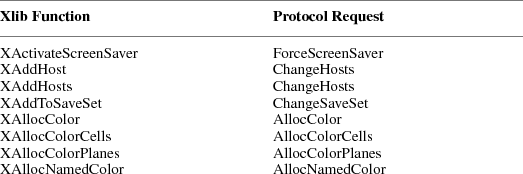
17
Xlib − C
Library X11, Release 6.7 DRAFT
The following table
lists each X protocol request (in alphabetical order) and
the Xlib functions that reference it.
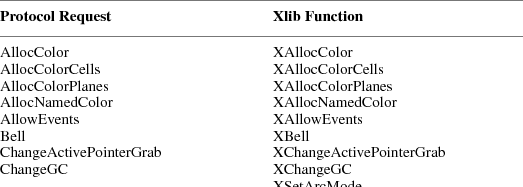
18
Xlib − C
Library X11, Release 6.7 DRAFT
Appendix
B
X
Font Cursors
The following are
the available cursors that can be used with
XCreateFontCursor.
|
#define XC_X_cursor 0 |
#define XC_ll_angle 76 |
|
#define XC_arrow 2 |
#define XC_lr_angle 78 |
|
#define XC_based_arrow_down 4 |
#define XC_man 80 |
|
#define XC_based_arrow_up 6 |
#define XC_middlebutton 82 |
|
#define XC_boat 8 |
#define XC_mouse 84 |
|
#define XC_bogosity 10 |
#define XC_pencil 86 |
#define XC_bottom_left_corner 12#define
XC_pirate 88
#define XC_bottom_right_corner 14#define XC_plus 90
|
#define XC_bottom_side 16 |
#define XC_question_arrow 92 |
|
#define XC_bottom_tee 18 |
#define XC_right_ptr 94 |
|
#define XC_box_spiral 20 |
#define XC_right_side 96 |
|
#define XC_center_ptr 22 |
#define XC_right_tee 98 |
|
#define XC_circle 24 |
#define XC_rightbutton 100 |
|
#define XC_clock 26 |
#define XC_rtl_logo 102 |
|
#define XC_coffee_mug 28 |
#define XC_sailboat 104 |
|
#define XC_cross 30 |
#define XC_sb_down_arrow 106 |
|
#define XC_cross_reverse 32 |
#define XC_sb_h_double_arrow 108 |
|
#define XC_crosshair 34 |
#define XC_sb_left_arrow 110 |
|
#define XC_diamond_cross 36 |
#define XC_sb_right_arrow 112 |
|
#define XC_dot 38 |
#define XC_sb_up_arrow 114 |
|
#define XC_dot_box_mask 40 |
#define XC_sb_v_double_arrow 116 |
|
#define XC_double_arrow 42 |
#define XC_shuttle 118 |
|
#define XC_draft_large 44 |
#define XC_sizing 120 |
|
#define XC_draft_small 46 |
#define XC_spider 122 |
|
#define XC_draped_box 48 |
#define XC_spraycan 124 |
|
#define XC_exchange 50 |
#define XC_star 126 |
|
#define XC_fleur 52 |
#define XC_target 128 |
|
#define XC_gobbler 54 |
#define XC_tcross 130 |
|
#define XC_gumby 56 |
#define XC_top_left_arrow 132 |
|
#define XC_hand1 58 |
#define XC_top_left_corner 134 |
|
#define XC_hand2 60 |
#define XC_top_right_corner 136 |
|
#define XC_heart 62 |
#define XC_top_side 138 |
|
#define XC_icon 64 |
#define XC_top_tee 140 |
|
#define XC_iron_cross 66 |
#define XC_trek 142 |
|
#define XC_left_ptr 68 |
#define XC_ul_angle 144 |
|
#define XC_left_side 70 |
#define XC_umbrella 146 |
|
#define XC_left_tee 72 |
#define XC_ur_angle 148 |
|
#define XC_leftbutton 74 |
#define XC_watch 150 |
|
#define XC_xterm 152 |
19
Xlib − C
Library X11, Release 6.7 DRAFT
Appendix
C
Extensions
Because X can
evolve by extensions to the core protocol, it is important
that extensions not be perceived as second-class citizens.
At some point, your favorite extensions may be adopted as
additional parts of the X Standard.
Therefore, there
should be little to distinguish the use of an extension from
that of the core protocol. To avoid having to initialize
extensions explicitly in application programs, it is also
important that extensions perform lazy evaluations,
automatically initializing themselves when called for the
first time.
This appendix
describes techniques for writing extensions to Xlib that
will run at essentially the same performance as the core
protocol requests.
Note
It is expected that
a given extension to X consists of multiple requests.
Defining 10 new features as 10 separate extensions is a bad
practice. Rather, they should be packaged into a single
extension and should use minor opcodes to distinguish the
requests.
The symbols and
macros used for writing stubs to Xlib are listed in
<X11/Xlibint.h>.
Basic Protocol Support Routines
The basic protocol
requests for extensions are XQueryExtension and
XListExtensions. __ │
Bool
XQueryExtension(display, name,
major_opcode_return, first_event_return,
first_error_return)
Display *display;
char *name;
int *major_opcode_return;
int *first_event_return;
int *first_error_return;
|
display |
|
Specifies the
connection to the X server. |
|
name |
|
Specifies the
extension name. |
major_opcode_return
|
Returns the major opcode. |
|
first_event_return
|
Returns the first event code, if any. |
|
first_error_return
|
Returns the first error code, if any.
│__ |
|
The
XQueryExtension function determines if the named
extension is present. If the extension is not present,
XQueryExtension returns False; otherwise, it
returns True. If the extension is present,
XQueryExtension returns the major opcode for the
extension to major_opcode_return; otherwise, it returns
zero. Any minor opcode and the request formats are specific
to the extension. If the extension involves additional event
types, XQueryExtension returns the base event type
code to first_event_return; otherwise, it returns zero. The
format of the events is specific to the extension. If the
extension involves additional error codes,
XQueryExtension returns the base error code to
first_error_return; otherwise, it returns zero. The format
of additional data in the errors is specific to the
extension.
If the extension
name is not in the Host Portable Character Encoding the
result is implementation-dependent. Uppercase and lowercase
matter; the strings ‘‘thing’’,
‘‘Thing’’, and
‘‘thinG’’ are all considered
different names. __ │
char
**XListExtensions(display, nextensions_return)
Display *display;
int *nextensions_return;
|
display |
|
Specifies the
connection to the X server. |
nextensions_return
|
Returns the number of extensions listed.
│__ |
|
The
XListExtensions function returns a list of all
extensions supported by the server. If the data returned by
the server is in the Latin Portable Character Encoding, then
the returned strings are in the Host Portable Character
Encoding. Otherwise, the result is implementation-dependent.
__ │
XFreeExtensionList(list)
char **list;
|
list |
|
Specifies the list
of extension names. |
|
│__
The
XFreeExtensionList function frees the memory
allocated by XListExtensions.
Hooking into Xlib
These functions
allow you to hook into the library. They are not normally
used by application programmers but are used by people who
need to extend the core X protocol and the X library
interface. The functions, which generate protocol requests
for X, are typically called stubs.
In extensions,
stubs first should check to see if they have initialized
themselves on a connection. If they have not, they then
should call XInitExtension to attempt to initialize
themselves on the connection.
If the extension
needs to be informed of GC/font allocation or deallocation
or if the extension defines new event types, the functions
described here allow the extension to be called when these
events occur.
The
XExtCodes structure returns the information from
XInitExtension and is defined in
<X11/Xlib.h>: __ │
|
typedef struct _XExtCodes { |
|
/* public to extension, cannot be changed
*/ |
|
|
int extension; |
/* extension number */ |
|
|
int major_opcode; |
/* major op-code assigned by server */ |
|
|
int first_event; |
/* first event number for the extension
*/ |
|
|
int first_error; |
/* first error number for the extension
*/ |
} XExtCodes; │__ __ │
XExtCodes
*XInitExtension(display, name)
Display *display;
char *name;
|
display |
|
Specifies the
connection to the X server. |
|
name |
|
Specifies the
extension name. |
│__
The
XInitExtension function determines if the named
extension exists. Then, it allocates storage for maintaining
the information about the extension on the connection,
chains this onto the extension list for the connection, and
returns the information the stub implementor will need to
access the extension. If the extension does not exist,
XInitExtension returns NULL.
If the extension
name is not in the Host Portable Character Encoding, the
result is implementation-dependent. Uppercase and lowercase
matter; the strings ‘‘thing’’,
‘‘Thing’’, and
‘‘thinG’’ are all considered
different names.
The extension
number in the XExtCodes structure is needed in the
other calls that follow. This extension number is unique
only to a single connection. __ │
XExtCodes
*XAddExtension(display)
Display *display;
|
display |
|
Specifies the
connection to the X server. |
│__
For local Xlib
extensions, the XAddExtension function allocates the
XExtCodes structure, bumps the extension number
count, and chains the extension onto the extension list.
(This permits extensions to Xlib without requiring server
extensions.)
Hooks into the Library
These functions
allow you to define procedures that are to be called when
various circumstances occur. The procedures include the
creation of a new GC for a connection, the copying of a GC,
the freeing of a GC, the creating and freeing of fonts, the
conversion of events defined by extensions to and from wire
format, and the handling of errors.
All of these
functions return the previous procedure defined for this
extension. __ │
int
(*XESetCloseDisplay(display, extension,
proc))()
Display *display;
int extension;
int (*proc)();
|
display |
|
Specifies the
connection to the X server. |
|
extension |
|
Specifies the
extension number. |
|
proc |
|
Specifies the
procedure to call when the display is closed. |
│__
The
XESetCloseDisplay function defines a procedure to be
called whenever XCloseDisplay is called. It returns
any previously defined procedure, usually NULL.
When
XCloseDisplay is called, your procedure is called
with these arguments: __ │
(*proc)(display,
codes)
|
Display *display; |
|
|
XExtCodes *codes; │__ __
│ |
|
int
(*XESetCreateGC(display, extension,
proc))()
Display *display;
int extension;
int (*proc)();
|
display |
|
Specifies the
connection to the X server. |
|
extension |
|
Specifies the
extension number. |
|
proc |
|
Specifies the
procedure to call when a GC is closed. |
│__
The
XESetCreateGC function defines a procedure to be
called whenever a new GC is created. It returns any
previously defined procedure, usually NULL.
When a GC is
created, your procedure is called with these arguments: __
│
(*proc)(display,
gc, codes)
|
Display *display; |
|
|
GC gc; |
|
|
XExtCodes *codes; │__ __
│ |
|
int
(*XESetCopyGC(display, extension,
proc))()
Display *display;
int extension;
int (*proc)();
|
display |
|
Specifies the
connection to the X server. |
|
extension |
|
Specifies the
extension number. |
|
proc |
|
Specifies the
procedure to call when GC components are copied. |
│__
The
XESetCopyGC function defines a procedure to be called
whenever a GC is copied. It returns any previously defined
procedure, usually NULL.
When a GC is
copied, your procedure is called with these arguments: __
│
(*proc)(display,
gc, codes)
|
Display *display; |
|
|
GC gc; |
|
|
XExtCodes *codes; │__ __
│ |
|
int
(*XESetFreeGC(display, extension,
proc))()
Display *display;
int extension;
int (*proc)();
|
display |
|
Specifies the
connection to the X server. |
|
extension |
|
Specifies the
extension number. |
|
proc |
|
Specifies the
procedure to call when a GC is freed. |
│__
The
XESetFreeGC function defines a procedure to be called
whenever a GC is freed. It returns any previously defined
procedure, usually NULL.
When a GC is freed,
your procedure is called with these arguments: __
│
(*proc)(display,
gc, codes)
|
Display *display; |
|
|
GC gc; |
|
|
XExtCodes *codes; │__ __
│ |
|
int
(*XESetCreateFont(display, extension,
proc))()
Display *display;
int extension;
int (*proc)();
|
display |
|
Specifies the
connection to the X server. |
|
extension |
|
Specifies the
extension number. |
|
proc |
|
Specifies the
procedure to call when a font is created. |
│__
The
XESetCreateFont function defines a procedure to be
called whenever XLoadQueryFont and XQueryFont
are called. It returns any previously defined procedure,
usually NULL.
When
XLoadQueryFont or XQueryFont is called, your
procedure is called with these arguments: __ │
(*proc)(display,
fs, codes)
|
Display *display; |
|
|
XFontStruct *fs; |
|
|
XExtCodes *codes; │__ __
│ |
|
int
(*XESetFreeFont(display, extension,
proc))()
Display *display;
int extension;
int (*proc)();
|
display |
|
Specifies the
connection to the X server. |
|
extension |
|
Specifies the
extension number. |
|
proc |
|
Specifies the
procedure to call when a font is freed. |
│__
The
XESetFreeFont function defines a procedure to be
called whenever XFreeFont is called. It returns any
previously defined procedure, usually NULL.
When
XFreeFont is called, your procedure is called with
these arguments: __ │
(*proc)(display,
fs, codes)
|
Display *display; |
|
|
XFontStruct *fs; |
|
|
XExtCodes *codes; │__ |
|
The
XESetWireToEvent and XESetEventToWire
functions allow you to define new events to the library. An
XEvent structure always has a type code (type
int) as the first component. This uniquely identifies
what kind of event it is. The second component is always the
serial number (type unsigned long) of the last
request processed by the server. The third component is
always a Boolean (type Bool) indicating whether the
event came from a SendEvent protocol request. The
fourth component is always a pointer to the display the
event was read from. The fifth component is always a
resource ID of one kind or another, usually a window,
carefully selected to be useful to toolkit dispatchers. The
fifth component should always exist, even if the event does
not have a natural destination; if there is no value from
the protocol to put in this component, initialize it to
zero.
Note
There is an
implementation limit such that your host event structure
size cannot be bigger than the size of the XEvent
union of structures. There also is no way to guarantee that
more than 24 elements or 96 characters in the structure will
be fully portable between machines. __ │
int
(*XESetWireToEvent(display, event_number,
proc))()
Display *display;
int event_number;
Status (*proc)();
|
display |
|
Specifies the
connection to the X server. |
event_number
|
|
Specifies the event code. |
|
proc |
|
Specifies the
procedure to call when converting an event. |
│__
The
XESetWireToEvent function defines a procedure to be
called when an event needs to be converted from wire format
(xEvent) to host format (XEvent). The event
number defines which protocol event number to install a
conversion procedure for. XESetWireToEvent returns
any previously defined procedure.
Note
You can replace a
core event conversion function with one of your own,
although this is not encouraged. It would, however, allow
you to intercept a core event and modify it before being
placed in the queue or otherwise examined.
When Xlib needs to
convert an event from wire format to host format, your
procedure is called with these arguments: __ │
Status
(*proc)(display, re, event)
|
Display *display; |
|
|
XEvent *re; |
|
|
xEvent *event; │__ |
|
Your procedure must
return status to indicate if the conversion succeeded. The
re argument is a pointer to where the host format event
should be stored, and the event argument is the 32-byte wire
event structure. In the XEvent structure you are
creating, you must fill in the five required members of the
event structure. You should fill in the type member with the
type specified for the xEvent structure. You should
copy all other members from the xEvent structure
(wire format) to the XEvent structure (host format).
Your conversion procedure should return True if the
event should be placed in the queue or False if it
should not be placed in the queue.
To initialize the
serial number component of the event, call
_XSetLastRequestRead with the event and use the
return value. __ │
unsigned long
_XSetLastRequestRead(display, rep)
Display *display;
xGenericReply *rep;
|
display |
|
Specifies the
connection to the X server. |
|
rep |
|
Specifies the wire
event structure. |
│__
The
_XSetLastRequestRead function computes and returns a
complete serial number from the partial serial number in the
event. __ │
Status
(*XESetEventToWire(display, event_number,
proc))()
Display *display;
int event_number;
int (*proc)();
|
display |
|
Specifies the
connection to the X server. |
event_number
|
|
Specifies the event code. |
|
proc |
|
Specifies the
procedure to call when converting an event. |
│__
The
XESetEventToWire function defines a procedure to be
called when an event needs to be converted from host format
(XEvent) to wire format (xEvent) form. The
event number defines which protocol event number to install
a conversion procedure for. XESetEventToWire returns
any previously defined procedure. It returns zero if the
conversion fails or nonzero otherwise.
Note
You can replace a
core event conversion function with one of your own,
although this is not encouraged. It would, however, allow
you to intercept a core event and modify it before being
sent to another client.
When Xlib needs to
convert an event from host format to wire format, your
procedure is called with these arguments: __ │
(*proc)(display,
re, event)
|
Display *display; |
|
|
XEvent *re; |
|
|
xEvent *event; │__ |
|
The re argument is
a pointer to the host format event, and the event argument
is a pointer to where the 32-byte wire event structure
should be stored. You should fill in the type with the type
from the XEvent structure. All other members then
should be copied from the host format to the xEvent
structure. __ │
Bool
(*XESetWireToError(display, error_number,
proc)()
Display *display;
int error_number;
Bool (*proc)();
|
display |
|
Specifies the
connection to the X server. |
error_number
|
|
Specifies the error code. |
|
proc |
|
Specifies the
procedure to call when an error is received. |
│__
The
XESetWireToError function defines a procedure to be
called when an extension error needs to be converted from
wire format to host format. The error number defines which
protocol error code to install the conversion procedure for.
XESetWireToError returns any previously defined
procedure.
Use this function
for extension errors that contain additional error values
beyond those in a core X error, when multiple wire errors
must be combined into a single Xlib error, or when it is
necessary to intercept an X error before it is otherwise
examined.
When Xlib needs to
convert an error from wire format to host format, the
procedure is called with these arguments: __ │
Bool
(*proc)(display, he, we)
|
Display *display; |
|
|
XErrorEvent *he; |
|
|
xError *we; │__ |
|
The he argument is
a pointer to where the host format error should be stored.
The structure pointed at by he is guaranteed to be as large
as an XEvent structure and so can be cast to a type
larger than an XErrorEvent to store additional
values. If the error is to be completely ignored by Xlib
(for example, several protocol error structures will be
combined into one Xlib error), then the function should
return False; otherwise, it should return
True. __ │
int
(*XESetError(display, extension,
proc))()
Display *display;
int extension;
int (*proc)();
|
display |
|
Specifies the
connection to the X server. |
|
extension |
|
Specifies the
extension number. |
|
proc |
|
Specifies the
procedure to call when an error is received. |
│__
Inside Xlib, there
are times that you may want to suppress the calling of the
external error handling when an error occurs. This allows
status to be returned on a call at the cost of the call
being synchronous (though most such functions are query
operations, in any case, and are typically programmed to be
synchronous).
When Xlib detects a
protocol error in _XReply, it calls your procedure
with these arguments: __ │
int
(*proc)(display, err, codes,
ret_code)
|
Display *display; |
|
|
xError *err; |
|
|
XExtCodes *codes; |
|
|
int *ret_code; │__ |
|
The err argument is
a pointer to the 32-byte wire format error. The codes
argument is a pointer to the extension codes structure. The
ret_code argument is the return code you may want
_XReply returned to.
If your procedure
returns a zero value, the error is not suppressed, and the
client’s error handler is called. (For further
information, see section 11.8.2.) If your procedure returns
nonzero, the error is suppressed, and _XReply returns
the value of ret_code. __ │
char
*(*XESetErrorString(display, extension,
proc))()
Display *display;
int extension;
char *(*proc)();
|
display |
|
Specifies the
connection to the X server. |
|
extension |
|
Specifies the
extension number. |
|
proc |
|
Specifies the
procedure to call to obtain an error string. |
│__
The
XGetErrorText function returns a string to the user
for an error. XESetErrorString allows you to define a
procedure to be called that should return a pointer to the
error message. The following is an example. __ │
(*proc)(display,
code, codes, buffer, nbytes)
|
Display *display; |
|
|
int code; |
|
|
XExtCodes *codes; |
|
|
char *buffer; |
|
|
int nbytes; │__ |
|
Your procedure is
called with the error code for every error detected. You
should copy nbytes of a null-terminated string containing
the error message into buffer. __ │
void
(*XESetPrintErrorValues(display, extension,
proc))()
Display *display;
int extension;
void (*proc)();
|
display |
|
Specifies the
connection to the X server. |
|
extension |
|
Specifies the
extension number. |
|
proc |
|
Specifies the
procedure to call when an error is printed. |
│__
The
XESetPrintErrorValues function defines a procedure to
be called when an extension error is printed, to print the
error values. Use this function for extension errors that
contain additional error values beyond those in a core X
error. It returns any previously defined procedure.
When Xlib needs to
print an error, the procedure is called with these
arguments: __ │
void
(*proc)(display, ev, fp)
|
Display *display; |
|
|
XErrorEvent *ev; |
|
|
void *fp; │__ |
|
The structure
pointed at by ev is guaranteed to be as large as an
XEvent structure and so can be cast to a type larger
than an XErrorEvent to obtain additional values set
by using XESetWireToError. The underlying type of the
fp argument is system dependent; on a POSIX-compliant
system, fp should be cast to type FILE*. __ │
int
(*XESetFlushGC(display, extension,
proc))()
Display *display;
int extension;
int *(*proc)();
|
display |
|
Specifies the
connection to the X server. |
|
extension |
|
Specifies the
extension number. |
|
proc |
|
Specifies the
procedure to call when a GC is flushed. |
│__
The procedure set
by the XESetFlushGC function has the same interface
as the procedure set by the XESetCopyGC function, but
is called when a GC cache needs to be updated in the server.
__ │
int
(*XESetBeforeFlush(display, extension,
proc))()
Display *display;
int extension;
int *(*proc)();
|
display |
|
Specifies the
connection to the X server. |
|
extension |
|
Specifies the
extension number. |
|
proc |
|
Specifies the
procedure to call when a buffer is flushed. |
│__
The
XESetBeforeFlush function defines a procedure to be
called when data is about to be sent to the server. When
data is about to be sent, your procedure is called one or
more times with these arguments: __ │
void
(*proc)(display, codes, data,
len)
|
Display *display; |
|
|
XExtCodes *codes; |
|
|
char *data; |
|
|
long len; │__ |
|
The data argument
specifies a portion of the outgoing data buffer, and its
length in bytes is specified by the len argument. Your
procedure must not alter the contents of the data and must
not do additional protocol requests to the same display.
Hooks onto Xlib Data Structures
Various Xlib data
structures have provisions for extension procedures to chain
extension supplied data onto a list. These structures are
GC, Visual, Screen,
ScreenFormat, Display, and XFontStruct.
Because the list pointer is always the first member in the
structure, a single set of procedures can be used to
manipulate the data on these lists.
The following
structure is used in the functions in this section and is
defined in <X11/Xlib.h>: __ │
typedef struct
_XExtData {
|
int number; |
/* number returned by XInitExtension */ |
|
struct _XExtData *next; |
/* next item on list of data for structure
*/ |
|
int (*free_private)(); |
/* if defined, called to free private
*/ |
|
XPointer private_data; |
/* data private to this extension. */ |
} XExtData; │__
When any of the
data structures listed above are freed, the list is walked,
and the structure’s free procedure (if any) is called.
If free is NULL, then the library frees both the data
pointed to by the private_data member and the structure
itself. __ │
union {Display
*display;
|
GC gc; |
|
|
Visual *visual; |
|
|
Screen *screen; |
|
|
ScreenFormat *pixmap_format; |
|
|
XFontStruct *font } XEDataObject; │__
__ │ |
|
XExtData
**XEHeadOfExtensionList(object)
|
object |
|
Specifies the
object. |
|
│__
The
XEHeadOfExtensionList function returns a pointer to
the list of extension structures attached to the specified
object. In concert with XAddToExtensionList,
XEHeadOfExtensionList allows an extension to attach
arbitrary data to any of the structures of types contained
in XEDataObject. __ │
XAddToExtensionList(structure,
ext_data)
XExtData **structure;
XExtData *ext_data;
|
structure |
|
Specifies the
extension list. |
|
ext_data |
|
Specifies the
extension data structure to add. |
│__
The structure
argument is a pointer to one of the data structures
enumerated above. You must initialize ext_data->number
with the extension number before calling this function. __
│
XExtData
*XFindOnExtensionList(structure, number)
struct _XExtData **structure;
int number;
|
structure |
|
Specifies the
extension list. |
|
|
number |
|
Specifies the
extension number from XInitExtension. |
|
│__
The
XFindOnExtensionList function returns the first
extension data structure for the extension numbered number.
It is expected that an extension will add at most one
extension data structure to any single data
structure’s extension data list. There is no way to
find additional structures.
The XAllocID
macro, which allocates and returns a resource ID, is defined
in <X11/Xlib.h>. __ │
XAllocID(display)
Display *display;
|
display |
|
Specifies the
connection to the X server. |
│__
This macro is a
call through the Display structure to an internal
resource ID allocator. It returns a resource ID that you can
use when creating new resources.
The
XAllocIDs macro allocates and returns an array of
resource ID. __ │
XAllocIDs(display,
ids_return, count)
Display *display;
XID *ids_return;
int count;
|
display |
Specifies the
connection to the X server. |
|
ids_return |
Returns the
resource IDs. |
|
rep |
Specifies the
number of resource IDs requested. |
│__
This macro is a
call through the Display structure to an internal
resource ID allocator. It returns resource IDs to the array
supplied by the caller. To correctly handle automatic reuse
of resource IDs, you must call XAllocIDs when
requesting multiple resource IDs. This call might generate
protocol requests.
GC Caching
GCs are cached by
the library to allow merging of independent change requests
to the same GC into single protocol requests. This is
typically called a write-back cache. Any extension procedure
whose behavior depends on the contents of a GC must flush
the GC cache to make sure the server has up-to-date contents
in its GC.
The FlushGC
macro checks the dirty bits in the library’s GC
structure and calls _XFlushGCCache if any elements
have changed. The FlushGC macro is defined as
follows: __ │
FlushGC(display,
gc)
Display *display;
GC gc;
|
display |
|
Specifies the
connection to the X server. |
|
gc |
|
Specifies the
GC. |
│__
Note that if you
extend the GC to add additional resource ID components, you
should ensure that the library stub sends the change request
immediately. This is because a client can free a resource
immediately after using it, so if you only stored the value
in the cache without forcing a protocol request, the
resource might be destroyed before being set into the GC.
You can use the _XFlushGCCache procedure to force the
cache to be flushed. The _XFlushGCCache procedure is
defined as follows: __ │
_XFlushGCCache(display,
gc)
Display *display;
GC gc;
|
display |
|
Specifies the
connection to the X server. |
|
gc |
|
Specifies the
GC. |
│__
Graphics Batching
If you extend X to
add more poly graphics primitives, you may be able to take
advantage of facilities in the library to allow back-to-back
single calls to be transformed into poly requests. This may
dramatically improve performance of programs that are not
written using poly requests. A pointer to an xReq,
called last_req in the display structure, is the last
request being processed. By checking that the last request
type, drawable, gc, and other options are the same as the
new one and that there is enough space left in the buffer,
you may be able to just extend the previous graphics request
by extending the length field of the request and appending
the data to the buffer. This can improve performance by five
times or more in naive programs. For example, here is the
source for the XDrawPoint stub. (Writing extension
stubs is discussed in the next section.) __ │
#include
<X11/Xlibint.h>
/* precompute
the maximum size of batching request allowed */
static int size
= sizeof(xPolyPointReq) + EPERBATCH * sizeof(xPoint);
XDrawPoint(dpy,
d, gc, x, y)
register Display *dpy;
Drawable d;
GC gc;
int x, y; /* INT16 */
{
xPoint *point;
LockDisplay(dpy);
FlushGC(dpy, gc);
{
register xPolyPointReq *req = (xPolyPointReq *)
dpy->last_req;
/* if same as previous request, with same drawable, batch
requests */
if (
(req->reqType == X_PolyPoint)
&& (req->drawable == d)
&& (req->gc == gc->gid)
&& (req->coordMode == CoordModeOrigin)
&& ((dpy->bufptr + sizeof (xPoint)) <=
dpy->bufmax)
&& (((char *)dpy->bufptr - (char *)req) <
size) ) {
point = (xPoint *) dpy->bufptr;
req->length += sizeof (xPoint) >> 2;
dpy->bufptr += sizeof (xPoint);
}
else {
GetReqExtra(PolyPoint, 4, req); /* 1 point = 4 bytes */
req->drawable = d;
req->gc = gc->gid;
req->coordMode = CoordModeOrigin;
point = (xPoint *) (req + 1);
}
point->x = x;
point->y = y;
}
UnlockDisplay(dpy);
SyncHandle();
} │__
To keep clients
from generating very long requests that may monopolize the
server, there is a symbol defined in
<X11/Xlibint.h> of EPERBATCH on the number of
requests batched. Most of the performance benefit occurs in
the first few merged requests. Note that FlushGC is
called before picking up the value of last_req,
because it may modify this field.
Writing Extension Stubs
All X requests
always contain the length of the request, expressed as a
16-bit quantity of 32 bits. This means that a single request
can be no more than 256K bytes in length. Some servers may
not support single requests of such a length. The value of
dpy->max_request_size contains the maximum length as
defined by the server implementation. For further
information, see ‘‘X Window System
Protocol.’’
Requests, Replies, and Xproto.h
The
<X11/Xproto.h> file contains three sets of
definitions that are of interest to the stub implementor:
request names, request structures, and reply structures.
You need to
generate a file equivalent to <X11/Xproto.h>
for your extension and need to include it in your stub
procedure. Each stub procedure also must include
<X11/Xlibint.h>.
The identifiers are
deliberately chosen in such a way that, if the request is
called X_DoSomething, then its request structure is
xDoSomethingReq, and its reply is xDoSomethingReply. The
GetReq family of macros, defined in
<X11/Xlibint.h>, takes advantage of this naming
scheme.
For each X request,
there is a definition in <X11/Xproto.h> that
looks similar to this:
#define
X_DoSomething 42
In your extension
header file, this will be a minor opcode, instead of a major
opcode.
Request Format
Every request
contains an 8-bit major opcode and a 16-bit length field
expressed in units of 4 bytes. Every request consists of 4
bytes of header (containing the major opcode, the length
field, and a data byte) followed by zero or more additional
bytes of data. The length field defines the total length of
the request, including the header. The length field in a
request must equal the minimum length required to contain
the request. If the specified length is smaller or larger
than the required length, the server should generate a
BadLength error. Unused bytes in a request are not
required to be zero. Extensions should be designed in such a
way that long protocol requests can be split up into smaller
requests, if it is possible to exceed the maximum request
size of the server. The protocol guarantees the maximum
request size to be no smaller than 4096 units (16384
bytes).
Major opcodes 128
through 255 are reserved for extensions. Extensions are
intended to contain multiple requests, so extension requests
typically have an additional minor opcode encoded in the
second data byte in the request header, but the placement
and interpretation of this minor opcode as well as all other
fields in extension requests are not defined by the core
protocol. Every request is implicitly assigned a sequence
number (starting with one) used in replies, errors, and
events.
To help but not
cure portability problems to certain machines, the
B16 and B32 macros have been defined so that
they can become bitfield specifications on some machines.
For example, on a Cray, these should be used for all 16-bit
and 32-bit quantities, as discussed below.
Most protocol
requests have a corresponding structure typedef in
<X11/Xproto.h>, which looks like: __
│
typedef struct
_DoSomethingReq {
|
CARD8 reqType; |
/* X_DoSomething */ |
|
CARD8 someDatum; |
/* used differently in different requests
*/ |
|
CARD16 length B16; |
/* total # of bytes in request, divided by
4 */ |
|
... |
|
|
/* request-specific data */ |
|
|
... |
|
} xDoSomethingReq; │__
If a core protocol
request has a single 32-bit argument, you need not declare a
request structure in your extension header file. Instead,
such requests use the xResourceReq structure in
<X11/Xproto.h>. This structure is used for any
request whose single argument is a Window,
Pixmap, Drawable, GContext,
Font, Cursor, Colormap, Atom, or
VisualID. __ │
typedef struct
_ResourceReq {
|
CARD8 reqType; |
/* the request type, e.g. X_DoSomething
*/ |
|
BYTE pad; |
/* not used */ |
|
CARD16 length B16; |
/* 2 (= total # of bytes in request,
divided by 4) */ |
|
CARD32 id B32; |
/* the Window, Drawable, Font, GContext,
etc. */ |
} xResourceReq; │__
If convenient, you
can do something similar in your extension header file.
In both of these
structures, the reqType field identifies the type of the
request (for example, X_MapWindow or X_CreatePixmap). The
length field tells how long the request is in units of
4-byte longwords. This length includes both the request
structure itself and any variable-length data, such as
strings or lists, that follow the request structure. Request
structures come in different sizes, but all requests are
padded to be multiples of four bytes long.
A few protocol
requests take no arguments at all. Instead, they use the
xReq structure in <X11/Xproto.h>, which
contains only a reqType and a length (and a pad byte).
If the protocol
request requires a reply, then <X11/Xproto.h>
also contains a reply structure typedef: __ │
typedef struct
_DoSomethingReply {
|
BYTE type; |
/* always X_Reply */ |
|
BYTE someDatum; |
/* used differently in different requests
*/ |
|
CARD16 sequenceNumber B16;/* # of requests
sent so far */ |
|
|
CARD32 length B32; |
/* # of additional bytes, divided by 4
*/ |
|
... |
|
|
/* request-specific data */ |
|
|
... |
|
} xDoSomethingReply; │__
Most of these reply
structures are 32 bytes long. If there are not that many
reply values, then they contain a sufficient number of pad
fields to bring them up to 32 bytes. The length field is the
total number of bytes in the request minus 32, divided by 4.
This length will be nonzero only if:
|
• |
|
The reply structure
is followed by variable-length data, such as a list or
string. |
|
• |
|
The reply structure
is longer than 32 bytes. |
Only
GetWindowAttributes, QueryFont,
QueryKeymap, and GetKeyboardControl have reply
structures longer than 32 bytes in the core protocol.
A few protocol
requests return replies that contain no data.
<X11/Xproto.h> does not define reply structures
for these. Instead, they use the xGenericReply
structure, which contains only a type, length, and sequence
number (and sufficient padding to make it 32 bytes
long).
Starting to Write a Stub Procedure
An Xlib stub
procedure should start like this:
#include
"<X11/Xlibint.h>
XDoSomething
(arguments, ... )
/* argument declarations */
{
register
XDoSomethingReq *req;
...
If the protocol
request has a reply, then the variable declarations should
include the reply structure for the request. The following
is an example:
xDoSomethingReply
rep;
Locking Data Structures
To lock the display
structure for systems that want to support multithreaded
access to a single display connection, each stub will need
to lock its critical section. Generally, this section is the
point from just before the appropriate GetReq call until all
arguments to the call have been stored into the buffer. The
precise instructions needed for this locking depend upon the
machine architecture. Two calls, which are generally
implemented as macros, have been provided. __ │
LockDisplay(display)
Display *display;
UnlockDisplay(display)
Display *display;
|
display |
|
Specifies the
connection to the X server. |
│__
Sending the Protocol Request and Arguments
After the variable
declarations, a stub procedure should call one of four
macros defined in <X11/Xlibint.h>:
GetReq, GetReqExtra, GetResReq, or
GetEmptyReq. All of these macros take, as their first
argument, the name of the protocol request as declared in
<X11/Xproto.h> except with X_ removed. Each one
declares a Display structure pointer, called dpy, and
a pointer to a request structure, called req, which is of
the appropriate type. The macro then appends the request
structure to the output buffer, fills in its type and length
field, and sets req to point to it.
If the protocol
request has no arguments (for instance, X_GrabServer), then
use GetEmptyReq.
GetEmptyReq
(DoSomething, req);
If the protocol
request has a single 32-bit argument (such as a
Pixmap, Window, Drawable, Atom,
and so on), then use GetResReq. The second argument
to the macro is the 32-bit object. X_MapWindow is a
good example.
GetResReq
(DoSomething, rid, req);
The rid argument is
the Pixmap, Window, or other resource ID.
If the protocol
request takes any other argument list, then call
GetReq. After the GetReq, you need to set all
the other fields in the request structure, usually from
arguments to the stub procedure.
GetReq
(DoSomething, req);
/* fill in arguments here */
req->arg1 = arg1;
req->arg2 = arg2;
...
A few stub
procedures (such as XCreateGC and
XCreatePixmap) return a resource ID to the caller but
pass a resource ID as an argument to the protocol request.
Such procedures use the macro XAllocID to allocate a
resource ID from the range of IDs that were assigned to this
client when it opened the connection.
rid =
req->rid = XAllocID();
...
return (rid);
Finally, some stub
procedures transmit a fixed amount of variable-length data
after the request. Typically, these procedures (such as
XMoveWindow and XSetBackground) are special
cases of more general functions like
XMoveResizeWindow and XChangeGC. These
procedures use GetReqExtra, which is the same as
GetReq except that it takes an additional argument
(the number of extra bytes to allocate in the output buffer
after the request structure). This number should always be a
multiple of four.
Variable Length Arguments
Some protocol
requests take additional variable-length data that follow
the xDoSomethingReq structure. The format of this
data varies from request to request. Some requests require a
sequence of 8-bit bytes, others a sequence of 16-bit or
32-bit entities, and still others a sequence of
structures.
It is necessary to
add the length of any variable-length data to the length
field of the request structure. That length field is in
units of 32-bit longwords. If the data is a string or other
sequence of 8-bit bytes, then you must round the length up
and shift it before adding:
req->length
+= (nbytes+3)>>2;
To transmit
variable-length data, use the Data macros. If the
data fits into the output buffer, then this macro copies it
to the buffer. If it does not fit, however, the Data
macro calls _XSend, which transmits first the
contents of the buffer and then your data. The Data
macros take three arguments: the display, a pointer to the
beginning of the data, and the number of bytes to be sent.
__ │
Data(display,
(char *) data, nbytes);
Data16(display,
(short *) data, nbytes);
Data32(display,
(long *) data, nbytes); │__
Data,
Data16, and Data32 are macros that may use
their last argument more than once, so that argument should
be a variable rather than an expression such as
‘‘nitems*sizeof(item)’’. You should
do that kind of computation in a separate statement before
calling them. Use the appropriate macro when sending byte,
short, or long data.
If the protocol
request requires a reply, then call the procedure
_XSend instead of the Data macro.
_XSend takes the same arguments, but because it sends
your data immediately instead of copying it into the output
buffer (which would later be flushed anyway by the following
call on _XReply), it is faster.
Replies
If the protocol
request has a reply, then call _XReply after you have
finished dealing with all the fixed-length and
variable-length arguments. _XReply flushes the output
buffer and waits for an xReply packet to arrive. If
any events arrive in the meantime, _XReply places
them in the queue for later use. __ │
Status
_XReply(display, rep, extra,
discard)
Display *display;
xReply *rep;
int extra;
Bool discard;
|
display |
|
Specifies the
connection to the X server. |
|
rep |
|
Specifies the reply
structure. |
|
extra |
|
Specifies the
number of 32-bit words expected after the replay. |
|
discard |
|
Specifies if any
data beyond that specified in the extra argument should be
discarded. |
│__
The _XReply
function waits for a reply packet and copies its contents
into the specified rep. _XReply handles error and
event packets that occur before the reply is received.
_XReply takes four arguments:
|
• |
|
A Display *
structure |
|
• |
|
A pointer to a
reply structure (which must be cast to an xReply
*) |
|
• |
|
The number of
additional 32-bit words (beyond sizeof(xReply) = 32
bytes) in the reply structure |
|
• |
|
A Boolean that
indicates whether _XReply is to discard any
additional bytes beyond those it was told to read |
Because most reply
structures are 32 bytes long, the third argument is usually
0. The only core protocol exceptions are the replies to
GetWindowAttributes, QueryFont,
QueryKeymap, and GetKeyboardControl, which
have longer replies.
The last argument
should be False if the reply structure is followed by
additional variable-length data (such as a list or string).
It should be True if there is not any variable-length
data.
Note
This last argument
is provided for upward-compatibility reasons to allow a
client to communicate properly with a hypothetical later
version of the server that sends more data than the client
expected. For example, some later version of
GetWindowAttributes might use a larger, but
compatible, xGetWindowAttributesReply that contains
additional attribute data at the end.
_XReply
returns True if it received a reply successfully or
False if it received any sort of error.
For a request with
a reply that is not followed by variable-length data, you
write something like:
_XReply(display,
(xReply *)&rep, 0, True);
*ret1 = rep.ret1;
*ret2 = rep.ret2;
*ret3 = rep.ret3;
...
UnlockDisplay(dpy);
SyncHandle();
return (rep.ret4);
}
If there is
variable-length data after the reply, change the True
to False, and use the appropriate _XRead
function to read the variable-length data. __ │
_XRead(display,
data_return, nbytes)
Display *display;
char *data_return;
|
display |
|
Specifies the
connection to the X server. |
data_return
|
|
Specifies the buffer. |
|
|
nbytes |
|
Specifies the
number of bytes required. |
|
│__
The _XRead
function reads the specified number of bytes into
data_return. __ │
_XRead16(display,
data_return, nbytes)
Display *display;
short *data_return;
long nbytes;
|
display |
|
Specifies the
connection to the X server. |
data_return
|
|
Specifies the buffer. |
|
|
nbytes |
|
Specifies the
number of bytes required. |
|
│__
The _XRead16
function reads the specified number of bytes, unpacking them
as 16-bit quantities, into the specified array as shorts. __
│
_XRead32(display,
data_return, nbytes)
Display *display;
long *data_return;
long nbytes;
|
display |
|
Specifies the
connection to the X server. |
data_return
|
|
Specifies the buffer. |
|
|
nbytes |
|
Specifies the
number of bytes required. |
|
│__
The _XRead32
function reads the specified number of bytes, unpacking them
as 32-bit quantities, into the specified array as longs. __
│
_XRead16Pad(display,
data_return, nbytes)
Display *display;
short *data_return;
long nbytes;
|
display |
|
Specifies the
connection to the X server. |
data_return
|
|
Specifies the buffer. |
|
|
nbytes |
|
Specifies the
number of bytes required. |
|
│__
The
_XRead16Pad function reads the specified number of
bytes, unpacking them as 16-bit quantities, into the
specified array as shorts. If the number of bytes is not a
multiple of four, _XRead16Pad reads and discards up
to two additional pad bytes. __ │
_XReadPad(display,
data_return, nbytes)
Display *display;
char *data_return;
long nbytes;
|
display |
|
Specifies the
connection to the X server. |
data_return
|
|
Specifies the buffer. |
|
|
nbytes |
|
Specifies the
number of bytes required. |
|
│__
The
_XReadPad function reads the specified number of
bytes into data_return. If the number of bytes is not a
multiple of four, _XReadPad reads and discards up to
three additional pad bytes.
Each protocol
request is a little different. For further information, see
the Xlib sources for examples.
Synchronous Calling
Each procedure
should have a call, just before returning to the user, to a
macro called SyncHandle. If synchronous mode is
enabled (see XSynchronize), the request is sent
immediately. The library, however, waits until any error the
procedure could generate at the server has been handled.
Allocating and Deallocating Memory
To support the
possible reentry of these procedures, you must observe
several conventions when allocating and deallocating memory,
most often done when returning data to the user from the
window system of a size the caller could not know in advance
(for example, a list of fonts or a list of extensions). The
standard C library functions on many systems are not
protected against signals or other multithreaded uses. The
following analogies to standard I/O library functions have
been defined:

These should be
used in place of any calls you would make to the normal C
library functions.
If you need a
single scratch buffer inside a critical section (for
example, to pack and unpack data to and from the wire
protocol), the general memory allocators may be too
expensive to use (particularly in output functions, which
are performance critical). The following function returns a
scratch buffer for use within a critical section: __
│
char
*_XAllocScratch(display, nbytes)
Display *display;
unsigned long nbytes;
|
display |
|
Specifies the
connection to the X server. |
|
nbytes |
|
Specifies the
number of bytes required. |
│__
This storage must
only be used inside of a critical section of your stub. The
returned pointer cannot be assumed valid after any call that
might permit another thread to execute inside Xlib. For
example, the pointer cannot be assumed valid after any use
of the GetReq or Data families of macros,
after any use of _XReply, or after any use of the
_XSend or _XRead families of functions.
The following
function returns a scratch buffer for use across critical
sections: __ │
char
*_XAllocTemp(display, nbytes)
Display *display;
unsigned long nbytes;
|
display |
|
Specifies the
connection to the X server. |
|
nbytes |
|
Specifies the
number of bytes required. |
│__
This storage can be
used across calls that might permit another thread to
execute inside Xlib. The storage must be explicitly returned
to Xlib. The following function returns the storage: __
│
void
_XFreeTemp(display, buf, nbytes)
Display *display;
char *buf;
unsigned long nbytes;
|
display |
|
Specifies the
connection to the X server. |
|
buf |
|
Specifies the
buffer to return. |
|
nbytes |
|
Specifies the size
of the buffer. |
│__
You must pass back
the same pointer and size that were returned by
_XAllocTemp.
Portability Considerations
Many machine
architectures, including many of the more recent RISC
architectures, do not correctly access data at unaligned
locations; their compilers pad out structures to preserve
this characteristic. Many other machines capable of
unaligned references pad inside of structures as well to
preserve alignment, because accessing aligned data is
usually much faster. Because the library and the server use
structures to access data at arbitrary points in a byte
stream, all data in request and reply packets must be
naturally aligned; that is, 16-bit data starts on 16-bit
boundaries in the request and 32-bit data on 32-bit
boundaries. All requests must be a multiple of 32
bits in length to preserve the natural alignment in the data
stream. You must pad structures out to 32-bit boundaries.
Pad information does not have to be zeroed unless you want
to preserve such fields for future use in your protocol
requests. Floating point varies radically between machines
and should be avoided completely if at all possible.
This code may run
on machines with 16-bit ints. So, if any integer argument,
variable, or return value either can take only nonnegative
values or is declared as a CARD16 in the protocol, be
sure to declare it as unsigned int and not as
int. (This, of course, does not apply to Booleans or
enumerations.)
Similarly, if any
integer argument or return value is declared CARD32
in the protocol, declare it as an unsigned long and
not as int or long. This also goes for any
internal variables that may take on values larger than the
maximum 16-bit unsigned int.
The library
currently assumes that a char is 8 bits, a
short is 16 bits, an int is 16 or 32 bits, and
a long is 32 bits. The PackData macro is a
half-hearted attempt to deal with the possibility of 32 bit
shorts. However, much more work is needed to make this work
properly.
Deriving the Correct Extension Opcode
The remaining
problem a writer of an extension stub procedure faces that
the core protocol does not face is to map from the call to
the proper major and minor opcodes. While there are a number
of strategies, the simplest and fastest is outlined
below.
|
1. |
|
Declare an array of
pointers, _NFILE long (this is normally found in
<stdio.h> and is the number of file descriptors
supported on the system) of type XExtCodes. Make sure
these are all initialized to NULL. |
|
2. |
|
When your stub is
entered, your initialization test is just to use the display
pointer passed in to access the file descriptor and an index
into the array. If the entry is NULL, then this is the first
time you are entering the procedure for this display. Call
your initialization procedure and pass to it the display
pointer. |
|
3. |
|
Once in your
initialization procedure, call XInitExtension; if it
succeeds, store the pointer returned into this array. Make
sure to establish a close display handler to allow you to
zero the entry. Do whatever other initialization your
extension requires. (For example, install event handlers and
so on.) Your initialization procedure would normally return
a pointer to the XExtCodes structure for this
extension, which is what would normally be found in your
array of pointers. |
|
4. |
|
After returning
from your initialization procedure, the stub can now
continue normally, because it has its major opcode safely in
its hand in the XExtCodes structure. |
20
Xlib − C
Library X11, Release 6.7 DRAFT
Appendix
D
Compatibility
Functions
The X Version 11
and X Version 10 functions discussed in this appendix are
obsolete, have been superseded by newer X Version 11
functions, and are maintained for compatibility reasons
only.
X Version 11 Compatibility Functions
You can use the X
Version 11 compatibility functions to:
|
• |
|
Set standard
properties |
|
|
• |
|
Set and get window
sizing hints |
|
|
• |
|
Set and get an
XStandardColormap structure |
|
|
• |
|
Parse window
geometry |
|
|
• |
|
Get X environment
defaults |
|
Setting Standard Properties
To specify a
minimum set of properties describing the simplest
application, use XSetStandardProperties. This
function has been superseded by XSetWMProperties and
sets all or portions of the WM_NAME, WM_ICON_NAME, WM_HINTS,
WM_COMMAND, and WM_NORMAL_HINTS properties. __ │
XSetStandardProperties(display,
w, window_name, icon_name,
icon_pixmap, argv, argc, hints)
Display *display;
Window w;
char *window_name;
char *icon_name;
Pixmap icon_pixmap;
char **argv;
int argc;
XSizeHints *hints;
|
display |
|
Specifies the
connection to the X server. |
|
w |
|
Specifies the
window. |
window_name
|
|
Specifies the window name, which should be
a null-terminated string. |
|
icon_name |
|
Specifies the icon
name, which should be a null-terminated string. |
icon_pixmap
|
|
Specifies the bitmap that is to be used for
the icon or None. |
|
argv |
|
Specifies the
application’s argument list. |
|
argc |
|
Specifies the
number of arguments. |
|
hints |
|
Specifies a pointer
to the size hints for the window in its normal state. |
│__
The
XSetStandardProperties function provides a means by
which simple applications set the most essential properties
with a single call. XSetStandardProperties should be
used to give a window manager some information about your
program’s preferences. It should not be used by
applications that need to communicate more information than
is possible with XSetStandardProperties. (Typically,
argv is the argv array of your main program.) If the strings
are not in the Host Portable Character Encoding, the result
is implementation-dependent.
XSetStandardProperties
can generate BadAlloc and BadWindow
errors.
Setting and Getting Window Sizing Hints
Xlib provides
functions that you can use to set or get window sizing
hints. The functions discussed in this section use the flags
and the XSizeHints structure, as defined in the
<X11/Xutil.h> header file and use the
WM_NORMAL_HINTS property.
To set the size
hints for a given window in its normal state, use
XSetNormalHints. This function has been superseded by
XSetWMNormalHints. __ │
XSetNormalHints(display,
w, hints)
Display *display;
Window w;
XSizeHints *hints;
|
display |
|
Specifies the
connection to the X server. |
|
w |
|
Specifies the
window. |
|
hints |
|
Specifies a pointer
to the size hints for the window in its normal state. |
│__
The
XSetNormalHints function sets the size hints
structure for the specified window. Applications use
XSetNormalHints to inform the window manager of the
size or position desirable for that window. In addition, an
application that wants to move or resize itself should call
XSetNormalHints and specify its new desired location
and size as well as making direct Xlib calls to move or
resize. This is because window managers may ignore
redirected configure requests, but they pay attention to
property changes.
To set size hints,
an application not only must assign values to the
appropriate members in the hints structure but also must set
the flags member of the structure to indicate which
information is present and where it came from. A call to
XSetNormalHints is meaningless, unless the flags
member is set to indicate which members of the structure
have been assigned values.
XSetNormalHints
can generate BadAlloc and BadWindow
errors.
To return the size
hints for a window in its normal state, use
XGetNormalHints. This function has been superseded by
XGetWMNormalHints. __ │
Status
XGetNormalHints(display, w,
hints_return)
Display *display;
Window w;
XSizeHints *hints_return;
|
display |
|
Specifies the
connection to the X server. |
|
w |
|
Specifies the
window. |
hints_return
|
Returns the size hints for the window in
its normal state. │__ |
The
XGetNormalHints function returns the size hints for a
window in its normal state. It returns a nonzero status if
it succeeds or zero if the application specified no normal
size hints for this window.
XGetNormalHints
can generate a BadWindow error.
The next two
functions set and read the WM_ZOOM_HINTS property.
To set the zoom
hints for a window, use XSetZoomHints. This function
is no longer supported by the Inter-Client Communication
Conventions Manual. __ │
XSetZoomHints(display,
w, zhints)
Display *display;
Window w;
XSizeHints *zhints;
|
display |
|
Specifies the
connection to the X server. |
|
w |
|
Specifies the
window. |
|
zhints |
|
Specifies a pointer
to the zoom hints. |
│__
Many window
managers think of windows in one of three states: iconic,
normal, or zoomed. The XSetZoomHints function
provides the window manager with information for the window
in the zoomed state.
XSetZoomHints
can generate BadAlloc and BadWindow
errors.
To read the zoom
hints for a window, use XGetZoomHints. This function
is no longer supported by the Inter-Client Communication
Conventions Manual. __ │
Status
XGetZoomHints(display, w,
zhints_return)
Display *display;
Window w;
XSizeHints *zhints_return;
|
display |
|
Specifies the
connection to the X server. |
|
w |
|
Specifies the
window. |
zhints_return
|
Returns the zoom hints. │__ |
|
The
XGetZoomHints function returns the size hints for a
window in its zoomed state. It returns a nonzero status if
it succeeds or zero if the application specified no zoom
size hints for this window.
XGetZoomHints
can generate a BadWindow error.
To set the value of
any property of type WM_SIZE_HINTS, use
XSetSizeHints. This function has been superseded by
XSetWMSizeHints. __ │
XSetSizeHints(display,
w, hints, property)
Display *display;
Window w;
XSizeHints *hints;
Atom property;
|
display |
|
Specifies the
connection to the X server. |
|
w |
|
Specifies the
window. |
|
hints |
|
Specifies a pointer
to the size hints. |
|
property |
|
Specifies the
property name. |
│__
The
XSetSizeHints function sets the XSizeHints
structure for the named property and the specified window.
This is used by XSetNormalHints and
XSetZoomHints and can be used to set the value of any
property of type WM_SIZE_HINTS. Thus, it may be useful if
other properties of that type get defined.
XSetSizeHints
can generate BadAlloc, BadAtom, and
BadWindow errors.
To read the value
of any property of type WM_SIZE_HINTS, use
XGetSizeHints. This function has been superseded by
XGetWMSizeHints. __ │
Status
XGetSizeHints(display, w, hints_return,
property)
Display *display;
Window w;
XSizeHints *hints_return;
Atom property;
|
display |
|
Specifies the
connection to the X server. |
|
w |
|
Specifies the
window. |
hints_return
|
|
Returns the size hints. |
|
|
property |
|
Specifies the
property name. |
|
│__
The
XGetSizeHints function returns the XSizeHints
structure for the named property and the specified window.
This is used by XGetNormalHints and
XGetZoomHints. It also can be used to retrieve the
value of any property of type WM_SIZE_HINTS. Thus, it may be
useful if other properties of that type get defined.
XGetSizeHints returns a nonzero status if a size hint
was defined or zero otherwise.
XGetSizeHints
can generate BadAtom and BadWindow errors.
Getting and Setting an XStandardColormap Structure
To get the
XStandardColormap structure associated with one of
the described atoms, use XGetStandardColormap. This
function has been superseded by XGetRGBColormap. __
│
Status
XGetStandardColormap(display, w,
colormap_return, property)
Display *display;
Window w;
XStandardColormap *colormap_return;
Atom property;
|
|
|
/* RGB_BEST_MAP, etc. */ |
|
display |
|
Specifies the
connection to the X server. |
|
w |
|
Specifies the
window. |
colormap_return
|
|
Returns the colormap associated with the
specified atom. |
|
property |
|
Specifies the
property name. |
│__
The
XGetStandardColormap function returns the colormap
definition associated with the atom supplied as the property
argument. XGetStandardColormap returns a nonzero
status if successful and zero otherwise. For example, to
fetch the standard GrayScale colormap for a display,
you use XGetStandardColormap with the following
syntax: __ │
XGetStandardColormap(dpy,
DefaultRootWindow(dpy), &cmap, XA_RGB_GRAY_MAP);
│__
See section 14.3
for the semantics of standard colormaps.
XGetStandardColormap
can generate BadAtom and BadWindow errors.
To set a standard
colormap, use XSetStandardColormap. This function has
been superseded by XSetRGBColormap. __ │
XSetStandardColormap(display,
w, colormap, property)
Display *display;
Window w;
XStandardColormap *colormap;
Atom property;
|
|
|
/* RGB_BEST_MAP, etc. */ |
|
display |
|
Specifies the
connection to the X server. |
|
w |
|
Specifies the
window. |
|
colormap |
|
Specifies the
colormap. |
|
property |
|
Specifies the
property name. |
│__
The
XSetStandardColormap function usually is only used by
window or session managers.
XSetStandardColormap
can generate BadAlloc, BadAtom,
BadDrawable, and BadWindow errors.
Parsing Window Geometry
To parse window
geometry given a user-specified position and a default
position, use XGeometry. This function has been
superseded by XWMGeometry. __ │
int
XGeometry(display, screen, position,
default_position, bwidth, fwidth,
fheight, xadder,
yadder, x_return, y_return,
width_return, height_return)
Display *display;
int screen;
char *position, *default_position;
unsigned int bwidth;
unsigned int fwidth, fheight;
int *x_return, *y_return;
int *width_return, *height_return;
|
display |
|
Specifies the
connection to the X server. |
|
screen |
|
Specifies the
screen. |
|
position |
|
|
default_position
|
|
Specify the geometry specifications. |
|
bwidth |
|
Specifies the
border width. |
|
fheight |
|
|
|
fwidth |
|
Specify the font height and width in pixels
(increment size). |
|
xadder |
|
|
|
yadder |
|
Specify additional interior padding needed
in the window. |
|
x_return |
|
|
|
y_return |
|
Return the x and y offsets. |
width_return
Return the width and height
determined. │__
You pass in the
border width (bwidth), size of the increments fwidth and
fheight (typically font width and height), and any
additional interior space (xadder and yadder) to make it
easy to compute the resulting size. The XGeometry
function returns the position the window should be placed
given a position and a default position. XGeometry
determines the placement of a window using a geometry
specification as specified by XParseGeometry and the
additional information about the window. Given a fully
qualified default geometry specification and an incomplete
geometry specification, XParseGeometry returns a
bitmask value as defined above in the XParseGeometry
call, by using the position argument.
The returned width
and height will be the width and height specified by
default_position as overridden by any user-specified
position. They are not affected by fwidth, fheight, xadder,
or yadder. The x and y coordinates are computed by using the
border width, the screen width and height, padding as
specified by xadder and yadder, and the fheight and fwidth
times the width and height from the geometry
specifications.
Getting the X Environment Defaults
The
XGetDefault function provides a primitive interface
to the resource manager facilities discussed in chapter 15.
It is only useful in very simple applications. __
│
char
*XGetDefault(display, program, option)
Display *display;
char *program;
char *option;
|
display |
|
Specifies the
connection to the X server. |
|
program |
|
Specifies the
program name for the Xlib defaults (usually argv[0] of the
main program). |
|
option |
|
Specifies the
option name. |
│__
The
XGetDefault function returns the value of the
resource prog.option, where prog is the
program argument with the directory prefix removed and
option must be a single component. Note that
multilevel resources cannot be used with XGetDefault.
The class "Program.Name" is always used for the
resource lookup. If the specified option name does not exist
for this program, XGetDefault returns NULL. The
strings returned by XGetDefault are owned by Xlib and
should not be modified or freed by the client.
If a database has
been set with XrmSetDatabase, that database is used
for the lookup. Otherwise, a database is created and is set
in the display (as if by calling XrmSetDatabase). The
database is created in the current locale. To create a
database, XGetDefault uses resources from the
RESOURCE_MANAGER property on the root window of screen zero.
If no such property exists, a resource file in the
user’s home directory is used. On a POSIX-conformant
system, this file is $HOME/.Xdefaults. After loading
these defaults, XGetDefault merges additional
defaults specified by the XENVIRONMENT environment variable.
If XENVIRONMENT is defined, it contains a full path name for
the additional resource file. If XENVIRONMENT is not
defined, XGetDefault looks for
$HOME/.Xdefaults-name, where name specifies the name of
the machine on which the application is running.
X Version 10 Compatibility Functions
You can use the X
Version 10 compatibility functions to:
|
• |
|
Draw and fill
polygons and curves |
|
|
• |
|
Associate user data
with a value |
|
Drawing and Filling Polygons and Curves
Xlib provides
functions that you can use to draw or fill arbitrary
polygons or curves. These functions are provided mainly for
compatibility with X Version 10 and have no server support.
That is, they call other Xlib functions, not the server
directly. Thus, if you just have straight lines to draw,
using XDrawLines or XDrawSegments is much
faster.
The functions
discussed here provide all the functionality of the X
Version 10 functions XDraw, XDrawFilled,
XDrawPatterned, XDrawDashed, and
XDrawTiled. They are as compatible as possible given
X Version 11’s new line-drawing functions. One thing
to note, however, is that VertexDrawLastPoint is no
longer supported. Also, the error status returned is the
opposite of what it was under X Version 10 (this is the X
Version 11 standard error status). XAppendVertex and
XClearVertexFlag from X Version 10 also are not
supported.
Just how the
graphics context you use is set up actually determines
whether you get dashes or not, and so on. Lines are properly
joined if they connect and include the closing of a closed
figure (see XDrawLines). The functions discussed here
fail (return zero) only if they run out of memory or are
passed a Vertex list that has a Vertex with
VertexStartClosed set that is not followed by a
Vertex with VertexEndClosed set.
To achieve the
effects of the X Version 10 XDraw,
XDrawDashed, and XDrawPatterned, use
XDraw. __ │
#include
<X11/X10.h>
Status
XDraw(display, d, gc, vlist,
vcount)
|
Display *display; |
|
|
Drawable d; |
|
|
GC gc; |
|
|
Vertex *vlist; |
|
|
int vcount; |
|
|
display |
|
Specifies the
connection to the X server. |
|
d |
|
Specifies the
drawable. |
|
gc |
|
Specifies the
GC. |
|
vlist |
|
Specifies a pointer
to the list of vertices that indicate what to draw. |
|
vcount |
|
Specifies how many
vertices are in vlist. |
│__
The XDraw
function draws an arbitrary polygon or curve. The figure
drawn is defined by the specified list of vertices (vlist).
The points are connected by lines as specified in the flags
in the vertex structure.
Each Vertex, as
defined in <X11/X10.h>, is a structure with the
following members: __ │
typedef struct
_Vertex {
|
short x,y; |
|
|
unsigned short flags; |
|
} Vertex; │__
The x and y members
are the coordinates of the vertex that are relative to
either the upper left inside corner of the drawable (if
VertexRelative is zero) or the previous vertex (if
VertexRelative is one).
The flags, as
defined in <X11/X10.h>, are as follows: __
│

│__
|
• |
|
If
VertexRelative is not set, the coordinates are
absolute (that is, relative to the drawable’s origin).
The first vertex must be an absolute vertex. |
|
• |
|
If
VertexDontDraw is one, no line or curve is drawn from
the previous vertex to this one. This is analogous to
picking up the pen and moving to another place before
drawing another line. |
|
• |
|
If
VertexCurved is one, a spline algorithm is used to
draw a smooth curve from the previous vertex through this
one to the next vertex. Otherwise, a straight line is drawn
from the previous vertex to this one. It makes sense to set
VertexCurved to one only if a previous and next
vertex are both defined (either explicitly in the array or
through the definition of a closed curve). |
|
• |
|
It is permissible
for VertexDontDraw bits and VertexCurved bits
both to be one. This is useful if you want to define the
previous point for the smooth curve but do not want an
actual curve drawing to start until this point. |
|
• |
|
If
VertexStartClosed is one, then this point marks the
beginning of a closed curve. This vertex must be followed
later in the array by another vertex whose effective
coordinates are identical and that has a
VertexEndClosed bit of one. The points in between
form a cycle to determine predecessor and successor vertices
for the spline algorithm. |
This function uses
these GC components: function, plane-mask, line-width,
line-style, cap-style, join-style, fill-style,
subwindow-mode, clip-x-origin, clip-y-origin, and clip-mask.
It also uses these GC mode-dependent components: foreground,
background, tile, stipple, tile-stipple-x-origin,
tile-stipple-y-origin, dash-offset, and dash-list.
To achieve the
effects of the X Version 10 XDrawTiled and
XDrawFilled, use XDrawFilled. __ │
#include
<X11/X10.h>
Status
XDrawFilled(display, d, gc,
vlist, vcount)
|
Display *display; |
|
|
Drawable d; |
|
|
GC gc; |
|
|
Vertex *vlist; |
|
|
int vcount; |
|
|
display |
|
Specifies the
connection to the X server. |
|
d |
|
Specifies the
drawable. |
|
gc |
|
Specifies the
GC. |
|
vlist |
|
Specifies a pointer
to the list of vertices that indicate what to draw. |
|
vcount |
|
Specifies how many
vertices are in vlist. |
│__
The
XDrawFilled function draws arbitrary polygons or
curves and then fills them.
This function uses
these GC components: function, plane-mask, line-width,
line-style, cap-style, join-style, fill-style,
subwindow-mode, clip-x-origin, clip-y-origin, and clip-mask.
It also uses these GC mode-dependent components: foreground,
background, tile, stipple, tile-stipple-x-origin,
tile-stipple-y-origin, dash-offset, dash-list, fill-style,
and fill-rule.
Associating User Data with a Value
These functions
have been superseded by the context management functions
(see section 16.10). It is often necessary to associate
arbitrary information with resource IDs. Xlib provides the
XAssocTable functions that you can use to make such
an association. Application programs often need to be able
to easily refer to their own data structures when an event
arrives. The XAssocTable system provides users of the
X library with a method for associating their own data
structures with X resources (Pixmaps, Fonts,
Windows, and so on).
An
XAssocTable can be used to type X resources. For
example, the user may want to have three or four types of
windows, each with different properties. This can be
accomplished by associating each X window ID with a pointer
to a window property data structure defined by the user. A
generic type has been defined in the X library for resource
IDs. It is called an XID.
There are a few
guidelines that should be observed when using an
XAssocTable:
|
• |
|
All XIDs are
relative to the specified display. |
|
• |
|
Because of the
hashing scheme used by the association mechanism, the
following rules for determining the size of a
XAssocTable should be followed. Associations will be
made and looked up more efficiently if the table size
(number of buckets in the hashing system) is a power of two
and if there are not more than 8 XIDs per bucket. |
To return a pointer
to a new XAssocTable, use XCreateAssocTable.
__ │
XAssocTable
*XCreateAssocTable(size)
|
size |
|
Specifies the
number of buckets in the hash system of
XAssocTable. |
│__
The size argument
specifies the number of buckets in the hash system of
XAssocTable. For reasons of efficiency the number of
buckets should be a power of two. Some size suggestions
might be: use 32 buckets per 100 objects, and a reasonable
maximum number of objects per buckets is 8. If an error
allocating memory for the XAssocTable occurs, a NULL
pointer is returned.
To create an entry
in a given XAssocTable, use XMakeAssoc. __
│
XMakeAssoc(display,
table, x_id, data)
Display *display;
XID x_id;
char *data;
|
display |
|
Specifies the
connection to the X server. |
|
table |
|
Specifies the assoc
table. |
|
x_id |
|
Specifies the X
resource ID. |
|
data |
|
Specifies the data
to be associated with the X resource ID. |
│__
The
XMakeAssoc function inserts data into an
XAssocTable keyed on an XID. Data is inserted into
the table only once. Redundant inserts are ignored. The
queue in each association bucket is sorted from the lowest
XID to the highest XID.
To obtain data from
a given XAssocTable, use XLookUpAssoc. __
│
char
*XLookUpAssoc(display, table, x_id)
Display *display;
XAssocTable *table;
XID x_id;
|
display |
|
Specifies the
connection to the X server. |
|
table |
|
Specifies the assoc
table. |
|
x_id |
|
Specifies the X
resource ID. |
│__
The
XLookUpAssoc function retrieves the data stored in an
XAssocTable by its XID. If an appropriately matching
XID can be found in the table, XLookUpAssoc returns
the data associated with it. If the x_id cannot be found in
the table, it returns NULL.
To delete an entry
from a given XAssocTable, use XDeleteAssoc. __
│
XDeleteAssoc(display,
table, x_id)
Display *display;
XAssocTable *table;
XID x_id;
|
display |
|
Specifies the
connection to the X server. |
|
table |
|
Specifies the assoc
table. |
|
x_id |
|
Specifies the X
resource ID. |
│__
The
XDeleteAssoc function deletes an association in an
XAssocTable keyed on its XID. Redundant deletes (and
deletes of nonexistent XIDs) are ignored. Deleting
associations in no way impairs the performance of an
XAssocTable.
To free the memory
associated with a given XAssocTable, use
XDestroyAssocTable. __ │
XDestroyAssocTable(table)
XAssocTable *table;
|
table |
|
Specifies the assoc
table. |
|
│__
21
Xlib − C
Library X11, Release 6.7 DRAFT
Glossary
Access control list
X maintains a list
of hosts from which client programs can be run. By default,
only programs on the local host and hosts specified in an
initial list read by the server can use the display. This
access control list can be changed by clients on the local
host. Some server implementations can also implement other
authorization mechanisms in addition to or in place of this
mechanism. The action of this mechanism can be conditional
based on the authorization protocol name and data received
by the server at connection setup. Active grab
A grab is active
when the pointer or keyboard is actually owned by the single
grabbing client. Ancestors
If W is an inferior
of A, then A is an ancestor of W. Atom
An atom is a unique
ID corresponding to a string name. Atoms are used to
identify properties, types, and selections.
Background
An
InputOutput window can have a background, which is
defined as a pixmap. When regions of the window have their
contents lost or invalidated, the server automatically tiles
those regions with the background. Backing store
When a server
maintains the contents of a window, the pixels saved
off-screen are known as a backing store. Base font
name
A font name used to
select a family of fonts whose members may be encoded in
various charsets. The CharSetRegistry and
CharSetEncoding fields of an XLFD name identify the
charset of the font. A base font name may be a full XLFD
name, with all fourteen ’-’ delimiters, or an
abbreviated XLFD name containing only the first 12 fields of
an XLFD name, up to but not including
CharSetRegistry, with or without the thirteenth
’-’, or a non-XLFD name. Any XLFD fields may
contain wild cards.
When creating an
XFontSet, Xlib accepts from the client a list of one
or more base font names which select one or more font
families. They are combined with charset names obtained from
the encoding of the locale to load the fonts required to
render text. Bit gravity
When a window is
resized, the contents of the window are not necessarily
discarded. It is possible to request that the server
relocate the previous contents to some region of the window
(though no guarantees are made). This attraction of window
contents for some location of a window is known as bit
gravity. Bit plane
When a pixmap or
window is thought of as a stack of bitmaps, each bitmap is
called a bit plane or plane. Bitmap
A bitmap is a
pixmap of depth one. Border
An
InputOutput window can have a border of equal
thickness on all four sides of the window. The contents of
the border are defined by a pixmap, and the server
automatically maintains the contents of the border. Exposure
events are never generated for border regions. Button
grabbing
Buttons on the
pointer can be passively grabbed by a client. When the
button is pressed, the pointer is then actively grabbed by
the client. Byte order
For image
(pixmap/bitmap) data, the server defines the byte order, and
clients with different native byte ordering must swap bytes
as necessary. For all other parts of the protocol, the
client defines the byte order, and the server swaps bytes as
necessary. Character
A member of a set
of elements used for the organization, control, or
representation of text (ISO2022, as adapted by XPG3). Note
that in ISO2022 terms, a character is not bound to a coded
value until it is identified as part of a coded character
set. Character glyph
The abstract
graphical symbol for a character. Character glyphs may or
may not map one-to-one to font glyphs, and may be
context-dependent, varying with the adjacent characters.
Multiple characters may map to a single character glyph.
Character set
A collection of
characters. Charset
An encoding with a
uniform, state-independent mapping from characters to
codepoints. A coded character set.
For display in X,
there can be a direct mapping from a charset to one font, if
the width of all characters in the charset is either one or
two bytes. A text string encoded in an encoding such as
Shift-JIS cannot be passed directly to the X server, because
the text imaging requests accept only single-width charsets
(either 8 or 16 bits). Charsets which meet these
restrictions can serve as ‘‘font
charsets’’. Font charsets strictly speaking map
font indices to font glyphs, not characters to character
glyphs.
Note that a single
font charset is sometimes used as the encoding of a locale,
for example, ISO8859-1. Children
The children of a
window are its first-level subwindows. Class
Windows can be of
different classes or types. See the entries for
InputOnly and InputOutput windows for further
information about valid window types. Client
An application
program connects to the window system server by some
interprocess communication (IPC) path, such as a TCP
connection or a shared memory buffer. This program is
referred to as a client of the window system server. More
precisely, the client is the IPC path itself. A program with
multiple paths open to the server is viewed as multiple
clients by the protocol. Resource lifetimes are controlled
by connection lifetimes, not by program lifetimes.
Clipping region
In a graphics
context, a bitmap or list of rectangles can be specified to
restrict output to a particular region of the window. The
image defined by the bitmap or rectangles is called a
clipping region. Coded character
A character bound
to a codepoint. Coded character set
A set of
unambiguous rules that establishes a character set and the
one-to-one relationship between each character of the set
and its bit representation. (ISO2022, as adapted by XPG3) A
definition of a one-to-one mapping of a set of characters to
a set of codepoints. Codepoint
The coded
representation of a single character in a coded character
set. Colormap
A colormap consists
of a set of entries defining color values. The colormap
associated with a window is used to display the contents of
the window; each pixel value indexes the colormap to produce
an RGB value that drives the guns of a monitor. Depending on
hardware limitations, one or more colormaps can be installed
at one time so that windows associated with those maps
display with true colors. Connection
The IPC path
between the server and client program is known as a
connection. A client program typically (but not necessarily)
has one connection to the server over which requests and
events are sent. Containment
A window contains
the pointer if the window is viewable and the hotspot of the
cursor is within a visible region of the window or a visible
region of one of its inferiors. The border of the window is
included as part of the window for containment. The pointer
is in a window if the window contains the pointer but no
inferior contains the pointer. Coordinate system
The coordinate
system has X horizontal and Y vertical, with the origin [0,
0] at the upper left. Coordinates are integral and coincide
with pixel centers. Each window and pixmap has its own
coordinate system. For a window, the origin is inside the
border at the inside upper-left corner. Cursor
A cursor is the
visible shape of the pointer on a screen. It consists of a
hotspot, a source bitmap, a shape bitmap, and a pair of
colors. The cursor defined for a window controls the visible
appearance when the pointer is in that window.
Depth
The depth of a
window or pixmap is the number of bits per pixel it has. The
depth of a graphics context is the depth of the drawables it
can be used in conjunction with graphics output.
Device
Keyboards, mice,
tablets, track-balls, button boxes, and so on are all
collectively known as input devices. Pointers can have one
or more buttons (the most common number is three). The core
protocol only deals with two devices: the keyboard and the
pointer. DirectColor
DirectColor
is a class of colormap in which a pixel value is decomposed
into three separate subfields for indexing. The first
subfield indexes an array to produce red intensity values.
The second subfield indexes a second array to produce blue
intensity values. The third subfield indexes a third array
to produce green intensity values. The RGB (red, green, and
blue) values in the colormap entry can be changed
dynamically. Display
A server, together
with its screens and input devices, is called a display. The
Xlib Display structure contains all information about
the particular display and its screens as well as the state
that Xlib needs to communicate with the display over a
particular connection. Drawable
Both windows and
pixmaps can be used as sources and destinations in graphics
operations. These windows and pixmaps are collectively known
as drawables. However, an InputOnly window cannot be
used as a source or destination in a graphics operation.
Encoding
A set of
unambiguous rules that establishes a character set and a
relationship between the characters and their
representations. The character set does not have to be fixed
to a finite pre-defined set of characters. The
representations do not have to be of uniform length.
Examples are an ISO2022 graphic set, a state-independent or
state-dependent combination of graphic sets, possibly
including control sets, the X Compound Text encoding, and
the UTF-8 ISO10646/Unicode encoding.
In X, encodings are
identified by a string which appears as: the
CharSetRegistry and CharSetEncoding components
of an XLFD name; the name of a charset of the locale for
which a font could not be found; or an atom which identifies
the encoding of a text property or which names an encoding
for a text selection target type. Encoding names should be
composed of characters from the X Portable Character Set.
Escapement
The escapement of a
string is the distance in pixels in the primary draw
direction from the drawing origin to the origin of the next
character (that is, the one following the given string) to
be drawn. Event
Clients are
informed of information asynchronously by means of events.
These events can be either asynchronously generated from
devices or generated as side effects of client requests.
Events are grouped into types. The server never sends an
event to a client unless the client has specifically asked
to be informed of that type of event. However, clients can
force events to be sent to other clients. Events are
typically reported relative to a window. Event
mask
Events are
requested relative to a window. The set of event types a
client requests relative to a window is described by using
an event mask. Event propagation
Device-related
events propagate from the source window to ancestor windows
until some client has expressed interest in handling that
type of event or until the event is discarded explicitly.
Event source
The deepest
viewable window that the pointer is in is called the source
of a device-related event. Event synchronization
There are certain
race conditions possible when demultiplexing device events
to clients (in particular, deciding where pointer and
keyboard events should be sent when in the middle of window
management operations). The event synchronization mechanism
allows synchronous processing of device events. Exposure
event
Servers do not
guarantee to preserve the contents of windows when windows
are obscured or reconfigured. Exposure events are sent to
clients to inform them when contents of regions of windows
have been lost. Extension
Named extensions to
the core protocol can be defined to extend the system.
Extensions to output requests, resources, and event types
are all possible and expected. Font
A font is an array
of glyphs (typically characters). The protocol does no
translation or interpretation of character sets. The client
simply indicates values used to index the glyph array. A
font contains additional metric information to determine
interglyph and interline spacing. Font glyph
The abstract
graphical symbol for an index into a font. Frozen
events
Clients can freeze
event processing during keyboard and pointer grabs.
GC
GC is an
abbreviation for graphics context. See Graphics
context. Glyph
An identified
abstract graphical symbol independent of any actual image.
(ISO/IEC/DIS 9541-1) An abstract visual representation of a
graphic character, not bound to a codepoint. Glyph
image
An image of a
glyph, as obtained from a glyph representation displayed on
a presentation surface. (ISO/IEC/DIS 9541-1) Grab
Keyboard keys, the
keyboard, pointer buttons, the pointer, and the server can
be grabbed for exclusive use by a client. In general, these
facilities are not intended to be used by normal
applications but are intended for various input and window
managers to implement various styles of user interfaces.
Graphics context
Various information
for graphics output is stored in a graphics context (GC),
such as foreground pixel, background pixel, line width,
clipping region, and so on. A graphics context can only be
used with drawables that have the same root and the same
depth as the graphics context. Gravity
The contents of
windows and windows themselves have a gravity, which
determines how the contents move when a window is resized.
See Bit gravity and Window gravity.
GrayScale
GrayScale
can be viewed as a degenerate case of PseudoColor, in
which the red, green, and blue values in any given colormap
entry are equal and thus, produce shades of gray. The gray
values can be changed dynamically. Host Portable
Character Encoding
The encoding of the
X Portable Character Set on the host. The encoding itself is
not defined by this standard, but the encoding must be the
same in all locales supported by Xlib on the host. If a
string is said to be in the Host Portable Character
Encoding, then it only contains characters from the X
Portable Character Set, in the host encoding.
Hotspot
A cursor has an
associated hotspot, which defines the point in the cursor
corresponding to the coordinates reported for the pointer.
Identifier
An identifier is a
unique value associated with a resource that clients use to
name that resource. The identifier can be used over any
connection to name the resource. Inferiors
The inferiors of a
window are all of the subwindows nested below it: the
children, the children’s children, and so on. Input
focus
The input focus is
usually a window defining the scope for processing of
keyboard input. If a generated keyboard event usually would
be reported to this window or one of its inferiors, the
event is reported as usual. Otherwise, the event is reported
with respect to the focus window. The input focus also can
be set such that all keyboard events are discarded and such
that the focus window is dynamically taken to be the root
window of whatever screen the pointer is on at each keyboard
event. Input manager
Control over
keyboard input is typically provided by an input manager
client, which usually is part of a window manager.
InputOnly window
An InputOnly
window is a window that cannot be used for graphics
requests. InputOnly windows are invisible and are
used to control such things as cursors, input event
generation, and grabbing. InputOnly windows cannot
have InputOutput windows as inferiors. InputOutput
window
An
InputOutput window is the normal kind of window that
is used for both input and output. InputOutput
windows can have both InputOutput and
InputOnly windows as inferiors.
Internationalization
The process of
making software adaptable to the requirements of different
native languages, local customs, and character string
encodings. Making a computer program adaptable to different
locales without program source modifications or
recompilation. ISO2022
ISO standard for
code extension techniques for 7-bit and 8-bit coded
character sets. Key grabbing
Keys on the
keyboard can be passively grabbed by a client. When the key
is pressed, the keyboard is then actively grabbed by the
client. Keyboard grabbing
A client can
actively grab control of the keyboard, and key events will
be sent to that client rather than the client the events
would normally have been sent to. Keysym
An encoding of a
symbol on a keycap on a keyboard. Latin-1
The coded character
set defined by the ISO8859-1 standard. Latin Portable
Character Encoding
The encoding of the
X Portable Character Set using the Latin-1 codepoints plus
ASCII control characters. If a string is said to be in the
Latin Portable Character Encoding, then it only contains
characters from the X Portable Character Set, not all of
Latin-1. Locale
The international
environment of a computer program defining the
‘‘localized’’ behavior of that
program at run-time. This information can be established
from one or more sets of localization data. ANSI C defines
locale-specific processing by C system library calls. See
ANSI C and the X/Open Portability Guide specifications for
more details. In this specification, on implementations that
conform to the ANSI C library, the ‘‘current
locale’’ is the current setting of the LC_CTYPE
setlocale category. Associated with each locale is a
text encoding. When text is processed in the context of a
locale, the text must be in the encoding of the locale. The
current locale affects Xlib in its:
|
• |
|
Encoding and
processing of input method text |
|
• |
|
Encoding of
resource files and values |
|
• |
|
Encoding and
imaging of text strings |
|
• |
|
Encoding and
decoding for inter-client text communication |
Locale name
The identifier
used to select the desired locale for the host C library and
X library functions. On ANSI C library compliant systems,
the locale argument to the setlocale function.
Localization
The process of
establishing information within a computer system specific
to the operation of particular native languages, local
customs and coded character sets. (XPG3) Mapped
A window is
said to be mapped if a map call has been performed on it.
Unmapped windows and their inferiors are never viewable or
visible. Modifier keys
Shift, Control,
Meta, Super, Hyper, Alt, Compose, Apple, CapsLock,
ShiftLock, and similar keys are called modifier keys.
Monochrome
Monochrome is a
special case of StaticGray in which there are only
two colormap entries. Multibyte
A character
whose codepoint is stored in more than one byte; any
encoding which can contain multibyte characters; text in a
multibyte encoding. The ‘‘char *’’
null-terminated string datatype in ANSI C. Note that
references in this document to multibyte strings imply only
that the strings may contain multibyte characters.
Obscure
A window is
obscured if some other window obscures it. A window can be
partially obscured and so still have visible regions. Window
A obscures window B if both are viewable InputOutput
windows, if A is higher in the global stacking order, and if
the rectangle defined by the outside edges of A intersects
the rectangle defined by the outside edges of B. Note the
distinction between obscures and occludes. Also note that
window borders are included in the calculation.
Occlude
A window is
occluded if some other window occludes it. Window A occludes
window B if both are mapped, if A is higher in the global
stacking order, and if the rectangle defined by the outside
edges of A intersects the rectangle defined by the outside
edges of B. Note the distinction between occludes and
obscures. Also note that window borders are included in the
calculation and that InputOnly windows never obscure
other windows but can occlude other windows.
Padding
Some padding
bytes are inserted in the data stream to maintain alignment
of the protocol requests on natural boundaries. This
increases ease of portability to some machine architectures.
Parent window
If C is a child
of P, then P is the parent of C. Passive grab
Grabbing a key
or button is a passive grab. The grab activates when the key
or button is actually pressed. Pixel value
A pixel is an
N-bit value, where N is the number of bit planes used in a
particular window or pixmap (that is, is the depth of the
window or pixmap). A pixel in a window indexes a colormap to
derive an actual color to be displayed. Pixmap
A pixmap is a
three-dimensional array of bits. A pixmap is normally
thought of as a two-dimensional array of pixels, where each
pixel can be a value from 0 to 2
N −1, and where N
is the depth (z axis) of the pixmap. A pixmap can also be
thought of as a stack of N bitmaps. A pixmap can only be
used on the screen that it was created in. Plane
When a pixmap
or window is thought of as a stack of bitmaps, each bitmap
is called a plane or bit plane. Plane mask
Graphics
operations can be restricted to only affect a subset of bit
planes of a destination. A plane mask is a bit mask
describing which planes are to be modified. The plane mask
is stored in a graphics context. Pointer
The pointer is
the pointing device currently attached to the cursor and
tracked on the screens. Pointer grabbing
A client can
actively grab control of the pointer. Then button and motion
events will be sent to that client rather than the client
the events would normally have been sent to. Pointing
device
A pointing
device is typically a mouse, tablet, or some other device
with effective dimensional motion. The core protocol defines
only one visible cursor, which tracks whatever pointing
device is attached as the pointer. POSIX
Portable
Operating System Interface, ISO/IEC 9945-1 (IEEE Std
1003.1). POSIX Portable Filename Character Set
The set of 65
characters which can be used in naming files on a
POSIX-compliant host that are correctly processed in all
locales. The set is:
a..z A..Z 0..9
._- Property
Windows can
have associated properties that consist of a name, a type, a
data format, and some data. The protocol places no
interpretation on properties. They are intended as a
general-purpose naming mechanism for clients. For example,
clients might use properties to share information such as
resize hints, program names, and icon formats with a window
manager. Property list
The property
list of a window is the list of properties that have been
defined for the window. PseudoColor
PseudoColor
is a class of colormap in which a pixel value indexes the
colormap entry to produce an independent RGB value; that is,
the colormap is viewed as an array of triples (RGB values).
The RGB values can be changed dynamically.
Rectangle
A rectangle
specified by [x,y,w,h] has an infinitely thin outline path
with corners at [x,y], [x+w,y], [x+w,y+h], and [x, y+h].
When a rectangle is filled, the lower-right edges are not
drawn. For example, if w=h=0, nothing would be drawn. For
w=h=1, a single pixel would be drawn. Redirecting
control
Window managers
(or client programs) may enforce window layout policy in
various ways. When a client attempts to change the size or
position of a window, the operation may be redirected to a
specified client rather than the operation actually being
performed. Reply
Information
requested by a client program using the X protocol is sent
back to the client with a reply. Both events and replies are
multiplexed on the same connection. Most requests do not
generate replies, but some requests generate multiple
replies. Request
A command to
the server is called a request. It is a single block of data
sent over a connection. Resource
Windows,
pixmaps, cursors, fonts, graphics contexts, and colormaps
are known as resources. They all have unique identifiers
associated with them for naming purposes. The lifetime of a
resource usually is bounded by the lifetime of the
connection over which the resource was created. RGB
values
RGB values are
the red, green, and blue intensity values that are used to
define a color. These values are always represented as
16-bit, unsigned numbers, with 0 the minimum intensity and
65535 the maximum intensity. The X server scales these
values to match the display hardware. Root
The root of a
pixmap or graphics context is the same as the root of
whatever drawable was used when the pixmap or GC was
created. The root of a window is the root window under which
the window was created. Root window
Each screen has
a root window covering it. The root window cannot be
reconfigured or unmapped, but otherwise it acts as a
full-fledged window. A root window has no parent. Save
set
The save set of
a client is a list of other clients’ windows that, if
they are inferiors of one of the client’s windows at
connection close, should not be destroyed and that should be
remapped if currently unmapped. Save sets are typically used
by window managers to avoid lost windows if the manager
should terminate abnormally. Scanline
A scanline is a
list of pixel or bit values viewed as a horizontal row (all
values having the same y coordinate) of an image, with the
values ordered by increasing the x coordinate. Scanline
order
An image
represented in scanline order contains scanlines ordered by
increasing the y coordinate. Screen
A server can
provide several independent screens, which typically have
physically independent monitors. This would be the expected
configuration when there is only a single keyboard and
pointer shared among the screens. A Screen structure
contains the information about that screen and is linked to
the Display structure. Selection
A selection can
be thought of as an indirect property with dynamic type.
That is, rather than having the property stored in the X
server, it is maintained by some client (the owner). A
selection is global and is thought of as belonging to the
user and being maintained by clients, rather than being
private to a particular window subhierarchy or a particular
set of clients. When a client asks for the contents of a
selection, it specifies a selection target type, which can
be used to control the transmitted representation of the
contents. For example, if the selection is ‘‘the
last thing the user clicked on,’’ and that is
currently an image, then the target type might specify
whether the contents of the image should be sent in XY
format or Z format.
The target type
can also be used to control the class of contents
transmitted; for example, asking for the
‘‘looks’’ (fonts, line spacing,
indentation, and so forth) of a paragraph selection, rather
than the text of the paragraph. The target type can also be
used for other purposes. The protocol does not constrain the
semantics. Server
The server,
which is also referred to as the X server, provides the
basic windowing mechanism. It handles IPC connections from
clients, multiplexes graphics requests onto the screens, and
demultiplexes input back to the appropriate clients.
Server grabbing
The server can
be grabbed by a single client for exclusive use. This
prevents processing of any requests from other client
connections until the grab is completed. This is typically
only a transient state for such things as rubber-banding,
pop-up menus, or executing requests indivisibly. Shift
sequence
ISO2022 defines
control characters and escape sequences which temporarily
(single shift) or permanently (locking shift) cause a
different character set to be in effect
(‘‘invoking’’ a character set).
Sibling
Children of the
same parent window are known as sibling windows. Stacking
order
Sibling
windows, similar to sheets of paper on a desk, can stack on
top of each other. Windows above both obscure and occlude
lower windows. The relationship between sibling windows is
known as the stacking order. State-dependent
encoding
An encoding in
which an invocation of a charset can apply to multiple
characters in sequence. A state-dependent encoding begins in
an ‘‘initial state’’ and enters
other ‘‘shift states’’ when specific
‘‘shift sequences’’ are encountered
in the byte sequence. In ISO2022 terms, this means use of
locking shifts, not single shifts. State-independent
encoding
Any encoding in
which the invocations of the charsets are fixed, or span
only a single character. In ISO2022 terms, this means use of
at most single shifts, not locking shifts.
StaticColor
StaticColor
can be viewed as a degenerate case of PseudoColor in
which the RGB values are predefined and read-only.
StaticGray
StaticGray
can be viewed as a degenerate case of GrayScale in
which the gray values are predefined and read-only. The
values are typically linear or near-linear increasing ramps.
Status
Many Xlib
functions return a success status. If the function does not
succeed, however, its arguments are not disturbed.
Stipple
A stipple
pattern is a bitmap that is used to tile a region to serve
as an additional clip mask for a fill operation with the
foreground color.
STRING
encoding
Latin-1, plus
tab and newline.
String
Equivalence
Two ISO Latin-1
STRING8 values are considered equal if they are the same
length and if corresponding bytes are either equal or are
equivalent as follows: decimal values 65 to 90 inclusive
(characters ‘‘A’’ to
‘‘Z’’) are pairwise equivalent to
decimal values 97 to 122 inclusive (characters
‘‘a’’ to
‘‘z’’), decimal values 192 to 214
inclusive (characters ‘‘A grave’’ to
‘‘O diaeresis’’) are pairwise
equivalent to decimal values 224 to 246 inclusive
(characters ‘‘a grave’’ to
‘‘o diaeresis’’), and decimal values
216 to 222 inclusive (characters ‘‘O
oblique’’ to ‘‘THORN’’)
are pairwise equivalent to decimal values 246 to 254
inclusive (characters ‘‘o oblique’’
to ‘‘thorn’’). Tile
A pixmap can be
replicated in two dimensions to tile a region. The pixmap
itself is also known as a tile. Timestamp
A timestamp is
a time value expressed in milliseconds. It is typically the
time since the last server reset. Timestamp values wrap
around (after about 49.7 days). The server, given its
current time is represented by timestamp T, always
interprets timestamps from clients by treating half of the
timestamp space as being earlier in time than T and half of
the timestamp space as being later in time than T. One
timestamp value, represented by the constant
CurrentTime, is never generated by the server. This
value is reserved for use in requests to represent the
current server time. TrueColor
TrueColor
can be viewed as a degenerate case of DirectColor in
which the subfields in the pixel value directly encode the
corresponding RGB values. That is, the colormap has
predefined read-only RGB values. The values are typically
linear or near-linear increasing ramps. Type
A type is an
arbitrary atom used to identify the interpretation of
property data. Types are completely uninterpreted by the
server. They are solely for the benefit of clients. X
predefines type atoms for many frequently used types, and
clients also can define new types. Viewable
A window is
viewable if it and all of its ancestors are mapped. This
does not imply that any portion of the window is actually
visible. Graphics requests can be performed on a window when
it is not viewable, but output will not be retained unless
the server is maintaining backing store. Visible
A region of a
window is visible if someone looking at the screen can
actually see it; that is, the window is viewable and the
region is not occluded by any other window.
Whitespace
Any spacing
character. On implementations that conform to the ANSI C
library, whitespace is any character for which
isspace returns true. Window gravity
When windows
are resized, subwindows may be repositioned automatically
relative to some position in the window. This attraction of
a subwindow to some part of its parent is known as window
gravity. Window manager
Manipulation of
windows on the screen and much of the user interface
(policy) is typically provided by a window manager client.
X Portable Character Set
A basic set of
97 characters which are assumed to exist in all locales
supported by Xlib. This set contains the following
characters:
a..z A..Z 0..9
!"#$%&’()*+,-./:;<=>?@[\]^_‘{|}~
<space>, <tab>, and <newline>
This is the
left/lower half (also called the G0 set) of the graphic
character set of ISO8859-1 plus <space>, <tab>,
and <newline>. It is also the set of graphic
characters in 7-bit ASCII plus the same three control
characters. The actual encoding of these characters on the
host is system dependent; see the Host Portable Character
Encoding. XLFD
The X Logical
Font Description Conventions that define a standard syntax
for structured font names. XY format
The data for a
pixmap is said to be in XY format if it is organized as a
set of bitmaps representing individual bit planes with the
planes appearing from most-significant to least-significant
bit order. Z format
The data for a
pixmap is said to be in Z format if it is organized as a set
of pixel values in scanline order.
References
ANSI Programming
Language - C: ANSI X3.159-1989, December 14, 1989.
Draft Proposed
Multibyte Extension of ANSI C, Draft 1.1, November 30, 1989,
SC22/C WG/SWG IPSJ/ITSCJ Japan.
ISO2022:
Information processing - ISO 7-bit and 8-bit coded character
sets - Code extension techniques.
ISO8859-1:
Information processing - 8-bit single-byte coded graphic
character sets - Part 1: Latin alphabet No. 1.
POSIX: Information
Technology - Portable Operating System Interface (POSIX) -
Part 1: System Application Program Interface (API) [C
Language], ISO/IEC 9945-1.
Text of ISO/IEC/DIS
9541-1, Information Processing - Font Information
Interchange - Part 1: Architecture.
X/Open Portability
Guide, Issue 3, December 1988 (XPG3), X/Open Company, Ltd,
Prentice-Hall, Inc. 1989. ISBN 0-13-685835-8. (See
especially Volume 3: XSI Supplementary Definitions.)
22
Xlib − C
Library X11, Release 6.7 DRAFT
Table
of Contents
Table of Contents .
. . . . . . . . . . . . . . . . . .
ii
. . . . . . . . . . . . . . . . . . . .
iii
|
Chapter 1: Introduction to Xlib |
|
. . . . . . . . . . . .
1
|
1.1. Overview of the X Window System |
|
. . . . . . . . . .
1
. . . . . . . . . . . . . . . . . . . . . .
1
|
1.3. Standard Header Files |
|
. . . . . . . . . . . . . . .
1
|
1.4. Generic Values and Types |
|
. . . . . . . . . . . . .
1
|
1.5. Naming and Argument Conventions within
Xlib |
|
. . . .
1
|
1.6. Programming Considerations |
|
. . . . . . . . . . . .
1
|
1.7. Character Sets and Encodings |
|
. . . . . . . . . . .
1
|
1.8. Formatting Conventions |
|
. . . . . . . . . . . . . .
1
|
Chapter 2: Display Functions |
|
. . . . . . . . . . . . . .
2
. . . . . . . . . . . . . . . .
2
2.2. Obtaining Information about the Display, Image
. . . . . . . . . . . . . . . . . .
2
. . . . . . . . . . . . . . . . .
2
|
2.2.2. Image Format Functions and
Macros |
|
. . . . . . . .
2
|
2.2.3. Screen Information Macros |
|
. . . . . . . . . . . .
2
|
2.3. Generating a NoOperation Protocol
Request |
|
. . . . .
2
|
2.4. Freeing Client-Created Data |
|
. . . . . . . . . . . .
2
. . . . . . . . . . . . . . . .
2
|
2.6. Using X Server Connection Close
Operations |
|
. . . .
2
|
2.7. Using Xlib with Threads |
|
. . . . . . . . . . . . . .
2
|
2.8. Using Internal Connections |
|
. . . . . . . . . . . .
2
|
Chapter 3: Window Functions |
|
. . . . . . . . . . . . . .
3
. . . . . . . . . . . . . . . . . . .
3
. . . . . . . . . . . . . . . . .
3
|
3.2.1. Background Attribute |
|
. . . . . . . . . . . . . .
3
. . . . . . . . . . . . . . . .
3
|
3.2.3. Gravity Attributes |
|
. . . . . . . . . . . . . . .
3
|
3.2.4. Backing Store Attribute |
|
. . . . . . . . . . . . .
3
. . . . . . . . . . . . . . . . .
3
|
3.2.6. Backing Planes and Backing Pixel
Attributes |
|
. . .
3
3.2.7. Event Mask and Do Not Propagate Mask At-
. . . . . . . . . . . . . . . . . . . . . .
. .
3
|
3.2.8. Override Redirect Flag |
|
. . . . . . . . . . . . .
3
|
3.2.9. Colormap Attribute |
|
. . . . . . . . . . . . . . .
3
. . . . . . . . . . . . . . . .
3
. . . . . . . . . . . . . . . . .
3
. . . . . . . . . . . . . . . .
3
. . . . . . . . . . . . . . . . . .
3
. . . . . . . . . . . . . . . . .
3
. . . . . . . . . . . . . . . .
3
|
3.8. Changing Window Stacking Order |
|
. . . . . . . . . .
3
|
3.9. Changing Window Attributes |
|
. . . . . . . . . . . .
3
|
Chapter 4: Window Information Functions |
|
. . . . . . . .
4
|
4.1. Obtaining Window Information |
|
. . . . . . . . . . .
4
|
4.2. Translating Screen Coordinates |
|
. . . . . . . . . .
4
|
4.3. Properties and Atoms |
|
. . . . . . . . . . . . . . .
4
|
4.4. Obtaining and Changing Window
Properties |
|
. . . . .
4
. . . . . . . . . . . . . . . . . . . .
4
|
Chapter 5: Pixmap and Cursor Functions |
|
. . . . . . . . .
5
|
5.1. Creating and Freeing Pixmaps |
|
. . . . . . . . . . .
5
|
5.2. Creating, Recoloring, and Freeing
Cursors |
|
. . . . .
5
|
Chapter 6: Color Management Functions |
|
. . . . . . . . .
6
. . . . . . . . . . . . . . . . .
6
. . . . . . . . . . . . . . . . . . .
6
|
6.2.1. RGB Device String Specification |
|
. . . . . . . . .
6
|
6.2.2. RGB Intensity String
Specification |
|
. . . . . . .
6
|
6.2.3. Device-Independent String
Specifications |
|
. . . .
6
|
6.3. Color Conversion Contexts and Gamut
Mapping |
|
. . . .
6
|
6.4. Creating, Copying, and Destroying
Colormaps |
|
. . . .
6
|
6.5. Mapping Color Names to Values |
|
. . . . . . . . . . .
6
|
6.6. Allocating and Freeing Color Cells |
|
. . . . . . . .
6
|
6.7. Modifying and Querying Colormap
Cells |
|
. . . . . . .
6
|
6.8. Color Conversion Context Functions |
|
. . . . . . . .
6
6.8.1. Getting and Setting the Color Conversion Con-
. . . . . . . . . . . . . . . . . . .
6
6.8.2. Obtaining the Default Color Conversion Con-
. . . . . . . . . . . . . . . . . . . . . .
. . . .
6
|
6.8.3. Color Conversion Context Macros |
|
. . . . . . . . .
6
6.8.4. Modifying Attributes of a Color Conversion
. . . . . . . . . . . . . . . . . . . . . .
. .
6
6.8.5. Creating and Freeing a Color Conversion Con-
. . . . . . . . . . . . . . . . . . . . . .
. . . .
6
|
6.9. Converting between Color Spaces |
|
. . . . . . . . . .
6
. . . . . . . . . . . . . . . .
6
|
6.10.1. Prototype Gamut Compression
Procedure |
|
. . . . .
6
|
6.10.2. Supplied Gamut Compression
Procedures |
|
. . . . .
6
|
6.10.3. Prototype White Point Adjustment
Procedure |
|
. . .
6
|
6.10.4. Supplied White Point Adjustment
Procedures |
|
. . .
6
|
6.11. Gamut Querying Functions |
|
. . . . . . . . . . . . .
6
|
6.11.1. Red, Green, and Blue Queries |
|
. . . . . . . . . .
6
. . . . . . . . . . . . . . . . .
6
. . . . . . . . . . . . . . . . .
6
. . . . . . . . . . . . . . . . .
6
|
6.12. Color Management Extensions |
|
. . . . . . . . . . .
6
. . . . . . . . . . . . . . . . . .
6
|
6.12.2. Adding Device-Independent Color
Spaces |
|
. . . . .
6
|
6.12.3. Querying Color Space Format and
Prefix |
|
. . . . .
6
|
6.12.4. Creating Additional Color
Spaces |
|
. . . . . . . .
6
|
6.12.5. Parse String Callback |
|
. . . . . . . . . . . . .
6
|
6.12.6. Color Specification Conversion
Callback |
|
. . . .
6
. . . . . . . . . . . . . . . . .
6
|
6.12.8. Adding Function Sets |
|
. . . . . . . . . . . . . .
6
|
6.12.9. Creating Additional Function
Sets |
|
. . . . . . .
6
|
Chapter 7: Graphics Context Functions |
|
. . . . . . . . .
7
|
7.1. Manipulating Graphics
Context/State |
|
. . . . . . . .
7
|
7.2. Using Graphics Context Convenience
Routines |
|
. . . .
7
7.2.1. Setting the Foreground, Background, Function,
. . . . . . . . . . . . . . . . . . . . .
7
|
7.2.2. Setting the Line Attributes and
Dashes |
|
. . . . .
7
|
7.2.3. Setting the Fill Style and Fill
Rule |
|
. . . . . .
7
|
7.2.4. Setting the Fill Tile and
Stipple |
|
. . . . . . . .
7
|
7.2.5. Setting the Current Font |
|
. . . . . . . . . . . .
7
|
7.2.6. Setting the Clip Region |
|
. . . . . . . . . . . . .
7
7.2.7. Setting the Arc Mode, Subwindow Mode, and
. . . . . . . . . . . . . . . . . . .
7
|
Chapter 8: Graphics Functions |
|
. . . . . . . . . . . . .
8
. . . . . . . . . . . . . . . . . .
8
. . . . . . . . . . . . . . . . . . .
8
|
8.3. Drawing Points, Lines, Rectangles, and
Arcs |
|
. . . .
8
|
8.3.1. Drawing Single and Multiple
Points |
|
. . . . . . .
8
|
8.3.2. Drawing Single and Multiple
Lines |
|
. . . . . . . .
8
|
8.3.3. Drawing Single and Multiple
Rectangles |
|
. . . . .
8
|
8.3.4. Drawing Single and Multiple Arcs |
|
. . . . . . . .
8
. . . . . . . . . . . . . . . . . . .
8
|
8.4.1. Filling Single and Multiple
Rectangles |
|
. . . . .
8
|
8.4.2. Filling a Single Polygon |
|
. . . . . . . . . . . .
8
|
8.4.3. Filling Single and Multiple Arcs |
|
. . . . . . . .
8
. . . . . . . . . . . . . . . . . . .
8
|
8.5.1. Loading and Freeing Fonts |
|
. . . . . . . . . . . .
8
8.5.2. Obtaining and Freeing Font Names and Informa-
. . . . . . . . . . . . . . . . . . . . . .
. . . .
8
|
8.5.3. Computing Character String Sizes |
|
. . . . . . . .
8
|
8.5.4. Computing Logical Extents |
|
. . . . . . . . . . . .
8
|
8.5.5. Querying Character String Sizes |
|
. . . . . . . . .
8
. . . . . . . . . . . . . . . . . . .
8
|
8.6.1. Drawing Complex Text |
|
. . . . . . . . . . . . . .
8
|
8.6.2. Drawing Text Characters |
|
. . . . . . . . . . . . .
8
|
8.6.3. Drawing Image Text Characters |
|
. . . . . . . . . .
8
|
8.7. Transferring Images between Client and
Server |
|
. . .
8
|
Chapter 9: Window and Session Manager
Functions |
|
. . . .
9
|
9.1. Changing the Parent of a Window |
|
. . . . . . . . . .
9
|
9.2. Controlling the Lifetime of a
Window |
|
. . . . . . .
9
|
9.3. Managing Installed Colormaps |
|
. . . . . . . . . . .
9
|
9.4. Setting and Retrieving the Font Search
Path |
|
. . . .
9
. . . . . . . . . . . . . . . .
9
. . . . . . . . . . . . . . . . . .
9
|
9.7. Controlling the Screen Saver |
|
. . . . . . . . . . .
9
|
9.8. Controlling Host Access |
|
. . . . . . . . . . . . . .
9
|
9.8.1. Adding, Getting, or Removing
Hosts |
|
. . . . . . .
9
9.8.2. Changing, Enabling, or Disabling Access Con-
. . . . . . . . . . . . . . . . . . . . . .
. . . .
9
. . . . . . . . . . . . . . . . . . .
10
. . . . . . . . . . . . . . . . . . .
10
. . . . . . . . . . . . . . . . .
10
. . . . . . . . . . . . . . . . . . .
10
|
10.4. Event Processing Overview |
|
. . . . . . . . . . . .
10
|
10.5. Keyboard and Pointer Events |
|
. . . . . . . . . . .
10
|
10.5.1. Pointer Button Events |
|
. . . . . . . . . . . . .
10
|
10.5.2. Keyboard and Pointer Events |
|
. . . . . . . . . .
10
|
10.6. Window Entry/Exit Events |
|
. . . . . . . . . . . . .
10
|
10.6.1. Normal Entry/Exit Events |
|
. . . . . . . . . . . .
10
|
10.6.2. Grab and Ungrab Entry/Exit
Events |
|
. . . . . . .
10
. . . . . . . . . . . . . . . .
10
10.7.1. Normal Focus Events and Focus Events While
. . . . . . . . . . . . . . . . . . . . . .
. .
10
|
10.7.2. Focus Events Generated by Grabs |
|
. . . . . . . .
10
|
10.8. Key Map State Notification Events |
|
. . . . . . . .
10
. . . . . . . . . . . . . . . . .
10
. . . . . . . . . . . . . . . . .
10
|
10.9.2. GraphicsExpose and NoExpose
Events |
|
. . . . . . .
10
|
10.10. Window State Change Events |
|
. . . . . . . . . . .
10
|
10.10.1. CirculateNotify Events |
|
. . . . . . . . . . . .
10
|
10.10.2. ConfigureNotify Events |
|
. . . . . . . . . . . .
10
|
10.10.3. CreateNotify Events |
|
. . . . . . . . . . . . . .
10
|
10.10.4. DestroyNotify Events |
|
. . . . . . . . . . . . .
10
|
10.10.5. GravityNotify Events |
|
. . . . . . . . . . . . .
10
|
10.10.6. MapNotify Events |
|
. . . . . . . . . . . . . . .
10
|
10.10.7. MappingNotify Events |
|
. . . . . . . . . . . . .
10
|
10.10.8. ReparentNotify Events |
|
. . . . . . . . . . . . .
10
|
10.10.9. UnmapNotify Events |
|
. . . . . . . . . . . . . .
10
|
10.10.10. VisibilityNotify Events |
|
. . . . . . . . . . .
10
|
10.11. Structure Control Events |
|
. . . . . . . . . . . .
10
|
10.11.1. CirculateRequest Events |
|
. . . . . . . . . . . .
10
|
10.11.2. ConfigureRequest Events |
|
. . . . . . . . . . . .
10
|
10.11.3. MapRequest Events |
|
. . . . . . . . . . . . . . .
10
|
10.11.4. ResizeRequest Events |
|
. . . . . . . . . . . . .
10
|
10.12. Colormap State Change Events |
|
. . . . . . . . . .
10
|
10.13. Client Communication Events |
|
. . . . . . . . . . .
10
|
10.13.1. ClientMessage Events |
|
. . . . . . . . . . . . .
10
|
10.13.2. PropertyNotify Events |
|
. . . . . . . . . . . . .
10
|
10.13.3. SelectionClear Events |
|
. . . . . . . . . . . . .
10
|
10.13.4. SelectionRequest Events |
|
. . . . . . . . . . . .
10
|
10.13.5. SelectionNotify Events |
|
. . . . . . . . . . . .
10
|
Chapter 11: Event Handling Functions |
|
. . . . . . . . . .
11
. . . . . . . . . . . . . . . . .
11
|
11.2. Handling the Output Buffer |
|
. . . . . . . . . . . .
11
|
11.3. Event Queue Management |
|
. . . . . . . . . . . . . .
11
|
11.4. Manipulating the Event Queue |
|
. . . . . . . . . . .
11
|
11.4.1. Returning the Next Event |
|
. . . . . . . . . . . .
11
11.4.2. Selecting Events Using a Predicate Procedure
|
. . . . . . . . . . . . . . . . . . . . . .
. . . . . . |
11
11.4.3. Selecting Events Using a Window or Event
. . . . . . . . . . . . . . . . . . . . . .
. . . .
11
|
11.5. Putting an Event Back into the
Queue |
|
. . . . . . .
11
|
11.6. Sending Events to Other
Applications |
|
. . . . . . .
11
|
11.7. Getting Pointer Motion History |
|
. . . . . . . . . .
11
|
11.8. Handling Protocol Errors |
|
. . . . . . . . . . . . .
11
|
11.8.1. Enabling or Disabling
Synchronization |
|
. . . . .
11
|
11.8.2. Using the Default Error
Handlers |
|
. . . . . . . .
11
|
Chapter 12: Input Device Functions |
|
. . . . . . . . . . .
12
. . . . . . . . . . . . . . . . .
12
. . . . . . . . . . . . . . . .
12
|
12.3. Resuming Event Processing |
|
. . . . . . . . . . . .
12
. . . . . . . . . . . . . . . .
12
|
12.5. Controlling Input Focus |
|
. . . . . . . . . . . . .
12
12.6. Manipulating the Keyboard and Pointer Settings
|
. . . . . . . . . . . . . . . . . . . . . .
. . . . . . |
12
|
12.7. Manipulating the Keyboard
Encoding |
|
. . . . . . . .
12
Chapter 13: Locales
and Internationalized Text Func-
. . . . . . . . . . . . . . . . . . . . . .
. . .
13
|
13.1. X Locale Management |
|
. . . . . . . . . . . . . . .
13
|
13.2. Locale and Modifier Dependencies |
|
. . . . . . . . .
13
|
13.3. Variable Argument Lists |
|
. . . . . . . . . . . . .
13
. . . . . . . . . . . . . . . . . .
13
|
13.4.1. Output Method Overview |
|
. . . . . . . . . . . . .
13
|
13.4.2. Output Method Functions |
|
. . . . . . . . . . . .
13
|
13.4.3. X Output Method Values |
|
. . . . . . . . . . . . .
13
|
13.4.3.1. Required Char Set |
|
. . . . . . . . . . . . . .
13
. . . . . . . . . . . . . . . . . .
13
|
13.4.3.3. Directional Dependent Drawing |
|
. . . . . . . .
13
|
13.4.3.4. Context Dependent Drawing |
|
. . . . . . . . . .
13
|
13.4.4. Output Context Functions |
|
. . . . . . . . . . . .
13
|
13.4.5. Output Context Values |
|
. . . . . . . . . . . . .
13
. . . . . . . . . . . . . . . .
13
|
13.4.5.2. Missing CharSet |
|
. . . . . . . . . . . . . . .
13
. . . . . . . . . . . . . . . .
13
. . . . . . . . . . . . . . . . .
13
|
13.4.5.5. Resource Name and Class |
|
. . . . . . . . . . .
13
. . . . . . . . . . . . . . . . . .
13
. . . . . . . . . . . . . . . . .
13
|
13.4.6. Creating and Freeing a Font Set |
|
. . . . . . . .
13
|
13.4.7. Obtaining Font Set Metrics |
|
. . . . . . . . . . .
13
|
13.4.8. Drawing Text Using Font Sets |
|
. . . . . . . . . .
13
. . . . . . . . . . . . . . . . . .
13
|
13.5.1. Input Method Overview |
|
. . . . . . . . . . . . .
13
|
13.5.1.1. Input Method Architecture |
|
. . . . . . . . . .
13
. . . . . . . . . . . . . . . .
13
|
13.5.1.3. Getting Keyboard Input |
|
. . . . . . . . . . . .
13
|
13.5.1.4. Focus Management |
|
. . . . . . . . . . . . . . .
13
|
13.5.1.5. Geometry Management |
|
. . . . . . . . . . . . .
13
|
13.5.1.6. Event Filtering |
|
. . . . . . . . . . . . . . .
13
. . . . . . . . . . . . . . . . . .
13
|
13.5.1.8. Visible Position Feedback
Masks |
|
. . . . . . .
13
|
13.5.1.9. Preedit String Management |
|
. . . . . . . . . .
13
|
13.5.2. Input Method Management |
|
. . . . . . . . . . . .
13
. . . . . . . . . . . . . . . . . . .
13
|
13.5.2.2. Preedit State Operation |
|
. . . . . . . . . . .
13
|
13.5.3. Input Method Functions |
|
. . . . . . . . . . . . .
13
|
13.5.4. Input Method Values |
|
. . . . . . . . . . . . . .
13
|
13.5.4.1. Query Input Style |
|
. . . . . . . . . . . . . .
13
|
13.5.4.2. Resource Name and Class |
|
. . . . . . . . . . .
13
|
13.5.4.3. Destroy Callback |
|
. . . . . . . . . . . . . . .
13
|
13.5.4.4. Query IM/IC Values List |
|
. . . . . . . . . . .
13
|
13.5.4.5. Visible Position |
|
. . . . . . . . . . . . . . .
13
|
13.5.4.6. Preedit Callback Behavior |
|
. . . . . . . . . .
13
|
13.5.5. Input Context Functions |
|
. . . . . . . . . . . .
13
|
13.5.6. Input Context Values |
|
. . . . . . . . . . . . . .
13
. . . . . . . . . . . . . . . . .
13
. . . . . . . . . . . . . . . .
13
. . . . . . . . . . . . . . . . .
13
|
13.5.6.4. Resource Name and Class |
|
. . . . . . . . . . .
13
|
13.5.6.5. Geometry Callback |
|
. . . . . . . . . . . . . .
13
. . . . . . . . . . . . . . . .
13
|
13.5.6.7. Destroy Callback |
|
. . . . . . . . . . . . . . .
13
|
13.5.6.8. String Conversion Callback |
|
. . . . . . . . . .
13
|
13.5.6.9. String Conversion |
|
. . . . . . . . . . . . . .
13
. . . . . . . . . . . . . . . . .
13
. . . . . . . . . . . . . . . . . .
13
. . . . . . . . . . . . . . . .
13
|
13.5.6.13. Preedit and Status
Attributes |
|
. . . . . . . .
13
. . . . . . . . . . . . . . . . . . .
13
. . . . . . . . . . . . . . . .
13
|
13.5.6.13.3. Spot Location |
|
. . . . . . . . . . . . . . .
13
. . . . . . . . . . . . . . . . .
13
|
13.5.6.13.5. Foreground and Background |
|
. . . . . . . . .
13
|
13.5.6.13.6. Background Pixmap |
|
. . . . . . . . . . . . .
13
. . . . . . . . . . . . . . . . .
13
|
13.5.6.13.8. Line Spacing |
|
. . . . . . . . . . . . . . .
13
. . . . . . . . . . . . . . . . . .
13
|
13.5.6.13.10. Preedit State |
|
. . . . . . . . . . . . . .
13
|
13.5.6.13.11. Preedit State Notify
Callback |
|
. . . . . .
13
|
13.5.6.13.12. Preedit and Status
Callbacks |
|
. . . . . . .
13
|
13.5.7. Input Method Callback Semantics |
|
. . . . . . . .
13
|
13.5.7.1. Geometry Callback |
|
. . . . . . . . . . . . . .
13
|
13.5.7.2. Destroy Callback |
|
. . . . . . . . . . . . . . .
13
|
13.5.7.3. String Conversion Callback |
|
. . . . . . . . . .
13
|
13.5.7.4. Preedit State Callbacks |
|
. . . . . . . . . . .
13
|
13.5.7.5. Preedit Draw Callback |
|
. . . . . . . . . . . .
13
|
13.5.7.6. Preedit Caret Callback |
|
. . . . . . . . . . . .
13
|
13.5.7.7. Status Callbacks |
|
. . . . . . . . . . . . . . .
13
. . . . . . . . . . . . . . . .
13
|
13.5.9. Getting Keyboard Input |
|
. . . . . . . . . . . . .
13
|
13.5.10. Input Method Conventions |
|
. . . . . . . . . . .
13
|
13.5.10.1. Client Conventions |
|
. . . . . . . . . . . . .
13
|
13.5.10.2. Synchronization Conventions |
|
. . . . . . . . .
13
. . . . . . . . . . . . . . . . .
13
|
Chapter 14: Inter-Client Communication
Functions |
|
. . . .
14
|
14.1. Client to Window Manager
Communication |
|
. . . . . .
14
|
14.1.1. Manipulating Top-Level Windows |
|
. . . . . . . . .
14
|
14.1.2. Converting String Lists |
|
. . . . . . . . . . . .
14
|
14.1.3. Setting and Reading Text
Properties |
|
. . . . . .
14
|
14.1.4. Setting and Reading the WM_NAME
Property |
|
. . . .
14
14.1.5. Setting and Reading the WM_ICON_NAME Proper-
. . . . . . . . . . . . . . . . . . . . . .
. . . . .
14
|
14.1.6. Setting and Reading the WM_HINTS
Property |
|
. . .
14
14.1.7. Setting and Reading the WM_NORMAL_HINTS
. . . . . . . . . . . . . . . . . . . . . .
. .
14
|
14.1.8. Setting and Reading the WM_CLASS
Property |
|
. . .
14
14.1.9. Setting and Reading the WM_TRANSIENT_FOR
. . . . . . . . . . . . . . . . . . . . . .
. .
14
14.1.10. Setting and Reading the WM_PROTOCOLS Prop-
. . . . . . . . . . . . . . . . . . . . . .
. . . .
14
14.1.11. Setting and Reading the WM_COLORMAP_WINDOWS
. . . . . . . . . . . . . . . . . . . . . .
. .
14
14.1.12. Setting and Reading the WM_ICON_SIZE Prop-
. . . . . . . . . . . . . . . . . . . . . .
. . . .
14
14.1.13. Using Window Manager Convenience Functions
|
. . . . . . . . . . . . . . . . . . . . . .
. . . . . . |
14
|
14.2. Client to Session Manager
Communication |
|
. . . . .
14
14.2.1. Setting and Reading the WM_COMMAND Property
|
. . . . . . . . . . . . . . . . . . . . . .
. . . . . . |
14
14.2.2. Setting and Reading the WM_CLIENT_MACHINE
. . . . . . . . . . . . . . . . . . . . . .
. .
14
. . . . . . . . . . . . . . . .
14
|
14.3.1. Standard Colormap Properties and
Atoms |
|
. . . . .
14
|
14.3.2. Setting and Obtaining Standard
Colormaps |
|
. . . .
14
|
Chapter 15: Resource Manager Functions |
|
. . . . . . . . .
15
|
15.1. Resource File Syntax |
|
. . . . . . . . . . . . . . .
15
|
15.2. Resource Manager Matching Rules |
|
. . . . . . . . .
15
. . . . . . . . . . . . . . . . . . . . . .
15
|
15.4. Creating and Storing Databases |
|
. . . . . . . . . .
15
|
15.5. Merging Resource Databases |
|
. . . . . . . . . . . .
15
|
15.6. Looking Up Resources |
|
. . . . . . . . . . . . . . .
15
|
15.7. Storing into a Resource Database |
|
. . . . . . . . .
15
|
15.8. Enumerating Database Entries |
|
. . . . . . . . . . .
15
|
15.9. Parsing Command Line Options |
|
. . . . . . . . . . .
15
|
Chapter 16: Application Utility
Functions |
|
. . . . . . .
16
|
16.1. Using Keyboard Utility Functions |
|
. . . . . . . . .
16
|
16.1.1. KeySym Classification Macros |
|
. . . . . . . . . .
16
|
16.2. Using Latin-1 Keyboard Event
Functions |
|
. . . . . .
16
|
16.3. Allocating Permanent Storage |
|
. . . . . . . . . . .
16
|
16.4. Parsing the Window Geometry |
|
. . . . . . . . . . .
16
|
16.5. Manipulating Regions |
|
. . . . . . . . . . . . . . .
16
|
16.5.1. Creating, Copying, or Destroying
Regions |
|
. . . .
16
|
16.5.2. Moving or Shrinking Regions |
|
. . . . . . . . . .
16
|
16.5.3. Computing with Regions |
|
. . . . . . . . . . . . .
16
|
16.5.4. Determining if Regions Are Empty or
Equal |
|
. . .
16
16.5.5. Locating a Point or a Rectangle in a Region
|
. . . . . . . . . . . . . . . . . . . . . .
. . . . . . |
16
. . . . . . . . . . . . . . . .
16
|
16.7. Determining the Appropriate Visual
Type |
|
. . . . .
16
|
16.8. Manipulating Images |
|
. . . . . . . . . . . . . . .
16
|
16.9. Manipulating Bitmaps |
|
. . . . . . . . . . . . . . .
16
|
16.10. Using the Context Manager |
|
. . . . . . . . . . . .
16
|
Appendix A: Xlib Functions and Protocol
Requests |
|
. . . .
17
|
Appendix B: X Font Cursors |
|
. . . . . . . . . . . . . .
19
. . . . . . . . . . . . . . . . .
20
|
Appendix D: Compatibility Functions |
|
. . . . . . . . . .
21
. . . . . . . . . . . . . . . . . . . . . .
. .
22
. . . . . . . . . . . . . . . . . . . . . .
. . .
23